Tired of manually checking for mod updates? ModsUpdater is a standalone tool that automates the entire process. It checks, downloads, and backs up your mods, so you can spend less time managing and more time playing.
This is a standalone program, not a mod. Do not put it in your mods folder. Unzip it anywhere and run the executable.
Always back up your save game before updating mods. A new mod version can sometimes cause issues with an existing world.
Use the Mod Exclusion feature for terrain generation mods. Once a world is created, these mods should generally not be updated.
For those cautious about executables, a VirusTotal analysis link is included in the changelog for each new release.
Key Features
Automatic Update Check: Scans your mods and compares them to the latest versions on the ModDB.
Smart Downloading: Downloads new versions automatically or lets you choose manually after reviewing changelogs.
Automatic Mod Downgrade: If a mod is too new for your game version, the updater finds and installs the latest compatible version.
Incompatibility Warnings: Alerts you if a mod is incompatible with your game version.
Safe Backups: Automatically backs up mods before updating, with a configurable limit.
Modlist Generation: Generates a shareable list of your installed mods in PDF, JSON, and HTML formats.
Detailed Logging: Creates comprehensive log files for easy troubleshooting.
Exclusion List: Easily prevent specific mods from being updated via the config file.
Multi-Language & Self-Updating: The tool is available in 13 languages and checks for its own updates at launch.
How To Use
On the first run, the application will guide you through a quick setup by asking for your mods folder path and other basic preferences. This creates the config.ini file for you.
After that, simply run the program to check for updates. For advanced changes, like adding mod exclusions, you can edit the config.ini file directly at any time.
Configuration Details (`config.ini`)
The config.ini file contains the configuration parameters for the application. Its location depends on your OS:
Windows: In the same directory as the .exe file.
Linux & macOS:~/.config/VS_ModsUpdater/
[ModsUpdater]
version = 2.4.0
version: Current version of the ModsUpdater application (for information only).
[Logging]
log_level = DEBUG
log_level: Sets the detail level for logs (DEBUG, INFO, WARNING, ERROR, CRITICAL). DEBUG will display the most details.
backup_folder / modlist_folder: Name of the backup and report folders. You can use a full path to store them elsewhere.
max_backups: Max number of backups to keep. `0` disables the limit.
[ModsPath]
path = D:\\Game\\VintagestoryData\\Mods
path: Full path to your Vintage Story `Mods` directory. This is essential.
[Language]
language = en_US
language: Language code for the interface (e.g., `en_US`, `fr_FR`).
[Game_Version]
user_game_version = 1.20.5
user_game_version: Target game version for mod updates. Leave empty or set to `latest_version` to get the newest mod versions, but use with caution as they may be incompatible.
[Mod_Exclusion]
mods = extraoverlays.zip, morefirewood.zip
mods: Comma and space-separated list of mod filenames to ignore.
Command-Line Arguments (for Advanced Users)
Use arguments to override config.ini settings for a single run.
--dry-run: Checks for updates and creates a report without downloading or changing any files.
--force-update: Forces re-download of mods, even if the version is the same.
--install-modlist: Reads modlist.json and downloads all mods listed in it.
--modspath "<path>": Overrides the mods directory path from `config.ini`. The path must be in quotes if it contains spaces.
--log-level <level>: Temporarily sets the logging level (e.g., `INFO`, `DEBUG`).
--max-workers <number>: Temporarily sets the number of parallel downloads.
--timeout <seconds>: Temporarily sets the network timeout.
--no-json / --no-pdf / --no-html: Disables the generation of the specified report file.
--no-pause: Prevents the console from pausing at the end of execution.
Build Automation: Implemented a GitHub Actions workflow to automatically build and create releases for Windows (.exe), Linux (AppImage), and macOS (.dmg).
Platform-Specific Icons: The build process now automatically selects the appropriate icon format (.ico for Windows, .png for Linux, .icns for macOS).
Support for Directory-Based Mods: The updater can now detect and update mods that are managed in individual folders (e.g., by Mod Organizer 2), as long as they contain a modinfo.json file.
feat(update): Implement mod downgrade capability (thanks to Surdjak: https://github.com/Laerinok/VS_ModsUpdater_v2/pull/39). If an installed mod is too new for the selected game version, the updater will now offer to downgrade it to the latest compatible version.
feat(check): Add proactive incompatibility check. The application now warns the user if an installed mod is incompatible with the game version, even when no alternative version is available for download.
feat(config): Add 'incompatibility_behavior' option. Users can now configure how the application reacts to incompatible mods: ask to continue (0), abort automatically (1), or ignore (2).
feat (UX): Added display of the specific reason for mod exclusion in the final summary (e.g., 'Excluded by user in config.ini' or 'API data unavailable').
feat(UX): The summary displayed during the initial configuration now includes the user's choice for incompatibility behavior, improving clarity.
feat(UX): The dry-run report now includes the game version used for the simulation, providing better context.
fix(linux): Corrected the backup directory path on Linux to use the user's data directory (~/.local/share/VS_ModsUpdater/backup_mods/) instead of the application's root.
Fixed a critical issue where mods installed as directories were detected but not actually updated.
Fixed a bug where mod icons were not displayed correctly (or at all) in the HTML and PDF reports.
Fixed a bug where local-only mods would have a broken link in the generated reports.
Fixed a bug where setting max_backups = 0 in the config file would incorrectly delete all backups instead of preserving them.
Fixed a crash that could occur during the update process.
Fixed a bug where some user prompts were case-sensitive.
fix(core): Overhauled update detection logic. The application now retrieves the game version of installed mods directly from the ModDB API, ensuring reliable update and downgrade decisions even when the local modinfo.json is missing compatibility data.
fix(core): Fixed a critical ValueError crash that occurred when processing local mods (mods not present on the ModDB) due to an incorrect number of return values in the API data fetching function.
fix(cli): Restored the --dry-run functionality, which was broken during a recent refactoring. The application now correctly displays the simulation report and exits as expected.
fix(UX): Restored the display of the exclusion reason in the final summary, which had disappeared during a refactoring.
fix(UX): Changelogs displayed in the console are now converted from HTML to Markdown for improved readability.
fix(config): Resolved a critical encoding issue (UnicodeDecodeError) during configuration migration that could corrupt paths with special characters (e.g., accents). The migration process now correctly reads the old configuration file using UTF-8.
fixed (Critical): Resolved a critical issue causing download failures for certain mods due to **double URL encoding** in download URLs retrieved from the Vintage Story mod API.
fixed (Critical): Fixed a fatal crash (AttributeError: 'NoneType') that occurred when the HTTP client failed to complete a download request after all retry attempts. Download failures are now logged and handled gracefully.
fixed: The application now correctly displays the changelogs for all intermediate versions when updating a mod, instead of only showing the changelog for the latest version. This provides a complete picture of the changes included in an update.
fixed (i18n): Resolved a critical issue where the 'Yes/No' prompts failed to accept universal ASCII input (like 'n' for No) when the locale used non-ASCII characters (e.g., Russian 'н'/'д').
Changed
Improvement: The application now correctly handles "yes/no" and "y/n" responses in English, in addition to localized answers, for all confirmation prompts. This improves consistency and user experience, especially during initial setup and when displaying the changelog.
Improvement: The yes/no confirmation prompts now explicitly display all valid inputs (e.g., (o/n, y/n)), making it clear that both localized and English responses are accepted.
Internationalization: Translated comments in setup.py to English for better maintainability.
Build System: Updated setup.py to support platform-specific icon selection.
docs: Clarified file and directory locations for Windows and Linux in the README and Wiki.
refactor(deps): Removed multiple unused Python dependencies (e.g., beautifulsoup4, Pygments, striprtf) from requirements.txt, reducing the final application size by ~15MB.
refactor(config): Dynamically generate the language selection list to improve maintainability. This removes the need for manual re-numbering when adding/removing languages and ensures the default language selection is always correct.
refactor (Logic): Reworked the mod update check logic (mods_update_checker.py) to sequentially pre-filter user-excluded mods. This centralizes exclusion logic and **prevents unnecessary network calls** during concurrent processing.
refactor (Core): Centralized the entire 'Yes/No' user input logic into the robust utils.prompt_yes_no function and removed the superfluous and rigid validation loop from main.py, making the application flow cleaner and more maintainable.
refactor (i18n): Reworked title string logic to use a dynamic variable ({ModsUpdater_author}) instead of hardcoding the author's name, preparing the codebase for easier redistribution or branding changes.
refactor (Data): Enriched the excluded_mods data in global_cache to store the specific Reason for exclusion, improving debugging and logging.
i18n: Added translation keys across all 12 supported languages to ensure full support for the new exclusion messages.
Added: a user prompt that allows displaying the changelog for new script updates on demand.
Added: support for a new API to check for ModsUpdater updates.
Added: Improved console output with clickable links and better-centered text.
Fixed: Resolved issues with misaligned text in the console display.
Fixed: Removed unused code and imports for better performance and readability.
Fixed: Resolved an issue where mods on the exclusion list were not being properly ignored. The program will now correctly skip all excluded mods and will not attempt to check for their updates or download them. The list of excluded mods is now displayed correctly at the start of the scan process.
Fixed: The program now correctly identifies and displays local mods in the excluded mods list.
Changed: The game version display has been rephrased for better clarity.
Improved the configuration for the game version. The program now automatically uses the latest version of the game if no specific version is indicated in `config.ini`.
For clarity, the `config.ini` file now shows 'latest_version' instead of being empty when this option is selected.
v2.2.1:
Fixed: a bug that caused the application to crash when using the --force-update option on mods that did not have a new version available.
Fixed: Addressed an issue where progress messages for specific modlist exports (PDF, JSON) would run even when their respective --no- flags were used.
Fixed: Restructured the export logic to ensure command-line arguments are parsed only once and correctly passed to all export functions.
Featured: - The `install-modlist` command now shows the name of the mod being downloaded in the progress bar.
v2.2.0:
Added: --force-update argument: Added a new command-line argument that forces a re-download and re-installation of all mods, even if their versions are already up to date. This is useful for repairing corrupted files or performing a clean install.
Added: Update date and time are now displayed in updated_mods_changelog.txt
Added: Added a new command-line argument (--install-mods) to download all mods listed in modlist.json to the designated mods folder.
Fixed an issue where the warning message for an empty mods directory was not displaying the directory path correctly.
Fixed: Exported JSON data now correctly lists installed mod's download URL. Previously, the installed_download_url could show the latest available version instead of the exact version you have installed. This has been corrected to ensure the exported data is accurate for all mods, regardless of their update status.
Fixed and improved mod changelog retrieval. Mod changelog information is now fetched directly from the API.
Fixed: Adapted API call for game version retrieval. The Vintage Story Mods API no longer prepends a 'v' to game version strings (e.g., v1.20.11 is now 1.20.11).
Improved: Enhanced configuration file handling by explicitly specifying UTF-8 encoding for both reading and writing config.ini.
Fixed: The download link for ModsUpdater was broken due to a character issue.
Build System: Migrated the binary creation process from Nuitka to cx_Freeze. This change aims to improve build compatibility and simplify the packaging workflow.
DELETE the old folder. You can keep your config.ini file and Logs and modlist folder.
Fixed: Improved the warning message displayed when a directory is found in the Mods folder. It now includes the name of the directory in question, providing clearer context to the user.
Fixed: get_mod_path: Command line `modspath` argument is now correctly used.
Fixed: Ensure mod icons are extracted when PDF export is disabled. The if not args.no_pdf: condition was moved within the export_pdf module to wrap only the PDF generation steps. This ensures that the icon extraction logic, which runs before PDF generation, is always executed, making icons available for other export formats (like HTML) even if PDF export is skipped.
v2.1.0:
Fixed (welcome_display): Ensures that the update status message is always displayed. A logic issue prevented the "No new version available" message from being shown.
Fixed: Correct mod icon is now displayed in the PDF modlist even if a manual update for that mod was skipped.
Fixed: modlist_json for manual mode: download links were not for the correct version.
Fixed: Incorrect input values for user responses.
Fixed: updated_mods_changelog.txt was not being populated correctly for manual download mode.
Added: Functionality to export the list of installed mods to an HTML file.
Added: New command-line argument --no-html to disable HTML mod list export.
Added: Display of the maximum game version for mod updates.
Added: ko_KR.json file (Korean localization) From gitHub. Thanks purple8cloud. (I've added some new strings).
Improved: Display of the mod information retrieval progress bar.
Improved: Display of the mod download progress bar.
Improved: Display of the PDF creation progress bar.
Updated: Language files with translations for the HTML export feature and the --no-html option.
Change the way localization works. Users have choice at the first launch
Updated lang files
Fixed: Issue with some rare versioning with pre-release of mods
Fixed: Crash in rare case if modID not present in modinfo.json and the modname is not the same that the one in API. When it occurs a message is displayed and a crashlog is generated for information.
Fixed: Crash with pdf creation with cyrillic font
Added: Option to force update all mods
Added: Two new arguments for command line. '--makepdf' to create the pdf file and '--forceupdate' to force the update for every mods
Updated (Linux)
Fixed: (Linux) The download link for ModsUpdater pointed to the Windows version
Because of some new features and updated lang files, DELETE the old ModsUpdater folder and use this new one instead. If you had modified the config.ini file don't forget to write the changes again.
- fixed: bad links in pdf file - fixed: crash if a mod whose name contains the character % is placed in the [Mod_Exclusion] section of the config.ini file - fixed: Some mods don't update if you set a limit for a game version. - fixed: crash if modinfo.json had keys without "" - Added: "Previous version to newest version" added to the logfile. You could so come back to a previous easily. - tweak: improve the logfile.txt. Some texts could not be displayed or in a bad way.
fixed: in some cases, crash introduced with the 1.3.0
correction of a text string in language files. Although it's not necessary for the program to work, if you want to have the corrected file, you'll have to replace the 'lang' files with those of this version.
New way to store config information. The config.ini is now created beside the executable instead the modconfig folder. So you can now easlily use a custom path for Mods folder.
Change text strings in language files
Beware to use the new lang files
You can delete the old VintagestoryData\ModConfig\ModsUpdater folder. It is no more used.
For future updates, beware to keep the config.ini if you modified it.
INFO : If you had an an old version, you can delete the VintagestoryData\ModConfig\ModsUpdate (I changed the folder name to match with the program name ModsUpdate -> ModsUpdater)
Seriously thank you for this program. I've been using it since september to keep my server up to date and it has never failed me. Truly a GOAT'd piece of software
Hello, After a few months, this new version has a version for macOS. It's a test, as I don't have a Mac available. I'm quite confident about its reliability, and since I haven't yet had any feedback saying it doesn't work, it seems good. So if you're still looking, you can take a look.
Adding a non-standard letter (’E’) to the version number crashes the tool because it uses a strict Python library for comparison. To handle this case, I suggest using the devN standard (for 'development version' cf: https://semver.org/). For example, instead of 1.5.0E, use 1.5.0.dev1. This indicates that your version is a development version based on 1.5.0, and it allows the tool to continue working, while ensuring that an official version (1.5.0 or 1.5.1) will be recognized as an update.
But your problem revealed a flaw in error handling, so I'll correct that. Thanks.
💬DigitalHare, Oct 9th at 10:18 AM (modified Oct 9th at 10:20 AM)
Laerinok Sure. Given that the patch we modified was still live on the DB, I didn't want to change the actual number in case there was another small incriment. So I just noted that it was the edited version with an 'E' on the end of the version number given outside of VS, things like "Version 10A and Version 10B" are something that happens at times. VS itself has a slight issue too, but it just says it "assumes X version" and proceeds.
Logic was, that no matter what the creator versioned it as, it will always be a higher number than what was there and the updaters would catch the new version.
Laerinok Hm, if that's it lemme check. I've got a hunch what one if is given that info.
-- Yep. That was it, it's my fault. I had a mod that I edited for the server that I added a letter to. Saw it complain on the server but no real other effect. Thanks for the tip to help me figure it out
Hello, My first intuition is that a mod doesn't have a standard version number. Can you give me the list of your mods and/or the complete log. I need to test them.
After updating to 1.21.2, seems it's crashing quietly after finishing scanning for mods. Log has nothing of interest, just the final items it had to search for on the list before a silent ctd.
Spoiler
2025-10-05 13:32:37,803 - DEBUG - Attempting to fetch data for mod 'xskills' from API.
Fixed! will be present in the next version 2.4.0 Regarding the y/n answer issue, we now have the option to answer with y/n or in the locallanguage, it doesn't matter. And indeed, the case was locked.
Hi, Thanks, indeed there seems to be an issue with double encoding of special characters. I'll take a look, but right now I don't have as much time as I'd like to dedicate to coding. It might take a while.
Trampek Hello, Glad to hear this. Don't hesitate to tell me if it occurs again.
RunYouCleverBoy Hi, I don't exactly remember how I handle input at this level. I recall wondering about the case sensitivity. It seems to me that the library I'm using requires the input to be exactly correct (so it's case-sensitive), and I didn't have the ability to perform the test. But that was a long time ago, and I may have simply forgotten to finalize it. Anyway, I'll go check. Thanks ;)
(I'll replace the choice with 'y/n'. I remember having the same issue with another non-Latin language.)
Hello, i see the issue answering positive and negative only accept y but not Y (n/N) it case sesitive it feels unhandy
(and in russian lang it accept only д/н (which is first letters of yes and no) but the russian gamers do not use russian keystrokes for keybindings so maybe keep translate but keep controls english?
💬Trampek, Sep 27th at 1:37 PM (modified Sep 27th at 1:37 PM)
hello
just here to report that all working without problem now
dunno what was going on then but now used it many times with no issue :)
💬Trampek, Sep 18th at 12:27 PM (modified Sep 18th at 12:27 PM)
well, i think about it more and i also never try again update mod that was deleted with modupdater but i just download it from site and put in mods folder, next time i try that and tell you if still unsolved
💬Trampek, Sep 18th at 12:21 PM (modified Sep 18th at 12:22 PM)
tbh i cant reproduce it too just as i said - first i noticed some mods missing, then narrow it down to this program, then noticed it sometimes didnt close properly and at same time mods are missing and then when that happend once more, i got log file and reported it here
after i noticed it is this program, it was easy to find, cos before it deletes old version of mods, it makes backup so i only checked backup vs mods (if they still there) and once it was that darcy dirfters missing and today it was daymare cup, others i dont remember cos i didnt know about this problem and was just wondering how did i delete this mods
it was like 1 out of 4 times it bugged out mayby even less
i didnt change anything in config , i do change lots config of other mods or even some other files in them, but modupdater was simple to me, i just run it before starting server and thats all
modlist.json
{ "Mods": [ { "Name": "More Lanterns", "Version": "1.3.4", "ModId": "apelanterns", "Side": "both", "Description": "Adds a variety of decorative and useful lanterns",
}, { "Name": "BetterJonasDevices", "Version": "2.0.4", "ModId": "betterjonasdevicesfixed", "Side": "both", "Description": "Tweaks to make Jonas devices more useful",
}, { "Name": "Improved Ladders", "Version": "1.1.0", "ModId": "bradyladder", "Side": "both", "Description": "Are you tired of falling to your death because you misremembered the location of your ladders? This mod is for you.",
}, { "Name": "Butchering", "Version": "1.10.3", "ModId": "butchering", "Side": "both", "Description": "Carry animals back to your place for proper butchering.",
}, { "Name": "Click Up Torches", "Version": "1.1.1", "ModId": "clickuptorches", "Side": "both", "Description": "Allows players to pick up torches with a right-click.",
}, { "Name": "FoodShelves", "Version": "2.3.0", "ModId": "foodshelves", "Side": "both", "Description": "Contains various food shelves and food storage, mainly made to be used alongside Expanded Foods.",
}, { "Name": "Hardcore Water : Transport Edition", "Version": "1.3.2", "ModId": "hardcorewater", "Side": "both", "Description": "Previously prevented buckets from placing source blocks, but now adds methods of water transportation for when source block moving is disabled in your worlds.",
}, { "Name": "Hydrate Or Diedrate", "Version": "2.2.13", "ModId": "hydrateordiedrate", "Side": "both", "Description": "Adds a thirst and hot weather mechanic to the game.",
}, { "Name": "Immersive Lanterns", "Version": "0.1.1", "ModId": "immersivelanterns", "Side": "client", "Description": "Lanterns react to movement and make noise",
}, { "Name": "Long-term food", "Version": "0.2.2", "ModId": "longtermfood", "Side": "both", "Description": "Adds food that does not spoil for a very long time.",
}, { "Name": "Lord Of The Flies", "Version": "1.0.0", "ModId": "lordoftheflies", "Side": "client", "Description": "Client side only. A cloud of flies will spawn near any container with rot inside.",
}, { "Name": "Manual Quenching", "Version": "1.0.8", "ModId": "manualquenching", "Side": "both", "Description": "Quenching hot metal without the need to drop it",
}, { "Name": "Pelagus Winds", "Version": "1.2.2", "ModId": "pelaguswinds", "Side": "both", "Description": "Randomizes wind direction over time with smooth transitions.",
}, { "Name": "PurposefulStorage", "Version": "1.4.1", "ModId": "purposefulstorage", "Side": "both", "Description": "Adds a variety of storage blocks designed for both aesthetic appeal and functional item organization.",
}, { "Name": "SergsMetalTongs", "Version": "2.0.0", "ModId": "Sergsmetaltongs", "Side": "both", "Description": "Adds Metal tongs with durability to the game",
}, { "Name": "Tankards, Goblets and More!", "Version": "1.3.0", "ModId": "tankardsandgoblets", "Side": "both", "Description": "Drink in style! Adds a variety of tankards, goblets and bottles into Vintage Story.",
}, { "Name": "Unconscious", "Version": "1.12.8", "ModId": "unconscious", "Side": "both", "Description": "New system which adds an unconscious system. Preferable added to multiplayer servers.",
OK. Can you send the modlist.json please? I will try with your mods because I am not able to reproduce the issue.
Did you changed the 'max_workers' in the config.ini file ? a too high value may cause issue. Default is 4, but if your PC is quite recent, you may have to lower this value. (1, 2 or 3)
💬Trampek, Sep 18th at 11:16 AM (modified Sep 18th at 11:18 AM)
also there was no need to delete anything, thats part of problem that this mod was missing ( old version was in backup folder tho)
only thing that repeats about this bug is that mod updater not quit and wait for you to press enter, but just crashes or just exit with nothing
Thanks for the log. From what I see, the problem seems to come from the daymare's cup mod.
Try deleting it and running the update again, then let me know if it still crashes or if it's OK. (you should manually download the last update for it)
I'm going to see what's causing the issue with this mod.
💬Trampek, Sep 18th at 9:05 AM (modified Sep 18th at 9:06 AM)
hello,
after near month working without problem, since yesterday this program started behave wierd
few times already (not always tho) it exit without warning, just shutdown but also it delete old mods but not download new versions :(
it is never same mods, at first i missed it completly, then it worked ok few times, but today it kinda happen right before my eyes
Spoiler
2025-09-18 10:59:04,524 - DEBUG - Logging configured successfully with 'DEBUG' level and custom file handler! 2025-09-18 10:59:04,527 - INFO - Checking for the latest ModsUpdater script version via API... 2025-09-18 10:59:04,528 - DEBUG - Starting new HTTPS connection (1): mods.vintagestory.at:443
2025-09-18 10:59:06,179 - INFO - Current version: 2.3.0, Latest version: 2.3.0 2025-09-18 10:59:06,184 - INFO - ModsUpdater - No new version 2025-09-18 10:59:06,597 - DEBUG - Attempting to fetch data for mod 'attributerenderinglibrary' from API.
2025-09-18 10:59:06,597 - DEBUG - Attempting to fetch data for mod 'betterjonasdevicesfixed' from API. 2025-09-18 10:59:06,597 - DEBUG - Attempting to fetch data for mod 'betterruins' from API.
2025-09-18 10:59:08,347 - DEBUG - Attempting to fetch data for mod 'butchering' from API. 2025-09-18 10:59:08,347 - DEBUG - Attempting to fetch data for mod 'nbcartographer' from API.
2025-09-18 10:59:15,317 - INFO - Hardcore Water : Transport Edition: No compatible release found for game version 1.21.1. 2025-09-18 10:59:15,317 - DEBUG - Attempting to fetch data for mod 'bradyladder' from API.
2025-09-18 10:59:15,317 - DEBUG - Received assetid: 4983, mod_url: https://news.kalataka.ru/show/mod/4983, and changelog for mod: Hardcore Water : Transport Edition
2025-09-18 10:59:16,765 - INFO - Instant Firepits: No compatible release found for game version 1.21.1. 2025-09-18 10:59:16,765 - DEBUG - Attempting to fetch data for mod 'manualquenching' from API.
2025-09-18 10:59:17,191 - INFO - Liquid Containers v1.3.1: No compatible release found for game version 1.21.1. 2025-09-18 10:59:17,191 - DEBUG - Attempting to fetch data for mod 'apelanterns' from API.
2025-09-18 10:59:20,048 - INFO - Sergs' Metal Tongs: No compatible release found for game version 1.21.1. 2025-09-18 10:59:20,048 - DEBUG - Attempting to fetch data for mod 'claywheel' from API.
2025-09-18 10:59:24,021 - DEBUG - Received assetid: 3246, mod_url: https://news.kalataka.ru/show/mod/3246, and changelog for mod: Translocator Engineering Redux
2025-09-18 10:59:24,270 - DEBUG - Received assetid: 29112, mod_url: https://news.kalataka.ru/show/mod/29112, and changelog for mod: Water Weather Simulation Redux
2025-09-18 10:59:24,879 - INFO - Backup of mods completed: D:\Vintagestory\VS_ModsUpdater.v2.3.0_Windows\backup_mods\backup_20250918105924.zip 2025-09-18 10:59:24,881 - INFO - Deleted old backup: D:\Vintagestory\VS_ModsUpdater.v2.3.0_Windows\backup_mods\backup_20250914105538.zip 2025-09-18 10:59:24,885 - DEBUG - Starting new HTTPS connection (1): moddbcdn.vintagestory.at:443 2025-09-18 10:59:24,885 - INFO - Old file BloodTrail-v1.0.2.zip has been deleted successfully. 2025-09-18 10:59:24,886 - DEBUG - Starting new HTTPS connection (2): moddbcdn.vintagestory.at:443 2025-09-18 10:59:24,886 - INFO - Old file Daymare's Cup Mod 1.0.6.zip has been deleted successfully. 2025-09-18 10:59:24,887 - DEBUG - Starting new HTTPS connection (3): moddbcdn.vintagestory.at:443 2025-09-18 10:59:24,887 - INFO - Old file foragersgamble_1.0.7.zip has been deleted successfully. 2025-09-18 10:59:24,888 - DEBUG - Starting new HTTPS connection (4): moddbcdn.vintagestory.at:443 2025-09-18 10:59:24,889 - INFO - Old file overhaullib_1.8.2.zip has been deleted successfully.
After verifying, its mostlikely what you mentioned. I see them appearing on the top, but when i verify mod version, is the same as mine. They are indeed updated, but i was misleaded by the page because they show up on the list as being "recently updated" lol
💬Laerinok , Sep 10th at 1:29 PM (modified Sep 10th at 1:29 PM)
That's weird. I don't think my program is the issue, it's more likely that the mods you're seeing haven't been truly updated.
It looks like many mods are appearing at the top of the update page because of a new feature on ModDB. Even if they haven't received a new version, a simple change to the description or game version number is enough to make them appear as if they were recently updated.
Could you give me a few examples of mods that you think are updated, but my program didn't work for? I will check this.
I changed the mod version on the config files and it still dont update 90% of the mods even thought they have been uupdated to 1.21.1 on the website :(
💬Laerinok , Sep 9th at 2:15 PM (modified Sep 9th at 3:09 PM)
That was in fact what I was wondering. I know I can just manually set the limitation, but knowing me I'd forget to change it come the next stable update and go insane trying to figure out why it won't work 😂
💬Laerinok , Sep 8th at 6:53 AM (modified Sep 8th at 7:03 AM)
You mean instead of manually setting the game version you're using, either on first launch or later by editing the configuration file?
I haven't found a simple way to do that. I could probably retrieve the version number from the game's executable, but that would require a new entry in the config file (the game's installation path), and it would have to work for both Windows AND Linux (since it's the same source code). But in that case, it's essentially the same as editing the config file to change the desired game version.
Or maybe I misunderstood what you're asking for.
if you set the game version like this: [Game_Version]
Under "Current version" is there a way to set it to auto detect the version of the game we're currently running so as not to accidently install RC candadites?
💬Laerinok , Sep 6th at 8:00 AM (modified Sep 6th at 2:16 PM)
It's unlikely you can run the mod update process directly on a third-party server because most hosting providers do not allow the execution of external programs or custom scripts. They prioritize security and stability by limiting what can be run on their machines. Therefore, you can't install and run a third-party program like Modsupdater on the server itself.
I don't know how mods are managed, but if you have access to the mod folder you can try to create a local update process that mirrors what would happen on the server, and then use a command-line FTP client to transfer the updated files. This is a common and effective method for server maintenance.
You can do it by your own or I can provide a script that automates this entire process for you (VS_ModsUpdater-Server-Utilities). The script would:
Run Modsupdater locally: It would execute the Modsupdater program on your computer to download and update all the mods in a designated local folder.
Transfer files via FTP: After the mods are updated, the script would automatically connect to your third-party server and transfer the new or changed files to your server's mods folder.
For the file transfer, we'll use a program called WinSCP. Unlike graphical clients like FileZilla, WinSCP has a powerful command-line interface (CLI) that allows us to fully automate the file synchronization. This means we can write a script that tells WinSCP exactly what to do, without any manual intervention.
By using this approach, you can have a fully automated mod update system that works seamlessly with your third-party hosting provider.
P.S. I don't have a server, so I wasn't able to test the last part (the server connection). I could only emulate the access. Some adjustments may be necessary.
Hello, f you take a look at the modlist.json file (generated by default at the end of each execution, in the 'Modlist' folder), you will find the "Side" key that answers your request.
Modlist.json
{ "Mods": [ { "Name": "ABCSRedux", "Version": "2.0.3", "ModId": "abcsredux", "Side": "both", "Description": "Advanced Backpack Construction System for leather and sturdy leather backpack upgrading",
}, { "Name": "AdditionalMolds", "Version": "1.0.1", "ModId": "additionalmolds", "Side": "both", "Description": "A simple mod that adds more clay molds.",
}, { "Name": "Advanced Smithing", "Version": "1.4.0", "ModId": "advancedsmithing", "Side": "both", "Description": "Tired of wasting more than half an ingot on smithing? Not anymore!",
Just an idea, there a way to have it show which is client side, server side, etc? That'd be a great feature to have in it. Otherwise, love this mod. Breaks the monotony of trying to figure out which of my mods is needing updated, especially after this recent 1.21.0 drop that borked every mod it seems XD
That's it. Most of the bugs are fixed. There are still a few remaining, and I still have some additions to make, but the most urgent work is done. Everything should now be functional. A priori, only the use of certain arguments might not work optimally in some cases.
It's impossible to upload an external program to ModDB at the moment because it doesn't contain the requested structure for a mod (the modinfo.json file). I believe this should be fixed soon; otherwise, I'll add an empty modinfo.json file to the archive, but I'd like to avoid that since it's useless for the program.
This new version should fixe th emost important bugs and add two fonctionalities with arguments: - `--install-mods` argument: If you have the modlist.json, you can install all you the mod from it.
- `--force-update` argument: It forces a re-download of all mods, even if their versions are already up to date. This is useful for repairing corrupted files or performing a clean install.
The issue is now fixed. Actually, there's currently a problem with the API, which no longer provides the changelog, even though it's displayed on modDB. That's what was preventing the mods from updating.
I'm doing a few more tests and then I'll release an update. I'll take the time to fix/add the rest later.
Thank you for the test version! It no longer crashes and does generate the modlist. The only issue now is that it isn't updating the mods (with or without the target version set) even if a mod does need one. Glad to hear you are well and hope you are having a good summer as well!
💬Laerinok , Aug 17th at 6:26 AM (modified Aug 18th at 5:12 AM)
Hey everyone,
I was away for a bit and will be back soon. I'll look into all these issues once I'm fully up and running again.
For now, feel free to test v2.1.4-rc.1 - it fixes the changelog bug. I'll release the full version with more fixes once I'm done.
Thanks for your interest! The changelog issue is already fixed but not officially released. you must use the v2.1.4-rc.1. There was no api entry for changelog. That's why I had to parse html. But Tyron added it a few months ago and now we can use the API for changelog (FYI: vs-mod-db-api-docs).
I was pretty sure I managed empty folder case. I should have messed something or forgot something. Thanks for report.
Indeed I have to rework my logic for versionning. I have some troubles to make it fully working. Feel free to share some ideas or to make some PR if needed (on the Dev branch) 👍
💬CorvidShaman, Aug 16th at 7:57 PM (modified Aug 16th at 7:59 PM)
Great script! it's really well developed and really easy to use. Looking at the options it's really intricate and super cool for power users.
I have, however, run into three problems:
It looks like the script fails every time to grab the Changelog.
From looking at the github, it looks like the div that was being parsed used to be 'changelogtext' but now it looks like it's 'release-changelog'. I'll put in a PR in github later.
There's no error-catch for if the mod folder is empty.
I noticed that I had my mods installed in %APPDATA%\Vintagestory\Mods, not %APPDATA%\VintagestoryData\Mods, which was empty. After taking a look at the logs it's obvious that it saw no mods and thus terminated, so it might be nice for non-technical users if the actual terminal showed an error instead of just closing instantly.
There might be a use-case for changing the logic of what is the 'latest' version of a mod from latest version number to most recently uploaded.
For example, the Wilderlands Rust mod's dev has an old version 2.0.0-dev from march that is valid for 1.20.1-1.20.4 of VS, but the most recent version of the mod is 1.0.0 which is valid for 1.20.12. that was updated in June. The update script grabbed the dev version even though it wasn't valid for 1.20.12 (I made sure the config had my version in there, as you mentioned with the new changes).
Could it be possible to do either of the following?
Have it be a config to get the latest mods by version or by date of upload but still check the versions match?
Prompt the user for which version to download if the latest uploaded version of a mod and the latest numbered version aren't the same version?
If this DB has a backend API of some kind (besides just going to the website and parsing the HTML), it'd be a lot easier to do these, does that exist or any documentation that is out there I can take a look at? I have some time coming up and I'd be happy to help some commits on the github.
💬HerbDashwell, Aug 13th at 8:32 PM (modified Aug 13th at 8:43 PM)
Love the mod! Recently though it crashes after seaching through the modlist and reaching 100%, despite it working a few days ago. No changes to the config were made. This is for 1.20.12 It seems to be the same issue MarkusAureus and SourGreenApples are facing.
Having a bit of trouble with the updater. It seems everything is working, however no mods are actually updated when it concludes. I am certain there is at least one mod that has an update for version 1.20.12, but the updater hasn't attempted a download of any mod in administrator mode or otherwise. Not sure if I am doing something wrong, though.
Edit; I have attempted to run in manual mode as well, it scans through all the mods, then closes. No list is given, no backups made, nothing.
Thank you for trying to find a solution to this problem, because updating mods manually is a routine hell. We will be waiting for a stable launcher. While he was working, everything was fine.
I think I've identified the problem. Having 'user_game_version = none' allows the script to always fetch the latest version of the game. This avoids having to update the value manually, which is convenient as long as you don't want to stay on a specific game version.
The current issue is that the latest game version, v1.21.0-pre.1, exists, but no mods currently have this tag. So, the script considers that there's no version available.
I'll need to find a way to handle these situations.
I see what @B0YAR is saying so it starts the scan of the mods folder for me it sees all my mods in the folder but for instance the one below well it sees it in the feth it doesnt pull the new 1.0.21 version of it releases earlier even though it scanned it it is like this for quite a few of my updates the ones it is pulling it has fixed the changelog and version though but for somereason certian mods are being skipped or not seeing the updates.
update: got it fixed by specifiying version to 1.20.12 then everything was seen and updated. suprised i needed to specify though as it was set to none before.
Legacy of the phanerozoic: long neck (v1.0.20)
2025-06-22 02:33:53,887 - INFO - Legacy of the Phanerozoic: Long Neck: No compatible release found for game version 1.21.0-pre.1. 2025-06-22 02:33:53,887 - DEBUG - Attempting to fetch data for mod 'carcharodontosauridae' from API.
2025-06-22 02:33:53,888 - DEBUG - Received assetid: 22299, mod_url: https://news.kalataka.ru/show/mod/22299, and changelog for mod: Legacy of the Phanerozoic: Long Neck
Here's the v2.1.4-rc.1. Please try it out and let me know if it fixes your issue. If not, could you please provide me with the following files. You can send them to me here or on Discord (same username) :
config.ini
The log file(s) (in the application's 'logs' folder)
The modlist.json file (in the 'modlist' folder)
One of the modlist.pdf or modlist.html files (in the 'modlist' folder)"
Youpreviouslyadvisedus to rewrite the config for thenewversion of the gamethatweuse,butforsomereason,notallmods are can be updated for thenewversion of the game,2/3 of the mods do notseeupdates,whilethey have already been released for thenewversion and they are located in the repository.
Version and log retrieval fixes are complete. I still need to verify that this doesn't cause issues on Linux (it's the same code for both Windows and and Linux) and then I can do a release. I'll take the time to add the features I wanted later. If I have time this weekend, I should be able to compile it.
There's still one bug to fix (perhaps it's the one you're encountering): if you set user_game_version = 1.21.0-pre.1, the program doesn't see updates. This is probably because no mods are tagged for that version yet. For now, you should leave user_game_version = 1.20.12. I haven't concerned myself with the pre-release yet, but I discovered this bug while fixing the game version retrieval.
But it sounds like you have a different problem. I've never encountered behavior like that.
Now that I think about it, it sounds like you're playing on a game version that's higher than what's defined in your config.ini. If you manually set user_game_version = 1.20.11 and then updated the game to v1.20.12, you'll need to update user_game_version = 1.20.11 to user_game_version = 1.20.12.
This value is specifically used to block downloads of higher versions.
If it's none of these issues, I'll need more information (your game version, the contents of your config.ini file, and possibly the name of one of the mods that isn't being recognized).
FYI, I have no issue and all my mods are updated for my game on v1.20.12
Hello again! You can't tell me when your launcher will be able to correctly update mods from repositories, because at the moment, when updating, the launcher does not see all the updated mods, and updating them manually is tedious. The launcher sees only a third of the updated mods from our list.
Normally, with the latest version of ModsUpdater, it's no longer necessary to add the program to your antivirus exceptions. The issue you're experiencing is almost certainly due to the game's version number. Until I update the script (I know, I'm a bit behind...), you'll need to specify the game version you're using in the config.ini file.
Please refer to the IMPORTANT NOTE on the description page above for more information.
so uh whenever i try to use this on the newest version it scans the mod folder then gets stuck at "Fetching mod info from API" for a few seconds then shortly displays text for like a split second before closing itself it shows nothing about the displayed text in the log and i excluded it from anti virus so that isnt interfering either.
You're right, that is the only way to fix it for now. ModDB changed how they display versioning, and while I've got a fix ready, I'm hoping to add a few more improvements before putting out a new version.
Ok, I'll see what I do, probably a mix of all that. And thanks for your appreciation of this program. It always makes me very happy to know it's useful :)
either location is fine i sugested the pdf because of it nice simplistic layout but the json file would also be fine ill leave the decision where you want to include that information to you be it in the log file or json whatever you think makes more sense as it is more important that i have it than where it is i will use the backup location there as i did not know that that function was there so for now it will be of great help till you get to it so thank you for that and i appreciaate the work you do as this mod has been invaluable.
Also the log shows the updated version from what version to what version updated but not the date or time so i am assuming that should be easy to include and wouldnt mind it there in the updated mods log if you could do so. looking at it though i think the modlist json would be the better choice if your cool with that.
Yes, that's absolutely possible. I'll add it to my to-do list (which is getting quite long ^^). Do you absolutely need this information in the PDF/HTML file? In my vision, I want to keep those as "light" as possible (name + description). The "modlist.json" file is intended for more technical uses, so it would be perfectly justifiable there. Additionally, there's the log file (updated_mods_changelog.txt) which could display this information. I need to modify how the logs are retrieved, because since the last ModDB update, the logs are no longer displayed, but I will add the update date there. I'm even wondering if I hadn't included it in v1.X.X. Or perhaps I used to create a log file per update. But since that eventually created too many files, I switched to a single file that was replaced with each new update.
In the meantime, you can use a workaround to find out the latest updated mods, at least to some extent. Updated mods are archived in a zip file within the "backup_mods" folder so they can be easily reinstalled if needed. There's one zip file per update session. By default, only 3 archives are saved, but you can modify this value in the "config.ini" file (max_backups = 3).
Actually, user_game_version = None allows you to avoid setting a version limit for updates, which means you can update mods all the time without worrying about the game's version. This is more practical because it prevents you from having to change the value every time the game updates.
Manually defining this value lets you block updates to that specific game version, but it forces the user to manually change it when they update the game. And for many users, this would be a "problem" in the sense that they don't want to or don't know how to do it.
But I agree that the explanation isn't clear enough.
Hi Dev first thank you for the tool and work you do is great. I was wondering in the html or pdf outpuit report of mods. If you could add a colum for last time of update for each mod as i update my mods in a batch and only a handful update at time on diffrent day over a span of diffrent times it would make debugging crashes and errors much better to know what mod was updated when so if i update 5 mods today i will know which 5 updated so i can have a much easier time debugging the mod causing problems rather than manually writting down which ones i updated at that time on that day manually. I hope this is something that could be added as it would be really useful. Iuse windows folder timestamps now but if i modify any jsonfiles in the mod it throws of the time of update of the folder with the modification
Hi, Idk why but now the mod didn't work... it's start searching my mods but the bar still to 0% all time and after like 30 second the windows just quit... I am on the last version of your mod and I tried this on the 2 last versions of Vintage Story... :/
Thanks for the heads-up. I hadn't checked yet, but I suspected as much. The way changelogs are displayed on the site has just been modified too. I will fix it as soon as possible, but I am not at home for the next week.
Heh heh, it's really great to see such enthusiasm! And I'm thrilled I could help improve your gaming experience. Indeed for now, you just need to remember to enter the game's version number to avoid that little crash. I'm planning an update as soon as the work on the website is finished (at least concerning the version number management), unless a major issue pops up. I admit I also have a soft spot for this type of interface: practical, but without being austere. It's great if you like it too! Thanks again for your comment, it's truly motivating!
Just downloaded this to try it out, and it crashed upon fetching API. Imagine my delight when I looked in the comments and imemdiately saw an easy fix that worked immediately. Thanks so much for the utility. There are mods I had disabled because they were too small for me to bother updating, but they had broken over time. Immediate improvement to my game thanks to you! Really appreciate it. I also love the colors and progress bars in the interface. I have played a lot of ASCII graphics games and I think the readability and visual appeal of what you did with the interface is top notch.
The primary issue right now stems from changes in how ModDB's API handles version numbers. This will require a small update on my end. However, you can resolve this yourself by setting the game version in your config.ini file.
[Game_Version] user_game_version = 1.20.11
Check if that fixes the problem. If not, send me the log file so I can investigate further.
Good tool for mods updates, but after month good working - tool is stop working. After mods checking API stopped on 0%. Something wrong with ModDB repository? Or need update?
'user_game_version = none' was used when users doesn't want use a max game version. In this case mods are always downloaded to their latest version. It is the "easy" way to use the updater. If you set a version, you have to change it each time you update the game version.
@Laerinok Yeah, I think it was all the recent site changes as I just now opened it up and it started to work normally~ Thank you very much for this mod, I can't imagine not having it now~ lol Keep up the great work!
Changing the game verison manually worked for me- I can't speak for anyone else, but I thought it was a little fishy it was saying "None" in the place where it should go. I should've tried that first. Thank you, though, very much. This application is a genuinely amazing part of the VS experience!
I also just set the 'user_game_version = 1.20.11-rc.1' in the 'config.ini', it was set to 'none' - now it retrieves the mod info from the 'api' as before and updates mods as before?
Your file is good. I think the problem is due to the recent changes on the site regarding versions. That said, it doesn't look like the latest errors from the messages below. And I can't reproduce your error. I'll have to investigate.
Hey, i had this same error. Go into the config file for the updater and manually enter your game version. This fix worked for so hopefully it should resolve yours as well.
ModDB is undergoing modifications, and this seems to particularly affect game versioning, which in certain instances, appears to be disrupting ModsUpdater's functionality.
Currently, I advise defining a specific version within the config.ini file; this seems to be an effective workaround.
The updater's maximum game version bugged out and now lists it as .4.4-dev.2 and can't fetch mod info from the API. Currently running 1.20.10 stable, and I dont know how to properly add an image to the comments btw.
2025-05-26 17:22:23,346 - INFO - Game version data retrieved. 2025-05-26 17:22:23,346 - ERROR - Error occurred while loading the config.ini file: list index out of range
That's already the case. The second line, in the subtitle (cf image below), indicates whether or not there's a new version. If a new version is available, the link is displayed and you can normally click on it. Otherwise, you just need to come here.
Glad everything is back to normal. And thank you for your enthusiastic feedback! :)
Regarding versioning, it follows the rules of SemVer.
So, if the latest game version is v1.20.11-rc.1 and you have set 'user_game_version = 1.20.10' in the config.ini, then only mods with a maximum compatible version of v1.20.10 will be downloaded.
Regardless of the game's version status (rc or stable), only mods for a version less than or equal to the one defined in the config.ini will be downloaded.
Be careful, if 'user_game_version = ' or 'user_game_version = None', then it downloads the very latest version of the mod available, regardless of the game version.
Also one side note, I saw you added game versioning to the updates (update to x version) which is super useful. How does it handle the rc branches that come out? Not using any till I am sure the kinks in the code changes dont affect the programmed mods, but might be a cool thing to have if a dev cycle goes long enough again to have a substantial amount of rc versions
Ok had some time to give it another go. Good news, it works! Cant say what the issue was specificially since I restarted while I was gone and redownloaded. Id probably leave it up to a moddb download issues since I remember that being an issue when 1.20 dropped - first time I have had an issue with that since though.
Thanks for your work! Great utility to have! In case anyone else runs into issues where they double click and the console immediately closes (or if you run it on cmd and get that error or something like it) definitely try redownloading it later. Ill also mark the git issue as resolved too :)
Hello. No idea at the moment, I've never encountered this error before. I don't have a '__startup__' module in my code, so I presume it's a necessary module installed when creating the executable. I see two possible causes:
a problem during the extraction of the archive.
a problem during the creation of the executable.
For the moment, as it's a unique problem, I'd lean more towards an issue with the archive or the extracted files. Even though, indeed, I have the impression that you did the installation correctly, I prefer to be sure.
You can re-download the archive. It may have been slightly corrupted. Or, failing that, check the Checksum of your archive. It should be the same as indicated in the IMPORTANT NOTE section.
Redo the extraction in an empty folder.
How are you launching the program? From the folder by double-clicking on VS_ModsUpdater.exe, with a shortcut, or via the command line?
If the problem persists:
Do you have the creation of an app_log.txt file in the logs folder?
Is there another message besides the one you wrote? (that might scroll too quickly or something like that)
Hey! I just updated this because I noticed the version i had prior had an issue running. Wiped the install folder and extracted the files to the previous path. Gave it a quick run and it is just giving ModuleNotFoundError: No module named '__startup__ before exiting. Any idea what might be going on and causing this issue?
Yes. You can use the program with arguments. There are a few arguments available (look at the 'Arguments' section in the 'Want to customize' spoiler or the dedicatedt section in the wiki).
There are still a few minor bugs in some cases, regarding the exclusion of mods; I'm working on fixing them.
For example: ./VS_ModsUpdater.exe --no-pause --modspath "D:\Games\Vintage Story\mods"
--no-pause allows the script not to require user intervention.
It's surprising because according to VirusTotal, Symantec doesn't detect it. But I imagine I could never prevent all instances of false positive detections.
I've made a new version using a new library (cx_freeze) to create the executable. It seems to be good, I'm no longer getting any detections. VirusTotal has a score of 0/67 detections.I hope this will resolve the issues encountered.
balloonhead666Dusktracer I am going to make a new executable with another librairy. I guess the one (Nuitka) I used is not so good. Since 2 days VirusTotal has also gone from 2 detections to 15 out of 66 BitDefender also flags the script on my computer... :/
Laerinok I've already done both of those things. Unfortunately, for whatever reason, the category that this script falls into doesn't allow for that anyway. I think I'll double check all of my server and admin settings to see if the admin ones might have been overriding the main profiles for the server, but if not, I'll likely just switch to a linux system for my server side maintenance at least. Thanks for the reply!
BulletSponge unfortunately, this particular method doesn't seem to work for my current system. It's actually bypassing quarantine altogether since this latest Windows update. It's also ignoring the exceptions I added for both the folder -and- the file, and continues to delete it.
I actually switched to Nuitka because it's reputed to be more 'safe' for detections. I also stopped providing a single .exe file, but the complete folder instead. This way, there isn't a file that seems to be hiding, which is also an indication of transparency for antivirus software.
The cause is well-known; it's a recurring issue with any Python script that you want to compile. The alternative is to use the Python script itself instead of the executable. But this requires a bit more knowledge and the installation of Python on the user's system.
The Windows and Linux versions are exactly the same and compiled in the same way. It's really Windows Defender that's causing the problem. The other antivirus programs don't seem to have any issues.
I hope you manage to figure out the false positive issue with Microsoft! It's true that you're sort of at their mercy in terms of getting a particular file whitelisted, but I think more useful outcomes would be learning exactly what's triggering the false positive and avoiding it (not really 'fair' to you, I know, but what can you do?) or it's even possible that MS has received a flood of false positives for this same thing and yours is just one more on the pile and they'll remove something they added to the patterns. I saw that you mentioned being unsigned is a contributor. That's not the reason for the detection here sadly.
Looks like a lot of the detections reference Nuitka, might be that any bin compiled with Nuitka is detected now or something. I went back a few versions of your ModsUpdater and they're all detected the same. Could always try swapping to another compiler for a bit, just to see if that helps (though like I said, I get that it's not really fair to you to have to avoid something harmless to avoid angering Defender).
Are the linux ones also built with Nuitka? I notice those don't have the same VirusTotal detections.
Anyway, hope you get it figured out. Very useful 'mod'!
No worries. I completely understand the stress it can cause. It's just that your comment was a bit too categorical, especially since I spend quite a bit of time explaining the reasons.
It's the downside of things; lately, the number of downloads has increased considerably, and it's logical that these kinds of issues happen.
Although I understand it, it's not the most pleasant feedback to receive.
I hope that within a few days/weeks, Windows Defender will have integrated the program. I made the request this morning; I have no idea about the timeframe.
I haven't used Windows Defender for a long time, except very occasionally, so I don't really know if you could do what I am about to write. If you have the option to define a folder as an exception instead of the file itself, then you just need to download VS_ModsUpdater.v2.1.2_Windows.zip into this folder excluded from Windows Defender's monitoring, and unzip it there. And then you can use it as long as it stays within this exclusion zone.
Really wish I'd be able to use this. Unfortunately this whole Windows Defender thing is actively precluding me from using it. Whatever changed on Windows end is forcing deletion of the file before I can do anything despite it being added explicitly and implicitly into the exceptions lists for Windows Defender. Anyone have any advice on how to fix that issue? Microsoft is absolutely no help.
Laerinok That wasn't a troll my friend, sorry my bad I am not a "noob" with computer but I was still scared when Windows Spammed me with "Virus" that never happened to me since 6/7 years I have a computer (And I donwloaded a LOT of things on links that are not really safe) so it was a first time and scared me xD But I just read the comments I am not the only one in this case so I guess that just Windows the problem sorry my friend ! <3
The Virus warning seems to have been due to a very recent antivirus signature update. When I first downloaded this version of the program it didn't ping anything in the antivirus. Very strange stuff, I don't think I've had Windows Defender ever misbehave like this in particular before. C'est la vie, I suppose.
In case anyone's wondering, its a false positive, the program acts as you'd want it to.
If my script were a virus, I'd be a pretty terrible cybercriminal! I haven't even managed to optimize a few functions properly... I am still learning. But maybe one day... But I guess you only have a few computer knowledge.
Thanks to FafhrdBulletSponge and others for taking the time to explain the false positive detection. I really appreciate it.
nickzom I completely understand the concern regarding these detections. I'm a user myself, and if an antivirus flags something, it always triggers an alert. That being said, it's important to understand how antiviruses work and to keep in mind that they are far from infallible. Regarding ModsUpdater, it is obviously a false positive. I repeat, the program is entirely safe.
Why is it sometimes detected as PUA/PUP/Trojan?
The file is not digitally signed. Digitally signed files have passed a battery of tests that validate the legitimacy of the version. However, this has a cost that I don't want to pay. This program is and remains a personal project that I freely make available to everyone. I'm not going to start investing in that.
Python scripts are particularly sensitive to detection, and even more so when you want to create an executable (.exe) to simplify usage. Creating an executable involves masking files, and this raises the attention of antiviruses. Even more so if connection actions to a server and downloads are performed, which is the case since that's the purpose of the program.
Finally, what to do:
VirusTotal is a reference in terms of antiviruses since it allows you to simultaneously scan a file with a large number of antiviruses. It's only an indicator, and it requires the user to interpret the result, but generally, the lower the number of detections, the more likely it is to be a false positive.
I've already said it, but hosting a malicious file on the official website, on my personal gaming account, is the least likely place. The consequences would be radical...
Moreover, I provide the sources. Anyone is free to inspect them. Of course, this is not an absolute guarantee, and you need the knowledge to dig into them. But the community is large, and a number of users/modders have already done it for you.
Finally, I sent the latest version to Microsoft for analysis and addition to the Windows Defender whitelist. We'll see what happens, but it will take time, and by then, a new version will be released, and I'll have to start the process again.
In short, I have no other guarantees to provide; you are free to download or not, but I repeat once again, there is absolutely no risk. The file is SAFE.
I will take the time to add a complete paragraph in the description since I see that the topic is becoming recurring with the increasing number of downloads. Thank you for that, by the way!
For those just arriving with concerns over their antivirus messages on this mod, do ctr + F for "virus" and read the comments explaining it. TL;DR as long as you download it from here or the author's github, it's totally fine, just a false positive.
For another data point, my Win Def flags it as Win32/Kepavll!rfn (Trojan) for VS_ModsUpdater.exe. womp womp.
"Nuitka is the optimizing Python compiler written in Python that creates executables that run without a separate installer. Data files can both be included or put alongside.
Nuitka is fully compatible with Python 3 (3.4 — 3.13) and Python 2 (2.6, 2.7), and works on Windows, macOS, Linux, and more — essentially, wherever Python is already compatible with your system."
"VirTool:Python/Packed.Nuitka.Y denotes a type of potentially unwanted program (PUP) or malware that has been packaged or obfuscated using Nuitka, a Python compiler. Nuitka converts Python code into C or C++ code, which is then compiled into an executable. This can be used legitimately to distribute Python applications without requiring users to install a Python interpreter. However, it can also be misused by malicious actors to conceal their code and evade detection by antivirus software."
Based on the few flags the virus total popped up, its just flagging it due to Nuitka being used by the author to convert their .py file to .exe, and that its used to download and update our mods, which is where the "The specific behavior of the malware can vary, but it often involves activities such as: Downloading additional malware" part comes in.
Hope I'm not wrong :(, but all evidence I've seen points to just false flag.
nickzom Interesting, I'm not getting any of that on my end, just the one "Win32/Wacapew.C!ml". You are able to go to defender on windows and restore blocked files, false positives do happen, often, but thats up to you. Haven't noticed anything weird yet
BulletSponge it will not even let me unpack the zip folder if I try to redownload it. just says denied, Windows gives me this Trojan:Win32/Vigorf.A and the zip file gets deleted. Had to redownload it cause I tried to run it earlier and windows deleted the exe. did not know I was going to have a issue cause it worked fine last night. and also earlier when I tried to run it and it gaves me the error the first time it gave me this code Trojan:Win32/Kepavll!rfn
In response to nickzom a new defender update was released that recognizes VS_ModUpdater.exe as trying to run "Win32/Wacapew.C!ml" and is a possible virus, auto removing it.
TL;DR: It is related to pyinstaller (a known issue) and the way the updater is compiled
As long as you download this from here or Laerinok official github and not some shady thirdparty site, you should be fine. Just exclude it from Defender, its working fine for me (Reviewed the commits on github also, no worries there)
what happens too, and maybe Laerinok can add some sort of info , but when you load up the program without any mods in the folder, the program also exits instant after starting it.
Windows is telling me this mod contains a virus now. tried running it and would not start, so I deleted the folder and redownloaded it and it said the .zip contains a trojan. worked absolutley fine until today so I am not sure what that is all about
Laerinok I was extracting it using extract here (WinRAR). What I've ended up doing is simply copying the the lang folder into C:\Users\myname\ which has made the program actually work. Not sure why it wants to go to that folder but it works :\
I think we've found the cause. The indicated paths are strange. They don't correspond to what they should be.
You have 'C:\Users\myname\DOWNLO~1\MODSUP~1.2' which should be the root folder.
Then it indicates: C:\Users\myname\lang\en_US.json which is not supposed to be that. You should have 'C:\Users\myname\DOWNLO~1\MODSUP~1.2\lang\en_US.json'.
The 'lang' folder must be inside the 'ModsUpdater.v2.1.2' folder.
I have the feeling there's an issue during the extraction of the zip file or during a move operation. The simplest thing to do is to right-click on the zip file and choose the option 'extract here' or 'extract all' or something similar depending on what you use for archive management. And then move the folder where you want.
ModsUpdater folder view (modlist and backup_mods folders are created after first uses and mod update):
I think i'm a little bit dumb because I don't know how to use the command prompt right. It just said it couldn't find the language json file even though it's there in the folder.
Enter the number of your language choice (leave blank for default English): 2 Traceback (most recent call last): File "C:\Users\myname\DOWNLO~1\MODSUP~1.2\main.py", line 174, in <module> File "C:\Users\myname\DOWNLO~1\MODSUP~1.2\main.py", line 88, in initialize_config File "C:\Users\myname\DOWNLO~1\MODSUP~1.2\lang.py", line 79, in load_translations FileNotFoundError: [Error] Language file not found: C:\Users\myname\lang\en_US.json. Ensure the path is correct.
Here is the modlist. A good chunk of them are out of date i would guess
That's even more surprising. The problem must be coming from somewhere else... I imagine you don't have a 'modlist' folder that was created, nor any 'modlist.pdf' / 'json' / 'html' files. But could you give me the list of mods you are using? Although I doubt a mod is the cause.
What I don't understand is that it looks like normal behavior. Could you launch it from the Windows command prompt? That should prevent the window from closing at the end, and if there's an error that isn't captured by the log, it will be displayed.
Once in the command prompt, you need to navigate to the location of 'VS_ModsUpdater.exe' to execute it.
Whenever I run the program after the config file, a few seconds pass and then it just closes. I check the log and it sends me the same thing as before.
I am using English for as my language. Here's my config file:
meatshield It's very strange because the fact that '2025-04-27 11:29:10,087 - INFO - Program terminated' is in the log indicates that the program didn't crash. That's really the last message that can only appear upon the 'normal' exit of the program.
You said that the config file was created. Could you please show it to me? What happens when you launch the program after the config file is created?
Perhaps I made a mistake when pressing the key to continue the program after configuration and so even though you press the key to continue the program, it understands that you want to exit. (And that's the hypothesis I think is most likely, but only with a language other than English). What language are you using?
Laerinok I've restarted the program and I've actually deleted and redownloaded it two or three times. On the first launch of the program I put in the info for lanuage, path to mods folder, asking to block updates and asking for manual or auto updates. It makes the config file and then asks me if i want to continue. I then type "y", a couple seconds pass, and then it closes. I've used your program before and it worked fine without this issue happening.
Because what you're describing resembles the normal behavior of the first use, which is:
1st launch of the program
Inputting information and creating the config.ini file
You are asked if you want to continue or not. By default, it's "no" so you can modify certain values in the config file. So if you press "enter," it's normal for the program to terminate.
But on the 2nd launch, the program is supposed to run normally.
I started up the program and it lets me put in the lanague and stuff but soon after it never starts the update and just closes. this is the log I get everytime i try to use it.
2025-04-27 11:29:07,669 - DEBUG - Logging configured successfully with 'DEBUG' level and custom file handler! 2025-04-27 11:29:07,671 - INFO - OS: Windows - ModsUpdater v2.1.2 2025-04-27 11:29:07,671 - INFO - For Vintage Story v1.20.9 2025-04-27 11:29:07,671 - INFO - Checking for ModsUpdater script update 2025-04-27 11:29:07,674 - DEBUG - Starting new HTTPS connection (1): mods.vintagestory.at:443
The problem arises with corrupted files. In that case, even 7-Zip can't open them. I've done some tests in that regard.
On the other hand, I hadn't paid attention to the fact that fixes could be made for the same version. In that case, indeed, the function makes sense.
Regarding the API search issue, I need to retrieve a minimum of information from the modinfo.json file inside the zip. Without the modID, the API is useless to me. I can't rely on the filename, as it can be anything.
That being said, when implementing the modlist.json file, I had somewhat this idea of using it to create a way to redownload installed mods. This just implies that the file has been created at least once and that it's easily accessible.
7-Zip lets me edit ZIP files, so it helps me redownload the original files, as well as when people post hotfixes on the same versions (Maltiez does this a lot). No malfunctions on that one.
Maybe if the ModDB API got a way to search for it? Or maybe save which mod came from where and use it as a springboard to redownload.
Ah yes, indeed. Actually, I realized it wasn't working completely as it should. I had imagined it would be useful in case of a corrupted file. But in fact, if the file is corrupted, it was impossible to recover the information contained in the zip file to download it again. So, it only downloaded the "valid" files, so not really useful at first glance.
I need to find a proper way to make it actually work.
In what context did you use it? Didn't you encounter any malfunctions?
Ah... antiviruses, their blind trust, and false positives. A story as old as the internet (and even before).
Did you read the information on the Vintage Story download page? Or are you also too lazy to read it? It clearly states that antivirus software often recognizes the installation file as a false positive. Windows Defender displays an alert every time there's a new installation. And yet, it's the official file, and you downloaded it despite the warning.
Let's be clear, I will never blame anyone for being wary of files downloaded from the internet. On the other hand, being lazy and blindly trusting software, and not trying to understand the computer mechanisms behind it, may harm you in the long run.
I'm not going to repeat what I've already explained and what gdorn has, very well explained in detail (thanks for explanations and links). I'm doing my best, with my limited knowledge, to provide the most comfortable experience, but I have neither the desire nor the means to pay for a digitally signed file.
I'm flattered that you compare it to Vortex, but we're not playing in the same league. Moreover, if Vortex isn't detected by Windows Defender, it's also because it has been digitally signed.
My program is first and foremost a learning exercise for me, which I freely offer to the community. Everyone is free to use it or not.
And finally, to conclude, let's use common sense. I distribute the program on the official Vintage Story mod hosting server, with my personal account. That's the last place to put a malicious file.
Finally, I make the source code available. It has already been inspected numerous times by competent and not lazy users. The slightest problem would have been detected a long time ago
Windows Defender has a long history of false positives when it comes to python scripts compiled into executables. Annoyingly, really the only thing a dev can do is upload the binary to Microsoft directly: https://www.microsoft.com/en-us/wdsi/filesubmission and this will need to happen for every new version.
Remember, Windows Defender flagged Chrome when Google released it. It is not infallible.
Another option for the user is to run the python script, no executable version needed. Install python, clone the repo from the source tab with git, and run "python main.py" in the working copy. Yeah, this is exactly why Laerinok is offering a pre-compiled version.
I am a lazy person. But I trust WindowsDefender. And the flagged data was Puwaders.C!ml. Even Vortex never got flagged by WindowsDefender. And that updates mods for other games automatically as well. So I heavily distrust this.
I downloaded it again and used the override feature for windows defender. Was quite the hassle to get the bloody thing to kooperate, but i finaly get it to obey me. Thank you for your reasuring comment and thank you for your hard work providing us with a great tool Cheers
I am well aware that sometimes the script can be detected as malware and blocked by anti-virus software. Unfortunately, there isn't much more I can do. I've already stopped packaging the files into a single file as in v1. This results is a folder with a multitude of files and folders, but anti-virus programs are less suspicious if the files are not hidden.
After that, these are still Python executables without a signature recognized by anti-virus software, so they are more easily targeted and blocked.
Either you run a battery of anti-virus tests (like VirusTotal, for example) and you'll see that the result is safe and you can exclude the file from scans, or you can wait (sometimes a few days later, the file is no longer detected as positive), or you can move on to something else.
If you have any doubts, always run all the tests you can. However, it's important to understand that this type of program is very likely to be flagged as a false positive.
And finally, only if you trust the program, you can add it to the exclusion zone of your antivirus software. Then you'll be able to use it.
I used the programm for sevaral days now and all seems well. But now, for some unknown reasons, Windows Defender marked it as a Virus and i can´t start it anymore. Is anyone else having this issue?
The subject of required libraries crossed my mind too. But in the end, I wasn't really sure what to do with that information. What I mean is, if a mod needs a library, it makes sense that the modder would update the dependency first and then the mod. Otherwise, they potentially break the game for everyone. So in practice, they will always update the mod last, or at least at the same time.
However, there is still one point to consider: what if the dependency is tagged as a pre-release version, and in the modupdater options, the user has enabled the option not to download mods if they are in pre-release?
That might be something to look into in the future.
Laerinok I totally get you regarding GUI needlessly complicating things whereas your effortless y/n cli does all that we *need*, I was too used to the convention of elaborate mod organizers. Thanks for recommending the MO2 plugin mod, I checked it out and may use it, but the effectiveness of your program is making that seem somewhat pointless if I'm honest haha. After giving it more thought, one of the main downsides of a "blind" and serial update process you employ is the potential for a prompted mod update to take place without the knowledge of whether or not any dependent mods have also updated (if need be) alongside. I know the dev(s) for combat overhaul require overhaul library for their mod to work, and luckily they're updated around the same time so I always know that one update will follow another. But in the case of library-type mods updating without their dependent mods and potentially breaking them (albeit unlikely), perhaps it would be nice to know the update status when applicable, if depencies are catalogued somewhere other the mod descriptions (which would make this quite difficult I imagine).
--no-json => Disables the automatic generation of the mod list in JSON format at the end of execution.
--no-pdf => Disables the automatic generation of the mod list in PDF format at the end of execution.
--no-html => Disables the automatic generation of the mod list in HTML format at the end of execution.
Take a look in the Want to Customize? section, open the spoiler (Configuration (config.ini) & Arguments), and at the very bottom you have Command Line Arguments Usage with examples.
Then, either you use the console, or you create a shortcut with the argument at the end of the line:
I really appreciate your interest in the program :) I acknowledge that in terms of integration it would be practical. However, regarding usefulness, I'm more hesitant, because once the mods are updated, you have to restart the game anyway (it's still better though). Another major problem is that allowing the execution of an executable program from within is potentially a huge security vulnerability. So, for that reason alone, I doubt it's feasible, at least without the game allowing it. That being said, the problem already exists with simple mods..
Hyomoto
Absolutely, I had indeed grasped the humorous side of the message. I immediately had the same image of the guy with glasses in front of his console and like in the Matrix. Let's say my response was mostly general, because as you say, it's an idea that can be legitimate. I acknowledge that the application might seem a bit austere, but what matters to me is that it does the job. Not being a programmer (just starting out), I really appreciate the feedback, whatever it may be, from people who know their stuff. First, because it's useful. Second, because it shows interest in the work, so it's a bit gratifying, I admit :)
I am *not* advocating for a GUI, just to be clear. As a programmer myself I am fully aware of the value of say, not having to debug a GUI interface in addition to writing the useful backend, let alone making it oh, I dunno, user friendly and etc... It is entirely functional as is, and while I recognize many may make this request, I'm totally in support of it being fire and forget.
I'm not a moding expert at all but an idea that came to me is if it is possible to make a custom GUI that you could popup with a hotkey or customize the menu with a new button through a mod (I've seen other mods do that with a hotkey) and that custom GUI would have a button in it "Check for Mod Updates" and when that button is pressed it would open a command line window and ran the ModsUpdater exe. The idea sorta integrates ModsUpdater into the VS interface but doesn't really change the current exe. Seems to me that it would be simular to how you can press Open Mods Folder and it goes outside of VS and just opens a seprate window. Or someone could make a companion mod to ModsUpdater that does this. Just a thought
💊 Red pill swallowed since day one. The graphical interface is a sweet illusion for the unawakened. We carve our path in the real Matrix, command line by command line, following that damn white rabbit! 🐇
And more seriously, I knew nothing about programming when I started version 1.0.0. The graphical interface was illusory back then, especially since I just wanted to make a small script for my personal use. It's with time that it has evolved. That said, there are still quite a few reasons why I'm not sure about ever releasing a GUI:
It goes against the initial idea I had for the role of this program, which is that you launch it and it does everything, all by itself, without any intervention. A graphical interface would lead to superfluous clicks in that case.
A GUI will increase the file size and I won't be able to host it here anymore (limit: 40MB), which will complicate distribution.
I would have to spend time learning how to create GUIs, and for the moment, I don't feel like it.
But who knows... a version 3.0 with a GUI isn't out of the question one day. 😉
Something that really sets VS apart from other games that share the space is it easy mod support. Update the server and all players will update their mods as well, it's trivial to update the server and call it good. The only issue is finding them. No more! Amazing. I find it slightly hilarious that it's a command line program though. When it's time to update the mods I put on my best hacker glasses, pencil mustache and press the Enter key with my Power Glove. Time to hack the matrix!
Laerinok Man, I completely missed that! I'm so used to having to unzip mods ;-; in that case, could I just zip them back up or should I redownload and replace them all with the .zips?
I don't think you are 😉, but indeed, you shouldn't unzip the mods when you download them! Even if it generally works, it's not a good habit. It's specified in the game's wiki:
On Windows, you can get there fast by using the run file dialog. Hit the key combination Win+R and type %appdata%/VintagestoryData/Mods into the box.
Once you're in the Mods folder, drag and drop the mod file from the download folder to the Mods folder - or you can use cut/copy and paste commands as you prefer. Do not extract the mod zip. Just place the .zip file into your Mods folder, that's all you have to do. In the game's main menu Mod Manager, click the Reload Mods button - or else close and reopen your game. The mod should be loaded and listed in the mod manager. Congratulations on your very first modded Vintage Story Experience!
Completely accepting I may be an idiot and doing this wrong, I did the initial setup then tried to run it to update mods and got "Please ensure you have .zip files, not folders." for each of them. Do the mods in the /Mods/ folder need to be zipped?
Fixed: Ensure mod icons are extracted when PDF export is disabled. The if not args.no_pdf: condition was moved within the export_pdf module to wrap only the PDF generation steps. This ensures that the icon extraction logic, which runs before PDF generation, is always executed, making icons available for other export formats (like HTML) even if PDF export is skipped.
v2.1.0:
Fixed (welcome_display): Ensures that the update status message is always displayed. A logic issue prevented the "No new version available" message from being shown.
Fixed: Correct mod icon is now displayed in the PDF modlist even if a manual update for that mod was skipped.
Fixed: modlist_json for manual mode: download links were not for the correct version.
Fixed: Incorrect input values for user responses.
Fixed: updated_mods_changelog.txt was not being populated correctly for manual download mode.
Added: Functionality to export the list of installed mods to an HTML file.
Added: New command-line argument --no-html to disable HTML mod list export.
Added: Display of the maximum game version for mod updates.
Added: ko_KR.json file (Korean localization) From gitHub. Thanks purple8cloud. (I've added some new strings).
Improved: Display of the mod information retrieval progress bar.
Improved: Display of the mod download progress bar.
Improved: Display of the PDF creation progress bar.
Updated: Language files with translations for the HTML export feature and the --no-html option.
No, not with the same instance: One instance = One config.
That being said, by making copies of the ModsUpdater folder, you can configure as many instances as you want (with a different modpath for each of them). Then you just need to launch the one you want. With a few well-named shortcuts, you can have an update for each different mod folder. Or another solution, you can configure multiple paths in the config.ini file, but only one must be active. You just need to comment out / uncomment the lines with a # in front. You have only one folder of ModsUpdater but you will have to comment/decomment the ligne each time you want to change.
Edit the config.ini file and add paths:
In this example, the modpath used is for ModFolder_1:
I've thought about making a system with multiple configurations. For the moment, I haven't found it better to have multiple instances, and it would require quite a few changes in the code. I can think about it. But if it happens, it won't be for soon.
Personally, I recommend, and I use, multiple instances (so multiple folders) for each different configuration.
Last news: Here is the list of the latest fixes that have been implemented.
v2.0.3: - Fixed: Incorrect input values for user responses. - Fixed: updated_mods_changelog.txt was not being populated correctly for manual download mode. - Added: Display of the maximum game version for mod updates. - Added: ko_KR.json file (Korean localization). - Improved: Display of the mod information retrieval progress bar. - Improved: Display of the mod download progress bar. - Improved: Display of the PDF creation progress bar. - Updated localization files.
There are still new bugs during the export of modlists for manual downloads. This only affects the export of the mod list, so it's not too bothersome for the moment.
No ETA for the v2.0.3 yet , but it should not be too long
Hello and a big thank you for your message! I'm really touched by your enthusiasm, and it makes me very happy to see that you like and find the program useful. 😊
Regarding MO2, I must admit that I only know it by name; I've never used it personally. But your suggestions are very interesting and give me food for thought.
The idea of a graphical user interface (GUI) has indeed crossed my mind at some point. However, for now, I'm not sure if it will materialize. There are several reasons for this:
Despite what one might think, I'm still a beginner in programming, even though I really enjoy taking on challenges! Developing a GUI requires quite a bit of time and new knowledge.
My initial vision for ModsUpdater was really to create something simple and fast, where the user only needs to launch the program and everything happens automatically. A GUI might complicate this approach a bit. That being said, it would be entirely possible to have a GUI while still keeping a console mode for those who prefer it.
For your information, I saw that there's a tool called "Vintage Story - Mod Organizer 2 Support Tools" that mentions the integration of ModsUpdater. From what I understand (having not used MO2), it's probably just a simple shortcut that points to the ModsUpdater executable. It doesn't quite match what you're looking for, but it's good to know 😉.
Once again, thank you very much for your ideas and your support! It's this kind of feedback that motivates me to continue developing and improving this tool.
This is a game changer. CLI is super straightforward - I've used it on many occasion to update various mods with brief associated change summaries for each one. I'm accustomed to using MO2 for other games, and while that has a fully fleshed out GUI, I'd love to see elements from it eventually (if this updater ever gets a gui) such as overwriting/overwritten icons, right click to visit on _mod DB name - opens browser_, load order if that's ever going to be important for vanilla assets etc, mod collection profiles (seems unecessary imo but a fun idea). The list goes on. Maybe support for MO2 is what we need instead with an updater plugin that can be ported from this?? I'm sure this is a lot, espcially coming from a lay person like me with no dev's perspective.
Thank you very much! As a player myself, I know how tedious updating mods can be. I'm delighted that it makes your life easier.
m1keeee
Indeed, while rewriting the description page for this new version, I erased the information indicating that it wasn't a mod, but a third-party program. Thanks for pointing that out to me ;) It's just that I have the bad habit of thinking that everyone reads the manuals before using something ^^.
Regarding the reactivation of mods, no, that's not due to ModsUpdater. At least not directly. Its's due to the way the game manages disabled mods. The disabled mods are written in the game's configuration file (\VintagestoryData\clientsettings.json). The game remembers the mod's filename. When ModsUpdater updates the mod, it deletes the old file and downloads the new one. If the filename changes, then it's no longer the one stored by the game. And if the mod's filename changes, the game thinks it's a new mod and activates it. This happens whether you use ModsUpdater or download the mod manually. This is one of the reasons why it's advisable to always delete an unused mod and not just disable it.
To avoid the terrain generation mod issue, there is the [mod_Exclusion] section in the config.ini file which allows you to prevent certain mods from being updated. Everything is explained in the wiki/readme (and even in the configuration section of this page). 😉
Thanks for you feedback. I'm going to update a few warnings.
Tetsune
Thanks :) I admit I also liked the scrolling of the mods... But that was purely aesthetic and, above all, illustrated poor efficiency. The mods were processed linearly, one after the other, which took a lot of time. V2 introduces multithreading, which allows multiple mods to be processed simultaneously (depending on the max_workers parameter). As a result, the display as it was no longer makes sense; instead, the name of the processed mod and the progress bar are more meaningful. I'm very happy that you've noticed a better efficiency compared to the old version. I've indeed learned a lot, and my code is much cleaner and more efficient (even if there's still a lot to improve).
Excellent work, I cannot thank you enough for making updating mods a streamlined process. As someone who is fairly computer-illiterate this is pure magic to me, please keep it up! 😀
it wasn't very clear that i had to extract it, and other users may assume its a mod that you have to put in your mods folder like every other mod.
and it seems to have reenabled certain mods that i had disabled, this could mess with or ruin player's worlds if they had for example a terrain gen mod they used in a different playthrough but are no longer using
The initial loading time is a newly identified issue (hope fixed in v2). It is most likely due to the time required to decompress the file before execution.
However, without additional information about the crash, there's not much I can do. Nothing in the log? You can try running the .exe from the Windows console (it must be launched from the modsupdater directory). It will display the traceback after the crash.
Oops... Which version? v1.4.2 / v1.4.3-preX / v2.0.0-devX?
This is a recurring issue for any executable program, especially if it makes requests to access websites (which is the case here to retrieve mods and information). Additionally, to make distribution easier, I provide an option to bundle everything into a single file, which packages all files together. This often triggers false positives.
For the future v2, I will stop using this bundling method, but the content will be more "messy." However, in practice, it doesn't really matter, and I’m using another system that is known to be more antivirus-friendly.
I'm fully aware of this issue, but I don’t have much room to maneuver (at least with my current knowledge). Even I get annoyed by it sometimes. Everything works fine, and then one day, for no reason, the antivirus suddenly flags it as a positive...
The v2 is progressing better than I expected (at least for this phase). The auto-update feature is fully functional, and I’ve finally managed to properly retrieve all changelogs (or at least, I hope so). I don’t plan to modify or release version 1.4.3 anymore. In the end, I’ve made much more progress on v2 than I initially thought.
As soon as I restore the mod list generation feature in PDF format (with a bonus JSON format for those interested), I will officially release v2.
In the meantime, v2.0.0-dev2 is available on GitHub.
Completed Features:
Auto-download fully functional
Changelog retrieval fully functional (all changelogs should now be complete)
Next steps:
Reintroduce mod list generation (PDF + JSON).
Introduce manual mod downloading so users can decide whether to update a mod or not.
Redo the localization, as the current implementation no longer meets my needs.
I think I’ve figured out where the freeze at program launch was coming from. The most likely cause is that the script keeps growing with each version. To make distribution easier, I create the executable as a single file (only dependencies like language files, etc., are kept alongside it).
As a result, in order to run, the file must first extract itself into Windows' temp folder. This process can take varying amounts of time depending on the system configuration. If we also factor in the time needed to connect to the server to check for script updates, it might sometimes feel slow.
For version 2, I’m testing different methods to create the executable, but so far, none fully satisfy me. I will put both oh them soon to see if we see a difference.
Laerinok Thanks for all the work. I tried out v2 dev-1 and can't get it working. I posted the issue on github for you to look at when you get the chance.
Glad everything is finally working! And yes, the normal behavior of the game is to use zipped files—you’re not supposed to unzip them. I should add an info message when the program detects this. Thanks for the feedback! ;)
Hi I'm having a bit of an issue with trying to get the mod folder right, I have the install on an SSD (D:) and the mods are there (which I correctly point to in the path) but it keeps refusing to update everytime as if the mod folder was empty (I suspect its pointing to the mod folder that's in appdata in my other hard drive (C:)) is there something else I need to add to the path so it reads it over on my D: drive?
I finally got it working, it was both a path issue, a config issue and also not realizing this checks for the zipped versions not the extracted ones, its working wonders now!
I’ve finally resumed development on version 2 (available on GitHub). I started everything from scratch, cleanly. I just released a very early version that will allow testing. For now, it only handles automatic downloads. There’s no changelog retrieval or mod list creation yet, but that will come later. It is
On my side, it works very well, and I no longer have the latency issue.
I’m looking forward to your feedback from those who will test.
I highly encourage you to read the README in the archive or on GitHub to see the changes in functionality.
DISCLAIMER : This is for TEST purpose. There shouldn't be any issues, but if you're unsure, you can make a copy of your mods folder beforehand.
Drayce91
You can try this v2 if you want, and tell me if you see a speed improvement.
@Laerinok Yes, I have been using the pre2 build since it's release now and honestly haven't noticed anyhting in regards to speed changes, though I did notice less crashing of the program itself, which happened infrequently and at random for me with 1.4.2. I appreciate you taking the time to explain the nuances of the issue, I'm sure none of it is easy but your work is absolutely appreciated by me and countless others here. Without a script like yours to update, modding and updating this game would be much, much more painful.
No, it's not just you. The 1.4.2 update was necessary due to ModDB server changes, and since then, this issue has appeared. I haven't identified the cause or found a solution yet, probably due to my lack of knowledge.
I'm trying to rewrite the entire script from scratch. This script is my first attempt at programming, so I'm progressing little by little. I'll see if that changes anything in terms of speed. I've added multithreading, which greatly speeds up mod processing, but it doesn't affect the initial connection time.
Have you tried version v1.4.3-pre2 ? Some fixes have been made.
From what I understand, the possible causes following the server's switch to a CDN are:
Rate limiting – They limit the number of requests per IP to prevent abuse.
User-Agent filtering – They block or slow down requests coming from scripts without a credible User-Agent.
Anti-bot protection (Cloudflare, Akamai, etc.) – Some CDNs detect automated scripts and intentionally slow them down.
Caching and redirections – The script may be redirected multiple times before reaching the final resource, which takes more time.
So I'm not sure if this is just me, but I've noticed that after the 1.4.2 update, the time it took to start scanning mods for update is exponentially longer, nearly as long as the time to actually scan the mods themselves. Is there some technical reason for this long delay before starting mod updating? Also regarding updating, is there perhaps any way to speed up how quickly it goes through the mods? It's painfully slow...
Indeed, the -pre1 version don't create the config file (my bad), but it was fixed in the -pre2.
I assume it's because of the browser's cache, but the link I posted below is supposed to lead to the releases, not just to -pre1. I had modified it last week. Either way, it's fixed now with v1.1.4.3-pre2. But yes, using an old config file was enough, as it hasn't changed.
Log files are only created for updated mods, to keep track of the files. As for the mod list, I only have it in PDF format, but I can look into adding another format. Just so you know, the script only lists the mods folder, so it doesn't distinguish between enabled and disabled mods.
What kind of info would you like to see? I can't guarantee I'll manage it (though it doesn't seem particularly difficult), but it sounds like a good exercise.
Sunday is sadly coming to an end—I hope yours was more relaxing than mine! ;)
Laerinok Cheers for creating this. It's making mod actualization an absolute jiffy.
I'm using 1.4.3-pre1, which didn't fill the config.ini after creating it. (I copied the content from 1.4.2). It also did not create the logs directory. Not sure if it adds logs in there, will have to downgrade a mod to try it.
I'd also like to request the logfiles to be created on every run - so it will output the current mod list with versions even without updating it. Unless it's supposed to do that, then my "installation" isn't working correctly.
And could we have the modlist as a json or something arrayable (objects would be great)? I'd like to display the server mods on my website. I'm currently using th3dilly's "th3serverstats" for that (which works perfect, just includes too much other info. So no rush, would just be a great alternative).
Thanks ;). No doubt this feature will be in game later. But meanwhile I am glad to help :)
RowanSkie
It's not a feature I use, so I forgot to test, my bad. You can make a shortcut and add the following argument --forceupdate true after the .exe. You can also add --disable_mod_dev false if you want to update -dev/rc/pre mods (VS_ModsUpdater.exe --forceupdate true --disable_mod_dev false). That said, if a zip file is corrupted, it may not download it because the script needs the modinfo.json from the zip file. I'll have to find another way.
INFO : New pre-release version is available on GitHub. Should be the last before uploading here.
Changelog:
fixed: crash when a zip file is corrupted.
fixed: crash at first run due to regex changes in 1.4.3-pre1
tweaked: timeout from 2 to 5
tweaked: destination pdf file to 'modslist' folder
twaeked: small fix for error msg
tweaked: changed log file name to reduce occurrences.
====================================
JaxsonBright
The number of mods has no impact. I've already seen lists with more than 200 mods. Try the last pre-release (v1.4.3-pre2) avalaible GitHub, and if it still crashes, send me more info (log, temp file, etc.). If there's no log and the window closes, run the script from the console (by navigating to the ModsUpdater folder). The report will remain displayed.
Currently, I was testing the ZIP file to check if it was indeed a ZIP. I will add to the script the ability to detect if a ZIP file is corrupted and identify it in the log.
A corrupted zip-file may have a size of 0Ko, but not always. To be sure you must try to extract files from archive. If the zip is corrupted, you will get an erorr message. If you use 7-zip you can select the zip files, right-clic and check (or test or something like).
INFO : A pre-release version is available on GitHub. It fixes errors when creating the PDF if a mod has name or description containing CJK characters. I will officially release it after some testing and feedbaks.
Using the csvtemp file and the position provided in the log file, I was able to determine the issue was with five mods that use different language characters. I did DM you csvtemp file on discord for you to look at. I'll post the contents here as well just to be thorough I had origanly randomly selected two mods and as luck would have it... they were two of the five troublemakers!
OK, either one mod contains an unrecognized character, or the temporary csvtemp.csv file was not encoded properly. You should have a file named csvtemp.csv in the temp folder. Can you send it to me (e.g., on Discord, same username), or tell me its content AND its encoding format? It should be in UTF-8, not CP1252. Which mod did you use to test with a single mod?
The pdf creation is not working for me. I have completly removed and reinstalled the updater and I have also tried to create a pdf using a single mod within the mods folder.
Here is info from the logs file:
2025-03-02 13:15:10 : Traceback (most recent call last): File "VS_ModsUpdater.py", line 950, in makepdf File "encodings\cp1252.py", line 23, in decode UnicodeDecodeError: 'charmap' codec can't decode byte 0x81 in position 3394: character maps to <undefined>
Each instance can only have one config file with an active modpath, but you can create as many 'ModsUpdater' folders as you want, each with its own specific config file and thus a specific modpath.
Personally, I use 2-3 instances:
A solo instance with the 'biome' mod
A multiplayer instance
A testing instance
If you absolutly want a single instance with two modpaths, you can define both modpaths and comment out the one you're not using with #. However, this requires manually switching each time. The easiest solution is to create multiple folders for the program.
[ModPath] #path = C:\Users\UserName\AppData\Roaming\VintagestoryData\Mods => will not be used path = C:\Users\UserName\AppData\Roaming\VintagestoryData\Mods_2 => will be used
Exactly, it's a server access issue. The possible causes (as far as I know) are:
Network problem: Your internet connection is unstable or blocked by a firewall/proxy.
Server unavailable: mods.vintagestory.at might be temporarily down or overloaded with requests.
Timeout too short: The waiting time (2 seconds) might not be enough to establish the connection.
Blocked by the server: Too many requests in a short time could result in a temporary ban (Rate Limiting).
Misconfigured HTTP client: For example, improper handling of proxies or SSL certificates.
I set a 2s timeout because, in my tests, I encountered infinite waiting loops. I could increase it slightly, but that would only extend the waiting time. I can only assume that sometimes the server access is either weak or overloaded. My knowledge on this topic is too limited to know more with precision.
When this happens to me, I usually retry shortly after, and it works.
Am getting the following errors in the windows terminal and log files. I'm guessing it a VS ModDB thing but, just in case I wanted to drop the error here.
Log File:
2025-02-20 18:16:12 : ReadTimeout error: Server did not respond within the specified timeout.
Windows Terminal:
Traceback (most recent call last): File "urllib3\connection.py", line 198, in _new_conn File "urllib3\util\connection.py", line 85, in create_connection File "urllib3\util\connection.py", line 73, in create_connection TimeoutError: timed out
The above exception was the direct cause of the following exception:
Traceback (most recent call last): File "urllib3\connectionpool.py", line 787, in urlopen File "urllib3\connectionpool.py", line 488, in _make_request File "urllib3\connectionpool.py", line 464, in _make_request File "urllib3\connectionpool.py", line 1093, in _validate_conn File "urllib3\connection.py", line 704, in connect File "urllib3\connection.py", line 207, in _new_conn urllib3.exceptions.ConnectTimeoutError: (<urllib3.connection.HTTPSConnection object at 0x00000206B6360B50>, 'Connection to mods.vintagestory.at timed out. (connect timeout=2)')
The above exception was the direct cause of the following exception:
Traceback (most recent call last): File "requests\adapters.py", line 667, in send File "urllib3\connectionpool.py", line 841, in urlopen File "urllib3\util\retry.py", line 519, in increment urllib3.exceptions.MaxRetryError: HTTPSConnectionPool(host='mods.vintagestory.at', port=443): Max retries exceeded with url: /api/mod/autoatlas (Caused by ConnectTimeoutError(<urllib3.connection.HTTPSConnection object at 0x00000206B6360B50>, 'Connection to mods.vintagestory.at timed out. (connect timeout=2)'))
During handling of the above exception, another exception occurred:
Traceback (most recent call last): File "VS_ModsUpdater.py", line 1083, in <module> File "VS_ModsUpdater.py", line 643, in mods_list File "requests\api.py", line 73, in get File "requests\api.py", line 59, in request File "requests\sessions.py", line 589, in request File "requests\sessions.py", line 703, in send File "requests\adapters.py", line 688, in send requests.exceptions.ConnectTimeout: HTTPSConnectionPool(host='mods.vintagestory.at', port=443): Max retries exceeded with url: /api/mod/autoatlas (Caused by ConnectTimeoutError(<urllib3.connection.HTTPSConnection object at 0x00000206B6360B50>, 'Connection to mods.vintagestory.at timed out. (connect timeout=2)')) [PYI-22300:ERROR] Failed to execute script 'VS_ModsUpdater' due to unhandled exception!
[process exited with code 1 (0x00000001)] You can now close this terminal with Ctrl+D, or press Enter to restart.
It seems that since ModDB changed servers, the script takes a bit longer to start. I don't know if it's related to the server itself or the way it is accessed, but indeed, sometimes it feels like "nothing is happening." You just have to wait. That being said, another possible cause is that if you click inside the console window, it pauses the script. I imagine this is a behavior of the Windows console. Simply clicking back into the console window will resume the script. I'm surprised that v1.4.0 still works for you because the download links have changed. As a result, v1.4.0 works fine as long as the script doesn't encounter any mods to update; otherwise, it crashes.But if it goes on updating mods, let it me know.
Aside from that, the only new feature in v1.4.2 is the ability to use personal mods that are not hosted on ModDB, which is quite specific.
Hello, Laerinok, the recent update (1.4.2) does not work for me. 1.4.0 was working just fine, but after the initial run (choose language, y to continue with default config), it does nothing (cursor blinking). I am using the latest stable VS version 1.20.4. Reverted back to 1.4.0, which continues to work fine. Thank you.
Just to be sure, even though it shouldn't have any impact, do you have any files other than mods in the mods folder? And if you can send me the list of mods, I could test to see if a particular mod is causing the issue.
Getting this error when I run it after a new install. Sorry for the potato-quality, but I had to film the crash with my phone and pause the frame to see what it said before it shut down.
Unfortunately, I'm afraid the answer is "never." At least not from me. I don't have a Mac, and the library I use to create the executable needs to be run on the corresponding OS. However, the source code is available, and if someone can provide a MacOS version, I'd be happy to include it.
Unless there's another way to do it, but if there is, I don't know it.
EDIT: I just saw a solution using GitHub Actions workflow. I'll take a look, but no guarantees.
Windows Defender is being extremely fussy about 1.4.2, and while 1.4.1 works, it doesn't function because it just tells me to update to 1.4.2 which is very annoying.
Morggin Hello.This error is fixed with the v1.4.1 (I hope I didn't forgot anything...) But I didn't yet update the file for Linux and I probably wait to fix the last issues before. But you can use the .py from the source. It's up to date. Actually, your case is not so strange. Thie error occurs only when the script tried to download a mod. The path to download has changed, so it crasched. If only one of your servers has this issue, it's probably either they don't have the same mods and one doesn't to update mods whereas the other one does. Or One made update before the path from modDB have changed.
DejFidOFF
Hello. Glad to know it's being used for servers. I don't get much feedback on this feature, and since I don't manage a server myself, it tends to stay in the background. I thought I had fixed the issue with PDF creation as well. Either I forgot, or I messed things up. But I have to admit that this fix had been in progress for a long time, and I might have forgotten something due to the "urgency" of the repair.
TrueChickenman No, that’s not the case. There are three possible causes:
The program has an unlisted issue (if you don’t see any message or if there’s no log in the 'logs' folder).
You pressed the "Enter" key during the PDF generation. In that case, it exits immediately at the end of the creation.
You used the --nopause true argument at launch.
But the normal behavior is:
Check for updates and apply updates.
Ask for PDF creation. If the answer is "no," then exit. Otherwise, create the PDF and then wait for the user to press "Enter" to quit after the PDF is generated.
Hello o/ thank you for fast updating this. It´s crucial for all server owners to manage updating mods. If I can make a suggestion, please can PDF creator skip mod which is also not in modDB. PDF creation crashes when mod is not in DB. Thank you.
strange ... one of my Linux servers (ubuntu 22.04) runs fine, but my 2nd Linux server running the same OS (also ubuntu 22.0.4) is getting "Traceback (most recent call last): File "VS_ModsUpdater.py", line 631, in update_mods TypeError: int() argument must be a string, a bytes-like object, or a real number, not 'NoneType'"
so it's working on one server but not the other. I wonder if I'm missing some library in Python on the second server? I did see your post a few hours ago about a change in ModDB. Currious that is works on one server but not the other.
Hey, looks like mod URLs with spaces in them cannot be downloaded. Error here for example:
http.client.InvalidURL: URL can't contain control characters. '/ACulinaryArtillery%2B1_2542abbf8ad4e2daa7ccd61eef06aef2.zip?dl=ACulinaryArtillery 1.2.3.zip' (found at least ' ')
Maybe doing some URL encoding on that part of the string might fix it.
Indeed, it's a non-standard version number, but the cause is the mod author of AbsoluteProspecting using a non-standard number. I'll see if I can do something (at least prevent the crash), but it's up to the author to use the standard system (which is also used by ModDB).
I got scared when I saw your message! 😅 It's possible to have a short pause sometimes. It also happens if you click in the console—it pauses until you click again.
Looks like there's still an issue. To be fair, the version numbers they're using are a little wacky
2025-02-16 15:36:47 : AbsoluteProspecting Traceback (most recent call last): File "VS_ModsUpdater.py", line 671, in update_mods File "semver\version.py", line 644, in parse ValueError: 1.500.02 is not valid SemVer string
Theres a substantial pause before the updater starts show the list of mods it has checked. Its long enough that I had thought it was hanging but then, after a few tries, I decided patience was needed haha.
It should be fixed now. It's now OK on my game, but let me know if you have any issues. Moreover, I took the opportunity to fix a crash that occurred when there was a personal mod in the mod folder that was not present on ModDB and to put an update of german lang file (thanks Zetabite and sorry for long time...)
File "VS_ModsUpdater.py", line 631, in update_mods TypeError: int() argument must be a string, a bytes-like object or a real number, not 'NoneType'
The issue has been identified. The new ModDB server no longer returns the Content-Length value that I was using to retrieve the file size for downloading. I'll fix it as soon as possible, but probably not today.
The error is related to requesting the zip file size before downloading. I believe the change this afternoon on ModDB is the cause. I'll have to fix that indeed. It seems that updates are not possible at the moment. I'm not sure I'll be able to fix it this weekend, as I'm not at home.
RachelTGG This error indicates that the script cannot reach the ModDB server. Usually, it's either due to a lack of internet connection or because the server is overloaded. Simply restarting the script is often enough.
EDIT : Or maybe it was while ModDB was under maintenance earlier (or maybe it's the result of the changes made to ModDB...) I will check as soon as possible.
I am getting an error as well! None of the mods with updates are actually updating. Log output:
Traceback (most recent call last): File "VS_ModsUpdater.py", line 631, in update_mods TypeError: int() argument must be a string, a bytes-like object or a real number, not 'NoneType'
It doesnt seem to be working, i keep getting a error when a mod needs to updated. It doesnt download the update and gives this: 2024-10-25 13:06:57 : ReadTimeout error: Server did not respond within the specified timeout.
Wow this is very useful and i was not expecting the option to create a pdf modlist, not only that its also so nicely formatted. This is a great tool!!!
this "mod" is absoloutly amazing im so glad that i dont have to spend the entire day deleting and redownloading all my mods just so i can get the latest version Thank you so much for your hard work!!!!❤️
You have already used ModsUpdater before, in which case a config.ini file has already been created.
It's the first time you're running the program. In this case, after selecting the language, the config.ini file will be created with default values (including the chosen language), and you will be asked whether you want to continue or exit the program to modify the configuration. You MUST EXIT the program at this point.
Then, simply edit the config.ini file (located in the ModsUpdater folder) and change:
[Game_Version_max] version = 100.0.0
to:
[Game_Version_max] version = 1.19.8
(If you want to keep the v1.19.8)
This was an arbitrary value chosen to always get the latest game version. I improved this in the next version... Then if you want to play later with the latest game version, simply write again version = 100.0.0
You can make a backup of your mod folders before to avoid any issues.
2025-02-03 06:21:48 : Auto config lib Traceback (most recent call last): File "requests\models.py", line 971, in json File "json\__init__.py", line 346, in loads File "json\decoder.py", line 337, in decode File "json\decoder.py", line 355, in raw_decode json.decoder.JSONDecodeError: Expecting value: line 1 column 1 (char 0)
During handling of the above exception, another exception occurred:
Traceback (most recent call last): File "VS_ModsUpdater.py", line 611, in update_mods File "requests\models.py", line 975, in json requests.exceptions.JSONDecodeError: Expecting value: line 1 column 1 (char 0)
as far as I can tell, each debug log is the same for each individual mod.
Just to be sure, you use the last version v1.4.0 ?
Do you have other file than mods in the mods folder ?
If you can, send me the modlist you have in your mods directory (Discord - same pseudo - or via github via the issue tracker tab, or a pastebin).
You can try :
run VS_ModsUpdater.exe via the windows console. You will able to see the message at the crash. (Be sure to browse to the ModsUpdater folder)
Make a backup of your mods folder, and then delete every mods in the mods folder but let only one Then run again Modsupdater. If it works, then the issue is caused by a mod file. you can try with other mods, just to be sure. If you want identify the mod causing the crash, add some mods until it crashes again.
not sure. still does not work and it does not stay open long enough for me to see what it says. nothing in the temp folder either. My firewall and windows defender are turned off and I have not changed anything since the last time it worked.
Very strange indeed. Did you try again after it crashed ? As for this version I did not really know how to manage errors, sometimes there are no logs. Do you have a "temp" directory. In this case you should see insdie the last mod handled. Check if all the files are always in the folder (see the last picture in the description above).
I can see some reasons:
There was no internet connection or the server was unreachable.
With the last update, a new version of a mod has caused the crash.
Windows Defender or another anti-virus has suddenly decided o block the program.
for some reason this morning it decided to stop working for me. run the program and it just pops up for a couple seconds and closes. not giving me a log file when it does it either. worked fine yesterday
Indeed, that's an undeniable advantage. When I started creating this program, the sole purpose was to learn and have something to quickly update mods. Since it was a personal project, I didn’t need many options. But seeing how the program has become far more popular than I anticipated, it's time to evolve—especially since my skills have improved.
That being said, I still have some issues. I'm stuck on retrieving the changelogs of mods. In the current version, it's incomplete. Some parts aren't being retrieved. Since there’s no API key available for changelogs, I have to scrape them, and the problem is that there are very different formatting styles between each modder. I can't seem to standardize everything.
Another issue... I play Vintage Story a lot instead of coding ^^
Very excited for 2.0!!! Having the ability to manually choose which mods to update would be such a game-changer, a lot of big mods or anything related to worldgen often have special instructions or warnings about changing mod versions mid-game and I like checking for those when the Updater makes any changes - being able to check before allowing the mod to update would be heaven!
I’ve learned a lot from this project, and now I’m ready to move on to an entirely new version 2.0. I started the code from scratch and added new features:
A system for migrating custom configurations.
The ability to choose the update mode (automatic/manual). You can decide whether to update a mod or not.
Backup of mods before updating them.
Improved logging and error management system.
These features are complete. I still have a lot to work on; I don’t have an estimated release date yet, but progress is being made.
If you have any suggestions, now is the time to share them. If it’s within my abilities, I’ll see what I can do.
By default it downloads mods for the latest game version. So for 1.20.pre.
If you want to stay with the 1.19.8 you should edit the config.ini file and set the right option : [Game_Version_max] version = 1.19.8
If you've already use ModsUpdater, the config.ini is already created (beside modsupdater.exe). So you have to edit it before run it.
If it is the first time, after to have set the language and the modpath, you will be asked to exit or keep on going. Yous MUST exit and then edit the config.ini as said above.
I'm working on a brand-new version that is more intuitive and comprehensive, but it will not available before a while.
I meant the Vintage Launcher. But I take back that opinion. Because I updated my game to the newest version and I only got errors for most mods. Had to go back to 1.19.8. I think it's really better to do this oneself. For now.
I thought about an auto-update for the script but gave up the idea. Maybe later... But I am not sure of what you mean... There is no link to Discord nor any thread in Discord about it. But the script checks if there's a new version, and you're notified if there is. No need to monitor yourself. All you have to do is to click on the link. But indeed, I could add a text with "no new version of the script".
I explained it in the section "What the script does in detail" and in one of the description picture.
Indeed you're right. You must not unzip files when you download them. I guess you manually download them and don't use the "1-click mod install" because you wouldn't have unziped files :) You even are lucky because for some few mods, if you unzip them it causes troubles.
So, in anyway, if you want to use ModsUpdater, you must have zip-file and not folder 😉
not entirely sure why, but the program simply tells me i don't have any mods installed when pointed to my mods folder... despite the game itself recognizing each and every mod i have installed. am i doing something wrong? the only thing i can think of is that my mods each have their own bespoke folders within the mods folder which contain all their data/files; is that not how you're supposed to do it? are you supposed to just toss everything naked into the mods folder in one big jumble?
😅 OK. So I must dive into the code, and many guides. I have no more idea at this time. I read something about the difference between urblib and requests for this issue. Maybe a clue.. But as I am a beginner in Python, I go on slowly...
I prefer not to provide a whole version without SSL verification, but, as you said, at your own risk, you can edit the VS_ModsUpdater.py file: - search for requests.get (there must be 5) - add the verify=False parameter - you'll get something like this requests.get(url, verify=False) Then you could run the script without the SSL validation.
But maybe, you can try to get the ssl-certificate from vintage story site and install it to your server as a trusted certificate. (don't ask me how, I have no idea...)
Running the python scripts gets me the same results, if you can't easily fix this can we get a version with a config to disable SSL verification? Completely own risk ofcourse.
No, no other programs are required. everything is packaged in the program. You can always try to run directly the python script on the pc, but you must have python 3.11 and all dependancies installed. Everything is avalaible in the source tab. But I have no idea, or I must say; I don't have enough knowledges about this to tell more at the moment. I am working to a new version, (but it takes time) and maybe some libraries will be updated.
I just tested and it works fine on my personal PC, just the server has the SSL issue, there is no proxy or VPN in play, both computers are on the same network. Are there any required prerequisite programs/frameworks?
I saw some similar cases to yours. But it was for Linux... Indeed, each message occurs for each mod the script tries to update. The error you encounter, SSL: CERTIFICATE_VERIFY_FAILED, indicates that Python is unable to verify a server's SSL certificate. Possible causes : - Self-signed certificate: The server is using a certificate that is not signed by a recognized certification authority (CA). - Incomplete certificate chain: The server does not provide all the certificates required to establish a chain of trust. - SSL configuration problems: Your environment may not be configured to recognize certain certificates.
I think we can exclude the first two causes, because everyone would have the same issue. So I think your environment does not accept the SSL-certificate from the site. Do you use any proxy or vpn ? I read somewhere it could be the source of the problem.
For those who use ModsUpdater and don't want to update mods for v1.20, don't forget to set the version in the config.ini: [Game_Version_max] version = 1.19.8
the "[Errno 11001] getaddrinfo failed" error may be due to temporary connection problems or if the script can't reach the url. I will try to manage this kind of error, but I don't think i can do anything but a better info message.
I had many issues for the pdf creation with mods with cyrillic fonts. I will have a look at this specific mod. There is probably an issue I missed. Indeed, when the program crash, the temp folder and temp files are not deleted. It's a thing I could add but it may be useful to keep them to know where is an issue.
Running it after that it works fine except for PDF creation fails. I also get the decode error like another user below.
2024-08-11 11:19:32 : Traceback (most recent call last): File "VS_ModsUpdater.py", line 840, in makepdf File "encodings\cp1252.py", line 23, in decode UnicodeDecodeError: 'charmap' codec can't decode byte 0x9d in position 2083: character maps to <undefined>
The problem is with the mod SimpleCloth https://news.kalataka.ru/simplecloth. The description of that mod has Unicode characters on which the program chokes. If I remove that mod and temp\csvtemp.csv then the PDF creation works. As a side note, I had to remove the temp csv file and not just the mod or the program re-used the csv file and the bad mod info was still in there.
My config.ini that was generated (I did not change):
[ModsUpdater] # info about the creation of the config.ini file ver = 1.4.0 system = Windows # enable or disable force_update for every mods. if enabled, it will download the last version for all mods, even if the version is already the latest. (true/false default=false) force_update = false # allow to disable or enable update of mod in dev or prerelease (true/false default=false). disable_mod_dev = false
[Language] # to change the default language, uncomment the line below and set the desired language ('lang' folder) language = en_US
[Game_Version_max] # select the maximum game version for which mods can update themselves (ex: 100.0.0, 1.18, 1.18.1). default: 100.0.0 (to have all versions) version = 100.0.0
[Mod_Exclusion] # to exclude a mod from the update, add the name (with extension) of the mod's zip file after = (one per line) mod1 = mod2 = mod3 = mod4 = mod5 = mod6 = mod7 = mod8 = mod9 = mod10 =
I will investigate. At this time, I have no idea of what causing this. Maybe an issue with the csv file before creating the pdf. I was not able to reproduce this yet.
I don't think number of mods matters. But maybe one of your mods has a specific character, in the name or description, which causes this issue. If you could send me your mods list I will have a look.
2024-06-09 17:43:01 : Traceback (most recent call last): File "VS_ModsUpdater.py", line 840, in makepdf File "encodings\cp1250.py", line 23, in decode UnicodeDecodeError: 'charmap' codec can't decode byte 0x98 in position 6280: character maps to <undefined>
Good to know it's now working. The bat file is more an example for server or to use in command line. But you can use it to customize according to your needs.
Laerinok Seems to be working now! I initially tried via the bat but in the console it mentioned the config.ini so I tried that as well, dunno what changed but before it wouldn't scan and just prompted if I wanted to save a PDF and closed immediately.
Laerinok Yeah, I did notice the exclusion zone. didn't actually occur to me to use it for this purpose though. and disabling force_update was the first thing I hunted down on day one. :)
Though now I know the paths are set in the config, No need for me to use the bat anymore but I have just set up a server to play with friends, so maybe the bat will make a comeback.
It's an option I'm working on. Someone already asked for it 😉. But I think it needs many changes and I need time to do this.
In the meantime if you don't want to update a specific mod you can put it in the exclusion section in the config.ini file.
Have a look to the description above in "Advanced Operation(via config.ini)"
EDIT: I don't know if you modified the bat file, but as it was for server, you may want to change some arguments. Moreever I forgot to change set force_update=true. By defaut it should be set force_update=false. with true enabled all mods will always download the latest version, even if it's already up to date.
Much like how it asks you if you want a PDF, could there be an option that when an update is found to a mod, it asks if I would like to update. sometimes I'm avoiding a new version because it has problems.
A dummy question, did you try to set the path without quote ? I will check tomorrow but if am right quotes are only needed when using arguments in command line.
This is beacause the mod's author didn't fill correctly the modinfo.json in the zip file. "modID" string is missing so the script can't find it in the api. In some case I can get this string from the modname, but in this case it's too different for the script to "guess" it.
The only way is to ask to the author to add the string "ModID": "passthruchutes" in the modinfo.json. I will send a message.
Jae_
As I don't have a mac I cannot make a binary file. The only way for you is to use the python script (VS_ModsUpdater.py). Look at the source tab.
You must have Python v3.11 installed
You must install all the depencies from the requirements.txt
You must put this files/folders beside VS_ModsUpdater.py :
font folder with the font files
lang folder with lang files
banner.png
Once it's OK you can run VS_ModsUpdater.py in console/command prompt.
Well, you can already do this. Have a look to the "for SERVER" section in the description above or the wiki. You can run the script in command line with some arguments. The argument --nopause true allows to avoid prompt. You should have a VS_ModsUpdater.bat file in the VS_ModsUpdater folder. You can use it. You have to change the path to match to your configuration and change "set force_update=true" to "set force_update=false".
Or you can make your own .bat file (or a shortlink) with something like: VS_ModsUpdater.exe --modspath "your_modpath_here" --language "en_US" --nopause true
The language value is the filename from lang folder, without extension.
You may have to set the absolute path before VS_ModsUpdater.exe, depending your system configuration.
Answered on Discord. 😉 I will add a test to avoid personal mods that are not on the moddb. At the moment, try to put them on the mods exclusion section in the config.ini.
- "It would be great if it first fetched updates, then asked you whether you'd like to download some/all. Would this be possible?"
=> I guess that's something possible. I will think about it.
- "Would also be great if, since it mass updates, checked for enabled/disabled state of the mods and adjusted it accordingly, so mass updating doesn't turn mods on."
=> Oh, I see what you mean. Actually the script doesn't change the state of a mod. It only updates the file. But mods you turn off are listed in the clientsettings.json file at the section "disabledMods": [ ] with this shape : mod_name_id_string@mod_version.
So everytime you make an update, this section isn't updated and the new version is like a new mod. I will see if I can update this list in the same time.
Would also be great if, since it mass updates, checked for enabled/disabled state of the mods and adjusted it accordingly, so mass updating doesn't turn mods on.
Sorry for the long time to answer. I guess this is a possibility. I will have a look but there's no guarantee I will do it as I would change many things due to the creation of the changelog and the pdf file.
I have several instances of VS on my PC and I prefer use an instance of modsupdater for each one with a specific config.ini for each of them.
Would it be possible to have multiple custom modpaths? I run a server and I would like to update both with a single click. If not this is still a great mod.
As I've already said, I'm aware of this problem, and I know it can be worrying. But there is nothing more I can do. Every executable file that have no signature neither security certificate has chance to be false positive. Windows once blocked one of my first version too, and without any white list of my part, next versions were considered as safe...
I don't know what weirdeness you are tlaking about, but I don't think it is due to this issue. Either it is flag as positive and it is deleted/put in quarantine, or there is a strange behavior/crash and it is due to a bad use/bad codding 😅.
In any case, it's always a good thing not to trust blindly.
So I'm having the issue where when I extract the zip the v1.3.6 executable seems to being picked up by windows as a virus, specifically Trojan:Win32/Wacatac.B!ml, guessing it's a false positive.The v1.3.5 executable is fine but this might explain some of the weirdness.
Can you run ModsUpdater.exe file via the windows command prompt ? You need to navigate to the folder where ModsUpdater.exe is located if not it won't run.
Then you should see somme info about what it is going wrong.
PS: Do you have a standard or custom VintagestoryData path ?
No debug/crash log. It does not say anything, just loads for second and then nothing happens.
Extracted all files to archive.
It did work in v1.3.5, even it stopped working after I tried new 1.3.6 (installed them both to diffrent archieves.)
I deleted old v1.3.5 archieve, so old config.ini went with it. Tried to extract v1.3.5 to new archieve, same results. It loaded for second and nothing happened, not crash messages or anything. It does not make new config.ini.
Is it a fresh install ? I mean did you extract all files/folders from archive or only the exe file ?
What was the last working version ? v1.3.5 ?
Do you use an old config.ini file ?
Althought most of time you can only extract the exe file, it may be safer to delete old folder and use the new in archive (and generate a new config file).
When I click .exe, modsupdater loads for second and after that nothing happens. It worked for while when I updated VS to 1.19.5. After I updated modsupdater to 1.3.6, it again stopped working.
For information, the argument parser doesn't use system variables. I made some tweaks to be able to use %appdata% (and HOME for linux), so it should be OK for this one.
Getting error when specifying a custom mods path via arguments:
<!--StartFragment -->
Vintage Story Mod Updater - v.1.3.5 by Laerinok Traceback (most recent call last): File "VS_ModsUpdater.py", line 913, in <module> File "VS_ModsUpdater.py", line 545, in accueil File "VS_ModsUpdater.py", line 149, in check_update_script NameError: name 'my_os' is not defined [33164] Failed to execute script 'VS_ModsUpdater' due to unhandled exception!
Thanks for the feedback. I don't see any reasons that could cause this. My first thought is that there could have a kind of anti-cheat in VS (I don't know if it's right) and if it detects an exe file other than those "regular" in the game folder it closes the connection.
I never put it in the game folder, so I will try and see what happens.
i found out the hard way that if you leave the updater in the main folder of VS [not the mods folder or VSdata, the VS folder]. as i was saying, leaving this in the VS folder breaks LAN play for some odd reason. no clue why at all, but i had to move it to resolve the issue. just thought id say something. (works great btw, thank you lots.)
There is no reason you cannot add modsupdater, it'a an executable file like any else.
Without more info I can't tell very much more. What do you mean by "not really working"? Any error message? Crash log?
You extracted the zip file and run the exe?
I will try tomorrow with GOG to see this.
EDIT:
It seems that you only can add executable for games that GoG Galaxy knows. So indeed you may not add anything else. I tried with another exe or the .bat file. I will look further...
EDIT 2:
It works once by adding the bat file.
But you must add these two lines aat the end of the bat file to launch the game after the script is done :
set VSGamePath=C:\Game\VintageStory (Put he path of your VS installation)
start /B /wait /D "%VSGamePath%" Vintagestory.exe
BUT you won't see any windows for the update process. So if you have many mods yuo may think nothing happens for a few minutes whereas it runs. The game will launch once updates verification finished.
It seems this way works only once. After the launch the "play" button remains grey. You have to quit Galaxy and start it again.
So in my opinion, it's not realy the good thing to do.
it's much easier to run ModsUpdater on its own. Or make a shortcut on the desktop.
I launch Vintage Story through GOG Galaxy, and I'm trying to add Mods Updater as an additional executable- it's not really working. Not sure where to get advice for this, so I figured I'd just ask if anyone had any suggestions here.
Once again the issue comes from a bad format of the modinfo.json in the mod file. I'm gonna fix it. Meanwhile, you can put this mod in the exclusion section of the config. In this way you could use it but it won't be updated. To do this open the config.ini file and add it like this:
[Mod_Exclusion] # pour exclure un mod de la maj, ajouter le nom du fichier zip (avec l'extension) du mod après = (un par ligne) mod1 = NoisyBears.zip mod2 = mod3 = mod4 =
Save the file and it's ok. You will have to delete the name from here to enable the update again.
EDIT: Fixed. Will be in the v1.3.4 today or tomorrow.
idiomcritter
Indeed it's not a mod so you don't have to put it in the mod's folder. But if you do it shouldn't causes issues (I fixed it some versions ago but I didn't try since). You're right I should add some more explications. You just have to extract where you want (Desktop, game folder, VS folder...) and run the exe.
seems nordvpn was preventing the file from downloading. Had to completely close down the vpn.
After downloading, ran a scan with malwarebytes and checked out ok.
I downloaded the file into the mods folder, from there it should do its magic yes?
oh, so that doesn't work lol. placed the file on the desktop, unpacked it into a folder. then ran the exe. (suggestion (or not) for us noobs, in the description, highlite this understanding maybe. so use to normally downloading mods straight into the VSdata>mods folder, thinking VS would run it as just another mod lol )
I was trying the 1.3.3 version. I am still getting the same error with the 1.3.4version. It is always pointing to the same mod (Noisy Bears). I deleted that mod and everything works as advertised. Noisy bears hasnt been updated since may '23 so not surprised it has issues.
Which version do you have ? I thought most of this kind of crashes were fixed in the v1.3.3. Do you have a crash log file in the logs folder ? There should be the mod name displayed.
I was about to publish the v1.3.4 but before I send it, could you try it and tell me if you always crash ?
Edit:
VS_ModsUpdater.v.1.3.4.zip deleted, waiting for new upload with fix.
This might be singlehandedly the most useful mod on the ModDB, it makes it so easy to keep everyones modlist up to date for MP severs with friends. 10/10
As I've said, ModsUpdater is an executable file. Even if "classic" mods can have virus, an exe file is more frequently flag by Antivirus because it is not known and it is a potential threat. That is a legit comportment. Problem is that there are often too agressive detections and there are many "false positive" detections and files go to quarantine. There nothing I can do about it. You may try a another browser, again. But if it's the antivirus that blocks it won't change anything.
All I can say is :
Either you don't trust the file and you forget it.
Or you get back the file from the quarantine of your antivrus, and you whitelist it.
In some rare case (it happened to me) after a few days an antivirus doesn't block the file anymore. So, sometimes you just have to wait and try again later.
PS: Wich antivirus do you have ? When you say "virus scan fail" you mean that the you cannot scan the file or the result is clean ?
can't download, don't know why, windows 10 both firefox and chrome flagg the file when attempting to download (virus scan fail, downloading other mods appear fine)
This mod tool has single-handedly made playing the game after a work week a non-chore, just boot, update, and play. No more fighting with the willpower to update every mod or check for updates. Thank you!
It seems that some rare mods cause crash. If it happens to you, you can use this temporary version. It should help to identify mods causing troubles. A log file will be created.
OK. Well. that's is the same issue I fixed this mornig at the same line... 😬 The good thing that's I know where to look. Thks for the mod. I am going to make tests.
Edit: Ok, I see where is the problem. I'm working on it. I tried to clean the code and I guess I messed some things Meanwhile, you can use the v1.20. It was working well for several months. The only difference is that with 1.3.0 you will be able to generate a pdf file of the mod list.
Thanks for the response. Updated to v1.3.1 today and ran into the following error.
Traceback (most recent call last): File "VS_ModsUpdater.py", line 294, in extract_modinfo AttributeError: 'NoneType' object has no attribute 'group'
During handling of the above exception, another exception occurred:
Traceback (most recent call last): File "VS_ModsUpdater.py", line 755, in <module> File "VS_ModsUpdater.py", line 457, in mods_list File "VS_ModsUpdater.py", line 304, in extract_modinfo IndexError: tuple index out of range [16552] Failed to execute script 'VS_ModsUpdater' due to unhandled exception!
I elimnated all the mods and traced it the Auto Panning mod, version 1.0.1.
Well... It's another thing. Can you confirm you used a fresh and clean installation ? I mean you used the new lang files ? If there is a missing string, the program will crash. Could you can also give me your mod' list please ? So I could make test to check which mod causes this issue.
v1.3.0 is not working at all, just closes up without doing anything (even when saying y/yes to continue). Reverted back to 1.2.0, which has been working fine for months.
Yes you have a log file with changelog of each mod updated. There is a new log fîle created for everytime you run the script and if there is an update.
A log directory is created the first time a mod is updated.
I haven’t used this mod yet, but does it keep a log or record of recently updated mods? Often when a mod updates it might have a new bug or incompatibility. If you’ve updated multiple mods, you then have to figure out which one is causing the issue. It’s easier to detect if you’ve updated manually and this could make it harder to figure out which it is, unless it keeps a log and then you can just check that to see which ones have updated.
Yo, Laerinok, i tried the Linux version on Arch Linux and got this error:
Vintage Story Mod Updater - v.1.1.2 by Laerinok [SSL: CERTIFICATE_VERIFY_FAILED] certificate verify failed: self-signed certificate in certificate chain (_ssl.c:1006) Traceback (most recent call last): File "urllib/request.py", line 1348, in do_open File "http/client.py", line 1286, in request File "http/client.py", line 1332, in _send_request File "http/client.py", line 1281, in endheaders File "http/client.py", line 1041, in _send_output File "http/client.py", line 979, in send File "http/client.py", line 1458, in connect File "ssl.py", line 517, in wrap_socket File "ssl.py", line 1108, in _create File "ssl.py", line 1379, in do_handshake ssl.SSLCertVerificationError: [SSL: CERTIFICATE_VERIFY_FAILED] certificate verify failed: self-signed certificate in certificate chain (_ssl.c:1006)
During handling of the above exception, another exception occurred:
Traceback (most recent call last): File "VS_ModsUpdater.py", line 95, in check_update_script File "urllib/request.py", line 216, in urlopen File "urllib/request.py", line 519, in open File "urllib/request.py", line 536, in _open File "urllib/request.py", line 496, in _call_chain File "urllib/request.py", line 1391, in https_open File "urllib/request.py", line 1351, in do_open urllib.error.URLError:
During handling of the above exception, another exception occurred:
Traceback (most recent call last): File "VS_ModsUpdater.py", line 537, in File "VS_ModsUpdater.py", line 353, in accueil File "VS_ModsUpdater.py", line 113, in check_update_script NameError: name 'err_lang' is not defined [96479] Failed to execute script 'VS_ModsUpdater' due to unhandled exception!
Open a terminal and go to the folder VS_ModsUpdater_Linux (or whatever the name you gave it)
Drag&Drop VS_ModsUpdater in the terminal to run it.
I need feedback to know if it works as intended and if it is easy to use. As I don't often use Linux I am not really comfortable.
If you tested this linux version please let it me know. If it's OK I will upload an "official" version.
Yskar
It is not a flapak, but the "pyinstaller" module I use to make executable file has an option "one-file". So you should not have to worry about dependencies.
Well Laerinok, i know a lil and can try to help you if you need, i suggested appimage because it is kinda easy to do (and there's a plenty of tutorials), i use the same nickname as user on Telegram if you need someone to test the linux version (and i need to learn to do appimage for myself anyway, so i can help you making an script to try automate that).
Appimage is kinda like all in one executable bundle on an compressed file, you just open and it works.
I'm not an Linux user. I have a boot CD with Mint and some other tools and I sometime I use ViritualBox when needed. I even had a server under linux, but it was a long time ago and I forgot many things. So I will see what I can do but it is without any guarantee ;)
For now I have some issues to make it work under linux propably because of path errors and lower/upper case. But when It will be fixed I'll check for flatpak. I dont' really know what it is, only that it's an option to install an application.
The mod folder path is: ~/.config/VintagestoryData/Mods/ The comments being in french isn't a problem, i can use google translator 'cause i can only read in portuguese and english, lol.
I'll try the python script configurating the path as "~/.config/VintagestoryData/Mods/" and see what happens.
I'm thinking about making a version for linux. But I'm not sure of what I need or what is the path. I'll try with virtualbox.
But look at the source Tab, there is the. py file. But comments are in french. When I started I didn't think I will share it so I didn't used english inside, and then I didn't changed.
Thanks, and Feel free to say your thoughts, I am learning :) You're right, but this detection was for previous versions (before 1.18.8). I deleted this information in the description, because with v1.18.8 there is only the net7 version, in VintagestoryData. It becomes the standard. So now, no need to make the diference between those two version. I have just not deleted this funcion in the script, because I'd like to be sure that I won't use it anymore and that nobody use old version of Vintage Story.
In the facts, it doesn't mater for the script to know if you use net4 or net7, it does the same thing : To Browse mods folder and to update them. But when I was asked for a net7 exp version, the path was different (VintagestoryDatanet7). So I needed to set another path. But now, with the 1.18.8, there a unique path (VintagestoryData).
Maybe I could delete the (net4/net7) information in the title, but there is yet some people downloading previous versions.
So to sum up, the method I was using to detect Net4 vs Net7 is not used anymore, but it is always in the script. I should clean up the script, but it's not on my prior list to do :)
Loved the work on the update, however just a polite heads up, the method your using to detect Net4 vs Net7 (via looking up the VS Data folder in appdata) is very unreliable, I have 1.18.8 net7 installed and my datafolder is "VintagestoryData".
By default as of atleast 1.18.6 the default folder for both Net4 and Net7 is "VintagestoryData".
Concerning Medieval Fashion, It's a mod that cannot be automatically updated. That's is due to the way the creator made it. You must place it in the exclusion section, as you did.
I don't think any .dll file causes crash.The program only looks for .cs or .zip files. I had issues when there was zip-file which was not a mod, but it's now fixed.
For the prompt...my bad... I forgot to bypass the test if you have set the right path. I don't know how, but it will be fixed.
1. The config.ini is created and saved. It also has the right path for my mods directory:
path = D:\Vintage Story\Data\Mods
But, I'm still prompted for the data path every time I start the program. Maybe it also needs to save the data path and not just the mods path?
2. I'm on windows and running it through a CMD prompt. The window closes on failure with no input from me, so if the error is listed there I can't see it. However, I do have a temp folder, and I can see that Medieval Fashion is the one that is causing the failure. I saw mention in I think the Vintage Launcher mod about this one being problematic for downloading through the API, so I'll mess with excluding it later, but the program is probably fine.
To your other questions: 1. I extract to my desktop on my C drive and run it where it's extracted (i.e. with the lang directory present). I run it by double clicking the executable. 2. My mods directory does have a .dll, but as mentioned, the updater is failing before I get to that anyway (and I'll try excluding it if it's a problem).
Edit: After excluding Medieval Fashion and the .dll file it runs just fine for me. Still prompted each time for the data path, but that's a minor inconvenience. Thanks a lot for the help and the tool.
Weird. When I tested (with the same path - D:\Vintage Story\Data), path was saved and it worked as intended... Is the config.ini file is created in your VSData\ModConfig\ModsUpdater ?
If you run modsupdater.exe through the Windows console you will have more info. The error message will remains in the windows. But I need more info :
Beside modsupdater.exe, is there a 'temp' folder ? Inside you would find the modinfo.json for the last mods checked.
How do you extract/use modsupdater.exe ? (You only have to extract the folder and run from this folder. You shall not move into another directory, or if you do, you must move lang directory too)
In your mods directory, are there any files other than mods files ? I tried to make tests to use only mod zip or cs, but I may have forgotten something.
1. Subsequent runs prompt for the path every time - it's not saving the data path entered the first time 2. Seeing a failure when checking one mod (I'm not sure which). Window closes immediately and I don't see a log file to see what went wrong.
OK, I didn't know these commands. I will check to deal with these specific configs. The most simple maybe, will be to put the config file right beside the exe file. It's on my ToDo list.
There is already a config file. But it is created in the VS data ;)
Meanwhile, I suggest :
to create c:\users\yourusername\AppData\Roaming\VintagestoryData with nothing inside. It is only to create the config file.
Then run the program once. It will be asked if you want to go on or exit, then EXIT (if you go on it will crash because it won't find path mod).
Go and edit c:\users\yourusername\AppData\Roaming\VintagestoryData\ModConfig\ModsUpdater\config.ini
I've relocated my entire appdata directory for Vintage Story. There are a couple launch arguments you can use:
--dataPath "D:\Vintage Story\Data"
--addModPath "D:\Vintage Story\Data\Mods"
These will cause Vintage Story to look in these locations for your data (saves, config, logs, etc.) and mods when launching.
If you're using the env var for appdata then that's probably the problem. My appdata directory is there, but there is nothing there for Vintage Story (all moved to D drive). My suggestion would be a config file included in the download (or instructions on making one) which is used by the program to find the data directory, possibly defaulting to the appdata path or using that as a fallback option if the user doesn't set the config file.
Your VS data is on your D drive, but, is it only the VS data or all your %appdata% drive ? Because I use a system variable to get the appdata's path. So whatever the path it should be able to get it. And I don't remeber we could choose the path for data. Only for the game. But I may miss something. But you're right I should add more messages error. Every update of ModsUpdater already had a new error message. There are so much errors that I don't think all of them. So I update when some of you are confronted to one of them :)
Can you update this error message with more details (namely, the path)? This happens when I try to run the program for the first time. I'm guessing it's looking for the default mod location, which I don't have since my VS data is on my D drive. Maybe manually creating the config.ini would fix this, will try it later:
"Error:The system cannot find the path specified Press any key to continue . . ."
It doesn't matter where your installation is. It doesn't use it. What is matter is where the mods folder is. By défaut mods folders is in c:\users\yourusername\appdata\roaming\VintagestoryData\Mods and actualy I don't see how we could change it, unless all your system is in a drive which is not c. But Even in this case the program should find the right path.
It doesn't matter where you run the program from. It use a system variable of windows to find the right path.
Can you run it in the windows console and give me the error message ? If you don't know how to do, check the post below, with pictures.
I've redirected my installation to a different drive than C:\, and I can't seem to run this properly. Do I run it from inside my VS installation folder? The Data folder? Somwhere else?
Indeed. And I've already caught a lot of errors. Problem is that there are a lot of kind of errors and I must make a test for each. Either I didn't think of one of them, or even I don't know them.
That's why by launching with the console, the error is displayed in the windows.
As I said at the beginning, I am not a programer. I have only learned for some months. But I will try to make better to see errors :)
A nice update would be it not closing automatically when it finishes or errors. Like, Press Y to finish/close or press R to run it again (or idk, some other buttons)
I've already had this kind of error. It was when there was in the mod folder a zip-file which was not a mod-file. for example if you put VS_ModsUpdater.v.1.0.9.zip in the mod folder you probably will have the error. On my todo list there is something to set a test if a zip-file is a mod-file or not. Are you sure there is no other file than mod-file ?
I suggest (if you've not already did it) to male a clean install by deteting all files (cf post below, to TopOnPC)
If you still have issue, could you send me your mod' list please ?
I you want, I made a small program to create a pdf file of all mods file in the mods repertory. As it was for a personal use, it is in french, and should work on any PC. But you have nothing to do, only run the .exe and the .pdf will be created. You muste DL the 2 file (VS_ModsList.exe and banner.png) Just be aware to keep the banner.jpg in the same directory than VS_ModsList.exe
Hello, If you're having issues when updating, the best thing to do is :
delete all files. I mean :
VS_ModsUpdater.exe
\lang\english.json (or en.json if it's an old version)
\lang\french.json.json (or fr.json if it's an old version)
\lang\russian.json (if present)
delete the config.ini file in \AppData\Roaming\VintagestoryData\ModConfig\ModsUpdater
you can now unzip VS_ModsUpdater.v.1.0.9.zip
At the first run it will create a new config.ini file, then ask if you wish go on updating or exit and set some mods in the exception section of the config.ini
It should run without issue.
I think your issue is due to an old file still present.
Edit : To run the mod updater in a console window :
1) In the windows explorer, go into the modsupdater directory and click in the adress bar and type cmd (and then 'enter'). The console opens.
2) Then drag and drop VS_ModsUpdater.exe into the windows console.
Ok, noticed one weird thing happening. Every mod its causing a error saying there is no modinfo.json in the archive, when i if look in the files, there is. And it goes directly to the error (it doesnt try to update anything else it seems)
Vintage Story Mod Updater - v.1.0.9 by Laerinok
Max game version: Any version
Traceback (most recent call last): File "VS_ModsUpdater.py", line 476, in <module> File "VS_ModsUpdater.py", line 352, in mods_list File "VS_ModsUpdater.py", line 216, in extract_modinfo File "zipfile.py", line 1664, in extract File "zipfile.py", line 1703, in _extract_member File "zipfile.py", line 1476, in getinfo KeyError: "There is no item named 'modinfo.json' in the archive" [18860] Failed to execute script 'VS_ModsUpdater' due to unhandled exception!
Hi I had a previous version but when I installed the new version I deleted the old file and it the new one never worked. I've done the same with the update you just released and it still doesn't work. I also don't know how to run the mod updater in a console window. I can open the mod updater file but it just closes after loading the first mod or something. I'm not sure what is going on.
Now, with the 1.0.9 you have no limit anymore for mods-exclusion.
The alphabetic sorting is now OK, except for mods whose modname and filename are different. I am working to fix that, but I think I must rewrite a good part of codes. So it's not my priority for now. If you have other issues don't hesitate to tell me.
Well, my bad. Indeed there is a limit with 10 files for mods exclusion. I will change this to fit the exclusion list's size. I thought I had changed it. I will check for the order. It's not something I set, but by defaut the sort function is by alphabetical. But what it happens (I think), the mod'sort is by name file, so what you see is sorted by file name. But what is displayed in the windows is the modid, which may be different. For example, the mod YABBA Forge was named before "more molds". So the filename is moremoldsXXXX.zip. In the list it is sorted by the "M" but the displayed name is "Yabba Forge". Morever, if you use cs-file mods, they are sorted after the zip-file. The Step up mod will be displayed at the end of the list. it is due to the fact that at the begining I didn't know there were cs-file. As I can't open them at the same time than the zip-file they come at the end. Since it doesn't change the result, I didn't modify this. But I guess can do something for that.
Weird, both 1 and 2 i was having it not do that. On 1 it seemed to go by order then it started going backwards (comparing to the mod folder that is sorted by name). On 2, i added it and it just ignored it. (and yeah,i do it seems, in total 143 (!) files in the mods folder.
What is the order it checks mods to update : Alphabetical order of mod-file names (I don't remember if zip-files and cs-files are separate or not). It may be different than the mod id.
Cant have more than 10 mods on the ignore list. Yes. You can have as much as you want. Just add one line per additional mod (mod11=... / mod12=.../ mod13=....). But you have so much mods to put in this section ?! ;)
Can we have a update so it skips mods it cant update and just writes to a log file but doesnt stops updating. I'm not sure. I mean to get the log, I must get before the 2 versions to compare each one, and this is what I can't do with these 2 mods. But If I find a way to get the log, It' will be the same way to get the new file, so... I'm gonna try to find a fix. I have some ideas to do this, but it may take some time.
I am sorry for you, but you will have to DL Medieval Fashion (and vanilla wood) manually . The creator coded these 2 mods in a way to be easier for him to maintain them but in return we're not able to download them automatically. You must keep it int the [Mod_Exclusion] and DL them manually.
I tried with your mod's list and I didn't had any issue. So It comes from anoter thing. Can you try to run it in the conwole windows and then give me the error message please. It would be helpful.
Question : Is it your first DL of modsupdater or you updated it from a previous version ? Because I changed the language file's name in the 1.0.8 and if it is not the new name it crashes. You must have beside the VS_ModsUpdater.exe these 3 files :
I tried with the 4 mods who gave me. The issue comes from "Medieval Fashion" whitch use a bad versioning. I suggest you to add it in the mod exclusion in the config.ini until I find a fix. It will be ignored and you will be able to update other mods.
Just add in the config.ini this line (\AppData\Roaming\VintagestoryData\ModConfig\ModsUpdater\config.ini) :
mod1 = Medieval_Fashion_v-2.01.26-VS-1.18.6-c.zip (or mod2, mod3 if you already add some exclusions)
You always can update it manually, but in this case you should change the name in the config.ini after updating it or you will have this error agin.
Most recent error: Vanilla Crate Compatibility: installed version : 1.0.0 - last version : 1.0.0 Traceback (most recent call last): File "VS_ModsUpdater.py", line 466, in File "VS_ModsUpdater.py", line 348, in update_mods File "VS_ModsUpdater.py", line 212, in extract_modinfo File "zipfile.py", line 1662, in extract File "zipfile.py", line 1701, in _extract_member File "zipfile.py", line 1475, in getinfo KeyError: "There is no item named 'modinfo.json' in the archive" [24696] Failed to execute script 'VS_ModsUpdater' due to unhandled exception!
This same error happens with the other mods mentioned on the other message and many others. Seems to be a bit random? Like mods that have just been updated (Vanilla Variants) do that too.
Laerinok havent changed anything. The latest mod (in the temp file) is Medieval Fashion. It is the one that gives that version number.
A few mods are causing that error: -Medieval Fashion (either the normal or the vanilla woods version) -QPTech -VSBiggerWindmil -Visible Terra Petra Particles
It seems to be a versioning issue. The last time I saw this issue was when we write a wrong version max in the config.ini. Did you change it ? If it's you, why this number specifically (The version 2.01.25 seems strange. I think it should be 2.1.25). If not do you know witch mod is involved ? you can see (maybe) in the "temp" directory (beside Modsupdater.exe) in the the modinfo.json.
To be more precise, the max version in the config.ini is the version of Vintage Story (not the one of a mod). So the maximum should be less than actual version of VS. if you want to limit download.
Welp, i get this error after some mods updated Traceback (most recent call last): File "VS_ModsUpdater.py", line 466, in <module> File "VS_ModsUpdater.py", line 365, in update_mods File "VS_ModsUpdater.py", line 269, in compversion File "semver\_deprecated.py", line 80, in wrapper File "semver\_deprecated.py", line 112, in compare File "semver\version.py", line 646, in parse ValueError: 2.01.25 is not valid SemVer string [2416] Failed to execute script 'VS_ModsUpdater' due to unhandled exception!
Most of the time, crashes that occur now are due :
to a file which is not a zip-file mod or a cs-file mod int he mods directory.
be sure your internet connection is OK (It's probably the case). As the script doesn't test neither made an error message if there's no internet connection, crash may happen.
zip-file doesn't always contain a standard modinfo.json. I tried to think all possibilities but I can forget some.
I can have made mistakes ^^
For more info, you can check ih the temp directory is created and look int he modinfo.json (with a simple text editor). You will see the name of last mod.
You can also run the script via the cms console. You will see the error message.
You can also send me your mods list and I will ltry.
Hi! When I try to run the mod updater it opens and works for a second but then suddenly closes without any apparent reason. Any idea how to fix this? Thanks!
Moreover, it seems that the script doesn't detect the localization. If there are some russian users, could you tell me if the script detects the right language or if it still in english (v1.0.7)
When I have time, I will make improvements for localization, but for now I focus on fixing bugs ;)
You're right. I should change the explication. When I wrote 1.18.x I would say 1.18.1 or 1.18.2, 1.18.3 etc... no the letter X Maybe I will fix later for use X as a number of version, but for now you should use real numbers ;)
Edit : Indeed, I should change the way to tell the script the max version...
Until the next fix, if it crashes, you should set the version to something like 1.18.7
[Game_Version_max]
version = 100
version = 1.18.7
OK, I saw where this issue comes from. To fix an issue with the comparison of versions, I use now a module with standard Semantic Versioning. And a version number looks like this : MAJOR.MINOR.PATCH
So either you write your version like this 1.18.7 or you can keep the hight value 100 but in this case you must write : 100.0.0
Latest version crashes when checking versions of any mod, not just the mod mentioned in the log.
Vintage Story Mod Updater (Net4). v.1.0.6 by Laerinok
Max game version: Any version
ABCSReborn: installed version : 0.1.1 - last version : 0.1.1 Traceback (most recent call last): File "VS_ModsUpdater.py", line 458, in File "VS_ModsUpdater.py", line 370, in update_mods File "VS_ModsUpdater.py", line 267, in compversion File "semver\_deprecated.py", line 80, in wrapper File "semver\_deprecated.py", line 112, in compare File "semver\version.py", line 396, in compare File "semver\version.py", line 646, in parse ValueError: 100 is not valid SemVer string [22932] Failed to execute script 'VS_ModsUpdater' due to unhandled exception!
EDIT: Assuming that it was because of the version I changed it to 1.18.x and it still crashes, but it seems that the error is somewhere to do with the max version of the game
Vintage Story Mod Updater (Net4). v.1.0.6 by Laerinok
Max game version: 1.18.x
ABCSReborn: installed version : 0.1.1 - last version : 0.1.1 Traceback (most recent call last): File "VS_ModsUpdater.py", line 458, in <module> File "VS_ModsUpdater.py", line 370, in update_mods File "VS_ModsUpdater.py", line 267, in compversion File "semver\_deprecated.py", line 80, in wrapper File "semver\_deprecated.py", line 112, in compare File "semver\version.py", line 396, in compare File "semver\version.py", line 646, in parse ValueError: 1.18.x is not valid SemVer string [38712] Failed to execute script 'VS_ModsUpdater' due to unhandled exception!
Hi, Thanks, I am on it. Mathgeniuszach gave me some clues to solve this issue as he was confronted to the same issue. It should befixed in the next version. And russian language will be added (thanks to Vsatan)
So not the most important thing but I noticed that the update for prospecttogether (https://news.kalataka.ru/prospecttogether) isn't recognised because of their versioning:
ProspectTogether: installed version : 1.1.0-rc.3 - last version : 1.1.0
Just wanted to say that this mod has been pretty amazing. Once I got the correct version downloaded and ran, it was literally hands off. The best part was, I was completely unaware of the fact that it will spit out a changelog for everything once done. Imagine my surprise when it did so as I was struggling to open all the browser windows so I could see the changelog myself.
Well I have the UAC with the default settings and I have a standard account (not an admin) and I don't have this issue. Does it always occur with the 1.0.4 ? I fixed an issue. Which version of Windows do you have ? Maybe the security options are different... I am on Win10.
But at the first run (if the config.ini was not created before) it's normal that the program stop and exit. It is to allow you to modify the config file, if needed, before. You have a message saying the config file was created and that you should run again.
To answer your question, yes my account has wright access, but I use the prompt feature of UAC to warn me if an unauthorized program is attempt to alter files. Sometimes I forget about the directories I use this in as it isn't universally applied.
It's just an issue with the exit fonction. I don't know why, but as the program would exit in any case, it's not an issue, you can use it. The config.ini file should be created and that is the most important. I will investigate where does this error come from because it didn't happen to me. I'll patch it in the next version (I hope)
First execution of the program, creation of the config.ini file done. Please restart the program (you can add the mods to exclude in the config.ini file before) Drücken Sie eine beliebige Taste . . . Traceback (most recent call last): File "VS_ModsUpdater.py", line 115, in <module> NameError: name 'exit' is not defined [4732] Failed to execute script 'VS_ModsUpdater' due to unhandled exception!
Is the directory where is the VS_ModsUpdater.exe read-only or you can write in ? Because the script needs to create a temp directory to extract the modinfo.json. It's the only reason I see for the moment. Maybe your profile has no rights to write in this directory but in Admin it's OK.
Well, I need to put another path for the net7 version. While waiting for my change, maybe you can rename VintagestoryData\Mods in VintagestoryData\Mods_ (or what you want), then create a new Mods folder and put inside the net7 mods. Update them and put thme back in the right net7 folder. Once done, you can use again mods folder for net4 mods.
But I probably will make changes this aftermoon so You can just wait a while ;)
I have several versions on my pc. It updated the wrong version. I have a net4 version that it updated and a net7 version it did not update. The net 7 version is installed VintagestoryDataNet7. How can I get it to update the right place?
Strange issue. I've never had it. Do you have an error message or it just closes ? The program doesn't create a VintagestoryData\ModsUpdater directory but \VintagestoryData\ModConfig\ModsUpdate
It seems that the program doesn't find the VintageStory mods directory.
Can you confirm that you have a \VintagestoryData\ModConfig\ModsUpdate directory with a config.ini file ? and that the section [ModPath] in config.ini has the right value for 'path'
Another question, what is the language of your system ? Maybe there are some special characters that are unrecognized.
If needed you can DM me on on discord (same pseudo on the VS server)
Is there any chance that before 1.19 comes out you can add a kind of configuration to only allow mods to update based on a version of the game it supports. Because I feel like when 1.19 comes out we won't want to update everything until a majority have updated? Also "rolling back" based on the game version support would be awesome too. So, for instance if I run for a newer version of the game, find out there is a bug, then set the config for this to a previous version of the game and then the it will roll things back? I know it is a lot to ask but some food for thought to be prepped for when 1.19 comes out.
It's possible. I can scrap the page and get the changelog. But I don't know how will be the consequence on the speed of the script (it will take more time to execute). But I could set an option in the config.ini to disable this option by defaut, and those who want it just have to enable.
For mods with incomplete modinfo.json file, I cannot do anything. I have set an error message when occurs. You could try to ask modder to put the right key 'moddid' in the modinfo.json
I have change the directory name. So delete the old directory if you have the previous version.
Ok. I see what is the problem. the version number contains letters in addition to numbers so it cannot compare the version and... crashes. I think it's the problem.
Thanks.
EDIT : In fact, there are two distinct issues:
version number with digit AND letters (like RC, pre-) so the script doesn't compare versions. (fixing in progress)
Some rare modders doesn't set the 'modid" key in the modinfo.json. Therefore I'm not be able to get the version from the api. It's the case for Arachnid Replacer, Farmland Drop. I've added an error info when it occurs.
"Traceback (most recent call last): File "Vintage_Story_ModUPdate_V4_WIP.py", line 225, in <module> File "Vintage_Story_ModUPdate_V4_WIP.py", line 164, in compversion File "Vintage_Story_ModUPdate_V4_WIP.py", line 164, in <listcomp> ValueError: invalid literal for int() with base 10: '0-rc' [25940] Failed to execute script 'Vintage_Story_ModUPdate_V4_WIP' due to unhandled exception!"
and
Traceback (most recent call last): File "Vintage_Story_ModUPdate_V4_WIP.py", line 222, in <module> KeyError: 'mod' [2356] Failed to execute script 'Vintage_Story_ModUPdate_V4_WIP' due to unhandled exception!
After excluding the following it finished successfully
Indeed it is a point of view. But I don't share it. Yes it's an easy way, just to click one button. But you have to go to the site, check which mod have been updated. That's OK for 5 mods. But 70+, I don't feel like to spend my time at chekcking and clicking.
And Moreover, as I've said, it originally was an exercise for me. And then I decided to share it.
You may not like the idea, but auto-update is a lack for many players I know.
Because of the great way the official mod site is laid out. It is no problem to pop in for 5 minutes a day just before you start playing and update anything that has changed.
And check out anything that is new.
And doing it that way has the benefit that you can avoid updating when the mod changes in a way you don't like.
Well I don't know. what kind of server ? I mean, it's just an executable file for Windows. So if you can run the software on the server it should be able to update mods.
I see several cases:
You play with "open to internet". Your PC is the server, so you will be able to update mods with the software.
You have a dedicated server (Windows) at home. Same as above. Just run it on your server
You have a paid dedicated server. I don't know which tree structure where is used for vintagestorydata. If it is the case, maybe you could tell me the absolute path ? (but I guess it's the same). But in anyway If you cannot run a program on the server, It will be impossible, I think.
And as it's a windows software, if the server runs under linux, indeed that's a problem. But it's a python script, so I could try to create something running for linux.
As I said, I am learning python. So I don't know if I will able to do something. But I will look for.


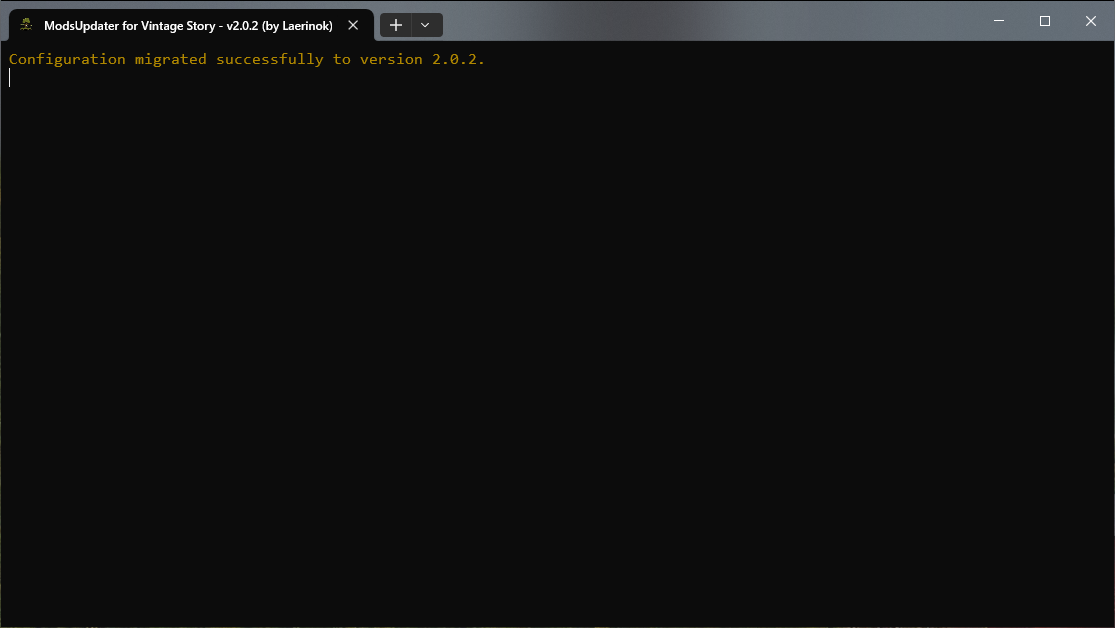

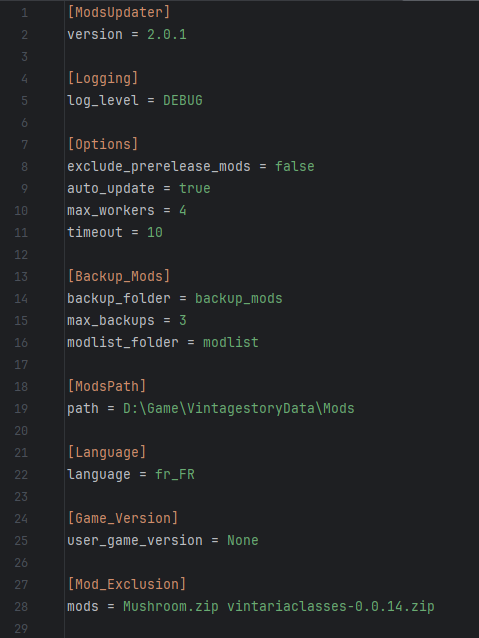
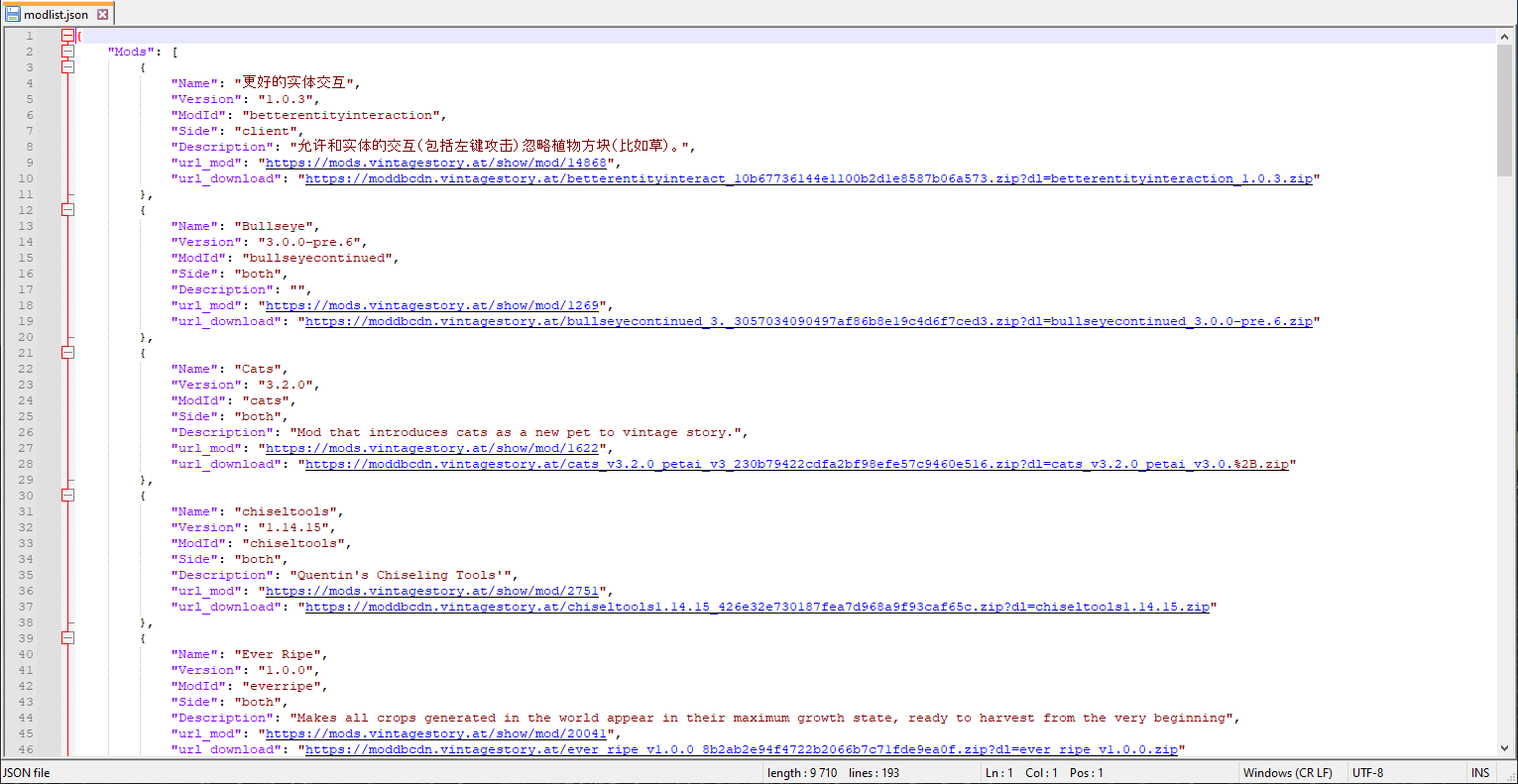

FatherSarge
Thank you very much for your comment. It's always a pleasure to know that my program is still useful and appreciated :D
Seriously thank you for this program. I've been using it since september to keep my server up to date and it has never failed me. Truly a GOAT'd piece of software
RowanSkie
I'm not sure I understand what you would like. If you could give more details please ;)
Idea: Link mods that are not unable to be updated, so people can check if they can safely remove it or something.
Aspendosia
Hello,
After a few months, this new version has a version for macOS. It's a test, as I don't have a Mac available. I'm quite confident about its reliability, and since I haven't yet had any feedback saying it doesn't work, it seems good.
So if you're still looking, you can take a look.
Procdrone
Ugh! Thanks, file re-uploaded !
you newest zip file is corrupted and cannot be unpacked
DigitalHare
Adding a non-standard letter (’E’) to the version number crashes the tool because it uses a strict Python library for comparison. To handle this case, I suggest using the devN standard (for 'development version' cf: https://semver.org/). For example, instead of 1.5.0E, use 1.5.0.dev1. This indicates that your version is a development version based on 1.5.0, and it allows the tool to continue working, while ensuring that an official version (1.5.0 or 1.5.1) will be recognized as an update.
But your problem revealed a flaw in error handling, so I'll correct that. Thanks.
Laerinok Sure. Given that the patch we modified was still live on the DB, I didn't want to change the actual number in case there was another small incriment. So I just noted that it was the edited version with an 'E' on the end of the version number given outside of VS, things like "Version 10A and Version 10B" are something that happens at times. VS itself has a slight issue too, but it just says it "assumes X version" and proceeds.
Logic was, that no matter what the creator versioned it as, it will always be a higher number than what was there and the updaters would catch the new version.
DigitalHare
Glad to see it's resolved. If you tell me what you modified, I can arrange to handle this type of error and prevent the crash.
Laerinok Hm, if that's it lemme check. I've got a hunch what one if is given that info.
-- Yep. That was it, it's my fault. I had a mod that I edited for the server that I added a letter to. Saw it complain on the server but no real other effect. Thanks for the tip to help me figure it out
DigitalHare
Hello,
My first intuition is that a mod doesn't have a standard version number. Can you give me the list of your mods and/or the complete log. I need to test them.
After updating to 1.21.2, seems it's crashing quietly after finishing scanning for mods. Log has nothing of interest, just the final items it had to search for on the list before a silent ctd.
2025-10-05 13:32:37,804 - DEBUG - Retrieving mod info from: https://news.kalataka.ru/api/mod/xskills
2025-10-05 13:32:37,804 - DEBUG - Received assetid: 367, mod_url: https://news.kalataka.ru/show/mod/367, and changelog for mod: Xandus Inventory Tweaks
2025-10-05 13:32:37,986 - DEBUG - Received assetid: 6102, mod_url: https://news.kalataka.ru/show/mod/6102, and changelog for mod: Wild Farming Revival
2025-10-05 13:32:38,171 - DEBUG - Received assetid: 24373, mod_url: https://news.kalataka.ru/show/mod/24373, and changelog for mod: Wind Chimes
2025-10-05 13:32:38,196 - DEBUG - https://news.kalataka.ru:443 "GET /api/mod/xskills HTTP/1.1" 200 None
2025-10-05 13:32:38,475 - DEBUG - Received assetid: 244, mod_url: https://news.kalataka.ru/show/mod/244, and changelog for mod: XLib
2025-10-05 13:32:39,321 - DEBUG - Received assetid: 247, mod_url: https://news.kalataka.ru/show/mod/247, and changelog for mod: XSkills
NuVanDibe RunYouCleverBoy
Fixed! will be present in the next version 2.4.0
Regarding the y/n answer issue, we now have the option to answer with y/n or in the locallanguage, it doesn't matter. And indeed, the case was locked.
NuVanDibe
Hi,
Thanks, indeed there seems to be an issue with double encoding of special characters. I'll take a look, but right now I don't have as much time as I'd like to dedicate to coding. It might take a while.
Crashes when updating "Darce's Drifters Redone" and "ARCHOSAUR!" probably because of the punctuation characters
Trampek
Hello,
Glad to hear this. Don't hesitate to tell me if it occurs again.
RunYouCleverBoy
Hi,
I don't exactly remember how I handle input at this level. I recall wondering about the case sensitivity. It seems to me that the library I'm using requires the input to be exactly correct (so it's case-sensitive), and I didn't have the ability to perform the test. But that was a long time ago, and I may have simply forgotten to finalize it.
Anyway, I'll go check. Thanks ;)
(I'll replace the choice with 'y/n'. I remember having the same issue with another non-Latin language.)
Hello, i see the issue
answering positive and negative
only accept y but not Y (n/N)
it case sesitive
it feels unhandy
(and in russian lang it accept only д/н (which is first letters of yes and no)
but the russian gamers do not use russian keystrokes for keybindings
so maybe keep translate but keep controls english?
hello
just here to report that all working without problem now
dunno what was going on then but now used it many times with no issue :)
Trampek
Thanks, I'll look into it. It's strange indeed.
well, i think about it more and i also never try again update mod that was deleted with modupdater but i just download it from site and put in mods folder, next time i try that and tell you if still unsolved
tbh i cant reproduce it too just as i said - first i noticed some mods missing, then narrow it down to this program, then noticed it sometimes didnt close properly and at same time mods are missing and then when that happend once more, i got log file and reported it here
after i noticed it is this program, it was easy to find, cos before it deletes old version of mods, it makes backup so i only checked backup vs mods (if they still there) and once it was that darcy dirfters missing and today it was daymare cup, others i dont remember cos i didnt know about this problem and was just wondering how did i delete this mods
it was like 1 out of 4 times it bugged out mayby even less
i didnt change anything in config , i do change lots config of other mods or even some other files in them, but modupdater was simple to me, i just run it before starting server and thats all
"Mods": [
{
"Name": "More Lanterns",
"Version": "1.3.4",
"ModId": "apelanterns",
"Side": "both",
"Description": "Adds a variety of decorative and useful lanterns",
"url_mod": "https://news.kalataka.ru/show/mod/14471",
"installed_download_url": "https://moddbcdn.vintagestory.at/apelanterns-v1.21.1-_f9de6fe1f2bff36a7a2bc2e6d652519f.zip?dl=apelanterns-v1.21.1-1.3.4.zip"
},
{
"Name": "Combat Overhaul : Armory",
"Version": "1.2.0",
"ModId": "armory",
"Side": "both",
"Description": "Weapons, shields and armor",
"url_mod": "https://news.kalataka.ru/show/mod/15285",
"installed_download_url": "https://moddbcdn.vintagestory.at/armory_1.2.0_8d74790e252e61935b29bb51dae0490b.zip?dl=armory_1.2.0.zip"
},
{
"Name": "Attribute Rendering Library",
"Version": "2.3.0",
"ModId": "attributerenderinglibrary",
"Side": "both",
"Description": "Attribute-based variant system for rendering things.",
"url_mod": "https://news.kalataka.ru/show/mod/26831",
"installed_download_url": "https://moddbcdn.vintagestory.at/AttributeRenderingLi_d4286f99d0d3855254c25e9e94f0d5fa.zip?dl=AttributeRenderingLibrary-v2.3.0.zip"
},
{
"Name": "BetterJonasDevices",
"Version": "2.0.4",
"ModId": "betterjonasdevicesfixed",
"Side": "both",
"Description": "Tweaks to make Jonas devices more useful",
"url_mod": "https://news.kalataka.ru/show/mod/19375",
"installed_download_url": "https://moddbcdn.vintagestory.at/BetterJonasDevices-F_f8d6e273f223f29bfa7ef5f9914f1394.zip?dl=BetterJonasDevices-Fixed-v2.0.4.zip"
},
{
"Name": "BetterRuins",
"Version": "0.5.0",
"ModId": "betterruins",
"Side": "both",
"Description": "Adds a lot of structures to the worldgen over and underground.\nBuilders: Bellcross, Dampus, hřbitovník , Ifoz, Marlim, Ogdred, OnBean, Tiggetagg, Sirayne,\nPar, Quentin, StAdrian, SamGray, Tiggetagg, Vilderos, Virrnogamr, Freian, FemurSnapper, yapludepatte\nWriters: Blinky Dorf, Ifoz, dazedandconfused, GentleBoyHell, Joe Silent, moronwmachinegun",
"url_mod": "https://news.kalataka.ru/show/mod/3829",
"installed_download_url": "https://moddbcdn.vintagestory.at/BetterRuinsv0.5.0_dfdcabe20de1b145b9984d9bc30924dd.zip?dl=BetterRuinsv0.5.0.zip"
},
{
"Name": "BetterTraders",
"Version": "0.1.0",
"ModId": "bettertraders",
"Side": "server",
"Description": "Replaces vanilla traders with new trader structures.\nBuilders: StAdrian, Bellcross, Sirayne, NiclAss",
"url_mod": "https://news.kalataka.ru/show/mod/6160",
"installed_download_url": "https://moddbcdn.vintagestory.at/BetterTradersv0.1.0_a849efca5f57a3e0887631c5894a6554.zip?dl=BetterTradersv0.1.0.zip"
},
{
"Name": "Improved Ladders",
"Version": "1.1.0",
"ModId": "bradyladder",
"Side": "both",
"Description": "Are you tired of falling to your death because you misremembered the location of your ladders? This mod is for you.",
"url_mod": "https://news.kalataka.ru/show/mod/16048",
"installed_download_url": "https://moddbcdn.vintagestory.at/bradyladders-v1.1.0__3d43bb29b49c8ac8f613848f2e67ddf0.zip?dl=bradyladders-v1.1.0_v1.20.7.zip"
},
{
"Name": "Bushfat",
"Version": "1.0.1",
"ModId": "bushfat",
"Side": "both",
"Description": "Allows you to convert bushmeat to fat (3:1).",
"url_mod": "https://news.kalataka.ru/show/mod/27715",
"installed_download_url": "https://moddbcdn.vintagestory.at/bushfat-1.0.1_ce308e56b915802d964dc3d9977213bb.zip?dl=bushfat-1.0.1.zip"
},
{
"Name": "Butchering",
"Version": "1.10.3",
"ModId": "butchering",
"Side": "both",
"Description": "Carry animals back to your place for proper butchering.",
"url_mod": "https://news.kalataka.ru/show/mod/7966",
"installed_download_url": "https://moddbcdn.vintagestory.at/butchering_1.10.3_dd05921ea65637975831b3959be20a27.zip?dl=butchering_1.10.3.zip"
},
{
"Name": "Simple Pottery Wheel",
"Version": "1.1.3",
"ModId": "claywheel",
"Side": "both",
"Description": "Adds a pottery wheel for easier clay forming.",
"url_mod": "https://news.kalataka.ru/show/mod/4980",
"installed_download_url": "https://moddbcdn.vintagestory.at/pottery-wheel_v1.1.3_e8051a36254167ffe43686abcf43542f.zip?dl=pottery-wheel_v1.1.3.zip"
},
{
"Name": "Click Up Torches",
"Version": "1.1.1",
"ModId": "clickuptorches",
"Side": "both",
"Description": "Allows players to pick up torches with a right-click.",
"url_mod": "https://news.kalataka.ru/show/mod/14611",
"installed_download_url": "https://moddbcdn.vintagestory.at/ClickUpTorches_3d7eb460ae3d6b9b28f65986f77bb7a1.zip?dl=ClickUpTorches.zip"
},
{
"Name": "Combat Overhaul",
"Version": "0.9.3",
"ModId": "combatoverhaul",
"Side": "both",
"Description": "",
"url_mod": "https://news.kalataka.ru/show/mod/12614",
"installed_download_url": "https://moddbcdn.vintagestory.at/combatoverhaul_0.9.3_98d4e146e614243ed374a34a6245d91c.zip?dl=combatoverhaul_0.9.3.zip"
},
{
"Name": "CommonLib",
"Version": "2.8.0",
"ModId": "commonlib",
"Side": "both",
"Description": null,
"url_mod": "https://news.kalataka.ru/show/mod/5457",
"installed_download_url": "https://moddbcdn.vintagestory.at/CommonLib_VS1.21.1_n_d3341cb58f69383bf44c257c1ff89757.zip?dl=CommonLib_VS1.21.1_net8_v2.8.0.zip"
},
{
"Name": "Composter",
"Version": "1.2.1",
"ModId": "composter",
"Side": "both",
"Description": "A container that decomposes food extremely fast",
"url_mod": "https://news.kalataka.ru/show/mod/2326",
"installed_download_url": "https://moddbcdn.vintagestory.at/Composter-v1.2.1_85a0ac7b73c0ac8b0b0bdbb799819a69.zip?dl=Composter-v1.2.1.zip"
},
{
"Name": "Config lib",
"Version": "1.10.2",
"ModId": "configlib",
"Side": "both",
"Description": "Configs library with YAML config format and in-game GUI",
"url_mod": "https://news.kalataka.ru/show/mod/9551",
"installed_download_url": "https://moddbcdn.vintagestory.at/configlib_1.10.2_d604c3eda2a803ace4508ca411a36dff.zip?dl=configlib_1.10.2.zip"
},
{
"Name": "Configure Everything",
"Version": "2.2.1",
"ModId": "configureeverything",
"Side": "both",
"Description": "All configurations in one place",
"url_mod": "https://news.kalataka.ru/show/mod/10411",
"installed_download_url": "https://moddbcdn.vintagestory.at/ConfigureEverything-_f0863a5e563ae91ca413e3c30a9ce93e.zip?dl=ConfigureEverything-v2.2.1.zip"
},
{
"Name": "FoodShelves",
"Version": "2.3.0",
"ModId": "foodshelves",
"Side": "both",
"Description": "Contains various food shelves and food storage, mainly made to be used alongside Expanded Foods.",
"url_mod": "https://news.kalataka.ru/show/mod/13865",
"installed_download_url": "https://moddbcdn.vintagestory.at/foodshelves_2.3.0_f08766107297bbf9437613592b8b0bac.zip?dl=foodshelves_2.3.0.zip"
},
{
"Name": "Foragers Gamble",
"Version": "1.0.7",
"ModId": "foragersgamble",
"Side": "both",
"Description": "Masks food safety and names until after eaten.",
"url_mod": "https://news.kalataka.ru/show/mod/29340",
"installed_download_url": "https://moddbcdn.vintagestory.at/foragersgamble_1.0.7_4c19aa1fa58f3f0807fb9cc282b63804.zip?dl=foragersgamble_1.0.7.zip"
},
{
"Name": "From Golden Combs",
"Version": "1.9.2-rc.2",
"ModId": "fromgoldencombs",
"Side": "both",
"Description": "Adding depth, variety, and complexity to Vintage Apiculture",
"url_mod": "https://news.kalataka.ru/show/mod/1373",
"installed_download_url": "https://moddbcdn.vintagestory.at/FromGoldenCombs-1.21_2dba294b59a9e116b8365828987e7791.zip?dl=FromGoldenCombs-1.21-v1.9.2-rc.2.zip"
},
{
"Name": "Fueled Wearable Light",
"Version": "1.0.2",
"ModId": "fueledwearablelights",
"Side": "both",
"Description": "",
"url_mod": "https://news.kalataka.ru/show/mod/27875",
"installed_download_url": "https://moddbcdn.vintagestory.at/fueledwearablelights_5f5b01f149c4897c6ea25c79dec7dc6a.zip?dl=fueledwearablelights_1.0.2.zip"
},
{
"Name": "Hanging Oil Lamps",
"Version": "1.0.5",
"ModId": "hangingoillamps",
"Side": "both",
"Description": "Oil lamps on walls and ceilings hang from wires.",
"url_mod": "https://news.kalataka.ru/show/mod/3008",
"installed_download_url": "https://moddbcdn.vintagestory.at/hangingoillamps_1.0._57aa46325554ddcfabff6788af76242d.zip?dl=hangingoillamps_1.0.5.zip"
},
{
"Name": "Hardcore Water : Transport Edition",
"Version": "1.3.2",
"ModId": "hardcorewater",
"Side": "both",
"Description": "Previously prevented buckets from placing source blocks, but now adds methods of water transportation for when source block moving is disabled in your worlds.",
"url_mod": "https://news.kalataka.ru/show/mod/4983",
"installed_download_url": "https://moddbcdn.vintagestory.at/hardcorewater_1.3.2_60a376d41f2468b7fb4ac00dd1a85a29.zip?dl=hardcorewater_1.3.2.zip"
},
{
"Name": "Hydrate Or Diedrate",
"Version": "2.2.13",
"ModId": "hydrateordiedrate",
"Side": "both",
"Description": "Adds a thirst and hot weather mechanic to the game.",
"url_mod": "https://news.kalataka.ru/show/mod/13245",
"installed_download_url": "https://moddbcdn.vintagestory.at/hydrateordiedrate_2._e87fdb6becdc59bb7bb8360a5738975f.zip?dl=hydrateordiedrate_2.2.13.zip"
},
{
"Name": "Immersive Lanterns",
"Version": "0.1.1",
"ModId": "immersivelanterns",
"Side": "client",
"Description": "Lanterns react to movement and make noise",
"url_mod": "https://news.kalataka.ru/show/mod/30235",
"installed_download_url": "https://moddbcdn.vintagestory.at/ImmersiveLanterns_0._9ef0b141bf33b9929b9b8fccd2d38378.zip?dl=ImmersiveLanterns_0.1.1.zip"
},
{
"Name": "Instant Firepits",
"Version": "5.0.0",
"ModId": "instantfirepits",
"Side": "both",
"Description": "Firepits construct instantly, no need for 4 firewood.",
"url_mod": "https://news.kalataka.ru/show/mod/408",
"installed_download_url": "https://moddbcdn.vintagestory.at/InstantFirepits_v5.0_0828c8db53fb54e2131605df211263a4.zip?dl=InstantFirepits_v5.0.0.zip"
},
{
"Name": "Liquid Containers",
"Version": "1.3.1",
"ModId": "liquidcontainers",
"Side": "both",
"Description": "Adds an array of different liquid container alternatives to clay jugs.",
"url_mod": "https://news.kalataka.ru/show/mod/3269",
"installed_download_url": "https://moddbcdn.vintagestory.at/LiquidContainers-1.3_198bd7bbadecead7d0e38688c7b84e3e.zip?dl=LiquidContainers-1.3.1.zip"
},
{
"Name": "Long-term food",
"Version": "0.2.2",
"ModId": "longtermfood",
"Side": "both",
"Description": "Adds food that does not spoil for a very long time.",
"url_mod": "https://news.kalataka.ru/show/mod/13813",
"installed_download_url": "https://moddbcdn.vintagestory.at/Long-term%2Bfood%2Bv0.2._db59084a309e6bbfa7feb163a3dc8d09.zip?dl=Long-term%20food%20v0.2.2.zip"
},
{
"Name": "Lord Of The Flies",
"Version": "1.0.0",
"ModId": "lordoftheflies",
"Side": "client",
"Description": "Client side only. A cloud of flies will spawn near any container with rot inside.",
"url_mod": "https://news.kalataka.ru/show/mod/29019",
"installed_download_url": "https://moddbcdn.vintagestory.at/lordoftheflies_1.0.0_9fc5e09890d5551ff7c4dff9e76ea8a4.zip?dl=lordoftheflies_1.0.0.zip"
},
{
"Name": "Crossbows",
"Version": "1.5.3",
"ModId": "maltiezcrossbows",
"Side": "both",
"Description": "Medieval crossbows",
"url_mod": "https://news.kalataka.ru/show/mod/8613",
"installed_download_url": "https://moddbcdn.vintagestory.at/maltiezcrossbows_1.5_a04bde7912c7fbf04bd92a5e38af877b.zip?dl=maltiezcrossbows_1.5.3.zip"
},
{
"Name": "Firearms",
"Version": "1.2.3",
"ModId": "maltiezfirearms",
"Side": "both",
"Description": "Black powder firearms",
"url_mod": "https://news.kalataka.ru/show/mod/7497",
"installed_download_url": "https://moddbcdn.vintagestory.at/maltiezfirearms_1.2._b4cfeac0795259e99393540643b4678a.zip?dl=maltiezfirearms_1.2.3.zip"
},
{
"Name": "Manual Quenching",
"Version": "1.0.8",
"ModId": "manualquenching",
"Side": "both",
"Description": "Quenching hot metal without the need to drop it",
"url_mod": "https://news.kalataka.ru/show/mod/16075",
"installed_download_url": "https://moddbcdn.vintagestory.at/ManualQuenching_1.0._c2355864864c47b5797bbf15222d29e1.zip?dl=ManualQuenching_1.0.8.zip"
},
{
"Name": "More Arrows",
"Version": "1.1.1",
"ModId": "morearrows",
"Side": "both",
"Description": "Add more arrows for Combat Overhaul",
"url_mod": "https://news.kalataka.ru/show/mod/22327",
"installed_download_url": "https://moddbcdn.vintagestory.at/morearrows_1.1.1_0ab4c0c876705462c461bff6b54b6a3d.zip?dl=morearrows_1.1.1.zip"
},
{
"Name": "Cartographer",
"Version": "2.2.1",
"ModId": "nbcartographer",
"Side": "both",
"Description": "Allows to share waypoints with other players",
"url_mod": "https://news.kalataka.ru/show/mod/10012",
"installed_download_url": "https://moddbcdn.vintagestory.at/nbcartographer_2.2.1_077291a363450f386ccae53c2023ae68.zip?dl=nbcartographer_2.2.1.zip"
},
{
"Name": "Not Enough Map Icons",
"Version": "1.1.0",
"ModId": "nemi",
"Side": "client",
"Description": "More waypoint icons",
"url_mod": "https://news.kalataka.ru/show/mod/5425",
"installed_download_url": "https://moddbcdn.vintagestory.at/NotEnoughMapIcons-v1_79327e4789d4698a24e0b876ffd53609.zip?dl=NotEnoughMapIcons-v1.1.0.zip"
},
{
"Name": "Overhaul Library",
"Version": "1.8.2",
"ModId": "overhaullib",
"Side": "both",
"Description": "",
"url_mod": "https://news.kalataka.ru/show/mod/22381",
"installed_download_url": "https://moddbcdn.vintagestory.at/overhaullib_1.8.2_4876d113c9ff36e3d147c09c7a14c0b6.zip?dl=overhaullib_1.8.2.zip"
},
{
"Name": "Pelagus Winds",
"Version": "1.2.2",
"ModId": "pelaguswinds",
"Side": "both",
"Description": "Randomizes wind direction over time with smooth transitions.",
"url_mod": "https://news.kalataka.ru/show/mod/11997",
"installed_download_url": "https://moddbcdn.vintagestory.at/pelaguswinds_1.2.2_3ff17540ed0efe3d19c0ce9d2c1fa60b.zip?dl=pelaguswinds_1.2.2.zip"
},
{
"Name": "PurposefulStorage",
"Version": "1.4.1",
"ModId": "purposefulstorage",
"Side": "both",
"Description": "Adds a variety of storage blocks designed for both aesthetic appeal and functional item organization.",
"url_mod": "https://news.kalataka.ru/show/mod/25347",
"installed_download_url": "https://moddbcdn.vintagestory.at/purposefulstorage_1._baaa82400caf0aa1d9c821e53d6289c7.zip?dl=purposefulstorage_1.4.1.zip"
},
{
"Name": "Quivers And Sheaths",
"Version": "0.3.3",
"ModId": "quiversandsheaths",
"Side": "both",
"Description": "",
"url_mod": "https://news.kalataka.ru/show/mod/27685",
"installed_download_url": "https://moddbcdn.vintagestory.at/quiversandsheaths_0._008a205bd9b7896866341fc8bc7b77af.zip?dl=quiversandsheaths_0.3.3.zip"
},
{
"Name": "Real Smoke",
"Version": "1.1.1",
"ModId": "realsmoke",
"Side": "both",
"Description": "Physics-based smoke",
"url_mod": "https://news.kalataka.ru/show/mod/27288",
"installed_download_url": "https://moddbcdn.vintagestory.at/realsmoke_1.1.1_7278d50080532a0c6e8033f984fac9cd.zip?dl=realsmoke_1.1.1.zip"
},
{
"Name": "Rivers",
"Version": "4.7.3",
"ModId": "rivers",
"Side": "both",
"Description": "Standalone version of rivers.",
"url_mod": "https://news.kalataka.ru/show/mod/9360",
"installed_download_url": "https://moddbcdn.vintagestory.at/rivers_4.7.3_f1bb5857b47ac16188e093e1e7b759e4.zip?dl=rivers_4.7.3.zip"
},
{
"Name": "SergsMetalTongs",
"Version": "2.0.0",
"ModId": "Sergsmetaltongs",
"Side": "both",
"Description": "Adds Metal tongs with durability to the game",
"url_mod": "https://news.kalataka.ru/show/mod/16743",
"installed_download_url": "https://moddbcdn.vintagestory.at/Sergsmetaltongs_2.0._f6831457e7cdb34858b498e045f66fdb.zip?dl=Sergsmetaltongs_2.0.0.zip"
},
{
"Name": "Shelf Obsessed",
"Version": "1.7.0",
"ModId": "shelfobsessed",
"Side": "both",
"Description": "When in doubt, put it on the shelf!",
"url_mod": "https://news.kalataka.ru/show/mod/25512",
"installed_download_url": "https://moddbcdn.vintagestory.at/shelfobsessed_v1.7.0_48214226962abb3281b91c5c5091cb7a.zip?dl=shelfobsessed_v1.7.0.zip"
},
{
"Name": "Simple Hotbar Refill",
"Version": "1.2.7",
"ModId": "simplehotbarrefill",
"Side": "both",
"Description": "Automatically refills empty hotbar slots from your inventory.",
"url_mod": "https://news.kalataka.ru/show/mod/28147",
"installed_download_url": "https://moddbcdn.vintagestory.at/CFY.SimpleRefill-1.2_15fe96b7be85345e7f22408bb9056466.zip?dl=CFY.SimpleRefill-1.2.7.zip"
},
{
"Name": "SlowTox",
"Version": "3.0.1",
"ModId": "slowtox",
"Side": "server",
"Description": "Realistic intoxication, with benefits!",
"url_mod": "https://news.kalataka.ru/show/mod/26245",
"installed_download_url": "https://moddbcdn.vintagestory.at/slowtox_3.0.1_a6e63fa51d83ee1d981ae63d168bdedb.zip?dl=slowtox_3.0.1.zip"
},
{
"Name": "Sortable Storage",
"Version": "2.4.2",
"ModId": "sortablestorage",
"Side": "both",
"Description": "Adds a sortable variant of vanilla chests, labeled chests, trunks, storage vessels, and baskets",
"url_mod": "https://news.kalataka.ru/show/mod/2966",
"installed_download_url": "https://moddbcdn.vintagestory.at/sortablestorage_2.4._b8987b46d28ef2d9690b3ec7ec3d6252.zip?dl=sortablestorage_2.4.2.zip"
},
{
"Name": "Stone Bake Oven",
"Version": "1.2.0",
"ModId": "stonebakeoven",
"Side": "both",
"Description": "Creates a usable large stone oven for baking.",
"url_mod": "https://news.kalataka.ru/show/mod/6038",
"installed_download_url": "https://moddbcdn.vintagestory.at/stonebakeoven_1.2.0_d0185ecf7e391798e744b8ec982b20e4.zip?dl=stonebakeoven_1.2.0.zip"
},
{
"Name": "Stone Quarry",
"Version": "3.5.1",
"ModId": "stonequarry",
"Side": "both",
"Description": null,
"url_mod": "https://news.kalataka.ru/show/mod/1592",
"installed_download_url": "https://moddbcdn.vintagestory.at/StoneQuarry_VS1.21.1_2633f5fda94e7aedfb948c029061825d.zip?dl=StoneQuarry_VS1.21.1_net8_v3.5.1.zip"
},
{
"Name": "Tankards, Goblets and More!",
"Version": "1.3.0",
"ModId": "tankardsandgoblets",
"Side": "both",
"Description": "Drink in style! Adds a variety of tankards, goblets and bottles into Vintage Story.",
"url_mod": "https://news.kalataka.ru/show/mod/23091",
"installed_download_url": "https://moddbcdn.vintagestory.at/TankardsandGoblets_v_6cd24d41e4f45d869f9ea13d8d59901a.zip?dl=TankardsandGoblets_v1.3.0.zip"
},
{
"Name": "Temporal Symphony",
"Version": "2.2.1",
"ModId": "temporalsymphony",
"Side": "both",
"Description": "Replaces temporal storm chat warnings with audio-visual cues. Tweaks to many things temporal and rust creature alike.",
"url_mod": "https://news.kalataka.ru/show/mod/24868",
"installed_download_url": "https://moddbcdn.vintagestory.at/TemporalSymphony_2.2_e49aae230bc223bd9c56f6921aa9e3c8.zip?dl=TemporalSymphony_2.2.1.zip"
},
{
"Name": "Th3Dungeon",
"Version": "0.4.4",
"ModId": "th3dungeon",
"Side": "both",
"Description": "A mod to bring procedural dungeon generation to Vintage Story",
"url_mod": "https://news.kalataka.ru/show/mod/5215",
"installed_download_url": "https://moddbcdn.vintagestory.at/th3dungeon_0.4.4_8a3d248c1ee3e0d2ab013435ab42b86f.zip?dl=th3dungeon_0.4.4.zip"
},
{
"Name": "Tools Animations",
"Version": "1.2.3",
"ModId": "toolsanimations",
"Side": "both",
"Description": "",
"url_mod": "https://news.kalataka.ru/show/mod/22429",
"installed_download_url": "https://moddbcdn.vintagestory.at/toolsanimations_1.2._baecbe0e0ec325e2afbda1b7bf789e42.zip?dl=toolsanimations_1.2.3.zip"
},
{
"Name": "Traders Sell Crowbars",
"Version": "0.0.2",
"ModId": "traderssellcrowbars",
"Side": "both",
"Description": "The treasure hunter trader sells crowbars from the Translocator Engineering Redux mod.",
"url_mod": "https://news.kalataka.ru/show/mod/16499",
"installed_download_url": "https://moddbcdn.vintagestory.at/traderssellcrowbars__02db854c6b212d5c89860f2432461f74.zip?dl=traderssellcrowbars_0.0.2.zip"
},
{
"Name": "Translocator Engineering Redux",
"Version": "1.6.0",
"ModId": "translocatorengineeringredux",
"Side": "both",
"Description": "Enables deconstruction, construction, and linking of Static Translocators (ft. CaptainOats, SpearAndFang, Macoto Hino, Peter Wedder, Billy Galbreath)",
"url_mod": "https://news.kalataka.ru/show/mod/3246",
"installed_download_url": "https://moddbcdn.vintagestory.at/translocatorengineer_dd86dabfe7543d859464c25bc8270967.zip?dl=translocatorengineeringredux_1.6.0.zip"
},
{
"Name": "Unconscious",
"Version": "1.12.8",
"ModId": "unconscious",
"Side": "both",
"Description": "New system which adds an unconscious system. Preferable added to multiplayer servers.",
"url_mod": "https://news.kalataka.ru/show/mod/15820",
"installed_download_url": "https://moddbcdn.vintagestory.at/Unconscious_1.12.8_21990438570454ceda13a6dbe7355507.zip?dl=Unconscious_1.12.8.zip"
},
{
"Name": "Dear ImGui",
"Version": "1.1.12",
"ModId": "vsimgui",
"Side": "both",
"Description": "Brings famous immediate mode GUI to Vintage Story",
"url_mod": "https://news.kalataka.ru/show/mod/9329",
"installed_download_url": "https://moddbcdn.vintagestory.at/vsimgui_1.1.12_2207df0c3a513f285518a13b5f23bd9c.zip?dl=vsimgui_1.1.12.zip"
},
{
"Name": "Water Weather Simulation Redux",
"Version": "1.1.0",
"ModId": "waterweathersimulationredux",
"Side": "server",
"Description": "Melts ice and freezes water during chunk load. Now with configurable options!",
"url_mod": "https://news.kalataka.ru/show/mod/29112",
"installed_download_url": "https://moddbcdn.vintagestory.at/waterweathersimulati_973b0a1ae7c7460533988f1f8a4bd1e3.zip?dl=waterweathersimulationredux_1.1.0.zip"
}
]
}
Trampek
OK. Can you send the modlist.json please? I will try with your mods because I am not able to reproduce the issue.
Did you changed the 'max_workers' in the config.ini file ? a too high value may cause issue. Default is 4, but if your PC is quite recent, you may have to lower this value. (1, 2 or 3)
also there was no need to delete anything, thats part of problem that this mod was missing ( old version was in backup folder tho)
only thing that repeats about this bug is that mod updater not quit and wait for you to press enter, but just crashes or just exit with nothing
this time it was this mod, but last time it was diffrent mod and earlier even diffrent one
i think 1 before that was - darcy drifters reborn
earlier im not sure cos i didnt spot this bug at once but after a while when starting noticing mods missing while playing
Trampek
Hello,
Thanks for the log. From what I see, the problem seems to come from the
daymare's cup mod.Try deleting it and running the update again, then let me know if it still crashes or if it's OK. (you should manually download the last update for it)
I'm going to see what's causing the issue with this mod.
hello,
after near month working without problem, since yesterday this program started behave wierd
few times already (not always tho) it exit without warning, just shutdown but also it delete old mods but not download new versions :(
it is never same mods, at first i missed it completly, then it worked ok few times, but today it kinda happen right before my eyes
2025-09-18 10:59:04,527 - INFO - Checking for the latest ModsUpdater script version via API...
2025-09-18 10:59:04,528 - DEBUG - Starting new HTTPS connection (1): mods.vintagestory.at:443
2025-09-18 10:59:04,858 - DEBUG - https://news.kalataka.ru:443 "GET /api/mod/1403 HTTP/1.1" 200 None
2025-09-18 10:59:06,179 - INFO - Current version: 2.3.0, Latest version: 2.3.0
2025-09-18 10:59:06,184 - INFO - ModsUpdater - No new version
2025-09-18 10:59:06,597 - DEBUG - Attempting to fetch data for mod 'attributerenderinglibrary' from API.
2025-09-18 10:59:06,597 - DEBUG - Retrieving mod info from: https://news.kalataka.ru/api/mod/attributerenderinglibrary
2025-09-18 10:59:06,597 - DEBUG - Attempting to fetch data for mod 'betterjonasdevicesfixed' from API.
2025-09-18 10:59:06,597 - DEBUG - Attempting to fetch data for mod 'betterruins' from API.
2025-09-18 10:59:06,597 - DEBUG - Retrieving mod info from: https://news.kalataka.ru/api/mod/betterjonasdevicesfixed
2025-09-18 10:59:06,598 - DEBUG - Attempting to fetch data for mod 'bettertraders' from API.
2025-09-18 10:59:06,598 - DEBUG - Retrieving mod info from: https://news.kalataka.ru/api/mod/betterruins
2025-09-18 10:59:06,598 - DEBUG - Retrieving mod info from: https://news.kalataka.ru/api/mod/bettertraders
2025-09-18 10:59:06,599 - DEBUG - Starting new HTTPS connection (1): mods.vintagestory.at:443
2025-09-18 10:59:06,600 - DEBUG - Starting new HTTPS connection (2): mods.vintagestory.at:443
2025-09-18 10:59:06,600 - DEBUG - Starting new HTTPS connection (3): mods.vintagestory.at:443
2025-09-18 10:59:06,600 - DEBUG - Starting new HTTPS connection (4): mods.vintagestory.at:443
2025-09-18 10:59:06,985 - DEBUG - https://news.kalataka.ru:443 "GET /api/mod/attributerenderinglibrary HTTP/1.1" 200 None
2025-09-18 10:59:06,995 - DEBUG - https://news.kalataka.ru:443 "GET /api/mod/betterjonasdevicesfixed HTTP/1.1" 200 None
2025-09-18 10:59:07,028 - DEBUG - https://news.kalataka.ru:443 "GET /api/mod/bettertraders HTTP/1.1" 200 None
2025-09-18 10:59:07,038 - DEBUG - https://news.kalataka.ru:443 "GET /api/mod/betterruins HTTP/1.1" 200 None
2025-09-18 10:59:07,635 - DEBUG - Attempting to fetch data for mod 'bloodtrail' from API.
2025-09-18 10:59:07,635 - DEBUG - Received assetid: 3829, mod_url: https://news.kalataka.ru/show/mod/3829, and changelog for mod: BetterRuins
2025-09-18 10:59:07,635 - DEBUG - Retrieving mod info from: https://news.kalataka.ru/api/mod/bloodtrail
2025-09-18 10:59:07,700 - DEBUG - https://news.kalataka.ru:443 "GET /api/mod/bloodtrail HTTP/1.1" 200 None
2025-09-18 10:59:08,255 - DEBUG - Attempting to fetch data for mod 'bushfat' from API.
2025-09-18 10:59:08,255 - DEBUG - Received assetid: 26831, mod_url: https://news.kalataka.ru/show/mod/26831, and changelog for mod: Attribute Rendering Library
2025-09-18 10:59:08,255 - DEBUG - Retrieving mod info from: https://news.kalataka.ru/api/mod/bushfat
2025-09-18 10:59:08,321 - DEBUG - https://news.kalataka.ru:443 "GET /api/mod/bushfat HTTP/1.1" 200 None
2025-09-18 10:59:08,347 - DEBUG - Attempting to fetch data for mod 'butchering' from API.
2025-09-18 10:59:08,347 - DEBUG - Attempting to fetch data for mod 'nbcartographer' from API.
2025-09-18 10:59:08,347 - DEBUG - Received assetid: 6160, mod_url: https://news.kalataka.ru/show/mod/6160, and changelog for mod: BetterTraders
2025-09-18 10:59:08,347 - DEBUG - Retrieving mod info from: https://news.kalataka.ru/api/mod/butchering
2025-09-18 10:59:08,348 - DEBUG - Retrieving mod info from: https://news.kalataka.ru/api/mod/nbcartographer
2025-09-18 10:59:08,348 - DEBUG - Received assetid: 30331, mod_url: https://news.kalataka.ru/show/mod/30331, and changelog for mod: BloodTrail
2025-09-18 10:59:08,416 - DEBUG - https://news.kalataka.ru:443 "GET /api/mod/nbcartographer HTTP/1.1" 200 None
2025-09-18 10:59:08,454 - DEBUG - Attempting to fetch data for mod 'clickuptorches' from API.
2025-09-18 10:59:08,454 - DEBUG - Received assetid: 19375, mod_url: https://news.kalataka.ru/show/mod/19375, and changelog for mod: BetterJonasDevices
2025-09-18 10:59:08,454 - DEBUG - Retrieving mod info from: https://news.kalataka.ru/api/mod/clickuptorches
2025-09-18 10:59:08,460 - DEBUG - https://news.kalataka.ru:443 "GET /api/mod/butchering HTTP/1.1" 200 None
2025-09-18 10:59:08,519 - DEBUG - https://news.kalataka.ru:443 "GET /api/mod/clickuptorches HTTP/1.1" 200 None
2025-09-18 10:59:09,119 - DEBUG - Attempting to fetch data for mod 'combatoverhaul' from API.
2025-09-18 10:59:09,119 - DEBUG - Received assetid: 27715, mod_url: https://news.kalataka.ru/show/mod/27715, and changelog for mod: Bushfat
2025-09-18 10:59:09,119 - DEBUG - Retrieving mod info from: https://news.kalataka.ru/api/mod/combatoverhaul
2025-09-18 10:59:09,122 - DEBUG - Attempting to fetch data for mod 'armory' from API.
2025-09-18 10:59:09,122 - DEBUG - Received assetid: 14611, mod_url: https://news.kalataka.ru/show/mod/14611, and changelog for mod: Click Up Torches
2025-09-18 10:59:09,122 - DEBUG - Retrieving mod info from: https://news.kalataka.ru/api/mod/armory
2025-09-18 10:59:09,225 - DEBUG - https://news.kalataka.ru:443 "GET /api/mod/armory HTTP/1.1" 200 None
2025-09-18 10:59:09,266 - DEBUG - https://news.kalataka.ru:443 "GET /api/mod/combatoverhaul HTTP/1.1" 200 None
2025-09-18 10:59:09,725 - DEBUG - Attempting to fetch data for mod 'commonlib' from API.
2025-09-18 10:59:09,726 - DEBUG - Received assetid: 10012, mod_url: https://news.kalataka.ru/show/mod/10012, and changelog for mod: Cartographer
2025-09-18 10:59:09,726 - DEBUG - Retrieving mod info from: https://news.kalataka.ru/api/mod/commonlib
2025-09-18 10:59:09,798 - DEBUG - https://news.kalataka.ru:443 "GET /api/mod/commonlib HTTP/1.1" 200 None
2025-09-18 10:59:09,834 - DEBUG - Attempting to fetch data for mod 'composter' from API.
2025-09-18 10:59:09,834 - DEBUG - Retrieving mod info from: https://news.kalataka.ru/api/mod/composter
2025-09-18 10:59:09,834 - DEBUG - Received assetid: 7966, mod_url: https://news.kalataka.ru/show/mod/7966, and changelog for mod: Butchering
2025-09-18 10:59:09,900 - DEBUG - https://news.kalataka.ru:443 "GET /api/mod/composter HTTP/1.1" 200 None
2025-09-18 10:59:10,205 - DEBUG - Attempting to fetch data for mod 'configlib' from API.
2025-09-18 10:59:10,205 - DEBUG - Received assetid: 12614, mod_url: https://news.kalataka.ru/show/mod/12614, and changelog for mod: Combat Overhaul
2025-09-18 10:59:10,205 - DEBUG - Retrieving mod info from: https://news.kalataka.ru/api/mod/configlib
2025-09-18 10:59:10,288 - DEBUG - https://news.kalataka.ru:443 "GET /api/mod/configlib HTTP/1.1" 200 None
2025-09-18 10:59:10,442 - DEBUG - Attempting to fetch data for mod 'configureeverything' from API.
2025-09-18 10:59:10,442 - DEBUG - Received assetid: 15285, mod_url: https://news.kalataka.ru/show/mod/15285, and changelog for mod: Combat Overhaul : Armory
2025-09-18 10:59:10,442 - DEBUG - Retrieving mod info from: https://news.kalataka.ru/api/mod/configureeverything
2025-09-18 10:59:10,804 - DEBUG - Attempting to fetch data for mod 'maltiezcrossbows' from API.
2025-09-18 10:59:10,804 - DEBUG - Received assetid: 5457, mod_url: https://news.kalataka.ru/show/mod/5457, and changelog for mod: CommonLib
2025-09-18 10:59:10,804 - DEBUG - Retrieving mod info from: https://news.kalataka.ru/api/mod/maltiezcrossbows
2025-09-18 10:59:11,395 - DEBUG - Attempting to fetch data for mod 'darcesdriftersredone' from API.
2025-09-18 10:59:11,395 - DEBUG - Received assetid: 2326, mod_url: https://news.kalataka.ru/show/mod/2326, and changelog for mod: Composter
2025-09-18 10:59:11,395 - DEBUG - Retrieving mod info from: https://news.kalataka.ru/api/mod/darcesdriftersredone
2025-09-18 10:59:11,542 - DEBUG - https://news.kalataka.ru:443 "GET /api/mod/darcesdriftersredone HTTP/1.1" 200 None
2025-09-18 10:59:11,559 - DEBUG - https://news.kalataka.ru:443 "GET /api/mod/configureeverything HTTP/1.1" 200 None
2025-09-18 10:59:11,587 - DEBUG - https://news.kalataka.ru:443 "GET /api/mod/maltiezcrossbows HTTP/1.1" 200 None
2025-09-18 10:59:11,654 - DEBUG - Attempting to fetch data for mod 'daymarescupmod' from API.
2025-09-18 10:59:11,654 - DEBUG - Received assetid: 9551, mod_url: https://news.kalataka.ru/show/mod/9551, and changelog for mod: Config lib
2025-09-18 10:59:11,654 - DEBUG - Retrieving mod info from: https://news.kalataka.ru/api/mod/daymarescupmod
2025-09-18 10:59:11,719 - DEBUG - https://news.kalataka.ru:443 "GET /api/mod/daymarescupmod HTTP/1.1" 200 None
2025-09-18 10:59:12,481 - DEBUG - Attempting to fetch data for mod 'vsimgui' from API.
2025-09-18 10:59:12,481 - DEBUG - Received assetid: 10411, mod_url: https://news.kalataka.ru/show/mod/10411, and changelog for mod: Configure Everything
2025-09-18 10:59:12,481 - DEBUG - Retrieving mod info from: https://news.kalataka.ru/api/mod/vsimgui
2025-09-18 10:59:12,503 - DEBUG - Attempting to fetch data for mod 'hqzlights' from API.
2025-09-18 10:59:12,503 - DEBUG - Received assetid: 25180, mod_url: https://news.kalataka.ru/show/mod/25180, and changelog for mod: Darce's Drifters Redone
2025-09-18 10:59:12,503 - DEBUG - Retrieving mod info from: https://news.kalataka.ru/api/mod/hqzlights
2025-09-18 10:59:12,567 - DEBUG - https://news.kalataka.ru:443 "GET /api/mod/hqzlights HTTP/1.1" 200 None
2025-09-18 10:59:12,576 - DEBUG - https://news.kalataka.ru:443 "GET /api/mod/vsimgui HTTP/1.1" 200 None
2025-09-18 10:59:12,850 - DEBUG - Attempting to fetch data for mod 'maltiezfirearms' from API.
2025-09-18 10:59:12,851 - DEBUG - Retrieving mod info from: https://news.kalataka.ru/api/mod/maltiezfirearms
2025-09-18 10:59:12,851 - DEBUG - Received assetid: 8613, mod_url: https://news.kalataka.ru/show/mod/8613, and changelog for mod: Crossbows
2025-09-18 10:59:12,964 - DEBUG - https://news.kalataka.ru:443 "GET /api/mod/maltiezfirearms HTTP/1.1" 200 None
2025-09-18 10:59:13,196 - DEBUG - Attempting to fetch data for mod 'foodshelves' from API.
2025-09-18 10:59:13,196 - DEBUG - Received assetid: 28059, mod_url: https://news.kalataka.ru/show/mod/28059, and changelog for mod: Daymare's Cup Mod
2025-09-18 10:59:13,196 - DEBUG - Retrieving mod info from: https://news.kalataka.ru/api/mod/foodshelves
2025-09-18 10:59:13,272 - DEBUG - https://news.kalataka.ru:443 "GET /api/mod/foodshelves HTTP/1.1" 200 None
2025-09-18 10:59:13,506 - DEBUG - Attempting to fetch data for mod 'foragersgamble' from API.
2025-09-18 10:59:13,507 - DEBUG - Received assetid: 9329, mod_url: https://news.kalataka.ru/show/mod/9329, and changelog for mod: Dear ImGui
2025-09-18 10:59:13,507 - DEBUG - Retrieving mod info from: https://news.kalataka.ru/api/mod/foragersgamble
2025-09-18 10:59:13,579 - DEBUG - https://news.kalataka.ru:443 "GET /api/mod/foragersgamble HTTP/1.1" 200 None
2025-09-18 10:59:13,680 - DEBUG - Attempting to fetch data for mod 'fromgoldencombs' from API.
2025-09-18 10:59:13,680 - DEBUG - Received assetid: 7497, mod_url: https://news.kalataka.ru/show/mod/7497, and changelog for mod: Firearms
2025-09-18 10:59:13,680 - DEBUG - Retrieving mod info from: https://news.kalataka.ru/api/mod/fromgoldencombs
2025-09-18 10:59:13,744 - DEBUG - Attempting to fetch data for mod 'fueledwearablelights' from API.
2025-09-18 10:59:13,744 - DEBUG - Received assetid: 371, mod_url: https://news.kalataka.ru/show/mod/371, and changelog for mod: DRBraziers
2025-09-18 10:59:13,744 - DEBUG - Retrieving mod info from: https://news.kalataka.ru/api/mod/fueledwearablelights
2025-09-18 10:59:13,756 - DEBUG - https://news.kalataka.ru:443 "GET /api/mod/fromgoldencombs HTTP/1.1" 200 None
2025-09-18 10:59:13,814 - DEBUG - https://news.kalataka.ru:443 "GET /api/mod/fueledwearablelights HTTP/1.1" 200 None
2025-09-18 10:59:14,290 - DEBUG - Attempting to fetch data for mod 'hangingoillamps' from API.
2025-09-18 10:59:14,290 - DEBUG - Received assetid: 13865, mod_url: https://news.kalataka.ru/show/mod/13865, and changelog for mod: FoodShelves
2025-09-18 10:59:14,290 - DEBUG - Retrieving mod info from: https://news.kalataka.ru/api/mod/hangingoillamps
2025-09-18 10:59:14,358 - DEBUG - https://news.kalataka.ru:443 "GET /api/mod/hangingoillamps HTTP/1.1" 200 None
2025-09-18 10:59:14,550 - DEBUG - Attempting to fetch data for mod 'hardcorewater' from API.
2025-09-18 10:59:14,550 - DEBUG - Received assetid: 1373, mod_url: https://news.kalataka.ru/show/mod/1373, and changelog for mod: From Golden Combs
2025-09-18 10:59:14,550 - DEBUG - Retrieving mod info from: https://news.kalataka.ru/api/mod/hardcorewater
2025-09-18 10:59:14,581 - DEBUG - Attempting to fetch data for mod 'hydrateordiedrate' from API.
2025-09-18 10:59:14,581 - DEBUG - Received assetid: 29340, mod_url: https://news.kalataka.ru/show/mod/29340, and changelog for mod: Foragers Gamble
2025-09-18 10:59:14,581 - DEBUG - Retrieving mod info from: https://news.kalataka.ru/api/mod/hydrateordiedrate
2025-09-18 10:59:14,618 - DEBUG - https://news.kalataka.ru:443 "GET /api/mod/hardcorewater HTTP/1.1" 200 None
2025-09-18 10:59:14,685 - DEBUG - https://news.kalataka.ru:443 "GET /api/mod/hydrateordiedrate HTTP/1.1" 200 None
2025-09-18 10:59:14,961 - DEBUG - Attempting to fetch data for mod 'immersivelanterns' from API.
2025-09-18 10:59:14,962 - DEBUG - Received assetid: 27875, mod_url: https://news.kalataka.ru/show/mod/27875, and changelog for mod: Fueled Wearable Light
2025-09-18 10:59:14,962 - DEBUG - Retrieving mod info from: https://news.kalataka.ru/api/mod/immersivelanterns
2025-09-18 10:59:15,031 - DEBUG - https://news.kalataka.ru:443 "GET /api/mod/immersivelanterns HTTP/1.1" 200 None
2025-09-18 10:59:15,317 - INFO - Hardcore Water : Transport Edition: No compatible release found for game version 1.21.1.
2025-09-18 10:59:15,317 - DEBUG - Attempting to fetch data for mod 'bradyladder' from API.
2025-09-18 10:59:15,317 - DEBUG - Received assetid: 4983, mod_url: https://news.kalataka.ru/show/mod/4983, and changelog for mod: Hardcore Water : Transport Edition
2025-09-18 10:59:15,317 - DEBUG - Retrieving mod info from: https://news.kalataka.ru/api/mod/bradyladder
2025-09-18 10:59:15,383 - DEBUG - https://news.kalataka.ru:443 "GET /api/mod/bradyladder HTTP/1.1" 200 None
2025-09-18 10:59:15,684 - DEBUG - Attempting to fetch data for mod 'instantfirepits' from API.
2025-09-18 10:59:15,685 - DEBUG - Received assetid: 3008, mod_url: https://news.kalataka.ru/show/mod/3008, and changelog for mod: Hanging Oil Lamps
2025-09-18 10:59:15,685 - DEBUG - Retrieving mod info from: https://news.kalataka.ru/api/mod/instantfirepits
2025-09-18 10:59:15,750 - DEBUG - https://news.kalataka.ru:443 "GET /api/mod/instantfirepits HTTP/1.1" 200 None
2025-09-18 10:59:15,774 - DEBUG - Attempting to fetch data for mod 'liquidcontainers' from API.
2025-09-18 10:59:15,774 - DEBUG - Received assetid: 13245, mod_url: https://news.kalataka.ru/show/mod/13245, and changelog for mod: Hydrate Or Diedrate
2025-09-18 10:59:15,774 - DEBUG - Retrieving mod info from: https://news.kalataka.ru/api/mod/liquidcontainers
2025-09-18 10:59:15,839 - DEBUG - https://news.kalataka.ru:443 "GET /api/mod/liquidcontainers HTTP/1.1" 200 None
2025-09-18 10:59:15,937 - DEBUG - Attempting to fetch data for mod 'longtermfood' from API.
2025-09-18 10:59:15,937 - DEBUG - Received assetid: 30235, mod_url: https://news.kalataka.ru/show/mod/30235, and changelog for mod: Immersive Lanterns
2025-09-18 10:59:15,937 - DEBUG - Retrieving mod info from: https://news.kalataka.ru/api/mod/longtermfood
2025-09-18 10:59:16,041 - DEBUG - https://news.kalataka.ru:443 "GET /api/mod/longtermfood HTTP/1.1" 200 None
2025-09-18 10:59:16,653 - DEBUG - Attempting to fetch data for mod 'lordoftheflies' from API.
2025-09-18 10:59:16,653 - DEBUG - Received assetid: 13813, mod_url: https://news.kalataka.ru/show/mod/13813, and changelog for mod: Long-term food
2025-09-18 10:59:16,653 - DEBUG - Retrieving mod info from: https://news.kalataka.ru/api/mod/lordoftheflies
2025-09-18 10:59:16,722 - DEBUG - https://news.kalataka.ru:443 "GET /api/mod/lordoftheflies HTTP/1.1" 200 None
2025-09-18 10:59:16,765 - INFO - Instant Firepits: No compatible release found for game version 1.21.1.
2025-09-18 10:59:16,765 - DEBUG - Attempting to fetch data for mod 'manualquenching' from API.
2025-09-18 10:59:16,765 - DEBUG - Received assetid: 408, mod_url: https://news.kalataka.ru/show/mod/408, and changelog for mod: Instant Firepits
2025-09-18 10:59:16,765 - DEBUG - Retrieving mod info from: https://news.kalataka.ru/api/mod/manualquenching
2025-09-18 10:59:16,765 - DEBUG - Attempting to fetch data for mod 'morearrows' from API.
2025-09-18 10:59:16,765 - DEBUG - Received assetid: 16048, mod_url: https://news.kalataka.ru/show/mod/16048, and changelog for mod: Improved Ladders
2025-09-18 10:59:16,765 - DEBUG - Retrieving mod info from: https://news.kalataka.ru/api/mod/morearrows
2025-09-18 10:59:16,835 - DEBUG - https://news.kalataka.ru:443 "GET /api/mod/morearrows HTTP/1.1" 200 None
2025-09-18 10:59:16,836 - DEBUG - https://news.kalataka.ru:443 "GET /api/mod/manualquenching HTTP/1.1" 200 None
2025-09-18 10:59:17,191 - INFO - Liquid Containers v1.3.1: No compatible release found for game version 1.21.1.
2025-09-18 10:59:17,191 - DEBUG - Attempting to fetch data for mod 'apelanterns' from API.
2025-09-18 10:59:17,191 - DEBUG - Received assetid: 3269, mod_url: https://news.kalataka.ru/show/mod/3269, and changelog for mod: Liquid Containers
2025-09-18 10:59:17,191 - DEBUG - Retrieving mod info from: https://news.kalataka.ru/api/mod/apelanterns
2025-09-18 10:59:17,256 - DEBUG - https://news.kalataka.ru:443 "GET /api/mod/apelanterns HTTP/1.1" 200 None
2025-09-18 10:59:17,559 - DEBUG - Attempting to fetch data for mod 'nemi' from API.
2025-09-18 10:59:17,559 - DEBUG - Received assetid: 22327, mod_url: https://news.kalataka.ru/show/mod/22327, and changelog for mod: More Arrows
2025-09-18 10:59:17,559 - DEBUG - Retrieving mod info from: https://news.kalataka.ru/api/mod/nemi
2025-09-18 10:59:17,630 - DEBUG - https://news.kalataka.ru:443 "GET /api/mod/nemi HTTP/1.1" 200 None
2025-09-18 10:59:17,649 - DEBUG - Attempting to fetch data for mod 'overhaullib' from API.
2025-09-18 10:59:17,649 - DEBUG - Received assetid: 29019, mod_url: https://news.kalataka.ru/show/mod/29019, and changelog for mod: Lord Of The Flies
2025-09-18 10:59:17,649 - DEBUG - Retrieving mod info from: https://news.kalataka.ru/api/mod/overhaullib
2025-09-18 10:59:17,737 - DEBUG - https://news.kalataka.ru:443 "GET /api/mod/overhaullib HTTP/1.1" 200 None
2025-09-18 10:59:17,897 - DEBUG - Attempting to fetch data for mod 'pelaguswinds' from API.
2025-09-18 10:59:17,897 - DEBUG - Received assetid: 14471, mod_url: https://news.kalataka.ru/show/mod/14471, and changelog for mod: More Lanterns
2025-09-18 10:59:17,897 - DEBUG - Retrieving mod info from: https://news.kalataka.ru/api/mod/pelaguswinds
2025-09-18 10:59:17,965 - DEBUG - https://news.kalataka.ru:443 "GET /api/mod/pelaguswinds HTTP/1.1" 200 None
2025-09-18 10:59:18,142 - DEBUG - Attempting to fetch data for mod 'purposefulstorage' from API.
2025-09-18 10:59:18,142 - DEBUG - Received assetid: 16075, mod_url: https://news.kalataka.ru/show/mod/16075, and changelog for mod: Manual Quenching
2025-09-18 10:59:18,142 - DEBUG - Retrieving mod info from: https://news.kalataka.ru/api/mod/purposefulstorage
2025-09-18 10:59:18,208 - DEBUG - https://news.kalataka.ru:443 "GET /api/mod/purposefulstorage HTTP/1.1" 200 None
2025-09-18 10:59:18,275 - DEBUG - Attempting to fetch data for mod 'quiversandsheaths' from API.
2025-09-18 10:59:18,276 - DEBUG - Received assetid: 5425, mod_url: https://news.kalataka.ru/show/mod/5425, and changelog for mod: Not Enough Map Icons
2025-09-18 10:59:18,276 - DEBUG - Retrieving mod info from: https://news.kalataka.ru/api/mod/quiversandsheaths
2025-09-18 10:59:18,343 - DEBUG - https://news.kalataka.ru:443 "GET /api/mod/quiversandsheaths HTTP/1.1" 200 None
2025-09-18 10:59:18,711 - DEBUG - Attempting to fetch data for mod 'realsmoke' from API.
2025-09-18 10:59:18,712 - DEBUG - Received assetid: 25347, mod_url: https://news.kalataka.ru/show/mod/25347, and changelog for mod: PurposefulStorage
2025-09-18 10:59:18,712 - DEBUG - Retrieving mod info from: https://news.kalataka.ru/api/mod/realsmoke
2025-09-18 10:59:18,785 - DEBUG - https://news.kalataka.ru:443 "GET /api/mod/realsmoke HTTP/1.1" 200 None
2025-09-18 10:59:19,107 - DEBUG - Attempting to fetch data for mod 'realsmokeforbraziers' from API.
2025-09-18 10:59:19,107 - DEBUG - Received assetid: 27685, mod_url: https://news.kalataka.ru/show/mod/27685, and changelog for mod: Quivers And Sheaths
2025-09-18 10:59:19,107 - DEBUG - Retrieving mod info from: https://news.kalataka.ru/api/mod/realsmokeforbraziers
2025-09-18 10:59:19,152 - DEBUG - Attempting to fetch data for mod 'rivers' from API.
2025-09-18 10:59:19,152 - DEBUG - Received assetid: 22381, mod_url: https://news.kalataka.ru/show/mod/22381, and changelog for mod: Overhaul Library
2025-09-18 10:59:19,152 - DEBUG - Retrieving mod info from: https://news.kalataka.ru/api/mod/rivers
2025-09-18 10:59:19,170 - DEBUG - https://news.kalataka.ru:443 "GET /api/mod/realsmokeforbraziers HTTP/1.1" 200 None
2025-09-18 10:59:19,210 - DEBUG - Attempting to fetch data for mod 'Sergsmetaltongs' from API.
2025-09-18 10:59:19,211 - DEBUG - Retrieving mod info from: https://news.kalataka.ru/api/mod/Sergsmetaltongs
2025-09-18 10:59:19,211 - DEBUG - Received assetid: 11997, mod_url: https://news.kalataka.ru/show/mod/11997, and changelog for mod: Pelagus Winds
2025-09-18 10:59:19,248 - DEBUG - https://news.kalataka.ru:443 "GET /api/mod/rivers HTTP/1.1" 200 None
2025-09-18 10:59:19,275 - DEBUG - https://news.kalataka.ru:443 "GET /api/mod/Sergsmetaltongs HTTP/1.1" 200 None
2025-09-18 10:59:19,877 - DEBUG - Attempting to fetch data for mod 'shelfobsessed' from API.
2025-09-18 10:59:19,878 - DEBUG - Received assetid: 27288, mod_url: https://news.kalataka.ru/show/mod/27288, and changelog for mod: Real Smoke
2025-09-18 10:59:19,878 - DEBUG - Retrieving mod info from: https://news.kalataka.ru/api/mod/shelfobsessed
2025-09-18 10:59:19,944 - DEBUG - https://news.kalataka.ru:443 "GET /api/mod/shelfobsessed HTTP/1.1" 200 None
2025-09-18 10:59:19,994 - DEBUG - Attempting to fetch data for mod 'simplehotbarrefill' from API.
2025-09-18 10:59:19,994 - DEBUG - Received assetid: 30337, mod_url: https://news.kalataka.ru/show/mod/30337, and changelog for mod: Real Smoke For Braziers
2025-09-18 10:59:19,994 - DEBUG - Retrieving mod info from: https://news.kalataka.ru/api/mod/simplehotbarrefill
2025-09-18 10:59:20,048 - INFO - Sergs' Metal Tongs: No compatible release found for game version 1.21.1.
2025-09-18 10:59:20,048 - DEBUG - Attempting to fetch data for mod 'claywheel' from API.
2025-09-18 10:59:20,048 - DEBUG - Received assetid: 16743, mod_url: https://news.kalataka.ru/show/mod/16743, and changelog for mod: SergsMetalTongs
2025-09-18 10:59:20,048 - DEBUG - Retrieving mod info from: https://news.kalataka.ru/api/mod/claywheel
2025-09-18 10:59:20,060 - DEBUG - https://news.kalataka.ru:443 "GET /api/mod/simplehotbarrefill HTTP/1.1" 200 None
2025-09-18 10:59:20,077 - DEBUG - Attempting to fetch data for mod 'slowtox' from API.
2025-09-18 10:59:20,077 - DEBUG - Received assetid: 9360, mod_url: https://news.kalataka.ru/show/mod/9360, and changelog for mod: Rivers
2025-09-18 10:59:20,077 - DEBUG - Retrieving mod info from: https://news.kalataka.ru/api/mod/slowtox
2025-09-18 10:59:20,114 - DEBUG - https://news.kalataka.ru:443 "GET /api/mod/claywheel HTTP/1.1" 200 None
2025-09-18 10:59:20,149 - DEBUG - https://news.kalataka.ru:443 "GET /api/mod/slowtox HTTP/1.1" 200 None
2025-09-18 10:59:21,211 - DEBUG - Attempting to fetch data for mod 'sortablestorage' from API.
2025-09-18 10:59:21,211 - DEBUG - Received assetid: 28147, mod_url: https://news.kalataka.ru/show/mod/28147, and changelog for mod: Simple Hotbar Refill
2025-09-18 10:59:21,211 - DEBUG - Retrieving mod info from: https://news.kalataka.ru/api/mod/sortablestorage
2025-09-18 10:59:21,305 - DEBUG - https://news.kalataka.ru:443 "GET /api/mod/sortablestorage HTTP/1.1" 200 None
2025-09-18 10:59:21,367 - DEBUG - Attempting to fetch data for mod 'stonebakeoven' from API.
2025-09-18 10:59:21,367 - DEBUG - Received assetid: 25512, mod_url: https://news.kalataka.ru/show/mod/25512, and changelog for mod: Shelf Obsessed
2025-09-18 10:59:21,367 - DEBUG - Retrieving mod info from: https://news.kalataka.ru/api/mod/stonebakeoven
2025-09-18 10:59:21,435 - DEBUG - https://news.kalataka.ru:443 "GET /api/mod/stonebakeoven HTTP/1.1" 200 None
2025-09-18 10:59:21,446 - DEBUG - Attempting to fetch data for mod 'stonequarry' from API.
2025-09-18 10:59:21,446 - DEBUG - Received assetid: 26245, mod_url: https://news.kalataka.ru/show/mod/26245, and changelog for mod: SlowTox
2025-09-18 10:59:21,446 - DEBUG - Retrieving mod info from: https://news.kalataka.ru/api/mod/stonequarry
2025-09-18 10:59:21,533 - DEBUG - https://news.kalataka.ru:443 "GET /api/mod/stonequarry HTTP/1.1" 200 None
2025-09-18 10:59:21,580 - DEBUG - Attempting to fetch data for mod 'tankardsandgoblets' from API.
2025-09-18 10:59:21,580 - DEBUG - Received assetid: 4980, mod_url: https://news.kalataka.ru/show/mod/4980, and changelog for mod: Simple Pottery Wheel
2025-09-18 10:59:21,580 - DEBUG - Retrieving mod info from: https://news.kalataka.ru/api/mod/tankardsandgoblets
2025-09-18 10:59:21,649 - DEBUG - https://news.kalataka.ru:443 "GET /api/mod/tankardsandgoblets HTTP/1.1" 200 None
2025-09-18 10:59:22,529 - DEBUG - Attempting to fetch data for mod 'temporalsymphony' from API.
2025-09-18 10:59:22,529 - DEBUG - Received assetid: 2966, mod_url: https://news.kalataka.ru/show/mod/2966, and changelog for mod: Sortable Storage
2025-09-18 10:59:22,529 - DEBUG - Retrieving mod info from: https://news.kalataka.ru/api/mod/temporalsymphony
2025-09-18 10:59:22,597 - DEBUG - Attempting to fetch data for mod 'th3dungeon' from API.
2025-09-18 10:59:22,597 - DEBUG - Received assetid: 6038, mod_url: https://news.kalataka.ru/show/mod/6038, and changelog for mod: Stone Bake Oven
2025-09-18 10:59:22,597 - DEBUG - Retrieving mod info from: https://news.kalataka.ru/api/mod/th3dungeon
2025-09-18 10:59:22,626 - DEBUG - https://news.kalataka.ru:443 "GET /api/mod/temporalsymphony HTTP/1.1" 200 None
2025-09-18 10:59:22,687 - DEBUG - https://news.kalataka.ru:443 "GET /api/mod/th3dungeon HTTP/1.1" 200 None
2025-09-18 10:59:22,819 - DEBUG - Attempting to fetch data for mod 'toolsanimations' from API.
2025-09-18 10:59:22,819 - DEBUG - Received assetid: 1592, mod_url: https://news.kalataka.ru/show/mod/1592, and changelog for mod: Stone Quarry
2025-09-18 10:59:22,819 - DEBUG - Retrieving mod info from: https://news.kalataka.ru/api/mod/toolsanimations
2025-09-18 10:59:22,885 - DEBUG - https://news.kalataka.ru:443 "GET /api/mod/toolsanimations HTTP/1.1" 200 None
2025-09-18 10:59:23,099 - DEBUG - Attempting to fetch data for mod 'traderssellcrowbars' from API.
2025-09-18 10:59:23,099 - DEBUG - Received assetid: 23091, mod_url: https://news.kalataka.ru/show/mod/23091, and changelog for mod: Tankards, Goblets and More!
2025-09-18 10:59:23,099 - DEBUG - Retrieving mod info from: https://news.kalataka.ru/api/mod/traderssellcrowbars
2025-09-18 10:59:23,164 - DEBUG - https://news.kalataka.ru:443 "GET /api/mod/traderssellcrowbars HTTP/1.1" 200 None
2025-09-18 10:59:23,294 - DEBUG - Attempting to fetch data for mod 'translocatorengineeringredux' from API.
2025-09-18 10:59:23,294 - DEBUG - Received assetid: 5215, mod_url: https://news.kalataka.ru/show/mod/5215, and changelog for mod: Th3Dungeon
2025-09-18 10:59:23,294 - DEBUG - Retrieving mod info from: https://news.kalataka.ru/api/mod/translocatorengineeringredux
2025-09-18 10:59:23,389 - DEBUG - https://news.kalataka.ru:443 "GET /api/mod/translocatorengineeringredux HTTP/1.1" 200 None
2025-09-18 10:59:23,553 - DEBUG - Attempting to fetch data for mod 'unconscious' from API.
2025-09-18 10:59:23,553 - DEBUG - Received assetid: 22429, mod_url: https://news.kalataka.ru/show/mod/22429, and changelog for mod: Tools Animations
2025-09-18 10:59:23,553 - DEBUG - Retrieving mod info from: https://news.kalataka.ru/api/mod/unconscious
2025-09-18 10:59:23,676 - DEBUG - https://news.kalataka.ru:443 "GET /api/mod/unconscious HTTP/1.1" 200 None
2025-09-18 10:59:23,695 - DEBUG - Attempting to fetch data for mod 'waterweathersimulationredux' from API.
2025-09-18 10:59:23,695 - DEBUG - Received assetid: 24868, mod_url: https://news.kalataka.ru/show/mod/24868, and changelog for mod: Temporal Symphony
2025-09-18 10:59:23,695 - DEBUG - Retrieving mod info from: https://news.kalataka.ru/api/mod/waterweathersimulationredux
2025-09-18 10:59:23,762 - DEBUG - https://news.kalataka.ru:443 "GET /api/mod/waterweathersimulationredux HTTP/1.1" 200 None
2025-09-18 10:59:24,021 - DEBUG - Received assetid: 3246, mod_url: https://news.kalataka.ru/show/mod/3246, and changelog for mod: Translocator Engineering Redux
2025-09-18 10:59:24,270 - DEBUG - Received assetid: 29112, mod_url: https://news.kalataka.ru/show/mod/29112, and changelog for mod: Water Weather Simulation Redux
2025-09-18 10:59:24,459 - DEBUG - Received assetid: 16499, mod_url: https://news.kalataka.ru/show/mod/16499, and changelog for mod: Traders Sell Crowbars
2025-09-18 10:59:24,834 - DEBUG - Received assetid: 15820, mod_url: https://news.kalataka.ru/show/mod/15820, and changelog for mod: Unconscious
2025-09-18 10:59:24,879 - INFO - Backup of mods completed: D:\Vintagestory\VS_ModsUpdater.v2.3.0_Windows\backup_mods\backup_20250918105924.zip
2025-09-18 10:59:24,881 - INFO - Deleted old backup: D:\Vintagestory\VS_ModsUpdater.v2.3.0_Windows\backup_mods\backup_20250914105538.zip
2025-09-18 10:59:24,885 - DEBUG - Starting new HTTPS connection (1): moddbcdn.vintagestory.at:443
2025-09-18 10:59:24,885 - INFO - Old file BloodTrail-v1.0.2.zip has been deleted successfully.
2025-09-18 10:59:24,886 - DEBUG - Starting new HTTPS connection (2): moddbcdn.vintagestory.at:443
2025-09-18 10:59:24,886 - INFO - Old file Daymare's Cup Mod 1.0.6.zip has been deleted successfully.
2025-09-18 10:59:24,887 - DEBUG - Starting new HTTPS connection (3): moddbcdn.vintagestory.at:443
2025-09-18 10:59:24,887 - INFO - Old file foragersgamble_1.0.7.zip has been deleted successfully.
2025-09-18 10:59:24,888 - DEBUG - Starting new HTTPS connection (4): moddbcdn.vintagestory.at:443
2025-09-18 10:59:24,889 - INFO - Old file overhaullib_1.8.2.zip has been deleted successfully.
2025-09-18 10:59:25,342 - DEBUG - https://moddbcdn.vintagestory.at:443 "GET /overhaullib_1.8.3_5eceebd753fe3e227d83dbb9504f266c.zip?dl=overhaullib_1.8.3.zip HTTP/1.1" 200 596127
2025-09-18 10:59:25,367 - DEBUG - https://moddbcdn.vintagestory.at:443 "GET /foragersgamble_1.0.8_e2ce6109008dafc3bd4d4a6144caa5eb.zip?dl=foragersgamble_1.0.8.zip HTTP/1.1" 200 342356
2025-09-18 10:59:25,375 - DEBUG - https://moddbcdn.vintagestory.at:443 "GET /BloodTrail-v1.0.5_c756ec2b04540ae8dbbb1bf638d12d0a.zip?dl=BloodTrail-v1.0.5.zip HTTP/1.1" 200 446250
2025-09-18 10:59:25,407 - DEBUG - https://moddbcdn.vintagestory.at:443 "GET /Daymare%2527s%2BCup%2BMod%2B1._7b096f42a961625954725e8ede219b00.zip?dl=Daymare%27s%20Cup%20Mod%201.0.7.zip HTTP/1.1" 404 None
2025-09-18 10:59:25,407 - ERROR - Request failed (attempt 1/3): 404 Client Error: Not Found for url: https://moddbcdn.vintagestory.at/Daymare%2527s%2BCup%2BMod%2B1._7b096f42a961625954725e8ede219b00.zip?dl=Daymare%27s%20Cup%20Mod%201.0.7.zip
2025-09-18 10:59:25,924 - INFO - Download completed: C:\Users\Wojtas\AppData\Roaming\VintagestoryData\Mods\overhaullib_1.8.3.zip
2025-09-18 10:59:26,071 - INFO - Download completed: C:\Users\Wojtas\AppData\Roaming\VintagestoryData\Mods\BloodTrail-v1.0.5.zip
2025-09-18 10:59:26,650 - INFO - Download completed: C:\Users\Wojtas\AppData\Roaming\VintagestoryData\Mods\foragersgamble_1.0.8.zip
2025-09-18 10:59:27,846 - DEBUG - https://moddbcdn.vintagestory.at:443 "GET /Daymare%2527s%2BCup%2BMod%2B1._7b096f42a961625954725e8ede219b00.zip?dl=Daymare%27s%20Cup%20Mod%201.0.7.zip HTTP/1.1" 404 None
2025-09-18 10:59:27,847 - ERROR - Request failed (attempt 2/3): 404 Client Error: Not Found for url: https://moddbcdn.vintagestory.at/Daymare%2527s%2BCup%2BMod%2B1._7b096f42a961625954725e8ede219b00.zip?dl=Daymare%27s%20Cup%20Mod%201.0.7.zip
2025-09-18 10:59:30,148 - DEBUG - https://moddbcdn.vintagestory.at:443 "GET /Daymare%2527s%2BCup%2BMod%2B1._7b096f42a961625954725e8ede219b00.zip?dl=Daymare%27s%20Cup%20Mod%201.0.7.zip HTTP/1.1" 404 None
2025-09-18 10:59:30,149 - ERROR - Request failed (attempt 3/3): 404 Client Error: Not Found for url: https://moddbcdn.vintagestory.at/Daymare%2527s%2BCup%2BMod%2B1._7b096f42a961625954725e8ede219b00.zip?dl=Daymare%27s%20Cup%20Mod%201.0.7.zip
2025-09-18 10:59:30,149 - ERROR - Max retry attempts reached. Request failed.
JokoJose
Great! That's what I thought. You're not the first, and probably not the last, to be misled by this change.
After verifying, its mostlikely what you mentioned. I see them appearing on the top, but when i verify mod version, is the same as mine. They are indeed updated, but i was misleaded by the page because they show up on the list as being "recently updated" lol
JokoJose
Hey,
That's weird. I don't think my program is the issue, it's more likely that the mods you're seeing haven't been truly updated.
It looks like many mods are appearing at the top of the update page because of a new feature on ModDB. Even if they haven't received a new version, a simple change to the description or game version number is enough to make them appear as if they were recently updated.
Could you give me a few examples of mods that you think are updated, but my program didn't work for? I will check this.
I changed the mod version on the config files and it still dont update 90% of the mods even thought they have been uupdated to 1.21.1 on the website :(
Dracdracono
I'd like, but I have no idea how to do. I don't have any mac to test the code or make the binary.
Roughgalaxy
I'll see what I can do, but I can't make any promises.
Is there a version for mac?
Laerinok
That was in fact what I was wondering. I know I can just manually set the limitation, but knowing me I'd forget to change it come the next stable update and go insane trying to figure out why it won't work 😂
Roughgalaxy
You mean instead of manually setting the game version you're using, either on first launch or later by editing the configuration file?
I haven't found a simple way to do that. I could probably retrieve the version number from the game's executable, but that would require a new entry in the config file (the game's installation path), and it would have to work for both Windows AND Linux (since it's the same source code). But in that case, it's essentially the same as editing the config file to change the desired game version.
Or maybe I misunderstood what you're asking for.
if you set the game version like this:
[Game_Version]
user_game_version = 1.21.0
It won't update mods for 1.21.1-rc2
Under "Current version" is there a way to set it to auto detect the version of the game we're currently running so as not to accidently install RC candadites?
Wolfin_x3
It's unlikely you can run the mod update process directly on a third-party server because most hosting providers do not allow the execution of external programs or custom scripts. They prioritize security and stability by limiting what can be run on their machines. Therefore, you can't install and run a third-party program like Modsupdater on the server itself.
I don't know how mods are managed, but if you have access to the mod folder you can try to create a local update process that mirrors what would happen on the server, and then use a command-line FTP client to transfer the updated files. This is a common and effective method for server maintenance.
You can do it by your own or I can provide a script that automates this entire process for you (VS_ModsUpdater-Server-Utilities). The script would:
Run Modsupdater locally: It would execute the Modsupdater program on your computer to download and update all the mods in a designated local folder.
Transfer files via FTP: After the mods are updated, the script would automatically connect to your third-party server and transfer the new or changed files to your server's mods folder.
For the file transfer, we'll use a program called WinSCP. Unlike graphical clients like FileZilla, WinSCP has a powerful command-line interface (CLI) that allows us to fully automate the file synchronization. This means we can write a script that tells WinSCP exactly what to do, without any manual intervention.
By using this approach, you can have a fully automated mod update system that works seamlessly with your third-party hosting provider.
P.S. I don't have a server, so I wasn't able to test the last part (the server connection). I could only emulate the access. Some adjustments may be necessary.
Is it possible to update your server's mods with this? - I host on a 3rd party site, not on vintage story's official mod hosting.
JaceAurelius
It's something I can think of.
Laerinok
egads, never thought of that XD Though it would be handy in the HTML/PDF document too.
JaceAurelius
Hello,
f you take a look at the
modlist.jsonfile (generated by default at the end of each execution, in the 'Modlist' folder), you will find the "Side" key that answers your request."Mods": [
{
"Name": "ABCSRedux",
"Version": "2.0.3",
"ModId": "abcsredux",
"Side": "both",
"Description": "Advanced Backpack Construction System for leather and sturdy leather backpack upgrading",
"url_mod": "https://news.kalataka.ru/show/mod/18932",
"installed_download_url": "https://moddbcdn.vintagestory.at/ABCSRedux_v2.0.3_196a996ae2797f83224f6f4fdf0a005e.zip?dl=ABCSRedux_v2.0.3.zip"
},
{
"Name": "AbsoluteProspecting",
"Version": "1.500.3",
"ModId": "AbsoluteProspecting",
"Side": "both",
"Description": "Absolute Prospecting. Prospect, Absolutely",
"url_mod": "https://news.kalataka.ru/show/mod/13840",
"installed_download_url": "https://moddbcdn.vintagestory.at/AbsoluteProspecting__b2afb0d84c93e6243dd0959827b1bcdd.zip?dl=AbsoluteProspecting_1.500.3.zip"
},
{
"Name": "AdditionalMolds",
"Version": "1.0.1",
"ModId": "additionalmolds",
"Side": "both",
"Description": "A simple mod that adds more clay molds.",
"url_mod": "https://news.kalataka.ru/show/mod/956",
"installed_download_url": "https://moddbcdn.vintagestory.at/AdditionalMolds-1.0._c44dfa20330825a98167ae9a886a5fe7.zip?dl=AdditionalMolds-1.0.1.zip"
},
{
"Name": "Advanced Smithing",
"Version": "1.4.0",
"ModId": "advancedsmithing",
"Side": "both",
"Description": "Tired of wasting more than half an ingot on smithing? Not anymore!",
"url_mod": "https://news.kalataka.ru/show/mod/1796",
"installed_download_url": "https://moddbcdn.vintagestory.at/AdvancedSmithing1.4._363f4092136d265a43c7ecbad7e7a13a.zip?dl=AdvancedSmithing1.4.0.zip"
},
{
"Name": "Thermometer",
"Version": "0.2.0",
"ModId": "airthermomod",
"Side": "both",
"Description": "Adds self-recording thermometer",
"url_mod": "https://news.kalataka.ru/show/mod/16686",
"installed_download_url": "https://moddbcdn.vintagestory.at/airthermomod_0.2.0_50f3fa64f60e491229f1d8d963b145e2.zip?dl=airthermomod_0.2.0.zip"
}
}
Just an idea, there a way to have it show which is client side, server side, etc? That'd be a great feature to have in it. Otherwise, love this mod. Breaks the monotony of trying to figure out which of my mods is needing updated, especially after this recent 1.21.0 drop that borked every mod it seems XD
Roughgalaxy Ditsydoo
Thank you for your words ! 😀
You alone have made me no longer dread updates and updating as much. Thank you for what you do and make.
Some heroes don't wear capes.
Entix
Glad to hear it! Happy it works and that it's useful.
Thanks :)
Thank you for your hard work, this is a lifesaver
V2.2.2
That's it. Most of the bugs are fixed. There are still a few remaining, and I still have some additions to make, but the most urgent work is done. Everything should now be functional.
A priori, only the use of certain arguments might not work optimally in some cases.
Laerinok
Thank you! All works fine! 👍
It's impossible to upload an external program to ModDB at the moment because it doesn't contain the requested structure for a mod (the modinfo.json file). I believe this should be fixed soon; otherwise, I'll add an empty
modinfo.jsonfile to the archive, but I'd like to avoid that since it's useless for the program.In the meantime, the new version is available on GitHub : VS_ModsUpdater_v2.2.0
HerbDashwell CorvidShaman SourGreenApples MarkusAureus B0YAR
This new version should fixe th emost important bugs and add two fonctionalities with arguments:
- `--install-mods` argument: If you have the modlist.json, you can install all you the mod from it.
- `--force-update` argument: It forces a re-download of all mods, even if their versions are already up to date. This is useful for repairing corrupted files or performing a clean install.
Laerinok I love you dude, tysm!
HerbDashwell
Hello,
The issue is now fixed. Actually, there's currently a problem with the API, which no longer provides the changelog, even though it's displayed on modDB. That's what was preventing the mods from updating.
I'm doing a few more tests and then I'll release an update. I'll take the time to fix/add the rest later.
Thank you for the test version! It no longer crashes and does generate the modlist. The only issue now is that it isn't updating the mods (with or without the target version set) even if a mod does need one. Glad to hear you are well and hope you are having a good summer as well!
Hey everyone,
I was away for a bit and will be back soon. I'll look into all these issues once I'm fully up and running again.
For now, feel free to test v2.1.4-rc.1 - it fixes the changelog bug. I'll release the full version with more fixes once I'm done.
Hope you're all having a great summer!
MarkusAureus Khaziir SourGreenApples HerbDashwell
GreaterPrussia Thanks a lot for your words !
CorvidShaman
Thanks for your interest!
The changelog issue is already fixed but not officially released. you must use the v2.1.4-rc.1. There was no api entry for changelog. That's why I had to parse html. But Tyron added it a few months ago and now we can use the API for changelog (FYI: vs-mod-db-api-docs).
I was pretty sure I managed empty folder case. I should have messed something or forgot something. Thanks for report.
Indeed I have to rework my logic for versionning. I have some troubles to make it fully working.
Feel free to share some ideas or to make some PR if needed (on the Dev branch) 👍
Great script! it's really well developed and really easy to use. Looking at the options it's really intricate and super cool for power users.
I have, however, run into three problems:
If this DB has a backend API of some kind (besides just going to the website and parsing the HTML), it'd be a lot easier to do these, does that exist or any documentation that is out there I can take a look at? I have some time coming up and I'd be happy to help some commits on the github.
Love the mod! Recently though it crashes after seaching through the modlist and reaching 100%, despite it working a few days ago. No changes to the config were made. This is for 1.20.12
It seems to be the same issue MarkusAureus and SourGreenApples are facing.
ABSOLUTE KING! this has made the process of updating so much easier! :)
I have the same problem as @MarkusAureus ,I defined the game version to 1.20.12 and when it trys to connect to the API it just crashes.
This is getting pinged by microsoft defender. got it in excluded folder, but still want to mention this here so you can try to adress it.
Having a bit of trouble with the updater. It seems everything is working, however no mods are actually updated when it concludes. I am certain there is at least one mod that has an update for version 1.20.12, but the updater hasn't attempted a download of any mod in administrator mode or otherwise. Not sure if I am doing something wrong, though.
Edit; I have attempted to run in manual mode as well, it scans through all the mods, then closes. No list is given, no backups made, nothing.
Laerinok
Thank you for trying to find a solution to this problem, because updating mods manually is a routine hell. We will be waiting for a stable launcher. While he was working, everything was fine.
Scorives B0YAR
Thanks for the feedback.
I think I've identified the problem. Having
'user_game_version = none'allows the script to always fetch the latest version of the game. This avoids having to update the value manually, which is convenient as long as you don't want to stay on a specific game version.The current issue is that the latest game version, v1.21.0-pre.1, exists, but no mods currently have this tag. So, the script considers that there's no version available.
I'll need to find a way to handle these situations.
Laerinok
I see what @B0YAR is saying so it starts the scan of the mods folder for me it sees all my mods in the folder but for instance the one below well it sees it in the feth it doesnt pull the new 1.0.21 version of it releases earlier even though it scanned it it is like this for quite a few of my updates the ones it is pulling it has fixed the changelog and version though but for somereason certian mods are being skipped or not seeing the updates.
update: got it fixed by specifiying version to 1.20.12 then everything was seen and updated. suprised i needed to specify though as it was set to none before.
Legacy of the phanerozoic: long neck
(v1.0.20)
2025-06-22 02:33:53,887 - INFO - Legacy of the Phanerozoic: Long Neck: No compatible release found for game version 1.21.0-pre.1.
2025-06-22 02:33:53,887 - DEBUG - Attempting to fetch data for mod 'carcharodontosauridae' from API.
2025-06-22 02:33:53,887 - DEBUG - Retrieving mod info from: https://news.kalataka.ru/api/mod/carcharodontosauridae
2025-06-22 02:33:53,888 - DEBUG - Received assetid: 22299, mod_url: https://news.kalataka.ru/show/mod/22299, and changelog for mod: Legacy of the Phanerozoic: Long Neck
2025-06-22 02:33:54,057 - DEBUG - https://news.kalataka.ru:443 "GET /api/mod/therizinosauridae HTTP/1.1" 200 None
2025-06-22 02:33:54,152 - DEBUG - https://news.kalataka.ru:443 "GET /api/mod/carcharodontosauridae HTTP/1.1" 200 None
server running 1.20.12 stable
hope all this info helps let me know if i can get you anymore info for debugging.
B0YAR
Here's the v2.1.4-rc.1. Please try it out and let me know if it fixes your issue. If not, could you please provide me with the following files. You can send them to me here or on Discord (same username) :
Laerinok
[Game_Version]
user_game_version = 1.20.12
You previously advised us to rewrite the config for the new version of the game that we use, but for some reason, not all mods are can be updated for the new version of the game, 2/3 of the mods do not see updates, while they have already been released for the new version and they are located in the repository.
B0YAR
Hello,
Version and log retrieval fixes are complete. I still need to verify that this doesn't cause issues on Linux (it's the same code for both Windows and and Linux) and then I can do a release. I'll take the time to add the features I wanted later. If I have time this weekend, I should be able to compile it.
There's still one bug to fix (perhaps it's the one you're encountering): if you set
user_game_version = 1.21.0-pre.1, the program doesn't see updates. This is probably because no mods are tagged for that version yet. For now, you should leaveuser_game_version = 1.20.12. I haven't concerned myself with the pre-release yet, but I discovered this bug while fixing the game version retrieval.But it sounds like you have a different problem. I've never encountered behavior like that.
Now that I think about it, it sounds like you're playing on a game version that's higher than what's defined in your
config.ini. If you manually setuser_game_version = 1.20.11and then updated the game to v1.20.12, you'll need to updateuser_game_version = 1.20.11touser_game_version = 1.20.12.This value is specifically used to block downloads of higher versions.
If it's none of these issues, I'll need more information (your game version, the contents of your
config.inifile, and possibly the name of one of the mods that isn't being recognized).FYI, I have no issue and all my mods are updated for my game on v1.20.12
Laerinok
Hello again! You can't tell me when your launcher will be able to correctly update mods from repositories, because at the moment, when updating, the launcher does not see all the updated mods, and updating them manually is tedious. The launcher sees only a third of the updated mods from our list.
Jack_Lotas
Normally, with the latest version of ModsUpdater, it's no longer necessary to add the program to your antivirus exceptions. The issue you're experiencing is almost certainly due to the game's version number. Until I update the script (I know, I'm a bit behind...), you'll need to specify the game version you're using in the config.ini file.
Please refer to the IMPORTANT NOTE on the description page above for more information.
so uh whenever i try to use this on the newest version it scans the mod folder then gets stuck at "Fetching mod info from API" for a few seconds then shortly displays text for like a split second before closing itself it shows nothing about the displayed text in the log and i excluded it from anti virus so that isnt interfering either.
Laerinok That okay, thx for your work !
Vari_Ares
You're right, that is the only way to fix it for now. ModDB changed how they display versioning, and while I've got a fix ready, I'm hoping to add a few more improvements before putting out a new version.
Laerinok Okay I understand now ! But it was the only way to fix my problem... 🥹
Scorives
Ok, I'll see what I do, probably a mix of all that. And thanks for your appreciation of this program. It always makes me very happy to know it's useful :)
Laerinok
either location is fine i sugested the pdf because of it nice simplistic layout but the json file would also be fine ill leave the decision where you want to include that information to you be it in the log file or json whatever you think makes more sense as it is more important that i have it than where it is i will use the backup location there as i did not know that that function was there so for now it will be of great help till you get to it so thank you for that and i appreciaate the work you do as this mod has been invaluable.
Also the log shows the updated version from what version to what version updated but not the date or time so i am assuming that should be easy to include and wouldnt mind it there in the updated mods log if you could do so. looking at it though i think the modlist json would be the better choice if your cool with that.
Scorives
Hi,
Yes, that's absolutely possible. I'll add it to my to-do list (which is getting quite long ^^). Do you absolutely need this information in the PDF/HTML file? In my vision, I want to keep those as "light" as possible (name + description). The "modlist.json" file is intended for more technical uses, so it would be perfectly justifiable there. Additionally, there's the log file (updated_mods_changelog.txt) which could display this information. I need to modify how the logs are retrieved, because since the last ModDB update, the logs are no longer displayed, but I will add the update date there. I'm even wondering if I hadn't included it in v1.X.X. Or perhaps I used to create a log file per update. But since that eventually created too many files, I switched to a single file that was replaced with each new update.
In the meantime, you can use a workaround to find out the latest updated mods, at least to some extent. Updated mods are archived in a zip file within the "backup_mods" folder so they can be easily reinstalled if needed. There's one zip file per update session. By default, only 3 archives are saved, but you can modify this value in the "config.ini" file (max_backups = 3).
SilverEyeWolf
Thank you for answering ;)
Vari_Ares
Actually, user_game_version = None allows you to avoid setting a version limit for updates, which means you can update mods all the time without worrying about the game's version. This is more practical because it prevents you from having to change the value every time the game updates.
Manually defining this value lets you block updates to that specific game version, but it forces the user to manually change it when they update the game. And for many users, this would be a "problem" in the sense that they don't want to or don't know how to do it.
But I agree that the explanation isn't clear enough.
Laerinok
Hi Dev first thank you for the tool and work you do is great. I was wondering in the html or pdf outpuit report of mods. If you could add a colum for last time of update for each mod as i update my mods in a batch and only a handful update at time on diffrent day over a span of diffrent times it would make debugging crashes and errors much better to know what mod was updated when so if i update 5 mods today i will know which 5 updated so i can have a much easier time debugging the mod causing problems rather than manually writting down which ones i updated at that time on that day manually. I hope this is something that could be added as it would be really useful. Iuse windows folder timestamps now but if i modify any jsonfiles in the mod it throws of the time of update of the folder with the modification
SilverEyeWolf OMG THX it worked ! I checked the config.in file and for some randomr reasons the game version was set to "None" lol ty so much ! <3
Vari_Ares Change game version in confing.ini to 1.20.12 it may help.
Hi, Idk why but now the mod didn't work... it's start searching my mods but the bar still to 0% all time and after like 30 second the windows just quit... I am on the last version of your mod and I tried this on the 2 last versions of Vintage Story... :/
LyotBernandez
Thanks for the heads-up. I hadn't checked yet, but I suspected as much. The way changelogs are displayed on the site has just been modified too.
I will fix it as soon as possible, but I am not at home for the next week.
Sylanna
😃
Small update: The updater works but can no longer shows proper changelogs, only showing "None". Hoping the website stabilizes soon.
Laerinok Thank you for the fix information!
snotfan
Heh heh, it's really great to see such enthusiasm! And I'm thrilled I could help improve your gaming experience.
Indeed for now, you just need to remember to enter the game's version number to avoid that little crash. I'm planning an update as soon as the work on the website is finished (at least concerning the version number management), unless a major issue pops up.
I admit I also have a soft spot for this type of interface: practical, but without being austere. It's great if you like it too!
Thanks again for your comment, it's truly motivating!
Just downloaded this to try it out, and it crashed upon fetching API. Imagine my delight when I looked in the comments and imemdiately saw an easy fix that worked immediately. Thanks so much for the utility. There are mods I had disabled because they were too small for me to bother updating, but they had broken over time. Immediate improvement to my game thanks to you! Really appreciate it. I also love the colors and progress bars in the interface. I have played a lot of ASCII graphics games and I think the readability and visual appeal of what you did with the interface is top notch.
Laerinok
Thank you!
B0YAR
The primary issue right now stems from changes in how ModDB's API handles version numbers. This will require a small update on my end.
However, you can resolve this yourself by setting the game version in your config.ini file.
[Game_Version]
user_game_version = 1.20.11
Check if that fixes the problem. If not, send me the log file so I can investigate further.
Laerinok
Good tool for mods updates, but after month good working - tool is stop working. After mods checking API stopped on 0%.
Something wrong with ModDB repository? Or need update?
I'll fix that once the ModDB changes are stable.
Anathematise Thanks for your words ☺️
SilverEyeWolf Valteron Garthall
Thanks to confirm it works for you by setting the 'user_game_version'.
Garthall
'user_game_version = none' was used when users doesn't want use a max game version. In this case mods are always downloaded to their latest version. It is the "easy" way to use the updater. If you set a version, you have to change it each time you update the game version.
@Laerinok Yeah, I think it was all the recent site changes as I just now opened it up and it started to work normally~ Thank you very much for this mod, I can't imagine not having it now~ lol Keep up the great work!
Can confirm thath changing game version in config.ini works. Thanks!
Changing the game verison manually worked for me- I can't speak for anyone else, but I thought it was a little fishy it was saying "None" in the place where it should go. I should've tried that first. Thank you, though, very much. This application is a genuinely amazing part of the VS experience!
I also just set the 'user_game_version = 1.20.11-rc.1' in the 'config.ini', it was set to 'none' - now it retrieves the mod info from the 'api' as before and updates mods as before?
Anathematise
Your file is good. I think the problem is due to the recent changes on the site regarding versions. That said, it doesn't look like the latest errors from the messages below. And I can't reproduce your error. I'll have to investigate.
Laerinok
This is what my config ini looks like
[ModsUpdater]
version = 2.1.3
[Logging]
log_level = DEBUG
[Options]
exclude_prerelease_mods = false
auto_update = True
max_workers = 4
timeout = 10
[Backup_Mods]
backup_folder = backup_mods
max_backups = 3
modlist_folder = modlist
[ModsPath]
path = C:\Users\Anathematise\AppData\Roaming\VintagestoryData\Mods
[Language]
language = en_US
[Game_Version]
user_game_version = 1.20.10
[Mod_Exclusion]
mods =
LyotBernandez
Hey, i had this same error. Go into the config file for the updater and manually enter your game version. This fix worked for so hopefully it should resolve yours as well.
ModDB is undergoing modifications, and this seems to particularly affect game versioning, which in certain instances, appears to be disrupting ModsUpdater's functionality.
Currently, I advise defining a specific version within the config.ini file; this seems to be an effective workaround.
LyotBernandez
I made tests and I got the same thing in one case. It seems now happen if user_game_version = is not defined in the config.ini file.
set a value to
[Game_Version]
user_game_version = 1.20.10
or
Game_Version]
user_game_version = 1.20.11-rc.1
Valteron
I don't know if it is the same issue, but if it worked well before, and not now, I guess the changes made on modDB are the cause too.
EDIT: I'll wait for the changes on the site to settle down, then I'll look into changing how the game version is retrieved.
The updater's maximum game version bugged out and now lists it as .4.4-dev.2 and can't fetch mod info from the API. Currently running 1.20.10 stable, and I dont know how to properly add an image to the comments btw.
Same error, no previous settings changed? EN used. was fine on wednesday last week, been away for weekend, today same error as below?
V.
Does not retrieve any mod info? normally you see it checking through installed mods, but now no mod titles appear in the dos prompt.
Anathematise Garthall
I suspect an error when the language is being requested. What language are you using? Could you check your
config.inifile and tell me the value for:you should have something like
```ini
[Language]
language = en_US
```
with one of these diffferents values:
de_DE (Deutsch)
en_US (English)
es_ES (Español)
fr_FR (Français)
it_IT (Italiano)
ja_JP (日本語)
pt_BR (Português (Brasil))
pt_PT (Português (Portugal))
ru_RU (Русский)
uk_UA (Yкраїнська)
zh_CN (简体中文)
ko_KR (한국어)
I'm getting the esxact same error message as Anathematise here
When I open it up it closes immediately and this is what the log isays:
2025-05-26 17:21:39,752 - DEBUG - Logging configured successfully with 'DEBUG' level and custom file handler!
2025-05-26 17:21:52,473 - INFO - Using mods directory: C:\Users\Anathematise\AppData\Roaming\VintagestoryData\Mods
2025-05-26 17:22:14,895 - INFO - Auto update selected.
2025-05-26 17:22:14,900 - INFO - Config.ini file created at E:\Games\Mods\Vintage Story\VS_ModsUpdater\config.ini
2025-05-26 17:22:22,164 - DEBUG - Starting new HTTPS connection (1): mods.vintagestory.at:443
2025-05-26 17:22:22,784 - DEBUG - https://news.kalataka.ru:443 "GET /api/gameversions HTTP/1.1" 200 None
2025-05-26 17:22:23,346 - INFO - Game version data retrieved.
2025-05-26 17:22:23,346 - ERROR - Error occurred while loading the config.ini file: list index out of range
Roughgalaxy
That's already the case. The second line, in the subtitle (cf image below), indicates whether or not there's a new version. If a new version is available, the link is displayed and you can normally click on it. Otherwise, you just need to come here.
Is there a plan for the updater to get an internal updater? Checks it's own version and updates itself first?
Ladyhawke
Thanks ☺️ Glad this issue is resolved!
I'll be able to get back to fixing the last remaining bugs as soon as I have a moment.
Thank you so much for your effort! Works like a charm with Bitdefender now. Thank you!
conninator2000
Glad everything is back to normal. And thank you for your enthusiastic feedback! :)
Regarding versioning, it follows the rules of SemVer.
So, if the latest game version is v1.20.11-rc.1 and you have set 'user_game_version = 1.20.10' in the config.ini, then only mods with a maximum compatible version of v1.20.10 will be downloaded.
Regardless of the game's version status (rc or stable), only mods for a version less than or equal to the one defined in the config.ini will be downloaded.
Be careful, if 'user_game_version = ' or 'user_game_version = None', then it downloads the very latest version of the mod available, regardless of the game version.
Also one side note, I saw you added game versioning to the updates (update to x version) which is super useful. How does it handle the rc branches that come out? Not using any till I am sure the kinks in the code changes dont affect the programmed mods, but might be a cool thing to have if a dev cycle goes long enough again to have a substantial amount of rc versions
Ok had some time to give it another go. Good news, it works! Cant say what the issue was specificially since I restarted while I was gone and redownloaded. Id probably leave it up to a moddb download issues since I remember that being an issue when 1.20 dropped - first time I have had an issue with that since though.
Thanks for your work! Great utility to have! In case anyone else runs into issues where they double click and the console immediately closes (or if you run it on cmd and get that error or something like it) definitely try redownloading it later. Ill also mark the git issue as resolved too :)
conninator2000
Hello.
No idea at the moment, I've never encountered this error before. I don't have a '__startup__' module in my code, so I presume it's a necessary module installed when creating the executable. I see two possible causes:
For the moment, as it's a unique problem, I'd lean more towards an issue with the archive or the extracted files. Even though, indeed, I have the impression that you did the installation correctly, I prefer to be sure.
If the problem persists:
Every little detail can be useful...
Hey! I just updated this because I noticed the version i had prior had an issue running. Wiped the install folder and extracted the files to the previous path. Gave it a quick run and it is just giving
ModuleNotFoundError: No module named '__startup__
before exiting. Any idea what might be going on and causing this issue?
Amarillo
Yes. You can use the program with arguments. There are a few arguments available (look at the 'Arguments' section in the 'Want to customize' spoiler or the dedicatedt section in the wiki).
There are still a few minor bugs in some cases, regarding the exclusion of mods; I'm working on fixing them.
For example: ./VS_ModsUpdater.exe --no-pause --modspath "D:\Games\Vintage Story\mods"
--no-pause allows the script not to require user intervention.
Does this work to update a server mod list?
KingMyrddin
It's surprising because according to VirusTotal, Symantec doesn't detect it. But I imagine I could never prevent all instances of false positive detections.
Norton is still getting hit.
RoughPebble
Glad to see it's fixed. Thanks for your feedback :D
Laerinok I just wanted to confirm I am also no longer experiencing the issue! Thanks for being so awesome and putting this mod together :)
I've made a new version using a new library (cx_freeze) to create the executable. It seems to be good, I'm no longer getting any detections. VirusTotal has a score of 0/67 detections. I hope this will resolve the issues encountered.
Sorry for any inconvenience caused.
balloonhead666 Dusktracer
I am going to make a new executable with another librairy. I guess the one (Nuitka) I used is not so good. Since 2 days VirusTotal has also gone from 2 detections to 15 out of 66
BitDefender also flags the script on my computer... :/
Antivirus AVAST also hits it. I made several Exlusions and reported the file as clean for investigating
Laerinok I've already done both of those things. Unfortunately, for whatever reason, the category that this script falls into doesn't allow for that anyway. I think I'll double check all of my server and admin settings to see if the admin ones might have been overriding the main profiles for the server, but if not, I'll likely just switch to a linux system for my server side maintenance at least. Thanks for the reply!
BulletSponge unfortunately, this particular method doesn't seem to work for my current system. It's actually bypassing quarantine altogether since this latest Windows update. It's also ignoring the exceptions I added for both the folder -and- the file, and continues to delete it.
For the ones asking, or anyone that comes after:
Steps to restore VS_ModUpdater.exe/.zip from Windows Defender:
This is on Windows 11, steps should be similar on Windows 10.
Select Virus & threat protection and then, under Current threats, select Protection history.
If you have a list of items, you can filter on Quarantined Items.
Select an item you want to keep, and choose an action, such as Restore.
Then proceed to run the updater or extract the zip. Repeat if it happens again after unzipping and running.
Gurman8r
Your message is a breath of fresh air amidst all these alerts! Thank you so much. 😊
Works like a charm. Thanks.
Aronai
I actually switched to Nuitka because it's reputed to be more 'safe' for detections. I also stopped providing a single .exe file, but the complete folder instead. This way, there isn't a file that seems to be hiding, which is also an indication of transparency for antivirus software.
The cause is well-known; it's a recurring issue with any Python script that you want to compile. The alternative is to use the Python script itself instead of the executable. But this requires a bit more knowledge and the installation of Python on the user's system.
The Windows and Linux versions are exactly the same and compiled in the same way. It's really Windows Defender that's causing the problem. The other antivirus programs don't seem to have any issues.
I hope you manage to figure out the false positive issue with Microsoft! It's true that you're sort of at their mercy in terms of getting a particular file whitelisted, but I think more useful outcomes would be learning exactly what's triggering the false positive and avoiding it (not really 'fair' to you, I know, but what can you do?) or it's even possible that MS has received a flood of false positives for this same thing and yours is just one more on the pile and they'll remove something they added to the patterns. I saw that you mentioned being unsigned is a contributor. That's not the reason for the detection here sadly.
Looks like a lot of the detections reference Nuitka, might be that any bin compiled with Nuitka is detected now or something. I went back a few versions of your ModsUpdater and they're all detected the same. Could always try swapping to another compiler for a bit, just to see if that helps (though like I said, I get that it's not really fair to you to have to avoid something harmless to avoid angering Defender).
Are the linux ones also built with Nuitka? I notice those don't have the same VirusTotal detections.
Anyway, hope you get it figured out. Very useful 'mod'!
Vari_Ares
No worries. I completely understand the stress it can cause. It's just that your comment was a bit too categorical, especially since I spend quite a bit of time explaining the reasons.
It's the downside of things; lately, the number of downloads has increased considerably, and it's logical that these kinds of issues happen.
Although I understand it, it's not the most pleasant feedback to receive.
I hope that within a few days/weeks, Windows Defender will have integrated the program. I made the request this morning; I have no idea about the timeframe.
Dusktracer
I haven't used Windows Defender for a long time, except very occasionally, so I don't really know if you could do what I am about to write. If you have the option to define a folder as an exception instead of the file itself, then you just need to download
VS_ModsUpdater.v2.1.2_Windows.zipinto this folder excluded from Windows Defender's monitoring, and unzip it there. And then you can use it as long as it stays within this exclusion zone.Really wish I'd be able to use this. Unfortunately this whole Windows Defender thing is actively precluding me from using it. Whatever changed on Windows end is forcing deletion of the file before I can do anything despite it being added explicitly and implicitly into the exceptions lists for Windows Defender. Anyone have any advice on how to fix that issue? Microsoft is absolutely no help.
Laerinok That wasn't a troll my friend, sorry my bad I am not a "noob" with computer but I was still scared when Windows Spammed me with "Virus" that never happened to me since 6/7 years I have a computer (And I donwloaded a LOT of things on links that are not really safe) so it was a first time and scared me xD But I just read the comments I am not the only one in this case so I guess that just Windows the problem sorry my friend ! <3
The Virus warning seems to have been due to a very recent antivirus signature update. When I first downloaded this version of the program it didn't ping anything in the antivirus. Very strange stuff, I don't think I've had Windows Defender ever misbehave like this in particular before. C'est la vie, I suppose.
In case anyone's wondering, its a false positive, the program acts as you'd want it to.
ive the same problem.. also a virus warning..
Kepavll!rfn
this one.. windows refuses even to open the zip
Vari_Ares
You can put the troll back in its cage now ;)
If my script were a virus, I'd be a pretty terrible cybercriminal! I haven't even managed to optimize a few functions properly... I am still learning. But maybe one day...
But I guess you only have a few computer knowledge.
Thanks to Fafhrd BulletSponge and others for taking the time to explain the false positive detection. I really appreciate it.
nickzom
I completely understand the concern regarding these detections. I'm a user myself, and if an antivirus flags something, it always triggers an alert. That being said, it's important to understand how antiviruses work and to keep in mind that they are far from infallible. Regarding ModsUpdater, it is obviously a false positive. I repeat, the program is entirely safe.
Why is it sometimes detected as PUA/PUP/Trojan?
Finally, what to do:
VirusTotal is a reference in terms of antiviruses since it allows you to simultaneously scan a file with a large number of antiviruses. It's only an indicator, and it requires the user to interpret the result, but generally, the lower the number of detections, the more likely it is to be a false positive.
I've already said it, but hosting a malicious file on the official website, on my personal gaming account, is the least likely place. The consequences would be radical...
Moreover, I provide the sources. Anyone is free to inspect them. Of course, this is not an absolute guarantee, and you need the knowledge to dig into them. But the community is large, and a number of users/modders have already done it for you.
Finally, I sent the latest version to Microsoft for analysis and addition to the Windows Defender whitelist. We'll see what happens, but it will take time, and by then, a new version will be released, and I'll have to start the process again.
In short, I have no other guarantees to provide; you are free to download or not, but I repeat once again, there is absolutely no risk. The file is SAFE.
I will take the time to add a complete paragraph in the description since I see that the topic is becoming recurring with the increasing number of downloads. Thank you for that, by the way!
Don't download this guys there is a friking virus inside.
For those just arriving with concerns over their antivirus messages on this mod, do ctr + F for "virus" and read the comments explaining it. TL;DR as long as you download it from here or the author's github, it's totally fine, just a false positive.
For another data point, my Win Def flags it as Win32/Kepavll!rfn (Trojan) for VS_ModsUpdater.exe. womp womp.
Heres a virus total scan
Each detection is linked directly to Nuikta:
"Nuitka is the optimizing Python compiler written in Python that creates executables that run without a separate installer. Data files can both be included or put alongside.
Nuitka is fully compatible with Python 3 (3.4 — 3.13) and Python 2 (2.6, 2.7), and works on Windows, macOS, Linux, and more — essentially, wherever Python is already compatible with your system."
"
VirTool:Python/Packed.Nuitka.Ydenotes a type of potentially unwanted program (PUP) or malware that has been packaged or obfuscated using Nuitka, a Python compiler. Nuitka converts Python code into C or C++ code, which is then compiled into an executable. This can be used legitimately to distribute Python applications without requiring users to install a Python interpreter. However, it can also be misused by malicious actors to conceal their code and evade detection by antivirus software."Based on the few flags the virus total popped up, its just flagging it due to Nuitka being used by the author to convert their .py file to .exe, and that its used to download and update our mods, which is where the "The specific behavior of the malware can vary, but it often involves activities such as: Downloading additional malware" part comes in.
Hope I'm not wrong :(, but all evidence I've seen points to just false flag.
BulletSponge yeah I have not gotten the one you did at all. weird
nickzom Interesting, I'm not getting any of that on my end, just the one "Win32/Wacapew.C!ml". You are able to go to defender on windows and restore blocked files, false positives do happen, often, but thats up to you. Haven't noticed anything weird yet
Maybe best you wait for the Author to comment.
BulletSponge it will not even let me unpack the zip folder if I try to redownload it. just says denied, Windows gives me this Trojan:Win32/Vigorf.A and the zip file gets deleted. Had to redownload it cause I tried to run it earlier and windows deleted the exe. did not know I was going to have a issue cause it worked fine last night. and also earlier when I tried to run it and it gaves me the error the first time it gave me this code Trojan:Win32/Kepavll!rfn
In response to nickzom a new defender update was released that recognizes VS_ModUpdater.exe as trying to run "Win32/Wacapew.C!ml" and is a possible virus, auto removing it.
Here is a reddit thread explaining it
TL;DR: It is related to pyinstaller (a known issue) and the way the updater is compiled
As long as you download this from here or Laerinok official github and not some shady thirdparty site, you should be fine. Just exclude it from Defender, its working fine for me (Reviewed the commits on github also, no worries there)
meatshield
what happens too, and maybe Laerinok can add some sort of info , but when you load up the program without any mods in the folder, the program also exits instant after starting it.
Windows is telling me this mod contains a virus now. tried running it and would not start, so I deleted the folder and redownloaded it and it said the .zip contains a trojan. worked absolutley fine until today so I am not sure what that is all about
meatshield
The most important thing is that it's functional. Note to self: Further improve error handling.
Laerinok I was extracting it using extract here (WinRAR). What I've ended up doing is simply copying the the lang folder into C:\Users\myname\ which has made the program actually work. Not sure why it wants to go to that folder but it works :\
meatshield
I think we've found the cause. The indicated paths are strange. They don't correspond to what they should be.
The 'lang' folder must be inside the 'ModsUpdater.v2.1.2' folder.
I have the feeling there's an issue during the extraction of the zip file or during a move operation.
The simplest thing to do is to right-click on the zip file and choose the option 'extract here' or 'extract all' or something similar depending on what you use for archive management. And then move the folder where you want.
ModsUpdater folder view (modlist and backup_mods folders are created after first uses and mod update):
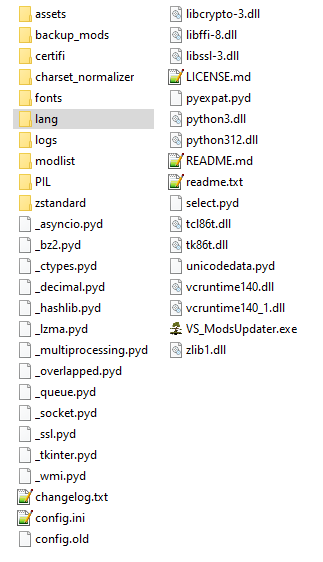
Laerinok
I think i'm a little bit dumb because I don't know how to use the command prompt right. It just said it couldn't find the language json file even though it's there in the folder.
Enter the number of your language choice (leave blank for default English): 2
Traceback (most recent call last):
File "C:\Users\myname\DOWNLO~1\MODSUP~1.2\main.py", line 174, in <module>
File "C:\Users\myname\DOWNLO~1\MODSUP~1.2\main.py", line 88, in initialize_config
File "C:\Users\myname\DOWNLO~1\MODSUP~1.2\lang.py", line 79, in load_translations
FileNotFoundError: [Error] Language file not found: C:\Users\myname\lang\en_US.json. Ensure the path is correct.
Here is the modlist. A good chunk of them are out of date i would guess
ACulinaryArtillery 1.2.5.zip"
AncientTools_V1.5.25.zip"
animalcages_v3.2.2.zip"
apeflowerpots-1.20.4-v1.2.3.zip"
apegrapes-v1.20.4-1.2.6.zip"
Auto Map Markers 4.0.1 (Vintagestory 1.20).zip"
autoconfiglib_2.0.6.zip"
BetterFirepit-1.1.5.zip"
BetterProspecting_1.7.0.zip"
BetterRuinsv0.4.9.zip"
BetterSticks_v1.2.0.zip"
blacksmithenhancements_1.0.5.zip"
blockoverlay-4.2.0.zip"
buzzwords_1.7.0.zip"
CarryOn-1.20.0-pre_v1.8.0-pre.1.zip"
CartwrightsCaravan_1.1.1.zip"
ChestOrganizer-1.2.3.zip"
chiseltools1.14.12.zip"
claycasting-v1.2.02.zip"
CommonLib_VS1.20.0-rc.1_net7_v2.6.1.zip"
configlib_1.5.2.zip"
ConnectedStairs-v1.0.0.zip"
DanaCanCook-v0.2.6.zip"
DanaTweaks-v3.4.1.zip"
drbraziers_1.1.1.zip"
ExpandedFoods 1.7.4.zip"
ExtraInfo-v1.9.7.zip"
FixedPaths.zip"
foodshelves_1.5.3.zip"
hangingbaskets_1.1.0.zip"
hangingoillamps_1.0.3.zip"
ImprovedHandbookRecipes_1.1.3.zip"
kevinsfurniture_1.6.4.zip"
Knapster_v2.14.1.zip"
more-map-icons-1.1.0.zip"
oneroof_1.8.2.zip"
PackedDirtPaths1.2.1.zip"
pottery-wheel_v1.1.2.zip"
primitivesurvival_3.7.6.zip"
ProspectTogether-2.0.2.zip"
Sammiches_v1.2.7.zip"
smithingplus_1.4.0.zip"
statushudcont_3.2.6.zip"
StickyMouseButtons-1.1.1.zip"
StoneQuarry_VS1.20.1_net7_v3.4.3.zip"
StorageOptions-v1.0.2.zip"
thrifty-smithing-1.2.0.zip"
UsefulDrifterLoot 1.2.1.zip"
usefulstuff17_1.4.0.zip"
Verticality_0.3.1.zip"
vsimgui_1.1.7.zip"
xinvtweaks_v1.8.0.zip"
meatshield
That's even more surprising. The problem must be coming from somewhere else... I imagine you don't have a 'modlist' folder that was created, nor any 'modlist.pdf' / 'json' / 'html' files. But could you give me the list of mods you are using? Although I doubt a mod is the cause.
What I don't understand is that it looks like normal behavior. Could you launch it from the Windows command prompt? That should prevent the window from closing at the end, and if there's an error that isn't captured by the log, it will be displayed.
Once in the command prompt, you need to navigate to the location of 'VS_ModsUpdater.exe' to execute it.
Laerinok
Whenever I run the program after the config file, a few seconds pass and then it just closes. I check the log and it sends me the same thing as before.
I am using English for as my language. Here's my config file:
[ModsUpdater]
version = 2.1.2
[Logging]
log_level = DEBUG
[Options]
exclude_prerelease_mods = false
auto_update = True
max_workers = 4
timeout = 10
[Backup_Mods]
backup_folder = backup_mods
max_backups = 3
modlist_folder = modlist
[ModsPath]
path = D:\Vintagestory\Mods
[Language]
language = en_US
[Game_Version]
user_game_version = None
[Mod_Exclusion]
mods =
meatshield
It's very strange because the fact that '2025-04-27 11:29:10,087 - INFO - Program terminated' is in the log indicates that the program didn't crash. That's really the last message that can only appear upon the 'normal' exit of the program.
You said that the config file was created. Could you please show it to me? What happens when you launch the program after the config file is created?
Perhaps I made a mistake when pressing the key to continue the program after configuration and so even though you press the key to continue the program, it understands that you want to exit. (And that's the hypothesis I think is most likely, but only with a language other than English). What language are you using?
Laerinok
I've restarted the program and I've actually deleted and redownloaded it two or three times. On the first launch of the program I put in the info for lanuage, path to mods folder, asking to block updates and asking for manual or auto updates. It makes the config file and then asks me if i want to continue. I then type "y", a couple seconds pass, and then it closes. I've used your program before and it worked fine without this issue happening.
meatshield
Have you restarted the program?
Because what you're describing resembles the normal behavior of the first use, which is:
But on the 2nd launch, the program is supposed to run normally.
I started up the program and it lets me put in the lanague and stuff but soon after it never starts the update and just closes. this is the log I get everytime i try to use it.
2025-04-27 11:29:07,669 - DEBUG - Logging configured successfully with 'DEBUG' level and custom file handler!
2025-04-27 11:29:07,671 - INFO - OS: Windows - ModsUpdater v2.1.2
2025-04-27 11:29:07,671 - INFO - For Vintage Story v1.20.9
2025-04-27 11:29:07,671 - INFO - Checking for ModsUpdater script update
2025-04-27 11:29:07,674 - DEBUG - Starting new HTTPS connection (1): mods.vintagestory.at:443
2025-04-27 11:29:08,261 - DEBUG - https://news.kalataka.ru:443 "GET /modsupdater HTTP/1.1" 200 None
2025-04-27 11:29:10,075 - INFO - ModsUpdater - No new version
2025-04-27 11:29:10,087 - INFO - Program terminated
I'm guessing it's the connection part but I'm connected to the internet so I'm unsure how to fix tjhis issue
RowanSkie
The problem arises with corrupted files. In that case, even 7-Zip can't open them. I've done some tests in that regard.
On the other hand, I hadn't paid attention to the fact that fixes could be made for the same version. In that case, indeed, the function makes sense.
Regarding the API search issue, I need to retrieve a minimum of information from the modinfo.json file inside the zip. Without the modID, the API is useless to me. I can't rely on the filename, as it can be anything.
That being said, when implementing the modlist.json file, I had somewhat this idea of using it to create a way to redownload installed mods. This just implies that the file has been created at least once and that it's easily accessible.
Something to think about.
7-Zip lets me edit ZIP files, so it helps me redownload the original files, as well as when people post hotfixes on the same versions (Maltiez does this a lot). No malfunctions on that one.
Maybe if the ModDB API got a way to search for it? Or maybe save which mod came from where and use it as a springboard to redownload.
RowanSkie
Ah yes, indeed. Actually, I realized it wasn't working completely as it should. I had imagined it would be useful in case of a corrupted file. But in fact, if the file is corrupted, it was impossible to recover the information contained in the zip file to download it again. So, it only downloaded the "valid" files, so not really useful at first glance.
I need to find a proper way to make it actually work.
In what context did you use it? Didn't you encounter any malfunctions?
The redownload all mods got removed :<
MyuriC
Ah... antiviruses, their blind trust, and false positives. A story as old as the internet (and even before).
Did you read the information on the Vintage Story download page? Or are you also too lazy to read it? It clearly states that antivirus software often recognizes the installation file as a false positive. Windows Defender displays an alert every time there's a new installation. And yet, it's the official file, and you downloaded it despite the warning.
Let's be clear, I will never blame anyone for being wary of files downloaded from the internet. On the other hand, being lazy and blindly trusting software, and not trying to understand the computer mechanisms behind it, may harm you in the long run.
I'm not going to repeat what I've already explained and what gdorn has, very well explained in detail (thanks for explanations and links). I'm doing my best, with my limited knowledge, to provide the most comfortable experience, but I have neither the desire nor the means to pay for a digitally signed file.
I'm flattered that you compare it to Vortex, but we're not playing in the same league. Moreover, if Vortex isn't detected by Windows Defender, it's also because it has been digitally signed.
My program is first and foremost a learning exercise for me, which I freely offer to the community. Everyone is free to use it or not.
And finally, to conclude, let's use common sense. I distribute the program on the official Vintage Story mod hosting server, with my personal account. That's the last place to put a malicious file.
Finally, I make the source code available. It has already been inspected numerous times by competent and not lazy users. The slightest problem would have been detected a long time ago
Windows Defender has a long history of false positives when it comes to python scripts compiled into executables. Annoyingly, really the only thing a dev can do is upload the binary to Microsoft directly: https://www.microsoft.com/en-us/wdsi/filesubmission and this will need to happen for every new version.
Remember, Windows Defender flagged Chrome when Google released it. It is not infallible.
Another option for the user is to run the python script, no executable version needed. Install python, clone the repo from the source tab with git, and run "python main.py" in the working copy. Yeah, this is exactly why Laerinok is offering a pre-compiled version.
To be 100% clear: Windows Defender is wrong: https://medium.com/@markhank/how-to-stop-your-python-programs-being-seen-as-malware-bfd7eb407a7
And this problem goes back over a decade:Â https://stackoverflow.com/questions/23815222/py2exe-application-flagged-as-malware-by-windows-defender-what-to-do
I am a lazy person. But I trust WindowsDefender. And the flagged data was Puwaders.C!ml.
Even Vortex never got flagged by WindowsDefender. And that updates mods for other games automatically as well. So I heavily distrust this.
I downloaded it again and used the override feature for windows defender. Was quite the hassle to get the bloody thing to kooperate, but i finaly get it to obey me.
Thank you for your reasuring comment and thank you for your hard work providing us with a great tool
Cheers
N3xus1980
RoughPebble
I am well aware that sometimes the script can be detected as malware and blocked by anti-virus software. Unfortunately, there isn't much more I can do. I've already stopped packaging the files into a single file as in v1. This results is a folder with a multitude of files and folders, but anti-virus programs are less suspicious if the files are not hidden.
After that, these are still Python executables without a signature recognized by anti-virus software, so they are more easily targeted and blocked.
Either you run a battery of anti-virus tests (like VirusTotal, for example) and you'll see that the result is safe and you can exclude the file from scans, or you can wait (sometimes a few days later, the file is no longer detected as positive), or you can move on to something else.
If you have any doubts, always run all the tests you can. However, it's important to understand that this type of program is very likely to be flagged as a false positive.
And finally, only if you trust the program, you can add it to the exclusion zone of your antivirus software. Then you'll be able to use it.
VirusTotal Scan Result: VS_ModsUpdater.v2.1.1_Windows.zip
Only 2 positive detections out of 65 tests. Nuitka is the library I use to make the binary.
@N3xus1980 I am also having the same issue :(
I used the programm for sevaral days now and all seems well. But now, for some unknown reasons, Windows Defender marked it as a Virus and i can´t start it anymore.
Is anyone else having this issue?
Fafhrd
The subject of required libraries crossed my mind too. But in the end, I wasn't really sure what to do with that information. What I mean is, if a mod needs a library, it makes sense that the modder would update the dependency first and then the mod. Otherwise, they potentially break the game for everyone. So in practice, they will always update the mod last, or at least at the same time.
However, there is still one point to consider: what if the dependency is tagged as a pre-release version, and in the modupdater options, the user has enabled the option not to download mods if they are in pre-release?
That might be something to look into in the future.
Laerinok I totally get you regarding GUI needlessly complicating things whereas your effortless y/n cli does all that we *need*, I was too used to the convention of elaborate mod organizers. Thanks for recommending the MO2 plugin mod, I checked it out and may use it, but the effectiveness of your program is making that seem somewhat pointless if I'm honest haha. After giving it more thought, one of the main downsides of a "blind" and serial update process you employ is the potential for a prompted mod update to take place without the knowledge of whether or not any dependent mods have also updated (if need be) alongside. I know the dev(s) for combat overhaul require overhaul library for their mod to work, and luckily they're updated around the same time so I always know that one update will follow another. But in the case of library-type mods updating without their dependent mods and potentially breaking them (albeit unlikely), perhaps it would be nice to know the update status when applicable, if depencies are catalogued somewhere other the mod descriptions (which would make this quite difficult I imagine).
Kolljak
Wow, thank you so much for your words! I'm glad you like the mod so much. 😊
You are the most wonderful modder ever. I am using this mod forever. i had to manually do this shit.
GON
Hello,
You can use the following arguments:
Take a look in the Want to Customize? section, open the spoiler (Configuration (config.ini) & Arguments), and at the very bottom you have Command Line Arguments Usage with examples.
Then, either you use the console, or you create a shortcut with the argument at the end of the line:
Hello,
How to adjust the config for the modlist output? We want to turn off the pdf file generation
JimmyMac
I really appreciate your interest in the program :)
I acknowledge that in terms of integration it would be practical. However, regarding usefulness, I'm more hesitant, because once the mods are updated, you have to restart the game anyway (it's still better though). Another major problem is that allowing the execution of an executable program from within is potentially a huge security vulnerability. So, for that reason alone, I doubt it's feasible, at least without the game allowing it. That being said, the problem already exists with simple mods..
Hyomoto
Absolutely, I had indeed grasped the humorous side of the message. I immediately had the same image of the guy with glasses in front of his console and like in the Matrix.
Let's say my response was mostly general, because as you say, it's an idea that can be legitimate. I acknowledge that the application might seem a bit austere, but what matters to me is that it does the job.
Not being a programmer (just starting out), I really appreciate the feedback, whatever it may be, from people who know their stuff. First, because it's useful. Second, because it shows interest in the work, so it's a bit gratifying, I admit :)
I am *not* advocating for a GUI, just to be clear. As a programmer myself I am fully aware of the value of say, not having to debug a GUI interface in addition to writing the useful backend, let alone making it oh, I dunno, user friendly and etc... It is entirely functional as is, and while I recognize many may make this request, I'm totally in support of it being fire and forget.
I'm not a moding expert at all but an idea that came to me is if it is possible to make a custom GUI that you could popup with a hotkey or customize the menu with a new button through a mod (I've seen other mods do that with a hotkey) and that custom GUI would have a button in it "Check for Mod Updates" and when that button is pressed it would open a command line window and ran the ModsUpdater exe. The idea sorta integrates ModsUpdater into the VS interface but doesn't really change the current exe. Seems to me that it would be simular to how you can press Open Mods Folder and it goes outside of VS and just opens a seprate window. Or someone could make a companion mod to ModsUpdater that does this. Just a thought
Hyomoto
💊 Red pill swallowed since day one. The graphical interface is a sweet illusion for the unawakened. We carve our path in the real Matrix, command line by command line, following that damn white rabbit! 🐇
And more seriously, I knew nothing about programming when I started version 1.0.0. The graphical interface was illusory back then, especially since I just wanted to make a small script for my personal use. It's with time that it has evolved. That said, there are still quite a few reasons why I'm not sure about ever releasing a GUI:
But who knows... a version 3.0 with a GUI isn't out of the question one day. 😉
🐇
Something that really sets VS apart from other games that share the space is it easy mod support. Update the server and all players will update their mods as well, it's trivial to update the server and call it good. The only issue is finding them. No more! Amazing. I find it slightly hilarious that it's a command line program though. When it's time to update the mods I put on my best hacker glasses, pencil mustache and press the Enter key with my Power Glove. Time to hack the matrix!
JimmyMac
Good catch! Thanks for the report. Fixed and will be in the next version.
when there is a folder in the mods folder it says
Warning: Directory found in Mods folder: {item_name}. Please ensure you have .zip files, not folders.
I don't think {item_name} was intended. Shouldn't it be the folder name?
Vinland
Yes, you can re-zip them. But be careful, the files must be at the root of the archive. Don't zip the folder.
Good zipfile:
Bad zipfile:
EDIT: msg edited to activate the ping et to add images
Laerinok Man, I completely missed that! I'm so used to having to unzip mods ;-; in that case, could I just zip them back up or should I redownload and replace them all with the .zips?
Vinland
I don't think you are 😉, but indeed, you shouldn't unzip the mods when you download them! Even if it generally works, it's not a good habit. It's specified in the game's wiki:
On Windows, you can get there fast by using the run file dialog. Hit the key combination Win+R and type
%appdata%/VintagestoryData/Modsinto the box.Once you're in the Mods folder, drag and drop the mod file from the download folder to the Mods folder - or you can use cut/copy and paste commands as you prefer. Do not extract the mod zip. Just place the .zip file into your Mods folder, that's all you have to do. In the game's main menu Mod Manager, click the Reload Mods button - or else close and reopen your game. The mod should be loaded and listed in the mod manager. Congratulations on your very first modded Vintage Story Experience!
Completely accepting I may be an idiot and doing this wrong, I did the initial setup then tried to run it to update mods and got "Please ensure you have .zip files, not folders." for each of them. Do the mods in the /Mods/ folder need to be zipped?
Changelog:
if not args.no_pdf:condition was moved within theexport_pdfmodule to wrap only the PDF generation steps. This ensures that the icon extraction logic, which runs before PDF generation, is always executed, making icons available for other export formats (like HTML) even if PDF export is skipped.--no-htmlto disable HTML mod list export.--no-htmloption.RowanSkie
No, not with the same instance: One instance = One config.
That being said, by making copies of the ModsUpdater folder, you can configure as many instances as you want (with a different modpath for each of them). Then you just need to launch the one you want. With a few well-named shortcuts, you can have an update for each different mod folder.
Or another solution, you can configure multiple paths in the config.ini file, but only one must be active. You just need to comment out / uncomment the lines with a # in front. You have only one folder of ModsUpdater but you will have to comment/decomment the ligne each time you want to change.
Edit the config.ini file and add paths:
[ModsPath]
path = D:\Game\Data\VintagestoryData\ModFolder_1
# path = D:\Game\Data\VintagestoryData\ModFolder_2
# path = D:\Game\Data\VintagestoryData\ModFolder_3
# path = D:\Game\Data\VintagestoryData\ModFolder_4
[ModsPath]
# path = D:\Game\Data\VintagestoryData\ModFolder_1
# path = D:\Game\Data\VintagestoryData\ModFolder_2
path = D:\Game\Data\VintagestoryData\ModFolder_3
# path = D:\Game\Data\VintagestoryData\ModFolder_4
I've thought about making a system with multiple configurations. For the moment, I haven't found it better to have multiple instances, and it would require quite a few changes in the code. I can think about it. But if it happens, it won't be for soon.
Personally, I recommend, and I use, multiple instances (so multiple folders) for each different configuration.
NMND
😄
Is it possible to have multiple mod folders at once?
Yäyhurräy for v2! (\o/)
Last news: Here is the list of the latest fixes that have been implemented.
There are still new bugs during the export of modlists for manual downloads. This only affects the export of the mod list, so it's not too bothersome for the moment.
No ETA for the v2.0.3 yet , but it should not be too long
Fafhrd
Hello and a big thank you for your message! I'm really touched by your enthusiasm, and it makes me very happy to see that you like and find the program useful. 😊
Regarding MO2, I must admit that I only know it by name; I've never used it personally. But your suggestions are very interesting and give me food for thought.
The idea of a graphical user interface (GUI) has indeed crossed my mind at some point. However, for now, I'm not sure if it will materialize. There are several reasons for this:
For your information, I saw that there's a tool called "Vintage Story - Mod Organizer 2 Support Tools" that mentions the integration of ModsUpdater. From what I understand (having not used MO2), it's probably just a simple shortcut that points to the ModsUpdater executable. It doesn't quite match what you're looking for, but it's good to know 😉.
Once again, thank you very much for your ideas and your support! It's this kind of feedback that motivates me to continue developing and improving this tool.
This is a game changer. CLI is super straightforward - I've used it on many occasion to update various mods with brief associated change summaries for each one. I'm accustomed to using MO2 for other games, and while that has a fully fleshed out GUI, I'd love to see elements from it eventually (if this updater ever gets a gui) such as overwriting/overwritten icons, right click to visit on _mod DB name - opens browser_, load order if that's ever going to be important for vanilla assets etc, mod collection profiles (seems unecessary imo but a fun idea). The list goes on. Maybe support for MO2 is what we need instead with an updater plugin that can be ported from this?? I'm sure this is a lot, espcially coming from a lay person like me with no dev's perspective.
Surtur
Indeed. I will look at this. I think it must be the same problem for some other alphabets.
Thanks for yout repport !
EDIT: While waiting for a fix, you can create it in English and then change the language in the config.ini.
FIXED: will be in the next release.
There is a problem if you select the Russian version of the program. In the automatic or manual update option, he considers any option incorrect.
DejFidOFF
Hambone
Glad you appreciate it. ! Thanks a lot :)
Works like a charm, fantastic little tool. Great work!
purple8cloud
Just seen it. Thanks a lot ! I will add it
I sent korean translation to github
Laerinok
As a few servers owner. You are the GOD, thank you <3
IANcel
Thank you very much! As a player myself, I know how tedious updating mods can be. I'm delighted that it makes your life easier.
m1keeee
Indeed, while rewriting the description page for this new version, I erased the information indicating that it wasn't a mod, but a third-party program. Thanks for pointing that out to me ;)
It's just that I have the bad habit of thinking that everyone reads the manuals before using something ^^.
Regarding the reactivation of mods, no, that's not due to ModsUpdater. At least not directly. Its's due to the way the game manages disabled mods. The disabled mods are written in the game's configuration file (\VintagestoryData\clientsettings.json). The game remembers the mod's filename. When ModsUpdater updates the mod, it deletes the old file and downloads the new one. If the filename changes, then it's no longer the one stored by the game. And if the mod's filename changes, the game thinks it's a new mod and activates it. This happens whether you use ModsUpdater or download the mod manually. This is one of the reasons why it's advisable to always delete an unused mod and not just disable it.
To avoid the terrain generation mod issue, there is the [mod_Exclusion] section in the config.ini file which allows you to prevent certain mods from being updated.
Everything is explained in the wiki/readme (and even in the configuration section of this page). 😉
Thanks for you feedback. I'm going to update a few warnings.
Tetsune
Thanks :)
I admit I also liked the scrolling of the mods... But that was purely aesthetic and, above all, illustrated poor efficiency. The mods were processed linearly, one after the other, which took a lot of time. V2 introduces multithreading, which allows multiple mods to be processed simultaneously (depending on the max_workers parameter). As a result, the display as it was no longer makes sense; instead, the name of the processed mod and the progress bar are more meaningful.
I'm very happy that you've noticed a better efficiency compared to the old version. I've indeed learned a lot, and my code is much cleaner and more efficient (even if there's still a lot to improve).
Excellent work, I cannot thank you enough for making updating mods a streamlined process. As someone who is fairly computer-illiterate this is pure magic to me, please keep it up! 😀
pretty cool mod. however;
it wasn't very clear that i had to extract it, and other users may assume its a mod that you have to put in your mods folder like every other mod.
and it seems to have reenabled certain mods that i had disabled, this could mess with or ruin player's worlds if they had for example a terrain gen mod they used in a different playthrough but are no longer using
otherwise it was pretty easy to use
Love the new look! I kinda miss the mods being listed, but it's no biggie. Works much better than the last ver for me too!
Keep up the good work! 🤟
INFO : Version 2 - is done!
It should be landing very soon. Gotta finalize a few little Linux issues, but it should be fast.
While you wait, feel free to check out the new wiki and readme.
Hoping you'll like this new version!
INFO : Version 2 - Some News (Check out the description at the top of the page)
v2 is coming out soon. It's pretty much done, and works great already.
Check out the README for more details.
The v2.0.1-rc1 is available on GitHub.
DudeBroManGuy
The initial loading time is a newly identified issue (hope fixed in v2). It is most likely due to the time required to decompress the file before execution.
However, without additional information about the crash, there's not much I can do. Nothing in the log? You can try running the
.exefrom the Windows console (it must be launched from themodsupdaterdirectory). It will display the traceback after the crash.For some reason it just hangs for a while on the "limit mod updates to the game version: latest version" screen and then crashes.
Kubimate
Oops...
Which version? v1.4.2 / v1.4.3-preX / v2.0.0-devX?
This is a recurring issue for any executable program, especially if it makes requests to access websites (which is the case here to retrieve mods and information). Additionally, to make distribution easier, I provide an option to bundle everything into a single file, which packages all files together. This often triggers false positives.
For the future v2, I will stop using this bundling method, but the content will be more "messy." However, in practice, it doesn't really matter, and I’m using another system that is known to be more antivirus-friendly.
I'm fully aware of this issue, but I don’t have much room to maneuver (at least with my current knowledge). Even I get annoyed by it sometimes. Everything works fine, and then one day, for no reason, the antivirus suddenly flags it as a positive...
The .exe is giving my ESET a stroke 🙄
Drayce91
Got it. Thanks !
Laerinok Thanks for your hard work! I'm getting some new errors on v2 and sent you the logs on github.
INFO : Version 2 - Some News
The v2 is progressing better than I expected (at least for this phase). The auto-update feature is fully functional, and I’ve finally managed to properly retrieve all changelogs (or at least, I hope so). I don’t plan to modify or release version 1.4.3 anymore. In the end, I’ve made much more progress on v2 than I initially thought.
As soon as I restore the mod list generation feature in PDF format (with a bonus JSON format for those interested), I will officially release v2.
In the meantime, v2.0.0-dev2 is available on GitHub.
Completed Features:
Auto-download fully functional
Changelog retrieval fully functional (all changelogs should now be complete)
Next steps:
Introduce manual mod downloading so users can decide whether to update a mod or not.
Redo the localization, as the current implementation no longer meets my needs.
I think I’ve figured out where the freeze at program launch was coming from. The most likely cause is that the script keeps growing with each version. To make distribution easier, I create the executable as a single file (only dependencies like language files, etc., are kept alongside it).
As a result, in order to run, the file must first extract itself into Windows' temp folder. This process can take varying amounts of time depending on the system configuration. If we also factor in the time needed to connect to the server to check for script updates, it might sometimes feel slow.
For version 2, I’m testing different methods to create the executable, but so far, none fully satisfy me. I will put both oh them soon to see if we see a difference.
Drayce91
Drayce91
Thanks. Errors identified. I’ll also add logs for this type of error (Check GitHub for the explanations).
Eldrom
Thank you ! 😊
Laerinok Thanks for all the work. I tried out v2 dev-1 and can't get it working. I posted the issue on github for you to look at when you get the chance.
Hi there,
Really appreciate this!
Good work with the colours, it was so easy to use even as a person with no coding experience.
Keep it up!
Louse
Glad everything is finally working! And yes, the normal behavior of the game is to use zipped files—you’re not supposed to unzip them. I should add an info message when the program detects this.
Thanks for the feedback! ;)
Hi I'm having a bit of an issue with trying to get the mod folder right, I have the install on an SSD (D:) and the mods are there (which I correctly point to in the path) but it keeps refusing to update everytime as if the mod folder was empty (I suspect its pointing to the mod folder that's in appdata in my other hard drive (C:)) is there something else I need to add to the path so it reads it over on my D: drive?
I finally got it working, it was both a path issue, a config issue and also not realizing this checks for the zipped versions not the extracted ones, its working wonders now!
INFO : Version 2 is coming soon!
I’ve finally resumed development on version 2 (available on GitHub). I started everything from scratch, cleanly. I just released a very early version that will allow testing. For now, it only handles automatic downloads. There’s no changelog retrieval or mod list creation yet, but that will come later. It is
On my side, it works very well, and I no longer have the latency issue.
I’m looking forward to your feedback from those who will test.
I highly encourage you to read the README in the archive or on GitHub to see the changes in functionality.
DISCLAIMER : This is for TEST purpose. There shouldn't be any issues, but if you're unsure, you can make a copy of your mods folder beforehand.
Drayce91
You can try this v2 if you want, and tell me if you see a speed improvement.
@Laerinok Yes, I have been using the pre2 build since it's release now and honestly haven't noticed anyhting in regards to speed changes, though I did notice less crashing of the program itself, which happened infrequently and at random for me with 1.4.2. I appreciate you taking the time to explain the nuances of the issue, I'm sure none of it is easy but your work is absolutely appreciated by me and countless others here. Without a script like yours to update, modding and updating this game would be much, much more painful.
Drayce91
So I'm not sure if this is just me, but I've noticed that after the 1.4.2 update, the time it took to start scanning mods for update is exponentially longer, nearly as long as the time to actually scan the mods themselves. Is there some technical reason for this long delay before starting mod updating? Also regarding updating, is there perhaps any way to speed up how quickly it goes through the mods? It's painfully slow...
NMND
thanks for enjoying it :)
Indeed, the -pre1 version don't create the config file (my bad), but it was fixed in the -pre2.
I assume it's because of the browser's cache, but the link I posted below is supposed to lead to the releases, not just to -pre1. I had modified it last week. Either way, it's fixed now with v1.1.4.3-pre2. But yes, using an old config file was enough, as it hasn't changed.
Log files are only created for updated mods, to keep track of the files. As for the mod list, I only have it in PDF format, but I can look into adding another format. Just so you know, the script only lists the mods folder, so it doesn't distinguish between enabled and disabled mods.
What kind of info would you like to see? I can't guarantee I'll manage it (though it doesn't seem particularly difficult), but it sounds like a good exercise.
Sunday is sadly coming to an end—I hope yours was more relaxing than mine! ;)
Laerinok Cheers for creating this. It's making mod actualization an absolute jiffy.
I'm using 1.4.3-pre1, which didn't fill the config.ini after creating it. (I copied the content from 1.4.2). It also did not create the logs directory. Not sure if it adds logs in there, will have to downgrade a mod to try it.
I'd also like to request the logfiles to be created on every run - so it will output the current mod list with versions even without updating it. Unless it's supposed to do that, then my "installation" isn't working correctly.
And could we have the modlist as a json or something arrayable (objects would be great)? I'd like to display the server mods on my website. I'm currently using th3dilly's "th3serverstats" for that (which works perfect, just includes too much other info. So no rush, would just be a great alternative).
Thanks again, have a deliciously relaxed sunday!
you are a godsend. thank you
Spleeeeep
Thanks ;). No doubt this feature will be in game later. But meanwhile I am glad to help :)
RowanSkie
It's not a feature I use, so I forgot to test, my bad. You can make a shortcut and add the following argument --forceupdate true after the .exe. You can also add --disable_mod_dev false if you want to update -dev/rc/pre mods (VS_ModsUpdater.exe --forceupdate true --disable_mod_dev false).
That said, if a zip file is corrupted, it may not download it because the script needs the
modinfo.jsonfrom the zip file. I'll have to find another way.This doesn't seem to follow the config for redownloading every mod even after setting that to true.
Great program, should be integrated into the base game!! 👍
JaxsonBright
👍 🙂
Laerinok 1.4.3-pre2 worked! Thank you!
INFO :
New pre-release version is available on GitHub.
Should be the last before uploading here.
Changelog:
====================================
JaxsonBright
The number of mods has no impact. I've already seen lists with more than 200 mods.
Try the last pre-release (v1.4.3-pre2) avalaible GitHub, and if it still crashes, send me more info (log, temp file, etc.).
If there's no log and the window closes, run the script from the console (by navigating to the ModsUpdater folder). The report will remain displayed.
Laerinok After checking Each of my 133 Mods I can confirm that none of them are Corrupt, maybe the Updater is having issues with so many Mods?
JaxsonBright
Currently, I was testing the ZIP file to check if it was indeed a ZIP. I will add to the script the ability to detect if a ZIP file is corrupted and identify it in the log.
A corrupted zip-file may have a size of 0Ko, but not always. To be sure you must try to extract files from archive. If the zip is corrupted, you will get an erorr message.
If you use 7-zip you can select the zip files, right-clic and check (or test or something like).
DrBubba Was it a specific Mod Zip adn how did you find out which one?
It was caused by a corrupted mod zip, JaxsonBright
Laerinok I am having the same issue as DrBubba Was there any solution found?
INFO :
A pre-release version is available on GitHub. It fixes errors when creating the PDF if a mod has name or description containing CJK characters. I will officially release it after some testing and feedbaks.
Junrall
I got your message, thanks. I had made sure that languages with different alphabets were properly handled, but I must have missed something.
Laerinok
Using the csvtemp file and the position provided in the log file, I was able to determine the issue was with five mods that use different language characters. I did DM you csvtemp file on discord for you to look at. I'll post the contents here as well just to be thorough
I had origanly randomly selected two mods and as luck would have it... they were two of the five troublemakers!
更好的实体交互,å…许和实体的交互(包括左键攻击)忽略æ¤ç‰©æ–¹å—(比如è‰ï¼‰ã€‚,https://news.kalataka.ru/betterentityinteraction,
Better Fire,Делает более реалиÑтичные чаÑтицы Ð¾Ð³Ð½Ñ Ð¸ дыма,https://news.kalataka.ru/bf,
Better Grass,"Покрывает почти ввеÑÑŒ блок земли травою, кроме редкой и прочей..",https://news.kalataka.ru/bettergrass,
FixToggleSprint,ä¿®å¤åŒå‡»å‰è¿›é”®ä¸èƒ½åˆ‡æ¢å†²åˆºçš„问题,https://news.kalataka.ru/fixtogglesprint,
MoreRope,ДобавлÑет новые рецепты верёвок,https://news.kalataka.ru/morerope,
Junrall
OK, either one mod contains an unrecognized character, or the temporary
csvtemp.csvfile was not encoded properly.You should have a file named
csvtemp.csvin the temp folder. Can you send it to me (e.g., on Discord, same username), or tell me its content AND its encoding format? It should be in UTF-8, not CP1252.Which mod did you use to test with a single mod?
Laerinok
The pdf creation is not working for me. I have completly removed and reinstalled the updater and I have also tried to create a pdf using a single mod within the mods folder.
Here is info from the logs file:
2025-03-02 13:15:10 : Traceback (most recent call last):
File "VS_ModsUpdater.py", line 950, in makepdf
File "encodings\cp1252.py", line 23, in decode
UnicodeDecodeError: 'charmap' codec can't decode byte 0x81 in position 3394: character maps to <undefined>
SoloBlood
Each instance can only have one config file with an active modpath, but you can create as many 'ModsUpdater' folders as you want, each with its own specific config file and thus a specific modpath.
Personally, I use 2-3 instances:
If you absolutly want a single instance with two modpaths, you can define both modpaths and comment out the one you're not using with
#. However, this requires manually switching each time. The easiest solution is to create multiple folders for the program.[ModPath]
#path = C:\Users\UserName\AppData\Roaming\VintagestoryData\Mods => will not be used
path = C:\Users\UserName\AppData\Roaming\VintagestoryData\Mods_2 => will be used
Laerinok Thanks for this mod. Is there a way to define mutiple modpaths in the config.ini?
Junrall
Exactly, it's a server access issue. The possible causes (as far as I know) are:
mods.vintagestory.atmight be temporarily down or overloaded with requests.I set a 2s timeout because, in my tests, I encountered infinite waiting loops. I could increase it slightly, but that would only extend the waiting time. I can only assume that sometimes the server access is either weak or overloaded.
My knowledge on this topic is too limited to know more with precision.
When this happens to me, I usually retry shortly after, and it works.
Shadowise
👍
Laerinok
Am getting the following errors in the windows terminal and log files. I'm guessing it a VS ModDB thing but, just in case I wanted to drop the error here.
Log File:
2025-02-20 18:16:12 : ReadTimeout error: Server did not respond within the specified timeout.
Windows Terminal:
Traceback (most recent call last):
File "urllib3\connection.py", line 198, in _new_conn
File "urllib3\util\connection.py", line 85, in create_connection
File "urllib3\util\connection.py", line 73, in create_connection
TimeoutError: timed out
The above exception was the direct cause of the following exception:
Traceback (most recent call last):
File "urllib3\connectionpool.py", line 787, in urlopen
File "urllib3\connectionpool.py", line 488, in _make_request
File "urllib3\connectionpool.py", line 464, in _make_request
File "urllib3\connectionpool.py", line 1093, in _validate_conn
File "urllib3\connection.py", line 704, in connect
File "urllib3\connection.py", line 207, in _new_conn
urllib3.exceptions.ConnectTimeoutError: (<urllib3.connection.HTTPSConnection object at 0x00000206B6360B50>, 'Connection to mods.vintagestory.at timed out. (connect timeout=2)')
The above exception was the direct cause of the following exception:
Traceback (most recent call last):
File "requests\adapters.py", line 667, in send
File "urllib3\connectionpool.py", line 841, in urlopen
File "urllib3\util\retry.py", line 519, in increment
urllib3.exceptions.MaxRetryError: HTTPSConnectionPool(host='mods.vintagestory.at', port=443): Max retries exceeded with url: /api/mod/autoatlas (Caused by ConnectTimeoutError(<urllib3.connection.HTTPSConnection object at 0x00000206B6360B50>, 'Connection to mods.vintagestory.at timed out. (connect timeout=2)'))
During handling of the above exception, another exception occurred:
Traceback (most recent call last):
File "VS_ModsUpdater.py", line 1083, in <module>
File "VS_ModsUpdater.py", line 643, in mods_list
File "requests\api.py", line 73, in get
File "requests\api.py", line 59, in request
File "requests\sessions.py", line 589, in request
File "requests\sessions.py", line 703, in send
File "requests\adapters.py", line 688, in send
requests.exceptions.ConnectTimeout: HTTPSConnectionPool(host='mods.vintagestory.at', port=443): Max retries exceeded with url: /api/mod/autoatlas (Caused by ConnectTimeoutError(<urllib3.connection.HTTPSConnection object at 0x00000206B6360B50>, 'Connection to mods.vintagestory.at timed out. (connect timeout=2)'))
[PYI-22300:ERROR] Failed to execute script 'VS_ModsUpdater' due to unhandled exception!
[process exited with code 1 (0x00000001)]
You can now close this terminal with Ctrl+D, or press Enter to restart.
Thank you for the detailed response, Laerinok! Waiting long enough did the job! Much appreciated.
Shadowise
Hello
It seems that since ModDB changed servers, the script takes a bit longer to start. I don't know if it's related to the server itself or the way it is accessed, but indeed, sometimes it feels like "nothing is happening." You just have to wait.
That being said, another possible cause is that if you click inside the console window, it pauses the script. I imagine this is a behavior of the Windows console. Simply clicking back into the console window will resume the script.
I'm surprised that v1.4.0 still works for you because the download links have changed. As a result, v1.4.0 works fine as long as the script doesn't encounter any mods to update; otherwise, it crashes.But if it goes on updating mods, let it me know.
Aside from that, the only new feature in v1.4.2 is the ability to use personal mods that are not hosted on ModDB, which is quite specific.
Hello, Laerinok, the recent update (1.4.2) does not work for me. 1.4.0 was working just fine, but after the initial run (choose language, y to continue with default config), it does nothing (cursor blinking). I am using the latest stable VS version 1.20.4. Reverted back to 1.4.0, which continues to work fine. Thank you.
DrBubba
Just to be sure, even though it shouldn't have any impact, do you have any files other than mods in the mods folder? And if you can send me the list of mods, I could test to see if a particular mod is causing the issue.
Laerinok
Negative. It's empty.
DrBubba
OK. and is there sometging in the temp folder ?
Laerinok
I was originally going to share a log but....there are none. Only "font", "lang", and "temp" folders.
DrBubba
Don' worry about the quality, it's OK.
This error is caused by a failed attempt to open a ZIP file. Possible causes:
Do you have a debug file in the 'log' subfolder? It should contain the name of the mod involved.
Getting this error when I run it after a new install. Sorry for the potato-quality, but I had to film the crash with my phone and pause the frame to see what it said before it shut down.
Help, Laerinok
YOU SIR, is a lifesaver.
Aspendosia
Unfortunately, I'm afraid the answer is "never." At least not from me. I don't have a Mac, and the library I use to create the executable needs to be run on the corresponding OS. However, the source code is available, and if someone can provide a MacOS version, I'd be happy to include it.
Unless there's another way to do it, but if there is, I don't know it.
EDIT: I just saw a solution using GitHub Actions workflow. I'll take a look, but no guarantees.
Dare I ask the 'MacOS when' question?
Cuddly_Khan
Glad to hear there are no more issues. If you need anything, feel free to contact me on Discord (same pseudo).
Okay, Windows Defender doesn't have a problem with it now. I don't know why it decided to change it's mind
Windows Defender is being extremely fussy about 1.4.2, and while 1.4.1 works, it doesn't function because it just tells me to update to 1.4.2 which is very annoying.
Urist_Ozsitmafol
Thanks ! :)
DejFidOFF
Mods which are not in modDB are now in PDF.
dangerousb
Mods with non standard versionning should be OK now.
Thank you for the update, you even fixed things I encontered yesterday and didn't report :) Your mod is unbelievably helpful!
Morggin
Hello.This error is fixed with the v1.4.1 (I hope I didn't forgot anything...) But I didn't yet update the file for Linux and I probably wait to fix the last issues before. But you can use the .py from the source. It's up to date.
Actually, your case is not so strange. Thie error occurs only when the script tried to download a mod. The path to download has changed, so it crasched. If only one of your servers has this issue, it's probably either they don't have the same mods and one doesn't to update mods whereas the other one does. Or One made update before the path from modDB have changed.
DejFidOFF
Hello. Glad to know it's being used for servers. I don't get much feedback on this feature, and since I don't manage a server myself, it tends to stay in the background. I thought I had fixed the issue with PDF creation as well. Either I forgot, or I messed things up.
But I have to admit that this fix had been in progress for a long time, and I might have forgotten something due to the "urgency" of the repair.
TrueChickenman
No, that’s not the case. There are three possible causes:
--nopause trueargument at launch.But the normal behavior is:
question as im not versed in coding or what this uses but is it supposed to close on its own after its done updating
Laerinok
Hello o/ thank you for fast updating this. It´s crucial for all server owners to manage updating mods.
If I can make a suggestion, please can PDF creator skip mod which is also not in modDB. PDF creation crashes when mod is not in DB. Thank you.
strange ... one of my Linux servers (ubuntu 22.04) runs fine, but my 2nd Linux server running the same OS (also ubuntu 22.0.4) is getting "Traceback (most recent call last):
File "VS_ModsUpdater.py", line 631, in update_mods
TypeError: int() argument must be a string, a bytes-like object, or a real number, not 'NoneType'"
so it's working on one server but not the other. I wonder if I'm missing some library in Python on the second server? I did see your post a few hours ago about a change in ModDB. Currious that is works on one server but not the other.
ToastyDerek
OK. Thanks for the report. It seems that the changes caused by the move of modDB to a CDN are more significant.
Hey, looks like mod URLs with spaces in them cannot be downloaded. Error here for example:
http.client.InvalidURL: URL can't contain control characters. '/ACulinaryArtillery%2B1_2542abbf8ad4e2daa7ccd61eef06aef2.zip?dl=ACulinaryArtillery 1.2.3.zip' (found at least ' ')
Maybe doing some URL encoding on that part of the string might fix it.
Junrall
The pdf file is in the ModsUpdater folder.
dangerousb
Indeed, it's a non-standard version number, but the cause is the mod author of AbsoluteProspecting using a non-standard number. I'll see if I can do something (at least prevent the crash), but it's up to the author to use the standard system (which is also used by ModDB).
https://semver.org/
Laerinok
Haha... sorry about that!
One question... when choosing to save the mod list to a pdf, where does this pdf save to?
Junrall
I got scared when I saw your message! 😅
It's possible to have a short pause sometimes. It also happens if you click in the console—it pauses until you click again.
Looks like there's still an issue. To be fair, the version numbers they're using are a little wacky
2025-02-16 15:36:47 : AbsoluteProspecting
Traceback (most recent call last):
File "VS_ModsUpdater.py", line 671, in update_mods
File "semver\version.py", line 644, in parse
ValueError: 1.500.02 is not valid SemVer string
Theres a substantial pause before the updater starts show the list of mods it has checked. Its long enough that I had thought it was hanging but then, after a few tries, I decided patience was needed haha.
It should be fixed now. It's now OK on my game, but let me know if you have any issues.
Moreover, I took the opportunity to fix a crash that occurred when there was a personal mod in the mod folder that was not present on ModDB and to put an update of german lang file (thanks Zetabite and sorry for long time...)
File "VS_ModsUpdater.py", line 631, in update_mods
TypeError: int() argument must be a string, a bytes-like object or a real number, not 'NoneType'
The issue has been identified. The new ModDB server no longer returns the
Content-Lengthvalue that I was using to retrieve the file size for downloading.I'll fix it as soon as possible, but probably not today.
DrBubba Thanks ;) rosysyn
The error is related to requesting the zip file size before downloading. I believe the change this afternoon on ModDB is the cause. I'll have to fix that indeed.
It seems that updates are not possible at the moment.
I'm not sure I'll be able to fix it this weekend, as I'm not at home.
🧐
Laerinok
First off, this mod is a MUST HAVE. Congrats and well done!
Also, having the same issues as rosysyn.
RachelTGG
This error indicates that the script cannot reach the ModDB server. Usually, it's either due to a lack of internet connection or because the server is overloaded. Simply restarting the script is often enough.
EDIT : Or maybe it was while ModDB was under maintenance earlier (or maybe it's the result of the changes made to ModDB...) I will check as soon as possible.
I am getting an error as well! None of the mods with updates are actually updating. Log output:
Traceback (most recent call last):
File "VS_ModsUpdater.py", line 631, in update_mods
TypeError: int() argument must be a string, a bytes-like object or a real number, not 'NoneType'
Added to the issue tracker.
It doesnt seem to be working, i keep getting a error when a mod needs to updated. It doesnt download the update and gives this:
2024-10-25 13:06:57 : ReadTimeout error: Server did not respond within the specified timeout.
Tallermagician Kant
Glad you enjoy it. Thank you! :)
☺️
One of the best mods for VS hands down
Wow this is very useful and i was not expecting the option to create a pdf modlist, not only that its also so nicely formatted. This is a great tool!!!
OGBossotron3000
Thank you so much for your comment 🤗. I'm really happy to know that it's useful for some players ☺️
this "mod" is absoloutly amazing im so glad that i dont have to spend the entire day deleting and redownloading all my mods just so i can get the latest version Thank you so much for your hard work!!!!❤️
Aksyl
Yes, it's possible.
Two possibilities:
Then, simply edit the config.ini file (located in the ModsUpdater folder) and change:
[Game_Version_max]
version = 100.0.0
to:
[Game_Version_max]
version = 1.19.8
(If you want to keep the v1.19.8)
This was an arbitrary value chosen to always get the latest game version. I improved this in the next version... Then if you want to play later with the latest game version, simply write again version = 100.0.0
You can make a backup of your mod folders before to avoid any issues.
Is there an option to have the updater check the game version and try to not exceed it?
BriarBlack
I need more information because I tried with Auto config lib and I didn't meet any issue while updating.
2025-02-03 06:21:48 : Auto config lib
Traceback (most recent call last):
File "requests\models.py", line 971, in json
File "json\__init__.py", line 346, in loads
File "json\decoder.py", line 337, in decode
File "json\decoder.py", line 355, in raw_decode
json.decoder.JSONDecodeError: Expecting value: line 1 column 1 (char 0)
During handling of the above exception, another exception occurred:
Traceback (most recent call last):
File "VS_ModsUpdater.py", line 611, in update_mods
File "requests\models.py", line 975, in json
requests.exceptions.JSONDecodeError: Expecting value: line 1 column 1 (char 0)
as far as I can tell, each debug log is the same for each individual mod.
nickzom
Do you have the cairns mod ? I discovered it caused crash because of a missing string in its modinfo.json.
You must edit the modinfo.json file in the zip file (Cairns 1.2 - Recoverable Stones.zip) and add this line
"modid": "cairns12recoverablestones",{
"type": "content",
"name": "Cairns 1.2 - Recoverable Stones",
"modid": "cairns12recoverablestones",
"description" : "Adds piles of rocks",
"author": "Spionbil",
"version": "1.2.0",
"gameversions": [ "1.9.8" ]
}
nickzom
Just to be sure, you use the last version v1.4.0 ?
Do you have other file than mods in the mods folder ?
If you can, send me the modlist you have in your mods directory (Discord - same pseudo - or via github via the issue tracker tab, or a pastebin).
You can try :
not sure. still does not work and it does not stay open long enough for me to see what it says. nothing in the temp folder either. My firewall and windows defender are turned off and I have not changed anything since the last time it worked.
nickzom
Very strange indeed. Did you try again after it crashed ? As for this version I did not really know how to manage errors, sometimes there are no logs.
Do you have a "temp" directory. In this case you should see insdie the last mod handled. Check if all the files are always in the folder (see the last picture in the description above).
I can see some reasons:
for some reason this morning it decided to stop working for me. run the program and it just pops up for a couple seconds and closes. not giving me a log file when it does it either. worked fine yesterday
Desolae
Indeed, that's an undeniable advantage. When I started creating this program, the sole purpose was to learn and have something to quickly update mods. Since it was a personal project, I didn’t need many options. But seeing how the program has become far more popular than I anticipated, it's time to evolve—especially since my skills have improved.
That being said, I still have some issues. I'm stuck on retrieving the changelogs of mods. In the current version, it's incomplete. Some parts aren't being retrieved. Since there’s no API key available for changelogs, I have to scrape them, and the problem is that there are very different formatting styles between each modder. I can't seem to standardize everything.
Another issue... I play Vintage Story a lot instead of coding ^^
Very excited for 2.0!!! Having the ability to manually choose which mods to update would be such a game-changer, a lot of big mods or anything related to worldgen often have special instructions or warnings about changing mod versions mid-game and I like checking for those when the Updater makes any changes - being able to check before allowing the mod to update would be heaven!
ThePacifistNinja
Thank you very much for your words !
Hands down, Laerinok top 3 GOAT!
Brilliant and a Linux version!? EPIC
Afroman726
Thanks for your enthusiasm! ! :)
Laerinok Thank you for this mod! Can't wait for 2.0 to come out! :D
INFO V2.0.0:
I’ve learned a lot from this project, and now I’m ready to move on to an entirely new version 2.0.
I started the code from scratch and added new features:
These features are complete. I still have a lot to work on; I don’t have an estimated release date yet, but progress is being made.
If you have any suggestions, now is the time to share them. If it’s within my abilities, I’ll see what I can do.
Servius
By default it downloads mods for the latest game version. So for 1.20.pre.
If you want to stay with the 1.19.8 you should edit the config.ini file and set the right option :
[Game_Version_max]
version = 1.19.8
If you've already use ModsUpdater, the config.ini is already created (beside modsupdater.exe). So you have to edit it before run it.
If it is the first time, after to have set the language and the modpath, you will be asked to exit or keep on going. Yous MUST exit and then edit the config.ini as said above.
I'm working on a brand-new version that is more intuitive and comprehensive, but it will not available before a while.
will this update to the correct version or if there are a 1.20 vversion will try to download it, even if 1.19 is better for the install im using?
MyuriC
Indeed, I didn't undserstand what you meant. 😅
Sure it's always safer to keep an eye before updating anything.
And, for your information, you can restrict the update to 1.19.8 by setting the config.ini (beside modsupdater.exe after first run):
[Game_Version_max]
version = 1.19.8
Laerinok
I meant the Vintage Launcher. But I take back that opinion. Because I updated my game to the newest version and I only got errors for most mods. Had to go back to 1.19.8.
I think it's really better to do this oneself. For now.
MyuriC
Glad you like it.Thanks.
I thought about an auto-update for the script but gave up the idea. Maybe later... But I am not sure of what you mean... There is no link to Discord nor any thread in Discord about it.
But the script checks if there's a new version, and you're notified if there is. No need to monitor yourself. All you have to do is to click on the link.
But indeed, I could add a text with "no new version of the script".
I explained it in the section "What the script does in detail" and in one of the description picture.
Or maybe I did not understand what you meant :)
I love that this exists. Thank you. Only wish that the launcher could update itself without having to check Discord every now and then.
Laerinok ah, darn-- well, at least the problem is solvable! thank you very much!
LemonJamTart
Hello,
Indeed you're right. You must not unzip files when you download them. I guess you manually download them and don't use the "1-click mod install" because you wouldn't have unziped files :)
You even are lucky because for some few mods, if you unzip them it causes troubles.
So, in anyway, if you want to use ModsUpdater, you must have zip-file and not folder 😉
not entirely sure why, but the program simply tells me i don't have any mods installed when pointed to my mods folder... despite the game itself recognizing each and every mod i have installed. am i doing something wrong? the only thing i can think of is that my mods each have their own bespoke folders within the mods folder which contain all their data/files; is that not how you're supposed to do it? are you supposed to just toss everything naked into the mods folder in one big jumble?
No need to be sorry, you are providing a tool for free.
I've made an issue on the github, if you want further communication/testing it can be done there.
Thanks and sorry you cannot use it as you want.
One of my problem is I can't reproduce it, so it will be hard to fix it.
Wget also gives the same error btw, and I have no idea how to get that one to ignore SSL certs.
But its a cool project, good luck fixing this bug😁
Brumes
😅
OK. So I must dive into the code, and many guides. I have no more idea at this time. I read something about the difference between urblib and requests for this issue. Maybe a clue..
But as I am a beginner in Python, I go on slowly...
Laerinok
I already tried that haha, still get the same error somehow. I think the problem might lie with "urllib.request" instead of the "requests" package
Brumes
I prefer not to provide a whole version without SSL verification, but, as you said, at your own risk, you can edit the VS_ModsUpdater.py file:
- search for requests.get (there must be 5)
- add the verify=False parameter - you'll get something like this requests.get(url, verify=False)
Then you could run the script without the SSL validation.
But maybe, you can try to get the ssl-certificate from vintage story site and install it to your server as a trusted certificate. (don't ask me how, I have no idea...)
Laerinok
Running the python scripts gets me the same results, if you can't easily fix this can we get a version with a config to disable SSL verification? Completely own risk ofcourse.
Brumes
No, no other programs are required. everything is packaged in the program. You can always try to run directly the python script on the pc, but you must have python 3.11 and all dependancies installed. Everything is avalaible in the source tab.
But I have no idea, or I must say; I don't have enough knowledges about this to tell more at the moment.
I am working to a new version, (but it takes time) and maybe some libraries will be updated.
Laerinok
I just tested and it works fine on my personal PC, just the server has the SSL issue, there is no proxy or VPN in play, both computers are on the same network. Are there any required prerequisite programs/frameworks?
Brumes
I saw some similar cases to yours. But it was for Linux... Indeed, each message occurs for each mod the script tries to update.
The error you encounter, SSL: CERTIFICATE_VERIFY_FAILED, indicates that Python is unable to verify a server's SSL certificate.
Possible causes :
- Self-signed certificate: The server is using a certificate that is not signed by a recognized certification authority (CA).
- Incomplete certificate chain: The server does not provide all the certificates required to establish a chain of trust.
- SSL configuration problems: Your environment may not be configured to recognize certain certificates.
I think we can exclude the first two causes, because everyone would have the same issue. So I think your environment does not accept the SSL-certificate from the site. Do you use any proxy or vpn ? I read somewhere it could be the source of the problem.
Does not work for me on win10, In the logs (why are there multiple log files for 1 run?) it seems to have this error for pretty much every mod:
2024-10-03 11:04:02 : [SSL: CERTIFICATE_VERIFY_FAILED] certificate verify failed: self signed certificate in certificate chain (_ssl.c:1002) : Stone Bake Oven
For those who use ModsUpdater and don't want to update mods for v1.20, don't forget to set the version in the config.ini:
[Game_Version_max]
version = 1.19.8
So, mods for v1.20 won't be downloaded.
Kerbo
Hello and thanks for the feedback.
the "[Errno 11001] getaddrinfo failed" error may be due to temporary connection problems or if the script can't reach the url. I will try to manage this kind of error, but I don't think i can do anything but a better info message.
I had many issues for the pdf creation with mods with cyrillic fonts. I will have a look at this specific mod. There is probably an issue I missed.
Indeed, when the program crash, the temp folder and temp files are not deleted. It's a thing I could add but it may be useful to keep them to know where is an issue.
Hello and thank you for a useful program. On the first run it had many getaddrinfo errors and did not work. Example:
2024-08-11 11:15:39 : [Errno 11001] getaddrinfo failed : https://news.kalataka.ru/modsupdater#tab-files
Running it after that it works fine except for PDF creation fails. I also get the decode error like another user below.
2024-08-11 11:19:32 : Traceback (most recent call last):
File "VS_ModsUpdater.py", line 840, in makepdf
File "encodings\cp1252.py", line 23, in decode
UnicodeDecodeError: 'charmap' codec can't decode byte 0x9d in position 2083: character maps to <undefined>
The problem is with the mod SimpleCloth https://news.kalataka.ru/simplecloth. The description of that mod has Unicode characters on which the program chokes. If I remove that mod and temp\csvtemp.csv then the PDF creation works. As a side note, I had to remove the temp csv file and not just the mod or the program re-used the csv file and the bad mod info was still in there.
My config.ini that was generated (I did not change):
[ModsUpdater]
# info about the creation of the config.ini file
ver = 1.4.0
system = Windows
# enable or disable force_update for every mods. if enabled, it will download the last version for all mods, even if the version is already the latest. (true/false default=false)
force_update = false
# allow to disable or enable update of mod in dev or prerelease (true/false default=false).
disable_mod_dev = false
[ModPath]
path = C:\Users\Computer User\AppData\Roaming\VintagestoryData\Mods
[Language]
# to change the default language, uncomment the line below and set the desired language ('lang' folder)
language = en_US
[Game_Version_max]
# select the maximum game version for which mods can update themselves (ex: 100.0.0, 1.18, 1.18.1). default: 100.0.0 (to have all versions)
version = 100.0.0
[Mod_Exclusion]
# to exclude a mod from the update, add the name (with extension) of the mod's zip file after = (one per line)
mod1 =
mod2 =
mod3 =
mod4 =
mod5 =
mod6 =
mod7 =
mod8 =
mod9 =
mod10 =
Thank you
SocialBlazer
Thanks :)
Damn dude. Good staff
Harpi
I will investigate. At this time, I have no idea of what causing this. Maybe an issue with the csv file before creating the pdf. I was not able to reproduce this yet.
Laerinok
the problem is also with 1 mod. I think the error is somewhere on my PC, but what?
update: Now it's working again, so I don't know what it could be.
Harpi
I don't think number of mods matters. But maybe one of your mods has a specific character, in the name or description, which causes this issue. If you could send me your mods list I will have a look.
Laerino 1. Y; 2. No/ EN; 3. No; only en langue no cyrillic font
It worked normally, maybe I have too many mods,
I also did a clean install
Harpi
Hello,
You can confirm that you have extract the font folder and the two fonts files (FreeSans.ttf and FreeSansBold.ttf) beside VS_ModsUpdater.exe ?
Do you use Cyrillic language / which language do you use ?
If you run the script with en_US as language does it solve the issue ?
I had many problems with cyrillic fonts. Maybe it is a new one...
Hi no create pdf.
2024-06-09 17:43:01 : Traceback (most recent call last):
File "VS_ModsUpdater.py", line 840, in makepdf
File "encodings\cp1250.py", line 23, in decode
UnicodeDecodeError: 'charmap' codec can't decode byte 0x98 in position 6280: character maps to <undefined>
LunaGore
Good to know it's now working. The bat file is more an example for server or to use in command line. But you can use it to customize according to your needs.
Laerinok Seems to be working now! I initially tried via the bat but in the console it mentioned the config.ini so I tried that as well, dunno what changed but before it wouldn't scan and just prompted if I wanted to save a PDF and closed immediately.
Laerinok Yeah, I did notice the exclusion zone. didn't actually occur to me to use it for this purpose though. and disabling force_update was the first thing I hunted down on day one. :)
Though now I know the paths are set in the config, No need for me to use the bat anymore but I have just set up a server to play with friends, so maybe the bat will make a comeback.
Kief
It's an option I'm working on. Someone already asked for it 😉. But I think it needs many changes and I need time to do this.
In the meantime if you don't want to update a specific mod you can put it in the exclusion section in the config.ini file.
Have a look to the description above in "Advanced Operation(via config.ini)"
EDIT: I don't know if you modified the bat file, but as it was for server, you may want to change some arguments. Moreever I forgot to change set force_update=true. By defaut it should be set force_update=false. with true enabled all mods will always download the latest version, even if it's already up to date.
I have a suggestion.
Much like how it asks you if you want a PDF, could there be an option that when an update is found to a mod, it asks if I would like to update. sometimes I'm avoiding a new version because it has problems.
Laerinok I just assumed it was the way it was done and never questioned it. :D
Kief
Oh. Surprised and glad to see someone using the bat file. I didn't know if it would be useful. It was mainly for server.
LunaGore Laerinok
I didn't even notice the conifg.ini. I have always used the bat file:
set modspath=E:\Games\Vintage Story\Mods
I looked in the config.ini and it had auto set as:
[ModPath]
path = E:\Games\Vintage Story\Mods
Which is on another drive and includes a space without using quotes. No problems here.
LunaGore
I used your path (path = c:\SSD Game Library\Vintage Story\1.19-Village\Data\Mods) and it worked fine.
I am not at home and this pc has only one partition, so I cannot change the letter. But on my PC it's on another partition and I've already used it.
I made some tests with differents pathname with one or more space and had no issue. The only condition is not to use any quotes.
Do you have any error message or a log ?
PS: If you want, we can see it on Discord
@Laerinok
Happens with and without quotes
@LunGore
A dummy question, did you try to set the path without quote ? I will check tomorrow but if am right quotes are only needed when using arguments in command line.
Laerinok In the config.ini file
[ModPath]
path = "H:\SSD Game Library\Vintage Story\1.19-Village\Data\Mods"
LunaGore
need more details to help you. is it in the config.ini file or in comand line ? can you show me what you wrote.
Having an issue with adding a custom path with spaces, I've tried all number of double quotes in different areas of the path and non work.
Kief
I thought to another way to fix this issue. It should be working. I'll test it and will put in the next update.
Laerinok Thanks for the info. at least I can correct it myself for now. 🙂
Kief
This is beacause the mod's author didn't fill correctly the modinfo.json in the zip file. "modID" string is missing so the script can't find it in the api. In some case I can get this string from the modname, but in this case it's too different for the script to "guess" it.
The only way is to ask to the author to add the string "ModID": "passthruchutes" in the modinfo.json.
I will send a message.
Jae_
As I don't have a mac I cannot make a binary file. The only way for you is to use the python script (VS_ModsUpdater.py). Look at the source tab.
Once it's OK you can run VS_ModsUpdater.py in console/command prompt.
How can i use this on mac?
There seems to be an issue when the script checks PassThruChutes_V1.0.0.zip
2024-05-31 20:17:11 : Pass-Thru Chutes
Traceback (most recent call last):
File "VS_ModsUpdater.py", line 612, in update_mods
KeyError: 'mod'
ManaWei
Well, you can already do this. Have a look to the "for SERVER" section in the description above or the wiki. You can run the script in command line with some arguments. The argument --nopause true allows to avoid prompt. You should have a VS_ModsUpdater.bat file in the VS_ModsUpdater folder. You can use it. You have to change the path to match to your configuration and change "set force_update=true" to "set force_update=false".
Or you can make your own .bat file (or a shortlink) with something like: VS_ModsUpdater.exe --modspath "your_modpath_here" --language "en_US" --nopause true
The language value is the filename from lang folder, without extension.
You may have to set the absolute path before VS_ModsUpdater.exe, depending your system configuration.
Think you can toss out a server version?
one with no promps, that just updates and auto-closes after?
think it would be very useful
Answered on Discord. 😉
I will add a test to avoid personal mods that are not on the moddb. At the moment, try to put them on the mods exclusion section in the config.ini.
crashes when creating pdf
Janeator
- "It would be great if it first fetched updates, then asked you whether you'd like to download some/all. Would this be possible?"
=> I guess that's something possible. I will think about it.
- "Would also be great if, since it mass updates, checked for enabled/disabled state of the mods and adjusted it accordingly, so mass updating doesn't turn mods on."
=> Oh, I see what you mean. Actually the script doesn't change the state of a mod. It only updates the file. But mods you turn off are listed in the clientsettings.json file at the section "disabledMods": [ ] with this shape : mod_name_id_string@mod_version.
So everytime you make an update, this section isn't updated and the new version is like a new mod. I will see if I can update this list in the same time.
Would also be great if, since it mass updates, checked for enabled/disabled state of the mods and adjusted it accordingly, so mass updating doesn't turn mods on.
It would be great if it first fetched updates, then asked you whether you'd like to download some/all. Would this be possible?
Matiamo
Sorry for the long time to answer. I guess this is a possibility. I will have a look but there's no guarantee I will do it as I would change many things due to the creation of the changelog and the pdf file.
I have several instances of VS on my PC and I prefer use an instance of modsupdater for each one with a specific config.ini for each of them.
Would it be possible to have multiple custom modpaths? I run a server and I would like to update both with a single click. If not this is still a great mod.
God tier. Thank you so much for this.
Legendary; cannot live without moving forward in life. Doing gods work out here brother.
Aura_Dacella
I added the option in config.ini and arguments to choise to disable or not the dev versions.
Default (disable_mod_dev = false): it downloads ALL versions. You have to set disable_mod_dev = true to disable dev version.
I tried with -dev version. It should be OK with -pre or -rc but I couldn't find any file with this prefix.
Aura_Dacella
I guess I can add an option in the config.ini. I will see what I can do.
Could there be an option to disable grabbing dev versions of mods?
As I've already said, I'm aware of this problem, and I know it can be worrying. But there is nothing more I can do. Every executable file that have no signature neither security certificate has chance to be false positive.
Windows once blocked one of my first version too, and without any white list of my part, next versions were considered as safe...
I don't know what weirdeness you are tlaking about, but I don't think it is due to this issue. Either it is flag as positive and it is deleted/put in quarantine, or there is a strange behavior/crash and it is due to a bad use/bad codding 😅.
In any case, it's always a good thing not to trust blindly.
So I'm having the issue where when I extract the zip the v1.3.6 executable seems to being picked up by windows as a virus, specifically Trojan:Win32/Wacatac.B!ml, guessing it's a false positive.The v1.3.5 executable is fine but this might explain some of the weirdness.
Well... Strange. I don't see any reason it runs without issue with windows cmd prompt and not directly, but glad for you :)
Tried ModsUpdater from windows command prompt and it started to work. Well, great.
Manticore
Can you run ModsUpdater.exe file via the windows command prompt ? You need to navigate to the folder where ModsUpdater.exe is located if not it won't run.
Then you should see somme info about what it is going wrong.
PS: Do you have a standard or custom VintagestoryData path ?
You can also ping me on discord (same pseudo)
No debug/crash log. It does not say anything, just loads for second and then nothing happens.
Extracted all files to archive.
It did work in v1.3.5, even it stopped working after I tried new 1.3.6 (installed them both to diffrent archieves.)
I deleted old v1.3.5 archieve, so old config.ini went with it. Tried to extract v1.3.5 to new archieve, same results. It loaded for second and nothing happened, not crash messages or anything. It does not make new config.ini.
Manticore
Hello, I need some more information :
Althought most of time you can only extract the exe file, it may be safer to delete old folder and use the new in archive (and generate a new config file).
When I click .exe, modsupdater loads for second and after that nothing happens. It worked for while when I updated VS to 1.19.5. After I updated modsupdater to 1.3.6, it again stopped working.
NekoBoiNick
It should be fixed now.
For information, the argument parser doesn't use system variables. I made some tweaks to be able to use %appdata% (and HOME for linux), so it should be OK for this one.
NekoBoiNick
Thanks fo repport. I will investigate.
Getting error when specifying a custom mods path via arguments:
<!--StartFragment -->
Traceback (most recent call last):
File "VS_ModsUpdater.py", line 913, in <module>
File "VS_ModsUpdater.py", line 545, in accueil
File "VS_ModsUpdater.py", line 149, in check_update_script
NameError: name 'my_os' is not defined
[33164] Failed to execute script 'VS_ModsUpdater' due to unhandled exception!
<!--EndFragment -->
<!--StartFragment --><!--EndFragment -->My command line arguments are as follows:
<!--StartFragment -->
Hope this is enough information.
<!--EndFragment -->
TRexTheHunter
Thanks for your feedback. I really apreciate. Glad to see the exclusion is used. It's a very specific thing I added for my need.
Many thanks for this mod! Makes my life super simple. Really easy UI and easy to add exclusions! 😍
i forgot to metnion the crashing occurs on my friend who trys to join. sorry for forgetting that.
idk why it cuases issue either, doesnt make sense to why. either way, enjoy your day :D
endey
Thanks for the feedback. I don't see any reasons that could cause this. My first thought is that there could have a kind of anti-cheat in VS (I don't know if it's right) and if it detects an exe file other than those "regular" in the game folder it closes the connection.
I never put it in the game folder, so I will try and see what happens.
i found out the hard way that if you leave the updater in the main folder of VS [not the mods folder or VSdata, the VS folder]. as i was saying, leaving this in the VS folder breaks LAN play for some odd reason. no clue why at all, but i had to move it to resolve the issue. just thought id say something. (works great btw, thank you lots.)
Travisplo
I don't really use launchers so...
There is no reason you cannot add modsupdater, it'a an executable file like any else.
Without more info I can't tell very much more. What do you mean by "not really working"? Any error message? Crash log?
You extracted the zip file and run the exe?
I will try tomorrow with GOG to see this.
EDIT:
It seems that you only can add executable for games that GoG Galaxy knows. So indeed you may not add anything else. I tried with another exe or the .bat file. I will look further...
EDIT 2:
It works once by adding the bat file.
But you must add these two lines aat the end of the bat file to launch the game after the script is done :
set VSGamePath=C:\Game\VintageStory (Put he path of your VS installation)
start /B /wait /D "%VSGamePath%" Vintagestory.exe
BUT you won't see any windows for the update process. So if you have many mods yuo may think nothing happens for a few minutes whereas it runs. The game will launch once updates verification finished.
It seems this way works only once. After the launch the "play" button remains grey. You have to quit Galaxy and start it again.
So in my opinion, it's not realy the good thing to do.
it's much easier to run ModsUpdater on its own. Or make a shortcut on the desktop.
I launch Vintage Story through GOG Galaxy, and I'm trying to add Mods Updater as an additional executable- it's not really working. Not sure where to get advice for this, so I figured I'd just ask if anyone had any suggestions here.
Works great! Thanks so much for putting this together.
Transgressor Roughgalaxy
Thanks ! I really appreciate 😀
This needs to be adopted in the vanilla game asap. so good.
appreciate your work, this is so much easier now!
v1.3.4 is out. A few fixes and improvements. Next step will be an improvement of the language detection.
Gaylen
Dont' worry about delay. We have a life ;)
Once again the issue comes from a bad format of the modinfo.json in the mod file. I'm gonna fix it. Meanwhile, you can put this mod in the exclusion section of the config. In this way you could use it but it won't be updated. To do this open the config.ini file and add it like this:
[Mod_Exclusion]
# pour exclure un mod de la maj, ajouter le nom du fichier zip (avec l'extension) du mod après = (un par ligne)
mod1 = NoisyBears.zip
mod2 =
mod3 =
mod4 =
Save the file and it's ok.
You will have to delete the name from here to enable the update again.
EDIT: Fixed. Will be in the v1.3.4 today or tomorrow.
idiomcritter
Indeed it's not a mod so you don't have to put it in the mod's folder. But if you do it shouldn't causes issues (I fixed it some versions ago but I didn't try since). You're right I should add some more explications.
You just have to extract where you want (Desktop, game folder, VS folder...) and run the exe.
Thanks for your feedback !
Laerinok
seems nordvpn was preventing the file from downloading. Had to completely close down the vpn.
After downloading, ran a scan with malwarebytes and checked out ok.
I downloaded the file into the mods folder, from there it should do its magic yes?
oh, so that doesn't work lol. placed the file on the desktop, unpacked it into a folder. then ran the exe. (suggestion (or not) for us noobs, in the description, highlite this understanding maybe. so use to normally downloading mods straight into the VSdata>mods folder, thinking VS would run it as just another mod lol )
thanks for making this, its great
@Laerinok
Sorry for the delayed response.
I was trying the 1.3.3 version. I am still getting the same error with the 1.3.4version. It is always pointing to the same mod (Noisy Bears). I deleted that mod and everything works as advertised. Noisy bears hasnt been updated since may '23 so not surprised it has issues.
Thanks for all that you are doing!
ComradeTum
thanks 😄
Gaylen
Hello,
Which version do you have ? I thought most of this kind of crashes were fixed in the v1.3.3. Do you have a crash log file in the logs folder ? There should be the mod name displayed.
I was about to publish the v1.3.4 but before I send it, could you try it and tell me if you always crash ?
Edit:
VS_ModsUpdater.v.1.3.4.zip deleted, waiting for new upload with fix.
This might be singlehandedly the most useful mod on the ModDB, it makes it so easy to keep everyones modlist up to date for MP severs with friends. 10/10
idiomcritter
Hello,
As I've said, ModsUpdater is an executable file. Even if "classic" mods can have virus, an exe file is more frequently flag by Antivirus because it is not known and it is a potential threat. That is a legit comportment. Problem is that there are often too agressive detections and there are many "false positive" detections and files go to quarantine. There nothing I can do about it.
You may try a another browser, again. But if it's the antivirus that blocks it won't change anything.
All I can say is :
PS: Wich antivirus do you have ? When you say "virus scan fail" you mean that the you cannot scan the file or the result is clean ?
can't download, don't know why, windows 10 both firefox and chrome flagg the file when attempting to download (virus scan fail, downloading other mods appear fine)
DELTAGOD
Thanks for your feedback. I'm glad you found the application useful. 😀
This mod tool has single-handedly made playing the game after a work week a non-chore, just boot, update, and play. No more fighting with the willpower to update every mod or check for updates. Thank you!
This last version should be the good one. I think I managed most of issues due to modinfo.json.
I also fixed a rare issue where some mods were not updated if you used a limit for the game version.
If you encounter other crashes you should now have a log file. It will help to identify issues.
It seems that some rare mods cause crash. If it happens to you, you can use this temporary version. It should help to identify mods causing troubles. A log file will be created.
Shadowise
It took times, but it's finally OK. 😅
Laerinok, the latest version works perfectly, thank you!
jshea483 Shadowise
This should be OK now.
jshea483
OK. Well. that's is the same issue I fixed this mornig at the same line... 😬
The good thing that's I know where to look.
Thks for the mod. I am going to make tests.
Edit: Ok, I see where is the problem. I'm working on it. I tried to clean the code and I guess I messed some things
Meanwhile, you can use the v1.20. It was working well for several months. The only difference is that with 1.3.0 you will be able to generate a pdf file of the mod list.
Thanks for the response. Updated to v1.3.1 today and ran into the following error.
Traceback (most recent call last):
File "VS_ModsUpdater.py", line 294, in extract_modinfo
AttributeError: 'NoneType' object has no attribute 'group'
During handling of the above exception, another exception occurred:
Traceback (most recent call last):
File "VS_ModsUpdater.py", line 755, in <module>
File "VS_ModsUpdater.py", line 457, in mods_list
File "VS_ModsUpdater.py", line 304, in extract_modinfo
IndexError: tuple index out of range
[16552] Failed to execute script 'VS_ModsUpdater' due to unhandled exception!
I elimnated all the mods and traced it the Auto Panning mod, version 1.0.1.
Shadowise
Well... It's another thing. Can you confirm you used a fresh and clean installation ? I mean you used the new lang files ? If there is a missing string, the program will crash.
Could you can also give me your mod' list please ? So I could make test to check which mod causes this issue.
Thank you, Laerinok, but 1.3.1 still crashes the same way for me.
Shadowise
My bad. Should be fixed with the v1.3.1
v1.3.0 is not working at all, just closes up without doing anything (even when saying y/yes to continue). Reverted back to 1.2.0, which has been working fine for months.
jshea483
There is always a risk of false positive with file without signature. Even Vintage Story installer has issues with some antivirus.
The only thing I can say use other antivirus and look the result.
I tried with virustotal.
This is the result : only 6 within about 70 antivirus flag it
https://www.virustotal.com/gui/file/77942896e95ec7a137ef2fafa77c26d85a31cf005f7128b0694b38f4751df2cd?nocache=1
You can also look at sources file.
Just downloaded the new version and my anitvirus flagged and quarrantine the executable stating it contained Win32/Sabsik.FL.A!ml Trojan.
Hello everyone,
New version of my ModsUpdater. The main new feature is that you can now make a pdf file of your mods in the mods folder.
I added some new language, translated with DeepL, so feel free to give me correction if needed. Or even new language.
Yes you have a log file with changelog of each mod updated. There is a new log fîle created for everytime you run the script and if there is an update.
A log directory is created the first time a mod is updated.
I haven’t used this mod yet, but does it keep a log or record of recently updated mods? Often when a mod updates it might have a new bug or incompatibility. If you’ve updated multiple mods, you then have to figure out which one is causing the issue. It’s easier to detect if you’ve updated manually and this could make it harder to figure out which it is, unless it keeps a log and then you can just check that to see which ones have updated.
Yskar
I answered you in the Linux page ;)
Yo, Laerinok, i tried the Linux version on Arch Linux and got this error:
Vintage Story Mod Updater - v.1.1.2 by Laerinok
[SSL: CERTIFICATE_VERIFY_FAILED] certificate verify failed: self-signed certificate in certificate chain (_ssl.c:1006)
Traceback (most recent call last):
File "urllib/request.py", line 1348, in do_open
File "http/client.py", line 1286, in request
File "http/client.py", line 1332, in _send_request
File "http/client.py", line 1281, in endheaders
File "http/client.py", line 1041, in _send_output
File "http/client.py", line 979, in send
File "http/client.py", line 1458, in connect
File "ssl.py", line 517, in wrap_socket
File "ssl.py", line 1108, in _create
File "ssl.py", line 1379, in do_handshake
ssl.SSLCertVerificationError: [SSL: CERTIFICATE_VERIFY_FAILED] certificate verify failed: self-signed certificate in certificate chain (_ssl.c:1006)
During handling of the above exception, another exception occurred:
Traceback (most recent call last):
File "VS_ModsUpdater.py", line 95, in check_update_script
File "urllib/request.py", line 216, in urlopen
File "urllib/request.py", line 519, in open
File "urllib/request.py", line 536, in _open
File "urllib/request.py", line 496, in _call_chain
File "urllib/request.py", line 1391, in https_open
File "urllib/request.py", line 1351, in do_open
urllib.error.URLError:
During handling of the above exception, another exception occurred:
Traceback (most recent call last):
File "VS_ModsUpdater.py", line 537, in
File "VS_ModsUpdater.py", line 353, in accueil
File "VS_ModsUpdater.py", line 113, in check_update_script
NameError: name 'err_lang' is not defined
[96479] Failed to execute script 'VS_ModsUpdater' due to unhandled exception!
PS: You can count on me for testing on Linux. 😁
PPS: Dependencies aren't really a problem, Linux users are mostly tech savvy, maybe havin an py script would be even easier, or an appimage, maybe (using this: https://www.reddit.com/r/Python/comments/gia4b1/making_python_appimages_using_a_single_command/ ).
Tested on Linux Mint 21 with VirtualBox
==========
I made a pre-release version for Linux. This version is for test purpose.
You can run it through the terminal :
I need feedback to know if it works as intended and if it is easy to use. As I don't often use Linux I am not really comfortable.
If you tested this linux version please let it me know. If it's OK I will upload an "official" version.
Yskar
It is not a flapak, but the "pyinstaller" module I use to make executable file has an option "one-file". So you should not have to worry about dependencies.
Well Laerinok, i know a lil and can try to help you if you need, i suggested appimage because it is kinda easy to do (and there's a plenty of tutorials), i use the same nickname as user on Telegram if you need someone to test the linux version (and i need to learn to do appimage for myself anyway, so i can help you making an script to try automate that).
Appimage is kinda like all in one executable bundle on an compressed file, you just open and it works.
Yskar
I'm not an Linux user. I have a boot CD with Mint and some other tools and I sometime I use ViritualBox when needed. I even had a server under linux, but it was a long time ago and I forgot many things. So I will see what I can do but it is without any guarantee ;)
For now I have some issues to make it work under linux propably because of path errors and lower/upper case. But when It will be fixed I'll check for flatpak. I dont' really know what it is, only that it's an option to install an application.
Laerinok, if you can make it as an appimage (and/or flatpak) would be amazing, so you could pack all the prerequisted packages inside of it.
I need to make some small changes, but I think I could have a version for both, Windows and Linux.
The mod folder path is: ~/.config/VintagestoryData/Mods/
The comments being in french isn't a problem, i can use google translator 'cause i can only read in portuguese and english, lol.
I'll try the python script configurating the path as "~/.config/VintagestoryData/Mods/" and see what happens.
Hello Yskar,
I'm thinking about making a version for linux. But I'm not sure of what I need or what is the path. I'll try with virtualbox.
But look at the source Tab, there is the. py file. But comments are in french. When I started I didn't think I will share it so I didn't used english inside, and then I didn't changed.
Thanks Laerinok, i'm glad this just works under Arco/Arch linux using WINE, but a version as .py would be nice too.
thank you all, glad to have done something useful.
😃
Esto es maravilloso, muchisimas gracias. 💚
😄
This is a must have tbh
Laerinok
It is, awesome! Ty for the swift response
DisarmedSpy
Should be fixed with 1.1.1.
OK. It's another issue with a non standard versionning of a mod. I'll make a fix as soon as possible.
Thanks
PS : Until I make a fix, you can put it in the [Mod_Exclusion] section of the config.ini.
Crashes when updating QPTech with no error.
Thank you.
Glad to know that my app is useful 😀
thank you for your work
TerminalAccess
Hello.
Thanks, and Feel free to say your thoughts, I am learning :)
You're right, but this detection was for previous versions (before 1.18.8). I deleted this information in the description, because with v1.18.8 there is only the net7 version, in VintagestoryData. It becomes the standard. So now, no need to make the diference between those two version. I have just not deleted this funcion in the script, because I'd like to be sure that I won't use it anymore and that nobody use old version of Vintage Story.
In the facts, it doesn't mater for the script to know if you use net4 or net7, it does the same thing : To Browse mods folder and to update them. But when I was asked for a net7 exp version, the path was different (VintagestoryDatanet7). So I needed to set another path. But now, with the 1.18.8, there a unique path (VintagestoryData).
Maybe I could delete the (net4/net7) information in the title, but there is yet some people downloading previous versions.
So to sum up, the method I was using to detect Net4 vs Net7 is not used anymore, but it is always in the script. I should clean up the script, but it's not on my prior list to do :)
Loved the work on the update, however just a polite heads up, the method your using to detect Net4 vs Net7 (via looking up the VS Data folder in appdata) is very unreliable, I have 1.18.8 net7 installed and my datafolder is "VintagestoryData".
By default as of atleast 1.18.6 the default folder for both Net4 and Net7 is "VintagestoryData".
Updated to v1.1.0
New way to use the config.ini, so you can now a custom path for you mods folder.
OK. That's in a good way.
Concerning Medieval Fashion, It's a mod that cannot be automatically updated. That's is due to the way the creator made it. You must place it in the exclusion section, as you did.
I don't think any .dll file causes crash.The program only looks for .cs or .zip files. I had issues when there was zip-file which was not a mod, but it's now fixed.
For the prompt...my bad... I forgot to bypass the test if you have set the right path. I don't know how, but it will be fixed.
1. The config.ini is created and saved. It also has the right path for my mods directory:
path = D:\Vintage Story\Data\Mods
But, I'm still prompted for the data path every time I start the program. Maybe it also needs to save the data path and not just the mods path?
2. I'm on windows and running it through a CMD prompt. The window closes on failure with no input from me, so if the error is listed there I can't see it. However, I do have a temp folder, and I can see that Medieval Fashion is the one that is causing the failure. I saw mention in I think the Vintage Launcher mod about this one being problematic for downloading through the API, so I'll mess with excluding it later, but the program is probably fine.
To your other questions:
1. I extract to my desktop on my C drive and run it where it's extracted (i.e. with the lang directory present). I run it by double clicking the executable.
2. My mods directory does have a .dll, but as mentioned, the updater is failing before I get to that anyway (and I'll try excluding it if it's a problem).
Edit: After excluding Medieval Fashion and the .dll file it runs just fine for me. Still prompted each time for the data path, but that's a minor inconvenience. Thanks a lot for the help and the tool.
Zinloz
But I need more info :
Thanks, I can run it now. However:
1. Subsequent runs prompt for the path every time - it's not saving the data path entered the first time
2. Seeing a failure when checking one mod (I'm not sure which). Window closes immediately and I don't see a log file to see what went wrong.
Zinloz
Xandyr78
v1.0.10 should be OK for custom VS datapath.
Simply run it and if the program doesn't find the defaut path of VSData at the first run, it will ask you to entry the path.
OK, I didn't know these commands.
I will check to deal with these specific configs. The most simple maybe, will be to put the config file right beside the exe file. It's on my ToDo list.
There is already a config file. But it is created in the VS data ;)
Meanwhile, I suggest :
Now you should be able to use the ModsUpdater.
I've relocated my entire appdata directory for Vintage Story. There are a couple launch arguments you can use:
--dataPath "D:\Vintage Story\Data"
--addModPath "D:\Vintage Story\Data\Mods"
These will cause Vintage Story to look in these locations for your data (saves, config, logs, etc.) and mods when launching.
If you're using the env var for appdata then that's probably the problem. My appdata directory is there, but there is nothing there for Vintage Story (all moved to D drive). My suggestion would be a config file included in the download (or instructions on making one) which is used by the program to find the data directory, possibly defaulting to the appdata path or using that as a fallback option if the user doesn't set the config file.
Zinloz
Your VS data is on your D drive, but, is it only the VS data or all your %appdata% drive ? Because I use a system variable to get the appdata's path. So whatever the path it should be able to get it. And I don't remeber we could choose the path for data. Only for the game. But I may miss something.
But you're right I should add more messages error. Every update of ModsUpdater already had a new error message. There are so much errors that I don't think all of them. So I update when some of you are confronted to one of them :)
Can you update this error message with more details (namely, the path)? This happens when I try to run the program for the first time. I'm guessing it's looking for the default mod location, which I don't have since my VS data is on my D drive. Maybe manually creating the config.ini would fix this, will try it later:
"Error:The system cannot find the path specified
Press any key to continue . . ."
Glad to hear that !
😀
Laerinok
Hi! Deleting the config file in the ModData folder worked! I can now update my mods with the Mod Updater! Thanks a bunch :)
It doesn't matter where your installation is. It doesn't use it. What is matter is where the mods folder is. By défaut mods folders is in c:\users\yourusername\appdata\roaming\VintagestoryData\Mods and actualy I don't see how we could change it, unless all your system is in a drive which is not c. But Even in this case the program should find the right path.
It doesn't matter where you run the program from. It use a system variable of windows to find the right path.
Can you run it in the windows console and give me the error message ? If you don't know how to do, check the post below, with pictures.
I've redirected my installation to a different drive than C:\, and I can't seem to run this properly. Do I run it from inside my VS installation folder? The Data folder? Somwhere else?
Indeed. And I've already caught a lot of errors. Problem is that there are a lot of kind of errors and I must make a test for each. Either I didn't think of one of them, or even I don't know them.
That's why by launching with the console, the error is displayed in the windows.
As I said at the beginning, I am not a programer. I have only learned for some months. But I will try to make better to see errors :)
A nice update would be it not closing automatically when it finishes or errors. Like, Press Y to finish/close or press R to run it again (or idk, some other buttons)
Good news !
On my to do list : having a test to avoid this kind of issue.
Have fun and good play.
Laerinok
The VS_ModsUpdater for the older version was in the mods folder :p
Going to run it now and see if i have any other problems
Update: Yep, finally it is working. It finally generated a proper update log :p
RachelTGG
I've already had this kind of error. It was when there was in the mod folder a zip-file which was not a mod-file. for example if you put VS_ModsUpdater.v.1.0.9.zip in the mod folder you probably will have the error. On my todo list there is something to set a test if a zip-file is a mod-file or not. Are you sure there is no other file than mod-file ?
I suggest (if you've not already did it) to male a clean install by deteting all files (cf post below, to TopOnPC)
If you still have issue, could you send me your mod' list please ?
I you want, I made a small program to create a pdf file of all mods file in the mods repertory. As it was for a personal use, it is in french, and should work on any PC. But you have nothing to do, only run the .exe and the .pdf will be created.
You muste DL the 2 file (VS_ModsList.exe and banner.png) Just be aware to keep the banner.jpg in the same directory than VS_ModsList.exe
Direct Download - VS_ModsList
TopOnPC
Hello, If you're having issues when updating, the best thing to do is :
I think your issue is due to an old file still present.
Edit : To run the mod updater in a console window :
1) In the windows explorer, go into the modsupdater directory and click in the adress bar and type cmd (and then 'enter'). The console opens.
2) Then drag and drop VS_ModsUpdater.exe into the windows console.
3 ) press 'enter'. The script begins
Ok, noticed one weird thing happening. Every mod its causing a error saying there is no modinfo.json in the archive, when i if look in the files, there is. And it goes directly to the error (it doesnt try to update anything else it seems)
Vintage Story Mod Updater - v.1.0.9 by Laerinok
Max game version: Any version
Traceback (most recent call last):
File "VS_ModsUpdater.py", line 476, in <module>
File "VS_ModsUpdater.py", line 352, in mods_list
File "VS_ModsUpdater.py", line 216, in extract_modinfo
File "zipfile.py", line 1664, in extract
File "zipfile.py", line 1703, in _extract_member
File "zipfile.py", line 1476, in getinfo
KeyError: "There is no item named 'modinfo.json' in the archive"
[18860] Failed to execute script 'VS_ModsUpdater' due to unhandled exception!
Laerinok
Hi I had a previous version but when I installed the new version I deleted the old file and it the new one never worked. I've done the same with the update you just released and it still doesn't work. I also don't know how to run the mod updater in a console window. I can open the mod updater file but it just closes after loading the first mod or something. I'm not sure what is going on.
Thanks for all the updates!
RachelTGG
Now, with the 1.0.9 you have no limit anymore for mods-exclusion.
The alphabetic sorting is now OK, except for mods whose modname and filename are different. I am working to fix that, but I think I must rewrite a good part of codes. So it's not my priority for now.
If you have other issues don't hesitate to tell me.
Well, my bad. Indeed there is a limit with 10 files for mods exclusion. I will change this to fit the exclusion list's size. I thought I had changed it.
I will check for the order. It's not something I set, but by defaut the sort function is by alphabetical. But what it happens (I think), the mod'sort is by name file, so what you see is sorted by file name. But what is displayed in the windows is the modid, which may be different. For example, the mod YABBA Forge was named before "more molds". So the filename is moremoldsXXXX.zip. In the list it is sorted by the "M" but the displayed name is "Yabba Forge". Morever, if you use cs-file mods, they are sorted after the zip-file. The Step up mod will be displayed at the end of the list. it is due to the fact that at the begining I didn't know there were cs-file. As I can't open them at the same time than the zip-file they come at the end. Since it doesn't change the result, I didn't modify this. But I guess can do something for that.
Weird, both 1 and 2 i was having it not do that. On 1 it seemed to go by order then it started going backwards (comparing to the mod folder that is sorted by name). On 2, i added it and it just ignored it. (and yeah,i do it seems, in total 143 (!) files in the mods folder.
I'm gonna try to find a fix. I have some ideas to do this, but it may take some time.
1- What is the order it checks mods to update? because it seems to be going backwards (Z to A instead of A to Z) on giving me errors
2- Cant have more than 10 mods on the ignore list.
3- Can we have a update so it skips mods it cant update and just writes to a log file but doesnt stops updating?
RachelTGG
I am sorry for you, but you will have to DL Medieval Fashion (and vanilla wood) manually . The creator coded these 2 mods in a way to be easier for him to maintain them but in return we're not able to download them automatically.
You must keep it int the [Mod_Exclusion] and DL them manually.
TopOnPC
I tried with your mod's list and I didn't had any issue. So It comes from anoter thing.
Can you try to run it in the conwole windows and then give me the error message please. It would be helpful.
Question : Is it your first DL of modsupdater or you updated it from a previous version ? Because I changed the language file's name in the 1.0.8 and if it is not the new name it crashes.
You must have beside the VS_ModsUpdater.exe these 3 files :
RachelTGG
I tried with the 4 mods who gave me. The issue comes from "Medieval Fashion" whitch use a bad versioning. I suggest you to add it in the mod exclusion in the config.ini until I find a fix. It will be ignored and you will be able to update other mods.
Just add in the config.ini this line (\AppData\Roaming\VintagestoryData\ModConfig\ModsUpdater\config.ini) :
mod1 = Medieval_Fashion_v-2.01.26-VS-1.18.6-c.zip (or mod2, mod3 if you already add some exclusions)
You always can update it manually, but in this case you should change the name in the config.ini after updating it or you will have this error agin.
Laerinok
List of mods
This is what is in the modinfo.json
{
"type": "code",
"modid": "egocaribautomapmarkers",
"name": "Auto Map Markers",
"authors": [ "egocarib" ],
"description": "Automatically adds map markers to your map when you interact with certain objects. Fully configurable.",
"version": "2.6.0",
"requiredOnServer": true,
"requiredOnClient": true,
"dependencies": {
"game": "1.18.6-rc.2"
}
}
Most recent error:
Vanilla Crate Compatibility: installed version : 1.0.0 - last version : 1.0.0
Traceback (most recent call last):
File "VS_ModsUpdater.py", line 466, in
File "VS_ModsUpdater.py", line 348, in update_mods
File "VS_ModsUpdater.py", line 212, in extract_modinfo
File "zipfile.py", line 1662, in extract
File "zipfile.py", line 1701, in _extract_member
File "zipfile.py", line 1475, in getinfo
KeyError: "There is no item named 'modinfo.json' in the archive"
[24696] Failed to execute script 'VS_ModsUpdater' due to unhandled exception!
This same error happens with the other mods mentioned on the other message and many others. Seems to be a bit random? Like mods that have just been updated (Vanilla Variants) do that too.
Laerinok havent changed anything. The latest mod (in the temp file) is Medieval Fashion. It is the one that gives that version number.
A few mods are causing that error:
-Medieval Fashion (either the normal or the vanilla woods version)
-QPTech
-VSBiggerWindmil
-Visible Terra Petra Particles
RachelTGG
It seems to be a versioning issue. The last time I saw this issue was when we write a wrong version max in the config.ini. Did you change it ? If it's you, why this number specifically (The version 2.01.25 seems strange. I think it should be 2.1.25). If not do you know witch mod is involved ? you can see (maybe) in the "temp" directory (beside Modsupdater.exe) in the the modinfo.json.
To be more precise, the max version in the config.ini is the version of Vintage Story (not the one of a mod). So the maximum should be less than actual version of VS. if you want to limit download.
Welp, i get this error after some mods updated
Traceback (most recent call last):
File "VS_ModsUpdater.py", line 466, in <module>
File "VS_ModsUpdater.py", line 365, in update_mods
File "VS_ModsUpdater.py", line 269, in compversion
File "semver\_deprecated.py", line 80, in wrapper
File "semver\_deprecated.py", line 112, in compare
File "semver\version.py", line 646, in parse
ValueError: 2.01.25 is not valid SemVer string
[2416] Failed to execute script 'VS_ModsUpdater' due to unhandled exception!
TopOnPC
Hello,
Most of the time, crashes that occur now are due :
For more info, you can check ih the temp directory is created and look int he modinfo.json (with a simple text editor). You will see the name of last mod.
You can also run the script via the cms console. You will see the error message.
You can also send me your mods list and I will ltry.
:)
Hi! When I try to run the mod updater it opens and works for a second but then suddenly closes without any apparent reason. Any idea how to fix this? Thanks!
Localization should now be OK.
If you wish to have your language you can send it to me and I'll add it.
Well It should be OK now.
Moreover, it seems that the script doesn't detect the localization. If there are some russian users, could you tell me if the script detects the right language or if it still in english (v1.0.7)
When I have time, I will make improvements for localization, but for now I focus on fixing bugs ;)
Thauma
You're right. I should change the explication. When I wrote 1.18.x I would say 1.18.1 or 1.18.2, 1.18.3 etc... no the letter X
Maybe I will fix later for use X as a number of version, but for now you should use real numbers ;)
Edit : Indeed, I should change the way to tell the script the max version...
Until the next fix, if it crashes, you should set the version to something like 1.18.7
[Game_Version_max]
version = 100
version = 1.18.7
OK, I saw where this issue comes from. To fix an issue with the comparison of versions, I use now a module with standard Semantic Versioning. And a version number looks like this : MAJOR.MINOR.PATCH
So either you write your version like this 1.18.7 or you can keep the hight value 100 but in this case you must write : 100.0.0
It will be fixed in the next version.
Latest version crashes when checking versions of any mod, not just the mod mentioned in the log.
Vintage Story Mod Updater (Net4). v.1.0.6 by Laerinok
Max game version: Any version
ABCSReborn: installed version : 0.1.1 - last version : 0.1.1
Traceback (most recent call last):
File "VS_ModsUpdater.py", line 458, in
File "VS_ModsUpdater.py", line 370, in update_mods
File "VS_ModsUpdater.py", line 267, in compversion
File "semver\_deprecated.py", line 80, in wrapper
File "semver\_deprecated.py", line 112, in compare
File "semver\version.py", line 396, in compare
File "semver\version.py", line 646, in parse
ValueError: 100 is not valid SemVer string
[22932] Failed to execute script 'VS_ModsUpdater' due to unhandled exception!
EDIT: Assuming that it was because of the version I changed it to 1.18.x and it still crashes, but it seems that the error is somewhere to do with the max version of the game
Vintage Story Mod Updater (Net4). v.1.0.6 by Laerinok
Max game version: 1.18.x
ABCSReborn: installed version : 0.1.1 - last version : 0.1.1
Traceback (most recent call last):
File "VS_ModsUpdater.py", line 458, in <module>
File "VS_ModsUpdater.py", line 370, in update_mods
File "VS_ModsUpdater.py", line 267, in compversion
File "semver\_deprecated.py", line 80, in wrapper
File "semver\_deprecated.py", line 112, in compare
File "semver\version.py", line 396, in compare
File "semver\version.py", line 646, in parse
ValueError: 1.18.x is not valid SemVer string
[38712] Failed to execute script 'VS_ModsUpdater' due to unhandled exception!
Hi,
Thanks, I am on it. Mathgeniuszach gave me some clues to solve this issue as he was confronted to the same issue. It should befixed in the next version. And russian language will be added (thanks to Vsatan)
Hey there,
So not the most important thing but I noticed that the update for prospecttogether (https://news.kalataka.ru/prospecttogether) isn't recognised because of their versioning:
ProspectTogether: installed version : 1.1.0-rc.3 - last version : 1.1.0
All the best
Deathscreton
Thanks a lot for you message ! Glad to see this is useful.
As you said, what I had in mind was the fact I didn't want to do anything to update. Just run the soft and go.
You emphasise the fact that I should update the description too ! After four updates there are some fixes and additions that might be more indicated
Just wanted to say that this mod has been pretty amazing. Once I got the correct version downloaded and ran, it was literally hands off. The best part was, I was completely unaware of the fact that it will spit out a changelog for everything once done. Imagine my surprise when it did so as I was struggling to open all the browser windows so I could see the changelog myself.
This is great stuff, thank you!
Aksyl
Well I have the UAC with the default settings and I have a standard account (not an admin) and I don't have this issue. Does it always occur with the 1.0.4 ? I fixed an issue.
Which version of Windows do you have ? Maybe the security options are different... I am on Win10.
But at the first run (if the config.ini was not created before) it's normal that the program stop and exit. It is to allow you to modify the config file, if needed, before. You have a message saying the config file was created and that you should run again.
To answer your question, yes my account has wright access, but I use the prompt feature of UAC to warn me if an unauthorized program is attempt to alter files. Sometimes I forget about the directories I use this in as it isn't universally applied.
mohmaniac
It's just an issue with the exit fonction. I don't know why, but as the program would exit in any case, it's not an issue, you can use it. The config.ini file should be created and that is the most important. I will investigate where does this error come from because it didn't happen to me. I'll patch it in the next version (I hope)
EDIT : Fixed in 1.0.4
The first run results in an error message:
E:\Downloads\VS_ModsUpdater.v.1.0.3>VS_ModsUpdater.exe
First execution of the program, creation of the config.ini file done.
Please restart the program (you can add the mods to exclude in the config.ini file before)
Drücken Sie eine beliebige Taste . . .
Traceback (most recent call last):
File "VS_ModsUpdater.py", line 115, in <module>
NameError: name 'exit' is not defined
[4732] Failed to execute script 'VS_ModsUpdater' due to unhandled exception!
Is this an issue?
Aksyl
Is the directory where is the VS_ModsUpdater.exe read-only or you can write in ? Because the script needs to create a temp directory to extract the modinfo.json. It's the only reason I see for the moment. Maybe your profile has no rights to write in this directory but in Admin it's OK.
@Laerinok It created the folders and config but just closed after. Subsequent runs caused it to just close immediately until running it through cmd.
Had to run as admin, d'oh
I've made a quick release for Net7 version. It's the same that the v1.0.3 but with the path for NET7 version.
Next I will make a unique file for both, but I won't have the time this weekend.
@Loco
Well, I need to put another path for the net7 version. While waiting for my change, maybe you can rename VintagestoryData\Mods in VintagestoryData\Mods_ (or what you want), then create a new Mods folder and put inside the net7 mods. Update them and put thme back in the right net7 folder. Once done, you can use again mods folder for net4 mods.
But I probably will make changes this aftermoon so You can just wait a while ;)
I have several versions on my pc. It updated the wrong version. I have a net4 version that it updated and a net7 version it did not update. The net 7 version is installed VintagestoryDataNet7. How can I get it to update the right place?
Secular12
You can now choose the version of the game via the config.ini file.
It's only for updates, I don't know if I can do for a downgrade.
New version online.
Now you can choose the maximum version of the game (set it in the config.ini file).
You must delete the old config.ini file before runs this release, or you can add this section:
[Game_Version_max]
# Select the desired game version (ex: 100, 1.18, 1.18.x). default: 100 (to have all versions)
version = 100
Aksyl
Strange issue. I've never had it. Do you have an error message or it just closes ?
The program doesn't create a VintagestoryData\ModsUpdater directory but \VintagestoryData\ModConfig\ModsUpdate
It seems that the program doesn't find the VintageStory mods directory.
Can you confirm that you have a \VintagestoryData\ModConfig\ModsUpdate directory with a config.ini file ? and that the section [ModPath] in config.ini has the right value for 'path'
Another question, what is the language of your system ? Maybe there are some special characters that are unrecognized.
If needed you can DM me on on discord (same pseudo on the VS server)
I couldn't get this to work by just running the executable, I had to:
Well, I'll see what I can do.
Is there any chance that before 1.19 comes out you can add a kind of configuration to only allow mods to update based on a version of the game it supports. Because I feel like when 1.19 comes out we won't want to update everything until a majority have updated? Also "rolling back" based on the game version support would be awesome too. So, for instance if I run for a newer version of the game, find out there is a bug, then set the config for this to a previous version of the game and then the it will roll things back? I know it is a lot to ask but some food for thought to be prepped for when 1.19 comes out.
BlueBottle
Glad you enjoy it ! 😃
@Laerinok
Wow, thats exactly what i was hoping for! thanks very much
BlueBottle
It's possible. I can scrap the page and get the changelog. But I don't know how will be the consequence on the speed of the script (it will take more time to execute). But I could set an option in the config.ini to disable this option by defaut, and those who want it just have to enable.
I'll think about it
@Laerinok
Thanks for the fix and nice work on this.
No idea how hard it would be or if its even possible, would if be possible to pull the contents of the changelog for the updated mods?
Would be amazing to see this under the updated mods in the updated section.
OK. I see. I think I could add something for that.
It's on my to do list
StepUp for example
OK. I will what I ça do. If you could give me a name of a such mod, I will have à look.
Thanks
Laerinok They have ModInfoAttribute which contains modid, name etc.
DanaCraluminum I don't how mods works. But my script checks the modinfo.json in the zip-file and check the lastest version with the api.
How cs-mod are packaged ?
Issues from checking version should be fixed.
For mods with incomplete modinfo.json file, I cannot do anything. I have set an error message when occurs. You could try to ask modder to put the right key 'moddid' in the modinfo.json
I have change the directory name. So delete the old directory if you have the previous version.
Thanks to BlueBottle for his report
Is it compatible with mods that are just a single .cs file?
BlueBottle
Hello,
Ok. I see what is the problem. the version number contains letters in addition to numbers so it cannot compare the version and... crashes. I think it's the problem.
Thanks.
EDIT : In fact, there are two distinct issues:
Hello there,
I seem to be getting quite a few errors including
"Traceback (most recent call last):
File "Vintage_Story_ModUPdate_V4_WIP.py", line 225, in <module>
File "Vintage_Story_ModUPdate_V4_WIP.py", line 164, in compversion
File "Vintage_Story_ModUPdate_V4_WIP.py", line 164, in <listcomp>
ValueError: invalid literal for int() with base 10: '0-rc'
[25940] Failed to execute script 'Vintage_Story_ModUPdate_V4_WIP' due to unhandled exception!"
and
Traceback (most recent call last):
File "Vintage_Story_ModUPdate_V4_WIP.py", line 222, in <module>
KeyError: 'mod'
[2356] Failed to execute script 'Vintage_Story_ModUPdate_V4_WIP' due to unhandled exception!
After excluding the following it finished successfully
BetterFirepit.zip (..net7)
ACulinaryArtillery 1.0.12_RC.zip (.net7 and crashed)
AnvilMetalRecovery_V0.1.19-pre.1_Debug.zip (crashed)
arachnidreplacer.zip (crashed)
Bullseye_2.5.0-rc.1.zip (crashed)
FarmlandDropsSoil-VS1.15-v1.4.0.zip (crashed)
Indeed it is a point of view. But I don't share it. Yes it's an easy way, just to click one button. But you have to go to the site, check which mod have been updated. That's OK for 5 mods. But 70+, I don't feel like to spend my time at chekcking and clicking.
And Moreover, as I've said, it originally was an exercise for me. And then I decided to share it.
You may not like the idea, but auto-update is a lack for many players I know.
Because of the great way the official mod site is laid out. It is no problem to pop in for 5 minutes a day just before you start playing and update anything that has changed.
And check out anything that is new.
And doing it that way has the benefit that you can avoid updating when the mod changes in a way you don't like.
Araiye
Well I don't know. what kind of server ? I mean, it's just an executable file for Windows. So if you can run the software on the server it should be able to update mods.
I see several cases:
As I said, I am learning python. So I don't know if I will able to do something. But I will look for.
Can you create a server-side version of this? That would be amazing if you could!