
Mods / Sortable Storage

Author: SpearAndFang
Side: Both
Created: Apr 4th 2022 at 3:31 AM
Last modified: 5 days ago
Downloads: 138107
Follow Unfollow 1438
Recommended download (for Vintage Story 1.21.1 - 1.21.5):
sortablestorage_2.4.4.zip
1-click install
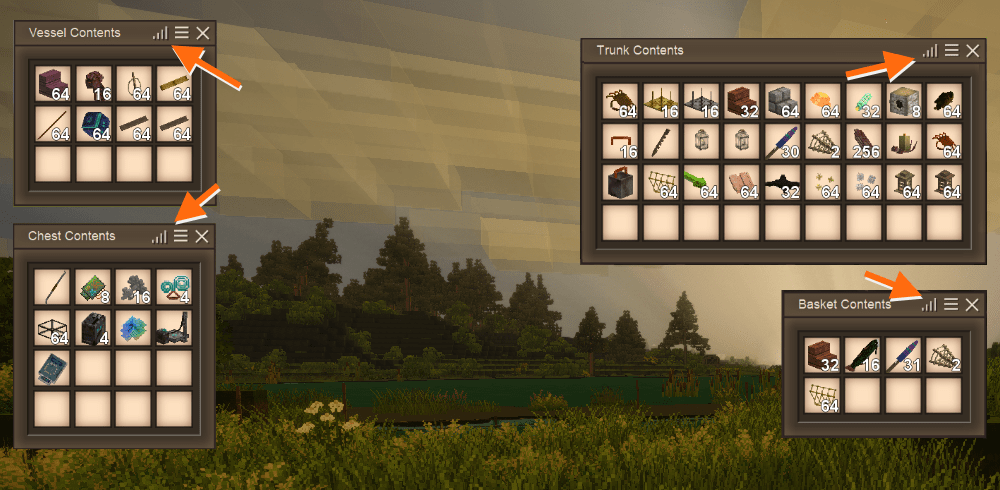
Put vanilla chests, labeled chests, trunks, baskets, and storage vessels back into the crafting grid to convert them into a sortable version of themselves. The sortable version has a sort button (upper right) which will sort that inventory by display name, and merge similar stacks. See the screen shot above for clarification. Includes Carry On and Deep Storage Device support!
Heads up: You can only convert one regular chest into its sortable variant at a time, because two or more chests in one crafting grid stack references the vanilla trunk recipe. Also, you can remove the sort functionality by simply putting that storage container back in the crafting grid.
Note: This mod was only ever intended for "casual clickers" like myself. If you're looking for a feature rich inventory management/sorting system, please check out Xandu's incredible Inventory Tweaks mod.
Italian translation courtesy of Yota!
Japanese translation courtesy of Macoto Hino!
Ukrainian translation courtesy of CakesTwix!
Mod Configuration
OPTIONAL: Now configurable in-game with a GUI! This new feature requires Config Lib and ImGui as dependencies. In-game: simply press [ESC] and click the new Mods Settings button to configure (or press [P]).
If you want to customize this mod the old fashioned way, see %appdata%/VintagestoryData/ModConfig/sortablestorage.json.
"useVanillaTextures": default is false - set this to true for better texturepack compatibility
"sortByDisplayName": default is false - set this to true to sort by display name instead of block/item code
Thanks to Maltiez for the mod configuration gui!
| Mod Version | Mod Identifier | For Game version | Downloads | Released | Changelog | Download | 1-click mod install* |
|---|---|---|---|---|---|---|---|
| 2.4.4 | sortablestorage | 1780 | 5 days ago | sortablestorage_2.4.4.zip | 1-click install | ||
|
Removed a now obsolete patch from being applied when useVanillaTextures is set to true in the mod config file - thanks Denis_NoL | |||||||
| 2.4.3 | sortablestorage | 9380 | Oct 25th at 4:13 PM | sortablestorage_2.4.3.zip | 1-click install | ||
|
New: pt-br translation - thanks Paulovnas! | |||||||
| 2.4.2 | sortablestorage | 22539 | Aug 30th at 3:39 PM | sortablestorage_2.4.2.zip | 1-click install | ||
|
Fix - CarryOn patch for storage vessels - thanks Raisenku | |||||||
| 2.4.1 | sortablestorage | 2836 | Aug 10th at 5:29 AM | sortablestorage_2.4.1.zip | 1-click install | ||
|
Fixed: lang file issues with storage vessels in crafting grid only wtf | |||||||
| 2.4.0 | sortablestorage | 484 | Jul 25th at 6:16 PM | sortablestorage_2.4.0.zip | 1-click install | ||
|
Initial release for game version 1.21 ONLY | |||||||
| 2.3.1 | sortablestorage | 26293 | Apr 18th at 2:35 PM | sortablestorage_2.3.1.zip | 1-click install | ||
|
Compatibility patches for Chute Block Placer mod https://news.kalataka.ru/chuteblockplacer | |||||||
| 2.3.0 | sortablestorage | 4566 | Mar 29th at 5:46 PM | sortablestorage_2.3.0.zip | 1-click install | ||
|
NEW: Spanish (Spain) translation courtesy of C4BR3R4 | |||||||
| 2.2.9 | sortablestorage | 10123 | Feb 9th at 5:43 PM | sortablestorage_2.2.9.zip | 1-click install | ||
|
TWEAK: Increased size of storage vessels in the gui | |||||||
| 2.2.8 | sortablestorage | 10117 | Nov 8th 2024 at 2:59 AM | sortablestorage_2.2.8.zip | 1-click install | ||
|
hotfix | |||||||
| 2.2.7 | sortablestorage | 1491 | Sep 21st 2024 at 3:59 AM | sortablestorage_2.2.7.zip | 1-click install | ||
|
1.20 specific updates | |||||||
| 2.2.6 | sortablestorage | 9970 | Jun 9th 2024 at 3:34 PM | sortablestorage_2.2.6.zip | 1-click install | ||
|
Added CarryOn trunk support to this mod's trunk. If it's enabled in the CarryOn mod config that is. | |||||||
| 2.2.5 | sortablestorage | 2025 | May 12th 2024 at 4:50 PM | sortablestorage_2.2.5.zip | 1-click install | ||
|
Changed default sort order to by block/item code. | |||||||
| 2.2.4 | sortablestorage | 2608 | Apr 17th 2024 at 6:43 AM | sortablestorage_2.2.4.zip | 1-click install | ||
|
OPTIONAL: Now configurable in-game with a GUI! This new feature requires Config Lib and ImGui as dependencies. In-game: simply press [ESC] and click the new Mods Settings button to configure (or press [P]). Thanks Maltiez! | |||||||
| 2.2.3 | sortablestorage | 2713 | Mar 9th 2024 at 7:22 AM | sortablestorage_2.2.3.zip | 1-click install | ||
|
Removed: Extra Chests integration - thanks StarLynx | |||||||
| 2.2.2 | sortablestorage | 1432 | Feb 25th 2024 at 8:06 AM | sortablestorage_2.2.2.zip | 1-click install | ||
|
updated: Italian translation - thanks Yota | |||||||
| 2.2.1 | sortablestorage | 4788 | Nov 10th 2023 at 4:07 PM | sortablestorage_2.2.1.zip | 1-click install | ||
|
Ukrainian translation, courtesy of CakesTwix! | |||||||
| 2.2.0 | sortablestorage | 689 | Oct 30th 2023 at 4:10 AM | sortablestorage_2.2.0.zip | 1-click install | ||
|
Almost the same as before - cleaned up (now) obsolete code, some minor fixes related to api changes, rebuilt with the latest Visual Studio, used new mod template, and lightly tested with the pre-release. | |||||||
| 2.1.0 | sortablestorage | 5417 | Sep 8th 2023 at 2:12 PM | SortableStorage210.zip | 1-click install | ||
|
Fix: Tidied up Carry On/Carry Capacity related integration | |||||||
| 2.0.0 | sortablestorage | 376 | Sep 7th 2023 at 1:54 PM | SortableStorage200.zip | 1-click install | ||
|
NEW: Added mod name to hud | |||||||
| 1.9.0 | sortablestorage | 2984 | Jul 9th 2023 at 4:35 PM | SortableStorage190.zip | 1-click install | ||
|
NEW: Japanese translation courtesy of Macoto Hino! | |||||||
| 1.8.0 | sortablestorage | 2864 | Mar 18th 2023 at 10:00 PM | SortableStorage180.zip | 1-click install | ||
|
Fix: crash because of this VS code refactor:
| |||||||
| 1.7.0 | sortablestorage | 721 | Feb 25th 2023 at 6:44 PM | SortableStorage170.zip | 1-click install | ||
|
FIX: v.1.18 compatibility | |||||||
| 1.6.0 | sortablestorage | 3403 | Oct 23rd 2022 at 2:57 PM | SortableStorage160.zip | 1-click install | ||
|
Added Italian translation courtesy of Yota. | |||||||
| 1.5.0 | sortablestorage | 1698 | Aug 13th 2022 at 5:55 PM | SortableStorage150.zip | 1-click install | ||
|
Recompiled and lightly tested in VS v1.17.0-rc.5 | |||||||
| 1.4.0 | sortablestorage | 674 | Jul 19th 2022 at 3:53 AM | SortableStorage140.zip | 1-click install | ||
|
. v1.17.0-pre.5 and newer code refactor. | |||||||
| 1.3.0 | sortablestorage | 419 | Jul 15th 2022 at 2:01 AM | SortableStorage130.zip | 1-click install | ||
|
Well you're going to need this one if you're using VS 1.17.pre.4. | |||||||
| 1.2.0 | sortablestorage | 419 | Jul 5th 2022 at 11:47 PM | SortableStorage120.zip | 1-click install | ||
|
Well I don't know what changed between pre.2 and pre.3 but it seems that another release is called for. sigh. | |||||||
| 1.1.0 | sortablestorage | 406 | Jul 2nd 2022 at 5:16 AM | SortableStorage110.zip | 1-click install | ||
|
Initial Release | |||||||
| 1.0.3 | sortablestorage | 2013 | Jun 12th 2022 at 9:11 PM | SortableStorage103.zip | 1-click install | ||
|
Writing with coal on a sortable labeled chest now works - thanks @gaborszollosy Certain items causing chest to explode on sort - I couldn't recreate this but shored up the code a bit - thanks @Lohn | |||||||
| 1.0.2 | sortablestorage | 1314 | Apr 25th 2022 at 2:01 AM | SortableStorage102.zip | 1-click install | ||
|
Extra Chests support | |||||||
| 1.0.1 | sortablestorage | 1044 | Apr 10th 2022 at 12:29 AM | SortableStorage1.0.1.zip | 1-click install | ||
|
Carry Capacity support | |||||||
| 1.0.0 | sortablestorage | 521 | Apr 4th 2022 at 3:45 AM | SortableStorage1.0.0.zip | 1-click install | ||
|
Initial Release | |||||||
Fixed in the latest release
Thanks Denis_NoL
Hi SpearAndFang , Thanks a lot for your mod. During game loading have Warning/Errors that seem to be related to your mod. Dispite of that it works nicely.
Would you tell me what I have to do to correct thoses messages.
In advance, thanks for your help.
Denis
Hereafter is the copy of the regeistered part in the log file:
"*": {
"ceramic": {
"base": "game:block/clay/ceramic"
},
"top": {
"base": "game:block/clay/vessel/top/{variant}"
},
"sides": {
"base": "game:block/clay/vessel/sides/{variant}"
},
"inside": {
"base": "game:block/clay/vessel/inside/{variant}"
},
"normal-ceramic": {
"base": "game:block/clay/ceramic"
},
"normal-top": {
"base": "game:block/clay/vessel/top/{variant}"
},
"normal-sides": {
"base": "game:block/clay/vessel/sides/{variant}"
},
"normal-inside": {
"base": "game:block/clay/vessel/inside/{variant}"
}
}
}
Thanks for keeping this updated :]
Noon_og
Sure
but my modding days are mostly over
if you search the modDB I think you will find such a mod
Probably a very naive question, but couldn't this mod just add the sort button mechanic instead of adding another type of chest? I'm kinda worried about updates breaking this mod and all my storage getting wiped.
Jader7777
Many mods are unforgiving when disabling them.
Sorry to be captain obvious but always backup your world prior to making changes to your mod loadout.
Sadly after installing this mod the server lost a lot of progress and data.
If you disable the mod and re-enable it later for any reason (testing, faults, backups etc), all your sortable containers will become static objects that you can't interact with, if you reload the server you have to destroy the container and lose everything that was contained within it.
Modders beware!
can confirm not working anymore
Jader7777
Perhaps the mod description has a clue:
Put vanilla chests, labeled chests, trunks, baskets, and storage vessels back into the crafting grid to convert them into a sortable version of themselves
G'day,
Just tried to install this mod. Doesn't work in single player or on a server.
Anyone else having issues?
Kamulton
Not sure what you mean. If you change the modconfig json file (see Mod Configuration above), then updating this mod should not touch your changes.
The only exception to this is if you change the modconfig file in such a way that you make it invalid, in which case the mod will always overwrite your changes, regardless of whether you update the mod or not.
Is there any way to update this mod without changing the settings that I changed in the json file in the previous installed version?
SpearAndFang
Oh, well, good on you! I'll drop you a line on Discord then. Yes, you're absolutely right that a patch mod would be better than a modified replica. Thus why I asked!
The_Box
If you just want to add more slots to this mods containers, why not just write a patch mod to do that? It would be simple enough to do and compatible with future versions of this mod without muddying up the modDB with another slightly different version of the same mod (that I would probably be asked to troubleshoot because it is so similar).
If you need help with that, I have already written your new mod - took like 15 minutes. You may just want to adjust the numbers.
PM me on Discord or ping me on the VS Discord - SpearAndFang#6757 - and I'll give it to you.
Figured I should go the route of asking permission. Would you mind if I uploaded a version of this mod that essentially combines it with a storage space mod, adding more slots to the sortable containers? I'm getting ready to spin up a new server with some friends and we want to play with sortable containers, but a bit more storage space in them.
This mod is bottled happiness.
SpearAndFang
My question is, is there an option to slow down the spoilage of various materials, including meat, just like you can change vegetables and grains?SpearAndFang Wow, problem exists between keyboard and chair... I had an obvious mod conflict, doh'. Thank you for your time, apologies for my dumbery.
VessPell
Still seems to work fine for me with the latest game version. Just make a labeled chest and then put it back in the crafting grid.
Worked great with charcoal - with other things like chalk you may have to stand close to the chest to write on the label (otherwise it might place the chalk on the ground in front of the chest).
Creating a sortable chest with a sign is a no go right?
SpearAndFang that's understandable. I just grabbed first sorting mod I saw few weeks ago and never went to check if there are any else. Thank you for making this mod all the same.
ChiefKrogan
Sorry no. I'm just limping this mod along for people that still want to use it. Not planning on adding anything.
There's surely some other storage sorting mod you could use.
Could you please add support for Vanilla Variants? Those chests are so pretty but I can't use them becuase the lack of sorting is driving me insane.
Ursiak
The two mods can certainly co-exist without issue (I just tested this to confirm), but this mod pretty much only allows you to convert vanilla storage containers into a sortable variant.
So no, it does not allow you to sort the modified "labelled trunk".
Hi, love this as someone who needed a sort button without any additionals options! Just a question, does it work with a mod called Labeled Trunks? Your mod doesn't seem to be working for me and I'm wondering if it's because of it, but to be honest I also have a lot of different mods that might be the issue haha
Coda_Vanistok
If it isn't easily and consistently recreatable then probably not this side. Not much going on on this side of things unless one of these containers is placed on the ground and you're interacting with it.
Kamulton
I looked at a few storage vessels and they seem to have the same spoilage rates as their vanilla equivalent. Which is intended. If that's what we are even talking about.
yes, but meat spoils quite quickly SpearAndFang
There seems to be a persistent bug with carry-on that causes singleplayer games to freeze without an error and crash. Dunno which side of the interaction is causing it, but I know it's only been happening with sortable vessels so far.
Kamulton
That is outside the scope of this mod. But all storage containers do have an attribute called "spoilSpeedMulByFoodCat" that you could adjust to change perish rates of food.
Is there any way to change the clay jugs so that food spoils slower? SpearAndFang
Any chance we can get the tab key bindable elsewhere for jumping between the sort button and the inventory? Have pretty much always used tab for inventory itself.
I forgot how much I used this mod until I stopped using it because of 1.21 shenanigans. Cheers Spear.
New version up. Beyond CarryOn compatibility patches, not much has changed, testing went well.
Raisenku appreciate the pull request - thanks!
Tehgarin I'm sorry but I can't help you - if you load a world and this mod doesn't load properly, it will brick the sortable containers. Restore from a backup and ensure that your mod loadout is tidy.
Thanks all for the kind words. It's the motivation I need to keep going.
I get an error with Sortable sotrage also. However chests are in game with no lable and cannot open them BUT carry on works fine with mine loaded for 1.21.0
Seems like its a sortable storage issue..
Anyway we could get a 1.21.0 update please please..
Hello, the CarryOn patch seems broken with the latest version of CarryOn for 1.21. This error message pops-up
[Error] Patch 3 (target: sortablestorage:blocktypes/clay/storagevesselsortable.json) in sortablestorage:patches/carryon.json failed because supplied path /behaviorsByType/*/- is invalid: The json path /behaviorsByType/*/- was not found. No such element 'behaviorsByType' at the root path
Edit : I found the issue and opened a PR SpearAndFang
Can't pick up the ceramic storage vessels (using CarryOn) when they have been converted to sortable version. It will open the container instead of pick it up.
New update hype! Take as much time as you need i love this mod.
This mod should be part of the game rather than just a mod. I hope the developers use it in a future game update 10/10
Kuppancs
Sorry no. I'm just limping this mod along for people that still want to use it. Not planning on adding anything.
Would you be able to implement a sorting option for player inventory too?
SpearAndFang I understand :) no worries I must have and forgot
eerino
sorry I don't know what to tell you. All indications are that your world was loaded one time without the mod enabled. Perhaps some other mod prevented the mod from loading. idk.
SpearAndFang I never removed the mod! I just never used it. I could have been more clear.
eerino
That's not a bug per se. If you load the world one time without this mod enabled (for whatever reason) then the storage containers from this mod get broken like that.
You can remove the mod, but before you do so you should remove everything from sortable containers.
BUG (me bug) I applyed this to my two and only double chests, just to try the mod out. I never really ended up needing or using it. After an (ingame) week long travel and back I was unable to open the chests or interact with them at all. So I crossed my fingers and tried to breaking it, expecting everything would drop to the floor. No items droped and the chest was empty when I set it back down. None of my other chests or storage containers have issiues.
Recently, I deleted my back ups accidently. So I accept not getting it back, but I'd like to figure out why so it doesn't happen again.
Its my first run of the game, 50ish hours in. I've lost... whatever was in there lol
To me this only works with oak chests, because they seem to be the default.. But im also using both Wildcraft Trees and Vanilla Variants 🤣
Shakezoolla
No idea, but if I had to guess it is a mod that adds more variants of containers that is breaking the crafting grid recipes. Or this mod isn't enabled.
The mod does not seem to be working for me. I craft the container, then put it back into the crafting grid, but nothing happens. It doesn't show an output for the "new" container and pulling it out of the grid and placing it down does nothing. I am using the latest Config Lib and latest 2.2.9 version of this mod, and I am on the latest 1.20.4 Vintage. The only other container mods that I am using are Carryon and Better Crates. Any idea?
Elorah
It sounds like you are using (and talking about) a different mod
https://news.kalataka.ru/show/mod/367
I can't figure out why the sorting button doesn't appear for me. There's a menu in the top left of my screen, but it hides behind my HUD Clock if I try to click it.
Scarecrow666
No, storage is saved in the saved game itself. There are no other files/considerations But if you load the world one time without this mod enabled (for whatever reason) then the storage chests get broken like that.
You will need to get another copy of the saved game and try again.
So I migrated a save file from one pc to another and while every other mod is working fine the sortable storage chests won't open up and don't drop the content when broken. Is there a file where the storage is saved that I didn't copy? Is it tied to folder locations?
C4BR3R4
Thank you! I have added it for the next release.
Translated to Spanish-Spain
Language file: es-es.json
PRaven
"Put vanilla chests, labeled chests, trunks, baskets, and storage vessels back into the crafting grid to convert them into a sortable version of themselves"
Hey there. I dont know but this mod seems to not work for me. I see no 'sort' button inside containers. Should i press some buttons to show them, or to activate the mod? No errors.
StepMurp
I'm not interested in doing that, no.
There's a couple other sorting mods. Maybe one of them does it already idk
Is there any way posisble to allow this mod to sort the players inventory also?
I'd like to help, but at this point restoring a backup world is the only way to recover those inventories. The moment the world is loaded without an appropriate version of mod installed and enabled for whatever reason (or multiple versions of this mod in the mods folder) the inventories are replaced with unknown blocks and inventories are lost.
Can 2nd what Fredement said, the sortable storage chests don't open at all after updating to 1.20.1. This is super frustrating bc our server has a lot of stuff in sortable storage trunks. Vanilla containers on the server open just fine, but all of the sortable ones just don't open. Tested breaking a couple with barely any items in them, breaking it and putting it back down, changing them back into non-sortable chests. None of those methods worked and they all deleted the items that were in them
I made a backup of the world before changing anything, but I would prefer to avoid going back to the backup if there is some other fix to get it working??
Fredement
No updates planned as it appears to be working aok for me in 1.20.1. I suspect that you've got something else going on there.
Does not work for me in 1.20.1 anymore. Any updates planned soon?
Ozan
Hmm. maybe you have the wrong version, check the Files tab at the top
Vidguy
yes. click on the Files tab at the top. There are different versions listed there. You would need v2.2.6
Is there a version available for 1.19?
Doesnt work for me unfortunately. Icon didnt show up
BraniyaKz
Sure, I'm good with either of those things. Thanks for asking!
SpearAndFang - Would it be okay for me to eventually post an alt version (Or give it to you to post for those interested) that simply applies the sorting behavior to all inventories (that are capable) without having to craft/convert them first?
Fair enough. Thank you!
AdryanaStahr
That would be difficult. This mod will probably add sorting to the labeled trunk mod already though
https://news.kalataka.ru/show/mod/367
What are the odds of adding a compatibility for the Labeled Trunks Mod? =D
Shinji170981
I can't do that. This is probably the mod you want in that case.
https://news.kalataka.ru/show/mod/367
Would it be possible to add Vanilla Variations to the compability as well? :)
I am still on 1.19.8 though, so it will probably only happen for 1.20. Still, would be very happy.
For anyone arriving here and reading the recent conversation...I think we've established (over on the VS Discord) that this mod was not responsible for the issue described below.
@SpearAndFang
I dont renember but i think so. After i disabled this mod i could use the reed thingy without problems.
RachelTGG
This was a "Reed basket (Sortable)", correct?
If so, there's a chance that this mod was the cause of the crash, although I'm unable to recreate the crash.
If it was a vanilla Reed Chest, then this mod surely wasn't the cause of the crash - the two are intentionally very isolated from one another.
I think its this mod that caused a crash when i shifted and pressed H and then released and was looking at the reed "chest". Lost everything in the area too.. goddamn it
https://pastebin.com/azTtsDEm
irRegularGuy646
I'm sure I could, but I have a long laundry list of things on my to-do list so I'm not planning on updating this mod any time soon.
I was going to suggest this mod instead, but I'm not sure if it can do that either.
https://news.kalataka.ru/show/mod/367
Note: if you do remove this mod, be sure and remove all of your stuff from sortable storage before disabling this mod or it will all be lost.
Could you add sort by freshness timer?
gg
DeansOnToast
It's mostly about me keeping a bit of separation from vanilla, rather than muck with the vanilla game directly.
Whats the reason against making the ability to sort default for all storages? Minor faff having to put every piece of storage back through crafting when I dont know why I need to do it.
Still love the mod, just the right amount of QOL for me.
ManaWei
Nope. This is probably the mod you want in that case.
https://news.kalataka.ru/show/mod/367
Think it's an amazing mod but, it's not compatible with Dana's Vanilla Variants.. combining colour coded chests with a sorting system would be amazing <3
Think you can make it work with not just vanilla chests ?
Hey spear, I'm really sorry about my last message i was testing on large chests.. which cant be picked up anyways. It was a me issue, I'm an idiot. I'm sorry! alls fine with your mod
GarethTheGoblin
Sorry I don't know what to tell you. I just tested again with the latest game version, mod version, and CarryOn version and it was all working perfectly. I've always have CarryOn in my loadout and use it extensively.Love that mod.
You sure that you don't have something in your offhand?
Failing that:
1. Go to the Mod Manager and click on Open Mods Folder
2. Make sure that no other versions of this mod in your mod folder. If there are, delete them. Same with CarryOn
3. Go up one folder level and into cache. Delete everything inside that folder
4. Start the game, go into the mod manager, and click "reload mods"
Might fix you up.
Hey, sorry for the message. I was wondering if there's anything i need to do to make this work with carry on? none of my sortable storage can be picked up using carry on. This is on a server
Other non sortable storages can be picked up
SpearAndFang thanks for checking into it. Its just strange because it was working, then I went and updated my mods (the only ones that had updates where ConfigLib, Dana Tweaks, and Sortable Storage) and when I reloaded into the world the unknown texture problem happened. I wonder if something just didn't load correctly. Thankfully I make videos on VS and was able to find clips of opening chests and grabbed screenshots of them all.
KhaosSN
I'd like to help, but at this point restoring a backup world is the only way to recover those inventories. The moment the world is loaded without the mod enabled for whatever reason (or multiple versions of this mod in the mods folder) the inventories are replaced with unknown blocks and inventories are lost.
I tried to recreate what you describe happened and could not. Upgrading from 2.2.3 to 2.2.4 seems fine.
Updated to 2.2.4 and all my sortable chests turned into unknown texture blocks. Reloaded the game, the textures came back but now all the chests cannot be opened. Breaking them just drops the chest and nothing that was inside. Tried reverting back to 2.2.3 and the chests are still unable to be opened now. Please tell me there is some way to fix this? All my stuff for my world was in Sortable Chests. I've already lost the stuff in the forging room due to the upgrade, really don't want to lose anything else.
NEWqwew
This mod does not add a sort button to the barrel UI. My best guess is that you are talking about another mod - probably this one:
https://news.kalataka.ru/show/mod/367
Hello I would like to report a bug that when you click on the sort button in the barrel UI, the liquid inside the barrel is turned into the form of a cube
StarLynx
Thanks, I'll see what I can do!
Reporting an issue with Extra Chests compatibility, upon upgrades chests do not retain their contents and labeled loose text, all get erased, and the issue increases further with bronze variants, tin bronze one works fine but other types break the texture, and rotate west in any placement position and can't be upgraded in the world, only in crafting grid. And as tested with ExtraChest mod alone, all works fine and everything stays during upgrades.
ShamblerDK Probably auto atlas but the texture issue is fixed in 19.4
ShamblerDK
Done - use the latest release
SpearAndFang Could you make this mod compatible with this one?: https://news.kalataka.ru/show/mod/4498
AngryOscar So, are you going to tell the rest of us, which mod that is???
Disregard. Once I installed the mod that allows for more textures, and deleted vanilla variants, it started working. Not sure which one fixed it as I did both at the same time
AngryOscar
I tested and am not sure what you are referring to. The sortable storage vessel has slightly different textures than the normal one, but nothing dramatic or wood like If you are running game version 1.18.x maybe your texture atlas is overflowing. There is a mod to help with that.
https://news.kalataka.ru/autoatlas
Texture glitch when open sortable storage vessel. Looks like wood on the top
NukoSan
Well that looks next to impossible unless:
1. You are still using a 1.18.x game release. In which case you probably have a texture atlas overflow and need this
https://news.kalataka.ru/autoatlas
2. Some other mod is seriously mangling some of the vanilla textures...doubtful but anything is possible.
3. Your game installation is badly broken and needs to be reinstalled.
4. Your mod version is not the right one for your game version.
Also, if you are using a 1.19.x release then install the latest one - there were a LOT of bug fixes in all but the latest release. If you are using a 1.18.x release, use 1.18.15 only. For the same reason.
Got some pink texture issues with the storage crates... https://ibb.co/N2mjrsf
Shinji170981
Well that doesn't sound good. I guess I would - revert back to 1.18.15 again (if necessary) and restore from a backup again. Make sure v.2.1.0 of this mod is in the mods folder.
Then:
1. Make sure that no other versions of this mod are in your mod folder. If there are, delete them.
2. Go up one folder level and into cache. Delete everything inside that folder
3. Start the game, go into the mod manager, and click "reload mods"
At this point afaic, that storage should be functional again.
If so, you have two options (Not sure if #2 will work. #1 would work for sure.):
1. Break sortable storage, put it back in the crafting grid to revert it to vanilla, place it and put inventory back in it. wash rinse repeat
or
2. Attempt the 1.19 upgrade again, much like above
- download the latest mod version, update the game version.
- go into the mods folder and make sure everything is neat and tidy
- delete the cache folder contents
- go into mod manager and "reload mods"
Hello SpearAndFang, I do have a small problem with the mod.
Yesterday, i made a backup of my 1.18.15 world, which was running the version 2.1.0 and everything was working fine, so i updated to 1.19.1, updated the mod to 2.2.1 and now i am unable to open the chests anymore.
I tried downgrading the game back to 1.18.15 and downgraded the mod as well back to 2.1.0.
Even after this and restoring the backup and deactivating all other mods, except this one, i am unable to open my chests anymore....
Any idea what i could do, to fix this issue?
Thanks a lot in advance.
Willrun4fun
Yes. Break em, put em back in the crafting grid. If you don't do this you will lose your storage and contents!
If I were wanting to remove this mod would I just need to convert any chests back to standard first?
ah, sorry about that. I have an auto-update mod to keep all of my mods up to date. Thank you for the notice!
@Ery,
Appreciate the report but like I told TheOnion, the latest release sortablestorage@2.2.0 is only for the 1.19.x prereleases of Vintage Story.
You are running Game Version: v1.18.15 (Stable)
SpearAndFang
I had the same crash just now in creative. Below is the report.
Running on 64 bit Windows with 32618 MB RAM
Game Version: v1.18.15 (Stable)
10/31/2023 1:30:40 PM: Critical error occurred in the following mod: sortablestorage@2.2.0
Loaded Mods: aculinaryartillery@1.0.15, betterruins@0.2.4, carpet@1.0.1, chiseltools@1.9.2, hqzlights@1.1.1, driedpeat@1.0.3, dye_recipes_fix@1.0.0, extrachests@1.7.0, fancysky@1.0.6, TA_fieldsandplateaus@1.0.2, lumbersling@1.1.0, millwright@1.1.1, mbpc@1.0.1, morecrystals@1.1.0, leadroof@1.3.4, natshumanskin@1.0.0, resinglue@0.0.3, roas@1.0.0, rooffix@0.0.1, smokychimneys@1.0.0, sortablestorage@2.2.0, ssppvv@1.0.5, litbrig@0.5.0, game@1.18.15, animalcages@2.2.0, betterfirepit@1.1.2, betteroutline@1.2.8, betterruinslootchanges@0.0.2, carryon@1.6.0, expandedfoods@1.6.8, farmlanddropssoil@1.4.0, fieldsofsalt@1.1.2, freedomunits@1.1.2, fromgoldencombs@1.4.21, glowingprojectiles@1.1.3, hudclock@3.3.0, medievalexpansion@3.11.1, prospecttogether@1.2.4, resingluetools@0.0.5, scythemold@1.0.0, simplestep@1.0.8, stonebakeoven@1.1.1, stonerailings@1.1.0, temporalstormtimer@1.1.1, useplanksinpitkiln@1.1.1, vtpp@1.1.0, creative@1.18.15, survival@1.18.15, VsWaypointSharing@1.0.6, whatbagwasthatagain@1.0.1, woodbarrels@1.0.4, woodchests@1.1.0, workbenchexpansion@1.7.0, plumpkins@1.0.1
System.TypeLoadException: Could not load type 'Vintagestory.API.Client.MultiTextureMeshRef' from assembly 'VintagestoryAPI, Version=1.0.0.0, Culture=neutral, PublicKeyToken=null'.
at SortableStorage.ModSystem.BlockGenericSortableTypedContainer.OnBeforeRender(ICoreClientAPI capi, ItemStack itemstack, EnumItemRenderTarget target, ItemRenderInfo& renderinfo)
at Vintagestory.Client.NoObf.InventoryItemRenderer.GetItemStackRenderInfo(ClientMain game, ItemSlot inSlot, EnumItemRenderTarget target, Single dt) in VintagestoryLib\Client\Render\InventoryItemRenderer.cs:line 318
at Vintagestory.Client.NoObf.InventoryItemRenderer.RenderItemstackToGui(ItemSlot inSlot, Double posX, Double posY, Double posZ, Single size, Int32 color, Single dt, Boolean shading, Boolean origRotate, Boolean showStackSize) in VintagestoryLib\Client\Render\InventoryItemRenderer.cs:line 196
at Vintagestory.API.Client.GuiElementItemSlotGridBase.RenderInteractiveElements(Single deltaTime) in VintagestoryApi\Client\UI\Elements\Impl\Interactive\Inventory\GuiElementItemSlotGridBase.cs:line 509
at Vintagestory.API.Client.GuiComposer.Render(Single deltaTime) in VintagestoryApi\Client\UI\GuiComposer.cs:line 695
at Vintagestory.API.Client.GuiDialog.OnRenderGUI(Single deltaTime) in VintagestoryApi\Client\UI\Dialog\GuiDialog.cs:line 379
at Vintagestory.Client.NoObf.GuiManager.OnRenderFrameGUI(Single deltaTime) in VintagestoryLib\Client\Systems\Gui\GuiManager.cs:line 318
at Vintagestory.Client.NoObf.ClientEventManager.TriggerRenderStage(EnumRenderStage stage, Single dt) in VintagestoryLib\Client\Util\ClientEventManager.cs:line 185
at Vintagestory.Client.NoObf.ClientMain.TriggerRenderStage(EnumRenderStage stage, Single dt) in VintagestoryLib\Client\ClientMain.cs:line 790
at Vintagestory.Client.NoObf.ClientMain.RenderToDefaultFramebuffer(Single dt) in VintagestoryLib\Client\ClientMain.cs:line 983
at Vintagestory.Client.ScreenManager.Render(Single dt) in VintagestoryLib\Client\ScreenManager.cs:line 668
at Vintagestory.Client.ScreenManager.OnNewFrame(Single dt) in VintagestoryLib\Client\ScreenManager.cs:line 643
at Vintagestory.Client.NoObf.ClientPlatformWindows.window_RenderFrame(FrameEventArgs e) in VintagestoryLib\Client\ClientPlatform\GameWindow.cs:line 77
at OpenTK.Windowing.Desktop.GameWindow.Run()
at Vintagestory.Client.ClientProgram.Start(ClientProgramArgs args, String[] rawArgs) in VintagestoryLib\Client\ClientProgram.cs:line 313
at Vintagestory.Client.ClientProgram.<>c__DisplayClass9_0.<.ctor>b__1() in VintagestoryLib\Client\ClientProgram.cs:line 129
at Vintagestory.ClientNative.CrashReporter.Start(ThreadStart start) in VintagestoryLib\Client\ClientPlatform\ClientNative\CrashReporter.cs:line 93
@TheOnion
The new version is for the 1.19 prereleases only. What game version are you running?
fwiw, I just tried to recreate that crash in 1.19.0 pre4 and couldn't.
Then newest version crashes the game in creative mode if you wanna type something in the search bar
Katlamos Appreciated! I've got a very long to-do list and mod integration isn't a priority for me, but I will put your request on my list.
Katlamos I use Xandus Inventory Tweaks with my Wood Chests mod
I love all your mods Spear! Would you be able to add support for the Wood Chests mod linked here?
Sorry, I was impatient
Craluminum Please stop spamming the modDB with nonsensical comments. A mod is only obsolete when the mod author decides it is. Your opinion is irrelevant.
Finally obsolete? Xandus Inventory Tweaks now adds gui SORT BUTTON to every existing inventory
new release for 1.18. For the brave and the bold.
As always, since this mod mucks with storage containers I highly recommend you make a backup first.
SpearAndFang thanks for the info, with that in mind I think ill remake all of my copper chests so I can use this.
not to worried about a backup though I colllected all this crap once I can do it again if it disapears.
@Mendall - Agreed. This mod will work properly with extra chests if you start using both at the same time, or add extra chests afterwards. If you add this mod after you already have some extra chests placed in the world, you'll have to break those seemingly broken chests (which will dump their contents) and then place them again.
Regardless, make a backup before you add/remove any storage type mods. Or any mods really ;)
be careful with this one if you run a lot of mods. I installed this and all my copper chests from the more chests mod changed to comman chests and could not be opened at all. luckily removeing it put everything right.
full disclosure I use an unusualy large amount of mods so its no telling what it was conflicting with.
@MIghtyGooga I cannot do that, so sorry!
Any chance wyou can add compatibility with WoodenChests mod? The one that allows you to build all wood types chests?
Released v1.3.0 which is a required update for people using Vintage Story 1.17.pre.4.
EDIT: Use v1.4.0 for v1.17.0-pre.5
Devestatio I did add support for Carry Capacity and Extra Chests back in v1.0.3 and tested both aok under 1.16.5. But I've heard that 1.16 can be a little unreliable when it comes to applying such patches. Nobody has reported that it doesn't work so I can only assume that it does. shrug. And yes, there is no support for other modded chests, just vanilla and Extra Chests.
@SpearAndFang I understand that 1.0.3 is for 1.16, but the mod support for Carry Capacity and Extra chests was an update you only added on the 1.17 version, at least that's what you said before, and based on the file date, as well as the fact that the sort button doesn't show up on extra chests (on the v1.0.3 for 1.16 file), also confirms the lack of support on the modded chests, unless there is some kind of config option I am not aware of?
Devestatio but...but...that's what the previous version is there for (v1.0.3). Other than that, the two versions are identical. I'm confused.
Any chance we could get the mod support on 1.16 as well please? I know that many, like myself only play the release versions, not the pre versions, and 1.17 is still going to be a while before release.
Devestatio Correct
"Now with Carry Capacity (link) and Extra Chests (link) support...and a brand spankin' new sort button!"
I am guessing since I didn't see the 1.16 file updated, this update only applies to 1.17?
Updated for 1.17.x
This mod only works with vanilla (unmodded) storage, extra chests, and carry capacity. No other mods, sorry.
Does this not work with Vanilla Varients?
New version up - thanks again gaborszollosy, Lohn
SpearAndFang - Ahh, that makes sense as to why their code directs to a folder on their desktop, then. It's probably from when they tested the code and a leftover path. I tried the other mod by Xandu and it doesn't crash - probably because it sorts via IDs, and something about your sorting method might be different somehow? I wouldn't know, but I figured I'd mention that if it helps fix your mod. :) It's great to have the UI and light-weight sorting this mod gives.
@Lohn - Thanks, I'll see if I can recreate that. FWIW, that user location is not mine, no. "Nexrem" contributed some code to the vanilla game a while back and now his name appears in a lot of crash logs for some reason.
So, I just encountered a crash when clicking sort on my chest. I'll post the crash error, but I notice it's refering to a user location that might be yours, rather than anything on my PC which might be part of the reason; not entirely sure. It seems it couldn't sort an item, maybe from being modded or some other issue - but it sorts stuff like ores fine up until now. I'll attach a picture of the inventory I'm sorting, too.
Crash log:
Game Version: v1.16.5 (Stable)
Loaded Mods: armordurability2@1.0.0, ancienttools@1.4.3, backpackpackplus@1.0.3, betterarchery@3.0.0, bettercrates@1.4.1, betterpoultice@1.0.0, buzzwords@1.0.0, cavecontent@1.0.1, composter@1.0.4, cottagewindows@1.0.8, craftables@1.1.1, cralutweaks@1.0.1, detonate@1.0.0, extrachests@1.5.2, fulldrop@1.0.0, reducedarmornegatives@1.0.2, mineralinguistics@1.0.0, moredrifterloot@1.5.4, moredrygrass@0.2.0, necessaries@1.1.2, nomolding@2.0.0, nooffhandhunger@1.0.0, orepulverizer@1.1.1, preservationmod@1.0.0, quickerbarrel@1.1.0, simpleelevator@1.3.0, sortablestorage@1.0.2, stackables@2.0.5, locustmod@2.3.5, usefulscrap@2.0.2, viesblocks@2.0.4, viescraftmachines@1.17.1, visibleore@1.0.1, game@1.16.5, captureanimals@2.1.1, carrycapacity@0.6.5, easylightlevels@1.0.2, extraoverlays@1.1.0, fancyplanters@1.0.5, farmlanddropssoil@1.4.0, hudclock@2.7.0, tpnet@1.5.1, creative@1.16.5, survival@1.16.5, xlib@0.6.9-rc.1, xskills@0.6.9-rc.1
2022-06-08 3:58:41 AM: Critical error occurred
System.InvalidOperationException: Collection was modified; enumeration operation may not execute.
at System.ThrowHelper.ThrowInvalidOperationException(ExceptionResource resource)
at System.Collections.Generic.List`1.Enumerator.MoveNextRare()
at SortableStorage.ModSystem.GuiDialogSortableBlockEntityInventory.CollapseStacks(SortedDictionary`2 dictionary)
at SortableStorage.ModSystem.GuiDialogSortableBlockEntityInventory.OnSortClick(Int32 num)
at SortableStorage.ModSystem.GuiElementIconItemGrid.OnMouseDownOnElement(ICoreClientAPI api, MouseEvent args)
at Vintagestory.API.Client.GuiElement.OnMouseDown(ICoreClientAPI api, MouseEvent mouse)
at Vintagestory.API.Client.GuiComposer.OnMouseDown(MouseEvent mouseArgs)
at Vintagestory.API.Client.GuiDialog.OnMouseDown(MouseEvent args)
at Vintagestory.Client.NoObf.GuiManager.OnMouseDown(MouseEvent args)
at Vintagestory.Client.NoObf.ClientMain.OnMouseDown(MouseEvent args)
at Vintagestory.Client.NoObf.ClientPlatformWindows.Mouse_ButtonDown(Object sender, MouseButtonEventArgs e)
at System.EventHandler`1.Invoke(Object sender, TEventArgs e)
at System.EventHandler`1.Invoke(Object sender, TEventArgs e)
at OpenTK.Platform.Windows.WinGLNative.WindowProcedure(IntPtr handle, WindowMessage message, IntPtr wParam, IntPtr lParam) in C:\Users\Nexrem\Desktop\transfer\opentk\src\OpenTK\Platform\Windows\WinGLNative.cs:line 792
at OpenTK.Platform.Windows.Functions.DispatchMessage(MSG& msg)
at OpenTK.Platform.Windows.WinGLNative.ProcessEvents() in C:\Users\Nexrem\Desktop\transfer\opentk\src\OpenTK\Platform\Windows\WinGLNative.cs:line 1551
at OpenTK.GameWindow.Run(Double updates_per_second, Double frames_per_second) in C:\Users\Nexrem\Desktop\transfer\opentk\src\OpenTK\GameWindow.cs:line 369
at _7zNxEbLnuy6Bq08TdMSIu9ZbrKf._vvUTh6X5xLRNnjtX2xSE7z8yMeh(_SUsdg1ytavxaRcNNkhfDrODGhGP , String[] )
at _yA4PJazdKq1OMm8H6js6v5AhQB._vvUTh6X5xLRNnjtX2xSE7z8yMeh(ThreadStart )
-------------------------------
Picture of current items I'm sorting: https://imgur.com/a/HKq1iya
Let me know if anything else could help figure it out. :) I love this mod. I do have the chests stacked on top of each other currently, and sorted the bottom chest - but I don't think that would make a difference. (They're trunks)
@gaborszollosy - there appears to be a rather odd thing going on with charcoal specifically. But it appears that if you target the top of the chest rather than the front you can write on it, That doesn't seem to be an issue at all for other things like chalk. Weird. I'll investigate. Thanks!
Great mod! Thanks for this. One question though: how do I write the label on the container once it's placed? The charcoal just stacks in front of it for me. Thanks!
I've done it. It's the latest version. And thanks!
GruntyThrst
Wonderful and simple QoL mod! Would it be possible to support Dauron's "Extra Chests" mod as well? I want that extra storage space but I hate giving up the sorting and automatic stack compression I get with the sorting chests.