
Mods / Toolsmith
Author: JonR
Side: Both
Created: Apr 1st at 7:15 AM
Last modified: Oct 18th at 7:54 AM
Downloads: 94082
Follow Unfollow 1725
Recommended download (for Vintage Story 1.21.0 - 1.21.5):
toolsmith_1.2.14.zip
1-click install
Version 1.2.X is here!
A MASSIVE thanks to ODs of Reforged Tools! Thanks to their help with various tool parts, this version has exactly what I wanted to add since the start - proper tool rendering for your tools based on the parts they are made of! And using their awesome style of tools seen in Reforged Tools as well! All of the vanilla Tinkered Tools now will show their respective parts and I think it looks absolutely incredible! You will have to re-build your tools from the base pieces to construct the data needed for the rendering, but otherwise it should work! Do let me know of any issues that may arise on the Official Discord, please. Be sure to grab the right version for your version of Vintage Story, the main download is for 1.20.12 and below, while the rc.1 version is for Vintage Story 1.21! This version also removed the old placeholder handles entirely, and any that still exist will be unknown items. If you are starting a new world or this is your first time downloading the mod, you don't have to worry about this! It's only for anyone who is updating old worlds and/or updating the mod! If you experience any issues, first try clearing the config and the mod cache! The config has been overhauled a bit as well, so resetting that is likely a good idea for everyone. More modded tool support and additional addons/renders for tools to come in due time though!
Keeping these around just in case it's still useful for some! For most people, use the most recent version, and these likely won't effect you!
Before updating to 1.1.4!
If you edited the configs already and wish to keep your settings, copy the config files out of the config folder before you update and start the game! Configs will now automatically update and regenerate themselves with every new mod version! This makes it easy for everyone, no more having to manually reset them, unless you want to make changes everything is handled automatically! If you wish to make changes, just look in Toolsmith.json at the very top to turn this off. If you run a server, any changes to your configs should be sync'd with clients now.
Quick notice for version 1.1.0+!
If you used Toolsmith before this, I HIGHLY recommend that you back up your save before updating just in case, as a good bit of the core functionality has been reworked and made more dynamic! Also please delete your old config files and let the mod make new ones, default settings have changed a good deal, and old settings can be bad or cause trouble! If you are loading up an old world from before 1.1.0, you will need to run the Remapper that should pop up when you join, and then restart your game after it finishes. If you are on a server, your server admin has to do this and restart the server! Mod page has been updated with the new info, and I am in the middle of adding in the requested Handbook pages as well! Cause of this rewrite, I wanted to get it done and out along with a bunch of fixes, and mechanics have changed so now I can spend time writing better handbook info pages.
This is Toolsmith! Inspired by the old Toolworks mod and similar, but I rebuilt it from the ground up in my own way with two driving goals behind the mod. The first one is the base idea of giving your tools a bit more customizability and reusability by giving each part a durability, and the second is to create a more realistic feel for your tools. If this sounds like a change you've always wanted, keep reading on! It's been designed from the ground up to work alongside Smithing Plus, but it isn't mandatory, just recommended!
Thanks for giving it a look, and if you read this far I hope you enjoy the idea already - feel free to leave any questions or comments in the Toolsmith Thread on the Official Vintage Discord, or down below in the comments! Beneath here is a bit more of an in-depth breakdown of how the mod currently works, and what it involves, so please give it a read if you have further questions. It'll be updated as the mod updates, but it's a lot to handle on my own! Also - if you feel so inclined and able, any donations are accepted at the link at the donation tab above, or if you want to check out the source code, follow the Github link up top as well!
I wanted first and foremost to make it a system that instead rewards the player for interacting with it instead of penalizing, and most importantly, will work out of the box with any mod's tools so long as it is configured properly. To this point, if there are any mods you find do not work immediately, let me know and I can add compatability to the default configs! All tool and part detection and stat lines are fully exposed in the Config files, so adding compat or tweaking things should be as easy as just editing them. It should also be possible to add in your own materials for handles or bindings as you please, or adjust the default settings I set up! If you opt to stick to the vanilla method of just using sticks and no binding material? Your handles and bindings will have the same durability as a vanilla tool of the same teir. The main change on top of this is that your tool's head will be more durable (currently 5x vanilla tool tier durability), and if you keep it well maintained, it will last for a very, very long time.
This loops back to the second driving goal, a more 'realistic' feel for your tools. A real tool could stay functional for generations if it was well-kept, and as a friend of mine joked around with, 'If I bought an axe and it broke after chopping down three large trees, I'd be pissed! I'd demand my money back!' A big change Toolsmith makes is a deliberate step away from that more 'Survival Crafter' idea of consumable tools, and tries to make something a bit more like Valheim if you have played that. The cost is shifted a little away from the metal, and more to the handles and binding materials of your choice.
-- General Overview --
Right now, Toolsmith changes exactly that, your tools! It classifies them into one of two types, a Tinkered Tool or a Smithed Tool. A Tinkered Tool is a tool that follows the vanilla conventions of a Tool Head on top of a Stick to craft that tool, while a Smithed Tool is named such because it either has just a one-step process like smithing a Chisel or has a complex crafting recipe that lacks distinct generic 'parts', but this is expanding to include more and more. Both of these tools can also be classified as Blunt, which means it has a static Sharpness level and a much lower chance to damage the tool head on any use.
Tools now have a second visual bar on them if they are not blunt! This second bar represents how sharp the tool is, and it is important to keep your tools from getting blunted if they aren't already supposed to be. For a quick overview, Sharpness will wear down as you use the tool just like Vanilla Durability, but as it lowers, the efficiency of the tool will slowly decrease. When you use a fully sharp tool, there is a small period where none of the parts - should it have multiple parts - will take any damage. This doesn't last too long as that level of sharpness will quickly deteriorate, but it is a reason to fully sharpen them when you choose to! After this though, the handle and bindings of a tool will take damage again, but until the head gets more dull it still might be able to go without chipping or taking durability hits.
As the tool gets more dull through use, this chance to damage the head will go up until it is always happening on every use - to remedy this, you will want to hone your tool on a Grindstone or Whetstone! While your tool gets more use and becomes duller, it slowly incurrs a steady chance of acquiring a Drawback. Drawbacks are small debuffs that will effect one part of the tool or another, like the head chipped a nasty chunk out of it and is at risk of more damage to that spot, or maybe a fracture starts to form in the metal and if you keep straining it, it could entirely crack apart. ( -- Drawbacks are not currently implemented yet, but are in progress! -- )
The durability bar still functions like it should, but for a Tinkered Tool it will visually display whatever durability is the lowest in your tool. That means if you use a Handle that is almost broken in a fresh tool, it will reflect that!
To go along with the basic description of Sharpness above, I'll break down the more specific points of the math involved and the curve calculating when and what exactly happens. This may get a bit math-intensive, so it might be hard to understand for some people!
Durability Damage -
Probably the biggest factor here, the durability. When the tool is at or above 98% sharpness, no part of the tool will be damaged if you use it, but this still consumes a point of Sharpness. This is true for both Smithed tools and Tinkered Tools! After this point, the "Head" of the tool - or in the case of a Smithed tool the tool itself - will have a flat (and configurable) chance to get damaged, by default it is 15% likely to take damage on any use. Should the tool drop to a completely dull state at 0 sharpness remaining, you will incur a guaranteed drawback and should you choose to keep using this tool in this state, the head will take double the durability damage. You probably should sharpen it at this point!
Handle and Binding -
For tools with a handle, binding or other parts, the bindings will start to damage after the tool drops below 98% sharpness, and the handle will start to damage after it hits lower then 95%. Below these points though, it is a guaranteed chance to damage barring other modifiers on the tool like a grip or treatment. But below this point Sharpness will not effect the chances.
Tool Speed -
While your tool is sharp, at or above 90% sharpness, you have a slight speed bonus since the tool is so sharp! It comes out to a small increase of 5% to the speed of the tool. Conversely, when the tool is starting to get blunt, it will be harder to use effectively and you will have a 10% speed penalty. It isn't too much, and better parts can still easily offset this, but it's there to encourage you to hone the tool back to max!
Drawbacks - (while not implemented yet, it will be in the future!)
When your tool is above 80% Sharpness, there is no chance for anything to go wrong with it! After this point, it is a slow curve upwards to a small chance maxing out at 20% sharpness remaining, after which the chance remains constant. So the more dull the tool, the higher the chance for something to go wrong with it! But, your tool can only ever have a single Drawback at a time, and it can be repaired in different ways depending on the Drawback in question. More to come on this when it is further implemented!
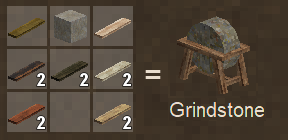
These are both used to re-sharpen a tool, in exchange for damaging the Tool or Tool's Head durability! The Grindstone can be used any time and won't really wear down since it's such a large chunk of stone, but Whetstones on the other hand are a more portable form of sharpening your tools. They are knapped from any knappable stone to make a flat surface on which to try and hone your tools, but they tend to wear out fairly quickly and only last about three full sharpens before you'll have to grab another. There will be upgrades to these to come that last longer, or provide a better curve for the damage and resulting in less durability damage overall, but they are in progress. For now, it is better to sharpen once and for a long time, as the longer you sharpen your tool for, the less damage it will take. But if you frequently oversharpen your tools, you will find them wearing down a lot faster!
This one will be shorter then the Sharpness at least! But it still goes hand in hand, of course! By default each 'tick' of sharpening will return 1% of the total Sharpness, so that it is now consistant how much is built up and how long it will take to go from 0 to 100.
Durability Damage -
When you start honing your tools, instead imagine this works from reverse compared to Sharpness's effects - starting at 0% sharpness and working up to 100%. The honing math is based on the duration you have been honing the tool; the overall sharpness % you have regained during that honing session, not the sharpness levels itself! It is important to keep that in mind for these percentages.
From 0 to 20% of the total sharpness, the total sharpness honed will be consumed from the durability of the tool or tool's head at a 1 Sharpness for 2 Durability. Then it will gradually decrease linearly as it goes from 20% total sharpness honed to 40%, at which point it is an even 1 for 1 ratio. After this point though, to encourage longer periods of honing, very quickly drops off to a 5% chance to damage the head at all at 50% Max Sharpness. After this point it sits at a constant 5% chance to actually damage the durability! So sharpening once for longer periods and maxing it out gets the most out of it!
There are a few ways you can put together your Tinkered Tools now!
To build any Tinkered Tool, you can take the Tool Head you want and hold it in your main hand, then place a Handle material in your offhand. Now just hold rightclick to bundle them together and you will produce a single item, a Head and Handle pair! This intermediary step lets you set aside a head with a handle before you make the full tool, but they do not stack. When you want to actually construct the two into your tool proper, you can optionally grab a Binding material and hold that in your offhand once again and hold rightclick while holding the Part Pair in your main hand just like before. Even without a binding this works - and after a bit of crafting, you'll have a complete tool!
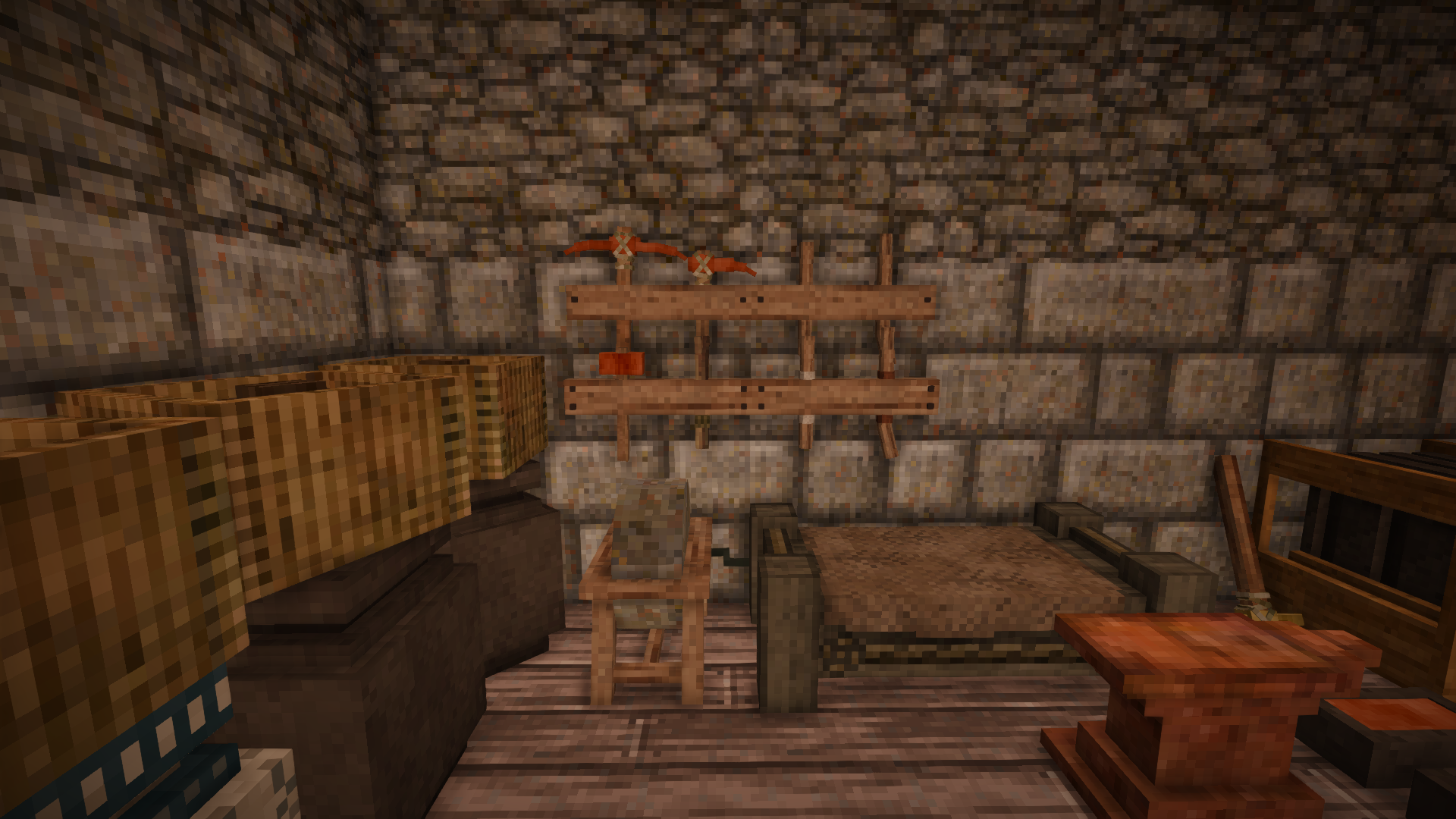
When you have a Saw, you can craft yourself a Workbench, and those slots in the middle of the table can be used to craft tools. Take a look at the icons and the In-World tooltips when you glance at any slot for which part goes where, and once you have all your parts in their slots, take a hammer and right click any of them a few times to craft your tool together!
If you wish to use the Grid Crafting method, it must be enabled in the mod settings. This is disabled by default just to clear up RAM and lower the boot time for the server, since it was only going to be growing bigger and bigger with the shear number of recipes being created. If enabled, procedurally generated recipes for every handle, head and binding are created so any combination can be used to construct a Tool.
To Deconstruct your tools before they break, all you have to do is take the tool in question to your Grindstone or your Workbench. If you are using your workbench, look at the Vise to the left side of the workbench and hold rightclick on it with the tool you wish to deconstruct. If you are choosing to use your Grindstone, you can just do the same but anywhere on the block. No matter what method you choose to use, if your Binding material is damaged at all you will be unable to recover it successfully since it needs to be damaged to take apart the head from the handle without breaking those pieces any. So please be aware if you make any mistakes constructing your tool, be sure to take it back apart before you use it!
Or a metal-based smithed tool!
You will need a Workbench to start a proper reforge as you need a nice surface and some extra tools (supplied from the toolbox on the Workbench itself) to prepare the item and get it ready for reforging. Over to the right of the Workbench, infront of the Toolbox, is the proper place for it. If you have a tool head or smithed tool that has less then 90% durability remaining in it, just put it down on your workbench and grab your smithing hammer to give it a nice whack with Rightclick to properly prepare it for reforging. This will convert it back into a Smithing Recipe workpiece, but you will notice that based on the amount of damage that the tool sustained before this, some portions of the metal head will be missing and need replacing or that a bit of metal has been bent out of shape. This is where Smithing Plus comes in handy! Using it's Smithing with Bits you can easily patch this up without using a full ingot and in return your head will be almost brand new once more!
See the above dropdown for how to use your Workbench to Craft!
-- The Tool Types --
These types of tools are the main meat of the mod! These tools are where you can put more care and effort into producing them, make a better proper handle, give it a grip, maybe even treat the wood, and finally secure that head on better with a proper binder. There are a few options for putting them together, so for now pick whatever you please. Because vanilla has no requirements for binding materials, you can opt to not use one - and instead just have to slap that tool head back on the handle when it comes off again. Just check the tooltips for the Heads and Handles to see their remaining durability percentage when your tool might fall apart. In addition to this, all valid Handles, Bindings and Tool Heads will have tool tips added to them that indiciate what part they are as well as if they are looking to be in a decent condition or not. Check the dropdowns for a bit more on each of these part types! Generally they are organized with the cheapest and weakest at the top, and the more expensive and better options following.
These will depend on what tool you are looking to craft, but the materal choice is still the most important. The base durability of the basic 'vanilla' tool is what determines the base for the others on your tools. So Iron or Steel tools will have a similarly larger health pool like in Vanilla over Bronze or Copper, and of course the use-speeds always get better with better metals. This is to keep a similar level of scaling that is in base game tools - even allowing for purely vanilla values for use time - while still expanding on it with care. The only default change from Vanilla is that a Tool's Head will have a part durability that is 5-times that of the base tool, making it a good bit more reusable even if you are slapping them on sticks! This is also configurable in the options though, and can be tweaked as you please.
When it comes to Tool Sharpness, you can either grind the full tool, or just the tool head alone, and it will hone the item. Some tools have a Blunt Head which wont need to maintain a sharp edge to keep it effective, instead they will just have a small chance for taking damage on use that remains flat the whole life of the tool. This only effects the head though, not the handle or bindings. A solid block of metal for your smithing hammer is pretty unlikely to wear down just from using it as it was intended!
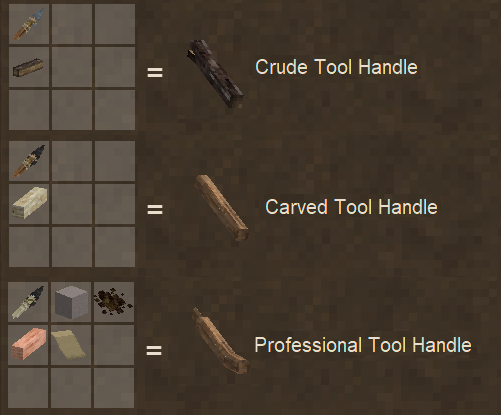
There are four different classifications of handle you can use for a tool, the better handles also take some strain off the bindings, and let them last longer:
- The vanilla stick - It's really nothing special! Default stats all around.
- Bone - It's a little better then a stick, providing a small boost to the durability, but you still might be better off making a proper handle.
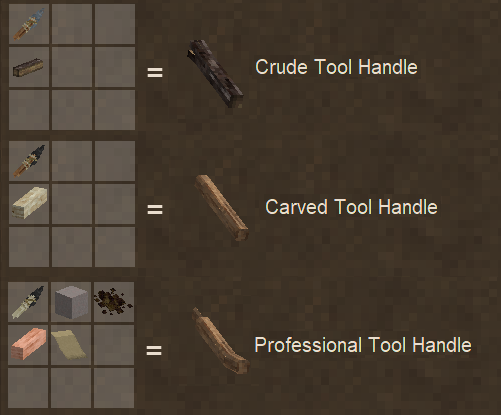
- Crude Handles - Take a knife to some spare firewood to shape it a little better and it can work a little better over a stick, but otherwise isn't too noteworthy. You can add a grip to it, but it's unlikely treating this wood will do much to help.
- Carved Handles - When you have a Saw, or another way to make support beams, instead take this properly cut piece of hardwood and carve that into a handle! It lasts a good bit longer over the Crude, and you can also treat the wood!
- Professional Handles - These take a bit more of an investment, but perform the best. Similarly crafted like a Carved Handle, except the addition of some abrasives in the form of sandpaper (Pitch Glue, Sand of any type, and Parchment) to help give a more ergonomic shape to the handle. This too can have it's wood properly treated, and a grip attached.
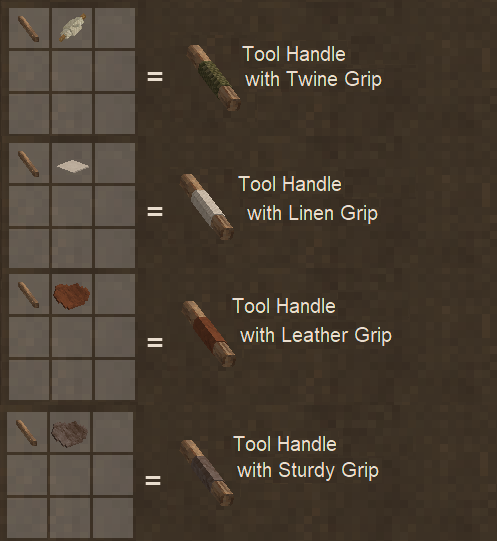
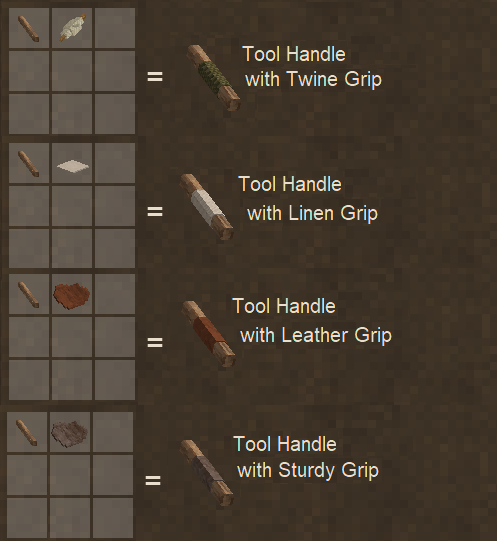
Adding a grip to your tool can make it easier for your Seraph to use that tool a little faster, and thanks to having a proper grip, sometimes a proper swing will negate any damage to the handle, extending it's use! Currently there are a few options for grips, but don't go wasting that sturdy leather on a crude tool handle (or if you really want to pull a power move... go right ahead):
- Twine Wrapping - It helps keep your hands on the tool, but isn't the most comfortable to hold. It'll give a small chance to strike true.
- Linen Cloth - If you have the linen to spare, this can help give a bit of a use speed boost as well as a higher chance to strike true over Twine!
- Leather - A right proper grip material, with bonuses similar to linen, leather increases them just a bit further.
- Sturdy Leather - The best grip, if expensive to make. Even better over Leather, this one might be for those very well-off Seraphs! But don't waste this one on a Crude Handle!
Finally, a grip isn't required, either! Maybe you don't have any materials to spare, or any on hand, so a lack of grip is as valid as having one! It just, well, won't provide any bonuses of course!
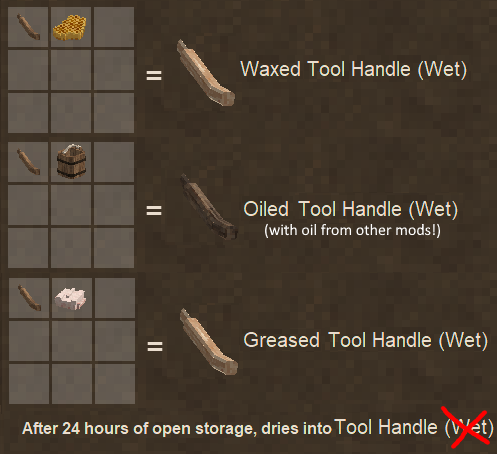
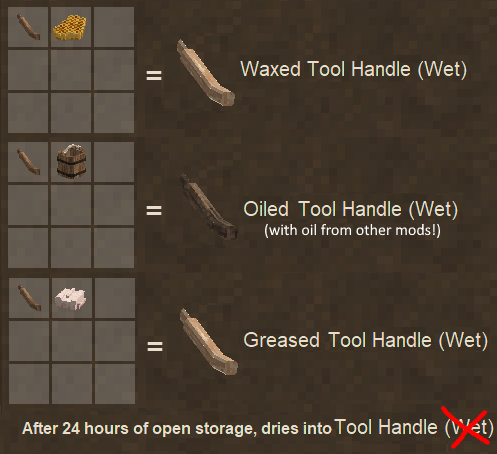
Inspired by medieval methods of treating wood, there are a few options on hand to protect the handle from the elements that make sense for the time:
- Fat - Coating the handle in fat and letting it dry for a day will protect the wood a little better. This provides a decent bonus to the handle's durability when used!
- Beeswax - Using beeswax instead can better seal the wood, and after a day of drying, provide a better durability boost over fat.
- Oil - The best treatment for your tool handles is coating it with Flax or Seed oil and letting it soak in, this takes two days to dry fully over the others. This will give the largest durability bonus, but as of currently the only usable oils come from other mods - check Mod Compat below for more information. Let me know if there might be more compat to add, but it only takes a recipe to make it so it's fairly easy!
Once again though, a treatment isn't required! A non-treated handle works as well as a treated one, it just might not last as long!
Bindings are important for keeping that tool head secure. Without one you can still use a tool, but it'll come loose after a while and need to be re-attached! The stronger the material used for the binder, the longer it will last for and even help dissipate some force from the tool's strikes so the handle lasts a little further. Most of the time, the binding material will be damaged just through using the tool, so unless it has been recently applied and not used too much, the binding likely will not be recovered. Any binding made from a fabric will not need the original full item, but instead take a knife to it to cut them into strips, and these can be used as bindings! Two for the price of one! Optional Bindings include:
- Twine - Twine (of various types as well, including Wool and Stuff's Wool Twine) will help secure the head on for longer, but it still fairly flimsy.
- Rope - Rope (or Cordage from Primitive Survival) is much sturdier over basic twine, lasting for a good while longer as well as taking a bit of strain off the handle.
- Leather - Leather (or Leather Strips from Tailor's Delight) is the third of these classic binding options, it has the most durability along with the highest window to be reusable of the first three options here.
- Glue - Glue is very strong, but it cannot be reused of course. That's the only trade-off here!
- Nails and Strips - Any of the Bronzes, Copper, Iron meteoric or normal, steel, or even Cupronickel (also the vanilla 'Metal Parts' item!) metals can be used as a binder for your tools. The metal's stats scale similarly to the vanilla stats, while Cupronickel is similar in effectiveness to Tin Bronze. In addition to potentionally being able to recover the nails from your handle and reuse them, no matter what even if it's too damaged, breaking this binding will let your Seraph recover some metal bits from it.
If any of these three main parts (Head, Handle or Binding) hit zero durability, the tool will fall apart, but if the Head or Handle still have durability you can reuse them. As mentioned before in the Bindings section, if they have not been used to below a certain window they can be reused again. This should cover most of everything about Tinkered Tools!
Smithed Tools are both tools that you may create through smithing that result in the finished tool upon completion - or any more specific tool that does not follow the conventions of having different parts like a handle or a binding, where those would not make sense to use. Some examples of each are the Vanilla Shears and Chisel, since they are produced fully as soon as you finish their smithing recipe, and some modded tools like the Rolling Pins from Expanded Foods, or the Creaser from Art of Growing. They represent a more singular tool that doesn't have varied parts, but those that still can benefit from the Sharpness and Reforging (where applicable) will be able to!
These tools are still crafted in their own ways, but they can also be considered a Blunt Tool just like Tinkered Tools can. If you have a Blunt Smithed tool, it functions the same as a Blunt Tinkered Tool!
-- Miscellanious Tweaks or Changes --
For now this section will be small, but it is for any other changes that Toolsmith makes that don't really fall into one big grand catagory. Right now all Toolsmith includes is a patch for Copper to make it Cold-Forgable! Cold forging copper is possible, so why not also ingame? But you still need to heat up any bits or additional metal to adhere it on to an existing piece! It's at least easier to pound out a shape and play around with the crafting system when you are getting started forging for the first time.
Smithing with Bits! A version of this is built into the mod by default, so you can use bits to smith your pieces as well! If you use Smithing Plus though, Toolsmith will disable this patch automatically in favor of Smithing Plus's version entirely.
Config Help -
If you want a small guide to the config options for Toolsmith, check in this section! But it is in need of a rewrite again with the recent 1.1.0 update, so please bear with me! I'm always available to answer questions and provide assistance in the Toolsmith Discord thread on the official Vintage Story Discord! If anything seems off from the new defaults, it might need an update.
Some of these options are either out of date or moved around now, another rewrite of the configs happened moving them into the JSON files under Assets/(Mod Domain)/Config/Toolsmith - Check these for examples on how you add your own Json files for easy compat!
---
This file contains the core config options for the mod, turning on and off certain settings, adjusting some values, and the core registering of what actually constitutes a 'Tool' in the Mod's system. Always the registering of a tool and parts will be contained in the bottom portion of the file so the important and simple settings remain on top. The current simpler settings are as follows:
- PrintAllParsedToolsAndParts - Default: false, if enabled will print debug information to the log about everything the mod parsed as the various tools and parts. Helps if you are looking to configure the settings for more mods yourself!
- DebugMessages - Default: false, if enabled Toolsmith will print general debug messages throughout the mod. Please check the source code to see what is logged if curious.
- HeadDurabilityMult - Default: 5.0, accepts any decimal value. This value is multiplied against the Tool's base Vanilla durability to determine a Tool Head's maximum durability. Set it to 1.0 for a Tool Head to have strictly vanilla numbers, but this does not change Handle or Binding Durabilities. It's recommended to at least have it set to 2 or 2.5 if you want to take full advantage of the current best tools and bindings without having to Grindstone your toolhead multiple times, but I found 5 seems to work for how I like things. Don't set it negative!
- GrindstoneSharpenPerTick - Default: 5, this value is the amount of durability repair per tick of the Grindstone and only accepts integer values. Set it higher to use the Grindstone faster, or lower if you want to make it take longer to grind a tool back into shape. Don't set it negative!
Now after this point is where the config gets more complicated and can be ignored unless you are looking to add compatability yourself to other mod's tools, or add functional parts to handles or bindings. Generally this part of the config shouldn't be touched unless you know what you are doing, and this section is what is important to regenerate now and again if you are looking to update the default config settings. Any time inherent mod compatability is added, it will be changing this section most likely. I won't include the default strings for these because it would be a wall of settings, it would be better to just let the mod regenerate a fresh config file if you wish to take a peek at the settings! It's also going to be a bit more technical in the explanations as well, it helps if you understand the layout of the base game's Json files for items and blocks. The first five settings use Regex to parse through the loaded items in the game while looking for what validates as a 'tool', and which kind it is. For these five settings, if you want to add an entry, just follow the default example and add a | before the ) and followed by your additional string to compare with.
- ToolHeads - This string contains various key fragments of the code to detect a tool's head. Vanilla's Axe Code is just 'axe' while the Axe Head is 'axehead', so it goes through all the found TinkerableTools and finds recipes that are used to craft them, then looks at the ingredients to determine what ingredient's code contains any of the strings in this bunch. Since an Axe in vanilla is made from a GridRecipe of an "axehead" and a "stick", it will match with the "head" in the default string to determine that this item is the Tool's Head used to craft this tool.
These three strings dictate what the mod looks for and considers a tool.
- TinkerableTools - These Tools are the ones that can be crafted like a Vanilla Axe or Pickaxe, a tool that takes a handle and a head. Any that match with these strings will be considered a valid Tinkered Tool as explained above! This only needs the Code of the tool's item, and it will match with all variants of that tool. Sometimes it may help to be a bit more specific in some cases and also include parts of the variants as well, an example of this is in the Stone Quarry compat. All of their Chisel tools are the same base 'chisel' item definition with variants for each tool, "chisel-finishing" or "chisel-wedge" for example, but these are specifically Tinkerable Tools and not Smithed (single part) Tools. Toolsmith looks for Tinkered Tools first and then Smithed Tools second, so entries in this string will match first and exclude that tool from being checked for if it is a Smithed Tool.
- SinglePartTools - This is very similar to the above setting, except that it will be matched with tools that are Smithed Tools. Since this checks only after Toolsmith determines it is not a Tinkerable Tool, there's no need for adding anything that is already being matched with something on the Tinkerable Tools string, but it shouldn't cause any problems. It is important to remember that since this checks only after it has been determined something is not a Tinkered Tool, that can be used to filter more specific cases into Tinkerable Tools first and the rest can hit a more generic Code here. These tools again just operate on a single durability value of the tool, so it can be used to catch any item with durability that you wish to add the Grindstone or other mechanics to.
- BluntHeadedTools - This string is used to check after Toolsmith has found a Tool, and checks if a tool is a Blunt Tool - one that's head won't be damaged from general use. Mainly for Hammers and Wrenches in vanilla, but it can also be used to just tell the mod not to damage this tool's head (or tool entirely if a Smithed Tool) on use, but it still will take use damage on the Handle and Bindings if it has them. While it's called 'blunt' headed tools, it can be used to simply tell Toolsmith to not allow for the Grindstone to interact with this tool in cases it might not really make sense. No matter what type of tool it is, it will compare against this string, so all types of tools can be 'Blunt'.
- PartBlacklist - This string is checked any time Toolsmith has found something that matches any of the Tool type (Tinkered or Smithed) strings above, and is used to exclude any item from actually being matched as a Tool. This is used in the Vanilla game to prevent Toolsmith from considering a Helve Hammer from being considered a Tool, since it doesn't actually use durability, but it still has 'hammer' in it's Code.
Finally, these two config settings are entirely explicitly defined Dictionary entries of full Codes as the key, for respective tool parts, handle or binding - followed by any tags for the specific stat information defined in the other file.
- ToolHandlesWithStats - This entry is all items that will be considered a Handle for a Tinkered Tool. Each item needs to be defined separately and completely, the best examples to check are the handles Toolsmith adds. It needs the full Code with variants string as the Key. It may help to look at the handles Toolsmith adds for how they fit together. Unless someone is making an expansion mod for Toolsmith, you probably won't have to mess too much with this setting at all.
- handleStats - Set this to be the same as the key defined in PartStats.json for the handle core. Used to define the base material, or tier level, of the handle. IE stick, bone, crude...
- gripStats - Set this to be the same as the grip key you want assigned to this Handle. This is based on the variants of the handles.
- treatmentStats - This defines if the handle has been treated or not, similarly to the grip, based on the variants of handle.
- BindingsWithStats - Similarly to the Handles, the Keys for this setting are the explicit full code for the item in question to be allowed to be considered a Binding. For now it only has one ID associated with it, the bindingStats key. This helps to define one set of stats and use it for multiple bindings easily and only have to edit just one entry to change all of their stats.
Future Plans and Ideas -
Peek here if you want an idea of what I have planned or am currently working on! For a much more complete and updated list, check the Github and the Roadmap under the Projects there! Feel free to add any ideas or criticisms in the comments as well and I'll try and listen to them. If it's really a great idea and it fits the idea of the mod extremely well, it might inspire me to add it sooner then later, haha.
Next up on the list:
- Toolsmithing Weapons and Combat Overhaul integration. Right now it just lets all weapons default to vanilla mechanics, and doesn't touch them. I'd like to change this eventually, but since I love using Combat Overhaul, accounting for that will take time and possibly some special effort! Would be nice to add some additional tweaks or modifiers to them though... Serraded Blade for bleed? Poison, perhaps? Who knows quite yet, nothing is set in stone. Maltiez added stats for the weapons based on attributes, so that means that any Tinkering done on the weapons could have an even greater effect, too!
Later down the line (or just constant progress now and again):
- Further out-of-the-box Mod Compatability. For at least my modpack, this has already been configured to work with everything in there and it contains some big mods like Primitive Survival and Ancient Tools, and especially QP Chisel Tools!
- Integration with the Wood Lathe mod! I REALLY want to get this working with that, because I absolutely wanted to add proper wood-turning for handles and more to Toolsmith itself, so this mod being made is AMAZING. Perhaps another set of tool handles specifically from the Lathe? Who knows! It's really cool!
- Some Misc ideas: Blacksmith Gloves, Bellows maybe, Metal Smithing Tongs... Naming your tools?
- Perhaps once weapons are working better, a method to restore the Ruined tools back, or at least use them as a blueprint or study to craft a replacement blueprint! Idea offered by v99 on the Discord!
FAQ (Please Read Me!) -
How do I use the different handles? / How do I apply a binding?
Please read the tooltips on various items! I've left indications if something is a valid part, what kind of part it is, and most importantly, how to use them. Your Tool Head has instructions on using the In-Hand crafting method, and after the first step, read the tooltip on the middle step to continue and add an optional binding. If you want more info, please read the Construction And Deconstruction dropdown in General Overview above.
Will Weapons work with Toolsmith?
Not currently, but it is being worked on! If you want more information on it, check the Github link up above and then click on the Projects tab once there. I have set up a Roadmap with a bunch more information on what I have planned, and the goals I'm going to strive for with it!
What do the other two slots on the Workbench do?
They currently are semi-unused for crafting a tool, but they are intended to be used for tools that require more then 3 parts!
I don't like the tool models. Can you change them back?
There is an option in the Client Config file to entirely disable the multi-part rendering code, it will disable any distinction for what tools are made of what parts and return the vanilla models. Sorry you don't like it, but I can't do more then this without additional help really - the shear amount of models that would be needed for that is a lot, and to keep updating the mod while maintaining a whole ton of part models and wanting to add more capabilities and everything is just not feasible and I rather not spend the time doing that when I have other obligations and want to add actual functionalities to the mod.
If you are interested in making your own part designs for everything and need any assistance or help to understand what is needed, I more then welcome the effort and the help! Just shoot me a message on the Toolsmith Thread on the Vintage Discord or otherwise let me know, and I can help you out! It would be possible to then upload it as a separate addon mod, or otherwise incorporate it into the base mod if you wished.
Mod Compat -
If you find something that isn't working as listed here, do let me know! If you also find a mod that has tools that you want to integrate with Toolsmith, let me know those mods! I can help provide configs and update the defaults packed with the mod as I hear about them. Below is the list of mods that I have personally used in my own playing of the game, or have been alerted to and been able to update the default configs to account for them as well. Please read through this if you have any questions, and feel free to let me know if anything was missed or needs an update!
- Ancient Tools (Adze, Wedges and Mallet)
- Primitive Survival (Cordage can be used as a Binding material)
- Stone Quarry (All the Chisels and Rubble Hammer)
- Tailor's Delight (Awls, Leather Strips as a Binding material)
- QP Chisel Tools (Every tool it adds should be accounted for! Most are 'Smithed Tools' though and can be repaired, but a good number have been registered as 'blunt' so they take low low damage. It's for decor anyway!)
- Spyglass
- In Dappled Groves (Adze and the different Axes)
- Art of Growing (Creaser, Flail and Hayfork)
- Expanded Foods (Rolling Pin, as well as the ability to Oil your handles!)
- Oils! From Seed to Substance (Linseed and Walnut Oil, and Wood Finish, can be used for handles)
- Butchery (Hide and Sinew Glue can be used as a Binding material, Bone Pickaxe is classed as a Tinker Tool)
- Wool and More (The various wool twines you can harvest can be used as Twine Binding)
- Wildcraft Trees (The woods can be used in handle-crafting for unique colors!)
- Hunting Knife
- Multitools (Paxel)
- Smithing Plus - Partners incredibly well with Jayu's smithing tweaks and additions! I highly recommend downloading that alongside!
- It is also important to note that Smithing Plus will only take effect on a Tinkered Tool if you break the Tool's Head, not just the Handle or Binding.
- Also you will want to adjust the Smithing Plus "BrokenToolVoxelPercent" config down to like 0.4 so that it accurately penalizes breaking a tool head, but still makes it salvagable!
- XSkills - Should also be fully compatable now, I believe! With the durability changes from a unique attribute to the vanilla one, I believe this will make every part of XSkills function with every tool! You may wish to configure the reforge durability percent to be less then 100% or else you can keep rerolling your Quality attributes for free.
- CAN Jewelry - Jewels encrusted on tools will remain on the tool head if on a Tinker Tool! Also in the Jewelry Configs there is "chance_gem_drop_on_item_broken" to configure a chance on both Reforge and Tool/Head breaking that the gems themselves will be recovered! The Gem Chisel is also classed as a Smithed Tool!
Anything in here will have more information as to why it is in here! As always, if anything changes, do let me know!
- Item Rarity - It's mostly compatable now! The only issue arises if you try to make a grid-crafted tool the rarity won't properly apply. A quick bit of testing seems to show In-hand crafted tools work fine, and seem to lose durability normally. As well as how it patches ConsumeCraftingIngredients instead of OnCreatedByCrafting causes some troubles.
- Combat Overhaul (Base) and Armory - Works without conflict, but Toolsmith's changes and additions will not effect weapons (not yet at least... Soon...)
- Weapon Pack Alpha - Just like CO and Armory, works without conflict, but the weapons are uneffected by any changes.
- Salty's Manual Tool Crafting - Not really needed, since I added similar functionality with the In-Hand crafting for tools! Doesn't conflict though from what I saw, just plays the crafting audio twice.
- RepairMe - It's not exactly required with the Grindstone in Toolsmith and the Wear mechanics. It should work from what I've been told so far. I've tried to get it functional on my end but I don't use it myself, so please let me know if something changes.
- Currently Toolsmith does not effect Weapons yet, spears, falx, or CO's Armory or anything. I want to add more parts and expand on the system to include these, as for example a sword has a guard and hilt instead of a handle and binding! Plus, with CO, there can be tweaks to the usability stats... And that's hype. Currently in progress!
I hope everyone finds this useful, and if you have any ideas or feedback, I'd love to hear it! If there's any mod compatability problems, make sure to check the dropdowns right above this, I might have an answer already there. Again, please let me know if there's any additional modded tool support I can add to the default configs on the Issue Tracker above or over in the Toolsmith Discord thread, or if you simply have any questions I can answer them as well! And please, if you are experiencing a bug, it would be tremendously helpful if you had your server and client logs uploaded somewhere for me to read through them, and an idea of what steps I have to take to try and reproduce the issue. The issue tracker above is great for this! I want to help, but I cannot help if I cannot reproduce the issue on my end to see what's going wrong.
Another option is the official Vintage Story Discord, and the Toolsmith Mod Thread on there! Feel free to message me in that thread with any ideas or issues as well, but if you have bugs, please do have your logs and modlist ready still! And while it's absolutely not required, if you wish to support the mod past that, there is a donation link above! I hope you enjoy Toolsmith!
Credits and Special Thanks -
Maltiez for directing me towards his working Textures from Attributes and sending me some untested multi-shape rendering by attribute as well! I based a good bit of the rendering work on this!
Jayu for Smithing Plus and inspiring some ideas, and helping me get things working smoothly with it as well!
Meister Dwight for finding and editing together the new scraping and honing finished audio when honing a tool!
NolandVoyd gets a MASSIVE thanks for pointing out and helping me fix the math curves for damage and sharpening and everything!
Ross for more feedback and ideas based on real smithing experience, as well as bouncing code and ideas my way!
ODs for all the amazing work he did on the various part models and model upgrades for the Grindstone and Workbench!
| Mod Version | Mod Identifier | For Game version | Downloads | Released | Changelog | Download | 1-click mod install* |
|---|---|---|---|---|---|---|---|
| 1.2.14 | toolsmith | 16240 | Oct 18th at 7:54 AM | toolsmith_1.2.14.zip | 1-click install | ||
|
Toolsmith Version 1.2.14 - Updates To Science and Steel Not too much to go into detail about! Just updates from Dio and Scientific Smithy, and added mod compat files!
| |||||||
| 1.2.13 | toolsmith | 1610 | Oct 16th at 10:34 AM | toolsmith_1.2.13.zip | 1-click install | ||
|
Toolsmith Version 1.2.13 - Science and Smithing! Merged Dio's pull request to add Scientific Smithy compat and everything! Now if you are making tools with that mod, it'll properly adjust stats and everything! The amount of sharpness and durability a tool has is based on it's ScientificSmithy stats! Check out his page for more details, cause the math took a bit for me to understand as well, hah.
| |||||||
| 1.2.12 | toolsmith | 4514 | Oct 8th at 11:57 PM | toolsmith_1.2.12.zip | 1-click install | ||
|
Toolsmith Version 1.2.12 - Tags don't Tag properly! Have to revert that slight optimization change using the tags, since in multiplayer they do not appear to sync to the clients at all unfortunately! This corrects the issues caused from the last update.
| |||||||
| 1.2.11 | toolsmith | 809 | Oct 8th at 3:57 AM | toolsmith_1.2.11.zip | 1-click install | ||
|
Toolsmith Version 1.2.11 - Adjustments, Fixes and Small Improvements! Mostly contains slight fixes and adjustments here and there, but most importantly, added proper Item and Block tags for all parts both generic with "toolsmith-part" and typed where you replace 'part' with your respective tool part - head/handle/binding - as well as an Item Tag for Maintenance Items, currently Sandpaper and Whetstones. This is mainly for compat purposes, and future additions!
| |||||||
| 1.2.10 | toolsmith | 7998 | Sep 26th at 1:36 AM | toolsmith_1.2.10.zip | 1-click install | ||
|
Toolsmith Version 1.2.10 - Glues v2! Butchering updated! Now the glues are liquids again!
| |||||||
| 1.2.9 | toolsmith | 1412 | Sep 25th at 11:55 AM | toolsmith_1.2.9.zip | 1-click install | ||
|
Toolsmith Version 1.2.9 - Updated Compats! Updated compat with Butchering and Ancient Tools! Also French translation! Thanks to Nayumii on the Github!
| |||||||
| 1.2.8 | toolsmith | 5803 | Sep 17th at 7:49 AM | toolsmith_1.2.8.zip | 1-click install | ||
|
Toolsmith Version 1.2.8 - Fixes I thought were in... but were not. Fixed up those handbook issues and a few tweaks here and there! Not too much of note quite yet!
| |||||||
| 1.2.7 | toolsmith | 10178 | Aug 30th at 6:52 AM | toolsmith_1.2.7.zip | 1-click install | ||
|
Toolsmith Version 1.2.7 - Moving on to 1.21 and Beyond! This update is mainly for a solid point of leaving version 1.20 behind! Glue and bindings have been slightly reworked to account for the fact it's a liquid now, and bindings now can support liquids as well (if there are any others apart from glue?) Unlikely to be backporting too much after this, since it was a pretty big rework of a few things to account for the Glue and I don't want to have to revert that repeatedly anymore, heh. Since the stable is out, I'd recommend to update when you can!
| |||||||
| 1.2.6 | toolsmith | 2940 | Aug 23rd at 12:06 AM | toolsmith_1.2.6.zip | 1-click install | ||
|
Toolsmith Version 1.2.6 - Handling Handles! An important fix to prevent the stacking and merging of handles (and fabric strips) when they should have remained different!
| |||||||
| 1.2.6-rc.1 | toolsmith | 2115 | Aug 23rd at 12:02 AM | toolsmith_1.21.0_1.2.6.zip | 1-click install | ||
|
Toolsmith Version 1.2.6 - Handling Handles! An important fix to prevent the stacking and merging of handles (and fabric strips) when they should have remained different!
| |||||||
| 1.2.5 | toolsmith | 3046 | Aug 16th at 3:45 AM | toolsmith_1.2.5.zip | 1-click install | ||
|
Toolsmith Version 1.2.5 - Fixes Part 2! Should fix the issues that were reported already!
| |||||||
| 1.2.5-rc.1 | toolsmith | 280 | Aug 16th at 3:39 AM | toolsmith_1.21.0_1.2.5.zip | 1-click install | ||
|
Toolsmith Version 1.2.5 - Fixes Part 2! Should fix the issues that were reported already!
| |||||||
| 1.2.4 | toolsmith | 499 | Aug 15th at 10:28 AM | toolsmith_1.2.4.zip | 1-click install | ||
|
Toolsmith Version 1.2.4 - Configs, Compat and Fixes! Big part of the update is a much better rewrite for the configs and allowing for them to be much easier for Content Modders to add compatability! For more info, check the assets/toolsmith/config/toolsmith directory for the vanilla and other mod compat examples. All it needs is to follow the same examples and paths and the mod reads and parses all of files in those directories regardless of domain. The configs for Stats and Part definitions always will be regenerated now to account for possible other mod additions at any time. Also Bindings have been slightly reworked to be a bit more generous! Instead of the full item, you now cut that item into two strips of fabric to use as a binding. Hide is also a possible binding material now as well, and depending on the size of the hide, you get more out of it.
| |||||||
| 1.2.4-rc.1 | toolsmith | 111 | Aug 15th at 10:20 AM | toolsmith_1.21.0_1.2.4.zip | 1-click install | ||
|
Toolsmith Version 1.2.4 - Configs, Compat and Fixes! Big part of the update is a much better rewrite for the configs and allowing for them to be much easier for Content Modders to add compatability! For more info, check the assets/toolsmith/config/toolsmith directory for the vanilla and other mod compat examples. All it needs is to follow the same examples and paths and the mod reads and parses all of files in those directories regardless of domain. The configs for Stats and Part definitions always will be regenerated now to account for possible other mod additions at any time. Also Bindings have been slightly reworked to be a bit more generous! Instead of the full item, you now cut that item into two strips of fabric to use as a binding. Hide is also a possible binding material now as well, and depending on the size of the hide, you get more out of it.
| |||||||
| 1.2.3 | toolsmith | 3365 | Aug 3rd at 11:40 AM | toolsmith_1.2.3.zip | 1-click install | ||
|
Version 1.2.3 - Actually Fixed the Textures Prevented it from crashing everything, sorry about that. It seems good to go now though? I hope!
| |||||||
| 1.2.3-rc.1 | toolsmith | 435 | Aug 3rd at 11:34 AM | toolsmith_1.21.0_1.2.3.zip | 1-click install | ||
|
Version 1.2.3-rc.1 - Actually Fixed the Textures Prevented it from crashing everything, sorry about that. It seems good to go now though? I hope!
| |||||||
| 1.2.2 | toolsmith | 102 | Aug 3rd at 1:56 AM | toolsmith_1.2.2.zip | 1-click install | ||
|
Version 1.2.2 - Texture and Animation Fixes! Refined the rendering a bit more to ideally account for tools that do not have part shapes made yet to revert to their base model, while also keeping it open and available for if they are found later it seemlessly will use them.
| |||||||
| 1.2.2-rc.1 | toolsmith | 33 | Aug 3rd at 1:45 AM | toolsmith_1.21.0_1.2.2.zip | 1-click install | ||
|
Version 1.2.2-rc.1 - Texture and Animation Fixes! Refined the rendering a bit more to ideally account for tools that do not have part shapes made yet to revert to their base model, while also keeping it open and available for if they are found later it seemlessly will use them.
| |||||||
| 1.2.1 | toolsmith | 190 | Jul 30th at 12:54 AM | toolsmith_1.2.1.zip | 1-click install | ||
|
Version 1.2.1 - Emergency Patch Removed the remapper since that was likely causing things to break. Apologies about that! I will be taking down the older download to ensure that people don't continue to run into issues from that. This just means that any existing Old Handles will become unknown items as I removed them to clean things up with the 1.2.0 release. They should have been crafted into the new handles a while back, so ideally no one should run into problems from this.
Version 1.2.0 - Tool Part Rendering! Keeping the changelog kinda shorter this time, but the big news is here! Tool Part Rendering for Tinkered Tools! A few other misc patches made it in as well, but, I'll have to compound them from Github. | |||||||
| 1.2.1-rc.1 | toolsmith | 49 | Jul 30th at 12:51 AM | toolsmith_1.21.0_1.2.1.zip | 1-click install | ||
|
Version 1.2.1-rc1 - Emergency Patch Removed the remapper since that was likely causing things to break. Apologies about that! I will be taking down the older download to ensure that people don't continue to run into issues from that. This just means that any existing Old Handles will become unknown items as I removed them to clean things up with the 1.2.0 release. They should have been crafted into the new handles a while back, so ideally no one should run into problems from this.
Version 1.2.0-rc1 - Tool Part Rendering! Keeping the changelog kinda shorter this time, but the big news is here! Tool Part Rendering for Tinkered Tools! A few other misc patches made it in as well, but, I'll have to compound them from Github. | |||||||
| 1.1.11 | toolsmith | 10052 | Jun 3rd at 5:06 AM | toolsmith_1.1.11.zip | 1-click install | ||
|
Version 1.1.11 - Bars and more Configurability! Another small update as I try to shift into the next big task to accomplish!
| |||||||
| 1.1.10 | toolsmith | 189 | May 31st at 10:49 PM | toolsmith_1.1.10.zip | 1-click install | ||
|
Version 1.1.10 - Additional Tweaks and Fixes Update! Not too much in this one, but a few things here and there! Few additions to the default configs for more compat out of the box, as well as a few tweaks and recipe additions as requested or expected!
| |||||||
| 1.1.9 | toolsmith | 2814 | May 23rd at 11:06 PM | toolsmith_1.1.9.zip | 1-click install | ||
|
Version 1.1.9 Fixes and Patches! Fixes for the CAN Jewelry problems, and Honing still able to break things. Now it should be good!
| |||||||
| 1.1.8 | toolsmith | 643 | May 22nd at 8:29 AM | toolsmith_1.1.8.zip | 1-click install | ||
|
Version 1.1.8 More Ease of Use for the Workbench and Compat Update! Added some more guiding designs to the Workbench to help show how to use the crafting, and made it more strict what goes where on it! Also added compat for CAN Jewelry properly to handle gems through the tool's life and more! Sorry it took a bit, some stuff happened I had to deal with!
| |||||||
| 1.1.7 | toolsmith | 2202 | May 15th at 9:52 AM | toolsmith_1.1.7.zip | 1-click install | ||
|
Version 1.1.7 Desync Begone! This should hopefully fix that weird desyncing happening on Multiplayer servers when shift-clicking handles or tool heads. It was likely due to Attributes being different on both sides.
| |||||||
| 1.1.6 | toolsmith | 1070 | May 12th at 1:57 AM | toolsmith_1.1.6.zip | 1-click install | ||
|
Version 1.1.6 The Few More Bugfixes Update A small fix for four bugs, one that was in for a little while now but rarely seemed to come up.
| |||||||
| 1.1.5 | toolsmith | 484 | May 11th at 5:05 AM | toolsmith_1.1.5.zip | 1-click install | ||
|
Version 1.1.5 The Workbench Gains More Update! Workbench crafting is around now! As well as a way to merge and average out durabilities of any Tool Head or Smithed Tool that has a recipe that outputs mutliple pieces! It would be hard to keep them stacked otherwise. Both use the 'Crafting Slots' on the Workbench!
| |||||||
| 1.1.4 | toolsmith | 1073 | May 8th at 11:51 AM | toolsmith_1.1.4.zip | 1-click install | ||
|
Version 1.1.4 - Emergency Crashing Patch Appears to be some other mod somehow calling ShowHeldItemInfo on the Client before it is fully initialized causing a crash? But I threw in a check to prevent this. Sorry! Also it turns out that it doesn't update the Tooltips when you press a button unless Debug Mode is on, so I just moved the Binding and Handle info into the full description, no shift needed.
Version 1.1.3 - The Ingame Info Expanded Update! Main highlights for this version are even more handbook pages covering everything also on the Mod Page, and currently in the mod as a whole! Also made the Configs better in that they will automatically update themselves with every new version of the mod unless you disable that. This should make it convienient for the average user to not have to manually reset them!
| |||||||
| 1.1.2 | toolsmith | 605 | May 7th at 10:15 AM | toolsmith_1.1.2.zip | 1-click install | ||
|
Version 1.1.2 - The Math actually Maths Now Update! First off, MASSIVE THANKS to Noland for both pointing it out, as well as helping a TON with reworking the math and curve involved with Damage Loss from use, sharpening and the upcoming Drawbacks curve as well. That was a royal mess to reorganize! But now things function as I intended! Little has changed with the end gameplay it's mostly the math actually does what I wanted it to do from the start - and it turns out it wasn't accurate before and was more aggressive then I wanted.
| |||||||
| 1.1.1 | toolsmith | 1184 | May 4th at 12:08 PM | toolsmith_1.1.1.zip | 1-click install | ||
|
Version 1.1.1 - I guess I spoke too soon release! Had a little bit of inspiration, fixed a possible error I discovered and then another quickly reported one.
| |||||||
| 1.1.0 | toolsmith | 180 | May 4th at 7:53 AM | toolsmith_1.1.0.zip | 1-click install | ||
|
Version 1.1.0 - The Sharpness and Wear Update! Now stable enough that I feel like it deserves the full numbers now! Another few bugs fixed here, a bit of code cleaned up, but so far it seems to be playing pretty well.
| |||||||
| 1.1.0-rc.4 | toolsmith | 558 | May 3rd at 10:14 AM | toolsmith_1.1.0-rc.4.zip | 1-click install | ||
|
V 1.1.0-rc4 A few more fixes, and a proper scraping sound for the Whetstone when you use it now! Animations will come in the future though, I need to figure those out.
| |||||||
| 1.1.0-rc.3 | toolsmith | 226 | May 2nd at 11:34 PM | toolsmith_1.1.0-rc.3.zip | 1-click install | ||
|
Version 1.1.0-rc3 Another few bugfixes all around, and all reported bugs should have been fixed again! Thanks for letting me know about these popping up!
| |||||||
| 1.1.0-rc.2 | toolsmith | 432 | May 2nd at 6:51 AM | toolsmith_1.1.0-rc.2.zip | 1-click install | ||
|
Version 1.1.0-rc2 Fixed the bugs that got reported today with yesterday's release! Fixed the rotation issues with non-north oriented Workbenches. Fixed (again) the crash due to resetting tool heads for clients connecting to a server, sorry about that. Fixed the Handbook crashes when looking at Expanded Foods Oils treating a Handle, and only those ones for some reason? Fixed errant code still existing from adding the Whetstone which was causing a crash when shift-rightclicking air with a tool head. Updated the RU lang file thanks to BalaurGD again! | |||||||
| 1.1.0-rc.1 | toolsmith | 459 | May 1st at 9:56 AM | toolsmith_1.1.0-rc.1.zip | 1-click install | ||
|
Version 1.1.0 - Beta 1 Massive changes here! A good bit of the core was reworked and rewritten to be more dynamic and flexible, as well as the biggest additions of Sharpness and Wear to your tools now! Also added the Workbench block which has half of the functionality currently. It can be used to take your tools apart (along with the Grindstone) and it is the staging point for Reforging your tool heads! Because of this update being so large, I extremely recommend that you back up your save first as well as delete your Toolsmith Configs and let the mod recreate them again. It should be fully functional now but some of the systems have changed!
| |||||||
| 1.0.13 | toolsmith | 4258 | Apr 9th at 1:50 AM | toolsmith_1.0.13.zip | 1-click install | ||
|
Small update to add the requested patches for the Oils mod oils being used in handle crafting, as well as default configuration added for Art of Growing! If you use Art of Growing, make sure to let your config regenerate! Also fixed the Treasure Hunter Trader not accepting the Pickaxe due to the added attributes! | |||||||
| 1.0.11 | toolsmith | 330 | Apr 8th at 11:41 AM | toolsmith_1.0.11.zip | 1-click install | ||
|
Took a bit of figuring out and reworking things, but both XSkills and Item Rarity mods work for the most part. Please see the Mod Compatability section in the description for more details! Changed how I was grabbing the Collectable's base durability to account for other mods that Postfix patch GetMaxDurability to make their adjustments. This contributed to the XSkills and Item Rarity working now! A known issue of using those two mods is that their patches on GetMaxDurability cause the Damage Bar rendering to 'break', but only visually. They should function normally otherwise! | |||||||
| 1.0.10 | toolsmith | 407 | Apr 7th at 11:27 AM | toolsmith_1.0.10.zip | 1-click install | ||
|
Forgot a few places where the base head multiplier was still hard coded. Sorry! This is why you don't hard code things... I knew better and still did it anyway :P You only need to bother updating to this version if you want to adjust the default 5x multiplier for the tool head's durability! Otherwise v.9 is the same. | |||||||
| 1.0.9 | toolsmith | 108 | Apr 7th at 8:49 AM | toolsmith_1.0.9.zip | 1-click install | ||
|
Made both the Tool Head's Durability Multiplier and the amount the Grindstone will fix up the Head's durability each tick of grinding it configurable! Now both of these can be configured as you please. Fixed some more hiccups with Smithing Plus compatability, should be able to properly re-use a repaired tool head and it shouldn't cause Smithing Plus to crash cause of the placeholder recipe it sends when you make a tool. Added the default ability and patch needed to use Bone as a handle! Pretty much functions like a stick with a tiny HP bonus. But the 'bone' grid crafted tools will remain functioning like Vanilla tools for now. Added a compat patch for Wildcraft Trees to just quickly patch that mod's storageflags patch so you can still hold sticks and bones in the offhand, and also store them in the Foraging Basket. | |||||||
| 1.0.8 | toolsmith | 417 | Apr 6th at 9:43 AM | toolsmith_1.0.8.zip | 1-click install | ||
|
Fixed improper detection for if something is on the IgnoreCodes backup list. It was checking for things that were on it, not ones off of it. Whoops. Added Sawdust to the default blacklist. Please regen your config if you use any mod with a 'sawdust' item! | |||||||
| 1.0.7 | toolsmith | 164 | Apr 6th at 2:53 AM | toolsmith_1.0.7.zip | 1-click install | ||
|
Refactored where, when, and how the tool part resets happen for creative spawned initialized tools, or old tools from an existing world. Now it happens any time the 'Get' parts or MaxDurability for any part happens it will ensure that part has been initialized first. This hopefully makes it even stronger all around. Changed the dropping of the tool parts/head to before 'breaking' the tool, to ensure they never end up in that same slot. This was causing issues with Axes and similar code like that, because it was only checking for if the Slot is Null for if it should continue. This might be big actually. Also fixed that infinite loop it would catch in if any tool was damaged with more then 1 damage, on a tool with a chance to not damage the handle. Whoops. That's good now! | |||||||
| 1.0.5 | toolsmith | 655 | Apr 4th at 1:23 AM | toolsmith_1.0.5.zip | 1-click install | ||
|
Added default config compats for In Dappled Groves Added a few more null checks and defaults around to hopefully prevent issues cropping up from things getting marked that shouldn't have been Refined the recipe checking just a little to account for possible null-ingredients in the middle of the recipe
Please make sure to regenerate your config files after downloading this if you use In Dappled Groves! This will ensure that they will be properly handled by default! | |||||||
| 1.0.4 | toolsmith | 393 | Apr 3rd at 1:19 AM | toolsmith_1.0.4.zip | 1-click install | ||
|
Uncommented a bit that I had left out during testing. On my own dedicated server testing locally, had no issues adding the mod in! If anything persists, might be caused by mod compat. | |||||||
| 1.0.3 | toolsmith | 273 | Apr 2nd at 10:32 AM | toolsmith_1.0.3.zip | 1-click install | ||
|
OKAY narrowed it down to a Multiplayer only issue, so now I can say it should be fixed with some certainty! Apologies for that - but mousing over the tools before the client has recieved an item update from the server should ideally stop crashing you now. | |||||||
| 1.0.2 | toolsmith | 73 | Apr 2nd at 8:43 AM | toolsmith_1.0.2.zip | 1-click install | ||
|
Apologies for another quick update, but this version should have hopefully full compatability with other mods that look for when a tool breaks, and in theory this should make all tools Tinkered or Smithed work with Smithing Plus and all of it's features! I'm pretty happy with this, but keep in mind this will only take effect if the Tool's Head itself breaks, not the Handles or Binding. Also encountered and hopefully fixed a funky desyncing issue, maybe. I can't replicate it again, so back to playtesting. | |||||||
| 1.0.1 | toolsmith | 118 | Apr 2nd at 1:24 AM | toolsmith_1.0.1.zip | 1-click install | ||
|
Added hopefully some better null handling and error reporting for resetting a tool head. Now if it finds a tool lacking a 'head' item stored on it, and it fails to find one in the parsed recipes Dictionary, it should throw an error in the Logger and add it to a temporary ignore list that is reset when the game is relaunched. If this case is hit, the mod should try to revert to vanilla mechanics for durability! Changed the part durability tooltip additions to not bother rendering if the item is in a DummyInventory or the CreativeInventory (and Handbook), since those won't have anything initialized anyway. Should save some time and RAM? | |||||||
| 1.0.0 | toolsmith | 202 | Apr 1st at 7:24 AM | toolsmith_1.0.0.zip | 1-click install | ||
|
Initial release! There might be bugs or a crash maybe, but I've been trying to playtest it myself. It should be fine to add to existing worlds as well, I tried to account for handling tools from an old world that existed before adding the mod but this was where I have ran into a few issues and have been ironing them out one by one. Please let me know of any crashes or issues with logs on the issue tracker! | |||||||
0nc0l The mod already has extensive config options for everything, you can customize the stats for every part (in ToolsmithPartStats.json) or set a general multiplier for all toolheads (using HeadDurabilityMult in Toolsmith.json).
Besides, the whole point of the new system is that tool heads may be more resilient, but you will have to do plenty of extra work to maintain them by sharpening, reforging, replacing the handles and bindings, etc.
For some reason whenever me or my friend (multiplayer) tries to craft an tool on workbench.. we smack it 3 times with handle, binding and tool head. 3 smacks and crash :(
I was wondering when the ideal time to resharpen to make the tool last as long as possible was.
I conducted a test using sharpened shovels, using them and resharpening then with they hit certain intervals. until the head broke.
Not sure how much RNG plays a role in this, but my results were:
Never resharpen. -> 100% (baseline)
Resharpen at 80% -> 70%
Resharpen at 50% -> 84%
Resharpen at 30% -> 130%
Resharpen at 0% -> 160%
That seem about right?
Idea for the mod itself is cool, but the stats are absurd.
2, maybe 2.5 times is ok but 1500 duralibity on a copper picaxe (Same as meteoric iron in vanilla)?
pls change value to something more balanced.
I think I may have found a bug with the Toolsmith mod. The hammer and saw tools are placed incorrectly when placed in the world with modded tool holding methods. I think I have tested all the tools and those two were the only ones I noticed having this positioning issue. Since the other tools work I hope this can be a relatively easy thing to fix.
When testing I used these storage methods:
- The antler mount option from the Display Container Versatility mod
- The decorative tool rack from QP's Chisel Tools mod
While testing this I disabled all mods but Toolsmith and those two mods. I have tested with Toolsmith and both of them active at the same time, as well as just one of the other mods active to make sure it was not just some combination there that caused the issue.
My game version is 1.21.1 and I use Toolsmith version 1.2.14.
I noticed some other things that I don't know if they are caused directly by Toolsmith but I still want to mention them in case they can help you with any potential bug hunting:
- Display Container Versatility options' antler mount seems to cause some issue with what I think may be the normals of large tools, like shovels or pickaxes, as you can see the insides of them when mounted. The same doesn't happen when placing the pickaxe on the scroll rack however. I noticed no such issues when not using the Toolsmith mod.
- QP's Chisel Tools' decorative tool racks uses the vanilla models of the tools for some reason but that doesn't happen with the Display Container Versatility mod options so I suspect it has something to do with the decorative tool rack implementation.
-------------
With that out of the way I just want to thank you for making this great mod! It is one of the mods I feel are practically essential to how I enjoy the game at this point.🙂
Having some compatability issues with this and Vintage Engineering, specifically how cold-forging copper works. Any chance we could have a config to turn off cold-forging from this mod?
I heard that in the new update, there will be a grindstone added. Do you plan to remove grindstone from this mod, once the vanilla one appears?
Treasure Hunter won't take pickaxe, he says he does, but he doesn't and then he doesn't give me the map even though he has the option to get it again, if I log out of the server and log back in it's like nothing happened and he still wants a pickaxe? I Tried this multiple times to the same conclusion. I am on the most recent version.
Edit: The pickaxe had to be on my toolbar to count and not in my inventory.
just encountered a vert odd bug while updating to the newest version of the mod - the broken iron axe head i had in my inventory became an unfinished meteoric iron wrench :') not the worst thing to happen since i've got so much regular iron i can just make another axe head and haven't found any meteoric iron so even a small amount is welcome, but yeah it's just odd!
Great mod, however, is there a way to keep the vanilla tool head models, while keeping multi-part rendering?
The new models supplied here sorta break the art style of the game by being unusually smooth...
If there was a way to change whatever model is used for the Toolsmith tool heads to the vanilla tool heads, that would fix this issue.
@JonR | Love the mod and have been using it for a few saves now. I've recently downloaded rawNature and have found that the mods are unfortanelty uncompatible. rawNature has it so that when you craft firewood you get firewood of that tree type. As an example oak logs would give you oak firewood while birch logs would give you birch firewood. Because of this and your mod looking for the vanilla firewood varient for the crafting of tool rods it's only possible to use sticks and support beams to make tools. I've used what little knowledge of coding I know to look thorugh both mods json files and have seen that all firewood in rawNature has the class "ItemFirewood". I'm wondering if it's possible for the tool handle crafts from your mod to be able to use that class in the crafting to have the mods be compatible with each other. Again I know next to nothing about coding so if I understand if I'm speaking nonsense.
greatorder | You can just add bits to it instead of a full Ingot! Smith with bits! Ah- And your earlier message as well, I'll take a look at the Rawhide Strips, thank you for letting me know!
LeperLizard | Oh yeah no worries, I don't plan on dropping this. It's far more then just what Vanilla is adding, and I have loads more planned. Just figuring out how to best incorporate Vanilla's changes is going to be the question.
Raelin | That's strange but, it's probably not Toolsmith. Keyword probably at least :P I'd recommend trying to replicate the issue with solely Toolsmith and PS, see if it continues there, and if it does, then try just PS alone and do the same thing. The tool itself is still the same item from the base mod (or vanilla in the case of those tools) when it comes to the code, and I don't believe anything should be on the interaction points either on a finished tool. Should just be running the original tool's code for that!
ShikiTochi | Did you enable the edits for the regex config option? If you don't enable that option first, it will always override any changes you make to the Regex part of the config with those files that are in the mod. I suspect that might've been what was going on!
Zsuatem | I'll see if I can look into this, thank you for letting me know!
Is there much point to reforging single ingot tools? They're missing enough material you need to add a second ingot, so you may as well just forge a whole new head at that point.
Really unless there's something blocking you it's cheaper to break the reforging head down into bits with a chisel, then forge a new one.
Seeing the new stuff we're supposedly getting in 1.22, I hope you'll still continue to update this mod. From just initial looks alone, I think I'll still much prefer your tool system than what vanilla is going to be.
Hi! I'm having an issue with the hoe+primitive survival. When I try and use the hoe to make the furrows for irrigation, after a couple (3-5) blocks it suddenly stops working. It will till the soil a few blocks away, but won't make the furrows at all nor till the soil near where I was.
Yeah, it is a vanilla liquids behavior, but my point stands. I don't really interact with liquid cooking with thousands of hours in this game, so that's not really obvious lol
Coconutsales i think thats vanilla behaviour
Hot Pitch Glue needs a tooltip warning that says the following:
WARNING: YOU WILL SPILL ALL 6 LITERS OF THIS PRECIOUS SUBSTANCE IF YOU REMOVE THE COOKING POT FROM THE FIREPIT.
TO COLLECT THE PITCH GLUE, TAKE A BOWL/JUG/BUCKET AND RIGHT CLICK THE HOT PITCH GLUE TO TAKE A PORTION OF THE LIQUID.
I just wasted a few hours getting a nice big batch of glue only for it to spill out.
Then, when I made more, I had to fiddle around trying to find out how to actually collect the pitch glue. Would be nice to have known before spending all day making it...
Rawhide strips can't be made out of a huge hide. It shares the recipe with the rawhide mantle, so the game'll just give you the mantle instead.
I prefer the vanilla style of tool models but unfortunately the client config option didn't seem to have made it to 1.20.12...
I'm holding off from updating to 1.21.x till most of the major mods that I like gets a stable version and not an unstable dev build, for instance culinary artiliery and expanded foods.
Is there a way to make the Wedges from Ancient tools not have sharpness, I've personally tried using the config to change them to either blunt or blacklisted from the toolsmith mod but it doesnt do anything, ive tried using different code names too including| @wedge|wedge|wedge-metal & wedge-stone. But no matter what I try it always keeps the sharpness value on the wedge itself.
EDIT: OKAY I FIGURED IT OUT! I didnt realize there were configs inside the mod itself, but by adding "wedge" in the regex tab under blunt headed tools for ancient tools it worked.
The sandpaper recipe shows for me, however it wont craft? full bucket of pitch glue, half, 0.5 liters, nothing seems to work?
JonR
In the phrase

game:toolhandletreated This handle has been treated with {0}.
the translation from
game:treatment-wax Waxed
should be used, but it isn’t. :/
And if it isn’t supposed to be that string, the translated phrase from the game still isn’t being used — only the English one is. :/
Hahaha, okay that one made me laugh, thank you :P
Sticking my little hand under the door to toolsmith weaponry like a cat locked out of the bathroom
Excited to see this for weapons as well
Greetings, mod is great and should be vanilla. Cant wait for weapons to work the same :)
One thing i noticed, the stack size number on your handles are behind the handle texture. Noticed it on the professional tool handles
Best regards
I ran into a crash that happens with the RepairMe 1.21 Patch- whenever I click on any of that mod's whetstones in the handbook, down goes the game, and the crash report seems to indicate that Toolsmith is the culprit.
(I wanted the RepairMe mod so I could also repair weapons xD)
Here's the client crash log (let me know if you need more)
This mod is fantastic, but I've acquired an issue in the last day or two. For some reason, I can't craft tools on the tool bench anymore. I right click them with the hammer, and they go through three positions on the table continuously until I get bored and wander off to figure out where the Drifters are spawning in my base.
EDIT: Okay, it just appears to be constructing on the workbench. Once I actually READ HOW TO USE THE MOD, and learned about in-hand construction, the issue resolved itself.
DrunkGeko | Ah, no, you want to use it for as long as possible, and then sharpen it. I generally say wait until the tool has about 30% sharpness remaining in it, so when the bar turns orange. It's a good point, and will be more effective later on as well.
Sameal | If you have the most recent version of Toolsmith, it's already got it!
Sharpness seems to cost waaay too much to get back from gameplay feel. I haven't really mathed it out but i've been using my tools a fair bit and getting their heads only barely damaged while the honing process is taking the vast majority of their durability
Like, again, i haven't tried to actually run the numbers but i get the feeling that just letting a tool get to 0 sharpness and use it like that without ever honing is actually better than honing it. Sure, you'll suffer double durability damage but honing it just seems to do a lot more damage than that
Correct me if i'm wrong, i would like to understand what i'm doing wrong and what the optimal strategy would be (from the in-game guide it seems like that would be sharpening it as often as possible to keep it topped off at all times, right?)
JonR was wondering if you could make compatitbile with meteoric steel?
JonR hi! i was asking myself, untill your system for weapons is ready, why not make weapons work with the already existing system? is there some limitation? would it work if i add them in the config? and if yes, would it work with other mods weapon (i don't use combat overhaul cause it doesn't work with immersive first person, so that is a no issue)
I'm having some trouble putting a tool into the workbench, I've tried; right clicking, shift clicking, and ctrl clicking everywhere on the bench block but still no luck. Unsure if im doing something wrong or if theres anything additional I need to install? Any help greatly apprechiated!!
JonR OHHH! i misread the description and thought the "leather strips" were only if also using the tailor's delight mod, hah. thank you! <3
Sirius1984 | It probably should work, but I don't use the mod myself so you'd have to give it a shot yourself!
butterduck | You need to cut it with a knife first to get strips of leather, then you can use it as a binding!
Beedy Eurielle | Yeah, that was mentioned previously when it updated before, I've been considering it!
Hey,
Thanks for the awesome mod.
i have the question if the mod is compatible with KRPG Enchantment?
Thanks
how are you supposed to apply a leather binding to a tool? the game doesn't let me put leather in the offhand or the binding slot on the workbench - using the latest version of the game + mod
I strongly agree with Eurielle. That would be a good use of that mod's item.
An idea for a good integration would be to work with the butchering mod, it has strong bone which according to it can be used for tools. Perhaps the ability to carve that strong bone into a handle might make for an interesting tool handle with better durability!
The way the overhanging left bit of the table z-fights with any block it is placed against is supremely annoying
is there a way to mute the whetsone/grindstone sounds, my ears are bleeding
Edit: I'm an id*ot. I was testing on (QP's Chisel Tools)'s "decorative" tool rack. The base game tool rack displays the models correctly. But I'm going to leave the question for anyone confused/mistaken.
Original post: Tools on my tool racks look vanilla. How do I make them display the peoper Toolsmith models?
i cant seem to get my weapons to sharpen after making one. i made a granite axe with cordage and a crude handle and when i try to sharpen using a granite whetstone, it does the sharpening animation, but it doesnt increase the sharpness.
JonR Sorry, I'm not trying to be obtuse.
I'm not sure how to hold the "head and handle part bundle in my main hand"-- how to get two items in one hand? As you say, if I combine the head and handle into a functional tool, I can't add the binding.
I'm also not sure which config file to edit to turn on the Grid Recipes.
. . . and now it's working. First the head goes into the main hand and the handle in the offhand. Then the bundle goes into the main hand and the binding (optional) goes in to the offhand.
Nexi_Wolf hussar | Well, Grid Recipes are disabled by default and you have to enable those in the configs so that's why those won't work. But for the In-hand crafting, you add your head and handle together and then what? You just have to hold the head and handle part bundle in your main hand then the binding in your offhand and hold rightclick again to finish the tool with a binding. You can't add it to an already functional tool, so maybe that's what's going wrong? Otherwise, if it is a bug, I kinda need your exact steps to be able to recreate it cause it shouldn't have any issues in the most recent version. Oh, also make sure your mod is up to date!
Potato_Spud | I think that kinda falls under the Drawbacks system idea that I have planned! It sounds kinda similar to that, but not with the flat out breaking the head. But something similar is kinda planned!
@Nexi_Wolf same here
ThirtySix are you playing with the latest version of Toolsmith enabled? (1.2.14) Meteoric steel tools should be fully customizeable in that version, they are on my end at least.
Have you considered giving certain tool teirs a chance to just break the tool head when the tool breaks? like flint/stone tools at all levels of sharpness or copper at 70% sharpness and below. I only ask because when you start a new world and make flint tools they basically only cost 1 flint per tool. You never really need to make new flint tool heads and if you can get a wetstone early they'll last well into the copper age.
I do think a player should be rewarded for being attentive to their tools, but the stone age should probably have more fragile tools
meteoric steel tools al look crude no matter what
No matter what i cant add a binding at all
neither hand crafting or grid crafting it just gives no item when in that order and holding right click for a few minutes does nothing
JonR I'm not clicking any differently than I normally do. I usually just shift+click to get the maximum amount unless I want a specific number of something, which typically isn't the case with something like firewood.
ItzNapkins | Huh. You said 'when adding a tool' do you mean it freezes on placing that tool into the grid slot - or did you mean on the actual crafting action? And similar to FFIVEZ, do you rapidly click the output, or just pull it all out at once? If you could give me the exact steps you took to have it stutter, it would help greatly! Like, it might seem silly, but the specific count of blocks and everything you use can help me be sure I'm replicating exactly what you are doing, heh. The more specific the better really :P
On plus with FFIVEZ's post, I have also encountered numerous times that the game tends to stutter and even freeze for times when adding a tool with durability handlings (probably an enclustered calculation from XSkills's blacksmith rarities and Smithing+'s stuff all adding up to the tools hightened numbers yknow). And wanted to try testing out if it's just my pc being bottlenecked by my CPU or it being the mods alltogether causing lag. (though my main suspect being this mod, as it only happens with items that reduce durability from toolsmith's build-a-tool mechanic...)
Lovely mod and really appriciate the usage of all the different materials to make your tools more robust! Thank you <3
Chiseling work items is vanilla, but smithing plus makes the amount of metal you get back dynamic for each work item and it adds broken tool heads. Smithing plus really is one of those mods that's so essential imo that I forget it's even a mod T-T
WalkTheSeas | No worries! Glad you are enjoying it all! And thanks for answering some questions here too :P Though, I believe the chiseling a workpiece into bits is actually a Smithing Plus addition! I also added a similar way to break workpieces down though, if you use the Workbench's Vise and rightclick the workpiece on it to break it down. Works the same otherwise! Or, should at least, heh. I can take a look at the Mystic Metals mod and see about adding in a patch eventually!
FFIVEZ | I can see if it happens with just Toolsmith, but I can't say I've seen it happen in my testing. It might be another mod, but it also might be a mod conflict or the calculations being handled. Do you rapidly click to take one at a time, or do you just shift click to grab all of them at once? If you rapidly click, it could be that it's just slowing things down for your computer.
Guar | Please read the FAQ above!
Schn0z1cl3 | It's planned when weapons are done.
Morcalvin | Yes, I mentioned in a few places I designed it from the ground up to work alongside Smithing Plus. I use it all the time in my testing.
JonR Hey, thanks for the compatability with meteoric steel, now I won't feel weird using lower-tier looking tools at such a high tier. If you find the time/motivation adding compatability with the recent Mystic Metals patch would be fantastic! It recently got a stable release and adds the following new tool types/tiers: Blacksteel, Crysteel, Bluesteel, Redsteel, Mithril, Adamantite, and Vinarium. All of those tools suffer the same issue metoric steel did before with using lower-tier models and not changing appearance based on the handle/bindings you used to craft the tool. Hopefully adding compat with this mod will be as simple as meteoric steel seemed to be. There also aren't and nails of those metal types if I remember correctly, so you shouldn't have to worry about adding those as bindings. I'll survive if you don't get to this, but as always, good luck to the maker of my favorite VS mod!
Aklone The key thing about the handle durability difference is that the handle and binding durability values change based on the head material used. With a copper pickaxe and a professional handle your handle's durability will be FAR less than if you're using an iron pickaxe with a professional handle. This means that the seemingly small percentage difference between the carved handle and the professional handle grows in noticeability/effectiveness the higher tier your tool metal gets. With a steel tool you'll have hundreds if not thousands more durability on a professional handle compared to a carved handle, whereas with a stone tool you would have tens to hundreds. This same principle applies to treating your handles. 60% more durability from oil treatment gives a lot more bang for your buck on an already higher level handle. For example, 160% of 100 is 160, whereas 160% of 120 is 192. This may seem like a small difference, but remember that both this and the tool tier thing I mentioned before stack together, so once again you will be getting hundreds more uses out of just the treatment on a professional handle than a carved handle.
Besides that I really don't think the professional handle is much more expensive at all. I actually wish it was acquired later on or better yet was followed by an even better handle tier later on closer to iron/steel tier since you can get professionally carved handles as early as the late copper age. The only difference between it and the carved handle when crafted is the sandpaper. Sandpaper requires 1 sand (cheap), 1L of pitch glue (debateably cheap), and 1 parchment (the annoying part imo). The good thing is that you get 4 sandpaper for one parchment, which is 4 professional handles. If you think any of those ingredients are tedious to get your hands on as you scale your technoloygy level (i.e. never getting easier like collecting resin for example) there are good mods out there that make obtaining all of these easier in a realistic way.
I hope I helped and explained this in a way that actually makes sense.
Meelock you have to first disassemble the tools by crouch right click holding the vice on the left side of the workbench (if you have visual overlay on it'll tell you what controls to do so if you have them rebinded (ctrl+n)). This will give you the head and handle of the tool back seperately. Then place the head on the slot on the far right end of the workshop and right click it with a hammer in your hand to convert the head into a work piece. Then, just liike you would in vanilla, craft the work item into bits of metal using the item and a chisel in the crafting grid.
Love the premise of the mod - was dissapointed to learn that VS didn't really have any native tool maintenance/repair system when I first got into it, so this was an easy download. That being said, I've encountered an issue with this mod that causes lag/stuttering whenever I need to craft a recipe using a tool (chopping logs into firewood, for example). It appears to take an extra second trying to calculate durability loss on the tool (I think). I'm not sure if I can provide more detailed information, and it's possible that it's the result of a mod conflict of some kind, though I can't imagine which mod would be causing such a specific issue.
Is there any way to disassemble tool heads into bits? I couldn't figure out any way, and have some tools I really would like to use the metal of in other projects.
Hi, so a bit of a random question, but is it possible to disable the smooth textures for the tools? I love the way that I can see the specific tool parts though, is there an option for this?
@Aklone "The more often you sharpen, the less there will be to sharpen" - someone probably. Also personally, 5% sounds a lot. Get that handle treated and wrapped in some leather and it won't break when you need it the most.
Now what is not very cool that mod needs another mod for it's best handle treatment. Especially when both mods don't have a stable version. Long-term food mod has corn oil and it has stable release. it would be very cool if it was compatible so i could have my legendary professional handle, oiled and wrapped in sturdy leather.
So I've been enjoying the mod, and I really enjoy the extra layer of immersion it provides, but I have a few questions/criticisms.
Why does honing do so much damage? Seems silly for tools to have 5x the durability if they're going to be taking so much damage anyways. I think shrinking both numbers would be for the better (I know I can config this, but just saying).
If I'm understanding the math, the player is punished for repairing the tools often? Why? If they want to repair a tool every minute or so, let them disrupt their own flow. I'm confused because you obviously don't want to be low sharpness for the drawbacks/increased part damage, but damage from honing is frontloaded.
The professional handle seems very expensive for what it offers. I can craft 2 crafted handles for more durability at the cost of just wood (basically free) and an insignificant fraction of metal tool durability (also basically free), and only lose 5% speed in comparison.
All in all, the mod is still really fun to play with, would love to see some extra accessories for more maintenance (eg: upgraded whetstone/grindstones that increase the sharpness speed buff window, or maybe something like applying oil to tool heads for temporary buffs?)
will you be able to make this mod compatible with ancient armory?
Does this work alongside Smithing Plus?
Breugpfel | There is! Just use a knife and your handle of choice to scrap it.
Aklone | Yeah, like Fishlady said, it's a multiplier against the vanilla base durability to determine how much sharpness a tool has.
Legendary_220 | I'm not really sure what is going on there exactly? To use Pitch Glue you just need to put it in a Bowl/Jug/Bucket and then use that in your crafting method of choice, I recommend the In-Hand crafting or the Workbench. Same for actually performing a Reforge, you need the Workbench. Just take the tool head over to the slot on the right side in front of the toolbox, stick it in there and rightclick with a hammer. There's a few Handbook pages ingame!
Aklone I believe the SharpnessMult is a mulitplier for the total sharpness value on a tool
Whetstoning while walking looks like a Jamiroquai Grab.
This is not a bug report.
This is an excellent mod and I really like the extra steps you can take to reforge & sharpen tools.
My only issue with it is the number of low-durability handles and sticks you get with no easy means to dispose of them. It would be helpful if there was a recipe to turn any 'used' handle back into a simple stick?
What does SharpnessMult control?
JonR Ok, I have a problem and idk if anyone else has brought this up or not, the problem is when I try and use Pitch Glue as a binding. I can't seem to get it to work or anything even though it says it's a binding and I've been trying to get it to work but can't, so either im not doing it right or it's a bug or something. When you make pitch glue it stays in the pot and you can't just move the pitch glue from the pot unless you use something to hold it like a jug or bowl and I made say a knife and have it put to gether to where I can use a binding but when I try and use pitch glue I can't because it has to be in a container and you can't have it in said container or else it just won't work. I've tried all containers and everything and it just won't bind to my tool. Can I please get some help or answers? I thought pitch glue was a great mid game alternative to leather strips but I can't even use the glue! The recipe calls for Hot Pitch Glue which doesn't necessarily exist but you can make Pitch Glue by cooking 2 resin and 2 Charcoal powder in a pot to make Pitch Glue but that's the closes you get to "Hot" Pitch Glue! So what am I missing if anything? Is this a bug or am I doing something wrong? I also just tried it with Metal parts and that too didn't work so it seems to be anything that isn't stips. I've been able to get Rawhide and Leather Strips to work with no problems but everything else seems to not work. Although idk about cloth or wool strips but idk why they wouldn't work but I don't have the materials to test sorry.
I aso have another smaller question about Honing a tool. I have this Axe and when I go to hone it I get a little message in red at the bottom saying... There's very little material left for honing. It looks like a great time for a reforge! So what does that mean exactly?! I took the tool apart and tried to see if I could reforge it like if it had broke but it wouldn't even let me put it on the anvil after I heated it up and everything. So am I just not allowed to fix it and have to wait for it to break or what? If so I would find that very annoying especially if I need said to for some harversting/farming or what ever. Like I want my tool to be in good condition before I go on a trip so I don't get screwed when I need it most and it breaks becoming unusable! It would be dumb to have to do that since I would find just making a new tool better for me in that case that way I don't get screwed over by a break at a bad time! So is there something I'm missing or is the tool tip just figurative and you aren't actually meant to do anything until it breaks or what?! I would appreciate some assistance with these problems/concerns!
JonR Oh that's great news :) Gonna be satisfying as hell with a nice walnut handle haha
keep up the good work my friend :3
Kripteekz | Ah, good news! I actually had it done earlier today, and am uploading it now. Only thing that needed to be done was just adding similar part patches for the new metals added, so it was fairly easy to do. Should be up in a tiny bit!
Hey JonR got more info on the meteoric steel mod from the author. Don't know if any would help the integration but thought I'd let you know. The advised for all tools except knife, axe, hoe and shovel they used the vanilla variants group and added their metal. Those ones they had to do more to add the tools but not sure exactly what that entailed haha
VincentMorgan | I think I see where I can explain it better, since I believe you have a slightly wrong idea for the math still. It's all based on the maximum sharpness the tool has regardless of it's current value. So the "From 0 to 20% of the total sharpness recovered" ... I'm having trouble rewording it so honestly maybe a full rewrite is in order. Basically, the curve is applied from 0 sharpness to the tool's maximum sharpness, and up until you recover 20% of the tool's maximum sharpness value it will be dealing the 1:2 ratio of sharpness:durability. The total amount of sharpness recovered (in percentage) is recorded every tick of the Sharpening action, and this is what the various percentages in the explanation represent. Then from there on it goes to follow the curve following this same idea! That's why it's always dealing the 1:2 ratio to damage until you recover more then 20% of the maximum sharpness, and yeah this is intended to be working in conjunction with the Drawbacks system as well as like sure, you could just keep using your tool at 0% sharpness but it's dealing double durability damage each use ontop of that. Sharpness ends up being a buffer or replacement for the Head's durability in the vanilla sense.
All in all it does end up mathing out so that the default config settings means you get about 78% or so of the vanilla durability value in damage if you hone from 30% -> 100% sharpness. Units matter hah, and I think I didn't do the best job making it clear which is what.
JonR
sorry, didnt got the info about forge.
just wanted give feedback.
thanks ;3
I see where I got things wrong, thanks for clarifying.
When I said that I recovered 40 sharpness, I forgot that I meant 40% sharpness, which in the case for a tin bronze pickaxe would be 270 sharpness (From a total of 675). That makes the 450 durability cost a little more logical.
The "From 0 to 20% of the total sharpness" part of the description made me assume that whenever a tool drops below 20% total sharpness, recovering up to 20% total sharpness would incur the 1:2 cost ratio, then up to 40% would have it's own math and so on. Which in turn made it seem optimal to sharpen your tools as often as possible, but dropping down to 50% was alright because honing them above that would only consume very little of the toolhead durability. In short, I thought players were encouraged to sharpen their tools as often as possible and to avoid dropping below 50% of total sharpness to avoid steeper durability costs.
If I'm understanding correctly, the math instead applies to the sharpness that's missing. (This is implied by the "the total sharpness honed" part of the description, but it's right after the part that confuses me). For clarity, I'll use the tin bronze pickaxe again. If it's missing 40% sharpness, so 270 sharpness points, recovering the first 20% of said 270 points would be 54 sharpness at the cost of 108 durability. Then the 20-40% sharpness recovery would linearly scale down to a 1:1 ratio, so another 54 sharpness at a cost lower than 108 durability. I don't have the full, correct math but it still shouldn't add up to around 450-500 durability spent to recover 270 sharpness. (My very rough estimate would be around 160 durabilty cost to hone 270 sharpness, but I ain't no math guy at all, so please correct me if I'm wrong)
All of this happens in a single "honing session" where a session is reset any time you use the tool in any capacity. So if you use your tool even once, you're immediately back to the large penalties for sharpening it back up. Breaking a single block with a fully honed tin bronze pickaxe and then sharpening it costs a total of 14 toolhead durability. This scales up to around 80-100 toolhead durability for a steel pickaxe. In short, do as said and sharpen your tools completely, but only when they drop to around 30% remaining sharpness.
I understand why you've done things the way you have. Preventing people from spam-honing their tools which would lead to minmaxing at the cost of tedium. As it stands now, it's not worth taking care of your tools. Once drawbacks are implemented, it'll be a different story. I still think that there's something off with the math and that toolhead durability is consumed too quickly. (See pickaxe example above)
VincentMorgan | I think you missed the important bit - When you sharpen your tool, it has nothing to with the amount of sharpness that the tool currently has, it's all about the maximum Sharpness recovered in that single session. That's why it takes a lot of durability at the start and tapers off after.
On sharpness and honing, here's an example.
A tin bronze pickaxe has a head durability of 2025. I used it until sharpness dropped to about 60 sharpness and head durabilty was sitting at 1995 or so. After resharpening it, durability fell all the way down to 1513.
The math above would suggest that since I've kept the sharpness above 50% and honed it back up to full in one go, every sharpness recovered would only be a 5% chance to consume head durability. But it's still a little confusing how the honing section shows how it's better to sharpen your tools often before they get too dull, but then the section is capped off by suggesting to do it as little as possible.
Either way, recovering 40 sharpness shouldn't cost 450+ head durability, even when going by the math shown above. Currently, it really is better to let your tools dull out and never bother sharpening them.
FennecFyre | Ah, that's a good point... But yeah, if you wait until it's orange it's the best time to sharpen it. That's about 30% sharpness remaining, but it makes me wonder if it might be better to adjust the colors to make it a bit clearer that 'yellow' is, well, not bad but it was mainly because I wanted to make a Monster Hunter joke I went with that color scheme :P If you wait until then, it will take the same amount of durability damage but will recover 70% (or more if you wait longer! but that will run into some issues later down the line when I implement drawbacks) of the Sharpness.
RunYouCleverBoy | I mentioned that in my previous message? I can't do anything more about the Forge Transforms right now, and since you are running Smithing Plus, that's why you can put tool heads in the forge in the first place. But I have the transforms set up, and just need a slight change to Smithing Plus to account for existing ones, as it reverts them to default.
WalkTheSeas | I can see about it, yeah! It's been asked about a few times now, but it hopefully shouldn't be a problem really.
What's the best way to handle sharpness? I try to only sharpen tools when they drop into the yellow, but it feels like I lose a massive amount of tool head durability when I sharpen them, to the point it doesn't seem worth it to sharpen at all. I assume I'm just not understanding the mechanic properly, though.
hello
thanks for update
tongs offset was fixed
but some heads in forge still missplaced
scythe head
knife head
hacksaw head
hammer head (not in center< at least do not clip through forge wall)
is ok
axe head
Hey I'm not sure if you've been asked already, but is there any way you can add full compatability with Meteoric Steel? Things I can think of that would need to be done for this would be adding meteoric steel nails and strips as a higher tier binding and fixing the models of meteoric steel tool heads. In my testing the meteoric steel axe has the model of a stone tier axe, and most other meteoric steel tools have the models from copper tier (circular mallet-shaped hammer, straight/flat pickaxe, etc.) It's not unplayable by any means, but getting to the point of producing meteoric steel only to forge a craggy looking axe is dissappointing lol.
RunYouCleverBoy Kokey | Thank you both! Turns out vanilla changed the tongs animation in v21 or one of these updates, so I went through and updated all of the transforms again. Should be good to go now, but, the InForgeTransforms needs an update on SmithingPlus's side to account for existing transforms in the json. They are currently reverting to default but Jayu helped me realize what was going on there, so it should be good soon enough!
LunaTheFox | Ah, Gildening Tools not yet currently, and I believe there have been some issues with how ReAlloy does some things? I'm not sure but you can try that one. GildeningTools has issues with how I currently kind of expect just a single tool output per tool head, and have plans to address that but, yeah. Been working on things!
WhiteDwarf just read the general overview and the section for sharpness and wear
There is too much text. I lost interest as I read...
Try to add a short description without unnecessary text at the beginning.
I have no desire to read a dissertation to understand what this mod does.
do you know if this will work with these mods?
https://news.kalataka.ru/gildeningtools
https://news.kalataka.ru/realloy
JonR
Like the comment below me showcase, same situation... It's happening without any other mods other than this one and smithing plus.
JonR
hello, about models offset with holding by tongs
no another mods enabled (only Toolsmith and Smithing plus)
and it have bad position out of tongs for almost all modded models (vanilla heads still good and some-how knife is good or maybe just not that bad)
on forge it have bad totally position for scythe, knife, saw
and on right side of workbench
also modded one from stoneQuarry which u marked as Compatibility have issues
at least Bronze Splitter Plug and Bronze Rough Chisel have bad offset with tongs. (upd: it have bad offset even without ur mod enabled)
screenshots:
https://ibb.co/1GtxKNGk
https://ibb.co/kzFhFYb
https://ibb.co/cKXYz6RJ
https://ibb.co/9mhD05WM
https://ibb.co/mVXHZN17
https://ibb.co/8LgTxjg2
https://ibb.co/9mDh7YF5
https://ibb.co/LbyfhfX
https://ibb.co/V0P8jk1z
https://ibb.co/TxjXvP3S
https://ibb.co/ymKsjhkP
https://ibb.co/Q3dF2Jy5 (vanilla- all mods disabled)
NateDoesLife | I'm not entirely sure what you mean by the nails question, but yeah better metals have better stats. As for the glue, I can probably see about adding a patch to allow it to heat up .5 or .25L maybe, I didn't realize it's limited to 1L only heh.
AlmightyKaz | It might be that either vanilla or the mod updated the texture path and I just need to update it on my end. Thanks for letting me know though!
Kripteekz | I'll have to see if I can do anything about it, but it might be somewhat difficult with how the part rendering is set up.
Thranduil61 | Nope! It'll happen only when the head itself breaks, but otherwise if it does, I send it over to Smithing Plus to handle things normally.
Kokey | Can you be more specific? Which ones, or is it all of them? If it's all of them, it might be a mod incompatibility.
RunYouCleverBoy | The smithing plus repair count I kinda imagined is supposed to be the head sustains damage when it breaks and not when you deliberately want to patch it up with the Reforge. I figured this made sense. And the bit loss is based on the amount of damage on the head and the head's actual number of voxels.
DonaldRTS | I think that might be an issue on Salty's side of things? As long as it calls the OnCreatedByCrafting method, everything should be automatically handled, so I suspect it might not be doing that.
There is a slight incompatibility with Salty's Radial Crafting. When trying to either Wax a tool rod, or put a Grip on one, the Wax or grip dissapears and the Rod is left as it was before crafting. Of course, using the Regular crafting grid to upgrade a tool rod works perfectly fine, but I'd like to do it in-world rather than the grid.
Head parts are floating at a distance when held by tongs
me too
hello, i have this and smithing plus
after my head is about 10% or lesser i going to bump it wih hammer to be able for refoorge
but no matter how much hp it left it become about
3-4 bits loss forging blank item
which is disbalace- i have no loss of metal at all about using this mod.
which certain strings of configs in both mod can i change to got the ~ equal % metal back from damaged at % toolhead?
and the smithingplus do not count toolhead repair counts with this mod
Head parts are floating at a distance when held by tongs
When I install this mod, does the tool repair part in the smithing plus mod become inactive?
Hey JonR very new set of mods but was wondering if any way to get Meteoric Steel and Reforged Meteoric Steel working in toolsmith? When the tool heads are crafted with toolsmith on it seems to override and revert the meteoric steel back to vanilla textures rather than reforged ones.
Not sure if this is something to do with you and more to do with the Wools mod, but I noticed that while the 'Plain Wool' seems to be fine; the other wools like 'Brown Wool' or 'Black Wool' are white with a red circle or something in it?
Do all nails give a flat durability to the binding or do they give more as you use better metal?
Also just a suggestion but could you make pitch glue just use the entire 1L for the binding.....you are not allowed to heat up .5L in game, it has to be a full L to do it.
- so If I make just 1 tool (or an odd amount) and it uses .5L and I get stuck with .5L of hardended glue (it cools down before I make another tool lets say) I have to make a whole new L of glue to make more tools and hope I get stuck with another .5L at some point. I just found it extremely annoying personally.
- Not only that but if I use a bucket of pitch glue on teh workbench I for some reason cannot remove the bucket from teh workbench without destroying it. Not sure if I am doing something wrong here....
Satkill08 Shirby MadameJojo Niniisan | I just reverted a slight change from the last update to address these issues ideally! The tags apparently are not being synced at all in multiplayer to the clients, so I couldn't use it for detecting parts, whoops. It's back to how it was before, so this should fix any of that!
SPQRattus | Oh, yeah. If you meant just in the Handbook, yeah. The code is what ends up doing what is needed to add the information to the item and everything, but that part is not called in the handbook or else it would probably lag a ton. I thought you were trying to craft in the slots this whole time, heh. The recipes show the pattern, but the output is dynamic so it doesn't exactly function with the speedy handbook rendering unfortunately.
Poking MadameJojo, same issue here!
New update removed the durability bar from my weapons and tools, I can't see it anymore unless I hover over the item with my mouse.
So I have the handles working again. But the handbook got very confusing on that, as there was no way to tell that the recipes would work right. I don't know how to best make that better, but it seems like there's a UX problem there. Not sure if that's even solvable outside the main game code itself. Anyhow, it does work, I verified it in my creative world I use for mod testing etc.
To anyone else confused: The recipes WILL work, even if it's unclear from the handbook! If nothing else, once you place the ingredients in the grid, it should show up correctly in the result slot.
There is a conflict with RepairMe 1.21 (https://news.kalataka.ru/show/mod/29458). Workbench will not function correctly with RepairMe enabled - strike to craft will play the bounce endlessly without craft the tool. Disabling RepairMe fixes the problem.
Very good mod, fun to play around. I used it with Smithing Plus, and that combination allows u to save up a lot resources, so if you don't wanna grind - go for both of them. My only complaint - hammer durability is crazy. I got to Iron Age in around 50h on my playthrough, and lost like 700 durability out of 2500 on my Copper Hammer, which basicially means if u make one hammer u are set up for long time. Cuz of that, I kinda didn't even bother to make decent hammer, and just put the head on the stick everytime it broke.
I was about to ask for help aswell, same issue as Satkill08, without the config setting active I can't make tools at all. We added this mid-save and just updated to the latest version because of Pitchglue not working.
We also have the issue that the tool head is sometimes duplicated and you end up with 2, after some time the second disappears when you try to split or drop it. (Running several other mods ontop, including Smithingplus. Nothing else touches the same area.) Also can't place grips/sticks/handles in any slots either. Only the toolhead goes in and doesn't appear visible for a while too.
Edit: Just added toolsmith and updated to the latest version an hour ago.
Wiadomość na pewno dotyczy modów po aktualizacji powodujących zawieszenie sie co jakiś czas przed łatką tego nie było
bad news since the last patch i can't use the workbench anymore, handles are flagged as tool head and ask to be sharpened, aaand also i can't put the binders in their slots :/
I.e : the only tool part I can put on the workbench is the head and the only workaround i've found so far is to just build them by hands ^^'
zigdon | Ah yeah, you kinda can do that already, you can scrap your spare handles back into Firewood. And... now I realize technically that's an infinite crude handle loop hah. Well, I can change that one to output a stick instead, heh.
ShaeTsu | Yeah, I'd like to see about ranged weapons, but first thing is going to be Melee ones! Since, well, that makes the most sense to begin with.
Kokey | I noticed it before, but I think it's sorta a result of just how small or thin it is of a slice? I'm not sure exactly, but yeah, I think it's kinda more in the base rendering engine of the game?
MrMelonMonkey
> sometimes when a tool head is carried (i think its when holding tongs) it appears offset hovering in the air from the view of another player.
Do you have Serg's Metal Tongs enabled? If so, try SergsmetaltongsAnimationfix.
i'm really loving this mod. one feature request - can we make the handles be burnable? maybe a percentage of the time of the original material, depending on durability left? as it is, when one wears out, i basically have to throw it in the trash, and that's just a waste :)
The workbench's white markings become holes in the geometry at a distance
This has become one of my favorite mods. I hope whenever you get around to adding weapon compatibilty, you include ways to improve the longbow, primarily it's damage tier. The crossbow and firearms mods exist, but I prefer the longbow for aesthetic reasons and I always feel like it's fallen off lategame unless I use CO and edit the config to increase the damage to 1.5x.
Brady21711 | I was able to sit down and figure out what was going on with that, so it's fixed now! Sorry about that, but feel free to update whenever you can.
SPQRattus MoonieMoons | Try grabbing the most recent version, I added a check to hopefully prevent any recipe generation issues, maybe that has fixed your issue as well?
Potato_Spud | Potentially! I've been considering an overhaul to handles for a while now, but it's a ways out still. And yeah, I was hoping to add some more treating and stuff to tool heads themselves perhaps, but wanted to get more core functionality done first.
Radar5225 | Make sure your mod version is up to date and clear your mod cache just in case, if it is, can you send your log files to me either over the official VintageStory Discord or the Forum messaging?
Shinji170981 | Weapons are being worked on! (It's in the FAQ)
I know that spears, swords and falx aren't really tools but do you think it would be possible to make them repairable as well? Maybe even with a different work station, if you want to separate tools and weapons?
Not sure how complex it would be to add all the weapon variations, since there are sooo many additional mods for weapons but maybe adding at least the vanilla ones as an option.
Otherwise i would say, i am really happy with your mod and i wish the mechanics would be part of the base game. :)
Not sure how to go about fixing this. Whenever I take a tool a part at the workbench, I get a candle instead of whatever tool head it was supposed to be. Anybody got a fix for this?
is there any plan to add buffs or nerfs to specific wood types? Also what was the plan for those 2 empty spots on the work bench? The main thing I was wondering was why isn't there a similar amount of depth for the tool heads as the tool handle? Like polish, waxing, or modifications(all mostly for higher teir tools). Could use temporal gears in some way.
really enjoy what you're doing.
I can second what SPQRattus is saying. I can't upgrade any handle type with any grip type.
I've got something weird going on with tool handles. All of the recipes for improving them (greasing them, adding leather/string/etc.) just yield a standard tool handle of the same type with no improvements, wasting the other materials. I can't even find the improved handles in my handbook. Any ideas what might cause that?
JonR I reset the config files but the bug with colored stuff still persisted.
Teagan | Yeah, I'm not sure that's exactly possible currently. I think all it really does is change the recipes for vanilla stone tools? So it's sorta... counter-intuitive to have both.
AGoldenRetriever | Yeah! Ideally ranged weapons would come after melee ones, but they will certainly need some time to cook cause I have not thought about them yet at all :P
AlmightyKaz | Ah, if you mean you want to disassemble it to recover it, that will sacrifice the binding always to ensure the handle is recovered without damaging it any more.
AffluenzaShot | Thank you! I'm glad you are enjoying it!
Brady21711 | If you are on the most recent version and haven't messed with the configs, they should be automatically refreshing for the most part. But otherwise the easiest way is just to delete them and start up a world.
JonR How do I actually reset the config files? And is that suggestion for the obsidian craft glitch or the colored leather and cloth glitch?
This mod somehow manages to combine all of my favorite qualities from previous tool crafting mods! The sheer range of tool customization and overall polish of this mod makes it a must-have, bravo!
JonR Thanks for the reply!
I guess I was wanting that percentage visible so I knew more specifically when to stop using the tool to save the binding.
I know that it might not be within scope, but it would be so cool if this also affected bows. (Ignore me if you're already considering bows as part of weapons more generally)
Thanks so much for all your hard work on this mod regardless!
Not sure it's possible but compatibility with Conquest Reforged Stone Age mod would be awesome. I tried patching it myself but your mod has a complicated process for tools. Basically, all Stone Age tools needs a handle, cordage binding and pitch to assemble. In your mod that would be two bindings. I tried disabling stone tools from your mod but it did some weird stuff lol
JonR No problem, everything in good time.
Deruko I'm glad it worked for you, enjoy it.
NeoB Deruko | Ah, thank you! I'll add it now locally to my version, but I won't be able to push an update until after the weekend at least cause I'm going to be busy unfortunately. But at least I can add this in for next update!
NeoB Thank you very much for your help. I tried it and it worked. I hope the mod creator includes it officially. Thank you for taking the time to do this translation <3
Deruko NP, go to the folder where you have the mods installed and locate the toolsmith mod. You don't need to unzip it, just open the zip file and locate the “lang” folder. Now, in the link I left, copy the code that is there and save it as "es-419.json" for latam or "es-es.json" for spain with any text program (like notepad, notepad++, etc.)
Once you have saved it, drag it to the lang folder in the zip file.
NeoB Hello, sorry to bother you, but how can I install the mod translation? Which file do I need to replace, or what do I need to do?
Patching up makes sense - so the handles would still break at some point! :D
Hello, I have translated this mod into Spanish. If you like, you can add it to both the Latin American version (es-419.json) and the Spanish version (es-es.json). here it is for you to take a look at.
Niniisan | It's not possible already, and it doesn't make the most sense realistically. I'm considering a way to maybe patch them once or twice maybe, with glue or something else possibly, but the handles are intended to be used up eventually.
Calbain | Oh, yeah, that would make sense if it's pure gold, I can look into it.
AlmightyKaz | I kinda worry that too much info might make it just look cluttered. The reason the parts themselves use a percentage on their tooltips is because it's the base vanilla durability value that ends up scaling everything, it's possible for it to change based on the tool you make, yet the percentage is always consistant.
MrMelonMonkey | I'm glad you also like the new part shapes! Do you know what specific tool heads look funky? It might be just the offset being odd or needs adjusting.
DCullis | There's a way to merge them on the Workbench! Just stick a wedge in the open crafting slot and it will unlock all 5 slots for other wedges. Add all four of them, one each slot doesn't matter where, and then use the hammer rightclick as if you were crafting to average out the durabilities and sharpness over all of them. This ensures they stack by having the same data again for storage purposes.
Brady21711 | Hmm. Have you reset your config files? It should be working already, I believe it was when I tested it last.
xXx_Ape_xXx | Ah, since it's the Workbench, is it happening with specific items only? Or all items? I know of a case where it kinda errored out a bit when given certain items and printed that similar error, but it was rare and I wasn't sure how to address it best yet.
ofarns RunYouCleverBoy | Please read the FAQ dropdown above about the part rendering.
Kosmu | Oh yes! I absolutely want to add stuff like that. It just needs more models, and ODs has been busy lately.
Altimely | Ah, I can look into it! It might need a bit of a rework of sorts... Since sounds are kind of synced through the server? Worst case a server-sided option to adjust the volume at least would be easy.
Aksyl | Since you mentioned a server, are you sure you are using the most recent version of the mod? Cause it sounds like someone has the wrong idea how sharpening works. There is no timing involved with sharpening, and there's no difference between using a Whetstone or a Grindstone. With the most recent versions, it basically comes down to if you want to optimize for durability, wait until the Sharpness is about 30% or less (when the bar turns orange then red after that) then just sharpen with any method until it's full. The damage is front-loaded, meaning the most happens at the beginning, but the longer you sharpen without using it again, the less damage it takes. After you recovered about 50% of the total sharpness bar, the rest is practically free. That's why it's a tradeoff to sacrifice durability for the small bonuses when it's really sharp - because you are keeping it really brittle as well.
Dindonich | Извините, если это звучит странно, я использую Google Translate. Но я загрузил только Toolsmith и смог как изготовить кирку вручную, так и использовать сетку крафта, как вы, с палкой и наконечником из оловянной бронзы. Я смог сдать оба варианта. Может быть, проблема в другом моде? Или наконечник инструмента изначально был повреждён? Если он слишком повреждён, ванильная игра его тоже не примет.
Would it be possible for the handles to be repairable once taken apart from the tool? Or is it already possible?
Could you make gold cold-forgeable as well?
Thranduil61
thanks, i didn't know you could use those on the anvil.
MrMelonMonkey you can craft bits from ingot with chissel. Then use the bits as much as you need. Save the rest use them later. This way you can use 1 full ingot multiple times.
Not sure if its been mentioned but in the tooltip for the tools it'd be nice if next to the durability number for the parts if it would show the percentage as well.
Awesome mod btw!
JonR So I basically found out which PC model replacer works perfectly fine. It uses Maltiez's Player Model Library. I assume any models added using Player Model Lib works fine with this mod. Been using the Kobold one for now. Hoping someone makes a fox one soon.
what use does reforging actually serve? i just reforged my tin bronze shovel, just to realize i could have just forged a new one since it took me a full ingot anyway, despite missing only few voxels.
Should i be using another mod to reclaim unused or removed bits when smithing?
Also just wanted to say I do like the custom models, dont know what problem people have with them. only thing i noticed: sometimes when a tool head is carried (i think its when holding tongs) it appears offset hovering in the air from the view of another player.
Is there a way to make it so that Wedges from ancient tools just have durability? I am being a bit irked that I have to manually input each wedge as each has a different sharpness/durability and no longer stack properly.
Hello, here after converting toolhead (chisel-copper) to smeltable one it didnt got repaired count
which in Smithing plus should give penalty to infinite repairing
(yep it lost some bits in metal smithing minigame)
JonR Is it possible to make a compatibility update for corn oil from Long-term food mod?
JonR there is currently a bug with colored leather and cloth strips. When you use them as bindings, instead of showing their color, they just appear as the plain cloth or leather, which is odd, because that isn't happening when I use them as grips on handles.
is here ability go to vanilla shaped models?
its was better style matching to base game
also blacksmith grip worlking incorrect with that model
Seeing a lot of these errors in our logs on a mp server I play on. We're currently using v1.2.8 of the mod, but I don't see anything in the changelog that might sugest this has been addressed? If I'm wrong, please ignore this msg.
28.9.2025 01:34:20 [Error] Exception: Attempting to insert a texture into the atlas outside of the main thread. This is not possible as we have only one OpenGL context!
at Vintagestory.Client.NoObf.TextureAtlasManager.InsertTexture(IBitmap bmp, Int32& textureSubId, TextureAtlasPosition& texPos, Single alphaTest) in VintagestoryLib\Client\Render\Atlas\TextureAtlasManager.cs:line 301
at Vintagestory.Client.NoObf.TextureAtlasManager.GetOrInsertTexture(AssetLocationAndSource loc, Int32& textureSubId, TextureAtlasPosition& texPos, CreateTextureDelegate onCreate, Single alphaTest) in VintagestoryLib\Client\Render\Atlas\TextureAtlasManager.cs:line 254
at Vintagestory.Client.NoObf.TextureAtlasManager.GetOrInsertTexture(CompositeTexture ct, Int32& textureSubId, TextureAtlasPosition& texPos, Single alphaTest) in VintagestoryLib\Client\Render\Atlas\TextureAtlasManager.cs:line 995
at Vintagestory.API.Client.ShapeTextureSource.get_Item(String textureCode) in VintagestoryApi\Client\Texture\ShapeTextureSource.cs:line 45
at Vintagestory.Client.NoObf.ShapeTesselator.TesselateShapeElement(Int32 indexForLogging, MeshData meshdata, ShapeElement element, TesselationMetaData meta) in VintagestoryLib\Client\Render\Tesselation\ShapeTesselator.cs:line 495
at Vintagestory.Client.NoObf.ShapeTesselator.TesselateShapeElements(MeshData meshdata, ShapeElement[] elements, TesselationMetaData meta) in VintagestoryLib\Client\Render\Tesselation\ShapeTesselator.cs:line 376
at Vintagestory.Client.NoObf.ShapeTesselator.TesselateShapeElements(MeshData meshdata, ShapeElement[] elements, TesselationMetaData meta) in VintagestoryLib\Client\Render\Tesselation\ShapeTesselator.cs:line 393
at Vintagestory.Client.NoObf.ShapeTesselator.TesselateShape(Shape shapeBase, MeshData& modeldata, Vec3f wholeMeshRotation, Vec3f wholeMeshOffset, Single wholeMeshScale, TesselationMetaData meta) in VintagestoryLib\Client\Render\Tesselation\ShapeTesselator.cs:line 290
at Toolsmith.ToolTinkering.Blocks.BlockEntityWorkbench.GetOrCreateFullSlotMesh(ItemStack stack, Int32 slotIndex) in D:\Vintage Story\Modding\Toolsmith\Toolsmith\ToolTinkering\Blocks\BlockEntityWorkbench.cs:line 644
at Toolsmith.ToolTinkering.Blocks.BlockEntityWorkbench.OnTesselation(ITerrainMeshPool mesher, ITesselatorAPI tessThreadTesselator) in D:\Vintage Story\Modding\Toolsmith\Toolsmith\ToolTinkering\Blocks\BlockEntityWorkbench.cs:line 786
at Vintagestory.Client.NoObf.JsonTesselator.Tesselate(TCTCache vars) in VintagestoryLib\Client\Render\Tesselation\ChunkTesselator\JsonTesselator.cs:line 123
I love the tool part rendering mechanic, but I really dislike the custom models over the base models that VS has for the heads and other tools. Will there ever be an option to not use the custom models for the heads but keep using the part rendering?
Hello, thank you for all your work on this mod, have you considered adding "Gildening" to tools? just for the sake of looking nice? an example I want to make is the Silver/Gold Falx you can craft, it would be nice if you could add some nice gold trims to a an oak handle w black leather for example
Thank you for you time and effort with this mod! It's one of my must-haves when playing.
Are you considering adding a config for the volume when sharpening with the whetstone? It's rather loud and while I can lower it via the 'Ambient Sound' slider, I prefer not to since I like the other ambient sounds. Not a huge deal, I'll continue playing with it either way and appreciate your time 🖖
@JonR У меня возникла проблема в игре: я не могу отдать торговцу оловянную кирку. После диалога, где он предлагает карту, возможности отдать кирку нет.
Кирка только то, что изготовлено, и я опробовал ее до и после заточки. Кирка сделана из обухи и палки, созданных в сетке крафта.
Я играю в версию 1.21.1 с модом версии 1.2.10.
JonR Hey, just me again. I don't know if this is a bug or just not a compatible mod yet, but the obsidian saw and obsidian sickle from obsidian craft do not have unique models when fully created, but when they are in the tool head and handle stage, they do. When you bind it all together it just converts back to the regular stick texture. same thing goes for the stone mallet mod by LedyanayaSonya. Also, for the new ancient tools compatibility, I believe that bucksin should be its own material and not just a recolored leather, as they are actually different materials, not just versions of each other. I'm not complaining though, I'm just happy bucksin actually has a decent use now :D
I feel like sharpness needs to be simplified, I don't know exactly what feels off with it, or what I'd need explained better, but I'll try to report if I figure out what I feel is off.
UPDATE: So I think part of the problem is server lag and part of the problem is how honing an item eventually tanks the durability of it, and in large chunks. I think you'd be better off preventing over-honing with a hard limit than just causing the tool to break much faster.
I've been playing on a multiplayer server using this, and trying to stop on time is made more difficult by input lag caused by server latency. If I ask other people for recommendations on how to better engage with this element of the mod, I get told I should probably avoid using a whetstone altogether as it's being called unpredictable. Having read the description here, I think it should be predictable, but it's not intuitive enough to players who don't actively choose to use the mod.
JonR Hi, I had cleared cache, reinstalled, etc. Are there any know imcompatabilities that could cause this?
JonR you're awesome!
Kaldo | I already released the working version! It's good to go, just grab the latest!
Honestly I assumed you were intentionally in sync and made glue liquid in collaboration ^^
Will this cause issues with the mod compatibility, should we hold off from upgrading just yet?
LastXsile | Yuuuup, I saw that. Technically before the update it was handled as a liquid, just no sandpaper recipes. But agh!
JonR Seems soon as you added glue compatibility from butchering the mod updated its glues to liquid.
SecretFoxfire | Yeah, I disabled that recipe generation by default because it's going to cause the game to take a good while longer to load and it's only going to get worse the more complex things get (with later updates and such!). It might also save on RAM to not have all that extra recipe data around, when you can use the In-Hand crafting as well as a Workbench when you get metal. But yeah, you can always re-enable it if you prefer! But glad you were able to figure it out!
El_Neuman | I really don't know what's going on there. If it's your own server, make sure the server's mod version is updated, and try clearing your server mods folders. Otherwise you probably have something conflicting on the server that you don't have on singleplayer.
JonR I’ve already tried everything — deleted the mod cache, configs, I have new models, and it’s also clear that the client config is trying to restore the original models (you can see it on the hammer), but something is blocking it. What should I do, maybe you know?
Important, in single player everything is ok, but on server i see that
I'm having an issue with the crude tool handles: I can't seem to use them. I've got a copper pick head and a copper propick head, and I made some crude tool handles for them, but I tried, rope, twine, and even grass as a binding and nothing worked (there's no output in the crafting grid). There's also no output with no binding. I don't have a saw yet so this means the only way I can make my tools is with sticks, which do not appear to accept any bindings, so that would really reduce the lifespan of the tool and the toolhead. This is a world with the lowest possible ore generation rate, so I don't want to waste any durability. Is this a bug, or has something changed in recent versions? I remember having no trouble crafting tools with crude handles and whatever binding I had on hand in 1.20.
EDIT: Actually, I just did a quick test and it seems the carved handles don't work either. Has the grid crafting recipe been changed or something? I've got handle at the bottom, toolhead above it, and binding to the right of that, but I'm not getting any output. :(
EDIT2: Okay, never mind! I didn't realize the grid crafting recipes were disabled in the config by default. I enabled them and it's working fine now! \o/ Thanks for the excellent mod!
Mawcii | I'm glad you are enjoying it a lot! If you do wanna make an addon eventually, I'd be glad to help out where I can! Certainly take your time, but I think it's a great endeavor regardless of what you want to make! The Wiki has a ton of very helpful guides to get started, and stuff like the different cosmetic modifiers for tools is certainly stuff I'd love to see added in one day as well, haha. Different textures and looks like that might actually not be a hard thing to add in, though mainly just making the textures would be the biggest trouble possibly. I actually use an overlay system for the wet treated handles already, so that probably could be easily repurposed!
rich15 | Try to make sure you are using the most recent version of the mod, and try to clear your mod cache as well.
I said before its a perfect mod, and after playing around with it a bit more- Its beyond that, honestly, i love sharpening my tools to keep them in a good condition, i love making my tools feel more like 'me', i love how much connection i have to my tools now, they're not just tools to use and discard once they break, it takes more effort to make a truly GOOD tool but it gives me a much better feeling of a reward, i use my black bronze knife even into the iron age, just because of how attached i grew to it, how it's the first thing i made with leather- the grip, how good i felt once i made nails and used them as the binding and how nice it felt for the tool to not break this quickly after using more than a stick and grass :P Anyways, i'm super looking forward to the new updates, something i'd like to see is maybe quenching for added hardness in the future? Or maybe different wood types giving different wood handle colors, with slots for pins in them, as well as pins? Though, i can imagine it would take quite a bit of work to work on each metal and wood- i'm slowly getting into modding and if i'll be able to in the future, i'd love to make an addon to this mod to allow for more customization, such as using oil to give your handles a nice look, using different woods and methods of making the wooden handles look different if it's not something that's gonna be there by the time i have enough skills to mod it in (ie. different colors and wood grain patterns), anyway, i'm rambling now, thank you for your amazing work and i hope you continue to have fun with modding vintage story <3
Edit: By oils, i meant using different types of oils for different effects- such as bringing out the wood grain further, lightening or darkening the handle and such, i know there is an option to oil the handles in the mod though! I just forgot to add that in xP
Hi, for some reason I am unable to treat handles. Tried with two professional handle types with fat and beeswax. The crafting recipe produces no product.
MooFah | Yup! It'll try to convert any existing tools, but any used ones will have partially used heads that will have whatever their vanilla durability was.
Abra_The_Cadabra | If you mean Smithing Plus, then Toolsmith disables it's smithing with bits and instead lets Smithing Plus handle it, so make sure you have it enabled there!
MadameJojo | What version of the mod are you using? I believe that's been fixed a while back, hopefully.
doodek | A bit late but, make sure you are running the most recent version of the mod!
Coda_Vanistok | Yeah, I can add some easy recipes.
Brady21711 | I'll finally get on that today, haha :P
can you install this mod after creating a world?
No clue if this is a bug or something I messed up, but with both the smithing mod and this mod, I wasn't able to add heated nuggets to a broken pickaxe head to repair it, I had to make a full ingot and then it would let me add it to repair.
I seem to have a bug in multuiplayer, once a player has hand-crafted a tool, they get stuck in the crafting animation ibdefinitely. Any idea what could cause this?
With a few tweaks to sharpening, and detailed weapon crafting, I think this is gonna be one of the best mods made for this game.
Hi! Not sure if a mod incompatibility might be causing this since i tried removing all the mods that would even remotely affect the pickaxe in some form, but while all my handcrafted tools' looks reflect the parts used to make them, the pickaxes don't, and have a default stick and rope model no matter what handle or binding i use for them. No other tool so far has given me this kind of problem and i'd love to know if either this will be fixed, or if caused by some other mod, to know if someone here has any idea what might be causing it
Edit: It was A Miner's Craft, despite being labelled as compatible in that mod's page. Removed it and now pickaxes display their parts properly
Is there a way to extract glue from bowl in orther to craft sandpaper? I've tried putting hot glue bowl into crafting, clicking with bowl to somehow add 10 mL of glue like you do in a pot but it doesn't work.
Minor heads up, not an issue on your side (I think) but you can't make crude tools handles if you use https://news.kalataka.ru/show/mod/8859 Better Sticks
JonR Heya, can we get a little love for the Butchering mod's Sinew and Hide glue options? They do already work as binding materials, apparently, but I noticed only pitch glue works for sandpaper. Unless I'm reading it wrong, you can't use anything aside from Pitch.
If there's anything the butchering mod has to do to help with that, I can also communicate with them.
JonR Yes, the native american tanning process is still the exact same, but now results in buckskin instead of leather. Prolly should've been a little more specific than what I has said
also, wanted to let you know that ancient metallurgy is incompatible with the mod, ancient metallurgy completely breaks the grid recipes for wood treatment and grips
Could there be alternative whetstone for when you spawn in a massive area of non-suitable rock?
I love the mod, but I am wondering if "break down a work piece into bits" on the vice is not currently working, or if i am doing something wrong. i have so many copper and bronze tool heads that i would love to get rid of.
Could you please add resin as another type of wood treatment? It could be equal to fat in terms of bonus but require processing with water in a pot to not make it so easy
There is indeed a history of using natural tree resin as a means to treat wood and if you need inspiration:
Here's how pine was used to treat wood around the 14th century, which is roughly VS' time period:
*Resin has to be extracted first from the trees via tar burning or pyrolysis
*Pine logs/wood could be used but traditionally, stumps and roots were the primary source
*The pine is cut, split, and stacked in a pit or kiln and covered with turf or other materials then slowly heated in a low oxygen environment, causing the resin to ooze out and collect at the bottom of the kiln, this results in a thick dark substance known as pine tar, which is then stored in a barrel
*Pine tar is applied to wood, for simplicity options; it could be applied directly but traditionally, it was applied via a mixture of pine tar, gum turpentine and boiled linseed oil, with turpentine acting as a solvent to make the tar more effective
*A thin coat was applied first, followed by a thicker coat of the mixture
Implementation wise, you could allow pine logs and/or planks to be processed into a smaller 'split form' then require placing the processed pine wood into some kind of fired clay container and then put it into a pit kiln and fire it and you could add stumps/roots maybe as part of modified pine tree gen (if feasible, skip if not) that give more pine tar when pit kiln burned and allow the resulting pine tar to be barrel storable
Then you could allow players to treat tool handles using the pine tar as a sort of impromptu fat-level treatent but provide mixing the pine tar with lineseed oil boiled and gum turpentine that provides a bonus in between oil and beeswax; gum turpentine could be made by boiling normal resin with some water in a cooking pot as thats very close to how gum turpentine is made although this was instead done in a copper kettle or still so instead you could add a copper kettle specifically for making gum turpentine
(more information about gum turpentine: the distillation of gum turpentine in a copper kettle or still seperates the volatile compounds from the rest and the volatile spirit or oil would vaoprize, the vapor is then passed through as coiled tube called a worm and submerged in a vat of cold water to condense into a liquid and the result is a mixture of turpentine and water and since turpentine is lighter and doesn't mix, it would float to the top for easy seperation and collection, you could also add the non-volatile residue that remains, its called rosin and is used for sealing wax so that means another crock sealing option and could also be a borax alt for making iron anvils as it was used as soldering flux and as a sulphur-level bandage component with reeds or linen as its also been used as antiseptic medical plaster and salves for treating wounds)
Dimmestvariable | It should be just in the crafting grid, put a handle and your desired grip. Make sure that you have the most up-to-date version, and try clearing your mod cache as well.
El_Neuman | You turned on the option that should disable all multi-part rendering. What's 'only partially' about it? Like, what's the problem you are having? In my testing that did entirely disable and revert the tools to their original look.
Perric101 | I can try to take a look, but ChiselPick sounds familiar already - I might've looked at it in the past, and it might be something with the recipes that makes it hard to work together. I can see what I can do though!
JonFox | Yeah, I don't know if Kemono has issues of it's own cause I've heard it causes trouble on it's own with other mods, but I don't see why a player model replacer shouldn't work fine at all. I'd assume all of them should be fine with Toolsmith? There shouldn't be any problems I would expect at least.
hello, i'm struggling to find this in the handbook: how do i apply a grip to a handle? it doesn't work in the crafting grid, and i've tried holding twine and the handle in both hands, and nothing seems to work.
JonR
I disabled rendering of everything that could possibly render new models, but that only helped partially.
"ShouldRenderWorkbenchSlotMarkers": true,
"ShowAllSharpnessBarSections": false,
"UseGradientForSharpnessInstead": false,
"DisableMultiPartRendering": true
}
JonR All good, thanks for acknowledging the question. For now I'll turn the health of my tools down to vanilla levels and go from there.
Love the mod! I'm wondering if compatibility would be possible between this and Flexible Tools for their custom tools (Diamond pick and the world eater pick) and also compatibility between this mod and chisel pick?
Any Possibility to use this mod with Player Model Replacers? Tried Kimono, Tried Fox, Tried Kobold. All no go and I prefer to play with either of those 3 player models
Edit: The redux Kobold works. I'm just stupid
El_Neuman | It's in the Toolsmith Client Config file
TrainDoc | It's not really feasible to do that
Would it be possible to not automatically convert vanilla tools and allow tools created in the crafting grid to be normal vanilla tools unless the recipies are enabled? Apologies if the last part is true. I enjoy the mod but I want to keep the behavior of my throwaway tools like vanilla and to choose to have modded tools be the ones I spend time and energy on. If that's not really plausible I understand.
JonR Will be really apreciate it if you tell me, where i can find render settings, cause i couldn't do it))
ThePhantomX64 Having played a good long while with Toolsmith and Combat Overhaul stuff, you won't have issues. The CO weapons are crafted vanilla style in the grid, and only have one durability, no multi-part and no sharpness.
El_Neuman | You can disable the multi-part rendering entirely if you are not a fan of the part shapes. As I've said multiple times before, the amount of models needed for a whole new look for everything is large. I am not capable of doing that alone.
I want to share my impressions of the Toolsmith mod.
It is one of my favorite mods because it adds wonderful mechanics: repairing tools, using different handles and bindings made of ropes, as well as sharpening tools. All of this fits perfectly into the game and makes it deeper and more interesting.
But relatively recently, the design of the tools was changed: the new models became smoother and more “modern.” For me, this looks out of place — in the Stone Age it would have been impossible to create such precise tools from stone, for example, a curved and polished stone shovel.
The main thing is that before, players had a choice:
use Toolsmith for its mechanics;
or, if desired, additionally install Reforged Tools if they wanted a different visual style.
Now this choice is gone: in order to use Toolsmith’s mechanics, you also have to accept the new tool designs, even if they don’t match the style of the game.
I truly love this mod, but the updated models completely ruin the experience for me — and that’s very upsetting. I understand that the author is unlikely to change anything just for one player, but it’s important for me to express how I feel.
When combat overhaul?
hey so I was reading compatibilities and saw this "Combat Overhaul (Base) and Armory - Works without conflict, but Toolsmith's changes and additions will not effect weapons (not yet at least... Soon...)" does it mean It works and I won't have issues? also will stuff like the handles and grindstone work on CO stuff? Just cuirous on what it means.
olofjewmeister | (Also anyone else having the similar issues!) Just uploaded a version that actually includes those fixes. I thought I had them in two weeks ago but apparently not! Sorry about that, but they should be in version 1.2.8 now for sure. That's why I never had any issues on my end... Guh.
thanks for replie i had tool tips off ille turn them back on and give it a wurl again, i thought i new all the tools functions vanila, and didnt need a tip hehe
I've been playing on my friend's server with this mod and many more, but I've had a lot of crashes with the handbook recipes. Not sure if people have addressed it, but I was trying to break down my tin ingots to get the nuggets, and I can't get it to work with my chisel in the crafting spot. If someone knows if I'm doing something wrong or if the server has a mod conflict, I'm gonna do a pastebin for the mods I have because there are too many for the comments here https://pastebin.com/Xtmc6S9c.
Tahvohck | Ah! Damn, okay I'll get that fixed soon hopefully! Thanks for letting me know!
For some reason "EnableEditsForRegex: true" causes the regexes to duplicate themselves, so I can't actually edit those.
So for example this change happens:
"ToolHeads": "@.*(head|blade|toolhead|finishingchiselhead|wedgechiselhead|thorn).*",
"ToolHeads": "@.*(head|blade|toolhead|finishingchiselhead|wedgechiselhead|thorn).*@.*(head|blade|toolhead|finishingchiselhead|wedgechiselhead|thorn).*",
JonR many thanks work fine now
NeoB | Make sure your mod is up to date, it works fine in the most recent version.
shaber | No, that's needed to actually function with the off-handed crafting and everything. I tried looking into prioritizing the backpack over the offhand in the past, but I remember it being incredibly difficult to address
Wingfriend | Yeah! I do wanna add compat with the Lathe, I've wanted to ever since I first saw it posted about months ago :P
Brady21711 | Ah okay, I'll have to look at the procedure then, the files looked the same but if it's a different kind of leather now, yeah I agree
I'm having a problem with the vendor map quest, and I think the durability of the weapons this mod gives is the issue. Is there any way to fix this?
Hello, big fan. Something about this mod made me starting picking up dry grass and sticks in the offhand. It's not a huge deal, but is there a way to make it not happen?
@rayray You take the whetstone in the offhand, then select the tool you want to sharpen normally on the toolbar as if you want to use it. Then hold rightclick, it should show an animation and you hear the sharpening. Once it's done, there's a shing.
The Workbench is not really complicated once you've wrapped your head around it. I highly recommend turning Block Interaction Help on, the tooltips are crucial I find in understanding how it works. To assemble, place the parts on the table in the correct spot (the tooltip will show; head in the middle for example, the one marked spot, wrapping and handle in their spots below the head). Then right click with a hammer to put everything together. The vise is to disasseble the tools, the spot on the right to turn a head into a workpiece for repair or chiseling down into bits.
JonR No worries. It would be cool, but the mechanics, as they are, are already absolutely worth it.
can someone please make a tutorial video on how to use the workbench thanks
Update- Nevermind! I have no idea what I did, but the problem seems to have resolved itself.
Amazing mod! I love the immersion it offers, and I am having a good time with the mechanics. My one problem so far seems to be that the pickaxe, prospector pick and shovel seem to only be losing durability to the tool head. I do have a mod affecting the prospector pick, BetterEr Prospecting (https://news.kalataka.ru/bettererprospecting), and I think it may be throwing off some code somewhere. The toolheads all lose durability even when freshly created with a treated handle, leather grip, and linen binding, fully sharpened on a grindstone. That mod I think is the only one I have affecting any one of these tools besides this one, so if you have the time to take a look, please let me know! Thank you so much again, you really help to bring to life this already wonderful game.
i made a whetstone cant figure out how it works ?
JonR Hello again! Still loving this mod to the point it feels like a neccesity in every save I make. I noticed the lathe mod and how you were talking about a lathe and such in your mod description and was wondering what the plans were if any at the moment you've got going for the future of this mod :3
Oh lmao I didn't even notice that. That should do the job.
JonR I would have suggested this with my reedless packs compatibility suggestion had i known this at the time, but ancient tools replaced the native american leather tanning with buckskin tanning, with isn't currently compatible as a binding or grip, so just wanted to suggest compatibility for that. Again, I would've suggested this earlier, but at that time ancient tools wasn't working on 1.21 for me, so I didn't know until today that this change was made
Chumber | Haha, thank you. It is a lot sometimes so I've taken breaks now and again, and do like it a lot more on the mod thread as well just cause it's easier for a proper back and forth :P But thank you for the update! I'll double check that bit of the code and see if I missed a check somewhere - I should have had it accounted for, but might've just slipped and forgot a tiny bit of it. Since yeah, if it's wet, it shouldn't be usable yet, haha.
stoicshield | Yeah, I do agree there. I took a look at it before cause it was suggested in the past, but it might require specific handling on a per-mod basis... Or, hm. Maybe I could code-generate something if I have a tool head for part rendering... I'll look into it some more soon maybe!
Tahvohck | Make sure you have toggled the option to actually allow edits first! It's right at the top of the file! Otherwise it will always override and regenerate it every launch to account for updates and possible mod additions.
For some reason the game overwrites any changes I make to ToolsmithPartsStats.json, even if I make them with the game closed. I've been trying to make the handles sturdier but it keeps resetting the changes I make in BaseHandleStats.
Suggestion, but I don't know how complicated it would be: It would be cool if some (or all, for that matter) of the tool heads could be placable on shelves, with the model they have if you hold them in your hand. Or the handles on a shelf to help them dry.
I don't like putting everything in boxes or on the floor, and when I made some tools, I noticed the handles weren't try yet, so I wanted to put the heads on a shelf until the handles are dry.
JonR I really appreciate you taking the time to respond to everyone and take suggestions. My find about the grip bugs was partially wrong or I misremembered-- I am not able to apply a coating after the grip has been applied, but I can still apply a grip after the coating while it's still wet, which does remove the coating.
Falsesummer | Aah, fair yeah. Unfortunately that is just a result of how the base game kinda handles that, there's no differenciation between the temp needed to start a workpiece, actually work a workpiece, and add to a workpiece. Since I didn't want to dive into reworking all that for the one little patch, I kinda just figured it was rare enough to use two ingots and just went with it, haha.
Sidfu | I don't use Geology Additions myself so there is no compatability there currently.
Coda_Vanistok | Both. Take a look at the assets/toolsmith/config/toolsmith directory for examples and everything, anything similarly added to any domain's config/toolsmith directory will be read and attempted to be processed.
JonR Are you creating the compatibility for other mods, or do you have variables exposed for others to create compatability for your mod?
so can only use the base game 4 or so stone types to make a whetstone? what about geolgy mod that adds more stone types.
JonR The point it became inconsistent for me was when I noticed I could cold-weld two copper ingots together when making copper plates.
Either way, thanks for looking into making it optional!
PenisMan | Is your mod version up to date? Make sure it is, cause it should be a non-issue with the most recent version.
Kadlore | Yeah, I've heard about it a few times now, but I'm looking into it. I thought it had been fixed already but I guess not. I just need to do some testing with mods that cause it.
Falsesummer | It's not exactly inconsistent, as you'd have to heat up the metal to weld two piece of split metal together, but are able to still hammer around room-temp copper to shape it. But yeah, I can see about adding a config option.
jks0810 Sivarous | What's going on here? If you got things fixed or patched, what did you do? I can fix things in the source if you let me know, or you can submit a pull request even.
Chumber | Hmm. Both of those situations shouldn't be possible, so I'll have to see what's going on there and if I can replicate it on my end. Thanks for letting me know!
Cynag | The recipe is the same! It's just procedurally created now so it can use any liquid container.
Hello! Is it possible for you to make any Tin Bronze pickaxe to count as a "Tin Bronze" pickaxe for the treasure hunter trader?
I did not have the specific one that he wanted (I molded it) so I had to get it (it also had a different design, smithed perhaps?) out of creative mode for him.
Don't know why he is so picky he had me stressing out thinking my game was bugged.
Hi, not sure if this crash is related to this mod, but when i look at sandpaper recipe to make the professional handle, my game crash.
I'm really enjoying this mod overall, but I'm frustrated with the inconsistency between cold-forging copper ingots and needing to heat up copper bits.
Plus, I really want the satisfying steam cloud from quenching hot metal.
Would you be able to add a config setting to enable/disable the cold-forging copper tweak?
I really like the idea behind the mod and all the design. I like that I could assemble and disassemble tools to upgrade their parts, however, the whole set of separate durability values for handles and binds and separate value for sharpness overcomplicates the mod for me, discouraging from using it. I really do not want to monitor each value separately constantly worring if my tool is at the best condition available.
If I were creating a mod like that, I would have kept a single durability value for each tool, and changed handles and bindes to give constant buffs, and sharpening to give temprorary buffs, and that's it.
Still, great mod!
One minor bug I've gotten so far: applying a grip to a wet tool handle uses the material but does not apply the grip. Similarly, applying a coating to a gripped handle removes the grip. Found out I need to wait until it's dry, then apply the grip and it works.
Also love Agouti's idea about progressive sharpening. The math is kinda weird, but I'd also like to see whetstones be more useful and stropping would be great to reach peak sharpness.
MadziiPadz you probably need to add a binding like grass/nails/string/glue etc.
hello! Has the sandpaper recipe been removed? I can't see it in the guide book
I'm having a glitch where whenever I make a tool with the crude handle, it becomes unusable. It becomes simply just an item. For example, I crafted my axe with a crude handle and tried to cut down a tree and it is as if I'm using my fist. It does not cut down the tree anymore.
Am I doing something wrong or is this really a glitch?
I'm really not a fan of the honing durability maths, where the first 20% honing you take double durability with a floor at around 50%. This means that trying to take care of your tools, with little touch-ups whenever it starts dulling, is by far the worst way. This is basically the opposite of the real world. Could we please have a config option to change this behaviour to just a flat durability loss per sharpness?
Of course, what I'd love to see is more closely mirroring real life, where the durability loss is based on how low the current sharpness is: so 10 -> 20% would be the most wear, 20 -> 30% less, 30 -> 40% less still, and going from 90 -> 100% sharpness (in real life, done with a leather strop) would be almost no material lost.
To go with this, you would actually need those different processes to get to the higher sharpness levels. Coarse sharpening could be done on the grindwheel, finer on the whetsone, finer still on a strop, and each step would take progressively longer. Likewise, sharpness loss rate should scale based on sharpness too - the sharper the tool, the faster it goes down.
The end result would be that maintaining the sharpest possible tool would be optimal, but also by far the most time consuming.
@JonR It does but now that I remembered the existence of crude tool handles it doesn't seem like an issue anymore since the issue seems to only persist with tools made with plain sticks.
I'm trying to take tools that have little durability left apart but it just tells me there's little material left for honing and nothing happens. Is this normal? What do you do in those cases?
I just wanna say that your mod is soooo cool
It's hyper annoying early on a bit because of all the breaking and crafting and replacing (but even with that annoyance it's a cool immersive system) but it's so cool
Feels so cool to make a tool with high tier bindings and a treated handle, it's like you're building an enchanted item in minecraft or something I dunno, very cool
Glazing your mod aside, I did encounter the "whetstone breaking makes the animation only stop if you use a new whetstone to start the animation again" bug, if that hasn't been looked at yet, thanks for the sick mod!
So I have come across an issue between the latest version of this and Geology addons. So far I have only had the issue when looking up nails, upon selecting it in the guidebook the game completely crashes. I am sure there may be other items.
The issue is around the bits/nuggets between the two mods. Disabling Geology addons lets me select my example from the guidebook without issue. Seems like jks0810, who had a similar issue, also had the same mod installed in their report
From what I can tell this is the part of the error log
ShikiTochi | Unfortunately, that's kinda just how it is. The tools are vanilla tools, but with added functionality on top. For anyone who doesn't want to use it, they only really have to use a stick and you could configure the "no binding" stats to have a 1.0 durability multiplier, that way their tools would have the same amount of durability as Vanilla.
Brady21711 | Oh sure thing, I can try to take a peek at it. It shouldn't be hard to add a part registry compat file, and other mods can do the same now too!
RuminaNero | I'm not sure what you mean? Toolsmith doesn't force tools to be two-handed. Are you using Salty's Immersive Mining? That mod does.
GamerCake SethTimeWalker | Make sure you have the most recent version! Glue is now a proper liquid in vanilla, so it needs a bowl or any liquid container to use it. You can scoop it up just like you would put water in your cooking pot for soup!
Chumber | Thank you! And thanks for re-reading things too :P Copper Nuggets/Bits requiring heat still is semi-intentional. It technically came about as an accident, but it makes sense to weld a smaller bit of copper back to a larger bit, you still need a bit of heat. So I ended up keeping that around.
DocJohnson609 | That's strange, is it still happening?
Halithor | I did consider a powered version of the grindstone eventually, but at the same time, I'm unsure how realistic that would be, haha. I figure the fine speed controls of the manual one does serve a purpose for actual proper honing methods, but I'd have to look into that.
so I cant craft vanilla grid tools with both the config for grid crafting on and off it always makes the grid tool as a tinkered tool instead of a vanilla tool, its also the only mod I have enabled so its not a thing of mod incompatibility, only reason im testing is because me and some others want to have it on a server but also dont want to have to force everyone to use it.
Pls give us CO compatibility 😭😭
JonR Hey, just wanted to drop by again to suggest mod compatibility with reedless packs. Reedless packs adds a vine stem item which looks a lot like it would be a good binding material in a pinch. That's all i have for now :D
If it's not too much to ask, would it be possible to create some sort of compatibility with Rock Chisel? Currently it doesn't work since it's forcing the rock chisel to be 2 handed rather than 1 handed with an off hand hammer.
Slight issue with the mod on the newer versions, since you can't take glue IN your hands anymore you can't make sandpaper, is there any way to work around this?
I didn't "get" this at first, but it's really growing on me and I'm starting to love it a lot.
Are there any plans to make this compatible with Maltiez's Armory? I'd love to be able to sharpen and maintain all those wonderful swords and bonking sticks. Nevermind! Helps to read the whole page.
Also, I love that this makes copper cold-forgeable, but the copper bits from Smithing Plus don't seem to follow that rule. Would that be fixed on your side or theirs, or is that intentional?
Regardless, awesome mod. Needs more attention.
Been trying to make sandpapper or use pitch glue for binding but nothing seems to be working.
So for whatever the reason I can't seem to get any of the bindings to work, neither in the crafting grid or main hand/off-hand method. Has anyone run in to similar issues?
Edit: It actually let me use the binding but only after I'd already broken the tool once.
Idk what's causing it but I'm getting duplicated flint tool heads
Just wanted to say I love this mod. It's a great addition to the game that really makes you feel attached to your tools, while not feeling out of place in the VS experience.
Can't wait for it to work with weapons and even combat overhaul. Also the wood lathe mod seems like a very natural fit for this mod.
A small feature suggestion: I would love to see a powered version of the grindstone that sharpens your tools extra fast :)
Skyrr on 1.20, just take the pot out, the glue will drop as an item.
JonR good point, the axe sharpened at 27/90 durability managed to process 258 logs (11% better than unsharpened entirely). But the guide could be better phrased as I, and evidently others, assumed that "total durability honed" refers not to this specific instance of sharpening, but the sharpening over this head's lifetime (i.e. current description can be taken as "sharpening 5% 10 times will reach minimal sharpen-damage the same as if you sharpened 50% once").
As an aside, if the game made a distinction between knapped (flint, chert, obsidian) and ground (everything else) stone tools then it would make sense to start knapped tools with 100% sharpness and give them HUGE sharpening damage, and ground stone at lower sharpness but sharpen them normally. Unfortunately, it doesn't.
I disabled this mod to troubleshoot a bug to report for the base game (making an entirely new world for it in the process) then re-enabled it to keep my playthrough going on my actual world. Problem though, now some of the tools are just... not right on their model. I never entered my main world with the mod disabled. Offcenter, for hammer and saw. Is there any way I can fix this?
For clarity, it appears the tool is being held a full block to my right instead of in my hand.
Edit - Issue resolved, was a mistake made in 1.6.1 of Shelf Obsessed that was fixed in 1.6.2. Typo, apparently.
JonR That was entirely my bad, I only saw the note after mentioning it while trying to get a more comprehensive idea of what's included. Good luck with everything, I'm excited to see it.
Blaiyze | Well, I believe Dana's crafting just pulls from the grid recipes, right? If you turned on the grid recipes in the config files, it would generate a whole heck of a ton of them, but it should make it possible to use that as well. I think, at least!
Skyrr | Make sure you are up to date with the mod! The most recent one for Vintage 21 has full glue compat, since it's a liquid now you just need to use a bowl or any liquid container while it's still hot.
Coda_Vanistok | I mean, I included a note above mentioning that it would cause a conflict with Toolsmith in the mod compat section? I don't add other crafting functionality because it's not using grid recipes or anything, it's specifically to set up and build a multi-part tool. I'm working on the weapon compatability slowly, but I also have other priorities as well I need to handle, so I can't really just cater to one specific server? I don't really get paid for this, haha, even if I'd love to.
FatRefrigerator | Yes! Absolutely agreed! I saw Spicy posting about it in the Discord a few months back and I was like OH. I NEED THIS. It's PERFECT. And ever since I've been keeping an eye on it haha.
Is this compatible with Dana Tweaks? I prefer the in-world crafting of tools provided by Dana Tweaks, just slap the tool head on the ground and right click with a stick. I imagine that the additions from your mod won't work?
I can't seem to use glue, since when i do the Pitch glue in a pot it apperas in the cooking field in the pot and cant be interacted with. and I'd really like to use pitch glue for binding.
There's a small issue regarding Salty's Manual Tool Crafting. Of course it does make things redundant for the tools used in Toolsmith, but Toolsmith doesn't add the manual creation functionality for spears or unaffected items, creating a weird behavioral divide where you have to manually craft tools, but grid craft spears.
I feel this could be addressed by adding the function to spears and other niche weapons. Maybe just remove spear sharpness and apply the damage into it's head durability. Otherwise, I have to make a workaround to keep synergy, especially for new players in my server.
Just saw the wood lathe mod and wow it's absolutely perfect for this. Could make carpentry a whole profession just with these two. Glad to see you're actively working with SpicyMiG
Lodey | Like I said, I can see about adding a toggle. It's just that all the patch does is increase the recipe's output from 3 to 4, the Server sends the recipes to the clients anyway and I really doubt this patch will cause much trouble anyway with any other mods.
JonR I'm happy to remove or alter the patch myself but if I ever wanted to put this mod on a multiplayer server I'm worried it would become an issue. Not sure how much leniency there is with compatibility in regards to differences between client and server.
Lodey | I didn't use any mods that adjusted it, and no it's not really required, an even 4 instead of 3 seemed more realistic and fit with Ancient Tool's Adze way as well. You can remove the patch though if you want, but I can see about adding a toggle.
Sharpiee | You gotta update your version of the mod! I've fixed that in the most recent one.
Barhandar | Good catch on that durability display issue! I'll see about tweaking it for the next update. And for the sharpening, you are likely sharpening far too soon! I recommend honing only when it hits 30% sharpness remaining, except as you said, in the case you really wanna maximize that speed. The damage is heavily front-loaded, it's not even throughout! So it barely damages the head past the 40% Sharpness recovered amount.
shaber | Haha, I won't lie, I would appreciate any and all donations, but it isn't required! It does help a ton though. For the weapons themselves though, I realized I need to kinda rework a good few things about classifying what tool is what exactly, and how that all works out, since right now adding more variations of tools with parts is not efficient or clean. But I have things planned out, and I do plan on getting vanilla support handled first, it's just going to be a bit bigger then expected cause I want to add more then just the honing and everything. I'd like to get a few custom parts made as well. But glad you are enjoying it!
RiverTheSheep | I think you might have a mod conflict then? Can you send your log files over the Vintage Messanger on the main site, or over the Discord Toolsmith Thread on the official Vintage Discord?
This is such a small thing but is it necessary for Toolsmith to change the support beam output? If it's going to override other mods that alter the output of beams it would be nice if it was configurable.
I believe that because of the 1.21 update changing pitch glue into a liquid, You are unable to craft sandpaper as there is no way to get the glue out of a container like the pot or bowl. The crafting recipe requires the pitch glue item, which can no long be obtained and placing a bowl with the glue needed in the crafting grid does not yield anything. Is this a oversight or am I missing something??
A flint axe can process about 232 logs into firewood before the head breaks if it's never sharpened, or about 176 logs if it's sharpened immediately on reaching green sharpness (which takes 19 logs). Mining tools behave similarly. The 15% mining speed difference (for flint shovel, that amounts to about 5 less blocks mined within 35 seconds) isn't worth it - sharpening durability loss needs to be reduced for up to half for sharpening to be worthwhile for anything but things you are willing to sacrifice for maximum speed.
Also, there's a bug in the durability display where sharpening in certain conditions (nearly broken head with durability similar, but slightly higher, than handle and binding) results in display switching to head durability but taking current as 100% (full bar) rather than maximum durability, thus appearing to rapidly drain durability from full to zero.
Added this mid game, so it was a bit of a chore remaking all of my tools, lol. But this is a REALLY cool mod. It changes the dynamic of the survival genre from "I have to make another Ax for the millionth time" to "I've got to sharpen my really cool Ax that I've been working on for awhile."
It would be great to have that same thing with weapons. I get that it's a lot with CO (well, idk how to mod so I don't really but I believe you) but maybe you could just apply it to vanilla weapons and roll that out while it's worked on? And maybe ancient armory since it's not as huge?
I don't like asking for mods for free, so I'd be willing to make a donation if it helps
anyway, thanks for the mod. It's dope!
@JonR I've made a completely 100% fresh tool and it still doesn't let me take it apart at the grindstone
burgertanker | Generally it's best to sharpen once it's got about 30% remaining or less. It's got a lot of leeway right now, but later on it'll have a slightly higher risk of a 'drawback' when it's used and it has less and less sharpness below 30%.
RiverTheSheep | Yeah, if it's a tool from an old enough version of the mod and you recently updated the mod, that could be why it's happening.
jks0810 Wladyth | I should have both of those crashes accounted for now, ideally. Doesn't seem to happen in my testing alone, but I added some checks to ideally help prevent it for the next update.
How often should I be sharpening? From blunt, half-blunt, near-sharp, etc.? I understand that sharpness protects the tool head, but then sharpening wears down the tool head quite a bit, so I don't know math wise whether it's more efficient to sharpen often, every once in a while or not at all
JonR was very careful to downlaod mods only for 1.20.12 as me and fren don't plan to update game yet, so I was confused why there was issue like this to begin with. Especially that one version worked but any other of this one did not - was very strange to encounter. I assume some version of .NET I had was a bit too 'outdated' even if it was the minimal needed for everything else to work sensibly or something broke in meantime - a mystery I won't be able to uncover most likely
@JonR I'm using the most recent version but the tools are from vanilla, I'll let you know if a completely fresh tool has that issue as well. Currently it just plays the sound but does nothing.
Deleted comment because I thought it was an external mod causing crash, but after removed mods with involved harmony ids the crash persists. Examining any smithed item before its been assembled (including chain, scales, etc.) causes insta crash. Guess it could still be a residual issue with leftover modifications from extrainfo mod, but if there's a way to patch this or a way I can edit the code to fix that would be great.
Running on 64 bit Windows 10.0.22621.0 with 49077 MB RAM
Game Version: v1.21.0 (Stable)
8/30/2025 2:37:06 PM: Critical error occurred in the following mod: toolsmith@1.2.7
Loaded Mods: chiseltools@1.15.1, darcesdriftersredone@1.2.3, decor@1.2.0, floralzonescaperegion@1.0.13, floralzonescaribbeanregion@1.0.10, floralzonescentralaustralianregion@1.0.7, floralzoneseastasiaticregion@1.0.5, floralzonesmediterraneanregion@1.0.3, floralzonesneozeylandicregion@1.0.6, geoaddons@1.4.0, millwright@1.2.7, overhaullib@1.2.0, plumpkins@1.0.9, primitivesurvival@3.9.4, prospecttogether@2.1.0-rc.1, game@1.21.0, wildfarmingrevival@1.4.0, attributerenderinglibrary@2.1.1, egocaribautomapmarkers@4.0.3, betterruins@0.5.0-pre.2, bettertraders@0.1.0, carryon@1.10.0-rc.3, danatweaks@3.5.1, farseer@1.3.2, fromgoldencombs@1.9.1, hydrateordiedrate@2.2.6-rc.7, pelaguswinds@1.2.2, rivers@4.7.2, terraprety@7.0.5-pre.1, toolsmith@1.2.7, discordrichpresence@1.1.0, creative@1.21.0, survival@1.21.0, wildgrass@1.3.4, xlibrabite@0.8.19, em@3.3.0, fueledwearablelights@1.0.1, moreblueclay@1.0.1, xinvtweaks@1.8.1, xskillsrabite@0.8.22, bricklayers@3.1.0
System.Exception: Can't create itemstack without item!
at Vintagestory.API.Common.ItemStack..ctor(Item item, Int32 stacksize) in VintagestoryApi\Common\Collectible\ItemStack.cs:line 227
at Toolsmith.ToolTinkering.Items.ItemWorkableNugget.GetMatchingRecipes(ItemStack stack) in D:\Vintage Story\Modding\Toolsmith\Toolsmith\ToolTinkering\Items\ItemWorkableNugget.cs:line 35
at Vintagestory.GameContent.CollectibleBehaviorHandbookTextAndExtraInfo.addCreatedByInfo(ICoreClientAPI capi, ItemStack[] allStacks, ActionConsumable`1 openDetailPageFor, ItemStack stack, List`1 components, Single marginTop, List`1 containers, List`1 fuels, List`1 molds, Boolean haveText) in VSSurvivalMod\Systems\Handbook\CollectibleBehaviorHandbookTextAndExtraInfo.cs:line 1224
at Vintagestory.GameContent.CollectibleBehaviorHandbookTextAndExtraInfo.GetHandbookInfo(ItemSlot inSlot, ICoreClientAPI capi, ItemStack[] allStacks, ActionConsumable`1 openDetailPageFor) in VSSurvivalMod\Systems\Handbook\CollectibleBehaviorHandbookTextAndExtraInfo.cs:line 109
at Vintagestory.GameContent.GuiHandbookItemStackPage.GetPageText(ICoreClientAPI capi, ItemStack[] allStacks, ActionConsumable`1 openDetailPageFor) in VSSurvivalMod\Systems\Handbook\Gui\GuiHandbookItemStackPage.cs:line 119
at Vintagestory.GameContent.GuiHandbookItemStackPage.ComposePage(GuiComposer detailViewGui, ElementBounds textBounds, ItemStack[] allstacks, ActionConsumable`1 openDetailPageFor) in VSSurvivalMod\Systems\Handbook\Gui\GuiHandbookItemStackPage.cs:line 113
at Vintagestory.GameContent.ModSystemSurvivalHandbook.onComposePage(GuiHandbookPage page, GuiComposer detailViewGui, ElementBounds textBounds, ActionConsumable`1 openDetailPageFor) in VSSurvivalMod\Systems\Handbook\SurvivalHandbook.cs:line 128
at Vintagestory.GameContent.GuiDialogHandbook.initDetailGui() in VSSurvivalMod\Systems\Handbook\Gui\GuiDialogHandbook.cs:line 258
at Vintagestory.GameContent.GuiDialogHandbook.onLeftClickListElement(Int32 index) in VSSurvivalMod\Systems\Handbook\Gui\GuiDialogHandbook.cs:line 348
at Vintagestory.GameContent.GuiElementFlatList.OnMouseUpOnElement(ICoreClientAPI api, MouseEvent args) in VSSurvivalMod\Systems\Handbook\Gui\GuiElementFlatList.cs:line 95
at Vintagestory.API.Client.GuiElement.OnMouseUp(ICoreClientAPI api, MouseEvent args) in VintagestoryApi\Client\UI\Elements\Impl\GuiElement.cs:line 742
at Vintagestory.GameContent.GuiElementFlatList.OnMouseUp(ICoreClientAPI api, MouseEvent args) in VSSurvivalMod\Systems\Handbook\Gui\GuiElementFlatList.cs:line 174
at Vintagestory.API.Client.GuiComposer.OnMouseUp(MouseEvent mouse) in VintagestoryApi\Client\UI\GuiComposer.cs:line 448
at Vintagestory.API.Client.GuiDialog.OnMouseUp(MouseEvent args) in VintagestoryApi\Client\UI\Dialog\GuiDialog.cs:line 593
at Vintagestory.Client.NoObf.GuiManager.OnMouseUp(MouseEvent args) in VintagestoryLib\Client\Systems\Gui\GuiManager.cs:line 423
at Vintagestory.Client.NoObf.ClientMain.UpdateMouseButtonState(EnumMouseButton button, Boolean down) in VintagestoryLib\Client\ClientMain.cs:line 1989
at Vintagestory.Client.SystemHotkeys.OnPrimaryMouseButton(KeyCombination mb) in VintagestoryLib\Client\Systems\Player\Hotkeys.cs:line 52
at Vintagestory.Client.HotkeyManager.TriggerHotKey(KeyEvent keyEventargs, IWorldAccessor world, IPlayer player, Boolean allowCharacterControls, Boolean isGlobal, Boolean fallBack, Boolean keyup) in VintagestoryLib\Client\HotkeyManager.cs:line 424
at Vintagestory.Client.HotkeyManager.TriggerHotKey(KeyEvent keyEventargs, IWorldAccessor world, IPlayer player, Boolean allowCharacterControls, Boolean keyUp) in VintagestoryLib\Client\HotkeyManager.cs:line 394
at Vintagestory.Client.HotkeyManager.OnMouseButton(ClientMain game, EnumMouseButton button, Int32 modifiers, Boolean buttonDown) in VintagestoryLib\Client\HotkeyManager.cs:line 574
at Vintagestory.Client.NoObf.ClientMain.OnMouseUpRaw(MouseEvent args) in VintagestoryLib\Client\ClientMain.cs:line 2019
at Vintagestory.Client.GuiScreenRunningGame.OnMouseUp(MouseEvent args) in VintagestoryLib\Client\MainMenu\Screens\GuiScreenRunningGame.cs:line 359
at Vintagestory.Client.ScreenManager.OnMouseUp(MouseEvent e) in VintagestoryLib\Client\ScreenManager.cs:line 921
at Vintagestory.Client.NoObf.ClientPlatformWindows.Mouse_ButtonUp(MouseButtonEventArgs e) in VintagestoryLib\Client\ClientPlatform\Input.cs:line 213
at OpenTK.Windowing.Desktop.NativeWindow.OnMouseUp(MouseButtonEventArgs e)
at OpenTK.Windowing.Desktop.NativeWindow.MouseButtonCallback(Window* window, MouseButton button, InputAction action, KeyModifiers mods)
--- End of stack trace from previous location ---
at OpenTK.Windowing.Desktop.NativeWindow.RethrowCallbackExceptionsIfNeeded()
at OpenTK.Windowing.Desktop.NativeWindow.ProcessWindowEvents(Boolean waitForEvents)
at OpenTK.Windowing.Desktop.GameWindow.Run()
at Vintagestory.Client.ClientProgram.Start(ClientProgramArgs args, String[] rawArgs) in VintagestoryLib\Client\ClientProgram.cs:line 338
at Vintagestory.Client.ClientProgram.<>c__DisplayClass10_0.<.ctor>b__1() in VintagestoryLib\Client\ClientProgram.cs:line 133
at Vintagestory.ClientNative.CrashReporter.Start(ThreadStart start) in VintagestoryLib\Client\ClientPlatform\ClientNative\CrashReporter.cs:line 95
Event Log entries for Vintagestory.exe, the latest 3
Saw's and hammers are bugged again when held or placed visually at least not sure whats changed. On 1.21 stable with lastest release.
Edit: Shelf obessed was causing this ignore this message.
I have managed to find a crash to desktop glitch in a case of looking up how to make sandpaper, Its in relation to Toolsmith and Alchemy, specifically when the recipe shows that you can use a Alchemy bottle filled with glue to make said sandpaper.
Game Version: v1.21.0 (Stable)8/30/2025 6:59:39 PM: Critical error occurred in the following mod: toolsmith@1.2.7
Loaded Mods: game@1.21.0, alchemy@1.7.13, toolsmith@1.2.7, creative@1.21.0, survival@1.21.0
System.NullReferenceException: Object reference not set to an instance of an object.
at Toolsmith.ToolTinkering.Behaviors.CollectibleBehaviorToolBinding.GetHeldItemInfo(ItemSlot inSlot, StringBuilder dsc, IWorldAccessor world, Boolean withDebugInfo) in D:\Vintage Story\Modding\Toolsmith\Toolsmith\ToolTinkering\Behaviors\CollectibleBehaviorToolBinding.cs:line 24
at Vintagestory.API.Common.CollectibleObject.GetHeldItemInfo(ItemSlot inSlot, StringBuilder dsc, IWorldAccessor world, Boolean withDebugInfo) in VintagestoryApi\Common\Collectible\Collectible.cs:line 1823
at Vintagestory.API.Common.Item.GetHeldItemInfo(ItemSlot inSlot, StringBuilder dsc, IWorldAccessor world, Boolean withDebugInfo) in VintagestoryApi\Common\Collectible\Item\Item.cs:line 173
at Vintagestory.API.Common.ItemStack.GetDescription(IWorldAccessor world, ItemSlot inSlot, Boolean debug) in VintagestoryApi\Common\Collectible\ItemStack.cs:line 402
at Vintagestory.API.Common.ItemSlot.GetStackDescription(IClientWorldAccessor world, Boolean extendedDebugInfo) in VintagestoryApi\Common\Inventory\ItemSlot.cs:line 478
at Vintagestory.API.Client.ItemstackComponentBase.OnRequireInfoText(ItemSlot slot) in VintagestoryApi\Client\UI\Elements\Impl\Interactive\Text\Richtext\ItemstackComponentBase.cs:line 64
at Vintagestory.API.Client.GuiElementItemstackInfo.AsyncRecompose() in VintagestoryApi\Client\UI\Elements\Impl\Interactive\Text\GuiElementItemstackInfo.cs:line 127
at Vintagestory.API.Client.ItemstackComponentBase.RenderItemstackTooltip(ItemSlot slot, Double renderX, Double renderY, Single dt) in VintagestoryApi\Client\UI\Elements\Impl\Interactive\Text\Richtext\ItemstackComponentBase.cs:line 81
at Vintagestory.API.Client.SlideshowGridRecipeTextComponent.RenderInteractiveElements(Single deltaTime, Double renderX, Double renderY, Double renderZ) in VintagestoryApi\Client\UI\Elements\Impl\Interactive\Text\Richtext\SlideshowGridRecipeTextComponent.cs:line 349
at Vintagestory.API.Client.GuiElementRichtext.RenderInteractiveElements(Single deltaTime) in VintagestoryApi\Client\UI\Elements\Impl\Interactive\Text\GuiElementRichtext.cs:line 483
at Vintagestory.API.Client.GuiComposer.Render(Single deltaTime) in VintagestoryApi\Client\UI\GuiComposer.cs:line 737
at Vintagestory.API.Client.GuiDialog.OnRenderGUI(Single deltaTime) in VintagestoryApi\Client\UI\Dialog\GuiDialog.cs:line 396
at Vintagestory.GameContent.GuiDialogHandbook.OnRenderGUI(Single deltaTime) in VSSurvivalMod\Systems\Handbook\Gui\GuiDialogHandbook.cs:line 559
at Vintagestory.Client.NoObf.GuiManager.OnRenderFrameGUI(Single deltaTime) in VintagestoryLib\Client\Systems\Gui\GuiManager.cs:line 309
at Vintagestory.Client.NoObf.ClientMain.RenderToDefaultFramebuffer(Single dt) in VintagestoryLib\Client\ClientMain.cs:line 1010
at Vintagestory.Client.GuiScreenRunningGame.RenderToDefaultFramebuffer(Single dt) in VintagestoryLib\Client\MainMenu\Screens\GuiScreenRunningGame.cs:line 250
at Vintagestory.Client.ScreenManager.Render(Single dt) in VintagestoryLib\Client\ScreenManager.cs:line 760
at Vintagestory.Client.ScreenManager.OnNewFrame(Single dt) in VintagestoryLib\Client\ScreenManager.cs:line 663
at Vintagestory.Client.NoObf.ClientPlatformWindows.window_RenderFrame(FrameEventArgs e) in VintagestoryLib\Client\ClientPlatform\GameWindow.cs:line 113
at OpenTK.Windowing.Desktop.GameWindow.Run()
at Vintagestory.Client.ClientProgram.Start(ClientProgramArgs args, String[] rawArgs) in VintagestoryLib\Client\ClientProgram.cs:line 338
at Vintagestory.Client.ClientProgram.<>c__DisplayClass10_0.<.ctor>b__1() in VintagestoryLib\Client\ClientProgram.cs:line 133
at Vintagestory.ClientNative.CrashReporter.Start(ThreadStart start) in VintagestoryLib\Client\ClientPlatform\ClientNative\CrashReporter.cs:line 95
Kesite | Did you download the wrong version of the mod? The one compiled for Vintage 1.21 needed .Net8 while the one for 1.20.12 only needs .Net7 so it sounds like this might've been the problem maybe!
RohakarOntari RiverTheSheep | Did you upgrade from an older version of the mod, and are these old tools that had existed before? That could cause it if you are updating from a very earlier version. If that isn't the case though - could you explain your process a bit more in detail for me to try and replicate? Also, what version of the mod are you using with what version of the game, and is this multiplayer or singleplayer? Can you include your log files - and please send them to me either through the Vintage Forums messanger or the official Discord! You can just toss them in the Toolsmith Thread.
In case it would help anyone! I am gaming with fren on 1.20.12 and I had issue where any version of this mod beyond 1.2.3 wouldn't load at all. If as only mod, with others, fresh reinstall, changed configs. Nothing. For some goddamn reason installing 'newer' version of .NET resolved whole thing completly altough I don't really understand why(found some random google search it could be related to that, tried it and it worked). I have no clue what version of .NET I had beforehand so can't even pinpoint, because I just went to install whatever is newest to try and 'fix' the issue without thinking first lol
Bigoy think you had same or similar issue, maybe this can help!
I had the same problem as RiverTheSheep, except that I was able to dismantle a pickaxe, but after that, nothing else could be dismantled.
I've been having issues trying to take apart tools at the grindstone, it just doesn't let me no matter how long I hold down the buttons for it.
GamerCake | Do you have a crash log? I've never had problems reforging so it might be a conflict or something else.
TheCrazyKid | It might have been addressed a long time ago, but also wasn't directly reported ever before. Give it a try?
Rerver008 | That's odd, but I don't see any issues relating to Toolsmith in the log there. There's a warning about it trying to render the 'north' texture but that's probably coming from the storage mod trying to render the icon on/in the storage or something. What mod are you using and what's your process for causing the crash?
Emu3008 | Yup! It will try to convert tools automatically, but if you have used them before, the current durability amount will remain the same for the Head. It will add the default other parts though!
MrApothic | It should work for the most part with Vintage 21! I just need to fix the glue issue since it got changed to a proper liquid now.
Max281B | Yeah, thank you! It's a bug currently, Glue was not a full liquid yet until Vintage 21, so I gotta fix that.
Brady21711 | I've got it mostly planned out at least, and now have a much better way to approach things in mind as well for organizing the code better. Will be a bit of a rewrite but a necissary one really :P
Attempting to reforge a tool head will cause a critical crash
Have they fix the lag spikes of crafting stuff in recpies. like when i put a saw in the crafting grid with wood to cut a lot of planks down theres a lag spike for that.
Getting a crash on v21. Seems to have something to do with this mod. Might also be one of the storage/furniture mods I have; not sure.
29.8.2025 01:39:30 [Error] Exception thrown when initializing a block entity with classname Crate:29.8.2025 01:39:30 [Error] Exception: Unable to cast object of type 'Vintagestory.API.Common.Block' to type 'Vintagestory.GameContent.BlockCrate'.
at Vintagestory.GameContent.BlockEntityCrate.Initialize(ICoreAPI api) in VSSurvivalMod\BlockEntity\BECrate.cs:line 82
at Vintagestory.Client.NoObf.ClientChunk.InitBlockEntitiesFromPacket(ClientMain game) in VintagestoryLib\Client\Model\ClientChunk.cs:line 361
29.8.2025 01:39:30 [Error] Exception thrown when initializing a block entity with classname Crate:
29.8.2025 01:39:30 [Error] Exception: Unable to cast object of type 'Vintagestory.API.Common.Block' to type 'Vintagestory.GameContent.BlockCrate'.
at Vintagestory.GameContent.BlockEntityCrate.Initialize(ICoreAPI api) in VSSurvivalMod\BlockEntity\BECrate.cs:line 82
at Vintagestory.Client.NoObf.ClientChunk.InitBlockEntitiesFromPacket(ClientMain game) in VintagestoryLib\Client\Model\ClientChunk.cs:line 361
29.8.2025 01:39:30 [Error] Exception thrown when initializing a block entity with classname Crate:
29.8.2025 01:39:30 [Error] Exception: Unable to cast object of type 'Vintagestory.API.Common.Block' to type 'Vintagestory.GameContent.BlockCrate'.
at Vintagestory.GameContent.BlockEntityCrate.Initialize(ICoreAPI api) in VSSurvivalMod\BlockEntity\BECrate.cs:line 82
at Vintagestory.Client.NoObf.ClientChunk.InitBlockEntitiesFromPacket(ClientMain game) in VintagestoryLib\Client\Model\ClientChunk.cs:line 361
29.8.2025 01:39:30 [Error] Exception thrown when initializing a block entity with classname Crate:
29.8.2025 01:39:30 [Error] Exception: Unable to cast object of type 'Vintagestory.API.Common.Block' to type 'Vintagestory.GameContent.BlockCrate'.
at Vintagestory.GameContent.BlockEntityCrate.Initialize(ICoreAPI api) in VSSurvivalMod\BlockEntity\BECrate.cs:line 82
at Vintagestory.Client.NoObf.ClientChunk.InitBlockEntitiesFromPacket(ClientMain game) in VintagestoryLib\Client\Model\ClientChunk.cs:line 361
29.8.2025 01:39:53 [Notification] Client pause state is now on
29.8.2025 01:39:54 [Notification] Client pause state is now off
29.8.2025 01:39:56 [Notification] Client pause state is now on
29.8.2025 01:39:57 [Notification] Window was resized to 0 0? Window probably got minimized. Will not rebuild frame buffers
29.8.2025 01:40:07 [Notification] Client pause state is now off
29.8.2025 01:40:40 [Notification] Client pause state is now on
29.8.2025 01:40:41 [Notification] Window was resized to 0 0? Window probably got minimized. Will not rebuild frame buffers
29.8.2025 01:40:50 [Notification] Client pause state is now off
29.8.2025 01:42:36 [Notification] Track music/night-to-day.ogg now started
29.8.2025 01:44:46 [Notification] Client pause state is now on
29.8.2025 01:44:46 [Notification] Window was resized to 0 0? Window probably got minimized. Will not rebuild frame buffers
29.8.2025 01:44:50 [Notification] Client pause state is now off
29.8.2025 01:46:30 [Notification] Client pause state is now on
29.8.2025 01:46:30 [Notification] Window was resized to 0 0? Window probably got minimized. Will not rebuild frame buffers
29.8.2025 01:46:32 [Notification] Client pause state is now off
29.8.2025 01:47:00 [Notification] Client pause state is now on
29.8.2025 01:47:00 [Warning] BlockGenericTypedContainer.GetDropsForHandbook(): type not set for block chiseltools:chiseledchest-east
29.8.2025 01:47:00 [Warning] BlockGenericTypedContainer.GetDropsForHandbook(): type not set for block chiseltools:chiseledchestnerfed-east
29.8.2025 01:47:00 [Warning] BlockGenericTypedContainer.GetDropsForHandbook(): type not set for block chiseltools:chiseledstoragevessel-burned
29.8.2025 01:47:01 [Warning] BlockGenericTypedContainer.GetDropsForHandbook(): type not set for block chiseltools:chiseledchest-east
29.8.2025 01:47:01 [Warning] BlockGenericTypedContainer.GetDropsForHandbook(): type not set for block chiseltools:chiseledchestnerfed-east
29.8.2025 01:47:01 [Warning] BlockGenericTypedContainer.GetDropsForHandbook(): type not set for block chiseltools:chiseledstoragevessel-burned
29.8.2025 01:47:02 [Notification] Client pause state is now off
29.8.2025 01:47:03 [Warning] Shape Compiling and Rendering Composite Shape for Modular Tool and Part rendering has an element using texture code north, but no such texture exists
29.8.2025 01:47:04 [Warning] Shape Compiling and Rendering Composite Shape for Modular Tool and Part rendering has an element using texture code north, but no such texture exists
29.8.2025 01:47:05 [Warning] Shape Compiling and Rendering Composite Shape for Modular Tool and Part rendering has an element using texture code north, but no such texture exists
29.8.2025 01:47:09 [Warning] Shape Compiling and Rendering Composite Shape for Modular Tool and Part rendering has an element using texture code north, but no such texture exists
29.8.2025 01:47:09 [Warning] Shape Compiling and Rendering Composite Shape for Modular Tool and Part rendering has an element using texture code north, but no such texture exists
29.8.2025 01:47:09 [Warning] Shape Compiling and Rendering Composite Shape for Modular Tool and Part rendering has an element using texture code north, but no such texture exists
29.8.2025 01:47:59 [Notification] Track music/groove.ogg now started
29.8.2025 01:49:49 [Error] The dialog GuiDialogBlockEntityRecipeSelector requested focus, but was not added yet. Missing call to api.Gui.RegisterDialog()
29.8.2025 01:50:00 [Error] The dialog GuiDialogBlockEntityRecipeSelector requested focus, but was not added yet. Missing call to api.Gui.RegisterDialog()
29.8.2025 01:50:41 [Error] The dialog GuiDialogBlockEntityRecipeSelector requested focus, but was not added yet. Missing call to api.Gui.RegisterDialog()
29.8.2025 01:52:25 [Notification] Client pause state is now on
29.8.2025 01:52:25 [Notification] Window was resized to 0 0? Window probably got minimized. Will not rebuild frame buffers
29.8.2025 01:54:13 [Notification] Client pause state is now off
29.8.2025 01:56:18 [Notification] Track music/summer-stroll.ogg now started
29.8.2025 01:57:56 [Notification] Client pause state is now on
29.8.2025 01:57:57 [Notification] Window was resized to 0 0? Window probably got minimized. Will not rebuild frame buffers
29.8.2025 01:58:00 [Notification] Client pause state is now off
29.8.2025 01:58:35 [Notification] Client pause state is now on
29.8.2025 01:58:35 [Notification] Window was resized to 0 0? Window probably got minimized. Will not rebuild frame buffers
29.8.2025 01:59:10 [Notification] Client pause state is now off
29.8.2025 02:01:47 [Notification] Client pause state is now on
29.8.2025 02:01:47 [Notification] Window was resized to 0 0? Window probably got minimized. Will not rebuild frame buffers
29.8.2025 02:01:54 [Notification] Client pause state is now off
29.8.2025 02:03:31 [Notification] Client pause state is now on
29.8.2025 02:03:31 [Notification] Window was resized to 0 0? Window probably got minimized. Will not rebuild frame buffers
29.8.2025 02:04:04 [Notification] Client pause state is now off
29.8.2025 02:04:27 [Warning] Shape Compiling and Rendering Composite Shape for Modular Tool and Part rendering has an element using texture code north, but no such texture exists
This is the best I can do (I think) since the crash reporter doesn't seem to be initializing.
is this good to add mid save?
Hello! I'm certain while you've gotten a ton of requests \ inquires but I'm curious when this will be releasing to V21? Thank in advance for all you do! This mod in my opinion is a absolute MUST have for the game.
Heya JonR, I'm not sure if this is a bug, or I'm not using liquids in crafting correctly, but when I try to make the sand paper, the recipe isn't working. Thanks in advance
@Roflnomish I know I'm not the mod author, but are you putting the knife in the slot above the firewood? The knife has to go there. Hope this helps! :D
JonR Hey, just me again. I was just wondering if there was any update on the progress for the toolsmithing of weapons! :D
not sure if it's a conflict or something, but using a knife and firewood in the crafting table just creates a single stick, instead of creating the crude handle like it should
So whats the progress or compatibility with the final 1.21.0?
So I have managed to replicate it, the loop start happen after going from survival to creative mode , and then assembling a tool and stays on the world even after I restart the game, or go back into survival.
im playing on 1.20.12 and cant play with any version of the mod newer than 1.1.11 otherwise, i cant craft tools as the mod intended, only the vanila way, 1 stick and the tool head, i cant use tool handles or bindings, it doesnt craft anything if i try to. i am also using reforged tools
Mod authour thanks for making this wonderful mod, cant really live without it anymore since its super nice to have.
I have an odd issue that 1.2.6-rc.1 works with the update but 1.2.6. does not oddly. Currently waiting for the patch with great glee.
JonR Mhm, me and Lorvidus are in the same community and the consesus agree that they want the vanilla voxel-based look of tools back; for a config to disable the added part rendering entirely to return to that OG look instead of using the smooth curves that were added by this.
Just curious though, are the vanilla model files somehow unreasonable to access to then edit to isolate the toolheads on their own, new model to work with part rendering of your custom tool handles and such? To the point that instead of isolating the vanilla tooleheads, they'd have to be remade from scratch?
Lorvidus | Again, it's not a toggle for just the models, it would be a toggle for the Part Rendering itself. You won't see anything but how it was in version 1.1.11, just to be absolutely clear about that.
Darkness0408 | Make sure you didn't leave an old version of the mod in the mods folder, and try clearing your mod cache to be sure as well. If that's all you are doing, I can't get it to replicate, so it might be a mod conflict issue?
portalguy | I don't know what you mean? ODs made the part shapes for the part rendering, so it is his shapes being used in the tools.
JonR Apologies! Didn't see that response til long after I posted, a toggle for the models would be fantastic if you were willing to do so! I had figured custom models/part rendering would be needed seeing as how this mod adds a bunch of extra parts for tools, so wasn't sure if it was feasible as you've said. Would love to see it as an option though, yeah! :D
anyway to keep the reforged tools textures? i'm on 1.21
Its a singleplayer world and when I go to put the handle on my flint knife and after its puts it on then animation for attaching it just keeps playing untill a I save & leave then go back into the world.
NateDoesLife | Yeah, I knew about the change, and have been waiting for the proper full release to fix it and move on properly to v21. I'll probably keep this current version for 1.20 the last one barring anything seriously breaking and now I can address that proper.
Matsan Lorvidus | As I mentioned before in response to that, I can add an all or none toggle, but that's it. I can make it so you can turn off Part Rendering as a whole, but any more then that isn't feasible, please check my earlier response if you want more detail about why. I never heard back after offering that so I figured they didn't want that and it kinda fell to the side.
Darkness0408 | Could you give me some step by step directions on how you had it happen? And also your setup, if it was singleplayer or multiplayer and everything?
JonR
Not sure if you are aware or not for 1.21 but pitch glue was converted to a liquid and causes some crashing issues with your mod now.
Please add the config option to add vanilla visuals back. I was so looking forward to this with the concept finally being realized and fleshed out, but now I can't even play with it because of the reason below.
The fact that we can still craft vanilla tools or the option to delve into toolsmith is great, makes it so everyone doesn't need to delve into the mod of it's in a modpack. BUT the fact that it affects the visuals for BOTH options is a dealbreaker for most of the people of the community I'm in, they don't want the smoothbrain, they want the voxel look.
Saw it mentioned 5 days ago by TrainDoc and it hasn't really been touched on from what I can see (only checked a few weeks/couple months back), but would it be possible to add some kind of toggle for the models between Vanilla/What this mod adds? Or even a way to disable them through a config right now? It's a personal preference for liking the vanilla style more, or is it too much an integral part of the mod to do this?
I got a weird bug where the game does the attaching part animation in a loop forever I am use the current 1.2.6 version of the mod and 1.20.12 of vintage story, any help?
Do you have an FAQ somehwere? I was looking for one to see if you were working on weapons, but I found my weapon answer in the "known issues and bugs" section. i guess if i found my answer, then it does seems like a moot point to have an FAQ, but, i guess it would make it easier for the ones of us that are literate.
Shouldn't the chisel only give back the amount of bits that are actually left in the work item from a tool head? If we have to add e.g. 10 bits to a tool head for reforging to get a full new tool head back out, then instead turning that work item back into bits with a chisel should also only give back 20 - 10 = 10 metal bits.
Cyphon You already have to craft/wrap/treat handles and use bindings to maximize the potential for each tool, only to replace it the very next time the handle breaks.
Seems plenty expensive to me.
Entaris yeah, but i'd prefer having the option to make tools more expensive in some way, and make getting the tool to begin with feel like a grander hurdle, similar to armor but maybe just a tad less obscene
when using maltez's tool animation mod, it seems to work fine functionally but it uses the vanilla models. any plans or want to add compatibility?
Cyphon Isn't that, like, the whole point of the mod? To make it more realistic to maintain your tools, over simply them exploding in your hands and having to make entirely new ones?
Little duct tape, little JB Weld, and she'll be right for another year or so.
dunno if this is intended or not, but you can prep a broken tool head for reforging, and instead of putting it on the anvil you can chisel the work item in the crafting grid and get your full 20 bits back.
as a whole, i do love this mod, but it makes tools feel cheap, like, one ingot to make the tool to begin with, and then like, half an ingot, if that, to repair it.
Yeah, as Entaris said, it's better to use the in-hand crafting or the Workbench if you have one. But at the very least the Crafting Grid method should assign the data properly now as well, it's just I will primarily design things around the other crafting methods. If you are still having issues, you likely have a mod compatability issue.
noohuj you gotta unmake the tool and then recraft it using your hands or the mod's workbench.
Very important do not use the crafting grid.
Hammers and saws are visually buggy. when theyre placed against a wall, they're spaced away from it awkwardly and in the air instead of being right up against the wall. and they both are invisible when placed on a tool rack. i'm on the latest version of the mod
Thanks for looking!
MageTrash | Ah, good idea! It's done! Check either the mod compat dropdown, or the credits at the end!
MyuriC | It sounds like something else might be going on there, perhaps a compatability issue? If you could test other tools and try whatever you might think of, please let me know! If you do find anything that does get it to work, can you give me some steps to exactly replicate what you did to both have it not work and then what you did that worked? Also - if you could send your log file after as well, it has your modlist and any potential errors that might be getting thrown. It might be easier to send it all either through the Vintage Forums messaging or the Official Vintage Discord in the Toolsmith thread!
WalkTheSeas | Ooh, okay. Well, that's good that it does function, but hm. I'll have to take a look at it and see what's going on. It should be set up to texture the models/shapes relatively automatically if they followed vanilla conventions, but I'm guessing that isn't the case if it isn't working already :P
JonR
I mean just general (visual) support for the mods tools- I apologize, I am not versed in correct modding terminology.
But what I mean is the titanium tools from that mod can be crafted in the toolsmith way and seem to have the durability values between the head, handle, binding, and sharpness working so they are functionally compatible, but they will look the same regardless of what is done when crafting the tool. The pickaxe head for example has the vanilla blocky pickaxe head design, which sticks out like a sore thumb among every other pickaxe head now having the amazing smooth designs. Additionally, if I used a professional handle with a leather grip (for example) it would come out visually looking like the orginal tool design with a rugged stick and the pickaxe head bound by twine. It would be amazing if you could make the tools from that mod look like and be as customizable as vanilla tools! I'm not sure how possible that is or how difficult it would be either, but I would appreciate it if you did! Either way, as I said before this mod is peak.
Boop, do you wanna put a hyperlink for Smithing Plus? Considering you suggest its use in the Reforging section :]
JonR
Well I guess I didn't read properly haha ^^'
Well the Whetstone doesn't work at all. I didn't try it with other Tools as I figured it wouldn't work there either. Just the Flintstone Knife.
If I was looking anywhere specific? The ground? The Sky? The distant horrors that await me? Yes. All of it. Not at anything modded or build. Just plain Nature.
If you want me to test if it works with the other Tools you would have to wait for tomor- later today (past midnight) as I will be going to bed now.
Jassieboyyy | Make sure your mod version is updated! You probably have an older version of the mod.
MyuriC | Ah, okay. I just glanced back at your previous message, is it only with a knife? Or is it with any tools? And are you looking at anything specific when you are attempting to hone it? When you initially said you had the same issue as Sasquatch, I thought it was about the Whetstone breaking, but it seems like you were talking about a different situation entirely.
So I tried to play with this mod because it seemed fun, but my textures for the saw and hammer are broken, in my hand ánd in the toolrack, so I disabled it, then yesterday (hadn't had time to comment yet) I accidentally enabled it again but thought this time imma make a reddit post so I did, then I was told to ask here, so here I am, without being able to add screenshot because I don't know how to add them in here
I am using the latest mod version to the same game version the v1.20.12 (Stable) to the 1.2.5 Toolsmith one.
MyuriC | Is this the most recent version of the mod? What version of Vintage are you using as well, and what version of Toolsmith? I need to know if my attempted fix in the most recent version isn't enough or not, cause I believe it worked in my testing and maybe your mod version is out of date. If not, well, damn :P
Blacklands | Huh, I've heard the rare case of something like this happening, most of the time it's been due to people having a mod that gave instant pickups to items and once they toggled that off, it was fine afterwards. Dunno if that's in your case though, or just why the heck it happens exactly, it's a real odd one there. But for the tool that had fluctuating durability - do you mean you moused over the item and without doing anything else, you just watched it tick down right before you? That's how I read it at least, so I wanna confirm, heh. I have never seen or heard of anything like that before, that's for sure. As for the old vanilla tool bit, if you used the tool before you installed the mod, it will have the Durability set already because it's the vanilla attribute - and if it's already set, Toolsmith will assume it's just any other tool cause it's hard to programmically determine when something is being loaded in for the first time but is a used old item like that without adding some kinda uneeded overhead. That's likely why it dropped so fast because it was already 1/5 of the durability a fresh tool head would be.
But as for the other things, if they keep happening or you don't have an instant pickup mod like that, could you bring this up in the Toolsmith thread on the official discord, or send me a message on the Vintage Forums (Or the mod's Github as well!)? It might be easier to talk through those instead of the comments like this :P
WalkTheSeas | Models? Does it have it's own separate models for things? Or do you mean just general support for the mod's tools? I know I looked at it in the past, but I can't remember if it worked automatically or if I couldn't add compat cause it did it's recipes and additions in an odd way.
JonR
I have the same issue as @Sasquatch047. Putting the whetstone in the Off-Hand and then the flintknife in the right to sharpen it. Then I hold right click and it wants to do some kind of animation with the knife but it doesn't. Meanwhile the whetstone will do the Animation. After I release right click the whetstone is stuck in the sharpening animation but after a few seconds it will do the full Animation with sounds but nothing changes in the Sharpness.
Even if I switch to other offhand items - they will get stuck in that animation. I had something similar with the Crossbows once. Re-Loading the save solves that issue.
I'm unsure how I can help you with this log's wise.
This mod is amazing, but are there currently any known bugs related to tool durabilities?
It might be because I'm on v1.21 (mod version 1.2.4-rc.1), but I keep having random issues.
Sometimes I have "indestructible" tools where the binding durability is at (exactly) 1 and the durabilities of all of the tool's components do not go down anymore, no matter how much I continue to use the tool. (I basically just break those tools down manually then to get rid of them.) Is the tool supposed to fall apart in this state? If so, that does not seem to happen. (That was with leather binding, by the way.)
Sometimes a tool seems to have really weird or even fluctuating durability and then I look at the tooltip and one of the component durabilities is a negative number that keeps growing (into the negatives) insanely fast (to the point where the UI can't even display the number properly anymore) while I'm looking - some sort of integer overflow/underflow maybe?
Just yesterday I had an old vanilla tool (that I already had in my possession before I installed this mod) that was almost at full durability, and when I started sharpening it, I could watch the durability drop very very fast, all the way down to minimum (where it cannot be sharpened anymore), within the span of seconds - that does not seem right? (Essentially I broke the tool from almost full to almost nothing just trying to sharpen it a bit)
Can post modlist if so desired but I don't really have other tool related mods installed (no Smithing Plus because there's no v1.21 version of that yet).
Would it be possible to eventually add models for titanium tool heads from the TitaniumTools mod by Corenttin? Also this mod is amazing- top 5 VS mods imo.
Sasquatch047 | Is this the most recent version of the mod? I've tried to address it already but I need to be sure that you are not using an outdated version. It seemed to work when I tested it though.
JonR Not sure if you're already aware but there's a bug with the whetstone when it breaks the end animation call doesn't trigger so you get stuck in the animation loop until you grab another whetstone.
found an oddity, I guess when two other mods conflict it can break the handle treatment recipes (mods in question were Swordz and Geology Additions) no clue why and not sure if that info is useful but figured i'd mention it.
main reason i'm here is because i'm curious if you've considered handle stats dependent on wood type (just broadly as hardwood vs softwood) as some species are heavier and more durable while others are lighter and wear quickly.
either way i'm having a lot of fun with the mod, and am very excited for future updates and especially weapons, thanks for the great work
Not an issue with this mod but for anyone using or wanting to use "Tool Animation" the off-hand whetstone won't work. The sound plays but there's no animation for sharping and the sharpness bar doesn't budge nor does the durability bar on the whetstone.
I gotta say, it took a while to get the hang of this mod, but once it clicks, it clicks. Idk if this is a bug, but at least for primitive shovels, the model before binding has the shovel head floating in air while equipped. This is in 1.20 btw.
so uhh, i dont know if this has already been asked but are there plans to add metal tong's to this mod? Reason i ask is im a hobby blacksmith IRL and i wouldnt mind having durability on tongs through this mod and also having the ability to upgrade tongs in this game from what is essentially a pair of twigs to somthing that would survive glowing metal. thanks for your time and great mod by the way, i really enjoy this mod and so do my friends on our server!
JonR Sure! Yes it is as simple as craft and stack, but also if you shift click (may be remapped for me) the result so it comepletes and moves it to an inventory it will autostack, which if how it first happened to me. I have screenshots of the process as well, just did not want to clutter up the comment section. I can send them here under a spoiler or to you directly over Discord if you wish.
Also it seems to give both handles the drying percentage of the more completed one, though this may be an issue with the game itself? I will have to test if there are similar vanilla mechanics.
And yes I would have also figured the game would have prevented it, so I was quite suprised it did not. And that makes sense modded tools need their own custom patches.
JonR Thanks for your swiftness on catching bug reports and resolving them.
Saw your discussion with Neuman, I'd love to have a toggle for the base-game models as well.
I do like the look of the models that you have provided but run a a collection of mods that serves to only add functionality and aims for minimal additions or modifications to the base-game models.
Thanks for your understanding.
JonR Ah, thank you!! I didnt see it was out of date.
Really like this mod, reminds me of the Tetra mod for Minecraft, probably my favourite mod for that game.
Very nice work on the mod, I would like to see more in the way of personalising a tool like the Honing system from Tetra, but I understand that's not what the mods here for.
Good work hope to see more!
GriffinsWings | Update the mod! That's been fixed in 1.2.5! But glad you are enjoying things so far!
Hello! I'm loving this mod so far. I just got a crash when attempting to use a grindstone though. Is this a compatibility issue with another mod?
Sorry for the trouble, and thank you for your time!
Running on 64 bit Windows 10.0.19045.0 with 32681 MB RAMGame Version: v1.20.12 (Stable)
8/16/2025 7:49:53 PM: Critical error occurred in the following mod: toolsmith@1.2.4
Loaded Mods: aculinaryartillery@1.2.6, buzzwords@1.8.0, cavesymphony@1.1.3, chalkpigments@1.0.3, chiseltools@1.14.20, classrebalance@1.0.0, clayworks@0.4.7, combinethefat@1.0.0, cutthefat@1.0.1, diggyadjustments@0.1.6, firestarters@1.4.4, floralzonescosmopolitanregion@1.0.4, flourbags@1.1.1, forestsymphony@1.0.4, caninae@1.0.32, capreolinae@1.2.9, casuariidae@1.1.4, pantherinae@1.1.27, rhinocerotidae@1.0.20, grasstoropes@1.1.8, handtohand@1.0.3, hangingoillamps@1.0.3, justsoapandlye@1.0.0, sticksfromfirewoodmallow@1.0.0, manualdough@1.1.4, manualquenching@1.0.6, metalleaf@1.1.1, midomiscmod@1.0.2, millwright@1.2.7, nightskydelights@1.20.12, overhaullib@0.2.10, particlesplus@2.3.0, primitivesurvival@3.8.0, quickwaypoint@0.0.2, rotlotloot@1.1.0, scrollrackable@1.3.2, seasalt@1.0.0, shelfobsessed@1.4.0, somedisassemblyrequired@1.7.7, stepfixelk@0.0.1, temporalsymphony@2.1.1, volumetricshadingrefreshed@0.9.0, vpemmican@1.1.0, game@1.20.12, vsimgui@1.1.8, accessibilitytweaks@3.8.5, bedspawnv2@1.4.0, beeswaxingot@1.0.1, betterfirepit@1.1.6, betterruins@0.4.15, billposting@1.0.1, brickedbloomery@1.0.2, butchering@1.9.1, carryon@1.8.2, combatoverhaul@0.3.9, commonlib@2.6.1, configlib@1.5.3, craftablecartography@0.1.10, cuniculture@1.0.3, customplaystyles@1.0.1, customwaypointsuggestions@1.0.0, earlychiseling@1.0.1, esrafteranimimprovements@1.1.0, expandedfoods@1.7.4, extrainfo@1.9.10, farseer@1.3.1, fastknapping@1.0.0, fieldsofsalt@1.2.2, firepitsheatovens@1.0.0, foodshelves@2.2.1, freedomunits@1.1.4, fromgoldencombs@1.8.13, genelib@1.1.8, gourmand@1.7.0, handbookbookmarkbutton@0.1.2, hardcorewater@1.3.2, healthbar@1.0.7, hydrateordiedrate@2.1.2, itempickuphighlighter@1.0.0, itempickupnotifier@1.7.2, joyofsailing@1.4.0, kevinsfurniture@1.7.1, metalunittooltip@1.0.0, minimalcompass@1.1.4, morepiles@2.1.12, playerlist@2.1.5, purposefulstorage@1.3.0, radialgear@1.0.0, riftworks@1.1.13, saltandsands@1.1.1, smithingplus@1.6.5, statushudcont@3.2.7, stickydirt@0.1.1, tabletopgames@2.10.5, tablet@0.2.0, tanningredux@1.0.1, terraprety@7.0.5, toolsmith@1.2.4, traitacquirer@0.9.6, unbindhotkeys@1.0.1, unconscious@1.12.7, vinconomy@0.4.0, vintagesymphony@1.0.2, creative@1.20.12, survival@1.20.12, wildfarmingrevival@1.3.8, youvegotmail@1.0.12, armory@0.2.4, autoconfiglib@2.0.6, campaigncartographer@4.7.1, detailedanimals@0.5.6, em@3.2.3, gourmandbalance@1.0.2, playercorpse@1.11.1, simplewinddirection@1.0.2, snowshoes@1.0.2, stonequarry@3.4.3, vintagesymphonyassets@1.1.0, tailorsdelight@1.9.8, theworkingclasses@1.0.4
System.NullReferenceException: Object reference not set to an instance of an object.
at Toolsmith.Utils.ItemStackExtensions.ClearGrindstoneInUse(ItemStack itemStack) in D:\Vintage Story\Modding\Toolsmith\Toolsmith\Utils\ItemStackExtensions.cs:line 676
at Toolsmith.ToolTinkering.Blocks.BlockGrindstone.OnBlockInteractCancel(Single secondsUsed, IWorldAccessor world, IPlayer byPlayer, BlockSelection blockSel, EnumItemUseCancelReason cancelReason) in D:\Vintage Story\Modding\Toolsmith\Toolsmith\ToolTinkering\Blocks\BlockGrindstone.cs:line 159
at Vintagestory.Client.NoObf.SystemMouseInWorldInteractions.HandleHandInteraction(Single dt) in VintagestoryLib\Client\Systems\Player\MouseInWorldInteractions.cs:line 316
at Vintagestory.Client.NoObf.SystemMouseInWorldInteractions.OnGameTick(Single dt) in VintagestoryLib\Client\Systems\Player\MouseInWorldInteractions.cs:line 113
at Vintagestory.Common.GameTickListener.OnTriggered(Int64 ellapsedMilliseconds) in VintagestoryLib\Common\Model\GameTickListener.cs:line 31
at Vintagestory.Common.EventManager.TriggerGameTick(Int64 ellapsedMilliseconds, IWorldAccessor world) in VintagestoryLib\Common\EventManager.cs:line 174
at Vintagestory.Client.NoObf.ClientMain.MainRenderLoop(Single dt) in VintagestoryLib\Client\ClientMain.cs:line 825
at Vintagestory.Client.GuiScreenRunningGame.RenderToPrimary(Single dt) in VintagestoryLib\Client\MainMenu\Screens\GuiScreenRunningGame.cs:line 161
at Vintagestory.Client.ScreenManager.Render(Single dt) in VintagestoryLib\Client\ScreenManager.cs:line 695
at Vintagestory.Client.ScreenManager.OnNewFrame(Single dt) in VintagestoryLib\Client\ScreenManager.cs:line 670
at Vintagestory.Client.NoObf.ClientPlatformWindows.window_RenderFrame(FrameEventArgs e) in VintagestoryLib\Client\ClientPlatform\GameWindow.cs:line 88
at OpenTK.Windowing.Desktop.GameWindow.Run()
at Vintagestory.Client.ClientProgram.Start(ClientProgramArgs args, String[] rawArgs) in VintagestoryLib\Client\ClientProgram.cs:line 334
at Vintagestory.Client.ClientProgram.<>c__DisplayClass10_0.<.ctor>b__1() in VintagestoryLib\Client\ClientProgram.cs:line 130
at Vintagestory.ClientNative.CrashReporter.Start(ThreadStart start) in VintagestoryLib\Client\ClientPlatform\ClientNative\CrashReporter.cs:line 93
FoeHammer418 | Yeah, most modded tools and such will need explicit compatability for the Part Rendering, and that's something that will need to come in batches cause it's a lot of models needed. For now it's just vanilla tools that have proper part rendering! Though for the Wet Handles stacking, could you give me a step-by-step how you had it happen - or is it just as simple as craft any two handle types and then try to stack them? I'll have to try and test that out on my end, but I thought that the game would prevent that inherently because of the difference in Attributes... I hope it's a fluke, or at least an easy fix :P
Sheldon_Lee | Eventually!
SkavenSpectre | Thank you! I hope you enjoy it all!
I did a bit of testing and found 2 bugs. The first is that wet handles will stack even if the wood types are different, and the original stack will override the ones added. Had it turn oak into purpleheart.
the second bug may not necessarily bea bug but compatability? The rubble hammer keeps the stats of the parts, but only shows the standard handle instead of the one you made (professional oiled purpleheart with blue leather turned to plain oak).
This mod is simply amazing, I am excited to try it out. It adds so much depth without making me feel like I have to have a degree to follow along lol.
I am iffy on the drawbacks idea, however I think that may be due to my lack of understanding the way the system is set up and what you are trying to do with it.
I look forward to your work with Combat Overhaul compatability, and to adding this to my server at somepoint in the future. I would also love to help, though I am extremely new to modding.
Ancient Armory compat plxxx?
Was just about to report the handbook crash but you were already on-top of it, Fantastic work!
Updated to 1.2.5 x.x
However! I tested just Toolsmith and Soap and Lye together, and the flower oils unfortunately don't work for handles in the crafting grid.
Loving this mod so far tho :3
SkavenQueen | Oils (edit: sorry! I meant this one) should work fine for the most part on 1.20.12, but 1.21 is where it might be odd. I'm going to be adding proper oils and some more treatments to the base mod though soon enough!
Since the mod "Oils! From Seed to Substance" isn't updated for 1.20.12, would it be possible to add compatability for Soap and Lye mod's oils? I know it doesn't make much sense to use chamomile, hibiscus, or lavender oils for handles, but at this point I'll take any oil then no oil. lol
GVLT | Yeah, as Markus mentioned, the Glue changes in Vintage 21 I haven't been able to account for yet since I've been trying to maintain both 1.20 and 1.21, but once both have most bugs squashed I plan on just focusing on moving onto 1.21. As for the Leather mention for the handle - Oh, it must be flipping between the different recipes. Yeah, the handbook stuff is peculiar because to avoid having an infinite amount of items getting registered, the grips and treatments are generated by the code, so they end up just automatically getting registered and merged like that. It's something I'll have to try and address later with a more complete overhaul of the way everything is shown in the handbook. I am also unable to replicate this Poultice issue on my end with mainly just Toolsmith, so I suspect it has to be a mod conflict or something?
AntisocialCat | Hmm. I believe you are hosting multiplayer over LAN and it's happening? That'd be my best guess and I think I know what it causing it, so hopefully I'll have that fixed today.
El_Neuman | To answer number 1, cause I really liked the shape designs and I feel they respect and remain true to Vanilla's intended look, that's kinda it. ODs did wonderful work, and helped a TON with so many shape files to make it possible. Any sort of toggle for this would be all or none, you either have part rendering or you don't - because I only have 1 set of shapes for it all. Each different part on the completed tool is a different shape file (ie a separate model entirely) and they are put together into the one that you see ingame. It's made to easily be overridden by any addons or other style packs if someone is inclined to make them, so feel free to take a look in the assets/toolsmith/shapes/item/parts directory to see the whole breakdown and how to match the required texture names and naming scheme for it all. I can help give direction, but I tried my best to make it easily modifiable and extendable for any additional mod's tools.
For number 2, part of the intended design kinda was to make them more durable. I mentioned as much above at the start of the description, a real tool can last many generations if it's cared for properly compared to using a brand new pick or axe and wearing it away into nothing within 2 days of work or less. If you want to adjust that, then try tweaking HoningDamageMult more finely. That's a multiplier on the amount of damage done when you hone a tool. You don't have to jump to 5.0, you can use 2.0 or 2.5 and so on. You can also adjust the HeadDurabilityMult and lower that if you want, or increase SharpWear or BluntWear to increase the chance for damaging the head on use. The defaults are what I want to use for my game, and my intentions for making the mod, but you are free to change them however you want!
Skyeena_ | Thanks for the report! I have it fixed already, since I got similar posted on the thread and had a pretty good idea the cause! It was indeed due to an empty hand, whoops. It should be fixed later today!
MikeSyrup | Yes! Just adjust the HoningDamageMult value in the config, it is a multiplier on the amount of damage done to the head when you are honing it. So 0.5 will deal half the current damage, 0.25 will deal 1/4, and so on.
hey so since todays update, everyone on our server crashes when trying to look at recipes for sticks, bones and any tool head from your mod. Not sure why but we tested it multiple times and got a crash every time.
Hello. It appears that when using this mod, my girlfriends game crashes for some reason when she tries to craft a vanilla (in grid) stone knife. It doesn't happen to me and we are clueless as to why it happens. We deleted caches and restarted games.
here is the crashlog
Otherwise lovely mod !
Running on 64 bit Windows 10.0.26100.0 with 16070 MB RAM
Game Version: v1.20.12 (Stable)
8/15/2025 11:14:28 PM: Critical error occurred in the following mod: toolsmith@1.2.4
Loaded Mods: aculinaryartillery@1.2.5, americanfrontiersman@1.8.3, betterandimprovedweather@0.1.2, brickmold@1.2.0, cbr@1.0.0, chiseltools@1.14.21, chocolate@1.0.4, clayworks@0.4.7, clickuptorches@1.1.1, landformoverhaul@1.0.1, elkcrocks@1.0.1, destitute@1.0.0, hqzlights@1.1.1, eftraders@1.0.4, explosive@0.1.0, firestarters@1.4.4, flourbags@1.1.1, forestsymphony@1.0.4, fruitydumplings@1.0.0, geoaddons@1.4.2, handtohand@1.0.4, hideplayername@2.1.4, immersivemining@0.2.7, immersiveorecrush@2.2.2, ithaniabackpacks@0.2.0, manualquenching@1.0.7, manualscraping@1.2.2, millwright@1.2.7, moremeadoptions@1.1.4, oils@1.2.3, onlyverticalwindmill@1.0.2, overhaullib@0.2.12, peltrugs@1.0.0, pipeleaf@1.10.0, rmobadvancedinteractions@1.0.1, radialcrafting@0.2.3, royalscurtains@0.0.1, ruggedrugs@0.0.4, Sergsmetaltongs@2.2.1, sheepdontfly@1.0.0, slowwalkmod@1.2.3, soapandlye@1.2.4, sortablestorage@2.3.1, game@1.20.12, alchemy@1.6.51, animalcages@3.2.2, apeflowerpots@1.2.6, apegrapes@1.2.6, wrenchroof@1.2.0, attributerenderinglibrary@1.0.3, awearablelight@1.1.31, betterfirepit@1.1.6, blacksmithgloves@1.0.7, bradycrudebuilding@1.3.2, butchering@1.9.2, canjewelry@0.4.25, carryon@1.9.9, cartwrightscaravan@1.6.0, commonlib@2.6.1, composter@1.2.1, coreofarts@1.0.0, craftablecartography@0.2.14, caffCuniculture@1.0.10, danacancook@0.2.6, expandedfoods@1.7.4, fieldsofsalt@1.2.2, floatingfish@1.0.3, foodshelves@2.2.1, fromgoldencombs@1.8.13, genelib@1.1.9, handbookbookmarkbutton@0.1.2, hardcorewater@1.3.5, healothers@1.1.1, herbarium@1.4.0, hudclockpatch@1.0.7, hungeroverhaul@1.1.1, hydrateordiedrate@2.1.6, immersivewoodchopping@0.8.1, immersivewoodsawing@0.2.8, insanitylib@1.0.3, lavoisier@1.3.1, liquidcontainers@1.3.1, maketea@0.3.1, maltiezfirearms@0.14.2, mannequinstand@1.0.5, morepiles@2.1.12, oneroof@1.11.0, claywheel@1.1.2, purposefulstorage@1.3.0, recyclingtools@1.4.3, rivers@4.1.0, saltandsands@1.1.1, scarecrow@1.6.10, simplefootstepsredux@1.0.3, slowtox@2.3.2, smithingplus@1.6.5, tabletopgames@2.10.5, toolsmith@1.2.4, versionchecker@1.1.0, vintageartset@5.0.3, creative@1.20.12, survival@1.20.12, wildfarmingrevival@1.3.8, windchimes@1.1.1, woodenfortifications@2.0.9, alchemistry@1.0.2, artofgrowing@1.1.2, bookbinders@1.3.1, detailedanimals@0.5.6, em@3.2.3, shearlib@1.1.2, wearandtear@1.5.9, wildcraftfruit@1.4.2, wildcrafttree@1.3.1, aogbreedingaddon@1.1.0, bricklayers@3.0.3, tailorsdelight@1.9.8, ashes@1.2.0, wool@1.6.4, dressmakers@1.6.0, plumpkinsartofgrowingaddon@1.0.2
Involved Harmony IDs: smithingplus
System.NullReferenceException: Object reference not set to an instance of an object.
   at Toolsmith.Client.MultiPartRenderingHelpers.BuildToolRenderFromAllSeparateParts(ItemStack tool, ItemStack head, ItemStack handle, ItemStack binding) in D:\Vintage Story\Modding\Toolsmith\Toolsmith\Client\MultiPartRenderingHelpers.cs:line 418
   at Toolsmith.ToolTinkering.Behaviors.CollectibleBehaviorTinkeredTools.OnCreatedByCrafting(ItemSlot[] allInputslots, ItemSlot outputSlot, EnumHandling& bhHandling) in D:\Vintage Story\Modding\Toolsmith\Toolsmith\ToolTinkering\Behaviors\CollectibleBehaviorTinkeredTools.cs:line 173
   at Vintagestory.API.Common.CollectibleObject.<>c__DisplayClass81_0.b__0(CollectibleBehavior bh, EnumHandling& hd) in VintagestoryApi\Common\Collectible\Collectible.cs:line 807
   at Vintagestory.API.Common.CollectibleObject.WalkBehaviors(CollectibleBehaviorDelegate onBehavior, Action defaultAction) in VintagestoryApi\Common\Collectible\Collectible.cs:line 3034
   at Vintagestory.API.Common.CollectibleObject.OnCreatedByCrafting_Patch2(CollectibleObject this, ItemSlot[] allInputslots, ItemSlot outputSlot, GridRecipe byRecipe)
   at Vintagestory.API.Common.GridRecipe.GenerateOutputStack(ItemSlot[] inputSlots, ItemSlot outputSlot) in VintagestoryApi\Common\Crafting\GridRecipe.cs:line 637
   at Vintagestory.Common.InventoryCraftingGrid.FoundMatch(GridRecipe recipe) in VintagestoryLib\Common\GameContent\Inventory\InventoryCraftingGrid.cs:line 189
   at Vintagestory.Common.InventoryCraftingGrid.FindMatchingRecipe() in VintagestoryLib\Common\GameContent\Inventory\InventoryCraftingGrid.cs:line 184
   at Vintagestory.Common.InventoryCraftingGrid.OnItemSlotModified(ItemSlot slot) in VintagestoryLib\Common\GameContent\Inventory\InventoryCraftingGrid.cs:line 139
   at Vintagestory.API.Common.InventoryBase.DidModifyItemSlot(ItemSlot slot, ItemStack extractedStack) in VintagestoryApi\Common\Inventory\InventoryBase.cs:line 490
   at Vintagestory.Common.InventoryCraftingGrid.DidModifyItemSlot(ItemSlot slot, ItemStack extractedStack) in VintagestoryLib\Common\GameContent\Inventory\InventoryCraftingGrid.cs:line 144
   at Vintagestory.API.Common.ItemSlot.OnItemSlotModified(ItemStack sinkStack) in VintagestoryApi\Common\Inventory\ItemSlot.cs:line 425
   at Vintagestory.API.Common.ItemSlot.ActivateSlotLeftClick(ItemSlot sourceSlot, ItemStackMoveOperation& op) in VintagestoryApi\Common\Inventory\ItemSlot.cs:line 330
   at Vintagestory.API.Common.ItemSlot.ActivateSlot(ItemSlot sourceSlot, ItemStackMoveOperation& op) in VintagestoryApi\Common\Inventory\ItemSlot.cs:line 290
   at Vintagestory.API.Common.InventoryBase.ActivateSlot(Int32 slotId, ItemSlot sourceSlot, ItemStackMoveOperation& op) in VintagestoryApi\Common\Inventory\InventoryBase.cs:line 459
   at Vintagestory.Common.InventoryCraftingGrid.ActivateSlot(Int32 slotId, ItemSlot sourceSlot, ItemStackMoveOperation& op) in VintagestoryLib\Common\GameContent\Inventory\InventoryCraftingGrid.cs:line 127
   at Vintagestory.API.Client.GuiElementItemSlotGridBase.SlotClick(ICoreClientAPI api, Int32 slotId, EnumMouseButton mouseButton, Boolean shiftPressed, Boolean ctrlPressed, Boolean altPressed) in VintagestoryApi\Client\UI\Elements\Impl\Interactive\Inventory\GuiElementItemSlotGridBase.cs:line 991
   at Vintagestory.API.Client.GuiElementItemSlotGridBase.OnMouseDownOnElement(ICoreClientAPI api, MouseEvent args) in VintagestoryApi\Client\UI\Elements\Impl\Interactive\Inventory\GuiElementItemSlotGridBase.cs:line 789
   at Vintagestory.API.Client.GuiComposer.OnMouseDown(MouseEvent mouseArgs) in VintagestoryApi\Client\UI\GuiComposer.cs:line 459
   at Vintagestory.Client.NoObf.GuiDialogInventory.OnMouseDown(MouseEvent args) in VintagestoryLib\Client\Systems\Gui\Dialogs\GuiDialogInventory.cs:line 549
   at Vintagestory.Client.NoObf.GuiManager.OnMouseDown(MouseEvent args) in VintagestoryLib\Client\Systems\Gui\GuiManager.cs:line 393
   at Vintagestory.Client.NoObf.ClientMain.UpdateMouseButtonState(EnumMouseButton button, Boolean down) in VintagestoryLib\Client\ClientMain.cs:line 1972
   at Vintagestory.Client.HotkeyManager.TriggerHotKey(KeyEvent keyEventargs, IWorldAccessor world, IPlayer player, Boolean allowCharacterControls, Boolean isGlobal, Boolean fallBack, Boolean keyup) in VintagestoryLib\Client\HotkeyManager.cs:line 431
   at Vintagestory.Client.HotkeyManager.TriggerHotKey(KeyEvent keyEventargs, IWorldAccessor world, IPlayer player, Boolean allowCharacterControls, Boolean keyUp) in VintagestoryLib\Client\HotkeyManager.cs:line 395
   at Vintagestory.Client.HotkeyManager.OnMouseButton(ClientMain game, EnumMouseButton button, Int32 modifiers, Boolean buttonDown) in VintagestoryLib\Client\HotkeyManager.cs:line 574
   at Vintagestory.Client.NoObf.ClientMain.OnMouseDownRaw(MouseEvent args) in VintagestoryLib\Client\ClientMain.cs:line 1926
   at Vintagestory.Client.GuiScreenRunningGame.OnMouseDown(MouseEvent args) in VintagestoryLib\Client\MainMenu\Screens\GuiScreenRunningGame.cs:line 337
   at Vintagestory.Client.ScreenManager.OnMouseDown(MouseEvent e) in VintagestoryLib\Client\ScreenManager.cs:line 906
   at Vintagestory.Client.NoObf.ClientPlatformWindows.Mouse_ButtonDown(MouseButtonEventArgs e) in VintagestoryLib\Client\ClientPlatform\Input.cs:line 201
   at OpenTK.Windowing.Desktop.NativeWindow.OnMouseDown(MouseButtonEventArgs e)
   at OpenTK.Windowing.Desktop.NativeWindow.MouseButtonCallback(Window* window, MouseButton button, InputAction action, KeyModifiers mods)
--- End of stack trace from previous location ---
   at OpenTK.Windowing.Desktop.NativeWindow.RethrowCallbackExceptionsIfNeeded()
   at OpenTK.Windowing.Desktop.NativeWindow.ProcessWindowEvents(Boolean waitForEvents)
   at OpenTK.Windowing.Desktop.GameWindow.Run()
   at Vintagestory.Client.ClientProgram.Start(ClientProgramArgs args, String[] rawArgs) in VintagestoryLib\Client\ClientProgram.cs:line 334
   at Vintagestory.Client.ClientProgram.<>c__DisplayClass10_0.<.ctor>b__1() in VintagestoryLib\Client\ClientProgram.cs:line 130
   at Vintagestory.ClientNative.CrashReporter.Start(ThreadStart start) in VintagestoryLib\Client\ClientPlatform\ClientNative\CrashReporter.cs:line 93
GVLT Not sure how to answer your other questions as glue being handled as liquid is new to 1.21 and I have not had issues with poultices, but the Leather being an ingredient is a bit of a red-herring. If you already have a handle, you can wrap it with leather for a boost to durability and use speed. The recipe doesn't show up correctly, though.
And even more: with the mod active poultices cannot be applied.
Moreover, leather is stated as an ingredient in crafting pro handle, though the reciepe itself does not seem to include it.
Hi, how do I use pitch glue in crafting sandpaper? I can't put 10ml of fresh glue onto crafting grid, I can't use containers with glue either.
I really love this mod — it adds a lot of realism — but I’ve run into a couple of issues.
1. Tool design question.
I don’t quite understand why the visual changes from Reforged Tools were merged into this mod. This mod is about disassembling and repairing tools, not changing their style. Design is subjective: some people like HD, others prefer vanilla. It would make more sense to release the HD skins as a separate add-on, so that the main mod provides the mechanics, and the look can be chosen by the player.
I’d really appreciate it if you could add an option to disable HD tools and use the vanilla ones, without having for me to revert to version 1.11.1.
2. Tool durability balance.
By default, tools feel far too durable — especially stone tools in the early game. After reducing HoningDamageMult to 1.0 (the vanilla value), I ran into another problem: even light honing completely destroys the tool head, when it would make more sense for the wear to stay moderate. This leaves me with a choice: either enable head degradation, or raise HoningDamageMult to 5 and end up with overpowered tools again.
Thanks for taking the time to read this! I’d be very grateful if you could consider these points — the mod is amazing, and I’d love to keep using it comfortably.
Using 1.2.4-rc.1 on unstable v1.21.0-rc.4 and got the crit error when i rightclicked the grindstone with an empty hand (I like clicking things to see what they do because i'm a lil grimlin)
I'm hoping it's simply just an incompatibility that's on my side and not the mod, but still wanted to at least warn people that emptyhand right clicking on a grindstone MAY crash your game
Edit: I did make sure everything was updated too and tested it with JUST toolsmith active and the issue persists. And only with an empty hand (and probably a non tool item as well)
Game Version: v1.21.0-rc.4 (Unstable)
8/15/2025 10:50:26 AM: Critical error occurred in the following mod: toolsmith@1.2.4-rc.1
Loaded Mods: cavesymphony@1.1.3, ds2468@1.0.0, hqzlights@1.1.2, forestsymphony@1.0.4, millwright@1.2.7, playermodellib@0.1.22, primitivesurvival@3.9.3, scraps@1.1.1, soundofconfession@1.0.6, temporalsymphony@2.1.1, game@1.21.0-rc.4, vsimgui@1.1.11, wildfarmingrevival@1.4.0, zoombuttonreborn@2.0.0, alchemy@1.6.53, bedspawnv2@1.4.0, betterruins@0.5.0-rc.1, carryon@1.10.0-rc.1, commonlib@2.6.1, configlib@1.9.0, danatweaks@3.5.1, hazjackalope@1.0.0, knapster@2.14.6, lizardfolkpm@1.1.0, medievalexpansionpatch@1.2.1, purposefulstorage@1.4.1, statushudcont@3.2.7, toolsmith@1.2.4-rc.1, Verticality@0.3.1, creative@1.21.0-rc.4, survival@1.21.0-rc.4, em@3.3.0-pre.1, helvehammerext@1.7.0, playercorpse@1.11.1
System.NullReferenceException: Object reference not set to an instance of an object.
at Toolsmith.Utils.ItemStackExtensions.ClearGrindstoneInUse(ItemStack itemStack) in D:\Vintage Story\Modding\Toolsmith\Toolsmith\Utils\ItemStackExtensions.cs:line 676
at Toolsmith.ToolTinkering.Blocks.BlockGrindstone.OnBlockInteractCancel(Single secondsUsed, IWorldAccessor world, IPlayer byPlayer, BlockSelection blockSel, EnumItemUseCancelReason cancelReason) in D:\Vintage Story\Modding\Toolsmith\Toolsmith\ToolTinkering\Blocks\BlockGrindstone.cs:line 159
at Vintagestory.Client.NoObf.SystemMouseInWorldInteractions.HandleHandInteraction(Single dt) in VintagestoryLib\Client\Systems\Player\MouseInWorldInteractions.cs:line 262
at Vintagestory.Client.NoObf.SystemMouseInWorldInteractions.OnGameTick(Single dt) in VintagestoryLib\Client\Systems\Player\MouseInWorldInteractions.cs:line 164
at Vintagestory.Common.GameTickListener.OnTriggered(Int64 ellapsedMilliseconds) in VintagestoryLib\Common\Model\GameTickListener.cs:line 25
at Vintagestory.Common.EventManager.TriggerGameTick(Int64 ellapsedMilliseconds, IWorldAccessor world) in VintagestoryLib\Common\EventManager.cs:line 102
at Vintagestory.Client.NoObf.ClientMain.MainRenderLoop(Single dt) in VintagestoryLib\Client\ClientMain.cs:line 852
at Vintagestory.Client.NoObf.ClientMain.MainGameLoop(Single deltaTime) in VintagestoryLib\Client\ClientMain.cs:line 744
at Vintagestory.Client.GuiScreenRunningGame.RenderToPrimary(Single dt) in VintagestoryLib\Client\MainMenu\Screens\GuiScreenRunningGame.cs:line 172
at Vintagestory.Client.ScreenManager.Render(Single dt) in VintagestoryLib\Client\ScreenManager.cs:line 719
at Vintagestory.Client.ScreenManager.OnNewFrame(Single dt) in VintagestoryLib\Client\ScreenManager.cs:line 663
at Vintagestory.Client.NoObf.ClientPlatformWindows.window_RenderFrame(FrameEventArgs e) in VintagestoryLib\Client\ClientPlatform\GameWindow.cs:line 113
at OpenTK.Windowing.Desktop.GameWindow.Run()
at Vintagestory.Client.ClientProgram.Start(ClientProgramArgs args, String[] rawArgs) in VintagestoryLib\Client\ClientProgram.cs:line 337
at Vintagestory.Client.ClientProgram.<>c__DisplayClass10_0.<.ctor>b__1() in VintagestoryLib\Client\ClientProgram.cs:line 133
at Vintagestory.ClientNative.CrashReporter.Start(ThreadStart start) in VintagestoryLib\Client\ClientPlatform\ClientNative\CrashReporter.cs:line 95
Ha, that tin bronze hammer apeared :-) Good job Boss!
Is there a config to reduce durability damage when you sharpen a tool head?
JonR just tried out 1.2.4 on 1.20.12 and unfortunately the mod hasn't loaded properly, all my tools are now vanilla, hammer now has 2500 out of 450 durability after inheriting it from the hammer's head. Just checked but durability has gone back to vanilla norm (405 / 450), I'll try to load the mod again and see if that helps
EDIT: reloaded, mods working again but unfortunately means my hammer lost 2000 durability :/ but I got a stack and a half of copper so no worries
Edit: WAIT NO that crash is on me trying to use the 1.20 version on the 1.21rc lol
Thank you JonR the issue I saw is fixed! :D
can you make this compatible with Tools Extended? would be awesome to use this mod with the stainless steel and titanium tools from there. the mod says its outdated but the 1 line code change listed in the comments fixes it for 1.20+ and i can confirm it works in 1.20.12
Giordy492 `s problem also happens in my world the animation never ends
I have a problem with the mod on my server, the crafting animations gets stuck for all the players even after leaving and rejoining the server
apocriva | I sincerely appreciate the detailed steps and the effort to confirm it's just the mod itself! Thank you a ton, I'll try and look into it on my end today! This helps immensely.
HugeOtter GravityCat | I hopefully have this fixed for the next version, I just need to test a few things and finish up some stuff but it should be good to go soon hopefully.
Vashdrone | Do you have a crashlog for this? I've not had this happen on my end so it might be something with your setup or if it was an old tool or something.
HerbDashwell | That's strange, are you sure it's still being loaded in the log? It sounds like the game just isn't loading the mod for some reason.
Having an issue on 1.20.12 server. I have verified the mod is on both the server and client, but has stopped working entirely after a routine reboot (no textures, sharpness, etc). No new mods were added, and it had worked before with no issues.
Im using the latest version for 1.20, and everytime we place a toolsmith tool on a tool rack, the game crashes for the individual that does it, although it doesnt place on the rack at all
Also getting the persistant animation issue but relogging, restarting the client fully didnt fix it either but restarting the server itself fixed the problem.
TrainDoc Uploaded to imgur.com and then added as an image using the image button referencing the url of the .png directly. :)
JonR This save is just a few hours old, and only ever used the latest version of mods. First time using Toolsmith (which by the by is amazing, I love this mod!), so didn't realize I could finish tools without including a binding. I have much clearer repro steps now that I understand the mechanics better. :)
(Tested with all other mods disabled; Toolsmith 1.2.3-rc.1, Vintage Story v1.21.0-rc.4)
Recurring animation glitch in multiplayer where making a tool causes the animation to continously play afterwards, with both hands moving slightly. To other players the person appears crouched down crafting. Relogging does not solve the issue.
This is by far my favorite mod after playing the first time with mods! If it had weapon functionality and the parts affecting the tools models I would LOVE this mod 10x more!!
In my survival world i have a fair few mods, but I was able to replicate this bug in a creative world with ONLY toolsmith. a saw and a hammer (maybe more, but i havent tested everything) are placed wrong in a tool rack, offset INTO the block the tool rack is placed on rather than as if they is held by the rack. It is only a visual bug, as other tools appear correctly and the glitched tools are still able to be picked up.
https://imgur.com/a/uAd9cpp
I'm, having an issue where after i get done hand tinkering a new tool my player is stuck in the animation for my friend. Only way we found to stop it is leaving and rejoining. Does anyone else know of a fix so we don't have to leave? We've tried emoting, sleeping, reseting character.
Entity | Glad you are enjoying it!
Blacklands | That's a pretty good idea, I can include some patches for it possibly for the next update!
apocriva | If your handle was an old one from a previous version it might lead to it not having render data and displaying the underlying scrap metal as a fallback so it isn't invisible. If you were trying to add a binding with that in your offhand and it wasn't working, what were you using? Since it sounds like it worked fine when you just went with no binding. You don't need a workbench though.
TrainDoc | I actually had a second look at the error just now and realized what must have been going wrong, the Gradiant hasn't been initialized if the game doesn't start with the UseGradientForSharpnessInstead enabled. It was likely crashing cause you might have changed it to 'true' when you configured things? I've added a second check to initialize it later if that first one is missed in this situation, it should be fine for the next version! In the meantime, if you just manually edit the configs before you start the game it should work fine!
TenderRoast | Were you holding both handles in the offhand at the same time? I ended up fixing that just now, it could cause some oddities sometimes with how it was applying render data to the whole stack of them at once.
JonR My issue occured with the "in the hand" crafting method. I have been exclusively using the workbench since then and have had no issue since.
apocriva please let me know how you uploaded that image! I can't seem to upload any myself...
JonR that's good to know, didn't realize by reading the message you sent that you were talking about the hammer and saw stuff. Glad to hear a fix is coming soon.
The specific mods you need to recreate the crash (as far as I can tell) related to the settings menu I described are configlib, imguilib and autoconfiglib alongside Toolsmith.
I believe autoconfig generator is generating a config option that either shouldn't be modified on the fly or is catching an error with how the mod is handling it's config compared to other mods that utilize configlib etc.
Thanks for making a great mod. I'll be reinstalling when the fix is out so that I can start making awesome tools :D
Playing on v1.21.0-rc.4
Attaching a shovel head to a damaged handle results in an unusuable glitched half-tool. Unable to attach binding to complete the shovel. Used it on a workbench in creative and it maybe completed the shovel okay? I don't have a workbench in my active live save though.
I think I've only experienced this with shovels, but not sure. Haven't tested thoroughly.
Edit: Oh, I just reloaded my live save and tried to right-click with the glitched shovel equipped and nothing in the offhand, and that worked to complete it! (Don't know if it's related, but I also don't seem to be able to do any combining via the crafting grid.)
Copying what SkavenSpectre said, the whetstones conflict with Salty's Immersive Mining mod which require tolds to be held with two hands. Thankfully the two hand requirement can be disabled for Salty's mod
JonR Yes, it was the handcrafting method. Thanks.
Just out of curiosity, would it be (relatively easily) possible to make it so you can put tool heads on vanilla shelves?
I just made a nice corner with my workbench and some tool racks for the handles I made, and then I wanted to add some shelves for tool heads, but you can't put them on there. :( Now they have to go into a boring chest instead.
Really enjoying this mod, can't wait to be able to use the toolbench to make weapons.
ritinae | Aha, thank you! That helps a lot - I got that added to the default blacklist for the next version, and also added more to the code to ideally prevent a crash in the first place. It was due to the new Multi-Part Rendering only working on Items, whoops. It'd throw an error on a block, and that was causing the problem. This probably helped a lot of other issues as well!
TrainDoc RinOkami | I mentioned just before in my last comment here talking about exactly this! It's already been addressed for the next version.
Though not the Modmenu error at least. I don't really use that myself so, I might look into it in the future? I'm not sure, that's a very strange crash report.
I am also having the same issue re: misaligned hammers as Draylynn and TrainDoc. I am playing on 1.20.12. I removed all other mods to test if it was some compatibility problem, but I can report that the issue occurs with no other mods installed. Made a fresh world to test in too. This only occurs with hammers created "vanilla style" in the crafting grid with the head and a stick, regardless of whether they were made before or after installing the mod. Hammer head material does not seem to make a difference Hammers created in-hand style work as expected. It is also effecting saws crafted in the grid as well, but no other tools seem to have the issue that I've found. After removing the mod, the vanilla style hammers go back to being properly aligned.
I was having issues with Toolsmith not loading when Kevins Furniture was installed (server is on 1.20.12).
Turned out to be due to Kitchen Knife Blocks getting matched as tools (the block codes for those start with "knifeblock-*", which matches the "knife" keyword in the tool pattern). Attempting to load a piece of furniture as a tool obviously doesn't work. This causes an uncaught exception during "AssetsFinalize", which entirely prevents the mod from loading.
I resolved this by adding "|knifeblock" to the ItemBlacklist pattern (thanks for making these easily configurable!).
JonR,
I am also experiencing a crash when using the autoconfig and modconfig with vsimgui addon for a more dynamic mod config menu. If you do not intend to fix this as it is unintended behavior I understand but still want to bring it to your attention at least.
Specifically, when I modify the client side settings the autoconfig mod generates it will crash the game within a few seconds. Not sure if it's a combination of settings changed or just any single setting changed.
Below is crash report. I can provide more details as you request.
Many thanks in advance.
Game Version: v1.20.12 (Stable)
08/11/2025 15:24:15: Critical error occurred in the following mod: toolsmith@1.2.3
Loaded Mods: aculinaryartillery@1.2.5, bettersticks@1.2.0, buckets_stack_to_5@1.0.1, chiseltools@1.14.21, millwright@1.2.7, nudemod@1.0.5, packeddirtpaths@1.2.1, packyourshovel@1.0.8, pipeleaf@1.10.0, plumpkins@1.0.9, primitivesurvival@3.8.0, prospecttogether@2.0.7, quickwaypoint@0.0.2, shearsspeedscales@1.0.0, shelfobsessed@1.4.0, soapandlye@1.2.4, sortablestorage@2.3.1, spyglass@0.5.2, temporalstormgear@1.0.1, temporal_gears_stack@1.0.0, game@1.20.12, vsimgui@1.1.8, waysearchpoint@1.0.1, altmapiconrenderercontinued@1.4.0, ancienttools@1.6.0-pre.3, animalcages@3.2.2, egocaribautomapmarkers@4.0.2, flags@1.1.9, betterentityinteraction@1.0.4, betterfirepit@1.1.6, betterruins@0.4.15, carryon@1.9.6, cartwrightscaravan@1.6.0, commonlib@2.6.1, composter@1.2.1, configlib@1.5.3, danatweaks@3.4.5, expandedfoods@1.7.4, extrainfo@1.9.10, farmlanddropswithnutrients@1.2.1, heatretention@1.0.2, hudclockpatch@1.0.7, kilnspreading@1.0.2, knapster@2.14.6, morepiles@2.1.12, nbcartographer@2.1.1, playerlist@2.1.5, recyclingtools@1.4.3, spyglassinfo@1.0.1, textinputenhancements@0.2.1, toolsmith@1.2.3, unbindhotkeys@1.0.1, discordrichpresence@1.0.2, creative@1.20.12, survival@1.20.12, autoconfiglib@2.0.6, bettersmelting@0.2.1, em@3.2.3, playercorpse@1.11.1, snowshoes@1.0.2, bricklayers@3.0.3
Involved Harmony IDs: toolsmith
System.NullReferenceException: Object reference not set to an instance of an object.
   at Toolsmith.ToolTinkering.TinkeringUtility.GetItemSharpnessColor(ItemStack item) in D:\Vintage Story\Modding\Toolsmith\Toolsmith\ToolTinkering\TinkeringUtility.cs:line 121
   at Toolsmith.ToolTinkering.ToolTinkeringGuiElementPatches.DrawSharpnessBar(ItemSlot slot, Int32 slotId, Int32 slotIndex, Context textCtx, GuiElementItemSlotGridBase instance) in D:\Vintage Story\Modding\Toolsmith\Toolsmith\ToolTinkering\ToolTinkeringPatches.cs:line 613
   at Vintagestory.API.Client.GuiElementItemSlotGridBase.ComposeSlotOverlays_Patch0(GuiElementItemSlotGridBase this, ItemSlot slot, Int32 slotId, Int32 slotIndex)
   at Vintagestory.API.Client.GuiElementItemSlotGridBase.PostRenderInteractiveElements(Single deltaTime) in VintagestoryApi\Client\UI\Elements\Impl\Interactive\Inventory\GuiElementItemSlotGridBase.cs:line 371
   at Vintagestory.API.Client.GuiComposer.PostRender(Single deltaTime) in VintagestoryApi\Client\UI\GuiComposer.cs:line 678
   at Vintagestory.API.Client.GuiDialog.OnFinalizeFrame(Single dt) in VintagestoryApi\Client\UI\Dialog\GuiDialog.cs:line 410
   at Vintagestory.Client.NoObf.HudHotbar.OnFinalizeFrame(Single dt) in VintagestoryLib\Client\Systems\Gui\Huds\HudHotbar.cs:line 673
   at Vintagestory.Client.NoObf.GuiManager.OnFinalizeFrame(Single dt) in VintagestoryLib\Client\Systems\Gui\GuiManager.cs:line 324
   at Vintagestory.Client.NoObf.ClientMain.TriggerRenderStage(EnumRenderStage stage, Single dt) in VintagestoryLib\Client\ClientMain.cs:line 814
   at Vintagestory.Client.NoObf.ClientMain.RenderToDefaultFramebuffer(Single dt) in VintagestoryLib\Client\ClientMain.cs:line 996
   at Vintagestory.Client.GuiScreenRunningGame.RenderToDefaultFramebuffer(Single dt) in VintagestoryLib\Client\MainMenu\Screens\GuiScreenRunningGame.cs:line 242
   at Vintagestory.Client.ScreenManager.Render(Single dt) in VintagestoryLib\Client\ScreenManager.cs:line 695
   at Vintagestory.Client.ScreenManager.OnNewFrame(Single dt) in VintagestoryLib\Client\ScreenManager.cs:line 670
   at Vintagestory.Client.NoObf.ClientPlatformWindows.window_RenderFrame(FrameEventArgs e) in VintagestoryLib\Client\ClientPlatform\GameWindow.cs:line 127
   at OpenTK.Windowing.Desktop.GameWindow.Run()
   at Vintagestory.Client.ClientProgram.Start(ClientProgramArgs args, String[] rawArgs) in VintagestoryLib\Client\ClientProgram.cs:line 334
   at Vintagestory.Client.ClientProgram.<>c__DisplayClass10_0.<.ctor>b__1() in VintagestoryLib\Client\ClientProgram.cs:line 130
   at Vintagestory.ClientNative.CrashReporter.Start(ThreadStart start) in VintagestoryLib\Client\ClientPlatform\ClientNative\CrashReporter.cs:line 93
JonR, I'm experiencing the same behavior as Draylynn, as well as hammer swing (tested specifically with an anvil) animation being busted. Hammers were crafted before mod was installed, same with saw. All in an already existing world I added toolsmith to, generated with a much smaller modset for 1.20.12 in early June.
I have taken screenshots of what I've experienced and can provide them to you as it seems I'm not allowed to embed images in my comments.
List of mods I have installed:
AltMapIconRendererContinued_1.20.10 1.4.0
AncientTools 1.6.0-pre.3-no-brain-drops (version with brain drops removed, otherwise identical)
animalcages 3.2.2
Auto Map Markers 4.0.2 (Vintagestory 1.20)
autoconfiglib 2.0.6
Banners 1.1.9
betterentityinteraction 1.0.4
betterfirepit 1.1.6
betterruins 0.4.15
BetterSmelting 0.2.1
BetterSticks 1.2.0
bricklayers 3.0.3
buckets_stack_to_5 1.0.1
carryon 1.9.6
CartwrightsCaravan 1.6.0
chiseltools 1.14.21
CommonLib_VS 1.20.0-rc.1_net7_v2.6.1
composter 1.2.1
configlib 1.5.3
DanaTweaks 3.4.5
expanded_matter 3.2.3
expandedfoods 1.7.4
extrainfo 1.9.10
farmlanddropswithnutrients 1.2.1
gimmeoneseedplz 1.1.0
HeatRetention 1.19.2_v1.0.2
HudClockPatch 1.0.7
kilnspreading 1.0.2
Knapster 2.14.6
millwright 1.2.7
morepiles 2.1.12
nbcartographer 2.1.1
nudemod 1.0.5
OfflineFoodNoSpoil 1.4.0-1.20
PackedDirtPath 1.2.1
packyourshovel 1.0.8
pipeleaf 1.10.0
PlaceEveryItem 2.2.2
PlayerCorpse_VS 1.20.7_net7_v1.11.1
playerlist 2.1.5
Plumpkins V1.0.9
primitivesurvival 3.8.0
prospecttogether 2.0.7
QuickWaypoint 0.0.2
RecyclingTools 1.4.3
RiverGen 1.0.0
shears_speed_scales
shelfobsessed 1.4.0
snowshoes 1.0.2
SoapandLye 1.2.4
sortablestorage 2.3.1
spyglass 0.5.2
spyglassinfo 1.0.1
temporal_gears_stack 1.0.0
TemporalStormGear 1.0.1
textinputenhancements 0.2.1
toolsmith 1.2.3
unbindhotkeys 1.0.1
VS-DiscordRPC 1.0.2
vsimgui 1.1.8
waysearchpoint 1.0.1
whatmodwasthat 1.0.3
Draylynn | What did you make it out of, and did you use the In-Hand crafting method? You likely have it ending up using the default Vanilla shape which is inherently offset, so it appears inside the block. It's not invisible, but just inside the block. The next update is going to just construct a 'fallback' tool out of default parts if available instead to prevent this.
Loginvvvvv | When I am finished with the weapons, yeah. It should be simple enough to add compatability with all sorts of weapons in that case! And there will be a few 'types' of weapons similar to Tinkered and Smithed tools.
Hammers/Saws not rendering on a tool rack, tried resetting configs, only ever used 1.2.3 build of the mod and made the tools yesterday on a brand new world, SP and MP, after installing the mod. Suggestions?
skimmed through the comments, didn't see anything about this. Are there any plans to make this compat with Swordz? I see the mod doesn't affect weapons yet, so maybe this is on hold until that works, but in any case was just wondering if this was on the radar for the future. It would be really awesome if this came to be at some point, but I understand it could be complex and might not work as some weapons from that mod have no handles at all, which could make them overpowered if they are just much more durable options. Anyways, sorry for my longwinded question lol
Edit: I didn't think about this at first but I guess the sharpness would help fix the issue I mentioned with the all metal weapons
JonR Yeah the neverending thing.
Alright cool, thanks.
Entaris | Yeah, I'm working on a glue fix (for 1.21) and more. But, if you know of any other glues, I can see about adding recipes for them too! I'm not sure what you mean by the animation glitch unless you are just talking about it not ending on a server. I've hopefully tweaked things to fix that though already, it'll be in the next patch.
Nyxtus | That is incredibly damn strange, hm. It certainly sounds like a Desync, but can you get your log files and see about uploading them somewhere or send them over the official Vintage Discord? Does it only happen when you are using hosting to LAN, and not otherwise? And - are you using other mods alongside?
I don't suppose the Sandpaper recipe can take horn glue or hide glue from Relic Tools, eh?
Did anybody find a solution to the "Character constantly sperging out" animation glitch once you've assembled something?
I'm CERTAIN mine's getting worse
Love this mod, but I'm getting this incredibly odd error hosting to Lan with my partner and I. If we use a tool and it breaks in the process of whatever the tool was used for (Axe for cutting trees, knives for grass, etc) sometimes the game desyncs and I can't craft anything else. The stick and toolhead will dissapear, reappear, I can craft the item but if I try to use it for its purpose it dissapears again, and I have issues picking up items in the inventory slots that the original items (stick, handle, toolhead) occupied. Sometimes it wouldn't even fix itself unless I disabled the mod. It esentially rendered the game unplayable until I disabled the mod and did a bunch of crafting to eventually make those ghost items dissapear.
JonR Everything is fixed! I don't know exactly what did it, but i tried a few things and I managed to smooth out all issues. Thanks so much for an AMAZING mod!
the player seems to get stuck in the sharpening animation when the whetstone breaks too
Fyre_Fly | Yeah, I'm going to be looking into this more, it's been reported a few times now. I need to figure out why it isn't syncing up the end animation calls.
Brother_Stooly | Are you using the right kinds of stone for a Whetstone?
we've been using this mod on a small 6 person server, the mod works a treat, however when someone crafts a tool their player model gets stuck in the crafting animation and ends up just sliding around knelt down
I don't see the whetstone on the knapping menu
How do i make a whetstone exactly?
it still dont work on the rack even we do the new handle it dose the same thing any ideas
Sven_Gerpaty i seem to have found the issue after some testing with the whetstones. The Immersive mining mod made a change recently that requires free offhand on axes and other larger tools which prevents using the whetstone on them
Some of my other stuff are textured wrong from other mods like purposefull storage like in a chest
@JonR Im really happy to hear that, both regarding the Oil and the Tool Belt, although I personally would take the route of reworking the backpack (if that is possible). I dont hate the fact that better tools have higher durability, that is to be expected. Im trying to say that I like it more when a better tool lets you do something the previous version couldnt do. Like mining through Quartz for example.
I dont think the mod needs much improvement and it definitely doesnt need the feature Im talking about here, Im just saying that I would welcome such feature should something of that sort cristalize in your mind.
Take it easy. The mod is great fun. Dont burn yourself out.
@JonR that's fine. I just wanted to make sure it's intended to be that way.
Loving the mod overall.
TheCrazyKid | Yes it is, but you need to re-craft your Hammers and Saws. They are not disappearing, they are just offset and unfortunately ending up inside the block.
wib | Sorry yeah, the changes to glue in Vintage 1.21 have not been accounted for yet and I'm working on it!
Teqa | Aaah, okay, thank you for letting me know! I'll have to look into it some more then.
LongPenis | Unfortunately, I don't know what's going on there. Something must be interacting weirdly still?
MrBenTheDog | For a few quick responses here, yeah, I'm likely going to add my own version of Oil soon enough. It's kinda needed really, I agree, was mostly avoiding it at first to get all the system in place and worked out, but now yeah, it needs something in the base mod. The reason the 'better' tools have more use in them is because that's what Vanilla does with the different metal tiers. I figured I would keep in the similar scheme of vanilla and expand on that, and the stats themselves are all built on the base vanilla durability values. I do have some plans for a Toolbelt and stuff to help managing parts and everything as well.
Calbain | Yeah, there's a few things I need to address with Glue and the rendering, it doesn't have a model associated with it, so I need to account for that really. I thought it was good, but nope :P And the Saws and Hammers issue, as I've mentioned before, you need to re-craft them as they lack any rendering data so they default to the now-strangely-offset vanilla shapes.
Levion | That is peculiar indeed, I'll see what I can do about it, I think I know why it might be happening in the end, maybe. But that certainly shouldn't be happening, I'm surprised it's only been noticed now, haha. This is the first I've heard of it.
darkblade707 | It's possible maybe that I can add a 'metal core' or something, but a purely metal handle would absolutely destroy your hands if you used it on a pickaxe like a medieval one, haha. The metal would transfer the force through the handle and you'd end up taking the impact of it to desperse most of the force. I have been thinking of more ideas for handles though.
Entaris | I think you are referring to the 'Part Bundle'? It's the Head and Handle? If you check the Tooltip it explains it, it's the intermediary step to allow for directly choosing your Binding of choice actively.
Brady21711 | Ah, sorry for missing this at first! But that's a pretty good idea for the rawhide strips, I'll certainly consider something like that!
is this compactable with tool racks some stuff is disappearing on tool rack
Saw someone mention just picking up the pot of glue drops the glue itself, but when I try to do so it just gets dumped out and voided? Not sure how to obtain glue outside of a container, and I've also tried combining the in-progress tool with bowls, pots, and buckets full of the stuff unsuccesfully. Playing on 1.21.0-rc.3
JonR
Still really enjoying the mod with friends over here! Thank you for the updates!
I saw an update added in some animation cancelling for the servers, but unfortunately when someone on the server starts crafting a tool they continue the animation until they either die or rejoin.
@JonR Everything is working smoothly now, or was up until a moment ago. all of the sudden I can't re-assemble my tools after the binding has broken. I could last time I played. no new mods or anything. i can attach the head to the handle, then when i try to attach the binding it does the animation but nothing happens. otherwise, no more problems.
@ Sven_Gerpaty You have to hold the stone in your offhand and hold down it works slowly.
I don't understand why, but the whetstone doesn't work, unlike the grinding wheel
So I got a review and a suggestion for imrovement.
First of all let me quckly tell you that I absolutely love the mod, its great I wont glaze you more.
I have one complaint - I dont like the look of Professional Handle Strdy Leather wrapped Steel Saw, I much pereffer the Vanilla look of the Saw. Otherwise the textures are improvement over Vanilla.
I like:
Different handles have different ways of making - especially the use of sandpaper.
I hope that you can salvage Nails from binding - it doesnt really make sense for the other types of binding but it would absolutely make sense for the nails.
The sharpness mechanic and the fact that you kind of need to carry a wheatstone with you.
Im sure Im missing something as Im not all that familiar with the mod yet.
EDIT: I totally forgot. I absolutely love the In-hand crafting.
My sugestion/reminder for improvement.
In-mod way of making Linen Oil for handle- I like to keep my mod count low and I especially dont want to add a mod for oil that adds other things i dont really care for.
VS is basically an inventory based RPG - improveing your inventory makes you stronger. Making numbers go up is poor way of creating the experience of growing power, so (and i know this is difficult) I would like it very much if better made tools gave you more/better options, not just letting you hit something 5 times more before breaking than the previous version.
The different proceses of creating better gear are a very good thing. Handle wrapping - twine vs cloth, while I see why those two were included and im not trying to tell you remove one, are a bad example of this - the improvement is fake, its same thing, same process, just different color. Leather vs Sturdy leather are a prime example of how this should be done. The process of making is substantially different, it feels like im actually stepping up in the world not just grinding for better stats.
In the spirit of improving your gear to become stronger. It would be nice if you made it so that better backpacks have extra slots reserved just for better tools. I would suggest that Leather Backpack adds 1 such slot each (4 max) and Sturdy Leather Backpack adds 2 such slots each (8 max). These slots would be reserved only for tools made with Carved and Professional Handles. Bonus points if you would make these extra slots take Maltezian's Bullets, Patches, and Powder Flasks also, but I will admit this doesnt make much sense.
I very much like how armor is balanced in Vanilla. I am a huge fan of Iron Brigandine (I wear it 95% of time), because its the perfect balance of costs vs. benefits for me. I like it so much that if I could only have one set of armor I would pick my trusty Iron Brig over any Steel Armor. That being said I think every armor has its place and use case. I dont feel the same about the different quality tools (goes for Vanilla tools also). Now it makes perfect sense thet you would want the best quality tool you can possibly get, so I am by no means trying to say that you absolutely need to do this, but it would be nice if you found a use case for lower quality tools. I cant help you here, but maybe you will figure something out.
EDIT 2: I figured out a possible use case for lower quality tools. Traders should by most often mid range tools and perhaps even in bulk. Basically make creagting tools for the everyman a way of turning profit. I can give you my reasoning for this if you care.
Hammers made with pitch glue seem completely busted animation-wise. I also noticed that bone-handle tools come out wooden when using the glue.
also a lot of saws seem to be missing different models, turning invisible when they're on a tool rack, or when they're thrown on the ground
A friend and I have just now done testing in creative mode with Only Toolsmith 1.2.3 in on Vintage Story version 1.20.12, and we have found the inconsistent sharpening behavior is still present.
When one of us is sharpening, and another starts sharpening, it stops the first from continuing until the second finished. Sometimes it doesn't go right back to working again either, and I have to re-hold right click to get sharpening again. We are using Granite Whetstones and Flint Knives for our testing. Distance from eachother doesn't seem to matter. It prevents us (Group of four now) from sharpening things at once and we Have to go one at a time, which- not absolutely crippling, but very annoying.
Love your mod and I'm most definitely going to be using it in every playthrough from here on out, I want to suggest the idea of possibly using the metal rods in game as a handle type, or a forgible metal handle that serves the purpose of having high durability but slower use speed,
JonR It might have been because I was doing it to my vanilla pick before I re-crafted it.
PS: Are tools supposed to have a weird version of the icon once I've in-hand crafted on the handle, but haven't placed a binding? Because I get some strange intermediate form of the item on my bar that has no guages until I apply the "optional" binding (if I "apply" no binding, it leaves a gap, or at least it did with my stone shovel)
Entaris | I believe you have a mod conflict causing errors somewhere. The log likely has information printed to it, or an error during loading that something failed to load.
TenderRoast | By 'crafted by hand' do you mean in the Crafting Grid or the In-Hand Crafting method? If you didn't, I'd recommend using the In-Hand crafting method. Since it worked on the Workbench I don't believe there's a mod conflict since it'd likely show up there as well.
So, I just tried to sharpen my black bronze pickaxe with the whetstone, and all it did was eat my durability and make the noise and animation.
Sharpness did not increase.
I just made 2 copper pro-picks, wtih carved handles (treated with fat, and fully cured), and cordage for a binding, and the pick is about halfway down the handle. Crafted by hand.
Crafting it on a workbench fixed the issue. Not sure if i was unlucky, or if it is an actual bug.
JonR I'm not on the old jacked up world anymore. It's gone. reloaded configs and cleared cache. it also seems as if I can't attach handles to pick or shovel heads. the combine in hand feature is not entirely working. am I supposed to be able to do that with flint tools as well? I really don't know what mod could be causing the issue. I'd really like some help in getting to the bottom of this specific issue because it seems to be the only thing that's really wrong.
upon further investigation, shovel, pick, and knife heads cannot be used with the combine in hand feature at all. I really can't figure why his would be
UPDATE: I FIXED IT
it seems that a mod, "Re-alloy" by the looks of it, was incompatible.
JonR I Just wanted to say that you and ODs knocked it out of the park with the models for the current tool parts! Also, I wanted to add on to my idea of rawhide bindings and grips I mentioned a few days ago. I feel like the best way to pull that off materials-wise is to add sort of a rawhide strip or cord item that is obtained by crafting a piece of rawhide together with a knife, and the different hide sizes will give you a different amount of strips, that way there isnt any material waste.
PixiePoop | Does it only error with the Immersive Sawing mod? It's not updated to 1.21 yet so I'm not sure it'll work with my current setup just trying to move forward to that version, but maybe I can see what I can do.
JonR I had already done that. Tried the three most recent versions, each time with a fresh config folder.
PixiePoop | Try regenerating your config files, it sounds like there's something wrong in there possibly. Just delete them and let them be re-created!
Redumulis | I'd need more information to be able to help with this issue, it might be easier to talk on the official Discord instead of the comments here.
MrBenTheDog | As adres4t mentioned, you need to re-create your saw and hammer from new parts as they might not have the proper rendering information, so they are defaulting to the vanilla shape. The vanilla shape is offset by default, but it fully renders. It's just sometimes inside a block because of that offset when on a Tool Rack. There are pictures below in the comments here that show this a bit more clearly too.
LongPenis | Make sure you are not using the crafting grid for making your tools, and use the in-hand crafting instead. It's in the tooltips of the heads that explains the process! As for the other errors, I don't know why your saw is having that problem other then the RecipeRegister system failed to start and the mod couldn't fully initialize. There's likely a mod conflict or you need to regen your configs, but if this is the same world as before, that could be causing the problem.
NukoSan | There might be some errant data if that Tin Bronze head is an old one, have you tried a freshly-crafted one?
DramaChris | Part of the mod is to allow anyone to play how they wish, so honestly if this is what someone wants to do, fair enough. If you are starting out, it makes sense. If you have an excess of other materials, then it can benefit to make better handles, but it isn't supposed to be required. As for avoiding honing your tools, well, if you keep using a Tool that's got 0 sharpness, you are dealing double damage to the tool on use - and with the Drawbacks system when that's fully implemented, there will be further penalties for not caring for your tool like that. It's likely to just break entirely at that point.
Dragonfied321 | Yeah, it's been reported a few times, sorry. I'm having to keep track of a lot of things so it's going to take a bit to fix that one.
Emmaneintor, I have also noticed this bug. It has been present since at least 1.2.1, when I first installed the mod.
When you break a whetstone through usage, the animation does not end. The only solution I have found is to leave and then reload the world. I haven't tested this on multiplayer.
MrBenTheDog you need to dissassemble those and craft new handles for your tools. it seems like the handles pre 1.2.1 are causing this. Just try crafting a tool with a stick and grass and you'll see its texture on the rack. Hammers and saws are affected.
I absolutely love this mod. I find that it adds that little bit of ritual and time needed to make our tools into something a little more special.
Playing with it for a good while however, I'm noticing a few things, some patterns so to speak that more or less allow me to break the mod's spirit with little effort:
-The toolhead's durability seems to be mostly whittled down by sharpening (at least at iron level or above). If I do not sharpen, the head's durability barely drops.
-Handles can become an involved process, requiring multiple items from varying aspects of the game. They can be quite a valuable item... and they have no means to repair them.
-Finally, a optimised gameplay loop appears, and it's to simply use sticks and ignore the higher tier handles, and also ignore sharpening. This way, your tool head will never need actual repair other than just getting placed on an anvil as a work item (also allowing us to sharpen it for free again), and valuable handle material is never wasted.
Perhaps I've missed something, but handles not being repairable makes the bonuses somewhat less appealing. A stick will do the job. No need to use up beeswax, leather, pitch glue, and other such ressources. Perhaps the carved handle is a best of both worlds scenario, but it still feels like something is off.
If I'm missing the full picture, I'd like to know more 👀
I managed to disassemble and reassemble the bismuth bronze hammer - that is showing up normally, tin bronze one not at all.
JonR updated to 1.2.3. still can't fix handles to some tool heads- i can put a crude handle on a copper axe head no problem, but a pickaxe and shovel are a different story...
on another note, dismantlinga tinkered tool at a grindstone still results in a candle and stick. trying to sharpen anything still just drains it to 0 sharpness and will not resharpen at all.
hammers and saws do not show up on racks, and the saw's inventory models are all jacked up.
client main in question:
The tool in question is: game:saw-copper
Attempting to just reset the Tool Head instead. This might result in fallback data of a Candle being assigned.
4.8.2025 13:45:59 [Error] [toolsmith] Ran into a tool without an entry in the GridRecipes Dictionary! Something might be wrong with your configs, or something is getting improperly given the behaviors?
The Itemstack in question is: 1x Item Id 3553, Code game:saw-copper
Adding it to the Ignore list to revert to vanilla behaviors when encountered again, and assigning placeholder values to hopefully prevent this from being run again. If you get a Candle when this breaks somehow, this is why!
4.8.2025 13:45:59 [Error] [toolsmith] Somehow crafted a Tinker Tool with a recipe that could not find a head, nor tool to copy data from.
The tool in question is: game:saw-copper
Attempting to just reset the Tool Head instead. This might result in fallback data of a Candle being assigned.
4.8.2025 13:45:59 [Error] [toolsmith] Ran into a tool without an entry in the GridRecipes Dictionary! Something might be wrong with your configs, or something is getting improperly given the behaviors?
The Itemstack in question is: 1x Item Id 3553, Code game:saw-copper
Adding it to the Ignore list to revert to vanilla behaviors when encountered again, and assigning placeholder values to hopefully prevent this from being run again. If you get a Candle when this breaks somehow, this is why!
4.8.2025 13:45:59 [Error] [toolsmith] Somehow crafted a Tinker Tool with a recipe that could not find a head, nor tool to copy data from.
The tool in question is: game:saw-copper
Attempting to just reset the Tool Head instead. This might result in fallback data of a Candle being assigned.
4.8.2025 13:45:59 [Error] [toolsmith] Ran into a tool without an entry in the GridRecipes Dictionary! Something might be wrong with your configs, or something is getting improperly given the behaviors?
The Itemstack in question is: 1x Item Id 3553, Code game:saw-copper
Adding it to the Ignore list to revert to vanilla behaviors when encountered again, and assigning placeholder values to hopefully prevent this from being run again. If you get a Candle when this breaks somehow, this is why!
4.8.2025 13:45:59 [Error] [LevelUP] ERROR: Unable to find the value from Global in hunterclass configurations, you probably miss something in the json configuration, ex message: The given key 'classGlobalLevelMultiply' was not present in the dictionary.
4.8.2025 13:47:16 [Error] [LevelUP] ERROR: Unable to find the value from Global in hunterclass configurations, you probably miss something in the json configuration, ex message: The given key 'classGlobalLevelMultiply' was not present in the dictionary.
4.8.2025 13:47:37 [Notification] Track music/heartbeat-survive.ogg now started
4.8.2025 13:47:47 [Error] [LevelUP] ERROR: Unable to find the value from Global in hunterclass configurations, you probably miss something in the json configuration, ex message: The given key 'classGlobalLevelMultiply' was not present in the dictionary.
4.8.2025 13:47:49 [Error] [LevelUP] ERROR: Unable to find the value from Global in hunterclass configurations, you probably miss something in the json configuration, ex message: The given key 'classGlobalLevelMultiply' was not present in the dictionary.
4.8.2025 13:47:52 [Error] [LevelUP] ERROR: Unable to find the value from Global in hunterclass configurations, you probably miss something in the json configuration, ex message: The given key 'classGlobalLevelMultiply' was not present in the dictionary.
4.8.2025 13:47:55 [Error] [LevelUP] ERROR: Unable to find the value from Global in hunterclass configurations, you probably miss something in the json configuration, ex message: The given key 'classGlobalLevelMultiply' was not present in the dictionary.
4.8.2025 13:47:58 [Error] [LevelUP] ERROR: Unable to find the value from Global in hunterclass configurations, you probably miss something in the json configuration, ex message: The given key 'classGlobalLevelMultiply' was not present in the dictionary.
4.8.2025 13:48:02 [Error] [LevelUP] ERROR: Unable to find the value from Global in hunterclass configurations, you probably miss something in the json configuration, ex message: The given key 'classGlobalLevelMultiply' was not present in the dictionary.
4.8.2025 13:48:32 [Error] [LevelUP] ERROR: Unable to find the value from Global in hunterclass configurations, you probably miss something in the json configuration, ex message: The given key 'classGlobalLevelMultiply' was not present in the dictionary.
4.8.2025 13:49:55 [Notification] Window was resized to 0 0? Window probably got minimized. Will not rebuild frame buffers
4.8.2025 13:52:50 [Notification] Client pause state is now on
4.8.2025 13:52:52 [Notification] Destroying game session, waiting up to 200ms for client threads to exit
4.8.2025 13:52:52 [Notification] Stopping single player server
4.8.2025 13:52:57 [Notification] Exiting current game to main menu, reason: leave world button pressed
4.8.2025 13:53:03 [Notification] Window was resized to 0 0? Window probably got minimized. Will not rebuild frame buffers
server audit:
4.8.2025 13:41:22 [Audit] LongPenis left clicked slot 11 in hotbar-0/SbUIUvkflG6mA6dhl/+4yr. Before: (mouse: empty, inv: 4xCrude Tool Handle), after: (mouse: 4xCrude Tool Handle, inv: empty)
4.8.2025 13:41:23 [Audit] LongPenis left clicked slot 7 in craftinggrid-0/SbUIUvkflG6mA6dhl/+4yr. Before: (mouse: 4xCrude Tool Handle, inv: empty), after: (mouse: 3xCrude Tool Handle, inv: 1xCrude Tool Handle)
4.8.2025 13:41:24 [Audit] LongPenis left clicked slot 11 in hotbar-0/SbUIUvkflG6mA6dhl/+4yr. Before: (mouse: 3xCrude Tool Handle, inv: empty), after: (mouse: empty, inv: 3xCrude Tool Handle)
4.8.2025 13:41:25 [Audit] LongPenis left clicked slot 8 in hotbar-0/SbUIUvkflG6mA6dhl/+4yr. Before: (mouse: empty, inv: 1xCopper pickaxe head), after: (mouse: 1xCopper pickaxe head, inv: empty)
4.8.2025 13:41:26 [Audit] LongPenis left clicked slot 4 in craftinggrid-0/SbUIUvkflG6mA6dhl/+4yr. Before: (mouse: 1xCopper pickaxe head, inv: empty), after: (mouse: empty, inv: 1xCopper pickaxe head)
4.8.2025 13:41:28 [Audit] LongPenis left clicked slot 4 in craftinggrid-0/SbUIUvkflG6mA6dhl/+4yr. Before: (mouse: empty, inv: 1xCopper pickaxe head), after: (mouse: 1xCopper pickaxe head, inv: empty)
4.8.2025 13:41:29 [Audit] LongPenis left clicked slot 8 in hotbar-0/SbUIUvkflG6mA6dhl/+4yr. Before: (mouse: 1xCopper pickaxe head, inv: empty), after: (mouse: empty, inv: 1xCopper pickaxe head)
4.8.2025 13:41:30 [Audit] LongPenis left clicked slot 7 in craftinggrid-0/SbUIUvkflG6mA6dhl/+4yr. Before: (mouse: empty, inv: 1xCrude Tool Handle), after: (mouse: 1xCrude Tool Handle, inv: empty)
4.8.2025 13:41:31 [Audit] LongPenis left clicked slot 11 in hotbar-0/SbUIUvkflG6mA6dhl/+4yr. Before: (mouse: 1xCrude Tool Handle, inv: 3xCrude Tool Handle), after: (mouse: empty, inv: 4xCrude Tool Handle)
4.8.2025 13:41:46 [Audit] LongPenis shift clicked slot 9 in hotbar-0/SbUIUvkflG6mA6dhl/+4yr. Moved 1xCopper scythe head to (1x into backpack-0/SbUIUvkflG6mA6dhl/+4yr)
4.8.2025 13:41:46 [Audit] LongPenis shift clicked slot 8 in hotbar-0/SbUIUvkflG6mA6dhl/+4yr. Moved 1xCopper pickaxe head to (1x into backpack-0/SbUIUvkflG6mA6dhl/+4yr)
4.8.2025 13:41:47 [Audit] LongPenis shift clicked slot 5 in hotbar-0/SbUIUvkflG6mA6dhl/+4yr. Moved 1xCopper saw blade to (1x into backpack-0/SbUIUvkflG6mA6dhl/+4yr)
4.8.2025 13:41:48 [Audit] LongPenis shift clicked slot 6 in hotbar-0/SbUIUvkflG6mA6dhl/+4yr. Moved 2xNugget (Native copper) to (2x into backpack-0/SbUIUvkflG6mA6dhl/+4yr)
4.8.2025 13:41:48 [Audit] LongPenis shift clicked slot 7 in hotbar-0/SbUIUvkflG6mA6dhl/+4yr. Moved 1xWooden Tongs to (1x into backpack-0/SbUIUvkflG6mA6dhl/+4yr)
4.8.2025 13:41:51 [Audit] LongPenis Took 1xgame:axehead-copper from Tool mold at 512233, 114, 511943.
4.8.2025 13:42:02 [Audit] LongPenis shift clicked slot 8 in backpack-0/SbUIUvkflG6mA6dhl/+4yr. Moved 1xCopper pickaxe head to (1x into hotbar-0/SbUIUvkflG6mA6dhl/+4yr)
4.8.2025 13:42:30 [Audit] LongPenis left clicked slot 1 in chest-512229, 114, 511938. Before: (mouse: empty, inv: 4xMetal parts), after: (mouse: 4xMetal parts, inv: empty)
4.8.2025 13:42:31 [Audit] LongPenis left clicked slot 11 in hotbar-0/SbUIUvkflG6mA6dhl/+4yr. Before: (mouse: 4xMetal parts, inv: 3xCrude Tool Handle), after: (mouse: 3xCrude Tool Handle, inv: 4xMetal parts)
4.8.2025 13:42:33 [Audit] LongPenis left clicked slot 13 in backpack-0/SbUIUvkflG6mA6dhl/+4yr. Before: (mouse: 3xCrude Tool Handle, inv: empty), after: (mouse: empty, inv: 3xCrude Tool Handle)
4.8.2025 13:42:40 [Audit] LongPenis left clicked slot 5 in hotbar-0/SbUIUvkflG6mA6dhl/+4yr. Before: (mouse: empty, inv: 1xCopper axe), after: (mouse: 1xCopper axe, inv: empty)
4.8.2025 13:42:41 [Audit] LongPenis left clicked slot 2 in hotbar-0/SbUIUvkflG6mA6dhl/+4yr. Before: (mouse: 1xCopper axe, inv: 1xCopper pickaxe), after: (mouse: 1xCopper pickaxe, inv: 1xCopper axe)
4.8.2025 13:42:41 [Audit] LongPenis left clicked slot 3 in hotbar-0/SbUIUvkflG6mA6dhl/+4yr. Before: (mouse: 1xCopper pickaxe, inv: 1xFlint spear), after: (mouse: 1xFlint spear, inv: 1xCopper pickaxe)
4.8.2025 13:42:42 [Audit] LongPenis left clicked slot 4 in hotbar-0/SbUIUvkflG6mA6dhl/+4yr. Before: (mouse: 1xFlint spear, inv: 1xCopper hammer), after: (mouse: 1xCopper hammer, inv: 1xFlint spear)
4.8.2025 13:42:43 [Audit] LongPenis left clicked slot 5 in hotbar-0/SbUIUvkflG6mA6dhl/+4yr. Before: (mouse: 1xCopper hammer, inv: empty), after: (mouse: empty, inv: 1xCopper hammer)
4.8.2025 13:42:52 [Audit] LongPenis left clicked slot 13 in backpack-0/SbUIUvkflG6mA6dhl/+4yr. Before: (mouse: empty, inv: 3xCrude Tool Handle), after: (mouse: 3xCrude Tool Handle, inv: empty)
4.8.2025 13:42:53 [Audit] LongPenis left clicked slot 11 in hotbar-0/SbUIUvkflG6mA6dhl/+4yr. Before: (mouse: 3xCrude Tool Handle, inv: 3xMetal parts), after: (mouse: 3xMetal parts, inv: 3xCrude Tool Handle)
4.8.2025 13:42:53 [Audit] LongPenis left clicked slot 13 in backpack-0/SbUIUvkflG6mA6dhl/+4yr. Before: (mouse: 3xMetal parts, inv: empty), after: (mouse: empty, inv: 3xMetal parts)
4.8.2025 13:45:46 [Audit] LongPenis Took 2xgame:firewood from Ground storage at 512237, 114, 511944.
4.8.2025 13:45:46 [Audit] LongPenis Took 2xgame:firewood from Ground storage at 512237, 114, 511944.
4.8.2025 13:45:47 [Audit] LongPenis Took 2xgame:firewood from Ground storage at 512237, 114, 511944.
4.8.2025 13:45:47 [Audit] LongPenis Took 2xgame:firewood from Ground storage at 512237, 114, 511944.
4.8.2025 13:45:49 [Audit] LongPenis left clicked slot 7 in hotbar-0/SbUIUvkflG6mA6dhl/+4yr. Before: (mouse: empty, inv: 8xFirewood), after: (mouse: 8xFirewood, inv: empty)
4.8.2025 13:45:50 [Audit] LongPenis left clicked slot 7 in craftinggrid-0/SbUIUvkflG6mA6dhl/+4yr. Before: (mouse: 8xFirewood, inv: empty), after: (mouse: empty, inv: 8xFirewood)
4.8.2025 13:45:52 [Audit] LongPenis left clicked slot 2 in hotbar-0/SbUIUvkflG6mA6dhl/+4yr. Before: (mouse: empty, inv: 1xCopper axe), after: (mouse: 1xCopper axe, inv: empty)
4.8.2025 13:45:53 [Audit] LongPenis left clicked slot 4 in craftinggrid-0/SbUIUvkflG6mA6dhl/+4yr. Before: (mouse: 1xCopper axe, inv: empty), after: (mouse: empty, inv: 1xCopper axe)
4.8.2025 13:45:54 [Audit] LongPenis shift clicked slot 9 in craftinggrid-0/SbUIUvkflG6mA6dhl/+4yr. Moved 2xStick to (16x into backpack-0/SbUIUvkflG6mA6dhl/+4yr)
4.8.2025 13:45:55 [Audit] LongPenis left clicked slot 4 in craftinggrid-0/SbUIUvkflG6mA6dhl/+4yr. Before: (mouse: empty, inv: 1xCopper axe), after: (mouse: 1xCopper axe, inv: empty)
4.8.2025 13:45:56 [Audit] LongPenis left clicked slot 2 in hotbar-0/SbUIUvkflG6mA6dhl/+4yr. Before: (mouse: 1xCopper axe, inv: empty), after: (mouse: empty, inv: 1xCopper axe)
4.8.2025 13:45:57 [Audit] LongPenis left clicked slot 8 in backpack-0/SbUIUvkflG6mA6dhl/+4yr. Before: (mouse: empty, inv: 16xStick), after: (mouse: 16xStick, inv: empty)
4.8.2025 13:45:57 [Audit] LongPenis left clicked slot 7 in craftinggrid-0/SbUIUvkflG6mA6dhl/+4yr. Before: (mouse: 16xStick, inv: empty), after: (mouse: empty, inv: 16xStick)
4.8.2025 13:45:58 [Audit] LongPenis left clicked slot 9 in backpack-0/SbUIUvkflG6mA6dhl/+4yr. Before: (mouse: empty, inv: 1xCopper saw blade), after: (mouse: 1xCopper saw blade, inv: empty)
4.8.2025 13:45:59 [Audit] LongPenis left clicked slot 4 in craftinggrid-0/SbUIUvkflG6mA6dhl/+4yr. Before: (mouse: 1xCopper saw blade, inv: empty), after: (mouse: empty, inv: 1xCopper saw blade)
4.8.2025 13:45:59 [Audit] LongPenis left clicked slot 9 in craftinggrid-0/SbUIUvkflG6mA6dhl/+4yr. Before: (mouse: empty, inv: 1xCopper saw), after: (mouse: 1xCopper saw, inv: empty)
4.8.2025 13:46:01 [Audit] LongPenis left clicked slot 7 in hotbar-0/SbUIUvkflG6mA6dhl/+4yr. Before: (mouse: 1xCopper saw, inv: empty), after: (mouse: empty, inv: 1xCopper saw)
4.8.2025 13:46:09 [Audit] LongPenis moved 15xgame:stick from craftinggrid-0/SbUIUvkflG6mA6dhl/+4yr to hotbar-0/SbUIUvkflG6mA6dhl/+4yr
4.8.2025 13:46:24 [Audit] LongPenis Put 1xgame:saw-copper into Tool rack at 512237, 115, 511938.
4.8.2025 13:46:25 [Audit] LongPenis Took 1xgame:saw-copper from Tool rack at 512237, 115, 511938.
4.8.2025 13:46:26 [Audit] LongPenis Put 1xgame:saw-copper into Tool rack at 512237, 115, 511938.
4.8.2025 13:46:27 [Audit] LongPenis Took 1xgame:saw-copper from Tool rack at 512237, 115, 511938.
4.8.2025 13:46:28 [Audit] LongPenis Put 1xgame:saw-copper into Tool rack at 512237, 115, 511938.
4.8.2025 13:46:29 [Audit] LongPenis Took 1xgame:saw-copper from Tool rack at 512237, 115, 511938.
4.8.2025 13:46:29 [Audit] LongPenis Put 1xgame:saw-copper into Tool rack at 512237, 115, 511938.
4.8.2025 13:46:32 [Audit] LongPenis Took 1xgame:saw-copper from Tool rack at 512237, 115, 511938.
4.8.2025 13:46:33 [Audit] LongPenis Put 1xgame:saw-copper into Tool rack at 512237, 115, 511938.
4.8.2025 13:46:33 [Audit] LongPenis Took 1xgame:saw-copper from Tool rack at 512237, 115, 511938.
4.8.2025 13:46:38 [Audit] LongPenis Put 1xgame:hammer-copper into Tool rack at 512237, 115, 511938.
4.8.2025 13:46:38 [Audit] LongPenis Took 1xgame:hammer-copper from Tool rack at 512237, 115, 511938.
4.8.2025 13:46:48 [Audit] LongPenis left clicked slot 5 in hotbar-0/SbUIUvkflG6mA6dhl/+4yr. Before: (mouse: empty, inv: 1xCopper hammer), after: (mouse: 1xCopper hammer, inv: empty)
4.8.2025 13:46:49 [Audit] LongPenis left clicked slot 4 in craftinggrid-0/SbUIUvkflG6mA6dhl/+4yr. Before: (mouse: 1xCopper hammer, inv: empty), after: (mouse: empty, inv: 1xCopper hammer)
4.8.2025 13:46:49 [Audit] LongPenis left clicked slot 4 in craftinggrid-0/SbUIUvkflG6mA6dhl/+4yr. Before: (mouse: empty, inv: 1xCopper hammer), after: (mouse: 1xCopper hammer, inv: empty)
4.8.2025 13:46:50 [Audit] LongPenis left clicked slot 5 in hotbar-0/SbUIUvkflG6mA6dhl/+4yr. Before: (mouse: 1xCopper hammer, inv: empty), after: (mouse: empty, inv: 1xCopper hammer)
4.8.2025 13:46:55 [Audit] LongPenis left clicked slot 0 in chest-512229, 114, 511938. Before: (mouse: empty, inv: 16xPine log), after: (mouse: 16xPine log, inv: empty)
4.8.2025 13:46:56 [Audit] LongPenis left clicked slot 8 in backpack-0/SbUIUvkflG6mA6dhl/+4yr. Before: (mouse: 16xPine log, inv: empty), after: (mouse: empty, inv: 16xPine log)
4.8.2025 13:46:58 [Audit] LongPenis left clicked slot 8 in backpack-0/SbUIUvkflG6mA6dhl/+4yr. Before: (mouse: empty, inv: 16xPine log), after: (mouse: 16xPine log, inv: empty)
4.8.2025 13:46:59 [Audit] LongPenis left clicked slot 7 in craftinggrid-0/SbUIUvkflG6mA6dhl/+4yr. Before: (mouse: 16xPine log, inv: empty), after: (mouse: empty, inv: 16xPine log)
4.8.2025 13:47:00 [Audit] LongPenis left clicked slot 7 in hotbar-0/SbUIUvkflG6mA6dhl/+4yr. Before: (mouse: empty, inv: 1xCopper saw), after: (mouse: 1xCopper saw, inv: empty)
4.8.2025 13:47:01 [Audit] LongPenis left clicked slot 5 in craftinggrid-0/SbUIUvkflG6mA6dhl/+4yr. Before: (mouse: 1xCopper saw, inv: empty), after: (mouse: empty, inv: 1xCopper saw)
4.8.2025 13:47:02 [Audit] LongPenis left clicked slot 5 in craftinggrid-0/SbUIUvkflG6mA6dhl/+4yr. Before: (mouse: empty, inv: 1xCopper saw), after: (mouse: 1xCopper saw, inv: empty)
4.8.2025 13:47:02 [Audit] LongPenis left clicked slot 4 in craftinggrid-0/SbUIUvkflG6mA6dhl/+4yr. Before: (mouse: 1xCopper saw, inv: empty), after: (mouse: empty, inv: 1xCopper saw)
4.8.2025 13:47:03 [Audit] LongPenis shift clicked slot 9 in craftinggrid-0/SbUIUvkflG6mA6dhl/+4yr. Moved 12xBoard (Pine) to (64x into chest-512229, 114, 511938, 64x into chest-512229, 114, 511938, 64x into chest-512229, 114, 511938)
4.8.2025 13:47:04 [Audit] LongPenis left clicked slot 4 in craftinggrid-0/SbUIUvkflG6mA6dhl/+4yr. Before: (mouse: empty, inv: 1xCopper saw), after: (mouse: 1xCopper saw, inv: empty)
4.8.2025 13:47:04 [Audit] LongPenis left clicked slot 8 in backpack-0/SbUIUvkflG6mA6dhl/+4yr. Before: (mouse: 1xCopper saw, inv: empty), after: (mouse: empty, inv: 1xCopper saw)
4.8.2025 13:47:06 [Audit] LongPenis left clicked slot 10 in chest-512229, 114, 511938. Before: (mouse: empty, inv: 64xBoard (Pine)), after: (mouse: 64xBoard (Pine), inv: empty)
4.8.2025 13:47:08 [Audit] LongPenis left clicked slot 8 in craftinggrid-0/SbUIUvkflG6mA6dhl/+4yr. Before: (mouse: 64xBoard (Pine), inv: empty), after: (mouse: empty, inv: 64xBoard (Pine))
4.8.2025 13:47:08 [Audit] LongPenis moved 32xgame:plank-pine from craftinggrid-0/SbUIUvkflG6mA6dhl/+4yr to craftinggrid-0/SbUIUvkflG6mA6dhl/+4yr
4.8.2025 13:47:09 [Audit] LongPenis moved 11xgame:plank-pine from craftinggrid-0/SbUIUvkflG6mA6dhl/+4yr to craftinggrid-0/SbUIUvkflG6mA6dhl/+4yr
4.8.2025 13:47:09 [Audit] LongPenis moved 11xgame:plank-pine from craftinggrid-0/SbUIUvkflG6mA6dhl/+4yr to craftinggrid-0/SbUIUvkflG6mA6dhl/+4yr
4.8.2025 13:47:09 [Audit] LongPenis moved 5xgame:plank-pine from craftinggrid-0/SbUIUvkflG6mA6dhl/+4yr to craftinggrid-0/SbUIUvkflG6mA6dhl/+4yr
4.8.2025 13:47:09 [Audit] LongPenis moved 5xgame:plank-pine from craftinggrid-0/SbUIUvkflG6mA6dhl/+4yr to craftinggrid-0/SbUIUvkflG6mA6dhl/+4yr
4.8.2025 13:47:09 [Audit] LongPenis moved 6xgame:plank-pine from craftinggrid-0/SbUIUvkflG6mA6dhl/+4yr to craftinggrid-0/SbUIUvkflG6mA6dhl/+4yr
4.8.2025 13:47:10 [Audit] LongPenis moved 4xgame:plank-pine from craftinggrid-0/SbUIUvkflG6mA6dhl/+4yr to craftinggrid-0/SbUIUvkflG6mA6dhl/+4yr
4.8.2025 13:47:10 [Audit] LongPenis moved 4xgame:plank-pine from craftinggrid-0/SbUIUvkflG6mA6dhl/+4yr to craftinggrid-0/SbUIUvkflG6mA6dhl/+4yr
4.8.2025 13:47:10 [Audit] LongPenis moved 4xgame:plank-pine from craftinggrid-0/SbUIUvkflG6mA6dhl/+4yr to craftinggrid-0/SbUIUvkflG6mA6dhl/+4yr
4.8.2025 13:47:10 [Audit] LongPenis moved 4xgame:plank-pine from craftinggrid-0/SbUIUvkflG6mA6dhl/+4yr to craftinggrid-0/SbUIUvkflG6mA6dhl/+4yr
4.8.2025 13:47:11 [Audit] LongPenis moved 12xgame:plank-pine from craftinggrid-0/SbUIUvkflG6mA6dhl/+4yr to hotbar-0/SbUIUvkflG6mA6dhl/+4yr
4.8.2025 13:47:11 [Audit] LongPenis moved 12xgame:plank-pine from craftinggrid-0/SbUIUvkflG6mA6dhl/+4yr to hotbar-0/SbUIUvkflG6mA6dhl/+4yr
4.8.2025 13:47:11 [Audit] LongPenis moved 12xgame:plank-pine from craftinggrid-0/SbUIUvkflG6mA6dhl/+4yr to hotbar-0/SbUIUvkflG6mA6dhl/+4yr
4.8.2025 13:47:11 [Audit] LongPenis moved 16xgame:plank-pine from craftinggrid-0/SbUIUvkflG6mA6dhl/+4yr to hotbar-0/SbUIUvkflG6mA6dhl/+4yr
4.8.2025 13:47:11 [Audit] LongPenis moved 12xgame:plank-pine from craftinggrid-0/SbUIUvkflG6mA6dhl/+4yr to hotbar-0/SbUIUvkflG6mA6dhl/+4yr
4.8.2025 13:47:19 [Audit] LongPenis left clicked slot 8 in hotbar-0/SbUIUvkflG6mA6dhl/+4yr. Before: (mouse: empty, inv: 15xStick), after: (mouse: 15xStick, inv: empty)
4.8.2025 13:47:21 [Audit] LongPenis left clicked slot 8 in hotbar-0/SbUIUvkflG6mA6dhl/+4yr. Before: (mouse: 15xStick, inv: empty), after: (mouse: empty, inv: 15xStick)
4.8.2025 13:47:22 [Audit] LongPenis left clicked slot 7 in hotbar-0/SbUIUvkflG6mA6dhl/+4yr. Before: (mouse: empty, inv: 64xBoard (Pine)), after: (mouse: 64xBoard (Pine), inv: empty)
4.8.2025 13:47:23 [Audit] LongPenis left clicked slot 8 in craftinggrid-0/SbUIUvkflG6mA6dhl/+4yr. Before: (mouse: 64xBoard (Pine), inv: empty), after: (mouse: empty, inv: 64xBoard (Pine))
4.8.2025 13:47:23 [Audit] LongPenis moved 32xgame:plank-pine from craftinggrid-0/SbUIUvkflG6mA6dhl/+4yr to craftinggrid-0/SbUIUvkflG6mA6dhl/+4yr
4.8.2025 13:47:24 [Audit] LongPenis moved 11xgame:plank-pine from craftinggrid-0/SbUIUvkflG6mA6dhl/+4yr to craftinggrid-0/SbUIUvkflG6mA6dhl/+4yr
4.8.2025 13:47:24 [Audit] LongPenis moved 11xgame:plank-pine from craftinggrid-0/SbUIUvkflG6mA6dhl/+4yr to craftinggrid-0/SbUIUvkflG6mA6dhl/+4yr
4.8.2025 13:47:24 [Audit] LongPenis moved 5xgame:plank-pine from craftinggrid-0/SbUIUvkflG6mA6dhl/+4yr to craftinggrid-0/SbUIUvkflG6mA6dhl/+4yr
4.8.2025 13:47:24 [Audit] LongPenis moved 5xgame:plank-pine from craftinggrid-0/SbUIUvkflG6mA6dhl/+4yr to craftinggrid-0/SbUIUvkflG6mA6dhl/+4yr
4.8.2025 13:47:24 [Audit] LongPenis moved 6xgame:plank-pine from craftinggrid-0/SbUIUvkflG6mA6dhl/+4yr to craftinggrid-0/SbUIUvkflG6mA6dhl/+4yr
4.8.2025 13:47:24 [Audit] LongPenis moved 4xgame:plank-pine from craftinggrid-0/SbUIUvkflG6mA6dhl/+4yr to craftinggrid-0/SbUIUvkflG6mA6dhl/+4yr
4.8.2025 13:47:24 [Audit] LongPenis moved 4xgame:plank-pine from craftinggrid-0/SbUIUvkflG6mA6dhl/+4yr to craftinggrid-0/SbUIUvkflG6mA6dhl/+4yr
4.8.2025 13:47:24 [Audit] LongPenis moved 4xgame:plank-pine from craftinggrid-0/SbUIUvkflG6mA6dhl/+4yr to craftinggrid-0/SbUIUvkflG6mA6dhl/+4yr
4.8.2025 13:47:24 [Audit] LongPenis moved 4xgame:plank-pine from craftinggrid-0/SbUIUvkflG6mA6dhl/+4yr to craftinggrid-0/SbUIUvkflG6mA6dhl/+4yr
4.8.2025 13:47:25 [Audit] LongPenis left clicked slot 6 in craftinggrid-0/SbUIUvkflG6mA6dhl/+4yr. Before: (mouse: empty, inv: 16xBoard (Pine)), after: (mouse: 8xBoard (Pine), inv: 8xBoard (Pine))
4.8.2025 13:47:26 [Audit] LongPenis left clicked slot 0 in craftinggrid-0/SbUIUvkflG6mA6dhl/+4yr. Before: (mouse: 8xBoard (Pine), inv: empty), after: (mouse: empty, inv: 8xBoard (Pine))
4.8.2025 13:47:26 [Audit] LongPenis left clicked slot 8 in craftinggrid-0/SbUIUvkflG6mA6dhl/+4yr. Before: (mouse: empty, inv: 12xBoard (Pine)), after: (mouse: 6xBoard (Pine), inv: 6xBoard (Pine))
4.8.2025 13:47:27 [Audit] LongPenis left clicked slot 2 in craftinggrid-0/SbUIUvkflG6mA6dhl/+4yr. Before: (mouse: 6xBoard (Pine), inv: empty), after: (mouse: empty, inv: 6xBoard (Pine))
4.8.2025 13:47:31 [Audit] LongPenis moved 8xgame:plank-pine from craftinggrid-0/SbUIUvkflG6mA6dhl/+4yr to hotbar-0/SbUIUvkflG6mA6dhl/+4yr
4.8.2025 13:47:31 [Audit] LongPenis moved 6xgame:plank-pine from craftinggrid-0/SbUIUvkflG6mA6dhl/+4yr to hotbar-0/SbUIUvkflG6mA6dhl/+4yr
4.8.2025 13:47:31 [Audit] LongPenis moved 12xgame:plank-pine from craftinggrid-0/SbUIUvkflG6mA6dhl/+4yr to hotbar-0/SbUIUvkflG6mA6dhl/+4yr
4.8.2025 13:47:31 [Audit] LongPenis moved 12xgame:plank-pine from craftinggrid-0/SbUIUvkflG6mA6dhl/+4yr to hotbar-0/SbUIUvkflG6mA6dhl/+4yr
4.8.2025 13:47:31 [Audit] LongPenis moved 12xgame:plank-pine from craftinggrid-0/SbUIUvkflG6mA6dhl/+4yr to hotbar-0/SbUIUvkflG6mA6dhl/+4yr
4.8.2025 13:47:31 [Audit] LongPenis moved 8xgame:plank-pine from craftinggrid-0/SbUIUvkflG6mA6dhl/+4yr to hotbar-0/SbUIUvkflG6mA6dhl/+4yr
4.8.2025 13:47:31 [Audit] LongPenis moved 6xgame:plank-pine from craftinggrid-0/SbUIUvkflG6mA6dhl/+4yr to hotbar-0/SbUIUvkflG6mA6dhl/+4yr
4.8.2025 13:47:35 [Audit] LongPenis moved 1xgame:stone-granite from hotbar-0/SbUIUvkflG6mA6dhl/+4yr to ground-0/SbUIUvkflG6mA6dhl/+4yr
4.8.2025 13:47:36 [Audit] LongPenis moved 1xgame:stone-granite from hotbar-0/SbUIUvkflG6mA6dhl/+4yr to ground-0/SbUIUvkflG6mA6dhl/+4yr
4.8.2025 13:48:06 [Audit] LongPenis left clicked slot 9 in backpack-0/SbUIUvkflG6mA6dhl/+4yr. Before: (mouse: empty, inv: 1xGranite rock), after: (mouse: 1xGranite rock, inv: empty)
4.8.2025 13:48:07 [Audit] LongPenis left clicked slot 9 in hotbar-0/SbUIUvkflG6mA6dhl/+4yr. Before: (mouse: 1xGranite rock, inv: 15xGranite stone), after: (mouse: 15xGranite stone, inv: 1xGranite rock)
4.8.2025 13:48:08 [Audit] LongPenis moved 15xgame:stone-granite from mouse-0/SbUIUvkflG6mA6dhl/+4yr to ground-0/SbUIUvkflG6mA6dhl/+4yr
4.8.2025 13:48:09 [Audit] LongPenis left clicked slot 9 in hotbar-0/SbUIUvkflG6mA6dhl/+4yr. Before: (mouse: empty, inv: 1xGranite rock), after: (mouse: 1xGranite rock, inv: empty)
4.8.2025 13:48:10 [Audit] LongPenis left clicked slot 2 in craftinggrid-0/SbUIUvkflG6mA6dhl/+4yr. Before: (mouse: 1xGranite rock, inv: empty), after: (mouse: empty, inv: 1xGranite rock)
4.8.2025 13:48:10 [Audit] LongPenis left clicked slot 2 in craftinggrid-0/SbUIUvkflG6mA6dhl/+4yr. Before: (mouse: empty, inv: 1xGranite rock), after: (mouse: 1xGranite rock, inv: empty)
4.8.2025 13:48:11 [Audit] LongPenis left clicked slot 1 in craftinggrid-0/SbUIUvkflG6mA6dhl/+4yr. Before: (mouse: 1xGranite rock, inv: empty), after: (mouse: empty, inv: 1xGranite rock)
4.8.2025 13:48:12 [Audit] LongPenis left clicked slot 7 in hotbar-0/SbUIUvkflG6mA6dhl/+4yr. Before: (mouse: empty, inv: 64xBoard (Pine)), after: (mouse: 64xBoard (Pine), inv: empty)
4.8.2025 13:48:13 [Audit] LongPenis left clicked slot 0 in craftinggrid-0/SbUIUvkflG6mA6dhl/+4yr. Before: (mouse: 64xBoard (Pine), inv: empty), after: (mouse: empty, inv: 64xBoard (Pine))
4.8.2025 13:48:13 [Audit] LongPenis moved 32xgame:plank-pine from craftinggrid-0/SbUIUvkflG6mA6dhl/+4yr to craftinggrid-0/SbUIUvkflG6mA6dhl/+4yr
4.8.2025 13:48:13 [Audit] LongPenis moved 11xgame:plank-pine from craftinggrid-0/SbUIUvkflG6mA6dhl/+4yr to craftinggrid-0/SbUIUvkflG6mA6dhl/+4yr
4.8.2025 13:48:13 [Audit] LongPenis moved 11xgame:plank-pine from craftinggrid-0/SbUIUvkflG6mA6dhl/+4yr to craftinggrid-0/SbUIUvkflG6mA6dhl/+4yr
4.8.2025 13:48:14 [Audit] LongPenis left clicked slot 3 in craftinggrid-0/SbUIUvkflG6mA6dhl/+4yr. Before: (mouse: empty, inv: 21xBoard (Pine)), after: (mouse: 21xBoard (Pine), inv: empty)
4.8.2025 13:48:15 [Audit] LongPenis left clicked slot 3 in craftinggrid-0/SbUIUvkflG6mA6dhl/+4yr. Before: (mouse: 21xBoard (Pine), inv: empty), after: (mouse: empty, inv: 21xBoard (Pine))
4.8.2025 13:48:15 [Audit] LongPenis moved 11xgame:plank-pine from craftinggrid-0/SbUIUvkflG6mA6dhl/+4yr to craftinggrid-0/SbUIUvkflG6mA6dhl/+4yr
4.8.2025 13:48:15 [Audit] LongPenis moved 3xgame:plank-pine from craftinggrid-0/SbUIUvkflG6mA6dhl/+4yr to craftinggrid-0/SbUIUvkflG6mA6dhl/+4yr
4.8.2025 13:48:15 [Audit] LongPenis moved 4xgame:plank-pine from craftinggrid-0/SbUIUvkflG6mA6dhl/+4yr to craftinggrid-0/SbUIUvkflG6mA6dhl/+4yr
4.8.2025 13:48:16 [Audit] LongPenis left clicked slot 0 in craftinggrid-0/SbUIUvkflG6mA6dhl/+4yr. Before: (mouse: empty, inv: 21xBoard (Pine)), after: (mouse: 11xBoard (Pine), inv: 10xBoard (Pine))
4.8.2025 13:48:17 [Audit] LongPenis left clicked slot 2 in craftinggrid-0/SbUIUvkflG6mA6dhl/+4yr. Before: (mouse: 11xBoard (Pine), inv: empty), after: (mouse: empty, inv: 11xBoard (Pine))
4.8.2025 13:48:18 [Audit] LongPenis left clicked slot 6 in craftinggrid-0/SbUIUvkflG6mA6dhl/+4yr. Before: (mouse: empty, inv: 22xBoard (Pine)), after: (mouse: 11xBoard (Pine), inv: 11xBoard (Pine))
4.8.2025 13:48:19 [Audit] LongPenis left clicked slot 8 in craftinggrid-0/SbUIUvkflG6mA6dhl/+4yr. Before: (mouse: 11xBoard (Pine), inv: empty), after: (mouse: empty, inv: 11xBoard (Pine))
4.8.2025 13:48:19 [Audit] LongPenis left clicked slot 9 in craftinggrid-0/SbUIUvkflG6mA6dhl/+4yr. Before: (mouse: empty, inv: 1xGranite Grindstone), after: (mouse: 1xGranite Grindstone, inv: 1xBookshelf)
4.8.2025 13:48:20 [Audit] LongPenis left clicked slot 7 in hotbar-0/SbUIUvkflG6mA6dhl/+4yr. Before: (mouse: 1xGranite Grindstone, inv: empty), after: (mouse: empty, inv: 1xGranite Grindstone)
4.8.2025 13:48:21 [Audit] LongPenis moved 9xgame:plank-pine from craftinggrid-0/SbUIUvkflG6mA6dhl/+4yr to backpack-0/SbUIUvkflG6mA6dhl/+4yr
4.8.2025 13:48:21 [Audit] LongPenis moved 10xgame:plank-pine from craftinggrid-0/SbUIUvkflG6mA6dhl/+4yr to backpack-0/SbUIUvkflG6mA6dhl/+4yr
4.8.2025 13:48:21 [Audit] LongPenis moved 5xgame:plank-pine from craftinggrid-0/SbUIUvkflG6mA6dhl/+4yr to backpack-0/SbUIUvkflG6mA6dhl/+4yr
4.8.2025 13:48:21 [Audit] LongPenis moved 5xgame:plank-pine from craftinggrid-0/SbUIUvkflG6mA6dhl/+4yr to backpack-0/SbUIUvkflG6mA6dhl/+4yr
4.8.2025 13:48:21 [Audit] LongPenis moved 5xgame:plank-pine from craftinggrid-0/SbUIUvkflG6mA6dhl/+4yr to backpack-0/SbUIUvkflG6mA6dhl/+4yr
4.8.2025 13:48:21 [Audit] LongPenis moved 9xgame:plank-pine from craftinggrid-0/SbUIUvkflG6mA6dhl/+4yr to backpack-0/SbUIUvkflG6mA6dhl/+4yr
4.8.2025 13:48:21 [Audit] LongPenis moved 9xgame:plank-pine from craftinggrid-0/SbUIUvkflG6mA6dhl/+4yr to backpack-0/SbUIUvkflG6mA6dhl/+4yr
4.8.2025 13:52:52 [Audit] Client LongPenis got removed: 'Server shutting down - Exit request by client' (Server shutting down - Exit request by client)
server main in question:
4.8.2025 13:40:07 [Error] [toolsmith] An exception was thrown when trying to start the mod:
4.8.2025 13:40:07 [Error] [toolsmith] Exception: Object reference not set to an instance of an object.
   at Toolsmith.RecipeRegisterModSystem.AssetsFinalize(ICoreAPI api) in D:\Vintage Story\Modding\Toolsmith\Toolsmith\RecipeRegisterModSystem.cs:line 89
   at Vintagestory.Common.ModLoader.TryRunModPhase(Mod mod, ModSystem system, ICoreAPI api, ModRunPhase phase) in VintagestoryLib\Common\API\ModLoader.cs:line 661
4.8.2025 13:40:07 [Error] Failed to run mod phase AssetsFinalize for mod Toolsmith.RecipeRegisterModSystem
4.8.2025 13:40:07 [Notification]  replaced 0 recipes, 0 new recipes
4.8.2025 13:40:07 [Notification] [Recipe Patcher] RecipePatch Loader: [Recipe Patcher] Nothing to patch
4.8.2025 13:40:07 [Event] Server assets loaded, parsed, registered and finalized
4.8.2025 13:40:07 [Event] Initialising systems...
4.8.2025 13:40:07 [Notification] Entering runphase LoadGamePre
__________________________________________
Any idea why I dont see certain tools on my tool racks, for example hammers or saws, not all tools though, but all hammers.
My ModList
CarryOn-1.20_v1.8.0
FromGoldenCombs-1.20-v1.8.12
JuicyOres-v1.0.0
StoneQuarry_VS1.20.1_net7
chiseltools1.14.18
maltiezfirearms_0.14.2
mountDestroyLeaves_1.1.1
overhaullib_0.2.9
petai_v3.4.3
primitivesurvival_3.7.7
toolsmith_1.2.3
wolftaming_v3.0.6_petai_v3.0._
EDIT: So I remade all my tools with this mod and all of them show on tool racks including the Hammer and Saw. Just the old textures made with stick dont show.
Okay, new update crashes my world on startup time to down patch.
Also, down patching and removing Immersive Woodsawing fixed nothing for me, for anyone who comes after.
I get this error when loading a game when using 'Toolsmith' together with the 'Immersive Wood Sawing' mod. It doesn't cause a crash (yet) and I would love to play with these two. Any chance I'll be fine regardless, or is this error likely to cause issues later on?
4.8.2025 11:40:06 [Error] [toolsmith] An exception was thrown when trying to start the mod:4.8.2025 11:40:06 [Error] [toolsmith] Exception: Exception has been thrown by the target of an invocation.
at System.Reflection.ConstructorInvoker.Invoke(Object obj, IntPtr* args, BindingFlags invokeAttr)
at System.Reflection.RuntimeConstructorInfo.Invoke(BindingFlags invokeAttr, Binder binder, Object[] parameters, CultureInfo culture)
at System.RuntimeType.CreateInstanceImpl(BindingFlags bindingAttr, Binder binder, Object[] args, CultureInfo culture)
at Toolsmith.Utils.ItemStackExtensions.AddBehavior[T](CollectibleObject collectibleObject) in D:\Vintage Story\Modding\Toolsmith\Toolsmith\Utils\ItemStackExtensions.cs:line 795
at Toolsmith.ToolsmithModSystem.AssetsFinalize(ICoreAPI api) in D:\Vintage Story\Modding\Toolsmith\Toolsmith\ToolsmithModSystem.cs:line 272
at Vintagestory.Common.ModLoader.TryRunModPhase(Mod mod, ModSystem system, ICoreAPI api, ModRunPhase phase) in VintagestoryLib\Common\API\ModLoader.cs:line 661
4.8.2025 11:40:06 [Error] Failed to run mod phase AssetsFinalize for mod Toolsmith.ToolsmithModSystem
(Ps, I would love to be able to change the volume on the sharpening sound in config if possible)
toyota Yeah I hope there will be a way to keep the original look of the tool heads, the rounded look is so out of place from the rest of the game's artstyle, not sure why it was added.
Hi! Sorry if this is misspelled, I'm using a translator. I'm having a bug where the sharpening animation with the whetstone keeps getting the same. I'm playing multiplayer with the mod, and my partner keeps seeing me crouching down, sharpening tools.Gonna be honest, the update with the rounded and 'realistic' tool heads look really really weird
Dhendo127 try deleting config files and run the game again.
NukoSan I have just created a bunch of handles and assembled a hammer with it and that hammer have now correct texture and position. I'm going to do that with other hammer heads and saws pre 1.2.3 and new handles to see if it fix them
It does fix the issue. Tools render properly and are visible on the rack.
https://imgur.com/a/ZATb6Iv
DeadShotPL yes
Playing on game version 1.20.12, with mod version 1.2.3 on a new world with friends. We do have a bunch of other mods but none that off the top of my head should be interacting with vanilla tools.
We've noticed sometimes using a whetstone doesn't Always seem to start properly sharpening things despite playing the noise (neither whetstone durability bar nor tool sharpness bar moving).
Also there seems to be a bug where players get stuck in the sharpening animation loop. This doesn't inhibit gameplay at all from what I've experienced so far, just jarring. Happened to me when a whetstone broke in-hand while I was sharpening a flint knife.
Love the mod though, if there's anything I can do to help narrow down things at all lemme know.
JonR
Game version: 1.20.12
I was using the Reforged Tools mod before the textures were added to Toolsmithing, but now I can't see the new models even after remaking the tools from their components, OR remaking them entirely from scratch. In a completely new singleplayer world I got this error from my log just now. To be clear, I uninstalled the Reforged Tools mod and the only weapon/tool related mods I'm running are Toolsmithing and Combat Overhaul. I removed CO:Armory which I usually run with as well, just in case that somehow has something to do with it.
The game still starts, but none of my tools have the new textures either on my server or anywhere else.
3.8.2025 15:00:32 [Error] [toolsmith] An exception was thrown when trying to start the mod:3.8.2025 15:00:32 [Error] [toolsmith] Exception: Exception has been thrown by the target of an invocation.
at System.Reflection.ConstructorInvoker.Invoke(Object obj, IntPtr* args, BindingFlags invokeAttr)
at System.Reflection.RuntimeConstructorInfo.Invoke(BindingFlags invokeAttr, Binder binder, Object[] parameters, CultureInfo culture)
at System.RuntimeType.CreateInstanceImpl(BindingFlags bindingAttr, Binder binder, Object[] args, CultureInfo culture)
at System.Activator.CreateInstance(Type type, Object[] args)
at Toolsmith.Utils.ItemStackExtensions.AddBehavior[T](CollectibleObject collectibleObject) in D:\Vintage Story\Modding\Toolsmith\Toolsmith\Utils\ItemStackExtensions.cs:line 795
at Toolsmith.ToolsmithModSystem.AssetsFinalize(ICoreAPI api) in D:\Vintage Story\Modding\Toolsmith\Toolsmith\ToolsmithModSystem.cs:line 272
at Vintagestory.Common.ModLoader.TryRunModPhase(Mod mod, ModSystem system, ICoreAPI api, ModRunPhase phase) in VintagestoryLib\Common\API\ModLoader.cs:line 661
3.8.2025 15:00:32 [Error] Failed to run mod phase AssetsFinalize for mod Toolsmith.ToolsmithModSystem
Am having the same problem as B0YAR, playing on game version 1.20.12 and 1.2.3 wont work its giving the same error
still not seeing them hammers, textures a
ok
Used a hammer and tongs in offhand, accidentaly pressed x to switch hand and it used / broke my tongs on the anvil. Could be vanilla glitch or the fact that i updated this mod recently and had a hammer from a previous version before the new animations.
JonR
Game version: 1.20.12
Mod version: 1.2.3 -> work bad
Previous version 1.1.11 -> work fine
3.8.2025 20:36:44 [Server Error] [toolsmith] Exception: Exception has been thrown by the target of an invocation.
at System.Reflection.ConstructorInvoker. Invoke(Object obj, IntPtr* args, BindingFlags invokeAttr)
at System.Reflection.RuntimeConstructorInfo.Invoke (BindingFlags invokeAttr, Binder binder, Object[] parameters, CultureInfo culture)
at System.RuntimeType.CreateInstanceImpl(BindingFlags bindingAttr, Binder binder, Object[] args, CultureInfo culture)
at System.Activator.CreateInstance(Type type, Object[] args)
at Toolsmith.Utils.ItemStackExtensions.AddBehavior [T] (CollectibleObject collectibleObject) in D:\Vintage Story\Modding Toolsmith Toolsmith\Utils\ItemStackExtensions.cs:line 795
at Toolsmith.ToolsmithModSystem.Assets Finalize (ICoreAPI api) in D:\Vintage Story\Modding Toolsmith Toolsmith ToolsmithModSystem.cs:line 272
at Vintagestory.Common.ModLoader.TryRunModPhase (Mod mod, ModSystem system, ICoreAPI api, ModRunPhase phase) in Vintagestory Lib\Common\API\ModLoader.cs:line 661
3.8.2025 20:36:44 [Server Error] Failed to run mod phase AssetsFinalize for mod Toolsmith. ToolsmithModSystemd
LastXsile BraniyaKz Woohoo! not just me!
JonR
If you still need it this is the XInvTweak mod: https://news.kalataka.ru/show/mod/367
If an item was created before the mod was added, is it still possible to deconstruct it ?
Download for latest 1.21 version is broken, giving the "this page could not be loaded" error... v1.2.3-rc1
Trying the auto-install, the game says it could not be found (404), and would need to be manually downloaded...
But it can't be manually downloaded, so...?
JonR Thanks for taking quick action. Textures for tools from other mods are now fixed, nothing is crashing anymore. Hammers and saw still invisible and offset. I'm not sure why, maybe it's something on my end.
https://imgur.com/a/1IdRQNi
Should i try reforging tools once again? Reassembly doesn't fix it. Nope, that doesn't work.
JonR Can't seem to download the newest version for 1.21 Just says site cannot be reached when attempting to download it. The 1.20 version downloads fine. Not sure if thats a site issue but ill check in later and try again.
On a side note thanks for this mod Ive wanted something like this since toolworks got abandoned and it hits the spot perfectly. Thanks for your hardwork.
MuadDibz | You need to take it to the Workbench first and convert it into a workpiece on the right side of it. For the bits, you need to heat them in a crucible, but don't let them get too hot to melt.
Vermit | I just got a fix for that together and I'm pushing updates for both v21 and v20 right now!
And for anyone having the download issues, there's the new version - hopefully this one works fine!
Here I tried to pick up invisible hammer from the tool rack.
Side note: every tool that was on the tool racks is now missing a texture, scythes, shears etc.
Hope that helps
Game Version: v1.20.12 (Stable)
03/08/2025 10:58:12: Critical error occurred
Loaded Mods: acorns@0.7.2, aculinaryartillery@1.2.5, alefix@1.0.2, axleinblocks@1.21.0, barkbeetle@1.0.3, bettertraders@0.0.10, bola@1.2.0, buriedhostility@1.0.3, buzzybees@1.0.9, cavesymphony@1.1.2, chickenfeed@1.1.8, cbr@1.0.0, chiseltools@1.14.21, clayworks@0.4.5, clickuptorches@1.1.1, driedpeat@1.1.0, vichnybackpack@2.3.0, facop@1.0.0, forestsymphony@1.0.3, fagothic@1.1.2, ithaniabackpacks@0.2.0, justthepepper@1.3.1, linearpower@0.3.4, mbr@1.0.0, millwright@1.2.7, shroomies@1.2.2, oils@1.2.3, overhaullib@0.2.8, packyourshovel@1.0.7, primitivesurvival@3.8.0, ripenedwildcrops@1.0.0, fseasonedfirewood@1.2.5, snowcaps@0.0.0, sortablestorage@2.3.1, temporalsymphony@2.1.1, volumetricshadingrefreshed@0.9.0, game@1.20.12, vsimgui@1.1.8, zoombuttonreborn@2.0.0, abcsredux@1.0.9, airthermomod@0.1.2, ancienttools@1.6.0-pre.3, egocaribautomapmarkers@4.0.2, betterfirepit@1.1.6, betterruins@0.4.13, blocksoverlay@4.4.1, bowtornlootoverhaul@1.0.1, butchering@1.9.1, carryon@1.9.0, Clumps@1.0.1, combatoverhaul@0.3.9, commonlib@2.6.1, configlib@1.5.3, configurableroomsize@1.0.0, configureeverything@2.1.3, danatweaks@3.4.4, driedpeatraddon@0.0.2, drifterlootoverhaul@1.0.1, expandedfoods@1.7.4, extrainfo@1.9.10, farseer@1.3.1, foodshelves@2.1.1, hangingbaskets@1.1.0, hudclockpatch@1.0.6, insanitylib@1.0.3, interestingoregen@1.2.0, jonastools@1.2.0, lichenredux@1.8.3, medievalexpansionpatch@1.2.1, metalpots@1.5.1, millwrightvawtaddon@1.0.2, minishipfix@1.0.1, moreantlermounts@1.0.1, morepiles@2.1.9, ndlvillagers@1.5.0, ndlwoodentorchholder@1.4.3, nohands@0.1.1, spearexpantion@0.3.3, oneroof@1.11.0, purposefulstorage@1.3.0, rebalancedfuel@1.4.0, scarecrow@1.6.10, smithingplus@1.6.5, statushudcont@3.2.7, stepupadvanced@1.0.7, stonebakeoven@1.1.6, storageoptions@1.0.4, substrate@1.1.2, tasshroombodyfat@0.0.9, tentbagreworked@3.1.1, terraprety@7.0.2, toolsmith@1.2.2, traitacquirer@0.9.6, usefulstuff17@1.4.0, vanvar@6.0.12, Verticality@0.3.1, vintagesymphony@1.0.2, creative@1.20.12, survival@1.20.12, woodenshuttersandmore@1.2.2, xlib@0.8.16, zippyscroptweaks@1.2.0, zippysreseedingreeds@2.0.0, armory@0.2.4, autoconfiglib@2.0.6, butcheringcompatpatch@1.1.0, campaigncartographer@4.7.1, cookingtweaks@1.2.1, epxandedbloodbread@1.0.5, em@3.2.1, playercorpse@1.11.1, stonequarry@3.4.3, vintagesymphonyassets@1.1.0, wearandtear@1.5.9, xskills@0.8.19, zippysmoosetweaks@1.0.1, zippysthatchpatch@1.0.0, theworkingclasses@1.0.4
System.NullReferenceException: Object reference not set to an instance of an object.
   at Vintagestory.GameContent.BlockEntityToolrack.loadToolMeshes() in VSSurvivalMod\BlockEntity\BEToolrack.cs:line 119
   at Vintagestory.GameContent.BlockEntityToolrack.didInteract(IPlayer player) in VSSurvivalMod\BlockEntity\BEToolrack.cs:line 211
   at Vintagestory.GameContent.BlockEntityToolrack.TakeFromSlot(IPlayer player, Int32 slot) in VSSurvivalMod\BlockEntity\BEToolrack.cs:line 204
   at Vintagestory.GameContent.BlockEntityToolrack.OnPlayerInteract(IPlayer byPlayer, Vec3d hit) in VSSurvivalMod\BlockEntity\BEToolrack.cs:line 166
   at Vintagestory.GameContent.BlockToolRack.OnBlockInteractStart(IWorldAccessor world, IPlayer byPlayer, BlockSelection blockSel) in VSSurvivalMod\Block\BlockToolRack.cs:line 83
   at Vintagestory.Client.NoObf.SystemMouseInWorldInteractions.TryBeginUseBlock(Block selectedBlock, BlockSelection blockSelection) in VintagestoryLib\Client\Systems\Player\MouseInWorldInteractions.cs:line 877
   at Vintagestory.Client.NoObf.SystemMouseInWorldInteractions.HandleMouseInteractionsBlockSelected(Single dt) in VintagestoryLib\Client\Systems\Player\MouseInWorldInteractions.cs:line 617
   at Vintagestory.Client.NoObf.SystemMouseInWorldInteractions.OnFinalizeFrame(Single dt) in VintagestoryLib\Client\Systems\Player\MouseInWorldInteractions.cs:line 85
   at Vintagestory.Client.NoObf.ClientEventManager.TriggerRenderStage(EnumRenderStage stage, Single dt) in VintagestoryLib\Client\Util\ClientEventManager.cs:line 188
   at Vintagestory.Client.NoObf.ClientMain.RenderToDefaultFramebuffer(Single dt) in VintagestoryLib\Client\ClientMain.cs:line 996
   at Vintagestory.Client.GuiScreenRunningGame.RenderToDefaultFramebuffer(Single dt) in VintagestoryLib\Client\MainMenu\Screens\GuiScreenRunningGame.cs:line 242
   at Vintagestory.Client.ScreenManager.Render(Single dt) in VintagestoryLib\Client\ScreenManager.cs:line 695
   at Vintagestory.Client.ScreenManager.OnNewFrame(Single dt) in VintagestoryLib\Client\ScreenManager.cs:line 670
   at Vintagestory.Client.NoObf.ClientPlatformWindows.window_RenderFrame(FrameEventArgs e) in VintagestoryLib\Client\ClientPlatform\GameWindow.cs:line 88
   at OpenTK.Windowing.Desktop.GameWindow.Run()
   at Vintagestory.Client.ClientProgram.Start(ClientProgramArgs args, String[] rawArgs) in VintagestoryLib\Client\ClientProgram.cs:line 334
   at Vintagestory.Client.ClientProgram.<>c__DisplayClass10_0.<.ctor>b__1() in VintagestoryLib\Client\ClientProgram.cs:line 130
   at Vintagestory.ClientNative.CrashReporter.Start(ThreadStart start) in VintagestoryLib\Client\ClientPlatform\ClientNative\CrashReporter.cs:line 93
I'm having simllilar issue as OrbPonderer on 1.2.2 (Reverting to 1.2.1 fixes it)
It happens while placing tools (some of them could be from 1.1.11) on the tool rack.
CrashLog:
Game Version: v1.20.12 (Stable)
8/3/2025 11:37:24AM: Critical error occurred
Loaded Mods: aculinaryartillery@1.2.5, bettersticks@1.2.0, bettertraders@0.0.10, bola@1.2.2, canoemod@1.0.2, cavesymphony@1.1.2, floralzonescentralaustralianregion@1.0.14, floralzoneseastasiaticregion@1.0.12, floralzonesneozeylandicregion@1.0.13, caninae@1.0.32, capreolinae@1.2.9, casuariidae@1.1.4, cervinae@0.1.6, elephantidae@1.0.13, iniidae@0.1.3, machairodontinae@1.0.25, meiolaniidae@0.1.6, rhinocerotidae@1.0.20, sirenia@1.0.22, vombatidae@0.4.2, immersivemining@0.2.1, ithaniabackpacks@0.2.0, morebanners@1.2.1, overhaullib@0.2.10, primitivesurvival@3.8.0, fseasonedfirewood@1.2.5, shelfobsessed@1.3.0, soapandlye@1.2.3, tankardsandgoblets@1.1.2, temporalsymphony@2.1.1, volumetricshadingrefreshed@0.9.0, game@1.20.12, vsimgui@1.1.8, zoombuttonreborn@2.0.0, alchemy@1.6.51, apelanterns@1.1.2, apewindows@1.3.0, awearablelight@1.1.31, betterchisel@1.0.0-rc.4, betterruins@0.4.15, brutalstory@1.0.0, butchering@1.9.1, cannibalism@1.0.0, carryon@1.9.0, cartwrightscaravan@1.5.1, combatoverhaul@0.3.9, commonlib@2.6.1, configlib@1.5.3, danatweaks@3.4.5, expandedfoods@1.7.4, herbarium@1.4.0, hydrateordiedrate@2.1.2, joyofsailing@1.4.0, justanarrowheadmold@1.0.1, kscartographytable@1.0.2, maltiezcrossbows@1.2.0, maltiezfirearms@0.14.2, metalpots@1.5.3, morepiles@2.1.12, pelaguswinds@1.0.0, purposefulstorage@1.3.0, rackableplates@1.0.0, somethinginthewater@1.2.6, storageoptions@1.0.4, storageprops@1.0.0, tabletopgames@2.10.5, th3dungeon@0.4.3, toolsmith@1.2.2, traitacquirer@0.9.6, Verticality@0.3.1, vinconomy@0.4.0, creative@1.20.12, survival@1.20.12, waterfall@1.0.0, waypointtogethercontiued@2.2.0, woodenshuttersandmore@1.2.3, xlib@0.8.16, armory@0.2.4, em@3.2.3, stonequarry@3.4.3, wildcraftfruit@1.4.2, xskillgilded@1.0.2, xskills@0.8.19, bricklayers@3.0.3, exoskeletons@0.3.0, tailorsdelight@1.9.8, theworkingclasses@1.0.4, dressmakers@1.6.0
System.NullReferenceException: Object reference not set to an instance of an object.
at Vintagestory.GameContent.BlockEntityToolrack.loadToolMeshes() in VSSurvivalMod\BlockEntity\BEToolrack.cs:line 119
at Vintagestory.GameContent.BlockEntityToolrack.didInteract(IPlayer player) in VSSurvivalMod\BlockEntity\BEToolrack.cs:line 211
at Vintagestory.GameContent.BlockEntityToolrack.PutInSlot(IPlayer player, Int32 slot) in VSSurvivalMod\BlockEntity\BEToolrack.cs:line 185
at Vintagestory.GameContent.BlockEntityToolrack.OnPlayerInteract(IPlayer byPlayer, Vec3d hit) in VSSurvivalMod\BlockEntity\BEToolrack.cs:line 169
at Vintagestory.GameContent.BlockToolRack.OnBlockInteractStart(IWorldAccessor world, IPlayer byPlayer, BlockSelection blockSel) in VSSurvivalMod\Block\BlockToolRack.cs:line 83
at Vintagestory.Client.NoObf.SystemMouseInWorldInteractions.TryBeginUseBlock(Block selectedBlock, BlockSelection blockSelection) in VintagestoryLib\Client\Systems\Player\MouseInWorldInteractions.cs:line 877
at Vintagestory.Client.NoObf.SystemMouseInWorldInteractions.HandleMouseInteractionsBlockSelected(Single dt) in VintagestoryLib\Client\Systems\Player\MouseInWorldInteractions.cs:line 617
at Vintagestory.Client.NoObf.SystemMouseInWorldInteractions.OnFinalizeFrame(Single dt) in VintagestoryLib\Client\Systems\Player\MouseInWorldInteractions.cs:line 85
at Vintagestory.Client.NoObf.ClientMain.TriggerRenderStage(EnumRenderStage stage, Single dt) in VintagestoryLib\Client\ClientMain.cs:line 814
at Vintagestory.Client.NoObf.ClientMain.RenderToDefaultFramebuffer(Single dt) in VintagestoryLib\Client\ClientMain.cs:line 996
at Vintagestory.Client.GuiScreenRunningGame.RenderToDefaultFramebuffer(Single dt) in VintagestoryLib\Client\MainMenu\Screens\GuiScreenRunningGame.cs:line 242
at Vintagestory.Client.ScreenManager.Render(Single dt) in VintagestoryLib\Client\ScreenManager.cs:line 695
at Vintagestory.Client.ScreenManager.OnNewFrame(Single dt) in VintagestoryLib\Client\ScreenManager.cs:line 670
at Vintagestory.Client.NoObf.ClientPlatformWindows.window_RenderFrame(FrameEventArgs e) in VintagestoryLib\Client\ClientPlatform\GameWindow.cs:line 127
at OpenTK.Windowing.Desktop.GameWindow.Run()
at Vintagestory.Client.ClientProgram.Start(ClientProgramArgs args, String[] rawArgs) in VintagestoryLib\Client\ClientProgram.cs:line 334
at Vintagestory.Client.ClientProgram.<>c__DisplayClass10_0.<.ctor>b__1() in VintagestoryLib\Client\ClientProgram.cs:line 130
at Vintagestory.ClientNative.CrashReporter.Start(ThreadStart start) in VintagestoryLib\Client\ClientPlatform\ClientNative\CrashReporter.cs:line 93
This one was while placing Copper Stitching Awl. Downgrading to 1.2.1 fixed crash.
JUST FYI: I could see fixed model of stitching awl on 1.2.2 while on 1.2.1 its entire white, reforging does not help.
Might be a bug, cant place a heated up knife blade (tin bronze) for repair on the anvil at 1100c or lower.... cant put my bits in the forge either. Any ideas?
OrbPonderer | I'm not sure what XInvTweaks is and I'm having trouble finding it on the modDB, but that's what's reporting the error, not Toolsmith. I'm not sure what's going on there but I think it's related to that mod instead? Or it's a conflict with that mod.
Entaris | I'm not sure what's going on, but it seems to be on your end currently unfortunately. I have no issues with either of the links, maybe it's something that might help you to bring it up on the official Discord in the ModDB channel.
I can only assume that this crash is related to the tool mesh changes that occured; this crash is happening for tools that are failing to render on the tool rack. Pulling the tool apart and rebuilding it with a new handle still causes the crash. It also happens for tools that don't need a handle, like the pantograph from QP.
Update: Rolling back to 1.2.1 still fails to render some of the tools, but the crash no longer happens
Running on 64 bit Windows 10.0.19045.0 with 65478 MB RAM
Game Version: v1.20.12 (Stable)
8/2/2025 10:50:39 PM: Critical error occurred
Loaded Mods: aculinaryartillery@1.2.5, axleinblocks@1.20.1-rc.5, riffzbreakdownhides@1.0.1, buzzwords@1.8.0, cbr@1.0.0, chiseltools@1.14.21, fixedpaths@1.0.2, juicyores@1.0.0, millwright@1.2.7, moremeadoptions@1.1.4, overhaullib@0.2.10, primitivesurvival@3.8.0, propickfix@1.1.1, prospecttogether@2.0.7, quicklimepk@1.1.0, fseasonedfirewood@1.2.5, shelfobsessed@1.3.0, simplysmokeychimneys@1.0.0, specialexpandedbags@1.1.2, spyglass@0.5.2, usefultraders@2.2.0, game@1.20.12, vsimgui@1.1.8, wgmt@1.1.0, zoombuttonreborn@2.0.0, agingbarrels@1.2.4, airthermomod@0.1.2, alchemy@1.6.51, animalcages@3.2.2, attributerenderinglibrary@1.0.2, barreldough@2.0.1, betterfirepit@1.1.6, blacksmithenhancements@1.1.4, carryon@1.9.0, cartwrightscaravan@1.6.0, combatoverhaul@0.3.9, commonlib@2.6.1, configlib@1.5.3, dampenedanvil@1.0.0, danatweaks@3.4.5, expandedfoods@1.7.4, farseer@1.3.1, fendragonbcs@0.1.7, foodshelves@2.2.1, fromgoldencombs@1.8.13, glassroof@1.1.0, grog@1.0.2, healthbar@1.0.7, jaunt@2.0.0, lavoisier@1.3.1, libatex@0.6.0, maltiezfirearms@0.14.2, metalpots@1.5.3, mobsradar@2.1.6, morepiles@2.1.12, mountcamerafix@0.1.0, mountDestroyLeaves@1.1.3, nooffhandautopickup@1.0.2, onebedsleeping@2.5.4, oneroof@1.11.0, PingMarkers@1.1.1, purposefulstorage@1.3.0, rivers@4.1.0, rustboundmagic@2.5.7, smithingplus@1.6.5, spyglassinfo@1.0.1, stablesurface@0.0.2, statushudcont@3.2.7, stonebakeoven@1.1.6, temporalhole@1.2.0, toolsanimations@1.0.2, toolsmith@1.2.2, Verticality@0.3.1, vclayp@1.0.0, vhfp@1.3.0, creative@1.20.12, survival@1.20.12, wildfarmingrevival@1.3.8, windchimes@1.1.1, xlib@0.8.16, alchemistry@1.0.2, armory@0.2.4, astriaporta@0.0.5, campaigncartographer@4.7.1, draconis@1.0.0-rc.5, elkjaunt@1.1.2, em@3.2.3, shearlib@1.1.2, stonequarry@3.4.3, xinvtweaks@1.8.0, xskills@0.8.19, zrustdrops@1.2.2, moreroads@1.5.8, rustboundmagicxskills@0.2.1, wool@1.6.4
Involved Harmony IDs: XInvTweakPatch
System.NullReferenceException: Object reference not set to an instance of an object.
   at Vintagestory.GameContent.BlockEntityToolrack.loadToolMeshes() in VSSurvivalMod\BlockEntity\BEToolrack.cs:line 119
   at Vintagestory.GameContent.BlockEntityToolrack.didInteract(IPlayer player) in VSSurvivalMod\BlockEntity\BEToolrack.cs:line 211
   at Vintagestory.GameContent.BlockEntityToolrack.PutInSlot(IPlayer player, Int32 slot) in VSSurvivalMod\BlockEntity\BEToolrack.cs:line 185
   at Vintagestory.GameContent.BlockEntityToolrack.OnPlayerInteract(IPlayer byPlayer, Vec3d hit) in VSSurvivalMod\BlockEntity\BEToolrack.cs:line 169
   at Vintagestory.GameContent.BlockToolRack.OnBlockInteractStart(IWorldAccessor world, IPlayer byPlayer, BlockSelection blockSel) in VSSurvivalMod\Block\BlockToolRack.cs:line 83
   at Vintagestory.Client.NoObf.SystemMouseInWorldInteractions.TryBeginUseBlock(Block selectedBlock, BlockSelection blockSelection) in VintagestoryLib\Client\Systems\Player\MouseInWorldInteractions.cs:line 877
   at Vintagestory.Client.NoObf.SystemMouseInWorldInteractions.HandleMouseInteractionsBlockSelected_Patch1(SystemMouseInWorldInteractions this, Single dt)
   at Vintagestory.Client.NoObf.SystemMouseInWorldInteractions.OnFinalizeFrame(Single dt) in VintagestoryLib\Client\Systems\Player\MouseInWorldInteractions.cs:line 85
   at Vintagestory.Client.NoObf.ClientEventManager.TriggerRenderStage(EnumRenderStage stage, Single dt) in VintagestoryLib\Client\Util\ClientEventManager.cs:line 188
   at Vintagestory.Client.NoObf.ClientMain.RenderToDefaultFramebuffer(Single dt) in VintagestoryLib\Client\ClientMain.cs:line 996
   at Vintagestory.Client.GuiScreenRunningGame.RenderToDefaultFramebuffer(Single dt) in VintagestoryLib\Client\MainMenu\Screens\GuiScreenRunningGame.cs:line 242
   at Vintagestory.Client.ScreenManager.Render(Single dt) in VintagestoryLib\Client\ScreenManager.cs:line 695
   at Vintagestory.Client.ScreenManager.OnNewFrame(Single dt) in VintagestoryLib\Client\ScreenManager.cs:line 670
   at Vintagestory.Client.NoObf.ClientPlatformWindows.window_RenderFrame(FrameEventArgs e) in VintagestoryLib\Client\ClientPlatform\GameWindow.cs:line 88
   at OpenTK.Windowing.Desktop.GameWindow.Run()
   at Vintagestory.Client.ClientProgram.Start(ClientProgramArgs args, String[] rawArgs) in VintagestoryLib\Client\ClientProgram.cs:line 334
   at Vintagestory.Client.ClientProgram.<>c__DisplayClass10_0.<.ctor>b__1() in VintagestoryLib\Client\ClientProgram.cs:line 130
   at Vintagestory.ClientNative.CrashReporter.Start(ThreadStart start) in VintagestoryLib\Client\ClientPlatform\ClientNative\CrashReporter.cs:line 93
This mod looks amazing and I'd love to stop eating fistfuls of my very precious ores (copper eludes me, I've been panning it out for months, helpT.T) in a game that wants me to do exploratory prospecting.
However, when I click the 1.21.0-rc-1 link, it says deadlink.
For everyone having the texture errors and hopefully the animation troubles, I just pushed a patch version to hopefully address these problems! Grab 1.2.2 and let me know if it works out! And again to make it clear, hammers and saws from an older version of the mod will be offset from their normal vanilla positions because the new parts are oriented differently. Vanilla's shapes have an inherent offset to them, so they render inside blocks when on a Tool Rack, or when held they float in the middle of the screen. To fix this, you only have to rebuild your hammer from the parts so that it gains the proper new Rendering information on the item!
Brady21711 | That's honestly a good idea, I didn't consider that. I'll see what we can do and see if ODs is down for more handle-shapes, haha. Otherwise possibly just adjusting and re-texturing the Stick one would work fine too, but the Rawhide is a simple texture swap so that I can almost garentee should be real easy to add to bindings and grips.
JonR The new update was wonderful! I was wondering if you were planning on adding more material types for tool parts, like bamboo handles or rawhide grips and bindings for some more historically accurate stone-age tools.
Hello! I love this mod very much and I personally believe it improves the game a whole lot, and it is also quite immersive to have to care for your tools. But recently, after I reinstalled the mod, I've had some issues.
-My hammer disappeared upon my first login, and was absolutely nowhere to be found.
-After smithing a new one the texture was fine, but it's offset in both my inventory and my hadn; drifting off a fair bit to the left. It still works, just looks wonky.
-I tried using it on a Grindstone to disasemble it and no matter how long I tried it wouldn't work.
If it helps I'm only using two mods that mess with tools, that being Tool Animations and Combat Overhaul. I hope you can get all these issues fixed soon as this an incredible mod!
Not on a server, playing solo, when teleporting using the chat command I start doing the tool creation animation until I actually start putting a tool head onto a handle. I also noticed that some of the tools I put onto the carved handles will duplicate the tool head so there's two of them visually.
I have the same issue as Teqa, in multiplayer, we see our characters as if they are stuck in crouch position and still crafting their tools. Another bug I encountered is that when I finish a whetstone to sharpen a tool, my character gets stuck in sharpening animation until I craft another whetstone to shapen again. But I love this mod, it adds good gameplay mechanics with tools!
PS: I'm playing with stable 1.20.12 game with 1.2.1 version of your mod
Alright, after disabling Reforged tools, I'm not really seeing texture issues. However now my tools are using the standard models at the moment. Proffessional handles with leather grips don't visually show the grip anymore, and some tools (I notice it's my hammers and saw at the moment) seem to be offset from where they should be when held (Floating to the left of my character's right hand) and they are also offset on tool racks back into the wall.
Experimenting with multiplayer server mods, and I got a crash report with a critical error using toolsmith@1.2.1:
Running on 64 bit Windows 10.0.19045.0 with 16309 MB RAM
Game Version: v1.20.12 (Stable)
8/2/2025 2:10:17 AM: Critical error occurred in the following mod: toolsmith@1.2.1
Loaded Mods: aculinaryartillery@1.2.5, clayworks@0.4.7, containersbundle@1.1.0, copperandgrain@1.0.0, meadsmust@1.0.0, millwright@1.2.7, mycodiversity@1.0.4, overhaullib@0.2.10, playermodellib@0.0.29, primitivesurvival@3.8.0, shelfobsessed@1.3.0, soapandlye@1.2.0, game@1.20.12, agingbarrels@1.2.4, alchemy@1.6.51, autoatlasfixedaninmation@0.0.1, betterruins@0.4.15, bullseyecontinued@3.0.0, carryon@1.8.2, combatoverhaul@0.3.9, debarkMod@1.0.2, expandedfoods@1.7.4, herbarium@1.4.0, joyofsailing@1.4.0-rc.2, maltiezcrossbows@1.2.0, maltiezfirearms@0.14.2, millwrightvawtaddon@1.0.2, pelaguswinds@1.0.0, rustboundmagic@2.5.7, smithingplus@1.6.5, th3dungeon@0.4.3, toolsmith@1.2.1, vanvar@6.0.14, creative@1.20.12, survival@1.20.12, wildfarmingrevival@1.3.8, armory@0.2.4, campaigncartographer@4.7.1, morearrows@1.0.3, wildcraftfruit@1.4.2
System.NullReferenceException: Object reference not set to an instance of an object.
at Vintagestory.Client.NoObf.TextureAtlasManager.RuntimeCreateNewAtlas(String itemclass) in VintagestoryLib\Client\Render\Atlas\TextureAtlasManager.cs:line 138
at Vintagestory.Client.NoObf.TextureAtlasManager.AllocateTextureSpace(Int32 width, Int32 height, Int32& textureSubId, TextureAtlasPosition& texPos) in VintagestoryLib\Client\Render\Atlas\TextureAtlasManager.cs:line 403
at Vintagestory.Client.NoObf.TextureAtlasManager.GetOrInsertTexture(AssetLocationAndSource loc, Int32& textureSubId, TextureAtlasPosition& texPos, CreateTextureDelegate onCreate, Single alphaTest)
at Vintagestory.Client.NoObf.TextureAtlasManager.GetOrInsertTexture(CompositeTexture ct, Int32& textureSubId, TextureAtlasPosition& texPos, Single alphaTest) in VintagestoryLib\Client\Render\Atlas\TextureAtlasManager.cs:line 996
at Vintagestory.GameContent.ShapeTextureSource.get_Item(String textureCode) in VSSurvivalMod\Block\BlockShapeFromAttributes.cs:line 68
at Vintagestory.Client.NoObf.ShapeTesselator.TesselateShapeElement(Int32 indexForLogging, MeshData meshdata, ShapeElement element, TesselationMetaData meta) in VintagestoryLib\Client\Render\Tesselation\ShapeTesselator.cs:line 400
at Vintagestory.Client.NoObf.ShapeTesselator.TesselateShapeElements(MeshData meshdata, ShapeElement[] elements, TesselationMetaData meta) in VintagestoryLib\Client\Render\Tesselation\ShapeTesselator.cs:line 309
at Vintagestory.Client.NoObf.ShapeTesselator.TesselateShapeElements(MeshData meshdata, ShapeElement[] elements, TesselationMetaData meta) in VintagestoryLib\Client\Render\Tesselation\ShapeTesselator.cs:line 309
at Vintagestory.Client.NoObf.ShapeTesselator.TesselateShape(Shape shapeBase, MeshData& modeldata, Vec3f wholeMeshRotation, Vec3f wholeMeshOffset, Single wholeMeshScale, TesselationMetaData meta) in VintagestoryLib\Client\Render\Tesselation\ShapeTesselator.cs:line 250
at Toolsmith.Client.Behaviors.ModularPartRenderingFromAttributes.GenMesh(ITreeAttribute renderTree, ITextureAtlasAPI targetAtlas, Vec3f rotationInfo) in D:\Vintage Story\Modding\Toolsmith\Toolsmith\Client\Behaviors\ModularPartRenderingFromAttributes.cs:line 186
at Toolsmith.Client.Behaviors.ModularPartRenderingFromAttributes.GenMesh(ItemStack itemstack, ITextureAtlasAPI targetAtlas, BlockPos atBlockPos) in D:\Vintage Story\Modding\Toolsmith\Toolsmith\Client\Behaviors\ModularPartRenderingFromAttributes.cs:line 111
at Toolsmith.Client.Behaviors.ModularPartRenderingFromAttributes.OnBeforeRender(ICoreClientAPI capi, ItemStack itemstack, EnumItemRenderTarget target, ItemRenderInfo& renderinfo) in D:\Vintage Story\Modding\Toolsmith\Toolsmith\Client\Behaviors\ModularPartRenderingFromAttributes.cs:line 61
at Vintagestory.API.Common.CollectibleObject.OnBeforeRender(ICoreClientAPI capi, ItemStack itemstack, EnumItemRenderTarget target, ItemRenderInfo& renderinfo) in VintagestoryApi\Common\Collectible\Collectible.cs:line 412
at Vintagestory.Client.NoObf.InventoryItemRenderer.GetItemStackRenderInfo(ClientMain game, ItemSlot inSlot, EnumItemRenderTarget target, Single dt) in VintagestoryLib\Client\Render\InventoryItemRenderer.cs:line 315
at Vintagestory.Client.NoObf.InventoryItemRenderer.RenderItemstackToGui(ItemSlot inSlot, Double posX, Double posY, Double posZ, Single size, Int32 color, Single dt, Boolean shading, Boolean origRotate, Boolean showStackSize) in VintagestoryLib\Client\Render\InventoryItemRenderer.cs:line 194
at Vintagestory.API.Client.GuiElementCustomRender.RenderInteractiveElements(Single deltaTime) in VintagestoryApi\Client\UI\Elements\Impl\Misc\GuiElementCustomRender.cs:line 35
at Vintagestory.API.Client.GuiComposer.Render(Single deltaTime) in VintagestoryApi\Client\UI\GuiComposer.cs:line 718
at Vintagestory.API.Client.GuiDialog.OnRenderGUI(Single deltaTime) in VintagestoryApi\Client\UI\Dialog\GuiDialog.cs:line 398
at Vintagestory.Client.NoObf.HudElementInteractionHelp.OnRenderGUI(Single deltaTime) in VintagestoryLib\Client\Systems\Gui\Huds\HudElementInteractionHelp.cs:line 403
at Vintagestory.Client.NoObf.GuiManager.OnRenderFrameGUI(Single deltaTime) in VintagestoryLib\Client\Systems\Gui\GuiManager.cs:line 318
at Vintagestory.Client.NoObf.ClientEventManager.TriggerRenderStage(EnumRenderStage stage, Single dt) in VintagestoryLib\Client\Util\ClientEventManager.cs:line 188
at Vintagestory.Client.NoObf.ClientMain.RenderToDefaultFramebuffer(Single dt) in VintagestoryLib\Client\ClientMain.cs:line 996
at Vintagestory.Client.GuiScreenRunningGame.RenderToDefaultFramebuffer(Single dt) in VintagestoryLib\Client\MainMenu\Screens\GuiScreenRunningGame.cs:line 242
at Vintagestory.Client.ScreenManager.Render(Single dt) in VintagestoryLib\Client\ScreenManager.cs:line 695
at Vintagestory.Client.ScreenManager.OnNewFrame(Single dt) in VintagestoryLib\Client\ScreenManager.cs:line 670
at Vintagestory.Client.NoObf.ClientPlatformWindows.window_RenderFrame(FrameEventArgs e) in VintagestoryLib\Client\ClientPlatform\GameWindow.cs:line 88
at OpenTK.Windowing.Desktop.GameWindow.Run()
at Vintagestory.Client.ClientProgram.Start(ClientProgramArgs args, String[] rawArgs) in VintagestoryLib\Client\ClientProgram.cs:line 334
at Vintagestory.Client.ClientProgram.<>c__DisplayClass10_0.<.ctor>b__1() in VintagestoryLib\Client\ClientProgram.cs:line 130
at Vintagestory.ClientNative.CrashReporter.Start(ThreadStart start) in VintagestoryLib\Client\ClientPlatform\ClientNative\CrashReporter.cs:line 93
Awesome mod! Only issue I have is that for some reason, when me and my friends manually make a tool in a server, everyone else sees them stuck in that animation until they log back in. Is this a known issue?
Wingfriend | You don't need to install Reforged Tools, and having it alongside might conflict for now since we both were patching the same things. ODs just made the models and they are now part of Toolsmith! I've been getting reports on the blank white and red ? texture appearing, and have been looking into it so if it's that problem I'll hopefully have a fix soon. I just gotta test a few things out and get it done really.
The new tool stuff looks really cool! Though unfortunately as it seems with a couple people, my tools seem to be missing textures. I also wanted to clarify, do I need to install both this mod and reforged tools together now? Or could that be an issue. I've dissassembled and reassembled my hammers and my pick several times now and they remain textureless unfortunately.
MuadDibz | That's some other mod interacting, I don't require two hands for anything. Are you using Salty's Immersive Animations? Since I've seen that, and it mentions it does this.
So I updated to the latest version for 1.20.12 and now I cant seem to sharpen any of my tools, says I need to use two hands to use this tool. Tried downgrading as well and the same thing happens. Anyone else seen this? Turns out I can sharpen the tools if they are dissassembled. Not really a big issue as I can also use the Grindstone just fine, only the whetstone appears affected.
LastXsile i was able to pick up the pot and the glue fell to the ground as an item i was able to pick up, and then i was able to use that.
JonR Thank you dude! That explains that. I must have missed that.
Little update, I tried to reforge two of my hammers, iron and copper, and copper hammer have the correct texture now, iron not. Even forged two additional iron hammers and they still incorect. I also reforged my iron saw, put it together and it is unfortunately incorect too.
It is just a little annoying while smithing😅
Yeah other adjustments would be necessary. But i just realised that pitch can be used as a binder and i think this way its a better implementation (pitch better than grass yadayada).
AlexInvictus | AH! Thank you for mentioning that - I entirely overlooked one half of, well, handling exactly that, hah. I get that fixed up soon, and need to look into it a bit more.
mayonnaise | Thanks again for mentioning this! I completely forgot about that change in v21, but it might have to come after fixing up the existing bugs in both versions.
Bone_D | That is probably possible? But it would seriously lock a lot of stuff behind pitch glue, and doesn't make sense to require it all the time.
Greetings mod author,
I enjoy your mod, I think it improves the game quite a lot. Unfortunately, my friend and I encountered a bug that prevents us from progressing the treasure hunter's quest. I have a simple tin bronze pickaxe with a stick handle and flax twine, and yet he refuses to accept it. We're currently running the most recent 1.2.1 version of the mod. Is there any way we can fix it or spawn one in to continue the quest? Any help would be appreciated!
JonR sandpaper (and thus professional handles) cannot be crafted in the 1.21-rc1 release of this mod, because in 1.21 they made pitch glue into a regular fluid. this means you cant just take it out of the pot to use it in a recipe, you need to have a container now. just bringing it to your attention :>
Would it be possible to somehow edit the recipes in such a way that pitch is always necessary? Like necessary to have in the toolbar to build the tool? Mod is really really good/fun thx!
Se7enSquared | If you grabbed the original 1.2.0 version, or upgraded from one before that to that one, you might have to just grab the 1.2.1 version instead. The remapping I had before kinda broke a lot of things, so I removed it in the emergency 1.2.1 version. Sorry about that!
Sadly, I can't seem to deconstruct anything. For example, I have a hammer and I can't seem to repair it by grindstone so I held it in my main hand, shift + right click the grind stone, makes a sound like deconstrucitng but it doesn't actually do it. Not sure what I'm doing wrong. Everything else is working
WolfAB Redumulis adres4t NukoSan | For the texture errors yeah, it's been reported a few times and I'm looking into it, hopefully I can have it fixed or figured out today ideally. Vanilla tools seem fine, but anything from a mod I need to check out. If you are having the issue with vanilla tools, make sure they are indeed vanilla tools first thing, and check if you are using another mod that's changing texture paths or shapes of tools since those could be conflicting.
hstde | If you want the Grid Recipes enabled, you will have to enable them in the config! The code to generate grid recipes is still there, but I disabled it by default to encourage using the other methods of in-world crafting, as well as to avoid generating a whole ton of grid recipes which can effect performance (and would only get worse as things get added!).
Se7enSquared | Thank you! I'm glad you are enjoying the mod!
After updating I noticed that my pickaxe head (fully built tool) looked a bit funny so I opened it on the handbook and realized the head texture was gone. I went through the handbook and found what is probably most of the problem tools: Mallets & Adzes from Aincient tools mod, all Pickaxes, all Hammers, all Prospecting Picks, all Hammers from Oneroof mod, Flint Saw Blade from another mod though I dont remember which one and the handbook doesnt say. Also all summoned tools from the Rustbound Magic mod completely have no textures anymore.
Tools from Ancient Tools with this become broken, the mallets have no textures, and the adze has the head in the middle of the shaft now.
So I did some tinkering. Dissassembled One Roof hammer on the workbench, put that hammer head, stick and dry grass on the workbench and upon crafting the tool I got this:
[Error] Exception: Index was outside the bounds of the array.at Toolsmith.Client.MultiPartRenderingHelpers.ConvertFromTypedHandlePathToBindingShapePath(String handlePath, String binding, Boolean isMetalMat) in D:\Vintage Story\Modding\Toolsmith\Toolsmith\Client\MultiPartRenderingHelpers.cs:line 364
at Toolsmith.Client.MultiPartRenderingHelpers.AddBindingToExistingToolRender(ItemStack tool, ItemStack binding) in D:\Vintage Story\Modding\Toolsmith\Toolsmith\Client\MultiPartRenderingHelpers.cs:line 514
at Toolsmith.Client.MultiPartRenderingHelpers.BuildToolRenderFromAllSeparateParts(ItemStack tool, ItemStack head, ItemStack handle, ItemStack binding) in D:\Vintage Story\Modding\Toolsmith\Toolsmith\Client\MultiPartRenderingHelpers.cs:line 396
at Toolsmith.ToolTinkering.TinkeringUtility.TryCraftToolFromSlots(ItemSlot[] slots, IWorldAccessor world, BlockSelection blockSel) in D:\Vintage Story\Modding\Toolsmith\Toolsmith\ToolTinkering\TinkeringUtility.cs:line 534
at Toolsmith.ToolTinkering.Blocks.BlockEntityWorkbench.AttemptToCraft(IWorldAccessor world, IPlayer byPlayer, BlockSelection blockSel) in D:\Vintage Story\Modding\Toolsmith\Toolsmith\ToolTinkering\Blocks\BlockEntityWorkbench.cs:line 268
at Toolsmith.ToolTinkering.Blocks.BlockWorkbench.TryCraftingAction(IWorldAccessor world, IPlayer byPlayer, BlockSelection blockSel, BlockEntityWorkbench bench) in D:\Vintage Story\Modding\Toolsmith\Toolsmith\ToolTinkering\Blocks\BlockWorkbench.cs:line 388
at Toolsmith.ToolTinkering.Blocks.BlockWorkbench.OnBlockInteractStart(IWorldAccessor world, IPlayer byPlayer, BlockSelection blockSel) in D:\Vintage Story\Modding\Toolsmith\Toolsmith\ToolTinkering\Blocks\BlockWorkbench.cs:line 267
at Vintagestory.Server.ServerSystemBlockSimulation.HandleBlockInteract(Packet_Client packet, ConnectedClient client) in VintagestoryLib\Server\Systems\World\BlockSimulation.cs:line 430
at Vintagestory.Server.ServerSystemInventory.HandleHandInteraction(Packet_Client packet, ConnectedClient client) in VintagestoryLib\Server\Systems\Inventory.cs:line 256
at Vintagestory.Server.ServerMain.HandleClientPacket_mainthread(ReceivedClientPacket cpk) in VintagestoryLib\Server\ServerMainNetworking.cs:line 238
at Vintagestory.Server.ServerMain.ProcessMain() in VintagestoryLib\Server\ServerMain.cs:line 977
Not sure the compatibility for that particular mod is implemented but maybe you can do something with it.
Cheers
For me after update - tin bronze pickaxes (and prospect one) have no textures (look completely while) and hammers all disappeared (still can pick them up).
Apart from saw and hammer, I have also noticed the texture for hammers from One Roof mod is now missing while on rack/in hand. I knapped a new one and after asembly the issue still persist.
https://imgur.com/a/Z4XU7p3
After playing this mod for several days, it's one of my favorites! Great job. Looking forward to what you'll bring in the future!
Vermit
Thanks for the explenation, but yes I noticed, that I can still pick them up and use them as usual, but I wanted to recreate them nontheless.
While doing so, I noticed, that the grid-crafting recepy was not working anymore. Turns out, it probably has something to do with the binding, because just putting a head on a stick - or bone - still works fine.
What I don't know is, whether that has something to do with the mod, or with another conflicting one.
I had a look in the logs, but they looked fine - at least not errors or warnings relating to "toolsmith".
Vermit | Ah, thank you for that helpful explanation and the pictures! Yeah, it's because the Vanilla Shape for the hammer is technically placed half a block off the ground, so Vanilla uses the Transforms to have it visually line up properly... But because it was immensely easier for both ODs and I to keep all Tool Parts lined up the same way, so they all could use the same transform in the code for the rendering lineup and get designed the same way, this results in the offsets for the base Vanilla shape being weird like this, heh. It shows that inherent offset in the shape. And the base shape is only visible as a fallback in the case of something not being properly set up (and often shows when everyone's updating haha) It'll happen for the Hammer and the Saw since both of those Vanilla shapes are a bit offset compared to the rest.
#Update for Hammer not displayed properly on Tool Rack

After recreation of hammer it is being displayed/rendered correctly on Tool Rack
As it is written in update notes :D "You will have to re-build your tools from the base pieces to construct the data needed for the rendering, but otherwise it should work!"
hstde, it is being rendered but all Hammers are rendered on the other side :D
You can still pickup them if you know that Hammer is there (You need to click RMB on the rack not on the hammer ofc as only model is rendered with some shift)
Front & Back (Game 1.20.12 & Toolsmith 1.2.1 )
JonR IT IS AMAZING!
Has anyone else experienced issues with Gameversion 1.20.12 and the new 1.2.1 of this mod? I wanted to rebuild my hammer and saw, because the old ones don't render anymore on a tool rack, but they can't be crafted in the crafting grind anymore.
I tried a shovel as well, but that wasn't crafteable either.
The in-hand crafting worked well, though.
I tried a copper shovel-head, carved tool handle in the slot below and a cordage from primitive survial in the slot right to the shovel head. I tried substituting the toolhandle for a stick and the cordage for dry grass, but that didn't work either.
Is it just me having issues with the new 1.20.12 + “Reforged Tool” update when trying to craft the “Azde” from “Ancient Tool”? I have missing textures when crafting it from the inventory, and when I craft it in-world, it looks weird—like the model’s broken or something.
Wow, excellent work on the new tool renders! I wasn't expecting it so soon.
I did notice while testing that using glue when constructing the tool forces the vanilla model, rather than a unique one. I tested a lot of the bindings, including cordage from PS and Sinew from Butchering, but only the Glue type bindings broke the models.
I have included part of my logs that concerns Toolsmith if it helps.
29.7.2025 22:14:05 [Notification] Loaded Shaderprogramm for render pass nightvision.
29.7.2025 22:14:08 [Warning] Shape Compiling and Rendering Composite Shape for Modular Tool and Part rendering has an element using texture code handle, but no such texture exists
29.7.2025 22:14:14 [Notification] Track music/midnight.ogg now started
29.7.2025 22:14:38 [Warning] Shape For rendering item on a Workbench has an element using texture code material, but no such texture exists
29.7.2025 22:14:41 [Notification] Wow, client daytime drifted off significantly from server daytime (19.1 mins)
29.7.2025 22:14:43 [Warning] Shape For rendering item on a Workbench has an element using texture code material, but no such texture exists
29.7.2025 22:14:43 [Warning] Shape For rendering item on a Workbench has an element using texture code material, but no such texture exists
29.7.2025 22:14:43 [Warning] Shape For rendering item on a Workbench has an element using texture code material, but no such texture exists
29.7.2025 22:14:55 [Notification] Client pause state is now on
29.7.2025 22:16:12 [Notification] Client pause state is now off
29.7.2025 22:16:16 [Warning] Shape Compiling and Rendering Composite Shape for Modular Tool and Part rendering has an element using texture code handle, but no such texture exists
29.7.2025 22:16:16 [Warning] Shape Compiling and Rendering Composite Shape for Modular Tool and Part rendering has an element using texture code handle, but no such texture exists
29.7.2025 22:16:16 [Warning] Shape Compiling and Rendering Composite Shape for Modular Tool and Part rendering has an element using texture code handle, but no such texture exists
29.7.2025 22:18:12 [Error] Exception thrown during OnTesselation() of block entity Toolsmith.ToolTinkering.Blocks.BlockEntityWorkbench@512011/3/511969. Block will probably not be rendered as intended.
29.7.2025 22:18:12 [Error] Exception: Object reference not set to an instance of an object.
   at Toolsmith.ToolTinkering.Blocks.BlockEntityWorkbench.GetOrCreateFullSlotMesh(ItemStack stack, Int32 slotIndex) in D:\Vintage Story\Modding\Toolsmith\Toolsmith\ToolTinkering\Blocks\BlockEntityWorkbench.cs:line 689
   at Toolsmith.ToolTinkering.Blocks.BlockEntityWorkbench.OnTesselation(ITerrainMeshPool mesher, ITesselatorAPI tessThreadTesselator) in D:\Vintage Story\Modding\Toolsmith\Toolsmith\ToolTinkering\Blocks\BlockEntityWorkbench.cs:line 798
   at Vintagestory.Client.NoObf.JsonTesselator.Tesselate(TCTCache vars) in VintagestoryLib\Client\Render\Tesselation\ChunkTesselator\JsonTesselator.cs:line 162
29.7.2025 22:18:12 [Error] Exception thrown during OnTesselation() of block entity Toolsmith.ToolTinkering.Blocks.BlockEntityWorkbench@512011/3/511969. Block will probably not be rendered as intended.
29.7.2025 22:18:12 [Error] Exception: Object reference not set to an instance of an object.
   at Toolsmith.ToolTinkering.Blocks.BlockEntityWorkbench.GetOrCreateFullSlotMesh(ItemStack stack, Int32 slotIndex) in D:\Vintage Story\Modding\Toolsmith\Toolsmith\ToolTinkering\Blocks\BlockEntityWorkbench.cs:line 689
   at Toolsmith.ToolTinkering.Blocks.BlockEntityWorkbench.OnTesselation(ITerrainMeshPool mesher, ITesselatorAPI tessThreadTesselator) in D:\Vintage Story\Modding\Toolsmith\Toolsmith\ToolTinkering\Blocks\BlockEntityWorkbench.cs:line 798
   at Vintagestory.Client.NoObf.JsonTesselator.Tesselate(TCTCache vars) in VintagestoryLib\Client\Render\Tesselation\ChunkTesselator\JsonTesselator.cs:line 162
29.7.2025 22:18:12 [Error] Exception thrown during OnTesselation() of block entity Toolsmith.ToolTinkering.Blocks.BlockEntityWorkbench@512011/3/511969. Block will probably not be rendered as intended.
29.7.2025 22:18:12 [Error] Exception: Object reference not set to an instance of an object.
   at Toolsmith.ToolTinkering.Blocks.BlockEntityWorkbench.GetOrCreateFullSlotMesh(ItemStack stack, Int32 slotIndex) in D:\Vintage Story\Modding\Toolsmith\Toolsmith\ToolTinkering\Blocks\BlockEntityWorkbench.cs:line 689
   at Toolsmith.ToolTinkering.Blocks.BlockEntityWorkbench.OnTesselation(ITerrainMeshPool mesher, ITesselatorAPI tessThreadTesselator) in D:\Vintage Story\Modding\Toolsmith\Toolsmith\ToolTinkering\Blocks\BlockEntityWorkbench.cs:line 798
   at Vintagestory.Client.NoObf.JsonTesselator.Tesselate(TCTCache vars) in VintagestoryLib\Client\Render\Tesselation\ChunkTesselator\JsonTesselator.cs:line 162
29.7.2025 22:18:15 [Error] Exception thrown during OnTesselation() of block entity Toolsmith.ToolTinkering.Blocks.BlockEntityWorkbench@512011/3/511969. Block will probably not be rendered as intended.
29.7.2025 22:18:15 [Error] Exception: Object reference not set to an instance of an object.
   at Toolsmith.ToolTinkering.Blocks.BlockEntityWorkbench.GetOrCreateFullSlotMesh(ItemStack stack, Int32 slotIndex) in D:\Vintage Story\Modding\Toolsmith\Toolsmith\ToolTinkering\Blocks\BlockEntityWorkbench.cs:line 689
   at Toolsmith.ToolTinkering.Blocks.BlockEntityWorkbench.OnTesselation(ITerrainMeshPool mesher, ITesselatorAPI tessThreadTesselator) in D:\Vintage Story\Modding\Toolsmith\Toolsmith\ToolTinkering\Blocks\BlockEntityWorkbench.cs:line 798
   at Vintagestory.Client.NoObf.JsonTesselator.Tesselate(TCTCache vars) in VintagestoryLib\Client\Render\Tesselation\ChunkTesselator\JsonTesselator.cs:line 162
29.7.2025 22:18:15 [Error] Exception thrown during OnTesselation() of block entity Toolsmith.ToolTinkering.Blocks.BlockEntityWorkbench@512011/3/511969. Block will probably not be rendered as intended.
29.7.2025 22:18:15 [Error] Exception: Object reference not set to an instance of an object.
   at Toolsmith.ToolTinkering.Blocks.BlockEntityWorkbench.GetOrCreateFullSlotMesh(ItemStack stack, Int32 slotIndex) in D:\Vintage Story\Modding\Toolsmith\Toolsmith\ToolTinkering\Blocks\BlockEntityWorkbench.cs:line 689
   at Toolsmith.ToolTinkering.Blocks.BlockEntityWorkbench.OnTesselation(ITerrainMeshPool mesher, ITesselatorAPI tessThreadTesselator) in D:\Vintage Story\Modding\Toolsmith\Toolsmith\ToolTinkering\Blocks\BlockEntityWorkbench.cs:line 798
   at Vintagestory.Client.NoObf.JsonTesselator.Tesselate(TCTCache vars) in VintagestoryLib\Client\Render\Tesselation\ChunkTesselator\JsonTesselator.cs:line 162
29.7.2025 22:18:17 [Error] Exception thrown during OnTesselation() of block entity Toolsmith.ToolTinkering.Blocks.BlockEntityWorkbench@512011/3/511969. Block will probably not be rendered as intended.
29.7.2025 22:18:17 [Error] Exception: Object reference not set to an instance of an object.
   at Toolsmith.ToolTinkering.Blocks.BlockEntityWorkbench.GetOrCreateFullSlotMesh(ItemStack stack, Int32 slotIndex) in D:\Vintage Story\Modding\Toolsmith\Toolsmith\ToolTinkering\Blocks\BlockEntityWorkbench.cs:line 689
   at Toolsmith.ToolTinkering.Blocks.BlockEntityWorkbench.OnTesselation(ITerrainMeshPool mesher, ITesselatorAPI tessThreadTesselator) in D:\Vintage Story\Modding\Toolsmith\Toolsmith\ToolTinkering\Blocks\BlockEntityWorkbench.cs:line 798
   at Vintagestory.Client.NoObf.JsonTesselator.Tesselate(TCTCache vars) in VintagestoryLib\Client\Render\Tesselation\ChunkTesselator\JsonTesselator.cs:line 162
29.7.2025 22:18:17 [Error] Exception thrown during OnTesselation() of block entity Toolsmith.ToolTinkering.Blocks.BlockEntityWorkbench@512011/3/511969. Block will probably not be rendered as intended.
29.7.2025 22:18:17 [Error] Exception: Object reference not set to an instance of an object.
   at Toolsmith.ToolTinkering.Blocks.BlockEntityWorkbench.GetOrCreateFullSlotMesh(ItemStack stack, Int32 slotIndex) in D:\Vintage Story\Modding\Toolsmith\Toolsmith\ToolTinkering\Blocks\BlockEntityWorkbench.cs:line 689
   at Toolsmith.ToolTinkering.Blocks.BlockEntityWorkbench.OnTesselation(ITerrainMeshPool mesher, ITesselatorAPI tessThreadTesselator) in D:\Vintage Story\Modding\Toolsmith\Toolsmith\ToolTinkering\Blocks\BlockEntityWorkbench.cs:line 798
   at Vintagestory.Client.NoObf.JsonTesselator.Tesselate(TCTCache vars) in VintagestoryLib\Client\Render\Tesselation\ChunkTesselator\JsonTesselator.cs:line 162
29.7.2025 22:18:17 [Error] Exception thrown during OnTesselation() of block entity Toolsmith.ToolTinkering.Blocks.BlockEntityWorkbench@512011/3/511969. Block will probably not be rendered as intended.
29.7.2025 22:18:17 [Error] Exception: Object reference not set to an instance of an object.
   at Toolsmith.ToolTinkering.Blocks.BlockEntityWorkbench.GetOrCreateFullSlotMesh(ItemStack stack, Int32 slotIndex) in D:\Vintage Story\Modding\Toolsmith\Toolsmith\ToolTinkering\Blocks\BlockEntityWorkbench.cs:line 689
   at Toolsmith.ToolTinkering.Blocks.BlockEntityWorkbench.OnTesselation(ITerrainMeshPool mesher, ITesselatorAPI tessThreadTesselator) in D:\Vintage Story\Modding\Toolsmith\Toolsmith\ToolTinkering\Blocks\BlockEntityWorkbench.cs:line 798
   at Vintagestory.Client.NoObf.JsonTesselator.Tesselate(TCTCache vars) in VintagestoryLib\Client\Render\Tesselation\ChunkTesselator\JsonTesselator.cs:line 162
29.7.2025 22:18:17 [Error] Exception thrown during OnTesselation() of block entity Toolsmith.ToolTinkering.Blocks.BlockEntityWorkbench@512011/3/511969. Block will probably not be rendered as intended.
29.7.2025 22:18:17 [Error] Exception: Object reference not set to an instance of an object.
   at Toolsmith.ToolTinkering.Blocks.BlockEntityWorkbench.GetOrCreateFullSlotMesh(ItemStack stack, Int32 slotIndex) in D:\Vintage Story\Modding\Toolsmith\Toolsmith\ToolTinkering\Blocks\BlockEntityWorkbench.cs:line 689
   at Toolsmith.ToolTinkering.Blocks.BlockEntityWorkbench.OnTesselation(ITerrainMeshPool mesher, ITesselatorAPI tessThreadTesselator) in D:\Vintage Story\Modding\Toolsmith\Toolsmith\ToolTinkering\Blocks\BlockEntityWorkbench.cs:line 798
   at Vintagestory.Client.NoObf.JsonTesselator.Tesselate(TCTCache vars) in VintagestoryLib\Client\Render\Tesselation\ChunkTesselator\JsonTesselator.cs:line 162
29.7.2025 22:18:17 [Error] Exception thrown during OnTesselation() of block entity Toolsmith.ToolTinkering.Blocks.BlockEntityWorkbench@512011/3/511969. Block will probably not be rendered as intended.
29.7.2025 22:18:17 [Error] Exception: Object reference not set to an instance of an object.
   at Toolsmith.ToolTinkering.Blocks.BlockEntityWorkbench.GetOrCreateFullSlotMesh(ItemStack stack, Int32 slotIndex) in D:\Vintage Story\Modding\Toolsmith\Toolsmith\ToolTinkering\Blocks\BlockEntityWorkbench.cs:line 689
   at Toolsmith.ToolTinkering.Blocks.BlockEntityWorkbench.OnTesselation(ITerrainMeshPool mesher, ITesselatorAPI tessThreadTesselator) in D:\Vintage Story\Modding\Toolsmith\Toolsmith\ToolTinkering\Blocks\BlockEntityWorkbench.cs:line 798
   at Vintagestory.Client.NoObf.JsonTesselator.Tesselate(TCTCache vars) in VintagestoryLib\Client\Render\Tesselation\ChunkTesselator\JsonTesselator.cs:line 162
29.7.2025 22:18:17 [Error] Exception thrown during OnTesselation() of block entity Toolsmith.ToolTinkering.Blocks.BlockEntityWorkbench@512011/3/511969. Block will probably not be rendered as intended.
29.7.2025 22:18:17 [Error] Exception: Object reference not set to an instance of an object.
   at Toolsmith.ToolTinkering.Blocks.BlockEntityWorkbench.GetOrCreateFullSlotMesh(ItemStack stack, Int32 slotIndex) in D:\Vintage Story\Modding\Toolsmith\Toolsmith\ToolTinkering\Blocks\BlockEntityWorkbench.cs:line 689
   at Toolsmith.ToolTinkering.Blocks.BlockEntityWorkbench.OnTesselation(ITerrainMeshPool mesher, ITesselatorAPI tessThreadTesselator) in D:\Vintage Story\Modding\Toolsmith\Toolsmith\ToolTinkering\Blocks\BlockEntityWorkbench.cs:line 798
   at Vintagestory.Client.NoObf.JsonTesselator.Tesselate(TCTCache vars) in VintagestoryLib\Client\Render\Tesselation\ChunkTesselator\JsonTesselator.cs:line 162
29.7.2025 22:18:54 [Warning] Shape Compiling and Rendering Composite Shape for Modular Tool and Part rendering has an element using texture code handle, but no such texture exists
29.7.2025 22:18:54 [Warning] Shape Compiling and Rendering Composite Shape for Modular Tool and Part rendering has an element using texture code handle, but no such texture exists
29.7.2025 22:18:59 [Warning] Shape Compiling and Rendering Composite Shape for Modular Tool and Part rendering has an element using texture code handle, but no such texture exists
29.7.2025 22:20:08 [Error] Exception thrown during OnTesselation() of block entity Toolsmith.ToolTinkering.Blocks.BlockEntityWorkbench@512011/3/511969. Block will probably not be rendered as intended.
29.7.2025 22:20:08 [Error] Exception: Attempting to insert a texture into the atlas outside of the main thread. This is not possible as we have only one OpenGL context!
   at Vintagestory.Client.NoObf.TextureAtlasManager.GetOrInsertTexture(AssetLocationAndSource loc, Int32& textureSubId, TextureAtlasPosition& texPos, CreateTextureDelegate onCreate, Single alphaTest)
   at Vintagestory.GameContent.ShapeTextureSource.get_Item(String textureCode) in VSSurvivalMod\Block\BlockShapeFromAttributes.cs:line 37
   at Vintagestory.Client.NoObf.ShapeTesselator.TesselateShapeElement(Int32 indexForLogging, MeshData meshdata, ShapeElement element, TesselationMetaData meta) in VintagestoryLib\Client\Render\Tesselation\ShapeTesselator.cs:line 400
   at Vintagestory.Client.NoObf.ShapeTesselator.TesselateShapeElements(MeshData meshdata, ShapeElement[] elements, TesselationMetaData meta) in VintagestoryLib\Client\Render\Tesselation\ShapeTesselator.cs:line 309
   at Vintagestory.Client.NoObf.ShapeTesselator.TesselateShape(Shape shapeBase, MeshData& modeldata, Vec3f wholeMeshRotation, Vec3f wholeMeshOffset, Single wholeMeshScale, TesselationMetaData meta) in VintagestoryLib\Client\Render\Tesselation\ShapeTesselator.cs:line 250
   at Toolsmith.ToolTinkering.Blocks.BlockEntityWorkbench.GetOrCreateFullSlotMesh(ItemStack stack, Int32 slotIndex) in D:\Vintage Story\Modding\Toolsmith\Toolsmith\ToolTinkering\Blocks\BlockEntityWorkbench.cs:line 689
   at Toolsmith.ToolTinkering.Blocks.BlockEntityWorkbench.OnTesselation(ITerrainMeshPool mesher, ITesselatorAPI tessThreadTesselator) in D:\Vintage Story\Modding\Toolsmith\Toolsmith\ToolTinkering\Blocks\BlockEntityWorkbench.cs:line 798
   at Vintagestory.Client.NoObf.JsonTesselator.Tesselate(TCTCache vars) in VintagestoryLib\Client\Render\Tesselation\ChunkTesselator\JsonTesselator.cs:line 162
29.7.2025 22:20:08 [Error] Exception thrown during OnTesselation() of block entity Toolsmith.ToolTinkering.Blocks.BlockEntityWorkbench@512011/3/511969. Block will probably not be rendered as intended.
29.7.2025 22:20:08 [Error] Exception: Attempting to insert a texture into the atlas outside of the main thread. This is not possible as we have only one OpenGL context!
   at Vintagestory.Client.NoObf.TextureAtlasManager.GetOrInsertTexture(AssetLocationAndSource loc, Int32& textureSubId, TextureAtlasPosition& texPos, CreateTextureDelegate onCreate, Single alphaTest)
   at Vintagestory.GameContent.ShapeTextureSource.get_Item(String textureCode) in VSSurvivalMod\Block\BlockShapeFromAttributes.cs:line 37
   at Vintagestory.Client.NoObf.ShapeTesselator.TesselateShapeElement(Int32 indexForLogging, MeshData meshdata, ShapeElement element, TesselationMetaData meta) in VintagestoryLib\Client\Render\Tesselation\ShapeTesselator.cs:line 400
   at Vintagestory.Client.NoObf.ShapeTesselator.TesselateShapeElements(MeshData meshdata, ShapeElement[] elements, TesselationMetaData meta) in VintagestoryLib\Client\Render\Tesselation\ShapeTesselator.cs:line 309
   at Vintagestory.Client.NoObf.ShapeTesselator.TesselateShape(Shape shapeBase, MeshData& modeldata, Vec3f wholeMeshRotation, Vec3f wholeMeshOffset, Single wholeMeshScale, TesselationMetaData meta) in VintagestoryLib\Client\Render\Tesselation\ShapeTesselator.cs:line 250
   at Toolsmith.ToolTinkering.Blocks.BlockEntityWorkbench.GetOrCreateFullSlotMesh(ItemStack stack, Int32 slotIndex) in D:\Vintage Story\Modding\Toolsmith\Toolsmith\ToolTinkering\Blocks\BlockEntityWorkbench.cs:line 689
   at Toolsmith.ToolTinkering.Blocks.BlockEntityWorkbench.OnTesselation(ITerrainMeshPool mesher, ITesselatorAPI tessThreadTesselator) in D:\Vintage Story\Modding\Toolsmith\Toolsmith\ToolTinkering\Blocks\BlockEntityWorkbench.cs:line 798
   at Vintagestory.Client.NoObf.JsonTesselator.Tesselate(TCTCache vars) in VintagestoryLib\Client\Render\Tesselation\ChunkTesselator\JsonTesselator.cs:line 162
29.7.2025 22:20:10 [Error] Exception thrown during OnTesselation() of block entity Toolsmith.ToolTinkering.Blocks.BlockEntityWorkbench@512011/3/511969. Block will probably not be rendered as intended.
29.7.2025 22:20:10 [Error] Exception: Attempting to insert a texture into the atlas outside of the main thread. This is not possible as we have only one OpenGL context!
   at Vintagestory.Client.NoObf.TextureAtlasManager.GetOrInsertTexture(AssetLocationAndSource loc, Int32& textureSubId, TextureAtlasPosition& texPos, CreateTextureDelegate onCreate, Single alphaTest)
   at Vintagestory.GameContent.ShapeTextureSource.get_Item(String textureCode) in VSSurvivalMod\Block\BlockShapeFromAttributes.cs:line 37
   at Vintagestory.Client.NoObf.ShapeTesselator.TesselateShapeElement(Int32 indexForLogging, MeshData meshdata, ShapeElement element, TesselationMetaData meta) in VintagestoryLib\Client\Render\Tesselation\ShapeTesselator.cs:line 400
   at Vintagestory.Client.NoObf.ShapeTesselator.TesselateShapeElements(MeshData meshdata, ShapeElement[] elements, TesselationMetaData meta) in VintagestoryLib\Client\Render\Tesselation\ShapeTesselator.cs:line 309
   at Vintagestory.Client.NoObf.ShapeTesselator.TesselateShape(Shape shapeBase, MeshData& modeldata, Vec3f wholeMeshRotation, Vec3f wholeMeshOffset, Single wholeMeshScale, TesselationMetaData meta) in VintagestoryLib\Client\Render\Tesselation\ShapeTesselator.cs:line 250
   at Toolsmith.ToolTinkering.Blocks.BlockEntityWorkbench.GetOrCreateFullSlotMesh(ItemStack stack, Int32 slotIndex) in D:\Vintage Story\Modding\Toolsmith\Toolsmith\ToolTinkering\Blocks\BlockEntityWorkbench.cs:line 689
   at Toolsmith.ToolTinkering.Blocks.BlockEntityWorkbench.OnTesselation(ITerrainMeshPool mesher, ITesselatorAPI tessThreadTesselator) in D:\Vintage Story\Modding\Toolsmith\Toolsmith\ToolTinkering\Blocks\BlockEntityWorkbench.cs:line 798
   at Vintagestory.Client.NoObf.JsonTesselator.Tesselate(TCTCache vars) in VintagestoryLib\Client\Render\Tesselation\ChunkTesselator\JsonTesselator.cs:line 162
29.7.2025 22:20:10 [Error] Exception thrown during OnTesselation() of block entity Toolsmith.ToolTinkering.Blocks.BlockEntityWorkbench@512011/3/511969. Block will probably not be rendered as intended.
29.7.2025 22:20:10 [Error] Exception: Attempting to insert a texture into the atlas outside of the main thread. This is not possible as we have only one OpenGL context!
   at Vintagestory.Client.NoObf.TextureAtlasManager.GetOrInsertTexture(AssetLocationAndSource loc, Int32& textureSubId, TextureAtlasPosition& texPos, CreateTextureDelegate onCreate, Single alphaTest)
   at Vintagestory.GameContent.ShapeTextureSource.get_Item(String textureCode) in VSSurvivalMod\Block\BlockShapeFromAttributes.cs:line 37
   at Vintagestory.Client.NoObf.ShapeTesselator.TesselateShapeElement(Int32 indexForLogging, MeshData meshdata, ShapeElement element, TesselationMetaData meta) in VintagestoryLib\Client\Render\Tesselation\ShapeTesselator.cs:line 400
   at Vintagestory.Client.NoObf.ShapeTesselator.TesselateShapeElements(MeshData meshdata, ShapeElement[] elements, TesselationMetaData meta) in VintagestoryLib\Client\Render\Tesselation\ShapeTesselator.cs:line 309
   at Vintagestory.Client.NoObf.ShapeTesselator.TesselateShape(Shape shapeBase, MeshData& modeldata, Vec3f wholeMeshRotation, Vec3f wholeMeshOffset, Single wholeMeshScale, TesselationMetaData meta) in VintagestoryLib\Client\Render\Tesselation\ShapeTesselator.cs:line 250
   at Toolsmith.ToolTinkering.Blocks.BlockEntityWorkbench.GetOrCreateFullSlotMesh(ItemStack stack, Int32 slotIndex) in D:\Vintage Story\Modding\Toolsmith\Toolsmith\ToolTinkering\Blocks\BlockEntityWorkbench.cs:line 689
   at Toolsmith.ToolTinkering.Blocks.BlockEntityWorkbench.OnTesselation(ITerrainMeshPool mesher, ITesselatorAPI tessThreadTesselator) in D:\Vintage Story\Modding\Toolsmith\Toolsmith\ToolTinkering\Blocks\BlockEntityWorkbench.cs:line 798
   at Vintagestory.Client.NoObf.JsonTesselator.Tesselate(TCTCache vars) in VintagestoryLib\Client\Render\Tesselation\ChunkTesselator\JsonTesselator.cs:line 162
29.7.2025 22:20:10 [Error] Exception thrown during OnTesselation() of block entity Toolsmith.ToolTinkering.Blocks.BlockEntityWorkbench@512011/3/511969. Block will probably not be rendered as intended.
29.7.2025 22:20:10 [Error] Exception: Attempting to insert a texture into the atlas outside of the main thread. This is not possible as we have only one OpenGL context!
   at Vintagestory.Client.NoObf.TextureAtlasManager.GetOrInsertTexture(AssetLocationAndSource loc, Int32& textureSubId, TextureAtlasPosition& texPos, CreateTextureDelegate onCreate, Single alphaTest)
   at Vintagestory.GameContent.ShapeTextureSource.get_Item(String textureCode) in VSSurvivalMod\Block\BlockShapeFromAttributes.cs:line 37
   at Vintagestory.Client.NoObf.ShapeTesselator.TesselateShapeElement(Int32 indexForLogging, MeshData meshdata, ShapeElement element, TesselationMetaData meta) in VintagestoryLib\Client\Render\Tesselation\ShapeTesselator.cs:line 400
   at Vintagestory.Client.NoObf.ShapeTesselator.TesselateShapeElements(MeshData meshdata, ShapeElement[] elements, TesselationMetaData meta) in VintagestoryLib\Client\Render\Tesselation\ShapeTesselator.cs:line 309
   at Vintagestory.Client.NoObf.ShapeTesselator.TesselateShape(Shape shapeBase, MeshData& modeldata, Vec3f wholeMeshRotation, Vec3f wholeMeshOffset, Single wholeMeshScale, TesselationMetaData meta) in VintagestoryLib\Client\Render\Tesselation\ShapeTesselator.cs:line 250
   at Toolsmith.ToolTinkering.Blocks.BlockEntityWorkbench.GetOrCreateFullSlotMesh(ItemStack stack, Int32 slotIndex) in D:\Vintage Story\Modding\Toolsmith\Toolsmith\ToolTinkering\Blocks\BlockEntityWorkbench.cs:line 689
   at Toolsmith.ToolTinkering.Blocks.BlockEntityWorkbench.OnTesselation(ITerrainMeshPool mesher, ITesselatorAPI tessThreadTesselator) in D:\Vintage Story\Modding\Toolsmith\Toolsmith\ToolTinkering\Blocks\BlockEntityWorkbench.cs:line 798
   at Vintagestory.Client.NoObf.JsonTesselator.Tesselate(TCTCache vars) in VintagestoryLib\Client\Render\Tesselation\ChunkTesselator\JsonTesselator.cs:line 162
29.7.2025 22:20:10 [Error] Exception thrown during OnTesselation() of block entity Toolsmith.ToolTinkering.Blocks.BlockEntityWorkbench@512011/3/511969. Block will probably not be rendered as intended.
29.7.2025 22:20:10 [Error] Exception: Attempting to insert a texture into the atlas outside of the main thread. This is not possible as we have only one OpenGL context!
   at Vintagestory.Client.NoObf.TextureAtlasManager.GetOrInsertTexture(AssetLocationAndSource loc, Int32& textureSubId, TextureAtlasPosition& texPos, CreateTextureDelegate onCreate, Single alphaTest)
   at Vintagestory.GameContent.ShapeTextureSource.get_Item(String textureCode) in VSSurvivalMod\Block\BlockShapeFromAttributes.cs:line 37
   at Vintagestory.Client.NoObf.ShapeTesselator.TesselateShapeElement(Int32 indexForLogging, MeshData meshdata, ShapeElement element, TesselationMetaData meta) in VintagestoryLib\Client\Render\Tesselation\ShapeTesselator.cs:line 400
   at Vintagestory.Client.NoObf.ShapeTesselator.TesselateShapeElements(MeshData meshdata, ShapeElement[] elements, TesselationMetaData meta) in VintagestoryLib\Client\Render\Tesselation\ShapeTesselator.cs:line 309
   at Vintagestory.Client.NoObf.ShapeTesselator.TesselateShape(Shape shapeBase, MeshData& modeldata, Vec3f wholeMeshRotation, Vec3f wholeMeshOffset, Single wholeMeshScale, TesselationMetaData meta) in VintagestoryLib\Client\Render\Tesselation\ShapeTesselator.cs:line 250
   at Toolsmith.ToolTinkering.Blocks.BlockEntityWorkbench.GetOrCreateFullSlotMesh(ItemStack stack, Int32 slotIndex) in D:\Vintage Story\Modding\Toolsmith\Toolsmith\ToolTinkering\Blocks\BlockEntityWorkbench.cs:line 689
   at Toolsmith.ToolTinkering.Blocks.BlockEntityWorkbench.OnTesselation(ITerrainMeshPool mesher, ITesselatorAPI tessThreadTesselator) in D:\Vintage Story\Modding\Toolsmith\Toolsmith\ToolTinkering\Blocks\BlockEntityWorkbench.cs:line 798
   at Vintagestory.Client.NoObf.JsonTesselator.Tesselate(TCTCache vars) in VintagestoryLib\Client\Render\Tesselation\ChunkTesselator\JsonTesselator.cs:line 162
29.7.2025 22:20:10 [Error] Exception thrown during OnTesselation() of block entity Toolsmith.ToolTinkering.Blocks.BlockEntityWorkbench@512011/3/511969. Block will probably not be rendered as intended.
29.7.2025 22:20:10 [Error] Exception: Attempting to insert a texture into the atlas outside of the main thread. This is not possible as we have only one OpenGL context!
   at Vintagestory.Client.NoObf.TextureAtlasManager.GetOrInsertTexture(AssetLocationAndSource loc, Int32& textureSubId, TextureAtlasPosition& texPos, CreateTextureDelegate onCreate, Single alphaTest)
   at Vintagestory.GameContent.ShapeTextureSource.get_Item(String textureCode) in VSSurvivalMod\Block\BlockShapeFromAttributes.cs:line 37
   at Vintagestory.Client.NoObf.ShapeTesselator.TesselateShapeElement(Int32 indexForLogging, MeshData meshdata, ShapeElement element, TesselationMetaData meta) in VintagestoryLib\Client\Render\Tesselation\ShapeTesselator.cs:line 400
   at Vintagestory.Client.NoObf.ShapeTesselator.TesselateShapeElements(MeshData meshdata, ShapeElement[] elements, TesselationMetaData meta) in VintagestoryLib\Client\Render\Tesselation\ShapeTesselator.cs:line 309
   at Vintagestory.Client.NoObf.ShapeTesselator.TesselateShape(Shape shapeBase, MeshData& modeldata, Vec3f wholeMeshRotation, Vec3f wholeMeshOffset, Single wholeMeshScale, TesselationMetaData meta) in VintagestoryLib\Client\Render\Tesselation\ShapeTesselator.cs:line 250
   at Toolsmith.ToolTinkering.Blocks.BlockEntityWorkbench.GetOrCreateFullSlotMesh(ItemStack stack, Int32 slotIndex) in D:\Vintage Story\Modding\Toolsmith\Toolsmith\ToolTinkering\Blocks\BlockEntityWorkbench.cs:line 689
   at Toolsmith.ToolTinkering.Blocks.BlockEntityWorkbench.OnTesselation(ITerrainMeshPool mesher, ITesselatorAPI tessThreadTesselator) in D:\Vintage Story\Modding\Toolsmith\Toolsmith\ToolTinkering\Blocks\BlockEntityWorkbench.cs:line 798
   at Vintagestory.Client.NoObf.JsonTesselator.Tesselate(TCTCache vars) in VintagestoryLib\Client\Render\Tesselation\ChunkTesselator\JsonTesselator.cs:line 162
29.7.2025 22:20:10 [Error] Exception thrown during OnTesselation() of block entity Toolsmith.ToolTinkering.Blocks.BlockEntityWorkbench@512011/3/511969. Block will probably not be rendered as intended.
29.7.2025 22:20:10 [Error] Exception: Attempting to insert a texture into the atlas outside of the main thread. This is not possible as we have only one OpenGL context!
   at Vintagestory.Client.NoObf.TextureAtlasManager.GetOrInsertTexture(AssetLocationAndSource loc, Int32& textureSubId, TextureAtlasPosition& texPos, CreateTextureDelegate onCreate, Single alphaTest)
   at Vintagestory.GameContent.ShapeTextureSource.get_Item(String textureCode) in VSSurvivalMod\Block\BlockShapeFromAttributes.cs:line 37
   at Vintagestory.Client.NoObf.ShapeTesselator.TesselateShapeElement(Int32 indexForLogging, MeshData meshdata, ShapeElement element, TesselationMetaData meta) in VintagestoryLib\Client\Render\Tesselation\ShapeTesselator.cs:line 400
   at Vintagestory.Client.NoObf.ShapeTesselator.TesselateShapeElements(MeshData meshdata, ShapeElement[] elements, TesselationMetaData meta) in VintagestoryLib\Client\Render\Tesselation\ShapeTesselator.cs:line 309
   at Vintagestory.Client.NoObf.ShapeTesselator.TesselateShape(Shape shapeBase, MeshData& modeldata, Vec3f wholeMeshRotation, Vec3f wholeMeshOffset, Single wholeMeshScale, TesselationMetaData meta) in VintagestoryLib\Client\Render\Tesselation\ShapeTesselator.cs:line 250
   at Toolsmith.ToolTinkering.Blocks.BlockEntityWorkbench.GetOrCreateFullSlotMesh(ItemStack stack, Int32 slotIndex) in D:\Vintage Story\Modding\Toolsmith\Toolsmith\ToolTinkering\Blocks\BlockEntityWorkbench.cs:line 689
   at Toolsmith.ToolTinkering.Blocks.BlockEntityWorkbench.OnTesselation(ITerrainMeshPool mesher, ITesselatorAPI tessThreadTesselator) in D:\Vintage Story\Modding\Toolsmith\Toolsmith\ToolTinkering\Blocks\BlockEntityWorkbench.cs:line 798
   at Vintagestory.Client.NoObf.JsonTesselator.Tesselate(TCTCache vars) in VintagestoryLib\Client\Render\Tesselation\ChunkTesselator\JsonTesselator.cs:line 162
29.7.2025 22:21:14 [Error] Exception thrown during OnTesselation() of block entity Toolsmith.ToolTinkering.Blocks.BlockEntityWorkbench@512011/3/511969. Block will probably not be rendered as intended.
29.7.2025 22:21:14 [Error] Exception: Attempting to insert a texture into the atlas outside of the main thread. This is not possible as we have only one OpenGL context!
   at Vintagestory.Client.NoObf.TextureAtlasManager.GetOrInsertTexture(AssetLocationAndSource loc, Int32& textureSubId, TextureAtlasPosition& texPos, CreateTextureDelegate onCreate, Single alphaTest)
   at Vintagestory.GameContent.ShapeTextureSource.get_Item(String textureCode) in VSSurvivalMod\Block\BlockShapeFromAttributes.cs:line 37
   at Vintagestory.Client.NoObf.ShapeTesselator.TesselateShapeElement(Int32 indexForLogging, MeshData meshdata, ShapeElement element, TesselationMetaData meta) in VintagestoryLib\Client\Render\Tesselation\ShapeTesselator.cs:line 400
   at Vintagestory.Client.NoObf.ShapeTesselator.TesselateShapeElements(MeshData meshdata, ShapeElement[] elements, TesselationMetaData meta) in VintagestoryLib\Client\Render\Tesselation\ShapeTesselator.cs:line 309
   at Vintagestory.Client.NoObf.ShapeTesselator.TesselateShapeElements(MeshData meshdata, ShapeElement[] elements, TesselationMetaData meta) in VintagestoryLib\Client\Render\Tesselation\ShapeTesselator.cs:line 309
   at Vintagestory.Client.NoObf.ShapeTesselator.TesselateShape(Shape shapeBase, MeshData& modeldata, Vec3f wholeMeshRotation, Vec3f wholeMeshOffset, Single wholeMeshScale, TesselationMetaData meta) in VintagestoryLib\Client\Render\Tesselation\ShapeTesselator.cs:line 250
   at Toolsmith.ToolTinkering.Blocks.BlockEntityWorkbench.GetOrCreateFullSlotMesh(ItemStack stack, Int32 slotIndex) in D:\Vintage Story\Modding\Toolsmith\Toolsmith\ToolTinkering\Blocks\BlockEntityWorkbench.cs:line 689
   at Toolsmith.ToolTinkering.Blocks.BlockEntityWorkbench.OnTesselation(ITerrainMeshPool mesher, ITesselatorAPI tessThreadTesselator) in D:\Vintage Story\Modding\Toolsmith\Toolsmith\ToolTinkering\Blocks\BlockEntityWorkbench.cs:line 798
   at Vintagestory.Client.NoObf.JsonTesselator.Tesselate(TCTCache vars) in VintagestoryLib\Client\Render\Tesselation\ChunkTesselator\JsonTesselator.cs:line 162
29.7.2025 22:21:14 [Error] Exception thrown during OnTesselation() of block entity Toolsmith.ToolTinkering.Blocks.BlockEntityWorkbench@512011/3/511969. Block will probably not be rendered as intended.
29.7.2025 22:21:14 [Error] Exception: Attempting to insert a texture into the atlas outside of the main thread. This is not possible as we have only one OpenGL context!
   at Vintagestory.Client.NoObf.TextureAtlasManager.GetOrInsertTexture(AssetLocationAndSource loc, Int32& textureSubId, TextureAtlasPosition& texPos, CreateTextureDelegate onCreate, Single alphaTest)
   at Vintagestory.GameContent.ShapeTextureSource.get_Item(String textureCode) in VSSurvivalMod\Block\BlockShapeFromAttributes.cs:line 37
   at Vintagestory.Client.NoObf.ShapeTesselator.TesselateShapeElement(Int32 indexForLogging, MeshData meshdata, ShapeElement element, TesselationMetaData meta) in VintagestoryLib\Client\Render\Tesselation\ShapeTesselator.cs:line 400
   at Vintagestory.Client.NoObf.ShapeTesselator.TesselateShapeElements(MeshData meshdata, ShapeElement[] elements, TesselationMetaData meta) in VintagestoryLib\Client\Render\Tesselation\ShapeTesselator.cs:line 309
   at Vintagestory.Client.NoObf.ShapeTesselator.TesselateShapeElements(MeshData meshdata, ShapeElement[] elements, TesselationMetaData meta) in VintagestoryLib\Client\Render\Tesselation\ShapeTesselator.cs:line 309
   at Vintagestory.Client.NoObf.ShapeTesselator.TesselateShape(Shape shapeBase, MeshData& modeldata, Vec3f wholeMeshRotation, Vec3f wholeMeshOffset, Single wholeMeshScale, TesselationMetaData meta) in VintagestoryLib\Client\Render\Tesselation\ShapeTesselator.cs:line 250
   at Toolsmith.ToolTinkering.Blocks.BlockEntityWorkbench.GetOrCreateFullSlotMesh(ItemStack stack, Int32 slotIndex) in D:\Vintage Story\Modding\Toolsmith\Toolsmith\ToolTinkering\Blocks\BlockEntityWorkbench.cs:line 689
   at Toolsmith.ToolTinkering.Blocks.BlockEntityWorkbench.OnTesselation(ITerrainMeshPool mesher, ITesselatorAPI tessThreadTesselator) in D:\Vintage Story\Modding\Toolsmith\Toolsmith\ToolTinkering\Blocks\BlockEntityWorkbench.cs:line 798
   at Vintagestory.Client.NoObf.JsonTesselator.Tesselate(TCTCache vars) in VintagestoryLib\Client\Render\Tesselation\ChunkTesselator\JsonTesselator.cs:line 162
29.7.2025 22:21:16 [Error] Exception thrown during OnTesselation() of block entity Toolsmith.ToolTinkering.Blocks.BlockEntityWorkbench@512011/3/511969. Block will probably not be rendered as intended.
29.7.2025 22:21:16 [Error] Exception: Attempting to insert a texture into the atlas outside of the main thread. This is not possible as we have only one OpenGL context!
   at Vintagestory.Client.NoObf.TextureAtlasManager.GetOrInsertTexture(AssetLocationAndSource loc, Int32& textureSubId, TextureAtlasPosition& texPos, CreateTextureDelegate onCreate, Single alphaTest)
   at Vintagestory.GameContent.ShapeTextureSource.get_Item(String textureCode) in VSSurvivalMod\Block\BlockShapeFromAttributes.cs:line 37
   at Vintagestory.Client.NoObf.ShapeTesselator.TesselateShapeElement(Int32 indexForLogging, MeshData meshdata, ShapeElement element, TesselationMetaData meta) in VintagestoryLib\Client\Render\Tesselation\ShapeTesselator.cs:line 400
   at Vintagestory.Client.NoObf.ShapeTesselator.TesselateShapeElements(MeshData meshdata, ShapeElement[] elements, TesselationMetaData meta) in VintagestoryLib\Client\Render\Tesselation\ShapeTesselator.cs:line 309
   at Vintagestory.Client.NoObf.ShapeTesselator.TesselateShapeElements(MeshData meshdata, ShapeElement[] elements, TesselationMetaData meta) in VintagestoryLib\Client\Render\Tesselation\ShapeTesselator.cs:line 309
   at Vintagestory.Client.NoObf.ShapeTesselator.TesselateShape(Shape shapeBase, MeshData& modeldata, Vec3f wholeMeshRotation, Vec3f wholeMeshOffset, Single wholeMeshScale, TesselationMetaData meta) in VintagestoryLib\Client\Render\Tesselation\ShapeTesselator.cs:line 250
   at Toolsmith.ToolTinkering.Blocks.BlockEntityWorkbench.GetOrCreateFullSlotMesh(ItemStack stack, Int32 slotIndex) in D:\Vintage Story\Modding\Toolsmith\Toolsmith\ToolTinkering\Blocks\BlockEntityWorkbench.cs:line 689
   at Toolsmith.ToolTinkering.Blocks.BlockEntityWorkbench.OnTesselation(ITerrainMeshPool mesher, ITesselatorAPI tessThreadTesselator) in D:\Vintage Story\Modding\Toolsmith\Toolsmith\ToolTinkering\Blocks\BlockEntityWorkbench.cs:line 798
   at Vintagestory.Client.NoObf.JsonTesselator.Tesselate(TCTCache vars) in VintagestoryLib\Client\Render\Tesselation\ChunkTesselator\JsonTesselator.cs:line 162
29.7.2025 22:21:16 [Error] Exception thrown during OnTesselation() of block entity Toolsmith.ToolTinkering.Blocks.BlockEntityWorkbench@512011/3/511969. Block will probably not be rendered as intended.
29.7.2025 22:21:16 [Error] Exception: Attempting to insert a texture into the atlas outside of the main thread. This is not possible as we have only one OpenGL context!
   at Vintagestory.Client.NoObf.TextureAtlasManager.GetOrInsertTexture(AssetLocationAndSource loc, Int32& textureSubId, TextureAtlasPosition& texPos, CreateTextureDelegate onCreate, Single alphaTest)
   at Vintagestory.GameContent.ShapeTextureSource.get_Item(String textureCode) in VSSurvivalMod\Block\BlockShapeFromAttributes.cs:line 37
   at Vintagestory.Client.NoObf.ShapeTesselator.TesselateShapeElement(Int32 indexForLogging, MeshData meshdata, ShapeElement element, TesselationMetaData meta) in VintagestoryLib\Client\Render\Tesselation\ShapeTesselator.cs:line 400
   at Vintagestory.Client.NoObf.ShapeTesselator.TesselateShapeElements(MeshData meshdata, ShapeElement[] elements, TesselationMetaData meta) in VintagestoryLib\Client\Render\Tesselation\ShapeTesselator.cs:line 309
   at Vintagestory.Client.NoObf.ShapeTesselator.TesselateShapeElements(MeshData meshdata, ShapeElement[] elements, TesselationMetaData meta) in VintagestoryLib\Client\Render\Tesselation\ShapeTesselator.cs:line 309
   at Vintagestory.Client.NoObf.ShapeTesselator.TesselateShape(Shape shapeBase, MeshData& modeldata, Vec3f wholeMeshRotation, Vec3f wholeMeshOffset, Single wholeMeshScale, TesselationMetaData meta) in VintagestoryLib\Client\Render\Tesselation\ShapeTesselator.cs:line 250
   at Toolsmith.ToolTinkering.Blocks.BlockEntityWorkbench.GetOrCreateFullSlotMesh(ItemStack stack, Int32 slotIndex) in D:\Vintage Story\Modding\Toolsmith\Toolsmith\ToolTinkering\Blocks\BlockEntityWorkbench.cs:line 689
   at Toolsmith.ToolTinkering.Blocks.BlockEntityWorkbench.OnTesselation(ITerrainMeshPool mesher, ITesselatorAPI tessThreadTesselator) in D:\Vintage Story\Modding\Toolsmith\Toolsmith\ToolTinkering\Blocks\BlockEntityWorkbench.cs:line 798
   at Vintagestory.Client.NoObf.JsonTesselator.Tesselate(TCTCache vars) in VintagestoryLib\Client\Render\Tesselation\ChunkTesselator\JsonTesselator.cs:line 162
29.7.2025 22:21:16 [Error] Exception thrown during OnTesselation() of block entity Toolsmith.ToolTinkering.Blocks.BlockEntityWorkbench@512011/3/511969. Block will probably not be rendered as intended.
29.7.2025 22:21:16 [Error] Exception: Attempting to insert a texture into the atlas outside of the main thread. This is not possible as we have only one OpenGL context!
   at Vintagestory.Client.NoObf.TextureAtlasManager.GetOrInsertTexture(AssetLocationAndSource loc, Int32& textureSubId, TextureAtlasPosition& texPos, CreateTextureDelegate onCreate, Single alphaTest)
   at Vintagestory.GameContent.ShapeTextureSource.get_Item(String textureCode) in VSSurvivalMod\Block\BlockShapeFromAttributes.cs:line 37
   at Vintagestory.Client.NoObf.ShapeTesselator.TesselateShapeElement(Int32 indexForLogging, MeshData meshdata, ShapeElement element, TesselationMetaData meta) in VintagestoryLib\Client\Render\Tesselation\ShapeTesselator.cs:line 400
   at Vintagestory.Client.NoObf.ShapeTesselator.TesselateShapeElements(MeshData meshdata, ShapeElement[] elements, TesselationMetaData meta) in VintagestoryLib\Client\Render\Tesselation\ShapeTesselator.cs:line 309
   at Vintagestory.Client.NoObf.ShapeTesselator.TesselateShapeElements(MeshData meshdata, ShapeElement[] elements, TesselationMetaData meta) in VintagestoryLib\Client\Render\Tesselation\ShapeTesselator.cs:line 309
   at Vintagestory.Client.NoObf.ShapeTesselator.TesselateShape(Shape shapeBase, MeshData& modeldata, Vec3f wholeMeshRotation, Vec3f wholeMeshOffset, Single wholeMeshScale, TesselationMetaData meta) in VintagestoryLib\Client\Render\Tesselation\ShapeTesselator.cs:line 250
   at Toolsmith.ToolTinkering.Blocks.BlockEntityWorkbench.GetOrCreateFullSlotMesh(ItemStack stack, Int32 slotIndex) in D:\Vintage Story\Modding\Toolsmith\Toolsmith\ToolTinkering\Blocks\BlockEntityWorkbench.cs:line 689
   at Toolsmith.ToolTinkering.Blocks.BlockEntityWorkbench.OnTesselation(ITerrainMeshPool mesher, ITesselatorAPI tessThreadTesselator) in D:\Vintage Story\Modding\Toolsmith\Toolsmith\ToolTinkering\Blocks\BlockEntityWorkbench.cs:line 798
   at Vintagestory.Client.NoObf.JsonTesselator.Tesselate(TCTCache vars) in VintagestoryLib\Client\Render\Tesselation\ChunkTesselator\JsonTesselator.cs:line 162
29.7.2025 22:21:16 [Error] Exception thrown during OnTesselation() of block entity Toolsmith.ToolTinkering.Blocks.BlockEntityWorkbench@512011/3/511969. Block will probably not be rendered as intended.
29.7.2025 22:21:16 [Error] Exception: Attempting to insert a texture into the atlas outside of the main thread. This is not possible as we have only one OpenGL context!
   at Vintagestory.Client.NoObf.TextureAtlasManager.GetOrInsertTexture(AssetLocationAndSource loc, Int32& textureSubId, TextureAtlasPosition& texPos, CreateTextureDelegate onCreate, Single alphaTest)
   at Vintagestory.GameContent.ShapeTextureSource.get_Item(String textureCode) in VSSurvivalMod\Block\BlockShapeFromAttributes.cs:line 37
   at Vintagestory.Client.NoObf.ShapeTesselator.TesselateShapeElement(Int32 indexForLogging, MeshData meshdata, ShapeElement element, TesselationMetaData meta) in VintagestoryLib\Client\Render\Tesselation\ShapeTesselator.cs:line 400
   at Vintagestory.Client.NoObf.ShapeTesselator.TesselateShapeElements(MeshData meshdata, ShapeElement[] elements, TesselationMetaData meta) in VintagestoryLib\Client\Render\Tesselation\ShapeTesselator.cs:line 309
   at Vintagestory.Client.NoObf.ShapeTesselator.TesselateShapeElements(MeshData meshdata, ShapeElement[] elements, TesselationMetaData meta) in VintagestoryLib\Client\Render\Tesselation\ShapeTesselator.cs:line 309
   at Vintagestory.Client.NoObf.ShapeTesselator.TesselateShape(Shape shapeBase, MeshData& modeldata, Vec3f wholeMeshRotation, Vec3f wholeMeshOffset, Single wholeMeshScale, TesselationMetaData meta) in VintagestoryLib\Client\Render\Tesselation\ShapeTesselator.cs:line 250
   at Toolsmith.ToolTinkering.Blocks.BlockEntityWorkbench.GetOrCreateFullSlotMesh(ItemStack stack, Int32 slotIndex) in D:\Vintage Story\Modding\Toolsmith\Toolsmith\ToolTinkering\Blocks\BlockEntityWorkbench.cs:line 689
   at Toolsmith.ToolTinkering.Blocks.BlockEntityWorkbench.OnTesselation(ITerrainMeshPool mesher, ITesselatorAPI tessThreadTesselator) in D:\Vintage Story\Modding\Toolsmith\Toolsmith\ToolTinkering\Blocks\BlockEntityWorkbench.cs:line 798
   at Vintagestory.Client.NoObf.JsonTesselator.Tesselate(TCTCache vars) in VintagestoryLib\Client\Render\Tesselation\ChunkTesselator\JsonTesselator.cs:line 162
29.7.2025 22:21:16 [Error] Exception thrown during OnTesselation() of block entity Toolsmith.ToolTinkering.Blocks.BlockEntityWorkbench@512011/3/511969. Block will probably not be rendered as intended.
29.7.2025 22:21:16 [Error] Exception: Attempting to insert a texture into the atlas outside of the main thread. This is not possible as we have only one OpenGL context!
   at Vintagestory.Client.NoObf.TextureAtlasManager.GetOrInsertTexture(AssetLocationAndSource loc, Int32& textureSubId, TextureAtlasPosition& texPos, CreateTextureDelegate onCreate, Single alphaTest)
   at Vintagestory.GameContent.ShapeTextureSource.get_Item(String textureCode) in VSSurvivalMod\Block\BlockShapeFromAttributes.cs:line 37
   at Vintagestory.Client.NoObf.ShapeTesselator.TesselateShapeElement(Int32 indexForLogging, MeshData meshdata, ShapeElement element, TesselationMetaData meta) in VintagestoryLib\Client\Render\Tesselation\ShapeTesselator.cs:line 400
   at Vintagestory.Client.NoObf.ShapeTesselator.TesselateShapeElements(MeshData meshdata, ShapeElement[] elements, TesselationMetaData meta) in VintagestoryLib\Client\Render\Tesselation\ShapeTesselator.cs:line 309
   at Vintagestory.Client.NoObf.ShapeTesselator.TesselateShapeElements(MeshData meshdata, ShapeElement[] elements, TesselationMetaData meta) in VintagestoryLib\Client\Render\Tesselation\ShapeTesselator.cs:line 309
   at Vintagestory.Client.NoObf.ShapeTesselator.TesselateShape(Shape shapeBase, MeshData& modeldata, Vec3f wholeMeshRotation, Vec3f wholeMeshOffset, Single wholeMeshScale, TesselationMetaData meta) in VintagestoryLib\Client\Render\Tesselation\ShapeTesselator.cs:line 250
   at Toolsmith.ToolTinkering.Blocks.BlockEntityWorkbench.GetOrCreateFullSlotMesh(ItemStack stack, Int32 slotIndex) in D:\Vintage Story\Modding\Toolsmith\Toolsmith\ToolTinkering\Blocks\BlockEntityWorkbench.cs:line 689
   at Toolsmith.ToolTinkering.Blocks.BlockEntityWorkbench.OnTesselation(ITerrainMeshPool mesher, ITesselatorAPI tessThreadTesselator) in D:\Vintage Story\Modding\Toolsmith\Toolsmith\ToolTinkering\Blocks\BlockEntityWorkbench.cs:line 798
   at Vintagestory.Client.NoObf.JsonTesselator.Tesselate(TCTCache vars) in VintagestoryLib\Client\Render\Tesselation\ChunkTesselator\JsonTesselator.cs:line 162
DaveJustDave | Ah yeah, it might've slipped my mind to mention it in the notice, but for the new models and such you need to craft the tool from fresh parts so it can build and include the data needed to render everything.
Edit: And for anyone else reading this after downloading the 1.2.1 version of Toolsmith before I made this edit, try redownloading it now because I recompiled with an additional fix and didn't want to add a whole new version for it.
@JonR
Thanks for the response! I'd actually removed Reforged Tools once I did a detailed read of your mod description, thinking your mod used the same models, but they ended up being base game for some reason.
Still excitedly following what you're doing. When 1.21 releases, I'll be updating no hesitation!
Maybe use the new Attribute Rendering Library for your dynamic tool rendering, or patch it in to use it if its installed? Might be a bit of work, but the overall performance improvement is much better than vanilla's AttributesByType. Looked into the documentation and making the switch should be a breeze with chatgpt perhaps?
and this, too. hopefully what you need. i can't post everything, files too large.
29.7.2025 07:22:02 [Notification] Game Version: v1.20.12 (Stable)
29.7.2025 07:22:02 [Notification] Process path: C:\Users\Welco\AppData\Roaming\Vintagestory\Vintagestory.exe
29.7.2025 07:22:02 [Notification] Operating System: Windows 10.0.26100.0
29.7.2025 07:22:02 [Notification] CPU Cores: 12
29.7.2025 07:22:02 [Notification] Available RAM: 32492 MB
29.7.2025 07:22:03 [Notification] OpenAL Initialized. Available Mono/Stereo Sources: 255/1
29.7.2025 07:22:03 [Notification] Graphics Card Vendor: NVIDIA Corporation
29.7.2025 07:22:03 [Notification] Graphics Card Version: 3.3.0 NVIDIA 576.52
29.7.2025 07:22:03 [Notification] Graphics Card Renderer: NVIDIA GeForce RTX 3050 6GB Laptop GPU/PCIe/SSE2
29.7.2025 07:22:03 [Notification] Graphics Card ShadingLanguageVersion: 3.30 NVIDIA via Cg compiler
29.7.2025 07:22:03 [Notification] GL.MaxVertexUniformComponents: 4096
29.7.2025 07:22:03 [Notification] GL.MaxUniformBlockSize: 65536
29.7.2025 07:22:03 [Notification] C# Framework: .net 7.0.10
29.7.2025 07:22:03 [Notification] Cairo Graphics Version: 1.17.3
29.7.2025 07:22:03 [Notification] OpenAL Version: 1.1 ALSOFT 1.23.0
29.7.2025 07:22:03 [Notification] Zstd Version: 1.5.5
29.7.2025 07:22:03 [Notification] Start discovering assets
29.7.2025 07:22:03 [Notification] Found 29 base assets in category lang
29.7.2025 07:22:03 [Notification] Found 0 base assets in category patches
29.7.2025 07:22:03 [Notification] Found 24 base assets in category config
29.7.2025 07:22:03 [Notification] Found 0 base assets in category worldproperties
29.7.2025 07:22:03 [Notification] Found 49 base assets in category sounds
29.7.2025 07:22:03 [Notification] Found 95 base assets in category shapes
29.7.2025 07:22:03 [Notification] Found 80 base assets in category shaders
29.7.2025 07:22:03 [Notification] Found 18 base assets in category shaderincludes
29.7.2025 07:22:03 [Notification] Found 140 base assets in category textures
29.7.2025 07:22:03 [Notification] Found 4 base assets in category music
29.7.2025 07:22:03 [Notification] Found 0 base assets in category dialog
29.7.2025 07:22:03 [Notification] Found 439 base assets in total
29.7.2025 07:22:03 [Notification] Loading sounds
29.7.2025 07:22:03 [Notification] (Re-)loaded frame buffers
29.7.2025 07:22:03 [Notification] Loaded Shaderprogramm for render pass .
29.7.2025 07:22:03 [Notification] Sounds loaded
29.7.2025 07:22:03 [Notification] Waiting for async sound loading...
29.7.2025 07:22:03 [Notification] Begin loading shaders
29.7.2025 07:22:03 [Notification] Load shaders now
29.7.2025 07:22:03 [Notification] Loading shaders...
29.7.2025 07:22:03 [Notification] Loaded Shaderprogramm for render pass standard.
29.7.2025 07:22:03 [Notification] Loaded Shaderprogramm for render pass particlescube.
29.7.2025 07:22:03 [Notification] Loaded Shaderprogramm for render pass particlesquad.
29.7.2025 07:22:03 [Notification] Loaded Shaderprogramm for render pass sky.
29.7.2025 07:22:03 [Notification] Loaded Shaderprogramm for render pass nightsky.
29.7.2025 07:22:03 [Notification] Loaded Shaderprogramm for render pass woittest.
29.7.2025 07:22:03 [Notification] Loaded Shaderprogramm for render pass transparentcompose.
29.7.2025 07:22:03 [Notification] Loaded Shaderprogramm for render pass debugdepthbuffer.
29.7.2025 07:22:03 [Notification] Loaded Shaderprogramm for render pass helditem.
29.7.2025 07:22:03 [Notification] Loaded Shaderprogramm for render pass chunkopaque.
29.7.2025 07:22:03 [Notification] Loaded Shaderprogramm for render pass chunkliquid.
29.7.2025 07:22:03 [Notification] Loaded Shaderprogramm for render pass decals.
29.7.2025 07:22:03 [Notification] Loaded Shaderprogramm for render pass final.
29.7.2025 07:22:03 [Notification] Loaded Shaderprogramm for render pass gui.
29.7.2025 07:22:03 [Notification] Loaded Shaderprogramm for render pass blur.
29.7.2025 07:22:03 [Notification] Loaded Shaderprogramm for render pass chunktransparent.
29.7.2025 07:22:03 [Notification] Loaded Shaderprogramm for render pass findbright.
29.7.2025 07:22:03 [Notification] Loaded Shaderprogramm for render pass chunktopsoil.
29.7.2025 07:22:03 [Notification] Loaded Shaderprogramm for render pass godrays.
29.7.2025 07:22:03 [Notification] Loaded Shaderprogramm for render pass autocamera.
29.7.2025 07:22:03 [Notification] Loaded Shaderprogramm for render pass blockhighlights.
29.7.2025 07:22:03 [Notification] Loaded Shaderprogramm for render pass wireframe.
29.7.2025 07:22:03 [Notification] Loaded Shaderprogramm for render pass entityanimated.
29.7.2025 07:22:03 [Notification] Loaded Shaderprogramm for render pass luma.
29.7.2025 07:22:03 [Notification] Loaded Shaderprogramm for render pass blit.
29.7.2025 07:22:03 [Notification] Loaded Shaderprogramm for render pass particlesquad2d.
29.7.2025 07:22:03 [Notification] Loaded Shaderprogramm for render pass shadowmapentityanimated.
29.7.2025 07:22:03 [Notification] Loaded Shaderprogramm for render pass shadowmapgeneric.
29.7.2025 07:22:03 [Notification] Loaded Shaderprogramm for render pass texture2texture.
29.7.2025 07:22:03 [Notification] Loaded Shaderprogramm for render pass celestialobject.
29.7.2025 07:22:03 [Notification] Loaded Shaderprogramm for render pass guitopsoil.
29.7.2025 07:22:03 [Notification] Loaded Shaderprogramm for render pass colorgrade.
29.7.2025 07:22:03 [Notification] Loaded Shaderprogramm for render pass guigear.
29.7.2025 07:22:03 [Notification] Loaded Shaderprogramm for render pass ssao.
29.7.2025 07:22:03 [Notification] Loaded Shaderprogramm for render pass bilateralblur.
29.7.2025 07:22:03 [Notification] Loaded Shaderprogramm for render pass chunkliquiddepth.
29.7.2025 07:22:03 [Notification] Cached session key is valid, validating with server
29.7.2025 07:22:04 [Notification] Server validation response: Good
29.7.2025 07:22:04 [Notification] Will search the following paths for mods:
29.7.2025 07:22:04 [Notification] C:\Users\Welco\AppData\Roaming\Vintagestory\Mods
29.7.2025 07:22:04 [Notification] C:\Users\Welco\AppData\Roaming\VintagestoryData\Mods
29.7.2025 07:22:04 [Warning] [realloy] Dependency 'game': Failed parsing version string '1.20.*' at index 5: Expected PATCH version number, found '*' (best guess: 1.20.0)
29.7.2025 07:22:06 [Notification] Exiting game now. Server running=False. Exit reason: Main screen quit button was pressed
as requested. just hoping to be able to play the game again soon withouthaving to mess around with mods for more hours.
Game Version: v1.20.12 (Stable)6/23/2025 1:56:51 AM: Critical error occurred
Loaded Mods: cbr@1.0.0, japanesearchitecture@0.9.3, reimaginedstick@1.0.0, game@1.20.12, forgesstaywarm@1.0.0, toolsmith@1.1.11, creative@1.20.12, survival@1.20.12, stonepiles@1.1.5, treetapping@1.0.0
System.NullReferenceException: Object reference not set to an instance of an object.
at Vintagestory.GameContent.EntityShapeRenderer.RenderItem(Single dt, Boolean isShadowPass, ItemStack stack, AttachmentPointAndPose apap, ItemRenderInfo renderInfo) in VSEssentials\EntityRenderer\EntityShapeRenderer.cs:line 451
at Vintagestory.GameContent.EntityPlayerShapeRenderer.DoRender3DOpaque(Single dt, Boolean isShadowPass) in VSEssentials\EntityRenderer\EntityPlayerShapeRenderer.cs:line 214
at Vintagestory.Client.NoObf.SystemRenderEntities.OnRenderFrameShadows(Single dt) in VintagestoryLib\Client\Systems\Render\RenderEntities.cs:line 174
at Vintagestory.Client.NoObf.ClientEventManager.TriggerRenderStage(EnumRenderStage stage, Single dt) in VintagestoryLib\Client\Util\ClientEventManager.cs:line 188
at Vintagestory.Client.NoObf.ClientMain.MainRenderLoop(Single dt) in VintagestoryLib\Client\ClientMain.cs:line 825
at Vintagestory.Client.GuiScreenRunningGame.RenderToPrimary(Single dt) in VintagestoryLib\Client\MainMenu\Screens\GuiScreenRunningGame.cs:line 161
at Vintagestory.Client.ScreenManager.Render(Single dt) in VintagestoryLib\Client\ScreenManager.cs:line 695
at Vintagestory.Client.ScreenManager.OnNewFrame(Single dt) in VintagestoryLib\Client\ScreenManager.cs:line 670
at Vintagestory.Client.NoObf.ClientPlatformWindows.window_RenderFrame(FrameEventArgs e) in VintagestoryLib\Client\ClientPlatform\GameWindow.cs:line 127
at OpenTK.Windowing.Desktop.GameWindow.Run()
at Vintagestory.Client.ClientProgram.Start(ClientProgramArgs args, String[] rawArgs) in VintagestoryLib\Client\ClientProgram.cs:line 334
at Vintagestory.Client.ClientProgram.<>c__DisplayClass10_0.<.ctor>b__1() in VintagestoryLib\Client\ClientProgram.cs:line 130
at Vintagestory.ClientNative.CrashReporter.Start(ThreadStart start) in VintagestoryLib\Client\ClientPlatform\ClientNative\CrashReporter.cs:line 93
Game Version: v1.20.12 (Stable)
6/28/2025 8:32:54 AM: Critical error occurred
Loaded Mods: aculinaryartillery@1.2.5, cbr@1.0.0, japanesearchitecture@0.9.3, reimaginedstick@1.0.0, tankardsandgoblets@1.1.0, game@1.20.12, combatoverhaul@0.3.9, expandedfoods@1.7.4, forgesstaywarm@1.0.0, fromgoldencombs@1.8.12, herbarium@1.4.0, nooffhandautopickup@1.0.2, oreveintracers@1.1.0, recyclingtools@1.4.2, tailoringforall@1.0.1, toolsmith@1.1.11, visorhelmets@1.0.1, creative@1.20.12, survival@1.20.12, xlib@0.8.16, armory@0.2.4, em@3.2.3, reforgedtools@1.1.0, stonepiles@1.1.5, treetapping@1.0.0, wildcraftfruit@1.4.1, xskills@0.8.19, moreroads@1.5.8, tailorsdelight@1.9.8
System.Exception: Don't know how to instantiate item of class 'CombatOverhaul:Bow' did you forget to register a mapping?
at Vintagestory.Common.ClassRegistry.CreateItem(String itemClass) in VintagestoryLib\Common\ClassRegistry.cs:line 332
at Vintagestory.Common.ItemTypeNet.ReadItemTypePacket(Packet_ItemType packet, IWorldAccessor world, ClassRegistry registry) in VintagestoryLib\Common\Network\ItemTypeNet.cs:line 18
at Vintagestory.Client.NoObf.ClientSystemStartup.PopulateItems(List`1 items, Int32 listSize) in VintagestoryLib\Client\Systems\Startup.cs:line 606
at Vintagestory.Client.NoObf.ClientSystemStartup.LoadItemTypes() in VintagestoryLib\Client\Systems\Startup.cs:line 424
at Vintagestory.Client.NoObf.ClientSystemStartup.HandleServerAssets_Step1() in VintagestoryLib\Client\Systems\Startup.cs:line 377
at System.Threading.QueueUserWorkItemCallback.Execute()
at System.Threading.ThreadPoolWorkQueue.Dispatch()
at System.Threading.PortableThreadPool.WorkerThread.WorkerThreadStart()
Game Version: v1.20.12 (Stable)
6/28/2025 11:57:31 AM: Critical error occurred
Loaded Mods: cbr@1.0.0, japanesearchitecture@0.9.3, primitivestickwindow@1.0.0, reimaginedstick@1.0.0, game@1.20.12, combatoverhaul@0.3.9, forgesstaywarm@1.0.0, oreveintracers@1.1.0, recyclingtools@1.4.2, tailoringforall@1.0.1, toolsmith@1.1.11, visorhelmets@1.0.1, creative@1.20.12, survival@1.20.12, armory@0.2.4, em@3.2.3, stonepiles@1.1.5, treetapping@1.0.0, moreroads@1.5.8
System.ArgumentNullException: Value cannot be null. (Parameter 'key')
at System.Collections.Generic.Dictionary`2.FindValue(TKey key)
at Vintagestory.Common.ItemTypeNet.ReadItemTypePacket(Packet_ItemType packet, IWorldAccessor world, ClassRegistry registry) in VintagestoryLib\Common\Network\ItemTypeNet.cs:line 196
at Vintagestory.Client.NoObf.ClientSystemStartup.PopulateItems(List`1 items, Int32 listSize) in VintagestoryLib\Client\Systems\Startup.cs:line 615
at Vintagestory.Client.NoObf.ClientSystemStartup.LoadItemTypes() in VintagestoryLib\Client\Systems\Startup.cs:line 424
at Vintagestory.Client.NoObf.ClientSystemStartup.HandleServerAssets_Step1() in VintagestoryLib\Client\Systems\Startup.cs:line 377
at System.Threading.QueueUserWorkItemCallback.Execute()
at System.Threading.ThreadPoolWorkQueue.Dispatch()
at System.Threading.PortableThreadPool.WorkerThread.WorkerThreadStart()
Game Version: v1.20.12 (Stable)
7/26/2025 1:10:33 PM: Critical error occurred
Loaded Mods: aculinaryartillery@1.2.5, bushmeatrecipe@1.0.4, chainsmithingplus@1.0.0, cbr@1.0.0, chiseltools@1.14.11, chocolate@1.0.4, clayworks@0.4.7, crockmod@1.0.0, hqzlights@1.1.1, vichnybackpack@2.2.90, flourbags@1.1.1, fagothic@1.0.0, fagreenwich@1.1.0, geoaddons@1.4.2, japanesearchitecture@0.9.3, justthepepper@1.2.0, lanternsarelighters@1.0.0, manualquenching@1.0.6, masonsdelight@1.0.3, mycodiversity@1.0.4, overhaullib@0.2.9, particlesplus@2.0.1, plumpkins@1.0.8, primitivestickwindow@1.0.0, reimaginedstick@1.0.0, saltfromseawater@1.0.3, Sergsmetaltongs@2.2.1, shelfobsessed@1.2.0, sfaws@1.0.1, stackabletemporalgears@1.0.1, tankardsandgoblets@1.1.2, game@1.20.12, steelblistersteelmeltat1499c@1.0.1, apelanterns@1.1.2, apewindows@1.3.0, augplantlib@0.0.4, beeswaxingot@1.0.1, betterfirepit@1.1.6, canjewelry@0.4.21, cartwrightscaravan@1.5.1, combatoverhaul@0.3.9, commonlib@2.6.1, expandedfoods@1.7.4, fastknapping@1.0.0, firepitsheatovens@1.0.0, firewoodtosticks@1.0.0, foodshelves@2.2.1, forgesstaywarm@1.0.0, genelib@1.1.7, herbarium@1.4.0, jaunt@1.1.7, kevinsfurniture@1.7.0, levelup@2.0.3, liquidcontainers@1.3.1, maltiezcrossbows@1.2.0, maltiezfirearms@0.15.0, metalleaf@1.1.0, metalpots@1.3.2, morefluxes@0.3.1, moreantlermounts@1.0.1, opdoorpack@0.0.1, oreveintracers@1.1.0, realloy@0.7.0, recipepatcher@1.1.1, recyclingtools@1.4.2, rpgoverlay@1.0.4, storageoptions@1.0.4, tailoringforall@1.0.1, tarmor@2.1.3, tasshroombodyfat@0.0.4, tendies@1.0.2, toolsmith@1.1.11, vanillaarmory@1.7.7, visorhelmets@1.0.1, creative@1.20.12, survival@1.20.12, zippyscattailstew@1.0.1, armory@0.2.4, drkslights@3.0.2, equus@1.1.9, em@3.2.3, extrafirearms@0.1.91, newworldcrops@0.0.14, obsidiancraft@1.4.0, passablebranches@0.0.3, reforgedtools@1.2.4, sandwich@1.2.8, shearlib@1.1.2, stonepiles@1.1.5, stonequarry@3.4.3, treetapping@1.0.0, wildcraftfruit@1.4.1, wildcraftherb@0.0.1, wildcrafttree@1.3.1, moreroads@1.5.8, wildcraftherbfix@0.0.1, wool@1.6.4
System.TypeLoadException: Could not load type 'System.Runtime.CompilerServices.NullableContextAttribute' from assembly 'System.Runtime, Version=7.0.0.0, Culture=neutral, PublicKeyToken=b03f5f7f11d50a3a'.
at System.ModuleHandle.ResolveType(QCallModule module, Int32 typeToken, IntPtr* typeInstArgs, Int32 typeInstCount, IntPtr* methodInstArgs, Int32 methodInstCount, ObjectHandleOnStack type)
at System.ModuleHandle.ResolveTypeHandle(Int32 typeToken, RuntimeTypeHandle[] typeInstantiationContext, RuntimeTypeHandle[] methodInstantiationContext)
at System.Reflection.RuntimeModule.ResolveType(Int32 metadataToken, Type[] genericTypeArguments, Type[] genericMethodArguments)
at System.Reflection.CustomAttribute.FilterCustomAttributeRecord(MetadataToken caCtorToken, MetadataImport& scope, RuntimeModule decoratedModule, MetadataToken decoratedToken, RuntimeType attributeFilterType, Boolean mustBeInheritable, ListBuilder`1& derivedAttributes, RuntimeType& attributeType, IRuntimeMethodInfo& ctorWithParameters, Boolean& isVarArg)
at System.Reflection.CustomAttribute.IsCustomAttributeDefined(RuntimeModule decoratedModule, Int32 decoratedMetadataToken, RuntimeType attributeFilterType, Int32 attributeCtorToken, Boolean mustBeInheritable)
at System.Reflection.CustomAttribute.IsDefined(RuntimeType type, RuntimeType caType, Boolean inherit)
at System.Diagnostics.StackTrace.ToString(TraceFormat traceFormat, StringBuilder sb)
at System.Exception.get_StackTrace()
at Vintagestory.API.Common.LoggerBase.Fatal(Exception e) in VintagestoryApi\Common\API\ILogger.cs:line 286
at Vintagestory.Client.ClientProgram.ServerThreadStart() in VintagestoryLib\Client\ClientProgram.cs:line 445
at System.Threading.ExecutionContext.RunInternal(ExecutionContext executionContext, ContextCallback callback, Object state)
--- End of stack trace from previous location ---
at System.Threading.ExecutionContext.RunInternal(ExecutionContext executionContext, ContextCallback callback, Object state)
Game Version: v1.20.12 (Stable)
7/26/2025 9:22:10 PM: Critical error occurred
Loaded Mods: aculinaryartillery@1.2.5, bushmeatrecipe@1.0.4, chainsmithingplus@1.0.0, cbr@1.0.0, chiseltools@1.14.11, chocolate@1.0.4, clayworks@0.4.7, crockmod@1.0.0, hqzlights@1.1.1, vichnybackpack@2.2.90, flourbags@1.1.1, fagothic@1.0.0, fagreenwich@1.1.0, geoaddons@1.4.2, japanesearchitecture@0.9.3, justthepepper@1.2.0, lanternsarelighters@1.0.0, manualquenching@1.0.6, masonsdelight@1.0.3, mycodiversity@1.0.4, overhaullib@0.2.9, particlesplus@2.0.1, plumpkins@1.0.8, primitivestickwindow@1.0.0, reimaginedstick@1.0.0, saltfromseawater@1.0.3, Sergsmetaltongs@2.2.1, shelfobsessed@1.2.0, sfaws@1.0.1, stackabletemporalgears@1.0.1, tankardsandgoblets@1.1.2, game@1.20.12, steelblistersteelmeltat1499c@1.0.1, apelanterns@1.1.2, apewindows@1.3.0, augplantlib@0.0.4, beeswaxingot@1.0.1, betterfirepit@1.1.6, canjewelry@0.4.21, cartwrightscaravan@1.5.1, combatoverhaul@0.3.9, commonlib@2.6.1, expandedfoods@1.7.4, fastknapping@1.0.0, firepitsheatovens@1.0.0, firewoodtosticks@1.0.0, foodshelves@2.2.1, forgesstaywarm@1.0.0, genelib@1.1.7, herbarium@1.4.0, jaunt@1.1.7, kevinsfurniture@1.7.0, levelup@2.0.3, liquidcontainers@1.3.1, maltiezcrossbows@1.2.0, maltiezfirearms@0.15.0, metalleaf@1.1.0, metalpots@1.3.2, morefluxes@0.3.1, moreantlermounts@1.0.1, opdoorpack@0.0.1, oreveintracers@1.1.0, realloy@0.7.0, recipepatcher@1.1.1, recyclingtools@1.4.2, rpgoverlay@1.0.4, storageoptions@1.0.4, tailoringforall@1.0.1, tarmor@2.1.3, tasshroombodyfat@0.0.4, tendies@1.0.2, toolsmith@1.1.11, vanillaarmory@1.7.7, visorhelmets@1.0.1, creative@1.20.12, survival@1.20.12, zippyscattailstew@1.0.1, armory@0.2.4, drkslights@3.0.2, equus@1.1.9, em@3.2.3, extrafirearms@0.1.91, newworldcrops@0.0.14, obsidiancraft@1.4.0, passablebranches@0.0.3, reforgedtools@1.2.4, sandwich@1.2.8, shearlib@1.1.2, stonepiles@1.1.5, stonequarry@3.4.3, treetapping@1.0.0, wildcraftfruit@1.4.1, wildcraftherb@0.0.1, wildcrafttree@1.3.1, moreroads@1.5.8, wildcraftherbfix@0.0.1, wool@1.6.4
System.TypeLoadException: Could not load type 'System.Runtime.CompilerServices.NullableContextAttribute' from assembly 'System.Runtime, Version=7.0.0.0, Culture=neutral, PublicKeyToken=b03f5f7f11d50a3a'.
at System.ModuleHandle.ResolveType(QCallModule module, Int32 typeToken, IntPtr* typeInstArgs, Int32 typeInstCount, IntPtr* methodInstArgs, Int32 methodInstCount, ObjectHandleOnStack type)
at System.ModuleHandle.ResolveTypeHandle(Int32 typeToken, RuntimeTypeHandle[] typeInstantiationContext, RuntimeTypeHandle[] methodInstantiationContext)
at System.Reflection.RuntimeModule.ResolveType(Int32 metadataToken, Type[] genericTypeArguments, Type[] genericMethodArguments)
at System.Reflection.CustomAttribute.FilterCustomAttributeRecord(MetadataToken caCtorToken, MetadataImport& scope, RuntimeModule decoratedModule, MetadataToken decoratedToken, RuntimeType attributeFilterType, Boolean mustBeInheritable, ListBuilder`1& derivedAttributes, RuntimeType& attributeType, IRuntimeMethodInfo& ctorWithParameters, Boolean& isVarArg)
at System.Reflection.CustomAttribute.IsCustomAttributeDefined(RuntimeModule decoratedModule, Int32 decoratedMetadataToken, RuntimeType attributeFilterType, Int32 attributeCtorToken, Boolean mustBeInheritable)
at System.Reflection.CustomAttribute.IsDefined(RuntimeType type, RuntimeType caType, Boolean inherit)
at System.Diagnostics.StackTrace.ToString(TraceFormat traceFormat, StringBuilder sb)
at System.Exception.get_StackTrace()
at Vintagestory.API.Common.LoggerBase.Fatal(Exception e) in VintagestoryApi\Common\API\ILogger.cs:line 286
at Vintagestory.Client.ClientProgram.ServerThreadStart() in VintagestoryLib\Client\ClientProgram.cs:line 445
at System.Threading.ExecutionContext.RunInternal(ExecutionContext executionContext, ContextCallback callback, Object state)
--- End of stack trace from previous location ---
at System.Threading.ExecutionContext.RunInternal(ExecutionContext executionContext, ContextCallback callback, Object state)
Game Version: v1.20.12 (Stable)
7/27/2025 4:50:46 PM: Critical error occurred
Loaded Mods: aculinaryartillery@1.2.5, bushmeatrecipe@1.0.4, chainsmithingplus@1.0.0, cbr@1.0.0, chiseltools@1.14.11, chocolate@1.0.4, clayworks@0.4.7, crockmod@1.0.0, hqzlights@1.1.1, vichnybackpack@2.2.90, flourbags@1.1.1, fagothic@1.0.0, fagreenwich@1.1.0, geoaddons@1.4.2, japanesearchitecture@0.9.3, justthepepper@1.2.0, lanternsarelighters@1.0.0, manualquenching@1.0.6, masonsdelight@1.0.3, mycodiversity@1.0.4, overhaullib@0.2.9, particlesplus@2.0.1, plumpkins@1.0.8, primitivestickwindow@1.0.0, reimaginedstick@1.0.0, saltfromseawater@1.0.3, Sergsmetaltongs@2.2.1, shelfobsessed@1.2.0, sfaws@1.0.1, stackabletemporalgears@1.0.1, tankardsandgoblets@1.1.2, game@1.20.12, steelblistersteelmeltat1499c@1.0.1, apelanterns@1.1.2, apewindows@1.3.0, augplantlib@0.0.4, beeswaxingot@1.0.1, betterfirepit@1.1.6, canjewelry@0.4.21, cartwrightscaravan@1.5.1, combatoverhaul@0.3.9, commonlib@2.6.1, expandedfoods@1.7.4, fastknapping@1.0.0, firepitsheatovens@1.0.0, firewoodtosticks@1.0.0, foodshelves@2.2.1, forgesstaywarm@1.0.0, genelib@1.1.7, herbarium@1.4.0, jaunt@1.1.7, kevinsfurniture@1.7.0, levelup@2.0.3, liquidcontainers@1.3.1, maltiezcrossbows@1.2.0, maltiezfirearms@0.15.0, metalleaf@1.1.0, metalpots@1.3.2, morefluxes@0.3.1, moreantlermounts@1.0.1, opdoorpack@0.0.1, oreveintracers@1.1.0, realloy@0.7.0, recipepatcher@1.1.1, recyclingtools@1.4.2, rpgoverlay@1.0.4, storageoptions@1.0.4, tailoringforall@1.0.1, tarmor@2.1.3, tasshroombodyfat@0.0.4, tendies@1.0.2, toolsmith@1.1.11, vanillaarmory@1.7.7, visorhelmets@1.0.1, creative@1.20.12, survival@1.20.12, zippyscattailstew@1.0.1, armory@0.2.4, drkslights@3.0.2, equus@1.1.9, em@3.2.3, extrafirearms@0.1.91, newworldcrops@0.0.14, obsidiancraft@1.4.0, passablebranches@0.0.3, reforgedtools@1.2.4, sandwich@1.2.8, shearlib@1.1.2, stonepiles@1.1.5, stonequarry@3.4.3, treetapping@1.0.0, wildcraftfruit@1.4.1, wildcraftherb@0.0.1, wildcrafttree@1.3.1, moreroads@1.5.8, wildcraftherbfix@0.0.1, wool@1.6.4
System.TypeLoadException: Could not load type 'System.Runtime.CompilerServices.NullableContextAttribute' from assembly 'System.Runtime, Version=7.0.0.0, Culture=neutral, PublicKeyToken=b03f5f7f11d50a3a'.
at System.ModuleHandle.ResolveType(QCallModule module, Int32 typeToken, IntPtr* typeInstArgs, Int32 typeInstCount, IntPtr* methodInstArgs, Int32 methodInstCount, ObjectHandleOnStack type)
at System.ModuleHandle.ResolveTypeHandle(Int32 typeToken, RuntimeTypeHandle[] typeInstantiationContext, RuntimeTypeHandle[] methodInstantiationContext)
at System.Reflection.RuntimeModule.ResolveType(Int32 metadataToken, Type[] genericTypeArguments, Type[] genericMethodArguments)
at System.Reflection.CustomAttribute.FilterCustomAttributeRecord(MetadataToken caCtorToken, MetadataImport& scope, RuntimeModule decoratedModule, MetadataToken decoratedToken, RuntimeType attributeFilterType, Boolean mustBeInheritable, ListBuilder`1& derivedAttributes, RuntimeType& attributeType, IRuntimeMethodInfo& ctorWithParameters, Boolean& isVarArg)
at System.Reflection.CustomAttribute.IsCustomAttributeDefined(RuntimeModule decoratedModule, Int32 decoratedMetadataToken, RuntimeType attributeFilterType, Int32 attributeCtorToken, Boolean mustBeInheritable)
at System.Reflection.CustomAttribute.IsDefined(RuntimeType type, RuntimeType caType, Boolean inherit)
at System.Diagnostics.StackTrace.ToString(TraceFormat traceFormat, StringBuilder sb)
at System.Exception.get_StackTrace()
at Vintagestory.API.Common.LoggerBase.Fatal(Exception e) in VintagestoryApi\Common\API\ILogger.cs:line 286
at Vintagestory.Client.ClientProgram.ServerThreadStart() in VintagestoryLib\Client\ClientProgram.cs:line 445
at System.Threading.ExecutionContext.RunInternal(ExecutionContext executionContext, ContextCallback callback, Object state)
--- End of stack trace from previous location ---
at System.Threading.ExecutionContext.RunInternal(ExecutionContext executionContext, ContextCallback callback, Object state)
Game Version: v1.20.12 (Stable)
7/28/2025 11:00:51 PM: Critical error occurred in the following mod: toolsmith@1.2.0
Loaded Mods: aculinaryartillery@1.2.5, bushmeatrecipe@1.0.4, chainsmithingplus@1.0.0, cbr@1.0.0, chiseltools@1.14.11, chocolate@1.0.4, clayworks@0.4.7, crockmod@1.0.0, hqzlights@1.1.1, vichnybackpack@2.2.90, flourbags@1.1.1, fagothic@1.0.0, fagreenwich@1.1.0, geoaddons@1.4.2, japanesearchitecture@0.9.3, justthepepper@1.2.0, lanternsarelighters@1.0.0, manualquenching@1.0.6, masonsdelight@1.0.3, mycodiversity@1.0.4, overhaullib@0.2.9, particlesplus@2.0.1, plumpkins@1.0.8, primitivestickwindow@1.0.0, reimaginedstick@1.0.0, saltfromseawater@1.0.3, Sergsmetaltongs@2.2.1, shelfobsessed@1.2.0, sfaws@1.0.1, stackabletemporalgears@1.0.1, tankardsandgoblets@1.1.2, game@1.20.12, steelblistersteelmeltat1499c@1.0.1, apelanterns@1.1.2, apewindows@1.3.0, augplantlib@0.0.4, beeswaxingot@1.0.1, betterfirepit@1.1.6, canjewelry@0.4.21, cartwrightscaravan@1.5.1, combatoverhaul@0.3.9, commonlib@2.6.1, expandedfoods@1.7.4, fastknapping@1.0.0, firepitsheatovens@1.0.0, firewoodtosticks@1.0.0, foodshelves@2.2.1, forgesstaywarm@1.0.0, genelib@1.1.7, herbarium@1.4.0, jaunt@1.1.7, kevinsfurniture@1.7.0, levelup@2.0.3, liquidcontainers@1.3.1, maltiezcrossbows@1.2.0, metalleaf@1.1.0, metalpots@1.3.2, morefluxes@0.3.1, moreantlermounts@1.0.1, opdoorpack@0.0.1, oreveintracers@1.1.0, realloy@0.7.0, recyclingtools@1.4.2, rpgoverlay@1.0.4, storageoptions@1.0.4, tailoringforall@1.0.1, tarmor@2.1.3, tasshroombodyfat@0.0.4, tendies@1.0.2, toolsmith@1.2.0, vanillaarmory@1.7.7, visorhelmets@1.0.1, creative@1.20.12, survival@1.20.12, zippyscattailstew@1.0.1, armory@0.2.4, drkslights@3.0.2, equus@1.1.9, em@3.2.3, newworldcrops@0.0.14, obsidiancraft@1.4.0, passablebranches@0.0.3, sandwich@1.2.8, shearlib@1.1.2, stonepiles@1.1.5, stonequarry@3.4.3, treetapping@1.0.0, wildcraftfruit@1.4.1, wildcraftherb@0.0.1, wildcrafttree@1.3.1, moreroads@1.5.8, wildcraftherbfix@0.0.1, wool@1.6.4
System.NullReferenceException: Object reference not set to an instance of an object.
at Toolsmith.Client.Behaviors.ModularPartRenderingFromAttributes.GenMesh(ITreeAttribute renderTree, ITextureAtlasAPI targetAtlas, Vec3f rotationInfo) in D:\Vintage Story\Modding\Toolsmith\Toolsmith\Client\Behaviors\ModularPartRenderingFromAttributes.cs:line 179
at Toolsmith.Client.Behaviors.ModularPartRenderingFromAttributes.GenMesh(ItemStack itemstack, ITextureAtlasAPI targetAtlas, BlockPos atBlockPos) in D:\Vintage Story\Modding\Toolsmith\Toolsmith\Client\Behaviors\ModularPartRenderingFromAttributes.cs:line 111
at Toolsmith.Client.Behaviors.ModularPartRenderingFromAttributes.OnBeforeRender(ICoreClientAPI capi, ItemStack itemstack, EnumItemRenderTarget target, ItemRenderInfo& renderinfo) in D:\Vintage Story\Modding\Toolsmith\Toolsmith\Client\Behaviors\ModularPartRenderingFromAttributes.cs:line 61
at Vintagestory.API.Common.CollectibleObject.OnBeforeRender(ICoreClientAPI capi, ItemStack itemstack, EnumItemRenderTarget target, ItemRenderInfo& renderinfo) in VintagestoryApi\Common\Collectible\Collectible.cs:line 412
at Vintagestory.Client.NoObf.InventoryItemRenderer.RenderItemstackToGui(ItemSlot inSlot, Double posX, Double posY, Double posZ, Single size, Int32 color, Single dt, Boolean shading, Boolean origRotate, Boolean showStackSize) in VintagestoryLib\Client\Render\InventoryItemRenderer.cs:line 194
at Vintagestory.API.Client.GuiElementCustomRender.RenderInteractiveElements(Single deltaTime) in VintagestoryApi\Client\UI\Elements\Impl\Misc\GuiElementCustomRender.cs:line 35
at Vintagestory.API.Client.GuiComposer.Render(Single deltaTime) in VintagestoryApi\Client\UI\GuiComposer.cs:line 718
at Vintagestory.API.Client.GuiDialog.OnRenderGUI(Single deltaTime) in VintagestoryApi\Client\UI\Dialog\GuiDialog.cs:line 398
at Vintagestory.Client.NoObf.HudElementInteractionHelp.OnRenderGUI(Single deltaTime) in VintagestoryLib\Client\Systems\Gui\Huds\HudElementInteractionHelp.cs:line 403
at Vintagestory.Client.NoObf.GuiManager.OnRenderFrameGUI(Single deltaTime) in VintagestoryLib\Client\Systems\Gui\GuiManager.cs:line 318
at Vintagestory.Client.NoObf.ClientEventManager.TriggerRenderStage(EnumRenderStage stage, Single dt) in VintagestoryLib\Client\Util\ClientEventManager.cs:line 188
at Vintagestory.Client.NoObf.ClientMain.RenderToDefaultFramebuffer(Single dt) in VintagestoryLib\Client\ClientMain.cs:line 996
at Vintagestory.Client.GuiScreenRunningGame.RenderToDefaultFramebuffer(Single dt) in VintagestoryLib\Client\MainMenu\Screens\GuiScreenRunningGame.cs:line 242
at Vintagestory.Client.ScreenManager.Render(Single dt) in VintagestoryLib\Client\ScreenManager.cs:line 695
at Vintagestory.Client.ScreenManager.OnNewFrame(Single dt) in VintagestoryLib\Client\ScreenManager.cs:line 670
at Vintagestory.Client.NoObf.ClientPlatformWindows.window_RenderFrame(FrameEventArgs e) in VintagestoryLib\Client\ClientPlatform\GameWindow.cs:line 127
at OpenTK.Windowing.Desktop.GameWindow.Run()
at Vintagestory.Client.ClientProgram.Start(ClientProgramArgs args, String[] rawArgs) in VintagestoryLib\Client\ClientProgram.cs:line 334
at Vintagestory.Client.ClientProgram.<>c__DisplayClass10_0.<.ctor>b__1() in VintagestoryLib\Client\ClientProgram.cs:line 130
at Vintagestory.ClientNative.CrashReporter.Start(ThreadStart start) in VintagestoryLib\Client\ClientPlatform\ClientNative\CrashReporter.cs:line 93
Game Version: v1.20.12 (Stable)
7/28/2025 11:03:52 PM: Critical error occurred in the following mod: toolsmith@1.2.0
Loaded Mods: aculinaryartillery@1.2.5, bushmeatrecipe@1.0.4, chainsmithingplus@1.0.0, cbr@1.0.0, chiseltools@1.14.11, chocolate@1.0.4, clayworks@0.4.7, crockmod@1.0.0, hqzlights@1.1.1, vichnybackpack@2.2.90, flourbags@1.1.1, fagothic@1.0.0, fagreenwich@1.1.0, geoaddons@1.4.2, japanesearchitecture@0.9.3, justthepepper@1.2.0, lanternsarelighters@1.0.0, manualquenching@1.0.6, masonsdelight@1.0.3, mycodiversity@1.0.4, overhaullib@0.2.9, particlesplus@2.0.1, plumpkins@1.0.8, primitivestickwindow@1.0.0, reimaginedstick@1.0.0, saltfromseawater@1.0.3, Sergsmetaltongs@2.2.1, shelfobsessed@1.2.0, sfaws@1.0.1, stackabletemporalgears@1.0.1, tankardsandgoblets@1.1.2, game@1.20.12, steelblistersteelmeltat1499c@1.0.1, apelanterns@1.1.2, apewindows@1.3.0, augplantlib@0.0.4, beeswaxingot@1.0.1, betterfirepit@1.1.6, canjewelry@0.4.21, cartwrightscaravan@1.5.1, combatoverhaul@0.3.9, commonlib@2.6.1, expandedfoods@1.7.4, fastknapping@1.0.0, firepitsheatovens@1.0.0, firewoodtosticks@1.0.0, foodshelves@2.2.1, forgesstaywarm@1.0.0, genelib@1.1.7, herbarium@1.4.0, jaunt@1.1.7, kevinsfurniture@1.7.0, levelup@2.0.3, liquidcontainers@1.3.1, maltiezcrossbows@1.2.0, metalleaf@1.1.0, metalpots@1.3.2, morefluxes@0.3.1, moreantlermounts@1.0.1, opdoorpack@0.0.1, oreveintracers@1.1.0, realloy@0.7.0, recyclingtools@1.4.2, rpgoverlay@1.0.4, storageoptions@1.0.4, tailoringforall@1.0.1, tarmor@2.1.3, tasshroombodyfat@0.0.4, tendies@1.0.2, toolsmith@1.2.0, vanillaarmory@1.7.7, visorhelmets@1.0.1, creative@1.20.12, survival@1.20.12, zippyscattailstew@1.0.1, armory@0.2.4, drkslights@3.0.2, equus@1.1.9, em@3.2.3, newworldcrops@0.0.14, obsidiancraft@1.4.0, passablebranches@0.0.3, sandwich@1.2.8, shearlib@1.1.2, stonepiles@1.1.5, stonequarry@3.4.3, treetapping@1.0.0, wildcraftfruit@1.4.1, wildcraftherb@0.0.1, wildcrafttree@1.3.1, moreroads@1.5.8, wildcraftherbfix@0.0.1, wool@1.6.4
System.NullReferenceException: Object reference not set to an instance of an object.
at Toolsmith.Client.Behaviors.ModularPartRenderingFromAttributes.GenMesh(ITreeAttribute renderTree, ITextureAtlasAPI targetAtlas, Vec3f rotationInfo) in D:\Vintage Story\Modding\Toolsmith\Toolsmith\Client\Behaviors\ModularPartRenderingFromAttributes.cs:line 133
at Toolsmith.Client.Behaviors.ModularPartRenderingFromAttributes.GenMesh(ItemStack itemstack, ITextureAtlasAPI targetAtlas, BlockPos atBlockPos) in D:\Vintage Story\Modding\Toolsmith\Toolsmith\Client\Behaviors\ModularPartRenderingFromAttributes.cs:line 108
at Toolsmith.Client.Behaviors.ModularPartRenderingFromAttributes.OnBeforeRender(ICoreClientAPI capi, ItemStack itemstack, EnumItemRenderTarget target, ItemRenderInfo& renderinfo) in D:\Vintage Story\Modding\Toolsmith\Toolsmith\Client\Behaviors\ModularPartRenderingFromAttributes.cs:line 61
at Vintagestory.API.Common.CollectibleObject.OnBeforeRender(ICoreClientAPI capi, ItemStack itemstack, EnumItemRenderTarget target, ItemRenderInfo& renderinfo) in VintagestoryApi\Common\Collectible\Collectible.cs:line 412
at Vintagestory.Client.NoObf.InventoryItemRenderer.RenderItemstackToGui(ItemSlot inSlot, Double posX, Double posY, Double posZ, Single size, Int32 color, Single dt, Boolean shading, Boolean origRotate, Boolean showStackSize) in VintagestoryLib\Client\Render\InventoryItemRenderer.cs:line 194
at Vintagestory.API.Client.GuiElementCustomRender.RenderInteractiveElements(Single deltaTime) in VintagestoryApi\Client\UI\Elements\Impl\Misc\GuiElementCustomRender.cs:line 35
at Vintagestory.API.Client.GuiComposer.Render(Single deltaTime) in VintagestoryApi\Client\UI\GuiComposer.cs:line 718
at Vintagestory.API.Client.GuiDialog.OnRenderGUI(Single deltaTime) in VintagestoryApi\Client\UI\Dialog\GuiDialog.cs:line 398
at Vintagestory.Client.NoObf.HudElementInteractionHelp.OnRenderGUI(Single deltaTime) in VintagestoryLib\Client\Systems\Gui\Huds\HudElementInteractionHelp.cs:line 403
at Vintagestory.Client.NoObf.GuiManager.OnRenderFrameGUI(Single deltaTime) in VintagestoryLib\Client\Systems\Gui\GuiManager.cs:line 318
at Vintagestory.Client.NoObf.ClientEventManager.TriggerRenderStage(EnumRenderStage stage, Single dt) in VintagestoryLib\Client\Util\ClientEventManager.cs:line 188
at Vintagestory.Client.NoObf.ClientMain.RenderToDefaultFramebuffer(Single dt) in VintagestoryLib\Client\ClientMain.cs:line 996
at Vintagestory.Client.GuiScreenRunningGame.RenderToDefaultFramebuffer(Single dt) in VintagestoryLib\Client\MainMenu\Screens\GuiScreenRunningGame.cs:line 242
at Vintagestory.Client.ScreenManager.Render(Single dt) in VintagestoryLib\Client\ScreenManager.cs:line 695
at Vintagestory.Client.ScreenManager.OnNewFrame(Single dt) in VintagestoryLib\Client\ScreenManager.cs:line 670
at Vintagestory.Client.NoObf.ClientPlatformWindows.window_RenderFrame(FrameEventArgs e) in VintagestoryLib\Client\ClientPlatform\GameWindow.cs:line 88
at OpenTK.Windowing.Desktop.GameWindow.Run()
at Vintagestory.Client.ClientProgram.Start(ClientProgramArgs args, String[] rawArgs) in VintagestoryLib\Client\ClientProgram.cs:line 334
at Vintagestory.Client.ClientProgram.<>c__DisplayClass10_0.<.ctor>b__1() in VintagestoryLib\Client\ClientProgram.cs:line 130
at Vintagestory.ClientNative.CrashReporter.Start(ThreadStart start) in VintagestoryLib\Client\ClientPlatform\ClientNative\CrashReporter.cs:line 93
Game Version: v1.20.12 (Stable)
7/28/2025 11:29:40 PM: Critical error occurred in the following mod: toolsmith@1.2.0
Loaded Mods: aculinaryartillery@1.2.5, bushmeatrecipe@1.0.4, chainsmithingplus@1.0.0, cbr@1.0.0, chiseltools@1.14.11, chocolate@1.0.4, clayworks@0.4.7, crockmod@1.0.0, hqzlights@1.1.1, vichnybackpack@2.2.90, flourbags@1.1.1, fagothic@1.0.0, fagreenwich@1.1.0, geoaddons@1.4.2, japanesearchitecture@0.9.3, justthepepper@1.2.0, lanternsarelighters@1.0.0, manualquenching@1.0.6, masonsdelight@1.0.3, mycodiversity@1.0.4, overhaullib@0.2.9, particlesplus@2.0.1, plumpkins@1.0.8, primitivestickwindow@1.0.0, reimaginedstick@1.0.0, saltfromseawater@1.0.3, Sergsmetaltongs@2.2.1, shelfobsessed@1.2.0, sfaws@1.0.1, stackabletemporalgears@1.0.1, tankardsandgoblets@1.1.2, game@1.20.12, steelblistersteelmeltat1499c@1.0.1, apelanterns@1.1.2, apewindows@1.3.0, augplantlib@0.0.4, beeswaxingot@1.0.1, betterfirepit@1.1.6, canjewelry@0.4.21, cartwrightscaravan@1.5.1, combatoverhaul@0.3.9, commonlib@2.6.1, expandedfoods@1.7.4, fastknapping@1.0.0, firepitsheatovens@1.0.0, firewoodtosticks@1.0.0, foodshelves@2.2.1, forgesstaywarm@1.0.0, genelib@1.1.7, herbarium@1.4.0, jaunt@1.1.7, kevinsfurniture@1.7.0, levelup@2.0.3, liquidcontainers@1.3.1, maltiezcrossbows@1.2.0, metalleaf@1.1.0, metalpots@1.3.2, morefluxes@0.3.1, moreantlermounts@1.0.1, opdoorpack@0.0.1, oreveintracers@1.1.0, realloy@0.7.0, recyclingtools@1.4.2, rpgoverlay@1.0.4, storageoptions@1.0.4, tailoringforall@1.0.1, tarmor@2.1.3, tasshroombodyfat@0.0.4, tendies@1.0.2, toolsmith@1.2.0, vanillaarmory@1.7.7, visorhelmets@1.0.1, creative@1.20.12, survival@1.20.12, zippyscattailstew@1.0.1, armory@0.2.4, drkslights@3.0.2, equus@1.1.9, em@3.2.3, newworldcrops@0.0.14, obsidiancraft@1.4.0, passablebranches@0.0.3, sandwich@1.2.8, shearlib@1.1.2, stonepiles@1.1.5, stonequarry@3.4.3, treetapping@1.0.0, wildcraftfruit@1.4.1, wildcraftherb@0.0.1, wildcrafttree@1.3.1, moreroads@1.5.8, wildcraftherbfix@0.0.1, wool@1.6.4
System.NullReferenceException: Object reference not set to an instance of an object.
at Toolsmith.Client.Behaviors.ModularPartRenderingFromAttributes.GenMesh(ITreeAttribute renderTree, ITextureAtlasAPI targetAtlas, Vec3f rotationInfo) in D:\Vintage Story\Modding\Toolsmith\Toolsmith\Client\Behaviors\ModularPartRenderingFromAttributes.cs:line 179
at Toolsmith.Client.Behaviors.ModularPartRenderingFromAttributes.GenMesh(ItemStack itemstack, ITextureAtlasAPI targetAtlas, BlockPos atBlockPos) in D:\Vintage Story\Modding\Toolsmith\Toolsmith\Client\Behaviors\ModularPartRenderingFromAttributes.cs:line 111
at Toolsmith.Client.Behaviors.ModularPartRenderingFromAttributes.OnBeforeRender(ICoreClientAPI capi, ItemStack itemstack, EnumItemRenderTarget target, ItemRenderInfo& renderinfo) in D:\Vintage Story\Modding\Toolsmith\Toolsmith\Client\Behaviors\ModularPartRenderingFromAttributes.cs:line 61
at Vintagestory.API.Common.CollectibleObject.OnBeforeRender(ICoreClientAPI capi, ItemStack itemstack, EnumItemRenderTarget target, ItemRenderInfo& renderinfo) in VintagestoryApi\Common\Collectible\Collectible.cs:line 412
at Vintagestory.Client.NoObf.InventoryItemRenderer.RenderItemstackToGui(ItemSlot inSlot, Double posX, Double posY, Double posZ, Single size, Int32 color, Single dt, Boolean shading, Boolean origRotate, Boolean showStackSize) in VintagestoryLib\Client\Render\InventoryItemRenderer.cs:line 194
at Vintagestory.API.Client.GuiElementCustomRender.RenderInteractiveElements(Single deltaTime) in VintagestoryApi\Client\UI\Elements\Impl\Misc\GuiElementCustomRender.cs:line 35
at Vintagestory.API.Client.GuiComposer.Render(Single deltaTime) in VintagestoryApi\Client\UI\GuiComposer.cs:line 718
at Vintagestory.API.Client.GuiDialog.OnRenderGUI(Single deltaTime) in VintagestoryApi\Client\UI\Dialog\GuiDialog.cs:line 398
at Vintagestory.Client.NoObf.HudElementInteractionHelp.OnRenderGUI(Single deltaTime) in VintagestoryLib\Client\Systems\Gui\Huds\HudElementInteractionHelp.cs:line 403
at Vintagestory.Client.NoObf.GuiManager.OnRenderFrameGUI(Single deltaTime) in VintagestoryLib\Client\Systems\Gui\GuiManager.cs:line 318
at Vintagestory.Client.NoObf.ClientEventManager.TriggerRenderStage(EnumRenderStage stage, Single dt) in VintagestoryLib\Client\Util\ClientEventManager.cs:line 188
at Vintagestory.Client.NoObf.ClientMain.RenderToDefaultFramebuffer(Single dt) in VintagestoryLib\Client\ClientMain.cs:line 996
at Vintagestory.Client.GuiScreenRunningGame.RenderToDefaultFramebuffer(Single dt) in VintagestoryLib\Client\MainMenu\Screens\GuiScreenRunningGame.cs:line 242
at Vintagestory.Client.ScreenManager.Render(Single dt) in VintagestoryLib\Client\ScreenManager.cs:line 695
at Vintagestory.Client.ScreenManager.OnNewFrame(Single dt) in VintagestoryLib\Client\ScreenManager.cs:line 670
at Vintagestory.Client.NoObf.ClientPlatformWindows.window_RenderFrame(FrameEventArgs e) in VintagestoryLib\Client\ClientPlatform\GameWindow.cs:line 88
at OpenTK.Windowing.Desktop.GameWindow.Run()
at Vintagestory.Client.ClientProgram.Start(ClientProgramArgs args, String[] rawArgs) in VintagestoryLib\Client\ClientProgram.cs:line 334
at Vintagestory.Client.ClientProgram.<>c__DisplayClass10_0.<.ctor>b__1() in VintagestoryLib\Client\ClientProgram.cs:line 130
at Vintagestory.ClientNative.CrashReporter.Start(ThreadStart start) in VintagestoryLib\Client\ClientPlatform\ClientNative\CrashReporter.cs:line 93
Game Version: v1.20.12 (Stable)
7/29/2025 12:06:40 AM: Critical error occurred in the following mod: toolsmith@1.2.0
Loaded Mods: aculinaryartillery@1.2.5, bushmeatrecipe@1.0.4, chainsmithingplus@1.0.0, cbr@1.0.0, chiseltools@1.14.11, chocolate@1.0.4, clayworks@0.4.7, crockmod@1.0.0, hqzlights@1.1.1, vichnybackpack@2.2.90, flourbags@1.1.1, fagothic@1.0.0, fagreenwich@1.1.0, geoaddons@1.4.2, japanesearchitecture@0.9.3, justthepepper@1.2.0, lanternsarelighters@1.0.0, manualquenching@1.0.6, masonsdelight@1.0.3, mycodiversity@1.0.4, overhaullib@0.2.9, particlesplus@2.0.1, plumpkins@1.0.8, primitivestickwindow@1.0.0, reimaginedstick@1.0.0, saltfromseawater@1.0.3, Sergsmetaltongs@2.2.1, shelfobsessed@1.2.0, sfaws@1.0.1, stackabletemporalgears@1.0.1, tankardsandgoblets@1.1.2, game@1.20.12, steelblistersteelmeltat1499c@1.0.1, apelanterns@1.1.2, apewindows@1.3.0, augplantlib@0.0.4, beeswaxingot@1.0.1, betterfirepit@1.1.6, canjewelry@0.4.21, cartwrightscaravan@1.5.1, combatoverhaul@0.3.9, commonlib@2.6.1, expandedfoods@1.7.4, fastknapping@1.0.0, firepitsheatovens@1.0.0, firewoodtosticks@1.0.0, foodshelves@2.2.1, forgesstaywarm@1.0.0, genelib@1.1.7, herbarium@1.4.0, jaunt@1.1.7, kevinsfurniture@1.7.0, levelup@2.0.3, liquidcontainers@1.3.1, maltiezcrossbows@1.2.0, metalleaf@1.1.0, metalpots@1.3.2, morefluxes@0.3.1, moreantlermounts@1.0.1, opdoorpack@0.0.1, oreveintracers@1.1.0, realloy@0.7.0, recyclingtools@1.4.2, rpgoverlay@1.0.4, storageoptions@1.0.4, tailoringforall@1.0.1, tarmor@2.1.3, tasshroombodyfat@0.0.4, tendies@1.0.2, toolsmith@1.2.0, vanillaarmory@1.7.7, visorhelmets@1.0.1, creative@1.20.12, survival@1.20.12, zippyscattailstew@1.0.1, armory@0.2.4, drkslights@3.0.2, equus@1.1.9, em@3.2.3, newworldcrops@0.0.14, obsidiancraft@1.4.0, passablebranches@0.0.3, sandwich@1.2.8, shearlib@1.1.2, stonepiles@1.1.5, stonequarry@3.4.3, treetapping@1.0.0, wildcraftfruit@1.4.1, wildcraftherb@0.0.1, wildcrafttree@1.3.1, moreroads@1.5.8, wildcraftherbfix@0.0.1, wool@1.6.4
System.NullReferenceException: Object reference not set to an instance of an object.
at Toolsmith.Client.Behaviors.ModularPartRenderingFromAttributes.GenMesh(ITreeAttribute renderTree, ITextureAtlasAPI targetAtlas, Vec3f rotationInfo) in D:\Vintage Story\Modding\Toolsmith\Toolsmith\Client\Behaviors\ModularPartRenderingFromAttributes.cs:line 179
at Toolsmith.Client.Behaviors.ModularPartRenderingFromAttributes.GenMesh(ItemStack itemstack, ITextureAtlasAPI targetAtlas, BlockPos atBlockPos) in D:\Vintage Story\Modding\Toolsmith\Toolsmith\Client\Behaviors\ModularPartRenderingFromAttributes.cs:line 111
at Toolsmith.Client.Behaviors.ModularPartRenderingFromAttributes.OnBeforeRender(ICoreClientAPI capi, ItemStack itemstack, EnumItemRenderTarget target, ItemRenderInfo& renderinfo) in D:\Vintage Story\Modding\Toolsmith\Toolsmith\Client\Behaviors\ModularPartRenderingFromAttributes.cs:line 61
at Vintagestory.API.Common.CollectibleObject.OnBeforeRender(ICoreClientAPI capi, ItemStack itemstack, EnumItemRenderTarget target, ItemRenderInfo& renderinfo) in VintagestoryApi\Common\Collectible\Collectible.cs:line 412
at Vintagestory.Client.NoObf.InventoryItemRenderer.GetItemStackRenderInfo(ClientMain game, ItemSlot inSlot, EnumItemRenderTarget target, Single dt) in VintagestoryLib\Client\Render\InventoryItemRenderer.cs:line 315
at Vintagestory.Client.NoObf.InventoryItemRenderer.RenderItemstackToGui(ItemSlot inSlot, Double posX, Double posY, Double posZ, Single size, Int32 color, Single dt, Boolean shading, Boolean origRotate, Boolean showStackSize) in VintagestoryLib\Client\Render\InventoryItemRenderer.cs:line 194
at Vintagestory.API.Client.GuiElementCustomRender.RenderInteractiveElements(Single deltaTime) in VintagestoryApi\Client\UI\Elements\Impl\Misc\GuiElementCustomRender.cs:line 35
at Vintagestory.API.Client.GuiComposer.Render(Single deltaTime) in VintagestoryApi\Client\UI\GuiComposer.cs:line 718
at Vintagestory.API.Client.GuiDialog.OnRenderGUI(Single deltaTime) in VintagestoryApi\Client\UI\Dialog\GuiDialog.cs:line 398
at Vintagestory.Client.NoObf.HudElementInteractionHelp.OnRenderGUI(Single deltaTime) in VintagestoryLib\Client\Systems\Gui\Huds\HudElementInteractionHelp.cs:line 403
at Vintagestory.Client.NoObf.GuiManager.OnRenderFrameGUI(Single deltaTime) in VintagestoryLib\Client\Systems\Gui\GuiManager.cs:line 318
at Vintagestory.Client.NoObf.ClientEventManager.TriggerRenderStage(EnumRenderStage stage, Single dt) in VintagestoryLib\Client\Util\ClientEventManager.cs:line 188
at Vintagestory.Client.NoObf.ClientMain.RenderToDefaultFramebuffer(Single dt) in VintagestoryLib\Client\ClientMain.cs:line 996
at Vintagestory.Client.GuiScreenRunningGame.RenderToDefaultFramebuffer(Single dt) in VintagestoryLib\Client\MainMenu\Screens\GuiScreenRunningGame.cs:line 242
at Vintagestory.Client.ScreenManager.Render(Single dt) in VintagestoryLib\Client\ScreenManager.cs:line 695
at Vintagestory.Client.ScreenManager.OnNewFrame(Single dt) in VintagestoryLib\Client\ScreenManager.cs:line 670
at Vintagestory.Client.NoObf.ClientPlatformWindows.window_RenderFrame(FrameEventArgs e) in VintagestoryLib\Client\ClientPlatform\GameWindow.cs:line 88
at OpenTK.Windowing.Desktop.GameWindow.Run()
at Vintagestory.Client.ClientProgram.Start(ClientProgramArgs args, String[] rawArgs) in VintagestoryLib\Client\ClientProgram.cs:line 334
at Vintagestory.Client.ClientProgram.<>c__DisplayClass10_0.<.ctor>b__1() in VintagestoryLib\Client\ClientProgram.cs:line 130
at Vintagestory.ClientNative.CrashReporter.Start(ThreadStart start) in VintagestoryLib\Client\ClientPlatform\ClientNative\CrashReporter.cs:line 93
Game Version: v1.20.12 (Stable)
7/29/2025 12:22:39 AM: Critical error occurred in the following mod: toolsmith@1.2.0
Loaded Mods: aculinaryartillery@1.2.5, bushmeatrecipe@1.0.4, chainsmithingplus@1.0.0, cbr@1.0.0, chiseltools@1.14.11, chocolate@1.0.4, clayworks@0.4.7, crockmod@1.0.0, hqzlights@1.1.1, vichnybackpack@2.2.90, flourbags@1.1.1, fagothic@1.0.0, fagreenwich@1.1.0, geoaddons@1.4.2, japanesearchitecture@0.9.3, justthepepper@1.2.0, lanternsarelighters@1.0.0, manualquenching@1.0.6, masonsdelight@1.0.3, mycodiversity@1.0.4, overhaullib@0.2.9, particlesplus@2.0.1, plumpkins@1.0.8, primitivestickwindow@1.0.0, reimaginedstick@1.0.0, saltfromseawater@1.0.3, Sergsmetaltongs@2.2.1, shelfobsessed@1.2.0, sfaws@1.0.1, stackabletemporalgears@1.0.1, tankardsandgoblets@1.1.2, game@1.20.12, steelblistersteelmeltat1499c@1.0.1, apelanterns@1.1.2, apewindows@1.3.0, augplantlib@0.0.4, beeswaxingot@1.0.1, betterfirepit@1.1.6, canjewelry@0.4.21, cartwrightscaravan@1.5.1, combatoverhaul@0.3.9, commonlib@2.6.1, expandedfoods@1.7.4, fastknapping@1.0.0, firepitsheatovens@1.0.0, firewoodtosticks@1.0.0, foodshelves@2.2.1, forgesstaywarm@1.0.0, genelib@1.1.7, herbarium@1.4.0, jaunt@1.1.7, kevinsfurniture@1.7.0, levelup@2.0.3, liquidcontainers@1.3.1, maltiezcrossbows@1.2.0, metalleaf@1.1.0, metalpots@1.3.2, morefluxes@0.3.1, moreantlermounts@1.0.1, opdoorpack@0.0.1, oreveintracers@1.1.0, realloy@0.7.0, recyclingtools@1.4.2, rpgoverlay@1.0.4, storageoptions@1.0.4, tailoringforall@1.0.1, tarmor@2.1.3, tasshroombodyfat@0.0.4, tendies@1.0.2, toolsmith@1.2.0, vanillaarmory@1.7.7, visorhelmets@1.0.1, creative@1.20.12, survival@1.20.12, zippyscattailstew@1.0.1, armory@0.2.4, drkslights@3.0.2, equus@1.1.9, em@3.2.3, newworldcrops@0.0.14, obsidiancraft@1.4.0, passablebranches@0.0.3, sandwich@1.2.8, shearlib@1.1.2, stonepiles@1.1.5, stonequarry@3.4.3, treetapping@1.0.0, wildcraftfruit@1.4.1, wildcraftherb@0.0.1, wildcrafttree@1.3.1, moreroads@1.5.8, wildcraftherbfix@0.0.1, wool@1.6.4
System.NullReferenceException: Object reference not set to an instance of an object.
at Toolsmith.Client.Behaviors.ModularPartRenderingFromAttributes.GenMesh(ITreeAttribute renderTree, ITextureAtlasAPI targetAtlas, Vec3f rotationInfo) in D:\Vintage Story\Modding\Toolsmith\Toolsmith\Client\Behaviors\ModularPartRenderingFromAttributes.cs:line 133
at Toolsmith.Client.Behaviors.ModularPartRenderingFromAttributes.GenMesh(ItemStack itemstack, ITextureAtlasAPI targetAtlas, BlockPos atBlockPos) in D:\Vintage Story\Modding\Toolsmith\Toolsmith\Client\Behaviors\ModularPartRenderingFromAttributes.cs:line 108
at Toolsmith.Client.Behaviors.ModularPartRenderingFromAttributes.OnBeforeRender(ICoreClientAPI capi, ItemStack itemstack, EnumItemRenderTarget target, ItemRenderInfo& renderinfo) in D:\Vintage Story\Modding\Toolsmith\Toolsmith\Client\Behaviors\ModularPartRenderingFromAttributes.cs:line 61
at Vintagestory.Client.NoObf.InventoryItemRenderer.RenderItemstackToGui(ItemSlot inSlot, Double posX, Double posY, Double posZ, Single size, Int32 color, Single dt, Boolean shading, Boolean origRotate, Boolean showStackSize) in VintagestoryLib\Client\Render\InventoryItemRenderer.cs:line 194
at Vintagestory.API.Client.GuiElementCustomRender.RenderInteractiveElements(Single deltaTime) in VintagestoryApi\Client\UI\Elements\Impl\Misc\GuiElementCustomRender.cs:line 35
at Vintagestory.API.Client.GuiComposer.Render(Single deltaTime) in VintagestoryApi\Client\UI\GuiComposer.cs:line 718
at Vintagestory.API.Client.GuiDialog.OnRenderGUI(Single deltaTime) in VintagestoryApi\Client\UI\Dialog\GuiDialog.cs:line 398
at Vintagestory.Client.NoObf.HudElementInteractionHelp.OnRenderGUI(Single deltaTime) in VintagestoryLib\Client\Systems\Gui\Huds\HudElementInteractionHelp.cs:line 403
at Vintagestory.Client.NoObf.GuiManager.OnRenderFrameGUI(Single deltaTime) in VintagestoryLib\Client\Systems\Gui\GuiManager.cs:line 318
at Vintagestory.Client.NoObf.ClientEventManager.TriggerRenderStage(EnumRenderStage stage, Single dt) in VintagestoryLib\Client\Util\ClientEventManager.cs:line 188
at Vintagestory.Client.NoObf.ClientMain.RenderToDefaultFramebuffer(Single dt) in VintagestoryLib\Client\ClientMain.cs:line 996
at Vintagestory.Client.GuiScreenRunningGame.RenderToDefaultFramebuffer(Single dt) in VintagestoryLib\Client\MainMenu\Screens\GuiScreenRunningGame.cs:line 242
at Vintagestory.Client.ScreenManager.Render(Single dt) in VintagestoryLib\Client\ScreenManager.cs:line 695
at Vintagestory.Client.ScreenManager.OnNewFrame(Single dt) in VintagestoryLib\Client\ScreenManager.cs:line 670
at Vintagestory.Client.NoObf.ClientPlatformWindows.window_RenderFrame(FrameEventArgs e) in VintagestoryLib\Client\ClientPlatform\GameWindow.cs:line 88
at OpenTK.Windowing.Desktop.GameWindow.Run()
at Vintagestory.Client.ClientProgram.Start(ClientProgramArgs args, String[] rawArgs) in VintagestoryLib\Client\ClientProgram.cs:line 334
at Vintagestory.Client.ClientProgram.<>c__DisplayClass10_0.<.ctor>b__1() in VintagestoryLib\Client\ClientProgram.cs:line 130
at Vintagestory.ClientNative.CrashReporter.Start(ThreadStart start) in VintagestoryLib\Client\ClientPlatform\ClientNative\CrashReporter.cs:line 93
Game Version: v1.20.12 (Stable)
7/29/2025 12:40:20 AM: Critical error occurred in the following mod: toolsmith@1.2.0
Loaded Mods: aculinaryartillery@1.2.5, bushmeatrecipe@1.0.4, chainsmithingplus@1.0.0, cbr@1.0.0, chiseltools@1.14.11, chocolate@1.0.4, clayworks@0.4.7, crockmod@1.0.0, hqzlights@1.1.1, vichnybackpack@2.2.90, flourbags@1.1.1, fagothic@1.0.0, fagreenwich@1.1.0, geoaddons@1.4.2, japanesearchitecture@0.9.3, justthepepper@1.2.0, lanternsarelighters@1.0.0, manualquenching@1.0.6, masonsdelight@1.0.3, mycodiversity@1.0.4, overhaullib@0.2.9, particlesplus@2.0.1, plumpkins@1.0.8, primitivestickwindow@1.0.0, reimaginedstick@1.0.0, saltfromseawater@1.0.3, Sergsmetaltongs@2.2.1, shelfobsessed@1.2.0, sfaws@1.0.1, stackabletemporalgears@1.0.1, tankardsandgoblets@1.1.2, game@1.20.12, steelblistersteelmeltat1499c@1.0.1, apelanterns@1.1.2, apewindows@1.3.0, augplantlib@0.0.4, beeswaxingot@1.0.1, betterfirepit@1.1.6, canjewelry@0.4.21, cartwrightscaravan@1.5.1, combatoverhaul@0.3.9, commonlib@2.6.1, expandedfoods@1.7.4, fastknapping@1.0.0, firepitsheatovens@1.0.0, firewoodtosticks@1.0.0, foodshelves@2.2.1, forgesstaywarm@1.0.0, genelib@1.1.7, herbarium@1.4.0, jaunt@1.1.7, kevinsfurniture@1.7.0, levelup@2.0.3, liquidcontainers@1.3.1, maltiezcrossbows@1.2.0, metalleaf@1.1.0, metalpots@1.3.2, morefluxes@0.3.1, moreantlermounts@1.0.1, opdoorpack@0.0.1, oreveintracers@1.2.0, realloy@0.7.0, recyclingtools@1.4.2, rpgoverlay@1.0.4, storageoptions@1.0.4, tailoringforall@1.0.1, tarmor@2.1.3, tasshroombodyfat@0.0.4, tendies@1.0.2, toolsmith@1.2.0, vanillaarmory@1.7.7, visorhelmets@1.0.1, creative@1.20.12, survival@1.20.12, zippyscattailstew@1.0.1, armory@0.2.4, drkslights@3.0.2, equus@1.1.9, em@3.2.3, newworldcrops@0.0.14, obsidiancraft@1.4.0, passablebranches@0.0.3, sandwich@1.2.8, shearlib@1.1.2, stonepiles@1.1.5, stonequarry@3.4.3, treetapping@1.0.0, wildcraftfruit@1.4.1, wildcraftherb@0.0.1, wildcrafttree@1.3.1, moreroads@1.5.8, wildcraftherbfix@0.0.1, wool@1.6.4
System.NullReferenceException: Object reference not set to an instance of an object.
at Toolsmith.Client.Behaviors.ModularPartRenderingFromAttributes.GenMesh(ITreeAttribute renderTree, ITextureAtlasAPI targetAtlas, Vec3f rotationInfo) in D:\Vintage Story\Modding\Toolsmith\Toolsmith\Client\Behaviors\ModularPartRenderingFromAttributes.cs:line 133
at Toolsmith.Client.Behaviors.ModularPartRenderingFromAttributes.GenMesh(ItemStack itemstack, ITextureAtlasAPI targetAtlas, BlockPos atBlockPos) in D:\Vintage Story\Modding\Toolsmith\Toolsmith\Client\Behaviors\ModularPartRenderingFromAttributes.cs:line 108
at Toolsmith.Client.Behaviors.ModularPartRenderingFromAttributes.OnBeforeRender(ICoreClientAPI capi, ItemStack itemstack, EnumItemRenderTarget target, ItemRenderInfo& renderinfo) in D:\Vintage Story\Modding\Toolsmith\Toolsmith\Client\Behaviors\ModularPartRenderingFromAttributes.cs:line 61
at Vintagestory.Client.NoObf.InventoryItemRenderer.RenderItemstackToGui(ItemSlot inSlot, Double posX, Double posY, Double posZ, Single size, Int32 color, Single dt, Boolean shading, Boolean origRotate, Boolean showStackSize) in VintagestoryLib\Client\Render\InventoryItemRenderer.cs:line 194
at Vintagestory.API.Client.GuiElementCustomRender.RenderInteractiveElements(Single deltaTime) in VintagestoryApi\Client\UI\Elements\Impl\Misc\GuiElementCustomRender.cs:line 35
at Vintagestory.API.Client.GuiComposer.Render(Single deltaTime) in VintagestoryApi\Client\UI\GuiComposer.cs:line 718
at Vintagestory.API.Client.GuiDialog.OnRenderGUI(Single deltaTime) in VintagestoryApi\Client\UI\Dialog\GuiDialog.cs:line 398
at Vintagestory.Client.NoObf.HudElementInteractionHelp.OnRenderGUI(Single deltaTime) in VintagestoryLib\Client\Systems\Gui\Huds\HudElementInteractionHelp.cs:line 403
at Vintagestory.Client.NoObf.GuiManager.OnRenderFrameGUI(Single deltaTime) in VintagestoryLib\Client\Systems\Gui\GuiManager.cs:line 318
at Vintagestory.Client.NoObf.ClientEventManager.TriggerRenderStage(EnumRenderStage stage, Single dt) in VintagestoryLib\Client\Util\ClientEventManager.cs:line 188
at Vintagestory.Client.NoObf.ClientMain.RenderToDefaultFramebuffer(Single dt) in VintagestoryLib\Client\ClientMain.cs:line 996
at Vintagestory.Client.GuiScreenRunningGame.RenderToDefaultFramebuffer(Single dt) in VintagestoryLib\Client\MainMenu\Screens\GuiScreenRunningGame.cs:line 242
at Vintagestory.Client.ScreenManager.Render(Single dt) in VintagestoryLib\Client\ScreenManager.cs:line 695
at Vintagestory.Client.ScreenManager.OnNewFrame(Single dt) in VintagestoryLib\Client\ScreenManager.cs:line 670
at Vintagestory.Client.NoObf.ClientPlatformWindows.window_RenderFrame(FrameEventArgs e) in VintagestoryLib\Client\ClientPlatform\GameWindow.cs:line 88
at OpenTK.Windowing.Desktop.GameWindow.Run()
at Vintagestory.Client.ClientProgram.Start(ClientProgramArgs args, String[] rawArgs) in VintagestoryLib\Client\ClientProgram.cs:line 334
at Vintagestory.Client.ClientProgram.<>c__DisplayClass10_0.<.ctor>b__1() in VintagestoryLib\Client\ClientProgram.cs:line 130
at Vintagestory.ClientNative.CrashReporter.Start(ThreadStart start) in VintagestoryLib\Client\ClientPlatform\ClientNative\CrashReporter.cs:line 93
Game Version: v1.20.12 (Stable)
7/29/2025 1:00:49 AM: Critical error occurred in the following mod: toolsmith@1.2.0
Loaded Mods: aculinaryartillery@1.2.5, bushmeatrecipe@1.0.4, chainsmithingplus@1.0.0, cbr@1.0.0, chiseltools@1.14.11, chocolate@1.0.4, clayworks@0.4.7, crockmod@1.0.0, hqzlights@1.1.1, vichnybackpack@2.2.90, flourbags@1.1.1, fagothic@1.0.0, fagreenwich@1.1.0, geoaddons@1.4.2, japanesearchitecture@0.9.3, justthepepper@1.2.0, lanternsarelighters@1.0.0, manualquenching@1.0.6, masonsdelight@1.0.3, mycodiversity@1.0.4, overhaullib@0.2.9, particlesplus@2.0.1, plumpkins@1.0.8, primitivestickwindow@1.0.0, reimaginedstick@1.0.0, saltfromseawater@1.0.3, Sergsmetaltongs@2.2.1, shelfobsessed@1.2.0, sfaws@1.0.1, stackabletemporalgears@1.0.1, tankardsandgoblets@1.1.2, game@1.20.12, steelblistersteelmeltat1499c@1.0.1, apelanterns@1.1.2, apewindows@1.3.0, augplantlib@0.0.4, beeswaxingot@1.0.1, betterfirepit@1.1.6, canjewelry@0.4.21, cartwrightscaravan@1.5.1, combatoverhaul@0.3.9, commonlib@2.6.1, expandedfoods@1.7.4, fastknapping@1.0.0, firepitsheatovens@1.0.0, firewoodtosticks@1.0.0, foodshelves@2.2.1, forgesstaywarm@1.0.0, genelib@1.1.7, herbarium@1.4.0, jaunt@1.1.7, kevinsfurniture@1.7.0, levelup@2.0.3, liquidcontainers@1.3.1, maltiezcrossbows@1.2.0, metalleaf@1.1.0, metalpots@1.3.2, morefluxes@0.3.1, moreantlermounts@1.0.1, opdoorpack@0.0.1, oreveintracers@1.2.0, realloy@0.7.0, recyclingtools@1.4.2, rpgoverlay@1.0.4, storageoptions@1.0.4, tailoringforall@1.0.1, tarmor@2.1.3, tasshroombodyfat@0.0.4, tendies@1.0.2, toolsmith@1.2.0, vanillaarmory@1.7.7, visorhelmets@1.0.1, creative@1.20.12, survival@1.20.12, zippyscattailstew@1.0.1, armory@0.2.4, drkslights@3.0.2, equus@1.1.9, em@3.2.3, newworldcrops@0.0.14, obsidiancraft@1.4.0, passablebranches@0.0.3, sandwich@1.2.8, shearlib@1.1.2, stonepiles@1.1.5, stonequarry@3.4.3, treetapping@1.0.0, wildcraftfruit@1.4.1, wildcraftherb@0.0.1, wildcrafttree@1.3.1, moreroads@1.5.8, wildcraftherbfix@0.0.1, wool@1.6.4
System.NullReferenceException: Object reference not set to an instance of an object.
at Toolsmith.Client.Behaviors.ModularPartRenderingFromAttributes.GenMesh(ITreeAttribute renderTree, ITextureAtlasAPI targetAtlas, Vec3f rotationInfo) in D:\Vintage Story\Modding\Toolsmith\Toolsmith\Client\Behaviors\ModularPartRenderingFromAttributes.cs:line 133
at Toolsmith.Client.Behaviors.ModularPartRenderingFromAttributes.GenMesh(ItemStack itemstack, ITextureAtlasAPI targetAtlas, BlockPos atBlockPos) in D:\Vintage Story\Modding\Toolsmith\Toolsmith\Client\Behaviors\ModularPartRenderingFromAttributes.cs:line 108
at Toolsmith.Client.Behaviors.ModularPartRenderingFromAttributes.OnBeforeRender(ICoreClientAPI capi, ItemStack itemstack, EnumItemRenderTarget target, ItemRenderInfo& renderinfo) in D:\Vintage Story\Modding\Toolsmith\Toolsmith\Client\Behaviors\ModularPartRenderingFromAttributes.cs:line 61
at Vintagestory.API.Common.CollectibleObject.OnBeforeRender(ICoreClientAPI capi, ItemStack itemstack, EnumItemRenderTarget target, ItemRenderInfo& renderinfo) in VintagestoryApi\Common\Collectible\Collectible.cs:line 412
at Vintagestory.Client.NoObf.InventoryItemRenderer.GetItemStackRenderInfo(ClientMain game, ItemSlot inSlot, EnumItemRenderTarget target, Single dt) in VintagestoryLib\Client\Render\InventoryItemRenderer.cs:line 315
at Vintagestory.Client.NoObf.InventoryItemRenderer.RenderItemstackToGui(ItemSlot inSlot, Double posX, Double posY, Double posZ, Single size, Int32 color, Single dt, Boolean shading, Boolean origRotate, Boolean showStackSize) in VintagestoryLib\Client\Render\InventoryItemRenderer.cs:line 194
at Vintagestory.API.Client.GuiElementCustomRender.RenderInteractiveElements(Single deltaTime) in VintagestoryApi\Client\UI\Elements\Impl\Misc\GuiElementCustomRender.cs:line 35
at Vintagestory.API.Client.GuiComposer.Render(Single deltaTime) in VintagestoryApi\Client\UI\GuiComposer.cs:line 718
at Vintagestory.API.Client.GuiDialog.OnRenderGUI(Single deltaTime) in VintagestoryApi\Client\UI\Dialog\GuiDialog.cs:line 398
at Vintagestory.Client.NoObf.HudElementInteractionHelp.OnRenderGUI(Single deltaTime) in VintagestoryLib\Client\Systems\Gui\Huds\HudElementInteractionHelp.cs:line 403
at Vintagestory.Client.NoObf.GuiManager.OnRenderFrameGUI(Single deltaTime) in VintagestoryLib\Client\Systems\Gui\GuiManager.cs:line 318
at Vintagestory.Client.NoObf.ClientEventManager.TriggerRenderStage(EnumRenderStage stage, Single dt) in VintagestoryLib\Client\Util\ClientEventManager.cs:line 188
at Vintagestory.Client.NoObf.ClientMain.RenderToDefaultFramebuffer(Single dt) in VintagestoryLib\Client\ClientMain.cs:line 996
at Vintagestory.Client.GuiScreenRunningGame.RenderToDefaultFramebuffer(Single dt) in VintagestoryLib\Client\MainMenu\Screens\GuiScreenRunningGame.cs:line 242
at Vintagestory.Client.ScreenManager.Render(Single dt) in VintagestoryLib\Client\ScreenManager.cs:line 695
at Vintagestory.Client.ScreenManager.OnNewFrame(Single dt) in VintagestoryLib\Client\ScreenManager.cs:line 670
at Vintagestory.Client.NoObf.ClientPlatformWindows.window_RenderFrame(FrameEventArgs e) in VintagestoryLib\Client\ClientPlatform\GameWindow.cs:line 88
at OpenTK.Windowing.Desktop.GameWindow.Run()
at Vintagestory.Client.ClientProgram.Start(ClientProgramArgs args, String[] rawArgs) in VintagestoryLib\Client\ClientProgram.cs:line 334
at Vintagestory.Client.ClientProgram.<>c__DisplayClass10_0.<.ctor>b__1() in VintagestoryLib\Client\ClientProgram.cs:line 130
at Vintagestory.ClientNative.CrashReporter.Start(ThreadStart start) in VintagestoryLib\Client\ClientPlatform\ClientNative\CrashReporter.cs:line 93
Game Version: v1.20.12 (Stable)
7/29/2025 1:25:27 AM: Critical error occurred in the following mod: toolsmith@1.2.0
Loaded Mods: aculinaryartillery@1.2.5, bushmeatrecipe@1.0.4, chainsmithingplus@1.0.0, cbr@1.0.0, chiseltools@1.14.11, chocolate@1.0.4, clayworks@0.4.7, crockmod@1.0.0, hqzlights@1.1.1, vichnybackpack@2.2.90, flourbags@1.1.1, fagothic@1.0.0, fagreenwich@1.1.0, geoaddons@1.4.2, japanesearchitecture@0.9.3, justthepepper@1.2.0, lanternsarelighters@1.0.0, manualquenching@1.0.6, masonsdelight@1.0.3, mycodiversity@1.0.4, overhaullib@0.2.9, particlesplus@2.0.1, plumpkins@1.0.8, primitivestickwindow@1.0.0, reimaginedstick@1.0.0, saltfromseawater@1.0.3, Sergsmetaltongs@2.2.1, shelfobsessed@1.2.0, sfaws@1.0.1, stackabletemporalgears@1.0.1, tankardsandgoblets@1.1.2, game@1.20.12, steelblistersteelmeltat1499c@1.0.1, apelanterns@1.1.2, apewindows@1.3.0, augplantlib@0.0.4, beeswaxingot@1.0.1, betterfirepit@1.1.6, canjewelry@0.4.21, cartwrightscaravan@1.5.1, combatoverhaul@0.3.9, commonlib@2.6.1, expandedfoods@1.7.4, fastknapping@1.0.0, firepitsheatovens@1.0.0, firewoodtosticks@1.0.0, foodshelves@2.2.1, forgesstaywarm@1.0.0, genelib@1.1.7, herbarium@1.4.0, jaunt@1.1.7, kevinsfurniture@1.7.0, levelup@2.0.3, liquidcontainers@1.3.1, maltiezcrossbows@1.2.0, metalleaf@1.1.0, metalpots@1.3.2, morefluxes@0.3.1, moreantlermounts@1.0.1, opdoorpack@0.0.1, oreveintracers@1.2.0, realloy@0.7.0, recyclingtools@1.4.2, rpgoverlay@1.0.4, storageoptions@1.0.4, tailoringforall@1.0.1, tarmor@2.1.3, tasshroombodyfat@0.0.4, tendies@1.0.2, toolsmith@1.2.0, vanillaarmory@1.7.7, visorhelmets@1.0.1, creative@1.20.12, survival@1.20.12, zippyscattailstew@1.0.1, armory@0.2.4, drkslights@3.0.2, equus@1.1.9, em@3.2.3, newworldcrops@0.0.14, obsidiancraft@1.4.0, passablebranches@0.0.3, sandwich@1.2.8, shearlib@1.1.2, stonepiles@1.1.5, stonequarry@3.4.3, treetapping@1.0.0, wildcraftfruit@1.4.1, wildcraftherb@0.0.1, wildcrafttree@1.3.1, moreroads@1.5.8, wildcraftherbfix@0.0.1, wool@1.6.4
System.NullReferenceException: Object reference not set to an instance of an object.
at Toolsmith.Client.Behaviors.ModularPartRenderingFromAttributes.GenMesh(ITreeAttribute renderTree, ITextureAtlasAPI targetAtlas, Vec3f rotationInfo) in D:\Vintage Story\Modding\Toolsmith\Toolsmith\Client\Behaviors\ModularPartRenderingFromAttributes.cs:line 133
at Toolsmith.Client.Behaviors.ModularPartRenderingFromAttributes.GenMesh(ItemStack itemstack, ITextureAtlasAPI targetAtlas, BlockPos atBlockPos) in D:\Vintage Story\Modding\Toolsmith\Toolsmith\Client\Behaviors\ModularPartRenderingFromAttributes.cs:line 108
at Toolsmith.Client.Behaviors.ModularPartRenderingFromAttributes.OnBeforeRender(ICoreClientAPI capi, ItemStack itemstack, EnumItemRenderTarget target, ItemRenderInfo& renderinfo) in D:\Vintage Story\Modding\Toolsmith\Toolsmith\Client\Behaviors\ModularPartRenderingFromAttributes.cs:line 61
at Vintagestory.API.Common.CollectibleObject.OnBeforeRender(ICoreClientAPI capi, ItemStack itemstack, EnumItemRenderTarget target, ItemRenderInfo& renderinfo) in VintagestoryApi\Common\Collectible\Collectible.cs:line 412
at Vintagestory.Client.NoObf.InventoryItemRenderer.GetItemStackRenderInfo(ClientMain game, ItemSlot inSlot, EnumItemRenderTarget target, Single dt) in VintagestoryLib\Client\Render\InventoryItemRenderer.cs:line 315
at Vintagestory.Client.NoObf.InventoryItemRenderer.RenderItemstackToGui(ItemSlot inSlot, Double posX, Double posY, Double posZ, Single size, Int32 color, Single dt, Boolean shading, Boolean origRotate, Boolean showStackSize) in VintagestoryLib\Client\Render\InventoryItemRenderer.cs:line 194
at Vintagestory.API.Client.GuiElementCustomRender.RenderInteractiveElements(Single deltaTime) in VintagestoryApi\Client\UI\Elements\Impl\Misc\GuiElementCustomRender.cs:line 35
at Vintagestory.API.Client.GuiComposer.Render(Single deltaTime) in VintagestoryApi\Client\UI\GuiComposer.cs:line 718
at Vintagestory.API.Client.GuiDialog.OnRenderGUI(Single deltaTime) in VintagestoryApi\Client\UI\Dialog\GuiDialog.cs:line 398
at Vintagestory.Client.NoObf.HudElementInteractionHelp.OnRenderGUI(Single deltaTime) in VintagestoryLib\Client\Systems\Gui\Huds\HudElementInteractionHelp.cs:line 403
at Vintagestory.Client.NoObf.GuiManager.OnRenderFrameGUI(Single deltaTime) in VintagestoryLib\Client\Systems\Gui\GuiManager.cs:line 318
at Vintagestory.Client.NoObf.ClientEventManager.TriggerRenderStage(EnumRenderStage stage, Single dt) in VintagestoryLib\Client\Util\ClientEventManager.cs:line 188
at Vintagestory.Client.NoObf.ClientMain.RenderToDefaultFramebuffer(Single dt) in VintagestoryLib\Client\ClientMain.cs:line 996
at Vintagestory.Client.GuiScreenRunningGame.RenderToDefaultFramebuffer(Single dt) in VintagestoryLib\Client\MainMenu\Screens\GuiScreenRunningGame.cs:line 242
at Vintagestory.Client.ScreenManager.Render(Single dt) in VintagestoryLib\Client\ScreenManager.cs:line 695
at Vintagestory.Client.ScreenManager.OnNewFrame(Single dt) in VintagestoryLib\Client\ScreenManager.cs:line 670
at Vintagestory.Client.NoObf.ClientPlatformWindows.window_RenderFrame(FrameEventArgs e) in VintagestoryLib\Client\ClientPlatform\GameWindow.cs:line 88
at OpenTK.Windowing.Desktop.GameWindow.Run()
at Vintagestory.Client.ClientProgram.Start(ClientProgramArgs args, String[] rawArgs) in VintagestoryLib\Client\ClientProgram.cs:line 334
at Vintagestory.Client.ClientProgram.<>c__DisplayClass10_0.<.ctor>b__1() in VintagestoryLib\Client\ClientProgram.cs:line 130
at Vintagestory.ClientNative.CrashReporter.Start(ThreadStart start) in VintagestoryLib\Client\ClientPlatform\ClientNative\CrashReporter.cs:line 93
LastXsile | Ah, yeah, I'll need to change that. It's cause it was a half-liquid before this, so now that it's been fixed in vanilla, I'll have to change to suit things. It was expected, I just didn't realize v21 came with that change, hah.
LongPenis | Sorry about the loss of the world, I was a bit busy and couldn't check things until now. The candle is an intentional thing I added in for if it's attempting to handle an item as a Tinkered Tool but it's not been properly registered fully, and is a sign that something went wrong. I'd likely need full logs to be able to take a full look at it but it looks like a mod conflict of some sort, somewhere. Somehow an item has no base shape if that line number is correct, which is peculiar?
InsaneJun | Wait, making a full tool without a binding like that? Ah... I might've forgotten to account for that, crap. It's only going to effect the visuals at least, and only on the Shovel, probably. Cause the handle portion and the 'holder' for the head on the end of the handle is part of the "binding" model... and the lack of a binding, well... Whoops :P Thanks for letting me know - if this is the correct case, I'll try and fix it up!
Reby | Do you have a full log you can send to me? Preferably over the official discord would be the easiest way. It might be a mod conflict, it might be a Config/Cache thing, so make sure you cleared your mod cache and also try deleting and regenerating the Toolsmith Configs.
DaveJustDave | Ah, if you are still using Reforged Tools alongside, that will likely cause conflicts until ODs is able to tweak things on their end. You also probably don't need to use it, either, since ODs is the one who made the Part Shapes to use in the Part Rendering! They basically are the same things, haha. But I think it's due to us both needing to patch the same entries on the tools and parts, the patches might be conflicting with one another. I'll also be looking into the Missing Texture issue, it's peculiar that some other mod tools are effected and not others...
Thanks for the update!
It did break the texture for the splitting maul in In Dappled Groves. Small price to pay!
ETA: Actually, I think I might downgrade my version. Hammers aren't showing up on tool racks, and it seems the reforged tool's models aren't there. Should maybe mention I'm using 1.20.12
v.1.2.0, I put handle treated wax in rack, then the handle is missing in rack with my stuff too, when I hover on rack it said invalid block id 0, when I try to click the rack it crash my game. game version in 1.20.12
When using stone shovel and a handle/stick and making a tool it will have the head floating and it also looks like its floating in your hand. When making any other shovel that isnt stone looks like the tool is floating in your hand like its missing the bottom piece that you hold onto. Im also on 1.20.12
the new version is installed, but picks and shovel heads lack a durability and cannot be attached to a handle, and when I dismantle a tool at a grindstone, it either turns the head into a candle (yes, you read that correctly) or just outright crashes the game. I'd really like to not have to lose my 120hr playthrough...
I cleared cache and the config, and no help.
further update: deleted that world. washed my hands of it. still creating fatal error on new world though.
error log:
Running on 64 bit Windows 10.0.26100.0 with 32492 MB RAMGame Version: v1.20.12 (Stable)
7/29/2025 1:00:49 AM: Critical error occurred in the following mod: toolsmith@1.2.0
Loaded Mods: aculinaryartillery@1.2.5, bushmeatrecipe@1.0.4, chainsmithingplus@1.0.0, cbr@1.0.0, chiseltools@1.14.11, chocolate@1.0.4, clayworks@0.4.7, crockmod@1.0.0, hqzlights@1.1.1, vichnybackpack@2.2.90, flourbags@1.1.1, fagothic@1.0.0, fagreenwich@1.1.0, geoaddons@1.4.2, japanesearchitecture@0.9.3, justthepepper@1.2.0, lanternsarelighters@1.0.0, manualquenching@1.0.6, masonsdelight@1.0.3, mycodiversity@1.0.4, overhaullib@0.2.9, particlesplus@2.0.1, plumpkins@1.0.8, primitivestickwindow@1.0.0, reimaginedstick@1.0.0, saltfromseawater@1.0.3, Sergsmetaltongs@2.2.1, shelfobsessed@1.2.0, sfaws@1.0.1, stackabletemporalgears@1.0.1, tankardsandgoblets@1.1.2, game@1.20.12, steelblistersteelmeltat1499c@1.0.1, apelanterns@1.1.2, apewindows@1.3.0, augplantlib@0.0.4, beeswaxingot@1.0.1, betterfirepit@1.1.6, canjewelry@0.4.21, cartwrightscaravan@1.5.1, combatoverhaul@0.3.9, commonlib@2.6.1, expandedfoods@1.7.4, fastknapping@1.0.0, firepitsheatovens@1.0.0, firewoodtosticks@1.0.0, foodshelves@2.2.1, forgesstaywarm@1.0.0, genelib@1.1.7, herbarium@1.4.0, jaunt@1.1.7, kevinsfurniture@1.7.0, levelup@2.0.3, liquidcontainers@1.3.1, maltiezcrossbows@1.2.0, metalleaf@1.1.0, metalpots@1.3.2, morefluxes@0.3.1, moreantlermounts@1.0.1, opdoorpack@0.0.1, oreveintracers@1.2.0, realloy@0.7.0, recyclingtools@1.4.2, rpgoverlay@1.0.4, storageoptions@1.0.4, tailoringforall@1.0.1, tarmor@2.1.3, tasshroombodyfat@0.0.4, tendies@1.0.2, toolsmith@1.2.0, vanillaarmory@1.7.7, visorhelmets@1.0.1, creative@1.20.12, survival@1.20.12, zippyscattailstew@1.0.1, armory@0.2.4, drkslights@3.0.2, equus@1.1.9, em@3.2.3, newworldcrops@0.0.14, obsidiancraft@1.4.0, passablebranches@0.0.3, sandwich@1.2.8, shearlib@1.1.2, stonepiles@1.1.5, stonequarry@3.4.3, treetapping@1.0.0, wildcraftfruit@1.4.1, wildcraftherb@0.0.1, wildcrafttree@1.3.1, moreroads@1.5.8, wildcraftherbfix@0.0.1, wool@1.6.4
System.NullReferenceException: Object reference not set to an instance of an object.
at Toolsmith.Client.Behaviors.ModularPartRenderingFromAttributes.GenMesh(ITreeAttribute renderTree, ITextureAtlasAPI targetAtlas, Vec3f rotationInfo) in D:\Vintage Story\Modding\Toolsmith\Toolsmith\Client\Behaviors\ModularPartRenderingFromAttributes.cs:line 133
at Toolsmith.Client.Behaviors.ModularPartRenderingFromAttributes.GenMesh(ItemStack itemstack, ITextureAtlasAPI targetAtlas, BlockPos atBlockPos) in D:\Vintage Story\Modding\Toolsmith\Toolsmith\Client\Behaviors\ModularPartRenderingFromAttributes.cs:line 108
at Toolsmith.Client.Behaviors.ModularPartRenderingFromAttributes.OnBeforeRender(ICoreClientAPI capi, ItemStack itemstack, EnumItemRenderTarget target, ItemRenderInfo& renderinfo) in D:\Vintage Story\Modding\Toolsmith\Toolsmith\Client\Behaviors\ModularPartRenderingFromAttributes.cs:line 61
at Vintagestory.API.Common.CollectibleObject.OnBeforeRender(ICoreClientAPI capi, ItemStack itemstack, EnumItemRenderTarget target, ItemRenderInfo& renderinfo) in VintagestoryApi\Common\Collectible\Collectible.cs:line 412
at Vintagestory.Client.NoObf.InventoryItemRenderer.GetItemStackRenderInfo(ClientMain game, ItemSlot inSlot, EnumItemRenderTarget target, Single dt) in VintagestoryLib\Client\Render\InventoryItemRenderer.cs:line 315
at Vintagestory.Client.NoObf.InventoryItemRenderer.RenderItemstackToGui(ItemSlot inSlot, Double posX, Double posY, Double posZ, Single size, Int32 color, Single dt, Boolean shading, Boolean origRotate, Boolean showStackSize) in VintagestoryLib\Client\Render\InventoryItemRenderer.cs:line 194
at Vintagestory.API.Client.GuiElementCustomRender.RenderInteractiveElements(Single deltaTime) in VintagestoryApi\Client\UI\Elements\Impl\Misc\GuiElementCustomRender.cs:line 35
at Vintagestory.API.Client.GuiComposer.Render(Single deltaTime) in VintagestoryApi\Client\UI\GuiComposer.cs:line 718
at Vintagestory.API.Client.GuiDialog.OnRenderGUI(Single deltaTime) in VintagestoryApi\Client\UI\Dialog\GuiDialog.cs:line 398
at Vintagestory.Client.NoObf.HudElementInteractionHelp.OnRenderGUI(Single deltaTime) in VintagestoryLib\Client\Systems\Gui\Huds\HudElementInteractionHelp.cs:line 403
at Vintagestory.Client.NoObf.GuiManager.OnRenderFrameGUI(Single deltaTime) in VintagestoryLib\Client\Systems\Gui\GuiManager.cs:line 318
at Vintagestory.Client.NoObf.ClientEventManager.TriggerRenderStage(EnumRenderStage stage, Single dt) in VintagestoryLib\Client\Util\ClientEventManager.cs:line 188
at Vintagestory.Client.NoObf.ClientMain.RenderToDefaultFramebuffer(Single dt) in VintagestoryLib\Client\ClientMain.cs:line 996
at Vintagestory.Client.GuiScreenRunningGame.RenderToDefaultFramebuffer(Single dt) in VintagestoryLib\Client\MainMenu\Screens\GuiScreenRunningGame.cs:line 242
at Vintagestory.Client.ScreenManager.Render(Single dt) in VintagestoryLib\Client\ScreenManager.cs:line 695
at Vintagestory.Client.ScreenManager.OnNewFrame(Single dt) in VintagestoryLib\Client\ScreenManager.cs:line 670
at Vintagestory.Client.NoObf.ClientPlatformWindows.window_RenderFrame(FrameEventArgs e) in VintagestoryLib\Client\ClientPlatform\GameWindow.cs:line 88
at OpenTK.Windowing.Desktop.GameWindow.Run()
at Vintagestory.Client.ClientProgram.Start(ClientProgramArgs args, String[] rawArgs) in VintagestoryLib\Client\ClientProgram.cs:line 334
at Vintagestory.Client.ClientProgram.<>c__DisplayClass10_0.<.ctor>b__1() in VintagestoryLib\Client\ClientProgram.cs:line 130
at Vintagestory.ClientNative.CrashReporter.Start(ThreadStart start) in VintagestoryLib\Client\ClientPlatform\ClientNative\CrashReporter.cs:line 93
JonR So in 1.21 glue has been changed to a liquid and using buckets bowls or any form of container holding glue to make sandpaper doesn't seem to work. Not sure if this is an oversight or if im having mod conflicts.
JonR Small issue I noticed with the TS1.2.0 for VS1.20.12 is my meteor pickaxe and prospecting pick show the missing item texture for their heads. The Meteor Knife looks correct. Those are the only ones I've noticed so far
Edit: Also my tin bronze hammer is invisible when on the tool rack, and also shows the entire tool as the missing texture hehe
Yeah, there seems to be something going on with the ModDB right now, but it's being looked into already! Maltiez already reported it, and I just added on I'm having it as well here :P
The mod page has been set to draft? Strange haha, glad you recompiled for 1.20.12, looking forward to trying it in a moment!
MarkusAureus | Ah yeah, I just pushed the mod recompiled down for Vintage 1.20.12, so that one should work! The Vintage 21 version was compiled using a different version of .net so I didn't expect it to work exactly. Since I got this version out though, I'll be editing the notice in the description and such to reflect that.
LongPenis | Not sure what you did, but try the new version? And try deleting your configs and mod cache as well. Reforged Tools shouldn't be needed anymore since ODs is the one who made the new part shapes!
Damage_Zedd | Make sure to try deleting and regenerating the mod's config if you updated from an older version of the mod! That could cause problems like that, and also if you are using anything that might change the default models of tools, that could make things act up as well.
Unfortunately, I am getting no content with the new update when playing on 1.20.12. I expected as much, but I would have still liked to have the new tool renders without being on the unstable branch.
Here's the error report in the logs if it helps, but I can wait for 1.21 to be stable before getting it
28.7.2025 17:13:58 [Error] [toolsmith] An exception was thrown when trying to start the mod:
28.7.2025 17:13:58 [Error] [toolsmith] Exception: Could not load type 'Vintagestory.API.Client.ShapeTextureSource' from assembly 'VintagestoryAPI, Version=1.0.0.0, Culture=neutral, PublicKeyToken=null'.
   at Toolsmith.ToolsmithModSystem.<>c__DisplayClass34_0.<CacheAlternateWorkbenchSlots>b__0()
   at Vintagestory.API.Util.ObjectCacheUtil.GetOrCreate[T](ICoreAPI api, String key, CreateCachableObjectDelegate`1 onRequireCreate) in VintagestoryApi\Util\ObjectCacheUtil.cs:line 25
   at Toolsmith.ToolsmithModSystem.CacheAlternateWorkbenchSlots(ICoreClientAPI capi) in D:\Vintage Story\Modding\Toolsmith\Toolsmith\ToolsmithModSystem.cs:line 389
   at Toolsmith.ToolsmithModSystem.AssetsFinalize(ICoreAPI api) in D:\Vintage Story\Modding\Toolsmith\Toolsmith\ToolsmithModSystem.cs:line 176
   at Vintagestory.Common.ModLoader.TryRunModPhase(Mod mod, ModSystem system, ICoreAPI api, ModRunPhase phase) in VintagestoryLib\Common\API\ModLoader.cs:line 661
28.7.2025 17:13:58 [Error] Failed to run mod phase AssetsFinalize for mod Toolsmith.ToolsmithModSystem
so... I used to use it alongside reforged tools. with the recent updates and incorporations, i removed reforged tools. This mod started throwing errors and wasn't working at all, as in recipes and items aren't even present. I uninstalled it completely and reinstalled it, and it isn't throwing any errors but still, no content. it was working fine before. unfortunately, there are no logs to show because there were no errors thrown. Any Ideas?
FemboyExtremist | Aaah, okay. That part was not clear from your initial message, last I heard was the opposite, that it was working fine - so I can see if anything needs fixing.
Absolutely love this mod! I wish we found tit sooner in our current world.
The use of the workbench is a great replacement for the crafting grid, it just feels so right to use.
Though it does feel nice to make multiple oiled sturdy pro handles at once 😇
JonR Thanks for your response. And yeah I'm aware of that fact but the problem is that you can't use steel bits.
tools disapeering on tool rack. they are still there, just invisable (1.21.0-rc1) only other mod affecting tools is "tool animations" by maltiez.
FemboyExtremist | Along with what Dunbant said, I also added in a version of smithing with bits into Toolsmith itself inherently! It just disables itself if Smithing Plus is installed.
seems to be that it's incompatible with reforged tools... I'm guessing that sice it uses new models, they essentially replace the whole vanilla tool and not just the texture, thus removing the handle/binding compatibility code that you inserted on vanilla tools. update: sounds like the Reforged Tools author is working on a compat patch for it now.
FemboyExtremist Take a look at Smithing Plus. It allows you to smith with metal bits, and you get metal bits back when removing voxels from a workpiece. IIRC, it's one metal bit for every three voxels removed. Smithing Plus also allows you to add bits to a workpiece for two to three voxels.
Very impressive mod mate but just want to give some feedback.
The big reason I downloaded it is that in the late game, having to waste so much steel to replace tools annoyed me quite a bit.
And having to waste a whole bar of steel to repair a pickaxe with 50% durability feels kinda useless.
At this point I don't even see why it's worth reforging tools when it's faster to just make a whole new pickaxe or whatever tool you use.
A TLDR README FOR LAZY PEOPLE LIKE ME. Thank you for the mod!
Overview
Tools are now made of 3 parts:
Head (metal part) • Handle • Binding (optional but improves durability).
Tool heads last 5× longer than vanilla tools by default, but handles and bindings wear out over time.
Sharpness is a new stat:
High sharpness = faster and more efficient.
Dull tools = slower, more wear on parts.
Sharpen on a Grindstone (permanent) or Whetstone (portable, limited uses).
Basic Gameplay
Craft a Tool
Hold a Tool Head in your main hand.
Hold a Handle in your off-hand, right-click to combine.
Optionally, add a Binding (twine, rope, leather, nails, glue) in your off-hand and right-click again to finalize.
Maintain Sharpness
Use a Grindstone (for proper maintanence) or a Whetstone (for quick fixes if you're in a hurry).
Sharpen before it gets too dull to avoid extra wear.
Replace or Repair Parts
If the handle or binding breaks, the tool falls apart.
Recover the head (and sometimes the binding), then rebuild.
Reforge Metal Heads
Low-durability metal heads can be placed on a Workbench, hit with a hammer, and reforged
Quick Tips
Bindings matter: Without one, the head will come loose sooner. Leather > Rope > Twine.
Handles: Stick < Bone < Crude (shaped firewood) < Carved (sawn hardwood) < Professional (with sandpaper).
Grips & Treatments: Adding twine/linen/leather grips or treating wood with fat, beeswax, or oil improves durability.
Blunt Tools (hammers, etc.): They don’t need sharpness but still wear down handles and bindings.
Speed Bonus: Tools above 90% sharpness work ~5% faster. Below 10%, they slow down ~10%.
Early Game Strategy
Start with crude handles and twine—they’re cheap.
Build a grindstone early to extend tool life.
Save leather for your best handles and bindings.
Keep extra handles and twine in your inventory for quick field repairs.
Ok got it :-) is there a way to have a recipe thru the grid? I made three shovels the stick and crude handle has the same stats?
Installed the mod, created the crude handle but cannot craft it with anything, incompatibility with one of other mods? I see recipe for all weapons as stick plud the head, should the recipe use bonding?
I found out that the cold forging copper patch conflicts with Re-Smeltables Light, in so far that you can't put copper or bronze ingots in the crucible any more (and possible more stuff, that's just what I tested it on). I don't understand why that patch causes the issue exactly, but it would be great if the patch could be toggleable or if it's possible for you to fix that. It's a very strange conflict, I know
Spookydorf | What's going on exactly? Which versions are you using, and on which version of the game? For Vintage 1.20.12, Toolsmith 1.1.11, and Smithing Plus RC2 I've had no issues so far and use it often in my testing. I need to update my Smithing Plus version but I'm waiting on the v21 version for Jayu to have for testing.
Hey, toolsmith and smithing plus have a compatibility error. Supposedly this is because one of the mods changes the metal recipes. Can you look into this and fix it?
Yo, for anyone wondering like me, this mod doesnt work with vanilla armory (hopefully in the future). I do like this mod though, it looks so cool.
@JonR Ah I see, I'll try to delete the toolsmith configs and let them regenerate them
Wingfriend | Ah! Make sure you regenerate the configs! I assume you mean a Grip on a handle? I reworked the rendering and everything a little while back in preparation for the actual part rendering, so it's possible that the configs either don't have the proper entry in them (for easy configuration purposes if you know what you are doing) or another mod has changed a texture path in vanilla!
Absolutely love this mod. Honestly a main stay in my list. Though one quick question I have. For some reason after I updated my game to 1.20.12 when I try to apply binding to a handle, it puts a missing texture wrap around the handle. Still works perfectly fine otherwise just weird :P
I really love using this mod, it's like using tinkerer tools in minecraft, is this mod compatible with Gilded Steel mod ? or are you gonna make fancy handle like that with this mod ?, I really like there are several kind handle grip in this mod but the handle grip design in the gilded steel is fancier
Qwerdo | Luckily Jayu was able to track down the cause and fixed it on Smithing Plus's end already! Just grab the most recent version - and I'll likely be doing a similar change on my end to prevent that infinite loop we ended up getting the game caught in haha.
MarkusAureus | Yeah, it's been tweaked to give 4 sandpaper per craft now instead of just 1, and I'll likely be re-addressing this later on with more of a proper overhaul on Sandpaper and everything that I'd like to do sometime where it can have a bit of durability, but also will be used for more then just a single craft.
Great mod, Love the depth to toolmaking! If I could make a suggestion, I believe sandpaper shouldn't be one use. A small amount of durability would be nice, enough to make a few handles, or perhaps the durability is dependant on what sand type you use. Either way, I am looking forward to updates!
@Qwerdo weird because I changed nothing from 1.6.0rc2 in the part that seems to have an issue
JonR Heads up!
The new update for smithing plus breaks toolsmith.
It doesn't throw any errors in the log files but you can check the console when running VS in a developer environment.
I'm getting a stackoverflow exception
For anyone else getting this crash. revert to version 1.6.0 rc2 of smithing plus to fix
My guess it's something to do with the new mod compatibility mechanics they added and toolsmith needs to be adapted to it
Oooh, so that's how that works! I tried to treat the workbench like a Smithing+ copy and couldn't figure out why the bits don't get added!
Glue works without issues, yes, but the splat of white even game doesn't know what to do about cracks me up every time XD
Thank you for your explanations, and this mod is so far turning out to be even more fun than it looked on the first pass :D Thank you for the great time!
ChapelCanaan | Yeah, I've been working on it somewhat, but also have been occupied with other things. The reason it will take a bit is because I want to do more overall with weapons, more parts, and stuff like that in addition to the existing systems. I'll certainly be doing a first pass with just vanilla stuff though, just kinda still organizing the ideas and laying them out to see what would be a good first release!
Crazybmanp | I can see about adding something for that
GreenDragonette | I'm glad you are enjoying it! For some of your points though -
The first, it should still retain it's vanilla durability at least! It didn't really lose anything but the perception of it being 'full' cause I raised the max.
For the recipe stuff, I tried to disable it appearing in the handbook but I can at least try and look at that again. I want to refine it some but I'd probably have to write my own recipe parser maybe... Dunno exactly.
Yeah, you can add a grip to any handle as long as it is not wet (with a treatment) or already has a grip!
The Glue issue is a rendering weirdness probably, I'll have to look into it more cause there are some other things I know about and want to address eventually - but it should function normally otherwise!
Honing a tool is best done when the tool's sharpness hits 30% of the max or less for the most return for the least amount of durability. To keep it simple, that's the shorthand I go by, and about 80% of the damage to the durability is done when you recover the first 40% of the sharpness, so that's why waiting to hone when it's particularly dull is beneficial!
And the workbench - I don't believe you work anything hot on it at least! That's all at the anvil instead, you just kinda 'mark' it for reforging, or just use force (and the vise) to shatter it into bits again.
Hopefully this helps some to answer things! :P
Khrizantema | Yeah, I'm going to be at least in the short-term making it craft 4 sandpaper instead of 1 since so many people say it's far too expensive. But later on I kinda wanna rework the sandpaper to be a bit more interactive perhaps, so I am considering making it have durability then!
JonR I absolutely love this mod, it has definitely breathed some fresh air into my playthrough where I would've burned out otherwise. That said, I know you've said you were going to have to take a bit of time getting weapons working since you like to use Combat Overhaul, but is there a chance you could in the near future implement just a quick-and-dirty weapons integration for those of us that play vanilla combat?
Never hurts to ask, and either way, thank you for an incredible mod!
It would be nice to be able to disable the cold forge changes with a config option.
Thank you for this mod, it looks great! Just downloaded and figuring things out, but so far I do have a few notices:
Edit: the issue touches the handles, unless you're going into their recipes from search bar, clicking on image doesn't send you to the recipe
My base definitely does have more of a Valheim vibe now, thanks :)
Hi, the mod is really cool, but is it intentional that sandpaper is a one-time use thing? It was really frustrating to go through the effort of making sandpaper only to get one handle out of it.
Recall92 | Ah, thank you! Do you have a modlist or are there any errors that appear in your log? The rendering is being updated a little further to handle the full tool-part rendering so it might fix it already. But I'll see if I can replicate it any, it's been mostly fine on my end, but - Ah! What kind of handle and did you treat it, or add a grip? Also, was it freshly crafted? If you could give me step by step what you did to have it happen, that would help as well!
Wasn't sure if this was in the known issues but the handle after attaching to the tool head dissapears at least until I attach a rope rope onto it then that mesh appears.
So far I love the mod. It feels like it belongs in the game as a feature. Keep up the work.
Kaschperle | Ah, sorry, I meant that the wall of text kinda would be better if you could upload the file somewhere like on the Github proper instead of sticking it in the comments! It looked like you tried to put it inside a Spoiler Tag which would have helped a lot, but it failed and was just outside of it.
rayllis689 | Ah, hm. Yeah, if it was the "Part Bundle" that was invisible then it could be the multi-part rendering that did it and had a hiccup. It should be purely visual though as you said :P But I'll see if I can't narrow down exactly where that's going wrong, since it'll be important for the proper tool part rendering. And it's not the first time I heard recently this bugged out. But just to be sure, you are on the most recent mod version and everything? Hm. Maybe the reskin might've renamed or changed texture values actually... But I have been working with ODs to make the part rendering a thing, and it's incredible so far! I'm glad you are enjoying the mod!
Kaschperle | Thank you for the log - though could you see about fixing the dropdown and everything so the log is actually inside it? Heh. I'll see if I can replicate this, but do you know if it happens to one specific wood type - or all of them? It looks like it's probably due to the handle texture variety at least, and I know a few places I can try and clean that up some more, so it'll hopefully be fixed soon!
Combined a copper scythe with a carved tool handle(larch) and it had no icon on the inventory slot though it thankfully still worked. Thought i had lost the toolhead initially before mousing over my 'empty' slots to be sure. I am using the mod Reforged Tools which changes the tools models if that makes a difference. Edit: Also just wanted to add, THANK YOU so much for this mod. The processes of handle making, bindings, and sharpening adds such depth to tool care that I'm so in love with that I don't think i'll ever be able to play without this mod in the future. Even in the stone age, being able to care for and improve flint tools is absolutely amazing.
HerpDerply | Yup! I have plans for different guards as parts for weapons that can slightly change how things work!
@JonR
Any word on crossguards for Blackguard Sword or Falx's?
Rukiiuu | Aah, I do really like that idea! Originally I didn't have the idea for the Workbench yet when I made the initial recipes, and I just didn't even think of including it in with making different handles... Hmm. It's funny cause I did make a tiny file in the toolbox on the Workbench's model already, so it really makes a lot of sense. I was toying around with the idea of a further variety of handles as well, like turning the 'Professional' one into an Ergonomic one with more speed, then have a Durable one, and maybe another, something like that really.
Miysbi | Did you add Wildcraft to an existing world? Cause if so, that would cause that problem. I've used Wildcraft myself with no problems, so I suspect that might be your issue.
Ok... so i think i have found an issue with wildcraft fruits and nuts i do think. It seems the shears and knife are not working properly on the berry shrubs.
Rukiiuu
I concure
Rather intensive and lackluster
In both senses of late game, and expensive for the 1 use.
Fantastic mod, been enjoying it a lot on my little server with friends- really gives metal more of that recycleable and remoldable feel that it deserves instead of vanilla's plastic cutlery approach.
One thing that's come to mind with the way sandpaper is implemented (costly to keep endgame handles scarce) is how it doesn't feel very tech appropriate: Especially if you're planning on going the durability route like others have suggested before.
High quality sandpapers fit for woodworking are fairly modern as far as I'm aware, and early forms were closer in use to polishing compounds like jewelers rouge or abrasive stones, more for polishing metalwork.
I think rasps and files would be a much more appropriate tool for the job of making those nice highend handles, and that perhaps utilizing the workbench in the process could be a nice dynamic.
Perhaps being locked to steel tier to simulate the hardened reuired in making a durable file?
Workholding is also pretty important for good quality work, and this could both apply to the creation of hand-chiseled files as well as the handles, so using the workbench for this makes sense from a crafting perspective.
The use of screws in the vise looks to me like a nice potential tie-in with the Wood Lathe mod you mention, if that ends up working out?
Wooden screws rather than the current metal ones would make a lot more sense though...
The choice of a modern style vise (more metalworking looking since its on top?) requires screws to work so without those something more akin to a 'stitching pony' with leather requirements for the soft jaws might fit better tech wise.
Keep it up with the cool stuff!
EventidesTurmoil | Yeah, since I didn't want to have health attributes on the various common items that you'd use as binding materials I couldn't really keep the binding health values around. So to prevent any possible cheese by just taking apart your tools instead, the binding only drops if it hasn't been used yet. It also makes some sense, that if you put it together secure enough to use it, something's going to have to be damaged to get the other pieces back without damaging them.
Are nails supposed to not be recovered if manually deconstructed? Cause I don't get my nails back if I deconstruct it.
And they're steel nails, plus the items are usually above 90% durability
CookiePsycho | Yeah, I'm likely going to up the number of papers you get from it so that they remain disposable (just for realism sake for now), but it instead crafts 4 or so. Maybe it'll have durability later on down the line but yeah. I figured the Glue portion wasn't too bad to make since it was only 2 resin and I figured people would be gathering that stuff constantly, heh. So I imagined by the time people got Iron and Steel going, they'd have a lot of Resin as well. I play my games real slowly :P
I reached steel age, and started working on best handles etc... and I know its end game option xD but... sandpaper and glue this is harsh...
I asume glue is expensive because allows for getting clutter from ruins (too expensive for what you get, most of the time cant use it at all also, not worth the trouble IMO)
I have to agree with Foxtrot88 that Sandpaper should be a durability item - at least 5-10 uses before it goes out... so expensive
Swordz does actually have regular tools too, apparently. If you need something easy to cut your teeth on first.
Entity ASILiara | I'll have to see what I can do when I finish the weapon integration proper! I've been busy with a few other things lately but that's cleared up some a bit, so I can turn some focus back on weapons.
CookiePsycho | Huh, thanks for letting me know! I'll have to look into it.
MoarPye | Weapon integration is planned and being worked on!
I'm with Enthurian. I'd love to be able to sharpen my spears and falx the way I do all of my tools. It just makes sense.
Maybe even let us sharpen arrowheads before they're crafted into arrows?... I dunno about sharpening the arrows themselves. It'd be cool, but I wonder how that would effect stacking.
There is an exploit.
If you keep your handle and biding shity enough that it always brakes before sharpness drops low.
Then you reasemble tool, you can sharpen it again for free, therefore creating almost undestructible tools.
When I was replacing my tools to higher tier I noticed that my copper shovel that I use for 30h already still has 1939/2000 head durability.
I always just put a stick on it, maybe with some reeds sometimes... coz its just a shovel.
Played with it around a little bit, and that is how things are: after you brake your tool, and build a new one, although tool is not "freshly out from anvil" it is considered as such, and gets a free sharpen.
The Swordz mod has a several step process to sharpen the blade using a whetstone item in the recipe, without it the sword will come out dull. Would be cool to see compatibility to where the sword can be sharpened from blunt to honed using the grindstone in this mod.
Swordz is a mod that I'd really enjoy a compatibility patch for.
Disposable sandpaper is cruel
Would there be anyway to make it compatible with weapon on a basic level? I know you stated you wanted to do that eventually. but I don't really need indepth weapon durability stuff yet, it just feels really weird for only my tools to have complex durability, and all my weapons are just 'normal'.
What an excellent mod, loving using it. Thank you!
Can't wait for the combat overhaul's 'not yet at least... Soon...' to happen, if thats still on the cards.
Cyberboi ! Ah! I think I know exactly what change caused that, probably the shift to code-generating the recipes. But it means it should be an easy fix at least, haha. Thank you for letting me know!
One slight incompatibility I've just discovered is that the Vanilla Variants buckets can't be used to oil handles, only the standard vanilla bucket. So make sure to only use Oak wood buckets!
Actual_Dio | Ooh, you have? That sounds very interesting indeed, I'd love to hear more about it! I do have some ideas for changing up smithing as well to make it include some things like heat treating and quenching proper for a bonus, as well as some additional 'maintenance bits' in the actual voxels for a reforged piece that would actually 'feel' like you are maintaining it a bit more... But yeah! If you'd like to chat more about it, feel free to ping me in the Discord thread for Toolsmith or anything!
This is so cool cause I have been working on the metalurgy and metal working side of something like this for a while now, and I think this would go great with it. Id love to join my project with this!
JonR hm even though i had the mod as a freash install maybe i did give the mod a try in some forgotten time. but i dug up and clean the chache as that was all i needed to fix. well ill make the shuffle over to your mod sense its a lot more stable even if i have to redo my tool -_- time to take invintory as currently im still using toolworks. (only crashes with spear) but i would like to see this expand to all the base game items of the weapons ya craft as well. senes the falx is a sharpish weapon. and i currently have one with a bone hilt :P im gonna be happy to see when ya get the matterials to show.
Gueda | Are you using the most recent version? I fixed some issues similar to that already, so I just wanna be sure. But Toolsmith doesn't effect weapons yet, so it shouldn't be doing much when it comes to fighting things. Maybe it's a mod conflict somewhere causing it.
Hi!, i'm loving the mod! i have a question only about the "dupe" or "ghost" items that i started to have in my private server since i added the mod, anybody knows how to fix it? usually it happens when i'm fighting some monster, launching my spear,etc, it's like a desync, idk
JonR I down graded the mod to two previous versions, deleted the cache and it seems to be working on newly made tools but not the ones i had already made, which is ironically enough fine cause it was just copper stuff lmao
Think i found the problem the mod more tool variants, seems to be causing the issue, mod is by ObDolbaSya. so if anyone else is running into this problem thats why
ButahBabter | Huh, that's certainly weird. Are you sure it's up to date, and did you try clearing the cache and everything? Some of it sorta sounds like an old bug, but I did fix that a while back.
lechkingofdead | Are you holding the Whetstone in your offhand, the Tool in the main hand, and just hold rightclick? Also make sure your mod version is up to date, and if you still have problems try clearing the mod cache.
Gleipnyr | Is your mod updated to the most recent version? And a pickaxe can have a handle, anything that has the vanilla recipe of a stick and a tool head is a Tinkered Tool. Everything else is a 'Smithed' or Crafted Tool. Are you trying to attach it to a completed pick, or the head? Cause it needs to be the Pick Head.
CrimzonEmpire | No, it's also going to wear down as you use the tool, kinda like any grip you'd have on anything IRL.
Im pretty sure i'm having some sort of mod conflict although i couldnt tell you which one is causing it, my tools start out with around 70ish sharpness and when i try to sharpen then the sharpness drops to 0% and it will not rise up, some tools dont have sharpness at all and my favourite is when a knife runs out of handle durability it just drops the handle forever when used but keeps the knife itself as a tool with the handle durability going into negatives, I've tried reinstalling the mod thinking it might be a mod update issue but im not to positive about it. I dont have any other like tool mods other than those that are listed as compatible, same with smithing and the such.
eather im being dumb or there is some issue with the whetstones. as i can not for the life of me make them work i right click to try and use it but that just seams to not work at all. even in a freash world. i would not mind using this mod to replace my current tool mod (being toolworks) as for the mods well its a list but i know ancient tools nad prim survival are active as well as combat overhaul. now by meld pressing shift control and both left and right click i seam to get it to make noise but no sharpness on the tools i have tried in a test game, (creative just so i can test stuff.)
JonR Hello ! Indeed it's not here, perhaps it's a missunderstanding on my end ?
If I get it right, it's not possible to use a different handle for a smithed item such as a pickaxe, right ?
I've been trying to add a different handle to a copper pickaxe, but it won't accept it
Fantastic mod. Hope weapons (at least vanilla weapons, especially spears) get implemented soon.
is there any way to get your hande wrapping back before it breaks
@JonR great mod man!! Loving it in conjunction with CAN Jewlery, the possibilities are endless now!!
One thing i would like to see if its feasible to implement would be to get the gems back when reforging, but I understand it can be hard to do since it depends on another mod being actively developed!
Keep up the good work!!
EDIT: just seen the note on the CAN Jewlery config, gonna give it a try!
JonR my feedback was mostly directed towards the execution, not the design.
Don't get me wrong, it's good mod, I just think it could be done in a more "fitting way", adding depth without breaking the balance or getting in the way, but I won't dictate how you should make your own mod kek.
Thanks for the reply and good work.
Any way you could make it so that when we hover over our tool and the tooltip comes up that we can see what parts the tool is made out of? Specifically what type of binding was used and also what handle type is used?
NaroNapiski | I appreciate the feedback, but sorry you didn't really enjoy it! In response to your suggestions: for the first one, with the default configs, I wanted to keep the feel around the vanilla use duration for tools before you need to maintain it. That's why it's optimal to sharpen around 30% remaining or so, and the Sharpness bar is 1.5x the vanilla durability of the tool. You can keep using it at this point even after it is fully dull, it will just take away more durability from the head as a result and tank it. Part of the mod's goal was to make tools longer-lasting and to move away from the kind of "survival craftery" idea of craft a pick to use it until it breaks into nothing to make another and just keep spending tools like that, so taking good care of your tool heads will make them last forever - that includes reforging it when it needs it, along with keeping it sharp. But it is on the longer term scale more then the short.
For the second, there are bindings that give much more durability. The lack of a binding material used only having .5x vanilla tool durability is to encourage using a binding material, and there are incredibly easy ones to use like dried grass or cattails which have a regular 1x durability and no other bonuses. This leads into your third suggestion, both higher-quality handles and binding materials do have an effect on things beyond just effecting the durability. A better grip gives you a chance to not damage the handle because you swung it proper and are holding it comfortably and correctly. Similarly, better grips can let you use the tool a little bit faster as well. And both better bindings and handles (along with treating them) lets them last a lot longer overall. Bindings, if you use metal ones, when they break you can still salvage a few metal bits from them, so I feel all this does give them those small buffs as was my intention from the start.
Gleipnyr | It should be in the Toolsmith.json file exactly where you mentioned, but you are looking for the "EnableOptionalGridCraftingForTools" option. It should be in there in the most recent version I believe - though I am having trouble figuring exactly when I made that change? If it's not in there, then the recipes should all be active already and you don't need it, and the change is only on my working version on my computer.
river12348 | Aaah okay, I see what you mean now. While yeah that isn't currently possible, I think it should be able to be changed to be configured relatively easily? For now though and just to clarify as well, the SharpWear and BluntWear specifically only effect the Tool Heads - so the handles and bindings still take damage even if you set them to 0! It just means that the only damage to the Tool Head would come from honing it (if it's sharp of course :P) while yeah, you still need to maintain the handles and bindings. I'll look into trying to make even those specifics more configurable though!
JonR Thanks for the reply and while I DID see the Sharpwear and Bluntwear settings I still want to keep the damage to the parts as I still love the idea of maintaining the tools to make them last forever IF they are taken care of, my issue is with the 98% sharpness setting specifically for some of the tools more purpose built to be used constantly and heavily which is why I would like to be able to change that value in particular to be a tad lower while maintaining the damage to the tool if its neglected for too long to give an example, something like being able to set it so at 98% sharpness the secondary components begin to take damage just like now but the head remains untouched until it reaches 75% at which point that percent chance of damage takes over and starts dinging the blade/head as normal basically. Anyways, I appreciate the reply and perhaps its just a case of me splitting hairs, if it isnt possible or too much of a hassle I understand and I will be happy with what you suggested, its still an amazing mod and has earned a permanent spot on my list so thank you very much for making it!:)
JonR
Could you tell me where to find that " grid crafting config " please ?
I've been looking in VintageStoryData > ModConfig > Toolsmith, but i can not find it
I tried this mod but found it a bit more of a bloat instead of something that adds meaningful depth, though take my review with a grain of salt, it is heavily opinionated:
The premise is very interesting and adds an extra layer of realism that I enjoy in my games: the sharpness mechanic, the modular tools, everything is cool.
However, the way these mechanics have been implemented kind of throws the balance all over the place, turning the concept of tool maintenance into a nuisance with the added benefit of tools lasting 10x more.
My suggestions, although heavily personalized, would be:
I believe pulling back and/or simplifying these systems into something that punishes you for neglecting it while rewarding it for the extra attention would make it better than just buffing the material usage while making the entire system get in the way.
river12348 | I believe you can do almost exactly what you want to do already! The SharpWear and BluntWear config options control the chance on every use to damage the tool head, so you can set those to 0 to not damage the tool head ever when you use it - or however rare you want it. Then you can also tweak the HoningDamageMult to change how much damage is done when you hone it, again it is a multiplier so lower means you only take that percent of damage. I hope this can help already!
Firstly, I wanted to say I love this mod as it solves one of the primary gripes I have with VS (and other similar games...) tool mechanics. despite loving the mod I do have one personal preferrence issue and that is the fact that the sharpness mechanic works fantastic for low use items like knives/cleavers/shears/etc, use them quick then pop back in the house and spend some time sharpening em up for next time but for more heavy use gear like axes/pickaxes/etc it is less useful as its almost inevitable that they will drop under that sharpness threshold within the first use or two and while it makes total sense that it would start dinging the haft/binding, in reality these tools are made/smithed in such a way that they can take more of a beating before requiring sharpening/maintenance so my request I ask you to consider is would you be able to include the sharpness threshold of when JUST the toolhead and JUST the binding/handle (as I think the binding/nalde damage is perfect) starts to take damage in the config so that myself and others could tweak it to preference?
JonR
Okay i'll turn on the grid crafting then, thanks !
Yes i've been holding the right click
Gleipnyr | If you are using the most recent version of the mod, I disabled the Crafting Grid recipes by default just to make it perform a tiny bit better by not forcing the game to have to search through the whole list every time and massively bloating it. You can turn on the Crafting Grid recipes again in the configs though! And are you holding the right mouse button when you are trying to use the In-Hand crafting method with the pickaxe? Spears do not currently have functionality with everything yet, but I'm working on it.
I can't manage to put together a copper pickaxe head with a carved handle in the crafting grid, nothing shows up
Same if I try to put them together with the handle in my offhand + the head in my mainhand
Same result with a flint spearhead + carved handle, did i not understand something ?
HerpDerply | That's a pretty good idea, I was considering things like that for the parts. Maybe one that forgoes that chance, it's lighter and smaller, perhaps swings faster or allows for an active parry if swinging when attacked at about the same time. Unsure exactly what is plausible right now but, I do hope to have options like that indeed. Probably not a plate for the guard, but actually smithing a guard itself! Same for pommels and the like as well. The first pass for weapons will be Melee weapons only though, I haven't considered too much about ranged weapons yet, but I'd like to eventually after.
HakuKuro | Yeah, that is the Cold Forged Copper patch, it lets you forge Copper even when it's cold. It's something that's plausible with real smithing techiniques, and I think it actually helps to both introduce new players to smithing and make Copper still an interesting choice even after getting Bronze for this fact.
Great mod!
I'd love to see crossguards for the Falx's, or at least the Blackguard Sword with a crossguard. I'd like for the crossguard to add a passive chance to block in melee like 5-10%. The spear has too big of an edge on the swords, and they need -something- aside from durability from the tools mod to make them viable in close quarters combat.
My idea is similar to the Gold and Silver Falx where you have:
Steel Falx Head
Gold/Silver Plate
Stick
But instead you'd have:
Iron/Steel Shortsword Head + Coal
Metal Plate(you decide) for the crossguard.
stick/handle
Same damage as the steel falx, but higher durability and passive chance to block in melee combat. The blocked damage shouldn't be much more than an iron shield I'd suspect. No reason to make it as strong as a Steel Shield or a Blackguard Shield. If you really want to prevent it from being busted, you could make the plate be cupro or titanium?
A further worked or variant of the recurve bowstave for making a Compound Bow would not go amiss either. Maybe after the recurve bowstave is made and dried, it needs to then be treated once again with wax, and then wrapped with leather. 4.25 or 4.5 for damage would be fair values for an even harder bow, and the current 600 dura for a bow is awful imo.
What are your thoughts?
Oh, cool thx
Hello @JonR should that be that copperIngot now can be smithed cold because in case whit MoreInfo Mod i found that out and recently i can place iton anvil and pick the recipe and can smith what i would have for a recipe. I find that really wierd.
//Cheers Hakukuro
CrimzonEmpire | There's always a changelog on the Files tab here that I try to fill out, and if you want more details or a sneak peek, feel free to check the github commit log as well. Though it might be more rambly there at times haha.
Where can I find patch notes after the mod updates?
Kalmorph | Yeah, it just changes the vanilla durability values by that percentage, and since all the tool and part durabilities build off of this it should work as expected! It'll just change durabilties by that amount, in your case, doubling them all.
RavenWing | Oh that is kinda funny hah. I didn't consider that, but it's also the similar-to-vanilla situation of needing a hammer to smith a better hammer and you'll always need a second one around just in case haha. You can always use the In-Hand crafting method for tools, that still should work with no issue and without a Workbench, and if you'd like you can turn on the Grid Crafting recipes in the config - I just disabled them by default for performance sake really. They were creating a lot of recipes, heh.
Creo_Mercurief | I'm sorry you are having trouble, but are you sure you are using it right? I've been told the mod works fine in the current version, so it's either a mod conflict or just a mistake somewhere. What are you trying to do?
Hewholurks | It probably should work fine with Bones Bones and Bones, and yes, Toolsmith doesn't add oil itself, and it needs another mod that does to be able to use it! EF is certainly one option!
This might have been asked before for sure, but couldn't find anywhere: Changing the world setting to Tool durability: 200%, what this affects in your mod, if it affects it at all?
Hello! Your mod is pivotal for our current server world, but one of my players brought up a minor annoyance (that quite frankly I had a good laught at). So to contruct the improve tools you require a workbench, materials, and a hammer. Ironically this player disassembled their hammer to improve it, and found out that they could not improve it without said hammer. They had to smelt themselves a new hammer to improve the existing hammer, which seemed a bit counter productive, but ultimately funny. I did tell him he could always just remake the tool hammer in its vanilla state, but he wanted to make the improved one without having to make a new vanilla hammer. Is there a possiblilty that you can add an alternate recipe for just the improved tool hammers so that this particular instance doesnt happen again? Maybe using a stone or some other method? Now I am no programmer, nor do I understand the basics and hardships of mod developement, so if I have to tell my players to just deal with it, I have no problem doing so. But I figured letting you know about the strange situation my players found themselves in might be benifical for your mod's development.
@JonR workbench does not work at all
Does this work with Bones Bones, and Bones? I ask because it is a mod which lets you just convert bones into arrow heads, tool heads, etc.
Also is there any planned compatibility with Expanded foods since it adds in olive oil, and a bunch of other oils?
theess12 | Ah, thank you for letting me know! I figured that was the case so, I'll just tick the version real quick so I don't forget again :P
MindofDevon | Yeah! It works fine adding it later to a save! I needed that both so I could play with it on my own save, and to get creative-spawned tools working as well, haha. Things will get set with defaults, like a stick and no binding.
Hey there! Mod looks awesome and just what I've been looking for to add to the game, i just had a quick question; am I able to load this mod into the list after world gen? It doesn't seem like it would cause any issues but I just wanted to be sure. Thanks!
from what ive seen the mod is working perfectly with 1.20.12 ive used every feature on 1.20.12 and it seems fine
ZanZanaya | Oh! You are absolutely right, I think I completely forgot to do that - I was just thinking of it from like, the point of view 'the binding is sacrificed' and completely forgot the nails bits haha. Thank you for letting me know!
Creo_Mercurief | Is it failing to run or anything on 1.20.12? I peeked at the changelog and since it was just fixes for the most part, I didn't think there would be any problems.
needs update!
Hello hi! Are you aware that metal binding materials do not spawn bits when deconstructing a full tool using either the workbench or the grinding stone?
WolfWarrior | Not yet, but I'm working on it, sorry about that!
Dalet | Sorry, do you mean you'd like me to add that as a default to the configs? If so, certainly, that'd be easy to do.
CookiePsycho | Thanks for taking the time to give the feedback! If you'd like to talk it over more, it might be easier on the Discord if you are up for it. But the original idea is that the bonus lack of damage early on as an encouragement for honing fully, more of like a positive influence to do so instead and to kinda get people to want to fully hone instead of only partial. The Drawbacks as well are planned to only seriously kick in past the point you probably should have honed the tool again (lower then 30% sharpness). Sharpening your knife IRL after every use is excessive and does waste a lot of metal quite quickly in comparison to if you only honed it when it was required though, that's what the front-loaded damage for honing is supposed to encourage - to not hone after 5 uses, but to wait until it really needs it. Since honing will deal around the same damage if you hone it at 60% sharpness remains versus 30%, that makes all that use practically free use time; but the option is there that if you want to keep it really sharp you can opt in to that and it will consume durability faster as a tradeoff. There's also plans for an 'Oversharpen' kind of system to further expand on that idea as well, but that's another matter haha.
this still doesn't support weapons right? I've been getting comments about weather my mods are compatible
@JhonR I know for sure you put alot of though into this mod. And the mod is super amazing, but its hard to not notice that sharpening has little common sense atm. It dose not feel intuitive at all.
You encourage to keep high sharpenes levels by giving bonuses when sharpening is very high (no damage to handle, head and biding) but at the same time you punish for keeping it sharp all the time... And from what I understood you plan to add more punishment for not keeping it sharp, by introducing Drawbacks.
It is a game, and there have to be some balance to everything, a system where weapon is indestructible is just stupid, so I understand need for damaging the head when sharpening, but... the way it is now feels little unnatural.
In real life when a knife was super sharp, and just lost a tiny little bit of its sharpnes, then you hone it with high grit whetstone, and that uses almost none of knife material. When knife is super damaged (chips, bends) then you have to remove alot of material to bring proper edge back, and that makes sense.
In this mod, it kinda feels the other way around.
In my opinion it would be better to remove all bonuses from having tool 100% sharp, and just maybe give it a little boost to effectivnes, or maybe give it a 25% chance to not get damage. Nothing crazy. No indestructible tools.
And then give more or heavier punishements for sharpnes getting very low by adding Drawbacks.
Then the system would encourage to not being lazy and keeping your tools in high performance, and punish lazines.
Adelion | That's strange, try cleaning out the cache and/or redownloading it? It's failing even registering Tool Bindings, so it seems like something went wrong on install or download.
EventidesTurmoil | Yeah! It should work fine.
Does the mod have any conflicts with Tools Animation? the page doesn't say if it does or doesn't.
I got a Crash whit a log hopefully it helps or anybody can tell it is a config issue v 1.20.11 ( 1.1.11)
System.Exception: Don't know how to instantiate collectible behavior of class 'toolsmith:ToolBinding' did you forget to register a mapping?
at Vintagestory.Common.ClassRegistry.CreateCollectibleBehavior(CollectibleObject collectible, String code) in VintagestoryLib\Common\ClassRegistry.cs:line 256
at Vintagestory.Common.ItemTypeNet.ReadItemTypePacket(Packet_ItemType packet, IWorldAccessor world, ClassRegistry registry) in VintagestoryLib\Common\Network\ItemTypeNet.cs:line 53
at Vintagestory.Client.NoObf.ClientSystemStartup.PopulateItems(List`1 items, Int32 listSize) in VintagestoryLib\Client\Systems\Startup.cs:line 615
at Vintagestory.Client.NoObf.ClientSystemStartup.LoadItemTypes() in VintagestoryLib\Client\Systems\Startup.cs:line 424
at Vintagestory.Client.NoObf.ClientSystemStartup.HandleServerAssets_Step1() in VintagestoryLib\Client\Systems\Startup.cs:line 377
at Vintagestory.API.Common.TyronThreadPool.<>c__DisplayClass13_0.<QueueTask>b__0(Object a) in VintagestoryApi\Common\TyronThreadPool.cs:line 122
at System.Threading.QueueUserWorkItemCallback.Execute()
at System.Threading.ThreadPoolWorkQueue.Dispatch()
at System.Threading.PortableThreadPool.WorkerThread.WorkerThreadStart()
Event Log entries for Vintagestory.exe, the latest 2
ZarolDaHorion | I'll take a look at the Cordage when I can! It's likely a rendering issue on my end that I need to figure out how to fix, if it's the same, it's likely throwing an error in the log about trying to add a texture to the Atlas off the main thread. But otherwise it functions fine, just has display problems! I noticed it happened with the colored Leathers as well which also count as valid bindings, I need a better way to handle it, heh. But yeah sorry for the wall of text! Now that I have the Handbook pages ingame, I might need to refine those and clean up the page to give a quick and easier overview of things... But Weapons I'm working on next, so they will be the next big update.
CookiePsycho King_Wedgie | For both of you, yeah, if you sharpen early like that it will consume the most amount of durability. I need a better graph to actually show the curve, but the damage is front-stacked heavily when you hone. That means recovering that first 40% of the sharpness is almost all of the durability damage you will recieve at all for that full duration of honing. So ideally it is best to wait to hone for as long as you can! I'd recommend around 20-30% remaining Sharpness honestly. Past recovering 50% of the total sharpness, the head is unlikely to take much more damage after that! It takes some, but it's a very small chance! I can explain it in more detail on the Discord though if it's still confusing! But yeah, that durability loss is about accurate for that copper axe. The default settings are tuned so that you generally get about 3 full hones (0% sharpness to 100%) from a tool before needing to reforge. Also, make sure you are up to date with the mod! The first hone before ever using the tool head is free now! And letting go of the rightclick doesn't matter anymore, it retains your progress.
noodlepfp | Make sure you are up to date with the mod! As above, the first hone after making a new tool head is free now. I recommend waiting till your tool is at about 20-30% sharpness remaining (or less if you prefer, just don't hit 0), then hone it to full again. For the handle and binding, those are expected to break over use, it's mainly preserving your metal tool heads - but also having the option to use stronger and more durable handles and bindings. It might help to read the above bits for some more info about the sharpness, but if that's confusing I can try to explain it in more detail or anything on the Discord.
I have the same question/issue as CookiePsycho, trying to wrap my head around the sharpening mechanic. As a test, I crafted a brand new copper axe with a Carved Tool Handle and Copper Nails for the binding and sharpened it to the max Sharpness of 375. Max Head Durability is 1250. I chopped a bunch of logs until it's sharpness reached 185 (~50%), head was 1221. I sharpened it to max again at a grindstone (without releasing the button, if that makes a difference?), and the head durability came out to 929. Is that intended?
Loving the mod otherwise, I love the idea of totally customizing my tools.
this mod is kinda tricky to get the hang of! not as intuitive as I had thought... without smithing plus, theres sorta no benefit to reforging. and Im not seeing too much of a reason to sharpen my tool to 100% since it loses so much durability. so do I not sharpen my tool, and then the tool parts take more damage? I dont really understand it all haha, there are so many variables.
whats the best way to take care of my tools? sharpen to 100%? keep at 85%? do I need to replace tool parts at certain times?
Hi,
A quick question, when would be the best moment to sharpen my tool?
I tried sharpening when it droped to 90-95% of sharpness. But my toolhead durability droped so fast it was sad.
Hi just downloaded your mod and it is really a cool concept of a mod! Though there is a little issue on the compatibility side, with Primitive Survival, while the cordage works as binding, the model doesn't show up in the workbench while putting it all together. Is this a bug issue from either mods or something? And btw, keep up the good work. I really love where this mod is heading.
Edit: Never really read the whole page about the mod (I'm sorry I feel overwhelmed easily), but will there be plans for the flax blades also?
NateDoesLife | Oooh, okay! I got a bit confused (also a bit distracted more then a few times when writing that last response, hah) when you asked about durability in general. Since I reread that bit, as a separate part, the head or handle's health is just the percentage because the parts don't exactly know their full HP until crafted into a tool, as everything is applied to the Vanilla Tool's durability so that it can scale overall with the Vanilla durability scaling on materials. This makes it easy for it to just function automatically with added materials and as long as they are balanced along the vanilla stats, it would be a similar balance with Toolsmith stats. Maybe that helps a little if that's what you were asking about, or maybe this just makes it more confusing :P
But yeah! I can easily add in Chiselpicks to the default configs! In the meantime... gimme a bit and I'll edit this message later with configs you can just add in right now on your end for it to function.
Edit: Alright, that was even easier haha, since you followed vanilla conventions it's basically all but ready to go :P All you gotta do is add "|chiselpick" to the end of the TinkerableTools config line in ToolsmithConfig.json, just slot it in before the ).* at the end so that it matches up with everything else. The head should already be accounted for as well, and it'll get all the proper behaviors added when you boot it up!
Yeah 100% agree on the 3 separate durability bars part, I ment exactly what you added (for the tool parts seperate) so thank you for that!
Also if you don't mind could you add native support for NDL-Chiselpicks in your next release (not urgent or anything)?
Thanks!
JonR
i really nedd a reusable sandpaper 😭😭😭
NateDoesLife | The bar tracks whatever part has the lowest durability, since whenever that lowest one hits 0, it'll fall apart and this seemed cleaner then adding 3 separate durability bars for each part. What happened is likely that your Binding broke instead. I ended up adding in the bars for various parts with health and the sharpness for valid heads just now, and will try uploading this version so maybe it shows the most recent properly.
Yeah not a big deal, you might be able to ask on the discord in the #website-moddb channel. There is a guy named rennorb who handles all the stuff for the discord, you can @ him.
Also I wanted to see if it would be possible to put durability bars on all the tool parts instead of having to view it in the item subtext? Would also make it a bit visually easier to tell how much durability is left/will be combined maybe when you recombined to make a new tool.
and then just some question regarding durability in general. I was having a hard time determining how exactly its all calculated. I had a shovel and its durability bar got down to 0 and it broke, when I get the handle and the head back the head said it still had like 70% durability left and the handle had like 40% or something (I dont recall the exact %s). If there is somewhere I should read that I missed you can just tell me to read that but I found that to be a bit confusing personally.
JonR
NateDoesLife | That is so weird, huh. I'm not sure what's going on with it, but it seems to automatically choose which version to display? I don't know if I did something wrong but, I'll see if I can't just push another small update later today to fix this. In the meantime I tried messing with the tags and re-uploading it.
Just a heads up your recommended download button is for 1.1.9 not 1.1.10. Not sure why it didnt update
JonR
Achodyte | Ah! I've added protections against that causing problems, it was actually needed for spawning anything in from creative as well! Basically, if you add the mod to an existing game (or update the configs to include further compatability), anything that gets registered as a tool will have any missing data generated for it when you use it. It will have the bare basic materials of a stick and no binding though, and it should bring over the head durability as well, so you might want to make some proper handles if you add it in, heh.
Hello! I really enjoy this mod for my single player world, but I'm looking to potentially add it to a server that I play on with other people. Our main concern is that, since we are already established and at iron tools, adding this mod with tools already in the world might break stuff. Do you know if it is safe to add this mod in such a scenario, or would it likely break things? Thanks!
noodlepfp | Haha, thank you! To be fair, I had a similar seed idea before I ran into Toolworks, but then I found it and it really helped formulate the idea further - never could play with it though due to the hard incompatabilities it came with unfortunately. But, that explains the naming similarities! So a good bit of credit there too for the inspiration and evolving on the idea!
awesome to hear that! I love this mod, it really improves on the vanilla tool system. This mod is how vanilla tools should be! Its so realistic to forge, sharpen, craft handles, bindings... Really hoping that vanilla takes inspiration some day :)
noodlepfp | Weapons are planned! I just wanted to handle them a little differently, and wanted to first ensure the system worked proper with tools before I expanded it wider. I've been cooking up some ideas though so it might be to come next.
would it be possible to have swords repairable? my forlorn estoc, for example... theyre really hard to come by, but I love how it looks, so I want to be able to use it without having to worry about locating another one. not craftable!
ViathLean | Oh, it doesn't mention bucket in the Handbook? I can fix that much easily. But it should only require a bucket of the oil, and I can see about also including a bowl. I had hoped it would be generic but I guess not. It's just .1L of oil per handle as well!
I have the Expanded Foods mod installed and I have produced some seed oil. I tried putting carved professional handles into the barrel and into the crafting grid with a bowl of the oil, but nothing I could think to try was working to apply the oil. How is this supposed to work? Do I need a very precise amount of oil in a barrel per handle to get the soak recipe to appear? The in-game documentation didn't make any mention of what the method is for applying seed oil.
Hi, I made a mod called Hunting Knife and was wondering how to have toolsmith recognize the hunting knife as a tool that can be sharpened etc. Let me know what I can do to help or anything you need from me.
Hello! ive been having a lot of fun with this mod but i have a suggestion, have you thought about quenching? i dont have any idea how difficult modding this game is but i could see how this could add an extra interesing way to further strengthen the metal. I always see my barrel full of water beside my forge and always think about quenching. great mod!
JonR YEah, I am using the CAN jewelry (recently downloaded it when I noticed the previous version of your mod mentioned it). I will try out the new updat asap and hopefully that works. I had just gone back to the 1.1.7 version after whatever was causing the conflict and it worked perfectly, so fingers crossed! Thank you for the quick reply!
Is there a way to disable all the features except the Grindstone? All the other features hurt my head when reading them & would like to simplfy things for me.
Lexith | Ah, it sounds like you are using CAN Jewelry in addition? I have that issue fixed on my end and I'll try to push an update today possibly, but it only effects the Crafting Grid when you are trying to craft a tool, you should be able to use the In-Hand crafting and the Workbench crafting with no issue!
OnVocalRest | All of the vanilla game assets end up getting loaded under the 'game' domain together instead of splitting them apart. What's likely happening is if you are using In Dappled Groves (or possibly another mod that does similar), they removed the recipe entirely so it ends up failing to find it and throwing that error. I realize though I can probably filter it to disable the patch if IDG is loaded so it doesn't show up anymore, but like you said, it should be harmless, heh.
Quick Edit - Alright! Pushed an update that contains those few fixes mentioned before! If you are using CAN Jewelry I recommend updating! Feel free to check the changelog for more details.
JonR In trying to be helpful I forgot why I came here! You have a patch that changes the output of the support beam recipe to 4, but it's pointing to the "game" mod and not the "survival" mod where that recipe actually is. It's throwing a very inconsequential error server-side when it tries to load the patch, which is how I found it.
So, I am not sure why, but since updating to the new version, when I go to place sticks in the crafting tab, after having placed a tool head (in this instance a pick axe) it crashes the game. After swapping back to the previous version, it works just fine.
OnVocalRest | Actually you can sharpen just the head! Both options should work fine!
Reby | You can also put treatments on the Carved handle, and grips can go on both Carved and Crude handles if you'd like!
is it only professional handle that can use grip and fat ?
Snotbass the tool has to be completely assembled in order to be sharpened. You can't sharpen the unassembled head of a tool.
JonR Glad to be of help, thanks for making and upkeeping such an awesome mod!
Snotbass | It should work on stone and flint tools as well, you need to hold the Whetstone in your offhand and the tool in your main hand, then just hold Rightclick for it to start to hone it!
Hi, im kinda confused on how to use the wetstone, ive been trying to sharpen my stone axe head but it doesnt seem to accept. does this only work for ore tools?
nafen | Aah, yeah that would absolutely do it. I need to update the config section since it's been out of date a bit since the Math rewrite some, but the current default is supposed to be 1 ever since I shifted Honing to work based on a percentage of the total sharpness instead of a flat value. So the 1 represents 1% sharpness, and I'm betting if it's set above that, it can jump from like, 4% durability remaining down to -1% and then it completely bypasses that check to stop it early. I'll have to rework that and get it fixed up! Thanks for letting me know!
RoxyVee | Thank you for narrowing it down nicely and everything, it was very helpful! I got it fixed already on my end so it'll be good for the next update. It was likely because grid crafting sends the whole grid slots, even the empty ones, and I was forgetting to account for that. In the meantime though, you likely should be able to use the in-hand crafting and the Workbench crafting without a problem.
ssunny2008 | I think you might be a little missunderstanding of the system as is right now, if the handle or binding breaks, only those parts break. The Head's durability remained consistant through your images, so it looks like it's working as it should. The Head is what determines the tool, and until that breaks completely yeah, you can keep putting it together but you are using loads more sticks and time just putting it together. The head's durability has been multiplied by a configurable value so you can adjust that if you want. Also when you keep using the tool at 0 Sharpness you are dealing double damage to the head so if you keep using it like that, it effectively halves the livespan. I'm likely going to consider upping that penalty to double damage on every part, but also a system that I am still working on is the Drawback system. This will penalize hitting 0 sharpness guaranteed and have a much more likely chance to occur if you don't keep the tool sharp enough. It's in place enough that it should leave a message in the log about applying one, but I need time to actually add the possible drawbacks as well, but they will further penalize and harm tools that are improperly cared for.
Got an issue with crashing when attempting to assemble tools in the crafting grid, I've narrowed down the problem to a combination of the newest version of Toolsmith and CAN Jewelry.
Crashlog here: https://pastebin.com/Jg88C8Nq
Imo though, it might be best to leave the stick handles for the vanilla based tools (with no additional modifiers as added by toolsmith), and add your modifiers for proper handles (as provided by your mod) for tools meant to be handled with the attributes (sharpness, binding, handle, etc...).
@JonR I'm on 1.1.7 of the mod and tools can still break while honing. Maybe it's because I tweaked the sharpening speed?
"GrindstoneSharpenPerTick": 5,
It says in the Config Help on this site that the default is 5, but in our config it was set to 1.. We found it was a bit too slow so I was like huh, let me set it to 5 since it says that should be the default. Idk if that's why it is still breaking tool heads when sharpening, maybe if the sharpen per tick is high enough it skips the check that makes sure it doesn't go below 1% durability? For context we still only have Flint tools.
JonR
I´ve played on my server and we always got a stick + the knapped knife back. It had less sharpness but like full durabilities again once we put it together again and again...
Here is an example from my singleplayer run to check if your mod causes it. There is nothing else installed:
https://imgur.com/a/Ft7CQG9
The first picture already shows the 2nd life of this knife. As you can see the sharpness went off before the binding or something else broke.
I got BOTH items back into the inventory and have been able to put them together again. As you can see the binding got resetted but sharpness and handling are still where they´ve been left. Yet i´m able to cut down grass with 0 sharpness left (as you can see at the green bar on the 3rd picture).
So at this point the knife already had 3 "lives" without doing anything like sharping, binding, waxing or whatever. Once the handling went to 0, the stick broke but i still got the knapped knife back again:
https://imgur.com/a/8s2ZJmy
Still 0 sharpness but works with a new stick on its fourth lifecycle.
I´ve had the same thing happened with a hoe. I really love your idea, but that feels a bit off and looks more like a bug imo?! But if it´s intended, it´s sadly too much for our needs.
I actually thought that i´ve maintain tools from the beginning until they´re either
- not maintainable anymore,
- break to some random multiplier with a higher chance the more i maintained them,
- or i used them like usual till the end instead of using the new options you´ve added.
Best of luck on getting custom tool models working, I couldn't find any form of dynamic model for items so it's going to require either making a whole lot of item models or making a custom tool class. Honestly I don't understand why items don't already have functionality for dynamic models.
ssunny2008 | I'm not sure what you mean? Like, getting the handle back if the binding breaks is what it sounds like you are describing? The only recycling I have added so far in release is taking a knife to a handle to scrap it into firewood.
DilanRona | Yeah, I know what's causing this but it's complicated and just a desync like you edited in. It's due to the RNG chances involved on damage and it both running on the server and client to try and prevent the 'Ghost Tree' issue but now resulting in this, hah. I'm working on a way to fix it but hopefully can have it tweaked again soon.
was busy digging with a stone shovel (granate or flint, not sure which). Tool "broke" 3 times. Still had the shovel in my inven, had nothing else on me except that shovel and dirt that I was digging. Now sitting with 3 used tool handles.
EDIT: Visual glitch. Soon as I took packed dirt, one dissapeared. Second one also dissapeared after placing a block
Hi there, is there a way to disable the "recycling"?
I do like the mod and want the need to take care for my tools. But once they´re broken, i always get stuff back which is not even stackable and also feels a bit broken gameplay-wise.
KrystianMajster | Ah yeah, I'm glad updating fixed that issue for you. Though about the items appearing offset, that's a complex problem actually and not really due to the Workbench in this case. It's probably happening often with tool heads or any smithed tools I figure? Most vanilla tool heads are actually just the full tool model itself... but with the handle and binding bits turned invisible :P That's why they often appear offset because the bulk of the item is actually that invisible handle inside the slot area. I'm going to better address this when I get more models and stuff done for the proper tool-part rendering, but it's fairly tough to have a generic catch all kind of offset when the models can be placed or oriented anywhere within the full block. If you've taken a peek at the VS Model Maker a little, it might make a lot more sense, haha.
Mawcii | I'm glad it's perfect for you then! I'm hoping to have another update soon with some more refinement and extra tweaks to make repairing even easier, and recycling more plausible as well!
SPQRattus | Aaah, that would certainly do it. I believe it might have to do with if the Remapper hasn't been allowed to run, or it simply bugs out a little bit at the wrong time, but yeah like you said it's such a rare issue and only one from upgrading, I'm not too concerned either haha. Though perhaps maybe running the Remapper manually might help fix it, but once you get rid of any old handles it shouldn't ever happen again!
nafen | What version are you on? From 1.1.5 onward you shouldn't be able to break your tools by honing them anymore, so if you are able to still that's certainly a bug. I made it so it stops at 1% durability left to prevent this. The sound staying around is kind of a vanilla issue I think with how it handles playing sounds, I'm not too sure if I can update their after they are playing since I've noticed this even in vanilla. Mostly with entities like a bear roaring that takes a while to play out fully. But I'll see if it's anything that can be helped. Quick Edit: Okay it was actually pretty easy to update it's location each tick so, it's hopefully fixed. Unsure how it will sound in multiplayer though just cause that's hard to test alone, haha.
When sharpening, the sharpening sound stays behind when you move. Also, if your tool head breaks while sharpening then the sharpening sound will play in that area constantly!
JonR I'm fairly sure it's an upgrade glitch, then. Something about upgrading to v1.1 went sideways, and a bunch of handles I had lying by were turned to black squares. IOW, it's more of an anecdote than a bug report. But the sudden flurry of axe heads was a bit funny. 😁
And yes, I meant right as in correct, the "disassemble tool" slot on the vise.
I love this! I always put my tool durability to at least 2x in the game, as it never made sense that a steel axe would break that quickly when crafting, or cutting down trees. This mod is exactly what i needed, thank you <33
JonR
How does this reforging work? When I put my head on the table and click the right mouse button with a hammer in my hand, as the instrucjka says, nothing happens. Apart from that, the items I put down appear on the table outside the designated outlines.
edit install a newer version of the mod and it works, but the items placed are still outside the frames
NateDoesLife | Weapons are planned! I just need to sit down and plan out how I want to do it, cause I ideally want to integrate with Combat Overhaul heavily so that will factor into things heavily.
Awesome mod, you should consider making an addon for weapons as well =p
Foxenn | Oooh, that might do it! Just like Wildcraft Trees, they might have their own plank item. I've not used Floral Zones myself though, but I can see about adding compatable recipes for those boards if that's the case, it shouldn't be too hard or anything. I'll note it down for now and try and add it in for the next update!
JonR I think i figured it out! im using Totara planks which are part of the floral zone mods, sorry!
Foxenn | Huh, that shouldn't be happening unless the recipes are identical, then it would just use the first one it finds every time. Do you have any mods that change the recipe for the paths? The vanilla one is just a saw and two planks so something must have changed it for you.
Not sure if a mod is doing it, as i do not run any of the incompatible mods, and the wooden path item has no mod text on it, but when i try and craft a workbench, it just offers a wooden path instead
SPQRattus | That's peculiar indeed, was this on a server or singleplayer? Since you mention the crash and loading back in, I have to guess Singleplayer. When you say you rightclicked the 'right' bit of the Workbench, do you mean the Vise slot on the left side of it - or were you using the Reforging slot on the right? It might sound silly, but I just wanna verify I'm understanding what you mean by 'right' :P Finally, did you just install the mod for the latest version, or did you upgrade from a previous one? I've heard of like, two people getting issues cause a tool has an old handle on it and something goes wrong when it's breaking and trying to spawn one in but it's pretty rare and hard to replicate, and it's only from upgrading from an old version. Maybe it's that if that could also be your situation, but hopefully you can just spawn in a replacement axe head to break down.
I ran into a rather interesting bug yesterday, playing with the latest version. Disassembled my tin bronze axe, since I'd made an iron one, and I wanted to recycle the head. First, at t he workbench: Hold axe, right click the right bit of the workbench and hold, and... Suddenly I have 7 axe heads? Axe is still there, unchanged.
Try again, and let go after getting another half dozen or so. Go and try the grindstone. Same result, it spawns axe heads (with the durability of the axe carried over, too), something like 8 per second or thereabouts. Axe remains intact and unchanged.
So I go and chop down a few trees to wear down the last durability on it. Grind it sharp again, leaving a singe point of durability on the head itself. Try to chop a tree... Game crashes to desktop. Not entirely sure what happened there, TBH.
I load back up, and the autosave was after the first attempt at dismantling it, and I just went and threw the axe inb a lake instead, along with the extra heads. I of course can't remember the exact configuration of the axe, in terms of the handle and binding, or what else might have caused this problem. But it's something to look out for I suppose! If nothing else, makes for a funny story.
oadrianrabelo | If the handle is so damaged that you don't want to use it again, you can just take a knife and craft that with the handle to scrap it into a bit of firewood which can hopefully clear some space up! And for the translation, I know I was sent a file some time back for a pt-br translation and I added it in, but it hasn't been updated for some time. If you'd like to keep it updated though, I'd really appreciate it! I certainly could use the help for other languages, I only speak english and know a bit of spanish :P
Diavlo | That's strange, I use Wildcraft Fruits as well so I can give it a shot on my end. Did you just add Wildcraft Fruits to an existing world though? Because I do know doing that kinda breaks existing berry bushes and you cannot clip them - you need to either replace them with creative to get the proper stuff initialized or start a new world.
Hi, Brazilian here!
I just want to know if there is any way to repair or replace the tool handle once it loses durability. It gets a bit annoying to accumulate broken handles in the inventory.
Also, are there any plans to add a Brazilian Portuguese (pt-BR) translation? I’d be happy to help with that if needed!
Thanks for the amazing mod :)
Hey, I'm not sure on which side is the issue, but it seems that clipping doesnt work anymore with Toolsmith, Herbarium and Fruits & Nuts. I think its for some reason additional stats of knife and snippets somehow stops bushes from being snipped. Thats the only mods i've recently changed and now i cannot snip bushes anymore.
I'm loving it. Just started a new world, and the system feels natural and satisfying. great work, thank you! _o/
Vigilance | Huh, I've not noticed any slow loading on my end for the handbook, but I do know it loads on a separate thread from the game loading in and after you actually get the client loaded in. So if you have a lot of mods overall, it might just be slower from the shear number of mods/items you have or hardware being taxed.
JonR Yeah, I'm pretty diligent on updates. I always like to make sure I'm up to date so when I whine about something it is usually for new problems, and not already-addressed ones. I'm still trying to break the newest release. Smooth sailing so far, though, I'm wondering if your mod is the culprit behind my wickedly slow handbook loads, but I'm not ready to accuse you yet haha
Vigilance | Hahah, I'm glad that wasn't my issue then! I was so confused how it might've even happened, so I gave it a shot once, had no issue and kinda just wrote it off until I could get more info on it :P Though if you didn't grab the update already, I did fix that desyncing problem in 1.1.7! Thank you for the update as well!
JonR Great news, I managed to recreate the item tornado again. It's not your mod at all, actually, just can happen with any item like that, using the instant pickup mod. Can cross that one off your ghost bug list :)
Brady21711 | Oh yeah, I want to show everything, a unique shape for a Stick, Bone, Crude, Carved, or Professional handle, plus variations of grips for each (where applicable), and the bindings as well... But that's why it needs a good number of models made for it all, haha.
JonR Will this extend to show what grip it has and small details like the curve on professional handles or will it only reflect the wood type of the handle?
Brady21711 | Yup, it's planned and I have the framework in place and everything, you can see it when you make the "Part Bundle" of the head and handle. I just need to get a lot more part models done for the tools themselves but I'm going to use the same method to render the different parts of the tools.
Matt_97 | Ah yeah, I do have that written down to have more ways to recycle parts, though while it is a bit more hidden currently, you are able to take a knife to any handle to get a piece of firewood back. I just need to get more options done for the tool heads themselves. Technically in the meantime with any other mod that lets you recover bits from smithing, you can convert a tool head into a Reforge Workpiece and just split it apart there to recycle it! Though that does give me an idea for a simple addition... Take a work piece to the Vise and hold rightclick like deconstructing a tool to break it down into bits without any other mod needed.
I don't know if there's a mod that does this, but I would like to suggest being able to smelt metal tool heads back into ingots, with damaged tool heads giving less material back. Reduce, reuse, recycle.
JonR Any way to get tools that look different when made with different materials like in the original toolworks mod?
Vigilance | Yeaaah, I'm not expecting the latency to have done much either, and mainly only for the Desync. More asking just so I have a full understanding of the whole scenario just in case it comes up, the drop storm is probably a compatibility issue somewhere somehow, or a rare condition in vanilla that's never come up before, heck could be something is just weird or corrupted in your cache or install and it's a pure fluke. I'll hopefully be able to replicate the Desync in a little bit though and can fix that quickly.
JonR Yeah, I can send some more helpful debugging info (modlist) later on. It wouldn't surprise me if I was having a mild latency hiccup for the server in some way, since it's in the midwest and I am not, but I dunno how much it'd warrant that wild of an error. I wish I could remember more about the desync stuff, but I took mental note of it and then got used to it lmao. I definitely didn't have a whetstone, since I dislike them (grindstone superiority)
I'm pretty sure the desync corrects itself, I think it just screws up for a container and then stays screwed up for some time, but that can also include your inventory. Ultimately, I just relog if it gets too annoying, and I've never gained or lost an item from it. Perhaps the sticks/bones, but those are the kind of item I don't really take perfect account of. I can try to do a little more testing next time I'm ingame, which knowing me will be sometime in the next hand full of hours lol.
Vigilance | I'll have to try and look into it, do you know if you were having latency lag to the server? I doubt it had much of an impact, but it's hard for me to really test that too well myself haha. But thank you for confirming that the 'dupe' is just ghost items in the end! That makes it easier to pin that down at least. Do you remember if you had anything in your offhand when you trigger that desync issue, specifically a Whetstone or not as well? Also does it seem to correct itself after some time, since you said it continues for other things as well? The 'storm' of drops is peculiar to me, I don't know how it could have happened on my end exactly, cause it sounds like it was looping through damage somehow... I might be something else that caused it and triggered a lot of damage ticks, which would explain the drops. Could you also send your modlist? Either on the Discord thread for the mod, or on the Github would be helpful!
My memory isn't perfect. It could've been full bar one, or it could've been in a desynced state. All I know is that it sure behaved like it was full when the storm began. My experience with Dilan's issue is definitely desync-- items will appear "duped," and then just dissipate when you click on them. It seems to start "desyncing" when you interact with tool handle type items with like, shift+click, and then will continue with non-handle items too.
I'm not sure if the infini-sticks were real or fake, they were floating in water so they are almost certainly gone now. I really had my framerate at "Not tolerable" levels when I reconnected, so I left in a hurry. They did remain between the relogs, which had me confused/concerned.
Vigilance | Huh, so this was specifically on a server then. I'm not sure what the questionmarks mean after the full inventory - do you mean you are not sure if it was truly full or not? Safe to say that shouldn't happen where it's giving endless items though, heh. Since you called Dilan's message a Desync, is it more of exactly that where the client has extra fake items that disappear when the Server side updates them, or are they actually a hard dupe of items? Same goes for the stick rain, were those all real sticks or were they similarly fake? Though if they remained after you logged off, that sounds like they might have been real... And yeah, if people generally don't care for the stick or bone back, I could expose the limit in the configs for when they are dropped or trashed - currently for Sticks and Bones if it's below 25% hp it's just lost to not clutter things up too bad. I could make that configurable instead.
In addition to the weird desync the below user is reporting, and some other little annoyances I've noticed, I also had a situation happen where I broke my (looted) copper knife with a full inventory(?)(???) and it returned the branch it was using as a handle, only, instead of just giving me one branch, it started spewing an infinite quantity of branches, and since I was using the instant pickup mod, I quickly became a cyclone of frame destruction. Not really sure how to reproduce, and I'm frankly quite scared of doing so, as it made my server VERY unhappy during the entire time I was a hurricane, and I had to relog a few times to actually get to turn off the insta pickup and teleport out of the area so my framerate came back.
(Obligatory mention that I really don't think anyone wants the 50% durability branch back)
Picked up a weird duplication bug with the sticks. When shift clicking sticks from the hot bar to the baskets, or to chests, the sticks added to existing piles are doubled (12 sticks in storage allready, and adding another 3 results in 15 sticks, plus another 3 in a seperate slot, or if all slots in the chest is full, the stack goes to 18 sticks.). Closing the chest results in the correct amount being displayed. Noticed the problem with the latest version of Toolsmith (1.1.6).
Whetstone is working properly again. Thank you.
Kassc | Not a different future, but an expected future! (It's mentioned on the page as well, heheh.) I will add weapons handling eventually, I just need to work out and plan how it'll work and such! I do have a few ideas I'd like to see possible, so I'm pretty excited for it, I just gotta cook up a proper plan in time and have been just trying to fill out what's currently supposed to be in. Probably next is Drawbacks cause that framework is set up, but those will be fun as well I hope! After that, probably models for the proper pretty tool rendering and a mix of planning the Weapons overhaul too...
JonR
Thanks for the fix! Aside of that bug, huge praise! Very fun mod and fills in so nicely with the game loop, an other mini-game dedicated on maintaining, repairing and upgrading tools!
Wish it worked with Combat Overhaul, but maybe in a different future.
Keep at it, very awesome mod. <3
crumps | I think it should work fine with the tools from Vanilla Tools, possibly it's already set up too. But Toolsmith doesn't handle weapons yet cause I'm working on it, and I wanted them to be different to Tools a bit. It kinda makes more sense.
anyone know if the items from vanilla armory work with this? https://news.kalataka.ru/show/mod/23204
or vanilla tools? https://news.kalataka.ru/morevanillatools
CinoHusky | Aah yeah I heard about that one earlier as well, but luckily I think I know exactly what's going wrong so I can probably have a fix out in a little bit. It's likely a Multiplayer-only issue right now, whoops. Sorry about that!
Kassc | Huh, that is really weird but thankfully it does stop you from honing after your tool or head has 1% durability remaining now, so it hopefully shouldn't happen again!
JonR Heya, crashing on the latest version when striking the workbench with a hammer a few times with the handle, toolhead and binding laid out. The toolhead is an iron rubble hammer head from the stone quarry mod, the handle is a carved tool handle treated with wax and given a leather grip, and the binding is iron nails and strips.
Running on 64 bit Windows 10.0.26100.0 with 32679 MB RAM
Game Version: v1.20.10 (Stable)
11/05/2025 23:29:13: Critical error occurred in the following mod: toolsmith@1.1.5
Loaded Mods: barkbeetle@1.0.3, firestarters@1.4.3, forestsymphony@1.0.2, indappledgroves@2.1.1, manualdough@1.1.3, manualquenching@1.0.4, manualscraping@1.2.1, somedisassemblyrequired@1.4.5, swifttime@1.0.4, game@1.20.10, betterdeathmessages@0.2.1, butchering@1.8.2, commonlib@2.6.1, coreofarts@0.2.3, customtransitionlib@1.1.0, farseer@1.3.1, fromgoldencombs@1.8.12, hydrateordiedrate@2.1.0, infinitumpickupmod@1.2.0, kitchwaypointlabeler@1.1.0, naturescall@1.2.1, oneroof@1.10.0, tabletopgames@2.10.4, toolsmith@1.1.5, versionchecker@1.1.0, creative@1.20.10, survival@1.20.10, wildgrass@1.3.1, artofgrowing@1.1.2, mechanicalwoodsplitter@1.1.2, playercorpse@1.11.1, stonequarry@3.4.3
System.NullReferenceException: Object reference not set to an instance of an object.
at Toolsmith.ToolTinkering.TinkeringUtility.TryCraftToolFromSlots(ItemSlot[] slots, IWorldAccessor world, BlockSelection blockSel) in D:\Vintage Story\Modding\Toolsmith\Toolsmith\ToolTinkering\TinkeringUtility.cs:line 533
at Toolsmith.ToolTinkering.Blocks.BlockEntityWorkbench.AttemptToCraft(IWorldAccessor world, IPlayer byPlayer, BlockSelection blockSel) in D:\Vintage Story\Modding\Toolsmith\Toolsmith\ToolTinkering\Blocks\BlockEntityWorkbench.cs:line 178
at Toolsmith.ToolTinkering.Blocks.BlockWorkbench.TryCraftingAction(IWorldAccessor world, IPlayer byPlayer, BlockSelection blockSel, BlockEntityWorkbench bench) in D:\Vintage Story\Modding\Toolsmith\Toolsmith\ToolTinkering\Blocks\BlockWorkbench.cs:line 272
at Toolsmith.ToolTinkering.Blocks.BlockWorkbench.OnBlockInteractStart(IWorldAccessor world, IPlayer byPlayer, BlockSelection blockSel) in D:\Vintage Story\Modding\Toolsmith\Toolsmith\ToolTinkering\Blocks\BlockWorkbench.cs:line 175
at Vintagestory.Client.NoObf.SystemMouseInWorldInteractions.TryBeginUseBlock(Block selectedBlock, BlockSelection blockSelection) in VintagestoryLib\Client\Systems\Player\MouseInWorldInteractions.cs:line 877
at Vintagestory.Client.NoObf.SystemMouseInWorldInteractions.HandleMouseInteractionsBlockSelected(Single dt) in VintagestoryLib\Client\Systems\Player\MouseInWorldInteractions.cs:line 617
at Vintagestory.Client.NoObf.SystemMouseInWorldInteractions.OnFinalizeFrame(Single dt) in VintagestoryLib\Client\Systems\Player\MouseInWorldInteractions.cs:line 85
at Vintagestory.Client.NoObf.ClientEventManager.TriggerRenderStage(EnumRenderStage stage, Single dt) in VintagestoryLib\Client\Util\ClientEventManager.cs:line 188
at Vintagestory.Client.NoObf.ClientMain.RenderToDefaultFramebuffer(Single dt) in VintagestoryLib\Client\ClientMain.cs:line 992
at Vintagestory.Client.GuiScreenRunningGame.RenderToDefaultFramebuffer(Single dt) in VintagestoryLib\Client\MainMenu\Screens\GuiScreenRunningGame.cs:line 242
at Vintagestory.Client.ScreenManager.Render(Single dt) in VintagestoryLib\Client\ScreenManager.cs:line 695
at Vintagestory.Client.ScreenManager.OnNewFrame(Single dt) in VintagestoryLib\Client\ScreenManager.cs:line 670
at Vintagestory.Client.NoObf.ClientPlatformWindows.window_RenderFrame(FrameEventArgs e) in VintagestoryLib\Client\ClientPlatform\GameWindow.cs:line 88
at OpenTK.Windowing.Desktop.GameWindow.Run()
at Vintagestory.Client.ClientProgram.Start(ClientProgramArgs args, String[] rawArgs) in VintagestoryLib\Client\ClientProgram.cs:line 334
at Vintagestory.Client.ClientProgram.<>c__DisplayClass10_0.<.ctor>b__1() in VintagestoryLib\Client\ClientProgram.cs:line 130
at Vintagestory.ClientNative.CrashReporter.Start(ThreadStart start) in VintagestoryLib\Client\ClientPlatform\ClientNative\CrashReporter.cs:line 93
JonR
It was at half durability, thankfully the admin gave me a new one after testing out the bug.
No matter what durability the tool is at, if you break a tool by sharpening while holding a similar tool in the hotbar. It will break both.
CoffeeToffee | The Sandpaper is used in making Professional Handles, you craft it like the recipe above in the pictures, but place it directly to the right of the knife. Cause of the changes to the Recipe Gen and making them all generate through Code, I didn't want to overwhelm the Handbook. But I might see if I can enable some of them showing up and not others. I'm guessing the 'H' key on Handles doesn't work cause it isn't a strict Json recipe.
Binarydream | That's fair, and I'm glad you do like it so far! The sandpaper is mainly a placeholder or stop-gap for the original recipe which just had the components split apart, but it made sense and I did kind of want to make it an item itself originally. It'll likely evolve when I get into adding the better versions of Whetstones and I imagine it might be nice to also have like, Grindstone upgrades or abrasive coatings that can wear down, and similarly some better Sandpaper as well. As it was, it was to make it a liiiiittle bit pricier to justify the Professional Handle being pretty strong as is, especially with the wood treated. Do you have any other ideas as well?
small typo in the handbook under "in hand crafting" section. "Then if you wish yto use a binding"
Also was curious if workbench crafting fresh tools offered any benifit over hand crafting. Also noticed a sandpaper item but wasnt sure what it was used for if anything yet. I assume its for treating handles before you wax/oil them?
I like the mod and have replaced Toolworks with it, but one particular gripe I have is the single use of sandpaper in making professional tool handles. I'd like to see the sandpaper be multiple use for, say, 10-30 uses before it breaks cause you don't use it to rough-form the handle, you use it to finish the profile and smooth the handle after rough carving and prep it for taking a finish.
Either that or make a glass paper/cloth using crushed quartz with that durability factor so you can have the tier-1 single use and a tier-2 multi-use abrasive.
I overall find the single use of sandpaper in the making of the professional tool handle to be unrealistic and a bit unbalanced for the material cost.
Kassc | Oh no, that's probably the Vanilla auto-refil the slots bit. But at the very least Noland had the great idea to limit the Sharpening to stop when the durability gets low, so I'm going to add that in with a message that pops up saying 'It's got no material left to sharpen!' and stop it there, which at least will prevent it from ever breaking them. Was the Iron Axe low on durability already, or was it full though? I hope it wasn't a new axe!
FlorianXXIV | Thank you! I'm glad you are enjoying it!
This mod is genuinly awsome. I really makes tools feel like meaningful objects you can take care of, instead of an item you need to craft over and over again.
Found a funky bug when using the grindstone.
If you have a Iron axe on your hotbar, while sharpening a stone axe or stone axe head. If the stone axe breaks it quickly switches to the iron axe and breaks it along with it.
Been able to replicate it this, only fix is just not having any similar tools in your hotbar. xD
BulletSponge | Oh cool! I was suspecting that might work, cause it was failing to find any file thus erroring (whoops), but I just wasn't certain if it would populate or not haha. Glad it did work :P
JonR | Sweet! I was actually able to force it to populate by creating a blank "toolsmith.json" file in the ModConfig directory!
BulletSponge | That certainly confirms it then, hah, I see what I was doing wrong so it's been fixed now for next update! I'll hopefully be able to push a small one out later today with that added in.
First time running! But shows everytime I load my world, only config file I see is the `ToolsmithPartsStats.json`
Really like the mod!
BulletSponge | Aah, okay. I think I see what the problem was, did you get rid of the configs first or it's your first time running it? That might be causing it to toss that error, but as long as you are fine with the default settings it should work fine. I'll be able to have this fixed for the next update though!
JonR oops! sorry haha, I thought I added that to the pastebin, I updated it! I run quite a few mods, only play singleplayer
https://pastebin.com/uaJfWZG0
BulletSponge | That's strange, are you using other mods then as well? Something might be interfering somehow, I don't seem to be getting any problem with my modlist nor with Toolsmith alone.
@JonR Singleplayer, I use modupdater and have a script that clears cache each launch of the game
BulletSponge | Huh, are you connecting to singleplayer or a multiplayer server? And perhaps try clearing the cache just in case that it's not somehow got old code in there as well. I suspect maybe it's just that? Hopefully! Haha.
Solaire_Goshaven | Thank you for enjoying it and I hope I can impress with the weapons as well, haha. Those and getting everything to actually render their parts will be the next big leaps for sure...
Experiencing a failure to load config.
The error shows after first install, and each world load after. No crashes, everything seems to work fine regardless.
V1.1.4 Toolsmith, VS 1.20.10
https://pastebin.com/uaJfWZG0
JonR
Thank you for the update!! Im excited to see what you come up with for the weapons system, this mod has already become a must have in my playthroughs so I cant wait to see more. Keep up the good work!
BobEdJones | Haha, I'm glad! And thank you! I certainly wanted something like what you suggested from the start, but it certainly helped to refine the idea with feedback and stuff, and talking about it on the Discord some too.
I just came back to check up on this amazing mod and was completely shocked to see my suggestion largely be implemented. Great work!
Galadge | Oh, that's fair! It should work fine on 1.20.9 - and I can probably just update the version to reflect that, but I believe Toolsmith should likely work on any 1.20 version. I just habitually marked the latest one since I didn't want to download every single version and just load it up to be sure, haha. But yeah, I believe you should be able to update the mod with no issues! If anything does change in vanilla that does require that to be different, I'll leave a notice at the top of the mod description like I have been.
Churburby | If you are running with the default configs of 5x Tool Head Damage, for an Iron Pick that's about accurate! With the Math Changes, most of the durability damage your tools will incur will come from the act of sharpening instead now. It mathed out to around like, almost 80-85% of the damage comes from the Sharpening, while when you are actually using the tool, it only has a 15% chance to damage the head of it. This got updated in both the mod description and the handbook pages that I added!
JonR Pardon, we're still playing on 1.20.9 because other mods haven't updated, so our version of Toolsmith is 1.1.1
Loving the mod, just some feedback, sharpening tools does CRAZY damage to head durability, sharpening my iron pickaxe from half sharpness took 1400 head durability.
Galadge | Ah! Are you using an older version of the mod? I was hoping I fixed that already, haha. If you are on the current version and able to reproduce it, how are you getting it to happen? Maybe I missed something, or the catch didn't work fully. But thank you though, and I'm glad you are loving it!
Hey, Jon, only dipping my toes into the mod but loving it so far.
I see down in the comments you mention a bug where the sharpening sound doesn't end. I don't know where you're at on it but my partner and I have found out how to trigger it if that would help you out.
Solaire_Goshaven | Currently no weapons are set to work with Toolsmith as of yet, but that's because I plan on adding them later down the line with different parts and such that fit each weapon. It's planned! But because I want to handle weapon stats a little differently, it hasn't been finished yet. Been making sure that the core system is doing solid first, then I can expand on it further!
Is there any way the tool handles can be made compatible with ancient armory? its the only mod in my pack that isn't compatible so far, great work on the long list of compatibilities!!
JonR Its all good, was more worried I was bugging you and it was just me being dumb with a mod conflict smthn, thanks for the speedy fix. Didnt wanna make more work for ya
CoffeeToffee | Yeaaaah, I was actually getting that myself but only with my full modlist in, so I've already got an emergency patch ready - give me like, 5 minutes from posting this and 1.1.4 should be up.
Getting a crash when generating a new world but I cant make sense of the log.
Running on 64 bit Windows 10.0.22000.0 with 32616 MB RAM
Game Version: v1.20.10 (Stable)
5/8/2025 6:35:08 AM: Critical error occurred in the following mod: toolsmith@1.1.3
Loaded Mods: aculinaryartillery@1.2.5, bettersticks@1.2.0, flourbags@1.1.1, flowers@1.0.1, hangingoillamps@1.0.3, immersiveorecrush@2.2.1, khanimaltweaks@1.0.0, linearpower@0.3.4, manualdough@1.1.3, manualquenching@1.0.4, manualscraping@1.2.1, naprecipe@1.0.0, overhaullib@0.2.8, primitivesurvival@3.7.7, sprintmomentum@0.1.2, stoneharvesting@1.0.5, game@1.20.10, vsimgui@1.1.8, betterfpcamera@1.3.0, blocksoverlay@4.4.0, butchering@1.8.2, chestorganizer@1.2.3, composter@1.2.1, configlib@1.5.3, expandedfoods@1.7.4, farseer@1.3.1, hidenametagsmod@1.20.7, hit@2.2.0, immersivetpscamera@1.0.7, immersivewoodchopping@0.8.1, immersivewoodsawing@0.2.8, infinitumpickupmod@1.1.1, JustTrapdoors@1.0.2, metalpots@1.2.0, oneroof@1.10.0, smithingplus@1.6.0-rc.2, stirlingage@0.10.0, storageoptions@1.0.2, thirdperson_crosshair@1.0.0, toolsmith@1.1.3, Verticality@0.3.1, creative@1.20.10, survival@1.20.10, em@3.2.1, bricklayers@3.0.2
System.NullReferenceException: Object reference not set to an instance of an object.
at Vintagestory.API.Util.DictExtensions.Get[K,V](IDictionary`2 dict, K key, V defaultValue) in VintagestoryApi\Util\DictExtensions.cs:line 36
at Toolsmith.ToolTinkering.Behaviors.CollectibleBehaviorToolBinding.GetHeldItemInfo(ItemSlot inSlot, StringBuilder dsc, IWorldAccessor world, Boolean withDebugInfo) in D:\Vintage Story\Modding\Toolsmith\Toolsmith\ToolTinkering\Behaviors\CollectibleBehaviorToolBinding.cs:line 20
at Vintagestory.API.Common.CollectibleObject.GetHeldItemInfo(ItemSlot inSlot, StringBuilder dsc, IWorldAccessor world, Boolean withDebugInfo) in VintagestoryApi\Common\Collectible\Collectible.cs:line 1735
at Vintagestory.API.Common.Block.GetHeldItemInfo(ItemSlot inSlot, StringBuilder dsc, IWorldAccessor world, Boolean withDebugInfo) in VintagestoryApi\Common\Collectible\Block\Block.cs:line 2343
at Vintagestory.API.Common.ItemStack.GetDescription(IWorldAccessor world, ItemSlot inSlot, Boolean debug) in VintagestoryApi\Common\Collectible\ItemStack.cs:line 400
at Vintagestory.Common.CreativeTab.CreateSearchCache(IWorldAccessor world) in VintagestoryLib\Common\GameContent\Inventory\CreativeTab.cs:line 45
at Vintagestory.Common.CreativeTabs.CreateSearchCache(IWorldAccessor world) in VintagestoryLib\Common\GameContent\Inventory\CreativeTabs.cs:line 48
at Vintagestory.Client.NoObf.GuiDialogInventory.<OnOwnPlayerDataReceived>b__6_0() in VintagestoryLib\Client\Systems\Gui\Dialogs\GuiDialogInventory.cs:line 58
at Vintagestory.API.Common.TyronThreadPool.<>c__DisplayClass13_0.<QueueTask>b__0(Object a) in VintagestoryApi\Common\TyronThreadPool.cs:line 121
at System.Threading.QueueUserWorkItemCallback.Execute()
at System.Threading.ThreadPoolWorkQueue.Dispatch()
at System.Threading.PortableThreadPool.WorkerThread.WorkerThreadStart()
CoffeeToffee | Just because I saw your message right as I was uploading this version as well, sorry to make you update twice but, I just uploaded another version for more ingame info and automatic updating configs :P If that helps you, feel free to grab it as well!
JonR Ah sorry i didnt see a new version, amazing mod as always <3
CoffeeToffee | Ah yeah, I solved that in the latest update if you update your version!
Its not game breaking or anything but it seems like Toolsmith makes the creative search function chug a lot. Not sure how or why, just something i noticed.
BaconHam | Huh really? From what I remember looking at the code for the Quality, it adds together the quality of the components then divides by the number of components that have a possible quality. That's what gets assigned to the Tool itself. But since I store the actual items themselves as attribute data on the tool, I would figure it would retain that quality... Strange but I can probably take a look at it again later on.
The new grindstone implementation is wonderful.
11/10 mod. i can't wait for tools to fully reflect their components.
EDIT: when dismantling a tool at the workbench, it seems to remove Xskills quality modifiers. very minor issue all things considered but i can see niche cases where it could be annoying
DilanRona | Not sure what you mean by the Whetstones? Are you using the most recent update? Because I've already fixed some problems with the Whetstone.
Well done with the latest update. The sharpness mechanic makes a definate improvement over the previous 'infinate' durability of previous versions.
PS: Might want to recheck the wetstones code. Doesnt seem to reliable.
yakkob | Yeah, haha. It should work fine for all versions of 1.20 I'm pretty sure, not too much has changed between them all. I just kept it updated to make sure really on my end.
JonR I'm using version 1.1.0-rc. 1 since like a dozen mods I have specifically don't work on 1.20.9 or 1.20.10 (trust me I've tried), is the whetstone broken in older versions of this mod? or maybe its a conflict with one of the other 100 or so mods I have?
edit: ok turns out 1.1.1 works on VS 1.20.7, it no longer crashes when I place down tools and the whetstone actually works.
Clamatt | Ah, you mean like, specifically the Grindstone wouldn't wear down the head? I have been considering better grindstones and Whetstones later on that would make the durability use drop, so it's certainly being considered, I just need to get other things done first :P But at the same time after talking with Noland a bunch about the Math behind it all, the durability damage and everything is going to be changing because I screwed it up with the first go, haha. When Drawbacks come around as well, the Grindstone will be further differenciated from the Whetstones! It's complicated right now and in flux, but I hope to at least have an update out today with a few things and ideally the Handbook pages as well.
yakkob | Make sure your version of the mod is up to date, but you hold the Whetstone in your offhand and you take your tool in the main hand, then hold rightclick to sharpen it.
Attac_Mage how exactly do you use the whestone? I can not figure it out for the life of me? also for some reason it crashes when I try and place a flint knife on the ground but that very well could be one of the hundred or so other mods In have installed not necessarily toolsmith.
Hey Jon! Me again!
Do you think there could ever be the addition of a config setting, that allows the grindstone to sharpen without wear on the tool? I think it would be lovely for whetstones to sharpen on-the-go with the drawback of reducing durability, whereas if you take your time going back to your workshop and sharpen carefully with better tools, it should reward you with no durability loss!
Even an upgraded grindstone, that features mid to late game materials that allows this feature!
I have seen Attac has commented a similar point below, but I just thought I'd throw in my 2 pence to how I feel about the functionality atm :)!
Attac_Mage | The Grindstone only will disassemble tools if you hold shift and rightclick while looking at the Grindstone. It plays the loud 'Messy Crafting' sound that plays when you construct a tool as well in your hands, and it won't actually take it apart until you have held rightclick for 4.5 seconds. There's an in-world interaction popup when you look at the Grindstone now that tells you that you need to hold shift. It'll never deconstruct it otherwise, and there is no difference yet between the Whetstone and the Grindstone, just the Grindstone doesn't take durability damage so it's great for leaving at home while the Whetstones are great for on-the-go. Later on there will be more varieties of stones though! (Also don't worry about having damaged your shears, as pointed out by Noland, I screwed up the math a bit and actually it's better to sharpen it earlier right now :P)
I'm confused on how grindstones work now. While they obviously still sharpen tools (I've done so both with my shears and chisel), I'm wary of the disassembly feature. How do I know if I'll disassemble my item or sharpen it when it comes to a tinkered tool?
Also, is the grindstone less efficient than the whetstone? I've only used the whetstone on a new world with flint, low durability tools and it obviously has the diminishing wear over a full sharpen but I was wondering if the grindstone's much larger and faster sharpness increases could end up ignoring that reduced damage over time aspect. I haven't been able to test it accurately because all of my tools are too sharp at the moment (I accidentally chunked the aformentioned shears because I miscounted the sharpness).
ViathLean | Huh, that's interesting. Maybe something went on with the Remapper and it didn't fully work? I was able to successfully remap handles that were in a set of tool racks, but I'm guessing something must have gone wrong with the remapping. I'm glad it was able to be solved though! I've never seen it in any of my testing, so I believe it shouldn't happen again and might just be a quirk with the remapping system sometimes.
I found the cause of the crash, but I can only guess how it originated. Turns out our tool racks had invisible, invalid items with ID 0 in them. The first clue that it was an issue with the racks and not a Toolsmith tool, at least directly, is that trying to rack a longbow crashed as well. I'm thinking those invalid items were some of our spare tool rods (we liked putting them on racks to dry after waxing/greasing) and somehow being on tool racks caused them to become invalidated rather than converted when we updated the mod. I was able to get the invisible, invalid items off the racks by breaking the racks, and then threw the invalid items into a sinkhole to hopefully despawn. No crashes since, and I hope it stays that way.
Clamatt | Ah, the 'x' just means it can run on any of them, you can place any number there and it's going to work! It's just something to prevent needing to update it manually each time there's a small version bump really. Like, I saw 1.20.10 dropped, but I'm pretty confident even Toolsmith works on that version right now cause it didn't change much let alone anything that might effect it, heh. Though I am still considering adding my own version of the smithing with bits, just cause it's so useful to have here as I mentioned before haha.
JonR Thanks for clearing that up for me! I assumed with the majority of errors and with the "1.20.x" I just assumed not much was going on with it!
I'll install it on our server and see how I go, we used it in the past but just wanted to ensure we have a stable experience so we were weary!
Thanks again! :)
GhostComit | I'm sorry you don't like the update. I was talking a bunch in the comments here about my plans, I had it on the page before saying that I was going to be making it more in-depth, and I talked a bunch on the Discord about it. I always stated the goal of the mod was to make it more realistic in a fun way, and grinding away the metal slowly and maintaining it is certainly more realistic then free repairs forever. I didn't want to make the game and tools completely easy or free, that was temporary to begin with to make it usable and as a proof of concept I could then refine.
Not a huge fan of the change. The beauty of this mod was in it's simplicity. You could make a tool, make a grindstone, and very easily maintain it forever. If you wanted, you could upgrade it, or you could just stick with the vanilla tools. It added a reward for engaging, and didn't punish you for not engaging. It was basically perfect.
But now with the sharpness, you don't get a choice. You HAVE to make a grindstone to maintain your sharpness or your tool becomes useless. You HAVE to make a workbench if you want to maintain your tools. You (basically) HAVE to install an entirely seperate mod in order to keep the durability of your tools high.
I'm really disappointed.
Clamatt | What...? Smithing Plus is far from abandoned. Jayu's been around, and he updated the mod like, 15 days ago? Heck, it took me longer to push the Sharpness and Wear update for Toolsmith then it's been since his last update :P. I've been using that most recent update myself and had no problems at all, so I suspect some of those errors are either poorly explained, false reports (like one post mentioned they couldn't even replicate the issues as well) or some strange out-there mod conflict or user error. I'd say give it a shot yourself because almost 6k downloads and only two people claiming to have crashes likely means they are the outliers. Also the only reason I'm able to be more accessible is cause I have the lucky blessing of free time, not everyone can be able to handle all this for free in their own free time.
Thanks for confirming that for me! :)
With Smithing Plus looking pretty abandoned and most recent comments reporting it to be unstable, is there any alternative to making the repairing/reforging more efficient such as adding bits like the original mod does?
LunaGore | Ah sure, that's easy to tweak thankfully. I can try to have that handled for the next update push, if you have it installed I'll just rotate the recipe or something.
pngwn | Yeah! I do plan on having upgrades to the Grindstone and the Whetstones, so stuff like that is certainly plausible. It's on the list for the future!
Clamatt | Yeah, that is Toolsmith, I've noticed it rarely but also Dave on the Discord was testing it out for me and narrowed down the cause so I hope to have a fix for it out for the next update. I think it's a Server-Client desync issue? That's why it leaves the 'ghost tree', the client thinks it's completely gone, but it's not actually gone on the server.
JonR Pinged you on discord
I assume a quadratic curve would further benefit repeated sharpening, since the chance of durability damage would start increasing more slowly. You'd probably need to do an integral to calculate the total sharpness consumption for the curve. I think you have a lot of leeway tweaking the math behind the scenes to give a specific feeling, without the need to add complications for the player. Adding items/parts that support these playstyles, however, could help guide players who arent familiar with the math.
Hey there, unsure if this is actually being caused by toolsmith, but worth noting in case anyone else has had this issue and is wondering what's going on. As well as, if it is causing it, a fix would be great!
I've found in our server in the early game with copper axes, when we break trees, everything is completely fine - However if you go ahead and chop a huge tree that has enough logs to break the axe completely when it breaks the tree, it seems to drop the logs on the floor, some float in the air, and if you place any block onto where the tree log used to sit, it sort of replaces the dirt in this case, for the original log? It's like a ghost tree!
It's a very odd thing and hard to explain, but I'd be more than happy to send over a video showcasing what is going on :)!
Amazing mod btw!
I love how RepairMe uses gems to create higher-tier whetstones https://news.kalataka.ru/repairme
It gives gems more utility, and means that I can spend less time knapping whetstones if they have more durability. I wonder if this is a mechanic you'd be interested in implementing?
Would it be possible to change the crude handle recipe so it doesn't conflict with "BetterSticks"?
CoffeeToffee | Copper Nails not being used for a binder is slightly intentional, because copper is a softer metal that's able to be cold-forged and I figured it wouldn't stand up too well as a binding, though perhaps when compared to rope or twine, why not - but maybe make it significantly worse then bronze. Steel though should be usable, make sure your configs have been regenned, and that you are on the most recent version? The idea of some sorta treatment for the heads is an interesting one though, maybe I can see about adding something later on. I do like the tempering idea though for sure, and did kinda want to see about branching in that direction later already.
NolandVoyd | I'll have to go over this better after I get some sleep, but it also might be easier to talk about it on the Discord thread or start an Issue on the Github to track it in one place :P I kinda like the idea of people gravitating to whatever hard breakpoint they might prefer like that, so it's not a bad idea to encourage it a bit more. At the same time softening the hard edges is kinda a nice idea as well, so maybe a mix of both. I'll have to double check the ingame math though later since I did a few tests that it seemed like the early honing used more durability - but I also wasn't fully using the tool as well I think... The chance to damage the head also isn't Linear, it starts low once it passes the threshold, but then scales up faster and faster as it gets closer to 33% sharpness. A quartic equation seemed to fit the points I plotted best, so I ran with that one in the code.
JonR
I agree that there doesn't necessarily need to have strict "style" of maintenance, but due to the various hard breakpoints (i.e 90% sharpness for the efficiency boost, 80% for no defects, etc.) I think people might naturally gravitate towards sharpening when they reach a certain sharpness level. If you do want to encourage these styles, it could be worthwhile to create items or tool parts that encourage specific sharpening patterns, or make certain durability ranges more attarctive.
Some ideas: A "High Grit Whetstone" Could sharpen more effeciently than normal, but sharpens extremely slowly if the tool is under 90% sharpness. A "Padded Binding" could take less damage than normal when the tool is at low sharpness, and reduce the chance of defects at low sharpness.
If you instead want to avoid these styles centered around specific breakpoints, you could replace the hard breakpoins with gradients of their own. For example, the 5% speed boost at 90% durability could instead scale from 6.66% to 0% speed between 100% and 80% durability, giving players more choice on where they want to start sharpening to maintain their desired speed boost.
Fianlly, I ran some math (see examples below) and it looks like it is actually more efficient to sharpen your tool repeatedly instead of letting the durability drop, which seems counter to your intentions. You may want to double check the equations you are using (or I just calculated wrong :P).
MATH (please double check me!):
Using the linear equation below to calculate the durability gradient from 5% to 100% chance of durability loss between 100% and 33% durability (ignoring the negated durability loss at 98% durability):
y = -0.014179104477612(x - 100) + 0.05
If we have a tool with 100 sharpness and spend 100 sharpness, then sharpen the tool back to full, we would spend 68.175 durability (35.175 + 33) while using the tool, and the same amount sharpening it for a total of 136.35 durability lost.
If we instead spend 100 sharpness in increments of 10, sharpening back to full between each, we spend 1.2 durability when using the tool and 10 durability repairing it during each increment of 10 sharpness, for a total of 112 durability lost ( (1.2+10)*10 ).
This means that you use almost 18% less durability if you sharpen your tool whenever it reaches 90%, compared to sharpening when fully blunt, not to mention all of the other benefits for high sharpness!
P.S. There is no threshold mentioned in the mod post for the 10% speed malus for low durability tools.
I was a little concerned with the new changes because it felt like my tools were being sapped very quickly with the new sharpness mechanic, but when i went to reforge a really fucked up tool (the head had 3% durability left) it did only cost me about 4 nugs of material from smithing+ which was nice.
I was curious if you had any plans for tool-head treatments the way you can treat handles. Like maybe greasing with animal fat, or oil to prevent oxidation on the toolhead and boost its durability until its reforged. Or maybe tempering or bluing (black oxide coating)
Also I noticed that Copper and Steel nails cant be used for binding. Is that intentional or just an oversight. Gold and Silver nails cant either but that makes sense bc theyre soft metal, but copper and steel are atleast tool-grade.
ViathLean | I'm not really sure why it's crashing there, but I can't replicate it with the same tool. If it's an older tool, it might've kinda weirded out from the big update, see if you can try and deconstruct it? But it could crash you, so I'd recommend backing up your save first just incase, or simply try replacing it with creative. I believe I heard of it happening before once, and it might be because it had an old tool handle as a part of it.
Churburby | I know Smithing Plus saves a copy of the original tool and then pastes it back on when it's repaired and crafted again, but I had to clear most of that data to prevent problems with the dynamic parts.
gatorr16 | I'm not really sure what's going on there, but I don't mess with any of the smithing mechanics, so I don't think it can be Toolsmith. I just generate a workpiece and set where the voxels are on it, so it shouldn't cause anything I'd think.
ElusiveEnigma | Oh, I thought that was just vanilla and having a lot of items loaded since it always seemed to be a bit laggy for me. But I'll see if I can just filter out certain things if it's in a CreativeInventory and that will probably help.
I am unsure how to report this as it is only really repeatable with a particular computer configuration, but I have noticed that the manner at which you have added your item ID's seems to make the creative inventory chug quite a bit. To the point that whenever I hit 'E' for creative and then start to type to search anything, it slows to a crawl. Is this some sort of memory leak issue?
I haven't yet updated from v1.1.0-rc.4, but I'm not seeing this particular crash I'm encountering on the changelog for the later versions. If this has been fixed already, ignore me.
My friend and I are crashing when trying to rack a well used Copper Shovel with a greased carved tool handle and rope binding. We're resorting to stashing it in a container instead for now. No other tools we've been using is causing this.
I can provide more of the crash log if needed, but this looks like the most important line as to the cause:
System.NullReferenceException: Object reference not set to an instance of an object.
CAN jewelry no longer crashes, but when a tool breaks it loses its attached jewels. This did not happen with SmithingPlus, is there something that needs added to that config?
I had some issues regarding Smithy plus today, where when I attempted to reforge a broken item, the voxels would "Slide" off the part, and refuse to be moved and or chipped off. I don't exactly know what caused this, but this only happens when Smithy Plus is added. This could be a Smithy Plus specific bug, but I'd still bring it up to you since you directly mention it. I think it's honestly best if you internally make a way to use bits or such, since using an entire copper block to repair 2 or 3 missing voxels is really annoying, to say the least.
NolandVoyd | You pretty much hit the nail on the head with that, yeah. There's not really any strict 'style' of maintenance, it's just whatever the player wishes to go with and you are free to choose at any time really. There's just a gentle push here and there through the mechanics to incentivize it, but I kinda like the freeform intent. If you mean further incentivizing here and there that might be possible, but what did you have in mind? It's a tough balance to keep it feeling like vanilla with a little extra on top, but straying too far from that feel might drive some people away.
Whats the expected balance between the durability loss from sharpening and the durability loss from using the tool as it dulls? I think a little more clarity would be nice on why you might want to keep your sharpness topped up vs why you would let it go lower, and maybe the intended sweet spot where it is most efficient to sharpen your tool. From the description in the math section, it seems like regularly topping up your sharpness (i.e. sharpening when you reach 90%) will drain durability quite quickly, but give the best tool performance, whereas I would expect that waiting until you reach 33% would be most efficient for overall durability, but at the cost of degrading performance and (eventually) defects. I think more separation and clarity on these styles of tool maintenance would give players more interesting choices, since the actual math can be somewhat obtuse.
@JonR thanks for clarifying!
keijrex have a stick or handle in your offhand, and then right click a tool head in your hand
how do u apply the tool handles?
understood, thank you
TakeoTheWolf | Not yet, no. Weapons will come in the future! I need time to work on it.
you can't tinker the falx?
NolandVoyd | You don't need to edit Smithing Plus anymore, patched it in to automatically handle it and I can just update it as needed. The honing math is based on the duration you have been honing the tool, the overall sharpness % you have regained during that honing session, not the sharpness levels itself. I'll try and clarify that a bit better! I might be able to patch in tool heads getting the bars but, hmm, I'll have to see cause I have felt similarly. And yeah, the knapped tools I originally wasn't even certain they'd have Sharpness but friends were like eh why not, and I was like Aight :P It's totally up to tweaking later, I just wanted to make sure the system worked solidly first.
Also also, a few suggestions: It would be nice if tool heads had the blue sharpness bar (and durability bar?), so that its easier to sharpen them separately from the tool. Secondly, it cold be worth mentioning somewhere that tool heads are forged with less than full sharpness (and knapped tools even less), so you need to sharpen them immediately. Finally It might be worthwhile to change some of the way sharpness works for knapped tools. It seems a bit odd that a knapped tool isnt already fully sharp (especially for flint and obsidian where knapping IRL makes very sharp edges). Maybe they could lose sharpness more quickly and lose more durability from grinding, to further differentiate them from metal tools?
Regardless, I love the rework overall! Keep it up!
Also, In the math section for honing tools, It mentions that its is best to do long periods of honing. However, the math only mentions that the chance to lose durability is lower at higher % sharpness. So instead of doing long honing sessions, it seems better to sharpen your tools as often as possible. Am I missing something?
Do we still need to modify "ToolRepairForgettableAttributes" in the smithing plus config?
CoffeeToffee | That's odd, it shouldn't be required... I'll double check that I didn't accidentally use something from Smithing Plus when I didn't mean to. I just highly recommend it because it lets you smith with bits, but it shouldn't be dependant on it.
Cant seem to start a reforge on a shovel head. Its at 60% durability, and i get the prompt (hammer + m2 to start reforge) but it just doesnt do anything. Tried it with a pickaxe head as well and it didnt seem to work. Im not sure if im doing something wrong or its just bugged.
Edit: Just installed Smithing+ and it seems to work now, didnt realize it depended on that mod.
LadyCassandra | Ah yeah that bug has been fixed in the first 'beta' version. It's pretty close to being relatively stable as of now, but I do plan on pushing an update in an hour or so when I get it done to address another issue with the Whetstones (from Toolsmith) and knives but either way, when you do choose to update, make sure to back up your save just in case and let the Remapper run it's thing, then restart the server. It's needed since I overhauled a good bit of the mod.
Greetings, I just wanted to report a crash that we're experiencing on our dedicated server when clicking on the 'Iron Knife' in the handbook as well as the 'Whetstone' from 'The Working Classes' that seem to be linked back to Toolsmith.
We are on version .13 still from 9th of April because we don't really want to use unstable versions. Is this something that seems familiar?
https://pastebin.com/KU7aLywh
Aronai | Thank you! They keep coming in, haha. Got another about sharpening knives on the whetstone, it sorta starts but gets interrupted and never ends the audio or actually sharpens, so watch out for that - I hope to have a fix out soon.
ProfKane | Are you running the latest version of the mod? That sounds like the issue I tried to fix a version or two ago, so if yours is out of date, try to update it! It won't clear the existing sticks, but it should hopefully help clear any future ones.
B0YAR | I saw Brain Freeze already updated to address this and it wasn't a compatability issue, so that seems fixed. About Smithing Plus, the error also only shows Smithing Plus and I've seen that bug before Toolsmith, are you sure your Smithing Plus is updated fully? I think it might also be unrelated to Toolsmith.
so since you have updated to add the work bench and what not some sticks can no longer be used for pit kiln im not sure if anyone else is having this probnlem or if its just me
Great mod and you've been super-responsive to all the bug reports! Keep up the good work
v1.20.9
The mod conflicts with the "Brain Freeze" mod by throwing the client off the server with an error when trying use whetstone to sharpen the chisel. Please add compability.
3.5.2025 14:50:08 [Error] Exception: Object reference not set to an instance of an object.
at BrainFreeze.Code.Behaviors.IceBreakerTool.OnHeldInteractStart(ItemSlot slot, EntityAgent byEntity, BlockSelection blockSel, EntitySelection entitySel, Boolean firstEvent, EnumHandHandling& handHandling, EnumHandling& handling) in D:\Modding\VintageStory\BrainFreeze\BrainFreeze\Code\Behaviors\IceBreakerTool.cs:line 19
at Vintagestory.API.Common.CollectibleObject.OnHeldInteractStart(ItemSlot slot, EntityAgent byEntity, BlockSelection blockSel, EntitySelection entitySel, Boolean firstEvent, EnumHandHandling& handling) in VintagestoryApi\Common\Collectible\Collectible.cs:line 1291
at Vintagestory.GameContent.ItemChisel.OnHeldInteractStart(ItemSlot slot, EntityAgent byEntity, BlockSelection blockSel, EntitySelection entitySel, Boolean firstEvent, EnumHandHandling& handling) in VSSurvivalMod\Item\ItemChisel.cs:line 189
at Vintagestory.Server.ServerSystemInventory.HandleHandInteraction(Packet_Client packet, ConnectedClient client) in VintagestoryLib\Server\Systems\Inventory.cs:line 255
at Vintagestory.Server.ServerMain.HandleClientPacket_mainthread(ReceivedClientPacket cpk) in VintagestoryLib\Server\ServerMainNetworking.cs:line 238
at Vintagestory.Server.ServerMain.ProcessMain() in VintagestoryLib\Server\ServerMain.cs:line 957
Without "Brain Freeze" mod - whetstone conflict with "Smithing Plus" mod, but without crash.
3.5.2025 15:24:17 [Server Error] Exception: Object reference not set to an instance of an object.
ingPlus/SmithingPlus/BitsRecovery/CollectibleBehavior ScrapeCrucible.cs:line 119
at SmithingPlus.BitsRecovery. CollectibleBehavior ScrapeCrucible.TryGetSelectedGroundStorage (EntityPlayer entityPlayer, BlockSelection blockSel) in /Users/jacopouggeri/workspace/VintageModding/Smith at SmithingPlus.BitsRecovery. CollectibleBehaviorScrapeCrucible.OnHeldInteractStop (Single secondsUsed, ItemSlot slot, EntityAgent byEntity, BlockSelection blockSel, EntitySelection entitySel, EnumH andling& handling) in /Users/jacopouggeri/workspace/VintageModding/SmithingPlus/SmithingPlus/Bits Recovery/CollectibleBehavior ScrapeCrucible.cs:line 50 at Vintagestory.API.Common.CollectibleObject.OnHeldInteractStop (Single secondsUsed, ItemSlot slot, EntityAgent byEntity, BlockSelection blockSel, EntitySelection entitySel) in VintagestoryApi\Comm on\Collectible\Collectible.cs:line 1359 at Vintagestory.API.Common.CollectibleObject.OnHeldUseStop (Single secondsPassed, ItemSlot slot, EntityAgent byEntity, BlockSelection blockSel, EntitySelection entitySel, EnumHandInteract useType) in VintagestoryApi\Common\Collectible\Collectible.cs:line 1180
at Vintagestory.Server.ServerSystemInventory.callonUsing (ItemSlot slot, ServerPlayer player, BlockSelection blockSel, EntitySelection entitySel, Single& secondsPassed, Boolean callStop) in Vintage at Vintagestory.Server.ServerSystemInventory.OnUsing Tick(Single dt) in VintagestoryLib\Server\Systems\Inventory.cs:line 125
storyLib\Server\Systems\Inventory.cs:line 504
at Vintagestory.Common.GameTickListener.OnTriggered (Int64 ellapsedMilliseconds) in Vintagestory Lib\Common\Model\GameTickListener.cs:line 31
at Vintagestory.Common.EventManager. TriggerGameTick(Int64 ellapsedMilliseconds, IWorldAccessor world) in Vintagestory Lib\Common\EventManager.cs:line 170
at Vintagestory.Server.ServerMain. Process() in Vintagestory Lib\Server\ServerMain.cs:line 914
qtpihayley | I'll probably need your full logs to figure anything out for sure, could you send those on the Vintage Story Discord or on the Github for Toolsmith? Also, do any new tools not crash? I can place tools fine, so it might be that it's an older tool - but even in my playtest world my tools are fine despite having old pieces in them as well. I suspect it has to be a more complicated mod conflict, so I need the full logs to look into it further.
JonR its been all the rc versions, on singleplayer, and so far it's been a flint knife and a tin bronze scythe. these are tools I've had since before the recent release candidates so it could possibly be something wrong with them, but it's every time I try to double up on a tool.
System.NullReferenceException: Object reference not set to an instance of an object.
at Toolsmith.Utils.ItemStackExtensions.GetToolCurrentSharpness(ItemStack itemStack) in D:\Vintage Story\Modding\Toolsmith\Toolsmith\Utils\ItemStackExtensions.cs:line 84
at Toolsmith.ToolTinkering.TinkeringUtility.ToolOrHeadNeedsSharpening(ItemStack item, IWorldAccessor world) in D:\Vintage Story\Modding\Toolsmith\Toolsmith\ToolTinkering\TinkeringUtility.cs:line 540
at Toolsmith.ToolTinkering.Behaviors.CollectibleBehaviorTinkeredTools.OnHeldInteractStart(ItemSlot slot, EntityAgent byEntity, BlockSelection blockSel, EntitySelection entitySel, Boolean firstEvent, EnumHandHandling& handHandling, EnumHandling& handling) in D:\Vintage Story\Modding\Toolsmith\Toolsmith\ToolTinkering\Behaviors\CollectibleBehaviorTinkeredTools.cs:line 308
at Vintagestory.API.Common.CollectibleObject.OnHeldInteractStart(ItemSlot slot, EntityAgent byEntity, BlockSelection blockSel, EntitySelection entitySel, Boolean firstEvent, EnumHandHandling& handling) in VintagestoryApi\Common\Collectible\Collectible.cs:line 1291
at Vintagestory.GameContent.ItemKnife.OnHeldInteractStart(ItemSlot slot, EntityAgent byEntity, BlockSelection blockSel, EntitySelection entitySel, Boolean firstEvent, EnumHandHandling& handling) in VSSurvivalMod\Item\ItemKnife.cs:line 66
at Vintagestory.API.Common.CollectibleObject.OnHeldUseStart(ItemSlot slot, EntityAgent byEntity, BlockSelection blockSel, EntitySelection entitySel, EnumHandInteract useType, Boolean firstEvent, EnumHandHandling& handling) in VintagestoryApi\Common\Collectible\Collectible.cs:line 1127
at Vintagestory.Client.NoObf.SystemMouseInWorldInteractions.TryBeginUseActiveSlotItem(BlockSelection blockSel, EntitySelection entitySel, EnumHandInteract useType, EnumHandHandling& handling) in VintagestoryLib\Client\Systems\Player\MouseInWorldInteractions.cs:line 844
at Vintagestory.Client.NoObf.SystemMouseInWorldInteractions.TryBeginUseActiveSlotItem(BlockSelection blockSel, EntitySelection entitySel) in VintagestoryLib\Client\Systems\Player\MouseInWorldInteractions.cs:line 820
at Vintagestory.Client.NoObf.SystemMouseInWorldInteractions.HandleMouseInteractionsBlockSelected(Single dt) in VintagestoryLib\Client\Systems\Player\MouseInWorldInteractions.cs:line 617
at Vintagestory.Client.NoObf.SystemMouseInWorldInteractions.OnFinalizeFrame(Single dt) in VintagestoryLib\Client\Systems\Player\MouseInWorldInteractions.cs:line 85
at Vintagestory.Client.NoObf.ClientEventManager.TriggerRenderStage(EnumRenderStage stage, Single dt) in VintagestoryLib\Client\Util\ClientEventManager.cs:line 188
at Vintagestory.Client.NoObf.ClientMain.RenderToDefaultFramebuffer(Single dt) in VintagestoryLib\Client\ClientMain.cs:line 992
at Vintagestory.Client.GuiScreenRunningGame.RenderToDefaultFramebuffer(Single dt) in VintagestoryLib\Client\MainMenu\Screens\GuiScreenRunningGame.cs:line 242
at Vintagestory.Client.ScreenManager.Render(Single dt) in VintagestoryLib\Client\ScreenManager.cs:line 695
at Vintagestory.Client.ScreenManager.OnNewFrame(Single dt) in VintagestoryLib\Client\ScreenManager.cs:line 670
at Vintagestory.Client.NoObf.ClientPlatformWindows.window_RenderFrame(FrameEventArgs e) in VintagestoryLib\Client\ClientPlatform\GameWindow.cs:line 88
at OpenTK.Windowing.Desktop.GameWindow.Run()
at Vintagestory.Client.ClientProgram.Start(ClientProgramArgs args, String[] rawArgs) in VintagestoryLib\Client\ClientProgram.cs:line 334
at Vintagestory.Client.ClientProgram.<>c__DisplayClass10_0.<.ctor>b__1() in VintagestoryLib\Client\ClientProgram.cs:line 130
at Vintagestory.ClientNative.CrashReporter.Start(ThreadStart start) in VintagestoryLib\Client\ClientPlatform\ClientNative\CrashReporter.cs:line 93
Eagle_ | I'm not sure. At first glance at the page it might be fine? But it doesn't have any specific integration so I can't be sure. It certainly won't change recipes or anything based on that mod though.
qtpihayley | I'll have to try that on my end, but it never had any problems for me before? I've placed down tools all the time so, I need more information from you to do anything about this. What version are you using? Is it a server or singleplayer? What tool?
I hate how there is no instructions or guide on how to interact with the mods and tools.
Likew how the hell do I sharpen a tool ? What are the controls ?
Is this compatable with Stone Age Expansion?
trying to add a tool to ground storage crashes the game. it doesn't crash if you create a new ground storage, only when you try to add a tool to an existing ground storage
Ouk | Ah okay! Thank you for letting me know, that's likely another place I need to filter out the Stick info. At the same time it might have given me another idea to reinforce things better.
SuperTeeJ | That's a patch just to bump up the number of support beams you get from the vanilla recipe from 3 to 4, so I suspect you might have another mod that might've disabled the recipe or changed it? It's not really a problem though, since that's all it does. And about the handles, I rewrote them entirely so I had to use the Remapper to shift them to "old" versions to let you then craft them into the new versions. Did you let the Remapper run and then restart your game or server? It should have worked fine after that, but if you just replaced them, that's fine too :P
Elijah_ | Thank you!
metasynthie | Hoes are not blunt, but, are you trying to sharpen a Flint or Stone hoe and are you still on version 1.1.0-rc1? I found a tiny issue that was preventing sharpening tools with too small of a durability, it was rounding down to 0, whoops. If you are not on rc2, try grabbing that one and it should be fixed already.
Aronai | Ah, thank you! I'm pretty sure I know exactly where all three of these are having problems so it's likely an easy fix I can get done in a bit. The invisible part of the sticks is entirely due to the rendering, but I realized I should be checking for a blank string in the Shape attribute, and otherwise default to nothing. The hammers is probably I'm accidentally intercepting the interaction again, whoops, and then the null is likely just when the slot is empty or the head has no stats assigned yet so... yeah :P
Three bugs (rc2):
1) It seems like disassembling vanilla-converted tools gives you an invisible stick in your inventory. It has a tooltip, but doesn't stack with other sticks (that was previously reported, but I don't remember reading an 'invisible' part to that).
2) You don't appear to be able to disassemble hammers on the disassemble tool vice on the workbench. Not sure why. Just doesn't perform any interaction.
3) I get a null reference exception (on the server, not client, in multiplayer) in rc2 when right-clicking with hammer sometimes on workbench. If I right-click on tool heads to turn them into work items, sometimes it happens (but not every time). Same if I just right-click on the empty 'convert to work item' slot.
2.5.2025 11:30:42 [Server Error] Exception: Object reference not set to an instance of an object.
at Toolsmith.ToolTinkering.Drawbacks.ReforgingUtility.IsBelowPercentDurability(ItemStack stack, Single percent) in D:\Vintage Story\Modding\Toolsmith\Toolsmith\ToolTinkering\Drawbacks\ReforgingUtility.cs:line 37
at Toolsmith.ToolTinkering.Drawbacks.ReforgingUtility.TryGetSmithingRecipeFromCache(ItemStack stack, ICoreAPI api) in D:\Vintage Story\Modding\Toolsmith\Toolsmith\ToolTinkering\Drawbacks\ReforgingUtility.cs:line 20
at Toolsmith.ToolTinkering.Blocks.BlockEntityWorkbench.InitiateReforgeAttempt(IWorldAccessor world, IPlayer byPlayer, BlockSelection blockSel) in D:\Vintage Story\Modding\Toolsmith\Toolsmith\ToolTinkering\Blocks\BlockEntityWorkbench.cs:line 77
at Toolsmith.ToolTinkering.Blocks.BlockWorkbench.AttemptReforgingToolHead(IWorldAccessor world, IPlayer byPlayer, BlockSelection blockSel, BlockEntityWorkbench bench) in D:\Vintage Story\Modding\Toolsmith\Toolsmith\ToolTinkering\Blocks\BlockWorkbench.cs:line 268
at Toolsmith.ToolTinkering.Blocks.BlockWorkbench.OnBlockInteractStart(IWorldAccessor world, IPlayer byPlayer, BlockSelection blockSel) in D:\Vintage Story\Modding\Toolsmith\Toolsmith\ToolTinkering\Blocks\BlockWorkbench.cs:line 176
at Toolsmith.ToolTinkering.Blocks.BlockWorkbench.MBOnBlockInteractStart(IWorldAccessor world, IPlayer byPlayer, BlockSelection blockSel, Vec3i offset) in D:\Vintage Story\Modding\Toolsmith\Toolsmith\ToolTinkering\Blocks\BlockWorkbench.cs:line 309
at Vintagestory.GameContent.BlockMultiblock.<>c__DisplayClass17_0.b__0(IMultiBlockInteract inf) in VSEssentials\Block\BlockMultiblock.cs:line 239
at Vintagestory.GameContent.BlockMultiblock.Handle[T,K](IBlockAccessor ba, Int32 x, Int32 y, Int32 z, BlockCallDelegateInterface`2 onImplementsInterface, BlockCallDelegateBlock`1 onIsMultiblock, BlockCallDelegateBlock`1 onOtherwise) in VSEssentials\Block\BlockMultiblock.cs:line 83
at Vintagestory.GameContent.BlockMultiblock.OnBlockInteractStart(IWorldAccessor world, IPlayer byPlayer, BlockSelection blockSel) in VSEssentials\Block\BlockMultiblock.cs:line 236
at Vintagestory.Server.ServerSystemBlockInteraction.HandleBlockInteract(Packet_Client packet, ConnectedClient client) in VintagestoryLib\Server\Systems\WorldInteraction\BlockSimulation.cs:line 429
at Vintagestory.Server.ServerSystemInventory.HandleBlockInteract(Packet_Client packet, ConnectedClient client) in VintagestoryLib\Server\Systems\Inventory.cs:line 255
at Vintagestory.Server.ServerMain.HandleClientPacket_mainthread(ReceivedNetPacket cpk) in VintagestoryLib\Server\ServerMainNetworking.cs:line 238
at Vintagestory.Server.ServerMain.ProcessNetMessage(NetIncomingMessage msg) in VintagestoryLib\Server\ServerMain.cs:line 957
The new sharpening is great! I can't seem to sharpen hoes for some reason, when I right click the hoeing animation plays but the sharpness does not increase! Hoes aren't blunt, are they?
JonR Glad I could be of assistance and thanks very much for all your hard work on the mod, it's a fantstic addition and I'm excited to see where it goes in future!
Just wanna say that this mod is amazing, love it. Keep up the great work!
Hey there, I keep getting an error appearing even after updating to latest gamemode. Not sure what is causing it:
[Error] Patch 0 (target: game:recipes/grid/beams.json) in toolsmith:patches/supportbeam-output-to-4.json failed because supplied path /0/output/quantity is invalid: The json path /0/output/quantity was not found. No such element '0' at the root path.
I am able to load into the game fine and it hasn't caused any issues except for other handles I had crafted now appearing as error items but deleted them and playing fine.
Also thank you for all of your work. I love this mod and the concept!
Hi, I just installed the mod. I disassembled vanilla stone hoe with drystone and have the same problem with sticks like others plus the stick from the hoe is invissible. I can see tooltip for the stick in my inventory (if I hover over the slot) but not the stick. If I put something in the same slot, the stick is moved to another empty slot, but I can't take it and throw it away. My game is moded:
EDIT: Ican throw the invisible sticks away! Sorry.
RoxyVee | Ah! Okay, that answers where it's coming from, I can likely have that fixed tomorrow then! Unfortunately you might have to replace the non-stacking sticks with creative spawned ones, but I see what's happening now. I'll set up filtering for the sticks and bones specifically, but since they are considered handles they were likely getting handle data assigned to them accidentally and making them not stack as a result.
JonR I am dealing with a similar issue with sticks not stacking, specifically when produced by a modded recipe for converting firewood into sticks - they are also no longer usable for things like kiln firing when produced this way.
Esjitu
how much work would it be for me to make my vanilla armory compatible? I don't code I'm only a json
Okay! Just pushed another release now which should fix all the bugs that got found today except for that Jewelry issue since I believe that's something either on their side of things, or I need to find a better time when I'm not dealing with other things to sit down and figure out how their system works to see how it could be going wrong. If anyone knows about the mod, I'd appreciate the knowledge! As always feel free to check the Changelog on the release or on the github for what changed. It might be a bit drawn out or technical though sometimes :P
It works on v1.0.13. I also got a crash using the recent update when opening a chest with CAN Jewelry items and scrolling the handbook after searching "jewelry". The crash log says nul value in the texture atlas and gives other errors for rendering and shapes. I'll send the crash report on Discord.
Churburby | Ah! Was it working fine before this? Though I should be able to add an exception and checks for those socket attributes... I can probably fix that if you are looking to use Jewelery with Toolsmith.
Most recent update is incompatible with CAN Jewelry, removes socket slots on tools
@JonR I'am testing in single player world
JonR Essentially when I deconstruct a tool it crashed my client (this was on a server I'm hosting/testing) but not the server. I don't have logs I don't think because it was a clientside crash and not a serverside so it's not backed up on the server. I just reverted to the previous update and I'll run that till this release is stable. Awesome mod btw
Hyomoto | Sorry, I couldn't respond last night, I was tired and needed to get some sleep :P But yeah! I wrote it from the start to be fully compatible with Smithing Plus, and now I can more confidently say that it is fully compatible now. The in-hand crafting is fairly flexible as for what can be used in it, but right now it's certainly a bit more strictly coded - as in like, to add to it you might have to code some elements. It currently looks for Behavior tags to determine what classifies as a proper 'part', but since right now it is only assuming "Tools" and no weapons as of yet, it's fairly strict in that it's looking for a Tool Head, a Handle, and an optional binding. It's kinda integrated with the mod's configs and system as a whole, but it's certainly possible to look into making it more universally accessible all around. It might be easier to talk about it in the Mod thread on the Discord though! But I'm certainly up for talking about expanding on it, since with the Workbench now it's worth upgrading it further!
Balaur | That's peculiar hmm. You are on a dedicated server instead of a singleplayer game? I realized when I was getting ready to snooze that I didn't get a chance to test things on a dedicated server setup so there could be issues there that I need to debug, apologies! For the rendering of the parts on the bench though I'll have a look into it, I probably have something wrong with the rotations and such.
Aronai | That helps a lot to hear about, thanks for figuring that out!
Esjitu | Just to make sure, did you completely reset your configs for the mod? I think at this point I need to code a system to allow the configs to force a regeneration based on a flag... I didn't consider that until now but please try deleting your mod cache and the configs if you haven't already. If it persists though, would you be able to ping me on the Vintage Discord? I'd need to see if you can grab pictures of the attributes on the sticks and such, since most likely that is what is causing the trouble. I tried to account for every place I needed to where I should reset the attributes, but I likely missed a place or two and that's causing the stacking issues. If they are not perfectly the same, they won't stack.
EndlessOats | I've described it a bunch in the mod thread on the Discord if you are in that, otherwise I was planning on updating the description today and trying to work on more Handbook pages. I needed to get some sleep after getting this out there, but this is why I marked it as a beta or release candidate, I expected some problems at first cause of the large reworks. Can you describe the crash a bit more though? What are you doing with the workbench? Do you have any logs as well?
So what actually does the new update do? We need an updated description, I don't know what "sharpness" does and now my metal tools are breaking.
Edit: also this crashes my game whenever I use the workbench. I suppose it's wip so I'll let it cook a bit longer before I update.
Aronai +1
New save with the updated version and it seems like now sticks don't stack properly. I've got a stack of 20, another stack of 8, and a stack of 4, and none of them will stack with any of the other sticks in my inventory. I do have other mods so I can't say for certain this is the cause but I've never encountered it before, and before the new update if a tool broke and refunded a stick with durability lost it also wouldn't stack (which makes sense) so I'm just going out on a limb and assuming it could be related. These are all fresh sticks though, never used in tools, nothing about durability mentioned in the tooltip, they just won't stack normally since I updated this mod. Anyone having similar issues?
Seems like there's an X-translation issue on the workbench so that the further to the right you put a part, the further to the left it ends up sitting if the bench is oriented facing south.
When disassembling the tool on the workbench, all resources except the handle are returned, but if you clamp the assembly on the head, the tool reassembles as if nothing had happened.
If you put a whetstone on the ground and pick it back up, a duplicate of it is created.
Update:
Tool parts are placed ‘crooked’ on the workbench (sometimes in the air behind the workbench).
Tool tips do not appear when working with the workbench.
Snajper312 | Make sure that you deleted your old configs and try clearing your mod cache as well! The update changed a lot and the config regeneration is mandatory.
For now it mosty crash the game, like i used the previous version of mod, and it was fine but as i moved a bit from my house, the game just crashed.. and I needed to downgrade the mod version to join my server.
I've been using overhaul lib to manage this but I like what you are showing here. That it's based on Maltiez's work means I could probably slot it in pretty easily.
I use attributes to lookup a texture and models, as well as attributes on the handles as you are doing here so that's all right inline. Plus I heard toolsmith is compatible with smithing plus' broken tool heads but I haven't investigated. Sharpening tools is literally one of the last pieces of the puzzle.
The only thing that stands out is the in hand crafting. I like this idea but how flexible are the recipes? For example, for a sword i have the handle hilt/pommel and the blade you then use a hammer to put it all together. Can this work with your crafting system? How does it decide which items to use, etc...? This might be beyond the scope but the handle of a sword isn't like the handle of a shovel, so do we have control over how many layers of durability it has? Also, a press fit, for example, is used on more complex tools in my mod: there is no rope or twine to break. My pick axe is a handle plus the head and, again a hammer. Crude shovels are bound with rope or cordage, but a properly made shovel uses pins and a sheath. In short, while binds exist some tools should just be the handle and the toolhead.
These ate just my thoughts because I'm quite excited for what I just read, but can't mess with it right now. I will later, though!
CoffeeToffee | Ah yeah, both of those are planned, or in the case of bones, I actually got those working now instead. Initially I just was just blacklisting them and they were supposed to function like vanilla tools, but I did rework a good bit that I'm almost done with to release soon. But in the case of weapons, I didn't include those yet as I wanted to handle weapons slightly differently and also integrate with Combat Overhaul cause I love the mod.
Looks like if you use a bone in the crafting square (instead of using your offhand) instead of a stick for your stone tools, you dont get your stone toolhead back, and it behaves like a vanilla tool instead. Its not the end of the world its just a small inconsistency i noticed
Any plans to allow weapons like the metal spears or falx to use this handle/binding system?
BaconHam i think the mod dev of repairme has plans to implement all that
Cool mod but i don't like grindstone implementation.
In real life, a grindstone, whetstone, steel, or otherwise will function in one of two ways. It will either sharpen or hone the edge.
What is the difference?
sharpening will slowly strip away metal until the blade achieves a sharpened edge.
honing will straighten out the metal, which helps maintain an edge without stripping metal away. Honing however can only offset degredation by so much, and will never make the edge sharper than it was to begin with.
Realistically speaking, a grindstone will always sharpen a tool, not hone the edge. A Whetstone could also be used for sharpening, or it could be used for honing, depending on how hard the stone is and how fine the grit.
I would suggest that rather than repairing, the grindstone should give a semi-permanent (decaying based on durability) buff to your weapon's stats at the cost of maximumn durability, while durability could be refreshed with either a whetstone or honing steel.
ViathLean | It's absolutely not a dumb question! I don't think any are really. I need to badly rewrite both the mod description and add handbook pages though, it's very possible to add pages and it's fairly easy to do so, I've just been busy reworking systems a bit and adding in the Sharpness and Wear. I hope to have that done soon so I can work on the pages and such!
MadPixie Low Durability Handle drops when you use High Tier Handle without using a binding or a good enough binding. Essentially it kinda forcing you to also tier up your binding together with your good handles, as most of the time binding breaks when your tool/handle breaks. For the moment, when your tool breaks and gives you a tool head and handle, just assemble it back without binding or burn the handle.
Hi, I've noticed that sometimes when a tool breaks, I get back a low durability handle, but I can't seem to figure out what the point is? Can I repair them? It's a bit hard to find info about the mod...
New to Vintage Story modding here. I don't know if this is a dumb question. Is there anything stopping you from adding a handbook guide to at least list the tiers for each component so that forgetful players don't have to check the mod page if say they forget whether wax or fat is better?
Lordbanana89 | I've been working on the update and such for a while now! It should be fixed already on my end but I need to finish this update before I can push it live cause it wouldn't be fully functional yet, but it's close to finished.
News for the handbook fix ?
JonR The tooltip for the saw is broken both in handbook and in inventory, but it's purely visual. It also only affects the copper saw - all other saw types display their mining speed correctly.
JonR oh okay thank you, sorry i completely missed that it updated
Alphalight | That's fair, thank you for the feedback! The initial system I had in mind was to make everything scale off of the base tool durabilities to keep that sense of progression from Vanilla Tools meaningful in the same way, which is why it scales based on the tool head material. So yeah, you are kinda right, there really is no point to attaching a good handle to a poor head cause of keeping that progression consistent... Hmm. I'm thinking about it a bit more now, but while it's not a change or planned yet, maybe it could change down the line. Sharpness and Wear does change things a good amount too, so I'd like to see how that feels as is but it's a good idea to consider! If you'd like, and are on the official Discord, feel free to talk more about the idea in the mod's thread!
Zeekakkeloebes | Yeaaaaah that issue has been plaguing things for a bit, and while I hopefully have a fix already in place, just gotta finish a few things so the mod is fully playable again after a pretty extensive rework, haha. Though the saw mining speed tooltip bit is new, is that just in the handbook or also the item tooltip itself? I might have more places I should add some checks to just not do things if it's in the creative inventory or such.
As of right now, I don't see a point in attaching a good handle to a bad toolhead.
If possible, I think it would be better if handles had durability independent of the toolhead tier/material.
For instance, an Oiled Professional Tool Handle with Sturdy Grip has 3267 on an Iron tool, but only 163 durability on a Stone tool. Whether that's realistic or not, I don't know. But from a gameplay balance standpoint, it feels disatisfying. A handle such as that, requiring such high investment, should long-outlive many stone toolheads, even if it only lasts as long as, maybe, one well-maintained Bronze tool, repaired and worn down to dust.
I do understand the mod is undergoing a rework, so I apologize if this is already a feature or an upcoming feature and I haven't noticed.
That aside, thank you for making this mod! It's already one of my favorites, and I'm excited to see how it further develops!
I'm on 1.20.7 and using 1.0.13 of Toolsmith on a server, and opening the handbook for any scythe or saw crashes the client. The System.NullReferenceException at Toolsmith.Utils.ItemStackExtensions.SetToolbinding(ItemStack itemStack, ItemStack binding) makes me think it's a toolsmith issue.
I've also noticed that when I mouse over the saws, the copper saw just says 'mining speed: ' instead of 'mining speed: leaves 3x' or somesuch, but it does still get a boost to its speed, and it does still saw when I take it to a log using Dappled Groves, so I think it's purely a handbook issue. I can work around it currently by just telling my players scythes and saws are forbidden knowledge...
https://pastebin.com/TQtCziwq is my crash log.
Other tools do work fine - I've tested hoes, pickaxes, axes and falxes, as well as a few modded tools.
I would like to suggest something. I think that the head durability should be dependent on the tier of the material. So stone heads would have the same durability as the tool, as it is tier one. And cooper heads would have two times its tool durabillity, all the way up to steel, with five times, being tier 5 material.
JamesThraugn | Yeah, it's already coded and working on my end, but I've been waylaid by deciding it was a good time to try and make the tools and parts have a more modular renderer. I'll hopefully have this solved in a way where I can release it and continue working on it, but right now it's kinda fundamentally broken as I fix it.
I would like to suggest a way to forcibly "break" a tool. I have recipes that require a hammer, but both of my hammers are too low of durability to craft. It's aggravating to have to wait until I bust a hammer, or make a new one to craft what I'm needing.
Sofcrew | Make sure to update the mod! That issue has been fixed if you are using the most recent version. Sorry about that!
dasjester01 | That's odd, it shouldn't take more then 5 seconds. Could your server be lagging or something? I did a bit of tweaking on the crafting methods for the next version already, so maybe that helps fix it - but what is your modlist? Maybe something else is adding an interaction and it's causing trouble.
AzzyBunn | Thanks for the log and the report! It's likely on my end, probably. I THINK I might have addressed this similar issue based on another report I got earlier for the next version? But hopefully I can get that out soon. I'm getting a little carried away reworking and adding things, haha. But I'm really excited for the next release.
i think this mod is preventing me from being able to give the treasure hunter the tin bronze pickaxe. it's the only mod i have that messes with tools. i tried going into creative to see if that'd work, but it automatically goes to toolsmith tools so there's no way around it
JonR | yeah im doing in hand crafting but it seems to be taking forever i had a shovel head (flint) and crude tool rod but nothing seemed to be happening
Combining Toolsmith and Early Chiseling causes the game to crash whenever i open the handbook to read about Sticks, Logs and Axes.
Here's the crashlog: https://pastebin.com/z0vruqKy
How to reproduce:
-Load the game with those 2 mods
-Press H on a Stick, any kind of Log or any kind of Axe / open the handbook page for them
I have left the same comment over at the other mod's page.
The crash appeared on a modpack of ~120 mods, but i have narrowed it down to just those 2. Without Early Chiseling it doesn't crash.
dasjester01 | Are you using the In-Hand crafting method or the Grid Crafting? Check the tooltip of your tool head to see a reminder! But you need to hold the Tool Head in your main hand, and a Handle in your offhand, with an (optional) binding material in your hotbar.
EvilBobDALMYT | Yeah! The Wear idea is pretty much functional right now, and it's just like that for all tools. I just need to finish up the Reforging and I can push a release candidate while I work on the Drawbacks.
For weapons, I think the grindstone should lower the max durability in exchange for repairing the weapon upwards.
That way, there's still a reason to make new ones, but you can stubbornly use the same sword you made until it's ground to dust.
hey so im using this mod and the tools dont seem to want to go onto the tool rods?
sorry if this is anoying but this mod sounds so good i just cant figure it out
JonR
Thank you for this information, I will follow this closely. Congratulations again for the work accomplished.
JonR
I just red the section where you mention you dont know how to balance the mod with the wepons, but id be happy just being able to grind my sword to repair it. :)
I red through the mod files, but i cant seem to grasp how items can interact with the grindstone.. If i can make a local patch to see how it works, id be very happy :)
Lets say i want to make a simple sword (which would be a single part tool for the case of it working on the grindstone), where do i have to write its a SinglePartTools ?
Ive been running through the github, and i'd guess i have to make my item work with the type/class "CollectibleBehaviorSmithedTools"? (sorry if im imprecise, im not that used to c#)
Or should i just try to make it fit in the description i see in ToolsmithConfigs.cs:17, like making it a "cleaver"?
slads | Glad you are enjoying it! And also the Grindstone has been entirely reworked with the upcoming version that adds sharpness and wear, it'll be a lot more like that, for the most part. It's hard to find any information on the different material levels it adds, but I did have some ideas regarding that as well that are sorta in progress. Currently I added in Whetstones and plan to have a few levels for them which last longer, but the possibility of a better/finer grit stone being more efficient is an interesting idea. I'll write down a note, but the efficency stuff might come later since I got a lot on my plate and I want to get the Wear system shipped soon if I can!
Hello @JonR
First of all, thank you for this mod! I've been waiting a really long time for a worthy replacement for Toolworks.
A quick idea, I haven't seen anyone suggest it here... regarding the use of the grindstone, would it be possible to take inspiration from the Still Necessaries' Grindstone mod ? Or perhaps consider compatibility with the mod?
I find the idea of the grindstone in Still Necessaries' very interesting and particularly realistic. It allows you to restore the durability of the object while reducing its maximum durability, which corresponds to the realistic use of a grindstone that will remove material from the tool to restore it. In addition, the mod integrates different materials accessible at different levels of play (granite, basalt, diamond, etc.) to create more efficient grindstones.
Sorry for the rough translation, I'm French and Google Translate is my best friend XD
Just coming back to say I adore this mod. Even in the copper age I feel as if I am getting proper use out of metal tools. Looking forward to this awesome mod developing more!
JonR Thanks! I was using version 1.0.5 so I have updated them to 1.0.13
Krombee | Make sure you are updated to the latest version! That should be fixed in version 1.0.13
Love the mod! Having an issue thoughthat I saw someone else mention that the Tin Bronze pickaxe that the Treasure hunter needs to get to the archives isn't being registered.
EstherWidget | Yeah, that's all fair criticism, thank you for taking the time to say it all! I still need to rework this some more, take a look at a few other mods out there and make it look visually nicer as well. I did include a tooltip on every valid tool head automatically which should mention the in-hand crafting, is there a way to clean that up better if it was missed? The binding use is limited to just the hotbar, and it works from left to right, stopping at the first valid option it finds. But, hmm... A partial intermediary step might work out and might not be too hard to add in either, that's a good idea, thank you! I do also like that it gives the player much more direct control and choice there.
Currently there is no handbook yet mostly cause I was swamped with bugfixes at first, and then when it calmed down I tried to continue with the Sharpness and Wear mechanics currently, but I'll write down a note to try and have some handbook entry cause it is long overdue and you are far from the first to ask about it. Oh, now that I'm re-reading this bit of your message yeah, there is a tooltip on every 'Head' that is valid for the mod, but I can totally see about adding more information to the handles or handle pages as well.
Finally, the whole crafting grid separation was somewhat intentional because I wanted it to be compatable with any mod and only needing a config tweak. I do not know if I can generate grid crafting recipes through code, but the real hitch is just how many recipes might be needed for each tool, and if I can't add them through code that's a lot of recipes to make. On top of that, it'd also make it harder to add full compatability for any other tool mod out there just because then recipes would be required for those tools as well. The grid crafting is very... strictly looking for specific items to match to the recipes, so it is very rigid in that sense. I wish I could have it be able to just check the behaviors of the input items for these specific recipes... but I'd likely have to just go about making my own crafting code for that either way. I've been considering a Workbench of sorts to pair with the Grindwheel for further interactions and possible alternate crafting method, so maybe it could show up there.
And yeah, I can see about showing the stats a bit more ingame, I didn't want to fill the mod description with a wall of numbers already :P Probably the best bet is a few handbook pages maybe, but since the stats are fully configurable as well, it might be just the default stats at first.
Can I suggest a slight change to the crafting rules or more emphasis on the crafting method in the mod description? My friends and I were really frustrated trying to figure out how to attach a handle to a tool head last night and chalked it up to a mod incompatibility. It wasn't until I was going through the incompat list the morning after, to try and figure out what was going on, that I even realized in-hand crafting was a part of this. Possible solutions, from (probably) easiest to hardest:
1) Mention it in the first paragraph of the mod description. The first mention of this (fundamentally important) feature is one sentence, six paragraphs deep, inside a spoiler. Second (vague) mention is all the way at the end describing compatibility with another mod. And that's it. When I'm trying to throw something together on a tight play schedule, picking mods entirely off vibes, I won't really get that in-depth in reading. I'm just gonna be skimming along. It's also unclear how binding materials are applied from a hotbar. What if there are multiple options? Does it pick the first? Last? Highest or lowest quality? In a game with tight inventory space and very restrictive early game resource availability this kind of arcane feature can be... upsetting. Maybe make it a two-step process where the binding is added in a second round of crafting?
2) In-game handbook guide, even if it's just a couple paragraphs. Even if it's just the information on this page copied and pasted. Sorry if there is one, but I simply do not see it. If not a handbook guide, at least add "hold right click with handle in off hand and tool head in main hand" to the item pages for the tool handles.
3) Just let us do it in the crafting grid as well. Or force in-hand crafting for stick handles. It's confusing to be able to craft with the stick through the crafting grid, but then all other handles work a different way.
Also, mentioning the stat bonuses of the handles and wrappings in a guide or on the item pages would be awesome. Kinda hard to justify the time and/or material cost in game without a clear idea of the expected benefits. Even on this mod page, actual values aren't listed and it's unclear what is meant by "strike true."
Foxtrot88 That's a really great idea! JonR Is that something you might consider implementing at some point? Could still need those same ingredients to make a sheet of sandpaper, but then being able to get a dozen or so uses out of it. Seems a little more immersive than having to use an entire sandstone block to make one handle. Really loving the mod so far.
Unuson | Make sure that you and the server have updated the mod fully. That sounds like a bug I've already fixed a few versions back with an accidental infinite loop.
I found a bug on a multiplayer server with using a Toolsmith copper saw while trying to make a pulverizer frame. the game instantly hitches and freezes, and I have to force-close the game client. No crash logs are generated and the game never unfreezes, and the server does not recognize any issues other than the player disconnecting. I was using a slightly-used copper saw made from the carved tool handle wrapped with twine and greased. After the server uninstalled the Toolsmith mod I was able to make the pulverizer frame using the vanilla copper saw.
FatherSarge | Ah! Thank you for the descriptive report and the logs and everything! At quick glance it does look like it's something more on my end cause it's the 'GetHeldItemInfo' tooltip additions that I added that might be causing it, so I might be able to fix it on my end. I'll have to look into it more, but I do really appreciate the report and how you gave me all the steps and everything!
Hi jon, have an error here you might be interested in, compat issue with Chest Organizer (https://news.kalataka.ru/chestorganizer) looks like.
Occurred when I tried to use the CO search function (all area inventories) when there was a tinkered tool in one of the inventories. The tool in question was a tinkered Flint Mallet from Ancient Tools.
https://pastebin.com/F5ZDP2fQ
Easily repeatable
1. Tinker a tool
2. Put it in a chest
3. Open all area chests with CO
4. Use the search function
The crash occurs with your code but let me know if you want me to report to CO as well, probably some improved exception handling might have helped on their end.
Non-critical, just avoiding the search function if there are tinkered tools in inventories.
So, unrelated to this I was trying to write a patch for barbershop that would add the metal/wood variants for the various items in that pack and yeah, it's annoying but it's totally doable.
Separate mod for the grindstone, which would work with weapons too?
Just a suggestion, could you add a simple mill-powered grindstone? Maybe works faster than a regular grindstone (depending on windspeed), works with a horizontal axle like the helve hammer or pulverizer.
Yeah, that's fair! That's similar to why I kinda made it so sometimes some bindings can be recovered when/if you destroy the head or handle. I was kinda thinking of like, if it's at max hp at least you can recover all of them, otherwise breaking it down sacrifices the binding. That way it doesn't penalize an accident, cause that wouldn't be fun if it accidentally uses the wrong binding on you when you craft a tool :P Then otherwise the Handle and Head return with their current durability.
I for one would go with not having any binding recovery, as it's closest to the real life. Wedges get broken, nails or screws eat at the material, twine or rope gets eaten themselves. I'd say the binding is pretty cheap to get and can be ignored. A handle however, especially one that has been tender really well, I would like to use it a few more times.
Weerum | That's very wonderful to hear, thank you very much! I'm glad it's working well and you are enjoying it!
Hyomoto | Ah, yeah! I have seen Black's Tools, Blackmare posted on here as well before too! It certainly will be helpful to peek at it, and I know Maltiez's Armory uses a way to assign textures based on attributes so that's another thing I'm going to look at. And thank you for the first comment as well! Disassembling tools is certainly coming next with the Wear and Sharpness changes, mostly just need to figure out how to best return a Binding or not... Leaning towards a small window on a fresh binding means you can take it back off without breaking it, to account for accidents but prevent abusing free durability on bindings :P
itselre | I'm glad you are enjoying the idea as well! As above, disassembling tools is certainly next on the list along with Wear and Sharpness changes. I still wanna keep that longevity to tools, but them dulling and needing re-grinding just makes so much sense, and I think can add an interesting element to gameplay.
Ligmus | This might be easier to explain on the official Discord, do you think you could message in the Toolsmith thread and I can help with pictures of my own config files and such? ... Or heck, even just send you mine, hah.
I was very skeptical at first because I use a very tailored 100+ mod pack for my own private server; but after using it all day and experiencing nothing but flawless performance from it and a load of new content relegating my tools a longer lifespan while keeping it within the constraints of fairness, I can say that I am very pleased by your work and greatly impressed with the level of skill put into it's stability and synchronicity with other mods.
Well done, and I hope you never tire of your work.
Random thought, Blacks Tools seems to do, at some level, what you are trying to do here. They have custom handles/heads based on the ingredients used which includes different binds (I think). In case it's passed you by, https://news.kalataka.ru/bmt, might be worth a collab or perhaps it's just possible to learn from their work?
Hey im very new to this stuff so could you please explain it simply. If I choose to still use this mod with xskills what will happen? Also could you please explain more about using this mod with smithing plus? im not sure how to make the changes you said are required or how id know it was done correctly.
Thank you very much! I am loving the mods that breathe life into this game that's already amazing as it is. Indeed, being able to dissassemble would be awesome, but still. You've done an amazing job with this mod! Thank you again!
This is a very promising project. Disassembly is high on the list of wants right alongside the visual aspect. Any 'variants' option that adds a bit more to the 'ownership' of an item makes it more appealing. I think one of the strengths of VS is the ownership you can take over things, and being able to make 'nice knives' or whatever only adds to that. Functionality is nice, but it's the effort that goes into it that makes it matter.
Thank you very much!
I like your ideas, but adore your commitment to this project. Very interested to see where it goes. Take care friend <3
Tried to remove the stick from the config files, but every time I load the game, the stick gets put back to the configs. Making it impossible to make the vanilla tools.
Ideally it would be better to use the tool handles from your mod on the heads for the improved versions, and using the stick for vanilla tools.
HaraiseTenshi | Oh yeah, certainly. That should be easy to add support for! Honestly at a glance a good number of oils there make a lot of sense too. That's a really nice mod.
itselre | Ah, Art of Growing adds tools? It shouldn't be a problem at all to add support with the default configs! Thanks for giving me the heads up.
Edit: Just a quick edit on this message to let you two know that I just pushed a quick update adding both of those! If you use Art of Growing though, make sure to let your configs regenerate!
Double Edit: It's still near the top, so whoops. Almost forgot to fix the Treasure Hunter issue as well. But pushed v.13 that fixes that as well! Took down .12 cause basically there's no reason to grab that one over .13 and it's still new enough.
Hey any chance you could add the oils from https://news.kalataka.ru/oils for handle treating?
Is it possible to add support for Art of Growing tools?
Well, for Corvo as well as anyone else who asked about XSkills or ItemRarity, I managed to get them working for the most part. There is one hitch with each mod, but it is mostly functional on my side of things, and if you are interested in using those mods with Toolsmith, please check the Mod Compat section above for the details! I think the issues unique to each mod will have to be solved on their end of things, so I'll have to get in contact with the developers eventually, but it should be functional for the most part. The only oddity that comes from using either of them is that their patches break the rendering of the Damage Bar, but it is only purely visual. If anyone knows where that Damage Bar is rendered in the code, please let me know! I've been trying to locate it to fix this, but agh, I can't find it.
I really, really love how this mod is implimented, but we use xSkills. We just started a fresh server so I don't know how it interacts between the two, but I hope its no big deal. Will update with more feedback soon.
Kaschperle | I already have plans for a more accurate 'Wear' system likely involving sharpness and stuff. I posted more details about it earlier below if you scroll down and check it out.
Danzio | That might have been fixed already if only cause it sounds similar to the issue causing Smithing Plus to crash out, but I'll try a quick test of that today to be sure. Thanks! I've never made Soldering in my playtesting yet so I can't say for sure, I take things SUPER slow when I chill in games :P
DefiledMage | It might be similar to XSkills and the Quality system there, I think it might be those mods are modifying things after the tool is constructed on Toolsmith's end. I'm not sure, I've not used those mods myself so I'll need to look into it. Since it seems like a consistant issue for a few similar mods, I feel like I can better account for changes like this on my end to make things more compatable.
I noticed that this mod doesn't work well with the Item Rarity mod. When you get rarity, the maximum durability of items increases, but not the current one. Because of this, items are created immediately "damaged". Is there a way to fix this?
Sad... can't copy paste into VS apparently so gotta do it in the actual config file xD
I actually enjoy the sharpening mechanic. Even newly made tools needs sharpening before they can be used. Although I would add a config option to have it 100% on new created tools and repairs, for those that do not enjoy sharpening the tools first.
Hello! I am not quite sure, but few versions ago there was a bug, when crafting soldering (saw+soldering alloy ingot) caused internal server to crash (or, rather, not responding continously).
I'm not sure, did I describe that issue correct and completely, moreover maybe this one already been fixed in recent updates...
I know your vision isn't necessary as of many other people. But perhaps if we consider everyone uses smithing plus and so on perhaps the grinding stone should only be used to sharpen weapons. Alas you smith something or repair a broken toolhead from smithing plus and having to sharpen it before usage and making a handle is a gameloop people would enjoy rather the "seemingly" infinite tool durability (even with config) as many other people stated some material can't just be reused like it's steel where you hypothetically use a knife for 30 years as long as you reshapen it.
Another idea would be to make the sharpening usage related to the tool speed / dmg bonus. If you don't sharpen your tools you need longer to destroy rocks and so on starting at 100% sharpness then 50%,each stage you get a percent debuff on block dmg or whatever its handled as code. But if you keep your sharpness above 70% you should get a block destroy speed buff something to keep people busy and we play all vintage story for the simple but pleasurable grind.
Hopefully it makes sense.
Does the grindstone let you infinitely repair tool head durability? If so, what is the thought process of increasing the base tool head durability? Thank you for adding config options. How would I decrease the tool head durability value? Thanks for all your hard work!
XurxoMF | Yeah, the Spears and any weapons just function like Vanilla for now. I wanted to kinda make it a bit, well, it didn't seem to make complete sense to make it worked 1 for 1 exactly the same as Tools do. I have ideas to work on to handle them slightly differently, both in the code sense and the gameplay sense since there'd be a few issues with the code side of things. Ah! I also included that Wildcraft Trees patch so it'll work with that now in 1.0.9!
Lightpowder | Yeah, I'll eventually get on it but I have a few other things first. It's on the Todo list though!
Kosmu | Right now that specific mod wouldn't work with the system as I have it, but I'm trying to think up a way to handle cases like that where a tool head shares multiple tool crafting results. But if you mean to ask for like, decorative options to add to tools? That could be a possibility, like freely adding guilded flourishes. That would likely come when there's more proper graphics though for the constructed tools.
lugia | I'm not entirely sure what happened there, but it doesn't even look like the mod is loaded according to that bit of log. Try clearing the cache and redownloading the latest version? It might've corrupted on download or something.
Scornfulsix Swordzofgodz |
Version 1.0.9 should address both of these issues with Smithing Plus! I thought it was working already, but it wasn't so I fixed that bit. It was erroring and kinda crashing out Smithing Plus if you used a repaired tool head because I was sending a spoofed recipe into the OnGridCraft call to hook into that, but Smithing Plus wasn't checking for if something was null first. It'd be safer to just fill out as much as I can there to prevent this in the future.
Kaschperle | It's configurable now, as I said earlier here it was next on the list really.
Finally, I'll try looking into the whole Treasure Hunter trade issue and see what I can do about that next. Seems a bit odd that it's oddly specific like that, but huh. Just wanted to get this update out to deal with the pressing issues making things not work where they should be. Sorry about that! When you grab version 1.0.9, you will likely want to regen your configs, and if you use Smithing Plus, please check the Mod Compat dropdown above since you will need to edit that mod's configs to ensure everything works fine with Toolsmith! I'll be seeing if I can work with Jayu and get this automatically handled though in the future.
Hello!
I get an exception crash when trying to add toolhead onto a handle.
This is the error I get:
6.4.2025 22:44:57 [Error] Exception: Object reference not set to an instance of an object.
at SmithingPlus.ToolRecovery.ItemDamagedPatches.Postfix_OnCreatedByCrafting(ItemSlot[] allInputslots, ItemSlot outputSlot, GridRecipe byRecipe) in /Users/jacopouggeri/workspace/VintageModding/SmithingPlus/SmithingPlus/ToolRecovery/ItemDamagedPatches.cs:line 38
at Toolsmith.ToolTinkering.CollectibleBehaviorToolHead.CraftTool(Single secondsUsed, ItemSlot slot, EntityAgent byEntity, BlockSelection blockSel, EntitySelection entitySel, EnumHandling& handling) in D:\Vintage Story\Modding\Toolsmith\Toolsmith\ToolTinkering\CollectibleBehaviorToolHead.cs:line 66
at Toolsmith.ToolTinkering.CollectibleBehaviorToolHead.OnHeldInteractStop(Single secondsUsed, ItemSlot slot, EntityAgent byEntity, BlockSelection blockSel, EntitySelection entitySel, EnumHandling& handling) in D:\Vintage Story\Modding\Toolsmith\Toolsmith\ToolTinkering\CollectibleBehaviorToolHead.cs:line 43
at Vintagestory.API.Common.CollectibleObject.OnHeldUseStop(Single secondsPassed, ItemSlot slot, EntityAgent byEntity, BlockSelection blockSel, EntitySelection entitySel, EnumHandInteract useType) in VintagestoryApi\Common\Collectible\Collectible.cs:line 1183
at Vintagestory.Server.ServerSystemInventory.HandleHandInteraction(Packet_Client packet, ConnectedClient client) in VintagestoryLib\Server\Systems\Inventory.cs:line 255
at Vintagestory.Server.ServerMain.HandleClientPacket_mainthread(ReceivedClientPacket cpk) in VintagestoryLib\Server\ServerMainNetworking.cs:line 238
at Vintagestory.Server.ServerMain.ProcessMain() in VintagestoryLib\Server\ServerMain.cs:line 957
Any help would be greatly appreciated!
Maybe the solution for now regarding the problems with both Kaschperle (durability on heads), and Comrade_Toothpik (Treasure hunter not accepting tin bronze pickaxe), is to revert to the vanilla tools regarding the head, and sticks. With the actual enhanced version (as implemented now) to be exclusive to the tool handle that can be crafted. JonR
i looked into them but didn't see a easy swoop on terms of durability on pickaxe heads / any tool just the handles and as such I believe i can play around the handles but not the tool durability which is to much.
The config files are ToolsmithPartsStats.json, and Toolsmith.json. You will find both under the ModConfig folder.
Kaschperle
no config to change tool durability just makes this mod just to op.
Tested tinbronze pickaxes as well, head returns well. Repairs with the grindstone works great, no issue putting on the new handle. Only issue now that I can see on my end is the treasure hunter not recognising the new pickaxe now. Whether it was freshly made, or repaired.
Ok, Tried the mod again, the axe head that I used for testing returned every time now whenever the handle broke, putting a new handle (standard stick) wasnt any problems. Did a repair on a copper axe head (Smithing plus mechanic), and when I put a stick on the head, i noticed that the durability wasn't at 100% (1250 durability for the copper axe), but at 1. Making it neccessary to use the grind stone on the axe first. Going to assume that was intentional, and does make more sense also from a repairing point of view.
Didnt have any problems with the grind stones (both versions). Heads (granite and copper axes only tested so far) were returned properly, including the sticks that were used for handles when the head breaks. In the case of the metal axe heads, the broken tool head returned properly as well, and I had a successfull repair using the Smithing Plus mechanic. In light of the comment from Scornfulsix, I made a point to use the sticks that had a partial use on it (sticks from an axe where the granite, and copper heads broke). Didnt have any problems there.
Also found that the treasure hunter will not accept the tinbronze pickaxe now. So maybe a patch for the treasure trader.
Your mod has a very great potential. Thank you.
I'm having an issue turning in a tin bronze pickaxe in for the treasure hunter. I tried making one and spawning one in from the creative menu and neither seem to be recognised by the trader.
Maybe I'm doing this wrong, but I just repaired my broken tool head on my anvil with Smithing Plus like normal, but I can't seem to put the repaired head on any handles, just a normal stick.
so im getting this error on world load with latest version
Running on 64 bit Linux (EndeavourOS) [Kernel 6.13.6.1] with 32018 MB RAM
Game Version: v1.20.7 (Stable)
06/04/2025 23:21:19: Critical error occurred
Loaded Mods: aculinaryartillery@1.2.5, bertazzostickmod@1.0.0, betterloot@1.1.4, bowtornbalance@1.0.0, chargedjump@1.0.4, driedgrasstothatch@1.0.2, golden-wolf@1.1.1, MoveLikeKaji@0.0.6, OresAPlenty@3.3.0, OresAPlentyAddon@1.1.0, overhaullib@0.0.2, proximityprospectingpick@1.0.3, ragnamans-seeds-from-crops-recipes@1.0.0, ripened_wild_crops@1.0.0, rlldtco0001@1.2.0, scrapblocks@1.2.6, spyglass@0.5.2, temporal_gears_stack@1.0.0, tprunes@1.1.1, usefultraders@2.2.0, game@1.20.7, zoombuttonreborn@2.0.0, ancienttools@1.5.25, awearablelight@1.1.31, betterruins@0.4.9, blocksoverlay@4.2.0, bradycrudebuilding@1.2.0, bullseyecontinued@3.0.0-pre.7, carryon@1.8.0-rc.4, chestorganizer@1.2.3, commonlib@2.6.1, connectedstairs@1.0.0, egocaribautomapmarkers@4.0.1, expandedfoods@1.7.4, farmlanddropswithnutrients@1.2.0, farseer@1.0.2, glidierglider@0.0.3, kemono@0.0.27, krpgenchantment@0.6.25, krpgwands@0.5.0, metalrecoveryrevived@0.1.20, mobsradar@2.1.6, neverwinter@1.6.3, rivers@4.1.0, rustboundmagic@2.4.1, statushudcont@3.2.6, creative@1.20.7, survival@1.20.7, woodenfortifications@2.0.5, xlib@0.8.16, extraoverlays@1.5.0, rustboundmagiceasy@0.1.0, wkfa@0.0.96, xskills@0.8.17, rustboundmagicxskills@0.2.1
System.Exception: Don't know how to instantiate collectible behavior of class 'toolsmith:TinkeredTools' did you forget to register a mapping?
at Vintagestory.Common.ClassRegistry.CreateCollectibleBehavior(CollectibleObject collectible, String code) in VintagestoryLib\Common\ClassRegistry.cs:line 265
at Vintagestory.Common.ItemTypeNet.ReadItemTypePacket(Packet_ItemType packet, IWorldAccessor world, ClassRegistry registry) in VintagestoryLib\Common\Network\ItemTypeNet.cs:line 53
at Vintagestory.Client.NoObf.ClientSystemStartup.PopulateItems(List`1 items, Int32 listSize) in VintagestoryLib\Client\Systems\Startup.cs:line 627
at Vintagestory.Client.NoObf.ClientSystemStartup.LoadItemTypes() in VintagestoryLib\Client\Systems\Startup.cs:line 435
at Vintagestory.Client.NoObf.ClientSystemStartup.HandleServerAssets_Step1() in VintagestoryLib\Client\Systems\Startup.cs:line 377
at Vintagestory.API.Common.TyronThreadPool.<>c__DisplayClass13_0.<QueueTask>b__0(Object a) in VintagestoryApi\Common\TyronThreadPool.cs:line 121
at System.Threading.QueueUserWorkItemCallback.Execute()
at System.Threading.ThreadPoolWorkQueue.Dispatch()
at System.Threading.PortableThreadPool.WorkerThread.WorkerThreadStart()
Would it be possible to get something like gilded tools? https://news.kalataka.ru/gildedsteel
The quality for blacksmith affects durability but it seems to stop doing so with your mod (the hammer head at around 7.5 quality for example has 5k durability which to me seems like what you put it at). It doesn't really affect gameplay, just does make the skill kind of useless. Would be cool if you can sort it out tho.
JonR
@JonR | Yeah that was a typo, silex is the french word for flint, sorry! Just installed v1.0.8 on the server, will test it out. Thanks!
Sadly I know almost nothing about json patching on VS. I can try tho. If I can't do it I'll wait for the next big update ^^
I've been playing with this mod for a few hours and I love it. I hope to see new cool stuff on the future ❤️
EDIT: I've also found that spears can't use different handles and they are like vanilla ones, idk if it's a bug or intentional.
EDIT 2: Oh and I've found another bug(not this mod's fault I think). Wildcraft: Trees and Shrubs patches the stick to make it possible to store them on that mods baskets. This will overryde Toolsmith patch making it impossible to place it on the offhand. I've asked the Wildcraft author to check it too, hope there is a way to fix it and make both mods work.
XurxoMF | Not currently but I don't see why not just add it in. I've been considering it, and it's as easy as just adding to the default configs, so I might just do it for the next big update. In the meantime if you look at the two config files, you could add it yourself to function just like the Stick. Ah, and it would also need a patch written to be able to put it in the offhand slot.
Little question. Can you craft tools with bones like in vanilla? If so, can you do it with the offhand bone like with Salty's Mod?
Lightpowder | Ah, huh. That does sound likely it might be caused by XSkills. It's just a visual issue with the bar? Do the tools function properly otherwise? Also - what about vanilla tools? I can write a note down to check it out when it comes to getting things working better with XSkills, but right now I expect there to be some issues if you use XSkills. Worst case some skills might not work if they involve tool damage or durability, but I consider the quality one a bit more important to address sooner.
Tools from the Stone Quarry mod are crafted already damaged (the parts are all at max durability, but the bar is at like 75%).
Might have something to do with quality from XSkills.
JonR
stormtrooper_34 DilanRona -
Just pushed another patched version - it should fix that issue with the tools being unbreakable. I managed to notice it happening with Dilan's list but otherwise it works fine now on my end. Sorry about that!
It seems, tools are now unbreakable if all their durability wasn't used in one go. Got flint shovel that mends itself back to full health after beeing used
Ok, made a fresh batch of tools (with the mod removed), before installing the updated mod. Ran into a massive problem with the axes again.
When the handle durability reaches 0, it does drop a head this time, But I still have the original axe in my hand. And the moment I pick anything up, the axe head that was dropped immediately dissapears, and is replaced with whatever I pick up. Also, the axe that is in my hand (after the original broke) doesnt have any of its durability decreased. Stays at max the entire time.
As per your suggestion, RepairMe was removed.
Also got the client crash when skinning with a fancy knife. Will try to recreate in a bit to see if I can snag an error log
EDIT: oop, was looking at an outdated version of the comment section, will try 1.0.7 first
Guildorath Magmarashi -
Okay good news, it was an easy catch on that one and I just uploaded a fix for that! Thanks for reporting it well, too! Turns out, oops, I was catching things in an infinite loop, cause I forgot to increment the counter... A stupid mistake led to it just locking everything up any time a tool took more then 1 damage at a time with a handle that has a chance to not damage :P
Also for everyone in general, grab the most recent 1.0.7! It hopefully has a more aggressive way to ensure that tools are properly initialized any time something calls 'GetDurability', it should help with some oddities I think.
I'm currently working on reorganizing and rewriting the resetting of null parts to run a check if it needs to be done when the value is 'Get'-ed, it's mostly working so far but I think it could be causing some of these issues people have been having where another mod is attempting to get the durability but none of the tool has actually been initiated. Certainly seems to be a better way to handle it here, but, I've ended up coming across an oddity with Axes now that I need to figure out - and it might be related to crafting with saws and the knife issue posted earlier, not sure though, since it wasn't happening before I rewrote things. I'm working on it though and hope I can get it out soon, then I can try and look more into these other individual issues and try to replicate them. Hoping this rewrite will fix them though :P
Guildorath | In your previous message, you said 'silex' knife? Was that a typo or is it a modded knife from something? The above might pertain to the issues you are still having though, so hopefully I can get this done soon. In the meantime, make sure your client is using the same version as the server, and try to delete the Mod's cache on the clientside just to be sure. I had it happen once with More Piles where it was somehow not extracting the new version at all until I did that.
Magmarashi | Hmm, interesting. I could have sworn I tested a wrapped handle, but I'll give that a shot with v.5 real quick. Was it singleplayer or multiplayer, since Guildorath is playing Multi already, but I'll check both on my end too.
DilanRona | I can't go through the whole list quite yet since I'm busy with the aforementioned stuff, but I saw you have RepairMe added in - If you have time before I can finish this update, try removing that first thing since I already heard it had problems.
Matsan | I'll have to read this more later but, one quick bit is that the metals do determine the base durability already. Every tool is pulling from the base durability of the basic tool, then doing math on that to get the elevated values. It's why I set the Tool Head to be just x5 to start, so that with the better handles and bindings, the head won't shatter before the handle since that didn't make too much sense :P So at least in that sense, yeah, the better metals give their base mining speed buffs and their much larger pools of health for each step up. I'll certainly allow that Head durability multiplier to be configurable though, that'd be easy at least. And we have seen copper and broze tools that have survived until this day, copper not so much cause of oxidation but bronze definitely, and medieval iron tools (which is where the game's kinda tech level was at I figured) still are in pretty usable condition today if they were kept well and likely passed down. Trees themselves are an outlier for sure cause of how it counts every single block, they really are the ones that benefit the most as is - but before this I would chew through like 3 tin-bronze axes cutting down 1 'turbo oak' as I called it. I think it generated from Wilderlands Forests? It was huge but, it felt wrong and a little tiring to just chew through 3 or 4 ingots of bronze to cut down a single tree. I just made over 8 flint axes and just sat there for 5 minutes chopping instead. I honestly might consider just changing the Axe durability use to be 1 per tree (or log since you gotta split the trunk) actually chopped down, and the tree still fully collapses since, that's all you are chopping anyway. But dunno, bug fixes come first :P
I really gotta see about getting a thread on the official Discord... That will help immensely.
Tried the mod with some friends in a server, and gave some valuable feedback. (Glad I didn't experience the crash below.) Actually didn't experience any crashes, or that durability bug that one person mentioned.
A large part of the core loop of Vintage Story's gameplay loop is the planning on how to keep getting metals, progressing further and further to the next tiers. The need for such metals, and need to keep smithing, is basically gone with what the mod currently does in buffing the tool's durability by such a massive amount (5x?)
Instead of a buff, it'd be more fun if this mod was an "overhaul", like how the butchering mod changes how meat is processed to make it realistic. this should be an overhaul on how tools are made and handled, making it more realistic, but the gameplay loop should still be kept intact, that is being the next tier of metal is what makes it so you don't need to go out as often, just like how it is by default in vanilla.
I helped flesh out the idea with the Durability and Sharpness, but in terms of balancing, you should be (ideally) needing to get metals at the same rate with the need to sharpen it to maintain its effectiveness, reforging it to add durability back, and then sharpening again. It'd still be the same toolhead, but you'd still need to get the same amount of ores. It's that the bonuses that a better handle provides is what would make you need to go out less often, but at the same time gives you more stuff to overall do because of the existence of these better handles.
Then this is where a big improvement can be made: compatibility. I feel like if you were to reforge the same toolhead again and again, the more you'd be able to "perfect" it, where xskills come into play. You could make it so when a toolhead is reforged, it'd basically be like if you were able to reroll it for a better quality. Like the quality could be reduced by a range of 0.5, or increased to 1.
Another thing, the grindstone should definitely be a mechanically powered tool, with whetstones being the item that's used to do sharpening maintenance before that.
Of course, it can still be configurable if people do want the durability buff, to make it truly "realistic" like the maintenance of IRL tools, but the gameplay loop is just as important! Also, people don't really use copper pickaxes IRL.. they use steel! If they want their tools to last longer, they need to use the metals that we use today.
If a buff to the toolhead durability itself is a must, then 1.5x the vanilla durability should be good, but with your friend "if I got scammed out of an axe after breaking down six trees, I would want a refund!" Well.. if it was a steel axe? Definitely a scam, but a copper axe? Not so much. (Also, when chopping trees it takes into account the leaves as well, and it will soak up even more durability if the leaves are connecting to adjacent trees, trying to cut it all down at once.)
The problem might not be exclusive to knives, but really on handles. We were trying to make some gears for a windmill and everytime we used the modded saw for the craft, we crash..
Guildorath
JonR
Can confirm that this crash happens when Toolsmith is the only mod loaded, I threw together a series of knives to try and figure out what the problem was, and the crash seems to trigger on handles with wraps on them
Hi @JonR ! Me again. I stumbled upon something curious.
First of all, my friends and I love your mod! We think it's great! Thanks for the work.
But now I have a problem. My friend made me a copper-tin bronze knife with a waxed (with bees wax or fat he doesn't remember) professional handle with leather and either metal, nails or cordage (he doesn't remember) and when I go to skin a mob (tried on a drifter and a wolf), our server crash. It doesn't even restart properly and I'm forced to kill the process to force the shutdown for it to boot up correctly.
That was under 1.0.4. I installed since v1.0.5 and now it doesn't crash the server (good thing!) but it crashes my game and I can't get any crash log unfortunately. I tried to skin a wolf with a silex knife that I gave myself in creative and it works fine.
(The modlist is the same as in my previous message)
Ok, logs were sent to you via private message on the forum. Mod list is here.
'ACulinaryArtillery 1.2.5.zip', ClaimRadars-1.1.0.zip, FromGoldenCombs-1.20-v1.8.11-rc.7.zip, primitivesurvival_3.7.6.zip, tradie_1.0.2.zip
Aged1.0.8.zip, CommonLib_VS1.20.0-rc.1_net7_v2.6.1.zip, GrassierGrass_v1.0.0.zip, PrimitiveTools.zip, translocatorlocator_v1.0.2.zip
AlloyCalculator-v1.0.0.zip, Composter-v1.2.1.zip, icyexc.zip, propagatingreeds.zip, treetapper_v1.0.0.zip
AncientTools_V1.5.24.zip, configlib_1.5.1.zip, ImprovedHandbookRecipes_1.1.3.zip, remotetradercheckmod_0.2.3.zip, tulepropagation.zip
animalcages_v3.2.1.zip, coolinbarrel_0.5.3.zip, Knapster_v2.14.3.zip, resregrow2-1.0.0.zip,
barstotemporal.zip, craftableJonasParts_v1.0.0.zip, largercrock_v1.0.2.zip, rifteye_0.4.2.zip, usefultraders-v2.2.0.zip
bedspawnv2_1.4.0.zip, craftablerocks.zip, LimestoneSpeleothems-1.1.0.zip, R.Meat_v0.0.4.zip, VSCreativeMod.dll
BetterChisel-1.0.0-rc.4.zip, CraftableTemporalGears-1.1.0.zip, medievalexpansionpatch-1.0.1.zip, rockchisel_1.0.1.zip, VSCreativeMod.pdb
BetterFirepit-1.1.5.zip, morecalcinedflint.zip, smithingplus_1.5.5.zip, VSEssentials.dll
BetterJonasDevices-Fixed-v.2.0.2.zip, domesticanimaltrader1.1.0.zip, MoreTreesMoreSeeds_v1.0.0.zip, SpearsPlus_v1.1.0.zip, VSEssentials.pdb
betterloot1.1.1.zip, DryableGroundStorage.zip, mushroomtrader1.0.5.zip, SticksFromFirewood-1.1.0.zip, vsimgui_1.1.7.zip
BetterRuinsv0.4.8.zip, 'EasyFruitTrees 1.0.1.zip', ndlvillagers_1.3.2.zip, StickyMouseButtons-1.1.1.zip, VSSurvivalMod.dll
BigNailMold-1.0.5.zip, 'ExpandedFoods 1.7.4.zip', ndlwoodentorchholder_1.3.3.zip, stonebakeoven_1.1.6.zip, VSSurvivalMod.pdb
blockoverlay-4.2.0.zip, ExtraInfo-v1.9.7.zip, Normalizer-2.0.0.zip, StoneQuarry_VS1.20.1_net7_v3.4.3.zip, wildanimalstrader1.0.8.zip
butchering_1.8.1.zip, ExtraOverlays_VS1.20.1_net7_v1.5.0.zip, PaperLanternRecipe_v0.2.1.zip, SuperFuelResume-v2.1.4.zip, wildfarmingrevival_1.3.6.zip
ButcheringPatch_1.0.4.zip, FarmlandDropsWithNutrients.dll, PlayerCorpse_VS1.20.0-rc.1_net7_v1.11.0.zip, 'temporal_gears_stack v1.zip', workbench-expansion-patch-1.0.0.zip
CarryOn-1.20.0-pre_v1.8.0-pre.1.zip, Foundry_v1.0.0.zip, potashboneashfertilizer1.2.zip, traderssellborax.zip, Xcore-0.0.5.zip
AgingBarrels-1.0.0.zip, BetterProspecting_1.7.0.zip, fixcratemod_0.1.0.zip, instantTemporalmobdrops_v1.0.1.zip, PanCassiterite.zip, tablet_v0.2.0.zip, viescraftmachines_2.4.0.zip
axleinblocks_1.20.1-rc.5.zip, clayprocessing_1_to_4_1.0.3.zip, FlexibleTools-3.4.0.zip, 'Molds v0.1.7.zip', RepairMe1.0.3.zip, toolsmith_1.0.5.zip
BetterBloomery-1.0.5.zip, Foundry_v1.0.0.zip, MonsterDropsv1.0.0.zip, substrate_1.1.2.zip, undergroundmines_1.0.4.zip
Updated and stiull getting same crash
Running on 64 bit Windows 10.0.19045.0 with 65457 MB RAM
Game Version: v1.20.7 (Stable)
05.04.2025 11:42:34: Critical error occurred in the following mod: toolsmith@1.0.5
Loaded Mods: acorns@0.7.2, aculinaryartillery@1.2.5, aloysiasagriculture@1.0.0, barkbeetle@1.0.3, bedrespawn@1.1.0, betterloot@1.1.4, scrapblocks@1.2.6, bettertraders@0.0.9, Ceramos@0.5.1, ceramoscontentfix@1.0.0, clickuptorches@1.1.1, combatoverhaul@0.2.9, rlldtco0001@1.2.0, driedpeat@1.1.0, expandedmolds@1.1.2, extendedcreation@1.0.1, floralzonescaribbeanregion@1.0.12, floralzoneseastasiaticregion@1.0.7, forestsymphony@1.0.2, geoaddons@1.4.1, hangingoillamps@1.0.3, juicyores@1.0.0, lanternsarelighters@1.0.0, lettherebelight@0.0.2, linearpower@0.3.4, manualdough@1.1.3, manualscraping@1.2.1, materialaging@1.2.0, meadsmust@1.0.0, millwright@1.1.9, mymodestagriad@1.0.0, morebanners@1.2.1, moreftsat@1.0.0, MoreShingles@0.0.3, MoreTorchHolders@1.0.0, mushroom@1.0.3, OresAPlenty@3.3.0, OresAPlentyAddon@1.1.0, TA_plainsandvalleys@1.0.9, primitivesurvival@3.7.6, quicklimepk@1.1.0, reedlesspacks@1.0.3, rlmoonsun@0.1.3, saddleblanketbeds@0.0.3, SmokingChimneys@1.3.0, sortablestorage@2.3.0, specialexpandedbags@1.1.1, temporalcontainers@1.0.0, temporalgearsmithing@1.0.0, terraprety@6.0.2, vintageengineering@0.3.5, game@1.20.7, vsimgui@1.1.7, weedgardens@1.0.1, zoombuttonreborn@2.0.0, agingbarrels@1.2.0, animalcages@3.2.2, apegrapes@1.2.6, armory@0.2.3, augplantlib@0.0.4, egocaribautomapmarkers@4.0.1, flags@1.1.7, beesmoker@1.0.1, betterfirepit@1.1.5, betteritemflags@0.1.1, BetterProspecting@1.7.0, betterruins@0.4.9, butchering@1.8.1, canmarket@0.4.13, carryon@1.8.0-rc.4, cartwrightscaravan@1.2.0, commonlib@2.6.1, compatlib@1.0.1, configlib@1.5.2, coreofarts@0.2.3, customtransitionlib@1.0.0, decayingcreatures@0.1.4, infrastructureextension@1.0.5, exclusiveunlocker@1.0.2, expandedfoods@1.7.4, extrainfo@1.9.8, foodshelves@1.5.3, hydrateordiedrate@2.0.18, ksrealisticfarming@1.0.5, liquidcontainers@1.3.1, maketea@0.3.1, maltiezfirearms@0.11.3, mannequinstand@1.0.5, moreanimals@1.4.1, morepiles@2.1.3, pewter@1.2.3, claywheel@1.1.2, powdermanufacturing@0.0.3, removeprimitivesurvivalstairs@1.0.0, repairme@1.1.0, rockstratavariety@0.0.1, scorelogs@0.0.6, soilupgrade@1.20.1, substrate@1.0.1, th3dungeon@0.4.1, toolsmith@1.0.5, creative@1.20.7, survival@1.20.7, warpnetwork@1.0.0, wearandtear@1.3.7, wildfarmingrevival@1.3.6, woodenfortifications@2.0.5, xlib@0.8.16, artofgrowing@0.5.3, autoconfiglib@2.0.6, brainfreeze@1.1.1, em@3.2.1, moreblueclay@1.0.1, newworldcrops@0.0.9, pabrass@1.0.2, paelectrum@1.0.1, pagoldsilver@1.0.2, sausages@0.0.8, shearlib@1.1.2, th3dungeontopentrance@0.4.1, wpanning@1.0.0-dev.2, zippysreseedingreeds@1.0.0, zippysthatchpatch@1.0.0, bricklayers@3.0.0-pre.9, tailorsdelight@1.9.4, wool@1.6.1, dressmakers@1.5.2
Involved Harmony IDs: repairme, canmarket.Patches, brainfreeze
System.NullReferenceException: Object reference not set to an instance of an object.
at Toolsmith.Utils.ItemStackExtensions.SetToolbinding(ItemStack itemStack, ItemStack binding) in D:\Vintage Story\Modding\Toolsmith\Toolsmith\Utils\ItemStackExtensions.cs:line 90
at Toolsmith.ToolTinkering.CollectibleBehaviorTinkeredTools.OnCreatedByCrafting(ItemSlot[] allInputslots, ItemSlot outputSlot, EnumHandling& bhHandling) in D:\Vintage Story\Modding\Toolsmith\Toolsmith\ToolTinkering\CollectibleBehaviorTinkeredTools.cs:line 126
at Vintagestory.API.Common.CollectibleObject.<>c__DisplayClass81_0.<OnCreatedByCrafting>b__0(CollectibleBehavior bh, EnumHandling& hd) in VintagestoryApi\Common\Collectible\Collectible.cs:line 807
at Vintagestory.API.Common.CollectibleObject.WalkBehaviors(CollectibleBehaviorDelegate onBehavior, Action defaultAction) in VintagestoryApi\Common\Collectible\Collectible.cs:line 3034
at Vintagestory.API.Common.CollectibleObject.OnCreatedByCrafting_Patch1(CollectibleObject this, ItemSlot[] allInputslots, ItemSlot outputSlot, GridRecipe byRecipe)
at Vintagestory.API.Common.GridRecipe.GenerateOutputStack(ItemSlot[] inputSlots, ItemSlot outputSlot) in VintagestoryApi\Common\Crafting\GridRecipe.cs:line 637
at Vintagestory.Common.InventoryCraftingGrid.FoundMatch(GridRecipe recipe) in VintagestoryLib\Common\GameContent\Inventory\InventoryCraftingGrid.cs:line 189
at Vintagestory.Common.InventoryCraftingGrid.FindMatchingRecipe() in VintagestoryLib\Common\GameContent\Inventory\InventoryCraftingGrid.cs:line 184
at Vintagestory.Common.InventoryCraftingGrid.OnItemSlotModified(ItemSlot slot) in VintagestoryLib\Common\GameContent\Inventory\InventoryCraftingGrid.cs:line 139
at Vintagestory.API.Common.InventoryBase.DidModifyItemSlot_Patch1(InventoryBase this, ItemSlot slot, ItemStack extractedStack)
at Vintagestory.Common.InventoryCraftingGrid.DidModifyItemSlot(ItemSlot slot, ItemStack extractedStack) in VintagestoryLib\Common\GameContent\Inventory\InventoryCraftingGrid.cs:line 144
at Vintagestory.API.Common.ItemSlot.OnItemSlotModified(ItemStack sinkStack) in VintagestoryApi\Common\Inventory\ItemSlot.cs:line 423
at Vintagestory.API.Common.ItemSlot.ActivateSlotLeftClick_Patch1(ItemSlot this, ItemSlot sourceSlot, ItemStackMoveOperation& op)
at Vintagestory.API.Common.InventoryBase.ActivateSlot(Int32 slotId, ItemSlot sourceSlot, ItemStackMoveOperation& op) in VintagestoryApi\Common\Inventory\InventoryBase.cs:line 442
at Vintagestory.Common.InventoryCraftingGrid.ActivateSlot(Int32 slotId, ItemSlot sourceSlot, ItemStackMoveOperation& op) in VintagestoryLib\Common\GameContent\Inventory\InventoryCraftingGrid.cs:line 127
at Vintagestory.API.Client.GuiElementItemSlotGridBase.SlotClick(ICoreClientAPI api, Int32 slotId, EnumMouseButton mouseButton, Boolean shiftPressed, Boolean ctrlPressed, Boolean altPressed) in VintagestoryApi\Client\UI\Elements\Impl\Interactive\Inventory\GuiElementItemSlotGridBase.cs:line 966
at Vintagestory.API.Client.GuiElementItemSlotGridBase.OnMouseDownOnElement(ICoreClientAPI api, MouseEvent args) in VintagestoryApi\Client\UI\Elements\Impl\Interactive\Inventory\GuiElementItemSlotGridBase.cs:line 762
at Vintagestory.API.Client.GuiComposer.OnMouseDown(MouseEvent mouseArgs) in VintagestoryApi\Client\UI\GuiComposer.cs:line 459
at Vintagestory.Client.NoObf.GuiDialogInventory.OnMouseDown(MouseEvent args) in VintagestoryLib\Client\Systems\Gui\Dialogs\GuiDialogInventory.cs:line 591
at Vintagestory.Client.NoObf.GuiManager.OnMouseDown(MouseEvent args) in VintagestoryLib\Client\Systems\Gui\GuiManager.cs:line 390
at Vintagestory.Client.NoObf.ClientMain.UpdateMouseButtonState(EnumMouseButton button, Boolean down) in VintagestoryLib\Client\ClientMain.cs:line 1952
at Vintagestory.Client.HotkeyManager.TriggerHotKey(KeyEvent keyEventargs, IWorldAccessor world, IPlayer player, Boolean allowCharacterControls, Boolean isGlobal, Boolean fallBack, Boolean keyup) in VintagestoryLib\Client\HotkeyManager.cs:line 431
at Vintagestory.Client.NoObf.ClientPlatformWindows.Mouse_ButtonDown(MouseButtonEventArgs e) in VintagestoryLib\Client\ClientPlatform\Input.cs:line 198
at OpenTK.Windowing.Desktop.NativeWindow.MouseButtonCallback(Window* window, MouseButton button, InputAction action, KeyModifiers mods)
--- End of stack trace from previous location ---
at OpenTK.Windowing.Desktop.NativeWindow.RethrowCallbackExceptionsIfNeeded()
at OpenTK.Windowing.Desktop.GameWindow.Run()
at Vintagestory.Client.ClientProgram.Start(ClientProgramArgs args, String[] rawArgs) in VintagestoryLib\Client\ClientProgram.cs:line 334
at Vintagestory.Client.ClientProgram.<>c__DisplayClass10_0.<.ctor>b__1() in VintagestoryLib\Client\ClientProgram.cs:line 130
at Vintagestory.ClientNative.CrashReporter.Start(ThreadStart start) in VintagestoryLib\Client\ClientPlatform\ClientNative\CrashReporter.cs:line 93
Wanted to come and compliment on the mod cause I really like the idea and direction of this and I'll be looking forward to it's continued development, it's actually something I (Recently into the game) wanted to see! Though after reading through some of the recent comments, this DilanRona person seems to really be pursuing everything but the instructions that'd actually help. You just gotta actually give him the modlist, logs or something otherwise if he can't replicate your issue then there's something he can't perceive on your end that's going to continue preventing him from actually helping you. There is a rhyme and reason, heck I'd say that until like there is something substantial provided there is no way at all that JonR could manage to help!
I have been. It's how I've tested it from the start. I just grabbed a fresh download of 1.0.5 myself and did it just now. I'm telling you, I cannot replicate this with my mod and only my mod and you've mentioned you are using other mods, so I need your modlist to have the same state that you do.
In order to replicate the problem you actually have to completely remove the mod first.
Then make new tools from scratch (including new heads), and use standard sticks for handles. Havent got around to using bone just yet.
Then and only then do you reinstall the mod. The toolhead bug will then show up when the handle breaks before the head.
DilanRona | I cannot replicate your issue on my end no matter how many times I try to, so I need your modlist and logs if I'm going to be able to help with anything.
Ok, before reinstalling the mod, I made a series of test shovels and axes (Flint, Granite, Andesite, and Copper). I then reinstalled the mod, and went to work chopping the trees.
In the case of the Flint, Granite, and Andesite axes; no head was returned when the handle broke. Still busy testing the copper axe, and havent tested the shovels yet. So there is a definate case of tool head loss when tools were made before the mod was installed, when a head was supposed to be returned.
I made a point to empty my inventory completely, so there was plenty of space for the tool head to return to.
Vanargand | Aaah, thank you. I remember that happened to me once during my testing so if it's specifically only when the axe breaks, that helps narrow it down a good deal. Time to go cut down a bunch of trees, hah. I probably need to refine when it's doing a large chunk of damage to the tool, or it's something specifically with the tree chopping detection.
There's an odd issue where using an axe to fell trees would break the axe entirely, and not leave the head. Not only that, it also for some reason leaves logs spinning in midair. No other tools act like this.
Damonicus1986 | You are running an old version of the mod, try updating it.
Weerum Shizukesa | The latest version has default support added to the configs. Just regen your configs and it should work fine.
Songbird1 | Huh, alright. Thanks for letting me know! I'll see if I can do anything about it on this end, or if it's just a hard incompatability. Though at a quick glance, it's likely not all too required since the Grindstone kinda does the same and eventually I'll be adding the Wear system so it will be further separated from needing it. But whetstones would be a neat addition to the Wear system, too... For now, I'd probably recommend removing RepairMe.
Running on 64 bit Windows 10.0.19045.0 with 65457 MB RAM
Game Version: v1.20.7 (Stable)
04.04.2025 22:36:51: Critical error occurred in the following mod: toolsmith@1.0.2
Loaded Mods: acorns@0.7.2, aculinaryartillery@1.2.5, aloysiasagriculture@1.0.0, barkbeetle@1.0.3, bedrespawn@1.1.0, betterloot@1.1.4, scrapblocks@1.2.6, bettertraders@0.0.9, Ceramos@0.5.1, ceramoscontentfix@1.0.0, clickuptorches@1.1.1, combatoverhaul@0.2.9, rlldtco0001@1.2.0, driedpeat@1.1.0, expandedmolds@1.1.2, extendedcreation@1.0.1, floralzonescaribbeanregion@1.0.12, floralzoneseastasiaticregion@1.0.7, forestsymphony@1.0.2, geoaddons@1.4.1, hangingoillamps@1.0.3, juicyores@1.0.0, lanternsarelighters@1.0.0, lettherebelight@0.0.2, linearpower@0.3.4, manualdough@1.1.3, manualscraping@1.2.1, materialaging@1.2.0, meadsmust@1.0.0, millwright@1.1.9, mymodestagriad@1.0.0, morebanners@1.2.1, moreftsat@1.0.0, MoreShingles@0.0.3, MoreTorchHolders@1.0.0, mushroom@1.0.3, OresAPlenty@3.3.0, OresAPlentyAddon@1.1.0, TA_plainsandvalleys@1.0.9, primitivesurvival@3.7.6, quicklimepk@1.1.0, reedlesspacks@1.0.3, rlmoonsun@0.1.3, saddleblanketbeds@0.0.3, SmokingChimneys@1.3.0, sortablestorage@2.3.0, specialexpandedbags@1.1.1, temporalcontainers@1.0.0, temporalgearsmithing@1.0.0, terraprety@6.0.2, vintageengineering@0.3.5, game@1.20.7, vsimgui@1.1.7, weedgardens@1.0.1, zoombuttonreborn@2.0.0, agingbarrels@1.2.0, animalcages@3.2.2, apegrapes@1.2.6, armory@0.2.3, augplantlib@0.0.4, egocaribautomapmarkers@4.0.1, flags@1.1.7, beesmoker@1.0.1, betterfirepit@1.1.5, betteritemflags@0.1.1, BetterProspecting@1.7.0, betterruins@0.4.9, butchering@1.8.1, canmarket@0.4.13, carryon@1.8.0-rc.4, cartwrightscaravan@1.2.0, commonlib@2.6.1, compatlib@1.0.1, configlib@1.5.2, coreofarts@0.2.3, customtransitionlib@1.0.0, decayingcreatures@0.1.4, infrastructureextension@1.0.5, exclusiveunlocker@1.0.2, expandedfoods@1.7.4, extrainfo@1.9.8, foodshelves@1.5.3, hydrateordiedrate@2.0.18, ksrealisticfarming@1.0.5, liquidcontainers@1.3.1, maketea@0.3.1, maltiezfirearms@0.11.3, mannequinstand@1.0.5, moreanimals@1.4.1, morepiles@2.1.3, pewter@1.2.3, claywheel@1.1.2, powdermanufacturing@0.0.3, removeprimitivesurvivalstairs@1.0.0, repairme@1.1.0, rockstratavariety@0.0.1, scorelogs@0.0.6, soilupgrade@1.20.1, substrate@1.0.1, th3dungeon@0.4.1, toolsmith@1.0.2, creative@1.20.7, survival@1.20.7, warpnetwork@1.0.0, wearandtear@1.3.7, wildfarmingrevival@1.3.6, woodenfortifications@2.0.5, xlib@0.8.16, artofgrowing@0.5.3, autoconfiglib@2.0.6, brainfreeze@1.1.1, em@3.2.1, moreblueclay@1.0.1, newworldcrops@0.0.9, pabrass@1.0.2, paelectrum@1.0.1, pagoldsilver@1.0.2, sausages@0.0.8, shearlib@1.1.2, th3dungeontopentrance@0.4.1, wpanning@1.0.0-dev.2, zippysreseedingreeds@1.0.0, zippysthatchpatch@1.0.0, bricklayers@3.0.0-pre.9, tailorsdelight@1.9.4, wool@1.6.1, dressmakers@1.5.2
Involved Harmony IDs: repairme, canmarket.Patches, brainfreeze
System.NullReferenceException: Object reference not set to an instance of an object.
at Toolsmith.Utils.ItemStackExtensions.SetToolbinding(ItemStack itemStack, ItemStack binding) in D:\Vintage Story\Modding\Toolsmith\Toolsmith\Utils\ItemStackExtensions.cs:line 90
at Toolsmith.ToolTinkering.CollectibleBehaviorTinkeredTools.OnCreatedByCrafting(ItemSlot[] allInputslots, ItemSlot outputSlot, EnumHandling& bhHandling) in D:\Vintage Story\Modding\Toolsmith\Toolsmith\ToolTinkering\CollectibleBehaviorTinkeredTools.cs:line 215
at Vintagestory.API.Common.CollectibleObject.WalkBehaviors(CollectibleBehaviorDelegate onBehavior, Action defaultAction) in VintagestoryApi\Common\Collectible\Collectible.cs:line 3033
at Vintagestory.API.Common.CollectibleObject.OnCreatedByCrafting_Patch1(CollectibleObject this, ItemSlot[] allInputslots, ItemSlot outputSlot, GridRecipe byRecipe)
at Vintagestory.Common.InventoryCraftingGrid.FoundMatch(GridRecipe recipe) in VintagestoryLib\Common\GameContent\Inventory\InventoryCraftingGrid.cs:line 189
at Vintagestory.Common.InventoryCraftingGrid.FindMatchingRecipe() in VintagestoryLib\Common\GameContent\Inventory\InventoryCraftingGrid.cs:line 157
at Vintagestory.Common.InventoryCraftingGrid.OnItemSlotModified(ItemSlot slot) in VintagestoryLib\Common\GameContent\Inventory\InventoryCraftingGrid.cs:line 138
at Vintagestory.API.Common.InventoryBase.DidModifyItemSlot_Patch1(InventoryBase this, ItemSlot slot, ItemStack extractedStack)
at Vintagestory.API.Common.ItemSlot.OnItemSlotModified(ItemStack sinkStack) in VintagestoryApi\Common\Inventory\ItemSlot.cs:line 423
at Vintagestory.API.Common.ItemSlot.ActivateSlotLeftClick_Patch1(ItemSlot this, ItemSlot sourceSlot, ItemStackMoveOperation& op)
at Vintagestory.API.Common.InventoryBase.ActivateSlot(Int32 slotId, ItemSlot sourceSlot, ItemStackMoveOperation& op) in VintagestoryApi\Common\Inventory\InventoryBase.cs:line 442
at Vintagestory.Common.InventoryCraftingGrid.ActivateSlot(Int32 slotId, ItemSlot sourceSlot, ItemStackMoveOperation& op) in VintagestoryLib\Common\GameContent\Inventory\InventoryCraftingGrid.cs:line 120
at Vintagestory.API.Client.GuiElementItemSlotGridBase.SlotClick(ICoreClientAPI api, Int32 slotId, EnumMouseButton mouseButton, Boolean shiftPressed, Boolean ctrlPressed, Boolean altPressed) in VintagestoryApi\Client\UI\Elements\Impl\Interactive\Inventory\GuiElementItemSlotGridBase.cs:line 966
at Vintagestory.API.Client.GuiElementItemSlotGridBase.OnMouseDownOnElement(ICoreClientAPI api, MouseEvent args) in VintagestoryApi\Client\UI\Elements\Impl\Interactive\Inventory\GuiElementItemSlotGridBase.cs:line 762
at Vintagestory.API.Client.GuiComposer.OnMouseDown(MouseEvent mouseArgs) in VintagestoryApi\Client\UI\GuiComposer.cs:line 459
at Vintagestory.Client.NoObf.GuiDialogInventory.OnMouseDown(MouseEvent args) in VintagestoryLib\Client\Systems\Gui\Dialogs\GuiDialogInventory.cs:line 591
at Vintagestory.Client.NoObf.GuiManager.OnMouseDown(MouseEvent args) in VintagestoryLib\Client\Systems\Gui\GuiManager.cs:line 390
at Vintagestory.Client.NoObf.ClientMain.UpdateMouseButtonState(EnumMouseButton button, Boolean down) in VintagestoryLib\Client\ClientMain.cs:line 1958
at Vintagestory.Client.HotkeyManager.TriggerHotKey(KeyEvent keyEventargs, IWorldAccessor world, IPlayer player, Boolean allowCharacterControls, Boolean isGlobal, Boolean fallBack, Boolean keyup) in VintagestoryLib\Client\HotkeyManager.cs:line 431
at Vintagestory.Client.NoObf.ClientPlatformWindows.Mouse_ButtonDown(MouseButtonEventArgs e) in VintagestoryLib\Client\ClientPlatform\Input.cs:line 198
at OpenTK.Windowing.Desktop.NativeWindow.MouseButtonCallback(Window* window, MouseButton button, InputAction action, KeyModifiers mods)
--- End of stack trace from previous location ---
at OpenTK.Windowing.Desktop.NativeWindow.RethrowCallbackExceptionsIfNeeded()
at OpenTK.Windowing.Desktop.GameWindow.Run()
at Vintagestory.Client.ClientProgram.Start(ClientProgramArgs args, String[] rawArgs) in VintagestoryLib\Client\ClientProgram.cs:line 334
at Vintagestory.Client.ClientProgram.<>c__DisplayClass10_0.<.ctor>b__1() in VintagestoryLib\Client\ClientProgram.cs:line 130
at Vintagestory.ClientNative.CrashReporter.Start(ThreadStart start) in VintagestoryLib\Client\ClientPlatform\ClientNative\CrashReporter.cs:line 93
Ok, I made fresh tools to test with before reinstalling the mod again to see what it does to tools made before the mod was installed and compare it to how it handles tools after it was installed (New tools made after installation). Will provide feedback tomorrow once I tested them all and see what your mod can do when pushed.
I would also like to know if this is compatible with dappled groves
Loving the basic concept of the mod, didnt toy around with it enough to really write anything of value here, just wanting to say that the mod "Repair Me" causes hand toolbuilding to break, it doesnt crash the game or anything, it just prevents the crafting process from finishing, you just endlessly hear the crafting noise but it never finishes.
Edit: Right, been playing around with it a bit more, its definetively fun and gets you alot more attached to the tools you make, so i'll continue to use it, and regarding the Repair Me Mod, yea, i didnt ask for compability, just wanted to provide you a name to put on the incompabilities list so people like me dont have to go through trial and error of disabling mods, that bit was just a public service announcements, both mods effectively achieve similar results through different means so it'd be pointless to use both (which you already said)
Should we expect compatibility with In Dappled Groves?
Guildorath | Ah, I think I might have already fixed that in version 1.0.5, if you or whoever runs your server can update it, I think it won't happen again. Hopefully that version does work better though for you! Thanks for including the crash and everything as well.
Hi! On a multiplayers game, I tried to repair a tin-copper bronze hoe that I made before installing the mod. It had around 5 durability. As soon as I right-clicked on the granite grindstone, the game instantly crashed. Here is the crash report that I got :
Running on 64 bit Windows 10.0.19045.0 with 32678 MB RAM
Game Version: v1.20.7 (Stable)
04/04/2025 13:50:44: Critical error occurred in the following mod: toolsmith@1.0.4
Loaded Mods: aculinaryartillery@1.2.5, combatoverhaul@0.2.9, millwright@1.1.9, primitivesurvival@3.7.6, terraprety@6.0.2, game@1.20.7, vsimgui@1.1.7, animalcages@3.2.2, armory@0.2.3, betterruins@0.4.9, blocksoverlay@4.2.0, carryon@1.8.0-rc.2, commonlib@2.6.1, configlib@1.5.2, cooperativecombatrework@1.0.0, expandedfoods@1.7.4, extrainfo@1.9.8, maltiezfirearms@0.10.9, rpvoicechat@2.3.16, toolsmith@1.0.4, traitacquirer@0.9.6, creative@1.20.7, survival@1.20.7, autoconfiglib@2.0.6, em@3.2.1, moreblueclay@1.0.1, playercorpse@1.11.0, theworkingclasses@1.0.4
System.NullReferenceException: Object reference not set to an instance of an object.
at Toolsmith.Utils.ItemStackExtensions.ResetNullHead(ItemStack itemStack, IWorldAccessor world) in D:\Vintage Story\Modding\Toolsmith\Toolsmith\Utils\ItemStackExtensions.cs:line 133
at Toolsmith.ToolTinkering.BlockGrindstone.OnBlockInteractStep(Single secondsUsed, IWorldAccessor world, IPlayer byPlayer, BlockSelection blockSel) in D:\Vintage Story\Modding\Toolsmith\Toolsmith\ToolTinkering\BlockGrindstone.cs:line 33
at Vintagestory.Client.NoObf.SystemMouseInWorldInteractions.HandleHandInteraction(Single dt) in VintagestoryLib\Client\Systems\Player\MouseInWorldInteractions.cs:line 316
at Vintagestory.Client.NoObf.SystemMouseInWorldInteractions.OnGameTick(Single dt) in VintagestoryLib\Client\Systems\Player\MouseInWorldInteractions.cs:line 113
at Vintagestory.Common.GameTickListener.OnTriggered(Int64 ellapsedMilliseconds) in VintagestoryLib\Common\Model\GameTickListener.cs:line 31
at Vintagestory.Common.EventManager.TriggerGameTick(Int64 ellapsedMilliseconds, IWorldAccessor world) in VintagestoryLib\Common\EventManager.cs:line 170
at Vintagestory.Client.NoObf.ClientMain.MainRenderLoop(Single dt) in VintagestoryLib\Client\ClientMain.cs:line 825
at Vintagestory.Client.GuiScreenRunningGame.RenderToPrimary(Single dt) in VintagestoryLib\Client\MainMenu\Screens\GuiScreenRunningGame.cs:line 161
at Vintagestory.Client.ScreenManager.Render(Single dt) in VintagestoryLib\Client\ScreenManager.cs:line 695
at Vintagestory.Client.ScreenManager.OnNewFrame(Single dt) in VintagestoryLib\Client\ScreenManager.cs:line 670
at Vintagestory.Client.NoObf.ClientPlatformWindows.window_RenderFrame(FrameEventArgs e) in VintagestoryLib\Client\ClientPlatform\GameWindow.cs:line 127
at OpenTK.Windowing.Desktop.GameWindow.Run()
at Vintagestory.Client.ClientProgram.Start(ClientProgramArgs args, String[] rawArgs) in VintagestoryLib\Client\ClientProgram.cs:line 334
at Vintagestory.Client.ClientProgram.<>c__DisplayClass10_0.<.ctor>b__1() in VintagestoryLib\Client\ClientProgram.cs:line 130
at Vintagestory.ClientNative.CrashReporter.Start(ThreadStart start) in VintagestoryLib\Client\ClientPlatform\ClientNative\CrashReporter.cs:line 93
Thanks!
I'm looking into the issues still happening from time to time, namely the 0 or 1 durability then the tool breaks shouldn't be the case. I might have two ideas for where it might be going wrong, but if anyone is still getting that problem are you playing on Singleplayer, or Multiplayer? And while some people did mention it already, are you crafting them using the Grid Crafting or the In-Hand crafting? I'm having trouble replicating the issue on my end so it makes it hard to bug test it.
Edit: Also for anyone still having issues with the above stuff, I see that multiple people are using XSkills, or comment about it when they have these other issues. If you are having this problem, are you using XSkills? It would help if I recieved some modlists from people as I cannot replicate these problems with just Toolsmith, Smithing Plus, and the few mods in question.
Edit 2 Electric Boogaloo: Grabbed In Dappled Groves and was able to figure out what might have been going wrong there, and discovered where a possible recipe getting checked with a null ingredient partway through would break everything following it. Hopefully this will fix a few issues resulting from items being marked that wasn't expected, and further reinforces the recipe parsing code. Didn't realize that an empty ingredient simply would have a null ingredient in the array, huh. Makes sense though. But - this might have been why mods loaded later down the line were not working for some modlists. Please regen the configs if you use In Dappled Groves for that proper support!
While i understand the logical standpoint of rope being better than twine, progress-wise it should probably worse, since rope is achievable earlier. Perhaps we can have twine-incorporated rope specifically for this ?
I like the grind stone, but I don't think it should increase the durability as you are literally grinding away metal. I think it should take away durabilty, but add sharpness. Like the way the whetstone mod does. mods.vintagestory.at/whetstone
This reminds me of my own idea for a tool rework, were tools would have three stats, A static hardness value based on the material that determines the max sharpness and how offensive the tool will lose sharpness or mass.
Sharpness is the second value, incrementally increasing the speed, and every five Sharpness equals a damage/minning level. As long as your minning below the current mining level the tool will only lose Sharpness when being used. You can use a sharpening stone or a sharpening kit to increase the sharpness at the cost of Mass.
Mass is the durability of the tool. At 50% Mass your tool will brake giving you a randomized broken tool item you can reforge.
Is there any thought to allowing tool heads to drop from Smithing Plus in the config? Thats the only thing that is preventing me from using on my current game.
Hello, after testing on my server, I'm still undecided...
The grindstone doesn't always work. After adding the mod, all the tools had 0 durability, and if you're unfortunate enough to use it on the grindstone, it crashes. You have to use the item to get the "right" durability back.
I made the best handle possible, treated with grease, and added leather, but I haven't seen any visible change, and the usage speed is much slower than advertised. I don't remember which mod adds quality to forged items (Smithing Plus or xkills, or both, xD).
At what level do the binding and handle wear out?
Incompatible with 'Sticks from Firewood'. They share the same recipe.
I watch this mod with great interest!! Tinker's was always my favorite mod playing MC.
Moreover, I would love to use this with Salty's Manual Tool Crafting... Super immersive way of building tools.
Stone quarry mod's tools arent craftable with the handle in offhand method, and when crafted with a stick only have 1 (game) durability that breaks after one use, despite their head handle and binding durability being proper.
Additionally: I'd like to see support for "in dappled groves" axes to be crafted with this mods methods, theyre functional as is but its weird for it to be odd man out.
Another thing, but not like crashing the whole game but breaking game a bit.. I play with mod "In Dample Groves" and it seems that the mod don't recognize the tools from it as it should, like it is forcing the tools to become those from Toolsmith, and while crafting it is fine, but it can't be done manualy in hands or with modded handles, and all tools that are crafted remain on 1 durability even if it shows like 400(full durability on head, handle and binding), yet for example adze from "In Dample Groves" breaks instantly after on use. like i use pretty lot of mods that add tools like for example metal tongs and honestly even if i love the mod for putting more work into making tools, I may uninstall it later if it would be causing problems with others mods.. like it is a bit annoying if every tool break after one use..
I understand. When it comes to the model itself, if it's possible, maybe see if you can get into contact with the author who made ToolsPlus, @Jozhin_z_bazhin, and ask permission to use their existing models? Their mod itself doesn't work anymore, so I figured their models could get some use instead of going to waste. It should work to fill in the missing pieces, for leather strips you can recolor the existing rope on the vanilla model, for the grips you'd need to edit the hex values, and then there's the screws.
You'd need to isolate those parts to their own vertex group so they can be used dynamically, but it'd save on a lot of work. The only thing that's technically missing is the unique shape of the professional handle. It looks like the toolsplus tools are just the vanilla tools with slight edits, and the professional handle is already modeled itself; then you would need to position the handle to line up with the pickaxe in the 3d modelling software.
There is already the vanilla system of changing the hex value of the metal part of the item, so that functionality would need to also affect the vanilla visible rope binding (it could be set to "transparent" instead of removing the voxels), which I imagine would be the system to also have all the other parts rendered. They would already be there, transparent, and then attributes relating to it would add a hex value to it.
Another thing I just realized about the pickaxe!! It can get dull, yeah, but the thing is.. it has two ends on it. Maybe allowing you to press X (the off-hand keybind) to swap which side you're using would be cool!
Lastly, thought about the sharpening tiers some more. "Fully Sharpened" (tool heads made in a mold can't reach this until reforged), "Sharp", "Worn", "Dull", and then "Blunt" (neglectful blacksmith if you let it get to this tier..)
Have you thought about just outright making a new "sandpaper" craftable tool-like item with durability, whose sole use is to grind wood on the crafting grid for a professional handle, instead of having to always use 1 sand, 1 pitch glue and 1 parchment every time you want to craft a handle?
Ironscale | Aah yeah, I was planning on making the amount repaired through the grindstone configurable. No real reason why I didn't already, haha, just hardcoded that and only that despite knowing I should config it. And huh, that would make sense for having to use the tool once, it's because it technically has no mod data yet and I have to initialize it on the Serverside only so... I need to figure out a better way to fully kinda trigger on tools. It currently can be initialized by using the tool on a Grindstone or just have the tool take damage (or attempt to!). There's a half-solution in place to stop crashing once I realized that was a problem, and still generating basic durability info so it visually doesn't look broken, but hopefully the grindstone option would help in the meantime for most tools?
KnewOne | Yeah! Likely something like that is needed soon, I agree completely there. It'll also work really well with the Sharpness and Wear ideas and reforging the tool heads will require it. I've added it to the list for sure.
Matsan | Ah! I'll have to check your message then, it looks like you did edit it since I last checked, hah. But yeah, I might have to make it a chance or garenteed loss of the binding or else I could see some people just frequently re-crafting their tools and sorta abusing the free binding stuffs. It technically doesn't store the binding's HP on the binding item itself (while handles and heads do when taken apart), I didn't want to flood inventories with like, 4 different bits of twine each with a different attribute attached so it cannot stack - so it's all or nothing where you either get the full binding back or not. It might've been rare since often it's the binding that breaks first, but it was a slight concern I had. Similarly, I left it just 1 option for a binding for simplicity sake and getting it all working.
And yeah, I did have a mention in the future plans section about the graphics. I'd like to get it done sometime, but that's going to be difficult to do. Right now, the tools are the vanilla/modded tools themselves, I just add data to their itemstacks and use that. This keeps easy compat with recipes and other mods that might add functionality, but I'll have to intercept the rendering and add my own functionality in a similar way... And yeah, making models is hard :P Should be possible cause I've seen both Tabletop Games and Combat Overhaul have similar rendering based on Attributes, so I might be able to expand on that and change models ontop of that too. Or layer some models together? Right now though yeah, I wanted to get at least the Durability Bar visually working so it shows the lowest part durability, and otherwise there's the Tooltip haha. But yeaaaah, I want pretty visuals some day, just since it's form and not function, it's low priority. Oh - And I almost forgot. It's also going to be something that will be hard to have a one-solution-fits-all tools kinda deal, so it's going to need individual care for certain tools now and again, and that's a never ending race to keep up with :P
Glad I was able to solve that conundrum! I edited the comment a couple of times, this is my first time commenting on mods, so I don't know if you're notified of edits to a comment.
I definitely agree with KnewOne , it should be possible to remove the binding to maintain the toolhead, allowing you to reforge if it's too low on durability without sacrificing the handle in order to do so, as you said earlier yourself in your reply. Which the old handle could be used on a new tool, which could then be traded away, with your new better handle going onto the tool you want to use it on. The only binding that wouldn't be recoverable would be glue, ofc. Speaking of bindings, don't quite see why we aren't able to combine them? Like, I feel like it makes sense to add nails, glue, and twine/rope/leather strips all at once
If you don't mind me asking, aside from working on fleshing out the wear mechanic, when will the actual ingame item display, of you holding the tool, and icon; display the actual model? Cause currently, if you aren't holding the actual item, and you're another player, you wouldn't actually know how good their tool is. Imagine wanting to do a trade, but the visuals of the tool could be the best combination of items possible (but you wouldn't be able to actually tell), when in reality it's a 1 durability with a crude handle and no binding. People would be out for blood, lol.
An ability to disassemble tools would also be greatly appreciated. For cases when you get technology to make a new tier of handles but don't really want to spend time breaking the tool. Perhaps with a hammer ?
Seems to work pretty well. Only oddity I've noticed is that when using a vanilla tool that existed before the mod was applied, I need to spend one point of durability before it can be used in recipes. E.g., mine out a block with a saw before I can use it in the crafting grid to make planks. Not a problem, just confusing at first.
Only real suggestion I have is that it would be cool if the grindstone speed was configurable, or automatically took account of the
toolDurabilityworld config setting. It can take a while, otherwise.Matsan | Ooh, I do really love these ideas, thank you! I was absolutely somewhat stuck on the idea of 'Durability' of the head still maintaining that same constant drain and tacking on a Wear value that raises ontop of that, but I like your inverse of that instead - that it's consumed more to re-sharpen the tool head again and reduce the Wear, or increase the Sharpness as you said in your example. It's a much more complete shift in how head durability is handled and I really like it. Of course if the durability of the head ever runs out, it'd be nice to just fall back to other mods, and vanilla kind of mechanics to keep parity - and namely like, the idea for Smithing Plus to still shatter the hell out of the head.
It even goes better with how I was considering to maintain wear, and like previously requested by another comment earlier, more reason to go back to the Forge with the tool. When the Durability of the head is low enough, or really any time you want to fully restore the durability, being able to take the head off the Tool and 'Reforge' it at your forge by heating it up, perhaps a similar system to how Smithing Plus converted it to a Work Piece again with bits missing or moved around, but instead how many need fixing is based on the amount of durability left on the tool head... The less there is the worse off it is through an exponential curve. So it'd be easier to reforge it earlier on, pound those few pieces back into place and repair anything missing, and then the Grindstone can instead maintain the Sharpness value, which makes loads of sense. Ah! This can even carry over to Smithed Tools as well... Yeah I think this is going to be my next goal with the mod for sure, haha. I'm really getting into this idea now. What you said was basically very similar to what I was already considering, but agh, that swap to how I should consider utilizing the durability changes a lot to make it both realistic and fun I think...
This looks great; adding a guide into a survival handbook would be great, since it would allow easier parsing of tool types/etc. Check out Stone Bake Oven and how it does the links in the guide
This mod seems awesome so far, and I love the idea of the possible "wear" system and wanted to contribute some ideas to it. Keep in mind I haven't watched any smithing videos in awhile, so I'm going off what has been trapped in my brain from various media over the years.
I believe (by default) the tool head should require sharpening first before assembly to teach the sharpening mechanic, and to mimic real-life cause smithing it is just a step, after that it always requires sharpening before it's actually used. (Among many other steps, which I can't remember specifically.)
Another thing is that metals do have a "grain" too, like wood, and through molding you can't really "direct" that grain like you can with smithing, as well as folding the metal while smithing to give the parts that actually need that strength the strength they need. While it isn't right to (and shouldn't) nerf tools durability in a mold, it would make more sense to instead buff the durability of smithed tools to have more by default because of this. Making something with a mold it'd just all be in a.. equilibrium, no part specifically strengthened to handle its purpose properly, and no proper grain to reach the best sharpness tier (which I talk about next.)
As like someone said, it should take years to wear down a tool head if properly managed, I believe there will be the durability stat, and then the "sharpness" tier. The durability barely goes down at all, until it reaches a certain "tier" of sharpness until it starts affecting the durability lost with a multiplier, as well as increasing the amount of hits it takes for the tool to break the block in later tiers. Sharpening basically exchanges that durability stat, to reach back to a certain sharpness tier. The greater jump in going back to the best sharpness tier, the less efficient it is at keeping durability loss to a minimum, cause you'd have to shave off a larger chunk of deformed material in order to get it back to proper sharpness.
Sharpening it too often though when it doesn't need it would be a waste of material as well ofc! While it could be displayed with like a flat value, as a stat like durability, I personally believe tiers would be better. Like food with "Spoiling (50%)", it could be like "Fully Sharpened (25%)", no affected stats with the percentage, only when it jumps to the next tier like "Sharpened (50%)", or then to like "Dull (100%)" is when a stat change would happen. It's up to you how many tiers there are, but there should be a "Partially Sharpened", which would make it so the durability loss multiplier would be randomized within a certain range, because there would be uneven material loss if a sharpening attempt is left unfinished before a tier could reach 100%.
Ofc that's just the visuals for displaying it, in reality I imagine it would just be like a total value of 1000 (depends on what metal the tool is), and it'd go down from "fully sharpened" to "sharpened" when the value is at 800, then to "dull" at 400. Unless you can actually do percentages! In which case, I imagine to make it work with modded tools, just copy what total value the durability stat is, and make it go down to certain tiers depending on the percentage of the current value compared to the total value. The threshold points, the one that gives debuffing stats, should line up with the amount of uses it takes for a vanilla tool to usually break. Maybe a bit before?
All of this work, but it'd only really be a stat that's used for the slashing and piercing tools. Blunt tools, like the hammer, or a mace, would be a different story. Sharpness doesn't really apply for these, instead it would be displayed as "deformation" instead, requiring reheating in order to smith it back into shape. The more deformed a tool is like the hammer, the less chance to get a good result from like rarity with xskills blacksmith skill, or gives the a hammer a chance to move the pixel in the wrong direction, or maybe even split it; the more deformed it is.
its a single player world. Had to remove your mod as I was in the middle of testing Smithing Plus, and giving feedback to its developer. Will send fresh logs to you once I reinstalled the mod for toolsmith. If you could contact me on https://www.vintagestory.at/profile/241685-dilan-rona/ though so I can send the logs to you from there.
What I can tell you though was the tool handle was a normal stick. Maybe that can help to narrow down the problem.
Yeah, exactly what I was thinking for a "Wear" system like that! Maybe as it builds up wear, it could slowly lose effectiveness at first, and the higher it gets, the faster the penalties pile on. So it's easiest to repair it or keep using it when it's not too worn down, but if you let it get out of control it might take more effort to fix it up (Or let it break and use like, Smithing Plus instead :P) Was perhaps thinking like, maybe something similar to Smithing Plus in the Work Piece creation... To 'Patch' the missing metal chunks but create them based on the Wear value, and have it slightly exponential scaling. And recommended settings for Smithing Plus to make it even worse if you fully crack it in half, haha.
Had an interesting idea for balance, while adding realism. Would be cool to have the maximum HP of an item go down by a certain percentage, every time it's sharpened/ground, to simulate the material loss/removal that happens during that process. I have no idea how the code would work for that change tho XD
Looking at a knife or hatchet that you've owned for a while, or one that was passed down to you, you notice that the edge has been pushed back from repeated use and sharpening
Nyaaa_Natchi | No worries! I'm using Expanded Foods myself in my own pack and have no issues on my end, so I wonder if it's something else interfering. Are you able to chop up veggies, or is it another step that you are trying to do? Technically the knife is the Vanilla item but with added data on it, so in theory this shouldn't happen, except for if something else might be interfering with Durability checks maybe... To be absolutely certain though, it's a vanilla knife that you are trying to use as well, right? :P But, do you know where you can find your logs, and would you be able to upload those somewhere for me to read them? I should really see about asking for permissions to make a Mod Thread on the Vintage Discord since it would help a lot for this.
Edit: Oh- Haha, I should have refreshed before sending that. Strange though, but I'm glad it's fixed in this case.
DilanRona | Hmm. Generally the handles or bindings should break before any heads with a fresh tool head. Could you upload your Client and Server logs somewhere for me to check through them? And is this Multiplayer (Dedicated Server or not?) or Singleplayer?
Inventory had plenty of space. No tool dropped. Lost a steel shovel, and a steel axe. I didnt think much about the shovel being lost as I thought it was another mod at fault, but when I tested it with an axe, I got confirmation as to where the problem was. So I tested again with tin bronze axes , and the handle broke before the head. Resulting in the entire tool dissapearing.
Not sure if this has been posted about so bear with me but when using the knife for example to craft expanded food it doesnt seem to work. Also for the art of growing mods, you cannot use the knife to craft their recipies. I am not a modder nor know how to help but I'd like to at least bring this up as another mod, Blacks tools works like yours but your mod has a little more polish. Thank You!
EDIT: Seems like after testing, new tools created after mod creation work in Crafting recipies. Also tested, compatable with dappled groves work stations as well!
DilanRona | If the tool's handle broke, then Toolsmith should have dropped the head with the remaining durability. Was your inventory full and could it have been dropped in the world instead? As I mentioned in the Mod Compat section, Smithing Plus won't kick in unless the Tool's Head itself breaks. What tool were you using?
Ok, when the durability of the handle reaches 0, instead of getting the tool head back as expected, the entire tool breaks, and you get nothing back (which breaks the intended funcion of Smithing plus that allows repair of toolheads).
MystXeno | Some other mod you have is likely causing something to go wrong. I tried it on my end with no issues, it doesn't improperly register them when it shouldn't so they function like vanilla even after I add the mod. Since you mentioned Xskills earlier I'd have to bet it's something to do with that one or another mod causing something to go wrong. But could you open an issue on the Github tracker and include your server and client logs so I can see everything you are using and try to replicate it?
JonR So the tool durability is set to 0 when in inventory and breaks on use. Guess I didnt read enough about the modded weapons or something but it's https://news.kalataka.ru/show/mod/19507 these are the weapns that cant be used from what I found so far.
zizzler | Ah yeah, that sounds like it might be a result of my quick patch to at least stop it from crashing flat out. I need to find a more elegant solution, but it shouldn't be more then a visual desync from what's actually on the server. Hopefully you didn't actually lose any tools, since I'm not entirely sure what you mean by 'broke into a new version'? I was expecting the game would send an update packet for the items in question after they were used once and then you'd see everything fine on the client side. Let me know if you actually encountered troubles using the tools though! I'm going to be testing things on my end more today since at least it's not hard crashing everyone now.
Heckacoolmon | Sorta yes, sorta no! Basically, since there are different durabilities now on the tools, I made changes so that it passes to Smithing Plus only when the Tool's Head breaks and not when the Binding or Handle does. That's because if the handle breaks first, and the head still has durability left, you can still reuse that tool head as is! But if you keep on using it and using it until even that runs out, it will actually shatter and need to be repaired through Smithing Plus. Currently the Grindstone is a bit of a catch-all for the idea of "Maintenance" for your tools, but I hope to expand on that with a few ideas for a Wear system I had to still need bits of metal and such to patch it now and again. The idea was that in a realistic sense, tools last you a very long time, and it's only the survival crafter gamification that brought us tools that break like Minecraft - and I strove to more represent a 'realistic' enough tool that you can keep around forever as long as you keep it taken care of. I'll see about updating the description to better reflect this! Thank you for your questions.
MystXeno | It should work with some modded tools already, and anything that is similar in naming to vanilla ones should automatically be caught by the detection, but since mods can name their tools anything, some configuring of the configs is going to be required. It's why I left a message under the Mod Compat dropdown, what mods tools are not being caught already? I can check those mods out and add them to the default configs as well, it's an easy change! For tools having a durability of 0, that- Oh wait, I think I have a lead on what caused that now that I'm typing this up. It shouldn't be anything more then visual though, so please let me know if they actually do entirely break. I wanted it to be a seamless change adding it in, so this isn't intended for sure! As I said above though, I'll test things more on my end today and try to clean it up.
Snajper312 | Ah, that's interesting, thanks for letting me know - it does look like it's RepairMe, but I'll have to look at that later after some of these other things first!
Edit: Editing my top comment again to hopefully have another issue dealt with. In running a local dedicated server, I had no issues adding Toolsmith to an existing world with tools in inventory, ground storage and a chest. They all maintained durability like they should, and simply gained Handle and Binding stats. If anything persists, please make sure you are updated to 1.0.4, and also clear the Server's cache files as well just to be safe. Beyond that it might be mod compatability from something I don't use myself, so please open an Issue on the Github Issue Tracker with your server and client logs!
Edit: Checked it.. it really was a issue with RepairMe mod, but i will leave that comment for information that it is a thing that it cause crashes with using this two mods.
I don't know why, but I am always getting kicked from server during puting up tool together, like carved waxed with leather handle in off-hand, bizmunith bronze pickaxe head and metal parts as binding... I suspect that the error may be with repair me mod, but i am not sure..
Ok from some testing it works with all vanilla tools, any modded tools will not get the same treatment and be considered as if the mod wasnt in the game (still can use them just cant put custom handles). Any premade tools before adding this mod will have durability of 0 and will be basically broken so toss them out if you plan on adding this mod mid playthrough. Also all crafting recipies do work just dont use the broken tools as stated before.
Mods to note:
Smithing plus - you will not get back any broken toolheads anymore
Xskills - (Metalworking) Blacksmith quality now only changes damage now, durability gets overridden by mod
Overall like what it holds, maybe want to tweak durability for handles and heads and how repair works cause from what I tested it just repairs everytool minus wrench for each tick on the grindstone, would like to see this expanded with how smithing plus does it where you can resmith the head to make it last longer since grinding so much will make would make the head into a stub of its original self.
Also like to see Xskills compatability with smithing for durability, as well as easy mod weapon intigration without the need to go into the config and add them manualy
As someone who loved toolworks this is great! I am still a bit confused on how it is supposed to work with smiting plus. Like if the tools handle breaks do you get a broken head back or a damaged tinkered head? also if the tool heads can just be repaired at a grindstone is the tool repair functionality from smiting plus defunct?
Looks great! Models are really nice too! Definitely gives me an idea on how to better balance my own tool mod, though mine goes in a more minecrafty direction of just durability gains overall rather than different parts.
i did a quick test on existing save on multiplayer server.
all the existing tools had 0 durability when i logged in. if i use them it broke into the new version i guess which is ok if it works like that?
i tested hammer and i use it with the Rustbound Magic to make some magic blocks and that didnt work anymore. in that mod there is separate workbench to craft these blocks with hammer and chisel and they didnt work anymore. Also i use hammer to flatten meat with the Expanded Foods mod and it didnt work anymore.
edit: might have been broken hammer I tested with. I'll try again when others leave the server.
Thanks a lot, friend! Let's see if it works!
Cowent1n | Ah, dang. That looks similar to the earlier issues. Can you make sure that your server and client is updated to the most recent version now just to be sure? Is it happening when you mouse over the item in your inventory? If it's still happening even after updating and clearing the cache just to be safe, can you upload your server logs somewhere so I can read through it? I added an error message where it should be catching this, unless somehow the Itemstack being passed has no CollectableObject.
Edit: Since this is still at the topmost comment, I'll just edit this instead of posting a new one. Just uploaded another fix to hopefully with some certainty fix this issue! It was probably the case that everyone having it was attempting to play multiplayer, and I was having the Client attempting to access something that is only ever loaded on the Server. This worked in singleplayer without a problem, but whoops.
Hey there!
Your mod brings a lot of valuable features, I love the idea.
Unfortunately, we're getting this error while playing with friends: pastebin crash log
Any idea what that could be due to?
Sorry for another update so soon but I believe I did have an idea to fix any Smithing Plus issues, and I think now all tools should function with all of Smithing Plus's features! Also tried to fix a possible desync issue I was having during testing, and it seems to be gone for now.
Costardine | I've not used Black's Tools, but from the look of it, Black's Tools seems similarly inspired by Toolworks, which is what I was going for (and the similarity of name too, hah) so yes but with differences. The main difference that I can see at a glance is that the way I wrote things means that the tools you craft are the base vanilla or modded tool with added attribute data, and not a new tool added by Toolsmith. This means any other mod that looks for, patches the json, or even changes the code of those tools should have no compatability issue here but might need extra explicit compatability work on Black's Tool's side of things. I hope this isn't even more confusing though of an explanation, haha, but use whatever you find the most enjoyable! Black's Tools does have some good looking visuals, that's for sure, Toolsmith here needs work on that front :P
Imma pay good attention to this..
getting rid of the crafting grid to some extend would be amazing..
I know it can be a stretch but, some of us use Salty's Manual Crafting for this..
would be great to make it compatible with smithing plus / meaning when a tool breaks it doesnt give broken head back
question, because I'm having a hard time parsing it: is it similar in concept to black's tools?
I use Smithing Plus as well, and it's part of what got me to make this. Any Smithed Tools should work with Smithing Plus when they break if you mean the converting back into a Work Item, but currently any tool marked as a Tinkered Tool won't work with that option quite yet. I plan on seeing if I can pass it any broken tool heads though and adding direct compatability eventually -- Strike that, I might have had inspiration for getting it working right now. No promises but I'm seeing if this idea might work.
Many of us use smithing mods like Smithing Plus.. does your mod work with any of those ? because that would be amazing
Yes! I use both of those as well, and in my playtesting it worked fine with those tools!
tysm!! also does it have compatibility w/ ancient tools/primitive survival?
Aloy SariN
I released a patch to hopefully at least stop it from crashing on you, and better report the issue to the log! Sorry about that! Let me know if it helps, since I believe something is getting marked as a TinkeredTool when it shouldn't, and it just means I can account for it in the default configs. Or at the very least get a better understanding of what is going wrong! Please check your server logs for any errors logged by Toolsmith with this version, and if you find any feel free to open up an issue on the Github and I can take a look at it! Worst case - anything not handled should revert to Vanilla Behaviors for now.
I'll see what I can do about this crash, it's seemingly the same issue for all three, and likely due to adding it to an existing world from the looks of things - or perhaps improper handling of failure cases. I believe it's an issue entirely on my end though, so hopefully I'll be able to make it more robust today. Also I've been using Extra Info with no problem, but not XSkills, so I can't be sure if anything is going wrong with that. Thanks for the reports though!
fatal error crash:
Running on 64 bit Windows 10.0.19045.0 with 32718 MB RAM
Game Version: v1.20.7 (Stable)
4/1/2025 3:47:30 PM: Critical error occurred in the following mod: toolsmith@1.0.0
Loaded Mods: aculinaryartillery@1.2.3, Allclasses@1.2.3, aloysiahatesdwarfbirch@1.0.0, aloysiasagriculture@1.0.0, aloysiaslocustassembly@1.2.0, americanfrontiersman@1.5.4, ancientarmory@1.0.6, antlershorns@1.0.1, bastionofcivilisation@1.0.1, scrapblocks@1.2.0, bettertraders@0.0.9, bignailsmold@1.0.0, bushyknife@1.0.11, clickuptorches@1.1.1, craftablecompanion@1.2.1, decor@1.2.1, destitute@1.0.0, dressedtokill@1.0.3, explosive@0.0.8, fastpicklencure@1.0.0, fernslikegrass@1.1.0, firestarters@1.4.3, hotspringheal@1.0.1, icyexc@1.0.0, ifozclothes@1.1.1, immersiveorecrush@2.2.1, increasedstoragecapacity@0.0.2, lettherebelight@0.0.1, linenreturn@1.0.0, litshield@1.0.0, morefuel@1.0.6, moreicons@1.1.0, morecalcinedflint@1.0.0, mr@0.0.1, moretreesmoreseeds@1.0.0, nudemod@1.0.3, plasterwashes@1.0.0, primitivesurvival@3.7.5, rstick@0.0.1, theremnantslite@1.0.3, repairablelocust@1.4.0, rustandrot@1.0.6, saddleblanketbeds@0.0.2, seasalt@1.0.0, she1fish@1.2.1, somedisassemblyrequired@1.0.0, specificclutter@1.0.0, sletharm@0.1.0, temporal_gears_stack@1.0.0, traderssellcrowbars@0.0.1, translocatorengineeringredux@1.5.6, undertangledboughs@1.0.2, upgradeablelocust@1.0.3, usefultraders@2.2.0, Vanilla_PlusWorldGen@1.3.5, vpemmican@1.1.0, game@1.20.7, vsimgui@1.1.7, wetlandharvest@0.0.1, wwaymarkers@1.0.0-dev.1, rtrullywoods@0.0.44, offhandpenalty@1.2.1, ancienttools@1.5.20, animalcages@3.0.3, apeflowerpots@1.2.0, apewindows@1.2.0, awearablelight@1.1.31, betterruins@0.4.9, bradycrudebuilding@1.2.0, BreakOreWithRocks@1.0.0, plaindyeing@1.1.0, composter@1.1.1, configlib@1.4.4, configureeverything@2.1.3, CraftableCartography_fork@0.1.6, earlychiseling@1.0.1, evenjugincrements@1.0.0, expandedfoods@1.7.4, expandedskins@1.0.1, freedomunits@1.1.4, fromgoldencombs@1.8.10, hardcorewater@1.3.2, herbarium@1.4.0, hieronymusreptiles@1.0.1, hydrateordiedrate@1.8.5, kevinsfurniture@1.6.5, maketea@0.1.4, marximusmedievalmap@1.5.0, metaltongs@1.2.1, morepiles@2.0.0, nooceantranslocators@1.0.1, pomnotes@0.7.3-rc.1, postsandbeams@1.4.0, resmeltableslight@1.1.0, realisticwetness@0.0.3, scarecrow@1.6.4, sc@1.0.0, simplefootstepsredux@1.0.1, smithingplus@1.2.5, somethinginthewater@1.2.5, substrate@1.1.0, tarmod@1.1.0, temporaltempest@0.2.2, toolsmith@1.0.0, trailmodcupdate@1.2.1, traitacquirer@0.9.6, Verticality@0.3.1, creative@1.20.7, vsquest@1.2.0, survival@1.20.7, vsvillage@2.0.0, wildfarmingrevival@1.3.5, woodenfortifications@2.0.4, woodstain@1.3.0, bugnetcompatibility@1.0.1, chemistrylib@1.1.5, instantfirepits@5.0.0, cookie12000stickbeam@1.2.0, vsvillageviking@1.0.0, vsvillageaged@0.0.5, vsvillageindustrial@0.0.5, wildcraftfruit@1.3.0, wethology@1.0.0-dev.7, kosphotography@1.4.3
Involved Harmony IDs: com.chronolegionnaire.hydrateordiedrate
System.NullReferenceException: Object reference not set to an instance of an object.
at Vintagestory.API.Common.AssetLocation.ResolveToDomainAndPath(String domainAndPath, String& domain, String& path) in VintagestoryApi\Common\Assets\AssetLocation.cs:line 194
at Toolsmith.Utils.ItemStackExtensions.ResetNullHead(ItemStack itemStack, IWorldAccessor world) in D:\Vintage Story\Modding\Toolsmith\Toolsmith\Utils\ItemStackExtensions.cs:line 137
at Toolsmith.ToolTinkering.CollectibleBehaviorTinkeredTools.GetHeldItemInfo(ItemSlot inSlot, StringBuilder dsc, IWorldAccessor world, Boolean withDebugInfo) in D:\Vintage Story\Modding\Toolsmith\Toolsmith\ToolTinkering\CollectibleBehaviorTinkeredTools.cs:line 29
at Vintagestory.API.Common.CollectibleObject.GetHeldItemInfo_Patch3(CollectibleObject this, ItemSlot inSlot, StringBuilder dsc, IWorldAccessor world, Boolean withDebugInfo)
at Vintagestory.GameContent.GuiHandbookItemStackPage..ctor(ICoreClientAPI capi, ItemStack stack) in VSSurvivalMod\Systems\Handbook\Gui\GuiHandbookItemStackPage.cs:line 33
at Vintagestory.GameContent.ModSystemSurvivalHandbook.onCreatePagesAsync() in VSSurvivalMod\Systems\Handbook\SurvivalHandbook.cs:line 86
at Vintagestory.GameContent.GuiDialogHandbook.LoadPages_Async() in VSSurvivalMod\Systems\Handbook\Gui\GuiDialogHandbook.cs:line 418
at Vintagestory.API.Common.TyronThreadPool.<>c__DisplayClass13_0.<QueueTask>b__0(Object a) in VintagestoryApi\Common\TyronThreadPool.cs:line 121
at System.Threading.QueueUserWorkItemCallback.Execute()
at System.Threading.ThreadPoolWorkQueue.Dispatch()
at System.Threading.PortableThreadPool.WorkerThread.WorkerThreadStart()
JonR Both ways seems fine. Perfect solution in my head would be wear value plus integration with smithing plus. After wear value is maxed (for example after repairing tool 1-2 times fully) using grindstone would be disabled and when the tool head is destroyed it can be restored in forge using tool recovery system from smithing plus.
Ofc simple blocking grindstone usage after maxed wear value would be great too. Additionally it would be nice to have configurable indestructible hammers and other blunt tools.
In summary im in love in the idea of putting effort into preparing handles and bindings for more durable tools but im worried that nearly indestructible tool take away reasons for heating up my forge :D
I hope this mod will grow because it has a lot of potential.
👍 Love the sound of it, really missing toolworks for 1.20.x 😢
Could use a better descritpion more in depth and with images etc. instead of a wall of text.
Hello, this is a really interesting mod, and I've been looking for a while now for ways to efficiently repair tools or get stronger ones and make the forge a little more realistic, like "Thrifty Smithing" to get the metal you remove, or "Smithing Plus" to repair tools that break, and recently "BlackSmith Enhancements" which gives you gloves to pick up parts, a bellows to heat up, and the mandatory cooling for crafting. But there wasn't much for repairing or improving tools. There was a mod with a grinstone, but it took way too long to do everything for iron tools and higher...
I'll wait a little longer, as I see people are having problems. Finally, SariN has two mods that I already have on my server x) and see if it doesn't cause problems with "itemrarity."
Nice concept, I like the mod! Does it work with Combat Overhaul?
Keeps crashing on world generation, Also doesnt seem to like "extrainfo" or "xskills" mods.
(This log is with those two removed)
4/1/2025 9:31:29 AM: Critical error occurred in the following mod: toolsmith@1.0.0
Loaded Mods: aculinaryartillery@1.2.5, agiclasses-v0-9@0.9.8, backpackpackStandardcontinued@1.0.0, bettercrates@1.8.0, bowtornbalance@1.0.0, chiseltools@1.14.14, clicktopick@2.0.0, extrachests@1.9.0, hangingoillamps@1.0.3, immersiveorecrush@2.2.1, indappledgroves@2.1.2-rc.1, instantpickup@1.0.3, knifecrossguards@1.0.0, lightlevelone@1.0.0, lumbersling@1.2.2, millwright@1.1.9, molds@0.1.7, primitivesurvival@3.7.6, repairablelocust@1.4.1, rustandrot@1.0.6, temporal_gears_stack@1.0.0, torchrelitcontinued@1.0.2, upgradablecrates@1.0.1, usefultraders@2.2.0, game@1.20.6, vsimgui@1.1.7, AbsoluteProspecting@1.500.02, agingbarrels@1.2.0, alchemy@1.6.49, offhandpenalty@1.2.1, augplantlib@0.0.4, egocaribautomapmarkers@4.0.1, autolootreforged@1.0.3, betterfirepit@1.1.5, betterjonasdevicesfixed@2.0.2, blacksmithenhancements@1.1.4, butchering@1.8.1, carryon@1.8.0-rc.4, Clumps@1.0.1, commonlib@2.6.1, configlib@1.5.2, danatweaks@3.4.1, electricalprogressivecore@0.9.1, expandedfoods@1.7.4, flowerfarming@1.1.0, foodshelves@1.5.3, fromgoldencombs@1.8.12, herbarium@1.4.0, hidenametagsmod@1.20.6, hudclockpatch@1.0.0, kemono@0.0.27, knapster@2.14.4, ndlwoodentorchholder@1.3.3, petai@3.3.1, resmeltableslight@1.1.1, rustboundmagic@2.4.1, scorelogs@0.0.6, smithingplus@1.4.1, tentbag@2.2.0, toolsmith@1.0.0, Verticality@0.3.1, creative@1.20.6, survival@1.20.6, xlib@0.8.16, autoconfiglib@2.0.6, electricalprogressivebasics@0.9.1, indappledgrovesfirewoodbuff@1.0.1, mechanicalwoodsplitter@1.1.2, newworldcrops@0.0.10, passiveanimals@1.0.0, playercorpse@1.11.0, rustboundmagiceasy@0.1.0, sandwich@1.2.7, stonequarry@3.4.3, tpnetpatched@1.14.6, wkfa@0.0.96, wildcraftfruit@1.3.2, wildcraftherb@0.0.1, wildcrafttree@1.3.0, xinvtweaks@1.8.0, electricalprogressiveqol@0.9.0, electricalprogressiveequipment@0.9.0
System.NullReferenceException: Object reference not set to an instance of an object.
at Vintagestory.API.Common.AssetLocation.ResolveToDomainAndPath(String domainAndPath, String& domain, String& path) in VintagestoryApi\Common\Assets\AssetLocation.cs:line 194
at Toolsmith.Utils.ItemStackExtensions.ResetNullHead(ItemStack itemStack, IWorldAccessor world) in D:\Vintage Story\Modding\Toolsmith\Toolsmith\Utils\ItemStackExtensions.cs:line 137
at Toolsmith.ToolTinkering.CollectibleBehaviorTinkeredTools.GetHeldItemInfo(ItemSlot inSlot, StringBuilder dsc, IWorldAccessor world, Boolean withDebugInfo) in D:\Vintage Story\Modding\Toolsmith\Toolsmith\ToolTinkering\CollectibleBehaviorTinkeredTools.cs:line 29
at Vintagestory.API.Common.CollectibleObject.GetHeldItemInfo(ItemSlot inSlot, StringBuilder dsc, IWorldAccessor world, Boolean withDebugInfo) in VintagestoryApi\Common\Collectible\Collectible.cs:line 1581
at Vintagestory.API.Common.Block.GetHeldItemInfo(ItemSlot inSlot, StringBuilder dsc, IWorldAccessor world, Boolean withDebugInfo) in VintagestoryApi\Common\Collectible\Block\Block.cs:line 2320
at Vintagestory.API.Common.ItemStack.GetDescription(IWorldAccessor world, ItemSlot inSlot, Boolean debug) in VintagestoryApi\Common\Collectible\ItemStack.cs:line 399
at Vintagestory.Common.CreativeTab.CreateSearchCache(IWorldAccessor world) in VintagestoryLib\Common\GameContent\Inventory\CreativeTab.cs:line 45
at Vintagestory.Common.CreativeTabs.CreateSearchCache(IWorldAccessor world) in VintagestoryLib\Common\GameContent\Inventory\CreativeTabs.cs:line 48
at Vintagestory.Client.NoObf.GuiDialogInventory.<OnOwnPlayerDataReceived>b__6_0() in VintagestoryLib\Client\Systems\Gui\Dialogs\GuiDialogInventory.cs:line 58
at Vintagestory.API.Common.TyronThreadPool.<>c__DisplayClass13_0.<QueueTask>b__0(Object a) in VintagestoryApi\Common\TyronThreadPool.cs:line 121
at System.Threading.QueueUserWorkItemCallback.Execute()
at System.Threading.ThreadPoolWorkQueue.Dispatch()
at System.Threading.PortableThreadPool.WorkerThread.WorkerThreadStart()
There was also mention of a failure at line 32 but that was during the actual client.
I -really- want to use this mod, love the idea of better tool building.
i really like the idea of the mod. tried it on existing server and it crash. i made new issue with some logs. let me know if need more info!
Lilgast | Yeah, I was considering something like that. I expected it might be requested, but I'd personally probably leave it off myself since it was intended to indefinitely sustain the tool - so long as you take proper 'maintenance', just cause that's fairly realistic, tools are very dang sturdy, haha. But I don't see why it couldn't be a config option perhaps, ticking up a stacking reduction every time it is fully repaired or something like that... Or perhaps a 'Wear' value that goes up as it's used.
TimSithis | Hah, no worries about that, I promise it's a serious mod. Can check the source up at the top as well!
Great concept, after quick testing it works great. Love the idea of grindstone but i think it have one issue. It restores tools head durability up to its max value. Would be great if it was possible to decrease max durability in that process. That way we have prolonged life of the tool without extending it up to infinity.
Otherwise great mod, good job :)
Ah..Nono I don't really care about the Icon more worried it being a troll mod. But Overall I love the mod idea.
Very nice, we will watch your career with great interest.
Haha, if you mean the icon, it was just a joke between a friend and I. I wanted at least something to put for an icon and he jokingly made an incredibly unsettling gradiant as the background, so I came back and told him make it Fireblu. Thought it'd just be funny to toss that one up there, but the mod is simply just the mod as described up above! I'll just replace it tomorrow with a basic transparent background :P
Love it...And worried haha