
Mods / Kevins Furniture
Author: ZeroCrag
Side: Both
Created: Apr 29th 2024 at 9:48 PM
Last modified: Oct 11th at 1:56 AM
Downloads: 92052
Follow Unfollow 975
Latest release (for Vintage Story 1.21.4, potentially outdated):
kevinsfurniture_1.7.5.zip
1-click install
Current additions:
4 Burner Stove:
Adds in a upgraded version of the base game fire pit that can cook 4 food recipes at once. Only accepts firewood. Block info such as cook times are within the item info overlay.
Has two recipes, one easy one harder. leave sugesstions for changes.
Basic controls listed below:
open door: control click
Adding firewood (the only fuel type accepted right now): right click inner slot when door is open with firewood
lighting stove, right click inner slot with lit torch
Cooking pot:
add in ingredients: right click
new item entry: control click
remove liquids: right click with empty bowl or bucket
Nightstands:
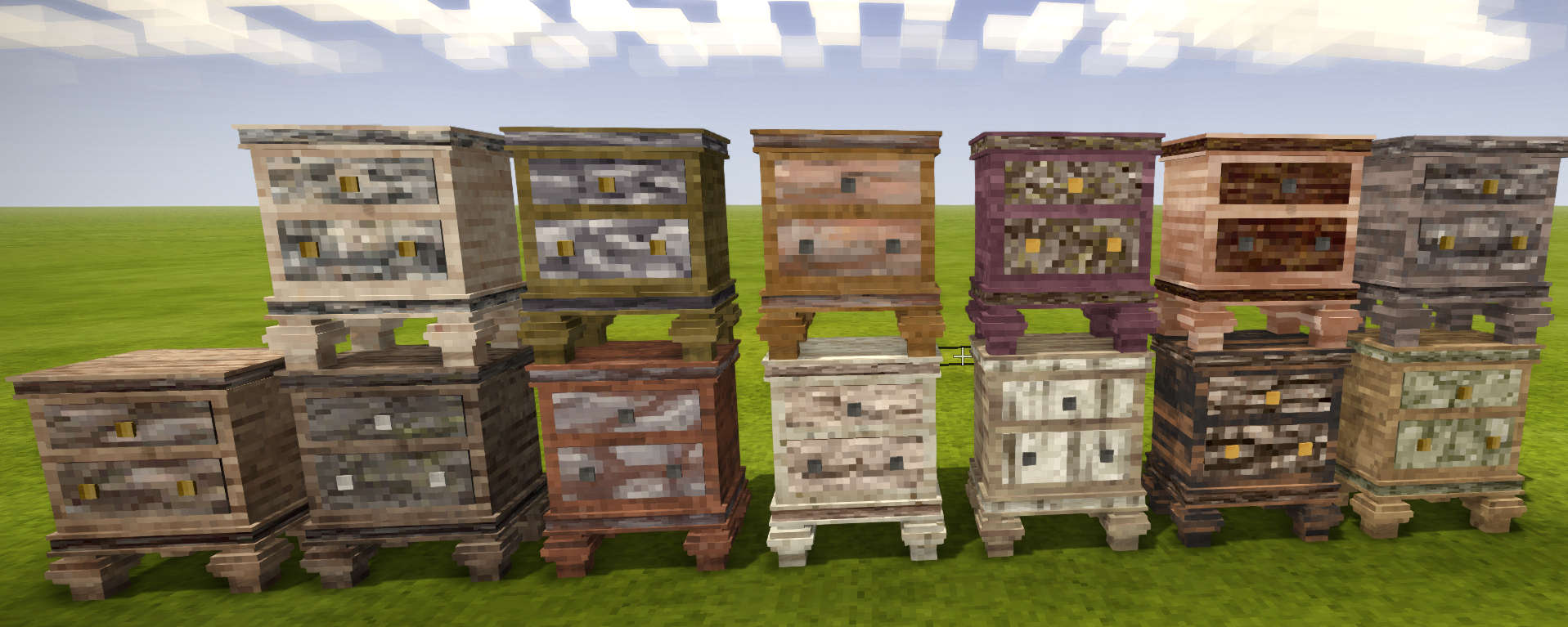
Two nightstand variants. Both function as remodeled chests, but the fancy ones come in all vanilla wood types.
Leather Flap Door:
A leather flap door for a more primal age look.
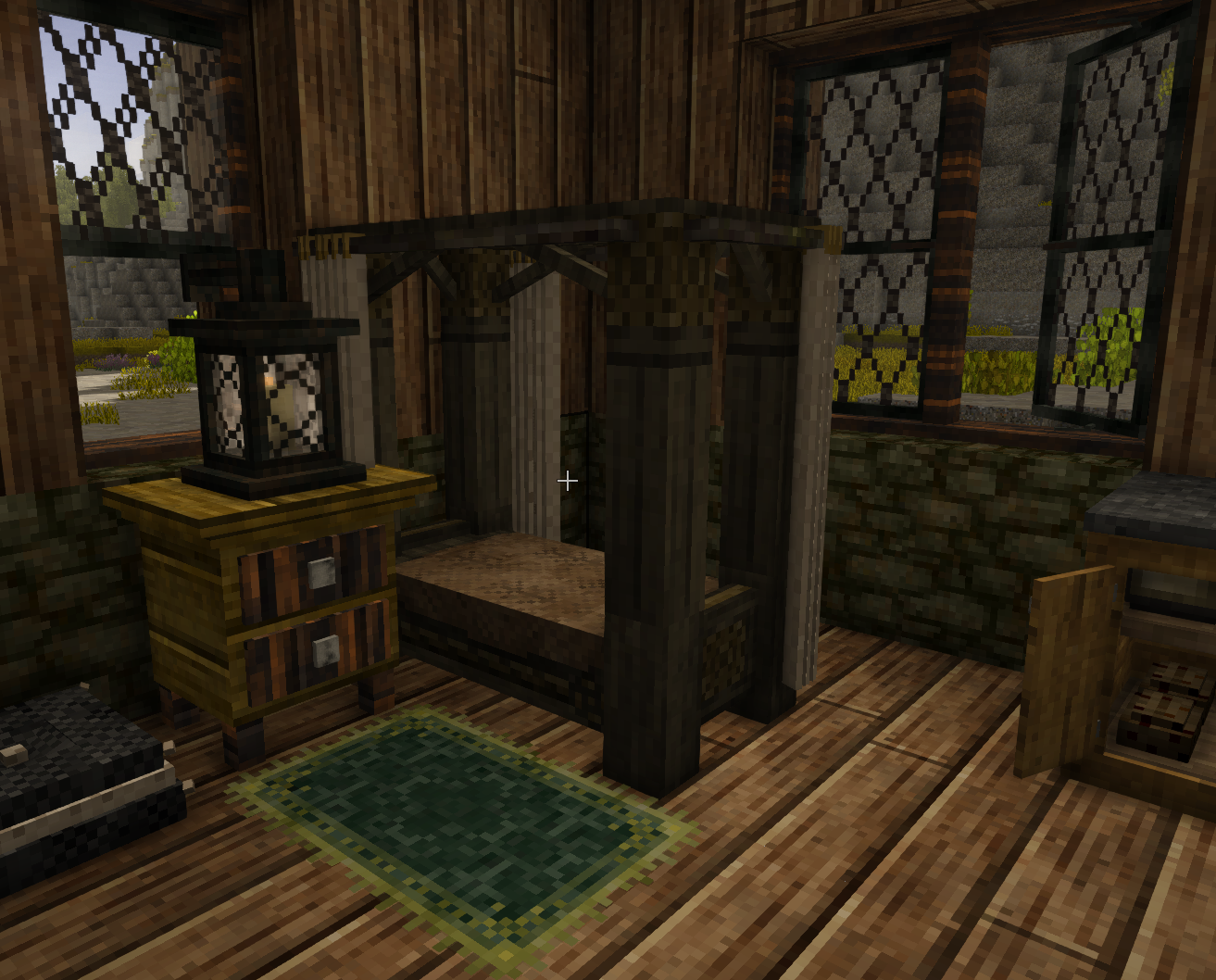
Canopy:
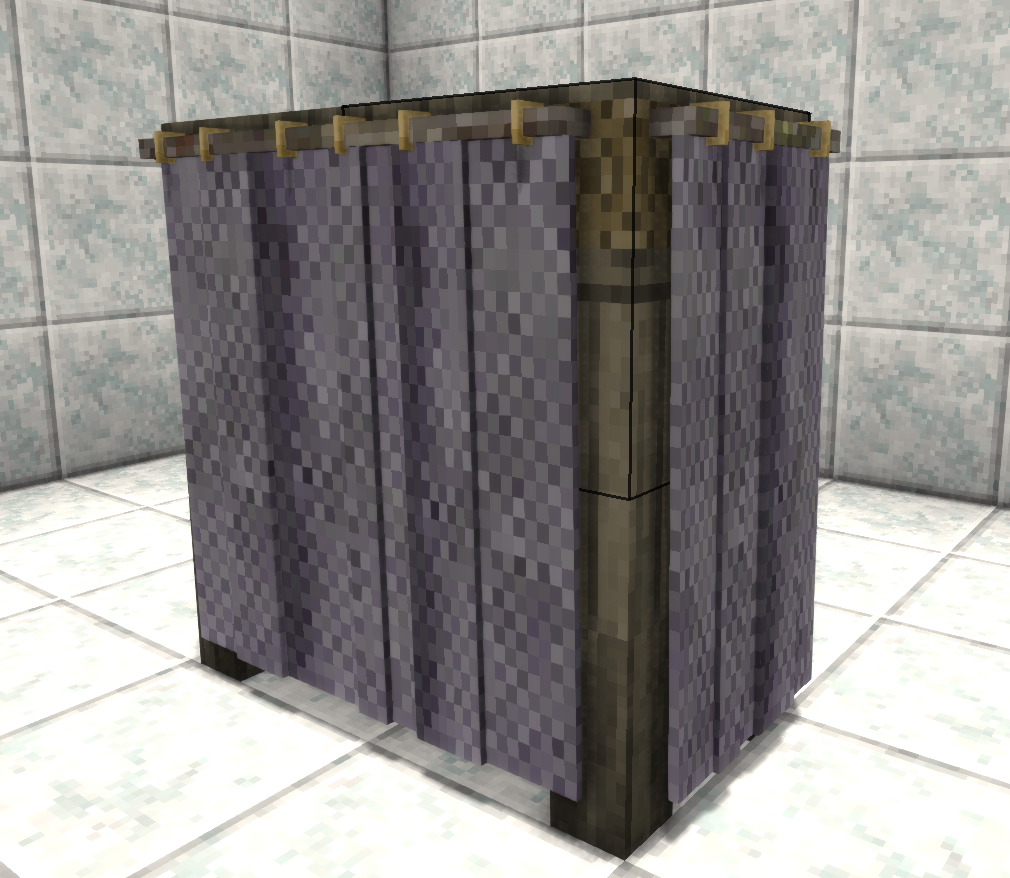
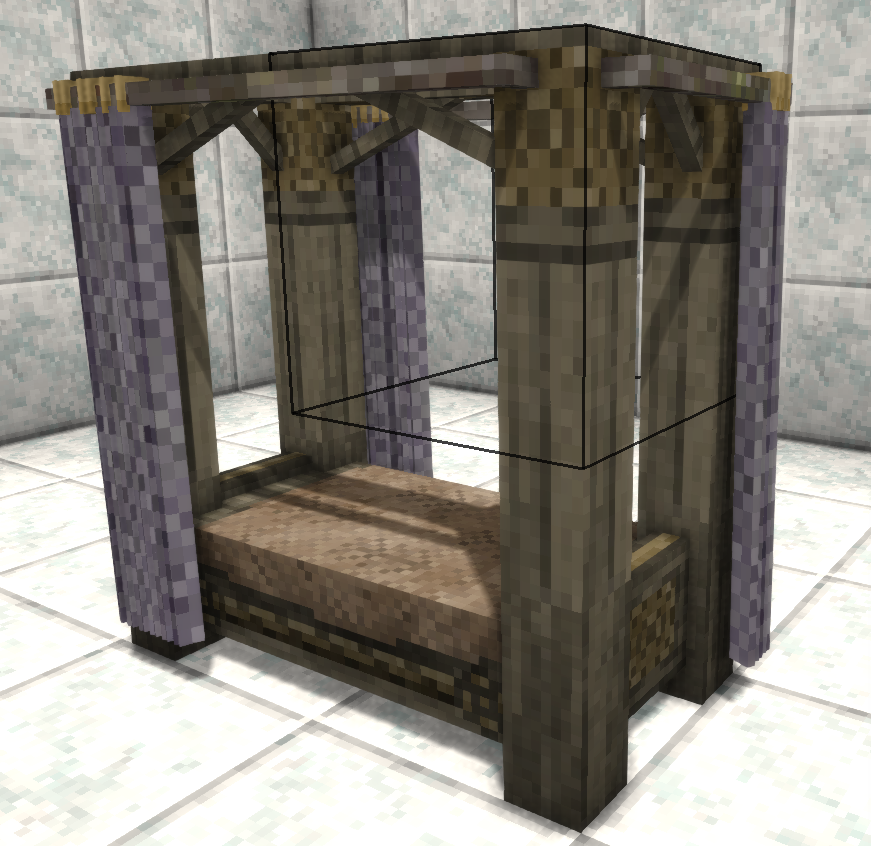
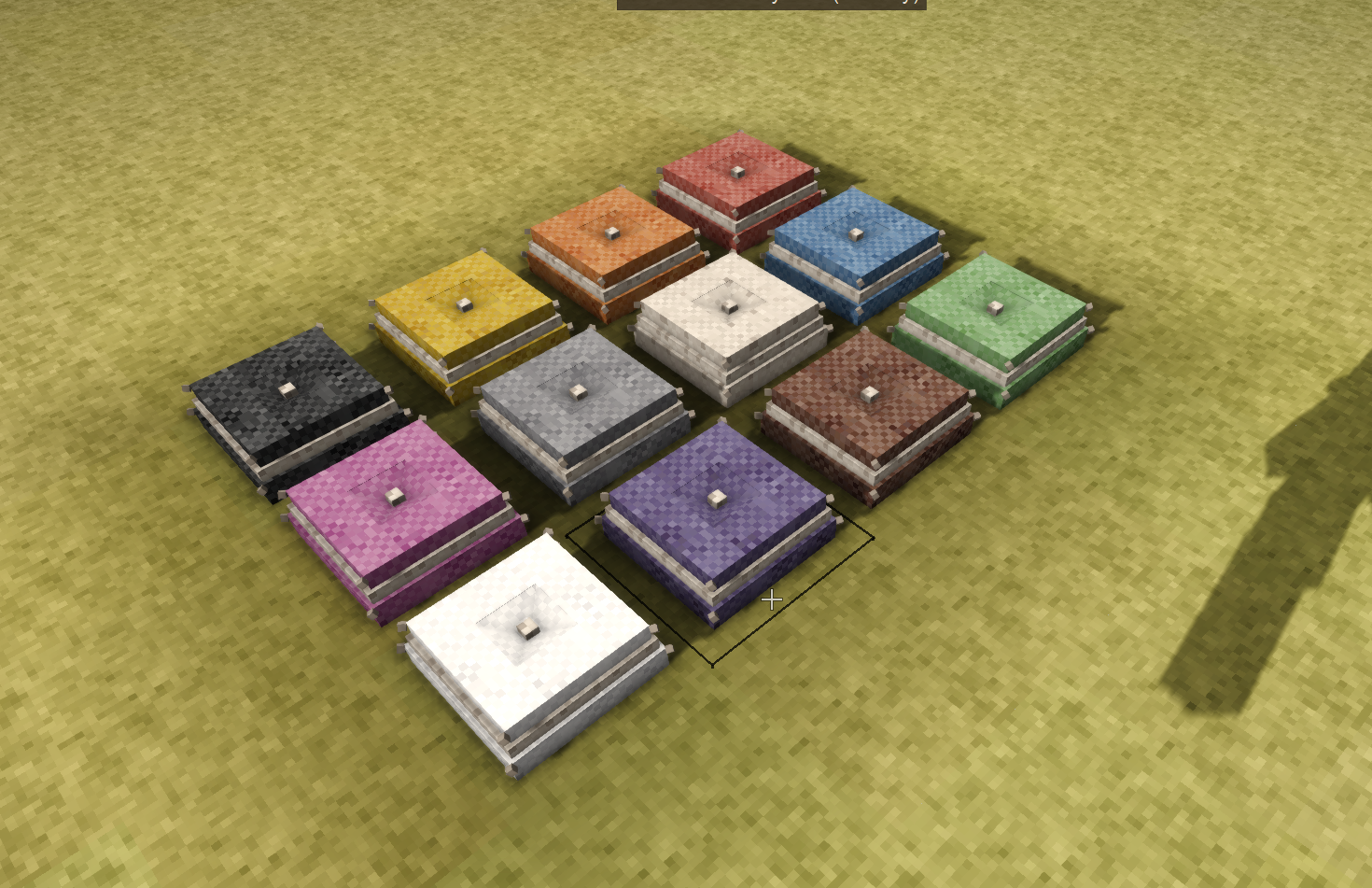
A nice set of curtains for your bed, so now when you inevitably sleep into noon you can still pretend its dark. It comes in all the cloth color variants.
Fur Roll:
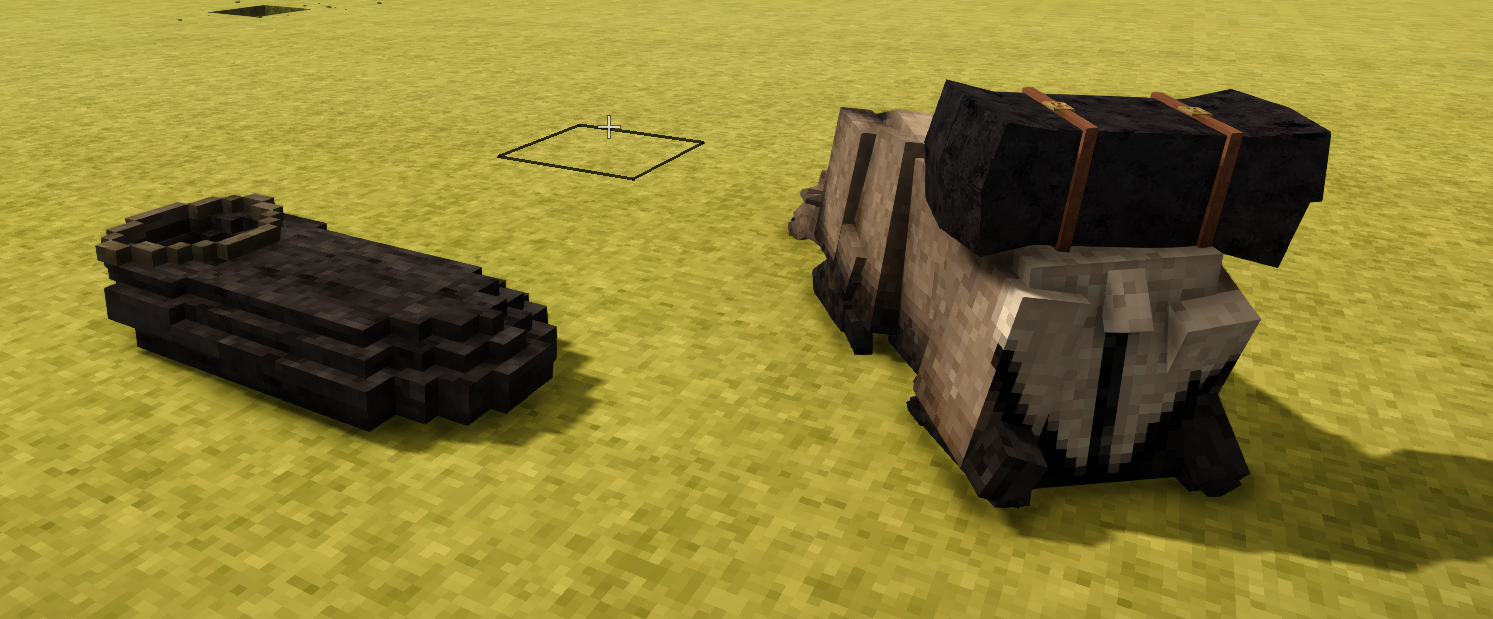
A fur sleeping bag for those cold nights. Lets you sleep the same as wood beds from vanilla. Now atttachable to the elk!
Suggested by: Hydromancerx
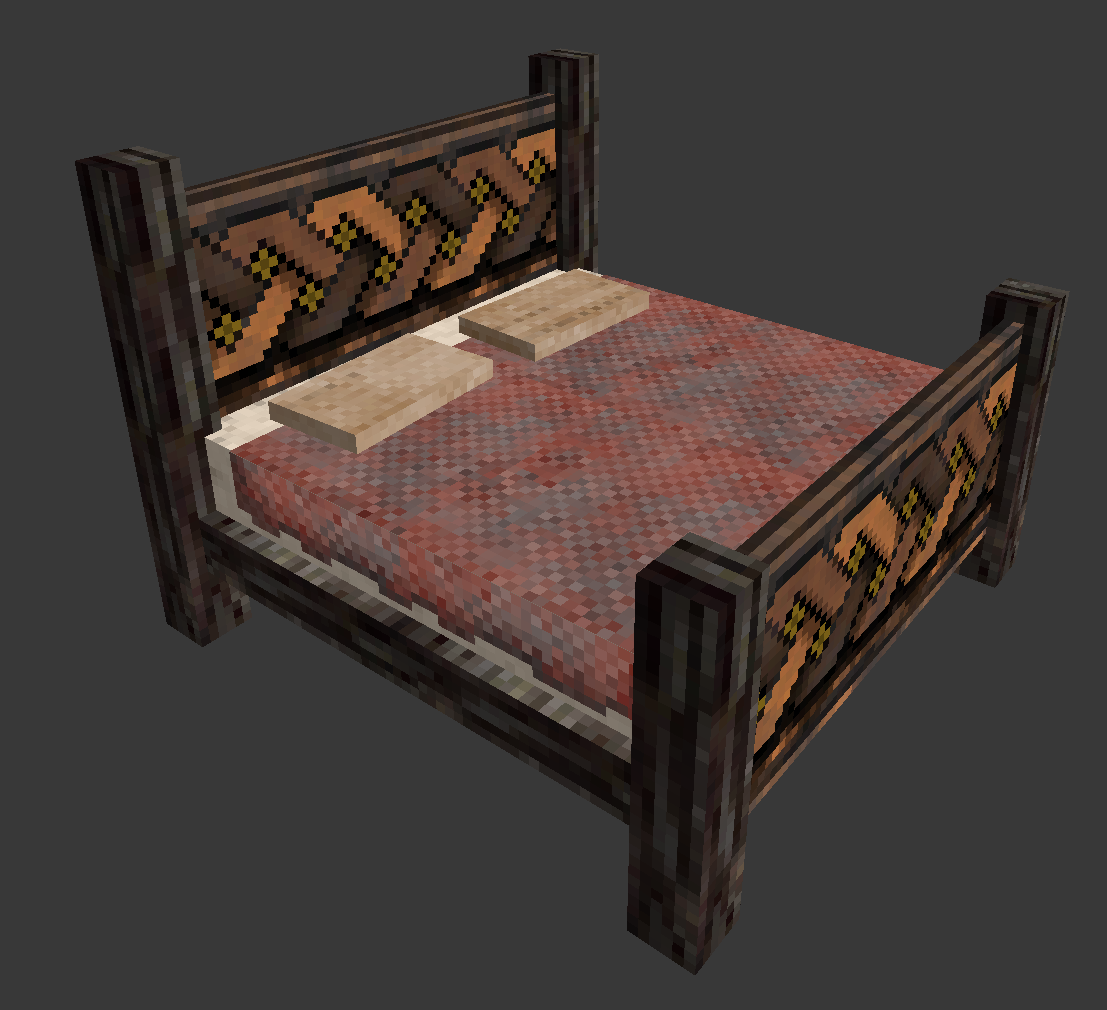
Celtic Double Bed:
Finally a large bed to make yourself feel like a king. Comes with my first crack at making textures that fit the style of vanilla VS. Sadly it functions as a single bed so only one person at a time. My coding laziness has deemed midnight romps a no-go :( .
V 1.7.4 known bug. You cannot place the bed while there are blocks in front of/behind it. Remove these blocks and place the bed. After which the blocks can be replaced safely. I will not fix this bug as it requires me to patch the vanilla bed code, and if I do that its likely to break other more popular mods like xskills.
Coffee Table:
A table variant with a nice glass top, works with pie forming. Comes in all wood variants.
Windows:
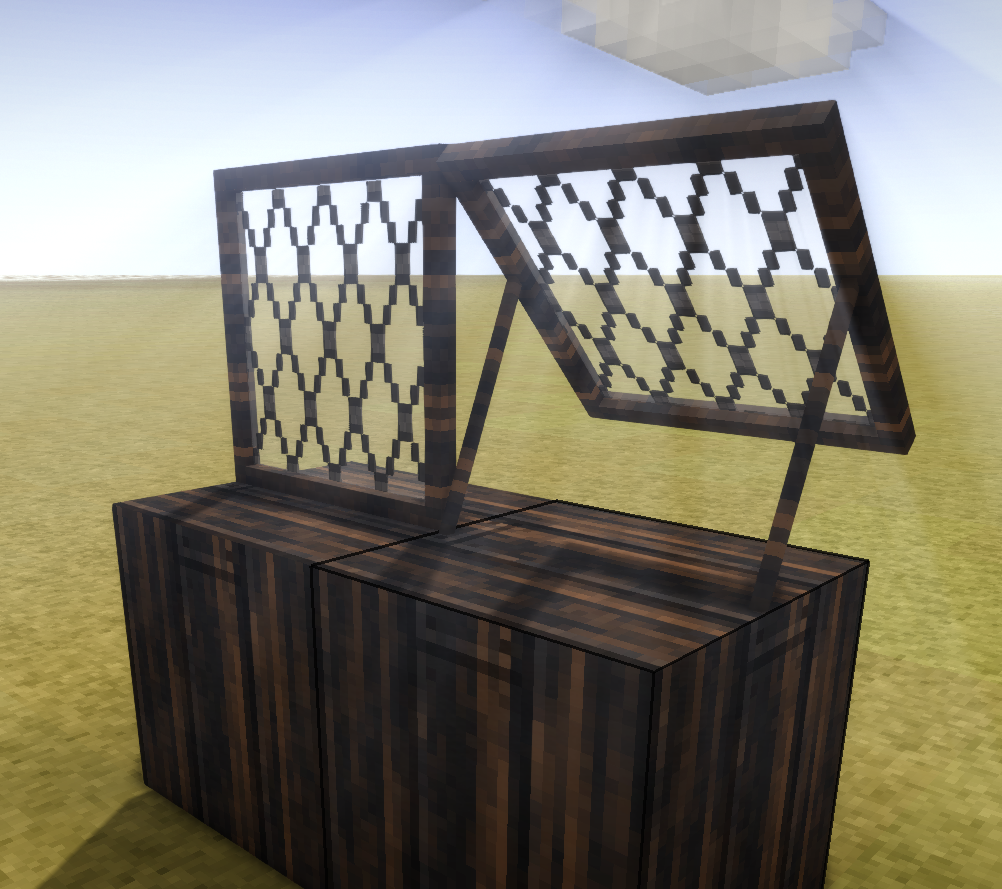
Multiple new window types and sizes that can all be opened. Some open large enough to jump out or shoot through.
Tall Shelf:
A tall shelf to add some variety to the cellars of VS. This was my first venture into coding for VS so I am quite happy with this.
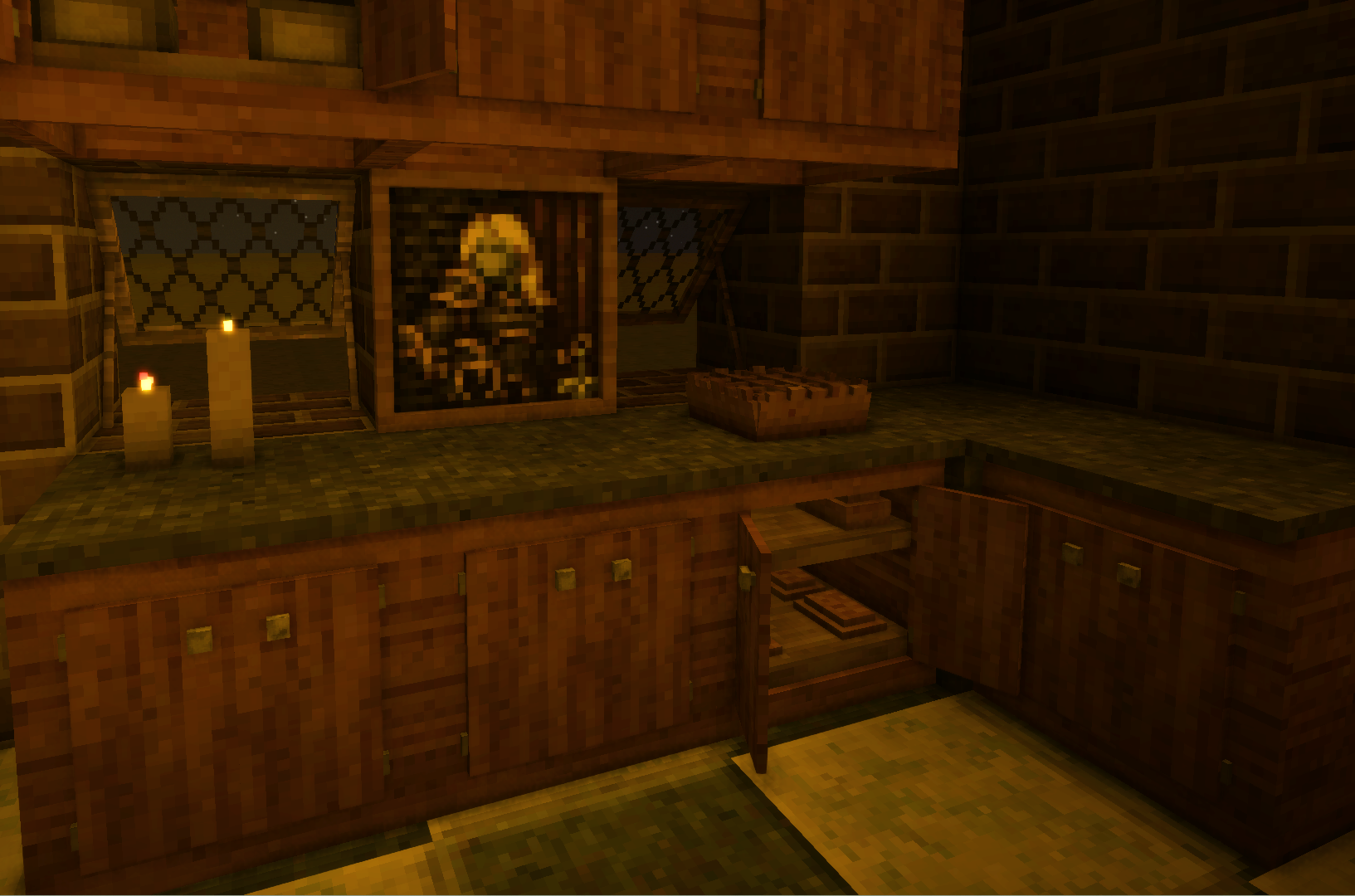
Counter Tops:
A stylish counter top for your kitchen with an included shelf and working doors! No longer must you resort to chests in your kitchen like some sort of college student still living out of cardboard boxes. Shift click Ctrl right click with an empty hand to open/close.
There is now a version without doors too. same recipe but the postion of nails & strips and the shelf is swapped.
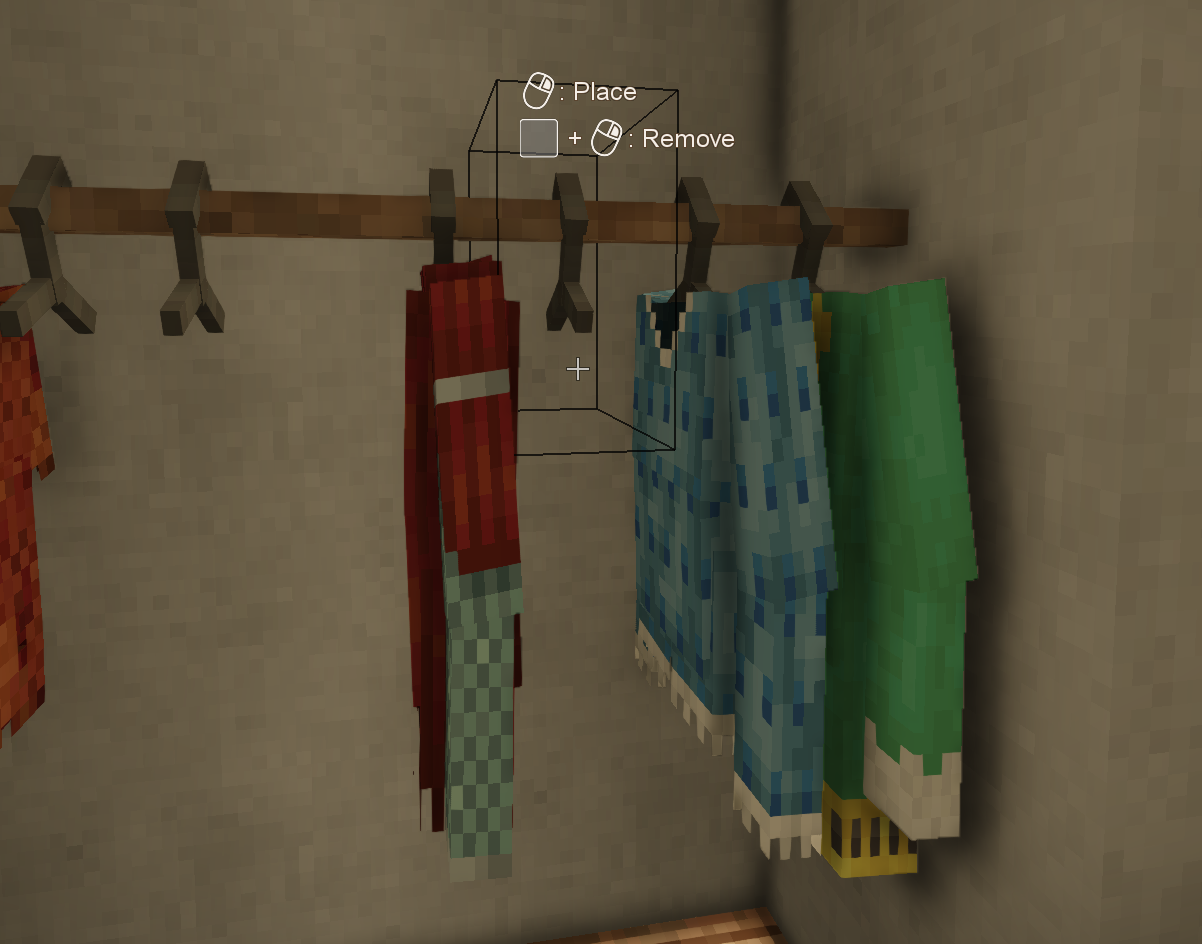
Wardrobe and shoe rack:
A new way to store clothing items. Works like a display case so unique clothing models are accurately represented. Wardrobe fits shirts, over shoulder and pants. Shoe rack is just for shoes.
Feel free to leave suggesstions.
Thanks to people who have helped:
Special thanks to Dana,SpearAndFang,TenthArchitect, Zach2039, BillyGalbreath, Goose, and Pizza2004 for debugging help!
Pawelot for making a polish translation of the mod.
Deanbro for makling Ukranian translation.
Contact me:
kev.c7465 in the Kevin's furniture subpage in mods of the VS discord.
| Mod Version | Mod Identifier | For Game version | Downloads | Released | Changelog | Download | 1-click mod install* |
|---|---|---|---|---|---|---|---|
| 1.7.5 | kevinsfurniture | 13178 | Oct 11th at 1:56 AM | kevinsfurniture_1.7.5.zip | 1-click install | ||
|
Additions: 1) Counter Tops without doors - great for making bars 2) angled windows (25.5deg from one corner, so they intercept with windows in middle of block) | |||||||
| 1.7.4 | kevinsfurniture | 7233 | Sep 28th at 3:22 AM | kevinsfurniture_1.7.4.zip | 1-click install | ||
|
FIXES: stove no longer makes food spoil super fast bed: you will need to either have the 2 blocks in front of or behind the bed clear (NOTHING THERE) in order to place it. after which blocks can be safely placed there. | |||||||
| 1.7.3 | kevinsfurniture | 11289 | Aug 12th at 3:43 AM | kevinsfurniture_1.7.3.zip | 1-click install | ||
|
updated to unstable branch. stove tweaked to allow pot variants. Knife block now obtainable. simple primitive stool added. Stove is no longer compatible with 1.20 | |||||||
| 1.7.2 | kevinsfurniture | 4147 | Aug 11th at 3:58 AM | kevinsfurniture_1.7.2.zip | 1-click install | ||
|
fixed dll still being ModTemplate. should be compatible with exsisting saves | |||||||
| 1.7.1 | kevinsfurniture | 6355 | Jul 29th at 4:30 AM | kevinsfurniture_1.7.1.zip | 1-click install | ||
|
Added blacklist to stove block, vanvar firewood compatibility with stove, and stove can no longer be set on fire | |||||||
| 1.7.0 | kevinsfurniture | 5842 | Jun 22nd at 6:44 PM | kevinsfurniture_1.7.0.zip | 1-click install | ||
|
added the stove block, more fixes to cabinets | |||||||
| 1.6.6 | kevinsfurniture | 11617 | Apr 13th at 12:47 AM | kevinsfurniture_1.6.6.zip | 1-click install | ||
|
fixed cabinet bug | |||||||
| 1.6.5 | kevinsfurniture | 3253 | Mar 31st at 1:39 AM | kevinsfurniture_1.6.5.zip | 1-click install | ||
|
Fixes: tall shelf deleting items, wardrobe pants being misplaced on save-relog Adjustments: changed the interaction with the cabinet block, now control, blocks access when closed. | |||||||
| 1.6.4 | kevinsfurniture | 7588 | Mar 1st at 10:38 PM | kevinsfurniture_1.6.4.zip | 1-click install | ||
|
Polish translation added. Shoe rack added. Cabinet open/close is now Ctrl right click. | |||||||
| 1.6.3 | kevinsfurniture | 3032 | Feb 24th at 2:55 AM | kevinsfurniture_1.6.3.zip | 1-click install | ||
|
made the wardrobe better, now accepts more items, such as pants. | |||||||
| 1.6.2 | kevinsfurniture | 1122 | Feb 22nd at 11:09 PM | kevinsfurniture_1.6.2.zip | 1-click install | ||
|
Added in Wardrobe. Fixed a bug where the leather flap door could be crafted with just the knife blade. | |||||||
| 1.6.1 | kevinsfurniture | 6232 | Jan 31st at 2:59 AM | kevinsfurniture_1.6.1.zip | 1-click install | ||
|
Fixed an issue with window recipes, Thanks Rob! | |||||||
| 1.6.0 | kevinsfurniture | 3603 | Jan 19th at 4:12 AM | kevinsfurniture_1.6.0.zip | 1-click install | ||
|
added double bed, facny nightstand and made furrolls attachable to elk. | |||||||
| 1.4.2 | kevinsfurniture | 1291 | Jan 9th at 4:46 AM | kevinsfurniture_1.4.2.zip | 1-click install | ||
|
updated the mod to unstable branch. | |||||||
| 1.4.1 | kevinsfurniture | 1251 | Dec 20th 2024 at 4:03 AM | kevinsfurniture_1.4.1.zip | 1-click install | ||
|
fixed sound issues with multiple blocks. | |||||||
| 1.4.0 | kevinsfurniture | 320 | Dec 18th 2024 at 4:22 AM | kevinsfurniture_1.4.0.zip | 1-click install | ||
|
added two new window variants, and floor cushions. fixed the recipe for countertop. Made it so windows when open can be shot/interact through. | |||||||
| 1.3.0 | kevinsfurniture | 512 | Dec 8th 2024 at 3:23 AM | kevinsfurniture_1.3.0.zip | 1-click install | ||
|
Added in a new kitchen style counter top with shelves. Fixed windows not being insulating. | |||||||
| 1.2.0 | kevinsfurniture | 2782 | May 15th 2024 at 4:24 AM | kevinsfurniture_1.2.0.zip | 1-click install | ||
|
Added Tall Shelf, and Tall windows, fixed a bug with nightstand crafting recipe causing crashes | |||||||
| 1.0.3 | kevinsfurniture | 611 | May 7th 2024 at 6:35 AM | kevinsfurniture.zip | 1-click install | ||
|
Added: Swing windows, fur roll, coffee tables | |||||||
| 1.0.2 | kevinsfurniture | 364 | May 3rd 2024 at 2:40 AM | kevinsfurniture.zip | 1-click install | ||
|
added in canopies for aged beds with colored cloth variants | |||||||
| 1.0.1 | kevinsfurniture | 185 | May 2nd 2024 at 3:24 AM | kevinsfurniture_1.0.1.zip | 1-click install | ||
|
Added in a leather flap door. | |||||||
| 1.0.0 | kevinsfurniture | 223 | Apr 29th 2024 at 9:54 PM | Empty | kevinsfurniture.zip | 1-click install | |
Use this mode with "Draconis" and i can't see fur roll on my mount. Here is my server note about it
I absolutely love this mod. However when I use the windows, I dont hear the nice sounds that I do in vanilla. Like the rain hitting the window pane, and I really miss it. Is there any way to fix this?
Thanks for adding the Stove Tutorial video. I get it now. I know this is asking too much but if it was in GUI similar to the base game it would be much easier and less confusing.
This is the video if the site refuses to load it here.
Kevin Thank you for this amazing mod! Much appreciated.
also if you have the mod that sets your spawn to your bed, dose that trigger with the fur rolls?
How dose the stove work with the Cauldron and pan from culinary artillery as they are a good bit larger and would take up the whole sove likely.
JayTea, i see the issue, the stove is actually gui-less. I have been considering to make a tutorial video. But note the directions I gave in mod description. Perphaps I will make that tutorial video soon.
open door: control click
Adding firewood (the only fuel type accepted right now): right click inner slot when door is open with firewood
lighting stove, right click inner slot with lit torch
Cooking pot:
add in ingredients: right click
new item entry: control click
remove liquids: right click with empty bowl or bucket
ZeroCrag I can confirm that the stove does not appear to work. No matter how I try I cannot find a way to access the cooking pots menu whilst they're on the stovetop. However, I am playing on a modded server so the issue may be a mod conflict rather than something being wrong with the stove itself.
Beedy, Paddles, Luka,
i have been testing the stove and found no issue on my end, can you post more info in the modpage on the offical VS discord? ill be more than happy to help there! Its under the mods tab as "Kevin's Furniture"
Amazing pieces. Whoever, 1) the the stove doesn't work 2) there are two recipes for the stove, one makes sense and the other is too cheap it looks like a mistake.
The stove appears to be broken
I can only place the cooking pot on top of the stove...but I can't access it by right-clicking. I can't get the cooking pot onto the wood...what am I doing wrong? The stove is useless like this...but it looks great :)I would love a crucible stove, something that looks a bit more fit for purpose than just plonking a crucible onto a campfire if that was on your radar at all!
Can you please add a lang entry for the creative tab of this mod?
hi, will you make a version for 1.20.0 when i try to install it to my server it says its not available for my version and incompatible :(
is there away to add this but disable the stove if we don't want it to be craftable? im pretty happy with the default cooking stuff and combined with EF im a bit worried about a custom stove doing its own thing changing the 'feel' of cooking a little too much
can you add more types of beds, maybe some chairs and couchs
Lovely mod and additions to the cottagecore vibe that VS brings. Much appreciated <3
ZeroCrag Fur roll works great on the elk! Any chance you can add in compatability with Equus so it works the same on the horses?
I love your furniture! <3 :U
Is this going to be updated to 1.21?
Description for stove usage is not detailed enough. I've manged to open it, add firewood, light it, put a cooking pot on it and then add igredients in it. It's not cooking. There's a cooking indicator that shows how many seconds it needs to cook. It never goes beyond Cooked "0.0/15s". I've also just placed an item on the stove alone. Still not cooking. Am I doing something wrong? Is there a more comprehensive guide somewhere because I've never found it.
I have Added a blacklist to the stove, if you encounter recipes that break the stove/crash or are just useless let me know and ill add them to the blacklist. Thanks for your sacrifice Parf
now compatible with vanvar firewood types. Leonetti
stove can no longer be set on fire if you shift right click with torch. remember its just right click, it lights instantly. scrunkley
things can now go on top of nightstands areallybigcat
Think I done bricked my character data trying to cook potash (alt. recipe from Soap & Lye) on the stove! Upon picking up one finished pot, game crashed. It was a multiplayer server and now I can't join the server anymore without an instant crash. Do you think you could fix this bug or would I have to find a way to fix my inventory data externally? Thanks regardless, lovely mod.
Warning to all other players: do not cook potash using Soap & Lye's recipe on the stove. You will not be able to load your save/join your server anymore. 😅 Regular potash recipe's kinda weird too and tries to turn into a meal rather than collectible potash.
Crashlog:
Running on 64 bit Windows 10.0.26100.0 with 32702 MB RAMGame Version: v1.20.12 (Stable)
7/28/2025 11:06:08 PM: Critical error occurred
Loaded Mods: aculinaryartillery@1.2.5, allclasses@1.3.5, ancientarmory@1.0.6, backpackpackplus@1.0.3, bettersticks@1.2.0, Ceramos@0.5.1, cheapersewingkit@1.0.0, chiseltools@1.14.20, rlldtco0001@1.2.3, dressedtokill@1.7.0, bovinae@0.2.4, caninae@1.0.32, capreolinae@1.2.9, felinae@0.2.10, millwright@1.2.7, nailsmold@1.0.2, prospecttogether@2.0.7, shelfobsessed@1.1.0, soapandlye@1.1.6, game@1.20.12, animalcages@3.2.2, apelanterns@1.1.2, betterfirepit@1.1.6, betterruins@0.4.14, carryon@1.8.1, cartwrightscaravan@1.5.1, commonlib@2.6.1, danatweaks@3.4.4, earlychiseling@1.0.1, expandedfoods@1.7.4, expandedskins@2.1.0, farmlanddropssoil@1.4.0, foodshelves@2.2.1, handbookbookmarkbutton@0.1.1, healothers@1.1.1, herbarium@1.4.0, hydrateordiedrate@2.1.2, interestingoregen@1.2.3, kevinsfurniture@1.7.0, knapster@2.14.6, metalpots@1.5.0, millwrightvawtaddon@1.0.2, morepiles@2.1.5, oneroof@1.10.0, petai@3.4.3, claywheel@1.1.2, purposefulstorage@1.3.0, rpvoicechat@2.3.19, scrollcharactercreation@1.0.3, simpleemotemenu@1.1.0, smithingplus@1.6.3, stepupcontinued@0.0.1, storageoptions@1.0.2, terraprety@7.0.5, thecritterpack@1.0.3, unconscious@1.10.3, vanity@2.4.2, visorhelmets@1.0.2, creative@1.20.12, survival@1.20.12, vsvillage@2.0.0, xlib@0.8.16, feverstonehorses@1.6.1, goblinears@2.2.2, playercorpse@1.11.1, sandwich@1.2.8, shearlib@1.1.2, stonequarry@3.4.3, wildcraftfruit@1.4.1, wildcrafttree@1.3.1, wolftaming@3.0.8, xskills@0.8.19, wool@1.6.4
System.NullReferenceException: Object reference not set to an instance of an object.
at Vintagestory.Client.NoObf.ShapeTesselator.TesselateShape(Shape shapeBase, MeshData& modeldata, Vec3f wholeMeshRotation, Vec3f wholeMeshOffset, Single wholeMeshScale, TesselationMetaData meta) in VintagestoryLib\Client\Render\Tesselation\ShapeTesselator.cs:line 250
at Vintagestory.Client.NoObf.ShapeTesselator.TesselateShape(String typeForLogging, Shape shapeBase, MeshData& modeldata, ITexPositionSource texSource, Vec3f wholeMeshRotation, Int32 generalGlowLevel, Byte climateColorMapId, Byte seasonColorMapId, Nullable`1 quantityElements, String[] selectiveElements) in VintagestoryLib\Client\Render\Tesselation\ShapeTesselator.cs:line 208
at Vintagestory.GameContent.MealMeshCache.GenFoodMixMesh(ItemStack[] contentStacks, CookingRecipe recipe, Vec3f foodTranslate) in VSSurvivalMod\Systems\Cooking\MealMeshCache.cs:line 445
at Vintagestory.GameContent.MealMeshCache.GenMealMesh(CookingRecipe forRecipe, ItemStack[] contentStacks, Vec3f foodTranslate) in VSSurvivalMod\Systems\Cooking\MealMeshCache.cs:line 318
at Vintagestory.GameContent.MealMeshCache.GenMealInContainerMesh(Block containerBlock, CookingRecipe forRecipe, ItemStack[] contentStacks, Vec3f foodTranslate) in VSSurvivalMod\Systems\Cooking\MealMeshCache.cs:line 303
at Vintagestory.GameContent.MealMeshCache.GetOrCreateMealInContainerMeshRef(Block containerBlock, CookingRecipe forRecipe, ItemStack[] contentStacks, Vec3f foodTranslate) in VSSurvivalMod\Systems\Cooking\MealMeshCache.cs:line 286
at Vintagestory.GameContent.BlockCookedContainer.OnBeforeRender(ICoreClientAPI capi, ItemStack itemstack, EnumItemRenderTarget target, ItemRenderInfo& renderinfo) in VSSurvivalMod\Systems\Cooking\BlockCookedContainer.cs:line 107
at Vintagestory.Client.NoObf.InventoryItemRenderer.GetItemStackRenderInfo(ClientMain game, ItemSlot inSlot, EnumItemRenderTarget target, Single dt) in VintagestoryLib\Client\Render\InventoryItemRenderer.cs:line 384
at Vintagestory.Client.NoObf.RenderAPIGame.GetItemStackRenderInfo(ItemSlot inSlot, EnumItemRenderTarget target, Single dt) in VintagestoryLib\Client\API\RenderAPIGame.cs:line 189
at Vintagestory.GameContent.EntityShapeRenderer.RenderHeldItem(Single dt, Boolean isShadowPass, Boolean right) in VSEssentials\EntityRenderer\EntityShapeRenderer.cs:line 444
at Vintagestory.GameContent.EntityPlayerShapeRenderer.RenderHeldItem(Single dt, Boolean isShadowPass, Boolean right) in VSEssentials\EntityRenderer\EntityPlayerShapeRenderer.cs:line 330
at Vintagestory.GameContent.EntityPlayerShapeRenderer.DoRender3DOpaque(Single dt, Boolean isShadowPass) in VSEssentials\EntityRenderer\EntityPlayerShapeRenderer.cs:line 249
at Vintagestory.Client.NoObf.SystemRenderEntities.OnRenderOpaque3D(Single deltaTime) in VintagestoryLib\Client\Systems\Render\RenderEntities.cs:line 104
at Vintagestory.API.Client.DummyRenderer.OnRenderFrame(Single deltaTime, EnumRenderStage stage) in VintagestoryApi\Client\API\IClientEventAPI.cs:line 83
at Vintagestory.Client.NoObf.ClientEventManager.TriggerRenderStage(EnumRenderStage stage, Single dt) in VintagestoryLib\Client\Util\ClientEventManager.cs:line 202
at Vintagestory.Client.NoObf.ClientMain.TriggerRenderStage(EnumRenderStage stage, Single dt) in VintagestoryLib\Client\ClientMain.cs:line 816
at Vintagestory.Client.NoObf.ClientMain.MainRenderLoop(Single dt) in VintagestoryLib\Client\ClientMain.cs:line 914
at Vintagestory.Client.NoObf.ClientMain.MainGameLoop(Single deltaTime) in VintagestoryLib\Client\ClientMain.cs:line 740
at Vintagestory.Client.GuiScreenRunningGame.RenderToPrimary(Single dt) in VintagestoryLib\Client\MainMenu\Screens\GuiScreenRunningGame.cs:line 170
at Vintagestory.Client.ScreenManager.Render(Single dt) in VintagestoryLib\Client\ScreenManager.cs:line 695
at Vintagestory.Client.ScreenManager.OnNewFrame(Single dt) in VintagestoryLib\Client\ScreenManager.cs:line 670
at Vintagestory.Client.NoObf.ClientPlatformWindows.window_RenderFrame(FrameEventArgs e) in VintagestoryLib\Client\ClientPlatform\GameWindow.cs:line 88
at OpenTK.Windowing.Desktop.GameWindow.Run()
at Vintagestory.Client.ClientProgram.Start(ClientProgramArgs args, String[] rawArgs) in VintagestoryLib\Client\ClientProgram.cs:line 334
at Vintagestory.Client.ClientProgram.<>c__DisplayClass10_0.<.ctor>b__1() in VintagestoryLib\Client\ClientProgram.cs:line 130
at Vintagestory.ClientNative.CrashReporter.Start(ThreadStart start) in VintagestoryLib\Client\ClientPlatform\ClientNative\CrashReporter.cs:line 93
I love this mod so far, but I don't believe its compatable with vanilla variants, when using the stove it doesn't recognize the firewoods from V.V. since they're labeled by wood types
Lovely mod, and I'm pumped about the functional stove. However, I think the stove is not yet compatible with A Culinary Artillery-- when placed on the stove, the cauldron and saucepan don't allow any ingredients to be added.
Would really like to be able to put things on top of the nightstand. It's baffling that I can't put a candle on top
This looks good! I'm looking forward to building my city every day that I see great mods like this pop up. All I need now is road construction blocks and lights. :D Keep up the amazing work!
Looks Great!
Will this work with 1.20.10?
I was really excited about the stove but I unfortunately cannot get it to work without lighting my whole house on fire ... having the full cooking pot window accessible would also be great! For now at least it makes my kitchen look really swanky!
does this still work? 1.20.12
Love the windows in this. Any chance of some diagonal/angled variants for making bay windows, without the hassle of having to mess around with chiseling?
Sloped variants for roofing (1:3, 1:2, and 3:1 slopes) would be nice too.
Shion
even vanilla windows, when you stick together, the noise gets through
Hello, the cabinets when you put a pot inside for example when it is open go into closed texture but you know how to put/take inside and when you do to "close" it goes back to open and if you close it everything is ok
Game has a feature of when opening the door in a house you can hear the outside better (wind, rain, storm, etc.). Can you recreate that with windows?
Yep, I'm having the same issue, even a closed cabinet lets you place items inside. It even happens if you right click with a bowl from behind the cabinet.
Can add/remove items from cabinet while its closed. Jugs placed in cabinet clip out of top on cabinet.
cabinet bug fixed, I accidentally commented something out.
Bug report: Can't access cabinet storage on latest version.
I wonder if you could add something like a divider or one of those paper walls that you see in bedrooms to be able to partition off parts of the room. A curtain item could also work. You could probably reuse your textures from the canopy and make a block that's placed similarly to the clothes rack and functions kind of like the leather flap door.
Downgrading to 1.6.4 due to inability to access any cabinet storage
Translated to Spanish Spain es-es.json
Same problem with not being able to pick up or put anything in the cabinet
I'm getting the same error as StarHelix, but I haven't adjusted any of the default keybinds. Some of my items are now trapped in shelves - breaking the shelf released them, but now I can't put them back in, and the shelves I haven't broken and replaced still have their inaccessible contents.
Love the mod, especially the wardrobe! However, after the last update, I can't seem to access the inner shelves of the Counter Top Cabinet. I saw the changelog note, but I have tried all combinations of Click+Modifier and nothing lets me add or remove from a cabinet. I also tried creating a new cabinet object, but same issue. I also tried in a new world with only Kevin's Furniture, but same issue. Storage on the top works fine, in fact, if I have the object in my hand already on top of the counter, interacting with the middle shelves actually changes the counter top instead.
Note: I have Ctrl/Shift switched in my game, i.e. Shift to run, Ctrl to crouch/place. For me, shift right click opens and shuts the cabinet doors, ctrl click places things on the top of the counter, basic right click does nothing unless there is already something on top of the counter (then it can grab or put)
Is it possible to make a seperate mod of this without the Tall Shelf due to its bug of removal items from the shelf? Would like to add it to a very popular server but most people would probably not know about it and might complain. Much appreciated and love the mod itself
Is there the possibility of a weapon hook to display various weapons horizontally?
I would love a hat rack, was looking for mods specifically to hang clothes and yours was perfect but sadly no hat hanging options. Both a wall mounted version and a standing pole kind would be awesome. Thanks for the great mods
Can we get a clothesline like the wardrobe? Want to hang saddle blankets and rugs and stuff out in the garden next to the bees. :D
Tiny issue, not sure if it's intended but the windows block out indoor rain ambience
This is a known issue, and im not quite sure how to fix it quite yet. for now if you take it off and replace it their position will be correct. DecaByte earwiq
ZeroCrag I'm seeing this issue too, "Pants on hangers seem to get displaced downwards upon server/game restart. Looks like it's floating in mid air."
loving the new update, especially the shoe rack and beefed up wardrobe! the ability to store clothes organically has been long missing in this game, imo. i didn't have any problems with my items disappearing on this update, either, so either that was a weird bug on my end or the internal cause of it has been fixed. happy to see it either way 🤝
I won't lie, when I saw the screenshot of the fur roll, this is what I had in my mind and I couldn't stop giggling. Kind of disappointed myself with unrealistic expectations.

Pants on hangers seem to get displaced downwards upon server/game restart. Looks like it's floating in mid air.
yes, that's exactly what I mean ZeroCrag
what do you mean? like having it say the wood type in the name? Richy
I love this mod, I was wondering if there is a way to improve the “lang” file for the different variants of wood furniture :3
Idea to make double beds work with two people: Just make each half a separate item. Easier to implement than trying to figure out how to let two people sleep on one item
blocks for a boot rack, hat rack, drawers for gloves and things would not go awry with the new wardrobe block
I don't know what vanilla options there are but right now I have my winter boots in a display case and everything other than chest and leg stuff in a box
first of all, love your mod, i was looking for a way to store clothes and the wardrobe you added is perfect! perhaps you could add a wooden variant with openable doors? i also have a suggestion for a round 2x2 door (similar to the gate) styled like a hobbit hole door from LOTR
Could you also make a patch that makes your beds compatible with the "Bed Respawn" mod? https://news.kalataka.ru/show/mod/19135
Sorry if this was already brought up, the only comment I saw that had something I wanted to ask too was about the double bed working as a 2 person bed.
Hi I made Polish translation https://pastebin.com/pQkQu9G1
I was able to figure out how to make the wardrobe compatible with pants. Was a little difficult but I got there. Note things like the malefactor hood will still be accepted by the wardrobe but will clip with the block. I do not want to patch the base game so this will not get fixed for now, unless I think of an easy way to adress these items directly. Eldritch_Warrior SpookiBoo
ZeroCrag No worries, really the only reason I brought it up was in hopes people would take that precaution; I didn't lose anything important. Huge fan of the mod, keep it up 👍
Yes, the bed can only fit one person right now, I know of a fix, but its annoyiong for me to impliment and debug so I am unlikely to do it untill the summer when I will have lots more free time. Jemhan
I will put a note in the mod description. I have no idea why the textures and shapes would have dissapeared. As for the items going away, that might be from the transition from the "?" blocks back into what they were supposed to be when you restarted. To be safe id reccomend removing any items from the shelf based blocks before updating next time. sorry about that blueblynd
ZeroCrag Just updated from 1.6.1 to 1.6.2 and all my windows and cabinets are replaced by ? blocks, as well as gone (alongside all other items from this mod) from the creative menu. Not sure what's going on there as there wasn't a crash log or anything -- on the off chance it wasn't user error, is there possibly a problem with the file you uploaded? (Empty somehow?)
Edit: reinstalled the file and for some reason that seems to have fixed everything, sans all the items that were in my cabinets now being gone. That's unfortunate, but at least it's resolved...? Sorry to bother.
Seconded on capes and pants! Items like the jord robe should fit, but so should coat. Right now it just looks to be the shirt slot?
Also, I love that you've considered that people already design their own fake wardrobes with doors and other wall type items - so it just being a standalone rod with hooks is perfect.
Hi ZeroCrag loving the mod i just noticed an issue with multiplayer not allowing two players to sleep on the celtic bed together.
ZeroCrag i think capes and maybe from personal experience pants would work (i use hangers for my jeans and pj pants that dont fit in my dresser irl so i feel that it could work on the wardrobe you made), aside from that hats and accessories would need different items to have them on to match better
right now its just shirt and shoulders, the code to add in capes is easy i just forgot to do it. I can add it in soon probably couple hours from now or tomorrow. Theoretically I can make it accept any block/item in the game, so if you feel something should be applicable lmk Eldritch_Warrior
Question about the wardrobe, it only works on top pieces for the shirt slots but will there ever be added support for capes slot items? or is there other options for displaying things like capes, hats and the other clothing items in the works?
Lattest update has a wardrobe function PupperDaddy
Please add a wardrobe or cabinet for storing clothes.
Thanks so much Kev! the hotfix works great for the windows now!
There was an issue with window recipes, V1.6.1 doesnt add anything new and should be safe to update on existing saves.
Looking forward to seeing an update for this for 1.20.x - everything looks lovely :)
I have nto tested it yet, but anticipate that there may be issues with the nightstand due to changes with the container classs.
ShanaLarisar
Does this work on 1.20-rc.X?
Finalcord
I have made the fix in my development version it will be out in next update. Thank you for telling me!
Looking in the code, I noticed that the swing windows aren't counted as solid on any sides, which means that you can't actually use them for building an enclosed room in any orientation. It might be a good idea to have them be solid on at least one side, so they can be practical as well as pretty!
I've compiled some more neolithic era inspired furniture ideas, if you would find any to be interesting:
1. Stone Shelves
2. Clay Table/Seating
3. Neolithic Bedframe
Newest release is back, the crahses related to the handbook should be fixed (I think). Somehow I must have edited the crafting recipe for the nightstand when I was referencing it, which caused the game to crash when attempting to open the handbook entry on it.
Yeah, I also crash when I open the handbook. Are all the recipes working properly?
I'm not sure why. but when I open the handbook on the mod items, the game crashes. At first I thought this was an issue with ExtraInfo (that mod has some reported issues I haven't personally encountered) so I disabled that, kept this mod and again, crashed. I then disabled the mod and re-enabled ExtraInfo and the game was fine. I wonder what's causing this? Every other mod I have is animal mods lol
Incredibly excited to see what more furniture is added. These look very natural to the appearance of Vintage. A follow for sure.
What about a kitchen update? Cellar furniture [ice box, a food storage unit like a primitive fridge?] Different types of stoves that function similar to the oven, only allowing people to put cooking pots on top of them? Pantry blocks that allow food storage not inside a cellar?
Sorry, I thought I mentioned which log it was :3 It's the client-main.txt log file.
BillyGalbreath
I didnt know that it was causing an error, which log did you attach and where can I find that?
Nice, ZeroCrag! That was a fast response \o/
The new version fixed everything except the missing `poor` texture in furroll-feet.
Since you are so wonderfully open to suggestions, I have a few ideas to throw in the ring.
Log and stone seats came to mind. So did a wooden wardrobe.
Hydromancerx
I actually have a model for the bead door, however due to the way wind calculations work it doesnt sway correctly. i.e. The beads end up desynced from the string connecting them. I could try making my own texture and then place it over a 2d face (similar to how grass works) but it may not look as good since it would have no thickness.
BillyGalbreath
Thank you!
I replaced the version file so any new downloads are correct.
P.S:
I forgot to remove the shelf, it was in progress (you may have noticed how messed up the selection boxes were)
I don't load the texture for poor leather in the shape file for furroll-feet becuase its not used in this shape (used only in the inventory shape and the head shape)
> (currently only allows 6 hours of sleep, I cant find what bug is causing this).
You have the wrong code. It's a 'furroll', not a 'bed-furroll' ;)
Side note: the value is used in this equation to get the hours:
sleepEfficiency * HoursPerDay / 2
i.e., 0.70833333 * 24 / 2 = 8.49999996
Edit:
There's also a few bugs you would never notice on your own computer due to the mod using absolute paths to some textures.
In blocktypes/containers/tallshelf.json you have these textures
"textures": {"square1": "/Users/user/AppData/Roaming/Vintagestory/assets/survival/textures/block/cloth/linen/square1",
"normal-westeast": "/Users/user/AppData/Roaming/Vintagestory/assets/survival/textures/block/reed/basket/normal-westeast",
"legs": "/Users/user/AppData/Roaming/Vintagestory/assets/survival/textures/block/wood/chair/normal/legs",
"side": "/Users/user/AppData/Roaming/Vintagestory/assets/survival/textures/block/wood/firewood/side",
"surface": "/Users/user/AppData/Roaming/Vintagestory/assets/survival/textures/block/wood/shelf/surface"
},
when they should be
"textures": {
    "square1": "game:block/cloth/linen/square1",
    "normal-westeast": "game:block/reed/basket/normal-westeast",
    "legs": "game:block/wood/chair/normal/legs",
    "side": "game:block/wood/firewood/side",
    "surface": "game:block/wood/shelf/surface"
},
Same thing in blocktypes/toggleable/window1.json
"textures": {
    "leaded": "/Users/user/AppData/Roaming/Vintagestory/assets/survival/textures/block/glass/leaded",
    "acacia1": "/Users/user/AppData/Roaming/Vintagestory/assets/survival/textures/block/wood/planks/acacia1"
},
should be
"textures": {
    "leaded": "game:block/glass/leaded",
    "acacia1": "game:block/wood/planks/acacia1"
},
Then in shapes/block/furrollbed-feet.json you're missing the texture entry for poor:
ZeroCrag
Thanks for using my idea! Here are some more ...
- Bead Curtan Door - Made from bones and rope.
- Bone Fences and Gates - Made from bones and rope.
- Leather Window Flaps - Made from Leather. Can be opened and closed like a trap door but made of leather.
Thank in advance!
To make an openable window, you could use a trapdoor format, probably, right?
ArtiKs
No I had not planned to add dyed leather colors, I wanted it to be a pelt door so that it could easily be aquired early game. I may consider adding the colors in the future though.
This is looking awesome! If you put "blockhelp-creative-switch": "whatever you want it to say", in your language file, it will have an actual prompt for changing the variants for your stuff instead of it just being game: etc! Mine says 'right click me' so people know to right click it to change the variant. Also in game if you are hovering over the block you want to edit the selection box, you can type .bsedit and can edit the selection and collision boxes to whatever size/shape you would like.
This is looking great!
Are the leather flap doors also coming in the dyed leather colors?
This looks absolutely gorgeous!
ZeroCrag
Some ideas ...
- Fur Bed - Made with wood logs (instead of planks), thatch and furs (instead of linnen).
- Sleeping Bag - Complelty made of Furs.
- Bamboo Frame Bed - Made like a normal bed but with bamboo instead of planks.
Thanks in advance!
This looks great already. Following for more furniture.