
Mods / Smithing Plus
Author: jayu
Side: Both
Created: Oct 24th 2024 at 1:06 AM
Last modified: Oct 27th at 11:46 PM
Downloads: 191410
Follow Unfollow 2234
Recommended download (for Vintage Story 1.21.0 - 1.21.5):
smithingplus_1.8.3.zip
1-click install


Have you ever messed up when smithing an item? Thought "What if I could just add a few voxels back"? Here's the solution! Add heated metal bits to the anvil directly, or smith with metal bits and native nuggets (copper, gold, silver) using Smithing Plus. More smithing tweaks and QOL to come.
Features
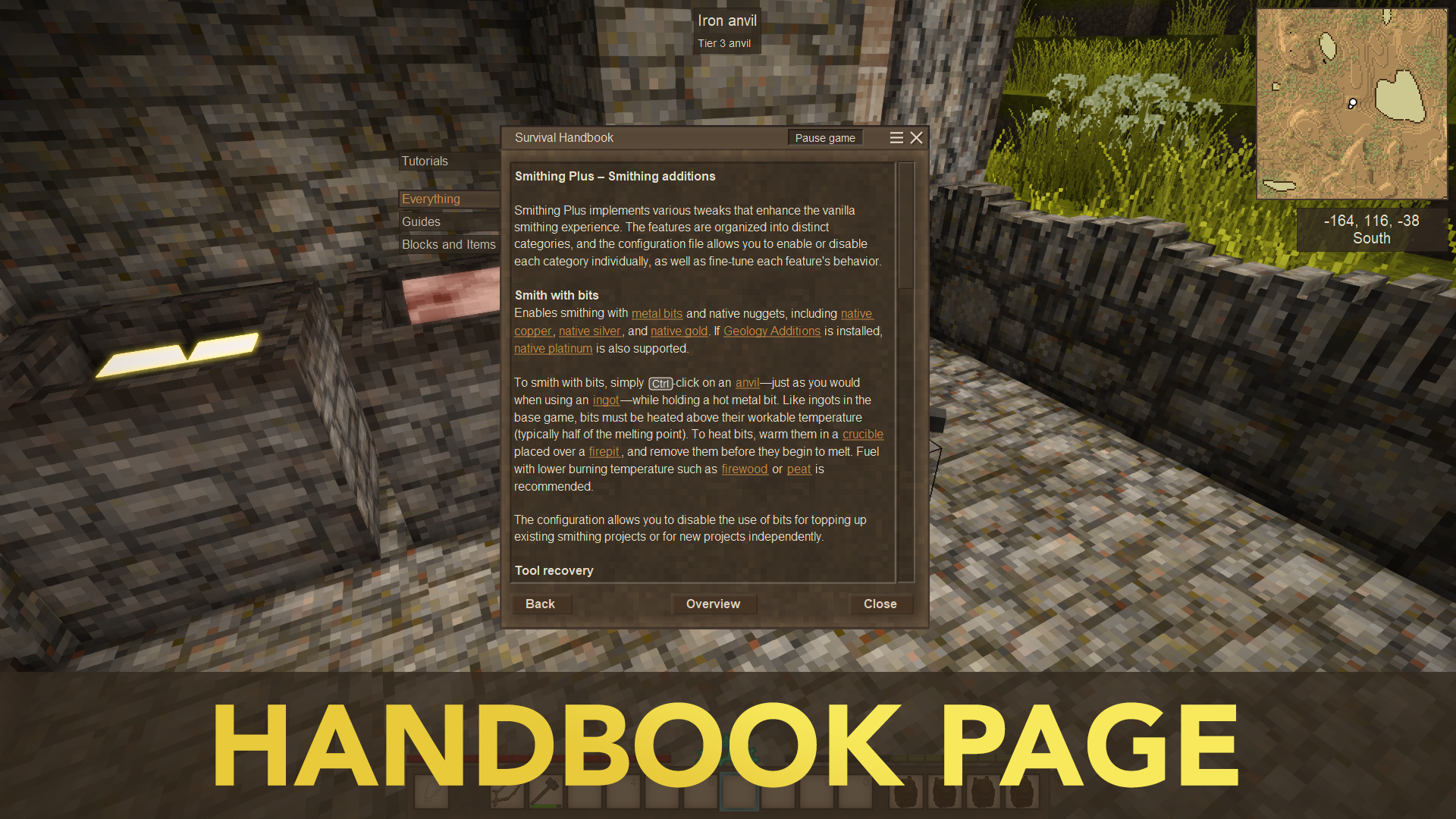
- Can smith with metal bits and native (copper, gold, silver) nuggets (heat them in a crucible at the workable temperature, do not let them melt)
- Can add bits to ongoing smithing projects (work items)
- Can smith with metal rods
- Can recover bits when splitting on an anvil
- Fix iron bloom regenerating voxels under a helve hammer. Iron blooms will always have enough voxels for an ingot. (Active when bits recovery is enabled)
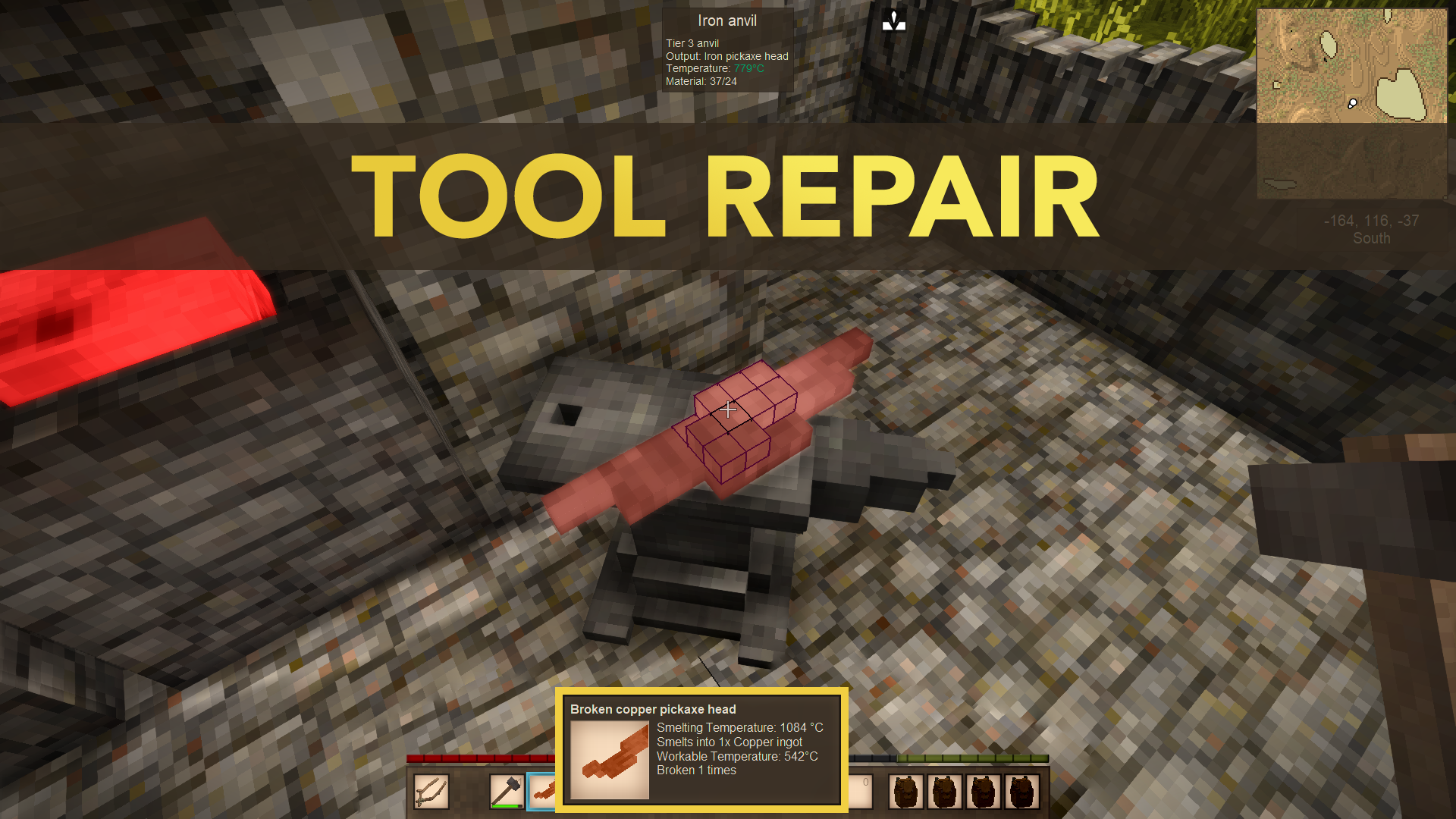
- Tools drop broken tool head when broken, which can be repaired on an anvil or chiseled to bits in the crafting grid (This now includes the Forlorn Hope estoc)
- Arrows will drop a metal bit when they break
- Chiseling work items in the crafting grid and other bits recycling grid recipes (even from other mods) will yield bits dynamically based on voxel count
- Cast tools have reduced durability (this disappears after repair)
- Metal units required by molds are dependent on cheapest smithing recipe (off by default, configurable)
- Scrape cold crucibles with a chisel to recover bits. Durability used depends on metal tier
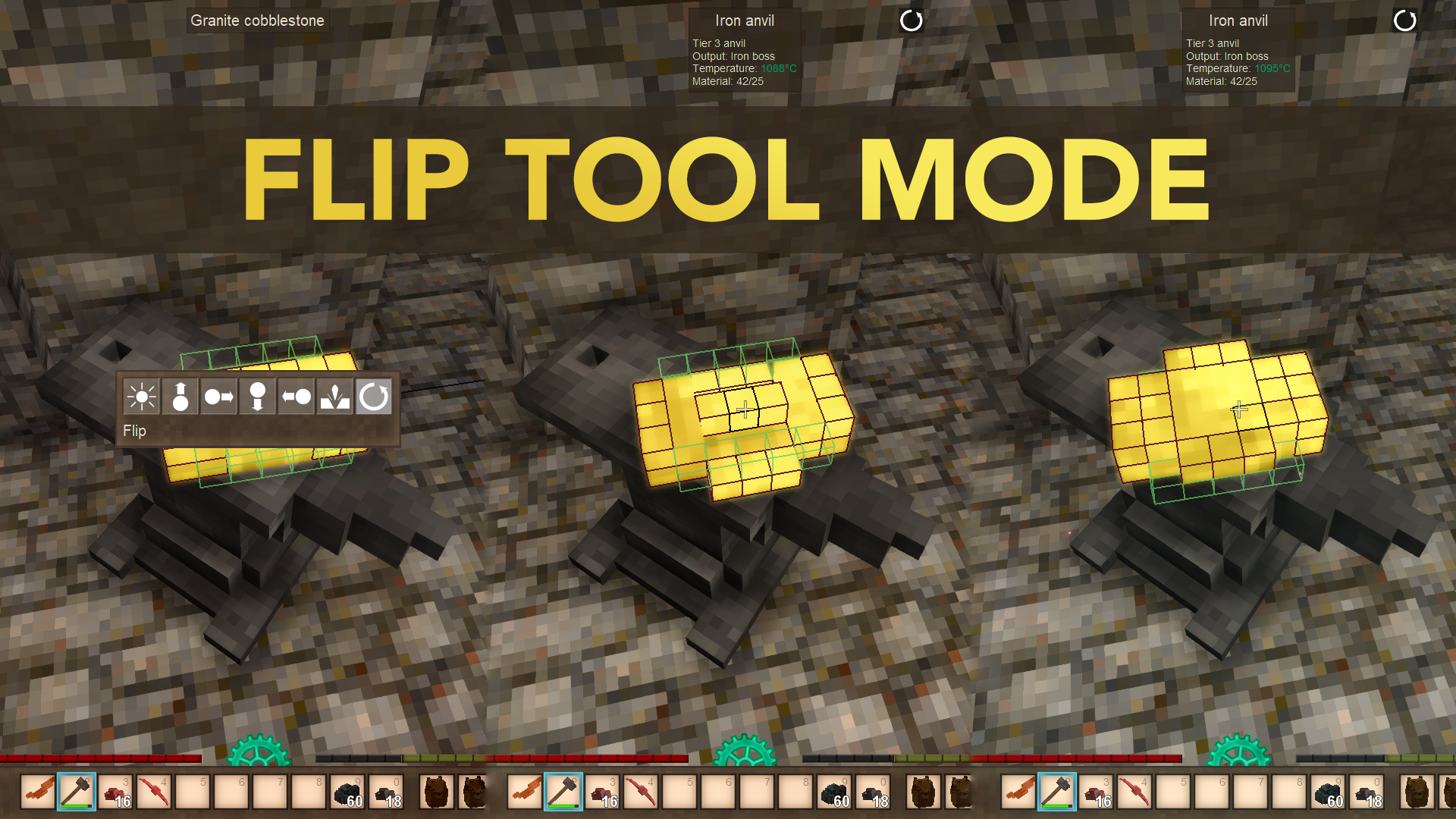
- Hammer tool mode to flip work items upside down
Client Tweaks
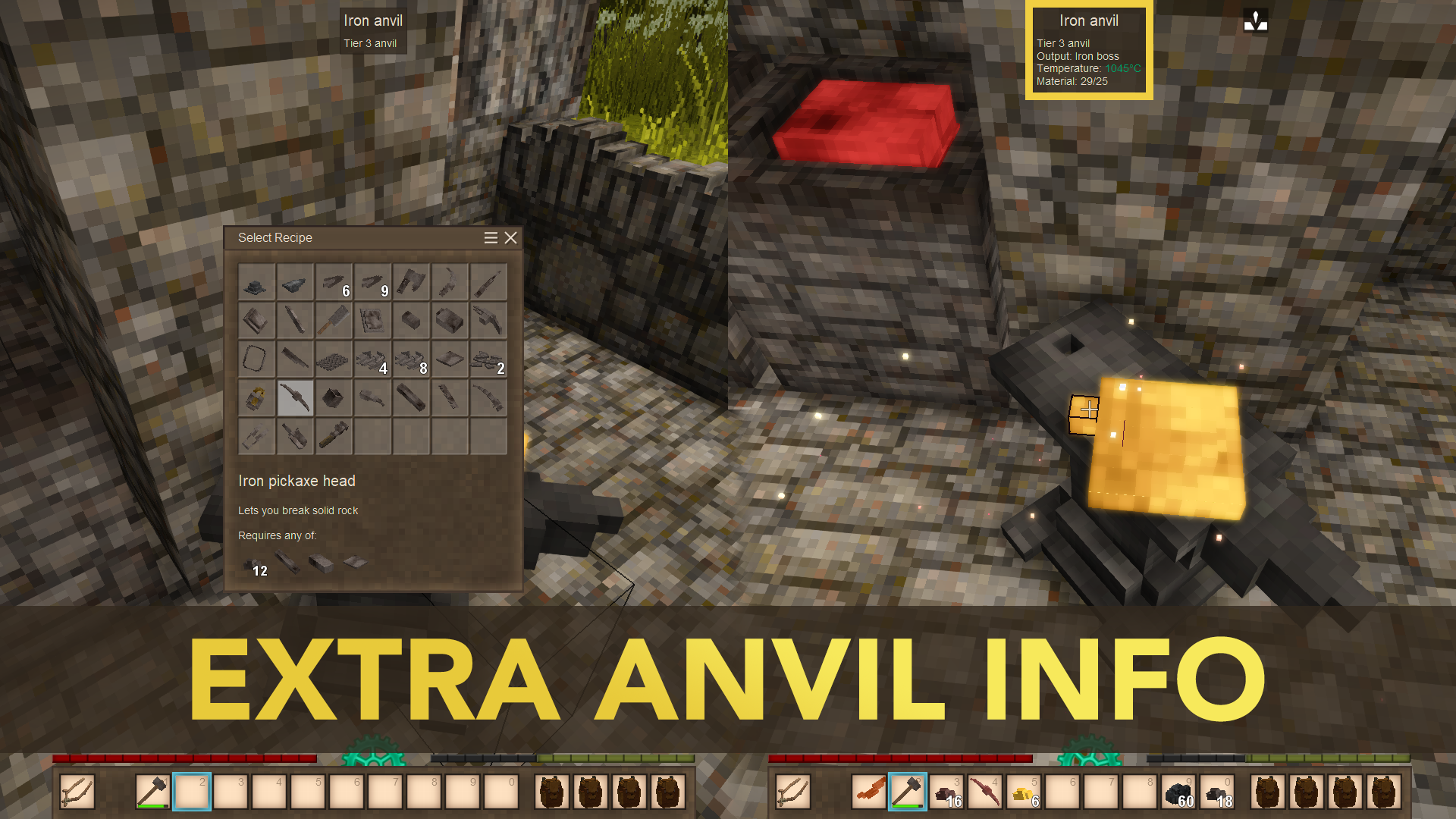
- Search anvil recipes from selection ui (useful when many mods add recipes)
- Change number of columns in the anvil recipe selection ui
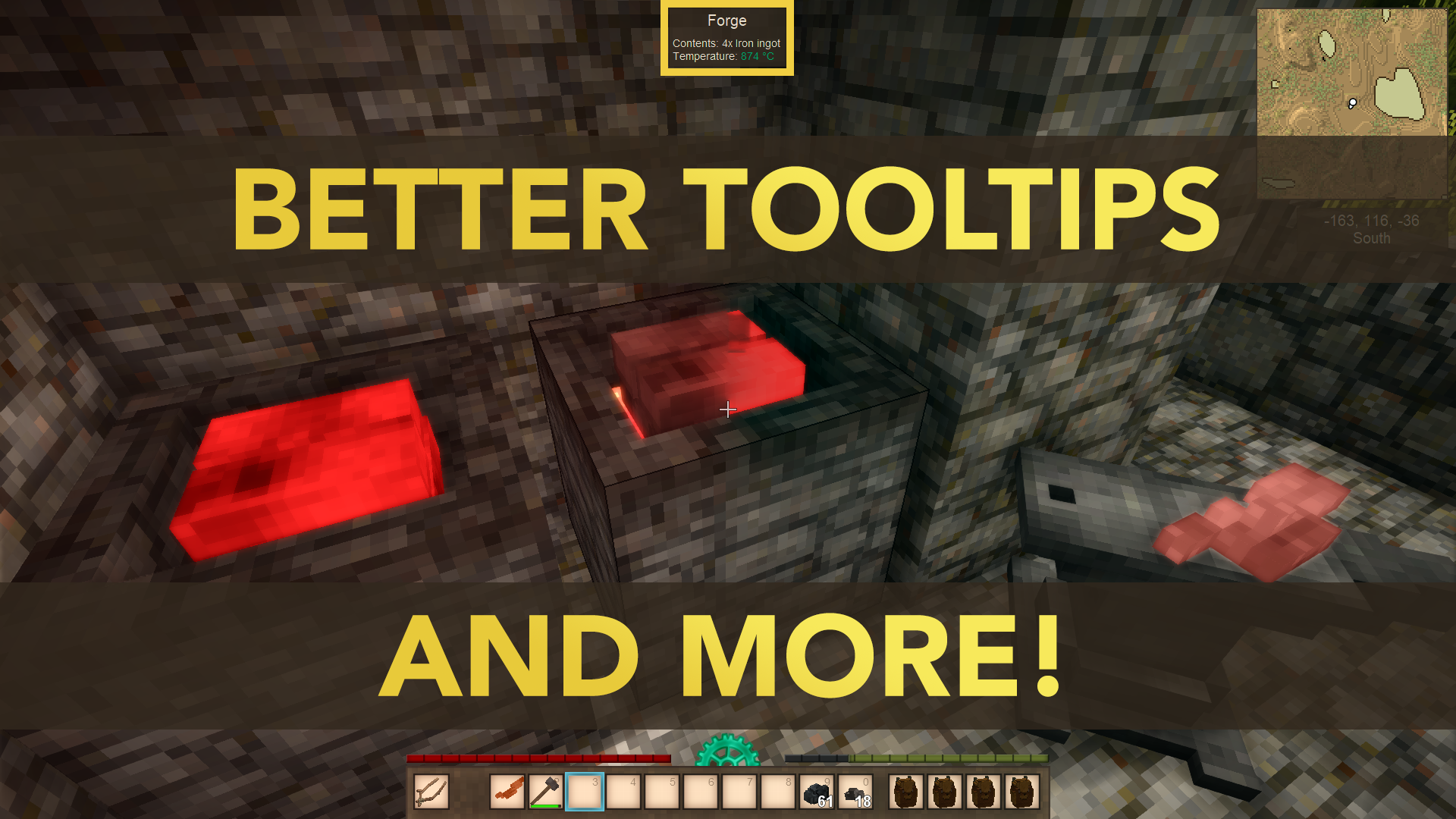
- Display workable temperature in tooltip for any anvil workable item
- Temperature will turn green on an anvil or forge when the item becomes workable
- Player will remember last used hammer tool mode
- Anvil will display its current voxel count and the chosen recipe voxel count
- Anvil recipes display voxel count at selection
- Handbook will display smithing ingredients and the minimum quantity necessary to smith an item
- Handbook will display detailed metal casting info
Fully configurable using ConfigLib or the file SmithingPlus.json in VintagestoryData/ModConfig
If there are features you don't like, you can likely disable them.
Compatibility notes
- Compatible with Toolsmith
- Now compatible with Salty's Manual Tool Crafting
- When using XSkills, I suggest disabling bits recovery in the config to avoid bad balancing
- Native platinum from Geology Additions can also be used in smithing when smithing with bits is enabled, just like vanilla native gold and copper.
- Any modded tool that has a crafting recipe and at least one metal part (a "tool head") in its recipe. For this to work, make sure the tool head and tool regex selectors in the config match the codes of those modded items. Some are supported out of the box, but not all. You're free to drop selectors for fuller compatibility in the comments.
This is compatible with the two following mods, although some or most features will be redundant, I suggest playing with the respective configs to balance them to work together if you intend to use them with this mod.
- Thrifty Smithing (Not compatible anymore after v1.6.7, this might change if the mod gets updated in the future.)
- Anvil Metal Recovery (Here for 1.20) (redundant feature: tool recovery, bits recovery)
Modder Info
Check the modding and compatibility guide
Wanted features
- Durability and performance debuff on cast items which can be fixed further smithing (like blister steel or iron bloom) or repair
- Tool dismantling for metal tools
- Change anvil recipe while smithing
- Stacking of multiple ingot and plate types in piles
- Forge improvement(s)
- Allow to stack different ingot types on forge
Known issues
- Chisel still crashes sometimes (might be fixed soon)
- Recycling work items is currently broken and doesn't scale (will be fixed soon)
- Some crashes when spears or arrows break apparently
- (If you encounter some issues with a new version of the mod after updating, please try to regenerate the config from scratch first)
Special thanks
- DilanRona hammer flip tool mode suggestion.
- FoeHammer418 for the wonderful screenshots.
Check out also


Other mods from this author



Please report issues on GitHub or Discord with as many details as possible
(mod list, crash logs, client-debug.log and server-debug.log in VintagestoryData/Logs)
DO NOT POST RAW LOGS IN THE COMMENT SECTION, THEY WILL BE DELETED
| Mod Version | Mod Identifier | For Game version | Downloads | Released | Changelog | Download | 1-click mod install* |
|---|---|---|---|---|---|---|---|
| 1.8.3 | smithingplus | 37277 | Oct 9th at 9:28 PM | smithingplus_1.8.3.zip | 1-click install | ||
| |||||||
| 1.8.2 | smithingplus | 4349 | Oct 6th at 9:41 PM | smithingplus_1.8.2.zip | 1-click install | ||
| |||||||
| 1.8.1 | smithingplus | 620 | Oct 6th at 9:04 PM | smithingplus_1.8.1.zip | 1-click install | ||
| |||||||
| 1.8.0 | smithingplus | 1857 | Oct 5th at 10:30 PM | smithingplus_1.8.0.zip | 1-click install | ||
| |||||||
| 1.8.0-rc.3 | smithingplus | 11326 | Sep 17th at 9:02 PM | smithingplus_1.8.0-rc.3.zip | 1-click install | ||
| |||||||
| 1.8.0-rc.2 | smithingplus | 1006 | Sep 16th at 11:28 PM | smithingplus_1.8.0-rc.2.zip | 1-click install | ||
|
[Fix] Handbook recursion loop ;( | |||||||
| 1.8.0-rc.1 | smithingplus | 249 | Sep 16th at 9:05 PM | smithingplus_1.8.0-rc.1.zip | 1-click install | ||
| |||||||
| 1.7.4 | smithingplus | 20163 | Sep 1st at 1:09 AM | smithingplus_1.7.4.zip | 1-click install | ||
| |||||||
| 1.7.4-dev.120 | smithingplus | 2858 | Sep 1st at 1:19 AM | smithingplus_1.7.4-dev.120.zip | 1-click install | ||
| |||||||
| 1.7.3 | smithingplus | 3056 | Aug 30th at 11:43 PM | smithingplus_1.7.3.zip | 1-click install | ||
| |||||||
| 1.7.2 | smithingplus | 356 | Aug 30th at 11:09 PM | smithingplus_1.7.2.zip | 1-click install | ||
| |||||||
| 1.7.1 | smithingplus | 4087 | Aug 28th at 2:39 PM | smithingplus_1.7.1.zip | 1-click install | ||
| |||||||
| 1.7.0 | smithingplus | 3979 | Aug 25th at 9:10 PM | smithingplus_1.7.0.zip | 1-click install | ||
| |||||||
| 1.6.9 | smithingplus | 2258 | Aug 25th at 9:06 PM | smithingplus_1.6.9.zip | 1-click install | ||
| |||||||
| 1.6.8 | smithingplus | 268 | Aug 25th at 2:03 PM | smithingplus_1.6.8.zip | 1-click install | ||
| |||||||
| 1.6.8-rc.7 | smithingplus | 270 | Aug 25th at 2:04 PM | smithingplus_1.6.8-rc.7.zip | 1-click install | ||
| |||||||
| 1.6.7 | smithingplus | 496 | Aug 24th at 10:47 PM | smithingplus_1.6.7.zip | 1-click install | ||
| |||||||
| 1.6.7-rc.7 | smithingplus | 125 | Aug 24th at 5:25 PM | smithingplus_1.6.7-rc.7.zip | 1-click install | ||
| |||||||
| 1.6.6-rc.7 | smithingplus | 32 | Aug 24th at 4:29 PM | smithingplus_1.6.6-rc.7.zip | 1-click install | ||
| |||||||
| 1.6.5 | smithingplus | 15675 | Jul 19th at 10:11 PM | smithingplus_1.6.5.zip | 1-click install | ||
| |||||||
| 1.6.4 | smithingplus | 1518 | Jul 17th at 4:34 PM | smithingplus_1.6.4.zip | 1-click install | ||
| |||||||
| 1.6.3 | smithingplus | 1221 | Jul 15th at 11:07 PM | smithingplus_1.6.3.zip | 1-click install | ||
| |||||||
| 1.6.2 | smithingplus | 203 | Jul 15th at 7:21 PM | smithingplus_1.6.2.zip | 1-click install | ||
| |||||||
| 1.6.1 | smithingplus | 220 | Jul 15th at 1:52 PM | smithingplus_1.6.1.zip | 1-click install | ||
|
[Fix] Patch error in metal material equality check (no material was recognised as equal to itself) | |||||||
| 1.6.0 | smithingplus | 218 | Jul 15th at 11:43 AM | smithingplus_1.6.0.zip | 1-click install | ||
Modder/compatibility info This version also add convenient ways for modders to make custom metal materials, or to define the metal material of an item for the purpose of bits recovery. There now is also the possibility to define custom metal materials, by adding a file config/metalmaterials.json structured as shown below: [
Places where metal materials are used
| |||||||
| 1.6.0-rc.2 | smithingplus | 13003 | Apr 15th at 7:19 PM | smithingplus_1.6.0-rc.2.zip | 1-click install | ||
| |||||||
| 1.6.0-rc.1 | smithingplus | 2477 | Apr 11th at 1:00 AM | smithingplus_1.6.0-rc.1.zip | 1-click install | ||
|
Pre-release: (Massive changes. Not fully tested. Might cause unexpected behavior)
| |||||||
| 1.5.1198-dev.1198 | smithingplus | 153 | Apr 5th at 1:31 AM | smithingplus_1.5.1198.zip | 1-click install | ||
| |||||||
| 1.5.7 | smithingplus | 11337 | Apr 8th at 6:22 PM | smithingplus_1.5.7.zip | 1-click install | ||
| |||||||
| 1.5.6 | smithingplus | 1234 | Apr 6th at 10:46 PM | smithingplus_1.5.6.zip | 1-click install | ||
| |||||||
| 1.5.5 | smithingplus | 2288 | Apr 4th at 3:06 AM | smithingplus_1.5.5.zip | 1-click install | ||
| |||||||
| 1.5.4 | smithingplus | 963 | Apr 3rd at 1:49 AM | smithingplus_1.5.4.zip | 1-click install | ||
| |||||||
| 1.5.3 | smithingplus | 1858 | Apr 2nd at 5:06 PM | smithingplus_1.5.3.zip | 1-click install | ||
| |||||||
| 1.5.2 | smithingplus | 77 | Apr 2nd at 4:15 PM | smithingplus_1.5.2.zip | 1-click install | ||
| |||||||
| 1.5.1 | smithingplus | 105 | Apr 2nd at 3:24 PM | smithingplus_1.5.1.zip | 1-click install | ||
| |||||||
| 1.5.0 | smithingplus | 368 | Apr 2nd at 3:00 AM | smithingplus_1.5.0.zip | 1-click install | ||
| |||||||
| 1.4.1 | smithingplus | 3769 | Mar 26th at 3:48 AM | smithingplus_1.4.1.zip | 1-click install | ||
| |||||||
| 1.4.0 | smithingplus | 4031 | Mar 18th at 1:19 PM | smithingplus_1.4.0.zip | 1-click install | ||
| |||||||
| 1.3.8 | smithingplus | 3030 | Mar 15th at 12:00 AM | smithingplus_1.3.8.zip | 1-click install | ||
| |||||||
| 1.3.7 | smithingplus | 341 | Mar 14th at 7:05 PM | smithingplus_1.3.7.zip | 1-click install | ||
|
[Fix] Fix cast tool crafting crash | |||||||
| 1.3.6 | smithingplus | 68 | Mar 14th at 6:20 PM | smithingplus_1.3.6.zip | 1-click install | ||
|
[Fix?] Possible fix to cast tool crash, or at least more debuggable code of it still happens | |||||||
| 1.3.5 | smithingplus | 461 | Mar 14th at 3:37 AM | smithingplus_1.3.5.zip | 1-click install | ||
| |||||||
| 1.3.4 | smithingplus | 526 | Mar 13th at 6:39 PM | smithingplus_1.3.4.zip | 1-click install | ||
| |||||||
| 1.3.3 | smithingplus | 709 | Mar 12th at 11:46 PM | smithingplus_1.3.3.zip | 1-click install | ||
| |||||||
| 1.3.2 | smithingplus | 280 | Mar 12th at 7:41 PM | smithingplus_1.3.2.zip | 1-click install | ||
| |||||||
| 1.3.1 | smithingplus | 714 | Mar 11th at 11:54 PM | smithingplus_1.3.1.zip | 1-click install | ||
| |||||||
| 1.3.0 | smithingplus | 510 | Mar 11th at 5:24 PM | smithingplus_1.3.0.zip | 1-click install | ||
| |||||||
| 1.2.10 | smithingplus | 551 | Mar 11th at 1:59 AM | smithingplus_1.2.10.zip | 1-click install | ||
| |||||||
| 1.2.9 | smithingplus | 175 | Mar 10th at 11:42 PM | smithingplus_1.2.9.zip | 1-click install | ||
| |||||||
| 1.2.8 | smithingplus | 714 | Mar 10th at 3:04 AM | smithingplus_1.2.8.zip | 1-click install | ||
| |||||||
| 1.2.7 | smithingplus | 298 | Mar 10th at 12:23 AM | smithingplus_1.2.7.zip | 1-click install | ||
| |||||||
| 1.2.6 | smithingplus | 1000 | Mar 8th at 9:57 PM | smithingplus_1.2.6.zip | 1-click install | ||
| |||||||
| 1.2.5 | smithingplus | 6911 | Feb 21st at 3:25 PM | smithingplus_1.2.5.zip | 1-click install | ||
| |||||||
| 1.2.4 | smithingplus | 698 | Feb 20th at 8:59 PM | smithingplus_1.2.4.zip | 1-click install | ||
| |||||||
| 1.2.3 | smithingplus | 952 | Feb 20th at 12:29 AM | smithingplus_1.2.3.zip | 1-click install | ||
| |||||||
| 1.2.2 | smithingplus | 546 | Feb 19th at 5:14 PM | smithingplus_1.2.2.zip | 1-click install | ||
| |||||||
| 1.2.1 | smithingplus | 556 | Feb 19th at 1:41 AM | smithingplus_1.2.1.zip | 1-click install | ||
| |||||||
| 1.2.0 | smithingplus | 66 | Feb 19th at 1:28 AM | smithingplus_1.2.0.zip | 1-click install | ||
| |||||||
| 1.1.11 | smithingplus | 147 | Feb 18th at 11:46 PM | smithingplus_1.1.11.zip | 1-click install | ||
| |||||||
| 1.1.10 | smithingplus | 1427 | Feb 17th at 1:14 AM | smithingplus_1.1.10.zip | 1-click install | ||
| |||||||
| 1.1.9 | smithingplus | 110 | Feb 17th at 12:47 AM | smithingplus_1.1.9.zip | 1-click install | ||
| |||||||
| 1.1.8 | smithingplus | 9725 | Jan 3rd at 3:26 PM | smithingplus_1.1.8.zip | 1-click install | ||
| |||||||
| 1.1.7 | smithingplus | 673 | Dec 29th 2024 at 2:15 PM | smithingplus_1.1.7.zip | 1-click install | ||
| |||||||
| 1.1.6 | smithingplus | 110 | Dec 29th 2024 at 1:29 PM | smithingplus_1.1.6.zip | 1-click install | ||
| |||||||
| 1.1.5 | smithingplus | 1105 | Dec 22nd 2024 at 10:26 AM | smithingplus_1.1.5.zip | 1-click install | ||
| |||||||
| 1.1.4 | smithingplus | 165 | Dec 21st 2024 at 9:27 PM | smithingplus_1.1.4.zip | 1-click install | ||
| |||||||
| 1.1.3 | smithingplus | 2275 | Oct 31st 2024 at 5:46 PM | smithingplus_1.1.3.zip | 1-click install | ||
| |||||||
| 1.1.2 | smithingplus | 181 | Oct 31st 2024 at 12:24 AM | smithingplus_1.1.2.zip | 1-click install | ||
| |||||||
| 1.1.1 | smithingplus | 428 | Oct 26th 2024 at 11:44 PM | smithingplus_1.1.1.zip | 1-click install | ||
| |||||||
| 1.1.0 | smithingplus | 100 | Oct 26th 2024 at 11:12 PM | smithingplus_1.1.0.zip | 1-click install | ||
| |||||||
| 1.0.1 | smithingplus | 268 | Oct 24th 2024 at 10:16 PM | smithingplus_1.0.1.zip | 1-click install | ||
| |||||||
| 1.0.0 | smithingplus | 190 | Oct 24th 2024 at 1:10 AM | smithingplus_1.0.0.zip | 1-click install | ||
|
Initial release | |||||||

Crashing when opening up Brass Torch Holder in handbook.
how do I turn steel bit into ingots?
I am also experiencing this issue of getting too much iron back. I have knapster and this mod, and i am getting bits back from all of the slag i am hitting off of the bar.
Not sure if it's due to this mod or Autoknapping or both, but uh. You get way more iron back from removing oxidization than what I think is normal? After smithing 10 bars of iron, I got like...14 bars worth of bits back.
Does anyone know if this is compatible out of the box with Ancient Armory, or does it need patching?
Your mod has a problem with the XSkills mod. When your mod is enabled, the tool molds start showing that the mold must be filled with 55, 95, or 35 units of material, for example copper. I also use the XSkills mod, and when I add the smelting perk that reduces the required material amount by 10%, it becomes impossible to fill the mold with metal. The material amount cycles from 0 to 55 over and over again. The metal does not stop at the full mold value.
Please help or advise how to fix it
Would it be possible as a config option to lock features of this mod behind class Traits?
Is BlackSmith Enhancements compatible with it ? It is your mod like this one but I haven't tested yet but i like the option of this one too and maybe it could be a good addition to smithing plus ?
ChirpingWren while https://news.kalataka.ru/toolsmith adds a lot of other features as well, it's also possible to reforge tools whenever. Both mods are compatible (and recommended by the author of toolsmith) to be used together
Had a thought about smithing skill. What if you render a sphere at the intersection of player cursor with metal, and the higher your skill the smaller the sphere, and when you click with hammer it will randomly be applied to blocks in the sphere based on how much of their volume is contained by it.
So at low levels you'd have to be very careful about your positioning to only hit the exact bit you want, or be more adaptable and as it gets smaller you can eventually fit it inside a single bit if you line up with its center, and eventually its small enough that pretty much any part of the bit you point at is a guarentee. Combine with an auto smith function that just dumbly does a greedy pathfind and moves a random bit towards the nearest hole via a hit with the sphere, such that at lower levels holding the button will never get you a finished part but might help roughtly situating everything, then at high levels it starts actually properly finishing the part just with a few bits going wrong that you have to manually forge.
So, i dont know if there is a way to do it or if it is planned on being added, but i think it would be great if we could break our tools intentionally; lets say i have an iron pickaxe that has like 80 durability and i am about to go mining, instead of forcing me to mine 80 blocks, itd be cool if we could like use a hammer and chisel in the crafting menu to like break off the head to the broken tool item and let us repair it from there. also, itd be cool if we could put the little nuggets in the forge/ put the crucible in the forge so we can not have the ugly fireplace in my cool blacksmith. otherwise, awesome mod, literally like my number one mod i use tbh
Is this Compatible with the fire arms mod by maltiez?
How do you heat the iron parts up further then 1100? the forge is not working
Hey
Just wanted to ask if it could be possible to add the ability to put a crucible on the forge to heat it, instead of using a fireplace? As done in real life.
Love your mod btw. Its brilliant.
Thanks
I'm getting a bug where it won't let me put copper bits into crucibles to heat them up.
Would it be at all possible to add Copper arrow heads, Copper spear heads and Copper Awls (Tailor's Delight) to the chisel bit recovery?
This is the iron anvil base and top.
I don't think any of my other mods affect the anvil positioning.
How do you smelt down broken tool heads? I'm stacking up a bunch of broken weaker metal tools that I want to turn back into ingots.
lol just realised you can break them with the chisel, I thought that doesn't work for some reason. Leaving the comment up in case someone else has my kind of tardation.
Im having an issue where when I rotate a chiseled block sometimes my game will crash. I see that a known issue is chisel crashing and was wondering if this was it?
the server Im in spits out this error when it happens if that might help. Im also using the true chisel from qp's chisels
alucard666 it works fine on 1.21.5, but I can add the version if it bothers you so it doesn't say "possibly outdated"
any chance this will be updated to 1.21.5
Having issues with repeating text, cast a prospecting pickaxe head and it was called a "Cast cast copper prospecting pick head"
The item description was also repeating:
Cast tool durability penalty: 10%
Refine this on an anvil to remove imperfections
Workable Temperature: 542°
Workable Temperature: Always
Cast tool durability penalty: 10%
Refine this on an anvil to remove imperfections
Workable Temperature: 542°
I'm playing on 1.21.5 with the latest mod version
Rilla LagMonster
Did you guys get the issue with the pickaxe being at 55/55 ever working? Was it the problem with this mod? I'm encountering this too when filling a copper pickaxe mold and can't get more than 55 in it, and same with a prospecting pickaxe on a multiplayer server with 1.8.3 version of this mod
Any chance for a compatibility for Vanilla Variants? If I make a helve hammer from any other wood than oak the smithing stopps working and they won't smith any ingots or plates at all. Considering it works perfectly fine with oak which is detected as the default I figured it must be VV incompatibility.
Ah, so THAT'S why I couldn't store some nuggets in a pile.
not sure if its a feature or a bug but tin bronze bits dont seem to be workable?
jayu Yea, plate can be done. But I only tested it with iron and steel bits.
Lord_Venom Can plates be done currently? I told the game to not make it workable, but it might use the value of the finished product. If so, ingots can't be done because they aren't helve workable in vanilla.
CreepoJoe that is a bug in an old version. Update the mod.
Hi, it is possible to make ingot from bits on helve hammer or only plates can be done?
Hi, theres a small problem I've found. When repairing a tool head on an anvil, you need to spend material to fix it. All good! It's durability goes down and that's good too.
The main issue I have is that the tool head can be broken down into 20 bits, so there's no point in repairing the tool at all.
Most stuff reported here should be fixed in 1.8.0. I cannot read all comments, please open a bug report on github if you want full visibility.
The issue with all ingot recipes using bits outputting copper ingots seems to be that the recipe file ingots.json is broken in this version. In previous versions it used a generic filter that allowed it to parse all metal types and return the correct recipe. In this version it's hard coded to copper.
I assume this is an oversight and not an intentional change. We tried using the old version of the json, but it caused the bits to be returned to your inventory when you try to start the craft instead of being placed on the anvil, so I'm unsure what functionality was changed that is incompatable now and I don't have a workaround, but hopefully this is at least helpful information.
Any update on when the stable patch should be released?
jayu please please add a quickfix version for toggling debug lines or something as others have requested. the mod is spamming this for like 6 different materials like thousands of times and i've narrowed it down to be one of the very likely culprits in my performance issues.
[VerboseDebug] [smithingplus] [MetalMaterial] Metal material game:blistersteel not found. Will return null.
for anybody that confused about the discord link not working; you need to join the vintage story discord for the link to work, as it links to thread not a server.
It seem that tin pickaxe with this mod is not recognized by treasure hunter because durability is lower than vanila tin pickaxe. I had to pull one from creative mode to advance story line.
Smithing Plus uses chisel & ingots to make copper bits, but it duplicated massively.

400 units worth of copper bits in the form of copper ingots made 1,920 units worth of copper bits when they were Shift-LeftClicked in the crafting menu...... Using mod version 1.8.0-rc.3 on 1.21.1. When you just spam left click and do not use shift, duplication does not occur. Tried this with Tin as well and tin worked properly without duplicating. On a fresh server with no other mods installed, the same issue occurs.
Got quite a few of those in the client-debug.log (like the debug file after 3h is 11Mb...
[VerboseDebug] [smithingplus] [MetalMaterial] Metal material game:nativecopper not found. Will return null.
[VerboseDebug] [smithingplus] [MetalMaterial] Metal material game:nativegold not found. Will return null.
[VerboseDebug] [smithingplus] [MetalMaterial] Metal material game:nativesilver not found. Will return null.
[VerboseDebug] [smithingplus] [MetalMaterial] Metal material game:blistersteel not found. Will return null.
[VerboseDebug] [smithingplus] [MetalMaterial] Metal material game:leadsolder not found. Will return null.
[VerboseDebug] [smithingplus] [MetalMaterial] Metal material game:silversolder not found. Will return null.
just a snippet, there are thousands of those, just took one of each to save space (think it's just the 6 of them, they do cause a bit of a frame drop...
Any idea when the full release version will be updated?
[Warning] Harmony instance "smithingplus" attempted to run UnpatchAll() with no arguments. This normally unpatches all mods, including EMTK, instead of just the harmony instance itself. Please notify the mod author to use UnpatchAll("smithingplus") instead.
- EarlyModToolKit warning.
Just want to corroborate what snopey1 an Bobosaw were experiencing. When I smith an ingot from bits (of any kind; this happens with tin and bismuth bronze, iron, and gold from what I've experienced), the ingot turns into a copper ingot upon completion. Not that big a deal; I just go into creative and swap it for the correct ingot, but inconvenient all the same.
The only mods I have affecting smithing are this and Toolsmith, though Toolsmith should be disabling its smithing with bits patch. Perhaps that's accidentally not switching off?
The game is crashing for me whenever I try to break my anvil out of its mold. Tried fixes from previous comments without luck.
Tried:
olofjewmeister I am also having issues with that. edit: its the GlooMeClasses mod messing with bits for me.
I'm not sure if there is an incompatible mod for my friend's server, but for some reason, many people on the server are unable to repair the tool with bits. Yes, we have heated both the bits and the tool head to the appropriate temperature, and I personally have heated them to the melting point, but I can't add bits to them. Additionally, I'm unsure if we're supposed to see the smithing grid when adding them, but I don't. Here's a pastebin https://pastebin.com/wApRfKmy for the mods we have in the server. If someone knows an incompatibility, let me know. Thanks
Rilla I have the same thing happening. I even have a world where the Anvil mold say 0/0 units. Can't even smelt an anvil in that world for some reason.
EDIT: I realize now I was on a previous version that had an issue with the smelting unit count. Seems the units for tools heads was adjusted, which is cool, and the most recent version fixes the issue with the molds sometimes saying 0/0 units
My pickaxe mold only need 55 units to make the part. Is there something im doing wrong? is this part of the mod?
ist ok supposed to be that when I forge an ingot from pieces of steel, I end up with a copper ingot and not steel??
updating fixed it for a few days but this is happening again. i also have chisel tools, and it happens when i'm looking up particularly.
To add to what Bobosaw said, I smithed Iron bits into an ingot and got a copper ingot instead. Also had some problem from tin bronze bits too.
Mods related to smithing:
This one
Xskills
Toolsmith
Recently added mods overall were:
Alchemy
Bricklayers
EM
Better Crates
Pelagus Winds
Wool & ShearLib
bulkmolds
jayu
Sorry to keep piling issues on you, I'm unable to get my github login to toss this into your issue tracker right now:
I have a unique issue where chiseling ingots results in a stacking duplication of however many ingots are in the craft when multicrafting the items. (In my case, shift clicking the output of bits)
1 ingot under chisel = 20 bits.
2 ingot under chisel = 80 bits
It's certainly an interesting situation going on.
Mods I have regarding smithing:
SmithingPlus 1.8.0-rc.3
XSkills 0.9.0-pre.2
Toolsmith 1.2.8
Bits recovery is disabled in Smithing Plus as suggested for XSkills, every setting in Xskills and Toolsmith are default currently.
how do i chisel tool heads down to bits? Im placing them in the crafting grid with the chisel and never get a result no matter what order i put them in.
I think it feels cheaty to get like ~4-12 bits back per work item, and then also to get a full 20 by breaking down the tool head. Literally free metal.
Do I turn "EnableToolRecovery" to false or set "DontRepairBrokenToolHeads" to true?
this "
issue still rises with cast tools so basically they are infinitely getting more hp with each handle attached. While using toolsmith.
Hey, I don't seem to be able to add bits to an iron knife head I'm working on
For what it's worth, i'm using Toolsmith aswell, and it's a knife head i'm trying to repair with toolsmith
Guess I'll put this here: As of the change with Smithing plus (1.8.0-rc.1 if I am correct), a new incompatability with XSkills arose, at least from it being discovered by my server's smith (Who was gone and/or busy for a number of days since..) this morning. Doing some testing on my single player test world, the changes to the amounts that molds take interacts poorly with Metalworking's Smelter ability, which makes molds take less to fill.
On my testing I ran with Smithing Plus only and it worked fine. Added Xskills and it worked fine. But adding the "Smelter" ability caused the mold to fill, seemingly 'refund' an amount to the crucible and reset the mold's fill state down in a repeating loop. What results is the crucible pouring endlessly while gaining amounts. i.e., if you started pouring with 100, let it loop a few times, you can end up with 150 in the crucible with a half filled mold.
Lonniee Thank you so much, that solved it for me too!
And FYI I have the latest version, just looking at the changelog.
Hi, I'm the player Joenemba referenced |˶˙ᵕ˙ )ノ゙
Yo, a player in my server has found that, if you use bits to smith an ingot, place a couple of bits down, and then break the work item with a chisel, you get 20 bits back. Basically lets you dupe an infinite number of 'em.
Anything I can do?
edit: ah i see the known issues, my bad
for the time, couldn't you add a config that simply prevents recovery on work items?
When I use tin bronze bits to make an ingot it produces a copper ingot instead
[VerboseDebug] [smithingplus] [MetalMaterial] Metal material game:silversolder not found. Will return null. getting loads of those in my log (client debug) up to 5Mb
Plus a crash with this in the log:
Involved Harmony IDs: smithingplus, extrainfo
System.ArgumentException: Attempted to resolve the recipe ingredient wildcard Item game:metalrod-* but there are no such items/blocks!
now mod makes unable palce copper ore on the floor
already placed ore is missed any model
and when i didnt notice that and tryied place bowll on same place
game crashed.
checked- disabling ur mod bring copper ore back.
this is something about last update , cause im already played with ur mod 1.7.4
Running on 64 bit Windows 10.0.19045.0 with 32449 MB RAM
Game Version: v1.21.1 (Stable)
21.09.2025 19:59:09: Critical error occurred
Loaded Mods: catchledge@0.5.8, cbr@1.0.0, crawlanddive@0.2.1, dodgemaster@1.2.3, fallingtree@0.3.0, flickeringlights@0.1.2, freelook@1.0.3, immersiveorecrush@2.2.4, juicyores@1.0.1, largervanillabags@1.0.0, overhaullib@1.10.0, primitivesurvival@3.9.7, rstick@0.0.3, simpleconversions@0.0.1, spyglass@0.5.2, thatchexpanded@1.2.1, unstablecrackedrock@1.0.4, game@1.21.1, vsimgui@1.1.12, bedspawnv2@1.6.2, betterruins@0.5.0, bettertraders@0.1.0, bloodtrail@1.0.7, carryon@1.10.9, commonlib@2.8.0, composter@1.2.1, configlib@1.10.2, cratebulkinput@1.0.0, danatweaks@3.6.0, drifteraimnerf@1.0.0, hideplayername@2.2.0, immersivewoodchopping@0.8.2, itempickupnotifier@1.7.3, maltiezcrossbows@1.5.3, maltiezfirearms@1.2.3, metalunittooltip@1.1.1, minimalcompass@1.1.4, morepiles@2.2.0, nemi@1.1.0, playerlist@2.1.5, realsmoke@1.1.3, roomtools@1.4.0, rustboundmagic@3.0.14, simpleemotemenu@2.0.0, smithingplus@1.8.0-rc.3, statushudcont@4.0.0, stickydirt@0.1.1, tabfix@1.0.2, creative@1.21.1, survival@1.21.1, waypointtogethercontiued@4.1.0, autoconfiglib@2.0.9, pickupartist@0.3.1, playercorpse@1.12.0
System.NullReferenceException: Object reference not set to an instance of an object.
at Vintagestory.GameContent.BlockLiquidContainerBase.OnHeldInteractStart(ItemSlot itemslot, EntityAgent byEntity, BlockSelection blockSel, EntitySelection entitySel, Boolean firstEvent, EnumHandHandling& handHandling) in VSSurvivalMod\Systems\Liquid\BlockLiquidContainerBase.cs:line 658
at Vintagestory.API.Common.CollectibleObject.OnHeldUseStart(ItemSlot slot, EntityAgent byEntity, BlockSelection blockSel, EntitySelection entitySel, EnumHandInteract useType, Boolean firstEvent, EnumHandHandling& handling) in VintagestoryApi\Common\Collectible\Collectible.cs:line 1205
at Vintagestory.Client.NoObf.SystemMouseInWorldInteractions.TryBeginUseActiveSlotItem(BlockSelection blockSel, EntitySelection entitySel, EnumHandInteract useType, EnumHandHandling& handling) in VintagestoryLib\Client\Systems\Player\MouseInWorldInteractions.cs:line 848
at Vintagestory.Client.NoObf.SystemMouseInWorldInteractions.TryBeginUseActiveSlotItem(BlockSelection blockSel, EntitySelection entitySel) in VintagestoryLib\Client\Systems\Player\MouseInWorldInteractions.cs:line 831
at Vintagestory.Client.NoObf.SystemMouseInWorldInteractions.HandleMouseInteractionsBlockSelected(Single dt) in VintagestoryLib\Client\Systems\Player\MouseInWorldInteractions.cs:line 573
at Vintagestory.Client.NoObf.SystemMouseInWorldInteractions.OnFinalizeFrame(Single dt) in VintagestoryLib\Client\Systems\Player\MouseInWorldInteractions.cs:line 87
at Vintagestory.Client.NoObf.ClientMain.RenderToDefaultFramebuffer(Single dt) in VintagestoryLib\Client\ClientMain.cs:line 1031
at Vintagestory.Client.GuiScreenRunningGame.RenderToDefaultFramebuffer(Single dt) in VintagestoryLib\Client\MainMenu\Screens\GuiScreenRunningGame.cs:line 250
at Vintagestory.Client.ScreenManager.Render(Single dt) in VintagestoryLib\Client\ScreenManager.cs:line 760
at Vintagestory.Client.ScreenManager.OnNewFrame(Single dt) in VintagestoryLib\Client\ScreenManager.cs:line 663
at Vintagestory.Client.NoObf.ClientPlatformWindows.window_RenderFrame(FrameEventArgs e) in VintagestoryLib\Client\ClientPlatform\GameWindow.cs:line 113
at OpenTK.Windowing.Desktop.GameWindow.Run()
at Vintagestory.Client.ClientProgram.Start(ClientProgramArgs args, String[] rawArgs) in VintagestoryLib\Client\ClientProgram.cs:line 338
at Vintagestory.Client.ClientProgram.<>c__DisplayClass10_0.<.ctor>b__1() in VintagestoryLib\Client\ClientProgram.cs:line 133
at Vintagestory.ClientNative.CrashReporter.Start(ThreadStart start) in VintagestoryLib\Client\ClientPlatform\ClientNative\CrashReporter.cs:line 95
Event Log entries for Vintagestory.exe, the latest 1
Found the temp fix for some of the Combat Overhaul: Armory weapons not dropping heads when they break.
in SmithingPlus.json:
Update the "RepairToolSelector" and "ToolHeadSelector" lines to the ones pasted below
"RepairableToolSelector": "@.*(pickaxe|shovel|saw|axe|hoe|knife|hammer|chisel|shears|sword|spear|bow|shield|sickle|scythe|tongs|wrench|solderingiron|cleaver|prospectingpick|crossbow|pistol|rifle|shotgun|blade|halberd|poleaxe|quarterstaff|pike).*",
"ToolHeadSelector": "@(.*)(head|blade|boss|barrel|stirrup|part)(.*)",
I think i got all of the additional weapon types
Forging an iron ingot from hot bits makes a copper ingot
love this mod, huge fan, keep up the great work
Ensorcelled Do these appear in your server console? I thought verbose debug only appeared in the debug log file. At least it does for me when running locally from console.
Ok, it is the debug logs, but it's MOST of that file and even with a 100k file split it fills up fast...
20.9.2025 11:45:43.413 [VerboseDebug] [smithingplus] [BitsRecovery] Split count below 1 (0.4761905), not recovering bits
20.9.2025 11:45:44.127 [VerboseDebug] [smithingplus] [BitsRecovery] Split count below 1 (0.952381), not recovering bits
20.9.2025 11:45:44.871 [VerboseDebug] [smithingplus] [BitsRecovery] Attempting to recover bits from 1x Item Id 1945, Code game:workitem-iron
20.9.2025 11:45:44.873 [VerboseDebug] [smithingplus] [MetalMaterial] Metal material game:north not found. Will return null
...pretty much that type of thing. I have some serious smiths? LOL
I am just wondering if it can be set to off in the .json? I have no idea if that is worth the effort to add or not, but it never hurts to ask.
I'm looking forward to the 1.21.1 full version to be done, trying to keep this server up to date. Your mod is a MUST HAVE.
Thank you for your time in any event. I appreciate those of you with programming skills and wonderful ideas!
Ensorcelled what logs are being spammed? I have debug logs in the debug log, normal logs should show warnings and errors only that the user should be aware of.
Hey, can you PLEASE add a debug spam toggle in the config? We don't need 100k lines of debug messages from smithing plus when 10 people smith.
VS 1.21.1 with S+ v. 1.7.4 ..... If the newer version has that, let me know and I'll switch over. Thanks!
With parameter "DynamicMoldUnits": false - molds require full 100 units (as intended) but the tooltip on them shows amounts as if the parameter was set to true, so 0/95, 0/60, etc.
Swiftthistle use the latest version
I don't believe in god, but god bless you man for this wonderful mod!
Hey, I don't know if you ever addressed this, but when you break a tool and receive a broken tool head, if you chisel it down into bits, you always receive 20 bits back. A full ingot. Like if you make a prospecting pick with 6 bits, and break it, you gain +14 bits. Might want to address this by forcing tools to only drop as many bits as the remaining voxels within the broken tool itself. As a result you can turn tools into profit.
GPedia
See this message I sent a while back:
If you can tell me the items that are missing I can add them myself at this point. Otherwise, you can modify the config settings tool head selector and tool selector to match the "code" (read: string id, but that's how the game calls it) of the various tools and tool heads you want to be affected. They use regex, the simplest way to verify if it matches a certain code is to use some regex checker tool online. Here's the default tool head selector, which will match stuff like game:pickaxehead-copper for example, since it contains the word "head". This can be made more or less restrictive using regex.
Note I might change this system soon however, as while the selectors are great to make this configurable, they also might give too much freedom that is rarely used but has a world load time cost as these have to be applied to every item to check for a match.
jayu oh i didn't realize debug had them now... thanks for telling me!
Question: What is the syntax needed to add Crossbow bolts to the arrowselector atribute so that my bolts start to drop bits when they break?
I couldn't find any other atributes that show the "@(.*):arrow-(.*)", style but with multiple values, so I'm not sure what wording is used to add ''or bolts'' to it.
I just encountered a slight bug. I tried crafting an iron ingot from iron bits and it gave me a copper ingot instead.
Yeah, the xskills smelter perk is funny, I don't remember the exact details of how it was written since I haven't messed with it in long enough. I sure wasn't expecting that interaction though.
As for the anvil molds still acting strange when the patch is disabled, I don't really know what to say about that. with "DynamicMoldUnits": false, I was still unable to cast an anvil as the molds read-out their adjusted values (Even after being replaced.) The other molds would let me pour the correct amount, but the anvil would take about a tick of metal and then lock up until I broke it, yielding nothing.
quick edit to mention this is pre the patch you just put out, I'll grab that and write back probably tomorrow at this rate and see if it behaves correctly, though I'm sure if it isn't someone else might slide in and say haha
Vigilance XSkills alters molds units too? Of course it does...
Still, I can't see how it happens with that disabled. Nothing else is touching mold units and that patch would be disabled.
The infini-pour glitch (which also adds metal to the crucible) is from the dynamic mold amount on molds being altered by xskills. I was basically unable to even interact with the anvil mold-- including after turning the dynamic mold setting off.
GPedia the held item commands for temperature and durability have been removed since the base game already has them XD. Simply do /debug heldTemperature 1000 or /debug heldDura 1 for example.
TopOnPC what version are you using?
Vigilance is this due to molds having 0 units? Will be fixed soon.
There's also a nice bug where you can infinitely pour (and the associated bad things such as infinite XP) with xskills' smelter perk. I hope other server owners are more weary of this mod updating than I am, for balance's sake!
Hi, i'm a new player just now started a new playthrough with mods in mind. Since i can't casted an Anvil, is there some kind of work around for it? or this is just need a small fix and i should just sit thight cus would be fixed like tomorrow or something?
hey, anvil molds are broken if the dynamic mold values is active; and also i miss the sp held item commands which seem to have been removed too, (specifically the temperature one)
Yep, it really broke, anvil molds are also showing as 0/0.
The update that changes the mold stuff has broken a few things like the molds for bullets from firearms label themselves as having 0/0 units in them I don't know if that was intentional or an oversight
Was wondering what changed mold costs... Interesting change haha
Hi, I'm running a server and some players are crashing due to this mod I think. Here is the code from the server logs. Could you let me know if there is anything I can do to prevent this? Thanks!
jayu That would be cool, thanks for putting it on your to-do list!
I did a quick test of the new dev build, most fixes seem to be working as intended. Thanks for implementing the adjusted cast requirements!
I did discover one major bug (non-smithable items, e.g. anvil, can't be cast) and one minor bug (handbook displaying incorrect bit requirements) - I opened an issue on GitHub for each.
Ever since updating this mod, I am having hard freezes upon trying to look at any metal item that's made, such as a tin bronze plate or what not. The freeze never ends and I have to force close the game.
Edit: Just saw your known issues part, I'll try remaking the config and report back.
Edit 2: Nope still hard freezes. Not sure what's going on but this was I believe the only mod that got updated and it has to do with smithing so, I presume it's this causing it.
Edit 3: Tested it by reverting to the previous version, I can confirm this mod is causing hard freezing when using the handbook to look at the recipes for seemingly any metal made item piece.
The_Revisionist will see what I can do when I get to reworking the config.
Would it be possible to change the config so that CastToolDurabilityPenalty is applied even if MetalCastingTweaks is turned off? I like that cast tools are worse than smithed ones, but I don't want to be able to repair the penalty.
MichaelStory please read previous comments
@MichaelStory
Treasure hunter accepts full smithed pickaxe, not casted.
Will there be an update for config to manage amount of bits recovered after chiseling broken tool heads? I wanted to reduce the amount to imitate materiall loss with use but there's no such feature.
Arisilde if you can tell me the items that are missing I can add them myself at this point. Otherwise, you can modify the config settings tool head selector and tool selector to match the "code" (read: string id, but that's how the game calls it) of the various tools and tool heads you want to be affected. They use regex, the simplest way to verify if it matches a certain code is to use some regex checker tool online. Here's the default tool head selector, which will match stuff like game:pickaxehead-copper for example, since it contains the word "head". This can be made more or less restrictive using regex.
Note I might change this system soon however, as while the selectors are great to make this configurable, they also might give too much freedom that is rarely used but has a world load time cost as these have to be applied to every item to check for a match.
@jayu Fair enough. I did try to search before asking, but didn't turn up any results. I'm unsure how to add the tools and heads, but certainly willing if you can point me toward a resource to learn how?
Arisilde nobody bothered to give me the full list of CO stuff, and I haven't played with CO so far, so you'll have to set the config yourself so that the tools and tool heads are recognised as valid tools. I will add a small note to do this in the mod description. I have said this before in the comment section but it probably got buried.
Is there info somewhere on how to get this and Combat Overhaul to play nice together? Certain things like spears and javelins drop broken items, others like the Short Sword do not. Is there a patch, info on how to add them, or anything at all to resolve this?
I have tried to start the first quest with treasure hunter where he requires tin bronze pickaxe and once I ask him about any interesting places, with a fully durable tin bronze pickaxe in my inventory he does not give the quest. This is the only mod that alters tools. I restarted the game and reloaded the mods but the issue persists, my only suspicion is that somehow the modded version of pickaxe has a different item id, and therefore is not recognized by trader but thats my conjecture. I would like to get some clarity on what should I do or whether it is a bug to be reported or altogether an error on my behalf, however in my unmodded playthrough I successfully received the maps for archives.
P.S. I tried to join discord to post this issue there but the thread is blank screen.
jayu I'd decided to be a bit proactive and opened a pull request for this feature :)
https://github.com/jayugg/SmithingPlus/pull/85
jayu Amazing, that would be a cool new feature!
The_Revisionist I think that should be possible yeah
I have a different kind of issue/suggestion than the bit recovery one everyone is mentioning lately. It's only slightly related.
The mod on default settings is obviously pushing the player to do smithing instead of casting, as there's a durability penalty on cast items. I thought this is fair and balanced, especially given that you can also repair the cast tool heads to remove the penalty.
But now I realised that when you cast a tool head you always use 20 bits worth of metal, no matter the shape. If you use those same 20 bits to cast an ingot, and then smith a tool head, you get back some bits, so the item only cost e.g. 15 bits, AND it is stronger than the cast one. In my opinion these two effects together (higher metal cost + durability penalty) make casting tool heads too weak relative to smithing. And it feels a bit unbalanced / immersion breaking that you only need to use e.g. 15 bits to make a pickaxe when smithing instead of 20 when casting, even though the shape/volume of the item is the same.
Would it be possible to tweak the casting recipes so that casting would use up the same amount of metal as smithing the same item? I do realise that this would usually mean some leftover metal in the crucible unless you do the exact math before melting it, but this would mean that the crucible scraping mechanic would be used more often, which is a win too.
Wonderful news thanks!
Razgriz this is in the todo list
Any chance of a way to recover a tool head on a tool thats really low durability without having to break it?
i.e. I have a spear thats like 20 dura left. Put it in the crafting grid with a saw to get the broken tool-head back. Losing that remaining durability is fine.
Having to throw the spear into the ground 20 times to repair it seems silly (along with going to dig up some dirt or chop a tree, etc.)
K1ll3rM this is a bug, it is being addressed. Fix is coming so I won't bother replying to more comments about this sorry.
Is there a way to reduce the amount of bits you get when you recycle a broken tool head? After recycling my hammer I got 20 bits back which is enough to make a new one making it almost free
There is another exploit:
If you recycle the work-item with a chisel in your crafting-field, you´ll get 10 bits back if the chisel is above the item.
But if it´s left / right / top of it, you´ll get the 20 bits back.
I didn´t test if that´s possible with your mod as standalone, if not, i´m kinda sure it´s related to the "Recyclingtools" - mod.
I tested only Recyclingtools without your mod. The 10bits recycle is possible too, but not the 20bits.
Hi there,
i found an exploit if you also have the mod "Molds".
Once you get a broken toolhead, you´re able to melt it again for the 100 copper/tin.... Molds let you put the broken head into the crucible, which is not possible without it.
Would be nice if it´s getting blocked or down to something like a value of 30-40.
Greetings
The_Revisionist a description is available when hovering on the grey question mark (?) next to a setting when using ConfigLib. Or in the folder assets/config/configlib-patches.json inside the mod's zip.
Is there documentation on what the variables in the config file mean exactly? Most are obvious from the name but some aren't, e.g. "BitsTopUp".
Your mod is awesome bro. That's all. So customizable too, very nice job.
Not sure if this has been noted yet but if while working on a "broken" piece to repair it, if the piece is rotated by 90 degrees either direction and you flip it, it will be offset from the guide. This also happens if you flip it, rotate it, and then flip it again, basically any flips at 90 (or 270) will cause the offset.
Heres some screen shots as a reference.
Looks like for the hoe the piece gets offset +1 in the X and for the Hammer guide gets offset by -1 in the Z
Not sure if other tools also do this
Abra_The_Cadabra yes, thanks to JonR
Edit: I now mention that on the mod page
SomeToast make sure you use version 1.7.4 or later, there was a bug that recycled the chisel instead of the original item in previous versions. If you encouter this in this version, it's likely there's a smithing recipe to make that item for cheaper, which is why you get the lowest count possible.
Am I supposed to get less than half the units for an item back when recycling with a chisel?
Is this compatible with toolsmith at all? I realized im running both but not sure.
SPITSPHIRE the tool heads swapping is a "vanilla" issue with recipe ids changing. Did you install or uninstall a mod between reloads?
If bits are heated at a workable temperature and the setting to smith with bits is enabled in the config (it is by default) you should be able to place them just like you can place ingots on the anvil.
How do you add metal bits to a current anvil work project?
Im trying to repair a pickaxe but i cant for the life of me figure out how to add any aditional material to the avil with wich to repair it.
The tool tip says to press shift and left click the anvil with material in hand but it wont let me place the metal bits.
When i have the hammer out i can see the green squares where normally for other crafting projects in the game is the indicator you can place aditional material onto the project, but i dont know the key combo required to add material.
What am i doing wrong here?
EDIT: I quit and restarted the game in the hopes that would fix the problem and after relogging into the world i was sucesefully able to add the metal bits to the project to repair my pickaxe head, but now ive realised my broken pickaxe head as somehow become duplicated in my inventory and the broken copper axehead i had in my inventory has randomly become a broken bizmuth bronze axehead?
I havent even found enough tin in this world yet to make reguler bronze, let alone bizmuth bronze.
Ashe_Ferro You can chisel broken tool heads in the crafting grid to get bits from them.
I'd really appreciate the ability to melt down broken tool heads from meltable matrerials.
It's incredibly nice to be able to repair and maintain gear but I'm managing multiple people in a server as our main blacksmith and it's a bit overwhelming the sheer volume of tools that end up taking up space in my workshop lol. Feels kind of wasteful to use single pieces fo charcoal just to repair one tool since I can't stack multiple tooolheads in a forge and work them in bulk
Dirty_Wizard without a crash log, there's nothing I can do other than telling you that it shouldn't happen and doesn't happen for me. What's your game version? You can ask on the discord if you want better help sorting this out.
SPITSPHIRE that's because the default is not 2 but 2.1, so each voxel gives 0.4 something bits. These accumulate and every time you get more than 1, the mod gives you a bit. You can set it to 2 if you wish, but be aware that will make the conversion worse in the other direction (the setting is used both to convert bit to voxels and to convert voxels to bits). 2.1 is the correct vanilla value since an ingot is 42 voxels and 20 bits.
I think this mod was causing crashes upon starting a newly created map, but I wouldn't be able to tell you why or how, since when I removed it the crashes stopped. The log showed it was actively loading recipes such as game:rod-copper and game:rod-iron so maybe that had something to do with it
Influfferious thats what the mod comes with by default, but i wasent getting a one to one return on material.
id only get material back every 2-3 blocks removed on the anvil
SPITSPHIRE You want to put it to 2, since one bit is 2 voxels
Im a bit confused by the "voxels per metal bit" setting, does this determine how much meterial is salvaged upon removeing a bit of metal from the current anvil project?
Im wanting to get a one to one return ratio, so every bit of metal removed gives me the eqlivelent ammount of material.
Should i change the slider to one if im wanting this result?
Narg Found the issue, the code was trying to recycle the chisel instead of the ingot (it's there to check the minimum amount of bits an item cost and only give you that amount back, prevent infinite metal loops with mods that add such recycling recipes for other stuff).
jayu since around 1.6.7 ive only been getting 7 bits from chiseling an ingot instead of the 20 I got before that. Not sure of exactly when and didnt think to bring it up because thats around the same time I reached steel. Is this an intended change? if so, where would I look to config it?
jayu follow your heart
osayra that's actually a good idea I suppose, tool plus chisel or wrench in the offhand could be fine for dismantling as an immersive interaction. I would avoid the crafting grid for both immersion and technical reasons. Guess the real problem left always comes down to how to handle attribute carry-over for items that have two different metal parts or more. I could do it as I do now and only treat one of those as the toolhead or I could finally address this for tool repair too and use it in both cases.
For tool dismantling, maybe just like a chisel + tool in crafting grid? I feel like using the chisel to pry the tool heads off makes somewhat sense. Or tool + chisel in off-hand for immersion?
Wolfin_x3 can you post that on github/discord instead of here? As per instructions just above ^^
The crash is probably related to a borked install, delete your VintagestoryData/Cache contents, reinstall the most recent version of the mod and make sure you only have one version of this mod in your mod folder.
shaber someone else suggested that too, I have to figure out how to make tool dismantling immersive enough (how to trigger it?) and how to handle attributes for tools that had multiple metal parts.
Is it possible to remove a tool head before it breaks to repair it? When my tools are super low, I just hit random stuff to get the head off so I can fix it before I go out, but it would be nice if I could just pop off the head
I use it with knapster. The only thing is, if you're using the auto complete option to remove blocks it doesn't return nuggets
Would this be compatible with knapster?
I ask because it would be super nice to be able to just quickly crafting things with a single button hold rather then needing to hunt for every pixel when crafting.
Even if it was just a case of knapster dident work for smithing with this installed but still did for everything else it would be nice.
System.Exception: Don't know how to instantiate collectible behavior of class 'smithingplus:CastToolHead' did you forget to register a mapping?
at Vintagestory.Common.ClassRegistry.CreateCollectibleBehavior(CollectibleObject collectible, String code) in VintagestoryLib\Common\ClassRegistry.cs:line 257
at Vintagestory.Common.ItemTypeNet.ReadItemTypePacket(Packet_ItemType packet, IWorldAccessor world, ClassRegistry registry) in VintagestoryLib\Common\Network\ItemTypeNet.cs:line 57
at Vintagestory.Client.NoObf.ClientSystemStartup.PopulateItems(List`1 items, Int32 listSize) in VintagestoryLib\Client\Systems\Startup.cs:line 639
at Vintagestory.Client.NoObf.ClientSystemStartup.LoadItemTypes() in VintagestoryLib\Client\Systems\Startup.cs:line 440
at Vintagestory.Client.NoObf.ClientSystemStartup.HandleServerAssets_Step1() in VintagestoryLib\Client\Systems\Startup.cs:line 382
at System.Threading.ThreadPoolWorkQueue.Dispatch()
at System.Threading.PortableThreadPool.WorkerThread.WorkerThreadStart()
Event Log entries for Vintagestory.exe, the latest 1
MongolianMike for now, you can disable AnvilShowRecipeVoxels in the config (set to false). Should be fixed in v1.7.2
Crash when opening anvil GUI with the barrels from the firearms mod
Game Version: v1.21.0 (Stable)
8/26/2025 11:09:23 PM: Critical error occurred
Loaded Mods: bettertraders@0.0.10, chiseltools@1.14.21, primitivesurvival@3.8.0, game@1.21.0, vsimgui@1.1.8, betterruins@0.4.15, carryon@1.9.9, commonlib@2.6.1, configlib@1.5.3, globalplayermapmarker@1.2.1, morepiles@2.1.12, visorhelmets@1.0.2, creative@1.21.0, survival@1.21.0, waypointtogethercontiued@3.1.0, playercorpse@1.11.1
System.ArgumentNullException: Value cannot be null. (Parameter 'key')
   at System.Collections.Generic.Dictionary`2.FindValue(TKey key)
   at System.Collections.Generic.Dictionary`2.ContainsKey(TKey key)
   at Vintagestory.Common.ItemTypeNet.ReadItemTypePacket(Packet_ItemType packet, IWorldAccessor world, ClassRegistry registry) in VintagestoryLib\Common\Network\ItemTypeNet.cs:line 50
   at Vintagestory.Client.NoObf.ClientSystemStartup.PopulateItems(List`1 items, Int32 listSize) in VintagestoryLib\Client\Systems\Startup.cs:line 639
   at Vintagestory.Client.NoObf.ClientSystemStartup.LoadItemTypes() in VintagestoryLib\Client\Systems\Startup.cs:line 440
   at Vintagestory.Client.NoObf.ClientSystemStartup.HandleServerAssets_Step1() in VintagestoryLib\Client\Systems\Startup.cs:line 382
   at Vintagestory.API.Common.TyronThreadPool.<>c__DisplayClass13_0.<QueueTask>b__0(Object a) in VintagestoryApi\Common\TyronThreadPool.cs:line 131
   at System.Threading.ThreadPoolWorkQueue.Dispatch()
   at System.Threading.PortableThreadPool.WorkerThread.WorkerThreadStart()
Game Version: v1.20.12 (Stable)
8/28/2025 2:26:45 PM: Critical error occurred
Loaded Mods: bettertraders@0.0.10, overhaullib@0.2.11, primitivesurvival@3.8.0, shelfobsessed@1.5.0, sortablestorage@2.3.1, game@1.20.12, vsimgui@1.1.8, betterruins@0.4.15, carryon@1.9.9, combatoverhaul@0.3.9, commonlib@2.6.1, configlib@1.5.3, globalplayermapmarker@1.2.1, maltiezfirearms@0.14.2, morepiles@2.1.12, smithingplus@1.6.9, visorhelmets@1.0.2, creative@1.20.12, survival@1.20.12, waypointtogethercontiued@3.1.0, armory@0.2.4, playercorpse@1.11.1
System.Exception: Don't know how to instantiate item of class 'ItemBlockSwapper' did you forget to register a mapping?
   at Vintagestory.Common.ClassRegistry.CreateItem(String itemClass) in VintagestoryLib\Common\ClassRegistry.cs:line 332
   at Vintagestory.Common.ItemTypeNet.ReadItemTypePacket(Packet_ItemType packet, IWorldAccessor world, ClassRegistry registry) in VintagestoryLib\Common\Network\ItemTypeNet.cs:line 196
   at Vintagestory.Client.NoObf.ClientSystemStartup.PopulateItems(List`1 items, Int32 listSize) in VintagestoryLib\Client\Systems\Startup.cs:line 606
   at Vintagestory.Client.NoObf.ClientSystemStartup.LoadItemTypes() in VintagestoryLib\Client\Systems\Startup.cs:line 424
   at Vintagestory.Client.NoObf.ClientSystemStartup.HandleServerAssets_Step1() in VintagestoryLib\Client\Systems\Startup.cs:line 377
   at System.Threading.QueueUserWorkItemCallback.Execute()
   at System.Threading.ThreadPoolWorkQueue.Dispatch()
   at System.Threading.PortableThreadPool.WorkerThread.WorkerThreadStart()
Game Version: v1.20.12 (Stable)
8/29/2025 2:30:46 PM: Critical error occurred in the following mod: smithingplus@1.6.9
Loaded Mods: bettertraders@0.0.10, chiseltools@1.14.22, overhaullib@0.2.11, primitivesurvival@3.8.0, shelfobsessed@1.5.0, sortablestorage@2.3.1, game@1.20.12, vsimgui@1.1.8, betterruins@0.4.15, carryon@1.9.9, combatoverhaul@0.3.9, commonlib@2.6.1, configlib@1.5.3, globalplayermapmarker@1.2.1, maltiezfirearms@0.14.2, morepiles@2.1.12, smithingplus@1.6.9, visorhelmets@1.0.2, creative@1.20.12, survival@1.20.12, waypointtogethercontiued@3.1.0, armory@0.2.4, playercorpse@1.11.1
Involved Harmony IDs: smithingplus
System.NullReferenceException: Object reference not set to an instance of an object.
   at SmithingPlus.CastingTweaks.CollectibleBehaviorCastToolHead.TryPlaceOn(ItemStack stack, BlockEntityAnvil beAnvil) in /Users/jacopouggeri/workspace/VintageModding/SmithingPlus/SmithingPlus/CastingTweaks/CollectibleBehaviorCastToolHead.cs:line 49
   at Vintagestory.GameContent.BlockEntityAnvil.TryPut_Patch0(BlockEntityAnvil this, IWorldAccessor world, IPlayer byPlayer, BlockSelection blockSel)
   at Vintagestory.GameContent.BlockEntityAnvil.OnPlayerInteract_Patch1(BlockEntityAnvil this, IWorldAccessor world, IPlayer byPlayer, BlockSelection blockSel)
   at Vintagestory.GameContent.BlockAnvil.OnBlockInteractStart(IWorldAccessor world, IPlayer byPlayer, BlockSelection blockSel) in VSSurvivalMod\Block\BlockAnvil.cs:line 169
   at Vintagestory.Client.NoObf.SystemMouseInWorldInteractions.TryBeginUseBlock(Block selectedBlock, BlockSelection blockSelection) in VintagestoryLib\Client\Systems\Player\MouseInWorldInteractions.cs:line 894
   at Vintagestory.Client.NoObf.SystemMouseInWorldInteractions.HandleMouseInteractionsBlockSelected(Single dt) in VintagestoryLib\Client\Systems\Player\MouseInWorldInteractions.cs:line 617
   at Vintagestory.Client.NoObf.SystemMouseInWorldInteractions.OnFinalizeFrame(Single dt) in VintagestoryLib\Client\Systems\Player\MouseInWorldInteractions.cs:line 85
   at Vintagestory.Client.NoObf.ClientEventManager.TriggerRenderStage(EnumRenderStage stage, Single dt) in VintagestoryLib\Client\Util\ClientEventManager.cs:line 188
   at Vintagestory.Client.NoObf.ClientMain.RenderToDefaultFramebuffer(Single dt) in VintagestoryLib\Client\ClientMain.cs:line 996
   at Vintagestory.Client.GuiScreenRunningGame.RenderToDefaultFramebuffer(Single dt) in VintagestoryLib\Client\MainMenu\Screens\GuiScreenRunningGame.cs:line 242
   at Vintagestory.Client.ScreenManager.Render(Single dt) in VintagestoryLib\Client\ScreenManager.cs:line 695
   at Vintagestory.Client.ScreenManager.OnNewFrame(Single dt) in VintagestoryLib\Client\ScreenManager.cs:line 670
   at Vintagestory.Client.NoObf.ClientPlatformWindows.window_RenderFrame(FrameEventArgs e) in VintagestoryLib\Client\ClientPlatform\GameWindow.cs:line 88
   at OpenTK.Windowing.Desktop.GameWindow.Run()
   at Vintagestory.Client.ClientProgram.Start(ClientProgramArgs args, String[] rawArgs) in VintagestoryLib\Client\ClientProgram.cs:line 334
   at Vintagestory.Client.ClientProgram.<>c__DisplayClass10_0.<.ctor>b__1() in VintagestoryLib\Client\ClientProgram.cs:line 130
   at Vintagestory.ClientNative.CrashReporter.Start(ThreadStart start) in VintagestoryLib\Client\ClientPlatform\ClientNative\CrashReporter.cs:line 93
Game Version: v1.20.12 (Stable)
8/29/2025 5:47:45 PM: Critical error occurred in the following mod: smithingplus@1.6.9
Loaded Mods: bettertraders@0.0.10, chiseltools@1.14.22, overhaullib@0.2.11, primitivesurvival@3.8.0, shelfobsessed@1.5.0, sortablestorage@2.3.1, game@1.20.12, vsimgui@1.1.8, betterruins@0.4.15, carryon@1.9.9, combatoverhaul@0.3.9, commonlib@2.6.1, configlib@1.5.3, globalplayermapmarker@1.2.1, maltiezfirearms@0.14.2, morepiles@2.1.12, smithingplus@1.6.9, visorhelmets@1.0.2, creative@1.20.12, survival@1.20.12, waypointtogethercontiued@3.1.0, armory@0.2.4, playercorpse@1.11.1
Involved Harmony IDs: smithingplus
System.NullReferenceException: Object reference not set to an instance of an object.
   at SmithingPlus.CastingTweaks.CollectibleBehaviorCastToolHead.TryPlaceOn(ItemStack stack, BlockEntityAnvil beAnvil) in /Users/jacopouggeri/workspace/VintageModding/SmithingPlus/SmithingPlus/CastingTweaks/CollectibleBehaviorCastToolHead.cs:line 49
   at Vintagestory.GameContent.BlockEntityAnvil.TryPut_Patch0(BlockEntityAnvil this, IWorldAccessor world, IPlayer byPlayer, BlockSelection blockSel)
   at Vintagestory.GameContent.BlockEntityAnvil.OnPlayerInteract_Patch1(BlockEntityAnvil this, IWorldAccessor world, IPlayer byPlayer, BlockSelection blockSel)
   at Vintagestory.GameContent.BlockAnvil.OnBlockInteractStart(IWorldAccessor world, IPlayer byPlayer, BlockSelection blockSel) in VSSurvivalMod\Block\BlockAnvil.cs:line 169
   at Vintagestory.Client.NoObf.SystemMouseInWorldInteractions.TryBeginUseBlock(Block selectedBlock, BlockSelection blockSelection) in VintagestoryLib\Client\Systems\Player\MouseInWorldInteractions.cs:line 877
   at Vintagestory.Client.NoObf.SystemMouseInWorldInteractions.HandleMouseInteractionsBlockSelected(Single dt) in VintagestoryLib\Client\Systems\Player\MouseInWorldInteractions.cs:line 617
   at Vintagestory.Client.NoObf.SystemMouseInWorldInteractions.OnFinalizeFrame(Single dt) in VintagestoryLib\Client\Systems\Player\MouseInWorldInteractions.cs:line 85
   at Vintagestory.Client.NoObf.ClientEventManager.TriggerRenderStage(EnumRenderStage stage, Single dt) in VintagestoryLib\Client\Util\ClientEventManager.cs:line 188
   at Vintagestory.Client.NoObf.ClientMain.RenderToDefaultFramebuffer(Single dt) in VintagestoryLib\Client\ClientMain.cs:line 996
   at Vintagestory.Client.GuiScreenRunningGame.RenderToDefaultFramebuffer(Single dt) in VintagestoryLib\Client\MainMenu\Screens\GuiScreenRunningGame.cs:line 242
   at Vintagestory.Client.ScreenManager.Render(Single dt) in VintagestoryLib\Client\ScreenManager.cs:line 695
   at Vintagestory.Client.ScreenManager.OnNewFrame(Single dt) in VintagestoryLib\Client\ScreenManager.cs:line 670
   at Vintagestory.Client.NoObf.ClientPlatformWindows.window_RenderFrame(FrameEventArgs e) in VintagestoryLib\Client\ClientPlatform\GameWindow.cs:line 88
   at OpenTK.Windowing.Desktop.GameWindow.Run()
   at Vintagestory.Client.ClientProgram.Start(ClientProgramArgs args, String[] rawArgs) in VintagestoryLib\Client\ClientProgram.cs:line 334
   at Vintagestory.Client.ClientProgram.<>c__DisplayClass10_0.<.ctor>b__1() in VintagestoryLib\Client\ClientProgram.cs:line 130
   at Vintagestory.ClientNative.CrashReporter.Start(ThreadStart start) in VintagestoryLib\Client\ClientPlatform\ClientNative\CrashReporter.cs:line 93
Game Version: v1.20.12 (Stable)
8/29/2025 5:51:29 PM: Critical error occurred in the following mod: smithingplus@1.6.9
Loaded Mods: bettertraders@0.0.10, chiseltools@1.14.22, overhaullib@0.2.11, primitivesurvival@3.8.0, shelfobsessed@1.5.0, sortablestorage@2.3.1, game@1.20.12, vsimgui@1.1.8, betterruins@0.4.15, carryon@1.9.9, combatoverhaul@0.3.9, commonlib@2.6.1, configlib@1.5.3, globalplayermapmarker@1.2.1, maltiezfirearms@0.14.2, morepiles@2.1.12, smithingplus@1.6.9, visorhelmets@1.0.2, creative@1.20.12, survival@1.20.12, waypointtogethercontiued@3.1.0, armory@0.2.4, playercorpse@1.11.1
Involved Harmony IDs: smithingplus
System.NullReferenceException: Object reference not set to an instance of an object.
   at SmithingPlus.CastingTweaks.CollectibleBehaviorCastToolHead.TryPlaceOn(ItemStack stack, BlockEntityAnvil beAnvil) in /Users/jacopouggeri/workspace/VintageModding/SmithingPlus/SmithingPlus/CastingTweaks/CollectibleBehaviorCastToolHead.cs:line 49
   at Vintagestory.GameContent.BlockEntityAnvil.TryPut_Patch0(BlockEntityAnvil this, IWorldAccessor world, IPlayer byPlayer, BlockSelection blockSel)
   at Vintagestory.GameContent.BlockEntityAnvil.OnPlayerInteract_Patch1(BlockEntityAnvil this, IWorldAccessor world, IPlayer byPlayer, BlockSelection blockSel)
   at Vintagestory.GameContent.BlockAnvil.OnBlockInteractStart(IWorldAccessor world, IPlayer byPlayer, BlockSelection blockSel) in VSSurvivalMod\Block\BlockAnvil.cs:line 169
   at Vintagestory.Client.NoObf.SystemMouseInWorldInteractions.TryBeginUseBlock(Block selectedBlock, BlockSelection blockSelection) in VintagestoryLib\Client\Systems\Player\MouseInWorldInteractions.cs:line 877
   at Vintagestory.Client.NoObf.SystemMouseInWorldInteractions.HandleMouseInteractionsBlockSelected(Single dt) in VintagestoryLib\Client\Systems\Player\MouseInWorldInteractions.cs:line 617
   at Vintagestory.Client.NoObf.SystemMouseInWorldInteractions.OnFinalizeFrame(Single dt) in VintagestoryLib\Client\Systems\Player\MouseInWorldInteractions.cs:line 85
   at Vintagestory.Client.NoObf.ClientEventManager.TriggerRenderStage(EnumRenderStage stage, Single dt) in VintagestoryLib\Client\Util\ClientEventManager.cs:line 188
   at Vintagestory.Client.NoObf.ClientMain.RenderToDefaultFramebuffer(Single dt) in VintagestoryLib\Client\ClientMain.cs:line 996
   at Vintagestory.Client.GuiScreenRunningGame.RenderToDefaultFramebuffer(Single dt) in VintagestoryLib\Client\MainMenu\Screens\GuiScreenRunningGame.cs:line 242
   at Vintagestory.Client.ScreenManager.Render(Single dt) in VintagestoryLib\Client\ScreenManager.cs:line 695
   at Vintagestory.Client.ScreenManager.OnNewFrame(Single dt) in VintagestoryLib\Client\ScreenManager.cs:line 670
   at Vintagestory.Client.NoObf.ClientPlatformWindows.window_RenderFrame(FrameEventArgs e) in VintagestoryLib\Client\ClientPlatform\GameWindow.cs:line 88
   at OpenTK.Windowing.Desktop.GameWindow.Run()
   at Vintagestory.Client.ClientProgram.Start(ClientProgramArgs args, String[] rawArgs) in VintagestoryLib\Client\ClientProgram.cs:line 334
   at Vintagestory.Client.ClientProgram.<>c__DisplayClass10_0.<.ctor>b__1() in VintagestoryLib\Client\ClientProgram.cs:line 130
   at Vintagestory.ClientNative.CrashReporter.Start(ThreadStart start) in VintagestoryLib\Client\ClientPlatform\ClientNative\CrashReporter.cs:line 93
jayu Done ! on Discord.
Balentines please report the crash with logs in the discord or GitHub, links just up here^^
Hello ! I have an annoying bug where opening the handbook to see smithing related item crashes the game instantly, quite annoying as the mod itself is great
Razgriz forget about GetToolRepairForgettableAttributes, idk why it's getting serialised in the config.
Thank you @jayu it's working perfectly now!
Edit: In my testing I mixed up my forged axehead and my casted axe head, and the values came out to be the same.
does the durability loss of tools stack on repair? i.e. a tool has 100 durability, is repaired with 10% loss giving the new one 90 durability, then when repaired a second time would it maintain 90 durability or would it go to 81 durability (90 - 10%)?
I'd personally prefer the stacking durability loss, in testing it doesnt seem to be the case that it does stack. In the config I noticed the values
"ToolRepairForgettableAttributes": "quality,maxRepair"
and
"GetToolRepairForgettableAttributes": [
"quality",
"maxRepair",
"durability",
"repairedToolStack",
"sp:castTool"
]
what do those do by chance?
BoredEngineer should be fixed
jayu yes, recipe with bits produces a single hook only, so that one doesn't come from Butchering
Dagurmawth can you please collapse that log? The spoiler tag didn't work and it really clutters the comments. Didn't crash for me when testing but I will try to find the source if it's a mod I guess. I think it's a broken smithing recipe, I suppose I can guard against those in my code.
Hit a crash looking at tool heads in the handbook. In this case I was looking at the Copper Falx blade.
(Appologies for the log, trying to figure out why it won't collapse x,x I'll cut it out since you've seen it and are tinkering out a solution.)
BoredEngineer does the recipe with bits produce a single hook or more? The single hook one is my own addition since with bits it makes sense but it makes no sense to use that with an ingot that can make more hooks.
Found a small bug with Butchering (1.21.0-rc.7) and SmithingPlus (1.6.8-rc.7 and 1.7.0) in VS 1.21.0 release. Butchering adds a meat hook recipy, but it doesn't appear in selection of smithing workitems, if you use an ingot. But if you use bits of metal then hook can be selected. In 1.20.x with appropriate mod versions, it worked as expected.
Darcmut the game logs complained about the vanilla traits file being json patched and to load from config/traits.json in my mod domain, which is probably because now they support loading traits from any domain.
What do you mean with "new guidelines" here?
Thank you for the update :) Love this Mod. Balanced Thirst too. ;)
DrakeBD That was expected since Vanilla added breaking changes. You can now use the release candidate version that was released.
Legion92 If you are chiseling the end product and not the work item, that is actually an issue of some mod defining the chiseling crafting recipe. Regardless, I can add a patch to modulate the result based on the amount of voxels of the largest recipe divided by its output count. But again, the proper balance should be done by whoever made that chiseling recipe because as far as I remember this mod does not allow to chisel to bits everything made of metal, it does modulate the result of chiseling work items though.
getting a crash in 1.21.0-rc.7
not getting bits from combat overhaul's arrow stuff i dont think?
@jayu Having the same issue as Marideira. The Chakri from weapon pack alpha take one ingot to make a stack of 220-660 depending on metal type. One chakri can be turned into 12 bits.
hey for some reasons, in this new update I'm not receiving the tool heads when the tool breaks. I can't repair my tools because of this, any clue what could be causing this ?
I got config lib and even there, the mod isn't detected somehow.
Edit: Re-installing the mod somehow fixed my issue.
Edit 2: For some reasons, the mod is detected by config lib, I can even configure all the mod's options. Despite that, when tools break, no tool head drops despite the option for this feature to function is active.
Running on 64 bit Windows 10.0.26100.0 with 32582 MB RAMGame Version: v1.20.12 (Stable)
8/10/2025 11:35:28 PM: Critical error occurred in the following mod: smithingplus@1.5.7
Loaded Mods: allclasses@1.3.5, betterforest@0.1.0, BetterGrass@0.0.3, betterloot@1.1.4, blackguardadditions@1.1.7, blacksmithname@1.2.0, chiseltools@1.14.21, decor@1.3.0, forestsymphony@1.0.2, forlornadditions@1.0.2, hangingoillamps@1.0.3, HoneyPress@1.1.2, plumpkins@1.0.8, prospecttogether@2.0.7, royalscurtains@0.0.1, ruggedrugs@0.0.4, shelfobsessed@1.2.0, snowcaps@0.0.0, stepfixelk@0.0.1, temporalsymphony@2.1.1, visibleore@1.0.1, game@1.20.12, vsimgui@1.1.8, weedgardens@1.0.1, zoombuttonreborn@2.0.0, airthermomod@0.1.2, altmapiconrenderercontinued@1.4.0, apeflowerpots@1.2.6, egocaribautomapmarkers@4.0.2, flags@1.1.9, betterfirepit@1.1.6, betterfpcamera@1.3.0, betterruins@0.4.15, blacksmithenhancements@1.1.4, carryon@1.8.1, clipfix@1.0.9, commonlib@2.6.1, configlib@1.5.3, entitynametag@1.3.0, extrainfo@1.9.9, farmlanddropswithnutrients@1.2.1, farseer@1.3.1, fromgoldencombs@1.8.13, heatretention@1.0.2, infinitumpickupmod@1.2.2, joyofsailing@1.4.0, justanarrowheadmold@1.0.1, kevinsfurniture@1.7.0, morepiles@2.1.6, petai@3.4.3, playerlist@2.1.5, scarecrow@1.6.10, scrollcharactercreation@1.0.3, smithingplus@1.5.7, statushudcont@3.2.7, stonebakeoven@1.1.6, targetDotSmall@1.1.0, terraprety@7.0.5, thecritterpack@1.0.6, creative@1.20.12, survival@1.20.12, xlib@0.8.16, antlershorns@1.2.1, autoconfiglib@2.0.6, cats@3.2.0, goblinears@2.2.2, moreblueclay@1.0.1, playercorpse@1.11.1, stonequarry@3.4.3, wolftaming@3.0.8, xskills@0.8.19
System.Exception: Can't create itemstack without item!
at SmithingPlus.ClientTweaks.RecipeVoxelCountPatch.<>c__DisplayClass7_0.<OnSlotOver>b__0(Int32 num)
at Vintagestory.API.Client.GuiElementSkillItemGrid.RenderInteractiveElements(Single deltaTime) in VintagestoryApi\Client\UI\Elements\Impl\Interactive\Inventory\GuiElementSkillItemGrid.cs:line 101
at Vintagestory.API.Client.GuiComposer.Render(Single deltaTime) in VintagestoryApi\Client\UI\GuiComposer.cs:line 718
at Vintagestory.API.Client.GuiDialog.OnRenderGUI(Single deltaTime) in VintagestoryApi\Client\UI\Dialog\GuiDialog.cs:line 398
at Vintagestory.GameContent.GuiDialogBlockEntityRecipeSelector.OnRenderGUI(Single deltaTime) in VSSurvivalMod\Gui\GuiDialogBlockEntityRecipeSelector.cs:line 186
at Vintagestory.Client.NoObf.GuiManager.OnRenderFrameGUI(Single deltaTime) in VintagestoryLib\Client\Systems\Gui\GuiManager.cs:line 318
at Vintagestory.Client.NoObf.ClientEventManager.TriggerRenderStage(EnumRenderStage stage, Single dt) in VintagestoryLib\Client\Util\ClientEventManager.cs:line 188
at Vintagestory.Client.NoObf.ClientMain.RenderToDefaultFramebuffer(Single dt) in VintagestoryLib\Client\ClientMain.cs:line 996
at Vintagestory.Client.GuiScreenRunningGame.RenderToDefaultFramebuffer(Single dt) in VintagestoryLib\Client\MainMenu\Screens\GuiScreenRunningGame.cs:line 242
at Vintagestory.Client.ScreenManager.Render(Single dt) in VintagestoryLib\Client\ScreenManager.cs:line 695
at Vintagestory.Client.ScreenManager.OnNewFrame(Single dt) in VintagestoryLib\Client\ScreenManager.cs:line 670
at Vintagestory.Client.NoObf.ClientPlatformWindows.window_RenderFrame(FrameEventArgs e) in VintagestoryLib\Client\ClientPlatform\GameWindow.cs:line 88
at OpenTK.Windowing.Desktop.GameWindow.Run()
at Vintagestory.Client.ClientProgram.Start(ClientProgramArgs args, String[] rawArgs) in VintagestoryLib\Client\ClientProgram.cs:line 334
at Vintagestory.Client.ClientProgram.<>c__DisplayClass10_0.<.ctor>b__1() in VintagestoryLib\Client\ClientProgram.cs:line 130
at Vintagestory.ClientNative.CrashReporter.Start(ThreadStart start) in VintagestoryLib\Client\ClientPlatform\ClientNative\CrashReporter.cs:line 93
When you heat up a cast tool head to remove the imperfections, once you put it on an anvil, the imperfections appear and the piece immediately becomes cold. This seems to happen because the item gets turned into a "work item" at this point, but this resets its temperature. You then have to heat it up again and place it back on the anvil to be able to remove the imperfections. Is this a bug?
On a related note, when you initially put the cast tool head on the forge, it often "floats".
Hello teh server im on uses your mod and it use to work with (Not only spears) https://news.kalataka.ru/show/mod/11264 and now you cant get bits from temporalite tools that this mod adds . Just giving you a heads up thanks in addvance
PS
Would i need to take this up with this Mod or with (Not only spears)?
jayu I have default install, all settings seem to be up.. I tested in creative, smithed a plate with 39 copper bits, and broke it down to 40 bits with chisel. Also all molds cost 100, wich sure is more than the smithing cost, but not consistent with the metal used.
"RecoverBitsOnSplit": true,
"HelveHammerBitsRecovery": true,
"VoxelsPerBit": 2.1,
"SmithWithBits": true,
"BitsTopUp": true,
"EnableToolRecovery": true,
"DurabilityPenaltyPerRepair": 0.05,
"ToolRepairForgettableAttributes": "quality,maxRepair",
"RepairableToolDurabilityMultiplier": 1.0,
"BrokenToolVoxelPercent": 0.8,
"RepairableToolSelector": "@.*(pickaxe|shovel|saw|axe|hoe|knife|hammer|chisel|shears|sword|spear|bow|shield|sickle|scythe|tongs|wrench|solderingiron|cleaver|prospectingpick|crossbow|pistol|rifle|shotgun|blade).*",
"ToolHeadSelector": "@(.*)(head|blade|boss|barrel|stirrup)(.*)",
"IngotSelector": "@(.*):ingot-(.*)",
"WorkItemSelector": "@(.*):workitem-(.*)",
"DontRepairBrokenToolHeads": false,
"CanRepairForlornHopeEstoc": true,
"ShowRepairedCount": true,
"ShowBrokenCount": true,
"ShowRepairSmithName": false,
"HelveHammerSmithingQualityModifier": 1.0,
"ArrowsDropBits": true,
"ArrowSelector": "@(.*):arrow-(.*)",
"MetalCastingTweaks": true,
"CastToolDurabilityPenalty": 0.1,
"HammerTweaks": true,
"RotationRequiresTongs": false,
"AnvilShowRecipeVoxels": true,
"RememberHammerToolMode": true,
"ShowWorkableTemperature": true,
"HandbookExtraInfo": true,
"GetToolRepairForgettableAttributes": [
"quality",
"maxRepair",
"durability",
"repairedToolStack",
"sp:castTool"
]
}
Marideira do you have some settings disabled? Chisel recipes should use the voxel count of the smithing recipe which should be consistent with the metal used to smith in the first place. Molds should give less than what went in for this same reason.
If I remember correctly this should apply to all recipes that output metal bits.
Is there no way to change chisel recepies to break into bits? currently the bits recovery allows for duplication.. Same question for molds, is there a way to make metal cost consistent in every way an item is made/broken down?
Running on 64 bit Windows 10.0.19045.0 with 12241 MB RAM
Game Version: v1.20.12 (Stable)
26.07.2025 09:35:19: Critical error occurred in the following mod: smithingplus@1.5.7
Loaded Mods: canoemod@1.0.2, chiseltools@1.14.20, millwright@1.2.7, overhaullib@0.2.10, game@1.20.12, betterruins@0.4.15, clipfix@1.0.9, commonlib@2.6.1, fieldsofsalt@1.2.2, hudclockpatch@1.0.5, maltiezcrossbows@1.2.0, smithingplus@1.5.7, creative@1.20.12, survival@1.20.12, bettersmelting@0.2.0, tradercamps@1.1.5, stonequarry@3.4.3
System.Exception: Can't create itemstack without item!
   at SmithingPlus.ClientTweaks.RecipeVoxelCountPatch.<>c__DisplayClass7_0.<OnSlotOver>b__0(Int32 num)
   at Vintagestory.API.Client.GuiElementSkillItemGrid.RenderInteractiveElements(Single deltaTime) in VintagestoryApi\Client\UI\Elements\Impl\Interactive\Inventory\GuiElementSkillItemGrid.cs:line 101
   at Vintagestory.API.Client.GuiComposer.Render(Single deltaTime) in VintagestoryApi\Client\UI\GuiComposer.cs:line 718
   at Vintagestory.API.Client.GuiDialog.OnRenderGUI(Single deltaTime) in VintagestoryApi\Client\UI\Dialog\GuiDialog.cs:line 398
   at Vintagestory.GameContent.GuiDialogBlockEntityRecipeSelector.OnRenderGUI(Single deltaTime) in VSSurvivalMod\Gui\GuiDialogBlockEntityRecipeSelector.cs:line 186
   at Vintagestory.Client.NoObf.GuiManager.OnRenderFrameGUI(Single deltaTime) in VintagestoryLib\Client\Systems\Gui\GuiManager.cs:line 318
   at Vintagestory.Client.NoObf.ClientEventManager.TriggerRenderStage(EnumRenderStage stage, Single dt) in VintagestoryLib\Client\Util\ClientEventManager.cs:line 188
   at Vintagestory.Client.NoObf.ClientMain.RenderToDefaultFramebuffer(Single dt) in VintagestoryLib\Client\ClientMain.cs:line 996
   at Vintagestory.Client.GuiScreenRunningGame.RenderToDefaultFramebuffer(Single dt) in VintagestoryLib\Client\MainMenu\Screens\GuiScreenRunningGame.cs:line 242
   at Vintagestory.Client.ScreenManager.Render(Single dt) in VintagestoryLib\Client\ScreenManager.cs:line 695
   at Vintagestory.Client.ScreenManager.OnNewFrame(Single dt) in VintagestoryLib\Client\ScreenManager.cs:line 670
   at Vintagestory.Client.NoObf.ClientPlatformWindows.window_RenderFrame(FrameEventArgs e) in VintagestoryLib\Client\ClientPlatform\GameWindow.cs:line 88
   at OpenTK.Windowing.Desktop.GameWindow.Run()
   at Vintagestory.Client.ClientProgram.Start(ClientProgramArgs args, String[] rawArgs) in VintagestoryLib\Client\ClientProgram.cs:line 334
   at Vintagestory.Client.ClientProgram.<>c__DisplayClass10_0.<.ctor>b__1() in VintagestoryLib\Client\ClientProgram.cs:line 130
   at Vintagestory.ClientNative.CrashReporter.Start(ThreadStart start) in VintagestoryLib\Client\ClientPlatform\ClientNative\CrashReporter.cs:line 93
Fluff_Riverfox what game version are you on? Can you send the logs on discord or github?
Crushing client sometimes when putting ingot on anvil
System.Exception: Can't create itemstack without item!
at SmithingPlus.ClientTweaks.RecipeVoxelCountPatch.<>c__DisplayClass7_0.<OnSlotOver>b__0(Int32 num)
Hey, Im not sure whats going on but sometimes the smithing menu GUI would be portrait shaped instead of the usual, then crashes the game after a couple of seconds? I've tried turning the anvilvoxelcount off and nothings changed, if anyone knows of any fix Id really appreciate it!!
Is it a bug that I cannot add blister steel bits back into an incomplete blister steel ingot? We have ingots that accidentally had one bit removed that are keeping them from being full steel ingots.
Hey! Glad you're okay! I was a bit worried when you stopped updating!
I've been wondering. We're using your mod with no bit loss when tools break.
Whenever the tool heads are heated up, you have to remove slack bits, like expected. But if the tool head stays cool, you can just place it on the anvil and it will be repaired instantly.
This has resulted in a bit of an exploit.
Also, we've been running into an issue of having low tool durability, wanting to go on a longer journey, but needing to make a new set of tools if we don't want to go back after just a couple of minutes.
All of us have been wondering if it was possible to break the tool instantly, so we can repair it? It would be extra cool, if the amount of durability the tool had would be reflected in the amount of work it takes to repair it!!!
Thanks a lot for all the work you're putting into the best smithing mod!!
Alpopo I actually don't remember if I allow that, the number of repairs is kind of limited by the repair penalty already (if you have a penalty of 10%, you can only repair it 10 times before it only keeps 1 durability each repair)
Hello again!
Can sombody please tell or explain to me how do I set the max number of times a tool can be restored?
OmegaEldritch fixed btw
jayu I cant join the discord server sadly, seems buggy (im running 1.6.4 version)
jayu Yours is the only mod that affects smithing I have installed and rods do not fit in the forge
OmegaEldritch hmm this might be an oversight on my part, do they not fit in the forge? Will be quick to fix if they don't.
The mod says you can smith with rods, and I can see as much in game. But I can't seem to find a way to actually heat the rods.
Monetin what mod version did you use? Can you share your client-main.log and client-debug.log from the Logs folder in the discord? (The logs folder is next to the Mods one)
Hello, the mod works perfectly except that I have broken 2 pickages and they have not dropped its heads to repair it, any solution? ): thanks
EDIT: Well it just worked with my hammer, maybe not works if your inventorty its full?
Kaschperle please spoiler the crash log ;( or report this on github. It looks like a small mod incompatibility but I can stop it from crashing on my side.
Ensorcelled thank you, it's an easy fix. I forgot to update one method for the helve hammer.
/EDIT Noproblem. Happy to help some jayu. I have some 1940 bloom to helve into ingots. taking some time, LOL Half way doing 16 forges at once took about 8 hours.
Smithing 1.6.3 on automated 3 Helve anvil, getting this when smithing iron bloom....
thank you :), it was
wael6 toolsmith crash fix is up, idk if yours is related.
when i tried to craft a flint knife normally the game crashed (when i put it in the crafting grid not when i directly tried to craft it and i tried doing it two times, both crashed), bug probably related to toolsmith
Released version 1.6.0:
Modder/compatibility info
This version also add convenient ways for modders to make custom metal materials, or to define the metal material of an item for the purpose of bits recovery.
Default materials are loaded from worldproperties/block/metal.json and will assume vanilla conventions, that is, metal items must have a metal or material variant identical (by spelling) to the corresponding metal worldproperty.
Any item or block can have a metalMaterial attribute that list the code of the corresponding metal material. This will override whatever default behaviour (for example, you could make copper arrows drop silver bits).
There now is also the possibility to define custom metal materials, by adding a file config/metalmaterials.json structured as shown below:
Places where metal materials are used
helm hammer dosnt register when you add bits to a item, otherwise works great for manual smithing
ANYONE WITH A CTD
Disable remaining voxels view
"AnvilShowRecipeVoxels": false
hopefully this mod can address the stupid game design of steel nuggets being useless
so if you mess up your ingot on the slag stage
you get a useless work item with no way to fix it as blister or steel bits
scream back at you "NOT THE SAME METAL"
potoes actual godsend, worked a treat
Cyberboi I also get the same CTD error
edit: found a fix that Redbarony6 mentioned below. In the mod's userconfig change Show recipe voxel count to false
I've been having the same crash error, "Can't create itemstack without item!"
Something is broken when working with iron in 1.20.11, same error as Amerakee
Running on 64 bit Windows 10.0.22631.0 with 32624 MB RAM
Game Version: v1.20.12 (Stable)
7/5/2025 9:34:09 PM: Critical error occurred in the following mod: smithingplus@1.5.7
Loaded Mods: aculinaryartillery@1.2.5, BetterGrass@0.0.3, chiseltools@1.14.20, moretreesmoreseeds@1.0.0, primitivesurvival@3.7.5, prospecttogether@2.0.5, game@1.20.12, animalcages@3.2.2, egocaribautomapmarkers@4.0.1, betterfirepit@1.1.5, carryon@1.8.0-pre.1, expandedfoods@1.7.4, farseer@1.3.1, foodshelves@2.2.1, claywheel@1.1.2, smithingplus@1.5.7, stonebakeoven@1.1.6, creative@1.20.12, survival@1.20.12
System.Exception: Can't create itemstack without item!
   at SmithingPlus.ClientTweaks.RecipeVoxelCountPatch.<>c__DisplayClass7_0.<OnSlotOver>b__0(Int32 num)
   at Vintagestory.API.Client.GuiElementSkillItemGrid.RenderInteractiveElements(Single deltaTime) in VintagestoryApi\Client\UI\Elements\Impl\Interactive\Inventory\GuiElementSkillItemGrid.cs:line 101
   at Vintagestory.API.Client.GuiComposer.Render(Single deltaTime) in VintagestoryApi\Client\UI\GuiComposer.cs:line 718
   at Vintagestory.API.Client.GuiDialog.OnRenderGUI(Single deltaTime) in VintagestoryApi\Client\UI\Dialog\GuiDialog.cs:line 398
   at Vintagestory.GameContent.GuiDialogBlockEntityRecipeSelector.OnRenderGUI(Single deltaTime) in VSSurvivalMod\Gui\GuiDialogBlockEntityRecipeSelector.cs:line 186
   at Vintagestory.Client.NoObf.GuiManager.OnRenderFrameGUI(Single deltaTime) in VintagestoryLib\Client\Systems\Gui\GuiManager.cs:line 318
   at Vintagestory.Client.NoObf.ClientEventManager.TriggerRenderStage(EnumRenderStage stage, Single dt) in VintagestoryLib\Client\Util\ClientEventManager.cs:line 188
   at Vintagestory.Client.NoObf.ClientMain.RenderToDefaultFramebuffer(Single dt) in VintagestoryLib\Client\ClientMain.cs:line 996
   at Vintagestory.Client.GuiScreenRunningGame.RenderToDefaultFramebuffer(Single dt) in VintagestoryLib\Client\MainMenu\Screens\GuiScreenRunningGame.cs:line 242
   at Vintagestory.Client.ScreenManager.Render(Single dt) in VintagestoryLib\Client\ScreenManager.cs:line 695
   at Vintagestory.Client.ScreenManager.OnNewFrame(Single dt) in VintagestoryLib\Client\ScreenManager.cs:line 670
   at Vintagestory.Client.NoObf.ClientPlatformWindows.window_RenderFrame(FrameEventArgs e) in VintagestoryLib\Client\ClientPlatform\GameWindow.cs:line 88
   at OpenTK.Windowing.Desktop.GameWindow.Run()
   at Vintagestory.Client.ClientProgram.Start(ClientProgramArgs args, String[] rawArgs) in VintagestoryLib\Client\ClientProgram.cs:line 334
   at Vintagestory.Client.ClientProgram.<>c__DisplayClass10_0.<.ctor>b__1() in VintagestoryLib\Client\ClientProgram.cs:line 130
   at Vintagestory.ClientNative.CrashReporter.Start(ThreadStart start) in VintagestoryLib\Client\ClientPlatform\ClientNative\CrashReporter.cs:line 93
I've been getting consistent crashes on 1.20.11. Either it's immediately when I place an ingot or bit on the anvil or as I'm selecting recipies. After disabling all my mods then re-enabling one at at time with Smithing Plus, I get the below crash log for with the following mods: Vintage Engineering and Overhaul Libary (Dependency for Maltiez's Crossbows and Combat Overhaul mods). I can also confirm the crash reported by ScarletFox with hovering over CullinaryArtillery's copper rolling pin. If enabled by themselves with Smithing Plus, this crash occurs. If I run with only Smithing Plus or with all of my mods enabled except those then the game is stable. Figure'd I'd post here to document likely incompatibility.
7/3/2025 17:08:15: Critical error occurred in the following mod: smithingplus@1.5.7Loaded Mods: vintageengineering@0.3.13, game@1.20.11, smithingplus@1.5.7, creative@1.20.11, survival@1.20.11
System.Exception: Can't create itemstack without item!
at SmithingPlus.ClientTweaks.RecipeVoxelCountPatch.<>c__DisplayClass7_0.b__0(Int32 num)
at Vintagestory.API.Client.GuiElementSkillItemGrid.RenderInteractiveElements(Single deltaTime) in VintagestoryApi\Client\UI\Elements\Impl\Interactive\Inventory\GuiElementSkillItemGrid.cs:line 101
at Vintagestory.API.Client.GuiComposer.Render(Single deltaTime) in VintagestoryApi\Client\UI\GuiComposer.cs:line 718
at Vintagestory.API.Client.GuiDialog.OnRenderGUI(Single deltaTime) in VintagestoryApi\Client\UI\Dialog\GuiDialog.cs:line 398
at Vintagestory.GameContent.GuiDialogBlockEntityRecipeSelector.OnRenderGUI(Single deltaTime) in VSSurvivalMod\Gui\GuiDialogBlockEntityRecipeSelector.cs:line 186
at Vintagestory.Client.NoObf.GuiManager.OnRenderFrameGUI(Single deltaTime) in VintagestoryLib\Client\Systems\Gui\GuiManager.cs:line 318
at Vintagestory.Client.NoObf.ClientEventManager.TriggerRenderStage(EnumRenderStage stage, Single dt) in VintagestoryLib\Client\Util\ClientEventManager.cs:line 188
at Vintagestory.Client.NoObf.ClientMain.RenderToDefaultFramebuffer(Single dt) in VintagestoryLib\Client\ClientMain.cs:line 996
at Vintagestory.Client.GuiScreenRunningGame.RenderToDefaultFramebuffer(Single dt) in VintagestoryLib\Client\MainMenu\Screens\GuiScreenRunningGame.cs:line 242
at Vintagestory.Client.ScreenManager.Render(Single dt) in VintagestoryLib\Client\ScreenManager.cs:line 695
at Vintagestory.Client.ScreenManager.OnNewFrame(Single dt) in VintagestoryLib\Client\ScreenManager.cs:line 670
at Vintagestory.Client.NoObf.ClientPlatformWindows.window_RenderFrame(FrameEventArgs e) in VintagestoryLib\Client\ClientPlatform\GameWindow.cs:line 88
at OpenTK.Windowing.Desktop.GameWindow.Run()
at Vintagestory.Client.ClientProgram.Start(ClientProgramArgs args, String[] rawArgs) in VintagestoryLib\Client\ClientProgram.cs:line 334
at Vintagestory.Client.ClientProgram.<>c__DisplayClass10_0.<.ctor>b__1() in VintagestoryLib\Client\ClientProgram.cs:line 130
at Vintagestory.ClientNative.CrashReporter.Start(ThreadStart start) in VintagestoryLib\Client\ClientPlatform\ClientNative\CrashReporter.cs:line 93
Very exciting mod. Makes smithing much more reasonable.
A few ideas, but I dunno the Modding api options, or if this is the direction you want.
Alternate heavy hit. Have it apply in the direction of the facing, like the upsets, unless you target the top face. I.e. Crude move lots in direction.
Knapping like detachment. When pieces are disconnected, remove entirely, turn to bits. Or, create a seperate "project" chunk.
Optional then, any chiseled bit breaks into "fragments" or "dust" or w.e., with like 2 metal value, and has to be remelted.
Combine projects,let you drop a project on another project on an anvil to place that full object on top. For work with freeform placement.
change project goal. When holding a project, can hit f to open the same start project menu, and select to Change the goal. Or add one, if it's a broken off chunk.
Freeform placement. Let you place bits or ingots or projects wherever, albeit with the same kinda restriction as clay forming, and has to be on top of stuff. Let you place bits roughly where you need, hammer down, then upset. No side placement tho, since that would make it too easy.
Hello, I crashed when I had just finished crafting a saw out of tin bronze and was about to craft a knife with the remaining hot bits. The crash happen right as the gui for the crafting opptions popped up.
Hope this helps, thanks for the awesome mod.
Running on 64 bit Windows 10.0.19045.0 with 16349 MB RAM
Game Version: v1.20.12 (Stable)
6/30/2025 3:12:54 PM: Critical error occurred in the following mod: smithingplus@1.5.7
Loaded Mods: aculinaryartillery@1.2.5, angelbelt@1.6.0, bean_stacks@1.1.0, bettersticks@1.2.0, expandedmolds@1.1.2, fieldsandplateaus@1.0.8, FlexibleTools@3.4.2, bovinae@0.2.4, caninae@1.0.32, elephantidae@1.0.13, felinae@0.2.10, machairodontinae@1.0.25, pantherinae@1.1.27, rhinocerotidae@1.0.20, abelisauridae@1.0.11, ankylosauria@1.0.19, carcharodontosauridae@1.0.7, ceratopsidae@1.2.0, dromaeosauridae@1.0.18, hadrosauroidea@1.0.12, macronaria@1.0.21, mosasauridae@1.0.14, ornithomimosauria@1.0.2, pachycephalosauria@1.0.10, spinosauridae@1.1.0, stegosauria@1.0.2, therizinosauridae@1.0.2, tyrannosauridae@1.4.2, luckyyouore@1.0.1, millwright@1.2.7, OresAPlenty@3.3.0, overhaullib@0.2.10, primitivesurvival@3.7.8, quicklimepk@1.1.0, sortablestorage@2.3.1, translocatorengineeringredux@1.5.8, usefulshears@1.0.0, vintageengineering@0.3.13, game@1.20.12, animalcages@3.2.2, apegrapes@1.2.6, egocaribautomapmarkers@4.0.2, betterbloomeriesreborn@1.0.5, betterfirepit@1.1.6, blocksoverlay@4.4.1, carryon@1.8.1, combatoverhaul@0.3.9, commonlib@2.6.1, configlib@1.5.3, electricalprogressivecore@1.1.0, expandedfoods@1.7.4, extrainfo@1.9.9, fieldsofsalt@1.2.2, fromgoldencombs@1.8.12, maltiezcrossbows@1.2.0, maltiezfirearms@0.14.2, millwrightvawtaddon@1.0.2, mobsradar@2.1.7, morepiles@2.1.5, petai@3.4.3, pewter@1.2.3, claywheel@1.1.2, powdermanufacturing@0.0.3, smithingplus@1.5.7, statushudcont@3.2.7, creative@1.20.12, survival@1.20.12, xlib@0.8.16, armory@0.2.4, autoconfiglib@2.0.6, bettersmelting@0.1.0, electricalprogressivebasics@1.1.0, em@3.2.3, extraoverlays@1.5.0, helvehammerext@1.7.0, pabrass@1.0.2, paelectrum@1.0.1, pagoldsilver@1.0.2, shearlib@1.1.2, stonequarry@3.4.3, wolftaming@3.0.8, xskills@0.8.19, electricalprogressiveqol@1.1.0, tailorsdelight@1.9.8, veep@1.0.0, wool@1.6.4, dressmakers@1.6.0
System.Exception: Can't create itemstack without item!
   at Vintagestory.API.Common.ItemStack..ctor(Item item, Int32 stacksize) in VintagestoryApi\Common\Collectible\ItemStack.cs:line 225
   at SmithingPlus.Util.CollectibleExtensions.GetMetalMaterialStack(CollectibleObject collObj, ICoreAPI api) in /Users/jacopouggeri/workspace/VintageModding/SmithingPlus/SmithingPlus/Util/CollectibleExtensions.cs:line 40
   at SmithingPlus.Util.ItemStackExtensions.GetMetalMaterialStack(ItemStack stack, ICoreAPI api) in /Users/jacopouggeri/workspace/VintageModding/SmithingPlus/SmithingPlus/Util/ItemStackExtensions.cs:line 105
   at SmithingPlus.ClientTweaks.RecipeVoxelCountPatch.<>c__DisplayClass7_0.<OnSlotOver>b__0(Int32 num) in /Users/jacopouggeri/workspace/VintageModding/SmithingPlus/SmithingPlus/ClientTweaks/RecipeVoxelCountPatch.cs:line 103
   at Vintagestory.API.Client.GuiElementSkillItemGrid.RenderInteractiveElements(Single deltaTime) in VintagestoryApi\Client\UI\Elements\Impl\Interactive\Inventory\GuiElementSkillItemGrid.cs:line 101
   at Vintagestory.API.Client.GuiComposer.Render(Single deltaTime) in VintagestoryApi\Client\UI\GuiComposer.cs:line 718
   at Vintagestory.API.Client.GuiDialog.OnRenderGUI(Single deltaTime) in VintagestoryApi\Client\UI\Dialog\GuiDialog.cs:line 398
   at Vintagestory.GameContent.GuiDialogBlockEntityRecipeSelector.OnRenderGUI(Single deltaTime) in VSSurvivalMod\Gui\GuiDialogBlockEntityRecipeSelector.cs:line 170
   at Vintagestory.Client.NoObf.GuiManager.OnRenderFrameGUI(Single deltaTime) in VintagestoryLib\Client\Systems\Gui\GuiManager.cs:line 318
   at Vintagestory.Client.NoObf.ClientEventManager.TriggerRenderStage(EnumRenderStage stage, Single dt) in VintagestoryLib\Client\Util\ClientEventManager.cs:line 188
   at Vintagestory.Client.NoObf.ClientMain.RenderToDefaultFramebuffer(Single dt) in VintagestoryLib\Client\ClientMain.cs:line 996
   at Vintagestory.Client.GuiScreenRunningGame.RenderToDefaultFramebuffer(Single dt) in VintagestoryLib\Client\MainMenu\Screens\GuiScreenRunningGame.cs:line 242
   at Vintagestory.Client.ScreenManager.Render(Single dt) in VintagestoryLib\Client\ScreenManager.cs:line 695
   at Vintagestory.Client.ScreenManager.OnNewFrame(Single dt) in VintagestoryLib\Client\ScreenManager.cs:line 670
   at Vintagestory.Client.NoObf.ClientPlatformWindows.window_RenderFrame(FrameEventArgs e) in VintagestoryLib\Client\ClientPlatform\GameWindow.cs:line 88
   at OpenTK.Windowing.Desktop.GameWindow.Run()
   at Vintagestory.Client.ClientProgram.Start(ClientProgramArgs args, String[] rawArgs) in VintagestoryLib\Client\ClientProgram.cs:line 334
   at Vintagestory.Client.ClientProgram.<>c__DisplayClass10_0.<.ctor>b__1() in VintagestoryLib\Client\ClientProgram.cs:line 130
   at Vintagestory.ClientNative.CrashReporter.Start(ThreadStart start) in VintagestoryLib\Client\ClientPlatform\ClientNative\CrashReporter.cs:line 93
Found a mod conflict with specifically "A Culinary Artillery" and this one. It happens when hovering over the "rolling pin" recipe on an anvil but only after first bringing up the recipe menu and canceling it. I figure knowing about this interaction might help find edge case scenarios and fix the root cause.
Unrelated to the issue I found (probably) I also had the "AnvilShowRecipeVoxels" crashing issue reported by others and disabling it worked for me. Though it was a bit harder to find when everyone else was referring to it as "Show recipe voxel count".
Running on 64 bit Windows 10.0.26100.0 with 49078 MB RAM
Game Version: v1.20.12 (Stable)
6/29/2025 8:28:11 PM: Critical error occurred in the following mod: smithingplus@1.5.7
Loaded Mods: aculinaryartillery@1.2.5, axleinblocks@1.20.1-rc.5, bastionofcivilisation@1.1.2, blacksmithname@1.2.0, boatiespeedie12@1.0.3, bucket5@1.0.1, buzzwords@1.7.0, chiseltoolslite@1.14.20, diversediets@1.0.0, dressedtokill@1.7.0, floralzonescosmopolitanregion@1.0.4, caninae@1.0.32, capreolinae@1.2.9, manidae@1.0.16, pantherinae@1.1.27, rhinocerotidae@1.0.20, justthepepper@1.0.0, morebanners@1.2.1, powerfulauratrees@0.1.1, primitivesurvival@3.7.8, prospecttogether@2.0.7, fseasonedfirewood@1.2.1, straw@1.0.2, game@1.20.12, vsimgui@1.1.8, zoombuttonreborn@2.0.0, betterruins@0.4.13, billposting@1.0.1, blocksoverlay@4.4.1, butchering@1.9.0, cartwrightscaravan@1.5.1, commonlib@2.6.1, configlib@1.5.3, entitynametag@1.3.0, expandedfoods@1.7.4, extrainfo@1.9.9, foodshelves@2.2.1, grassiergrass@1.0.0, handbookbookmarkbutton@0.1.1, herbarium@1.4.0, improvedhandbookrecipes@1.1.3, itempickuphighlighter@0.0.3, kevinsfurniture@1.7.0, kscartographytable@1.0.2, mannequinstand@1.0.5, medievalexpansionwaterwheelstonksminuscows@1.0.1, morepiles@2.1.5, pewter@1.2.3, purposefulstorage@1.2.0, smithingplus@1.5.7, statushudcont@3.2.7, stepupcontinued@0.0.1, stonebakeoven@1.1.6, terraprety@7.0.4, translocatorrelocator@1.0.1, vclayp@1.0.0, creative@1.20.12, survival@1.20.12, xlib@0.8.16, drkssling@1.1.5, epxandedbloodbread@1.0.5, onestick@1.0.1, pabrass@1.0.2, paelectrum@1.0.1, pagoldsilver@1.0.2, shearlib@1.1.2, stonequarry@3.4.3, wildcraftfruit@1.4.1, wildcraftherb@0.0.1, xskills@0.8.19, wildcraftherbfix@0.0.1, wool@1.6.4
System.Exception: Can't create itemstack without item!
   at SmithingPlus.ClientTweaks.RecipeVoxelCountPatch.<>c__DisplayClass7_0.b__0(Int32 num)
   at Vintagestory.API.Client.GuiElementSkillItemGrid.RenderInteractiveElements(Single deltaTime) in VintagestoryApi\Client\UI\Elements\Impl\Interactive\Inventory\GuiElementSkillItemGrid.cs:line 101
   at Vintagestory.API.Client.GuiComposer.Render(Single deltaTime) in VintagestoryApi\Client\UI\GuiComposer.cs:line 718
   at Vintagestory.API.Client.GuiDialog.OnRenderGUI(Single deltaTime) in VintagestoryApi\Client\UI\Dialog\GuiDialog.cs:line 398
   at Vintagestory.GameContent.GuiDialogBlockEntityRecipeSelector.OnRenderGUI(Single deltaTime) in VSSurvivalMod\Gui\GuiDialogBlockEntityRecipeSelector.cs:line 186
   at Vintagestory.Client.NoObf.GuiManager.OnRenderFrameGUI(Single deltaTime) in VintagestoryLib\Client\Systems\Gui\GuiManager.cs:line 318
   at Vintagestory.Client.NoObf.ClientEventManager.TriggerRenderStage(EnumRenderStage stage, Single dt) in VintagestoryLib\Client\Util\ClientEventManager.cs:line 188
   at Vintagestory.Client.NoObf.ClientMain.RenderToDefaultFramebuffer(Single dt) in VintagestoryLib\Client\ClientMain.cs:line 996
   at Vintagestory.Client.GuiScreenRunningGame.RenderToDefaultFramebuffer(Single dt) in VintagestoryLib\Client\MainMenu\Screens\GuiScreenRunningGame.cs:line 242
   at Vintagestory.Client.ScreenManager.Render(Single dt) in VintagestoryLib\Client\ScreenManager.cs:line 695
   at Vintagestory.Client.ScreenManager.OnNewFrame(Single dt) in VintagestoryLib\Client\ScreenManager.cs:line 670
   at Vintagestory.Client.NoObf.ClientPlatformWindows.window_RenderFrame(FrameEventArgs e) in VintagestoryLib\Client\ClientPlatform\GameWindow.cs:line 88
   at OpenTK.Windowing.Desktop.GameWindow.Run()
   at Vintagestory.Client.ClientProgram.Start(ClientProgramArgs args, String[] rawArgs) in VintagestoryLib\Client\ClientProgram.cs:line 334
   at Vintagestory.Client.ClientProgram.<>c__DisplayClass10_0.<.ctor>b__1() in VintagestoryLib\Client\ClientProgram.cs:line 130
   at Vintagestory.ClientNative.CrashReporter.Start(ThreadStart start) in VintagestoryLib\Client\ClientPlatform\ClientNative\CrashReporter.cs:line 93
On 1.20.12 with Sm+ v1.5.7 I can't seem to use the heavy hit mode of forging. It seems like the voxel change is made, but is reset immediately after the hit—is that potentially related to this, or is it more likely a different mod? I use, among others ToolSmith, but that seems like it shouldn't affect this. I can give a complete mod list if needed. I also reported on GitHub.
I'm also getting the crash when using a chisel on a crucible to get bits back. I posted the error message in the discord channel.
every time i try to chisel the contents of a crucible on my multiplayer server, it crashes. fix please?
JosieWhat I've tested it some on multiplayer with that option off, it SEEMS to work fine. One person on the discord was commenting that there might currently be a hard incompatability with a firearms mod. I'd say it needs more testing in multiplayer to be confident, but with just me and a buddy (and no firearms mods) we didn't have any issues.
Does anyone know if this still has crashes or issues with 1.20.11? I'm assuming you need to do the "Show recipe voxel count" fix, but is there anything else? How about in multiplayer?
Tried Redbarony6's trick. Seems to work for me. SharpShot_ You should try this too, way simpler fix than my workaround. The "Show recipe voxel count" setting is near the bottom of the Config Lib in game menu. Will update once I've tested in multiplayer.
Having issues when trying to use the hammer, unable to switch it from heavy hit mode regardless of the selected option, no change is rendered on the ui or in the actual effects of the anvil on the work item.
**DELETING MOD CONFIGS FIXED IT
Eranderil Correct.
Does anyone know how I add new weapons/tools to the repairable list? eg. Combat Overhaul: Armory weapons?
Redbarony6
By resource amount display, do you mean the "Show recipe voxel count" option in the mod settings?
I was able to fix the itemstack crash for myself by disabling the resource amount display on the anvil
SharpShot_
Upfront amendment, this trick does NOT seem to work while hosting a server.
After reading my crashlog I found 2 different crashes. My trick seems to work SPECIFICALLY against the Itemstack crash. There's a nullref crash as well, not certain what's causing that one (thankfully, that one seems considerably more rare). Here's my exact steps:
Take heated work item from forge with tongs in offhand,
Open inventory
Move ingot from hotbar into inventory (backpack- I drag and drop),
Close inventory.
Move over to anvil,
Open inventory and move item to be worked to the hotbar,
Precautionary force autosave with /autosavenow
Place on anvil and work as normal.
I was able to smith an entire iron shield from ingots with this process without crashing. Discord is Eranderil Nix Grey.
ZippyWonderdust
DM you where boss? I tried pinging you on the forum, but it said you can't recieve messages? I'm a bit of a newb with discord, so I don't really know how to DM you over there.
degenoah uhh...
Running on 64 bit Windows 10.0.22635.0 with 32670 MB RAM
Game Version: v1.20.11 (Stable)
11/06/2025 17:52:07: Critical error occurred in the following mod: smithingplus@1.6.0-rc.2
Loaded Mods: aculinaryartillery@1.2.5, advancedsmithing@1.4.0, axleinblocks@1.20.1-rc.5, bettercrates@1.8.0, bettersticks@1.2.0, bettertraders@0.0.10, bettertranslations@0.0.23, chargedjump@1.0.4, chiseltools@1.14.19, createsticks@1.3.0, crockmod@1.0.0, cutthefat@1.0.1, DeepStorage@0.0.6, driftershaveloot@1.0.3, dryablegroundstorage@1.0.1, extrachests@1.9.0, firestarters@1.4.4, fotofobdrifters@1.0.0, fotofobshivers@1.0.0, hangingoillamps@1.0.3, JacksFirewood@1.1.0, juicyores@1.0.0, long-term_food@0.2.1, luckyyouore@1.0.1, manualquenching@1.0.6, millwright@1.2.4, molds@0.1.7, morefuel@1.0.7, MoreTorchHolders@1.0.0, nobearjetpacks@1.0.2, OresAPlenty@3.3.0, OresAPlentyAddon@1.2.0, overhaullib@0.2.9, plumpkins@1.0.6, prettyLittleThings@2.4.2, primitivesurvival@3.7.7, prospecttogether@2.0.5, RelightTorches@1.0.0, resmeltableslight@1.1.2, ripened_wild_crops@1.0.0, rlldtco0001@1.2.2, shearsspeedscales@1.0.0, sheepdontfly@1.0.0, sortablestorage@2.3.1, torchrelitcontinued@1.0.2, translocatorengineeringredux@1.5.6, usefulshears@1.0.0, vintageengineering@0.3.11, game@1.20.11, vsimgui@1.1.8, wild_cabbage_pumpkin@1.0.0, zoombuttonreborn@2.0.0, alchemy@1.6.50, animalcages@3.2.2, apegrapes@1.2.6, egocaribautomapmarkers@4.0.2, betterfirepit@1.1.6, betterruins@0.4.12, biggercellars@1.0.1, blacksmithenhancements@1.1.4, blocksoverlay@4.4.1, cancrops@0.2.11, carryon@1.8.1, chimneyflues@1.1.1, chutemod@1.0.0, TrapdoorLadder@1.0.0, combatoverhaul@0.3.9, commonlib@2.6.1, composter@1.2.1, configlib@1.5.3, configureeverything@2.1.3, danatweaks@3.4.2, easyprospect@1.1.0, electricalprogressivecore@1.0.4, expandedfoods@1.7.4, extrainfo@1.9.9, farmlanddropswithnutrients@1.2.1, fendragonbcs@0.1.7, foodshelves@2.2.1, fromgoldencombs@1.8.12, genelib@1.1.1, greenhousebuff@1.2.0, herbarium@1.4.0, improvedhandbookrecipes@1.1.3, infinitumpickupmod@1.2.2, knapster@2.14.4, levelup@2.0.0-pre.6, maltiezbows@1.0.5, maltiezcrossbows@1.2.0, maltiezfirearms@0.14.2, millwrightvawtaddon@1.0.0, morepiles@2.1.5, norottinghides@1.0.0, passthruchutes@1.0.2, petai@3.4.3, claywheel@1.1.2, recipeselector@1.0.1, scarecrow@1.6.9, slvmegapatch@1.4.0, smithingplus@1.6.0-rc.2, statushudcont@3.2.7, stonebakeoven@1.1.6, storagecontroller@1.1.5, toolsmith@1.1.11, versionchecker@1.1.0, Verticality@0.3.1, creative@1.20.11, survival@1.20.11, warmarmor@1.2.1, wildfarmingrevival@1.3.6, xlib@0.8.16, armory@0.2.4, autoconfiglib@2.0.6, detailedanimals@0.5.2, electricalprogressivebasics@1.0.4, extraoverlays@1.5.0, glassmaking@1.4.2, co-lessclasspenalties@1.2.0, playercorpse@1.11.1, roofrecycling@1.0.2, wildcraftfruit@1.4.0, wolftaming@3.0.6, xskills@0.8.19, electricalprogressiveqol@1.0.4, exoskeletons@0.3.0, electricalprogressiveequipment@1.0.4
System.NullReferenceException: Object reference not set to an instance of an object.
at SmithingPlus.Metal.MetalMaterialExtensions.GetMetalMaterial(CollectibleObject collObj, ICoreAPI api, Int32 recursionDepth) in /Users/jacopouggeri/workspace/VintageModding/SmithingPlus/SmithingPlus/Metal/MetalMaterialExtensions.cs:line 44
at SmithingPlus.ClientTweaks.RecipeIngredientCountPatch.OnSlotOver(GuiDialogBlockEntityRecipeSelector recipeSelector, List`1 skillItems, Int32 prevSlotOver, ICoreClientAPI capi, Int32 num)
at SmithingPlus.ClientTweaks.RecipeIngredientCountPatch.<>c__DisplayClass2_0.<SetupDialog_Prefix>b__0(Int32 num) in /Users/jacopouggeri/workspace/VintageModding/SmithingPlus/SmithingPlus/ClientTweaks/RecipeIngredientCountPatch.cs:line 69
at Vintagestory.API.Client.GuiElementSkillItemGrid.RenderInteractiveElements(Single deltaTime) in VintagestoryApi\Client\UI\Elements\Impl\Interactive\Inventory\GuiElementSkillItemGrid.cs:line 101
at Vintagestory.API.Client.GuiComposer.Render(Single deltaTime) in VintagestoryApi\Client\UI\GuiComposer.cs:line 718
at Vintagestory.API.Client.GuiDialog.OnRenderGUI(Single deltaTime) in VintagestoryApi\Client\UI\Dialog\GuiDialog.cs:line 398
at Vintagestory.GameContent.GuiDialogBlockEntityRecipeSelector.OnRenderGUI(Single deltaTime) in VSSurvivalMod\Gui\GuiDialogBlockEntityRecipeSelector.cs:line 186
at Vintagestory.Client.NoObf.GuiManager.OnRenderFrameGUI(Single deltaTime) in VintagestoryLib\Client\Systems\Gui\GuiManager.cs:line 318
at Vintagestory.Client.NoObf.ClientEventManager.TriggerRenderStage(EnumRenderStage stage, Single dt) in VintagestoryLib\Client\Util\ClientEventManager.cs:line 188
at Vintagestory.Client.NoObf.ClientMain.RenderToDefaultFramebuffer(Single dt) in VintagestoryLib\Client\ClientMain.cs:line 996
at Vintagestory.Client.GuiScreenRunningGame.RenderToDefaultFramebuffer(Single dt) in VintagestoryLib\Client\MainMenu\Screens\GuiScreenRunningGame.cs:line 242
at Vintagestory.Client.ScreenManager.Render(Single dt) in VintagestoryLib\Client\ScreenManager.cs:line 695
at Vintagestory.Client.ScreenManager.OnNewFrame(Single dt) in VintagestoryLib\Client\ScreenManager.cs:line 670
at Vintagestory.Client.NoObf.ClientPlatformWindows.window_RenderFrame(FrameEventArgs e) in VintagestoryLib\Client\ClientPlatform\GameWindow.cs:line 88
at OpenTK.Windowing.Desktop.GameWindow.Run()
at Vintagestory.Client.ClientProgram.Start(ClientProgramArgs args, String[] rawArgs) in VintagestoryLib\Client\ClientProgram.cs:line 334
at Vintagestory.Client.ClientProgram.<>c__DisplayClass10_0.<.ctor>b__1() in VintagestoryLib\Client\ClientProgram.cs:line 130
at Vintagestory.ClientNative.CrashReporter.Start(ThreadStart start) in VintagestoryLib\Client\ClientPlatform\ClientNative\CrashReporter.cs:line 93
Event Log entries for Vintagestory.exe, the latest 3
==================================
{ TimeGenerated = 01/06/2025 20:00:46, Site = , Source = Application Error, Message = Nome do aplicativo com falha: Vintagestory.exe, versão: 1.20.11.0, carimbo de data/hora: 0x66470000
Nome do módulo com falha: coreclr.dll, versão: 7.0.1023.36312, carimbo de data/hora: 0x64b06d6c
Código de exceção: 0xc0000005
Deslocamento da falha: 0x00000000001c98a6
ID do processo com falha: 0x0x1b84
Hora de início do aplicativo com falha: 0x0x1dbd3485bdaf74b
Caminho do aplicativo com falha: C:\Users\potof\AppData\Roaming\VSLGameVersions\1.20.11\Vintagestory.exe
Caminho do módulo com falha: C:\Program Files\dotnet\shared\Microsoft.NETCore.App\7.0.10\coreclr.dll
ID do Relatório: dd651cc8-b0a8-4d35-a727-6861019894c8
Nome completo do pacote com falha:
ID do aplicativo relativo ao pacote com falha: }
--------------
{ TimeGenerated = 01/06/2025 19:54:17, Site = , Source = Application Error, Message = Nome do aplicativo com falha: Vintagestory.exe, versão: 1.20.11.0, carimbo de data/hora: 0x66470000
Nome do módulo com falha: coreclr.dll, versão: 7.0.1023.36312, carimbo de data/hora: 0x64b06d6c
Código de exceção: 0xc0000005
Deslocamento da falha: 0x00000000001c98a6
ID do processo com falha: 0x0x4104
Hora de início do aplicativo com falha: 0x0x1dbd343edb9385e
Caminho do aplicativo com falha: C:\Users\potof\AppData\Roaming\VSLGameVersions\1.20.11\Vintagestory.exe
Caminho do módulo com falha: C:\Program Files\dotnet\shared\Microsoft.NETCore.App\7.0.10\coreclr.dll
ID do Relatório: ea9127dc-b452-485b-a2f3-ce2cef1f678c
Nome completo do pacote com falha:
ID do aplicativo relativo ao pacote com falha: }
--------------
{ TimeGenerated = 31/05/2025 22:01:34, Site = , Source = Application Error, Message = Nome do aplicativo com falha: Vintagestory.exe, versão: 1.20.11.0, carimbo de data/hora: 0x66470000
Nome do módulo com falha: coreclr.dll, versão: 7.0.1023.36312, carimbo de data/hora: 0x64b06d6c
Código de exceção: 0xc0000005
Deslocamento da falha: 0x00000000001c98a6
ID do processo com falha: 0x0x1a60
Hora de início do aplicativo com falha: 0x0x1dbd28e3ab11970
Caminho do aplicativo com falha: C:\Users\potof\AppData\Roaming\VSLGameVersions\1.20.11\Vintagestory.exe
Caminho do módulo com falha: C:\Program Files\dotnet\shared\Microsoft.NETCore.App\7.0.10\coreclr.dll
ID do Relatório: 8e76d11c-0ced-471e-8075-c0759a91dba4
Nome completo do pacote com falha:
ID do aplicativo relativo ao pacote com falha: }
Eranderil yo whats your discord if you dont mind showing your trick, I cant get it to work.
Ototinho the crash is happening on 1.20.12. I would like to note this bug is fixed in 1.6.0-rc.1, as 1.5.7 is missing a check for when GetOrCacheMetalMaterial() returns a null ItemStack in RecipeVoxelCountPatch.OnSlotOver (now called RecipeIngredientCountPatch.OnSlotOver).
The version on moddb is still 1.5.7, however 1.6.0-rc.1 is available on the github.
Thanks ZippyWonderdust but since I updated the game to 1.20.11 it doesn't crash anymore.
Thanks for the insight tho, that's good to know
(edit): It was a fluke 😭
For those having crashing issues on .11, I MIGHT have found a work around. The game particularly seems to crash for me if I move a bar directly from the forge to anvil. If I move the bar into my inventory, then to the anvil, I don't seem to crash. Note: NOT hotbar- the bar has to go into a backpack, then to your hotbar. IE: pick it up, move it from hotbar into your backpack, walk to anvil, move heated metal to hotbar, place. It's unclear yet if your inventory needs to be opened and closed in between. I've now smithed 10+ iron items without crashing in my testing. Entirely possibly luck though, more testing needed.
Ototinho messorem_ LocatingGoku nowise33
I'm not the mod author, but I've been poking around in the Smithing Plus code trying to understand how it works so I can make sure my meteoric iron mod, Zippy's Sky Steel, is compatible with it. I'm using Smithing Plus 1.6.0-rc2 and it hasn't crashed at all, but I'm using it on my dev instance with one only other mod loaded.
I've noticed that, as part of how Smithing Plus assembles its list of available smithing options, it "walks" through all of the metal item grid recipes in your game. If you have another mod loaded that adds its own grid recipes, or patches existing ones, and one of those recipes contains an error, such as a reference to a block or item that doesn't exist, it will likely cause a crash.
You may want to try disabling any other metal smithing or crafting mods you have installed and then see if you still get any crashes.
(Edited to add: I'd be happy to look through your crash logs, but don't post them here. Send me a private message if you'd like my help.)
Having crashes with iron parts. seem to only happen when hovering over the recipies so just have to be quick and select what you want
mod crashes after working in anvil with iron parts, wasnt happen while copper or bronze only iron. we was need turn it off and play without it. i hope will be fixed beocuse like this mod
hey jayu, I hope you're doing alright. We may not have talked much but I do love your mods, and hope things calm down for you soon and that you're ok.
Same as the guy below!
Running on 64 bit Windows 10.0.26100.0 with 16180 MB RAM
Game Version: v1.20.10 (Stable)
6/3/2025 9:40:20 PM: Critical error occurred in the following mod: smithingplus@1.5.7
Loaded Mods: moreicons@1.1.0, overhaullib@0.2.8, sortablestorage@2.3.1, spyglass@0.5.2, terraprety@6.0.2, game@1.20.10, egocaribautomapmarkers@4.0.2, betterruins@0.4.12, combatoverhaul@0.3.9, hudclockpatch@1.0.1, joyofsailing@1.4.0, morepiles@2.1.4, river@4.5.0, smithingplus@1.5.7, Verticality@0.3.1, creative@1.20.10, survival@1.20.10, armory@0.2.4
System.Exception: Can't create itemstack without item!
at SmithingPlus.ClientTweaks.RecipeVoxelCountPatch.<>c__DisplayClass7_0.<OnSlotOver>b__0(Int32 num)
at Vintagestory.API.Client.GuiElementSkillItemGrid.RenderInteractiveElements(Single deltaTime) in VintagestoryApi\Client\UI\Elements\Impl\Interactive\Inventory\GuiElementSkillItemGrid.cs:line 101
at Vintagestory.API.Client.GuiComposer.Render(Single deltaTime) in VintagestoryApi\Client\UI\GuiComposer.cs:line 718
at Vintagestory.API.Client.GuiDialog.OnRenderGUI(Single deltaTime) in VintagestoryApi\Client\UI\Dialog\GuiDialog.cs:line 398
at Vintagestory.GameContent.GuiDialogBlockEntityRecipeSelector.OnRenderGUI(Single deltaTime) in VSSurvivalMod\Gui\GuiDialogBlockEntityRecipeSelector.cs:line 186
at Vintagestory.Client.NoObf.GuiManager.OnRenderFrameGUI(Single deltaTime) in VintagestoryLib\Client\Systems\Gui\GuiManager.cs:line 318
at Vintagestory.Client.NoObf.ClientEventManager.TriggerRenderStage(EnumRenderStage stage, Single dt) in VintagestoryLib\Client\Util\ClientEventManager.cs:line 188
at Vintagestory.Client.NoObf.ClientMain.RenderToDefaultFramebuffer(Single dt) in VintagestoryLib\Client\ClientMain.cs:line 992
at Vintagestory.Client.GuiScreenRunningGame.RenderToDefaultFramebuffer(Single dt) in VintagestoryLib\Client\MainMenu\Screens\GuiScreenRunningGame.cs:line 242
at Vintagestory.Client.ScreenManager.Render(Single dt) in VintagestoryLib\Client\ScreenManager.cs:line 695
at Vintagestory.Client.ScreenManager.OnNewFrame(Single dt) in VintagestoryLib\Client\ScreenManager.cs:line 670
at Vintagestory.Client.NoObf.ClientPlatformWindows.window_RenderFrame(FrameEventArgs e) in VintagestoryLib\Client\ClientPlatform\GameWindow.cs:line 88
at OpenTK.Windowing.Desktop.GameWindow.Run()
at Vintagestory.Client.ClientProgram.Start(ClientProgramArgs args, String[] rawArgs) in VintagestoryLib\Client\ClientProgram.cs:line 334
at Vintagestory.Client.ClientProgram.<>c__DisplayClass10_0.<.ctor>b__1() in VintagestoryLib\Client\ClientProgram.cs:line 130
at Vintagestory.ClientNative.CrashReporter.Start(ThreadStart start) in VintagestoryLib\Client\ClientPlatform\ClientNative\CrashReporter.cs:line 93
Not sure why but this crash happens some times so I figured it would be good to post this here
It always happen when I'm using the ainvil, sometimes selecting the recipe, sometimes working in a piece. Mostly when selecting tho.
Running on 64 bit Windows 10.0.22635.0 with 32670 MB RAM
Game Version: v1.20.11 (Stable)
01/06/2025 22:05:26: Critical error occurred in the following mod: smithingplus@1.6.0-rc.2
Loaded Mods: aculinaryartillery@1.2.5, advancedsmithing@1.4.0, axleinblocks@1.20.1-rc.5, bettercrates@1.8.0, bettersticks@1.2.0, bettertraders@0.0.10, bettertranslations@0.0.23, chargedjump@1.0.4, chiseltools@1.14.18, createsticks@1.3.0, cutthefat@1.0.1, DeepStorage@0.0.6, driftershaveloot@1.0.3, dryablegroundstorage@1.0.1, extrachests@1.9.0, firestarters@1.4.3, fotofobdrifters@1.0.0, fotofobshivers@1.0.0, hangingoillamps@1.0.3, JacksFirewood@1.1.0, juicyores@1.0.0, long-term_food@0.2.1, luckyyouore@1.0.1, manualquenching@1.0.6, millwright@1.2.3, molds@0.1.7, morefuel@1.0.7, MoreTorchHolders@1.0.0, nobearjetpacks@1.0.2, OresAPlenty@3.3.0, OresAPlentyAddon@1.2.0, overhaullib@0.2.8, plumpkins@1.0.6, prettyLittleThings@2.4.2, primitivesurvival@3.7.7, RelightTorches@1.0.0, resmeltableslight@1.1.2, ripened_wild_crops@1.0.0, rlldtco0001@1.2.2, shearsspeedscales@1.0.0, sheepdontfly@1.0.0, sortablestorage@2.3.1, torchrelitcontinued@1.0.2, translocatorengineeringredux@1.5.6, usefulshears@1.0.0, vintageengineering@0.3.10, game@1.20.11, vsimgui@1.1.8, wild_cabbage_pumpkin@1.0.0, zoombuttonreborn@2.0.0, alchemy@1.6.50, animalcages@3.2.2, apegrapes@1.2.6, egocaribautomapmarkers@4.0.2, betterfirepit@1.1.6, betterruins@0.4.12, biggercellars@1.0.1, blacksmithenhancements@1.1.4, blocksoverlay@4.4.1, cancrops@0.2.11, carryon@1.8.0, chimneyflues@1.1.1, chutemod@1.0.0, TrapdoorLadder@1.0.0, combatoverhaul@0.3.9, commonlib@2.6.1, composter@1.2.1, configlib@1.5.3, configureeverything@2.1.3, danatweaks@3.4.1, easyprospect@1.1.0, electricalprogressivecore@1.0.3, expandedfoods@1.7.4, extrainfo@1.9.9, fendragonbcs@0.1.7, foodshelves@2.1.3, fromgoldencombs@1.8.12, genelib@1.0.4, greenhousebuff@1.2.0, herbarium@1.4.0, improvedhandbookrecipes@1.1.3, infinitumpickupmod@1.2.2, knapster@2.14.4, levelup@1.3.8, maltiezbows@1.0.5, maltiezcrossbows@1.2.0, maltiezfirearms@0.14.2, morepiles@2.1.4, norottinghides@1.0.0, passthruchutes@1.0.2, petai@3.4.3, claywheel@1.1.2, prospecttogether@2.0.4, recipeselector@1.0.1, scarecrow@1.6.9, slvmegapatch@1.4.0, smithingplus@1.6.0-rc.2, statushudcont@3.2.6, stonebakeoven@1.1.6, storagecontroller@1.1.5, toolsmith@1.1.10, versionchecker@1.1.0, Verticality@0.3.1, creative@1.20.11, survival@1.20.11, warmarmor@1.2.1, wildfarmingrevival@1.3.6, xlib@0.8.16, armory@0.2.4, autoconfiglib@2.0.6, detailedanimals@0.5.0, electricalprogressivebasics@1.0.3, extraoverlays@1.5.0, glassmaking@1.4.2, co-lessclasspenalties@1.2.0, playercorpse@1.11.1, roofrecycling@1.0.2, wildcraftfruit@1.3.2, wolftaming@3.0.6, xskills@0.8.19, electricalprogressiveqol@1.0.3, exoskeletons@0.3.0, electricalprogressiveequipment@1.0.3
System.NullReferenceException: Object reference not set to an instance of an object.
at SmithingPlus.Metal.MetalMaterialExtensions.GetMetalMaterial(CollectibleObject collObj, ICoreAPI api, Int32 recursionDepth) in /Users/jacopouggeri/workspace/VintageModding/SmithingPlus/SmithingPlus/Metal/MetalMaterialExtensions.cs:line 44
at SmithingPlus.ClientTweaks.RecipeIngredientCountPatch.OnSlotOver(GuiDialogBlockEntityRecipeSelector recipeSelector, List`1 skillItems, Int32 prevSlotOver, ICoreClientAPI capi, Int32 num)
at SmithingPlus.ClientTweaks.RecipeIngredientCountPatch.<>c__DisplayClass2_0.b__0(Int32 num) in /Users/jacopouggeri/workspace/VintageModding/SmithingPlus/SmithingPlus/ClientTweaks/RecipeIngredientCountPatch.cs:line 69
at Vintagestory.API.Client.GuiElementSkillItemGrid.RenderInteractiveElements(Single deltaTime) in VintagestoryApi\Client\UI\Elements\Impl\Interactive\Inventory\GuiElementSkillItemGrid.cs:line 101
at Vintagestory.API.Client.GuiComposer.Render(Single deltaTime) in VintagestoryApi\Client\UI\GuiComposer.cs:line 718
at Vintagestory.API.Client.GuiDialog.OnRenderGUI(Single deltaTime) in VintagestoryApi\Client\UI\Dialog\GuiDialog.cs:line 398
at Vintagestory.GameContent.GuiDialogBlockEntityRecipeSelector.OnRenderGUI(Single deltaTime) in VSSurvivalMod\Gui\GuiDialogBlockEntityRecipeSelector.cs:line 186
at Vintagestory.Client.NoObf.GuiManager.OnRenderFrameGUI(Single deltaTime) in VintagestoryLib\Client\Systems\Gui\GuiManager.cs:line 318
at Vintagestory.Client.NoObf.ClientEventManager.TriggerRenderStage(EnumRenderStage stage, Single dt) in VintagestoryLib\Client\Util\ClientEventManager.cs:line 188
at Vintagestory.Client.NoObf.ClientMain.RenderToDefaultFramebuffer(Single dt) in VintagestoryLib\Client\ClientMain.cs:line 996
at Vintagestory.Client.GuiScreenRunningGame.RenderToDefaultFramebuffer(Single dt) in VintagestoryLib\Client\MainMenu\Screens\GuiScreenRunningGame.cs:line 242
at Vintagestory.Client.ScreenManager.Render(Single dt) in VintagestoryLib\Client\ScreenManager.cs:line 695
at Vintagestory.Client.ScreenManager.OnNewFrame(Single dt) in VintagestoryLib\Client\ScreenManager.cs:line 670
at Vintagestory.Client.NoObf.ClientPlatformWindows.window_RenderFrame(FrameEventArgs e) in VintagestoryLib\Client\ClientPlatform\GameWindow.cs:line 127
at OpenTK.Windowing.Desktop.GameWindow.Run()
at Vintagestory.Client.ClientProgram.Start(ClientProgramArgs args, String[] rawArgs) in VintagestoryLib\Client\ClientProgram.cs:line 334
at Vintagestory.Client.ClientProgram.<>c__DisplayClass10_0.<.ctor>b__1() in VintagestoryLib\Client\ClientProgram.cs:line 130
at Vintagestory.ClientNative.CrashReporter.Start(ThreadStart start) in VintagestoryLib\Client\ClientPlatform\ClientNative\CrashReporter.cs:line 93
Event Log entries for Vintagestory.exe, the latest 3
==================================
{ TimeGenerated = 01/06/2025 20:00:46, Site = , Source = Application Error, Message = Nome do aplicativo com falha: Vintagestory.exe, versão: 1.20.11.0, carimbo de data/hora: 0x66470000
Nome do módulo com falha: coreclr.dll, versão: 7.0.1023.36312, carimbo de data/hora: 0x64b06d6c
Código de exceção: 0xc0000005
Deslocamento da falha: 0x00000000001c98a6
ID do processo com falha: 0x0x1b84
Hora de início do aplicativo com falha: 0x0x1dbd3485bdaf74b
Caminho do aplicativo com falha: C:\Users\potof\AppData\Roaming\VSLGameVersions\1.20.11\Vintagestory.exe
Caminho do módulo com falha: C:\Program Files\dotnet\shared\Microsoft.NETCore.App\7.0.10\coreclr.dll
ID do Relatório: dd651cc8-b0a8-4d35-a727-6861019894c8
Nome completo do pacote com falha:
ID do aplicativo relativo ao pacote com falha: }
--------------
{ TimeGenerated = 01/06/2025 19:54:17, Site = , Source = Application Error, Message = Nome do aplicativo com falha: Vintagestory.exe, versão: 1.20.11.0, carimbo de data/hora: 0x66470000
Nome do módulo com falha: coreclr.dll, versão: 7.0.1023.36312, carimbo de data/hora: 0x64b06d6c
Código de exceção: 0xc0000005
Deslocamento da falha: 0x00000000001c98a6
ID do processo com falha: 0x0x4104
Hora de início do aplicativo com falha: 0x0x1dbd343edb9385e
Caminho do aplicativo com falha: C:\Users\potof\AppData\Roaming\VSLGameVersions\1.20.11\Vintagestory.exe
Caminho do módulo com falha: C:\Program Files\dotnet\shared\Microsoft.NETCore.App\7.0.10\coreclr.dll
ID do Relatório: ea9127dc-b452-485b-a2f3-ce2cef1f678c
Nome completo do pacote com falha:
ID do aplicativo relativo ao pacote com falha: }
--------------
{ TimeGenerated = 31/05/2025 22:01:34, Site = , Source = Application Error, Message = Nome do aplicativo com falha: Vintagestory.exe, versão: 1.20.11.0, carimbo de data/hora: 0x66470000
Nome do módulo com falha: coreclr.dll, versão: 7.0.1023.36312, carimbo de data/hora: 0x64b06d6c
Código de exceção: 0xc0000005
Deslocamento da falha: 0x00000000001c98a6
ID do processo com falha: 0x0x1a60
Hora de início do aplicativo com falha: 0x0x1dbd28e3ab11970
Caminho do aplicativo com falha: C:\Users\potof\AppData\Roaming\VSLGameVersions\1.20.11\Vintagestory.exe
Caminho do módulo com falha: C:\Program Files\dotnet\shared\Microsoft.NETCore.App\7.0.10\coreclr.dll
ID do Relatório: 8e76d11c-0ced-471e-8075-c0759a91dba4
Nome completo do pacote com falha:
ID do aplicativo relativo ao pacote com falha: }
Hey there, repeatedly gettting a "Can't create itemstack without item" crash (same as reported by DilanRona) when transferring hot iron ingots from the forge to the anvil. It does seem to happen with other metals as well, but much less frequently, whereas with iron it seems to happen almost every time.
Thirding the reports from EbKeth & Alpopo I guess? For me at least, it is only crashing with the latest update, 1.6.0-rc.2, when I revert back to 1.6.0-rc.1 there are no more crashes.
Seconding AcidNight's report on SmithingPlus crashing with the addition of Rustbound Magic 2.5.5
Hello!
Can sombody please tell or explain to me how do I set the max number of times a tool can be restored?
Hello, there is a strange error following the new version of "Rustbound Magic" in the latest version of VS, when the mod "Rustbound Magic" is in 2.5.4 everything is ok, but when I go to 2.5.5
my server does not see any problem, but the client spits out with an error related to Smithing Plus, if I move it there is no problem and the creator assures not to have done anything in
particular and tested without problem here is what I have:
Running on 64 bit Windows 10.0.26100.0 with 32681 MB RAM
Game Version: v1.20.11 (Stable)
29/05/2025 16:58:36: Critical error occurred in the following mod: smithingplus@1.6.0-rc.2
Loaded Mods: aculinaryartillery@1.2.5, alchemytrader@1.0.1, allsideshaveresin@1.0.0, allclasses@1.3.4, ancientarmory@1.0.6, autosifter@1.1.0, bettercrates@1.8.0, scrapblocks@1.1.0, bettersticks@1.2.0, bettertraders@0.0.9, bignailsmold@1.0.8, bloomeryfulldrops@1.0.0, canadianwinterclothes@1.0.0, chiseltools@1.14.18, claycasting@1.2.2, combatoverhaul@0.2.13, cryoqol@0.9.9, DiamondTools@2.0.9, dojofibras@1.0.3, elkaggressionnomore@1.0.0, elkmorehealth@1.0.0, extendedcreation@1.0.5, extrachests@1.9.0, fairstickrecipe@1.2.0, HoneyPress@1.1.2, immersivecorpsedrop@1.0.3, lightlevelone@1.0.0, dromaeosauridae@1.0.8, millwright@1.2.1, molds@0.1.4, moreicons@1.1.0, MoreTorchHolders@1.0.0, mushroom@1.0.3, mushroomtrader@1.0.5, RareDenseOres@0.2.7, richeezestryoutmod@1.1.1, riflemodredux@1.1.1, Ropebeam@1.1.0, dzsalvagepluspatch@1.0.1, SmokingChimneys@1.3.0, sortablestorage@2.2.8, specificclutter@1.0.0, spyglass@0.5.2, swordzcompat@1.0.1, temporal_gears_stack@1.0.0, translocatorengineeringredux@1.5.6, usefuldrifterloot@1.2.1, game@1.20.11, vsimgui@1.1.8, zoombuttonreborn@2.0.0, AbsoluteProspecting@1.500.02, alchemy@1.6.49, animalcages@3.2.2, armory@0.2.3, bedspawnv2@1.4.0, betterfirepit@1.1.6, betterruins@0.4.12, biggercellars@1.0.1, blacksmithenhancements@1.1.4, blastfurnace@1.0.0, blocksoverlay@4.3.1, butchering@1.8.2, butcheringaurochspatch@1.0.2, canbeignited@1.2.0, carryon@1.8.0-pre.1, charcoalpitdoor@1.0.0, chuteblockplacer@1.0.4, claycrafting@1.0.1, commonlib@2.6.1, configlib@1.5.2, craftableresin@1.0.0, easyprospect@1.1.0, electricalprogressivecore@1.0.2, expandedfoods@1.7.4, extrainfo@1.9.8, fastknapping@1.0.0, fendragonbcs@0.1.4, foodshelves@1.6.3, fromgoldencombs@1.8.12, fruitpressmashfix@1.0.1, healthbar@1.0.7, kevinsfurniture@1.6.6, knapster@2.14.4, krpgenchantment@0.6.26, krpgwands@0.5.0, lavoisier@1.3.1, maltiezcrossbows@1.0.1, maltiezfirearms@0.11.6, medievalexpansionpatch@1.0.1, metalpots@1.2.0, onebedsleeping@2.5.3, oneclickfillbloom@1.0.0, petai@3.3.1, pewter@1.2.3, prospecttogether@2.0.0, pyrogenesis@1.0.1, recipeselector@1.0.1, respawntools@1.4.3, rustboundmagic@2.5.5, smithingplus@1.6.0-rc.2, solidirondoor@1.0.0, spawnersapi@1.1.3, statushudcont@3.2.6, stillnecessaries@1.2.2, stirlingmotor@1.0.0, substrate@1.1.2, th3dungeon@0.4.2, titaniumtools@1.0.7, traitacquirer@0.9.6, unconscious@1.10.3, vmetp@1.1.1, creative@1.20.11, survival@1.20.11, wildfarmingrevival@1.3.6, workbenchexpansionpatch@1.0.0, xlib@0.8.16, battletowers@1.0.6, bttranslocatorsengineeringpatch@1.0.0, cats@3.1.1, tradercamps@1.1.5, electricalprogressivebasics@1.0.2, fruitpresstweaked@1.0.1, helvehammerext@1.7.0, ironandsteelwheellockpistol@0.0.1, itemrarity@1.1.4, petbackback@1.0.0, playercorpse@1.11.1, sandwich@1.2.8, stonequarry@3.4.3, th3dungeontopentrance@0.4.1, traitacquireraddon@1.0.0, wolftaming@3.0.5, xskills@0.8.19, electricalprogressiveqol@1.0.1, xskillsnewclassesexp@0.1.0, electricalprogressiveequipment@1.0.1
Involved Harmony IDs: smithingplus
System.NullReferenceException: Object reference not set to an instance of an object.
at SmithingPlus.Util.CollectibleExtensions.<>c__DisplayClass7_0.b__0(GridRecipe recipe) in /Users/jacopouggeri/workspace/VintageModding/SmithingPlus/SmithingPlus/Util/CollectibleExtensions.cs:line 84
at System.Linq.Enumerable.WhereListIterator
1.MoveNext() at SmithingPlus.Metal.MetalMaterialExtensions.TryGetMetalMaterial(IEnumerable1 gridRecipes, Func2 materialResolver, MetalMaterial& metalMaterial) in /Users/jacopouggeri/workspace/VintageModding/SmithingPlus/SmithingPlus/Metal/MetalMaterialExtensions.cs:line 54 at SmithingPlus.Metal.MetalMaterialExtensions.TryGetMetalMaterialRecursively(ICoreAPI api, IEnumerable1 gridRecipes, MetalMaterial& metalMaterial, Int32 recursionDepth) in /Users/jacopouggeri/workspace/VintageModding/SmithingPlus/SmithingPlus/Metal/MetalMaterialExtensions.cs:line 90at SmithingPlus.Metal.MetalMaterialExtensions.GetMetalMaterial(CollectibleObject collObj, ICoreAPI api, Int32 recursionDepth) in /Users/jacopouggeri/workspace/VintageModding/SmithingPlus/SmithingPlus/Metal/MetalMaterialExtensions.cs:line 43
at SmithingPlus.Metal.MetalMaterialExtensions.<>c__DisplayClass0_0.b__0() in /Users/jacopouggeri/workspace/VintageModding/SmithingPlus/SmithingPlus/Metal/MetalMaterialExtensions.cs:line 18
at SmithingPlus.Util.CacheHelper.GetOrAdd[TKey,TValue](IDictionary
2 cache, TKey key, Func1 valueFactory, Action`2 onAdd) in /Users/jacopouggeri/workspace/VintageModding/SmithingPlus/SmithingPlus/Util/CacheHelper.cs:line 25at SmithingPlus.Metal.MetalMaterialExtensions.GetOrCacheMetalMaterial(CollectibleObject collObj, ICoreAPI api) in /Users/jacopouggeri/workspace/VintageModding/SmithingPlus/SmithingPlus/Metal/MetalMaterialExtensions.cs:line 17
at SmithingPlus.CastingTweaks.AnvilWorkablePatches.OnLoaded_Postfix(BlockAnvil __instance, WorldInteraction[] ___interactions, ICoreAPI ___api) in /Users/jacopouggeri/workspace/VintageModding/SmithingPlus/SmithingPlus/CastingTweaks/AnvilWorkablePatches.cs:line 89
at Vintagestory.GameContent.BlockAnvil.OnLoaded_Patch1(BlockAnvil this, ICoreAPI api)
at Vintagestory.API.Common.CollectibleObject.OnLoadedNative(ICoreAPI api) in VintagestoryApi\Common\Collectible\Collectible.cs:line 265
at Vintagestory.Client.NoObf.ClientSystemStartup.OnAllAssetsLoaded_Blocks(Int32 i) in VintagestoryLib\Client\Systems\Startup.cs:line 988
at Vintagestory.Client.NoObf.ClientSystemStartup.<>c__DisplayClass57_0.<OnAllAssetsLoaded_Blocks>b__1() in VintagestoryLib\Client\Systems\Startup.cs:line 994
at Vintagestory.Client.NoObf.ClientMain.ExecuteMainThreadTasks(Single deltaTime) in VintagestoryLib\Client\ClientMain.cs:line 786
at Vintagestory.Client.GuiScreenConnectingToServer.RenderToDefaultFramebuffer(Single dt) in VintagestoryLib\Client\MainMenu\Screens\GuiScreenConnectingToServer.cs:line 254
at Vintagestory.Client.ScreenManager.Render(Single dt) in VintagestoryLib\Client\ScreenManager.cs:line 695
at Vintagestory.Client.ScreenManager.OnNewFrame(Single dt) in VintagestoryLib\Client\ScreenManager.cs:line 670
at Vintagestory.Client.NoObf.ClientPlatformWindows.window_RenderFrame(FrameEventArgs e) in VintagestoryLib\Client\ClientPlatform\GameWindow.cs:line 88
at OpenTK.Windowing.Desktop.GameWindow.Run()
at Vintagestory.Client.ClientProgram.Start(ClientProgramArgs args, String[] rawArgs) in VintagestoryLib\Client\ClientProgram.cs:line 334
at Vintagestory.Client.ClientProgram.<>c__DisplayClass10_0.<.ctor>b__1() in VintagestoryLib\Client\ClientProgram.cs:line 130
at Vintagestory.ClientNative.CrashReporter.Start(ThreadStart start) in VintagestoryLib\Client\ClientPlatform\ClientNative\CrashReporter.cs:line 93
Event Log entries for Vintagestory.exe, the latest 3
{ TimeGenerated = 29/05/2025 16:45:31, Site = , Source = Application Error, Message = Nom de l'application défaillante : Vintagestory.exe, version : 1.20.11.0, horodatage : 0x66470000
Nom du module défaillant : coreclr.dll, version : 7.0.1023.36312, horodatage : 0x64b06d6c
Exception code: 0xc0000005
Fault offset: 0x00000000001c98a6
Identifiant du processus défaillant : 0x3b1c
Heure de début de l'application défaillante : 0x1dbd0a82275beab
Chemin de l'application défaillante : F:\Vintagestory\Vintagestory.exe
Chemin du module défaillant : C:\Program Files\dotnet\shared\Microsoft.NETCore.App\7.0.10\coreclr.dll
ID du rapport : 8a62bd16-95c5-4ab2-87c1-2943a7311fe1
Nom complet du package défaillant :
Package défaillant – ID d'application relatif : }
{ TimeGenerated = 29/05/2025 16:43:00, Site = , Source = Application Error, Message = Nom de l'application défaillante : Vintagestory.exe, version : 1.20.11.0, horodatage : 0x66470000
Nom du module défaillant : openal32.dll, version : 1.23.0.0, horodatage : 0x63dd31ad
Exception code: 0x40000015
Fault offset: 0x00000000000df046
Identifiant du processus défaillant : 0x65a4
Heure de début de l'application défaillante : 0x1dbd0a7b714e365
Chemin de l'application défaillante : F:\Vintagestory\Vintagestory.exe
Chemin du module défaillant : F:\Vintagestory\Lib\openal32.dll
ID du rapport : 57ee1f78-2ae9-4316-a1b5-72bcfb177c84
Nom complet du package défaillant :
Package défaillant – ID d'application relatif : }
{ TimeGenerated = 29/05/2025 16:41:04, Site = , Source = Application Error, Message = Nom de l'application défaillante : Vintagestory.exe, version : 1.20.11.0, horodatage : 0x66470000
Nom du module défaillant : openal32.dll, version : 1.23.0.0, horodatage : 0x63dd31ad
Exception code: 0x40000015
Fault offset: 0x00000000000df046
Identifiant du processus défaillant : 0x2c3c
Heure de début de l'application défaillante : 0x1dbd0a7923f2a68
Chemin de l'application défaillante : F:\Vintagestory\Vintagestory.exe
Chemin du module défaillant : F:\Vintagestory\Lib\openal32.dll
ID du rapport : 778549a7-c5b4-4341-8ced-cc10414f3fcd
Nom complet du package défaillant :
Package défaillant – ID d'application relatif : }
in "chiselworkitem" you should be able to avoid the metalbits being spawned with a blank durability bar by adding "averageDurability":"false" here:
```
"width": 1,
"height": 2,
"averageDurability": false,
"output": { "type": "item", "code": "game:metalbit-{metal}", "quantity": 20 }
```
ironmansorbet
Of course, if you want to access your config files you can go to: "C:\Users\YourUsername\AppData\Roaming\VintagestoryData\ModConfig" and you should see the "SmithingPlus.json" file.
Everything should be there ;)
As nafen said earlier, in your case you need to replace the line: ["AnvilShowRecipeVoxels": true,] with ["AnvilShowRecipeVoxels": false,]
nafen how do I change the config of a mod?
For crashes related to hovering over items when choosing what to "Smith", you can change "AnvilShowRecipeVoxels" from true to false in the config for this mod and it seems to fix the crash
Lucraft how do I access the mods configuration file? and do you have any idea how to prevent or stop the crashes with this mod from placing ingots on the anvil and smithing them?
Chaonic I have the same issue, did you end up solving it?
B0YAR If you want to solve this problem in the meantime, you can go to the mod's configuration file "SmithingPlus.json" and deactivate what's causing you to crash. In your case, it's when an arrow breaks. So you can disable in the json: "ArrowDropBits": true, to "ArrowDropBits": false,
It would solve your problem.
Server crash, more then 100000 errors from this mod
The problem occurs after archery.
We thing problem with this - Arrows will drop a metal bit when they break
20.5.2025 13:00:21 [Error] [smithingplus] [MetalMaterial] Failed to load ingot item game:ingot-flint
20.5.2025 13:00:21 [Error] [smithingplus] [MetalMaterial] Failed to load ingot item game:ingot-flint
20.5.2025 13:00:21 [Error] [smithingplus] [MetalMaterial] Failed to load ingot item game:ingot-stick
20.5.2025 13:00:21 [Error] [smithingplus] [MetalMaterial] Failed to load ingot item game:ingot-feather
20.5.2025 13:00:21 [Error] [smithingplus] [MetalMaterial] Failed to load ingot item game:ingot-flint
20.5.2025 13:00:21 [Error] [smithingplus] [MetalMaterial] Failed to load ingot item game:ingot-stick
20.5.2025 13:00:21 [Error] [smithingplus] [MetalMaterial] Failed to load ingot item game:ingot-stick
20.5.2025 13:00:21 [Error] [smithingplus] [MetalMaterial] Failed to load ingot item game:ingot-flint
20.5.2025 13:00:21 [Error] [smithingplus] [MetalMaterial] Failed to load ingot item game:ingot-stick
20.5.2025 13:00:21 [Error] [smithingplus] [MetalMaterial] Failed to load ingot item game:ingot-feather
20.5.2025 13:00:21 [Error] [smithingplus] [MetalMaterial] Failed to load ingot item game:ingot-obsidian
20.5.2025 13:00:21 [Error] [smithingplus] [MetalMaterial] Failed to load ingot item game:ingot-stick
20.5.2025 13:00:21 [Error] [smithingplus] [MetalMaterial] Failed to load ingot item game:ingot-feather
20.5.2025 13:00:21 [Error] [smithingplus] [MetalMaterial] Failed to load ingot item game:ingot-flint
20.5.2025 13:00:21 [Error] [smithingplus] [MetalMaterial] Failed to load ingot item game:ingot-stick
20.5.2025 13:00:21 [Error] [smithingplus] [MetalMaterial] Failed to load ingot item game:ingot-chert
20.5.2025 13:00:21 [Error] [smithingplus] [MetalMaterial] Failed to load ingot item game:ingot-stick
20.5.2025 13:00:21 [Error] [smithingplus] [MetalMaterial] Failed to load ingot item game:ingot-rope
20.5.2025 13:00:21 [Error] [smithingplus] [MetalMaterial] Failed to load ingot item game:ingot-granite
20.5.2025 13:00:21 [Error] [smithingplus] [MetalMaterial] Failed to load ingot item game:ingot-stick
20.5.2025 13:00:21 [Error] [smithingplus] [MetalMaterial] Failed to load ingot item game:ingot-rope
20.5.2025 13:00:21 [Error] [smithingplus] [MetalMaterial] Failed to load ingot item game:ingot-andesite
20.5.2025 13:00:21 [Error] [smithingplus] [MetalMaterial] Failed to load ingot item game:ingot-stick
20.5.2025 13:00:21 [Error] [smithingplus] [MetalMaterial] Failed to load ingot item game:ingot-rope
20.5.2025 13:00:21 [Error] [smithingplus] [MetalMaterial] Failed to load ingot item game:ingot-basalt
20.5.2025 13:00:21 [Error] [smithingplus] [MetalMaterial] Failed to load ingot item game:ingot-stick
20.5.2025 13:00:21 [Error] [smithingplus] [MetalMaterial] Failed to load ingot item game:ingot-rope
20.5.2025 13:00:21 [Error] [smithingplus] [MetalMaterial] Failed to load ingot item game:ingot-obsidian
20.5.2025 13:00:21 [Error] [smithingplus] [MetalMaterial] Failed to load ingot item game:ingot-stick
20.5.2025 13:00:21 [Error] [smithingplus] [MetalMaterial] Failed to load ingot item game:ingot-rope
20.5.2025 13:00:21 [Error] [smithingplus] [MetalMaterial] Failed to load ingot item game:ingot-peridotite
20.5.2025 13:00:21 [Error] [smithingplus] [MetalMaterial] Failed to load ingot item game:ingot-stick
20.5.2025 13:00:21 [Error] [smithingplus] [MetalMaterial] Failed to load ingot item game:ingot-rope
20.5.2025 13:00:21 [Error] [smithingplus] [MetalMaterial] Failed to load ingot item game:ingot-flint
20.5.2025 13:00:21 [Error] [smithingplus] [MetalMaterial] Failed to load ingot item game:ingot-stick
20.5.2025 13:00:21 [Error] [smithingplus] [MetalMaterial] Failed to load ingot item game:ingot-rope
20.5.2025 13:00:21 [Error] [smithingplus] [MetalMaterial] Failed to load ingot item game:ingot-stick
20.5.2025 13:00:21 [Error] [smithingplus] [MetalMaterial] Failed to load ingot item game:ingot-flaxtwine
20.5.2025 13:00:21 [Error] [smithingplus] [MetalMaterial] Failed to load ingot item game:ingot-stick
20.5.2025 13:00:21 [Error] [smithingplus] [MetalMaterial] Failed to load ingot item game:ingot-flaxtwine
20.5.2025 13:00:21 [Error] [smithingplus] [MetalMaterial] Failed to load ingot item game:ingot-stick
20.5.2025 13:00:21 [Error] [smithingplus] [MetalMaterial] Failed to load ingot item game:ingot-flaxtwine
20.5.2025 13:00:21 [Error] [smithingplus] [MetalMaterial] Failed to load ingot item game:ingot-stick
20.5.2025 13:00:21 [Error] [smithingplus] [MetalMaterial] Failed to load ingot item game:ingot-flaxtwine
20.5.2025 13:00:21 [Error] [smithingplus] [MetalMaterial] Failed to load ingot item game:ingot-stick
20.5.2025 13:00:21 [Error] [smithingplus] [MetalMaterial] Failed to load ingot item game:ingot-flaxtwine
20.5.2025 13:00:21 [Error] [smithingplus] [MetalMaterial] Failed to load ingot item game:ingot-stick
20.5.2025 13:00:21 [Error] [smithingplus] [MetalMaterial] Failed to load ingot item game:ingot-flaxtwine
20.5.2025 13:00:21 [Error] [smithingplus] [MetalMaterial] Failed to load ingot item game:ingot-stick
20.5.2025 13:00:21 [Error] [smithingplus] [MetalMaterial] Failed to load ingot item game:ingot-flaxtwine
20.5.2025 13:00:21 [Error] [smithingplus] [MetalMaterial] Failed to load ingot item game:ingot-stick
20.5.2025 13:00:21 [Error] [smithingplus] [MetalMaterial] Failed to load ingot item game:ingot-flaxtwine
20.5.2025 13:00:22 [Error] [smithingplus] [MetalMaterial] Failed to load ingot item game:ingot-stick
20.5.2025 13:00:22 [Error] [smithingplus] [MetalMaterial] Failed to load ingot item game:ingot-flaxtwine
20.5.2025 13:00:22 [Error] [smithingplus] [MetalMaterial] Failed to load ingot item game:ingot-stick
20.5.2025 13:00:22 [Error] [smithingplus] [MetalMaterial] Failed to load ingot item game:ingot-rope
20.5.2025 13:00:22 [Error] [smithingplus] [MetalMaterial] Failed to load ingot item game:ingot-stick
20.5.2025 13:00:22 [Error] [smithingplus] [MetalMaterial] Failed to load ingot item game:ingot-rope
20.5.2025 13:00:22 [Error] [smithingplus] [MetalMaterial] Failed to load ingot item game:ingot-stick
20.5.2025 13:00:22 [Error] [smithingplus] [MetalMaterial] Failed to load ingot item game:ingot-rope
20.5.2025 13:00:22 [Error] [smithingplus] [MetalMaterial] Failed to load ingot item game:ingot-stick
20.5.2025 13:00:22 [Error] [smithingplus] [MetalMaterial] Failed to load ingot item game:ingot-rope
20.5.2025 13:00:22 [Error] [smithingplus] [MetalMaterial] Failed to load ingot item game:ingot-stick
20.5.2025 13:00:22 [Error] [smithingplus] [MetalMaterial] Failed to load ingot item game:ingot-rope
20.5.2025 13:00:22 [Error] [smithingplus] [MetalMaterial] Failed to load ingot item game:ingot-stick
20.5.2025 13:00:22 [Error] [smithingplus] [MetalMaterial] Failed to load ingot item game:ingot-rope
20.5.2025 13:00:22 [Error] [smithingplus] [MetalMaterial] Failed to load ingot item game:ingot-stick
20.5.2025 13:00:22 [Error] [smithingplus] [MetalMaterial] Failed to load ingot item game:ingot-rope
20.5.2025 13:00:22 [Error] [smithingplus] [MetalMaterial] Failed to load ingot item game:ingot-stick
20.5.2025 13:00:22 [Error] [smithingplus] [MetalMaterial] Failed to load ingot item game:ingot-rope
20.5.2025 13:00:22 [Error] [smithingplus] [MetalMaterial] Failed to load ingot item game:ingot-stick
20.5.2025 13:00:22 [Error] [smithingplus] [MetalMaterial] Failed to load ingot item game:ingot-rope
20.5.2025 13:00:22 [Error] [smithingplus] [MetalMaterial] Failed to load ingot item game:ingot-quartzite
20.5.2025 13:00:22 [Error] [smithingplus] [MetalMaterial] Failed to load ingot item game:ingot-stick
20.5.2025 13:00:22 [Error] [smithingplus] [MetalMaterial] Failed to load ingot item game:ingot-rope
20.5.2025 13:00:22 [Error] [smithingplus] [MetalMaterial] Failed to load ingot item game:ingot-diorite
20.5.2025 13:00:22 [Error] [smithingplus] [MetalMaterial] Failed to load ingot item game:ingot-stick
20.5.2025 13:00:22 [Error] [smithingplus] [MetalMaterial] Failed to load ingot item game:ingot-rope
20.5.2025 13:00:22 [Error] [smithingplus] [MetalMaterial] Failed to load ingot item game:ingot-gabbro
20.5.2025 13:00:22 [Error] [smithingplus] [MetalMaterial] Failed to load ingot item game:ingot-stick
20.5.2025 13:00:22 [Error] [smithingplus] [MetalMaterial] Failed to load ingot item game:ingot-rope
20.5.2025 13:00:22 [Error] [smithingplus] [MetalMaterial] Failed to load ingot item game:ingot-chert
20.5.2025 13:00:22 [Error] [smithingplus] [MetalMaterial] Failed to load ingot item game:ingot-stick
20.5.2025 13:00:22 [Error] [smithingplus] [MetalMaterial] Failed to load ingot item game:ingot-rope
20.5.2025 13:00:22 [Error] [smithingplus] [MetalMaterial] Failed to load ingot item game:ingot-granite
20.5.2025 13:00:22 [Error] [smithingplus] [MetalMaterial] Failed to load ingot item game:ingot-stick
20.5.2025 13:00:22 [Error] [smithingplus] [MetalMaterial] Failed to load ingot item game:ingot-rope
20.5.2025 13:00:22 [Error] [smithingplus] [MetalMaterial] Failed to load ingot item game:ingot-andesite
20.5.2025 13:00:22 [Error] [smithingplus] [MetalMaterial] Failed to load ingot item game:ingot-stick
20.5.2025 13:00:22 [Error] [smithingplus] [MetalMaterial] Failed to load ingot item game:ingot-rope
20.5.2025 13:00:22 [Error] [smithingplus] [MetalMaterial] Failed to load ingot item game:ingot-basalt
20.5.2025 13:00:22 [Error] [smithingplus] [MetalMaterial] Failed to load ingot item game:ingot-stick
20.5.2025 13:00:22 [Error] [smithingplus] [MetalMaterial] Failed to load ingot item game:ingot-rope
20.5.2025 13:00:22 [Error] [smithingplus] [MetalMaterial] Failed to load ingot item game:ingot-obsidian
20.5.2025 13:00:22 [Error] [smithingplus] [MetalMaterial] Failed to load ingot item game:ingot-stick
20.5.2025 13:00:22 [Error] [smithingplus] [MetalMaterial] Failed to load ingot item game:ingot-rope
20.5.2025 13:00:22 [Error] [smithingplus] [MetalMaterial] Failed to load ingot item game:ingot-peridotite
20.5.2025 13:00:22 [Error] [smithingplus] [MetalMaterial] Failed to load ingot item game:ingot-stick
20.5.2025 13:00:22 [Error] [smithingplus] [MetalMaterial] Failed to load ingot item game:ingot-rope
20.5.2025 13:00:22 [Error] [smithingplus] [MetalMaterial] Failed to load ingot item game:ingot-flint
20.5.2025 13:00:22 [Error] [smithingplus] [MetalMaterial] Failed to load ingot item game:ingot-stick
20.5.2025 13:00:22 [Error] [smithingplus] [MetalMaterial] Failed to load ingot item game:ingot-rope
20.5.2025 13:00:22 [Error] [smithingplus] [MetalMaterial] Failed to load ingot item game:ingot-quartzite
20.5.2025 13:00:22 [Error] [smithingplus] [MetalMaterial] Failed to load ingot item game:ingot-stick
20.5.2025 13:00:22 [Error] [smithingplus] [MetalMaterial] Failed to load ingot item game:ingot-rope
20.5.2025 13:00:22 [Error] [smithingplus] [MetalMaterial] Failed to load ingot item game:ingot-diorite
20.5.2025 13:00:22 [Error] [smithingplus] [MetalMaterial] Failed to load ingot item game:ingot-stick
20.5.2025 13:00:22 [Error] [smithingplus] [MetalMaterial] Failed to load ingot item game:ingot-rope
20.5.2025 13:00:22 [Error] [smithingplus] [MetalMaterial] Failed to load ingot item game:ingot-gabbro
20.5.2025 13:00:22 [Error] [smithingplus] [MetalMaterial] Failed to load ingot item game:ingot-stick
20.5.2025 13:00:22 [Error] [smithingplus] [MetalMaterial] Failed to load ingot item game:ingot-rope
20.5.2025 13:00:22 [Error] [smithingplus] [MetalMaterial] Failed to load ingot item game:ingot-chert
20.5.2025 13:00:22 [Error] [smithingplus] [MetalMaterial] Failed to load ingot item game:ingot-stick
20.5.2025 13:00:22 [Error] [smithingplus] [MetalMaterial] Failed to load ingot item game:ingot-rope
20.5.2025 13:00:22 [Error] [smithingplus] [MetalMaterial] Failed to load ingot item game:ingot-granite
20.5.2025 13:00:22 [Error] [smithingplus] [MetalMaterial] Failed to load ingot item game:ingot-stick
20.5.2025 13:00:22 [Error] [smithingplus] [MetalMaterial] Failed to load ingot item game:ingot-rope
20.5.2025 13:00:22 [Error] [smithingplus] [MetalMaterial] Failed to load ingot item game:ingot-andesite
20.5.2025 13:00:22 [Error] [smithingplus] [MetalMaterial] Failed to load ingot item game:ingot-stick
20.5.2025 13:00:22 [Error] [smithingplus] [MetalMaterial] Failed to load ingot item game:ingot-rope
20.5.2025 13:00:22 [Error] [smithingplus] [MetalMaterial] Failed to load ingot item game:ingot-basalt
20.5.2025 13:00:22 [Error] [smithingplus] [MetalMaterial] Failed to load ingot item game:ingot-stick
20.5.2025 13:00:22 [Error] [smithingplus] [MetalMaterial] Failed to load ingot item game:ingot-rope
20.5.2025 13:00:22 [Error] [smithingplus] [MetalMaterial] Failed to load ingot item game:ingot-obsidian
20.5.2025 13:00:22 [Error] [smithingplus] [MetalMaterial] Failed to load ingot item game:ingot-stick
20.5.2025 13:00:22 [Error] [smithingplus] [MetalMaterial] Failed to load ingot item game:ingot-rope
20.5.2025 13:00:22 [Error] [smithingplus] [MetalMaterial] Failed to load ingot item game:ingot-peridotite
20.5.2025 13:00:22 [Error] [smithingplus] [MetalMaterial] Failed to load ingot item game:ingot-stick
20.5.2025 13:00:22 [Error] [smithingplus] [MetalMaterial] Failed to load ingot item game:ingot-rope
20.5.2025 13:00:22 [Error] [smithingplus] [MetalMaterial] Failed to load ingot item game:ingot-flint
20.5.2025 13:00:22 [Error] [smithingplus] [MetalMaterial] Failed to load ingot item game:ingot-stick
20.5.2025 13:00:22 [Error] [smithingplus] [MetalMaterial] Failed to load ingot item game:ingot-rope
20.5.2025 13:00:22 [Error] [smithingplus] [MetalMaterial] Failed to load ingot item game:ingot-stick
20.5.2025 13:00:22 [Error] [smithingplus] [MetalMaterial] Failed to load ingot item game:ingot-flaxtwine
20.5.2025 13:00:22 [Error] [smithingplus] [MetalMaterial] Failed to load ingot item game:ingot-stick
20.5.2025 13:00:22 [Error] [smithingplus] [MetalMaterial] Failed to load ingot item game:ingot-stick
20.5.2025 13:00:22 [Error] [smithingplus] [MetalMaterial] Failed to load ingot item game:ingot-stick
20.5.2025 13:00:22 [Error] [smithingplus] [MetalMaterial] Failed to load ingot item game:ingot-flaxtwine
20.5.2025 13:00:22 [Error] [smithingplus] [MetalMaterial] Failed to load ingot item game:ingot-stick
20.5.2025 13:00:22 [Error] [smithingplus] [MetalMaterial] Failed to load ingot item game:ingot-stick
20.5.2025 13:00:22 [Error] [smithingplus] [MetalMaterial] Failed to load ingot item game:ingot-stick
20.5.2025 13:00:22 [Error] [smithingplus] [MetalMaterial] Failed to load ingot item game:ingot-flaxtwine
20.5.2025 13:00:22 [Error] [smithingplus] [MetalMaterial] Failed to load ingot item game:ingot-stick
20.5.2025 13:00:22 [Error] [smithingplus] [MetalMaterial] Failed to load ingot item game:ingot-stick
20.5.2025 13:00:22 [Error] [smithingplus] [MetalMaterial] Failed to load ingot item game:ingot-stick
20.5.2025 13:00:22 [Error] [smithingplus] [MetalMaterial] Failed to load ingot item game:ingot-flaxtwine
20.5.2025 13:00:22 [Error] [smithingplus] [MetalMaterial] Failed to load ingot item game:ingot-stick
20.5.2025 13:00:22 [Error] [smithingplus] [MetalMaterial] Failed to load ingot item game:ingot-stick
20.5.2025 13:00:22 [Error] [smithingplus] [MetalMaterial] Failed to load ingot item game:ingot-stick
20.5.2025 13:00:22 [Error] [smithingplus] [MetalMaterial] Failed to load ingot item game:ingot-flaxtwine
20.5.2025 13:00:22 [Error] [smithingplus] [MetalMaterial] Failed to load ingot item game:ingot-stick
20.5.2025 13:00:22 [Error] [smithingplus] [MetalMaterial] Failed to load ingot item game:ingot-stick
20.5.2025 13:00:22 [Error] [smithingplus] [MetalMaterial] Failed to load ingot item game:ingot-stick
20.5.2025 13:00:22 [Error] [smithingplus] [MetalMaterial] Failed to load ingot item game:ingot-flaxtwine
20.5.2025 13:00:22 [Error] [smithingplus] [MetalMaterial] Failed to load ingot item game:ingot-stick
20.5.2025 13:00:22 [Error] [smithingplus] [MetalMaterial] Failed to load ingot item game:ingot-stick
20.5.2025 13:00:22 [Error] [smithingplus] [MetalMaterial] Failed to load ingot item game:ingot-stick
20.5.2025 13:00:22 [Error] [smithingplus] [MetalMaterial] Failed to load ingot item game:ingot-flaxtwine
20.5.2025 13:00:22 [Error] [smithingplus] [MetalMaterial] Failed to load ingot item game:ingot-stick
20.5.2025 13:00:22 [Error] [smithingplus] [MetalMaterial] Failed to load ingot item game:ingot-stick
20.5.2025 13:00:22 [Error] [smithingplus] [MetalMaterial] Failed to load ingot item game:ingot-stick
20.5.2025 13:00:22 [Error] [smithingplus] [MetalMaterial] Failed to load ingot item game:ingot-flaxtwine
20.5.2025 13:00:22 [Error] [smithingplus] [MetalMaterial] Failed to load ingot item game:ingot-stick
20.5.2025 13:00:22 [Error] [smithingplus] [MetalMaterial] Failed to load ingot item game:ingot-stick
20.5.2025 13:00:22 [Error] [smithingplus] [MetalMaterial] Failed to load ingot item game:ingot-stick
20.5.2025 13:00:22 [Error] [smithingplus] [MetalMaterial] Failed to load ingot item game:ingot-flaxtwine
20.5.2025 13:00:22 [Error] [smithingplus] [MetalMaterial] Failed to load ingot item game:ingot-stick
20.5.2025 13:00:22 [Error] [smithingplus] [MetalMaterial] Failed to load ingot item game:ingot-stick
20.5.2025 13:00:22 [Error] [smithingplus] [MetalMaterial] Failed to load ingot item game:ingot-stick
20.5.2025 13:00:22 [Error] [smithingplus] [MetalMaterial] Failed to load ingot item game:ingot-flaxtwine
20.5.2025 13:00:22 [Error] [smithingplus] [MetalMaterial] Failed to load ingot item game:ingot-stick
20.5.2025 13:00:22 [Error] [smithingplus] [MetalMaterial] Failed to load ingot item game:ingot-stick
20.5.2025 13:00:22 [Error] [smithingplus] [MetalMaterial] Failed to load ingot item game:ingot-stick
20.5.2025 13:00:22 [Error] [smithingplus] [MetalMaterial] Failed to load ingot item game:ingot-flaxtwine
20.5.2025 13:00:22 [Error] [smithingplus] [MetalMaterial] Failed to load ingot item game:ingot-stick
20.5.2025 13:00:22 [Error] [smithingplus] [MetalMaterial] Failed to load ingot item game:ingot-stick
20.5.2025 13:00:22 [Error] [smithingplus] [MetalMaterial] Failed to load ingot item game:ingot-stick
20.5.2025 13:00:22 [Error] [smithingplus] [MetalMaterial] Failed to load ingot item game:ingot-flaxtwine
20.5.2025 13:00:22 [Error] [smithingplus] [MetalMaterial] Failed to load ingot item game:ingot-stick
20.5.2025 13:00:22 [Error] [smithingplus] [MetalMaterial] Failed to load ingot item game:ingot-stick
20.5.2025 13:00:22 [Error] [smithingplus] [MetalMaterial] Failed to load ingot item game:ingot-stick
20.5.2025 13:00:22 [Error] [smithingplus] [MetalMaterial] Failed to load ingot item game:ingot-flaxtwine
20.5.2025 13:00:22 [Error] [smithingplus] [MetalMaterial] Failed to load ingot item game:ingot-stick
20.5.2025 13:00:22 [Error] [smithingplus] [MetalMaterial] Failed to load ingot item game:ingot-stick
20.5.2025 13:00:22 [Error] [smithingplus] [MetalMaterial] Failed to load ingot item game:ingot-stick
20.5.2025 13:00:22 [Error] [smithingplus] [MetalMaterial] Failed to load ingot item game:ingot-flaxtwine
20.5.2025 13:00:22 [Error] [smithingplus] [MetalMaterial] Failed to load ingot item game:ingot-stick
20.5.2025 13:00:22 [Error] [smithingplus] [MetalMaterial] Failed to load ingot item game:ingot-stick
20.5.2025 13:00:22 [Error] [smithingplus] [MetalMaterial] Failed to load ingot item game:ingot-stick
20.5.2025 13:00:22 [Error] [smithingplus] [MetalMaterial] Failed to load ingot item game:ingot-flaxtwine
20.5.2025 13:00:22 [Error] [smithingplus] [MetalMaterial] Failed to load ingot item game:ingot-stick
20.5.2025 13:00:22 [Error] [smithingplus] [MetalMaterial] Failed to load ingot item game:ingot-stick
20.5.2025 13:00:22 [Error] [smithingplus] [MetalMaterial] Failed to load ingot item game:ingot-stick
20.5.2025 13:00:22 [Error] [smithingplus] [MetalMaterial] Failed to load ingot item game:ingot-flaxtwine
20.5.2025 13:00:22 [Error] [smithingplus] [MetalMaterial] Failed to load ingot item game:ingot-stick
20.5.2025 13:00:22 [Error] [smithingplus] [MetalMaterial] Failed to load ingot item game:ingot-stick
20.5.2025 13:00:22 [Error] [smithingplus] [MetalMaterial] Failed to load ingot item game:ingot-stick
20.5.2025 13:00:22 [Error] [smithingplus] [MetalMaterial] Failed to load ingot item game:ingot-flaxtwine
20.5.2025 13:00:22 [Error] [smithingplus] [MetalMaterial] Failed to load ingot item game:ingot-stick
20.5.2025 13:00:22 [Error] [smithingplus] [MetalMaterial] Failed to load ingot item game:ingot-stick
20.5.2025 13:00:22 [Error] [smithingplus] [MetalMaterial] Failed to load ingot item game:ingot-stick
20.5.2025 13:00:22 [Error] [smithingplus] [MetalMaterial] Failed to load ingot item game:ingot-flaxtwine
20.5.2025 13:00:22 [Error] [smithingplus] [MetalMaterial] Failed to load ingot item game:ingot-stick
20.5.2025 13:00:22 [Error] [smithingplus] [MetalMaterial] Failed to load ingot item game:ingot-stick
20.5.2025 13:00:22 [Error] [smithingplus] [MetalMaterial] Failed to load ingot item game:ingot-stick
20.5.2025 13:00:22 [Error] [smithingplus] [MetalMaterial] Failed to load ingot item game:ingot-flaxtwine
20.5.2025 13:00:22 [Error] [smithingplus] [MetalMaterial] Failed to load ingot item game:ingot-stick
20.5.2025 13:00:22 [Error] [smithingplus] [MetalMaterial] Failed to load ingot item game:ingot-stick
20.5.2025 13:00:22 [Error] [smithingplus] [MetalMaterial] Failed to load ingot item game:ingot-stick
20.5.2025 13:00:22 [Error] [smithingplus] [MetalMaterial] Failed to load ingot item game:ingot-flaxtwine
20.5.2025 13:00:22 [Error] [smithingplus] [MetalMaterial] Failed to load ingot item game:ingot-stick
20.5.2025 13:00:22 [Error] [smithingplus] [MetalMaterial] Failed to load ingot item game:ingot-stick
20.5.2025 13:00:22 [Error] [smithingplus] [MetalMaterial] Failed to load ingot item game:ingot-stick
20.5.2025 13:00:22 [Error] [smithingplus] [MetalMaterial] Failed to load ingot item game:ingot-flaxtwine
20.5.2025 13:00:22 [Error] [smithingplus] [MetalMaterial] Failed to load ingot item game:ingot-stick
20.5.2025 13:00:22 [Error] [smithingplus] [MetalMaterial] Failed to load ingot item game:ingot-stick
20.5.2025 13:00:22 [Error] [smithingplus] [MetalMaterial] Failed to load ingot item game:ingot-stick
20.5.2025 13:00:22 [Error] [smithingplus] [MetalMaterial] Failed to load ingot item game:ingot-flaxtwine
20.5.2025 13:00:22 [Error] [smithingplus] [MetalMaterial] Failed to load ingot item game:ingot-stick
20.5.2025 13:00:22 [Error] [smithingplus] [MetalMaterial] Failed to load ingot item game:ingot-stick
20.5.2025 13:00:22 [Error] [smithingplus] [MetalMaterial] Failed to load ingot item game:ingot-stick
20.5.2025 13:00:22 [Error] [smithingplus] [MetalMaterial] Failed to load ingot item game:ingot-flaxtwine
20.5.2025 13:00:22 [Error] [smithingplus] [MetalMaterial] Failed to load ingot item game:ingot-stick
20.5.2025 13:00:22 [Error] [smithingplus] [MetalMaterial] Failed to load ingot item game:ingot-stick
20.5.2025 13:00:22 [Error] [smithingplus] [MetalMaterial] Failed to load ingot item game:ingot-stick
20.5.2025 13:00:22 [Error] [smithingplus] [MetalMaterial] Failed to load ingot item game:ingot-flaxtwine
20.5.2025 13:00:22 [Error] [smithingplus] [MetalMaterial] Failed to load ingot item game:ingot-stick
20.5.2025 13:00:22 [Error] [smithingplus] [MetalMaterial] Failed to load ingot item game:ingot-stick
20.5.2025 13:00:22 [Error] [smithingplus] [MetalMaterial] Failed to load ingot item game:ingot-stick
20.5.2025 13:00:22 [Error] [smithingplus] [MetalMaterial] Failed to load ingot item game:ingot-flaxtwine
20.5.2025 13:00:22 [Error] [smithingplus] [MetalMaterial] Failed to load ingot item game:ingot-stick
20.5.2025 13:00:22 [Error] [smithingplus] [MetalMaterial] Failed to load ingot item game:ingot-stick
20.5.2025 13:00:22 [Error] [smithingplus] [MetalMaterial] Failed to load ingot item game:ingot-stick
20.5.2025 13:00:22 [Error] [smithingplus] [MetalMaterial] Failed to load ingot item game:ingot-flaxtwine
20.5.2025 13:00:22 [Error] [smithingplus] [MetalMaterial] Failed to load ingot item game:ingot-stick
20.5.2025 13:00:22 [Error] [smithingplus] [MetalMaterial] Failed to load ingot item game:ingot-stick
20.5.2025 13:00:22 [Error] [smithingplus] [MetalMaterial] Failed to load ingot item game:ingot-stick
20.5.2025 13:00:22 [Error] [smithingplus] [MetalMaterial] Failed to load ingot item game:ingot-flaxtwine
20.5.2025 13:00:22 [Error] [smithingplus] [MetalMaterial] Failed to load ingot item game:ingot-stick
20.5.2025 13:00:22 [Error] [smithingplus] [MetalMaterial] Failed to load ingot item game:ingot-stick
20.5.2025 13:00:22 [Error] [smithingplus] [MetalMaterial] Failed to load ingot item game:ingot-stick
20.5.2025 13:00:22 [Error] [smithingplus] [MetalMaterial] Failed to load ingot item game:ingot-flaxtwine
20.5.2025 13:00:22 [Error] [smithingplus] [MetalMaterial] Failed to load ingot item game:ingot-stick
20.5.2025 13:00:22 [Error] [smithingplus] [MetalMaterial] Failed to load ingot item game:ingot-stick
20.5.2025 13:00:22 [Error] [smithingplus] [MetalMaterial] Failed to load ingot item game:ingot-obsidian
20.5.2025 13:00:22 [Error] [smithingplus] [MetalMaterial] Failed to load ingot item game:ingot-stick
20.5.2025 13:00:22 [Error] [smithingplus] [MetalMaterial] Failed to load ingot item game:ingot-flaxtwine
20.5.2025 13:00:22 [Error] [smithingplus] [MetalMaterial] Failed to load ingot item game:ingot-stick
20.5.2025 13:00:22 [Error] [smithingplus] [MetalMaterial] Failed to load ingot item game:ingot-stick
20.5.2025 13:00:22 [Error] [smithingplus] [MetalMaterial] Failed to load ingot item game:ingot-obsidian
20.5.2025 13:00:22 [Error] [smithingplus] [MetalMaterial] Failed to load ingot item game:ingot-stick
20.5.2025 13:00:22 [Error] [smithingplus] [MetalMaterial] Failed to load ingot item game:ingot-flaxtwine
20.5.2025 13:00:22 [Error] [smithingplus] [MetalMaterial] Failed to load ingot item game:ingot-stick
20.5.2025 13:00:22 [Error] [smithingplus] [MetalMaterial] Failed to load ingot item game:ingot-stick
20.5.2025 13:00:22 [Error] [smithingplus] [MetalMaterial] Failed to load ingot item game:ingot-obsidian
20.5.2025 13:00:22 [Error] [smithingplus] [MetalMaterial] Failed to load ingot item game:ingot-obsidian
20.5.2025 13:00:22 [Error] [smithingplus] [MetalMaterial] Failed to load ingot item game:ingot-stick
20.5.2025 13:00:22 [Error] [smithingplus] [MetalMaterial] Failed to load ingot item game:ingot-rope
20.5.2025 13:00:22 [Error] [smithingplus] [MetalMaterial] Failed to load ingot item game:ingot-stick
20.5.2025 13:00:22 [Error] [smithingplus] [MetalMaterial] Failed to load ingot item game:ingot-stick
20.5.2025 13:00:22 [Error] [smithingplus] [MetalMaterial] Failed to load ingot item game:ingot-stick
20.5.2025 13:00:22 [Error] [smithingplus] [MetalMaterial] Failed to load ingot item game:ingot-bamboostakes
20.5.2025 13:00:22 [Error] [smithingplus] [MetalMaterial] Failed to load ingot item game:ingot-bamboostakes
20.5.2025 13:00:22 [Error] [smithingplus] [MetalMaterial] Failed to load ingot item game:ingot-bamboostakes
20.5.2025 13:00:22 [Error] [smithingplus] [MetalMaterial] Failed to load ingot item game:ingot-stick
20.5.2025 13:00:22 [Error] [smithingplus] [MetalMaterial] Failed to load ingot item game:ingot-stick
20.5.2025 13:00:22 [Error] [smithingplus] [MetalMaterial] Failed to load ingot item game:ingot-stick
20.5.2025 13:00:22 [Error] [smithingplus] [MetalMaterial] Failed to load ingot item game:ingot-stick
20.5.2025 13:00:22 [Error] [smithingplus] [MetalMaterial] Failed to load ingot item game:ingot-stick
20.5.2025 13:00:22 [Error] [smithingplus] [MetalMaterial] Failed to load ingot item game:ingot-stick
20.5.2025 13:00:22 [Error] [smithingplus] [MetalMaterial] Failed to load ingot item game:ingot-bamboostakes
20.5.2025 13:00:22 [Error] [smithingplus] [MetalMaterial] Failed to load ingot item game:ingot-bamboostakes
20.5.2025 13:00:22 [Error] [smithingplus] [MetalMaterial] Failed to load ingot item game:ingot-bamboostakes
20.5.2025 13:00:22 [Error] [smithingplus] [MetalMaterial] Failed to load ingot item game:ingot-stick
20.5.2025 13:00:22 [Error] [smithingplus] [MetalMaterial] Failed to load ingot item game:ingot-stick
20.5.2025 13:00:22 [Error] [smithingplus] [MetalMaterial] Failed to load ingot item game:ingot-stick
20.5.2025 13:00:22 [Error] [smithingplus] [MetalMaterial] Failed to load ingot item game:ingot-stick
20.5.2025 13:00:22 [Error] [smithingplus] [MetalMaterial] Failed to load ingot item game:ingot-stick
20.5.2025 13:00:22 [Error] [smithingplus] [MetalMaterial] Failed to load ingot item game:ingot-stick
20.5.2025 13:00:22 [Error] [smithingplus] [MetalMaterial] Failed to load ingot item game:ingot-bamboostakes
20.5.2025 13:00:22 [Error] [smithingplus] [MetalMaterial] Failed to load ingot item game:ingot-bamboostakes
20.5.2025 13:00:22 [Error] [smithingplus] [MetalMaterial] Failed to load ingot item game:ingot-bamboostakes
20.5.2025 13:00:22 [Error] [smithingplus] [MetalMaterial] Failed to load ingot item game:ingot-stick
20.5.2025 13:00:22 [Error] [smithingplus] [MetalMaterial] Failed to load ingot item game:ingot-stick
20.5.2025 13:00:22 [Error] [smithingplus] [MetalMaterial] Failed to load ingot item game:ingot-stick
20.5.2025 13:00:22 [Error] [smithingplus] [MetalMaterial] Failed to load ingot item game:ingot-stick
20.5.2025 13:00:22 [Error] [smithingplus] [MetalMaterial] Failed to load ingot item game:ingot-stick
20.5.2025 13:00:22 [Error] [smithingplus] [MetalMaterial] Failed to load ingot item game:ingot-stick
20.5.2025 13:00:22 [Error] [smithingplus] [MetalMaterial] Failed to load ingot item game:ingot-bamboostakes
20.5.2025 13:00:22 [Error] [smithingplus] [MetalMaterial] Failed to load ingot item game:ingot-bamboostakes
20.5.2025 13:00:22 [Error] [smithingplus] [MetalMaterial] Failed to load ingot item game:ingot-bamboostakes
20.5.2025 13:00:22 [Error] [smithingplus] [MetalMaterial] Failed to load ingot item game:ingot-stick
20.5.2025 13:00:22 [Error] [smithingplus] [MetalMaterial] Failed to load ingot item game:ingot-stick
20.5.2025 13:00:22 [Error] [smithingplus] [MetalMaterial] Failed to load ingot item game:ingot-stick
20.5.2025 13:00:22 [Error] [smithingplus] [MetalMaterial] Failed to load ingot item game:ingot-stick
20.5.2025 13:00:22 [Error] [smithingplus] [MetalMaterial] Failed to load ingot item game:ingot-stick
20.5.2025 13:00:22 [Error] [smithingplus] [MetalMaterial] Failed to load ingot item game:ingot-stick
20.5.2025 13:00:22 [Error] [smithingplus] [MetalMaterial] Failed to load ingot item game:ingot-bamboostakes
20.5.2025 13:00:22 [Error] [smithingplus] [MetalMaterial] Failed to load ingot item game:ingot-bamboostakes
20.5.2025 13:00:22 [Error] [smithingplus] [MetalMaterial] Failed to load ingot item game:ingot-bamboostakes
20.5.2025 13:00:22 [Error] [smithingplus] [MetalMaterial] Failed to load ingot item game:ingot-stick
20.5.2025 13:00:22 [Error] [smithingplus] [MetalMaterial] Failed to load ingot item game:ingot-stick
20.5.2025 13:00:22 [Error] [smithingplus] [MetalMaterial] Failed to load ingot item game:ingot-stick
20.5.2025 13:00:22 [Error] [smithingplus] [MetalMaterial] Failed to load ingot item game:ingot-stick
20.5.2025 13:00:22 [Error] [smithingplus] [MetalMaterial] Failed to load ingot item game:ingot-stick
20.5.2025 13:00:22 [Error] [smithingplus] [MetalMaterial] Failed to load ingot item game:ingot-stick
20.5.2025 13:00:22 [Error] [smithingplus] [MetalMaterial] Failed to load ingot item game:ingot-bamboostakes
20.5.2025 13:00:22 [Error] [smithingplus] [MetalMaterial] Failed to load ingot item game:ingot-bamboostakes
20.5.2025 13:00:22 [Error] [smithingplus] [MetalMaterial] Failed to load ingot item game:ingot-bamboostakes
20.5.2025 13:00:22 [Error] [smithingplus] [MetalMaterial] Failed to load ingot item game:ingot-stick
20.5.2025 13:00:22 [Error] [smithingplus] [MetalMaterial] Failed to load ingot item game:ingot-stick
20.5.2025 13:00:22 [Error] [smithingplus] [MetalMaterial] Failed to load ingot item game:ingot-stick
20.5.2025 13:00:22 [Error] [smithingplus] [MetalMaterial] Failed to load ingot item game:ingot-stick
20.5.2025 13:00:22 [Error] [smithingplus] [MetalMaterial] Failed to load ingot item game:ingot-stick
20.5.2025 13:00:22 [Error] [smithingplus] [MetalMaterial] Failed to load ingot item game:ingot-stick
20.5.2025 13:00:22 [Error] [smithingplus] [MetalMaterial] Failed to load ingot item game:ingot-cattailtops
20.5.2025 13:00:22 [Error] [smithingplus] [MetalMaterial] Failed to load ingot item game:ingot-cattailtops
20.5.2025 13:00:22 [Error] [smithingplus] [MetalMaterial] Failed to load ingot item game:ingot-cattailtops
20.5.2025 13:00:22 [Error] [smithingplus] [MetalMaterial] Failed to load ingot item game:ingot-stick
20.5.2025 13:00:22 [Error] [smithingplus] [MetalMaterial] Failed to load ingot item game:ingot-stick
20.5.2025 13:00:22 [Error] [smithingplus] [MetalMaterial] Failed to load ingot item game:ingot-stick
20.5.2025 13:00:22 [Error] [smithingplus] [MetalMaterial] Failed to load ingot item game:ingot-stick
20.5.2025 13:00:22 [Error] [smithingplus] [MetalMaterial] Failed to load ingot item game:ingot-stick
20.5.2025 13:00:22 [Error] [smithingplus] [MetalMaterial] Failed to load ingot item game:ingot-stick
20.5.2025 13:00:22 [Error] [smithingplus] [MetalMaterial] Failed to load ingot item game:ingot-cattailtops
20.5.2025 13:00:22 [Error] [smithingplus] [MetalMaterial] Failed to load ingot item game:ingot-cattailtops
20.5.2025 13:00:22 [Error] [smithingplus] [MetalMaterial] Failed to load ingot item game:ingot-cattailtops
20.5.2025 13:00:22 [Error] [smithingplus] [MetalMaterial] Failed to load ingot item game:ingot-stick
20.5.2025 13:00:22 [Error] [smithingplus] [MetalMaterial] Failed to load ingot item game:ingot-stick
20.5.2025 13:00:22 [Error] [smithingplus] [MetalMaterial] Failed to load ingot item game:ingot-stick
20.5.2025 13:00:22 [Error] [smithingplus] [MetalMaterial] Failed to load ingot item game:ingot-stick
20.5.2025 13:00:22 [Error] [smithingplus] [MetalMaterial] Failed to load ingot item game:ingot-stick
20.5.2025 13:00:22 [Error] [smithingplus] [MetalMaterial] Failed to load ingot item game:ingot-stick
20.5.2025 13:00:22 [Error] [smithingplus] [MetalMaterial] Failed to load ingot item game:ingot-cattailtops
20.5.2025 13:00:22 [Error] [smithingplus] [MetalMaterial] Failed to load ingot item game:ingot-cattailtops
20.5.2025 13:00:22 [Error] [smithingplus] [MetalMaterial] Failed to load ingot item game:ingot-cattailtops
20.5.2025 13:00:22 [Error] [smithingplus] [MetalMaterial] Failed to load ingot item game:ingot-stick
20.5.2025 13:00:22 [Error] [smithingplus] [MetalMaterial] Failed to load ingot item game:ingot-stick
20.5.2025 13:00:22 [Error] [smithingplus] [MetalMaterial] Failed to load ingot item game:ingot-stick
20.5.2025 13:00:22 [Error] [smithingplus] [MetalMaterial] Failed to load ingot item game:ingot-stick
20.5.2025 13:00:22 [Error] [smithingplus] [MetalMaterial] Failed to load ingot item game:ingot-stick
20.5.2025 13:00:22 [Error] [smithingplus] [MetalMaterial] Failed to load ingot item game:ingot-stick
20.5.2025 13:00:22 [Error] [smithingplus] [MetalMaterial] Failed to load ingot item game:ingot-cattailtops
20.5.2025 13:00:22 [Error] [smithingplus] [MetalMaterial] Failed to load ingot item game:ingot-cattailtops
20.5.2025 13:00:22 [Error] [smithingplus] [MetalMaterial] Failed to load ingot item game:ingot-cattailtops
20.5.2025 13:00:22 [Error] [smithingplus] [MetalMaterial] Failed to load ingot item game:ingot-stick
20.5.2025 13:00:22 [Error] [smithingplus] [MetalMaterial] Failed to load ingot item game:ingot-stick
20.5.2025 13:00:22 [Error] [smithingplus] [MetalMaterial] Failed to load ingot item game:ingot-stick
20.5.2025 13:00:22 [Error] [smithingplus] [MetalMaterial] Failed to load ingot item game:ingot-stick
20.5.2025 13:00:22 [Error] [smithingplus] [MetalMaterial] Failed to load ingot item game:ingot-stick
20.5.2025 13:00:22 [Error] [smithingplus] [MetalMaterial] Failed to load ingot item game:ingot-stick
20.5.2025 13:00:22 [Error] [smithingplus] [MetalMaterial] Failed to load ingot item game:ingot-cattailtops
20.5.2025 13:00:22 [Error] [smithingplus] [MetalMaterial] Failed to load ingot item game:ingot-cattailtops
20.5.2025 13:00:22 [Error] [smithingplus] [MetalMaterial] Failed to load ingot item game:ingot-cattailtops
20.5.2025 13:00:22 [Error] [smithingplus] [MetalMaterial] Failed to load ingot item game:ingot-stick
20.5.2025 13:00:22 [Error] [smithingplus] [MetalMaterial] Failed to load ingot item game:ingot-stick
20.5.2025 13:00:22 [Error] [smithingplus] [MetalMaterial] Failed to load ingot item game:ingot-stick
20.5.2025 13:00:22 [Error] [smithingplus] [MetalMaterial] Failed to load ingot item game:ingot-stick
20.5.2025 13:00:22 [Error] [smithingplus] [MetalMaterial] Failed to load ingot item game:ingot-stick
20.5.2025 13:00:22 [Error] [smithingplus] [MetalMaterial] Failed to load ingot item game:ingot-stick
20.5.2025 13:00:22 [Error] [smithingplus] [MetalMaterial] Failed to load ingot item game:ingot-cattailtops
20.5.2025 13:00:22 [Error] [smithingplus] [MetalMaterial] Failed to load ingot item game:ingot-cattailtops
20.5.2025 13:00:22 [Error] [smithingplus] [MetalMaterial] Failed to load ingot item game:ingot-cattailtops
20.5.2025 13:00:22 [Error] [smithingplus] [MetalMaterial] Failed to load ingot item game:ingot-stick
20.5.2025 13:00:22 [Error] [smithingplus] [MetalMaterial] Failed to load ingot item game:ingot-stick
20.5.2025 13:00:22 [Error] [smithingplus] [MetalMaterial] Failed to load ingot item game:ingot-stick
20.5.2025 13:00:22 [Error] [smithingplus] [MetalMaterial] Failed to load ingot item game:ingot-stick
20.5.2025 13:00:22 [Error] [smithingplus] [MetalMaterial] Failed to load ingot item game:ingot-stick
20.5.2025 13:00:22 [Error] [smithingplus] [MetalMaterial] Failed to load ingot item game:ingot-stick
[smithingplus] [MetalMaterial] Failed to load ingot item rustboundmagic:ingot-up
I do hope this mod sees an update to 1.20.10, currently whenever I hit with the hammer it just deletes the voxel. Very unfortunate... Also the occasional crash when working with the anvil and metals.
For anyone using xskills, you should probably disable the metalworking skill Duplicator in the modconfig as well, because you can can trigger the skill when you repair toolheads. If something has been repaired multiple times, it can pop out a completely fresh one with full durability.
I might have missed it, but how do you smelt BLISTER STEEL nuggets into ingots? if possible
Updating to 1.6.0-rc2 fixed the crashes from the ingot GUI, however there is an instant crash when trying to work with barrels from the firearms mod.
Would it be possible to add a compatibility note for the config changes needed to get bits back from bolts in the Crossbows mod?
hi we have this big problems with bits,
@Lobster Happens to me too, with copper
Lobter Happened to me too but I was able to place it and craft a few things before it crashed on the fourth item. Using stable version 1.5.7 on release canidate 1.20.11-rc.1.
conflict with toggle mouse control mod. If the mod is present, toggling hammer modes does not work.
Crashes when putting ingots on anvil. In my case, a tin bronze ingot on a copper anvil.
Does this mod's bit recovery work like this mod? (https://news.kalataka.ru/metalrecycling)
I'm gonna soon migrate to this mod, hopefully, it does.
holding right click while chiseling casues the chisel mechanic to be very slow. im having to tap to add. Unfortunately i have to uninstall this till its fixed. 90% of my game is using one. removed mod and the chisel mechanic is normal again. If there is a way to disable that from happening would be great. i love this mod
Had a crash just now, putting an ingot on an anvil.
https://pastebin.com/YPXfBqF0
Might I suggest a compat patch with YABBA forge? It adds pucks, which are somewhere between bits and ingots; one puck is equal to 20 units of metal, or one fifth of an ingot. They're pretty convenient, since they're more storage-efficient than bits with their stack size. Now they can be even more convenient if you can also just bang a hot puck on the anvil and and make it into most of a set of nails and strips!
Could you have smithing plus return the bits when using autocomplete (Knapster)?
Mod also have incompability with Ancient Tools mod. Please add compability fix! Thank you!
6.5.2025 00:07:20 [Server Error] [smithingplus] [MetalMaterial] Failed to load ingot item ancienttools: ingot-copper 6.5.2025 00:07:20 [Server Error] [smithingplus] [MetalMaterial] Failed to load ingot item ancienttools: ingot-copper 6.5.2025 00:07:33 [Server Error] [smithingplus] [MetalMaterial] Failed to load ingot item ancienttools: ingot-copper 6.5.2025 00:07:33 [Server Error] [smithingplus] [MetalMaterial] Failed to load ingot item ancienttools: ingot-copper 6.5.2025 00:07:48 [Server Error] [smithingplus] [MetalMaterial] Failed to load ingot item ancienttools: ingot-copper 6.5.2025 00:07:48 [Server Error] [smithingplus] [MetalMaterial] Failed to load ingot item ancient tools: ingot-copper 6.5.2025 00:07:58 [Server Error] [smithingplus] [MetalMaterial] Failed to load ingot item ancient tools: ingot-copper 6.5.2025 00:07:58 [Server Error] [smithingplus] [MetalMaterial] Failed to load ingot item ancient tools: ingot-copper 6.5.2025 00:08:16 [Server Error] [smithingplus] [MetalMaterial] Failed to load ingot item ancient tools: ingot-copper 6.5.2025 00:08:16 [Server Error] [smithingplus] [MetalMaterial] Failed to load ingot item ancienttools: ingot-copper
I am not sure what the issue with arrows is. I tried testing it by repeatedly shooting some until they break and my game didn't crash when the metal bit dropped. There was also an issue with starting a smithing project with bits crashing the game, which also didn't happen to me upon testing
jayu
I'm putting this comment both here and on Thrifty Smithing: Would one of y'all mind maybe doing a compat patch? I've noted that when both mods are used "out of the box" with no config changes that both system's bit recovery is active. I would think its a matter of putting in a "if thrifty is present, disable smithing+ bit recovery" (thrifty smithing is more balanced in terms of bit recovery, which I imagine is the only reason people would use them together.
Mod is broken! Same error messages and server crash after i trying pickup arrows. Please fix this!
https://pastebin.com/s5c1kFw0
Is there a way to disable arrows in this mod?
They are causing server shut downs, because of the constant attempt to recycle them.
Home hosted server on dedicated hardware is crashing 2x~ a day with this error.
mod list:
28.4.2025 18:43:02 [Notification] External Origins in load order: modorigin@C:\Users\GameMaster\AppData\Roaming\Vintagestory\assets\creative\, modorigin@C:\Users\GameMaster\AppData\Roaming\Vintagestory\assets\survival\, mod@ACulinaryArtillery 1.2.5.zip, mod@BetterTradersv0.0.10.zip, mod@chiseltools1.14.17.zip, mod@FotSA-Bovinae-v0.2.2.zip, mod@FotSA-Caninae-v1.0.31.zip, mod@FotSA-Elephantidae-v1.0.10.zip, mod@FotSA-Felinae-v0.2.9.zip, mod@FotSA-Manidae-v1.0.14.zip, mod@FotSA-Sirenia-v1.0.19.zip, mod@FotSA-Spheniscidae-v1.0.10.zip, mod@Foundry_v1.0.0 (1).zip, mod@GeologyAdditions 1.4.1.zip, mod@icyexc (1).zip, mod@JacksTallGrass_1.0.0 (1).zip, mod@millwright_1.2.0.zip, mod@moremolds_v1425.zip, mod@MoreTorchHolders.zip, mod@overhaullib_0.2.8.zip, mod@primitivesurvival_3.7.7.zip, mod@ProspectTogether-2.0.3.zip, mod@sortablestorage_2.3.1.zip, mod@Swordz 1.1.9.zip, mod@temporal_gears_stack v1 (1).zip, mod@terraprety_6.0.2.zip, mod@translocatorengineeringredux_1.5.6.zip, mod@viesblocks_2.5.1.zip, mod@viescraftmachines_2.4.0.zip, mod@alchemy_1.6.50.zip, mod@animalcages_v3.2.2.zip, mod@apegrapes-v1.20.4-1.2.6.zip, mod@AWearableLight-v1.1.31.zip, mod@bedspawnv2_1.4.0.zip, mod@BetterJonasDevices-Fixed-v.2.0.2.zip, mod@BetterRuinsv0.4.9.zip, mod@blacksmithenhancements_1.1.4.zip, mod@bullseyecontinued_3.0.0-pre.9.zip, mod@butchering_1.8.2.zip, mod@CarryOn-1.20_v1.8.0-rc.4.zip, mod@combatoverhaul_0.3.9.zip, mod@electricity_0.0.12.zip, mod@ExpandedFoods 1.7.4.zip, mod@ExtraInfo-v1.9.9.zip, mod@foodshelves_1.6.2.zip, mod@FromGoldenCombs-1.20-v1.8.12.zip, mod@GrassierGrass_v1.0.0 (1).zip, mod@hydrateordiedrate_2.1.0.zip, mod@joyofsailing_1.4.0-rc.5.zip, mod@KCM - Coal to Diamonds (1).zip, mod@KCM-Stick-Firewood.zip, mod@krpgenchantment_0.6.28.zip, mod@KsCartographyTable_v1.0.2.zip, mod@lavoisier_1.3.1.zip, mod@levelup_1.3.8.zip, mod@meteoricexpansion.zip, mod@MorePiles-v2.1.3.zip, mod@ndlvillagers_1.4.0.zip, mod@OneBedSleeping_v2.5.3.zip, mod@oneroof_1.9.3.zip, mod@petai_v3.4.0.zip, mod@pottery-wheel_v1.1.2.zip, mod@removeprimitivesurvivalstairs.zip, mod@rivers_4.1.0.zip, mod@rustboundmagic_2.4.1.zip, mod@scarecrow_v1.6.5.zip, mod@smithingplus_1.6.0-rc.2.zip, mod@stonebakeoven_1.1.6.zip, mod@StoneRailings.1.3.0.zip, mod@StorageOptions-v1.0.2.zip, mod@traitacquirer_0.9.6.zip, mod@undergroundmines_1.0.4.zip, mod@wildfarmingrevival_1.3.6.zip, mod@woodenfortifications_2.0.5.zip, mod@xlib_v0.8.16.zip, mod@APanserbjornStory-v0.9.6-1.20.0.zip, mod@CampaignCartographer_v4.6.7.zip, mod@cats_v3.2.0_petai_v3.0. .zip, mod@chemistrylib-1.1.5 (1).zip, mod@expanded_matter-3.2.1.zip, mod@PlayerCorpse_VS1.20.7_net7_v1.11.1.zip, mod@Sammiches_v1.2.8.zip, mod@StoneQuarry_VS1.20.1_net7_v3.4.3.zip, mod@wolftaming_v3.0.6_petai_v3.0._.zip, mod@xskills_v0.8.19.zip, mod@tailors_delight-1.9.5.zip, themepack@RLMoonSunv0.1.3.zip
Game Version: v1.20.9 (Stable)
4/26/2025 1:57:41 PM: Critical error occurred
Loaded Mods:
System.NullReferenceException: Object reference not set to an instance of an object.
at SmithingPlus.SmithWithBits.ItemWorkableRod.LoadVoxels(ICoreAPI coreApi) in /Users/jacopouggeri/workspace/VintageModding/SmithingPlus/SmithingPlus/SmithWithBits/ItemWorkableRod.cs:line 139
at SmithingPlus.SmithWithBits.ItemWorkableRod.OnLoaded(ICoreAPI coreApi) in /Users/jacopouggeri/workspace/VintageModding/SmithingPlus/SmithingPlus/SmithWithBits/ItemWorkableRod.cs:line 129
at Vintagestory.API.Common.CollectibleObject.OnLoadedNative(ICoreAPI api) in VintagestoryApi\Common\Collectible\Collectible.cs:line 265
at Vintagestory.Server.ServerSystemBlockSimulation.<OnBeginModsAndConfigReady>b__13_0(Item item) in VintagestoryLib\Server\Systems\World\BlockSimulation.cs:line 313
at System.Collections.Generic.List`1.ForEach(Action`1 action)
at Vintagestory.Server.ServerSystemBlockSimulation.OnBeginModsAndConfigReady() in VintagestoryLib\Server\Systems\World\BlockSimulation.cs:line 314
at Vintagestory.Server.ServerMain.EnterRunPhase(EnumServerRunPhase runPhase) in VintagestoryLib\Server\ServerMain.cs:line 637
at Vintagestory.Server.ServerMain.Launch() in VintagestoryLib\Server\ServerMain.cs:line 551
at Vintagestory.Server.ServerProgram.Main() in VintagestoryLib\Server\ServerProgram.cs:line 132
at Vintagestory.ClientNative.CrashReporter.Start(ThreadStart start) in VintagestoryLib\Client\ClientPlatform\ClientNative\CrashReporter.cs:line 93
Game Version: v1.20.9 (Stable)
4/26/2025 3:27:20 PM: Critical error occurred
Loaded Mods:
System.Threading.ThreadStateException: Thread is running or terminated; it cannot restart.
at System.Threading.Thread.StartInternal(ThreadHandle t, Int32 stackSize, Int32 priority, Char* pThreadName)
at System.Threading.Thread.StartCore()
at Vintagestory.Server.ServerMain.Launch() in VintagestoryLib\Server\ServerMain.cs:line 584
at Vintagestory.Server.ServerProgram.Main() in VintagestoryLib\Server\ServerProgram.cs:line 132
at Vintagestory.ClientNative.CrashReporter.Start(ThreadStart start) in VintagestoryLib\Client\ClientPlatform\ClientNative\CrashReporter.cs:line 93
Sadly after many updates and even more crashes i decided not to use this mod anymore. Dev is cool guy and did fixes very rapidly, sadly i can't say the same for his mod. Very unstable mod that likes to crash on working with chisel, working with metal and everything connected to voxels.
Had a question regarding this feautre....
I am seeing all the tool heads drop, but sometimes when I repair the head using an additional ingot on top I will get a -1/x value or a 0/x value for the durability of the weapon. Once it goes back to the associated head thats not in a broken form, I attach to a stick and will get those 0 or -1 values. Let me know if you need any additional info or screenshots would be happy to provide. Thanks! The mod is awesome only issue I've found, great work!
Got a severe crash.
Game Version: v1.20.8 (Stable)
2025/04/24 19:45:54: Critical error occurred in the following mod: smithingplus@1.5.7
Loaded Mods: aculinaryartillery@1.2.5, aged@1.0.8, aloysiasearlyinkandquill@1.0.0, autopanning@1.0.1, Autorotor@1.1.2, axleinblocks@1.20.1-rc.5, barstotemporal@0.1.0, betterloot@1.1.1, bignailsmold@1.0.5, ClaimsRadar@1.1.0, clayprocessing1to4@1.0.3, craftablejparts@1.0.0, craftablemetalparts@1.0.0, CraftableRocks@1.0.2, craftabletemporalgears@1.1.0, domesticanimaltrader@1.1.0, dryablegroundstorage@1.0.1, EasyFruitTrees@1.0.1, FlexibleTools@3.4.0, foundrymod@1.0.0, hammercrushed@1.0.0, harvestice@1.0.0, icyexc@1.0.0, instandtemporalmobdrops@1.0.2, largercrock@1.0.2, linkerrequirestinkerer@0.0.1, mastodontrunk@1.0.1, metalscraprecipe@1.0.0, molds@0.1.7, monsterdrops@1.0.0, morecalcinedflint@1.0.0, moretreesmoreseeds@1.0.0, MoveLikeKaji@0.0.6, mushroomtrader@1.0.5, pancassiterite@1.0.1, paperlanternrecipe@0.2.1, cbetterfertilizer@1.2.0, primitivesurvival@3.7.7, propagatingreeds@1.0.0, rmeat@0.0.4, resmeltableslight@1.1.2, irongears@1.1.1, ot_SticksFromFirewood@1.1.0, superfuelresumed@2.1.4, temporal_gears_stack@1.0.0, traderssellborax@1.0.1, tradie@1.2.0, translocatorengineeringredux@1.5.6, usefultraders@2.2.0, viescraftmachines@2.4.0, game@1.20.8, vsimgui@1.1.7, wildanimalstrader@1.0.8, agingbarrels@1.0.0, alloycalculator@1.0.0, ancienttools@1.5.24, animalcages@3.2.1, bedspawnv2@1.4.0, betterbloomeriesreborn@1.0.5, betterchisel@1.0.0-rc.4, betterfirepit@1.1.5, betterjonasdevicesfixed@2.0.2, BetterProspecting@1.7.0, betterruins@0.4.10, blocksoverlay@4.3.1, butchering@1.8.2, butcheringaurochspatch@1.0.2, carryon@1.8.0-pre.1, chuteblockplacer@1.0.4, chutemod@1.0.0, commonlib@2.6.1, composter@1.2.1, configlib@1.5.1, coolinbarrel@0.5.3, expandedfoods@1.7.4, extrainfo@1.9.7, farmlanddropswithnutrients@1.2.1, fixcratemod@0.1.0, foodshelves@1.6.1, fromgoldencombs@1.8.11-rc.7, grassiergrass@1.0.0, harvestableinventorysize@1.0.0, improvedhandbookrecipes@1.1.3, knapster@2.14.3, medievalexpansionpatch@1.0.1, metalpots@1.0.0, ndlvillagers@1.3.2, ndlwoodentorchholder@1.3.3, passthruchutes@1.0.2, primitivetools@1.4.1, pyrogenesis@1.0.2, recipeselector@1.0.1, reedbuff@1.0.0, remotetradercheckmod@0.2.3, rifteye@0.4.2, rockchisel@1.0.1, smithingplus@1.5.7, spearsplus@1.1.0, stickymousebuttons@1.1.1, stirlingage@0.10.0, stonebakeoven@1.1.6, substrate@1.1.2, tablet@0.2.0, tbojrecipes@1.2.2, titaniumtools@1.0.3, toolsmith@1.0.13, translocatorrelocator@1.0.1, TransLocPart@0.2.0, tulepropagation@1.0.0, creative@1.20.8, survival@1.20.8, wildfarmingrevival@1.3.6, workbenchexpansionpatch@1.0.0, advancedchests@0.2.4, astriaporta@0.0.3, butcheringcompatpatch@1.0.4, extraoverlays@1.5.0, playercorpse@1.11.0, stonequarry@3.4.3, treetapping@1.0.0, UPDirt@1.0.0
System.Exception: Can't create itemstack without item!
at SmithingPlus.ClientTweaks.RecipeVoxelCountPatch.<>c__DisplayClass7_0.<OnSlotOver>b__0(Int32 num)
at Vintagestory.API.Client.GuiElementSkillItemGrid.RenderInteractiveElements(Single deltaTime) in VintagestoryApi\Client\UI\Elements\Impl\Interactive\Inventory\GuiElementSkillItemGrid.cs:line 101
at Vintagestory.API.Client.GuiComposer.Render(Single deltaTime) in VintagestoryApi\Client\UI\GuiComposer.cs:line 718
at Vintagestory.API.Client.GuiDialog.OnRenderGUI(Single deltaTime) in VintagestoryApi\Client\UI\Dialog\GuiDialog.cs:line 398
at Vintagestory.GameContent.GuiDialogBlockEntityRecipeSelector.OnRenderGUI(Single deltaTime) in VSSurvivalMod\Gui\GuiDialogBlockEntityRecipeSelector.cs:line 182
at Vintagestory.Client.NoObf.GuiManager.OnRenderFrameGUI(Single deltaTime) in VintagestoryLib\Client\Systems\Gui\GuiManager.cs:line 318
at Vintagestory.Client.NoObf.ClientEventManager.TriggerRenderStage(EnumRenderStage stage, Single dt) in VintagestoryLib\Client\Util\ClientEventManager.cs:line 188
at Vintagestory.Client.NoObf.ClientMain.RenderToDefaultFramebuffer(Single dt) in VintagestoryLib\Client\ClientMain.cs:line 992
at Vintagestory.Client.GuiScreenRunningGame.RenderToDefaultFramebuffer(Single dt) in VintagestoryLib\Client\MainMenu\Screens\GuiScreenRunningGame.cs:line 242
at Vintagestory.Client.ScreenManager.Render(Single dt) in VintagestoryLib\Client\ScreenManager.cs:line 695
at Vintagestory.Client.ScreenManager.OnNewFrame(Single dt) in VintagestoryLib\Client\ScreenManager.cs:line 670
at Vintagestory.Client.NoObf.ClientPlatformWindows.window_RenderFrame(FrameEventArgs e) in VintagestoryLib\Client\ClientPlatform\GameWindow.cs:line 127
at OpenTK.Windowing.Desktop.GameWindow.Run()
at Vintagestory.Client.ClientProgram.Start(ClientProgramArgs args, String[] rawArgs) in VintagestoryLib\Client\ClientProgram.cs:line 334
at Vintagestory.Client.ClientProgram.<>c__DisplayClass10_0.<.ctor>b__1() in VintagestoryLib\Client\ClientProgram.cs:line 130
at Vintagestory.ClientNative.CrashReporter.Start(ThreadStart start) in VintagestoryLib\Client\ClientPlatform\ClientNative\CrashReporter.cs:line 93
Crash written to file at "./Profiles/Home/Data/Logs/client-crash.log"
--=-==-=--=-==-=--=-==-=--=-==-=--=-==-=--=-==-=--=-==-=--=-==-=--=-==-=--=-==-=--=-==-=--=-==-=--=-==-=--=-==-=--=-==-=--=-==-=--
My logs are also flooded with this.
24.4.2025 19:45:50 [Server Error] Exception: Cannot deserialize the current JSON object (e.g. {"name":"value"}) into type 'Vintagestory.API.Common.BlockDropItemStack[]' because the type requires a JSON array (e.g. [1,2,3]) to deserialize correctly.
To fix this error either change the JSON to a JSON array (e.g. [1,2,3]) or change the deserialized type so that it is a normal .NET type (e.g. not a primitive type like integer, not a collection type like an array or List<T>) that can be deserialized from a JSON object. JsonObjectAttribute can also be added to the type to force it to deserialize from a JSON object.
Path '*-surface', line 2, position 14.
at Newtonsoft.Json.Serialization.JsonSerializerInternalReader.CreateObject(JsonReader reader, Type objectType, JsonContract contract, JsonProperty member, JsonContainerContract containerContract, JsonProperty containerMember, Object existingValue)
at Newtonsoft.Json.Serialization.JsonSerializerInternalReader.CreateValueInternal(JsonReader reader, Type objectType, JsonContract contract, JsonProperty member, JsonContainerContract containerContract, JsonProperty containerMember, Object existingValue)
at Newtonsoft.Json.Serialization.JsonSerializerInternalReader.Deserialize(JsonReader reader, Type objectType, Boolean checkAdditionalContent)
at Newtonsoft.Json.JsonConvert.DeserializeObject(String value, Type type, JsonSerializerSettings settings)
at Vintagestory.GameContent.EntityBehaviorHarvestable.Initialize(EntityProperties properties, JsonObject typeAttributes) in VSEssentials\Entity\Behavior\BehaviorHarvestable.cs:line 309
at Vintagestory.API.Common.Entities.Entity.Initialize(EntityProperties properties, ICoreAPI api, Int64 InChunkIndex3d)
at Vintagestory.API.Common.EntityAgent.Initialize(EntityProperties properties, ICoreAPI api, Int64 InChunkIndex3d) in VintagestoryApi\Common\Entity\EntityAgent.cs:line 137
at Vintagestory.Server.ServerMain.SpawnEntity(Entity entity, EntityProperties type) in VintagestoryLib\Server\ServerMain.cs:line 2475
at Vintagestory.Server.ServerSystemEntitySimulation.UpdateEvery100ms(Single t1) in VintagestoryLib\Server\Systems\World\EntitySimulation.cs:line 207
24.4.2025 19:45:50 [Client Audit] DilanRona Put 1xgame:workitem-tinbronze on to Anvil at 512080, 110, 512269.
24.4.2025 19:45:50 [Server Error] Exception: Cannot deserialize the current JSON object (e.g. {"name":"value"}) into type 'Vintagestory.API.Common.BlockDropItemStack[]' because the type requires a JSON array (e.g. [1,2,3]) to deserialize correctly.
To fix this error either change the JSON to a JSON array (e.g. [1,2,3]) or change the deserialized type so that it is a normal .NET type (e.g. not a primitive type like integer, not a collection type like an array or List<T>) that can be deserialized from a JSON object. JsonObjectAttribute can also be added to the type to force it to deserialize from a JSON object.
Path '*-surface', line 2, position 14.
at Newtonsoft.Json.Serialization.JsonSerializerInternalReader.CreateObject(JsonReader reader, Type objectType, JsonContract contract, JsonProperty member, JsonContainerContract containerContract, JsonProperty containerMember, Object existingValue)
at Newtonsoft.Json.Serialization.JsonSerializerInternalReader.CreateValueInternal(JsonReader reader, Type objectType, JsonContract contract, JsonProperty member, JsonContainerContract containerContract, JsonProperty containerMember, Object existingValue)
at Newtonsoft.Json.Serialization.JsonSerializerInternalReader.Deserialize(JsonReader reader, Type objectType, Boolean checkAdditionalContent)
at Newtonsoft.Json.JsonConvert.DeserializeObject(String value, Type type, JsonSerializerSettings settings)
at Vintagestory.GameContent.EntityBehaviorHarvestable.Initialize(EntityProperties properties, JsonObject typeAttributes) in VSEssentials\Entity\Behavior\BehaviorHarvestable.cs:line 309
at Vintagestory.API.Common.Entities.Entity.Initialize(EntityProperties properties, ICoreAPI api, Int64 InChunkIndex3d)
at Vintagestory.API.Common.EntityAgent.Initialize(EntityProperties properties, ICoreAPI api, Int64 InChunkIndex3d) in VintagestoryApi\Common\Entity\EntityAgent.cs:line 137
at Vintagestory.Server.ServerMain.SpawnEntity(Entity entity, EntityProperties type) in VintagestoryLib\Server\ServerMain.cs:line 2475
at Vintagestory.Server.ServerSystemEntitySimulation.UpdateEvery100ms(Single t1) in VintagestoryLib\Server\Systems\World\EntitySimulation.cs:line 207
24.4.2025 19:45:51 [Server Error] Exception: Cannot deserialize the current JSON object (e.g. {"name":"value"}) into type 'Vintagestory.API.Common.BlockDropItemStack[]' because the type requires a JSON array (e.g. [1,2,3]) to deserialize correctly.
To fix this error either change the JSON to a JSON array (e.g. [1,2,3]) or change the deserialized type so that it is a normal .NET type (e.g. not a primitive type like integer, not a collection type like an array or List<T>) that can be deserialized from a JSON object. JsonObjectAttribute can also be added to the type to force it to deserialize from a JSON object.
Path '*-surface', line 2, position 14.
at Newtonsoft.Json.Serialization.JsonSerializerInternalReader.CreateObject(JsonReader reader, Type objectType, JsonContract contract, JsonProperty member, JsonContainerContract containerContract, JsonProperty containerMember, Object existingValue)
at Newtonsoft.Json.Serialization.JsonSerializerInternalReader.CreateValueInternal(JsonReader reader, Type objectType, JsonContract contract, JsonProperty member, JsonContainerContract containerContract, JsonProperty containerMember, Object existingValue)
at Newtonsoft.Json.Serialization.JsonSerializerInternalReader.Deserialize(JsonReader reader, Type objectType, Boolean checkAdditionalContent)
at Newtonsoft.Json.JsonConvert.DeserializeObject(String value, Type type, JsonSerializerSettings settings)
at Vintagestory.GameContent.EntityBehaviorHarvestable.Initialize(EntityProperties properties, JsonObject typeAttributes) in VSEssentials\Entity\Behavior\BehaviorHarvestable.cs:line 309
at Vintagestory.API.Common.Entities.Entity.Initialize(EntityProperties properties, ICoreAPI api, Int64 InChunkIndex3d)
at Vintagestory.API.Common.EntityAgent.Initialize(EntityProperties properties, ICoreAPI api, Int64 InChunkIndex3d) in VintagestoryApi\Common\Entity\EntityAgent.cs:line 137
at Vintagestory.Server.ServerMain.SpawnEntity(Entity entity, EntityProperties type) in VintagestoryLib\Server\ServerMain.cs:line 2475
at Vintagestory.Server.ServerSystemEntitySimulation.UpdateEvery100ms(Single t1) in VintagestoryLib\Server\Systems\World\EntitySimulation.cs:line 207
24.4.2025 19:45:51 [Server Error] Exception: Cannot deserialize the current JSON object (e.g. {"name":"value"}) into type 'Vintagestory.API.Common.BlockDropItemStack[]' because the type requires a JSON array (e.g. [1,2,3]) to deserialize correctly.
To fix this error either change the JSON to a JSON array (e.g. [1,2,3]) or change the deserialized type so that it is a normal .NET type (e.g. not a primitive type like integer, not a collection type like an array or List<T>) that can be deserialized from a JSON object. JsonObjectAttribute can also be added to the type to force it to deserialize from a JSON object.
Path '*-surface', line 2, position 14.
at Newtonsoft.Json.Serialization.JsonSerializerInternalReader.CreateObject(JsonReader reader, Type objectType, JsonContract contract, JsonProperty member, JsonContainerContract containerContract, JsonProperty containerMember, Object existingValue)
at Newtonsoft.Json.Serialization.JsonSerializerInternalReader.CreateValueInternal(JsonReader reader, Type objectType, JsonContract contract, JsonProperty member, JsonContainerContract containerContract, JsonProperty containerMember, Object existingValue)
at Newtonsoft.Json.Serialization.JsonSerializerInternalReader.Deserialize(JsonReader reader, Type objectType, Boolean checkAdditionalContent)
at Newtonsoft.Json.JsonConvert.DeserializeObject(String value, Type type, JsonSerializerSettings settings)
at Vintagestory.GameContent.EntityBehaviorHarvestable.Initialize(EntityProperties properties, JsonObject typeAttributes) in VSEssentials\Entity\Behavior\BehaviorHarvestable.cs:line 309
at Vintagestory.API.Common.Entities.Entity.Initialize(EntityProperties properties, ICoreAPI api, Int64 InChunkIndex3d)
at Vintagestory.API.Common.EntityAgent.Initialize(EntityProperties properties, ICoreAPI api, Int64 InChunkIndex3d) in VintagestoryApi\Common\Entity\EntityAgent.cs:line 137
at Vintagestory.Server.ServerMain.SpawnEntity(Entity entity, EntityProperties type) in VintagestoryLib\Server\ServerMain.cs:line 2475
at Vintagestory.Server.ServerSystemEntitySimulation.UpdateEvery100ms(Single t1) in VintagestoryLib\Server\Systems\World\EntitySimulation.cs:line 207
24.4.2025 19:45:52 [Server Error] Exception: Cannot deserialize the current JSON object (e.g. {"name":"value"}) into type 'Vintagestory.API.Common.BlockDropItemStack[]' because the type requires a JSON array (e.g. [1,2,3]) to deserialize correctly.
To fix this error either change the JSON to a JSON array (e.g. [1,2,3]) or change the deserialized type so that it is a normal .NET type (e.g. not a primitive type like integer, not a collection type like an array or List<T>) that can be deserialized from a JSON object. JsonObjectAttribute can also be added to the type to force it to deserialize from a JSON object.
Path '*-surface', line 2, position 14.
at Newtonsoft.Json.Serialization.JsonSerializerInternalReader.CreateObject(JsonReader reader, Type objectType, JsonContract contract, JsonProperty member, JsonContainerContract containerContract, JsonProperty containerMember, Object existingValue)
at Newtonsoft.Json.Serialization.JsonSerializerInternalReader.CreateValueInternal(JsonReader reader, Type objectType, JsonContract contract, JsonProperty member, JsonContainerContract containerContract, JsonProperty containerMember, Object existingValue)
at Newtonsoft.Json.Serialization.JsonSerializerInternalReader.Deserialize(JsonReader reader, Type objectType, Boolean checkAdditionalContent)
at Newtonsoft.Json.JsonConvert.DeserializeObject(String value, Type type, JsonSerializerSettings settings)
at Vintagestory.GameContent.EntityBehaviorHarvestable.Initialize(EntityProperties properties, JsonObject typeAttributes) in VSEssentials\Entity\Behavior\BehaviorHarvestable.cs:line 309
at Vintagestory.API.Common.Entities.Entity.Initialize(EntityProperties properties, ICoreAPI api, Int64 InChunkIndex3d)
at Vintagestory.API.Common.EntityAgent.Initialize(EntityProperties properties, ICoreAPI api, Int64 InChunkIndex3d) in VintagestoryApi\Common\Entity\EntityAgent.cs:line 137
at Vintagestory.Server.ServerMain.SpawnEntity(Entity entity, EntityProperties type) in VintagestoryLib\Server\ServerMain.cs:line 2475
at Vintagestory.Server.ServerSystemEntitySimulation.UpdateEvery100ms(Single t1) in VintagestoryLib\Server\Systems\World\EntitySimulation.cs:line 207
24.4.2025 19:45:53 [Client Debug] After gamewindow.Run()
24.4.2025 19:45:53 [Server Error] Exception: Cannot deserialize the current JSON object (e.g. {"name":"value"}) into type 'Vintagestory.API.Common.BlockDropItemStack[]' because the type requires a JSON array (e.g. [1,2,3]) to deserialize correctly.
To fix this error either change the JSON to a JSON array (e.g. [1,2,3]) or change the deserialized type so that it is a normal .NET type (e.g. not a primitive type like integer, not a collection type like an array or List<T>) that can be deserialized from a JSON object. JsonObjectAttribute can also be added to the type to force it to deserialize from a JSON object.
Path '*-surface', line 2, position 14.
at Newtonsoft.Json.Serialization.JsonSerializerInternalReader.CreateObject(JsonReader reader, Type objectType, JsonContract contract, JsonProperty member, JsonContainerContract containerContract, JsonProperty containerMember, Object existingValue)
at Newtonsoft.Json.Serialization.JsonSerializerInternalReader.CreateValueInternal(JsonReader reader, Type objectType, JsonContract contract, JsonProperty member, JsonContainerContract containerContract, JsonProperty containerMember, Object existingValue)
at Newtonsoft.Json.Serialization.JsonSerializerInternalReader.Deserialize(JsonReader reader, Type objectType, Boolean checkAdditionalContent)
at Newtonsoft.Json.JsonConvert.DeserializeObject(String value, Type type, JsonSerializerSettings settings)
at Vintagestory.GameContent.EntityBehaviorHarvestable.Initialize(EntityProperties properties, JsonObject typeAttributes) in VSEssentials\Entity\Behavior\BehaviorHarvestable.cs:line 309
at Vintagestory.API.Common.Entities.Entity.Initialize(EntityProperties properties, ICoreAPI api, Int64 InChunkIndex3d)
at Vintagestory.API.Common.EntityAgent.Initialize(EntityProperties properties, ICoreAPI api, Int64 InChunkIndex3d) in VintagestoryApi\Common\Entity\EntityAgent.cs:line 137
at Vintagestory.Server.ServerMain.SpawnEntity(Entity entity, EntityProperties type) in VintagestoryLib\Server\ServerMain.cs:line 2475
at Vintagestory.Server.ServerSystemEntitySimulation.UpdateEvery100ms(Single t1) in VintagestoryLib\Server\Systems\World\EntitySimulation.cs:line 207
24.4.2025 19:45:53 [Server Error] Exception: Cannot deserialize the current JSON object (e.g. {"name":"value"}) into type 'Vintagestory.API.Common.BlockDropItemStack[]' because the type requires a JSON array (e.g. [1,2,3]) to deserialize correctly.
To fix this error either change the JSON to a JSON array (e.g. [1,2,3]) or change the deserialized type so that it is a normal .NET type (e.g. not a primitive type like integer, not a collection type like an array or List<T>) that can be deserialized from a JSON object. JsonObjectAttribute can also be added to the type to force it to deserialize from a JSON object.
Path '*-surface', line 2, position 14.
at Newtonsoft.Json.Serialization.JsonSerializerInternalReader.CreateObject(JsonReader reader, Type objectType, JsonContract contract, JsonProperty member, JsonContainerContract containerContract, JsonProperty containerMember, Object existingValue)
at Newtonsoft.Json.Serialization.JsonSerializerInternalReader.CreateValueInternal(JsonReader reader, Type objectType, JsonContract contract, JsonProperty member, JsonContainerContract containerContract, JsonProperty containerMember, Object existingValue)
at Newtonsoft.Json.Serialization.JsonSerializerInternalReader.Deserialize(JsonReader reader, Type objectType, Boolean checkAdditionalContent)
at Newtonsoft.Json.JsonConvert.DeserializeObject(String value, Type type, JsonSerializerSettings settings)
at Vintagestory.GameContent.EntityBehaviorHarvestable.Initialize(EntityProperties properties, JsonObject typeAttributes) in VSEssentials\Entity\Behavior\BehaviorHarvestable.cs:line 309
at Vintagestory.API.Common.Entities.Entity.Initialize(EntityProperties properties, ICoreAPI api, Int64 InChunkIndex3d)
at Vintagestory.API.Common.EntityAgent.Initialize(EntityProperties properties, ICoreAPI api, Int64 InChunkIndex3d) in VintagestoryApi\Common\Entity\EntityAgent.cs:line 137
at Vintagestory.Server.ServerMain.SpawnEntity(Entity entity, EntityProperties type) in VintagestoryLib\Server\ServerMain.cs:line 2475
at Vintagestory.Server.ServerSystemEntitySimulation.UpdateEvery100ms(Single t1) in VintagestoryLib\Server\Systems\World\EntitySimulation.cs:line 207
24.4.2025 19:45:54 [Client Fatal] Game Version: v1.20.8 (Stable)
2025/04/24 19:45:54: Critical error occurred in the following mod: smithingplus@1.5.7
Loaded Mods: aculinaryartillery@1.2.5, aged@1.0.8, aloysiasearlyinkandquill@1.0.0, autopanning@1.0.1, Autorotor@1.1.2, axleinblocks@1.20.1-rc.5, barstotemporal@0.1.0, betterloot@1.1.1, bignailsmold@1.0.5, ClaimsRadar@1.1.0, clayprocessing1to4@1.0.3, craftablejparts@1.0.0, craftablemetalparts@1.0.0, CraftableRocks@1.0.2, craftabletemporalgears@1.1.0, domesticanimaltrader@1.1.0, dryablegroundstorage@1.0.1, EasyFruitTrees@1.0.1, FlexibleTools@3.4.0, foundrymod@1.0.0, hammercrushed@1.0.0, harvestice@1.0.0, icyexc@1.0.0, instandtemporalmobdrops@1.0.2, largercrock@1.0.2, linkerrequirestinkerer@0.0.1, mastodontrunk@1.0.1, metalscraprecipe@1.0.0, molds@0.1.7, monsterdrops@1.0.0, morecalcinedflint@1.0.0, moretreesmoreseeds@1.0.0, MoveLikeKaji@0.0.6, mushroomtrader@1.0.5, pancassiterite@1.0.1, paperlanternrecipe@0.2.1, cbetterfertilizer@1.2.0, primitivesurvival@3.7.7, propagatingreeds@1.0.0, rmeat@0.0.4, resmeltableslight@1.1.2, irongears@1.1.1, ot_SticksFromFirewood@1.1.0, superfuelresumed@2.1.4, temporal_gears_stack@1.0.0, traderssellborax@1.0.1, tradie@1.2.0, translocatorengineeringredux@1.5.6, usefultraders@2.2.0, viescraftmachines@2.4.0, game@1.20.8, vsimgui@1.1.7, wildanimalstrader@1.0.8, agingbarrels@1.0.0, alloycalculator@1.0.0, ancienttools@1.5.24, animalcages@3.2.1, bedspawnv2@1.4.0, betterbloomeriesreborn@1.0.5, betterchisel@1.0.0-rc.4, betterfirepit@1.1.5, betterjonasdevicesfixed@2.0.2, BetterProspecting@1.7.0, betterruins@0.4.10, blocksoverlay@4.3.1, butchering@1.8.2, butcheringaurochspatch@1.0.2, carryon@1.8.0-pre.1, chuteblockplacer@1.0.4, chutemod@1.0.0, commonlib@2.6.1, composter@1.2.1, configlib@1.5.1, coolinbarrel@0.5.3, expandedfoods@1.7.4, extrainfo@1.9.7, farmlanddropswithnutrients@1.2.1, fixcratemod@0.1.0, foodshelves@1.6.1, fromgoldencombs@1.8.11-rc.7, grassiergrass@1.0.0, harvestableinventorysize@1.0.0, improvedhandbookrecipes@1.1.3, knapster@2.14.3, medievalexpansionpatch@1.0.1, metalpots@1.0.0, ndlvillagers@1.3.2, ndlwoodentorchholder@1.3.3, passthruchutes@1.0.2, primitivetools@1.4.1, pyrogenesis@1.0.2, recipeselector@1.0.1, reedbuff@1.0.0, remotetradercheckmod@0.2.3, rifteye@0.4.2, rockchisel@1.0.1, smithingplus@1.5.7, spearsplus@1.1.0, stickymousebuttons@1.1.1, stirlingage@0.10.0, stonebakeoven@1.1.6, substrate@1.1.2, tablet@0.2.0, tbojrecipes@1.2.2, titaniumtools@1.0.3, toolsmith@1.0.13, translocatorrelocator@1.0.1, TransLocPart@0.2.0, tulepropagation@1.0.0, creative@1.20.8, survival@1.20.8, wildfarmingrevival@1.3.6, workbenchexpansionpatch@1.0.0, advancedchests@0.2.4, astriaporta@0.0.3, butcheringcompatpatch@1.0.4, extraoverlays@1.5.0, playercorpse@1.11.0, stonequarry@3.4.3, treetapping@1.0.0, UPDirt@1.0.0
System.Exception: Can't create itemstack without item!
at SmithingPlus.ClientTweaks.RecipeVoxelCountPatch.<>c__DisplayClass7_0.<OnSlotOver>b__0(Int32 num)
at Vintagestory.API.Client.GuiElementSkillItemGrid.RenderInteractiveElements(Single deltaTime) in VintagestoryApi\Client\UI\Elements\Impl\Interactive\Inventory\GuiElementSkillItemGrid.cs:line 101
at Vintagestory.API.Client.GuiComposer.Render(Single deltaTime) in VintagestoryApi\Client\UI\GuiComposer.cs:line 718
at Vintagestory.API.Client.GuiDialog.OnRenderGUI(Single deltaTime) in VintagestoryApi\Client\UI\Dialog\GuiDialog.cs:line 398
at Vintagestory.GameContent.GuiDialogBlockEntityRecipeSelector.OnRenderGUI(Single deltaTime) in VSSurvivalMod\Gui\GuiDialogBlockEntityRecipeSelector.cs:line 182
at Vintagestory.Client.NoObf.GuiManager.OnRenderFrameGUI(Single deltaTime) in VintagestoryLib\Client\Systems\Gui\GuiManager.cs:line 318
at Vintagestory.Client.NoObf.ClientEventManager.TriggerRenderStage(EnumRenderStage stage, Single dt) in VintagestoryLib\Client\Util\ClientEventManager.cs:line 188
at Vintagestory.Client.NoObf.ClientMain.RenderToDefaultFramebuffer(Single dt) in VintagestoryLib\Client\ClientMain.cs:line 992
at Vintagestory.Client.GuiScreenRunningGame.RenderToDefaultFramebuffer(Single dt) in VintagestoryLib\Client\MainMenu\Screens\GuiScreenRunningGame.cs:line 242
at Vintagestory.Client.ScreenManager.Render(Single dt) in VintagestoryLib\Client\ScreenManager.cs:line 695
at Vintagestory.Client.ScreenManager.OnNewFrame(Single dt) in VintagestoryLib\Client\ScreenManager.cs:line 670
at Vintagestory.Client.NoObf.ClientPlatformWindows.window_RenderFrame(FrameEventArgs e) in VintagestoryLib\Client\ClientPlatform\GameWindow.cs:line 127
at OpenTK.Windowing.Desktop.GameWindow.Run()
at Vintagestory.Client.ClientProgram.Start(ClientProgramArgs args, String[] rawArgs) in VintagestoryLib\Client\ClientProgram.cs:line 334
at Vintagestory.Client.ClientProgram.<>c__DisplayClass10_0.<.ctor>b__1() in VintagestoryLib\Client\ClientProgram.cs:line 130
at Vintagestory.ClientNative.CrashReporter.Start(ThreadStart start) in VintagestoryLib\Client\ClientPlatform\ClientNative\CrashReporter.cs:line 93
Related with your mod?
"Hey! Any chance you could make a patch for More Vanilla Tools? The Electrum and Cupronickel plates are missing their textures, but only when you put them in the forge."
I'm not finding any bits when my arrows break.. Any idea what could be wrong?
@jayu sorry for the late reply.
I have 114 mods https://pastebin.com/kKJ3bgiH but I only added "Flee exhaustion" and "Improved Sheep" the following day after I installed Smithing Plus.
I can't reproduce the issue either and it only happened 3 times so far. The only common scenario between all the tools were me putting them on a chest for few in-game days, since there was no urgency on my end to fix them.
I only noticed that they changed when I put them on the forge because the name of the item was different. I am not sure if the change happened while in the chest. Funny thing is, I also use iron bits even if the tools became bronze and meteoric.
I'll try to give an update if I find a reliable way to reproduce the issue
My mod list is aculinaryartillery1.2.5, bettercompost 1.0.2, scrapblocks 1.2.6, bettertraders 0.0.9, bloomeryfulldrops 1.0.0, buzzwords 1.7.0, cellardoor1.4.0, chickenfeed@1.1.7, chiseltools 1.14.16, craftablecompanion 1.2.1, cutthefat 1.0.1, dryablegroundstorage 1.0.1, driedfirefuels 1.1.1, vichnybackpack 2.2.90, expandedmolds 1.1.2, capreolinae 1.2.6, gildedsteel 1.1.1, hackedlocusts 1.0.0, hangingoillamps 1.0.3, itemrecycle 0.4.0, justmoreruins 0.9.8, manualquenching 1.0.4, meltingpp 1.0.4, millwright 1.2.0, MoreTorchHolders 1.0.0, oils 1.2.3, overhaullib 0.2.6, particlesplus 1.2.1, primitivesurvival 3.7.6, prospecttogether 2.0.2, proximityprospectingpick 1.0.3, repairablelocust, 1.4.1, saddleblanketbeds@0.0.4, sortablestorage2.3.0, sticksfromfirewood 1.0.0, stoneharvesting 1.0.5, upgradeablelocust 1.0.3, game 1.20.7, vsimgui 1.1.8, ancienttools 1.5.25, animalcages 3.2.2, metalrecoveryrevived 0.1.20, apeflowerpots 1.2.3, betterfirepit 1.1.5, betterruins 0.4.11, carryon 1.8.0-rc.4, chimneyflues 1.1.1, clipfix 1.0.9, combatoverhaul 0.3.7, commonlib 2.6.1, configlib 1.5.2, earlychiseling 1.0.1, electricity 0.0.12, expandedfoods 1.7.4, extrainfo 1.9.9, farseer 1.3.0, foodshelves 1.5.3, fromgoldencombs 1.8.12, hardcorewater 1.3.5, heatretention 1.0.2, kevinsfurniture 1.6.6, knapster 2.14.4, maltiezcrossbows 1.2.0, maltiezfirearms 0.14.2, medievalexpansionwaterwheelstonksminuscows 1.0.1, spearexpantion 0.3.1, oneroof 1.8.2, petai 3.3.1, rivers 4.1.0, smithingplus 1.6.0-rc.2, statushudcont 3.2.6, steamandpower 1.6.4, stonebakeoven 1.1.6, stonerailings 1.3.0, unconscious 1.10.3, vanity 2.4.2, creative 1.20.7, survival 1.20.7, xlib 0.8.16, armory 0.2.3, electricityaddon 0.0.20, electricityextensions 0.0.8, extrafirearms 0.1.4, glassmaking 1.4.2, playercorpse 1.11.0, stonequarry 3.4.3, tameablelocusts 1.0.1, xskills 0.8.19, electricfreezerplus 0.0.1, moreroads 1.5.8
Also when I was trying to troubleshoot, I noticed that the bug does not occur in singleplayer but only occurs when I open the game to LAN and Internet MP, only happens with steel ingots and the item in the smithing menu that causes the crash changes each time, sometimes its the vanilla pickaxe head, sometimes a steel rod etc. It's also instant, I'll just be moving my mouse across the smithing screen and it touches a random smithing item and BAM instant CTD with the crash log with no freeze or anything.
bell117 what is your mod list? I was not able to reproduce your issue.
Arciviel I was not able to reproduce this issue. It is possible there are mods that are adding recipes that mess with the way this mod looks up the original recipe. Does this happen in a fresh creative world? (Tip: You can use the commands
/setHeldDurability 1and/setHeldTemp 1400to quickly lower the durability and increase the temperature when testing). Did you install new mods between breaking the tool and attempting to repair it? What is your mod list? Please send it over on Discord or GitHubI encountered some weird bug where my broken tools turn into an entirely different item. My iron pickaxe turned into meteoric iron plate and my iron knife turned into bronze nails.
https://imgur.com/mu4Ga3r
bell117 thanks for reporting this. As stated up here^ in red, your comment will be deleted beacuse it contains raw crash logs. I have moved all the info in this GitHub issue. Next time please do report on there or on discord. Thank you.
RazVonCoon can you provide more information? I know the cause but it's also some code I need, so I am trying to figure out where and why it is misbehaving.
It does seem that with the newest version of the mod causes issues, it seems to crash the game at random calling for papyrus and other non metals for smithing.
Lovely mod! I feel like this is one of the most vanilla adjacent tool related mods that I've found so far, especially with the way that tool repair works. I've always liked having tools that are 'mine', and follow me throughout my time in the world, so being able to repair my pick and see the amount of times ive repaired it is a gem of an experience. Great work!
Quick clarification: Do tools durabilities go down slightly once repaired? And does it stack multiple times depending on the number of repairs?
Hope you love this mod as much as I do, and I hope this tool repair mechanic catches Tyron's eye. I'd love to see it in vanilla, it really fits.
Trungad I'm sorry that happened, but it sounds like auto updater should not download releases marked as unstable, I'm using the same versioning format and release strategy as the main game here.
Also, how did it "brick" the world? The mod runs perfectly fine for me on old worlds. Can you provide crash logs on GitHub or discord?
Guh! autoupdater caused the new update to brick my game with this update, you should make a fork on github for trial releases so ur main mod isnt undownloadable.
I'll wait a bit more till it's more refined, i'm already dealing with a ton of mods, until i get stable on those, i'll test yours, thank you so much for improving even more this mod, currently on 1.5.7
HaraiseTenshi sounds like you're talking about another mod XD. Is that Toolsmith?
Their mod page says:
Got it :)
Only "issue" I have is the durability bar even when the tool is newly crafted with all 3 parts (head handle binding) being new and full durability shows only around 70% green but thats optics so "meh"
HaraiseTenshi if you are not getting crashes in the previous version I don't see a reason to update right now.
Edit – For more information: I changed a lot of code in the back, but the end result should be almost the same except in edge cases, which these changes fixed. However since the change affected basically every functionality of the mod, I cannot be sure it didn't break anything, despite things looking fine at a cursory glance.
So should we get the new update? Can't quite figure out if I would profit from those changes and if the potential instability is worth it xD
The "changelog" seems a bit nondescript. From how I understood it you mainly changed how things are handled in the backend not so much impact userside wise right?
so far no crashes.. Thank you
READ BEFORE DOWNLOADING THE MOST RECENT VERSION (1.6.0-rc.1)
(Massive changes. Not fully tested. Might cause unexpected behavior)
Hello, same problem as the others... I went back to the old version to see, I made a ticket
Please refer to the issue tracker and discord for info and updates on the issue (related to modded smithing recipes and configurable options that can be disabled)
As others have said, this mod is causing crashes. It seems the creator is working on the issue.
my crash is identical to yours starting GuiManager.cs:line 318 & ending at line 93 Shroomster
when selecting the modded "temporalgearsmithing" recipe with copper ingot. i also noticed upon the first time i place the copper ingot and select anything i get no crash.. but upon picking up the ingot and placing it back down on the anvil changes the UI now i see 4 rows of copper resources.. (2 from breakdowntools) 1 set of copper bits, 1 copper bit (natural), & 1 ingot.. then just highlighting the gear/item crashes the game.
Edit: the crash seems to be related to modded items.. the steel crowbar from translocator engineering redux
Getting crashes that in the crashlog blames smithing plus, I opened a issue in the github, but just letting it be known here as well. The details just in case anyone else is getting this is that sometimes when placing an ingot on an anvil and then selecting an item to forge (in all 3 of the crashes I got it was plates, brass, iron, and steel, but it wasn't always for plates, I was still able to make them, just happened to crash on trying to make them sometimes)
Ah it seems that Modsupdater by Laerinok wasnt recognising Smithing plus as a valid mod, Thankyou :P
it was 1.5.1.1198 fixed now
Trungad which version of the mod are you using?
Any interest in adding Thrifty Smithings feature where helve hammers also drop bits?
jayu Sorry to anvser so late but i suspect we live in difrent time zones, but anyway i have tried some stuff and i know what might have been the issue i had the xskill mod also the liblary for it but i disabled it because it had some errors but still had it in my mod folder, after i uninstalled it everything is working just fine also i would like to post my logs in discord but for some reason as i try to join your server everyting is blank so i will try to post it in github.
PS. Thanks for a great mod that can help me get my smithing immersion.
Gimer there is no molybdochalkos hammer in vanilla, what mods are you using? Can you post your logs in discord or github? As written in the description up here ^
Azkaron those functionalities seem to work fine for me. Do you perhaps have the xskills strongback skill? That is the only one I've been reported might have issues. I will test more thoroughly later on.
OK, so im using 1.5.6 version of the mod and im playing 1.20.6 version of the game.I was trying to make a copper chain by smithing, trying with molybd hammer then copper hammer, i tried droping a hammer even giving one from creative menu but the tool menu is no mater what i chose always stuck at heavy hit option, also i tried reloging, restarting
Gimer I will need more details to help. What version of the mod are you using? Is this a one time thing? Have you tried dropping the hammer and picking it back up? How exacty is it stuck? Can you change tool mode with F, or is the F menu not coming up?
I cant change the tool mode for hammer while smithing and its stuck in heavy hit mode
Azkaron I will look into it, the only similar report I got was an incompatibility with xskills strongback? I also do not alter player controls in any way that could cause this...
A heads up that something about the newer versions messes up base game functionality with moving items in the inventory,
not sure exactly what version it starts at but I reverted back to 1.4.1 and nolonger have the issue.
Something done by the mod in later versions removes the players ability to walk while they have their inventory open and you can nolonger shift click items to easily transfer them.
I stand corrected then. Thank you. And thank you for the great mod.
DilanRona the problem is this mod does things differently from other mods like thrifty smithing, in that it returns the bits one at a time. If I calculated the bits at the end, it would probably not need any work to be compatible with knapster. I can check the knapster code and see how to make it compatible from my side, if possible.
Edit: ok looks like it would be easier to do for knapster since it has already a system set up to call the OnSplit patch from Anvil Metal Recovery, it could just do the same thing for my patch instead
The problem would lie with Knapster actually, and not smithing plus. I asked for the same thing there.
Do you think you could make it so that when I'm using Knapster to auto-complete I get bits back? Mod is perfect and deeply appreciated otherwise!
I actually did run into that bug you mentioned. Only I thought I screwed up somehow, and didnt think it was a bug.
Latest version updated is a 1.19.8 port of the most modern version. If you follow the mod, don't be surprised if you got a ping but didn't find any new 1.20 version release.
There is a small bug with work item flipping, where the recipe outline does not rotate properly if one adds voxels on the top (previoius bottom), and ends up appearing at the very bottom if the item is flipped again, instead of being raised from the lowest level. I will fix it in a future version but it's not urgent.
And whose to say we wont get another tool (vanilla or modded), that could use the flip functionality when repairing said tool? I stopped using the heavy blow function some time ago, and actually forgot that was a thing.
Wow, I thought the limitation was the overall height of the workpiece and it shouldn't change when flipping. I'll give it a try in game.
P.S. If the flip function is needed mainly to repair the hammer, I did without it, as the pixels were easily moved from top to bottom with a heavy blow. DilanRona
I thought adding voxels exactly where the cursor was pointing would be too imbalanced and therefore not added. And that's why I suggested that even randomly spreading them around the workpiece would be better than stacking them ‘tower’ in the centre. But if you can add exactly where the cursor is looking, then it will be great. jayu
Workaround for now while placing voxels, is to rotate the workpiece 180 degrees. that way you can stack more voxels. ChimMAG.
Thank you for the new workpiece flip feature, Jayu. I really appreciate it.
Keep up the great work on your mod.
Ok, thank you. Its better now.
ChimMAG I've had that idea for a while and have already had a look, but it is not easy to make the voxels appear at your current selected voxel (my ideal solution). I could find a clever way to do it, but it wouldn't be a quick and easy thing to add. That's why I have not done that yet. Placing them at random would be worse than it is now, although I could make them place to the side as a quick fix, instead of stopping you from placing more.
The answer to your other question was already given, I will copy it here:
If you are referring to the fact that when splitting on an anvil the number of splits to get a bit is variable, that's on purpose. So that on average you get 2.1 voxels per bit. The same applies to applying bits to smithing projects: some times, you will get a third voxel. If you want to change this to be always 2 in both cases you can set voxels per bit to 2 in the configuration. However, be aware that if you do so any process involving converting from bits to voxels will result in a small loss of metal.
It should not change from iron to bronze, if it did seem like that, it's likely it was a coincidence since the number is variable.
When I add pieces of metal to the workpiece on the anvil, they are always added in the same place, which results in a ‘tower’ of them and you can not add much (you have to distribute them with a hammer on the neighbouring ones) and in general it is very inconvenient. Is it possible to make them distributed either randomly on the workpiece or a wider front (not a tower of 2x1)?
Also, the question remains - why when chipping 3 voxels turn into 1 piece of iron, but when adding them on the contrary they turn into 2 voxels? While for bronze, 2 voxels turn into 1 piece.
AlebenTod it's fixed, among other things. Now the recipe outline rotates with it. There is also a config option to require tongs to rotate.
DilanRona a similar problem. A clean game, just this mod.
@jayu yup sorry, it's blacksmith enhancements. I got them mixed up there. My bad.
Same problem exists when trying to rotate any workpiece. it flips it instead, when the flip mode is not active.
Found another problem related to Iron Bloom, when trying to rotate the piece, it flips the piece upside down. The tool mode active at the time was splitting, and not flip. Same thing happens when attempting to move a voxel, and trying to rotate the piece. it flips it instead.
Ok, tool flipping, adding bits and moving voxels on the flipped side works perfectly now. Thank you. Only issue i could find was regarding the last tool mode. When flipping the tool, and the last tool mode selected was to move the voxel in a specific direction, the tool mode changes to autocomplete (for Knapster). Its a minor annoyance and not worth fixing tbh.
Dont see any other problems so I think you got this version nailed down tightly now. Now to get Tool Smith (https://news.kalataka.ru/toolsmith) to work properly. Had to remove that one as it interfered with your mod. I know its not your mod, and not your problem. But maybe you could see a couple usefull features that you could add to your mod.
As for the notifications, noted.
DilanRona yeah it was a little tricky to fix but I fixed that too in 1.5.4
Also you don't need to ping me. As the author, I already get a notification for every comment on here.
Snottytoe69 this mod doesn't add quenching, are you talking about salty's mod or BlacksmithEnhancements? Those add quenching so you should ask there. From what I know, blacksmith enhancements adds the icon of any barrel, bucket or liquid container that exists in the game, but doesn't add quenching oil. Might be some item you have from one mod or another that is classified as barrel, bucket or container.
When holding a hot tool head, it shows the tooltip for qunching in a bucket, a barrel, then some sort of black fluid. Is there some sort of quenching oil? I cannot for the life of me figure out what it is.
Ok, the tool flips upside down perfectly. Until you try to place down bits, or try to hammer it and it flips back the way it was originally. For now it will give an idea on where the missing bits are located and shift the bits where they are needed before adding more bits. So thank you. Flip upside down might need some more time in the proverbial oven though.
As for stacking ingots, it stacks perfectly now. Smelted 40 ingots worth of metal, and poured into vanilla molds, and modded molds, and they all stacked.
Keep up the great work. jayu
Works for me now, Thx.
RemyDuron try with 1.5.2
Oh sorry i didn't saw the big red text at all
Some nasty mod is registering a custom class that inherits from ItemHammer but has no toolModes field.
I'm still getting a crash related to tool modes with 1.5.1
Edit: Put crash log on Issue Tracker
DilanRona Thanks for reporting that, I will make it compatible with knapster if I can. Edit: try now, it works with knapster for me in 1.5.2
AcidNight
xCoiotex
As warned in the description, I will be removing your comments with crash logs. You can still find them here in a GitHub issue
I fixed the crash, it was a conflict with some unknown mod but I added a check for null hammer tool modes.
Updating from 1.4.1 to 1.5.0 crashes any client including my own, that attempts to conncet due to some sort of an error related to hammers.
Reverting back fixes this issue.
Thank you for the flipping tool mode! 🙏
Ok, I reset the config, and the autocomplete function of Knapster got changed to "flip the workpiece" (in name only), but the autocomplete functionality kicks in and the workpiece doesnt flip.
Did an initial test with the default config, and the ingots are stacking properly when casting a fresh batch of ingots, and placing it on an older stack of ingots.
After updating the mod to version 1.5.0, the game started throwing errors upon launch, forcing me to roll back to version 1.4.1. It seems the new version conflicts with the HelveHammerExtensions mod or another Errors related to the code.How to resolve this?
So, I added the mod to my server (v1.5.0), regenen the config, and it crashes out every client because of the unknown parameter "first." Downgrading fixed the issue.
The update is crashing anyone that tries to log into my server. Not sure if is because of other mods. Just figured I would mention it
Ran into a missing voxel on a hammer head I had to repair more than once. Knapster saved my bacon when I couldnt see where the missing voxel was. Being able to flip it upside down solves that problem.
Costardine
On the positive side, I didnt experience any crashes on the latest version, just some minor interference with it not playing nice with Knapster.
Same crash as everyone else, only in the 1.5.0 version. The one before works fine.
jayu I also experience the same crash, fyi. It's not an isolated event. Thank you so much for the mod and being so quick to answer btw
GODS that flip upside down feature would have been SOOOO useful a week ago, where somehow I was missing a single pixel UNDER an entire meteoric iron cuirass which was basically unrecoverable and had to almost do from scratch >:)
No but for real that's genius, best smithing mod out there
Does it play well with Knapster (https://news.kalataka.ru/knapster)? Tried flipping it over with the new button, and it autocompletes the same way Knapster does. I'll try to regen the smithing plus config and see if it still does the same. jayu
I'm getting the same crash..
xCoiotex please don't post the logs here, as requested in the mod description.
This is an easy fix I can do tomorrow. The question is, why do you have a hammer without tool modes? What kind of mod adds that? That is the cause of the crash.
DilanRona it is fixed now. My fix applied it only to the items where it shouldn't be applied instead of the inverse. I also added a tool mode to the hammer to flip upside-down.
Snottytoe69 the latest version of this mod should work on 1.20.4 afaik. You scrape bits by right clicking on a cold crucible with metal inside using a chisel
How do you scrape out bits with the chisel? I've tried a few different ways but it doesn't seem to be working. Or rather, is the scraping feature only on the newer version? The server I am on is running 1.20.4
Even when making it from scratch, smelting enough metal for 4 vanilla molds, and the 8 ingot mold from Molds, and the 12 ingot mold from Foundry, the ingots casted with the vanilla molds do not stack together with the ones from the mods. I tested it repeatedly, and it failed to stack everytime. jayu
FURRYHUSKY1000 this is known and fixed in the upcoming version, please be patient as I apply other fixes and requested features, thank you
Right clicking the air while holding a chisel causes the game to crash with this mod.
DilanRona hmm it was supposed to be fixed in the latest version. Of course, it wouldn't work retroactively for older ingots, but I will have a look at it to check if something is not working properly.
Regarding flipping the item upside-down, that's a great idea and definitely something I'm adding! Thanks.
Ingots will not stack otherwise when making with the molds from the mods, and trying to stack with ingots made with vanilla molds. The only way I could stack them is to set MetalCastingTweaks to false. There must be something on the vanilla side that doesnt get added to the attributes or something. I dont know.
I still use the vanilla molds along the modded molds, depending on how much metal I have available to cast. And prefer to be able to stack them properly. All relevant mods regarding metal is on the latest version available, using 1.20.7 of Vintage story.
Also, I have a feature request. If it is possible. When repairing the hammer, could you give us the ability to flip the workpiece upside down? You dont always see all the damaged bits when repairing, even when rotating to all 4 sides.
Thanks for all the great work you put into this mod. I actually switched over to your mod permanently now, and completely removed AMR.
jayu
jayu Thanks for indulging me!
ChimMAG I'm not sure what you're trying to say sorry. If you are referring to the fact that when splitting on an anvil the number of splits to get a bit is variable, that's on purpose. So that on average you get 2.1 voxels per bit. The same applies to applying bits to smithing projects: some times, you will get a third voxel. If you want to change this to be always 2 in both cases you can set voxels per bit to 2 in the configuration. However, be aware that if you do so any process involving converting from bits to voxels will result in a small loss of metal.
Venusgate I changed the description. Workable temperature is what the game uses to determine if you can place something on an anvil. Regardless, I will add more detailed handbook guides soon now that I made a mod to write handbook entries easily.
It only seemed to me or it really is:
when we remove 2 pixels in tin bronze, we add 1 piece of tin bronze. And back the same thing - we add one piece of tin bronze and two pixels are added. But with iron, the situation is different - we remove 3 pixels and only then one piece of iron is added, but when we add a piece of iron, only 2 pixels are added.
@jayu I'm just letting you know, I didnt gather that by just reading the description several times, I had to find it explained in the comments. I think it's that "workable temperature" is not obviously distinct to everyone separate from smelting temperature, at least at a glance.
DilanRona you don't need that to false anymore to prevent that, but you can keep it to false if you don't want that feature.
DarkThoughts yeah, someone asked for it
I don't understand the new feature. Is this for crucibles with hardened metal inside of them?
Updated back to 1.4.1 again, and set MetalCastingTweaks to false. That fixed the problem regarding the ingots from the mods not stacking with the vanilla mold casted ingots.
Ok, version 1.2.6 stacks with vanilla, Molds, and Forge casted ingots.
I was. Did 3 repeated tests, making sure to recast all the ingots in the 8 ingot mold from Molds, the 12 ingot mold from Foundry, and 2-4 from the vanilla molds. Only the ingots from the vanilla mold stack.
DilanRona are you on the latest version? This should be fixed (of course, it won't apply retroactively, but new ingots will stack properly)
I picked up a bug involving your mod, and it affects mods like https://news.kalataka.ru/show/mod/1197 or https://news.kalataka.ru/molds. For some reason when Smithing Plus, molds, and Foundry is installed, ingots casted with the 8 ingot mold, and the foundry molds does not stack with ingots casted with the vanilla molds.
I can only stack them together when Smithing Plus is disabled, and I recast fresh ingots with the 8 ingot mold, and the foundry molds. Otherwise they do not stack.
jayu
Venusgate The description says
It's often better to use a low burning temperature fuel such as wood or peat
Oh boy, I also had trouble figuring out tool repair, as i kept waiting for the bits to melt all the way.
Could I recommend to add something to the effect of "(Heat bits past working temp, but not to smelting temp. Place hot bits from hotbar.)" to the line about tool repair in the mod description?
ETA: Otherwise, and fucntionally, a fantastic mod.
xCoiotex looks like either me or xskills are handling item stack changes improperly, I'll try to test to figure out the cause
There's a durability bug related to xskills's soul strongback(soulbag also) when switching using R it uses previously value when last saved, for example, i had a brand new pickaxe, and when i switch to R for combat, the pickaxe durability get's the durability from a previous version with very low durability. I'm not sure why this happens
also for some reason this happened
Now you can scrape a cold crucible with a chisel
BingBongGorilla2
Dirius can you expand on this? Because I cannot reproduce it, I can place the blister steel on the anvil while the helve hammer is working on it and it will keep working. You shouldn't get a selection gui at all in vanilla since blister steel only has one recipe and it's to steel ingots. Do you have other mods that change that? I could try testing with those
ToastedChef you cannot put pure tin into tool molds, you can only make ingot out of it. This is just how the game works. Unless you mean tin bronze?
Tian_Huo I think that's outside the scope of the mod for now (perhaps until I have a better idea of how to improve that part of the experience in a way that fits with my vision for this mod). In the meantime, voilà.
jayu Any chance you could modify the vanilla vertical storage used for mold storage to hold plates as well? It'd be really cool to have a catalog of different quality plates to pick from when you go to make a set of armor. Kinda like picking out your slab when you're getting a granite kitchen counter made :)
How exactly do the broken tool heads work? The tooltip states I can just smelt them back into an ingot which seems like I could just keep breaking --> melting --> casting back into a pickaxe infinitely. Is it supposed to be missing bits everytime?
I was a fool I understand now.. its awesome and somewhat balanced by the tedium of constantly repairing and getting less durability I love it
In the newest version (1.20.6 server with 1.4.0 of smithing plus) we are experiencing an issue where blister steel does not want to function on anvils that have a helve hammer on them. When placing the item onto the anvil with the helve hammer, no selection GUI pops up and the hammer makes no progress on the steel. However, if placed on an anvil by itself, the blister steel will become a valid work item which can then be placed on the helve hammer and works as expected.
Question I was using Your mod and I filled the Hammer Mold Several times and now I can't get the Moltin TIn to go into a hammer mold I Can fill Ingot Molds but not the Hammer Mold. Im using the RIght Mold, It's been fired, I used it before and now the Game wont let me Poor Tin into it. IT's showing 0/100 in the Mold The Led is ready and will Poor into other molds. Is their a fix?
BingBongGorilla2 what if I add smashing the crucible with a hammer in the crafting grid/in world? That would then calculate the bits from how much metal is left.
Im not sure if this is just a noob question or not but would you be able to add in a feature where you can recover metal bits from a crucible? In my world, I sometimes have leftover metal bits when smelting my ore and the only way I know to recover the leftovers is to smelt it down into a mold and break the mold. I don't know of any in-game or modded features that can salvage leftover crucible bits without doing it that way. Like I said I am new to this game so maybe I'm overlooking a feature.
ChimMAG thanks I will add them to the next release
Russian-language translation. If you don't mind, please add him.
Kaschperle no worries
sorry I figured it out myself I was just about deleting my comment :D sorry I religiously look for updates but I missed both your smithing plus / tailor delight one! Sorry for bothering you once more!
Kaschperle you have an old version where it wasn't fixed so install the new version, I will remove the comment because logs clog the comment section. Please send those on GitHub or discord next time.
Thranos a temporary solution if you have admin privileges is if you do /spsa sp:castTool true while holding the old ingots in a stack in your hand, so they all have the same attributes and will stack.
jabes can you post the crash log on github or send it on the discod thread
Mollycoddle
Still hard crashing after 1.3.8 update while attempting to construct Reinfornced Pickaxe from Minerz mod and my issue is exactly as you described. Did turning off 'enable casting tweaks' fix the issue for you?
Confirming that ingot-stacking issue, VanillaMoreMolds in this case rather than Expanded Molds.
PurplePi yeah I suppose one would use the tool mold for everything in a content mod, I am thinking of a solution to this issue
Did some investigating, and it looks like it's common for mods to use the ToolMold class. Culinary artillery, Primitive survival, and expanded molds all use it for their non-tool molds.
Edit: looking at the IngotMold source code, it's pretty hard coded to only work with vanilla ingot molds, so that's probably why everyone uses ToolMold instead
IngotMold source ToolMold source
PurplePi I fixed a crash, nothing else. Apparently expanded molds uses the tool mold class? I will add some checks that prevent that attribute from attaching to something that isn't a tool I suppose. O just ingots. I will see.
darktoes I will address that in the next version, since I am reworking how metals are compared throughout the mod. With the current version, no iron bloom will have missing voxels by default, but if you split too much you are kind of stuck for now.
So how does one repair a bloom that's missing some voxels? I wasn't paying attention and split off too much, now when I try to add iron back with bits it says they aren't the same type of metal...
Hey, just a head up, I don't know if your latest patch fixed it, but on 1.3.7 the mod has a bad interaction with expanded molds, with ingots getting the "sp:castTools": True attribute and preventing them from stacking with normal ingots
Edit: just tested with 1.3.8, the bugs still there. I know you've been banging your head against the wall trying to get this working so I'm sorry to be the bearer of bad news.
you are a lifesaver. literally just the mod i wanted
umbrage I think I did it 🤞
All the love and encouragement in tackling these bugs. Love the mod, but the dedication is impressive all on its own. 💯
@jayu already did on Github
SteelNorthman can you send the crash logs on discord or GitHub? Do you have the latest version (1.3.7)?
Trying to make Pulverizer Pounder with Bronze Hammer and Chisel causes a crash.
Kyrios34 No need to change the code, you can use the mod config. What do you want to disable? Just iron bits or all bits? Because you can just disable arrows from dropping bits at all in the config, or if you only want to exclude iron arrows, you can udate the arrow selector in the config to use a regex pattern that excludes iron arrows
ide like to disable to iron bits dropping from arrows as I have another mod dealing with arrows , can I simply remove the line of code that handles that or is there more to it?
jayu Ah yeah! It was inspired by Toolworks, but I wanted to make a system that could (hopefully) hook into all modded tools as well out of the box, which more or less is possible so far. After trying out Smithing Plus here and seeing that you basically did similar to that with the Tool Head repair detection, I was like oh damn it's possible. A whole hell of a bunch of behaviors and such, since I wanted it to basically just add data to the base tools - and that's why I didn't just fork the Toolworks code either. It makes the tools it's own version which, yeah, might make it easier to pull off... but I just kinda worry about mod compat with that, it'd be a pain to have to add individual compat for like, Hydrate Or Diedrate's digging a well for example :P
Morcalvin like any unfinished vanilla smithing project (work item): you heat it up in a forge, place it on an anvil, top off the missing voxels with an ingot (or heated metal bits, a functionality added by the mod) and smith it back into shape. If you simply want to recover the metal instead, and are not interested in repairing it, you can place the tool and a chisel in the crafting grid to obtain metal bits back.
This is all described in the mod description btw:
But how do i repair the item I get? I can't seem to melt it down to reforge it
JonR yeah I'll make the helve hammer changes separate, it's just annoying to make a new config option every time and link it with config lib XD
JonR are you working on something like Toolworks? You could have a look at that one. It's abandoned btw, the author says the code is free to use for anyone.
Would it be possible to add a config option for the Helve Hammer changes? I personally play with friends on a private server, so we'd not really abuse the possible infinite bug, and it'd be nice to be able to enable the Helve Hammer doing it's usual thing again. But thank you for all the work on the mod! It's been incredible to play with, and it's helped to inspire me to try making my own kinda companion idea to this expanding on making your tool part choice matter a little more as well. Being able to read over your source has been very helpful in learning how the game works, so thank you for that as well!
Really? That wasn't the case in the earlier versions tho (I tried actually lol)
jayu
Lightpowder I don't find it a big issue since you can use iron bits to patch those up. I might make them have a minimum of 42 voxels in the future though so they always have enough. (Edit: It will be in the next version)
I just hope it won't brick legit "bricked "blooms recovery tho. Maybe limit voxel generation to like 5-10?
jayu
Lightpowder fixed the helve hammer infinite iron exploit, I also released it as a separate mod
Morcalvin when it breaks, you get a work item that you can smith to repair.
Mollycoddle have you updated the mod to 1.3.3? That bug is in 1.3.1
xCoiotex what exactly is the issue with malachite? This mod doesn't touch it, so if you expect it to, it shouldn't.
jabes update the mod, also please don't post crash reports under here. The mod description says how to report bugs.
How do I repair things?
Also it's deleting my damn hammers from the save every time it happens on a recipe they use.
jabes I'm getting a similar error from trying to use any 'cast' tool to create certain things, when the last item is placed in the crafting grid and the 'finished' one is mean to show up, the game crashes. I think it's the option to 'enable casting tweaks' in the modconfig that's doing it, currently testing turning it off and seeing if it still happens.
Yeah, I was also having an issue with knapster (I think) but the newest update seemed to fix that. It wouldn't drop items created by smithing either from the helve hammer or auto-compelting, buts it's gone now with 1.3.3. Perhaps others might still have problems with it, though
Happens while trying to make a reinforced pickaxe from the Minerz mod
Running on 64 bit Windows 10.0.26100.0 with 32551 MB RAM
Game Version: v1.20.4 (Stable)
3/12/2025 10:12:03 PM: Critical error occurred in the following mod: smithingplus@1.3.1
Loaded Mods: aculinaryartillery@1.2.4, aloysiaslocustassembly@1.1.0, americanfrontiersman@1.5.3, BetterGrass@0.0.3, buzzwords@1.7.0, chiseltools@1.14.12, craftablecompanion@1.2.1, cutfattolardcompat@, cutthefat@1.0.1, domesticanimaltrader@1.1.0, jonasboat@1.0.1, khanimaltweaks@1.0.0, primitivesurvival@3.7.6, prospecttogether@2.0.2, ridetogether@1.0.0, riflemodredux@1.1.2, tradie@1.0.2, usefultraders@2.2.0, game@1.20.4, vsimgui@1.1.7, animalcages@3.2.2, apeflowerpots@1.1.0, flags@1.1.6, bedspawnv2@1.4.0, betteritemflags@0.1.1, betterruins@0.4.7, butchering@1.8.1, cartwrightscaravan@1.0.1, coinage@1.13.0, combatrebalance@1.2.1, commonlib@2.6.1, configlib@1.5.1, expandedfoods@1.7.4, extrainfo@1.9.6, foodshelves@1.5.3, forgesstaywarm@1.0.0, fromgoldencombs@1.8.11, gourmand@1.6.5, kevinsfurniture@1.6.4, levelup@1.3.6, metaltongs@1.2.2, minerz@0.1.5, monsternuggetdrops@1.1.1, moreanimals@1.4.1, morepiles@2.1.2, oneroof@1.8.2, petai@3.1.0, rustboundmagic@2.3.8, shipshieldslots@1.0.0, smithingplus@1.3.1, statushudcont@3.2.6, stillnecessaries@1.2.2, vsatlas_resized@1.0.9, creative@1.20.4, survival@1.20.4, autoconfiglib@2.0.6, cats@3.1.1, em@3.1.0, gardenerz@0.1.3, playercorpse@1.11.0, shearlib@1.1.2, wolftaming@3.0.5, xinvtweaks@1.7.1, tailorsdelight@1.9.3, wool@1.6.0
Involved Harmony IDs: smithingplus, XInvTweakPatch
System.NullReferenceException: Object reference not set to an instance of an object.
at SmithingPlus.CastingTweaks.CastToolPenaltyPatch.<>c__DisplayClass1_1.<Postfix_OnCreatedByCrafting>b__1(GridRecipeIngredient ing) in /Users/jacopouggeri/workspace/VintageModding/SmithingPlus/SmithingPlus/CastingTweaks/CastToolPenaltyPatch.cs:line 37
at System.Linq.Enumerable.Any[TSource](IEnumerable`1 source, Func`2 predicate)
at SmithingPlus.CastingTweaks.CastToolPenaltyPatch.<>c__DisplayClass1_0.<Postfix_OnCreatedByCrafting>b__0(ItemSlot slot) in /Users/jacopouggeri/workspace/VintageModding/SmithingPlus/SmithingPlus/CastingTweaks/CastToolPenaltyPatch.cs:line 35
at System.Linq.Enumerable.Any[TSource](IEnumerable`1 source, Func`2 predicate)
at SmithingPlus.CastingTweaks.CastToolPenaltyPatch.Postfix_OnCreatedByCrafting(ItemSlot[] allInputslots, ItemSlot outputSlot, GridRecipe byRecipe) in /Users/jacopouggeri/workspace/VintageModding/SmithingPlus/SmithingPlus/CastingTweaks/CastToolPenaltyPatch.cs:line 34
at Vintagestory.API.Common.CollectibleObject.OnCreatedByCrafting_Patch2(CollectibleObject this, ItemSlot[] allInputslots, ItemSlot outputSlot, GridRecipe byRecipe)
at Vintagestory.API.Common.GridRecipe.GenerateOutputStack(ItemSlot[] inputSlots, ItemSlot outputSlot) in VintagestoryApi\Common\Crafting\GridRecipe.cs:line 637
at Vintagestory.Common.InventoryCraftingGrid.FoundMatch(GridRecipe recipe) in VintagestoryLib\Common\GameContent\Inventory\InventoryCraftingGrid.cs:line 189
at Vintagestory.Common.InventoryCraftingGrid.FindMatchingRecipe() in VintagestoryLib\Common\GameContent\Inventory\InventoryCraftingGrid.cs:line 184
at Vintagestory.Common.InventoryCraftingGrid.OnItemSlotModified(ItemSlot slot) in VintagestoryLib\Common\GameContent\Inventory\InventoryCraftingGrid.cs:line 139
at Vintagestory.API.Common.InventoryBase.DidModifyItemSlot(ItemSlot slot, ItemStack extractedStack) in VintagestoryApi\Common\Inventory\InventoryBase.cs:line 490
at Vintagestory.Common.InventoryCraftingGrid.DidModifyItemSlot(ItemSlot slot, ItemStack extractedStack) in VintagestoryLib\Common\GameContent\Inventory\InventoryCraftingGrid.cs:line 144
at Vintagestory.API.Common.ItemSlot.OnItemSlotModified(ItemStack sinkStack) in VintagestoryApi\Common\Inventory\ItemSlot.cs:line 425
at Vintagestory.API.Common.ItemSlot.ActivateSlotLeftClick(ItemSlot sourceSlot, ItemStackMoveOperation& op) in VintagestoryApi\Common\Inventory\ItemSlot.cs:line 330
at Vintagestory.API.Common.ItemSlot.ActivateSlot(ItemSlot sourceSlot, ItemStackMoveOperation& op) in VintagestoryApi\Common\Inventory\ItemSlot.cs:line 290
at Vintagestory.API.Common.InventoryBase.ActivateSlot_Patch1(InventoryBase this, Int32 slotId, ItemSlot sourceSlot, ItemStackMoveOperation& op)
at Vintagestory.Common.InventoryCraftingGrid.ActivateSlot(Int32 slotId, ItemSlot sourceSlot, ItemStackMoveOperation& op) in VintagestoryLib\Common\GameContent\Inventory\InventoryCraftingGrid.cs:line 127
at Vintagestory.API.Client.GuiElementItemSlotGridBase.SlotClick(ICoreClientAPI api, Int32 slotId, EnumMouseButton mouseButton, Boolean shiftPressed, Boolean ctrlPressed, Boolean altPressed) in VintagestoryApi\Client\UI\Elements\Impl\Interactive\Inventory\GuiElementItemSlotGridBase.cs:line 983
at Vintagestory.API.Client.GuiElementItemSlotGridBase.OnMouseDownOnElement(ICoreClientAPI api, MouseEvent args) in VintagestoryApi\Client\UI\Elements\Impl\Interactive\Inventory\GuiElementItemSlotGridBase.cs:line 781
at Vintagestory.API.Client.GuiElementItemSlotGridBase.OnMouseDown(ICoreClientAPI api, MouseEvent mouse) in VintagestoryApi\Client\UI\Elements\Impl\Interactive\Inventory\GuiElementItemSlotGridBase.cs:line 749
at Vintagestory.API.Client.GuiComposer.OnMouseDown(MouseEvent mouseArgs) in VintagestoryApi\Client\UI\GuiComposer.cs:line 469
at Vintagestory.Client.NoObf.GuiDialogInventory.OnMouseDown(MouseEvent args) in VintagestoryLib\Client\Systems\Gui\Dialogs\GuiDialogInventory.cs:line 549
at Vintagestory.Client.NoObf.GuiManager.OnMouseDown(MouseEvent args) in VintagestoryLib\Client\Systems\Gui\GuiManager.cs:line 393
at Vintagestory.Client.NoObf.ClientMain.UpdateMouseButtonState(EnumMouseButton button, Boolean down) in VintagestoryLib\Client\ClientMain.cs:line 1908
at Vintagestory.Client.SystemHotkeys.OnPrimaryMouseButton(KeyCombination mb) in VintagestoryLib\Client\Systems\Player\Hotkeys.cs:line 50
at Vintagestory.Client.HotkeyManager.TriggerHotKey(KeyEvent keyEventargs, IWorldAccessor world, IPlayer player, Boolean allowCharacterControls, Boolean isGlobal, Boolean fallBack, Boolean keyup) in VintagestoryLib\Client\HotkeyManager.cs:line 431
at Vintagestory.Client.HotkeyManager.TriggerHotKey(KeyEvent keyEventargs, IWorldAccessor world, IPlayer player, Boolean allowCharacterControls, Boolean keyUp) in VintagestoryLib\Client\HotkeyManager.cs:line 392
at Vintagestory.Client.HotkeyManager.OnMouseButton(ClientMain game, EnumMouseButton button, Int32 modifiers, Boolean buttonDown) in VintagestoryLib\Client\HotkeyManager.cs:line 574
at Vintagestory.Client.NoObf.ClientMain.OnMouseDownRaw(MouseEvent args) in VintagestoryLib\Client\ClientMain.cs:line 1878
at Vintagestory.Client.GuiScreenRunningGame.OnMouseDown(MouseEvent args) in VintagestoryLib\Client\MainMenu\Screens\GuiScreenRunningGame.cs:line 337
at Vintagestory.Client.ScreenManager.OnMouseDown(MouseEvent e) in VintagestoryLib\Client\ScreenManager.cs:line 906
at Vintagestory.Client.NoObf.ClientPlatformWindows.Mouse_ButtonDown(MouseButtonEventArgs e) in VintagestoryLib\Client\ClientPlatform\Input.cs:line 201
at OpenTK.Windowing.Desktop.NativeWindow.OnMouseDown(MouseButtonEventArgs e)
at OpenTK.Windowing.Desktop.NativeWindow.MouseButtonCallback(Window* window, MouseButton button, InputAction action, KeyModifiers mods)
--- End of stack trace from previous location ---
at OpenTK.Windowing.Desktop.NativeWindow.RethrowCallbackExceptionsIfNeeded()
at OpenTK.Windowing.Desktop.NativeWindow.ProcessWindowEvents(Boolean waitForEvents)
at OpenTK.Windowing.Desktop.GameWindow.Run()
at Vintagestory.Client.ClientProgram.Start(ClientProgramArgs args, String[] rawArgs) in VintagestoryLib\Client\ClientProgram.cs:line 334
at Vintagestory.Client.ClientProgram.<>c__DisplayClass10_0.<.ctor>b__1() in VintagestoryLib\Client\ClientProgram.cs:line 130
at Vintagestory.ClientNative.CrashReporter.Start(ThreadStart start) in VintagestoryLib\Client\ClientPlatform\ClientNative\CrashReporter.cs:line 93
version 1.3.1 , can't use reheat or add malachite (oxided copper), i'll update to 1.3.3
Buggi haven't tested so idk, not sure what knapster does for smithing but it might work depending on how it does it, my patches are pretty non-destructive (postfix on the OnUseOver for BlockEntityAnvil, if knapster doesn't change that too much, it should be fine). Also the other functionalities work even with bits recovery disabled.
Has the author or anyone tested this with the Knapster mod?
I would like the metal bit recovery from this but really like the Knapster changes.
xCoiotex cool I fixed that in the new version
I'll would say that trying to knap with bone to make a bone pickaxe head from butchering mod was crashing in version 1.2.9, but you did say in changelog that 1.2.10 fixed that, so i'll test it right now and edit this comment later with feedback
confirmed, it fixed it but there's no captions for head tools, thank you
Sorry will do, Thank for the quick fixes you been ontop of it!
Fixed. Please in the future report bugs in github or discord, not here. Dilbo253
Hello just made a new world and downloaded ur lastest update. My game keeps crashing everytime i try to make a flintaxe head. Thank you for this awesome mod!
Running on 64 bit Windows 10.0.22631.0 with 32544 MB RAM
Game Version: v1.20.4 (Stable)
3/10/2025 6:25:08 PM: Critical error occurred in the following mod: smithingplus@1.2.9
Loaded Mods: aculinaryartillery@1.2.5, bettertraders@0.0.9, TA_fieldsandplateaus@1.0.6, floralzonescaperegion@1.0.14, floralzonescaribbeanregion@1.0.11, floralzonescentralaustralianregion@1.0.8, floralzonesmediterraneanregion@1.0.4, caninae@1.0.29, felinae@0.2.7, machairodontinae@1.0.22, pantherinae@1.1.22, hangingoillamps@1.0.3, TA_plainsandvalleys@1.0.9, prospecttogether@2.0.2, game@1.20.4, vsimgui@1.1.7, alchemy@1.6.48, animalcages@3.2.1, betterfirepit@1.1.5, betterruins@0.4.8, configlib@1.5.1, expandedfoods@1.7.4, extrainfo@1.9.7, foodshelves@1.5.3, jopainting@1.4.1, smithingplus@1.2.9, stonebakeoven@1.1.6, vinconomy@0.4.0, creative@1.20.4, survival@1.20.4, vsvillage@2.0.0, autoconfiglib@2.0.6, bookbinders@1.3.1, em@3.1.0, shearlib@1.1.2, tailorsdelight@1.9.3, wool@1.6.0, dressmakers@1.5.1
System.ArgumentOutOfRangeException: Index was out of range. Must be non-negative and less than the size of the collection. (Parameter 'index')
at System.Collections.Generic.List`1.get_Item(Int32 index)
at SmithingPlus.ClientTweaks.RecipeVoxelCountPatch.<>c__DisplayClass2_0.b__0(Int32 num) in /Users/jacopouggeri/workspace/VintageModding/SmithingPlus/SmithingPlus/ClientTweaks/RecipeVoxelCountPatch.cs:line 45
at Vintagestory.API.Client.GuiElementSkillItemGrid.RenderInteractiveElements(Single deltaTime) in VintagestoryApi\Client\UI\Elements\Impl\Interactive\Inventory\GuiElementSkillItemGrid.cs:line 123
at Vintagestory.API.Client.GuiComposer.Render(Single deltaTime) in VintagestoryApi\Client\UI\GuiComposer.cs:line 718
at Vintagestory.API.Client.GuiDialog.OnRenderGUI(Single deltaTime) in VintagestoryApi\Client\UI\Dialog\GuiDialog.cs:line 398
at Vintagestory.GameContent.GuiDialogBlockEntityRecipeSelector.OnRenderGUI(Single deltaTime) in VSSurvivalMod\Gui\GuiDialogBlockEntityRecipeSelector.cs:line 185
at Vintagestory.Client.NoObf.GuiManager.OnRenderFrameGUI(Single deltaTime) in VintagestoryLib\Client\Systems\Gui\GuiManager.cs:line 318
at Vintagestory.Client.NoObf.ClientEventManager.TriggerRenderStage(EnumRenderStage stage, Single dt) in VintagestoryLib\Client\Util\ClientEventManager.cs:line 188
at Vintagestory.Client.NoObf.ClientMain.RenderToDefaultFramebuffer(Single dt) in VintagestoryLib\Client\ClientMain.cs:line 992
at Vintagestory.Client.GuiScreenRunningGame.RenderToDefaultFramebuffer(Single dt) in VintagestoryLib\Client\MainMenu\Screens\GuiScreenRunningGame.cs:line 242
at Vintagestory.Client.ScreenManager.Render(Single dt) in VintagestoryLib\Client\ScreenManager.cs:line 695
at Vintagestory.Client.ScreenManager.OnNewFrame(Single dt) in VintagestoryLib\Client\ScreenManager.cs:line 670
at Vintagestory.Client.NoObf.ClientPlatformWindows.window_RenderFrame(FrameEventArgs e) in VintagestoryLib\Client\ClientPlatform\GameWindow.cs:line 127
at OpenTK.Windowing.Desktop.GameWindow.Run()
at Vintagestory.Client.ClientProgram.Start(ClientProgramArgs args, String[] rawArgs) in VintagestoryLib\Client\ClientProgram.cs:line 334
at Vintagestory.Client.ClientProgram.<>c__DisplayClass10_0.<.ctor>b__1() in VintagestoryLib\Client\ClientProgram.cs:line 130
at Vintagestory.ClientNative.CrashReporter.Start(ThreadStart start) in VintagestoryLib\Client\ClientPlatform\ClientNative\CrashReporter.cs:line 9
Lightpowder fixed that
And hello again, this time it's a bug. Helve hammers can't finish a product and just endlessly hammer it in the "finished" state.
Here's a log
10.3.2025 22:49:15 [Server Error] At position 511549, 129, 512487 for block helvehammerbase-north a BEHelveHammer threw an error when ticked:
10.3.2025 22:49:15 [Server Error] Exception: Object reference not set to an instance of an object.
at SmithingPlus.ToolRecovery.ToolHeadRepairPatches.ModifyBrokenCount(BlockEntityAnvil instance, ItemStack itemstack, IPlayer byPlayer) in /Users/jacopouggeri/workspace/VintageModding/SmithingPlus/SmithingPlus/ToolRecovery/ToolHeadRepairPatches.cs:line 36
at Vintagestory.GameContent.BlockEntityAnvil.CheckIfFinished_Patch2(BlockEntityAnvil this, IPlayer byPlayer)
at Vintagestory.GameContent.BlockEntityAnvil.onHelveHitSuccess_Patch1(BlockEntityAnvil this, EnumVoxelMaterial mat, Vec3i usableMetalVoxel, Int32 x, Int32 y, Int32 z)
at Vintagestory.GameContent.BlockEntityAnvil.OnHelveHammerHit() in VSSurvivalMod\BlockEntity\BEAnvil.cs:line 536
at ImmersiveOreCrush.ImmersiveOreCrush+AnvilWithOreSmashing.OnHelveHammerHit_Patch0(AnvilWithOreSmashing this)
at Vintagestory.GameContent.Mechanics.BEHelveHammer.onEvery25ms_Patch0(BEHelveHammer this, Single dt)
at Vintagestory.Common.GameTickListener.OnTriggered(Int64 ellapsedMilliseconds) in VintagestoryLib\Common\Model\GameTickListener.cs:line 31
Yeah they actually do lol. It is apparent when you get a "failed" iron bloom that has less than 42 voxels of metal and placing it under a helve hammer still magically produces an ingot.
jayu
Lightpowder does the helve hammer generate voxels from nothing? Afaik the iron bloom only has a few extra voxels than needed to make an ingot so you would get barely a bit extra, and how would using the helve hammer differ from completing the recipe manually?
I fixed iron hatches now, the issue was that they don't have the metal (iron) in their item code. Similar errors can be debugged easily by looking at th client-debug.log file.
Didn't know about the helve hammer, what does it do exactly?
I suppose he's talking about manually splitting almost all voxels of the bloom for bits and then using a helve hammer to "repair" it.
On that note, I'm still curious why iron hatches don't give any bits at all.
jayu
Leave it to me to be so efficient that I dowload the broken one lol. I'll update and try it again. Thanks jayu
xCoiotex that was broken by 1.2.6 but fixed in 1.2.8, attributes weren't carrying over when crafting with repaired tool heads
PurplePi you shouldn't get more out, the dark stuff does not contribute to the nuggets you get. Didn't know about the helve hammer issue, what does it do exactly?
CtrlAltSilent issue was there for a few minutes before I took it down and uploaded a fixed version ;(
I feel like you shouldn't get bits back when working iron bloom, it feels kinda cheaty to get more nuggets out than you put in, not to mention I feel like you could use the fact that helve hammers can regenerat missing voxels on blooms to cheese a bunch of extra iron bits.
Just so you're aware, I just updated this mod and tools no longer have durability. They just break after one use. So, not sure what happened but it is very game breaking. Attempting to fix it myself now.
Edit: Yeah, downgrading to 1.2.7 fixed the issue.
i would complain that in 1.2.7 repairing itens won't decrease their durability like in 1.2.5, but you update the mod again so quick, so i'll have to brake another thing and test again later
oh my bad I didn't thought that this was still in development, so I'll edit that out XD
i1kana have you tried removing the file completely and also deleting the cache folder? If using config lib you also have to press the button to save the new settings for the changes to stay.
xCoiotex ssshhh! Stone smithing is a secret feature in development! ;)
UA_Shaman this has been added ;)
Im trying to edit the config file for this mod and both configlib and manually changing the config file does nothing and reverts back to the default settings
jayu
There's a bug with smithing hatch doors as they don't give any bits back.
jayu
Please tell me if it is possible to somehow add a skill using your mod so that some of the classes receive less penalty to strength when forging?
For example, a blacksmith as a class has the ability to forge, add a variable to it that would allow you to get better items than others.
Of course, so as not to use third-party mods for the class, purely vanilla. The blacksmith was given as an example.
Thanks in advance for the answer.
Thank you for your atention to explaining me how it works! That explains everything, sorry to bother you with my overthinking, I'll take 2.000/1 voxel/bit ratio, I'm fine with this, I was used to the mod anvil metal recovery, so the reheating metal bits in smith was kinda a new world to me, so I was worried it would be to easy, but it's balanced because I did further testings
Every bar has 42 voxels, and a plate needs 81 voxels, which is 2 bars and you get 3 voxels back (1 bit).
It's easier to do with a bar, but heating native/bits uses more hammering which in the end makes you use a coal to repair your broken hammer anyways. Using a coal to make 4 bars and using another coal to re-heat the bars before the smithing would mean less hammering.
In the end it's all balanced, you planned this mod very well, I was overthinking it was buggy since I've increased the voxel/bit ratio to beyond 3.000 (4.000) thinking that was only the recovered bits, not enterely the value of the one bit to 4 voxels.
If something I've said doesn't make much sense, it's because english is my second language and I probably didn't expressed myself very well.
This is indeed a great mod to have, should be in the game as a official update!
Thank you! Have a good one!
I forgot the default is 2.050/1 voxel/bit ratio which gives 3 voxels in smithing for every bit
This is not exactly true, what is happening is that the chances are being manipulated so that you get on average a bit every 2.1 voxels. What this means is that most times only two voxels will be enough, but some times you will need 3. If you change the voxels per bit value (which is not used only here, but also when bits are being added to a smithing project, where they have a chance to add a third bit depending on the fractional part) this will be affected. Any value other than 2.1 will deviate from vanilla balance, and any value outside of the range (2.0, 3.0) might behave weirdly or not at all as I didn't bother making code to make incredibly unrealistic values work. ConfigLib will also automatically correct the values to be in range I think. If you use a value of 2.0 you will always get a bit every two voxels, while if you use a value of three you will get a bit every 3. Anything in between will make the number of voxels random so that on average the ratio matches the selected value. For example, 2.5 will take 3 voxels 50% of the time, and 2 the other 50%.
xCoiotex
norm1000101 actually the mod is working fine, if the durability is being overridden it's because you are getting the quality of the old tool (from the first time it was crafted). This is how the feature was requested of me back in the day (allowing players to keep repairing a high quality pickaxe for example) but I could add a config option to instead give priority to the new quality.
I forgot the default is 2.050/1 voxel/bit ratio which gives 3 voxels in smithing for every bit. I made that comentary considering 4/1 voxel/bit ratio which also gives 3 voxels in smithing for every bit. (yes I did increased the maximum 3 to 4, just to test)
Then i noticed that it's all related to that value, so a 2.000 voxel/but gives 2 voxels in smithing to work, but 1/1 still gives 2 voxels per bit (dunno why).
still when I've recicled a copper chain into bits, it gave me 20 bits, which is one bar if I melt it, considering each bit to be 3, would be 3 bars, so that's why i was confused and trying to balance it
so i'll try 2.000/1 voxel which gives 2 voxels in smithing, and later i'll give you a feedback... but i've noticed something, when my hammer broke, if i would recycle it, it would give me 15 bits (should be less or equal to 10), which i can make another hammer and have spare bits (a bit broken), i'll have to test this.
anyway, thank you for your response! If i still find that this mechanic is a bit to easy/unbalanced i'll just deactivate the reheat bit to use in smithing. that would balance everything.
edit: well just now i've noticed how many voxels are needed in the tooltips menu ex:(material : 0/40)
so a broken hammer that has 15 bits, would be 30/40 (which is just)
so should the mod use default value of 2/1 instead of 2.050/1
TheBjark that is a vanilla description, and yes you can chisel them in the crafting grid. They are just vanilla work items (unfinished smithing projects) with some extra flair.
Taeo yes you can
MadEngineer broken heads are work items and can be chiseled to bits (in the crafting grid) like any vanilla work item.
xCoiotex I will test and get back to you, but I do not see the issue from your description. a bit is 2.1 voxels which is exactly vanilla balance. Your fix wouldn't work either because I alter chiselling recipes with code to output the exact value of bits from the voxels in the smithing recipe (contrary to vanilla which does not account for bit recovery to balance because it has no need to) rounded down.
Tocs thanks, bug is known (someone reported on github this week) and will be fixed soon.
I think I've found an interesting bug. When you craft food items with a knife that has been repaired (testing with Expanded Foods), the food item takes on the attributes of the tool. This makes the food item not stack with other similar items without the attribute and doesn't allow their use in recipes.
Using .gencraftjson on two items of meatnuggests from expanded food, one spawned from creative mode and the other crafted with a repaired knife:
{type: "Item", code: "expandedfoods:meatnugget-redmeat-raw" }
{type: "Item", code: "expandedfoods:meatnugget-redmeat-raw", attributes: { "brokenCount": 1, "repairSmith": "Tocs" } }
Attributes of the knife for reference:
{type: "Item", code: "game:knife-generic-tinbronze", attributes: { "brokenCount": 1, "repairedToolStack": { "type": "item", "code": "knife-generic-tinbronze", "attributes": { "brokenCount": 1, "repairSmith": "Tocs" }}, "repairSmith": "Tocs", "durability": 724 } }
I'm going to disable ShowBrokenCount and ShowRepairSmithName, but I'm not sure if these impact the backend attributes.
so there's a bug with copper, since every metal bit is 3 voxels, you can craft a chainmail, with 2 bars, use a chisel to recover the 20 metal bits, but when he-reating and using these 20 metal bits to craft, again, since every bit is 3 voxels, you tecnically have "60 metal bits" (3 bars) + the recovered ones
since every bar has 20 metal bits, i consider this a bug
question, are only copper, gold and silver considered as native/bits re-heatable? if yes, then the patch should be easy, something like this
for example:
game\patches\ 'metalbit-rebalance.json'
this should be needed to be patch for every object in recipes/grid/metalbit.json
sorry for the long text, the mod is great, have a good one!
Any chance of adding an option to have tools drop bits instead of broken tool heads? Or allow to easily turn the broken tool head into bits? Would help with saving inventory slots.
Broken tool heads say they can be smelted into an ingot however you cannot place them in a crucible or bloomery, nor can you split them into bits with a chisel. Bit confused how to do it
Does this mod provide any way to return steel bits to an ingot?
This is a lovely addition to the modDB! Love the feature to recover bits when cutting metal on the anvil. I have yet to try and repair a broken tool head, but I'm sure that is a good feature too.
Hope this will remain up to date, cause I would love to use this in every new and excisting playthroughs from now on!
I am guessing "Tools drop broken tool head when broken, which can be repaired on an anvil. " will conflict with Toolworks mod?
Hey jayu,
Any idea how to fix smithing durability overriding my xskills quality modifier? When I have a "common" modifier on a toolhead and craft it with a stick, the quality drops to "bad".
Thanks for an amazing mod!
I believe the durability multiplier on tools conflicts with the smithing quality durability buffs from Xskills. My high-quality items revert to normal durability immediately
Thranos also about the blister steel bits I do not add that recipe
SoloBlood you can just disable the bits recovery functionality with this mod if you only want xskills to have priority Thranos
The reason my mod gives steel is that I give bits from the metal material of the finished product, otherwise iron bloom and blister steel would give unusable bits.
jayu So many jays.... In Regards to xSkills. I THINK this is the setting that can balance bits. It is hard to find.
https://www.vintagestory.at/forums/topic/1720
-xlib-and-xskills/
A: The metalworking skill allows you to get more items with fewer costs. The mod reduces the amount of bits you receive for recycling these items to prevent infinity metal loops. You can configure this feature by setting the "chiselRecipesRatio" value in the metalworking config file. Set it to "1.0" to disable this feature.
It appears that when this is run with XSkills and someone with Metal Recovery (from XSkills) works anything steel on an anvil, the two mods overlap and cause them to produce both steel bits and blister steel bits, in roughly equal amounts.
EDIT- Also, while on the subject, does this mod add a 1:1 blister steel bit into steel bit crafting recipe, or is that from one of my other mods?
DramaChris you have to split 2-3 voxels before you get a bit back (otherwise the vanilla balance is messed up), if it's still not happening you can try sending me your server-debug.log file to see what went wrong. The show voxel count will add a line to the anvil tooltip that shows how many voxels you have and how many the recipe needs when you're holding a hammer, like for example "Material: 12/24"
Okay, so I have this mod, I split some voxels on the anvil, and nothing happened. Is there some requirements? Maybe the anvil tier or something that I'm missing?
Because right now it seems like nothing is happening :(
Not even the "show voxel count per recipe" is showing anything.
FallenFeces none of what you're saying is possible, although I could look into it. The problem of uncrafting tools is that more complicated recipes could be ambiguous, althought it would work fine with tools like a pickaxe, maybe I can implement a separate whitelist for those tools that can be uncrafted...
2 things.
1) I've not gotten to using a helve hammer in my playthrough. Does automated smithing also give those bit refunds?
2) Could you add a way to repair tools that aren't broken yet? Would love to be able to repair my pickaxe that's got 1/4 health left before a trip instead of just making a new one and never using that other one again to save inventory space.
Cuddly_Khan My patches are pretty non destructive (only run code after an action and don't alter any result), but it could allow for unbalanced metal creation out of nowhere so it's probably better to disable bits recovery when using it
In xskills there's a smithing perk that lets you recover bits when splitting metal. Which config option would I change to stop getting the recovered bits from this mod? EDIT: Never mind, I just had to delete and regenerate the config to see the option.
InertFurry it is compatible with some aspects of Xskills for sure but I haven't tested the whole mod. What specifically are you having issues with? Have you tried testing it with only Xskills and this mod?
Is this explicitly compatible with xskills? Trying to nail down why a player's smithing perks are turning off randomly.
PerpetualGamer yep I fixed it
jayu
just wanted to let ya know, 1.2.2 fixed my issue with the durability drop. Thank you!
Salty released a hotfix for his mod (I haven't tested it yet but I assume it works). Do with the Github issue that made for this bug as you will.
Ambredjazz this is interesting, I was aware of the issue and looking for a solution, but did not know it worked before. Nothing should have affected the mod but knowing it worked before might help me pinpoint the issue.
Edit: this is an annoying bug, can't find the cause. Might be due to a 1.20.4 change, but I'm working with the author to see how to fix this.
Hi
I was using Smithing Plus 1.1.8 with Salty's manual tool crafting, it was working just fine, but once I updated to 1.1.10 I was unable to craft any tool, I tried to update to 1.2.2 and regenerate the config but I still have the issue.
I'm looking for a fix, until then, I'll downgrade to 1.1.8 when it was working fine for me.
Thank's for all your amazing work with this mod ♥
SpacemanSpliff you can adjust the config manually to reduce the bits chance (to be close to vanilla balance you need around 0.46 to 0.5), this is fixed for people that move directly to 1.2.1 skipping 1.2.0. I will also rework the feature to be less random since now it's technically possible to get more bits although very unlikely.
Edit: This has now been released in 1.2.3
Still using and loving this, however, when smithing iron items (in this case a rough cut chisel from the stone quarry mod) I got 35 iron bits back...which is 15 bits more than it takes to make a single ingot.
@jayu Awesome, tyvm!
I originally went with Anvil Metal Recovery from 1.19.x, and decided to use it over ThriftySmithing. But since both AMR and TS wasnt updated to 1.20.x, AMR revived took its spot. @HoosierDaddy
As for the extra toolhead from AMR revived, I decided to choose SmithingPlus instead, and disabled AMR revived. Easier to repair tools than it is to make a new one every time it breaks (reason for installing AMR was to save on ore bits, so it went farther).
Keep up the great work, and thank you for replying, @jayu.
Figured I would report here as well just incase, but as of updating to 1.20.4 and the latest Smithing Plus + Xskills. After crafting brand new item of any kind, any usage immeditaly sets the durability to the vanilla durability, ignoring the max durability from Quality.
EDIT: Example my Iron pickaxe with 4.56 with a max durability of 1841. When I broke a leaf with it. It immeditally went to 1500 durability.
Coda_Vanistok well it was easy to add so I added metal bit recovery in 1.2.0. Works differently than Thrifty Smithing so the mods won't conflict, although they will both yield bits if one is not disabled. This functionality can be disabled in the config if one does not want it.
Kifa I can't see an obvious reason why it shouldn't but I haven't tested it. You can try it out in a new world if you want to be sure, but any issue you might encounter is unlikely to be world-breaking. It's likely everything will work fine.
DilanRona I assume you can adjust things in AMR's config to not drop stuff from tools, since this mod already covers it. Alternatively, you can disable tool heads from this mod. Other functionalisites wouldn't be impacted, you can alter the config in VintagestoryData/ModConfig/SmithingPlus.json or using ConfigLib
PhantomMonster already fixed in dev build but I have some other pending fixes before I release it.
itselre
Edit: Now fixed
MidOrange it simply makes it so that you can recycle the metal used, allowing you to get more mileage out of your ores. You still need to find the deposits, but now you will require less metal overall for tools. Many things are configurable (tool durability recovered, how much metal is needed to repair, etc), so if you think the default balance is off you can always adjust it.
Hello there!
I just have a question. From 1 to 10 how much this mod brokes the game? (since you don't have the option to repair in vanilla game i don't know how much it can "ruin" the experience?)
I'll appreciate any thoughts... Just started adding mods to my game.
Thank you! It looks awesome btw. cheers
The client-debug-.logs are getting filled with lines of: (roughly 1200 lines per second)
18.2.2025 20:01:11.977 [VerboseDebug] [smithingplus] Not a repairable tool: game:torch-basic-lit-up
18.2.2025 20:01:11.977 [VerboseDebug] [smithingplus] Multiplier: 1
18.2.2025 20:01:11.982 [VerboseDebug] [smithingplus] Not a repairable tool: game:torch-basic-lit-up
18.2.2025 20:01:11.982 [VerboseDebug] [smithingplus] Multiplier: 1
18.2.2025 20:01:11.982 [VerboseDebug] [smithingplus] Not a repairable tool: game:torch-basic-lit-up
18.2.2025 20:01:11.982 [VerboseDebug] [smithingplus] Multiplier: 1
Since playing for 1h and 30m I have 23 logs totaling nearly a Gb. jayu
@DilanRona, here's another thing to test in AMR. Fill your entire inventory with one tin-bronze axe with low durability, and fill all your inventory slots with knapped axes which also have 1 durability, then go chop down a big tree. Redwoods are perfect, so are some of the large oak, walnut and maple.
If you don't want cheese, switch to ThriftySmithing.
Hey, how come you don't get your name in green, too, DilanRona ?
Did a test. Made a tin bronze scythe head. Left over bits after making it was 9.
When it broke, I got a broken metal fragments (AMR), and a broken tin bronze scythe head. Both when chiselled returning 9 bits of tin bronze. Giving a net gain of 5 bits of Tin bronze.
jayu
Hey. I'm getting spammed everytime I'm opening creative inventory messages such as:
13:44:24.953 [VerboseDebug] [smithingplus] Not a repairable tool: game:dpanel-panel1-aged
I believe it's trying for every single item in game.
I'm using it with Primitive Survival, and the Butchering mod, and didnt encounter any problems there. Cannot say about the rest, and it shouldn't cause problems with the tailor's delight mod imo.
Kifa
Questions. Is this mod compatible with:
Thank you in advance.
Your mod returns for example a broken copper pickaxe. right? That you can reheat with copper bits in order to repair the broken copper pickaxe head. If so, there is an exploit when used with Anvil Metal Recovery (I'm using "Anvil Metal Recovery Revived").
When using a chisel on the broken tool (from AMR), I get the copper back (9 copper bits), when using the chisel on the broken copper head (from smithingplus I guess), I get 9 copper bits as well. So its a question now of which mod to keep between the two.
InertFurry I had an error in the config names, it's supposed to be called BrokenToolVoxelPercent, and configlib was looking for that key so it might not haver worked with config lib before, but yes it's the percentage of voxels you will retain on average in a broken tool.
Is BrokenToolVoxelChance chance for each given voxel to be removed when the tool breaks or the percentage of the tool's voxels that are removed when breaks occur? jayu
bringitonwimps maybe 1.20 broke my durability modifiers, or maybe it's a mod conflict, I can have a look. Also if you have configlib I set the max value to 1 so it will cap it to that... You should use vanilla durability modifiers to increase it since this setting was meant to be to reduce tool durability for repairable tools only, as a balancing option since they can be repaired.
Edit: I think I fixed it.
RealPandemonium can you record the instances in which these occur? Can you post a report with a mod list and client-debug.log and server-debug.log on github or discord?
burgertanker complicated because the vanilla system is a bit silly and iron bloom is a different material than iron. But it could be possible with an ad-hoc fix (which will fail when vanilla gets a decent smithing system but who knows when that will be)
Nico_Nico_Nyx fixed
SpacemanSpliff this is an issue caused by 1.20.4. It has been fixed in version 1.1.9 of the mod.
You can fix those one-bit broken blooms on a helve hammer, but that's about it burgertanker
Tool heads no longer drop broken tool heads on break.
Would it be possible to add iron bits to iron blooms, or blooms to blooms? I've had a couple of times where I get a bloom that doesn't have enough voxels (missing 1 or 2) after splitting all the slag. I tried adding spare iron bits after heating them up past a workable temperature but it states it must be the same metal to add material - fair enough, I'll try adding a spare incomplete bloom I had laying around. Nope, didn't work either, and neither did a untouched bloom. Is there any solution other than just taking the loss?
I can confirm broken toolheads don't drop anymore on 1.20.4
Yep, broken toolheads are not working on the new update.
Sorry, but is it not working with the Firearms, Crossbow mod? Or is it just a problem on my end? When the weapon breaks, the barrel is not returning on any of them.
Broken tool heads drop worked well on 1.20.3 but 1.20.4-rc.4 is not working.
Hope to see update of this mod :)
Thranos Just discovered the same thing. jayu is there still intent to update this mod for 1.20 and beyond? this is one my MUST HAVE mods, I would really be saddened to lose it.
still dropping toolheads on 1.20.3
Appears to no longer be dropping broken tool heads as of v1.20.4-rc3.
Some broken items are bugged. For example, when a user on my server broke a tin bronze axe, the broken item dropped was a broken steel scythe head. Chiseling the broken item produced tin bronze, but repairing the item (with tin bronze bits) created an actual steel scythe head. This is not the only instance of this bug; it seems to affect various items, but this is the only one that I have fresh documentation of.
I noticed similar to what bringitonwimps mentioned, with the tools not seemingly losing any durability and stuff, though admitably I've only been trying things in creative so far and I'm unsure how or where it might take effect - like if you need to actually smith the item in question for it to fully register. But I boosted the Repairable Tool Durability Modifier to 2.0 and it didn't seem to effect any tools or weapons, they still appear to have the vanilla durability, and when I broke a weapon to repair it and test the durability reduction, it didn't seem to do anything. I wonder if it's something to do with the crafting recipe not pulling the data from the head and it's effectively a new weapon each time?
Penacle there is a anvil recovery mod for that, and with xskills you can gain a skill that does that. I prefer just using xskills on my server. I find that getting the bits back AND not losing the tools does become a little broken and too many recovery mods and you start gaining metal as stuff breaks meaning a handfull of tools turns into infinite metal. This mod is a great comprimise, and is way more immersive. Really cool to not lose 100% of tool but require some working and coal/wood or other fuel to fix the tool.
jayu I think i may have mentioned this but letting you know that as of current all my tools always read times broken 1. doesn't seam to really effect anything alll that much that i can tell, I did however beleive the durability is supposed to slowly step down each breakage?.. if that is the case it seams to not be happeneing. Thanks for this mod though I love the immersiveness it brings to the game.
Akaston
You can heat up metal bits of the corresponding toolhead in a crucible to working temp, without melting them down mind you, and add them individually to the broken part on an anvil to repair the missing pieces into a new piece.
I believe using a chisel on the broken parts also breaks them down into metal bits as is the case for any anvil work item.
Is there any option to prevent melting the broken part and just repairing it? Because even if a broken tool is missing some pieces, melting it down turns it back into a full bar, or could melting be equivalent to the amount of material in the piece?
jayu
I don’t think the existence of other mods should be a reason to exclude features from your own mod let me explain because at first glance it might seem like I’m calling you out but that’s not my intention.
Just because X exists doesn’t mean it has an exclusive right to be the only one who includes this feature.
Having multiple options is actually better for the player base overall for example if the other mod’s author decides to quit or stop updating it players would lose access to that feature entirely but by including it in your mod you’re giving the community a valuable alternative
The ability to put two toolheads together after heating both would be cool, for example, whichever head you put down first is the recipe (picaxe for example) followed by say a head of a broken hammer, would function as workable material to make a picaxe.
While I do appreciate having compatability with other mods functionally and supporting each other. If the mods involved aren't keeping updated, it does make sense to adopt their features to not kneecap your own mod's reputation, even if it's a bandaid solution or a port of the other mod's functionality temporarily on it's own.
The developer of Thrifty Smithing has been quiet since October. I do hope all is well for them, but having metal recycling along with repairs is a pair of features I wanted to add in tandem myself. I'm sure others feel the same.
Penacle that is a function of two other mods so idk if it should be included here ;(
I love it! Perhaps this mod might one day include getting bits/nuggets back when splitting them from a work item?
Is support with Combat Overhaul planned? because it mostly works but things like spears drop multiple broken spear heads instead of one.
@jayu could you add the ability to break a tool?
Something like hit it with a hammer or do it in the crafting grid with a hammer.
The reason is that if Im about to set out for an adventure and I have a partially broken tool it sucks to have to go break it before I can repair it.
@jayu that works, thanks. please consider putting that in the tooltip instead of "smelting"
are you able to add iron recovery? when using a hammer or manually doing it?
Comedian13 use a chisel like you would recycle an anvil or work item (broken heads are vanilla work items with some extra flavour)
The tooltip on broken tools (in my case, my copper pickaxe and hammer) says the broken part can be smelted down to a ingot, but it doesn't enter the crucible. I can heat it up in the forge, but only to repair it? I wish I could smelt it down, since I'm using bronze now and could use an extra copper ingot for othr things.
Regenerating config did fix it, thanks!
EDIT: second time loading server error came back
Getting a [ConfigLib] (smithingplus) Error on parsing config: Sequence contains no elements.
I was getting the parent is missing error too, but regenerating the config helped. Confirm that helped.
AzuliBluespots same as below
Xerog
bringitonwimps Have you tried backing up and regenerating the config?
I'm getting this same error
5.1.2025 09:18:23 [Error] [Config lib] (smithingplus) Error on parsing config: The parent is missing..
4.1.2025 09:49:04 [Error] [Config lib] (smithingplus) Error on parsing config: The parent is missing.. I keep getting this when I start up.
loving this mod, but want to report an issue.
When my tools break they ALWAYS say broken 1 time... never counts up and i seam to always get full durability back. IDK if this is an eror or if I don't have something set proper in config or what. Any insite be great.
Thanks
I've been sing this error too. I kinda ignored it, but guess it's configlib then?
1.1.2025 11:44:45 [Error] [Config lib] (smithingplus) Error on parsing config: The parent is missing..
tehtelev Mod author said there is no change between the two versions... maybe try letting your config regenerate. If it still happens please post your logs in the ConfigLib discord.
@jayu 1.20 rc6
tehtelev which game version are you using?
@jayu non-parsed error on configlib (v 1.3.17) about this mod. Everything works with configlib v 1.3.13
Didgereedank ShyishHazard
the estoc from this mod would probably be repairable mods.vintagestory.at/morebladeslazylion
Edit: I also think I managed to make the vanilla one repairable quite easily, will likely come in the next update, with added support for smithing recipes that only work as repair recipes but not for crafting from scratch.
Edit2: Now the estoc is repairable (this can be disabled)
Silas heated bits are used like an ingot, not like molten metal. You have to take them out before they melt and place them like you would place a hot ingot on the anvil. The client tweaks added by the mod help by showing the workable temperature of the metal, which is the minimum temperature they need to be at for this to work.
AzuliBluespots might be that your config file is broken in some way, try backing it up and letting it regenerate
For the life of me, I have no idea how this works.
I have a broken tool head (in this case, copper saw blade)
- Saw blade goes in forge, heated up to workable temp
- Nuggets/bits go into Crucible, heated up to workable temp
-Heated Saw Blade goes on anvil
-Heated Bits are supposed to go on Saw Blade on anvil like filling up a ingot mold?
Nothing happens, I have hammer in my inventory. Not sure if am doing this correctly and I did not finde a step by step in description or in comments.
Yea it would be great if the estoc could be repaired, sadly fate is cruel
I'm constantly getting a non-parsed error on configlib about this mod. Not sure it is because i'm on 1.20 rc6
ShyishHazard mod currently supports any craftable tool. Even modded ones, although those might need to be specified in the config. If you cannot craft the forlorn hope estoc, this won't work. If you added a mod that adds a recipe for it, you would be able to. The mod works for: purely metal tools (chisel, tongs, etc); tools crafted from a tool head or blade (pickaxe, knife, CO swords, etc); tools that require multiple metal parts (shield, crossbow) but for these only one broken metal part will be dropped, not all of them. I have in mind how to make multiple metal parts tools drop all of them, but it's not a priority atm.
What you need to be able to repair something: a crafting recipe from a tool part, a smithing recipe for the tool part, the tool part and tool have to match the selector in the config.
is this mod only for tools and arrows, or do falx blades and spearheads have a broken version, too? if so, does it add a way to repair the Forlorn Hope set's estoc?
Spacewolf fixed
Kyrios34 that is weird as there is code explicitly for that. Do you have Thrifty Smithing installed? This mod doesn't do that on its own
@jayu @Snort @Marshy_Pup
all players on my server have the same issue. I'll upload my client-crash.txt to Discord right away
Snort
Can you provide the VintagestoryData/Logs/client-crash.txt file in the discord or the github issues page?
Marshy_Pup
noticed I dont get bits back if I just split something like a broken tool head , split all the bits = no profit
@Snort I too am having this issue. It fixed in Singleplayer after the 1.1.4/1.1.5 updates, but on my friends multiplayer server, even after having updating the mod on the server, we're still getting this issue too. Wasn't sure if it was another mod conflict, but you still having the issue too makes me feel like it isn't.
Having a problem I think might be from this mod - whenever I use a tool in the crafting grid (like the sieve to make parchment, which has durability) I'm kicked from my server for throwing an exception and the recipe doesn't complete.
Full agreeance with NastyFlytrap that I hope that this can carry on from where Anvil Metal Recovery+ left off, if it winds up no longer being maintained. Thank you for this!
Silas Bobosaw
silly me forgot to uncomment a line of code, I really need a better way to test this stuff
Silas
I am having a very similar problem. Hoping for a fix soon!
Weird issue, everytime I use a metal tool a broken head of it drops. Not sure what to do about that.
Seems like chiseling them freezes my game and rolls back slightly when relaunching it too
NastyFlytrap I can just add an option to make the tool heads unrepairable, then the only way to recover them is to chisel them (the recovered amount of bits has already been adjusted by this mod to depend on voxel count).
Edit: this feature has been added in 1.1.4
Honestly, i think you should keep it like this. Its funny, just mention in the description that this can very rarely happen
Also, could i ask for a favour? I quite like the anvil metal recovery mod and i dont think its going to be supported anymore, but i prefer its idea of metal recovery to the reuse of heads made by smithing plus, even though this is more realistic.
Would it be possible for you to implement an option into smithing plus where instead of dropping a toolhead i just need to repair, could it drop a pile of messy voxels that i have to take apart with a chisel to get metal bits? I know i can just turn off tool head recovery in the settings, and thats what i did, but your mod has a much nicer presentation. Copper looks copper, it has a nice description to it, it looks like a copper axe head, thats kinda what im looking for.
Would it be possible for you to create an alternative mode where tools drop a piece of metal scrap worth about 85% of a metal ingot, where they actually look like metal scrap? Not the ones from the ruins, but copper scraps looking like copper, iron looking like iron, meteoric iron looking like meteoric iron, etc. You could probably reuse the same model for all of them and just change the texture to that of the original metal ingots, and let us turn these into copper bits(not native copper but fully worked and finished copper), and iron, steel, you know, how metal recovery+ works, but with your nice presentation of it, instead of an ugly pile that doesnt say what it was before it became that, doesnt stack so even if i break two copper axes im going to have two different piles instead of one pile stacked to 2, and without the ugly description it has right now
SpacemanSpliff I guess you were very lucky, the broken voxels are chosen randomly and there is a very low chance none are broken (this is higher for smaller items). I guess I should add a system that ensures a minimum of broken voxels.
K_Rypt I suspect you're talking about default vanilla info about work items? I'd have to check but do interrupted vanilla smithing projects show the same? I think they do, if I remember correctly, Or maybe with Extra Info? Do you have it installed by any chance
CounterFail install the newest version
Loving this mod, however I just had a strange problem where taking a heated broken tin bronze pickaxe head to an anvil in hand (tongs) and right clicking instantly repaired the item. I was under the impression that the reqair required metal bits to be added like a work item. is this normal?
So, I'm curious. When I hover over a broken tool head, it lists information on temps that it can be workable and smeltable, and even shows that the broken tool can be smelted down one bar of that metal. Thing is, unless I'm doing something wrong, you can't put any of these broken tools in a crucible to smelt them down. is this a bug? or was this never a intended feature?
I have a bug where whenever i finish smithing an item with this mod in my list it creates 2 of the smithed item, ive tried running the game with just this mod enabled and the issue persists, is there a way to fix this?
@jayu Yeah I was still running patch 1.1.1. Updated and will try again. A bit annoying that the mod menu doesn't tell me the mod's been updated but there are limitations I suppose. :)
ldawn use 1.1.2+
TrueMetis might be due to extra attributes, I'll test with the newest versions and check if the issue is on me or thrifty smithing, but I mostly just keep it vanilla... should be compatible with other code implemented in a way that takes compatibility into account
ZephyrCuga I think that was fixed a while ago
@jayu Hey sorry it took me a while to respond, I haven't played in a bit. My friend found the scythe in a vessel and it functioned normally. After it broke I repaired it and when I try to craft it back into the tool it gives me the tool, but when I try to use it or store it nothing happens and if I put an item into my crafting slots it just disintegrates back into a stick and scythe head. It doesn't cause a crash or anything, just bugs out, rendering the item completely unusable. I think I'll just disable the repair function for the time being (if I can figure that out)
Found an interesting issue where the metal bits gotten from chiseling broken items from Smithing Plus and the metal bits returned from forging from Thrifty Smithing don't stack. They have the same name and look identical just don't stack.
When smelted down into ingots they turn into regular ingots, and you can even smelt different bits of the same metal type into a single ingot, with the weird exception of iron bits into the bloomery, you need to only use one of the stacks, but then the resulting iron ingots don't stack with normal iron ingots.
Posting this comment on both mods, cause I'm not sure where, or even what, exactly the issue is.
I used a chisel and a damaged spear to synthesize, and the result was a intact spear (durable 133). I didn't expect to get copper ore, but what's even more amazing is that I used a damaged spear and a chisel that had already been repaired once to synthesize, and I got two chisels. When I put this second chisel in the synthesis column, it disappears. I used Smithing Plus 1.1.1 and Thrifty Smithing 1.2.0
eggdropsoap Calamity Yes you heat bits and nuggets in a crucible, I could make it possible in a forge but that would require some work and as a feature, although it looks cool, it is questionable since it is less viable than using the crucible, which can use fuels like wood and is faster in comparison. I cannot ban heating in crucibles either as that would invalidate smelting entirely.
@Calamity Ah, ok. I see the difference now in these two bullet points from the description, but now I don't understand the first bullet point:
I figured if I can smith with nuggets, I can repair with nuggets. But now I don't understand how smithing with nuggets works at all, since they can't be put in the forge?
Edit: Aha! You can smith with native metal nuggets. You just have to heat them to working temperature in a crucible instead of a forge.
@eggdropsoap
you need to use copper bits not native nuggets.
Hi! I can't for the life of me figure out how to repair a broken copper pickaxe head. I can heat the broken copper pickaxe head in the forge just fine, but I can't figure out how to begin repairing it.
I can't add native copper nuggets to the forge to fill in the 6 missing voxels. I could heat up and then add a whole ingot to the broken head work item, but then I might as well just make a new pickaxe head with the ingot, and ignore the broken one or chisel it apart.
I'm sure I'm just missing something about the repair process. What am I missing?
Do you plan on adding features other mods have like thrifty smithing?
it would be nice to have all of them in 1 package if that makes sense. especially if the others dont update or build upon.
i dont think thrift smithing gives iron bloom bits which sucks
jayu Thanks
Ghostwheel they are just vanilla work items, you can chisel them to bits
Can we, and how if yes, smelt broken tool heals into bars? On it it says it smelts into 1 ingot, but it doesn't work in a crucible or forge. Bloomery?
Thank you! I've only recently started to use this mod, so I can't speak on my enjoyment of the features, but I really appreciate the work you put into compatibility for it.
gndrneutralnoun whoops, that was my bad, forgot to remove a debug test. Fixed now.
Hey, since I started using the 1.1.2 version, I get exactly 2 of everything I smith, even if it would usually output more than 1 item. i.e. 4 nail strips recipe = just 2 nail strips. 1 metal plate recipe = 2 metal plates. I tested this with all mods disabled except for Smithing Plus and it still happened.
jayu
Ohhhhhh! It seems to be fixed! Thank you so much for the help!!!!! amazing moooodddddddd
Veraldur from what I could see in my testing, all these issues are fixed in the new version I put out
jayu
Hi, we’ve been testing, and the same process happens when combining the head and handle. Another player without skills encountered the following log on the server; it doesn’t mention Xskills. On the other hand, we noticed that when we put a stack of 2 or more repaired heads and several sticks below, it creates the repaired tools until it reaches the value of 0. At that point, the repaired pickaxe can’t be extracted from the crafting slot; it stays at 0. (The person who tested it in the log has no blacksmith levels in Xskills).
Log server other player
Veraldur the issue can be fixed, I had a look at the XSkills code and am about to test if my fix works. If it does, I will upload it. If not, I will try to ask the XSkills author for a fix on their side.
Edit: In fact, I think I fixed it, did you have the metalworking Blacksmith skill? That seemed to be the issue, but now the pickaxe quality can transfer over properly.
Now I need to filter the new unfinished content I added so I can upload the mod.
jayu
I think this is the problem; both mods are incompatible. The worst part is that even after uninstalling Xskills and Xlib, the user's access remains corrupted. Even after uninstalling all inventory mods, it only works again when I remove Smithing Plus from the server.
I removed Smithing Plus, I was able to log back in, and now I’m going to permanently delete Skills because I prefer what Smithing does. Cheers, and thanks for everything.
EDIT
I uninstalled the Xlib and Xskills mods in a previous backup, but the error happened again. It occurs exactly when I try to add the stick to a repaired axe head in the crafting menu. When I click on the repaired pickaxe head with the handle in the output slot, the error occurs. After that, it only allows me to connect to the server if I have removed the Smithing Plus mod. If I remove it before combining the pickaxe head and the handle, it works perfectly. I don’t know, it’s kind of strange. I apologize if I'm being bothersome. I think I know how to handle it temporarily by uninstalling and reinstalling every time it happens. Cheers. Here’s the error log without Xskill or Xlib installed.
New server log
Veraldur yeah it seems like the problem is with XSkills, all the errors are thrown from the XSkills side. The reason you still get an error when you remove it is that it replaces the hotbar inventory somehow.
I will see what I can do on my side, if not will have to ask the XSkills author for a resolution on that side instead.
Btw, you do not have to uninstall the mod, turning off tool repair in the config would also disable the patch that is causing you issues.
jayu
Hello again, I managed to replicate the user’s error. It happens exactly after repairing tools like copper picks. It occurs when attempting to attach the head to the handle; the head isn’t completely cool yet. From the server log, I infer a possible incompatibility between this mod and xSkills?
The crash is severe; it doesn’t let me reconnect to the server. The server immediately rejects my connection. There’s no way to get back in. The only option is to remove the Smithing Plus mod.
Server Crash
Client Crash
I’m attaching the logs.
Edit: the server issue whe im try conect:
I tried completely uninstalling xSkills, but the error remains the same. I understand that it doesn’t seem to be an issue with Smithing Plus. What seems odd to me is that I can only log in when Smithing Plus is uninstalled from the server.
Server issue
ZephyrCuga if you can send client-debug.txt and server-debug.txt from VintagestoryData/Logs using a pastebin. What's your mod list? Did this happen after crafting it back? Could be an error when I transfer the attributes due to something else interfering with it.
Post-repair scythe is haunted. will not exist outside of my inventory. perpetually craftable but its soul will never leave my crafting window. I wish I was joking.
jayu
Now that you mention it, and after reviewing, the player noted that the crash happened right when they tried to store broken bronze pickaxe and hammer heads. It’s possible it was a synchronization issue, as we’ve had some mod alerts regarding syncing. We’ll continue playing with Smithing Plus, and I’ll personally try to repeat those specific scenarios. I’ll report back if anything else happens. Thanks again for taking the time to investigate this.
Veraldur ok thank you for the additional information, if there was a broken head involved then it must be this mod, although it is weird since the code uses base game features and doesn't touch sounds. I will try to investigate, but I might not be able to reproduce it. Thank you again for the report and please do report if this happens again.
Edit: Rereasdng your comment, it seems you were able to reproduce the issue? Did you place the toolhead in a vessel to do that? Does that work with any toolhead and/or vessel, or just the supposedl corrupted one? I do not get any crash when putting broken heads into an urn, when on a server
The crash itself seems to have to do with rendering the inventory contents, and it doesn't find something that it thinks should be there. Maybe some it's a weird synchronisation issue? Or the player doesn't have the mod installed properly on their client.
jayu
Firstly, thank you for your response and for this fantastic mod. I’m new to Vintage Story, and I set up a local server to play with friends as we’re still getting the hang of the game mechanics. So, it's likely the issue isn’t related to this mod. However, the player experiencing the bug could only log back into the server after we uninstalled Smithing Plus. After reviewing the client logs, there seems to be an inventory-related error, though it’s probably unrelated to the mod. Nevertheless, it was frustrating for that player to be locked out.
Before the errors appeared in the logs, we had removed several inventory-related mods from the server, such as CarryOn and BetterFirePit. Despite this, the player with the bug could only reconnect after uninstalling Smithing Plus. All other players were having a normal experience. The player with the bug reported that the game crashed right after storing a damaged axe head and a damaged hammer head in a ceramic urn. After removing Smithing Plus, that urn became inaccessible for any player and could only be destroyed.
I’ve attached the logs. Thank you again, and even though we had only run Smithing Plus for a day, I think it's one of the most immersive mods out there. We hope to be able to use it again soon.
Since the server kept running after all of this, there’s nothing unusual in the server log, and no errors mention Smithing Plus. This makes me think the issue wasn’t with the mod itself; it just caused a strong bug for that one player, which we resolved by uninstalling Smithing Plus.
Apologies for my lack of experience with this kind of issue. I’m learning as I go, and I have to emphasize that this mod is amazing—everyone should use it.
LOGS
Client Crash
Client Debug (The player normally plays on Windows, but I conducted these tests on a Linux system. The same error appeared on both systems.)
Veraldur well we have a problem because I do not touch neither sounds (OpenAL) nor containers of any kind. The log you show does not display any error that is related to my mod. Without any additional information (crash logs that show a stacktrace) I cannot do anything about this. Even with it, I find it hard to think that the mod is the direct cause, at worst it seems like a weird vanilla bug or mod interaction to me, but I could be wrong I guess.
If you can, please send the full files client-crash.txt, client-debug.txt and server-debug.txt after a crash using a pastebin please.
Also what and how did the player "interact" with, and what was being done when smithing? Again I doubt the mod is the direct cause, but there might be some obscure bug hidden in here.
Hi!!! First! ty for this great mod.
Issue Summary: Critical client crash while accessing a container with Smithing Plus mod enabled.
Description:
A player experienced a crash while accessing a container during smithing activities. After the crash, the player was unable to reconnect, and the client displayed multiple OpenAL errors related to
InvalidNamefor the soundgame:music/roots.ogg. Attempts to adjust the sound volume (setvolume(val)) resulted in repetitive OpenAL errors indicating "Invalid source ID 1." Other players could still access the container without issues, but the affected player remained unable to reconnect.Temporary Resolution:
Uninstalling the Smithing Plus mod allowed the affected player to reconnect, but the container itself became inaccessible to all players until it was destroyed.
27.10.2024 23:36:31 [Client Warning] OpenAL Error during setvolume(val) of sound game:music/roots.ogg: InvalidName
...
27.10.2024 23:36:40 [Client Fatal] Exception in async LoadSounds thread:
27.10.2024 23:36:40 [Client Error] Exception: Object reference not set to an instance of an object.
at csogg.Page.serialno()
at Vintagestory.Client.NoObf.OggDecoder.OggToWav(Stream ogg, IAsset asset) in VintagestoryLib\Client\ClientPlatform\ClientNative\OggDecoder.cs:line 528
...
Additional Context:
Suggested Actions:
this is a gpt o1 analisis.
my versión:
While performing some smithing actions, a player attempted to access a container, which caused the client to crash. After this crash, the player could no longer reconnect to the server, encountering repeated OpenAL errors with messages like:
OpenAL Error during setvolume(val) of sound game:music/roots.ogg: InvalidName
[ALSOFT] Error generated on context 0x7dbb4008ca20, code 0xa001, "Invalid source ID 1"
Other players were able to interact with the container without any issues, but the affected player remained unable to reconnect. The only solution was to uninstall the Smithing Plus mod in server side, allowing the player to log back in. However, no player could access the container afterward until it was destroyed.
TY! great mod