
Mods / Carry On

Author: NerdScurvy
Side: Both
Created: Oct 22nd 2022 at 1:30 AM
Last modified: Oct 7th at 3:51 AM
Downloads: 603180
Follow Unfollow 4969
Latest release (for Vintage Story 1.21.0, 1.21.1 and 1.21.4, potentially outdated):
CarryOn-1.21.0_v1.12.1.zip
1-click install
Fork of mod made by copygirl - CarryCapacity
Allows picking up and carrying blocks, especially containers along with their contents, in your hands and on your back.

Please support my caffeine consumption
Pre-Release
These may not be ready for general gameplay.
For Vintage Story v1.20.12
----
CarryOn v1.9.0-pre.1 adds an experimental feature: CarryOn Boating
- Compatible carried containers can be attached to the slots on rafts and sailboats.
- Can also be detached containers and should retain all contents.
- Exiting a raft or boat now requires the crouch to be tapped twice.
- This is to workaround default keybindings of CarryOn and allow players to move chests around while sitting on the craft.
CarryOn v1.9.0-pre.2:
- Rework of boat/raft interaction
- Doubletap sneak to dismount now applies to Elk as well so you can move carryable blocks while riding.
- If the sneak button is tapped twice withing 300ms then it will trigger the dismount while seated.
CarryOn v1.9.0-pre.3:
- Refactor carry handler and add on screen carry related error/warning messages.
- Add compatibility for Cartwright's Caravan
- Add error messages to language file (English only)
For Vintage Story v1.21.0-pre
----
CarryOn v1.10.0-pre.1
- Same features as v1.8.2 - recompiled for the pre-release
- No boating changes
CarryOn v1.10.0-pre.2
- Allows CarryOn to be used on boat/rafts and can pickup and putdown crates while riding an elk.
- Dismount for raft/boat/elk has changed and requires the crouch/sneak button to be tapped twice.
----
Usage
To pick up a block with your hands, sneak and hold right-click. Both hands must be empty.
A circular progress bar will be visible around your cursor as you wait.
You can only pick up certain supported blocks, such as baskets, chests, barrels, vessels (including broken ones), anvils, ...
To put a block onto your back, sneak and hold right-click without aiming at a block (or hold Ctrl when aiming at a block).
A smaller selection of blocks can be put on your back. Notably, baskets can be worn on your back without any downsides.
To put a block down, or from your back into your hands, just sneak and hold right-click again.
You can still interact with most doors and storage with your hands full but with a short delay (hold button to interact).
CarryOn interractions can be disabled in the client by using to Toggle hotkey combination [ALT]+K. This is useful where CarryOn interactions conflict with another mod.
If you are unable to drop a carried block then use the Quickdrop hotkey [CTRL]+[ALT]+K (This is a workaround until the issue can be resolved)
Keybinds
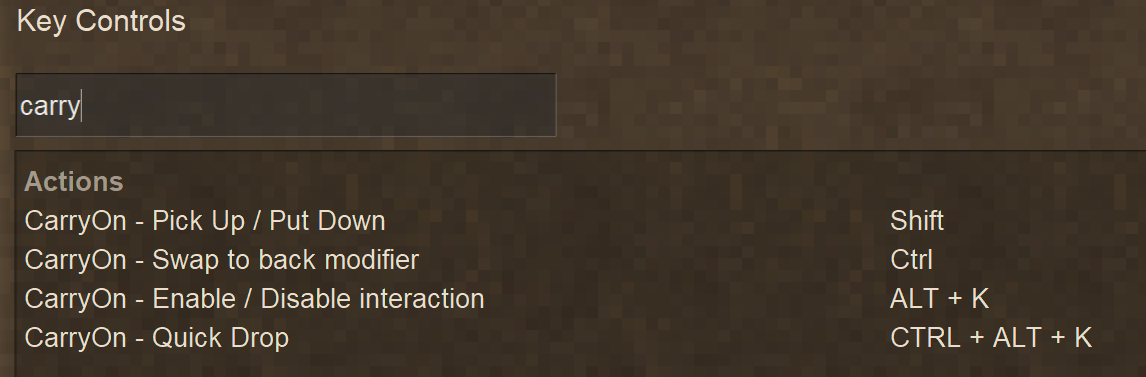
The keybinds for CarryOn only appear after a world has been loaded.
The default keybinds are mapped as above with Shift carry key also being the Sneak key.
It is recommended, if you swap the Run and Sneak keys, that you do the same for the carry and swap keys.
Reload your world after changes to the keybinds to ensure they take effect (Known CarryOn bug)
New Keybind added to v1.9.4:
Toggle Double Tap Dismount: CTRL+K
Additional Information
Typically, when carrying containers, you are slowed down by some amount.
You also cannot sprint when carrying a block in your hands.
When taking any damage, you drop what you're holding in your hands.
When you die, what you're carrying on your back will drop at your death location.
If the death occurs on a land claim on which the player does not have permission and no suitable location can be found to place the block, the items will drop. Containers will spill their contents, loot vessels will smash dropping the loot and some items could break entirely (e.g. clutter has a chance of breaking)
Recommended Mods
A selection of mods regularly tested with CarryOn - in no particular order.
- Japanese translation of Mods (including CarryOn)
- Extra Chests
- Better Crates
- Primitive Survival
- Vanilla Variants
- Bricklayers
- Sortable Storage
- Cartwright's Caravan
Having issues?
Feel free to contact me on Discord: nerdscurvy
Discord link: Vintage Story > mods > Carry On (Join the Official Vintage Story Discord server)
To help with resolving issues - send me your logs:
- client-main.txt
- client-debug.txt
- server-main.txt
- server-debug.txt
More logging information can be captured by enabling the following in the CarryOn ModConfig:
"LoggingEnabled": true
CarryOn Chat Commands
Anchor assignment and display
- .carryon gui show
- Show current CarryOn GUI anchor assignments (runtime Hands/Back anchors). If a client config exists it also shows the saved Hands/Back values.
- .carryon gui reset
- Reset CarryOn GUI anchors to mod defaults (runtime + save). The default anchor positions are L1 - Hands and R1 - Back.
- .carryon gui set <anchor> <hands|back|clear>
- Set or clear carry slot anchors. Usage examples:
.carryon gui set L1 hands— attach the Hands carried-item to anchor L1..carryon gui set R2 back— attach the Back carried-item to anchor R2..carryon gui set R1 clear— clear any assignment at anchor R1.
- Valid anchor names: L1, L2, L3, R1, R2, R3 (case-insensitive). Changes are applied at runtime and saved to the client config when present.
- Set or clear carry slot anchors. Usage examples:
Background (anchor fill)
- .carryon gui bg enable
- Enable drawing the anchor background fill (runtime + save to client config).
- .carryon gui bg disable
- Disable anchor background fill (runtime + save).
- .carryon gui bg color <hex>
- Set anchor background fill color. Example:
.carryon gui bg color #E4C4A6 - Hex must be full 6-digit format; command normalizes to leading
#and uppercase. Saved to client config.
- Set anchor background fill color. Example:
- .carryon gui bg alpha <0.0-1.0>
- Set anchor background alpha (opacity). Example:
.carryon gui bg alpha 0.5 - Value must be between 0.0 and 1.0. Saved to client config.
- Set anchor background alpha (opacity). Example:
- .carryon gui bg show
- Print current runtime settings and saved client config values for the anchor background.
- .carryon gui bg reset
- Reset the anchor background to mod defaults (runtime + save). (Defaults are the mod’s configured defaults — e.g., background color used by the mod.)
Border (anchor outline)
- .carryon gui border enable
- Enable anchor border outline (runtime + save).
- .carryon gui border disable
- Disable anchor border outline (runtime + save).
- .carryon gui border color <hex>
- Set anchor border color (6-digit hex format). Example:
.carryon gui border color #45372D - Validated and saved to client config.
- Set anchor border color (6-digit hex format). Example:
- .carryon gui border alpha <0.0-1.0>
- Set anchor border alpha. Example:
.carryon gui border alpha 1.0 - Validated and saved.
- Set anchor border alpha. Example:
- .carryon gui border show
- Show runtime and saved anchor border settings.
- .carryon gui border reset
- Reset anchor border to mod defaults (runtime + save).
Icon highlight (glow around icons)
- .carryon gui highlight enable
- Enable icon highlight (runtime + save).
- .carryon gui highlight disable
- Disable icon highlight (runtime + save).
- .carryon gui highlight color <hex>
- Set icon highlight color (6-digit hex). Example:
.carryon gui highlight color #FFFFFF - Validated and saved.
- Set icon highlight color (6-digit hex). Example:
- .carryon gui highlight alpha <0.0-1.0>
- Set icon highlight alpha. Example:
.carryon gui highlight alpha 0.8 - Validated and saved.
- Set icon highlight alpha. Example:
- .carryon gui highlight show
- Show runtime and saved icon highlight settings.
- .carryon gui highlight reset
- Reset icon highlight to mod defaults (runtime + save).
ModConfig
All carryables can be enabled/disabled via the CarryOnConfig.json file in ModConfig:
Refer to the Default CarryOnConfig.json section below.
Carryables
Options to enable blocks that can be carried. Each option represents a group of block types and can be set to true or false.
Interactables
Options to enable blocks that can be interacted with while the player is carrying a block in their hands. Each option represents a group of block types (Doors also covers Trap Doors) and can be set to true or false.
CarryOptions
Options and setting to change carry behavior:
- AllowSprintWhileCarrying (true/false): Normally players holding a block in their hands will not be able to sprint. When true, the player will be able to sprint, though may still have a movement penalty.
- IgnoreCarrySpeedPenalty (true/false): Each carryable block imposes a speed penalty when carried in hands, or on back*. When true, all carryables penalties are removed and the player can move at their normal speed.
- RemoveInteractDelayWhileCarrying (true/false): When a player is carrying a block in their hands they are only able to interact with the block types enabled in the Interactables config section. The interaction requires the player to hold the button until the animated spinner completes. This option removes the delay entirely.
- InteractSpeedMultiplier (0.01 - 20): Most CarryOn interactions have a delay and show the animated spinner. This setting can speed up or slow down the spinner. e.g. Setting it to 2.0 means players can pickup and put down blocks twice as fast. Also effects interact while carrying and swapping blocks to back.
- BackSlotEnabled (true/false): Some blocks can be carried on the player's back. If this option is set to false the the player will not be able to move any blocks to their back.
- AllowChestTrunksOnBack (true/false): Enabling this option will allow players to carry the trunk on their back. Does require the ChestTrunk Carriables option to be enabled so the player can carry trunks.
- AllowLargeChestsOnBack (true/false): This option allows higher capacity chests to be carried on the players back. Option is available for mods to use. e.g. ExtraChests
- AllowCratesOnBack (true/false): Enabling this option will allow players to carry the crates on their back.
CarryablesFilters
Black magic.
Filters to control what other blocks become carryable, interactable based their similarity and what mods and blocks to exclude.
DroppedBlockOptions
Only a single option related to dropped blocks:
- NonGroundBlockClasses (string array): Block classes listed in this array will be treated like air when determining where to place a dropped block, such as falling to until it finds another block to land on. So beware of deep water lest ye lose yer bounty to thee murky depths.
Note that if you remove BlockWater and drop your block whilst under water, then the dropped block may not be able to spawn resulting in the item and any contents being spilled.
Try adding BlockLeaves for the extra fun of losing your chest in the foliage.
Blocks affected by these options may be replaced by the dropped block.
DebuggingOptions
In case of emergency break temporal gear:
- LoggingEnabled (true/false): When enabled, extra debug logging information will be generated when processing the CarriablesFilters.
- DisableHarmonyPatch (true/false): Harmony patches are used to hook into or override vanilla Vintage Story functions.
Disabling will break the double tap to dismount feature and possibly other functionality.
{
  "ConfigVersion": 2,
  "Carryables": {
    "Anvil": true,
    "Barrel": true,
    "Bookshelf": false,
    "BunchOCandles": false,
    "Chandelier": false,
    "ChestLabeled": true,
    "ChestTrunk": false,
    "Chest": true,
    "Clutter": false,
    "Crate": true,
    "DisplayCase": false,
    "Flowerpot": false,
    "Forge": false,
    "Henbox": false,
    "LogWithResin": false,
    "LootVessel": true,
    "MoldRack": false,
    "Molds": false,
    "Oven": false,
    "Planter": true,
    "Quern": true,
    "ReedBasket": true,
    "Resonator": true,
    "Shelf": false,
    "Sign": false,
    "StorageVessel": true,
    "ToolRack": false,
    "TorchHolder": false
  },
  "Interactables": {
    "Door": true,
    "Barrel": true,
    "Storage": true
  },
  "CarryOptions": {
    "AllowSprintWhileCarrying": false,
    "IgnoreCarrySpeedPenalty": false,
    "RemoveInteractDelayWhileCarrying": false,
    "InteractSpeedMultiplier": 1.0,
    "BackSlotEnabled": true,
    "AllowChestTrunksOnBack": false,
    "AllowLargeChestsOnBack": false,
    "AllowCratesOnBack": false
  },
  "CarryablesFilters": {
    "AutoMapSimilar": true,
    "AutoMatchIgnoreMods": [
      "mcrate"
    ],
    "AllowedShapeOnlyMatches": [
      "block/clay/lootvessel",
      "block/wood/chest/normal",
      "block/wood/trunk/normal",
      "block/reed/basket-normal"
    ],
    "RemoveBaseCarryableBehaviour": [
      "woodchests:wtrunk"
    ],
    "RemoveCarryableBehaviour": [
      "game:banner"
    ]
  },
  "DroppedBlockOptions": {
    "NonGroundBlockClasses": [
      "BlockWater",
      "BlockLava"
    ]
  },
  "DebuggingOptions": {
    "LoggingEnabled": false,
    "DisableHarmonyPatch": false
  }
}
The values shown are the defaults.
{
  "AnvilEnabled": true,
  "BarrelEnabled": true,
  "BookshelfEnabled": false,
  "BunchOCandlesEnabled": false,
  "ChandelierEnabled": false,
  "ChestLabeledEnabled": true,
  "ChestTrunkEnabled": false,
  "ChestEnabled": true,
  "ClutterEnabled": false,  (Most of the clutter found in ruins)
  "CrateLegacyEnabled": true,
  "CrateEnabled": true,
  "DisplayCaseEnabled": false,
  "FlowerpotEnabled": false,
  "ForgeEnabled": false,
  "HenboxEnabled": false,
  "LogWithResinEnabled": false,
  "LootVesselEnabled": true,
  "MoldRackEnabled": false,
  "MoldsEnabled": false,
  "OvenEnabled": false,
  "PlanterEnabled": true,
  "QuernEnabled": true,
  "ShelfEnabled": false,
  "SignEnabled": false,
  "ReedBasketEnabled": true, (Reed Chest)
  "StorageVesselEnabled": true,
  "ToolRackEnabled": false,
  "TorchHolderEnabled": false,
  "BackSlotEnabled": true, (Used to disable items carried on back)
  "AllowChestTrunksOnBack": false,
  "AllowLargeChestsOnBack": false, (e.g. ExtraChests)
  "AllowCratesOnBack": false,
  "NonGroundBlockClasses": [
    "BlockWater",
    "BlockLava"
  ],
  "AutoMatchIgnoreMods": [
    "mcrate"
  ],
  "AllowedShapeOnlyMatches": [
    "block/clay/lootvessel",
    "block/wood/chest/normal",
    "block/wood/trunk/normal",
    "block/reed/basket-normal"
  ],
  "InteractDoorEnabled": true, (Hold interact button to open doors when carrying block in hands)
  "InteractStorageEnabled": true, (Hold interact button to open storage container when carrying block in hands)
  "AllowSprintWhileCarrying": false, (When true, players can still sprint while carrying chests, etc.)
  "IgnoreCarrySpeedPenalty": false, (When true, players will have normal movement speed when carrying block in hands and on back)
  "RemoveInteractDelayWhileCarrying": false, (When true, players can open doors and chests instantly while carrying a block in their hands)
  "InteractSpeedMultiplier": 1.0, (Multiplier to change the speed of the progress circle when interacting with carryable blocks)
  "LoggingEnabled": false (Output extra logging information)
}
NonGroundBlockClasses is used to determine if a dropped block will sink through these types when looking for ground or placing the block.
e.g. Adding "BlockLeaves" will cause dropped blocks to fall through tree foliage.
CarryOn will try to auto-match similar blocks in other mods to make them carryable. The following Config sections affect the auto-matching:
- AutoMatchIgnoreMods - any mod id added to this array will be excluded from auto-matching. mcrate has been excluded by default due to the multi-block storage. Carryable multi-blocks are not fully supported at the moment.
- AllowShapeOnlyMatches - Allows matching of similar carryables based on only the shape. Probably best to leave these as they are.
The HoldControlForBackSwapFocus option can be used to disable to Ctrl key interaction to prioritise swapping blocks to and from the back slot.
CarryOnClientConfig.json in ModConfig:
{
  "HoldControlForBackSwapFocus": true
}
Known Issues
- Multi-block carryables are not fully supported. They have a habit of deleting other blocks if dropped. The Trunks should be okay.
- Some players have encountered an issue where they are unable to drop crate, clutter or other carried block. Current workaround is to use the Quickdrop key [Ctrl]+[Alt]+K.
- Try going to the Key Controls section then uncheck 'Mouse click modifiers locked to Sneak/Sprint keys' and check it again. This can sometimes free-up strange keybind behavior.
| Mod Version | For Game version | Downloads | Released | Changelog | Download | 1-click mod install* |
|---|---|---|---|---|---|---|
| 1.12.1 | 63996 | Oct 7th at 3:51 AM | CarryOn-1.21.0_v1.12.1.zip | 1-click install | ||
| ||||||
| 1.12.0 | 11677 | Oct 4th at 6:16 AM | CarryOn-1.21.0_v1.12.0.zip | 1-click install | ||
| ||||||
| 1.11.0 | 9073 | Oct 1st at 1:09 PM | CarryOn-1.21.0_v1.11.0.zip | 1-click install | ||
Carried Block indicators are rendered on either side of the Hotbar in predefined anchor points Chat commands:Reset to default gui (Back in R1) Set L1 Anchor to hands Sets R2 Anchor to back Clears L1 anchor
| ||||||
| 1.10.9 | 31019 | Sep 13th at 9:58 PM | CarryOn-1.21.0_v1.10.9.zip | 1-click install | ||
| ||||||
| 1.10.8 | 5227 | Sep 12th at 10:02 AM | CarryOn-1.21.0_v1.10.8.zip | 1-click install | ||
Apologies if this has butchered anyone's language. Corrections are gladly accepted. | ||||||
| 1.10.7 | 19761 | Sep 3rd at 12:01 PM | CarryOn-1.21.0_v1.10.7.zip | 1-click install | ||
| ||||||
| 1.10.6 | 195 | Sep 3rd at 10:44 AM | CarryOn-1.21.0_v1.10.6.zip | 1-click install | ||
|
Known issue: Client/Server desync with carried storage.
After testing again it didn't fix the issue. | ||||||
| 1.10.5 | 4358 | Sep 2nd at 9:40 AM | CarryOn-1.21.0_v1.10.5.zip | 1-click install | ||
|
Known issue: Client/Server desync with carried storage.
| ||||||
| 1.10.4 | 2850 | Sep 1st at 4:16 PM | CarryOn-1.21.0_v1.10.4.zip | 1-click install | ||
|
Known issue: Client/Server desync with carried storage.
Fix crash when interacting with boat rollers | ||||||
| 1.10.3 | 1145 | Sep 1st at 10:49 AM | CarryOn-1.21.0_v1.10.3.zip | 1-click install | ||
|
Known issue: Client/Server desync with carried storage.
| ||||||
| 1.10.2 | 7463 | Aug 30th at 2:50 AM | CarryOn-1.21.0_v1.10.2.zip | 1-click install | ||
| ||||||
| 1.10.1 | 6081 | Aug 28th at 10:36 AM | CarryOn-1.21.0_v1.10.1.zip | 1-click install | ||
| ||||||
| 1.10.0 | 7915 | Aug 26th at 9:32 AM | CarryOn-1.21.0_v1.10.0.zip | 1-click install | ||
Changelog
| ||||||
| 1.10.0-rc.3 | 4322 | Aug 15th at 1:44 AM | CarryOn-1.21.0-rc.4_v1.10.0-rc.3.zip | 1-click install | ||
Changelog
| ||||||
| 1.10.0-rc.2 | 343 | Aug 13th at 3:25 PM | CarryOn-1.21.0-rc.4_v1.10.0-rc.2.zip | 1-click install | ||
Changelog
| ||||||
| 1.10.0-rc.1 | 2821 | Jul 26th at 5:21 PM | CarryOn-1.21.0-rc.1_v1.10.0-rc.1.zip | 1-click install | ||
Changelog
| ||||||
| 1.10.0-pre.2 | 509 | Jul 20th at 12:23 PM | CarryOn-1.21.0-pre.3_v1.10.0-pre.2.zip | 1-click install | ||
Changelog
Have only tested in single player. Would welcome any feedback on how it handles in multiplayer.
| ||||||
| 1.10.0-pre.1 | 491 | Jul 11th at 3:25 PM | CarryOn-1.21.0-pre.2_v1.10.0-pre.1.zip | 1-click install | ||
Changelog
| ||||||
| 1.9.10 | 2403 | Sep 22nd at 4:00 AM | CarryOn-1.20.4_v1.9.10.zip | 1-click install | ||
| ||||||
| 1.9.9 | 20574 | Aug 13th at 4:33 PM | CarryOn-1.20.4_v1.9.9.zip | 1-click install | ||
Changelog
Known issue: Players sometimes appears to standup in boat seats in multiplayer when mounting/switching seats. This is a side-effect of booting them from wrong seats. Probably the last VS 1.20 release. | ||||||
| 1.9.8 | 3118 | Aug 12th at 10:26 AM | CarryOn-1.20.4_v1.9.8.zip | 1-click install | ||
Changelog
| ||||||
| 1.9.6 | 2278 | Aug 10th at 9:11 AM | CarryOn-1.20.4_v1.9.6.zip | 1-click install | ||
Changelog
| ||||||
| 1.9.4 | 2465 | Aug 9th at 12:48 AM | CarryOn-1.20.4_v1.9.4.zip | 1-click install | ||
Changelog
Due to some players experiencing issues with the Double Tap Dismount feature, especially those on large servers, it has been disabled by default. Each player can enable it again with Ctrl+K | ||||||
| 1.9.3 | 2965 | Aug 6th at 11:56 AM | CarryOn-1.20.4_v1.9.3.zip | 1-click install | ||
Changelog
| ||||||
| 1.9.2 | 1066 | Aug 5th at 1:56 PM | CarryOn-1.20.4_v1.9.2.zip | 1-click install | ||
Changelog
| ||||||
| 1.9.0 | 46 | Aug 1st at 4:02 PM | CarryOn-1.20.4_v1.9.0.zip | 1-click install | ||
ChangelogCarryOn Boating
| ||||||
| 1.9.0-pre.3 | 254 | Jul 31st at 3:22 PM | CarryOn-1.20.4_v1.9.0-pre.3.zip | 1-click install | ||
Changelog
| ||||||
| 1.9.0-pre.2 | 4951 | Jul 19th at 10:46 AM | CarryOn-1.20.4_v1.9.0-pre.2.zip | 1-click install | ||
Changelog
This is a test release so use with caution - testing has been done mainly in single player.
| ||||||
| 1.9.0-pre.1 | 3998 | Jul 13th at 12:36 PM | CarryOn-1.20.4_v1.9.0-pre.1.zip | 1-click install | ||
Changelog
This is a test release so use with caution - testing has been done mainly in single player.
| ||||||
| 1.8.2 | 13252 | Jul 12th at 4:18 PM | CarryOn-1.20.4_v1.8.2.zip | 1-click install | ||
Changelog
| ||||||
| 1.8.1 | 32422 | Jun 5th at 12:12 PM | CarryOn-1.20.4_v1.8.1.zip | 1-click install | ||
Changelog
| ||||||
| 1.8.0 | 19586 | May 9th at 11:53 PM | CarryOn-1.20_v1.8.0.zip | 1-click install | ||
Changelog
I am still invesitgating reports of players unable to drop crates or clutter. Have not been able to replicate so have included the quick drop key as a workaround. | ||||||
| 1.8.0-rc.4 | 37201 | Mar 24th at 12:44 PM | CarryOn-1.20_v1.8.0-rc.4.zip | 1-click install | ||
Changelog
| ||||||
| 1.8.0-rc.3 | 115 | Mar 24th at 12:16 PM | CarryOn-1.20_v1.8.0-rc.3.zip | 1-click install | ||
Changelog
| ||||||
| 1.8.0-rc.2 | 4898 | Mar 22nd at 8:25 PM | CarryOn-1.20_v1.8.0-rc.2.zip | 1-click install | ||
Changelog
| ||||||
| 1.8.0-pre.1 | 91472 | Oct 10th 2024 at 4:06 PM | CarryOn-1.20.0-pre_v1.8.0-pre.1.zip | 1-click install | ||
Changelog
| ||||||
| 1.7.4 | 74506 | Jan 26th 2024 at 1:11 AM | CarryOn-1.19_v1.7.4.zip | 1-click install | ||
Changelog
| ||||||
| 1.7.3 | 1391 | Jan 24th 2024 at 10:52 AM | CarryOn-1.19_v1.7.3.zip | 1-click install | ||
Changelog
| ||||||
| 1.7.2 | 2864 | Jan 20th 2024 at 1:07 PM | CarryOn-1.19_v1.7.2.zip | 1-click install | ||
Changelog
| ||||||
| 1.7.1 | 531 | Jan 20th 2024 at 9:19 AM | CarryOn-1.19_v1.7.1.zip | 1-click install | ||
Changelog
| ||||||
| 1.7.0 | 786 | Jan 20th 2024 at 1:51 AM | CarryOn-1.19_v1.7.0.zip | 1-click install | ||
Changelog
| ||||||
| 1.7.0-pre.3 | 4359 | Dec 21st 2023 at 2:20 AM | CarryOn-1.19.0-pre.10_v1.7.0-pre.3.zip | 1-click install | ||
Changelog
| ||||||
| 1.7.0-pre.2 | 2868 | Nov 22nd 2023 at 11:34 AM | CarryOn-1.19.0-pre.7_v1.7.0-pre.2.zip | 1-click install | ||
Changelog
| ||||||
| 1.7.0-pre.1 | 2375 | Nov 4th 2023 at 2:41 AM | CarryOn-1.19.0-pre.4_v1.7.0-pre.1.zip | 1-click install | ||
Changelog
| ||||||
| 1.6.1 | 11064 | Nov 5th 2023 at 12:29 AM | CarryOn-1.18-net7_v1.6.1.zip | 1-click install | ||
ChangelogAdded Ukrainian translation thanks to justOmi | ||||||
| 1.6.0 | 12678 | Sep 15th 2023 at 12:06 PM | CarryOn-1.18-net7_v1.6.0.zip | 1-click install | ||
ChangelogAdded Polish translation thanks to @Kaofan | ||||||
| 1.5.0 | 5808 | Aug 23rd 2023 at 6:39 AM | CarryOn-1.18-net7_v1.5.0.zip | 1-click install | ||
ChangelogRebuilt for Vintage Story 1.18.8 DotNet 7
| ||||||
| 1.4.0 | 2035 | Aug 19th 2023 at 5:20 PM | CarryOn-1.18_v1.4.0.zip | 1-click install | ||
ChangelogFor Vintage Story 1.18
| ||||||
| 1.3.0 | 7594 | Jul 20th 2023 at 2:27 PM | CarryOn-1.18_v1.3.0.zip | 1-click install | ||
ChangelogFor Vintage Story 1.18
| ||||||
| 1.2.0 | 11026 | May 20th 2023 at 3:47 AM | CarryOn-1.18_v1.2.0.zip | 1-click install | ||
ChangelogFor Vintage Story 1.18
| ||||||
| 1.1.0 | 2845 | May 14th 2023 at 12:01 AM | CarryOn-1.18_v1.1.0.zip | 1-click install | ||
ChangelogFor Vintage Story 1.18
Note: All players should remove items from back before this option is enabled otherwise they will not be able to put it down. (Dying should allow it to drop) | ||||||
| 1.0.0 | 7082 | Apr 21st 2023 at 12:53 PM | CarryOn-1.18_v1.0.0.zip | 1-click install | ||
ChangelogFor Vintage Story 1.18
| ||||||
| 1.0.0-rc.3 | 1792 | Apr 19th 2023 at 12:31 PM | CarryOn-1.18.0-rc.8_v1.0.0-rc.3.zip | 1-click install | ||
ChangelogFor Vintage Story 1.18-rc.8
| ||||||
| 1.0.0-rc.2 | 1544 | Apr 12th 2023 at 11:50 AM | CarryOn-1.18.0-rc.5_v1.0.0-rc.2.zip | 1-click install | ||
ChangelogFor Vintage Story 1.18-rc.5
| ||||||
| 1.0.0-rc.1 | 1446 | Apr 5th 2023 at 3:29 PM | CarryOn-1.18.0-rc.2_v1.0.0-rc.1.zip | 1-click install | ||
ChangelogFor Vintage Story 1.18-rc.2
| ||||||
| 0.13.0-pre.3 | 891 | Mar 30th 2023 at 6:54 AM | CarryOn-1.18.0-pre_v0.13.0-pre.3.zip | 1-click install | ||
ChangelogFor Vintage Story 1.18 pre release
| ||||||
| 0.13.0-pre.2 | 850 | Mar 24th 2023 at 1:50 AM | CarryOn-1.18.0-pre_v0.13.0-pre.2.zip | 1-click install | ||
ChangelogFor Vintage Story 1.18 pre release
| ||||||
| 0.12.0 | 1292 | Mar 24th 2023 at 1:53 AM | CarryOn-1.17.0_v0.12.0.zip | 1-click install | ||
Changelog
| ||||||
| 0.11.0-pre.1 | 1740 | Feb 26th 2023 at 7:58 PM | CarryOn-1.18.0-pre_v0.11.0-pre.1.zip | 1-click install | ||
Changelog
| ||||||
| 0.10.4-rc.1 | 1260 | Feb 17th 2023 at 11:51 AM | CarryOn-0.10.4-rc.1-net7.zip | 1-click install | ||
|
Recompiled for new Vintage Story .net 7 Experimental build 1.17.11-rc.2 | ||||||
| 0.10.3 | 7712 | Dec 4th 2022 at 6:53 AM | CarryOn-1.17.9_v0.10.3.zip | 1-click install | ||
Changelog
| ||||||
| 0.9.1 | 866 | Nov 29th 2022 at 11:37 AM | CarryOn-1.17.9_v0.9.1.zip | 1-click install | ||
| ||||||
| 0.9.0 | 1550 | Nov 20th 2022 at 7:05 AM | CarryOn-1.17.9_v0.9.0.zip | 1-click install | ||
Changelog
Known issues
| ||||||
| 0.8.0 | 2132 | Nov 11th 2022 at 1:28 PM | CarryOn-1.17.9_v0.8.0.zip | 1-click install | ||
| ||||||
| 0.7.1 | 1650 | Oct 30th 2022 at 3:37 AM | CarryOn-1.17.9_v0.7.1.zip | 1-click install | ||
| ||||||
| 0.7.0 | 1099 | Oct 25th 2022 at 10:46 AM | CarryOn-1.17.9_v0.7.0.zip | 1-click install | ||
| ||||||
Again its in the client side config, not the server configs... For future people seeking the same heres a picture of those settings ingame.
Teax thanks for the help, but nope, it is not in the configs. But I found author's commands to disable them from the comments below.
Greetings, must have mod :)
Would it be possible to make it compatible with FoodShelves barrel racks?
With CarryOn you can move full barrels but as soon as they are inside a barrel rack you cannot move them out anymore with CarryOn.
Best regards :)
NC_WOLFF
Mod is working fine with 1.21.5
Beedy
look into the client side config, there you can disable these boxes :)
when do u update this mod for the 1.21.5. thx
Can you carry carcasses with this mod?
Please remove the new ui boxes. Or please make it togglable in the config.
Thank you for this amazing mod. I won't play without it.
Any advice for adding new carryable/interactable blocks from vanilla? Whenever I reuse the template from other blocks in CarryOn I get an error that the json path /behaviors/- was not found, and im not exactly sure where to find the block behavior section referenced on CarryOn's github modding guide. Is this only possible through editing CarryOn's src? I was hoping to just make a quick edit for my singleplayer world but am not sure if its worth that much effort as a layman without coding experience lol
awesome. ty!
NerdScurvy Thanks a bunch, my hud is once again streamlined and only there when I need it
Hello, I am currently using this mod on my server and have noticed a weird but interesting bug that not sure what causes it but after picking up a chest or other item your hands get stuck in the postion of holding said items even well after they are placed. Is there a known fix for this?
DrMonkfish The Decorative Chest is one of the items I plan to look at, but may be tricky to achieve.
Moshii I am looking at ways to optimise the mod - the main carry handler loop frequency could possibly be reduced. Have experienced similar issues - though was not sure at the time if it was the mod causing it. Will investigate and get back.
RobinCait Barrel rack integration will have to wait until I release the CarryLib and CarryOn-2.0 - this will allow modders to do this sort of interaction.
RyanBrewer I'm working on adjusting and repositioning all the carried blocks to work with the backpacks. Will also have straps so it looks secure. This is coming CarryOn-2.0 (no release date announced)
I still might consider adding an option to toggle visibility of what is carried on your back.
TheRealFlynn Should be able to make it carryable along with other game boards - you probably won't see the game pieces on the board while it is being carried though.
Ykulvaarlck Thank you - I've never used spectator mode. Will look for a fix.
InjuredAnders
If you want to remove the boxes but keep the item visible then look at the comments below.
If you want to disable completely then run the following commands in chat:
.carryon gui set R1 clear
.carryon gui set L1 clear
do you think you could add an option to turn off the two boxes on either side of the toolbar in the config file
bug: the two slots that are added to your inventory are visible in spectator mode
pls add omok tables to things that can be picked up and moved. thanks!
This isnt working. Whenever I try to pick up a block, it just repeatidly opens and closes the storage UI. Does anyone know what could be cauing the issue?
Would it be possible to create some sort of hide/show option so that you can graphically hide what you're carrying on your back? So it doesn't conflict with backpacks? You would still be able to see it in the icons to the left and right of your hotbar.
Would it be possible to get integration with Food Shelves' barrel racks? It would be super convenient to be able to slide filled barrels into the racks rather than having to use buckets to transfer into them.
Unfortuanetly, I had to un-install this mod, as having it installed causes my game to freeze up for about 6-8 seconds when moving around and loading different chunks. I'm assuming its possibly something to do with the ruin containers and something related to the mod upon being generated?, I'm not sure..
Would it be possible for a Decorative Chest to keep its chiseled appearence when carried on one's back? Would make it possible to make some cool custom backpacks
Guar See my previous message.
Johnski / Katzvielle
In game chat type the following commands:
.carryon gui border disable
.carryon gui bg disable
.carryon gui hightlight disable
This will hide the bounding boxes.
More commands are documented above in CarryOn Chat Commands
I'm starting to find the transparency distracting - changing the alpha settings to solid is less distracting.
Any feedback for different options is welcome.
Johnski
Did you find a way to disable the squares? They are so annoying that I have disabled the mod because of it..
Johnski the empty square on the left is for a chest or whatever your holding in your hand, the one on the right is for when you put it on your back.
i was a bit confused at first too at first
Im getting empty squares showing up to the left and right of my hotbar ui and I've traced it to this mod. Any ideas?
El_Neuman
Try the chat command that disables the highlight.
.carryon gui highlight disable
Using the commands will create a CarryOnClientConfig.json file.
The Anchor config options in CarryOnConfig.json are a mistake and will not do anything.
I tried to disable the border that appears when moving items, as well as when there are no items on the back, but it still doesn’t turn off and is quite distracting visually.
I also tried changing these settings, but it didn’t help:
"AnchorBackgroundColor": "#E4C4A6",
"AnchorBackgroundAlpha": 0.0,
"AnchorBackgroundEnabled": false
Thanks a lot for the update and all the bug fixes — really appreciate the work you’re putting into this mod!
NerdScurvy New version works great; completely fixes our issue. Thank you kindly.
@El_Neuman Another GUI element must be disabling textures. The progress spinner enables the textures again.
I'll add a fix this weekend.
Why do you think the GUI of the item on my back is white? But not always — when I press Shift + RMB, meaning when I remove the vessel from my back, the GUI looks normal.
Arisilde I'll see what I can do.
I've already done something similar to prevent the swap back action when looking at container, but that is a hardcoded check to look for a BlockBehaviorContainer behavior.
Might just define config array with "portals.portal" class as an entry. Could then check the selected block's class against the array before triggering the swapback action.
NerdScurvy Hey there. Got a bit of a (I believe small) compatability request, if possible. It'll help my mod, but I think it may positively affect many more as well.
I work on this portal mod:
https://news.kalataka.ru/vikingportalsmodified
It requires you to shift+right click on the portals to set their name tags to link them. If you have a CarryOn container on your back, and you have a free hand, you can't click on them. It always defaults to trying to take the container off your back. If you have something in your hand you can click on them normally.
My request is; can you somehow improve this functionality so it doesn't interfere with other interactions? You may have other ideas that would work better as well, but these are my first instincts on what might work.
RazzBerries If the block is not at the coordinates identified by the file in the ModData folder then it is probably gone with no way to get it back.
I've not been able to reproduce the collapsing block issue - so not sure if the storage vessel is just burried or if a collapsing block has replaced the storage vessel.
Edit: Storage vessels will fall and slide if on unstable ground - so the ModData file might have been removed and the vessel could be somewhere in the general area of the collapse.
is there any way to get storage vessels back that you lose from dropping on collapsing blocks?
Archadria Chest on back indicator work is mostly done in CarryOn 2.0 but that is not ready for release. I might be do a 1.11 release with the indicator feature.
ZakT I've heard there may be issues with custom player models and Combat Overhaul. CarryOn does attach the carried items to parts of the Vanilla player so if something is missing or renamed then I guess it could throw an error and break other mods.
Could we get an indicator for like the last carryon chest that was on back ect?
So, I've found an extremely strange incompatibility, and I'm not sure which page is best to put it on, so I'll post it on all three mod pages:
When running Combat Overhaul (and its required library, Overhaul Lib), running all of the following three mods together causes Combat Overhaul's armor to stop working entirely:
Removing any of the mods listed above fixes the issue, meaning any arbitrary two of three mods above work perfectly fine together. It's only when all three are loaded alongside Combat Overhaul (+ Overhaul Lib), after which case all incoming damage ignores all armor (to such an extent that it doesn't even inflict durability damage on the armor, as if the armor isn't being worn at all). Results seem to be 100% reproducible, and were tested multiple times in multiple different worlds, both immediately after creating the world and upon saving/loading existing worlds. Unloading any one of the three listed mods fixed the issue even in worlds which were created with all mods loaded, whereas loading all mods even in worlds which were created without all three loaded resulted in the bug occurring.
Tested on the latest game version 1.21.1 with all aforementioned mods updated to their latest versions.
There's some specific bug that only occurs when all three of the bulleted mods are loaded alongside Combat Overhaul, not in any other circumstance. I'm kind of at a loss for how to proceed or even how to report it, given it's such a specific issue.
Onward to a million and beyond! 🎉
woot! half a million downloads - congrats!
I've been using this mod for four years now and can't imagine playing without it. So good.
NerdScurvy Ok thanks for the reply... I think it was within range of a bear attack but the file is still there so maybe I'll find it eventually.
kepler_62f If it dropped as a block then it will not despawn, though I think it can be destroyed if within range of a bear attack. When a dropped block is removed from the world then the file will be removed from the ModData folder. So if the file is there the block should be too.
When you die and your carried container gets placed on the ground does it ever despawn? I died and ran back to pick up my stuff but didn't have time to grab the reed chest because the bear was still there, and now I can't find it anywhere. I saw it when I grabbed my stuff but I died multiple times after so the death marker is gone. I remember roughly where it was and even checked the file in ModData for the coords. Just wondering if it despawns like items or if it stays because it's a placed block so I know if I'm wasting my time or not when I go looking for it.
LordeCrowe If the player takes damage then any block carried in their hands will be dropped. If the player dies then all carried blocks will be dropped. Attempts will be made to place the dropped blocks on the ground, though if no suitable location is found then the the block will drop any items. Note that blocks will sink in water/lava.
There was a report a while back of a player losing a chest when they took damage when the ground collapsed, but was unable to reproduce the issue.
If you have access to the server, then check the ModData/{guid}/carryon folder - any carried block that is dropped creates a file in that directory. e.g. dropped-511923.3.511960 where the numbers are the x.y.z coordinates.
Seems Ive had a player fall while carrying, and the vessel disappeared. Has this been reported?
Sorry sorry, problem solved!
I finally got it figured out by going to discord and reading through some troubles that others had. I didn't realize the server config files also messed with your single player worlds. Once I corrected the pathway under the server config files, everything now works! Thank you for being willing to help, I love this mod so much!
Yaahoo, love you man😀😍
MelbaMel I don't think it would be an issue with the world. You could rule that out - make a creative flat world and place a reed chest to test if CarryOn works. You should see the "pickup" help text when looking at the chest.
There could be an error that is preventing CarryOn from starting properly.
You can send your logs to my nerdscurvy at gmail dot com mailbox if you want, and I will have a look.
@NerdScurvy When I downloaded the game onto my new computer, it was the newest version of the game. When I transferred all the existing files from the old computer, they were 1.20. I downloaded the newer version of the Carry On mod, however it's not showing up in game. The mod is turned on in the mod manager, and I even reloaded the mods to be sure. In game it is not giving me the option to use carry on. I'm still new to vintage story, could my world that I have be the old 1.20 version and that's why it's not working? Do I need to create a new world using the same seed and copy all structures to the new one to work in 1.21?
Hi MelbaMel I'll need more information to be able to assist. How is the mod not working? When you open Vintage Story does CarryOn appear in the mod menu?
Are you seeing any errors? Are you using a version of CarryOn that is compatible with the version of Vintage Story you are running?
I got a new computer last week and had to redownload my game. To transfer worlds to the new computer, I had to copy the files from the original computer, to the new one. Now my mod will not work. I tried deleting and redownloading the mod, but it still won't work. Is there something I can do to get it to work again?
alberto_ascani Do you mean the ones in the Extra chests mod?
There is a config setting to enable those.
Locate your Vintage Story data folder and look in ModConfig.
Edit the file CarryOnConfig.json
Set the following value to true.
If you are referring to a different mod then let me know.
NerdScurvy Yes! :D Hope that the desync issues arent too much of a headache for ya to be fighting!!!
*edit due to me bein unable to read and thinking there was a newer version than 1.10.7
Kassian0x0 were you using v1.10.7 when you were prevented from putting the chest on the ground?
Picked up an Owl chest and its now stuck in my hands, even tho i have "put" it on my back, i now cannot interact with anything else and restarting wont fix it :"D
Edit: I am so foolish LOL, had 2 identical chests ive found and already had one on my back, the restart did fix not being able to put them on the ground tho!
Kawsiphek The "basket" in the description does refer to the reed/papyrus chest. The chest was originally called a stationary basket (its block code is still stationarybasket), I just have not had the time to update all the documentation.
Currently there are minor penalties for blocks, other than reed chests, being carried on your back. It is mainly noticable when being chased by a wolf.
That is unless you have the IgnoreCarrySpeedPenalty set to true in the config or if I have broken something in the latest release.
I do plan to do some rebalancing speed penalties - and may consider including container contents in the equation.
The_Revisionist RemoveCarryableBehaviour will remove the behavior from the block entirely, so block is not carryable.
RemoveBaseCarryableBehaviour will only remove the first instance of the behavior. This can be used to override an unwanted or broken patch.
CarryOn patches allow multiple instances of the behavior to be configured, but only one can exist when the game is running. The filters, and other conditional properties, are used to determine which instance to keep/discard.
The description seems to imply that certain items (like a basket) would be able to go on your back without "downsides".
What baskets are you reffering to? A hand basket cant be picked up in the same way to placed on back as far as I can tell. Did you mean a "reed chest"?
It seems like any item on your back has no downsides. I can sprint even with a full chest on my back. Is that intended?
What's the difference between RemoveBaseCarryableBehaviour and RemoveCarryableBehaviour in the config file?
Bongous That's strange. Took me a while to find a river, but seeing consistent river generation using the same seed with and without carryon.
Abra_The_Cadabra Sounds like your issue may be related to the client/server desync issue which was fixed in v1.10.7
NerdScurvy Looks like that fixed my issue, thanks a bunch
Hi just wondering if rivers is compatible with this. Dont know if its a new bug. Clean install/ Rivers only works but as soon as i install carry on it breaks rivers and they stop spawning in new worlds with same settings. I have to completely uninstall the game for them to work again
@NerdScurvy I was able to choose blocks on my hot bar, but upon placing any it instantly returned to my inventory.
Rerver008 / AaronSherwood Found the bug was introduced in v1.10.3 with the workaround for requiring sneak to place molds.
v1.10.7 will hopefully fix the desync.
NerdScurvy
Server
NerdScurvy
singleplayer
Rerver008 / AaronSherwood Are you playing singleplayer or on a server?
Hi, just letting you know that CarryOn 1.10.5 is causing crates to desync when picking them up. More specifically, if you take something out of the crate before picking it up, it'll still have the same number of objects in the crate when you put it back down as it did before you took something out of it and picked it up.
Updated today and water barrels are now despawning all the water in them when I try to pick them up.
Just wanted to drop by and say thanks for all the hard work. Appreciate you keeping this mod going
Alwx RiverTheSheep
The diagnosis has come back. I'm afraid it is piles. More Piles to be exact. There is a conflict with certain keybinds that is preventing the block from being placed.
Will be releasing v1.10.5 which includes a workaround - will see how that goes. Hopefully does not interfere with anything else.
Abra_The_Cadabra I stepped on a campfire while holding a reed chest so it dropped. Could still place blocks.
Are you able to select blocks from the hotbar or is it locked?
RiverTheSheep
Would you be able to send your logs after the issue occurs?
client-debug.log
client-main.log
server-debug.log
server-main.log
You can send the to my email nerdscurvy at gmail dot com
No land claim, singleplayer. It's a pine crate specifically that i'm trying it with but i don't see why the wood type would matter.
The_Chuby v1.10.4 has a fix for the crash when interacting with Sailboat construction rollers.
Chumber I'm not seeing any crash with Ratlines on v1.10.4
Do Ratlines work? I don't get an option to climb them.
Abra_The_Cadabra That's a new one - will try to reproduce.
Alwx RiverTheSheep Dang. Are you on a land claimed area or just regular?
Not sure if its the real cause but I was carrying a barrel, accidentally right clicked the logs on the ground of the Sailboat after you finish building it and crashed
NerdScurvy Seconding the crate problem.
it's quite frustrating not being able to put them down without quick dropping
Having an issue where if the container I'm holding is knocked out of my hands, I cannot place any other block until I reload my save.
NerdScurvy Yes it's still happening
I haven't updated yet, but does the roller crash fix also fix the ratlines? I crash when shift-clicking ratlines on the boat unless I change the keybind first.
Stahl Apparently I didn't implement IgnoreCarrySpeedPenalty
Should be working in v1.10.3.
RiverTheSheep
Does the crate issue still happen in v1.10.3?
Stahl It is meant to, but looks like it only works with the allow sprint while carrying option enabled.
Will fix it soon.
Does IgnoreCarrySpeedPenalty actually do anything? 🤔
Sinemu The errors are coming from Ancient Tools mod. The author has not had a chance to update the compatibility patches.
there is a compatibility problem with the mod Ancient Tools
[Error] Patch 0 (target: ancienttools:blocktypes/pitchpot.json) in ancienttools:patches/compatibility/carryon/pitchpot.json failed because supplied path /behaviorsByType/@pitchpot-(unmixed|unmixedresiduecovered)/- is invalid: The json path /behaviorsByType/@pitchpot-(unmixed|unmixedresiduecovered)/- was not found. Could traverse until /behaviorsByType, but then '@pitchpot-(unmixed|unmixedresiduecovered)' does not exist. Full json at this path: {
"@pitchpot-(blue|fire|black|brown|cream|gray|orange|red|tan)-(unmixed|unmixedresiduecovered)": [
{
"name": "UnstableFalling"
},
{
"name": "RightClickPickup"
}
],
"@pitchpot-(blue|fire|black|brown|cream|gray|orange|red|tan)-(empty|finishedpitch)": [
{
"name": "UnstableFalling"
}
]
}
31.8.2025 10:21:30 [Error] Patch 1 (target: ancienttools:blocktypes/pitchpot.json) in ancienttools:patches/compatibility/carryon/pitchpot.json failed because supplied path /behaviorsByType/@pitchpot-(empty|finishedpitch)/- is invalid: The json path /behaviorsByType/@pitchpot-(empty|finishedpitch)/- was not found. Could traverse until /behaviorsByType, but then '@pitchpot-(empty|finishedpitch)' does not exist. Full json at this path: {
"@pitchpot-(blue|fire|black|brown|cream|gray|orange|red|tan)-(unmixed|unmixedresiduecovered)": [
{
"name": "UnstableFalling"
},
{
"name": "RightClickPickup"
}
],
"@pitchpot-(blue|fire|black|brown|cream|gray|orange|red|tan)-(empty|finishedpitch)": [
{
"name": "UnstableFalling"
}
]
}
31.8.2025 10:21:30 [Error] Patch 0 (target: ancienttools:blocktypes/salvepot.json) in ancienttools:patches/compatibility/carryon/salvepot.json failed because supplied path /behaviorsByType/@salvepot-(birch|birchresiduecovered|pine|pineresiduecovered|maple|mapleresiduecovered|oak|oakresiduecovered|acacia|acaciaresiduecovered|hardwax|hardwaxresiduecovered|softwax|barkoil)/- is invalid: The json path /behaviorsByType/@salvepot-(birch|birchresiduecovered|pine|pineresiduecovered|maple|mapleresiduecovered|oak|oakresiduecovered|acacia|acaciaresiduecovered|hardwax|hardwaxresiduecovered|softwax|barkoil)/- was not found. Could traverse until /behaviorsByType, but then '@salvepot-(birch|birchresiduecovered|pine|pineresiduecovered|maple|mapleresiduecovered|oak|oakresiduecovered|acacia|acaciaresiduecovered|hardwax|hardwaxresiduecovered|softwax|barkoil)' does not exist. Full json at this path: {
"@salvepot-(blue|fire|black|brown|cream|gray|orange|red|tan)-(birch|birchresiduecovered|pine|pineresiduecovered|maple|mapleresiduecovered|oak|oakresiduecovered|acacia|acaciaresiduecovered|hardwax|hardwaxresiduecovered|softwax|barkoil)": [
{
"name": "UnstableFalling"
},
{
"name": "RightClickPickup"
}
],
"@salvepot-(blue|fire|black|brown|cream|gray|orange|red|tan)-(empty|residuecovered|finishedsalve)": [
{
"name": "UnstableFalling"
}
]
}
NerdScurvy The latest version, so it's still happening
NerdScurvy I opened a small PR for adding a patch for the Labeled Trunks mod :)
NerdScurvy That's embarassing, it seems that my off-hand wasn't empty and that's why it wasn't working. Thanks for the heads up!
Hi The_Revisionist Can you confirm that your active hotbar slot and off-hand are empty when trying to pickup a chest?
In some words if I want to carry a container, and I hold down pickup button, when I hold right click, instead of the pickup indicator (the little circle loading) appearing, the container just opens and I cannot pick it up. It seems to work fine in newly generated words though. I also had this issue in 1.20 btw.
NerdScurvy i use this one for the bulk transfer feature, there is another similar mod i used for an older version that is outdated now. i am not one of the original commenters with same issue to report, have not tried toggling interactions yet. same thing happens when attempting to fill piles from more piles with an empty hand
Asmodus v.1.10.1 has a fix for crate interaction - you should no longer see the "nothing carried on back" when trying to insert stacks.
Is the feature of adding all the matching stacks in your inventory part of a mod?
Booze v1.10.1 should address the oar retrieval issue.
Booze Yup- CarryOn is probably the guilty party - the bug was introduced with the ability to load carried chests onto boats/rafts. I don't know the exact cause but will be looking into it.
unsure if this mod is the culprit but i noticed when placing a oar on a raft you cannot retrieve the oar unless you have something in your offhand. version 1.21.0 stable
RiverTheSheep What version of CarryOn are you using?
The Crate bug issue has popped up a few times, but have not found the source of the issue.
Seems like crates are bugged, you can't put them down without using the quick drop keybind
It should only create a single folder per world.
NerdScurvy
Ok, thank you for the reply. However, I'm curious why it generates multiple folders rather than creating one and using that alone?
Nexusdog CarryOn uses the mod data folder to store the locations of carried blocks/chests that were dropped either from damage, death or using the quickdrop key.
Why does Carry on mod keep making empty mod data folders?
The plan for Carryon 2.0 is a major clean up and refactoring of code. There will be a new CarryOnLib mod which will open up many of the carry functions to modders. A new transfer system allowing carried block interaction such as putting carried molds into the vertical rack and taking them out again.
Awesome, thanks a lot.
Also, if you don't mind me asking, what are your plans for CarryOn 2.0? This is the first I've heard of it.
I think I have an interim fix. Still needs some testing, but should have the build out sometime in the next 24 hours.
The root cause was the approach that was taken to do legacy config conversion. It confused the auto config mod. I'll add reworking the config to the list of things to work on for CarryOn 2.0
@NerdScurvy
that didn't work
@rumkex
It seems this is it. Though, it's weird. I was running with Carry On and Autoconfiglib just fine in rc.6 about a week ago. Something about the recent update to Carry On must have done something I guess? Since Autoconfiglib hasn't updated in months.
EDIT: So, I've tried messing around with some things to get it to work, to no avail. I'm hesitant to load my world without autoconfiglib loaded, since I modified Rivers worldgen (among other things) with it. I guess for now I'll just have to live without Carry On. Also, just thought I'd mention that I mentioned this issue over on the Autoconfiglib page as well, just in the hopes they might be able to do something about it.
Rerver008 NerdScurvy I believe it might be caused by a conflict with another mod, presumably AutoConfigLib
https://github.com/NerdScurvy/CarryOn/issues/37
Without it, at least the basic functions work fine.
Rerver008 Have your tried toggling "Mouse click modifiers locked..." off and on again?
That sometimes gets bugged and even resetting keybinds fails to fix it.
I might just rebuild against rc.7 and see if that helps.
NerdScurvy
In order:
yes; i.e. "nothing carried on back" (to be more specific, I only get this message when holding both sneak+shift at once. The chest just opens otherwise, so might be unrelated; only really mentioned it cause I saw Asmodus mention it)
yes
yes; toggling this was the first thing I tried
I did swap sneak and run; before you ask, I tried using both of them; neither worked (also it was working fine in rc.6)
no, I even made sure just now by resetting my keybinds, it still didn't work
Rerver008 Are you getting any on screen messages when you try to pick up chests?
Do you have your main hand and off-hand empty?
Are CarryOn interactions enabled (Alt+K to toggle)
Have you changed any of the key controls? i.e. swapped Sneak/Run
If so, have you changed the CarryOn Pickup keybinds to match or be something different?
Similar issue to Asmodus, but I can't pick up any chests at all. I'm on rc.7
Asmodus Will look into the issue with crates. As a workaround you could temporarily disable CarryOn interactions with ALT+K or have something held in your off-hand.
Wingfriend Thanks for letting me know about the compatibility issue.
NerdScurvy realized what the issue was. The system wasn't working until I disabled Joy of Sailing.
In 1.21rc6 the mod seems to interrupt putting stacks of items into crates since ctrl+shift+right click with an empty hand (which should keep placing stacks from inventory) prompts "nothing carried on back". Instead of holding right click I have to keep clicking to insert a stack at a time and the prompt keeps coming up.
B0YAR Have not found anything - unless you have a very old version of immersive wood chopping which also had the problem.
You might be able to use zgrep or similar to search your mod folder for any references to BackShirtTile in the file text.
NerdScurvy
Thank you for trying to figure out the problem!
We have a large mod pack))) i know this is increase difficulty to find problem...
Our mod list:
16.8.2025 08:54:59 [Notification] Mods, sorted by dependency: allclasses, allhelveworkable, barkbeetle, BetterGrass, betterloot, scrapblocksrebalance, bettertraders, bigcooking, blackguardadditions, bola, booktrader, bushmeatrecipe, buzzwords, buzzybees, cavesymphony, chargedjump, cheesemoredelicious, chickenfeed, chiseltools, claycasting, clayworks, clicktopick, clickuptorches, coldstorage, combinethefat, crackedrockweak, craftablecompanion, craftsticks, crockmod, cutthefat, darcesdriftersredone, diversediets, hqzlights, driedpeat, dryablegroundstorage, edeninstinct, fancysky, fieldsandplateaus, firestarters, flickeringlights, footsteps, forestsymphony, fagothic, fagreenwich, falandsknecht, fatemplar, gildedsteel, grasstoropes, handtohand, hangingoillamps, blackguardheavyd, honeypressmittim, immersivecorpsedrop, immersivemining, immersiveorecrush, improvedsheep, jonasboat, lanternsarelighters, largercrock, litbrig, manualdough, manualquenching, manualscraping, manualshingle, metalleaf, morefuel, morecalcinedflint, moreftsat, moremolds, ornamentalfish, overhaullib, sitatellis, plainsandvalleys, plumpkins, primitivesurvival, rcapacitiveglider, rdrygrass, rmobadvancedinteractions, rpermskin, rseeds, rstick, recyclablebags, repairablelocust, rlmoonsun, royalscurtains, dzsalvageplus, scrollrackable, fseasonedfirewood, shelfobsessed, shivertweaks, so, soapandlye, sortablestorage, soundofconfession, specificclutter, spyglass, stoneharvesting, stonemallet, strelgeooverhaul, tankardsandgoblets, temporalsymphony, theresinsauce, torchholdersmithingplus, traderssellcrowbars, translocatorengineeringredux, upgradeablelocust, vpemmican, game, vsimgui, wgmt, wildcultivation, alchemy, animalcages, apeflowerpots, apelanterns, attributerenderinglibrary, beeswaxingot, betterentityinteraction, betterfpcamera, betterhoe, betterpoultice2, betterruins, betterstonepath, billposting, blacksmithenhancements, boozeexpantion, bowinlefthand, brickedbloomery, butchering, carryon, colorfulcandles, commonlib, configlib, craftablecartography, cratelockfix, danatweaks, driedpeatraddon, edeninstinctaddonclasstraits, eggpiemod, emotemenupatched, envelopes, expandedstomach, extrainfo, fatcandles, floatingfish, foodshelves, fromgoldencombs, genelib, gourmand, handydaub, hayhive, HoDnokeg, hudclockpatch, huntingknife, immersivelighting, immersivewoodchopping, immersivewoodsawing, insanitylib, jopainting, kilnspreading, makemeleak, mannequinstand, metalpots, morepiles, mountDestroyLeaves, dyecoaldye, oneroof, oreveintracers, petai, pei, purposefulstorage, pyrogenesis, realsmoke, rockandstone, occult, saltandsands, scaffolding, scarecrow, simplefootstepsredux, slowtox, smithingplus, solidirondoor, stirlingmotor, tabletopgames, tanningredux, tasshroombodyfat, terraprety, th3dungeon, thecritterpack, thievery, toolsanimations, toolsmith, toolsrequirerope, vanillamoremolds, variantmeals, vintagesymphony, creative, survival, weatherthestorm, wildfarmingrevival, windchimes, xblood, xlib, aminerscraft, apanserbjornstory, bookbinders, cats, chickenpet, detailedanimals, drkssling, em, foxtaming, harepet, immersiveinventoryspoilage, playercorpse, porridgewithmilk, shearlib, snowshoes, stainedbeams, stonepiles, stonequarry, toomanyshingleblocks, vintagesymphonyassets, wearandtear, wolftaming, xskills, tailorsdelight, ashes, wool, xskillsnewclassesexp, dressmakers
B0YAR Have not been able to reproduce the issue, though I did discover I put "side": "Server" in the wrong place within animations.json
Don't think that would have caused issue, just logs a debug message about it.
BackShirtTile element was removed from the seraph-faceless shape when Vintagestory v1.20 was released.
CarryOn did use FrontShirtTile and BackShirtTile and did get the same error messages but I patched the log spamming out in CarryOn v1.8
Might be a different mod causing the issue. If you provide a full list of what mods you have and their versions then I may be able to help.
NerdScurvy
Yes, we have Better Traders, and many other mods on craft and gameplay.
This error pops up all the time, gradually clogging up the game's clients until they crash.
But server work fine.
Errors log:
16.8.2025 09:22:21 [Warning] Shape game:entity/humanoid/seraph-faceless: Two or more animations use the same code 'walkback'. This will lead to undefined behavior.
16.8.2025 09:22:21 [Warning] Shape game:entity/humanoid/seraph-faceless: Two or more animations use the same code 'walkleft'. This will lead to undefined behavior.
16.8.2025 09:22:21 [Warning] Shape game:entity/humanoid/seraph-faceless: Two or more animations use the same code 'walkright'. This will lead to undefined behavior.
16.8.2025 09:22:24 [Error] Shape game:entity/humanoid/seraph-faceless has a key frame element for which the referencing shape element BackShirtTile cannot be found.
16.8.2025 09:22:24 [Warning] Shape game:entity/humanoid/seraph-faceless: Two or more animations use the same code 'walkback'. This will lead to undefined behavior.
16.8.2025 09:22:24 [Warning] Shape game:entity/humanoid/seraph-faceless: Two or more animations use the same code 'walkleft'. This will lead to undefined behavior.
16.8.2025 09:22:24 [Warning] Shape game:entity/humanoid/seraph-faceless: Two or more animations use the same code 'walkright'. This will lead to undefined behavior.
16.8.2025 09:22:27 [Error] Shape game:entity/humanoid/seraph-faceless has a key frame element for which the referencing shape element BackShirtTile cannot be found.
16.8.2025 09:22:27 [Warning] Shape game:entity/humanoid/seraph-faceless: Two or more animations use the same code 'walkback'. This will lead to undefined behavior.
16.8.2025 09:22:27 [Warning] Shape game:entity/humanoid/seraph-faceless: Two or more animations use the same code 'walkleft'. This will lead to undefined behavior.
16.8.2025 09:22:27 [Warning] Shape game:entity/humanoid/seraph-faceless: Two or more animations use the same code 'walkright'. This will lead to undefined behavior.
16.8.2025 09:22:28 [Error] Shape game:entity/humanoid/seraph-faceless has a key frame element for which the referencing shape element BackShirtTile cannot be found.
16.8.2025 09:22:28 [Warning] Shape game:entity/humanoid/seraph-faceless: Two or more animations use the same code 'walkback'. This will lead to undefined behavior.
16.8.2025 09:22:28 [Warning] Shape game:entity/humanoid/seraph-faceless: Two or more animations use the same code 'walkleft'. This will lead to undefined behavior.
16.8.2025 09:22:28 [Warning] Shape game:entity/humanoid/seraph-faceless: Two or more animations use the same code 'walkright'. This will lead to undefined behavior.
16.8.2025 09:22:30 [Error] Shape game:entity/humanoid/seraph-faceless has a key frame element for which the referencing shape element BackShirtTile cannot be found.
16.8.2025 09:22:30 [Warning] Shape game:entity/humanoid/seraph-faceless: Two or more animations use the same code 'walkback'. This will lead to undefined behavior.
16.8.2025 09:22:30 [Warning] Shape game:entity/humanoid/seraph-faceless: Two or more animations use the same code 'walkleft'. This will lead to undefined behavior.
16.8.2025 09:22:30 [Warning] Shape game:entity/humanoid/seraph-faceless: Two or more animations use the same code 'walkright'. This will lead to undefined behavior.
16.8.2025 09:22:32 [Error] Shape game:entity/humanoid/seraph-faceless has a key frame element for which the referencing shape element BackShirtTile cannot be found.
16.8.2025 09:22:32 [Warning] Shape game:entity/humanoid/seraph-faceless: Two or more animations use the same code 'walkback'. This will lead to undefined behavior.
16.8.2025 09:22:32 [Warning] Shape game:entity/humanoid/seraph-faceless: Two or more animations use the same code 'walkleft'. This will lead to undefined behavior.
16.8.2025 09:22:32 [Warning] Shape game:entity/humanoid/seraph-faceless: Two or more animations use the same code 'walkright'. This will lead to undefined behavior.
16.8.2025 09:22:34 [Error] Shape game:entity/humanoid/seraph-faceless has a key frame element for which the referencing shape element BackShirtTile cannot be found.
16.8.2025 09:22:34 [Warning] Shape game:entity/humanoid/seraph-faceless: Two or more animations use the same code 'walkback'. This will lead to undefined behavior.
16.8.2025 09:22:34 [Warning] Shape game:entity/humanoid/seraph-faceless: Two or more animations use the same code 'walkleft'. This will lead to undefined behavior.
16.8.2025 09:22:34 [Warning] Shape game:entity/humanoid/seraph-faceless: Two or more animations use the same code 'walkright'. This will lead to undefined behavior.
16.8.2025 09:22:38 [Error] Shape game:entity/humanoid/seraph-faceless has a key frame element for which the referencing shape element BackShirtTile cannot be found.
16.8.2025 09:22:38 [Warning] Shape game:entity/humanoid/seraph-faceless: Two or more animations use the same code 'walkback'. This will lead to undefined behavior.
16.8.2025 09:22:38 [Warning] Shape game:entity/humanoid/seraph-faceless: Two or more animations use the same code 'walkleft'. This will lead to undefined behavior.
16.8.2025 09:22:38 [Warning] Shape game:entity/humanoid/seraph-faceless: Two or more animations use the same code 'walkright'. This will lead to undefined behavior.
16.8.2025 09:22:38 [Error] Shape game:entity/humanoid/seraph-faceless has a key frame element for which the referencing shape element BackShirtTile cannot be found.
16.8.2025 09:22:38 [Warning] Shape game:entity/humanoid/seraph-faceless: Two or more animations use the same code 'walkback'. This will lead to undefined behavior.
16.8.2025 09:22:38 [Warning] Shape game:entity/humanoid/seraph-faceless: Two or more animations use the same code 'walkleft'. This will lead to undefined behavior.
16.8.2025 09:22:38 [Warning] Shape game:entity/humanoid/seraph-faceless: Two or more animations use the same code 'walkright'. This will lead to undefined behavior.
16.8.2025 09:22:44 [Error] Shape game:entity/humanoid/seraph-faceless has a key frame element for which the referencing shape element BackShirtTile cannot be found.
16.8.2025 09:22:44 [Warning] Shape game:entity/humanoid/seraph-faceless: Two or more animations use the same code 'walkback'. This will lead to undefined behavior.
16.8.2025 09:22:44 [Warning] Shape game:entity/humanoid/seraph-faceless: Two or more animations use the same code 'walkleft'. This will lead to undefined behavior.
16.8.2025 09:22:44 [Warning] Shape game:entity/humanoid/seraph-faceless: Two or more animations use the same code 'walkright'. This will lead to undefined behavior.
16.8.2025 09:22:44 [Error] Shape game:entity/humanoid/seraph-faceless has a key frame element for which the referencing shape element BackShirtTile cannot be found.
16.8.2025 09:22:44 [Warning] Shape game:entity/humanoid/seraph-faceless: Two or more animations use the same code 'walkback'. This will lead to undefined behavior.
16.8.2025 09:22:44 [Warning] Shape game:entity/humanoid/seraph-faceless: Two or more animations use the same code 'walkleft'. This will lead to undefined behavior.
16.8.2025 09:22:44 [Warning] Shape game:entity/humanoid/seraph-faceless: Two or more animations use the same code 'walkright'. This will lead to undefined behavior.
16.8.2025 09:22:48 [Error] Shape game:entity/humanoid/seraph-faceless has a key frame element for which the referencing shape element BackShirtTile cannot be found.
16.8.2025 09:22:48 [Warning] Shape game:entity/humanoid/seraph-faceless: Two or more animations use the same code 'walkback'. This will lead to undefined behavior.
16.8.2025 09:22:48 [Warning] Shape game:entity/humanoid/seraph-faceless: Two or more animations use the same code 'walkleft'. This will lead to undefined behavior.
16.8.2025 09:22:48 [Warning] Shape game:entity/humanoid/seraph-faceless: Two or more animations use the same code 'walkright'. This will lead to undefined behavior.
16.8.2025 09:22:53 [Error] Shape game:entity/humanoid/seraph-faceless has a key frame element for which the referencing shape element BackShirtTile cannot be found.
16.8.2025 09:22:53 [Warning] Shape game:entity/humanoid/seraph-faceless: Two or more animations use the same code 'walkback'. This will lead to undefined behavior.
16.8.2025 09:22:53 [Warning] Shape game:entity/humanoid/seraph-faceless: Two or more animations use the same code 'walkleft'. This will lead to undefined behavior.
16.8.2025 09:22:53 [Warning] Shape game:entity/humanoid/seraph-faceless: Two or more animations use the same code 'walkright'. This will lead to undefined behavior.
16.8.2025 09:22:54 [Error] Shape game:entity/humanoid/seraph-faceless has a key frame element for which the referencing shape element BackShirtTile cannot be found.
16.8.2025 09:22:54 [Warning] Shape game:entity/humanoid/seraph-faceless: Two or more animations use the same code 'walkback'. This will lead to undefined behavior.
16.8.2025 09:22:54 [Warning] Shape game:entity/humanoid/seraph-faceless: Two or more animations use the same code 'walkleft'. This will lead to undefined behavior.
16.8.2025 09:22:54 [Warning] Shape game:entity/humanoid/seraph-faceless: Two or more animations use the same code 'walkright'. This will lead to undefined behavior.
16.8.2025 09:23:00 [Error] Shape game:entity/humanoid/seraph-faceless has a key frame element for which the referencing shape element BackShirtTile cannot be found.
16.8.2025 09:23:00 [Warning] Shape game:entity/humanoid/seraph-faceless: Two or more animations use the same code 'walkback'. This will lead to undefined behavior.
16.8.2025 09:23:00 [Warning] Shape game:entity/humanoid/seraph-faceless: Two or more animations use the same code 'walkleft'. This will lead to undefined behavior.
16.8.2025 09:23:00 [Warning] Shape game:entity/humanoid/seraph-faceless: Two or more animations use the same code 'walkright'. This will lead to undefined behavior.
16.8.2025 09:23:01 [Error] Shape game:entity/humanoid/seraph-faceless has a key frame element for which the referencing shape element BackShirtTile cannot be found.
16.8.2025 09:23:01 [Warning] Shape game:entity/humanoid/seraph-faceless: Two or more animations use the same code 'walkback'. This will lead to undefined behavior.
16.8.2025 09:23:01 [Warning] Shape game:entity/humanoid/seraph-faceless: Two or more animations use the same code 'walkleft'. This will lead to undefined behavior.
16.8.2025 09:23:01 [Warning] Shape game:entity/humanoid/seraph-faceless: Two or more animations use the same code 'walkright'. This will lead to undefined behavior.
16.8.2025 09:23:02 [Error] Shape game:entity/humanoid/seraph-faceless has a key frame element for which the referencing shape element BackShirtTile cannot be found.
16.8.2025 09:23:02 [Warning] Shape game:entity/humanoid/seraph-faceless: Two or more animations use the same code 'walkback'. This will lead to undefined behavior.
16.8.2025 09:23:02 [Warning] Shape game:entity/humanoid/seraph-faceless: Two or more animations use the same code 'walkleft'. This will lead to undefined behavior.
16.8.2025 09:23:02 [Warning] Shape game:entity/humanoid/seraph-faceless: Two or more animations use the same code 'walkright'. This will lead to undefined behavior.
16.8.2025 09:23:03 [Error] Shape game:entity/humanoid/seraph-faceless has a key frame element for which the referencing shape element BackShirtTile cannot be found.
16.8.2025 09:23:03 [Warning] Shape game:entity/humanoid/seraph-faceless: Two or more animations use the same code 'walkback'. This will lead to undefined behavior.
16.8.2025 09:23:03 [Warning] Shape game:entity/humanoid/seraph-faceless: Two or more animations use the same code 'walkleft'. This will lead to undefined behavior.
16.8.2025 09:23:03 [Warning] Shape game:entity/humanoid/seraph-faceless: Two or more animations use the same code 'walkright'. This will lead to undefined behavior.
16.8.2025 09:23:07 [Error] Shape game:entity/humanoid/seraph-faceless has a key frame element for which the referencing shape element BackShirtTile cannot be found.
16.8.2025 09:23:07 [Warning] Shape game:entity/humanoid/seraph-faceless: Two or more animations use the same code 'walkback'. This will lead to undefined behavior.
16.8.2025 09:23:07 [Warning] Shape game:entity/humanoid/seraph-faceless: Two or more animations use the same code 'walkleft'. This will lead to undefined behavior.
16.8.2025 09:23:07 [Warning] Shape game:entity/humanoid/seraph-faceless: Two or more animations use the same code 'walkright'. This will lead to undefined behavior.
16.8.2025 09:23:07 [Error] Shape game:entity/humanoid/seraph-faceless has a key frame element for which the referencing shape element BackShirtTile cannot be found.
16.8.2025 09:23:07 [Warning] Shape game:entity/humanoid/seraph-faceless: Two or more animations use the same code 'walkback'. This will lead to undefined behavior.
16.8.2025 09:23:07 [Warning] Shape game:entity/humanoid/seraph-faceless: Two or more animations use the same code 'walkleft'. This will lead to undefined behavior.
16.8.2025 09:23:07 [Warning] Shape game:entity/humanoid/seraph-faceless: Two or more animations use the same code 'walkright'. This will lead to undefined behavior.
16.8.2025 09:23:09 [Error] Shape game:entity/humanoid/seraph-faceless has a key frame element for which the referencing shape element BackShirtTile cannot be found.
16.8.2025 09:23:09 [Warning] Shape game:entity/humanoid/seraph-faceless: Two or more animations use the same code 'walkback'. This will lead to undefined behavior.
16.8.2025 09:23:09 [Warning] Shape game:entity/humanoid/seraph-faceless: Two or more animations use the same code 'walkleft'. This will lead to undefined behavior.
16.8.2025 09:23:09 [Warning] Shape game:entity/humanoid/seraph-faceless: Two or more animations use the same code 'walkright'. This will lead to undefined behavior.
16.8.2025 09:23:11 [Error] Shape game:entity/humanoid/seraph-faceless has a key frame element for which the referencing shape element BackShirtTile cannot be found.
16.8.2025 09:23:11 [Warning] Shape game:entity/humanoid/seraph-faceless: Two or more animations use the same code 'walkback'. This will lead to undefined behavior.
16.8.2025 09:23:11 [Warning] Shape game:entity/humanoid/seraph-faceless: Two or more animations use the same code 'walkleft'. This will lead to undefined behavior.
16.8.2025 09:23:11 [Warning] Shape game:entity/humanoid/seraph-faceless: Two or more animations use the same code 'walkright'. This will lead to undefined behavior.
16.8.2025 09:23:12 [Error] Shape game:entity/humanoid/seraph-faceless has a key frame element for which the referencing shape element BackShirtTile cannot be found.
16.8.2025 09:23:12 [Warning] Shape game:entity/humanoid/seraph-faceless: Two or more animations use the same code 'walkback'. This will lead to undefined behavior.
16.8.2025 09:23:12 [Warning] Shape game:entity/humanoid/seraph-faceless: Two or more animations use the same code 'walkleft'. This will lead to undefined behavior.
16.8.2025 09:23:12 [Warning] Shape game:entity/humanoid/seraph-faceless: Two or more animations use the same code 'walkright'. This will lead to undefined behavior.
B0YAR Any information in the logs on the cause of the error or location in the code?
BackShirtTile and walkback elements are not found in CarryOn and appear to be related to elk and traders respectively.
Do you have any other mods installed?
Game version: 1.20.12
Mod version: 1.9.9
After update we have this errors and then game client crash:
[Warning] Shape game:entity/humanoid/seraph-faceless: Two or more animations use the same code 'walkback'. This will lead to undefined behavior.
I literally have no idea how to play without this mod now
This mod should be part of the game rather than just a mod. I hope the developers use it in a future game update 10/10
DonZekane 😊
It is a side effect of insomnia. Maybe I should count more sheep.
Can I just say this person is amazing? This mod updates faster than I can count sheep.
kazuki777 The block was not deleted - it went to your back slot. Not sure exactly why in your case but if you were holding shift and ctrl then what you are holding is swapped to and from your back. Also if you do not targetting a block then it will also happen. Maybe there is something going on when targetting snow covered grass that I may need to look into.
The discord link is to a thread on the official Vintage Story Discord - so you will need to join to see it.
i placed down a full chest but it didint place the block while deleating it, so now everything is gone. also the discored you have linked for resolving problems seems to be private. so what should i do to get back my stuff? i dont really remember what was in it so i cant just get the stuff from creative mode.
edit: i went to pick a pot like 30 minutes and 2 relogs later and the chest re materialized out of the void??? so i have it back. but i think the placeing machanic bugs out when you try to place it on snow buried grass?
Nerd, you're my savor, thank you for newest update to newest release <3
Released v1.9.8 with the new config options to toggle sprint while carrying, remove speed penalties and change interaction speed. Hopefully this one is missing the multiplayer crash feature.
Wingfriend Placing and removing containers on boats uses the same key combo. Make sure you are targetting the slot that the container is in - sometimes requires aiming a little above the container - you should still be able to see the hitbox outline.
NerdScurvy Hey just wanted to ask. I'm having issues attempting to place or remove a container from a boat at all. I can pickup and place a chest normally on a block. Is there a particular key combo or different place I need to look to be able to interact?
Proda Its in the available downloads. i downgraded no issue earlier. just click the files tab above the mod images to see all the versions.
Proda
Go to Files section on top this page
Any chance you could put the previous version (1.9.6) up for download while you work on 1.9.7? I'm really wanting to use your mod.
Have removed download for v1.9.7 due to crash when playing on server.
NerdScurvy Yea, that's something that would be funny to do lol!
Previous version: Work fine 1.9.6, but new version 1.9.7 give us crash on all clients when we press Ctrl
Game version: 1.20.12
New version: 1.9.7
at Vintagestory.Client.NoObf.InputAPI.TriggerInWorldAction(EnumEntityAction action, Boolean on, EnumHandling& handling) in VintagestoryLib\Client\API\InputAPI.cs:line 38
at Vintagestory.Client.NoObf.SystemPlayerControl.OnGameTick(Single dt) in VintagestoryLib\Client\Systems\Player\PlayerControl.cs:line 71
at Vintagestory.Common.GameTickListener.OnTriggered(Int64 ellapsedMilliseconds) in VintagestoryLib\Common\Model\GameTickListener.cs:line 31
at Vintagestory.Common.EventManager.TriggerGameTick(Int64 ellapsedMilliseconds, IWorldAccessor world) in VintagestoryLib\Common\EventManager.cs:line 174
at Vintagestory.Client.NoObf.ClientMain.MainRenderLoop(Single dt) in VintagestoryLib\Client\ClientMain.cs:line 825
at Vintagestory.Client.GuiScreenRunningGame.RenderToPrimary(Single dt) in VintagestoryLib\Client\MainMenu\Screens\GuiScreenRunningGame.cs:line 161
at Vintagestory.Client.ScreenManager.Render(Single dt) in VintagestoryLib\Client\ScreenManager.cs:line 695
at Vintagestory.Client.ScreenManager.OnNewFrame(Single dt) in VintagestoryLib\Client\ScreenManager.cs:line 670
at Vintagestory.Client.NoObf.ClientPlatformWindows.window_RenderFrame(FrameEventArgs e) in VintagestoryLib\Client\ClientPlatform\GameWindow.cs:line 88
at OpenTK.Windowing.Desktop.GameWindow.Run()
at Vintagestory.Client.ClientProgram.Start(ClientProgramArgs args, String[] rawArgs) in VintagestoryLib\Client\ClientProgram.cs:line 334
at Vintagestory.Client.ClientProgram.<>c__DisplayClass10_0.<.ctor>b__1() in VintagestoryLib\Client\ClientProgram.cs:line 130
at Vintagestory.ClientNative.CrashReporter.Start(ThreadStart start) in VintagestoryLib\Client\ClientPlatform\ClientNative\CrashReporter.cs:line 93
GarnetAnimations v1.9.7 has new config options to toggle sprint while carrying, remove speed penalties and change interaction speed. See the release notes in the Files section.
Thanks for the explanation i think ill just change it to C.
ImBioShocked The new version of the mod adds the ability to place carried chests on boats which is why it behaves differently.
I can see the issue now - Both sprint and CarryOn pickup keys are set to Shift, which is also the key used to detach items from the raft (oars and reed chests).
This will happen with 'Mouse click modifiers locked to Sneak/Sprint keys' checked.
You could set your CarryOn Pick up/Put down key to C, or some other key, then Shift would work again when retrieving the oar and reed chests.
Or you could uncheck 'Mouse click modifiers locked to Sneak/Sprint keys' and set those keys independently.
I don't think I can modify CarryOn to work consistently with the conflicting keybinds.
I have changed keybinds yes my sneak is on c and sprint is on shift. not sure what ive got on control. Weird part is like i said the older version of your mod works fine its only the newer one thats got a conflict.
GarnetAnimations Should be able to add a server side config option. Planning to win the anvil carrying race?
ImBioShocked I'm guessing you have customised your keybinds?
The Carry Key is normally mapped the same as Sneak (Shift). If you have swapped the Sneak/Run keys then I suggest swapping the carryon pickup/'swap back' keys. (Remember to exit and open world again for the carryon keybinds to take effect)
If you look at the raft seat and see the same keybind for both 'Attach' and 'Attach carried' you have a keybind conflict.
It should look something like this if you have your Shift/Ctrl swapped:
-snip-
If that does not work then try resetting all keybinds- I've had a case where the game appeared to invert the sneak state. Resetting fixed the issue even with my custom bindings re-applied exactly how they were.
You can also temorarily disable the carryon interactions with ALT+K
v1.9 has had some rewrites to the carry handler which have not been merged into the VS 1.21 builds. These changes may have introduced some behavior differences.
TLDR: Possibly a keybind conflict which you should be able to resolve, but I'll look into making the oar retrievable even if the player is holding the carry pickup button.
Im on version 1.20.12 and i cant remove oars from rafts "cannot carry block"... ive tried version 1.9.6 and 1.9.4 of carryon and both do it. ive disabled every other mod and it still persists. Also i was playing the 1.21 versions and didnt have the issue there. Version 1.8.2 doesnt have the same issue.
By chance is it possible to get a config for the slow down & sprint being disabled? I personally like think being slowed down however I'd prefer too have the ability to remove it if need be. Thank you regardless for the mod!
Orasi in v1.9.6 I've added a code to workaround the issue with players dismounting boats being stuck facing one direction. Sometimes the boat still had the player registered as seated after dismount.
Wulff RaptorMother The doubletap feature has been updated so hopefully work better on servers. Can still enable/disable with CTRL+K
Hell yesssssss the best mod is here
What a legend. Thanks for the quick solution.
Wulff RaptorMother
CarryOn v1.9.4 has a new hotkey CTRL+K which will toggle the Double Tap Dismount.
The feature will be disabled by default, but once set it should remember.
As for the phantom force issue, I believe this is related to a bug with the vanilla game where there can be intermittent server-client syncing issues. I've exerienced similar issues with no mods installed. My implementation of the double tap just made it more likely for it to occur. Will be looking into an alternative solution, but for now hopefully having the feature disabled will overcome the issues.
I had originally intended to make it optional - for players who have mapped the Carry Key to something other than sneak.
Yeah as RaptorMother below said, there are some really weird things going on with the new "double tap" needed for dismount. Its more like you need to rapidly press the button to achieve results and with boats when you do dismount, sometimes a phantom force keeps you from approaching the boat.
I tested with all the versions back to 1.8.2, because at first i failed to notice the changes posted in the changelog, and they all have the same effect. The testing was done in a fresh install with only Carry On loaded on the current stable version of the game. It happens in both servers and single player. It doesnt happen everytime but it happens often and to the other players on my server as well.
Could the double tap to dismount be a setting that can be turned off? When there's server desync on larger servers this becomes an issue for people
SiiMeR Have added compatibility for QP's Chisel Tools in v1.9.3
New preventAttaching flag has been included on all the carryable chiselled blocks to prevent loading them onto boats.
NerdScurvy Glad i could help, i'll get to cleasing the rot in your honor!
Thanks for the amazing mod.
SiiMeR I'll look into it. The boats and carts should only allow certain blocks to be attached - Not sure why CarryOn is allowing the QP chests but normal attaching is prevented.
Thanks Didgereedank for reporting this. I walked over hot coals to fix this issue. Campfire was easiest way to take damage when reproducing the issue. 😁
CarryOn v1.9.2 should fix the null error.
Would it be possible to have a blacklist for certain types of chests placed on boats and carts?
The High Capacity Chest from QP Chisel Tools is placeable on boats and carts, but it renders as invisible. I would like to disable those from being placed there. I would like to still keep the carry functionality though
Running on 64 bit Windows 10.0.19045.0 with 16270 MB RAM
Game Version: v1.20.12 (Stable)
05/08/2025 15:18:24: Critical error occurred in the following mod: carryon@1.9.0
Loaded Mods: aculinaryartillery@1.2.5, blackguardadditions@1.1.7, chiseltools@1.14.21, landformoverhaul@1.0.1, hqzlights@1.1.1, fantasycreatures@0.7.1, fagothic@1.1.2, fagreenwich@1.2.2, fatemplar@1.2.2, forlornadditions@1.0.2, gildedsteel@1.1.2, hopereignited@1.0.0, immersiveorecrush@2.2.2, justthepepper@1.3.1, millwright@1.2.7, overhaullib@0.2.10, particlesplus@2.3.0, primitivesurvival@3.8.0, fseasonedfirewood@1.2.5, translocatorengineeringredux@1.5.8, game@1.20.12, vsimgui@1.1.8, wlts@1.0.1, alchemy@1.6.51, animalcages@3.2.2, egocaribautomapmarkers@4.0.2, bedspawnv2@1.4.0, betterruins@0.4.15, blackguardresurrected@1.1.0, blocksoverlay@4.4.1, butchering@1.9.1, canjewelry@0.4.24, cannibalism@1.0.0, carryon@1.9.0, cartwrightscaravan@1.6.0, commonlib@2.6.1, configlib@1.5.3, electricalprogressivecore@2.0.0, expandedfoods@1.7.4, fendragonbcs@0.1.7, foodshelves@2.2.1, fromgoldencombs@1.8.13, hudclockpatch@1.0.6, krpgenchantment@1.0.1, maltiezcrossbows@1.2.0, maltiezfirearms@0.14.2, petai@3.4.3, projectiletracker@1.0.4, purposefulstorage@1.3.0, rustboundmagic@2.5.7, slowtox@2.3.1, smithingplus@1.6.5, creative@1.20.12, survival@1.20.12, xlib@0.8.16, bloodisegg@1.1.0, electricalprogressivebasics@2.0.0, epxandedbloodbread@1.0.5, em@3.2.3, oregolems@0.1.7, playercorpse@1.11.1, wrustbound@1.0.0, xskillgilded@1.1.0, xskills@0.8.19, zrustdrops@1.2.2, electricalprogressiveqol@2.0.0, tailorsdelight@1.9.8, wilderlandsdrops@1.0.0, xskillsnewclassesexp@0.1.0, xwilderlands@1.0.0, electricalprogressiveequipment@1.0.6
System.NullReferenceException: Object reference not set to an instance of an object.
   at CarryOn.Common.CarryHandler.OnGameTick(Single deltaTime) in G:\git\github\Nerdscurvy\CarryOn\src\Common\CarryHandler.cs:line 572
   at Vintagestory.Common.GameTickListener.OnTriggered(Int64 ellapsedMilliseconds) in VintagestoryLib\Common\Model\GameTickListener.cs:line 31
   at Vintagestory.Common.EventManager.TriggerGameTick(Int64 ellapsedMilliseconds, IWorldAccessor world) in VintagestoryLib\Common\EventManager.cs:line 174
   at Vintagestory.Client.NoObf.ClientMain.MainRenderLoop(Single dt) in VintagestoryLib\Client\ClientMain.cs:line 825
   at Vintagestory.Client.GuiScreenRunningGame.RenderToPrimary(Single dt) in VintagestoryLib\Client\MainMenu\Screens\GuiScreenRunningGame.cs:line 161
   at Vintagestory.Client.ScreenManager.Render(Single dt) in VintagestoryLib\Client\ScreenManager.cs:line 695
   at Vintagestory.Client.ScreenManager.OnNewFrame(Single dt) in VintagestoryLib\Client\ScreenManager.cs:line 670
   at Vintagestory.Client.NoObf.ClientPlatformWindows.window_RenderFrame(FrameEventArgs e) in VintagestoryLib\Client\ClientPlatform\GameWindow.cs:line 127
   at OpenTK.Windowing.Desktop.GameWindow.Run()
   at Vintagestory.Client.ClientProgram.Start(ClientProgramArgs args, String[] rawArgs) in VintagestoryLib\Client\ClientProgram.cs:line 334
   at Vintagestory.Client.ClientProgram.<>c__DisplayClass10_0.<.ctor>b__1() in VintagestoryLib\Client\ClientProgram.cs:line 130
   at Vintagestory.ClientNative.CrashReporter.Start(ThreadStart start) in VintagestoryLib\Client\ClientPlatform\ClientNative\CrashReporter.cs:line 93
@NerdScurvy I just tried to download it again and it worked fine this time. I performed a manual scan without any issue. Must have just been windows being windows. Thanks for checking it!
PrismaticPlat
Have scanned the file with several online services, and Defender on my PC is not detecting anything. Ran full scans on my system with a couple of tools and nothing was detected.
PrismaticPlat I just DL'd the one for rc1, and had no issues.
Hi! I just tried to download CarryOn-1.20.4_v1.9.0.zip and windows defender blocked it due to an apparent trojan. I have not had any issues downloading previous versions.. Is anyone else seeing this also?
Yes, was indeed generating a new world. Sorry, was unaware of the bug.
Orasi
I think you found a bug in Vanilla - I get the same facing issue with all mods removed.
Found the issue mostly occurs when you sit in a boat then switch seats. From the other player's point of view they start flickering between the seats. Then when exiting their facing is limited, sometimes still in the seated position and the player begins to flicker in and out of the boat.
Feel free to submit a bug report to VS. I need to sleep. If not reported then I will do it when I wake.
Orasi
Hitting shift twice is intended since the key conflicts with the default carry key.
Will look into the player facing issue.
1.9.0 has a bug were you have to shift twice to unseat a boat then for other players you are stuck facing in one direction
@BraniyaKz
Were you generating a new world when the error occurred? I think this was reported on an earlier build. The workaround was to disable the carryon mod until the world was created.
It has something to do with the world config not being available.
I've not been able to reproduce the error, but will add error handling.
NerdScurvy Running the latest version for 1.20.12 throws this error:
31.7.2025 14:46:45 [Error] [carryon] An exception was thrown when trying to start the mod:31.7.2025 14:46:45 [Error] [carryon] Exception: Object reference not set to an instance of an object.
at CarryOn.ModConfig.ReadConfig(ICoreAPI api) in G:\git\github\Nerdscurvy\CarryOn\src\ModConfig.cs:line 44
at CarryOn.CarrySystem.StartPre(ICoreAPI api) in G:\git\github\Nerdscurvy\CarryOn\src\CarrySystem.cs:line 71
at Vintagestory.Common.ModLoader.TryRunModPhase(Mod mod, ModSystem system, ICoreAPI api, ModRunPhase phase) in VintagestoryLib\Common\API\ModLoader.cs:line 661
31.7.2025 14:46:45 [Error] Failed to run mod phase Pre for mod CarryOn.CarrySystem
Entaris
The ruined crates are just clutter and not functional. Unless you mean the aged crates you find in ruins. If you can use a crate for storage before you pick it up then it should allow you to use it after you put it down again.
Is it intended that ruined crates can't be used for storage after they've been picked up?
Not sure what the issue may have been but the repack seems to have fixed it. Working as expected. Thanks for such a quick response!
PandaBearJelly croweaver
Not sure why it is not working for you. Do you have custom keybinds? Note that when CarryOn keybinds are changed, you need to exit the world before they take effect (Something I need to fix)
I've rebuilt CarryOn against the latest release candidate to see if that fixes any issues.
If issue still persists then please provide more information. Was this an older world that has been upgraded? Are you using other mods? Do you have an older version of CarryOn deactivated in the mods folder.
Just confirming I also tested with rc.1 and while the hotkey prompt shows up, the carry function does not work. Tested with v1.10.0-pre.2.
croweaver
Are you using v1.10.0-pre.2 of carryon with rc.1?
ScourgeOTW
This is a known issue I have not been able to fix. The workaround is to use the quick drop key combination Alt+Ctrl+K
Currently not working on 1.21.0-rc.1: world loads fine but cannot use carryon functionality
I picked up a crate and now im unable to place it back down so im stuck walking around slowly and cant do anything?
I still will never understand why this mod isn't just apart of the vanilla game at this point
it's an immersive way to add some nice QoL when I'm remodling a house or moving things around
though TBF the ability to put a lot of containers on my back as an extra backpack is kinda OP, especially with the elk and boats. you can transport SOOOO much that way at full speed. Feels a little broken lol
but 11/10 this is easily my most go to mod of this game
Thank you!
Vancemfstubbs
If you go to the files tab v1.10.0-pre.1 is for vintage story 1.21.pre
Is the download for the test version bugged?
no 1.21.pre versions.
berryland
Have not experienced that issue. Holding the Ctrl key and selecting the oar hitbox should work. I've tried it with default keybinds and swapped Ctrl/Shift.
I did find another bug where selecting an empty raft slot with the carry key pressed can result in swapping seats and unable to swap back. Exiting the raft results in it being stuck to your feet. Relogging seems to resolve it. Was not happy with the way I implemented it so definitely needs a rework.
Apparently I'm unable to grab an oar placed on the side of a raft with 1.9 pre
Ooh okay, I didn't think I could carry a whole chest!
Hi, I don't know if it's possible, but It would be cool if we can open the containers that is on the back of a player and then put and take things from it ! <3
Janeator
This is intended behaviour when targeting nothing. Some containers can be carried on your back. If you go to 3rd person view then your should see it. When carried on your back the movement penalty is lessened. For the Reed Chest there is no penalty.
Attempting to place a carried chest by placing it against a crate will make it disappear... I thought? But apparently you can do this by just holding the button combination while pointing at nothing. This seems wrong. You can make it reappear the same way. Move penalty is removed while gone.
ZlodziejUliczny
Yup - swapping the mouse buttons breaks carryon - will look into it...
Should be fixed in v1.8.2
Smoke03
Sounds like the reed chest was moved to your back.
If you are out of range of a block or targetting open space then the carried block will be moved to your back.
Marlim
The Thievery mod has code that overrides the access check for Land Claims.
CarryOn uses this access check to see if the player has Build/Break permission but with Thievery it is always Granted for lockable blocks.
I'm open for suggestions, but the compatability may be better applies to the Thievery Mod.
Do you plan to add compatibility with the Thievery mod? It is currently possible to bypass Land Claims with Carry On if the Thievery mod is included.
https://news.kalataka.ru/thievery
NerdScurvy
im not able to pick up the reed basket, mod is enabled and ive restarted the game
you cannot pick up things when you have left and right click swapped. can it be fixed?
Update on bug: i went to another chest (not trunk) at another point in my base and noticed i could carry something on the edge of the chest hitbox, on doing so the missing reed chest teleporting into my hand from the ether. I have checked the logs and found nothing.
I think i found a bug, if you carry a reed chest and try to place it on a truck it can delete the reed chest and everything inside it.
i looked to try to find some error in the log but can't seem to find anything
If, on 1.20.12, you're making a new world and having an error as follows:
[Error] [carryon] Exception: Object reference not set to an instance of an object.
...then remove the mod, create the world, add the mod back, and reopen it. For whatever reason, that solved the issue. According to NerdScurvy, "Error location suggests it cannot find the World Config."
Please update to 1.21.0-pre.1. Crashes in the new version.
Not working on the last version, here's the log:
System.Exception: Don't know how to instantiate collectible behavior of class 'Carryable' did you forget to register a mapping?
at Vintagestory.Common.ClassRegistry.CreateCollectibleBehavior(CollectibleObject collectible, String code) in VintagestoryLib\Common\ClassRegistry.cs:line 256
at Vintagestory.Common.BlockTypeNet.ReadBlockTypePacket(Packet_BlockType packet, IWorldAccessor world, ClassRegistry registry) in VintagestoryLib\Common\Network\BlockTypeNet.cs:line 370
at Vintagestory.Client.NoObf.ClientSystemStartup.PopulateBlocks(Block[] blocks, Int32 start, Int32 maxCount) in VintagestoryLib\Client\Systems\Startup.cs:line 589
at Vintagestory.Client.NoObf.ClientSystemStartup.LoadBlockTypes() in VintagestoryLib\Client\Systems\Startup.cs:line 406
at Vintagestory.Client.NoObf.ClientSystemStartup.HandleServerAssets_Step1() in VintagestoryLib\Client\Systems\Startup.cs:line 381
at System.Threading.QueueUserWorkItemCallback.Execute()
at System.Threading.ThreadPoolWorkQueue.Dispatch()
at System.Threading.PortableThreadPool.WorkerThread.WorkerThreadStart()
not work on last version
NerdScurvy apologies for late reply, no changes to keybinds:)
Excellent mod, should be vanilla
@TheNaikan
edit the file at:
%appdata%/Vintagestorydata/Modconfig (on Windows hold Windows button and press R to open the run prompt and copy and paste this path to get to the right folder), the file is CarryOnConfig.json
Confirmed: Works fine with 1.20.11 (only tested in singleplayer)
How do I edit the config file?
Felix43502
If you have changed the default sneak/run keybindings then you might have a conflict.
Try changing the CarryOn pickup keybind to match the sneak or set it as another key.
TheNaikan
Unable to pick up double chests (they just open) and picking up chests with signs atatched for labels does not bring the sign wiht it.
can anyone help me with this mod ever since i downloaded it, i havnt been able to use,it shows the words on the screen but nothing happens when i try to carry it,it only openes it up. i tried to Disable then Enable but it dont help it. i tried downloaded an older version and also deleted the mod and downloaded it back to see if it would help but its still not working
i picked up a old opened Crate out of a ruin and wasnt able to put it down after some testing (taking dmg, remapping, restarting) i found a box in the control options where it doesnt allow modifiers on Sprint buttons after i unchecked the box i was able to put it down again
Also have the same issue with pine crates as @Valteron
I do have sprint rebound to LShift and sneak to C, but the mod's keybinds have not been changed.
Valteron
Have you made any changes to the default keybinds? Trying to track down what causes this issue.
Never mind, just spotted the quick drop:) it worked:)
Using latest version and I picked up a pine crate, now I cannot put it down? anyone found a way round this?
@NerdScurvy I think it's the mouse smoothing? Fiddling with that setting to turn it down seems to help though
NerdScurvy thanks for the answer :) i eventually figured this out and have upgraded to a chest, less of an issue now
Viscera
In what way is the mouse slowing down?
NerdScurvy
Yes right sorry, I got my bind wrong. I also play with them swapped and usually Shift+RMB is how I pick them up, but as said all the problems were fixed when I remapped the Pick Up to mouse button 4 instead, so now I use MB4 + RMB instead to pick up
Is there a way to disable the mouse slowing down when carrying things? My shoulder does not agree with it accessibility wise :(
LambMower
By default pulling stacks from crates is sprint/ctrl+rmb
I normally play with all the ctrl and shift keybinds swapped. The CarryOn pickup key should be the same as sneak or mapped to something other than Shift/Ctrl to avoid conflicts.
From my own testing it appears that the crate problem comes from some kind of keybind conflict, as I was able to once again interact with crates completely normally again when rebinding the pick up function to a different key. Before changing the bind I would also be unable to withdraw stacks from a crate using sneak+rmb and instead had to remove items one by one, again both issues solved after a rebind
Khaziir Kasel Cliper
The BackShirtTile/FrontShirtTile error was patched out a while ago in the latest release candidates.
I've now released v1.8.0 - should not see the errors.
I've added the quick drop keybind but not the line of sight. The drop radius is small so it will likely be dropped at your feet.
Will investigate line of sight later.
NerdScurvy
I wonder if you could add a line of sight check step to that instadrop keybind you mentioned you considered. That, if possible, could help avoid stuff getting dropped through walls etc. No clue if possible, but might be worthwhile to consider imo (because it'd be annoying to have to instadrop something near a wall you are unaware is only 1layer deep (weird cave placement etc) for it to be dropped past said wall and, as far as the player knows (due to lack of awareness of the void behind said wall), just poofing seemingly out of existance.
Additionally, using the newest game version, and the current version of this mod, i get the following errors in the server startup log (client-main.log) aswell myself .
[...]
9.5.2025 23:52:08 [Notification] Received 3828 item types from server
9.5.2025 23:52:08 [Notification] Loaded 12827 block types from server
9.5.2025 23:52:08 [Error] Shape game:entity/humanoid/seraph-faceless has a key frame element for which the referencing shape element FrontShirtTile cannot be found.
9.5.2025 23:52:08 [Error] Shape game:entity/humanoid/seraph-faceless has a key frame element for which the referencing shape element BackShirtTile cannot be found.
9.5.2025 23:52:09 [Notification] Reloaded sounds, now with mod assets
9.5.2025 23:52:09 [Notification] Composed 1 4096x2048 entities texture atlases from 570 textures
[...]
9.5.2025 23:52:14 [Notification] Received level finalize
9.5.2025 23:52:14 [Notification] Loaded Shaderprogramm for render pass clouds.
9.5.2025 23:52:14 [Notification] Loading world map cache db...
9.5.2025 23:52:15 [Warning] ===============================================================
9.5.2025 23:52:15 [Warning] (x_x) Captured 8 issues during startup:
9.5.2025 23:52:15 [Error] Shape game:entity/humanoid/seraph-faceless has a key frame element for which the referencing shape element FrontShirtTile cannot be found.
9.5.2025 23:52:15 [Error] Shape game:entity/humanoid/seraph-faceless has a key frame element for which the referencing shape element BackShirtTile cannot be found.
9.5.2025 23:52:15 [Warning] ===============================================================
9.5.2025 23:52:15 [Error] Shape game:entity/humanoid/seraph-faceless has a key frame element for which the referencing shape element FrontShirtTile cannot be found.
9.5.2025 23:52:15 [Error] Shape game:entity/humanoid/seraph-faceless has a key frame element for which the referencing shape element BackShirtTile cannot be found.
9.5.2025 23:52:15 [Error] Shape game:entity/humanoid/seraph-faceless has a key frame element for which the referencing shape element FrontShirtTile cannot be found.
9.5.2025 23:52:15 [Error] Shape game:entity/humanoid/seraph-faceless has a key frame element for which the referencing shape element BackShirtTile cannot be found.
9.5.2025 23:52:15 [Notification] Loaded Shaderprogramm for render pass nightvision.
9.5.2025 23:52:15 [Error] Shape game:entity/humanoid/seraph-faceless has a key frame element for which the referencing shape element FrontShirtTile cannot be found.
9.5.2025 23:52:15 [Error] Shape game:entity/humanoid/seraph-faceless has a key frame element for which the referencing shape element BackShirtTile cannot be found.
9.5.2025 23:52:15 [Error] Shape game:entity/humanoid/seraph-faceless has a key frame element for which the referencing shape element FrontShirtTile cannot be found.
9.5.2025 23:52:15 [Error] Shape game:entity/humanoid/seraph-faceless has a key frame element for which the referencing shape element BackShirtTile cannot be found.
9.5.2025 23:52:17 [Notification] Client pause state is now on
[...]
This does not happen with this mod disabled.
If you would like my entire log (whichever you think might be the most useful) let me know, and let me know of which route you'd like to get them for ease of access for you.
I am getting the same error spam at Cliper. I'm using the recent version of this mod.
Gapplepie1985
Maybe I should consider adding an instant drop keybind or command for situations where it is impossible to place a carried block.
The mod will look for an empty space near the player to place the block - this may include the other side of a wall.
If no suitable space is available then the container will spill its contents and drop the container item.
Cliper
What version of the mod are you using?
conninator2000
The reed basket likely ended up on your back.
Tiigra
Do you have video of this happening - trying to figure out what is causing this issue.
Kida_Mei
Thanks for the information - knowing that the progress bar is working may help debug the issue. (I'm assuming the progress bar completes but block is not placed)
Is the issue with putting crates back down only happening on dedicated servers or is it happening in single player as well?
This mod is creating multiple errors
8.5.2025 13:43:48 [Server Error] Shape game:entity/humanoid/seraph-faceless has a key frame element for which the referencing shape element FrontShirtTile cannot be found.
8.5.2025 13:43:48 [Server Error] Shape game:entity/humanoid/seraph-faceless has a key frame element for which the referencing shape element BackShirtTile cannot be found.
Just a heads up, trying to place a reed basket against a wall (without a block underneath) makes it and its contents disappear! Otherwise haven't had any issues in the limited time I have played with this on the latest version
Edit: I have diehydrate and used shift to drink some water and somehow the basket materialized back from the aether... very weird
Samething, with the crate i m stuck right now. Do i roleback to previous version?
Can't put the dang crate down in the middle of my lets play..
Just sort of adding onto the others who have said similar... We've been using this mod for about 3 weeks straight on our server with no issues, now suddenly today we've hit the glitch where if we pick up a crate we can't put it down again. Can't scroll hotbar, white progress bar will show when you hold right click, but nothing will happen. Just stuck.
EDIT: For anyone who sees my message and has the same issue and now can't figure out how to put the box down now, taking damage will indeed force you to drop it. This can be a punch from a player, an enemy, or the damage from hunger.
Im having an issue where i cant swap anything to my back
same thing happened to me, jumping off a ledge placed it down for me otherwise it wasnt getting placed
Hi, a problem I have had a couple of times is that if you're in a confined space with a storage vessel and stuff all over the floor / in a 1*1*2 hole it's impossible to place the vessel down. I have to wait till I take damage. Currently stuck with nowhere the vessel can go and waiting to starve. I don't know where the vessel will be able to go though, hope it doesn't glitch into the ether!
I just started playing. This mod worked for my first couple of in-game days and then quit. I'd list out my mods to help troubleshoot but it seems it has been a known issue for a while and many are just considering it broken. Cool idea, hopefully mod author can get it worked out for us!
Actually - quick edit. If you do ALT+K to disable the mod and re-enable, the functionality immediately comes back. That is a wonderfully easy workaround.
Another edit -- nope. Then you run into the crate bug. The only way out of the bug afaik is to shift+ctrl, right-click hold on ground, crate vanishes.
Just use version v1.8.0-rc.2 for now. Make sure to delete the mod config and restart your game so the v1.8.0-rc.2 config is generated.
I'm also running into the crate bug. I can't put it down after picking up.
When I pick up a crate I Can't put it down at all and i'm unsure what to do
What happens to containers that drop? Are they placed on ground, or do they 'float' waiting to get despawned? Container I was holding dropped while riding elk, so hoping the container is actually placed so that maybe I have a chance of recovering all the loot from archive.
Mod functionality is not working as of 1.20.07 objects cannot be carried or picked up. Checked the mod configs to see if it got messed with but everything seems normal. Reset command hotkeys as well to no avail. Make sure everything on your character is put down before upgrading or just wait for the mod to be fixed. I had a chest full of bricks on my back and upon upgrading it is completly gone.
https://pastebin.com/e4Xc9AAi
Good day. 100% translation into Russianru.json Carry On 1.20_v1.8.0-rc.4
Is working fine for me, even with sneak being a different key. You need to set a pickup key in the controls. Owch
Outright doesn't work if you have sneak set to a different key. I even changed the binds around in settings and it still didn't work.
Bobosaw NerdScurvy I'm having the same issue. The issue seems to be with all crates.
I tested a bunch of things on v1.20.7:
Current fix action I have is: take damage to drop your held crate, then toggle both "CrateLegacyEnabled" and "CrateEnabled" to "false" in the \AppData\Roaming\VintagestoryData\ModConfig\CarryOnConfig.json file. Restart the game. Doesn't require uninstalling the mod nor a fresh save.
Thanks for the hard work NerdScurvy and copygirl !
Have an issue where I cannot put down an aged crate and now cannot do anything in the game
Cool.
Please could you also reach out to the author of food shelves mod (think they may have on the main VS discord), to help make their mod compatible with this mod (ie place/pickup barrel from rack). These mods could really synergize well.
not using it on MP but no crashing or anything bad on singleplayer
Hopefully the latest release will stop crashes in multiplayer when teleporting.
Lexingtondavid
It runs on 1.20.4 and carryon appears to be functioning though have not done extensive testing.
Does the latest version work with 1.20.4? I'm a little hesitant to do partial updates of VS until all my must have mods are compatible...
SpacemanSpliff
Thanks for the heads up. An unwanted file made it into the release. Should be working on newest release
Crash on latest version of this mod, I think this mod is causing it. Log below:
https://pastebin.com/Gp8xDDqh
Hey cool, thanks for the update!
GlooMeGlo
The mod has not been abandoned. Life sometimes gets in the way and I forgot to check these mod page comments.
I have been working on it in the background to add new features.
MrTango
It would be neat to use carryon'd chests/vessels into boats. I have been working on a feature that does just that.
Have it working in single player, but not ready for release and have not tested it in multiplayer.
Would be neat if we could directly place carryon'd chests/vessels into boats (vanila raft/boat and canoe mod).
Dilbo253 !!?!? I spent the last year streaming modding for this game, have done a ton of tutorials. Where did you actually look?
Anyone know where to learn to mod for this game? I see its written in C# But i cant seem to find any recent tutorials not much info. Would love to start modding in this amazing game ive done it in ck3 for a couple of forks bringing back old mods lol
The mod seems to work for me just fine with crates and haven't had any issues with putting them back down. I don't have any other mods that effect or add new crates so I don't know if that has anything to do with it.
I think it's safe to call this mod abandoned, as the several issues that have been brought up here have not been addressed, and the last update was october last year.
Seems a lot of people are experiencing a bug where if you pick up a crate, you cannot put it back down.
You cannot scroll off your hotbar either. You are stuck with crate in hands and can do nothing further. Exiting game and disabling Carry-On will fix it. but even if you move somewhere else and then reenable the Mod.. the Crate reappears in your arms. The only fix is either to stop using Carry-On, or to restart a new world and avoid picking up crates.
When you try to put the crate down, you get the white progress circle but when it completes, the crate remains in hand.
Any word about a fix would be appreciated. I love the mod but currently cannot play with it.
Can't take stuff off of your back. This needs an update
Also cannot put down a crate from ruins.
Odd bug, but if you're a server mod/admin and you go into spectator mode with a container on your back, the container is still visible.
Though it was admittedly kinda hilarious when a mod tried to snoop on a player and got outed because he was, visually, a flying trunk xD
I'm having the same issue with not being able to put down crates too. Weirdly, it seems to be specific to vanilla crates. Floral Zones crates can be placed down normally. You can also get hurt to drop the crate and that'll work just fine
I swear you used to be able to toggle weather or not damage made you drop things, where's that gone?
Hoping for some fixes soon! Can't live without this mod <3
Same unable to move crates all of a sudden...
Kinamet yeah I can't pick put them back down either
Is anyone else having trouble placing down crates? I can pick them up but that's all. There isn't anything showing up in the logs about it either
@dalps1215 delete the patch folder from Extra Chests
Has anyone heard from the dev? If not, is anyone able to work on a patch to fix the bugs people like myself have listed?
I am unable to pick up reed chests. I have both hands free, and crouch and click like the game tells me to, but nothing. Does it only work with default controls or something? I play with left and right click swapped.
Please fix the bug with reed chests on your back slowing you down.
Balanced extra inventory space is the main reason I use this mod and used to reccomend it to others. :/
Crashes are beginning to happen on servers due to this mod.
This is working in 1.20.4 but things sit weirdly on the back - specifically, reed chests sit upright, meaning they attach on one side to the back and sit in the same orientation they do on the ground.
I'd like this mod to be compatible with Thievery to prevent locked chests from unlocking after wearing it please.
Plz would you consider reaching out to Food shelves dev to help them make compatibiltiy between your 2 amazing mods.
ie. How to make the following work: holding barrel (with fluid) with carryon then placing it inside barrel rack from food shelves (retaining fluid). And the reverse scenario too.
I would like to formally request that "L" not be used for the enable/disable option. It's the first step in the game is the L option to use the tutorial menu and you have to hold it. THis then spams the mod enabled/disabled in the chat when the player is just trying to start the tutorial. :)
While the documentation claims: "To pick up a block with your hands, sneak and hold right-click", picking up and placing blocks seems to be hard-coded to the "Shift" key. So if you've remapped your sneak key, you'll still need to hold "Shift" to pick up and place blocks.
Is there a way to add storage containers to the mod's whitelist? I'd love to be able to put the Steel Chest from @ExtraChests on my back!!
All containers give the same -15% movement speed penalty, which I have to assume is a bug because it makes no sense to nerf all the smaller containers like that.
It works in 1.20.1?
Just something I noticed while trying to use this mod...
I have found it impossible to use the mod because I prefer to have my primary mouse controls on the right and secondary controls on the left. Since there is no way to change the mouse controls of the mod, there is always a conflict between the mod's controls and the controls for interacting and breaking/placing blocks.
As a suggestion, there should be a way to change the mouse controls to avoid conflicts for those who prefer non-default mouse controls.
Two things I have noticed since switching to 1.20 versions, not sure of the cause:
- The mod is disabled in the mod manager by default if using in singleplayer.
- The mod is not downloaded by clients when installed on a dedicated multiplayer server.
Edit: Somehow the 1.8.0-pre.1 version is automatically being added to "DisabledMods" within the serverconfig.json?
this and the fact that some people are unable to pick things up in 1.20.3
31.1.2025 19:49:06 [Server Debug] Removed file './data/ModData/6678b7be-aed6-4267-8d6b-710fedbe9339/carryon/dropped-517065.139.515980'31.1.2025
20:15:11 [Server Debug] Created file './data/ModData/6678b7be-aed6-4267-8d6b-710fedbe9339/carryon/dropped-517111.138.515974'
Amazing mod! Thanks for the addition! With such smalls inventories the hability to be able to move diferent storages is, I would say, mandatory. Even in real life I rather carry or drag things before emptying them and moving them then putting everything back inside. Again, amazing addition!
Is it possible to let us carry a lantern? on our back (maybe hanging from backpack?) or on a belt?
I just tried the torch holder, it lets you pick it up but not put it on your back, it wouldn't really make much sense anyway though to have fire on your back ;)
but the lantern on you would be great so you can have your hands freed up for caving
This mod alone works in 1.20.3, but extra chests don't seem to work with it.
Hmm this doesn't seem to be working for me in 1.20.1. I'm shifting and right clicking on a chest and all it does is repeatedly open and shut it.
I love this mod, and I see people discussing something me and my friends also discussed - carrying small animals in your arms!
Maybe restrict it by generation, though I'd consider low generation for things like a chicken and rabbit, as they're relatively simple.
This mod is great overall though, thank you!
Working in 1.20.1
Thanks for this mod. Been enjoying it for years and love it and WON'T play without it either.
I have just been having an error that I have tracked down. No, nothing to do with this mod. But as a result all of my config files were recreated. As it turns out I had a trunk on my back. Since I did not edit the config file I am not allowed to put one on my back. But please tell me why if I have someting on my back would it matter if true or false in the config should prevent me from removing it FROM my back? I can't think of a good reason either. If something is on a back it should not matter what it is, it should be removable. There is a logic error in the mod I think. Thanks for listening to me and please consider what I have said. Caused me much grief for a period of time.
The mod does work in 1.20.1 but . . .
1.20.1 and current release of this mod.
I just noticed that reed baskets now have an 15% move speed penalty.
I made 3 images but guess they need to be on the internet somewhere but clearly I have full movement speed without the reed basket on my back then -15% movement penalty with the reed basket on my back.
Looked in the config files to see if that was something that I could control but nothing in them to alter that.
Please explain why there is not a penalty for reed baskets and why it is so high of a penalty.
For clarity there was never a penalty for a reed basket on your back before. So this is a new thing. It cannot be caused by the game since it has nothing to do with carrying things on our back because it does not support that. So this must come from your mod. Really please do explain this. Why?
Unhappy Wolf here!
Also thanks for all your work to allow us to have the great functionallity of this mod!
P.S. If I am completely wrong about my report then I ask you to forgive me. But the evidence has been followed to the best of my ability.
Can confirm, it works just fine
seems to be working on 1.20.1, testing basic pickup, and back carrying, placing back down, contents are here.
not sure what they were doing in the crash reports below but maybe it doesn't effect 1.20.1
working in 1.20?
would it work with https://news.kalataka.ru/show/mod/11853 ?
RC8 Resolves mod breakage. Just tested with a bunch of other mods.
Just adding to verify. 1.20 RC7 broke the mod.
Looks like there's an incompatibility with 1.20-rc.7 unfortunately! I pasted the top of the crash log in the mods channel on discord.
Snowfious
Hold alt and then hold right click to open the door. 👍
Can you add the ability to open up doors while we're carrying something? Simple QoL. Great mod though!
NerdScurvy Save us from this limited inventory space hell D:
Everyone! We must concentrate our powers to summon the great NerdScurvy!
This was working in rc5 but it stopped working in rc6. I think it also throws errors to the world loading screen but I could be wrong. This fundamental mod should be vanilla!
Playing on 1.19.x with v1.7.4 on Mac.
I rebound my right mouse button to left-Command, which the game interprets as LWin. The help tooltip when I mouse over a carryable item indicates that I should use Shift-LWin to pick up the item, but this does not seem to work. I checked to be sure both hands were empty.
If I re-map my right mouse back to "right mouse" (which is a 2-finger click on my trackpad -- a mess for combat, which is why I remap it), then I can carry as expected. I've tried several other remappings of the right mouse, and none seem to recognize the carry command.
(BTW: This is a mod that I have literally never played the game without. Thanks so much.)
The reed basket slows you down in 1.20rc-3, I don't recall this behaviour pre-1.20, unless this is an intended change? It's also oriented in the wrong way.
There's supposed to be configurable keybinds for the mod in the settings, but... I just don't have them? I'm on 1.19.8 with 1.7.4 installed, and the option to rebind any of the mod's keys just straight up do not show up on the mod list. What gives? Do I need a mod to make them show up?
EDIT: Apparently the keybinds only show up in a world? That's odd.
Got a very rare bug that I could not reproduce or figure out why it happened.
I was moving my sealed barrel with rot. I picked it and placed it — no issues. Then I decided to move it a little bit more and picked it again.
When I placed it once more, it was empty. When I tried to pick it up, it refused and teleported from my hands back on the ground. After I broke it down and re-placed it from my inventory, it resumed normal behavior, but of course still empty. Bye-bye 64 rot and 16 days of waiting...
I was trying hard to replicate it: I picked and placed different sealed and unsealed barrels, moved them to back and back (no pun intended), walked with a barrel till its clock would "tick", but everything worked fine after that single failure.
Nevertheless, be warned! It can happen. Be mindful when you move your full barrels.
Latest versions of game and mod.
Tested the newest version in 1.20-rc.1, reed basket rotation on characters back is wrong (it's oriented as if it is on the ground rather than bottom flat against characters back like it used to be), otherwise it all seems functional. Didn't test with any compatible mods.
So, the documentation for this mod says that reed baskets on your back don't have any debuffs, but for the last few versions my reed baskets still give me the -15% walk speed debuff that the bigger containers do. Is there any way to configure that manually, is this intended now or is it a bug?
I should change the K default or not allow it to be activated under certain circumstances.
@ Krosis96 you pressed K :)
Hey!
I have being using your mod in 1.19.8 without any issue at all, but yesterday I check the log and saw the mesage "carry on mod dissabled" and the reed basket was in my back missing.
I couldnt find a solution. Any idea of what I messed up? Did my basket drop somewhere or is it possible it dissapeared?
Sadly I did not take any screenshot.
Thanks.
Nahida - Post your log and confirm you are using the correct version of the mod for v1.19 (the currently posted one is for v1.20).
This mode crashed my game, LoL (1.19.8) Had to delete it :(
Hello I have an error when starting the game, it says that one file is missing and that it cannot be downloaded again, I tried to do it manually and it doesn't work, does anyone else have this error???Does this work for 1.19.7? What version do I download
What prerequisites do I need for this mod? when reloading mods it states I need prerequisites
By far one of the best QoL mods out there!
Hello :)
Is there any chance to implement compatibility with "Butchering" mod? Or at least make it able to carry animal corpses in hands and on back? It would be great to be able to pick up an animal corpse and carry it back to base :)
Bruco I don't have that issue while using the carry-on mod. However, you may have an issue with some previous mod cache data.
Trying clearing the data from /VintagestoryData/Cache to see if that helps, I have had to do this before when some mods would start causing random glitches/issues.
Seems to be disabling the abilty to turn log into firewood, both in the crafting menu unmodded and modded with the live action in world chopping mod.
i updated the german translation on Crowdin.
i've made a translation for Portuguese Brazil on Crowdin for this mod <3
Is there a way to not render the stuff when carried in your back?
Is there any chance you could enable the leaking resin logs from Ancient Tools and Wild Farming, as well as the Flora Zones mod series, to be carryable?
Thank you for creating this mod, it's made playing the game just that more fun and exciting - I love being able to move my full crates around!!
the mod was working fine, but now for some reason, it only opens and closes the container instead of grabbing it, even tho I have both hands empty, anyone with this issue? happened after I died!
EDIT: well I am just a dummy I disabled it by mistake by pressing the "K" so if anyone got that same issue that's how u fix it! =D
It's in the description but to be more obvious (it got me just now) if you are openning/closing instead of picking up....
BOTH HANDS MUST BE EMPTY!
Is there any way to get the Labeled Trunks mod compatible with this?
Any chance we can get an option to configure the movement speed while carrying a block on our back?
JosephiKrakowski
That'd be the K key bud!
I love this mod! Thank you for all the work you've done
One thing I've always wanted from this mod is some kind of hud indicator to show I'm wearing a container on my back. I frequently forget that I'm carrying one. I know that I can check by switching to 3rd person but this would be really nice.
Hey can anyone help me out? I accidentally hit a key combination and "CarryOn Disabled" appeared in chat, not sure how to undo it.
Having the same issue as Wizard76 and NerdlinGeeksly.
Edit: A day later, I don't have the problem anymore. I can pick things up just fine. I didn't update or reconfigure anything.
Love the mod! An idea I'll enjoy as a more hard-core player - config for global speed modifier when holding something in the hands, something in the back, and when holding both.
Even better if putting something back will require a special kit of ropes/ties/however you call it. Even if it's not visible, I'd enjoy this mechanic a lot. I've disabled the back slot completely for now as it is very unrealistic for me to be able to haul a chest on your back without any kit for it and almost no penalty to speed.
I just ran into a Nasty bug where attempting to pick up a locked chest causes it to become Inaccessible entirely. I was still able to break it (after breaking it the 50 times) and it dropped all it's things. But I imagine this means on servers anyone can try to pick up a locked chest and Seal it, forcing it's owner to break it to get things back
Im having the same issue as NerdlinGeeksly. It has a visual that I have a chest on my back, but I cant place it and cannot pick up a different chest.
I can't pick things up, the items have the sneak + right click prompt but when I do it I just open the vessel.
Hi, love the mod!
QP Chisel Tools recently made it possible to chisel chests, which you can carryon and move around, but the chisel does not stick once carryon happens (it defaults to the default chest texture while in-hand, and once put on back) but will go back to a chiseled block when placed using carryon.
Is it possible to have a chest retain it's chisel when carried on your back? My dreams of chiseled wings are so close...
Thanks!
Khana
WobblyBob MrChester
Have not done extensive testing so there could still be issues.
Can anyone confirm this works for 1.19?
does this work correctly with 1.19 now, or should i wait a little longer to avoid bugs?
has there been trunks removed from bein able to pick up or is that a bug? x
NerdScurvy
Well derp... I guess I didn't know how that works, never trapped anything till now. Oh well, I weirdly feel bad for the chickens, as I left them in the trap until they dispawned (there was no way for me to interact with them).
Sorry for the noob question, and thanks for the answer, and the mod.
If the basket movement speed is intended like that, could we also maybe add the wattle baskets from Wildcraft? They have the same armount of storage slots but by default reduce the full amount of movement speed.
@Kessem
Do you have an empty slot open where your baskets go? Baskets containing animals do not go in your normal inventory.
Is there a conflic between this mod and the basket trap?
I placed 3 Reed Basket Traps and cought 3 chickens in them, but when I shift-right click on them, they don't go to my empty slot, instead the turn to a small representation on the ground that shakes occasionaly, but cannot be interacted with in any way (not even breaking them).
Bug report: None of the individually configured walkSpeedModifiers work. Everything in hand gives -0.25, and on back -0.15.
The placed reed chest ignoring the direction you are facing is a side effect of the workaround to the null ref error.
Have requested a null check be added to the Vanilla code to support mods placing blocks that are not in standard slots.
i havent tested it yet, about to, but i can enable it now. no longer says its missing dependancies. 👍
when placing down a reed chest it looks like it ignores the direction you're facing and always places it with the front of the chest facing north. Haven't tested it on other containers. 1.19.1 version
Thanks a lot for this, major pain point eliminated for me!
I was wondering though: Would it be possible for you to poll the input from the game settings? It seems that as of now the input for the pickup action is hardcoded to the default sneak-button (shift L), rather than any user defined controls. Since I always use custom keybindings, this was very confusing, as it just wouldn't work until I thought of the default setting for sneaking.
@liliya You are running an older version of the mod. NerdScurvy updated it 11 and 7 hours ago.
Here's my crash log!
Running on 64 bit Windows 10.0.19045.0 with 24506 MB RAM
Game Version: v1.19.1 (Stable)
1/19/2024 11:15:48 AM: Critical error occurred in the following mod: carryon@1.7.0-pre.3
Loaded Mods: HangingOilLamps@1.0.1, spyglass@0.5.0, game@1.19.1, animalcages@3.0.1, beehivekiln@1.5.1, betterfirepit@1.1.3, carryon@1.7.0-pre.3, freedomunits@1.1.2, hudclock@3.4.0, creative@1.19.1, survival@1.19.1, metalrecovery@0.1.19-pre.1
System.NullReferenceException: Object reference not set to an instance of an object.
at CarryOn.Client.EntityCarryRenderer.RenderCarried(EntityAgent entity, CarriedBlock carried, Single deltaTime, Boolean isFirstPerson, Boolean isImmersiveFirstPerson, Boolean isShadowPass, EntityShapeRenderer renderer, IAnimator animator) in G:\git\github\Nerdscurvy\CarryOn\src\Client\EntityCarryRenderer.cs:line 118
at CarryOn.Client.EntityCarryRenderer.RenderAllCarried(EntityAgent entity, Single deltaTime, Boolean isShadowPass) in G:\git\github\Nerdscurvy\CarryOn\src\Client\EntityCarryRenderer.cs:line 94
at CarryOn.Client.EntityCarryRenderer.OnRenderFrame(Single deltaTime, EnumRenderStage stage) in G:\git\github\Nerdscurvy\CarryOn\src\Client\EntityCarryRenderer.cs:line 89
at Vintagestory.Client.NoObf.ClientEventManager.TriggerRenderStage(EnumRenderStage stage, Single dt) in VintagestoryLib\Client\Util\ClientEventManager.cs:line 185
at Vintagestory.Client.NoObf.ClientMain.TriggerRenderStage(EnumRenderStage stage, Single dt) in VintagestoryLib\Client\ClientMain.cs:line 802
at Vintagestory.Client.NoObf.ClientMain.MainRenderLoop(Single dt) in VintagestoryLib\Client\ClientMain.cs:line 808
at Vintagestory.Client.NoObf.ClientMain.MainGameLoop(Single deltaTime) in VintagestoryLib\Client\ClientMain.cs:line 724
at Vintagestory.Client.GuiScreenRunningGame.RenderToPrimary(Single dt) in VintagestoryLib\Client\MainMenu\Screens\GuiScreenRunningGame.cs:line 200
at Vintagestory.Client.ScreenManager.Render(Single dt) in VintagestoryLib\Client\ScreenManager.cs:line 675
at Vintagestory.Client.ScreenManager.OnNewFrame(Single dt) in VintagestoryLib\Client\ScreenManager.cs:line 650
at Vintagestory.Client.NoObf.ClientPlatformWindows.window_RenderFrame(FrameEventArgs e) in VintagestoryLib\Client\ClientPlatform\GameWindow.cs:line 78
at OpenTK.Windowing.Desktop.GameWindow.Run()
at Vintagestory.Client.ClientProgram.Start(ClientProgramArgs args, String[] rawArgs) in VintagestoryLib\Client\ClientProgram.cs:line 318
at Vintagestory.Client.ClientProgram.<>c__DisplayClass9_0.<.ctor>b__1() in VintagestoryLib\Client\ClientProgram.cs:line 128
at Vintagestory.ClientNative.CrashReporter.Start(ThreadStart start) in VintagestoryLib\Client\ClientPlatform\ClientNative\CrashReporter.cs:line 93
NerdScurvy Appreciated!
@DarkThoughts
Have reduced the dependency to 1.19.0
@Yanazake
Translation has been released.
Is the hard .1 release dependency necessary? It's not updated on Flathub yet... :(
Yanazake
Thanks, will include in the next release.
The spill mechanic is fairly rare, only happens if unable to find a suitable spot to drop a carried block when the player is damaged or dies.
The shoulder slot was there when I inherited the mod. I think it was a planned feature, but not used at the moment.
I'm not sure why this wasn't translated already, and I had no idea there was a "spill" mechanic.
Here's the pt-br translation. (also, what's carried on the shoulder??)
{
"blockhelp-pickup": "Carregar",
"drop-notice": "Você deixou cair {0} de suas {1}.",
"drop-notice-destroyed": "Você deixou cair {0} de {1} e acabou quebrando.",
"drop-notice-destroyed-spill-contents": "Você deixou cair {0} de {1} e acabou quebrando, soltando o conteúdo.",
"drop-notice-spill-contents": "Você deixou cair {0} de {1} e acabou abrindo, soltando o conteúdo.",
"slot-hands": "suas mãos",
"slot-back": "suas costas",
"slot-shoulder": "seus ombros",
"pickup-hotkey": "CarryOn - Carregar / Colocar",
"swap-back-hotkey": "CarryOn - Mudar para as costas",
"toggle-hotkey": "CarryOn - Habilitar / Desabilitar interação"
}
At 1.19.1
Right now, this mod is working fine.
Thank you so much.
Have added fix for the crash when placing the reed chest.
Have not looked at the multiplayer reed chest renderer issue yet.
Here's mine. I love this mod. I hope this helps and I hope it's an easy fix. I had just picked up and put down my basket whilst out scavaging. No problems at that time. The crash happened when I got back to my hovel and tried to put it down inside. There were drifter at the door. Don't know if any of that matters but in the interst of full disclosure...
Game Version: v1.19.1 (Stable)
1/19/2024 12:04:24PM: Critical error occurred in the following mod: carryon@1.7.0-pre.3
Loaded Mods: moreicons@1.1.0, primitivesurvival@3.4.5, game@1.19.1, carryon@1.7.0-pre.3, hudclock@3.4.0, morepiles@1.5.0, petai@2.2.1, creative@1.19.1, survival@1.19.1, feverstonehorses@1.6.0
System.NullReferenceException: Object reference not set to an instance of an object.
at Vintagestory.GameContent.BlockBehaviorCreatureContainer.HasAnimal(ItemStack itemStack) in VSSurvivalMod\BlockBehavior\BehaviorCreatureContainer.cs:line 31
at Vintagestory.GameContent.BlockBehaviorCreatureContainer.TryPlaceBlock(IWorldAccessor world, IPlayer byPlayer, ItemStack itemstack, BlockSelection blockSel, EnumHandling& handling, String& failureCode) in VSSurvivalMod\BlockBehavior\BehaviorCreatureContainer.cs:line 123
at Vintagestory.API.Common.Block.TryPlaceBlock(IWorldAccessor world, IPlayer byPlayer, ItemStack itemstack, BlockSelection blockSel, String& failureCode) in VintagestoryApi\Common\Collectible\Block\Block.cs:line 814
at CarryOn.API.Common.CarriedBlock.PlaceDown(IWorldAccessor world, BlockSelection selection, Entity entity, Boolean dropped, Boolean playSound) in G:\git\github\Nerdscurvy\CarryOn\src\API\Common\CarriedBlock.cs:line 195
at CarryOn.API.Common.CarriedBlockExtensions.PlaceCarried(IPlayer player, BlockSelection selection, CarrySlot slot) in G:\git\github\Nerdscurvy\CarryOn\src\API\Common\CarriedBlockExtensions.cs:line 135
at CarryOn.Common.CarryHandler.PlaceDown(IPlayer player, CarriedBlock carried, BlockSelection selection, BlockPos& placedAt) in G:\git\github\Nerdscurvy\CarryOn\src\Common\CarryHandler.cs:line 525
at CarryOn.Common.CarryHandler.OnGameTick(Single deltaTime) in G:\git\github\Nerdscurvy\CarryOn\src\Common\CarryHandler.cs:line 252
at Vintagestory.Common.EventManager.TriggerGameTick(Int64 ellapsedMilliseconds, IWorldAccessor world) in VintagestoryLib\Common\EventManager.cs:line 57
at Vintagestory.Client.NoObf.ClientMain.MainRenderLoop(Single dt) in VintagestoryLib\Client\ClientMain.cs:line 808
at Vintagestory.Client.NoObf.ClientMain.MainGameLoop(Single deltaTime) in VintagestoryLib\Client\ClientMain.cs:line 724
at Vintagestory.Client.GuiScreenRunningGame.RenderToPrimary(Single dt) in VintagestoryLib\Client\MainMenu\Screens\GuiScreenRunningGame.cs:line 200
at Vintagestory.Client.ScreenManager.Render(Single dt) in VintagestoryLib\Client\ScreenManager.cs:line 675
at Vintagestory.Client.ScreenManager.OnNewFrame(Single dt) in VintagestoryLib\Client\ScreenManager.cs:line 650
at Vintagestory.Client.NoObf.ClientPlatformWindows.window_RenderFrame(FrameEventArgs e) in VintagestoryLib\Client\ClientPlatform\GameWindow.cs:line 78
at OpenTK.Windowing.Desktop.GameWindow.Run()
at Vintagestory.Client.ClientProgram.Start(ClientProgramArgs args, String[] rawArgs) in VintagestoryLib\Client\ClientProgram.cs:line 318
at Vintagestory.Client.ClientProgram.<>c__DisplayClass9_0.<.ctor>b__1() in VintagestoryLib\Client\ClientProgram.cs:line 128
at Vintagestory.ClientNative.CrashReporter.Start(ThreadStart start) in VintagestoryLib\Client\ClientPlatform\ClientNative\CrashReporter.cs:line 93
Game Version: v1.19.1 (Stable)
1/19/2024 12:17:41PM: Critical error occurred in the following mod: carryon@1.7.0-pre.3
Loaded Mods: moreicons@1.1.0, primitivesurvival@3.4.5, game@1.19.1, carryon@1.7.0-pre.3, hudclock@3.4.0, morepiles@1.5.0, petai@2.2.1, creative@1.19.1, survival@1.19.1, feverstonehorses@1.6.0
System.NullReferenceException: Object reference not set to an instance of an object.
at Vintagestory.GameContent.BlockBehaviorCreatureContainer.HasAnimal(ItemStack itemStack) in VSSurvivalMod\BlockBehavior\BehaviorCreatureContainer.cs:line 31
at Vintagestory.GameContent.BlockBehaviorCreatureContainer.TryPlaceBlock(IWorldAccessor world, IPlayer byPlayer, ItemStack itemstack, BlockSelection blockSel, EnumHandling& handling, String& failureCode) in VSSurvivalMod\BlockBehavior\BehaviorCreatureContainer.cs:line 123
at Vintagestory.API.Common.Block.TryPlaceBlock(IWorldAccessor world, IPlayer byPlayer, ItemStack itemstack, BlockSelection blockSel, String& failureCode) in VintagestoryApi\Common\Collectible\Block\Block.cs:line 791
at CarryOn.API.Common.CarriedBlock.PlaceDown(IWorldAccessor world, BlockSelection selection, Entity entity, Boolean dropped, Boolean playSound) in G:\git\github\Nerdscurvy\CarryOn\src\API\Common\CarriedBlock.cs:line 195
at CarryOn.API.Common.CarriedBlockExtensions.PlaceCarried(IPlayer player, BlockSelection selection, CarrySlot slot) in G:\git\github\Nerdscurvy\CarryOn\src\API\Common\CarriedBlockExtensions.cs:line 135
at CarryOn.Common.CarryHandler.PlaceDown(IPlayer player, CarriedBlock carried, BlockSelection selection, BlockPos& placedAt) in G:\git\github\Nerdscurvy\CarryOn\src\Common\CarryHandler.cs:line 525
at CarryOn.Common.CarryHandler.OnGameTick(Single deltaTime) in G:\git\github\Nerdscurvy\CarryOn\src\Common\CarryHandler.cs:line 252
at Vintagestory.Common.EventManager.TriggerGameTick(Int64 ellapsedMilliseconds, IWorldAccessor world) in VintagestoryLib\Common\EventManager.cs:line 57
at Vintagestory.Client.NoObf.ClientMain.MainRenderLoop(Single dt) in VintagestoryLib\Client\ClientMain.cs:line 808
at Vintagestory.Client.NoObf.ClientMain.MainGameLoop(Single deltaTime) in VintagestoryLib\Client\ClientMain.cs:line 724
at Vintagestory.Client.GuiScreenRunningGame.RenderToPrimary(Single dt) in VintagestoryLib\Client\MainMenu\Screens\GuiScreenRunningGame.cs:line 200
at Vintagestory.Client.ScreenManager.Render(Single dt) in VintagestoryLib\Client\ScreenManager.cs:line 675
at Vintagestory.Client.ScreenManager.OnNewFrame(Single dt) in VintagestoryLib\Client\ScreenManager.cs:line 650
at Vintagestory.Client.NoObf.ClientPlatformWindows.window_RenderFrame(FrameEventArgs e) in VintagestoryLib\Client\ClientPlatform\GameWindow.cs:line 78
at OpenTK.Windowing.Desktop.GameWindow.Run()
at Vintagestory.Client.ClientProgram.Start(ClientProgramArgs args, String[] rawArgs) in VintagestoryLib\Client\ClientProgram.cs:line 318
at Vintagestory.Client.ClientProgram.<>c__DisplayClass9_0.<.ctor>b__1() in VintagestoryLib\Client\ClientProgram.cs:line 128
at Vintagestory.ClientNative.CrashReporter.Start(ThreadStart start) in VintagestoryLib\Client\ClientPlatform\ClientNative\CrashReporter.cs:line 93
Game Version: v1.19.1 (Stable)
1/19/2024 12:19:08PM: Critical error occurred in the following mod: carryon@1.7.0-pre.3
Loaded Mods: moreicons@1.1.0, primitivesurvival@3.4.5, game@1.19.1, carryon@1.7.0-pre.3, hudclock@3.4.0, morepiles@1.5.0, petai@2.2.1, creative@1.19.1, survival@1.19.1, feverstonehorses@1.6.0
System.NullReferenceException: Object reference not set to an instance of an object.
at Vintagestory.GameContent.BlockBehaviorCreatureContainer.HasAnimal(ItemStack itemStack) in VSSurvivalMod\BlockBehavior\BehaviorCreatureContainer.cs:line 31
at Vintagestory.GameContent.BlockBehaviorCreatureContainer.TryPlaceBlock(IWorldAccessor world, IPlayer byPlayer, ItemStack itemstack, BlockSelection blockSel, EnumHandling& handling, String& failureCode) in VSSurvivalMod\BlockBehavior\BehaviorCreatureContainer.cs:line 123
at Vintagestory.API.Common.Block.TryPlaceBlock(IWorldAccessor world, IPlayer byPlayer, ItemStack itemstack, BlockSelection blockSel, String& failureCode) in VintagestoryApi\Common\Collectible\Block\Block.cs:line 791
at CarryOn.API.Common.CarriedBlock.PlaceDown(IWorldAccessor world, BlockSelection selection, Entity entity, Boolean dropped, Boolean playSound) in G:\git\github\Nerdscurvy\CarryOn\src\API\Common\CarriedBlock.cs:line 195
at CarryOn.API.Common.CarriedBlockExtensions.PlaceCarried(IPlayer player, BlockSelection selection, CarrySlot slot) in G:\git\github\Nerdscurvy\CarryOn\src\API\Common\CarriedBlockExtensions.cs:line 135
at CarryOn.Common.CarryHandler.PlaceDown(IPlayer player, CarriedBlock carried, BlockSelection selection, BlockPos& placedAt) in G:\git\github\Nerdscurvy\CarryOn\src\Common\CarryHandler.cs:line 525
at CarryOn.Common.CarryHandler.OnGameTick(Single deltaTime) in G:\git\github\Nerdscurvy\CarryOn\src\Common\CarryHandler.cs:line 252
at Vintagestory.Common.EventManager.TriggerGameTick(Int64 ellapsedMilliseconds, IWorldAccessor world) in VintagestoryLib\Common\EventManager.cs:line 57
at Vintagestory.Client.NoObf.ClientMain.MainRenderLoop(Single dt) in VintagestoryLib\Client\ClientMain.cs:line 808
at Vintagestory.Client.NoObf.ClientMain.MainGameLoop(Single deltaTime) in VintagestoryLib\Client\ClientMain.cs:line 724
at Vintagestory.Client.GuiScreenRunningGame.RenderToPrimary(Single dt) in VintagestoryLib\Client\MainMenu\Screens\GuiScreenRunningGame.cs:line 200
at Vintagestory.Client.ScreenManager.Render(Single dt) in VintagestoryLib\Client\ScreenManager.cs:line 675
at Vintagestory.Client.ScreenManager.OnNewFrame(Single dt) in VintagestoryLib\Client\ScreenManager.cs:line 650
at Vintagestory.Client.NoObf.ClientPlatformWindows.window_RenderFrame(FrameEventArgs e) in VintagestoryLib\Client\ClientPlatform\GameWindow.cs:line 78
at OpenTK.Windowing.Desktop.GameWindow.Run()
at Vintagestory.Client.ClientProgram.Start(ClientProgramArgs args, String[] rawArgs) in VintagestoryLib\Client\ClientProgram.cs:line 318
at Vintagestory.Client.ClientProgram.<>c__DisplayClass9_0.<.ctor>b__1() in VintagestoryLib\Client\ClientProgram.cs:line 128
at Vintagestory.ClientNative.CrashReporter.Start(ThreadStart start) in VintagestoryLib\Client\ClientPlatform\ClientNative\CrashReporter.cs:line 93
Game Version: v1.19.1 (Stable)
1/19/2024 12:22:09PM: Critical error occurred in the following mod: carryon@1.7.0-pre.3
Loaded Mods: moreicons@1.1.0, primitivesurvival@3.4.5, game@1.19.1, carryon@1.7.0-pre.3, hudclock@3.4.0, morepiles@1.5.0, petai@2.2.1, creative@1.19.1, survival@1.19.1, feverstonehorses@1.6.0
System.NullReferenceException: Object reference not set to an instance of an object.
at Vintagestory.GameContent.BlockBehaviorCreatureContainer.HasAnimal(ItemStack itemStack) in VSSurvivalMod\BlockBehavior\BehaviorCreatureContainer.cs:line 31
at Vintagestory.GameContent.BlockBehaviorCreatureContainer.TryPlaceBlock(IWorldAccessor world, IPlayer byPlayer, ItemStack itemstack, BlockSelection blockSel, EnumHandling& handling, String& failureCode) in VSSurvivalMod\BlockBehavior\BehaviorCreatureContainer.cs:line 123
at Vintagestory.API.Common.Block.TryPlaceBlock(IWorldAccessor world, IPlayer byPlayer, ItemStack itemstack, BlockSelection blockSel, String& failureCode) in VintagestoryApi\Common\Collectible\Block\Block.cs:line 791
at CarryOn.API.Common.CarriedBlock.PlaceDown(IWorldAccessor world, BlockSelection selection, Entity entity, Boolean dropped, Boolean playSound) in G:\git\github\Nerdscurvy\CarryOn\src\API\Common\CarriedBlock.cs:line 195
at CarryOn.API.Common.CarriedBlockExtensions.PlaceCarried(IPlayer player, BlockSelection selection, CarrySlot slot) in G:\git\github\Nerdscurvy\CarryOn\src\API\Common\CarriedBlockExtensions.cs:line 135
at CarryOn.Common.CarryHandler.PlaceDown(IPlayer player, CarriedBlock carried, BlockSelection selection, BlockPos& placedAt) in G:\git\github\Nerdscurvy\CarryOn\src\Common\CarryHandler.cs:line 525
at CarryOn.Common.CarryHandler.OnGameTick(Single deltaTime) in G:\git\github\Nerdscurvy\CarryOn\src\Common\CarryHandler.cs:line 252
at Vintagestory.Common.EventManager.TriggerGameTick(Int64 ellapsedMilliseconds, IWorldAccessor world) in VintagestoryLib\Common\EventManager.cs:line 57
at Vintagestory.Client.NoObf.ClientMain.MainRenderLoop(Single dt) in VintagestoryLib\Client\ClientMain.cs:line 808
at Vintagestory.Client.NoObf.ClientMain.MainGameLoop(Single deltaTime) in VintagestoryLib\Client\ClientMain.cs:line 724
at Vintagestory.Client.GuiScreenRunningGame.RenderToPrimary(Single dt) in VintagestoryLib\Client\MainMenu\Screens\GuiScreenRunningGame.cs:line 200
at Vintagestory.Client.ScreenManager.Render(Single dt) in VintagestoryLib\Client\ScreenManager.cs:line 675
at Vintagestory.Client.ScreenManager.OnNewFrame(Single dt) in VintagestoryLib\Client\ScreenManager.cs:line 650
at Vintagestory.Client.NoObf.ClientPlatformWindows.window_RenderFrame(FrameEventArgs e) in VintagestoryLib\Client\ClientPlatform\GameWindow.cs:line 78
at OpenTK.Windowing.Desktop.GameWindow.Run()
at Vintagestory.Client.ClientProgram.Start(ClientProgramArgs args, String[] rawArgs) in VintagestoryLib\Client\ClientProgram.cs:line 318
at Vintagestory.Client.ClientProgram.<>c__DisplayClass9_0.<.ctor>b__1() in VintagestoryLib\Client\ClientProgram.cs:line 128
at Vintagestory.ClientNative.CrashReporter.Start(ThreadStart start) in VintagestoryLib\Client\ClientPlatform\ClientNative\CrashReporter.cs:line 93
Game Version: v1.19.1 (Stable)
1/19/2024 12:23:21PM: Critical error occurred in the following mod: carryon@1.7.0-pre.3
Loaded Mods: moreicons@1.1.0, primitivesurvival@3.4.5, game@1.19.1, carryon@1.7.0-pre.3, hudclock@3.4.0, morepiles@1.5.0, petai@2.2.1, creative@1.19.1, survival@1.19.1, feverstonehorses@1.6.0
System.NullReferenceException: Object reference not set to an instance of an object.
at Vintagestory.GameContent.BlockBehaviorCreatureContainer.HasAnimal(ItemStack itemStack) in VSSurvivalMod\BlockBehavior\BehaviorCreatureContainer.cs:line 31
at Vintagestory.GameContent.BlockBehaviorCreatureContainer.TryPlaceBlock(IWorldAccessor world, IPlayer byPlayer, ItemStack itemstack, BlockSelection blockSel, EnumHandling& handling, String& failureCode) in VSSurvivalMod\BlockBehavior\BehaviorCreatureContainer.cs:line 123
at Vintagestory.API.Common.Block.TryPlaceBlock(IWorldAccessor world, IPlayer byPlayer, ItemStack itemstack, BlockSelection blockSel, String& failureCode) in VintagestoryApi\Common\Collectible\Block\Block.cs:line 791
at CarryOn.API.Common.CarriedBlock.PlaceDown(IWorldAccessor world, BlockSelection selection, Entity entity, Boolean dropped, Boolean playSound) in G:\git\github\Nerdscurvy\CarryOn\src\API\Common\CarriedBlock.cs:line 195
at CarryOn.API.Common.CarriedBlockExtensions.PlaceCarried(IPlayer player, BlockSelection selection, CarrySlot slot) in G:\git\github\Nerdscurvy\CarryOn\src\API\Common\CarriedBlockExtensions.cs:line 135
at CarryOn.Common.CarryHandler.PlaceDown(IPlayer player, CarriedBlock carried, BlockSelection selection, BlockPos& placedAt) in G:\git\github\Nerdscurvy\CarryOn\src\Common\CarryHandler.cs:line 525
at CarryOn.Common.CarryHandler.OnGameTick(Single deltaTime) in G:\git\github\Nerdscurvy\CarryOn\src\Common\CarryHandler.cs:line 252
at Vintagestory.Common.EventManager.TriggerGameTick(Int64 ellapsedMilliseconds, IWorldAccessor world) in VintagestoryLib\Common\EventManager.cs:line 57
at Vintagestory.Client.NoObf.ClientMain.MainRenderLoop(Single dt) in VintagestoryLib\Client\ClientMain.cs:line 808
at Vintagestory.Client.NoObf.ClientMain.MainGameLoop(Single deltaTime) in VintagestoryLib\Client\ClientMain.cs:line 724
at Vintagestory.Client.GuiScreenRunningGame.RenderToPrimary(Single dt) in VintagestoryLib\Client\MainMenu\Screens\GuiScreenRunningGame.cs:line 200
at Vintagestory.Client.ScreenManager.Render(Single dt) in VintagestoryLib\Client\ScreenManager.cs:line 675
at Vintagestory.Client.ScreenManager.OnNewFrame(Single dt) in VintagestoryLib\Client\ScreenManager.cs:line 650
at Vintagestory.Client.NoObf.ClientPlatformWindows.window_RenderFrame(FrameEventArgs e) in VintagestoryLib\Client\ClientPlatform\GameWindow.cs:line 78
at OpenTK.Windowing.Desktop.GameWindow.Run()
at Vintagestory.Client.ClientProgram.Start(ClientProgramArgs args, String[] rawArgs) in VintagestoryLib\Client\ClientProgram.cs:line 318
at Vintagestory.Client.ClientProgram.<>c__DisplayClass9_0.<.ctor>b__1() in VintagestoryLib\Client\ClientProgram.cs:line 128
at Vintagestory.ClientNative.CrashReporter.Start(ThreadStart start) in VintagestoryLib\Client\ClientPlatform\ClientNative\CrashReporter.cs:line 93
Game Version: v1.19.1 (Stable)
1/19/2024 12:25:39PM: Critical error occurred in the following mod: carryon@1.7.0-pre.3
Loaded Mods: moreicons@1.1.0, primitivesurvival@3.4.5, game@1.19.1, carryon@1.7.0-pre.3, hudclock@3.4.0, morepiles@1.5.0, petai@2.2.1, creative@1.19.1, survival@1.19.1, feverstonehorses@1.6.0
System.NullReferenceException: Object reference not set to an instance of an object.
at Vintagestory.GameContent.BlockBehaviorCreatureContainer.HasAnimal(ItemStack itemStack) in VSSurvivalMod\BlockBehavior\BehaviorCreatureContainer.cs:line 31
at Vintagestory.GameContent.BlockBehaviorCreatureContainer.TryPlaceBlock(IWorldAccessor world, IPlayer byPlayer, ItemStack itemstack, BlockSelection blockSel, EnumHandling& handling, String& failureCode) in VSSurvivalMod\BlockBehavior\BehaviorCreatureContainer.cs:line 123
at Vintagestory.API.Common.Block.TryPlaceBlock(IWorldAccessor world, IPlayer byPlayer, ItemStack itemstack, BlockSelection blockSel, String& failureCode) in VintagestoryApi\Common\Collectible\Block\Block.cs:line 791
at CarryOn.API.Common.CarriedBlock.PlaceDown(IWorldAccessor world, BlockSelection selection, Entity entity, Boolean dropped, Boolean playSound) in G:\git\github\Nerdscurvy\CarryOn\src\API\Common\CarriedBlock.cs:line 195
at CarryOn.API.Common.CarriedBlockExtensions.PlaceCarried(IPlayer player, BlockSelection selection, CarrySlot slot) in G:\git\github\Nerdscurvy\CarryOn\src\API\Common\CarriedBlockExtensions.cs:line 135
at CarryOn.Common.CarryHandler.PlaceDown(IPlayer player, CarriedBlock carried, BlockSelection selection, BlockPos& placedAt) in G:\git\github\Nerdscurvy\CarryOn\src\Common\CarryHandler.cs:line 525
at CarryOn.Common.CarryHandler.OnGameTick(Single deltaTime) in G:\git\github\Nerdscurvy\CarryOn\src\Common\CarryHandler.cs:line 252
at Vintagestory.Common.EventManager.TriggerGameTick(Int64 ellapsedMilliseconds, IWorldAccessor world) in VintagestoryLib\Common\EventManager.cs:line 57
at Vintagestory.Client.NoObf.ClientMain.MainRenderLoop(Single dt) in VintagestoryLib\Client\ClientMain.cs:line 808
at Vintagestory.Client.NoObf.ClientMain.MainGameLoop(Single deltaTime) in VintagestoryLib\Client\ClientMain.cs:line 724
at Vintagestory.Client.GuiScreenRunningGame.RenderToPrimary(Single dt) in VintagestoryLib\Client\MainMenu\Screens\GuiScreenRunningGame.cs:line 200
at Vintagestory.Client.ScreenManager.Render(Single dt) in VintagestoryLib\Client\ScreenManager.cs:line 675
at Vintagestory.Client.ScreenManager.OnNewFrame(Single dt) in VintagestoryLib\Client\ScreenManager.cs:line 650
at Vintagestory.Client.NoObf.ClientPlatformWindows.window_RenderFrame(FrameEventArgs e) in VintagestoryLib\Client\ClientPlatform\GameWindow.cs:line 78
at OpenTK.Windowing.Desktop.GameWindow.Run()
at Vintagestory.Client.ClientProgram.Start(ClientProgramArgs args, String[] rawArgs) in VintagestoryLib\Client\ClientProgram.cs:line 318
at Vintagestory.Client.ClientProgram.<>c__DisplayClass9_0.<.ctor>b__1() in VintagestoryLib\Client\ClientProgram.cs:line 128
at Vintagestory.ClientNative.CrashReporter.Start(ThreadStart start) in VintagestoryLib\Client\ClientPlatform\ClientNative\CrashReporter.cs:line 93
Game Version: v1.19.1 (Stable)
1/19/2024 12:34:48PM: Critical error occurred in the following mod: carryon@1.7.0-pre.3
Loaded Mods: moreicons@1.1.0, primitivesurvival@3.4.5, game@1.19.1, carryon@1.7.0-pre.3, hudclock@3.4.0, morepiles@1.5.0, petai@2.2.1, creative@1.19.1, survival@1.19.1, feverstonehorses@1.6.0
System.NullReferenceException: Object reference not set to an instance of an object.
at Vintagestory.GameContent.BlockBehaviorCreatureContainer.HasAnimal(ItemStack itemStack) in VSSurvivalMod\BlockBehavior\BehaviorCreatureContainer.cs:line 31
at Vintagestory.GameContent.BlockBehaviorCreatureContainer.TryPlaceBlock(IWorldAccessor world, IPlayer byPlayer, ItemStack itemstack, BlockSelection blockSel, EnumHandling& handling, String& failureCode) in VSSurvivalMod\BlockBehavior\BehaviorCreatureContainer.cs:line 123
at Vintagestory.API.Common.Block.TryPlaceBlock(IWorldAccessor world, IPlayer byPlayer, ItemStack itemstack, BlockSelection blockSel, String& failureCode) in VintagestoryApi\Common\Collectible\Block\Block.cs:line 791
at CarryOn.API.Common.CarriedBlock.PlaceDown(IWorldAccessor world, BlockSelection selection, Entity entity, Boolean dropped, Boolean playSound) in G:\git\github\Nerdscurvy\CarryOn\src\API\Common\CarriedBlock.cs:line 195
at CarryOn.API.Common.CarriedBlockExtensions.PlaceCarried(IPlayer player, BlockSelection selection, CarrySlot slot) in G:\git\github\Nerdscurvy\CarryOn\src\API\Common\CarriedBlockExtensions.cs:line 135
at CarryOn.Common.CarryHandler.PlaceDown(IPlayer player, CarriedBlock carried, BlockSelection selection, BlockPos& placedAt) in G:\git\github\Nerdscurvy\CarryOn\src\Common\CarryHandler.cs:line 525
at CarryOn.Common.CarryHandler.OnGameTick(Single deltaTime) in G:\git\github\Nerdscurvy\CarryOn\src\Common\CarryHandler.cs:line 252
at Vintagestory.Common.EventManager.TriggerGameTick(Int64 ellapsedMilliseconds, IWorldAccessor world) in VintagestoryLib\Common\EventManager.cs:line 57
at Vintagestory.Client.NoObf.ClientMain.MainRenderLoop(Single dt) in VintagestoryLib\Client\ClientMain.cs:line 808
at Vintagestory.Client.NoObf.ClientMain.MainGameLoop(Single deltaTime) in VintagestoryLib\Client\ClientMain.cs:line 724
at Vintagestory.Client.GuiScreenRunningGame.RenderToPrimary(Single dt) in VintagestoryLib\Client\MainMenu\Screens\GuiScreenRunningGame.cs:line 200
at Vintagestory.Client.ScreenManager.Render(Single dt) in VintagestoryLib\Client\ScreenManager.cs:line 675
at Vintagestory.Client.ScreenManager.OnNewFrame(Single dt) in VintagestoryLib\Client\ScreenManager.cs:line 650
at Vintagestory.Client.NoObf.ClientPlatformWindows.window_RenderFrame(FrameEventArgs e) in VintagestoryLib\Client\ClientPlatform\GameWindow.cs:line 78
at OpenTK.Windowing.Desktop.GameWindow.Run()
at Vintagestory.Client.ClientProgram.Start(ClientProgramArgs args, String[] rawArgs) in VintagestoryLib\Client\ClientProgram.cs:line 318
at Vintagestory.Client.ClientProgram.<>c__DisplayClass9_0.<.ctor>b__1() in VintagestoryLib\Client\ClientProgram.cs:line 128
at Vintagestory.ClientNative.CrashReporter.Start(ThreadStart start) in VintagestoryLib\Client\ClientPlatform\ClientNative\CrashReporter.cs:line 93
crashed when trying to place a reed basket
And again. Hopefully it can be pinpointed as far as the issue, as I find this mod indispensable!
Running on 64 bit Windows 10.0.19045.0 with 130848 MB RAM
Game Version: v1.19.1 (Stable)
1/19/2024 10:16:28 AM: Critical error occurred in the following mod: carryon@1.7.0-pre.3
Loaded Mods: HangingOilLamps@1.0.1, spyglass@0.5.0, game@1.19.1, animalcages@3.0.1, beehivekiln@1.5.1, betterfirepit@1.1.3, carryon@1.7.0-pre.3, hudclock@3.4.0, creative@1.19.1, survival@1.19.1, metalrecovery@0.1.19-pre.1
System.NullReferenceException: Object reference not set to an instance of an object.
at CarryOn.Client.EntityCarryRenderer.RenderCarried(EntityAgent entity, CarriedBlock carried, Single deltaTime, Boolean isFirstPerson, Boolean isImmersiveFirstPerson, Boolean isShadowPass, EntityShapeRenderer renderer, IAnimator animator) in G:\git\github\Nerdscurvy\CarryOn\src\Client\EntityCarryRenderer.cs:line 118
at CarryOn.Client.EntityCarryRenderer.RenderAllCarried(EntityAgent entity, Single deltaTime, Boolean isShadowPass) in G:\git\github\Nerdscurvy\CarryOn\src\Client\EntityCarryRenderer.cs:line 94
at CarryOn.Client.EntityCarryRenderer.OnRenderFrame(Single deltaTime, EnumRenderStage stage) in G:\git\github\Nerdscurvy\CarryOn\src\Client\EntityCarryRenderer.cs:line 89
at Vintagestory.Client.NoObf.ClientEventManager.TriggerRenderStage(EnumRenderStage stage, Single dt) in VintagestoryLib\Client\Util\ClientEventManager.cs:line 185
at Vintagestory.Client.NoObf.ClientMain.TriggerRenderStage(EnumRenderStage stage, Single dt) in VintagestoryLib\Client\ClientMain.cs:line 802
at Vintagestory.Client.NoObf.ClientMain.MainRenderLoop(Single dt) in VintagestoryLib\Client\ClientMain.cs:line 808
at Vintagestory.Client.NoObf.ClientMain.MainGameLoop(Single deltaTime) in VintagestoryLib\Client\ClientMain.cs:line 724
at Vintagestory.Client.GuiScreenRunningGame.RenderToPrimary(Single dt) in VintagestoryLib\Client\MainMenu\Screens\GuiScreenRunningGame.cs:line 200
at Vintagestory.Client.ScreenManager.Render(Single dt) in VintagestoryLib\Client\ScreenManager.cs:line 675
at Vintagestory.Client.ScreenManager.OnNewFrame(Single dt) in VintagestoryLib\Client\ScreenManager.cs:line 650
at Vintagestory.Client.NoObf.ClientPlatformWindows.window_RenderFrame(FrameEventArgs e) in VintagestoryLib\Client\ClientPlatform\GameWindow.cs:line 78
at OpenTK.Windowing.Desktop.GameWindow.Run()
at Vintagestory.Client.ClientProgram.Start(ClientProgramArgs args, String[] rawArgs) in VintagestoryLib\Client\ClientProgram.cs:line 318
at Vintagestory.Client.ClientProgram.<>c__DisplayClass9_0.<.ctor>b__1() in VintagestoryLib\Client\ClientProgram.cs:line 128
at Vintagestory.ClientNative.CrashReporter.Start(ThreadStart start) in VintagestoryLib\Client\ClientPlatform\ClientNative\CrashReporter.cs:line 93
Got a crash just now with the mod. Here is the error.
Running on 64 bit Windows 10.0.19045.0 with 32692 MB RAM
Game Version: v1.19.1 (Stable)
1/19/2024 11:07:22 AM: Critical error occurred in the following mod: carryon@1.7.0-pre.3
Loaded Mods: backpackpackplus@1.0.3, betterdrifters@2.1.3, dragonessrecipes@0.2.0, fulldrop@1.0.0, LargerStacks@1.0.3, GreaterChanceForTerraPretaX40@0.4.0, moredrygrass@0.2.0, nailsmold@1.0.1, natseasystonebricks@1.0.1, primitivesurvival@3.4.5, usefulscrap@2.0.2, visibleore@1.0.1, game@1.19.1, accessibilitytweaks@3.4.1, carryon@1.7.0-pre.3, commonlib@2.3.2, egocaribautomapmarkers@3.0.2, hudclock@3.4.0, medievalexpansion@3.13.1, resinlightsbymad@1.0.1, tarmor@0.1.4, tstools@1.3.8, creative@1.19.1, survival@1.19.1, metalrecovery@0.1.19-pre.1, playercorpse@1.9.0, stonequarry@3.2.1
System.NullReferenceException: Object reference not set to an instance of an object.
at Vintagestory.GameContent.BlockBehaviorCreatureContainer.HasAnimal(ItemStack itemStack) in VSSurvivalMod\BlockBehavior\BehaviorCreatureContainer.cs:line 31
at Vintagestory.GameContent.BlockBehaviorCreatureContainer.TryPlaceBlock(IWorldAccessor world, IPlayer byPlayer, ItemStack itemstack, BlockSelection blockSel, EnumHandling& handling, String& failureCode) in VSSurvivalMod\BlockBehavior\BehaviorCreatureContainer.cs:line 123
at Vintagestory.API.Common.Block.TryPlaceBlock(IWorldAccessor world, IPlayer byPlayer, ItemStack itemstack, BlockSelection blockSel, String& failureCode) in VintagestoryApi\Common\Collectible\Block\Block.cs:line 791
at CarryOn.API.Common.CarriedBlock.PlaceDown(IWorldAccessor world, BlockSelection selection, Entity entity, Boolean dropped, Boolean playSound) in G:\git\github\Nerdscurvy\CarryOn\src\API\Common\CarriedBlock.cs:line 195
at CarryOn.API.Common.CarriedBlockExtensions.PlaceCarried(IPlayer player, BlockSelection selection, CarrySlot slot) in G:\git\github\Nerdscurvy\CarryOn\src\API\Common\CarriedBlockExtensions.cs:line 135
at CarryOn.Common.CarryHandler.PlaceDown(IPlayer player, CarriedBlock carried, BlockSelection selection, BlockPos& placedAt) in G:\git\github\Nerdscurvy\CarryOn\src\Common\CarryHandler.cs:line 525
at CarryOn.Common.CarryHandler.OnGameTick(Single deltaTime) in G:\git\github\Nerdscurvy\CarryOn\src\Common\CarryHandler.cs:line 252
at Vintagestory.Common.EventManager.TriggerGameTick(Int64 ellapsedMilliseconds, IWorldAccessor world) in VintagestoryLib\Common\EventManager.cs:line 57
at Vintagestory.Client.NoObf.ClientMain.MainRenderLoop(Single dt) in VintagestoryLib\Client\ClientMain.cs:line 808
at Vintagestory.Client.NoObf.ClientMain.MainGameLoop(Single deltaTime) in VintagestoryLib\Client\ClientMain.cs:line 724
at Vintagestory.Client.GuiScreenRunningGame.RenderToPrimary(Single dt) in VintagestoryLib\Client\MainMenu\Screens\GuiScreenRunningGame.cs:line 200
at Vintagestory.Client.ScreenManager.Render(Single dt) in VintagestoryLib\Client\ScreenManager.cs:line 675
at Vintagestory.Client.ScreenManager.OnNewFrame(Single dt) in VintagestoryLib\Client\ScreenManager.cs:line 650
at Vintagestory.Client.NoObf.ClientPlatformWindows.window_RenderFrame(FrameEventArgs e) in VintagestoryLib\Client\ClientPlatform\GameWindow.cs:line 78
at OpenTK.Windowing.Desktop.GameWindow.Run()
at Vintagestory.Client.ClientProgram.Start(ClientProgramArgs args, String[] rawArgs) in VintagestoryLib\Client\ClientProgram.cs:line 318
at Vintagestory.Client.ClientProgram.<>c__DisplayClass9_0.<.ctor>b__1() in VintagestoryLib\Client\ClientProgram.cs:line 128
at Vintagestory.ClientNative.CrashReporter.Start(ThreadStart start) in VintagestoryLib\Client\ClientPlatform\ClientNative\CrashReporter.cs:line 93
No specific action/cause, multiplayer. It's crashed twice now, with nothing in common among players as far as activities/carrying anything in hands/on back. I had warned all players to not attempt carrying a reed chest, and as far as I know, no one has.
Running on 64 bit Windows 10.0.19045.0 with 130848 MB RAM
Game Version: v1.19.0 (Stable)
1/18/2024 5:46:18 PM: Critical error occurred in the following mod: carryon@1.7.0-pre.3
Loaded Mods: HangingOilLamps@1.0.1, spyglass@0.5.0, game@1.19.0, animalcages@3.0.1, beehivekiln@1.5.1, betterfirepit@1.1.3, carryon@1.7.0-pre.3, hudclock@3.4.0, creative@1.19.0, survival@1.19.0, metalrecovery@0.1.19-pre.1
System.NullReferenceException: Object reference not set to an instance of an object.
at CarryOn.Client.EntityCarryRenderer.RenderCarried(EntityAgent entity, CarriedBlock carried, Single deltaTime, Boolean isFirstPerson, Boolean isImmersiveFirstPerson, Boolean isShadowPass, EntityShapeRenderer renderer, IAnimator animator) in G:\git\github\Nerdscurvy\CarryOn\src\Client\EntityCarryRenderer.cs:line 118
at CarryOn.Client.EntityCarryRenderer.RenderAllCarried(EntityAgent entity, Single deltaTime, Boolean isShadowPass) in G:\git\github\Nerdscurvy\CarryOn\src\Client\EntityCarryRenderer.cs:line 94
at CarryOn.Client.EntityCarryRenderer.OnRenderFrame(Single deltaTime, EnumRenderStage stage) in G:\git\github\Nerdscurvy\CarryOn\src\Client\EntityCarryRenderer.cs:line 89
at Vintagestory.Client.NoObf.ClientEventManager.TriggerRenderStage(EnumRenderStage stage, Single dt) in VintagestoryLib\Client\Util\ClientEventManager.cs:line 185
at Vintagestory.Client.NoObf.ClientMain.TriggerRenderStage(EnumRenderStage stage, Single dt) in VintagestoryLib\Client\ClientMain.cs:line 802
at Vintagestory.Client.NoObf.ClientMain.MainRenderLoop(Single dt) in VintagestoryLib\Client\ClientMain.cs:line 808
at Vintagestory.Client.NoObf.ClientMain.MainGameLoop(Single deltaTime) in VintagestoryLib\Client\ClientMain.cs:line 724
at Vintagestory.Client.GuiScreenRunningGame.RenderToPrimary(Single dt) in VintagestoryLib\Client\MainMenu\Screens\GuiScreenRunningGame.cs:line 200
at Vintagestory.Client.ScreenManager.Render(Single dt) in VintagestoryLib\Client\ScreenManager.cs:line 674
at Vintagestory.Client.ScreenManager.OnNewFrame(Single dt) in VintagestoryLib\Client\ScreenManager.cs:line 649
at Vintagestory.Client.NoObf.ClientPlatformWindows.window_RenderFrame(FrameEventArgs e) in VintagestoryLib\Client\ClientPlatform\GameWindow.cs:line 78
at OpenTK.Windowing.Desktop.GameWindow.Run()
at Vintagestory.Client.ClientProgram.Start(ClientProgramArgs args, String[] rawArgs) in VintagestoryLib\Client\ClientProgram.cs:line 318
at Vintagestory.Client.ClientProgram.<>c__DisplayClass9_0.<.ctor>b__1() in VintagestoryLib\Client\ClientProgram.cs:line 128
at Vintagestory.ClientNative.CrashReporter.Start(ThreadStart start) in VintagestoryLib\Client\ClientPlatform\ClientNative\CrashReporter.cs:line 93
Still, two crashes among quite a few hours of multiplayer isn't the end of the world. I'm amazed it's been functional at all, nevermind fairly stable!
Maybe its just reed chest, because you can use that one to catch animals in the new version.
I tried wooden chests and Extra Chests with 1.19.0. These work correctly.
Andy4Vendetta no, it crashes when you try to put something on the ground. I would not recommend using this currently. I think the issue is because of the new feature where you can trap animals in the reed chest.
Is this mod works normally on 1.19.0 Stable?
@Slimemage, Thank you, that worked 😀
MichelleW take the chest off your back, into your arms, then take fall damage instead of placing it down normally. Oh god how do I make this entire thing not tagged?
I'm stuck with 85% movement speed event though I've disabled the mod. Any way to clear that until the crash is fixed? Or is my character forever slow now?
not to add to the stress and you might already know....but. i cant even enable the mod in the current stable release. maybe its me \O/. says its missing dependancies. thx
Also getting a crash on 1.19 rc8 when placing a basket down. crashlog is here: https://pastebin.com/ETBbBhyM
Same thing, on 1.19
trying to place a basket or chest results in a crashSame as sushieater but with 1.19-rc8. When putting a basket on the ground.
Running on 64 bit Windows 10.0.22621.0 with 32463 MB RAM
Game Version: v1.19.0-rc.8 (Unstable)
1/14/2024 5:44:30 PM: Critical error occurred in the following mod: carryon@1.7.0-pre.3
Loaded Mods: buzzwords@1.5.0, moreicons@1.1.0, moremolds@1.4.2, MoreTorchHolders@1.0.0, primitivesurvival@3.4.5, roas@1.0.0, game@1.19.0-rc.8, zoombuttonreborn@1.6.0, altmapiconrenderer@1.2.2, animalcages@3.0.1, canbeignited@1.1.0, carryon@1.7.0-pre.3, commonlib@2.3.2, naturalnight@2.0.0, paxel@1.4.1, stickemup@1.1.0, stickscrafting@1.0.16, storageoptions@1.0.2, vtpp@1.1.0, creative@1.19.0-rc.8, vsimgui@0.3.2, survival@1.19.0-rc.8, workbenchexpansion@1.7.0, metalrecovery@0.1.19-pre.1, configlib@0.3.3, extraoverlays@1.4.0, stonequarry@3.2.1, statushudcont@2.1.0
System.NullReferenceException: Object reference not set to an instance of an object.
at Vintagestory.GameContent.BlockBehaviorCreatureContainer.HasAnimal(ItemStack itemStack) in VSSurvivalMod\BlockBehavior\BehaviorCreatureContainer.cs:line 31
at Vintagestory.GameContent.BlockBehaviorCreatureContainer.TryPlaceBlock(IWorldAccessor world, IPlayer byPlayer, ItemStack itemstack, BlockSelection blockSel, EnumHandling& handling, String& failureCode) in VSSurvivalMod\BlockBehavior\BehaviorCreatureContainer.cs:line 123
at Vintagestory.API.Common.Block.TryPlaceBlock(IWorldAccessor world, IPlayer byPlayer, ItemStack itemstack, BlockSelection blockSel, String& failureCode) in VintagestoryApi\Common\Collectible\Block\Block.cs:line 791
at CarryOn.API.Common.CarriedBlock.PlaceDown(IWorldAccessor world, BlockSelection selection, Entity entity, Boolean dropped, Boolean playSound) in G:\git\github\Nerdscurvy\CarryOn\src\API\Common\CarriedBlock.cs:line 195
at CarryOn.API.Common.CarriedBlockExtensions.PlaceCarried(IPlayer player, BlockSelection selection, CarrySlot slot) in G:\git\github\Nerdscurvy\CarryOn\src\API\Common\CarriedBlockExtensions.cs:line 135
at CarryOn.Common.CarryHandler.PlaceDown(IPlayer player, CarriedBlock carried, BlockSelection selection, BlockPos& placedAt) in G:\git\github\Nerdscurvy\CarryOn\src\Common\CarryHandler.cs:line 525
at CarryOn.Common.CarryHandler.OnGameTick(Single deltaTime) in G:\git\github\Nerdscurvy\CarryOn\src\Common\CarryHandler.cs:line 252
at Vintagestory.Common.EventManager.TriggerGameTick(Int64 ellapsedMilliseconds, IWorldAccessor world) in VintagestoryLib\Common\EventManager.cs:line 57
at Vintagestory.Client.NoObf.ClientMain.MainRenderLoop(Single dt) in VintagestoryLib\Client\ClientMain.cs:line 808
at Vintagestory.Client.NoObf.ClientMain.MainGameLoop(Single deltaTime) in VintagestoryLib\Client\ClientMain.cs:line 724
at Vintagestory.Client.GuiScreenRunningGame.RenderToPrimary(Single dt) in VintagestoryLib\Client\MainMenu\Screens\GuiScreenRunningGame.cs:line 200
at Vintagestory.Client.ScreenManager.Render(Single dt) in VintagestoryLib\Client\ScreenManager.cs:line 674
at Vintagestory.Client.ScreenManager.OnNewFrame(Single dt) in VintagestoryLib\Client\ScreenManager.cs:line 649
at Vintagestory.Client.NoObf.ClientPlatformWindows.window_RenderFrame(FrameEventArgs e) in VintagestoryLib\Client\ClientPlatform\GameWindow.cs:line 78
at OpenTK.Windowing.Desktop.GameWindow.Run()
at Vintagestory.Client.ClientProgram.Start(ClientProgramArgs args, String[] rawArgs) in VintagestoryLib\Client\ClientProgram.cs:line 318
at Vintagestory.Client.ClientProgram.<>c__DisplayClass9_0.<.ctor>b__1() in VintagestoryLib\Client\ClientProgram.cs:line 128
at Vintagestory.ClientNative.CrashReporter.Start(ThreadStart start) in VintagestoryLib\Client\ClientPlatform\ClientNative\CrashReporter.cs:line 93
I'm getting a crash with 1.19rc7 (1.19rc6 works), when trying to put down a chest:
System.NullReferenceException: Object reference not set to an instance of an object.
at Vintagestory.GameContent.BlockBehaviorCreatureContainer.HasAnimal(ItemStack itemStack) in VSSurvivalMod\BlockBehavior\BehaviorCreatureContainer.cs:line 31
at Vintagestory.GameContent.BlockBehaviorCreatureContainer.TryPlaceBlock(IWorldAccessor world, IPlayer byPlayer, ItemStack itemstack, BlockSelection blockSel, EnumHandling& handling, String& failureCode) in VSSurvivalMod\BlockBehavior\BehaviorCreatureContainer.cs:line 123
at Vintagestory.API.Common.Block.TryPlaceBlock(IWorldAccessor world, IPlayer byPlayer, ItemStack itemstack, BlockSelection blockSel, String& failureCode) in VintagestoryApi\Common\Collectible\Block\Block.cs:line 791
at CarryOn.API.Common.CarriedBlock.PlaceDown(IWorldAccessor world, BlockSelection selection, Entity entity, Boolean dropped, Boolean playSound) in G:\git\github\Nerdscurvy\CarryOn\src\API\Common\CarriedBlock.cs:line 195
at CarryOn.API.Common.CarriedBlockExtensions.PlaceCarried(IPlayer player, BlockSelection selection, CarrySlot slot) in G:\git\github\Nerdscurvy\CarryOn\src\API\Common\CarriedBlockExtensions.cs:line 135
...
iuno. Yes I did actually. Thanks for pointing that out. I'll make sure to clean up those files.
@Berkyjay I was getting the same crash, did you happen to install a newer version of the mod for the prereleases before going back to a 1.18 version? In any case deleting CarryOnConfig.json and CarryOnClientConfig.json in %appdata%/VintagestoryData/ModConfig fixed it for me.
Is there a conflg to make putting things on your back take up an backback slot?
Getting a game crash when trying to load a save when I enable Carry On.
Game Version: 1.18.15
Mod Version: 1.6.1
Crash log: https://pastebin.com/WBZ6T3n0
Yo Bruco I'm not the dev, but looking at the mod description, I think your wish for carry-able resign logs is already possible! See "LogWithResinEnabled" in the config list, which seems to be disabled by default :-)
Hi. I'm playing on the latest version and it seems the reed basket impart a 15% penalty of walking speed when on back now.
Don't know if it's intended as the debuff normarly starts when you put clay pots or chest on your back.
I sneak and hold right click but it doesnt do much, it only opens the container halp???
Hey there NerdScurvy , Im so glad you took this mod over and have it running so beautifully, but can I request two additional Blocks for Carry? I used to use the Carry Capacity mod, and seriously miss being able to carry resin tree blocks, so I can build a little resin Totem in my yard. Nothing big, like four blocks or so, for resin farming. Also and more especially, Hollow tree logs from the mod, " In Dappled Groves " by Vinter Nacht, as they dont just make a great carryable chest, but they look sooo cool on your back, with the Hollow pointing outward, gives it a very naturalistic feel to the character, an almost hobbit like backpack, that I think goes well with the overall feel of the sim.
Also, if you dont have time, is there any way I can add a block to the list?
wrong link on Wood Chests at Recommended Mods section
Missing dependencies.
In game Mod Manager screen is saying that this is missing dependencies.
Crash on world gen, and identical one if i generate the world and then get on after turning the mod on.
Running on 64 bit Windows with 15716 MB RAM
Game Version: v1.19.0-pre.9 (Unstable)
10/12/2023 14:37:48: Critical error occurred in the following mod: carryon@1.7.0-pre.2
Loaded Mods: game@1.19.0-pre.9, carryon@1.7.0-pre.2, hudclock@3.3.0, creative@1.19.0-pre.9, survival@1.19.0-pre.9
System.MissingFieldException: Field not found: 'Vintagestory.API.Common.Entities.Entity.AnimManager'.
at CarryOn.Client.EntityCarryRenderer.RenderAllCarried(EntityAgent entity, Single deltaTime, Boolean isShadowPass)
at CarryOn.Client.EntityCarryRenderer.OnRenderFrame(Single deltaTime, EnumRenderStage stage) in G:\git\github\Nerdscurvy\CarryOn\src\Client\EntityCarryRenderer.cs:line 86
at Vintagestory.Client.NoObf.ClientEventManager.TriggerRenderStage(EnumRenderStage stage, Single dt) in VintagestoryLib\Client\Util\ClientEventManager.cs:line 185
at Vintagestory.Client.NoObf.ClientMain.TriggerRenderStage(EnumRenderStage stage, Single dt) in VintagestoryLib\Client\ClientMain.cs:line 802
at Vintagestory.Client.NoObf.ClientMain.MainRenderLoop(Single dt) in VintagestoryLib\Client\ClientMain.cs:line 808
at Vintagestory.Client.NoObf.ClientMain.MainGameLoop(Single deltaTime) in VintagestoryLib\Client\ClientMain.cs:line 724
at Vintagestory.Client.GuiScreenRunningGame.RenderToPrimary(Single dt) in VintagestoryLib\Client\MainMenu\Screens\GuiScreenRunningGame.cs:line 200
at Vintagestory.Client.ScreenManager.Render(Single dt) in VintagestoryLib\Client\ScreenManager.cs:line 674
at Vintagestory.Client.ScreenManager.OnNewFrame(Single dt) in VintagestoryLib\Client\ScreenManager.cs:line 649
at Vintagestory.Client.NoObf.ClientPlatformWindows.window_RenderFrame(FrameEventArgs e) in VintagestoryLib\Client\ClientPlatform\GameWindow.cs:line 78
at OpenTK.Windowing.Desktop.GameWindow.Run()
at Vintagestory.Client.ClientProgram.Start(ClientProgramArgs args, String[] rawArgs) in VintagestoryLib\Client\ClientProgram.cs:line 317
at Vintagestory.Client.ClientProgram.<>c__DisplayClass9_0.<.ctor>b__1() in VintagestoryLib\Client\ClientProgram.cs:line 128
at Vintagestory.ClientNative.CrashReporter.Start(ThreadStart start) in VintagestoryLib\Client\ClientPlatform\ClientNative\CrashReporter.cs:line 93
Not that this is a terribly common thing to happem, but if you pick up a chest, then open your inventory and throw it away (at least in creative), the player still holds the chest there's no way to put anything back in that inventory spot.
Hello, crash on world gen with 19pre9
TRexTheHunter that's the exact same error I got. Mod works fine in other pre-release versions.
Crash on loading an existing world generated with v1.19.0-pre5 (update dto pre 7, and today with pre8 and seeing this crash during loading the world). I'll try to grab you on the discord as well.
Edit: also crash on worldgen for a fresh new world using pre8
Thanks!
Running on 64 bit Windows with 16309 MB RAM
Game Version: v1.19.0-pre.8 (Unstable)
2023-12-05 1:01:20 AM: Critical error occurred in the following mod: carryon@1.7.0-pre.2
Loaded Mods: buzzwords@1.6.0, primitivesurvival@3.4.2, sortablestorage@2.2.0, game@1.19.0-pre.8, zoombuttonreborn@1.6.0, carryon@1.7.0-pre.2, farmlanddropssoil@1.4.0, hudclock@3.3.0, morepiles@1.5.0, stepup@1.2.0, creative@1.19.0-pre.8, survival@1.19.0-pre.8, em@2.5.0-pre.1, bricklayers@2.5.0-pre.1
System.MissingFieldException: Field not found: 'Vintagestory.API.Common.Entities.Entity.AnimManager'.
at CarryOn.Client.EntityCarryRenderer.RenderAllCarried(EntityAgent entity, Single deltaTime, Boolean isShadowPass)
at CarryOn.Client.EntityCarryRenderer.OnRenderFrame(Single deltaTime, EnumRenderStage stage) in G:\git\github\Nerdscurvy\CarryOn\src\Client\EntityCarryRenderer.cs:line 86
at Vintagestory.Client.NoObf.ClientEventManager.TriggerRenderStage(EnumRenderStage stage, Single dt) in VintagestoryLib\Client\Util\ClientEventManager.cs:line 199
at Vintagestory.Client.NoObf.ClientMain.TriggerRenderStage(EnumRenderStage stage, Single dt) in VintagestoryLib\Client\ClientMain.cs:line 799
at Vintagestory.Client.NoObf.ClientMain.MainRenderLoop(Single dt) in VintagestoryLib\Client\ClientMain.cs:line 894
at Vintagestory.Client.NoObf.ClientMain.MainGameLoop(Single deltaTime) in VintagestoryLib\Client\ClientMain.cs:line 723
at Vintagestory.Client.GuiScreenRunningGame.RenderToPrimary(Single dt) in VintagestoryLib\Client\MainMenu\Screens\GuiScreenRunningGame.cs:line 163
at Vintagestory.Client.ScreenManager.Render(Single dt) in VintagestoryLib\Client\ScreenManager.cs:line 674
at Vintagestory.Client.ScreenManager.OnNewFrame(Single dt) in VintagestoryLib\Client\ScreenManager.cs:line 649
at Vintagestory.Client.NoObf.ClientPlatformWindows.window_RenderFrame(FrameEventArgs e) in VintagestoryLib\Client\ClientPlatform\GameWindow.cs:line 78
at OpenTK.Windowing.Desktop.GameWindow.Run()
at Vintagestory.Client.ClientProgram.Start(ClientProgramArgs args, String[] rawArgs) in VintagestoryLib\Client\ClientProgram.cs:line 317
at Vintagestory.Client.ClientProgram.<>c__DisplayClass9_0.<.ctor>b__1() in VintagestoryLib\Client\ClientProgram.cs:line 128
at Vintagestory.ClientNative.CrashReporter.Start(ThreadStart start) in VintagestoryLib\Client\ClientPlatform\ClientNative\CrashReporter.cs:line 93
Not sure if this is happening to anyone else, but the latest version of this mod is causing the game to hard crash on start for me on 1.19 pre-8.
Danni293 was having the same issue. But when I tried v 1.6.1 and v 1.6.0 my game started crashing half way into loading my world.
@NotGoodPlayer I had this too, then I checked the file versions. The latest release for Carry On is for VS version 1.19.0-pre, go to the files tab to download Carry On v 1.6.1 or 1.6.0 which are both for VS 1.18.x, which works for 1.18.15.
in v1.18.15 in instaled mods "Unable to resolve some mod dependencies. Check log files" and mod don`t work
@thebraen
This happenned to me in creative mode while looking for "oak" I realize, precisely, that quickly writing "oak" disables and re-enables it, this is the weirdest thing ever, but there you go
i pressed some button and deactivated carry on, how can i reactivate it again? pls help D:
Would it be possible to display red hint text in the bottom saying "Both hands must be empty to pick up" when Offhand or main hand is not empty and player tries to pick up something? I would increase the user expereince and prevented some facepalms xD
Ok, an update to my post about the crash I was having.
It turns out by having multiple mods in the mod folder will effect the game and was the cause of the issue all together.
I had to remove ALL of the versions of "Carryon" from the mod folder totally to get the game to load correctly with the mod active.
What does the activation button do and reloading the mods at the bottom do? If a mod is deactivated in the mod list then it should not effect the load order of the other mods in that list.
I think I may have accedentaly stumbled upon something that could be affecting a huge amout of people. Most mod list with a activation button means it is turned off and will not effect the other mods.
I just proved that it does. Now that I have just ONE version of "Carryon" in the mod folder (1.6.1). It works and all of my saves load just fine.
I was playing in my world and decided to move a storage vessel to the seller. When I got it empty and was going to move it. I couldn't pick it up. So, It had been a while sence I had updated the Carryon mod. I went and yes my version was really old. Now no matter the version I attempt to use. My game crashes. I went from the 1.0.0 all the way to current version for 1.18.15 of the game 1.6.1 I believe is the one. This is the crash logs.
Running on 64 bit Windows with 32700 MB RAM
Game Version: v1.18.15 (Stable)
11/8/2023 4:50:03 PM: Critical error occurred
Loaded Mods: aculinaryartillery@1.0.15, AMFinder@1.3.1, angelbelt@1.4.0, autosifter@1.1.0, backpackpackplus@1.0.3, bettercrates@1.6.0, BuggisRandomChanges@3.3.0, buildinggadgets@0.4.0, chiseltools@1.8.4, composter@1.0.4, craftingtable@0.4.0, EasyFruitTrees@1.0.1, extrachests@1.7.0, extraclayforming@1.0.0, FarmSurvival@1.3.0, FastPitkilns@1.0.0, fernslikegrass@1.0.0, FlexibleTools@2.1.0, HoneyPress@1.1.2, mcd1@1.0.0, moreclassestweak@1.2.5, moredrygrass@0.2.0, moremolds@1.4.12, MoreTreeSeeds@1.0.0, nightwatcher@1.4.0, nooffhandhunger@1.0.0, OresAPlenty@3.1.0, qptech@1.14.1, QuartzBlocks@1.1.0, roas@1.0.0, RockBlocks@1.0.0, simpleelevator@1.3.0, standardcrates@1.0.0, tprunes@1.0.8, vtpp@1.0.0, game@1.18.15, zoombuttonreborn@1.4.0, alloycalculator@1.0.0, animalcages@2.1.5, betterbloomeriesreborn@1.0.4, betterfirepit@1.1.0, diamondcrate@1.0.2, expandedfoods@1.6.8, farmlanddropssoil@1.4.0, hudclock@3.3.0, sailboat@1.1.0, kegrevival@1.0.3, medievalexpansion@3.9.2, petai@1.7.2, claywheel@1.1.0, prospectorinfo@4.3.0, scarecrow@1.2.3, stillnecessaries@1.0.0, techmolds@1.0.0, temporalstormtimer@1.0.0, translocatorlocator@1.0.2, creative@1.18.15, survival@1.18.15, wildfarmingrevival@1.0.5, metalrecovery@0.1.18-rc.2, tradercamps@1.0.4, em@2.4.1, feverstonehorses@1.5.0, morecandles@1.1.3, simplewinddirection@1.0.2
System.Exception: Don't know how to instantiate collectible behavior of class 'Carryable' did you forget to register a mapping?
at Vintagestory.Common.ClassRegistry.CreateCollectibleBehavior(CollectibleObject collectible, String code) in VintagestoryLib\Common\ClassRegistry.cs:line 220
at Vintagestory.Common.BlockTypeNet.ReadBlockTypePacket(Packet_BlockType packet, IWorldAccessor world, ClassRegistry registry) in VintagestoryLib\Common\Network\BlockTypeNet.cs:line 377
at Vintagestory.Client.NoObf.ClientSystemStartup.PopulateBlocks(Block[] blocks, Int32 start, Int32 maxCount) in VintagestoryLib\Client\Systems\Startup.cs:line 555
at Vintagestory.Client.NoObf.ClientSystemStartup.LoadBlockTypes() in VintagestoryLib\Client\Systems\Startup.cs:line 363
at Vintagestory.Client.NoObf.ClientSystemStartup.HandleServerAssets_Step1() in VintagestoryLib\Client\Systems\Startup.cs:line 338
at Vintagestory.API.Common.TyronThreadPool.<>c__DisplayClass12_0.<QueueTask>b__0(Object a) in VintagestoryApi\Common\TyronThreadPool.cs:line 108
at System.Threading.QueueUserWorkItemCallback.Execute()
at System.Threading.ThreadPoolWorkQueue.Dispatch()
at System.Threading.PortableThreadPool.WorkerThread.WorkerThreadStart()
NONE of my worlds load!!!
waterdrinker C:\Users\xxxxx\AppData\Roaming\VintagestoryData\ModConfig is the typical address.
It may not show in the ModConfig folder unless you run VS first with the mod. Good Luck!
I am having trouble finding the CarryOnConfig.json file. Is there a file path?
Could you enable please adding right shift for carrying containers? I'm left handed and I use the arrow keys for movement, not WASD keys. Thanks in advance.
JonFox The latest version of this mod is for 1.19 pre-release, which is available. If you are on 1.18, then go to the 'Files' tab near the top of the page and download v1.6.1.
ok i went to redownload all my mods for VS but when i came to Carry On. Im getting dependancy issues. Saying i need 1.19.0 of the game itself. That is released yet so i cant even use the dang mod
@Kaofan
Added just now. Thanks.
NerdScurvy
When will you introduce my Polish version?
Polish version
{
"blockhelp-pickup": "Podnieś",
"drop-notice": "Upuściłeś {0} z twoich {1}.",
"drop-notice-destroyed": "Upuściłeś {0} z twoich {1} i zostało zniszczone.",
"drop-notice-destroyed-spill-contents": "Upuściłeś {0} z twoich {1} i zostało zniszczone, wylewając zawartość.",
"drop-notice-spill-contents": "Upuściłeś {0} z twoich {1} i to się rozbiło, wylewając zawartość.",
"slot-hands": "ręce",
"slot-back": "plecy",
"slot-shoulder": "ramię",
"pickup-hotkey": "CarryOn - Podnieś / Odłóż",
"swap-back-hotkey": "CarryOn - Przełącz na plecy",
"toggle-hotkey": "CarryOn - Włącz / Wyłącz interakcję"
}
@NerdScurvy
sorry i was not able to provide more info, its just what i experinaced D=
Kara
The default pickup key has always been Shift (Sneak), but I think many players, myself included, swap the Shift/Ctrl mappings.
I've checked v1.5.0 on a dedicated server (VS 1.18.8) with default mappings, then swapped them over. Have not experienced any issues so far.
I did add the K hotkey to toggle the CarryOn interactions On/Off - if this was pressed by accident that could explain why it stopped working?
using version v1.5.0 on my server, i was encountering a issue, that i can only discribe as probably being a bug. mind you, no crashed or bug reports to send.
the issue was, i was not able to pickup anything. i know you changed the pickup key, from Ctrl, to shift. on changing it back, it worked at first but then stopped working for me. so maybe its an issue, when someone changes the keybind? for now, our server has reverted back to 1.3.0
pretty much it was acting like something was in my offhand when i try to pickup a chest/vessel/ anything and keeps opening/closing it.
If you do add carryable entities (which for argument's sake would be pretty accurate and immsersive), may I suggest a few things?
Obviously a knockout system and a tying system would need to be implemented for this. This is just my two sense for what I feel would make immersive sense in the game, you certainly don't have to take these suggestions at all.
i think it would be a fantastic addition. i would like to be able to configure it, maybe make just pets carryable (PetAI)
RogueRaiden
Entities cannot be carried with this mod. It is something I have been considering including.
can entities be carried? like pigs or bighorns
If the info helps anyone, I don't experience those lag spikes using Carry On 1.4.0 and Vintage Story 1.18.7.
Nebux
I've just released v1.5.0 which targets the DotNet 7 Build of Vintage Story.
See if that helps with the lag spikes.
i find that updating to 1.4.0 has lot's of lag spikes and reverted to older version and removed most of them. i still have spikes but i can continue moving instead of freezing in place
Thank you kindly for the update @NerdScurvy !
Guimoute
Version 1.4.0 has configurable hotkeys:
All keys work as before and require holding the right mouse button to interact.
Issues with grabbing a stack of items from a crate - but don't want to remap keys from default?
If that helps anyone, updating from 1.2.0 to 1.3.0 and changing the client config "HoldControlForBackSwapFocus" from true to false fixed my issue mentioned a few messages below.
Edit: nevermind, changing that setting helped with not having to enable "mouse modifiers locked to sneak/sprint" for the Carry to work, but now I can't grab a stack of items from a crate with ctrl, it carries it instead. I don't understand why this isn't a wide-spread issue. Does everyone just play with mouse modifiers locked? A dedicated key for the carry feature would be very welcome.
Just an fyi - I made the move to 1.18.8-rc.1 (NET7) for my current playthrough, and ended up using v1.3.0 of this mod successfully. Love love love this mod btw.
NerdScurvy
Hello, here is the content for the fr.json
{
"blockhelp-pickup": "Porter",
"drop-notice": "Vous avez déposé {0} de votre {1}.",
"drop-notice-destroyed": "Vous avez déposé {0} de votre {1} et il a été détruit.",
"drop-notice-destroyed-spill-contents": "Vous avez déposé {0} de votre {1} et il a été détruit, renversant le contenu.",
"drop-notice-spill-contents": "Vous avez déposé {0} de votre {1} et il s'est ouvert, renversant le contenu.",
"slot-hands": "mains",
"slot-back": "dos",
"slot-shoulder": "épaule"
}
===============
Pour les joueurs fr, en attendant la prochaine maj avec la trad. :
- copiez le texte ci-dessus dans un fichier texte
- nommez le fr.json
- placez ce fichier fr dans l'archive du mod CaryOn-XXXXXX.zip du dossier AppData\Roaming\VintagestoryData\Mods dans l'emplacement \assets\carryon\lang\
does food in side a basket on the back age the same as the player's inventory or as if the item was in the basket on the floor ?
This must be fixable by adding a custom hotkey to grab the container, just like the `Doff and Don Again` mod does for dropping armor?
@NerdScurvy Hmm I have this enabled since the beginning.
My settings are:
Maybe it's a bug with the game but my actions are modified by ctrl/shift, not R/ctrl.
_____
Edit: ok, disabling and enabling the setting did change the actions to be modified by R/ctrl and made the mod work with ctrl-sneak. So I'll use that setting as a way to enable/disable the mod when I move vessels. Not ideal but that will work, thank you.
Fun stuff with the setting disabled:
Guimoute
Another workaround is to enable "Mouse modifiers locked to Sneak/Sprint" in the controls tab.
Hello. The mod does not work if you bind sneak to left ctrl. The workaround is to change the binding just the time to move a vessel.
(Game 1.18.5, mod 1.2.0)
@NerdScurvy it is not activated, default config.
"I just noticed that trunks can still be carried even with the option set to false due to the similar blocks matching algorithm." -> i can confirm that.
DasPrinzip
Multi-block chests can be problematic and still needs some work.
Is this with the option "ChestTrunkEnabled": true?
I just noticed that trunks can still be carried even with the option set to false due to the similar blocks matching algorithm.
Will look into it.
DasPrinzip
That kind of chest should be avoided to be carried, it's kinda buggy. But if it's appearing randomly, there's some really weird stuff happening there.
since the update v1.1.0 , phantom boxes appear randomly from time to time for a short time, but the players do not have them with them. also you can see on the picture there is something wrong with the position of the box
I tried to change the walkspeed of my player when carrying stuff but it doesn't seem to effect anything, what do I need to do to change the values of walk speed? Specialy the default. Thanks in advance. Also allowCratesOnBack and other stuff set to false doesn't work, I still can carry them no problem.
My mod path and data path are set to another drive so I dont ocupy space, just some info.
"CarryOnConfig.json in ModConfig:"
The control-swap option is not in that file, but in the CarryOnClientConfig.json instead. Good job, though!
Hey Eifel13 I came here to mention this specific problem,
I swapped my sneak and sprint from the default settings and now picking up chests only works with the "Mouse modifiers locked to Sneak/Sprint" enabled
Problem:
Unable to pickup chests with both hand slots empty. (version 1.18.0)
Solution:
Turn off and then turn on the "Mouse modifiers locked to Sneak/Sprint" checkbox.
Can anyone confirm if it works with those who have a similar problem.
Le mob fonctionne très bien, le problème venait de moi, je n'avais jamais fait attention qu'il faillait avoir les deux mains libres pour pouvoir porter les coffres.
Encore merci pour votre temps et gentillesse.
The mob works very well, the problem came from me, I had never paid attention that it was necessary to have both hands free to be able to carry the chests. Thanks again for your time and kindness.Heracles056
By default the log files are in C:\Users\YOURACCOUNT\AppData\Roaming\VintagestoryData\Logs
Note that AppData is a hidden folder.
The files are overwritten each time the game is run - so test your non-working savegame and send me the files.
J'ai créé une autre partie test et le mod fonctionne, cela viens bien de ma sauvegarde, savez-vous comment réparer une partie pour que le mod fonctionne ?Pouvez-vous me dire où je pourrais trouver ses documents .text, je n'arrive pas à les trouver.
Merci.
I created another test game and the mod works, it's fine from my savegame, do you know how to fix a game to make the mod work? Can you tell me where I could find his .text documents, I can't seem to find them. Thanks.Heracles056
I can have a look at your logs if you send them to me.
Discord: NerdScurvy#7698
Email: NerdScurvy@gmail.com
Solo,
Et j'ai pourtant installé, désinstaller à plusieurs reprises, avec une nouvelle ou ancienne partie, il ne veut pas fonctionner.
Je ne connais pas la cause, il fonctionne impeccablement sur la 1.17.11 et 1.17.12.
And yet I have installed, uninstalled several times, with a new or old part, it does not want to work. I don't know the cause, it works flawlessly on 1.17.11 and 1.17.12.Heracles056
I've been playing with the Primitive Survival mod installed and have not had any issues. Are you playing single player or on a server?
Le mod Primitive Survival a-t-il une incidence avec votre mod?
J'ai fait une installation propre en 1.18 et Carry on 1.0.0 ne fonctionne pas de mon côté.
Dommage pour moi, car votre mod est vraiment génial.
Merci pour la mise à jour , Thanks for the update.
Vinter_Nacht
That's an older pre-release of CarryOn causing the error. The offending code has since been removed.
I think something in 1.18 rc 8 broke this. I try to place a masket down i had on my back and it desktops me every time.. (on a server i run) I will try more testing
Further testing i was not on the latest rc 5 patch you did.. that fixed it.. figured i would live info here so others may read and update too
thank you, thank you, thnk you, "Fix ExtraChests to allow carried on back when AllowLargeChestsOnBack is true"
you are my hero. I like to play as a nomad and the big chests are a god send when you only have the one chest you can carry
BlueFuryDragon
Can you check the logs to see if the mod is loading? Or you could send me the logs and I can look further.
Logs: server-main.txt. server.debug.txt client-main.txt client-debug.txt
Discord: NerdScurvy#7698
Email: NerdScurvy@gmail.com
yep i can confurm i cant pick up the reed basket at all and im on 1.17.11 actualy
@NerdScurvy
Nothing was in hand, and I don't remember on the other comment. Installed the previous version and it works just fine.
BlueFuryDragon
When looking at the Reed Chest does it show the info text for both Open and Carry?
Make sure you do not have a torch or something else in your second hand slot.
Latest version doesn't seem to be working on 1.18 pre. 7 with reed basket. Haven't tried anything else as started new world.
Yep, working with v0.10.3
Thank you, that works.
Frozen shrimps
Try with v0.10.3
v0.10.4-rc.1 is only for the experimental dotNet 7 build of Vintage Story
I've added a note to the description. Sorry for the confusion.
+1 on v0.10.4-rc.1 not working on 1.17.11 (OS Win10)
I'm playing on 1.17.11 and this mod doesn't work for me either. I've tried using only this mod and nothing else and still no joy.
Witan trimmer_shake rexi
What OS are you using?
If you would like to send me your log files my contacts are below.
Discord: NerdScurvy#7698
Email: NerdScurvy@gmail.com
It also does not work for me on v. 1.17.11
I have tried isolating the mod to a newly created save game (only enabled this mod). But it still does not work. I have also tried different versions (0.10.4 and 0.10.3 and 0.9.1) with no dice.
I tried resetting my controls, exiting the game and re entering a new save game and it does not work there either. Don't know what else to try, but the mod does nothing for me. Do I have to do something else other than just plopping it into the mods folder? I have tried on Baskets and Chests.
trimmer_shake
Tried with your mod combination and did not experience any issues, although not sure if I have the same versions.
Can you check the client/server logs for any errors? Also, make sure Carry On is enabled in the mod manager.
NerdScurvy
i have not changed any of the keybinds
and my modlist is -2x armor durability -anvil metal recovery -armorcrafting rebalance -backpackpackPLUS -Cottage windows -darker drifterspawns -EasyFruitTrees -ExpandedMatter -hangingoillamps -lanternlowlag -largerstacks -lessarmornegatives -moredrygrass -morepiles -moreresin -moreroads -morestonedrops -moretorchholders -nonegativetraits -relight torches -sleekswords -stackables -usefuldrifterloot -vesselbuff -visibleore
hm the newest version for 1.17.11 doesnt work for me
i looked at the configs, they are alright
i have nothing in my left hand nor base hand
i am holding shift (sometime even ctrl or both)
Version 1.17.11 stable and I can't get the mod to work at all - My guess is that its something with my mouse setup maybe - when I hold down the right mouse button on any container it just keeps open and close rapidly over and over and I think thats stoping the mod from working. Any idea why holding the right mouse would act like I'm clicking it over and over? And if thats the normal for VS then I have no clue whats up
Forget all of that. It would have been nice to know that it only works if you don't have anything in the far left (Left Hand) hot bar slot. Thanks youtube for the clarification. You might want to add that fact to the mod description.
trimmer_shake
Could be a mod conflict or maybe a key binding issue?
Can you provide your mod list and any keys to which you have changed any bindings?
i'm on 1.17.11 i have tested the 0.10.4 and 0.10.3 mods and they don't seem to work for me, not even a config file seems to be created.
am i missing something or does the mod just randomly not work for me, would it be a mod conflict?
the carry capacity mod does still seem to work for me though
Zxynix
Carry On 0.10.4-rc.1 is built for the Experimental DotNet 7 build of Vintage Story 1.17.11-rc.2 (See Devlog)
So if you are using the DotNet 4 version of VS then you are correct to go back to v0.10.3
Im having difficulties with the newest version 0.10.4. My game is 1.17.11 and it does not work with it. When I go back to v0.10.3, it works but lags and will crash my game.
Neat, ill test it with 1.17 dotnet in upcomming days NerdSurvy :)
I had a few ideas, ill msg you :)
Falco
The Vintage Story game has a Keep Contents option - if that is true then the carried items will not be dropped on death, at least those carried on back won't be. Items carried in hands may be dropped when the player takes damage - there is no option to disable this but could add one.
The original Carry Capacity is no longer maintained.
Carry On provides some bug fixes and new/optimised features:
Is there a config option for players to always keep their carried item? Also what's different from the original?
Dementio
I'm trying to reproduce the issue with the rebinding, and I can pick up the basket and other containers when using different keybinds.
The only time the basket opened while sneaking was when there was an item in either of the hand slots.
It seems that if you rebind your movement keys, it messes the mod up. I am able to use the mod properly as long as my sneak key is set to shift, and my run key is set to ctrl. If I rebind them to be opposite, the mod breaks. The mod shows "Hold ctrl+empty space+left click to pick up", but it only opens the basket.
Mouse Modifiers locked to sneak also seems to break it. If it's not working, check those.
murlocx Make sure both hands are empty.
I can see the mod is enabled cause the tooltip pops up to carry, but it has a "blank box" + "shift" + RMB and nothing seems to be working for me to pick it up. Did I miss something in order to set this mod up correctly?
LoneWolfREM
The CarryOn mod only deals with vanilla blocks.
The config parameters <block>Enabled allow the block type to be carried when set to true. The ability to carry blocks on your back is defined, per block type, in the patch files.
CarryOnMore deals with modded blocks. Some of the CarryOn config parameters are used by CarryOnMore to enable/disable carryables.
Better Crates now has CarryOn support built in, so has been removed from CarryOnMore.
Extra Chests also has CarryOn support but does not allow the new chests to be carried on back - CarryOnMore has an AllowExtraChestsOnBack config that overrides this.
Thanks for your hard work. I am a bit confused by what I see in the config file and it's settings. Are the settings in CarryOn only to allow us to pick up items? And CarryOnMore for back placement? It doesn't seem so to me. So for instance I see settings for the Crates. I assume this is in reference to the Better Crates. I can pick them up and assume that I should be able to place them on my back. But I cannot.
Please clarify. Thanks.
P.S. And I realize that some things just might not be implemented yet.
Currently can't get this to work on any containers, pressing shift and holding right click just opens and closes the chest over and over again. I've tried many containers at this point and none seem to be carryable sadly. I do have VSmovement, so that might be causing a problem, but given how common that mod is I would assume that would've been listed as an incompatibility, or mentioned by someone else by now.
Will say that the pickup option popup on containers seems to have an empty square, right click, and shift. I don't believe the empty square is intended, so that might also be causing issues.
EDIT: Am dumb, offhand wasn't empty. Works perfectly <3
Thank you for taking the ropes with this mod
Thanks Ziru Will include the file in the next version.
🇪🇸 Spanish traduction:
save as "es-es.json" in %SYSTEMDRIVE%\Users\%USERNAME%\AppData\Roaming\VintagestoryData\Mods\CarryOn-1.17.9_v0.9.0\assets\carryon\lang
https://pastebin.com/MreNWXv3
@nerdScurvy I just tried it and it worked. I had too build a new wall because the one it was sitting against before I picked it up had bean chisled since i placed it and thats why it wouldnt let me put it back. thank you for the help. my hands are free again.
thnks @NerdScurvy ill give that a try
Mendall The vertical rack needs to be placed against a solid wall.
I picked up a clay mold vertical rack and it will not let me put it down anywhere.
It will let me put it on my back and take it back off.
But when I try to put it down I get the circle forming in the center of the screen but then I still have it in my hands.
I have tried doing the /kill command in several places hoping to drop it. But that does not work either. I just spawn with it in my hands again. Any one have any ideas.
Added a compatibility mod: Carry On More
Includes patches for Better Crates, Extra Chests and Sortable Storage
there may be a bug or forgoten option to pick better crates crates
NerdScurvy Awesome, thanks! I'll give it a test tomorrow and package it together with a small update that'll come shortly.
McLenwe Ancient tools will need to be updated to use the new modId of carryon.
Taska I've created a pull request on the github repo.
I just noticed that you can´t carry the bark baskets from " Ancient tools" with this fork. (possible with the original mod) I guess something broke the patch. Thank you for maintaining this crucial mod. :)
Can you allow picking up of entities?
Juliustice Nope. You can have both, but there may be issues with this edition of the mod you may prefer CopyGirl's work to avoid, so long you other mods don't mind it.
Craluminum Maybe now is your time to shine mate. Push your commits and make it good in a PR?
The mod has duplicate patches that add second tooltip
Does fork mean you need this mod and the old mod? Or does it mean you just need this one?
I've encountered a small bug with this and the sortable containers mod, if a container is set to sortable it can't be picked up. Luckily it can be swapped between the two states for now, nothing game breaking but a bit inconveniente.
Juliustice Yes, this is a fork of CopyGirl's CarryCapacity.
NerdScurvy You might want to let people know via the thumbnail this is what it is. Some people don't pay mind ot the text underneath. Also, if you hadn't already leave a post in CopyGirl's CarryCapacity submission for curious people browsing who take notice to her mod, but not to yours.
Is this a replacement for the old Carry Capacity mod? Or do you need this and the old one together?
EiraValkyrie It may be possible to configure how the block is oriented. Will look at it on the weekend.
Craluminium I am a member of the Vintage Story Discord. Will create a post for this mod in the mods forum as soon as I get access.
Oooo... what a great name! Good choice.
Any way to make Leaky Resin blocks rotatable when placing them down again (like, always make the resin face you when placing) if you code it in to be carryable, or is that somehow hardcoded into world position
Do you have discord?
You can make all blocks in the game carryable with a single line of code
CopyGirl asked that forks be renamed to avoid conflicts and confusion. Link
Also here on Github
Is there any way to make the new fork compatible with Extra Chests upgraded chests and Ancient Tools bark baskets? Thanks for creating this fork btw.
NerdScurvy After some further tests, it looks like the player corpse issue is a conflict with another mod, Mortal Damage. The Carry Capacity problem seems to only affect bark baskets from Ancient Tools
I'll try to reproduce the multiplayer server issue and see what can be done. The CraluTweaks mod could easily be patched.
Unfortunately, this version of CarryCapacity isn't compatible with CraluTweaks — it contains dependent code which relies on CopyGirl's build of the mod. Previously players with both of these mods had the capability to carry leaking logs, Not sure if this is a thing you can fix.
I'm still having a problem where having this installed on a multiplayer server causes player corpse to stop working and carry capacity doesn't work either.
Axebeard there was an issue with another mod called player corpse, this one fixes that issue because the original mod author quit modding
where where did you seeachange log. I dont see it.
Oh so does that mean this one is fixed to work with player corpse? edit: nvm I saw the changelog now, sweet thank you for fixing that!
The older version was throwing an error on the death event, preventing the item in the back slot from dropping. The error was also preventing the Player Corpse from working.
What's the difference between this and the original? The original still work on 1.17.9 for me.