
Mods / xSkills Gilded
Tags:
#Graphics
#Utility
Author: Makham
Side: Client
Created: Jul 28th at 3:20 AM
Last modified: Aug 1st at 11:58 AM
Downloads: 9484
Follow Unfollow 300
Author: Makham
Side: Client
Created: Jul 28th at 3:20 AM
Last modified: Aug 1st at 11:58 AM
Downloads: 9484
Follow Unfollow 300
Latest release (for Vintage Story 1.20.4, outdated):
xSkillGilded_1.1.0.zip
1-click install
Require ImGui, xSkills
The default hotkey is O. Remap the xSkills "Show/Hide Skill Dialog" to something else to prevent conflict.

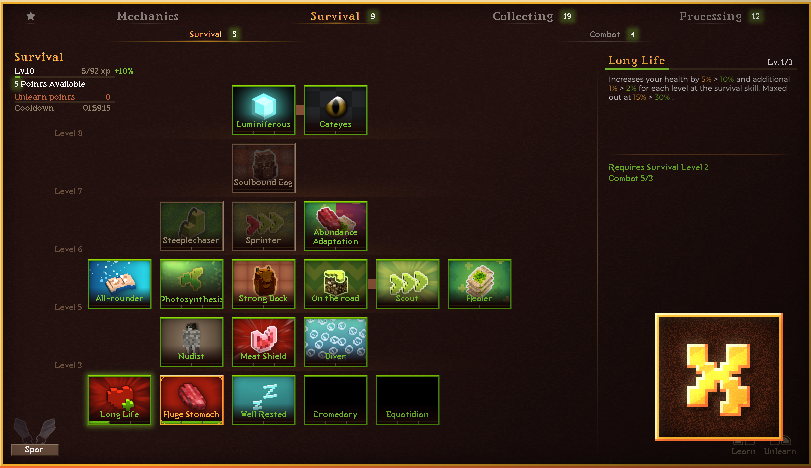
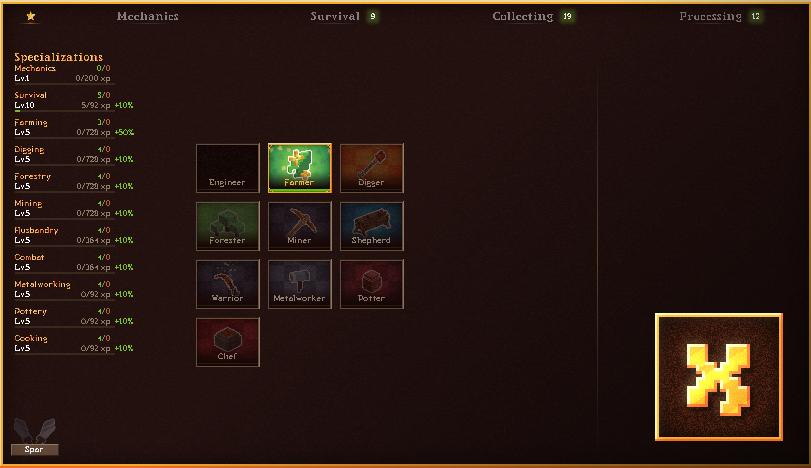
Add more bling to leveling with a new, shiny GUI.
Update 1.1.0
-
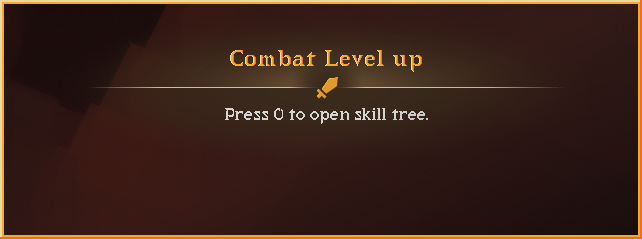
- Level up graphic
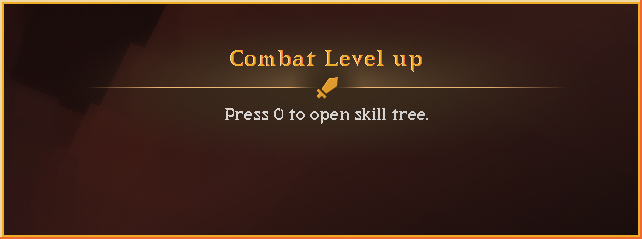
-
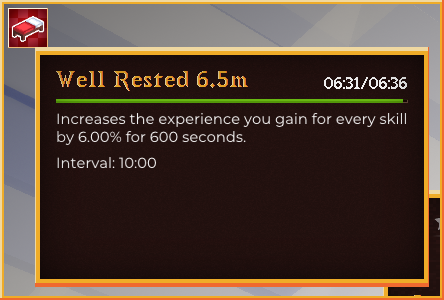
- Status effect display (the default display can be hidden with the "L" key)
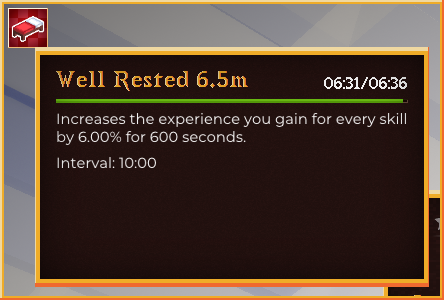
-
- Config file
-
-
- lvPopupEnabled: [true|false] Enable/Disable level up graphic
- effectBoxEnabled: [true|false] Enable/Disable status effect display
- effectBoxOriginX: 8.0 Status effect X position
- effectBoxOriginY: 8.0 Status effect Y position
- effectBoxSize: 40.0 Status effect size
- effectBoxOrientation: [0|1|2|3] Status effect orientation
-
Limitations
Because I use my own bitmap text renderer, the custom fonts only support Latin character. If your locale is set to use non-Latin characters, it will use default ImGui text renderer and text scaling might look off.
For mod maker
To add ability image. Put .png image (preferably square aspect ratio) of the same name as your abiltiy in `assets\xskillgilded\textures\gui\skilltree\abilityicon`.
| Mod Version | Mod Identifier | For Game version | Downloads | Released | Changelog | Download | 1-click mod install* |
|---|---|---|---|---|---|---|---|
| 1.1.0 | xskillgilded | 8279 | Aug 1st at 11:58 AM | xSkillGilded_1.1.0.zip | 1-click install | ||
| |||||||
| 1.0.2 | xskillgilded | 997 | Jul 28th at 10:10 AM | xSkillGilded_1.0.2.zip | 1-click install | ||
| |||||||
| 1.0.1 | xskillgilded | 56 | Jul 28th at 8:51 AM | xSkillGilded_1.0.1.zip | 1-click install | ||
|
Fix xp requirement bug | |||||||
| 1.0.0 | xskillgilded | 152 | Jul 28th at 3:26 AM | xSkillGilded_1.0.0.zip | 1-click install | ||
|
initial release | |||||||
xSkills Gilded is currently incompatible with 1.21.x.
Until Makham returns, use xSkills Guilded Patch.
Makham would it be possible to update the version to 1.21.x and add a config file to the mod, because i don't know how the config file is formatted.
Thanks in advance :)
Anyone else having an issue where this mod isn't creating a config file?
He who knows Im always watching
DaxKilo
Try changing your key bind; that's what I did. I also have both the old and new Xlib running. My key bind is O for the main screen, then it's P for the graphic one.
I haven't tested if it's linked, but :3
Doesnt seem to be working for me with the new update. Any plans to update this mod?
This is a very underrated mod, bravo to the creator, the design of the mod fits the game perfectly, thank you so much.
LOVE LOVE LOVE IT, it's absolutely the best mod for VS ever!
Kadlore i didnt know there were new skills so ill go back to your patch in the meantime, much love for the work all you modders do!
Kadlore on a quick test of running the mod it seems to work fine using the updated official version of xSkills/xLib, adds in the new skills fine it would seem. Only thing missing is the custom images of course.
Damage_Zedd does it work with the new skills added?
people asked me to update my patch, but if the original one work fine i will just put my patch down.
seems to be working fine with th offiial xskills and xlib update! we are so back (1.21.1 rc 2)
Hoping for an update to 1.21
thanks for the help it works, it turned out that I had both libraries 18 and 20
Matiamo Out of curiosity, did this ever get resolved or did you figure out how to work around this? You and I have the exact same monitor issues, down to the leftmost one being portrait, ha!
FatRefrigerator i did it, i never did this, so i hope i didn't made mistake: https://news.kalataka.ru/xskillsgildedpatch
Make a save of your world just in case.
Makham i will take off my patch as soon as you update your mod, i hope you don't mind my upload.
Kadlore if that works would you mind uploading a version of that here? that way it's on the DB and can be downloaded on MP servers
@NERD_NATO With xlib rabbit patch Xskill does work, but i didn't try this gilded mod with them yet
Edit:
It work with the condition to edit the dependencies to use Rabite's xlib and game 1.21
Open mod folder:
Extract the mod content
Edit modinfo file to replace xlib dependencies by " "xlibrabite": "0.8.20" (need to install it too)
Compress back in zip file with proper name
Delete the previous zip version
This is super cool, here's hoping this and xSkills get brought up to 1.21.0 soon
Kadlore Don't think so, it requires the original xlib as a dependency.
Hi, is this mod still working if we use rabbit patch?
@kutchix
your right thank you
One suggestion for the next update.
When the pop up appears, the game takes away all functions from the game and i have to tab into the game, because it seems to be detected as a out of window prompt.
When that happens, the game continues to do the current task until you are back in the game.
In my case, i was harvesting carrots and the terra preta block got destroyed by the harvesting animation. Not the worst in the world but slightly annoying ^^
Going to note as I have one of my monitors portrait I can't see like a quarter of the menus, and moving the window doesn't work. Might be an X11 issue.
Same issue as Matiamo
Unfortunately unusable on Linux (Arch, KDE Plasma, VS 1.20.12) with multiple monitors because the window opens on my left monitor and is half hidden by VS on my center monitor.
I managed to get it working in multiplayer.
Mods installed server side :
Mods installed client side :
In the mods folder of your client, I opened the xskillgilded.zip file and edited the file modinfo.json inside it.
I added the line in bold :
Small issue on linux with multiple monitors, I can't seem to get it to not render in the direct center between my monitors outside of vintage. I've played with the imgui configs and yea makes it unusable.
VS: 1.20.12
xskillgilded: 1.1.0
I've attempted this on Hyprland and Plasma Desktop Environments.
Madalovin - I had some issues too; however, maybe these steps might help out as this is a very nicely done mod.
Note: issued with imgui, configlib debug error (it should still not hamper xSkill Guilded from running, however, it's good to clean it up)
If you are having issues with this mod and config lib:
uninstall both and go into the "files" tab on both mod pages to download the previous version
make sure you restart your game. the problem is that the mods have updated to support the unstable branch of the game, but that does not support the stable branch anymore. once you go back to the previous version and restart the game, the issue will be fixed.
Yeah, couldn't get this to work on 1.20.12 :(
Oh man, this is so cool! Great work!
UI Mods are crazy. I just started my own journey into modding the day before yesterday.
How did you tackle this? Any tips? :3
Yeah, I don't think it works on .12 - unless it isn't client-sided.
Sneezingprince
,I have changed the key several times, but nothing changes. I do not see a window opening.
For some reason the popup is enabled but does not appear whenever I level up, not sure if Im missing something. Playing on 1.20.12
xpado1002x
BHBigF
You have to remap the xskill gilded mod to a key to make it work, currently xskills is mapped to "O", so put the gilded one on another key
Hi, is there anyone who can explain to me or make a video to show how to make the mod work? I don't understand what is missing for it to work.
hey i have a question i have install the game on old version noting happens
still old UI
installd the mods new and game on old version noting
so what should i do?
I'm not sure if I'm doing something wrong but after installing this mod, the xSkills still shows the old default UI.
I installed the 1.1.0 version and I'm playing on 1.20.12, maybe thats why? I'm pretty new on VS modding, sorry if the answer is obvious.
I am also using imGUI and xSkills, as recommended
I would like to apologize, it seems like I forgot to remap the keys to open the gilded version, it works now.
Stantis it does exist but you need to select it from the files setion manually.
Sadly this mod is saying that it needs xlib .8.16 which does not exist.
For whatever reason the mod causes bows to fire arrows but do zero damage to targets. the targets won't even register hits.
PapitoPapz i do have IMGui installed on v1.1.8, so i am a bit confused. Does it need to be installed on the server, because the mod page says it's client side only.
Normally it shouldn't impact the server, because xskills is sending the data to the GUI.
Leaving this here for those who have effect boxes hidden behind hudclock: go to config and change effectBoxOriginY to move the effectboxes downwards
Shinji170981 I am playing on 1.20.12 stable version and it is working perfectly fine. Maybe you do not have ImGui installed ?
For some reason, i can't assign a key binding to your mod, because it doesn't show up in the controls but i am using 1.20.12, so not sure if the 1.20.4 version is compatible with the latest stable version.
I already reassigned the regular xskills keybinding. Any advice or wait for a 1.20.12 update?
If you are gonna be making more mods like this, holy fuck I AM GONNA EAT GOOD FOR DAYS WOOooOOOOOO
OH MY FUCKING THANK LIKE HOLY FUCK, PEOPLE NEED TO DO MORE GUI MODS LIKE AAGSKMGHADKBMSDÖBMS I AM IN LOVE WITH THIS
Renrogn i can't replicate the crash. Are there any error messages in the log files?
Autor, check the correctness of the "COMBAT" section. When I hover the cursor over the skills of the 10th level, my game crashes
Makham
good soup mod
MrNeckBeard I'm having the same issue. I installed this onto my server and it doesn't seem to be working for me.
Makham i see, its not showing me the setting for gilded then, only option i have is the one for XSkills
MrNeckBeard You need to remap the key in setting to avoid conflict. While in game goto Setting > Controls > Search for "skill" you'll see 2 results:
"Show/Hide Skill Dialog" and "Show/Hide Skill Dialog - Gilded". By default both will bind to "O" key. I recommended remap the default one to "Ctrl+O" so you can access both at the same time.
does this run on 1.20.12, doesnt seem to work for me, if i install xSkills just brings up xSkills page
It looks amazing, great job!
Kosmu Updated the page to include xSkills as well. (technically it only require xlib)
Ruyeex Noted, will be fixed in 1.0.2.
So you don't need Xskills with this or is this just an UI mod?
If you rejoin the game the UI will be corrupted.
I meant to show instead of percentages it shows the values of the game like he has 15 and the next tier is 17, his pickaxe mine x amount of seconds compared to the new skill tier
demn this is.... this is beautiful.
Ruyeex It does show the current value (in "current tier" > "next tier" format).
batooo I'm sorry but I have to delete your comment, please keep the conversation related to the mod.
Loving it
Can we have the ability to check the current stats to the next stat like health or is it unnecessary as it's the only thing it can be bothering?