
Mods / VS Mod Update Tool
Author: AriesLR
Side: Both
Created: Sep 17th at 12:40 AM
Last modified: Oct 19th at 9:07 PM
Downloads: 1008
Follow Unfollow 77
For testers:
VS-Mod-Update-Tool_v0.6.0.zip

| Mod Version | Downloads | Released | Changelog | Download |
|---|---|---|---|---|
| 0.6.0 | 261 | Oct 19th at 9:07 PM | VS-Mod-Update-Tool_v0.6.0.zip | |
|
Added
- Added an Ignore column and matching logic to ignore checking for updates on specific mods in the event a new version of a mod causes issues, but an older version works fine.
- Added 1.21.5 as an option for version selection.
Changed
- Slightly increased the window size to accomodate the new column.
- Reworded some comments for clarity.
- Possible other changes to code I forgot about, it's been awhile between making these changes and pushing the update.
| ||||
| 0.5.2 | 196 | Oct 7th at 11:24 PM | VS-Mod-Update-Tool_v0.5.2.zip | |
|
Added Changed | ||||
| 0.5.1 | 275 | Sep 21st at 9:34 PM | VS-Mod-Update-Tool_v0.5.1.zip | |
Added
Fixed
| ||||
| 0.5.0 | 44 | Sep 21st at 8:12 PM | VS-Mod-Update-Tool_v0.5.0.zip | |
|
Added
Changed
| ||||
| 0.4.0 | 166 | Sep 18th at 6:53 PM | VS-Mod-Update-Tool_v0.4.0.zip | |
|
| ||||
| 0.3.0 | 66 | Sep 17th at 2:11 PM | Releasev0.3.0.zip | |
|
[v0.3.0] - 09-17-2025
Added
- Game version selection dropdown for finding the most recent mod updates by [major.minor](https://semver.org) version (e.g. `1.21.x`).
- Patch version no longer matters, as long as the update matches the selected [major.minor](https://semver.org) version.
Changed
- Updated MahApps.Metro from 2.4.10 → 2.4.11.
- Updated Newtonsoft.Json from 13.0.3 → 13.0.4.
- Switched update checking to use the Vintage Story Mods API instead of scraping webpages.
- Download logic adapted to align with the new update-checking method.
Fixed
- General code cleanup.
Removed
- HtmlAgilityPack dependency removed.
| ||||
MrFastZombie It's possible, just not high on my priority list right now
Something I've been wanting from launchers that have mod updaters that I've only seen in the MO2 updater plugin is a feature that shows all changelog entries since the installed update. Any chance this might be added in the future? I like that this tool is focused on mod updates because I don't really need the features of other launchers that much.
JupiterAugust I'm aware of the issue and I'll be looking into fixing it soon. The fixes I'm going to make won't support any fine selection for versions pre 1.21 for now, but I will get to work on pushing an update for this ASAP
hi! due to the vintagestrory update to 1.21.4 this automatically detects the most recent mod update, which makes it difficult if you're trying to stick to 1.21.1 for now. Can you add a thing to let it pick what version of 1.21.x we want to go by? currently it doesn't
AriesLR
That's very basic help. It's just that I was in the same boat with about twenty flags on VirusTotal. That created a wave of panic, as you can imagine. The cause was the library I was using to create the binary.
Good luck, I've been through all these steps. My program is the first and only one of this magnitude that I've done. It was basically a learning project. But I went through all the same problems: modid missing from modinfo, poorly formatted modinfo, case sensitivity issues with modinfo keys, arbitrary versioning...
Laerinok I appreciate you coming to my aid! I took your advice and added the checksums. Usually the things I release are on a much smaller scale with less users so this is surprisingly the first time I've ran into this issue.
To users: There's always the possibility I forget to update the checksums in the description, if you are ever unsure I urge you to use the github to download where the checksum is always displayed on the releases page. I will try to keep them updated, but I'm only human and my memory is a goldfish.
Hello,
I just wanted to tell you that I completely understand the situation! I've had the same experience with antivirus false positives on my own program, and I know how frustrating it is when you're working voluntarily for the community.
A note for users
These "Bitcoin miner" alerts are most often false alarms. The fact that the entire source code is shared is the best proof of good faith (even if it's never absolute proof, you are right to remain vigilant!).
It is always important to be concerned about the security of the programs you download, but you also have to be aware of what triggers the alert. Your antivirus is simply being a little too cautious with new, unsigned tools.
Small suggestion for trust
To reassure those who are wary even more, I suggest that you add the SHA-256 checksum of your downloaded file.
To users: this code (which is often displayed on sites like VirusTotal, by the way) guarantees that the file you download is exactly the same as the one the author has verified. It's a small extra step in transparency that helps a lot!
Good luck!
BiggieCheeze I really appreciate the apology tbh, I didn't expect that. My only guess is your antivirus is flagging it for the same reason a single vendor on VirusTotal flags it. Like I've mentioned in my previous comment though the source code is available to everybody and one of the huge benefits of doing that is anybody can see the code and see there is nothing of the sort in the app. Obviously I made it so this is going to hold much weight, but it would be crazy for me to put a miner in this and then let it run 24/7 on my server.
Basically not every antivirus is correct and sometimes will have a false positive, this is one of those cases. Don't listen to me though, listen to the other comment from Skaface443. They are not affiliated with me at all and have looked over the code and deemed it to be safe, as well as the mods locking this post for awhile to check it themselves.
In terms of functionality though the app is insanely simple, it basically just reads the api webpage for a mod (it finds this by reading the modId in a mod's modinfo.json file) then extracts the assetid which is used to construct the webpage link for the buttons that lead to the mod page, it also finds the download for the latest release based on what game version you have selected and links that to download buttons. Aside from any of the code for UI like button clicking or dialog popups there's not much else in the app. Even if you know nothing about any kind of programming you could probably look at my code and based on my comments figure out what each part does. I tend to label things in sections like "Mod Updates" or "Download Mods" etc.
gladly.
My anti virus pinged a file,
Risk.Coin.Miner.Gen!YPE
it was downloaded alongside the mod, instantly. the only thing i downloaded that day. Right when i installed this mod. I would like to believe it isnt but my anti virus has rarely been wrong
if thats not a coin miner then i don't know what it is.
If it was NOT from you then i apologize and will remove the comment saying so but as far as i can see it couldn't have come from anything else...
BiggieCheeze The source code is publically available, it is released under an MIT license. You have full ability to download it and build it yourself.
There's several reasons why this is obviously untrue, but the biggest being how is it mining bitcoin? It uses virtually zero cpu power, and under 200MB of ram. It will work on server hardware with no gpu attached at all.
Genuinely I would love to know your explaination, proof, or any coherant reason why this is a bitcoin miner.
Skaface443 Thank you very much! It was an insane claim, but I appreciate the virus scan.
Just to clarify about any external connections, these are the only urls that the app connects with on its own as seen within the methods below. Aside from that it does connect with the vintage story api when checking for updates/updating mods, also shown below.
// Fetch API info
string apiUrl = $"https://news.kalataka.ru/api/mod/{modId}";
string response = await client.GetStringAsync(apiUrl);
var apiData = JObject.Parse(response);
int assetId = apiData["mod"]?["assetid"]?.Value<int>() ?? 0;
if (assetId != 0)
mod.ModPageUrl = $"https://news.kalataka.ru/show/mod/{assetId}";
      UrlService.OpenUrlAsync("https://github.com/AriesLR/VS-Mod-Update-Tool");
      UrlService.OpenUrlAsync("https://buymeacoffee.com/arieslr");
      await UpdateService.CheckForUpdatesAsync("https://raw.githubusercontent.com/AriesLR/VS-Mod-Update-Tool/refs/heads/main/docs/version/update.json");
BiggieCheeze After having read the sourcecode you are incorrect. The bitcoin miner on your computer does not come from this mod.
Even VirusTotal says its fine: https://www.virustotal.com/gui/file/00f73447856ee1ed68775f896a5256918c997b8768c7f09f2debf5acd10a4ba2/detection
Just some noname vendor that randomly flags it without explanation to why its flagged, the rest looks fine. No malicious URL connections or anything
Parf I guess it depends on what you mean by generate modlists, if you mean a modlist you can copy/paste to update your modlist in your discord server or wherever you may use it, then yes.
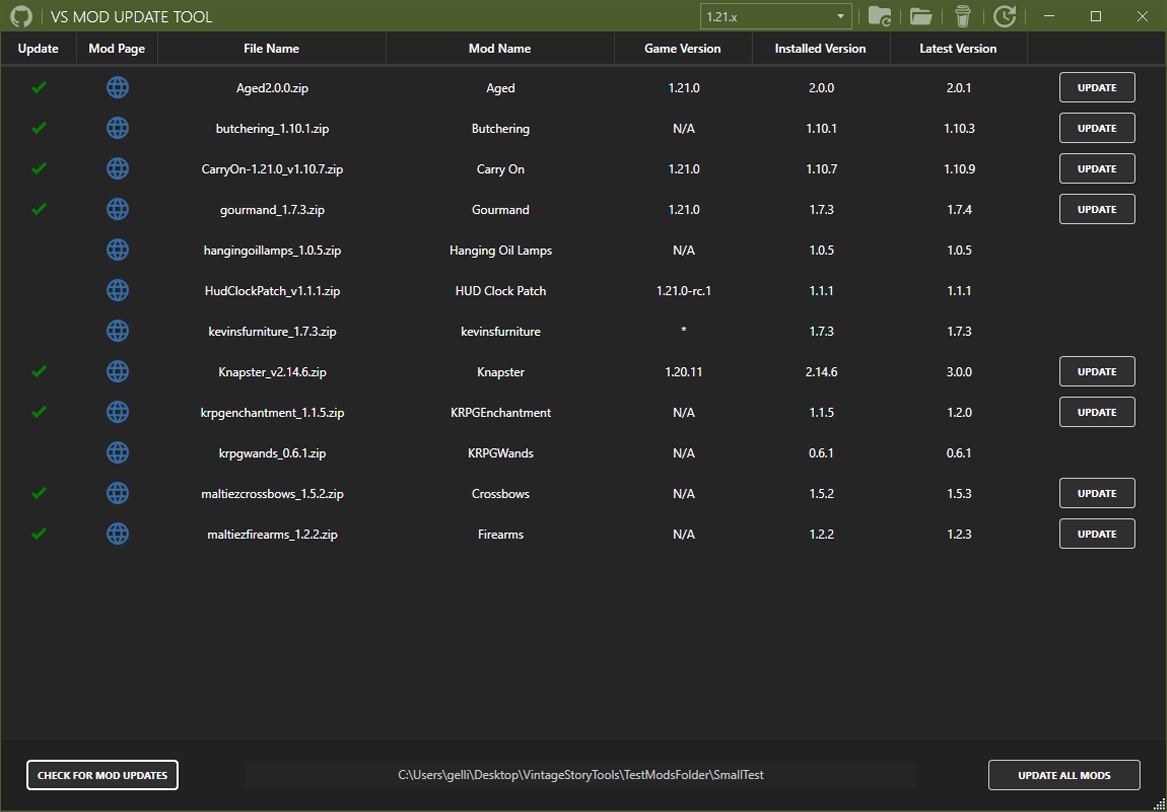
The images on the page aren't up to date, but there is a button on the top bar of the app to copy your modlist. It will output using discord markdown like this:
- [Aged](https://news.kalataka.ru/show/mod/14311)
- [Alchemy](https://news.kalataka.ru/show/mod/487)
- [Animal cages](https://news.kalataka.ru/show/mod/1194)
- [Animal ears](https://news.kalataka.ru/show/mod/30177)
- [Antlers & horns](https://news.kalataka.ru/show/mod/19036)
It might not be perfectly sorted as I just noticed while grabbing an example. I'll fix that soon, but it's just because I sort using modId rather than mod name (easy fix, just need to find the time)
Updating mods also gives you the option to copy the mod update log which will output like this:
- Updated **butchering** from **1.10.3** to **1.10.4**
- Updated **combatoverhaul** from **0.9.4** to **0.9.6**
- Updated **configlib** from **1.10.2** to **1.10.3**
Try pasting either of these examples in discord to see what it looks like if you're unfamiliar
ooooh i love a good updater. can this application generate modlists? i'm really fond of the lists automatically generated by ModsUpdater and how straightforward it is, though this one has a much friendlier yet simple interface.
Wilihey Honestly that's a better outcome than expected for linux, I wasn't sure it'd work at all. I do have plans down the line to have linux support, but it'll require a full rewrite of the app. Glad things worked though, there's a chance the error was with a a specific mod, for example the "Land claim and group GUI" mod will never update with my app until the mod author uses all the proper fields in the modinfo.json, it's currently missing a modId which is the single most important piece of information the app can get from a mod. This issue will cause an error to pop up after checking for mod updates, but it can easily be ignored. It just tells you the app couldn't find the modId.
Works on Linux, its a bit scuffed like the UI for me is all black and only shows up if i hover on the right buttons
its also a bit tricky to paste the mods location if you installed the game through an appimage
but it worked when i updated all the mods, it said it didnt and showed weird error but it actually updated all of them
CoachingNeeded that's awesome! Glad you were able to streamline the process.
AriesLR, fair enough. I'll figure it out. Thanks this makes live easier. Drag and drop is not the worst thing.
Keep up the amazing work!
Edit: I figured it out using WinFSP and SSHFS together I can map an SFTP folder in windows explorer.
Then I select the map in VS Mod Update Tool and it manages too update.
CoachingNeeded As of right now you would need access to the machine your server is on, FTP support might actually be the next step for adding any new features though since I failed to consider that. Right now the best you could do for a server setup like that is to have all your mods in a folder on your pc that you use to update them then drag/drop them in your FTP client to move them to your server, not ideal, but it'd work.
My server is not on my PC, how do I connect it? Does it support SFTP?
ALSO I'm working on a patch already as I'm seeing issues where the app prefers prerelease versions over the most recent. It's likely something to do with how I'm parsing the api and I'm trying to figure out a solution right now, I'd expect another update sometime today
ThePhantomX64 Possibly with wine, but no native linux support as of right now. It's not completely off the table yet, but I would need to nearly completely rewrite the app as it uses a ton of windows specific code right now and the framework it's built on has no cross platform support. While not impossible it's just not something I can easily do right away
Probably a stupid question but, does it work on Linux? Since I play VS on my steam deck.
Charicar Wouldn't have gone through with it if it weren't for you, I didn't even think I could, but I got curious and found a way to get to the mod pages from info on the api
AriesLR Love the new links. Thanks for the update!
nacnud That's the goal! Glad everything worked smoothly
easy update to 1.21.1, thanks! all the loading errors are gone
Charicar Everything you mentioned is fixed/implemented + a little more
Charicar Oh, yeah I guess you have a point lmao, I didn't consider that everyone would likely already have .NET 8 from Vintage Story. I'll likely change that in a patch very soon as working on linux support is becoming just as much of a task as I figured it would be. I'm going to switch over to working on that for my sanity, expect an update soonish
AriesLR Yeah the mod URL sounded difficult. Totally understand. Best of luck with the rewrite!
Self Contained is different from PublishSingleFile. Making it self contained means it includes the entire .Net 8 Runtime (~60MB) as well as your application. Removing SelfContained (and EnableCompressionInSingleFile since that relies on it) from the csproj while keeping PublishSingleFile will keep the single exe, but rely on the .Net 8 Runtime of the windows installation running the program rather than carrying it around itself. I ran it locally and it brought the program down to one 10MB exe.
Charicar I did actually consider having the mods folder at the very least be remembered if it's been used before which will actually be very easy to implement, as for the single file publishing this was mainly to keep things neat and in a single exe as a lot of my past projects haven't used it and it just looks ugly without also having some sort of installer setup so it gets hidden away in appdata/program files or something, but it might be something to consider for being able to post the actual program here. Although it does make releases tedious since I have to write patch notes in 2 different formats (Markdown/Whatever this page uses.) The API does expose everything about a mod except I don't believe it has the url to the actual mod page and mod page urls don't match with api urls all the time either. For example some mods have a url that ends in /show/42420 while others are just /carryon. With the api the api url is something like /mods/api/{modId} so mods like carryon would work since the modid and page name are the same, but others wouldn't work at all. Off the top of my head though I know I can and actually might still have the logic for displaying the mod description as I did have it in the first version of the app.
Everything you mentioned is something I'm considering, but as of right now I'm working on rewriting the entire app so I can support linux/mac as well (Not even sure if Vintage Story supports it, but in theory I can) so changes might be a little slow for a few days, although aside from a few minor issues you've mentioned the app is mostly feature complete and could function without my support at least until the next minor update of Vintage Story where I'd have to add a new version to the version selection dropdown (This is something I want to look into a solution for since it's the only thing really stopping the app from working indefinitely as long as the API doesn't change).
TL;DR I want to implement the changes you suggested with the only one being kinda iffy being the single file exe and even that's not totally off the table I just have other things I'm focused on at the current moment
This is a fantastic tool. I was getting tired of doing my updates manually with a million tabs open. That said, I do like having some tabs open to be able to see what's changed. Does the modding API give you the mod page URL? If so, having the 'Mod Name' column into links to the mod page would be a nice QoL feature. Ideally so that--when I see a mod has updated four times--I could quickly go check out the changelog to see if I want to update or not.
Minor quibbles: Having an application-spanning modal popup automatically appear on startup was disarming, especially as it happens every time the application is opened. Keeping a settings file for known locations (maybe with a taskbar dropdown like the game version?) and column order so that they carry over between application loads would be nice to see. The csproj is set up as Self Contained, but I think any windows machine running vintage story would already have the .Net 8 runtime installed and making it framework-dependent brings the single-file executable down to 10MB. Just something to consider if you hadn't looked at it before. If you have and decided to go with it anyway, I'm sorry for doubting you!
Fun fact, 37 people at the time of writing this didn't read the big red text xD
I only added the release to notify the 15 or so people following that I updated the app with a pretty major change in terms of QoL. I searched through api docs for so long and completely missed the mod api which happened to solve literally every issue I had with automatically finding mods without people having to manually enter urls.
osayra Thanks! I try my best!
this tool is brilliant you are amazing!!
Slith it wasn't really planned, but it's something I'll look into. I'll tell you right now though it won't be particularly easy as I will need to switch to a different framework with cross platform support, currently I'm quite limited to just windows since the whole app is built around it, but there are similar options that might streamline adding linux support.
I'll definitely look into it over the next few days and see if it's something I want to do. Lucky for you though I don't have any other immediate plans for the tool so it might just be the next thing I do
Any plans for a Linux release?
Coupled with a command line interface it'd be perfect, but I'd be happy if it was just the GUI one (i run a (mostly-)headless Ubuntu server).
Amazing, can't wait to test this out on our server.
The app has been updated to use the Vintage Story API, you don't have to manually enter links to each mod anymore, the app will find them for you!
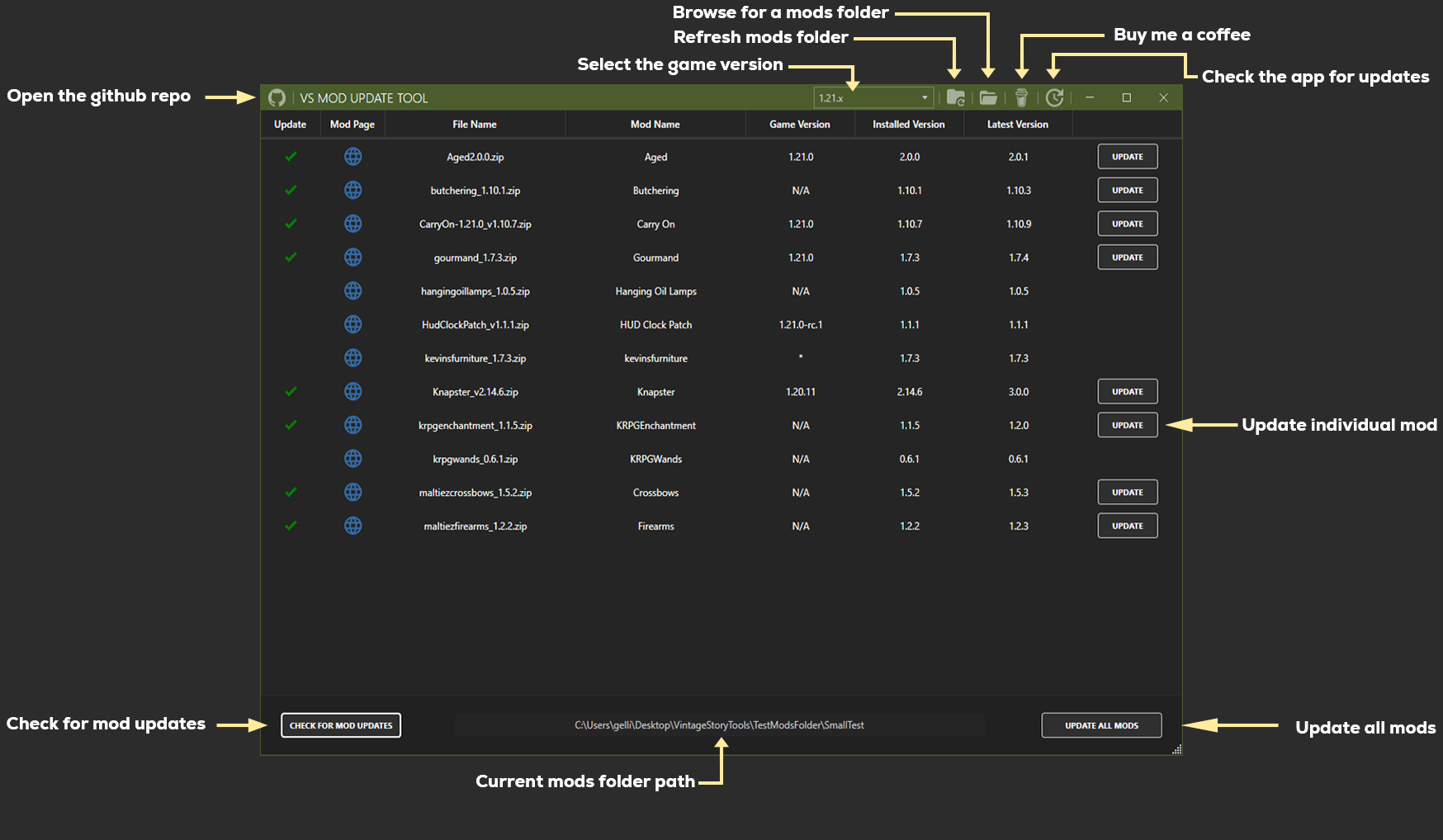
MRGOOSE Make sure you download the latest release which is v0.3.0, it was just updated either slightly before or after your comment. Then when the app opens it will ask you to select your mods folder, this would be the folder you put the mod.zip files. After that just click check for updates and if there are any either click update all mods or click each update button for each mod. If your server isn't on version 1.21.1 (or 1.21.0) at the top right of the app click the dropdown menu and select which game version you need the mods to be and the process to check mods/update is the same every time.
how can i run this on servers?
RunYouCleverBoy Firstly, love the Dr. Who reference. Second, I'm currently working on it, links will be automatic in the next update as well as some other features! Won't be too much longer and I'll push a new release.
programm do not remember the mod folder..|
And the sad momen- need to set the links manually..(
but the time i connected to server it asked for download missing mods
so the mod links should be obtainable auto i think
Looks like there was an API I didn't find when working on this, tomorrow/later today I'm going to look into implementing it so everything can be automatic
Abra_The_Cadabra Yeah I understand that, the next feature planned is to either find a good solution for automatically getting the links, which to be honest might not be possible due to mod authors not using the same modid in the actual mod as what the link to the mod is, or to allow you to just paste a whole list of links and the app will automatically find out how they relate to each mod in your mods folder.
As of right now though it definitely sucks, our server we launched as the same time as this suffered from the same issue of having to manually enter 100+ mods, but the one benefit to this is it will save the links in the future so you only need to add them for a mod once unless the mod's link changes.
TL;DR Is I feel you and I'll be working on a solution soon
This thing isn't too great if you already have 100+ mods installed. Having to manually enter each and every link is beyond tedious when there is the other updated which does it automatically. Not trying to be rude, just letting you know.
AriesLR No problem at all, I just figured in case you were busy would post the link real quick so others could find it easier.
Algernon Oops lmao, I had too many github tabs open and grabbed the wrong app entirely.
ValkyrieBanshee Thank you so much lmao I apparently didn't pay enough attention when adding the link
Link is fixed now
https://github.com/AriesLR/VS
-Mod-Update-Tool
AriesLR The link in your description is outdated though haha, its a jan 4 build without any vintage story features in your image
Algernon I know the feeling all too well, I was making this side-by-side with building a server and realized how annoying it can be to keep track of every mod. Thank you for giving it a try!
DemiRemi I LOVE YOU TOO!
IT'S A MIRACLE. THANK YOU. I LOVE YOU.
Exactly what I needed to update our yearly server's 100+ mods, uploaded right in time before I was about to download them manually. Thanks heaps bro