
Mods / ProspectTogether

Author: Wooza
Side: Both
Created: Jun 17th 2023 at 4:58 PM
Last modified: Nov 24th at 4:58 PM
Downloads: 254088
Follow Unfollow 2249
Recommended download (for Vintage Story 1.21.5):
ProspectTogether-2.1.2.zip
1-click install
This is a fork of the awesome ProspectorInfo mod from P3t3rix (https://news.kalataka.ru/show/mod/1235). ProspectTogether aims to make it easy to store, analyse and share your prospecting data. You can also use this mod in single player and client-side only. If you want to share prospecting data, this mod must be installed on the server as well.
- Drop the zip file into your
Modsfolder or use 1-click install from VSModDB. - Just keep prospecting, the mod will automatically record any data found while the pick is used in Density Search mode.
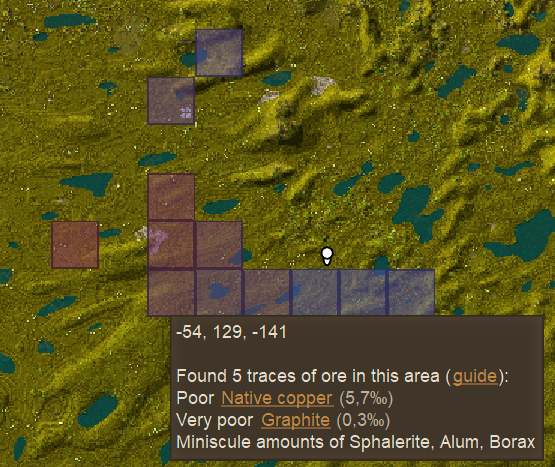
- The data of each prospected chunk is shown on the map, when the ProspectTogether map layer is enabled.
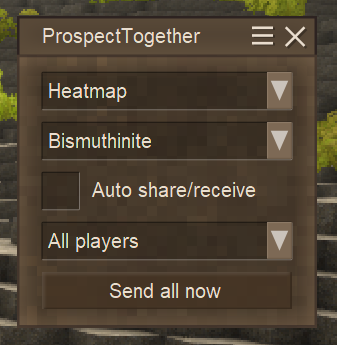
- Use the heatmap setting and select an ore to see where certain ores are more likely to occur.
- Configure autosharing if you want to share your data with the whole server or a certain group.
- This mod displays the most recent prospecting reading per chunk. This is inaccurate, because the readings are position-based and not chunk-based, however, readings within a chunk are usually close enough to each other that this does not matter much.
- The prospecting data is only captured if the map or mini-map is used, i.e., if the dot from the vanilla prospecting appears, than the information is also stored in this mod.
If you found a problem with the mod, feel free to report it. However, keep in mind that I'm maintaining this mod in my spare time, so don't expect me to immediately fix every bug. Please keep the following in mind, when reporting an error:
- Describe the problem as precise as you can. This makes it a lot easier for me to reproduce and fix a bug. Ideally, you give me a step-by-step explanation on how to reproduce the bug.
- Bad:
- "Mod does not work!"
- "Mod crashes!"
- Good:
- "I just prospected a new chunk while playing in SinglePlayer. Then I tried clicking on xyz and nothing seems to happen. Game Version X.Y, Mod Version X.Y, OS: Windows/Linux. I found the following errors in the log file, which might be related: [Log file contents here]"
- Bad:
- Check the log files for suspicious entries
- The game has several log files, though I'm not sure what ends up where, so make sure to skim over all of them. You can find them in
C:\Users\YourUserName\AppData\Roaming\VintagestoryData\Logs. - Note that the game creates new log files on each game start and archives the old entries so make sure you open the correct log files.
- It should be sufficient to use Ctrl+F to search for
ProspectTogether.
- The game has several log files, though I'm not sure what ends up where, so make sure to skim over all of them. You can find them in
- Ideally you create an Issue on Github.
- This requires a free account, but makes it easier for me to track different problems/questions, etc. instead having to follow individual comments on the Mod page.
- Posting on the Mod page is ok, but I might be slower to react to that.
See Changelog
This mod will automatically import existing prospecting data from the ProspectorInfo mod. To be more specific, in the %Vintage_Story_Data%/ModData/YourWorldId/ directory, it will copy the file vsprospectorinfo.data.json to prospectTogetherClient.json. Note that there have been cases, where ProspectorInfo was unable to parse the output of the Prospecting Pick. These entries cannot be imported. So you might have to prospect some chunks again.
If you want to share your existing prospecting data with other players on the server, use .pt sendall or the "Send All Now" on the map dialog. This will send all your prospecting data to the server and all other players. You usually only have to do this once. The server stores this information in %Vintage_Story_Data%/ModData/YourWorldId/prospectTogetherServer.json. If you also want to share newly added prospecting data in the future, enable autosharing. You can do this either via the dialog on the map or by using .pt autoshare true.
If you play on a PvP server, you may only want to share your data with a certain group of players. In the map dialog, select the group that you want to share your data with. You can use the "Send All Now" button, to send all your prospecting data to the selected group.
When autosharing is enabled, you will send all future prospecting data to the configured group. Data sent to "All players" will be received by all players, regardless of their configured group. Data sent to the configured group, will only be received by players in that group. If autosharing is disabled, you will neither send nor receive any prospecting data.
.pt showborder [true|false] - Show or hide the border around chunks. Toggles without argument.
.pt setcolor (overlay|border|zeroheat|lowheat|highheat) [0-255] [0-255] [0-255] [0-255] - Sets the color of the respective element.
.pt setborderthickness [1-5] - Sets the border thickness.
.pt mode [0-1] - Sets the map mode. Supported modes: 0 (Default) and 1 (Heatmap)
.pt heatmapore [oreName] - Changes the heatmap mode to display a specific ore.
    No argument resets the heatmap back to all ores. Can only handle the ore name in your selected language or the ore tag.
    Examples: game:ore-emerald, game:ore-bituminouscoal, Cassiterite.
.pt autoshare [true|false] - Set automatic sharing of prospecting data.
.pt setsaveintervalminutes [1-60] - Periodically store the prospecting data (on the client) every x minutes.
.pt sendall - Send all your existing prospecting information to the server. You usually only have to run this command once per server.
TextureColor [0-255] [0-255] [0-255] [0-255] - The default color to use for the overlay. Default: 150 125 150 128
BorderColor [0-255] [0-255] [0-255] [0-255] - The default color to use for the border. Default: 0 0 0 200
ZeroHeatColor [0-255] [0-255] [0-255] [0-255] - Heatmap color for zero relative density. Default: 0 0 0 0
LowHeatColor [0-255] [0-255] [0-255] [0-255] - Heatmap color for low relative density. Default: 85 85 181 128
HighHeatColor [0-255] [0-255] [0-255] [0-255] - Heatmap color for low relative density. Default: 168 34 36 128
BorderThickness [1-5] - The thickness, in pixels, of the border color. Default: 1
RenderBorder [true|false] - Whether or not to render the border at all. Default: true
HeatMapOre [oreName] - The ore selected for the heatmap.
MapMode [0-1] - The mode of the map.
SaveIntervalMinutes [1-60] - Periodically store the prospecting data every x minutes. Default: 5
AutoShare [true|false] - Share prospecting data with configured players on the server. Default: false
ShareGroupUid [int] - Group Uid to which your data is sent. Use -1 for all players. Default: -1
/pt setsaveintervalminutes [1-60] - Periodically store the prospecting data (on the server) every x minutes.
SaveIntervalMinutes [1-60] - Periodically store the prospecting data every x minutes. Default: 5
Whenever you finish prospecting a chunk, the data is saved into the ModData folder and added to the chunk info of the world map.
Additionally, if you enabled autosharing, the data is also sent to the server, where it is also stored and sent to all players.
The mod renders a transparent square of all chunks that have been prospected. If a chunk is re-prospected, the message is simply overwritten. The rendering of these squares can be toggled with the .pt command.
After prospecting, the info will be displayed in the tooltip of the minimap when hovering over the chunk. This info is stored in %Vintage_Story_Data%/ModData/YourWorldId/prospectTogetherClient.json.
On the server side, the info is stored in %Vintage_Story_Data%/ModData/YourWorldId/prospectTogetherServer.json.

A map mode that displays the relative density of the ores on the map via a color gradient. Can be enabled/disabled and switched between displaying the density of just one ore and displaying the density of all ores (The highest density per chunk is picked).
Normal map (map mode 0)

Heatmap (map mode 1)

Heatmap for Cassiterite only (map mode 1; heatmapore Cassiterite)

| Mod Version | Mod Identifier | For Game version | Downloads | Released | Changelog | Download | 1-click mod install* |
|---|---|---|---|---|---|---|---|
| 2.1.2 | prospecttogether | 3685 | Nov 24th at 4:58 PM | ProspectTogether-2.1.2.zip | 1-click install | ||
|
- Add Spanish translation | |||||||
| 2.1.1 | prospecttogether | 35152 | Sep 17th at 3:05 PM | ProspectTogether-2.1.1.zip | 1-click install | ||
| |||||||
| 2.1.0 | prospecttogether | 19784 | Aug 26th at 11:43 AM | ProspectTogether-2.1.0.zip | 1-click install | ||
| |||||||
| 2.1.0-rc.1 | prospecttogether | 1471 | Aug 15th at 11:31 AM | ProspectTogether-2.1.0-rc.1.zip | 1-click install | ||
| |||||||
| 2.0.7 | prospecttogether | 25431 | Jun 20th at 10:25 AM | ProspectTogether-2.0.7.zip | 1-click install | ||
| |||||||
| 2.0.6 | prospecttogether | 336 | Jun 19th at 9:02 PM | ProspectTogether-2.0.6.zip | 1-click install | ||
| |||||||
| 2.0.5 | prospecttogether | 6431 | Jun 3rd at 7:32 PM | ProspectTogether-2.0.5.zip | 1-click install | ||
| |||||||
| 2.0.4 | prospecttogether | 1726 | May 31st at 2:41 PM | ProspectTogether-2.0.4.zip | 1-click install | ||
| |||||||
| 2.0.3 | prospecttogether | 17926 | Apr 18th at 11:03 AM | ProspectTogether-2.0.3.zip | 1-click install | ||
| |||||||
| 2.0.2 | prospecttogether | 32391 | Feb 21st at 10:26 PM | ProspectTogether-2.0.2.zip | 1-click install | ||
| |||||||
| 2.0.1 | prospecttogether | 11015 | Feb 7th at 8:32 PM | ProspectTogether-2.0.1.zip | 1-click install | ||
| |||||||
| 2.0.0 | prospecttogether | 16280 | Jan 19th at 4:36 PM | ProspectTogether-2.0.0.zip | 1-click install | ||
| |||||||
| 2.0.0-rc.1 | prospecttogether | 8937 | Jan 5th at 1:54 PM | ProspectTogether-2.0.0-rc.1.zip | 1-click install | ||
| |||||||
| 1.4.0 | prospecttogether | 9498 | Nov 23rd 2024 at 3:25 PM | ProspectTogether-1.4.0.zip | 1-click install | ||
| |||||||
| 1.4.0-rc.2 | prospecttogether | 8394 | Sep 15th 2024 at 10:00 AM | ProspectTogether-1.4.0-rc.2.zip | 1-click install | ||
| |||||||
| 1.4.0-rc.1 | prospecttogether | 1781 | Sep 14th 2024 at 3:45 PM | ProspectTogether-1.4.0-rc.1.zip | 1-click install | ||
| |||||||
| 1.3.0 | prospecttogether | 25264 | Jan 27th 2024 at 9:02 PM | ProspectTogether-1.3.0.zip | 1-click install | ||
|
- Fix bug when importing older files from ProspectorInfo | |||||||
| 1.3.0-rc.3 | prospecttogether | 2341 | Jan 14th 2024 at 6:55 PM | ProspectTogether-1.3.0-rc.3.zip | 1-click install | ||
| |||||||
| 1.3.0-rc.1 | prospecttogether | 1011 | Jan 4th 2024 at 3:49 PM | ProspectTogether-1.3.0-rc.1.zip | 1-click install | ||
|
Changes:
Update steps
| |||||||
| 1.2.4 | prospecttogether | 12738 | Aug 30th 2023 at 7:09 PM | ProspectTogether-1.2.4.zip | 1-click install | ||
| |||||||
| 1.2.3 | prospecttogether | 973 | Aug 26th 2023 at 2:23 PM | ProspectTogether-1.2.3.zip | 1-click install | ||
| |||||||
| 1.2.2 | prospecttogether | 1073 | Aug 20th 2023 at 7:58 AM | ProspectTogether-1.2.2.zip | 1-click install | ||
| |||||||
| 1.2.1 | prospecttogether | 430 | Aug 19th 2023 at 5:08 PM | ProspectTogether-1.2.1.zip | 1-click install | ||
| |||||||
| 1.2.0 | prospecttogether | 337 | Aug 19th 2023 at 1:43 PM | ProspectTogether-1.2.0.zip | 1-click install | ||
| |||||||
| 1.1.0 | prospecttogether | 2846 | Jul 29th 2023 at 11:28 AM | ProspectTogether-1.1.0.zip | 1-click install | ||
| |||||||
| 1.1.0-rc.3 | prospecttogether | 1095 | Jul 23rd 2023 at 10:33 AM | ProspectTogether-1.1.0-rc.3.zip | 1-click install | ||
| |||||||
| 1.1.0-rc.2 | prospecttogether | 435 | Jul 22nd 2023 at 6:40 PM | ProspectTogether-1.1.0-rc.2.zip | 1-click install | ||
Make sure to backup your data before trying this version. See mod description for details. | |||||||
| 1.0.2 | prospecttogether | 559 | Jul 20th 2023 at 6:42 PM | ProspectTogether-1.0.2.zip | 1-click install | ||
| |||||||
| 1.0.1 | prospecttogether | 623 | Jul 17th 2023 at 7:02 PM | ProspectTogether-1.0.1.zip | 1-click install | ||
| |||||||
| 1.0.0 | prospecttogether | 2248 | Jun 25th 2023 at 1:44 PM | ProspectTogether-1.0.0.zip | 1-click install | ||
| |||||||
| 1.0.0-rc.3 | prospecttogether | 277 | Jun 25th 2023 at 11:48 AM | ProspectTogether-1.0.0-rc.3.zip | 1-click install | ||
| |||||||
| 1.0.0-rc.2 | prospecttogether | 1116 | Jun 18th 2023 at 11:09 AM | ProspectTogether-1.0.0-rc.2.zip | 1-click install | ||
| |||||||
| 1.0.0-rc.1 | prospecttogether | 484 | Jun 17th 2023 at 5:06 PM | ProspectTogether-1.0.0-rc.1.zip | 1-click install | ||
| |||||||
unable to see chunks on heat map. tired using commands to display it also didnt work. on a multiplayer server hosted by bisect hosting.
Hey, there is a bit of weirdness with aquifer from hydrateordiedrate, it counts aquifer as an ore reading, thus generating the % marker like an ore and thus influencing the coloring of the marker (high aquifer will lead to green marker which is usually meant for good ore readings). Would some sort of compatibility patch be needed for it?
Wooza Any chance for the Middle-Mouse keybind for hiding visibility of individual chunks function can be added to the 1.20.12 version of the mod?
Is this intentional handling of aquifers ?
Is there any way to add prospecting method from 1.19 version of the game? On TOPS server there is a problem where chunks loaded on 1.19 no longer show correct prospect info on the newest version of the game, and those are quite a lot of chunks. So perhaps adding this to the mod, if possible, would fix this (insane) problem?
In 1.21.1 I cannot share my waypoints with other group member or the server at all, this was only tested on LAN hosted servers
Is it intentional that you include trace amounts in the total count ? As opposed to vanilla
Is there a way to prevent the ProspectTogether window from opening automatically when you open the map? Thing is, I use the tab key to open/close the map, and when the prospect together window is there, instead of closing the map, when you press the tab key it starts switching inputs in the prospect together window. I don't really use that window, so I'd be more than happy to open it manually when needed.
for some reason my chunk borders arent showing any idea what im doing wrong?
version 1.21.1 and most recent mod version
Update just had to reload the game if anyone else has the same issue thats the fix
Wooza thanks a lot! That was surprisingly quick :D
x32
Done. You can use mouse-middle click on the map to toggle visibility of a prospected chunk.
There might be a better way to do this, but left click is already preserved for moving the map and right click for editing/creating waypoints.
FYI CriticalBackend Junrall as you also requested this feature some time ago :)
Hi, I request a feature to hide specific chunk overlays. Someone prospected on our base and it renders a square over our base on the minimap, which is aesthetically unpleasing. I know you can hide the overlay on map settings, but we want to keep other chunks.
Otherwise it's a great mod, thank you!
Bas_de_draak for me it does
Does this mod work with BettererProspecting? I'm new to the game and I'm trying to make prospecting a bit easier as I always hated the process whilst playing Terrafirmacraft
is there a way that I can make chunk borders render on the map even for un-prospected chunks? That way I can see when I am in a new chunk on the map rather than having to toggle the debug view. The debug view is at times difficult to interpret for me, and is not very useful when tunneling underground either.
Even when installed on a server this mod seems to be considered client side and doesn't force players to download it, it's not a big issue but a bit of a shame :/
Rydell
That is a bug in the base game. You can achieve the same bug with the vanilla prospecting dialog.
Someone encountered the same bug before, but I don't know if they reported it: https://github.com/Wooza/ProspectTogether/issues/12
Got a weird bug with this mod. Disabled all other mods to confirm there wasn't some kind of conflict.
Wherever I place the ProspectTogether window on the map screen it will then block mouse interaction in that area of the Settings menu. I've attached 2 photos, one you can see where I placed the ProspectTogether window and the other photo is the Settings screen. It might be hard to see but I have the Max FPS slider selected and I cannot drag it past the 203 line. If you swap between both photos you can see that the 203 lines up roughly with the frame of the ProspectTogether window. If I move the prospect window further left it will block even more of the mouse selection.
https://imgur.com/a/xEObg5v
Wooza It turns out something was wrong with my game and multiple mods had stopped working for some reason. Everything started working again after some fiddling, not sure what worked in the end.
Ygdrad did you start the server using "Open to LAN" or did you explicitly launch a server process?
My friends and I are running into an issue, we are unable to select autoshare/receive and when we use a command it says the mod isn't installed on the server. The server is running on on my computer using the same files as the client so it has the mod. Is there anything else that needs to be done I'm missing or something else that could be an issue?
maciaciele Thanks a lot.
Seems obvious in insight. Got so used to mod loaders updating everything on some other games i didnt realised ^^'
Could you make the mod sense if you're on TOPS and disable the client side stuff visually? LOVE YOUR WORK!
Mudz00 you're using wrong version of the mod - you sent 2.0.0, the newest ProspectTogether for 1.21.0 is 2.10.
Seems to be making my game crash when trying to join a server since the 1.21.0 got out.
Critical error occurred in the following mod: prospecttogether@2.0.0hi, recently tried to install this mod and didnt get the heatmap reading just like in the pictures, nor did i get prospecting info written onto the map, but the map showed the "prospectTogether" tab on the left side of the map, nothing showed in logs relating ProspectTogether (playing on win10, game v1.20.12, mod v2.0.7) i deleted all files from the VitageStoryData folder that had Prospecting info in the title, rebooted pc, installed freshly from the mod page, and the problem was gone. this helped me so maybe it might help someone else as i see some other people had same problem
Is there potentially a way to skip server integration to have clients that have this mod in common with eachother to communicate?
Like, you prospect and share a with a faction and anyone that has this mod installed on their client gets the chunk, but the info is not passed along to the server?
I was playing on Beevr's server and this was pretty handy for my group, but the mod got removed (I think because it was causing some form of bloat on the server's end)
Janeator sorry, for the late reply. Please take a look at the new Troubleshooting section
AlexCaptain I released a new build for 1.21.0-rc.4
The mod currently does not work with version 1.21.0-rc.1.
Wooza which log files should I look at?
Janeator that sounds like a corrupted json file, which could happen when the client or server crashed.
Is there anything in one of the log files?
Hi, ProspectTogether recently stopped working overnight without any changes being done on the server or client.
If I load into a singleplayer world, I can open my map and see the ProspectTogether tab and see the chunk prospecting heatmap.
However when I connect into the server (both 1.20.12 with 2.0.7) I cannot see the tab, the heatmap, or run any command related to it. Running /moddb list reveals it is indeed installed on the appropriate version and running.
I believe this happened to me once before on 1.18 or such and it just eventually fixed itself by updating to a newer version. I've tried reverting to an older version and back but no luck so far.
Wooza I haven't had a chance to check but it is weird that the server allowed the connection with a clear mod mismatch. I only discovered it because I was removing a mod that I didn't want anymore and noticed that the Prospect Together mod was not in my client folder. When I get a chance I will take a look and let you know.
SongAngel Dundee
That's strange. Is there any error in the logs that sticks out?
This mod doesn't seem to work at all with 1.20.12. Installed on our server and clients and no map display of chunk borders, no heatmap, no sharing of prospecting data.
UPDATE: I discovered that the auto download feature on the client when connecting to the server with mod mismatch did not work. It reported that it downloaded the mod but I had to do the 1-click install on my client and then everything started working. I assume this is an issue with the mod because I have used this same workflow with other mods and had no issues. i.e. I install the mod on the server, launch the client and let it sync up the mods with the server.
Any idea why I am not getting the chunk/map adjustments with the mod? I just installed it, and have prospected. I have tried heatmap mode, and default, and it isn't displaying like the pictures. I have the setting turned on, and on my server as well as in single player, it does not display.
There should be an option to remove prospected chunks from the map (Not the vanilla dots) without having to disable the entire overlay. It'd be nice to remove chunks we know have nothing we are interested in, or from placing we prospected on accident (Like my poor home that is being covered by a chunk square on the map)
Sweet! ill give it a try!
JustaKobold I fixed some of the "obvious" performance bottlenecks so please feel free to test if new version feels less laggy.
Aimli_ I will provide an rc version once the game itself is also in rc state. If you can't wait, I made a PR which builds against .NET8 and 1.21.0-pre1: https://github.com/Wooza/ProspectTogether/pull/19. You can find a built version of the mod under Checks/Artifacts
The lag spiks are noticably worse with prospect together though.
JustaKobold I've noticed this in vanilla when mousing over prospect points, don't think it's related to this mod. It's like the game is re-prospecting the same point.
Please update to 1.21.0-pre.1. Crashes in the new version.
I noticed a some weird lag spikes anytime my mouse is free and i mouse over a prospect together square on the mini map my 150ish fps drops to below 60.
I have played the same world for the past few months but i have like 9 of these ProspectTogetherClient-8a8d757c-8bb0-44c5-9905-2f00f9d0573d.json files from different dates clogging up my mod config folder why do i have so many and can i delete them with out any issues?
CriticalBackend You mean the dots? RIght click. If you mean the entire chunk squares, I don't think you can. You can hide all of them with the tabs on the left side of the map though.
Like many others, how can I delete nodes
Having the same issue, since the update there are no map overlays present from prospecting, I didn't see any error in the log files on MY end
Korcalius that seems strange.I simply added the most recent game version as a dependency. Are you running on 1.20.11?
Do you see any related errors in one of the log files?
I previously removed the game dependency in 2.0.1 as a precaution, because some people seemed to have problems. Though I could not reproduce them, so I added the dependency back in 2.0.4.
If this is still a problem, I will remove the dependency again.
I just tested it in my creative mode world and it does not show any sort of heatmap or overlay :(
I disabled all mods except for this one and did not change any relevant settings as far as I am aware.
Confirmed: Works fine with 1.20.11 (only tested in singleplayer)
The mod "works", but on multiplayer on the latest release, it causes some sort of lag or game freeze. Almost like it causes the server not to respond to you anymore.
I don't know if this is doable but it'd be helpfull if when in heatmap for a specific mineral if the mineral being filtered could be highlighted in the tooltip. Bold or color or hide the others.
Okay, i must have spoke too soon and messed it up on my end while trying to get a different mod to function and had to roll back anyway. I only paid attention to the prospecting on one of my attempts. Thanks for checking and sorry for that 😅
AngryMob just tested this in a LAN setup and sharing still works for me in 1.20.11-rc.1
Wooza 1.20.11-rc.1 seems to break the sharing. would love an update!
Kralicek
Unfortunately not, as this mod just adds some more information to the tooltip, but doesn't control the tool tip itself.
Liuzz
Yes, that should work out of the box.
Hey, does this mod retroactively create a heatmap of the prospecting waypoints from vanilla or do I have to use a propick in those areas again?
Hi, is there a way to freeze the tooltip, when hovering over a prospected chunk in the map ? I am using Geology Additions and have terrible memory for all the mineral names, so I'd like to click on them, to open the Guide page containing info on them.
I can see in the JSON file with info on the prospected areas, that the code there references guide pages, however, I don't know how to click on the text, because it moves with the cursor.
I haven't seen it listed here and haven't upedted to the newest version. but a bunch of us on a 1.20.7 server are unable to change anything with prospecting together on the map menu. the box shows and and the last heatmap is listed but I can't change any settings. every once in a while it will allow me to change it but then it stops again
Bleuzenn
That's a good point. I did some testing and this seems like a bug in the base game, which I reported here: https://github.com/anegostudios/VintageStory-Issues/issues/5758
In the meantime, I tried to clean up the existing dialog and make it a bit more compact.
An option to fully hide the ProspectTogether map window would be appreciated, if there isn't one that I'm just missing. Some players don't have reason to engage with it, but it takes up a fairly significant chunk of screen space and returns every time the map reopens, despite clicking to remove it from the left side of the map. It may not seem important, but I often like to navigate while keeping the map open, especially on a raft at sea, and it's an extra loss of vision. On a multiplayer server with this mod added, I don't think disabling it altogether is possible.
Sammael
I'm not sure what you mean? I just installed Geology Additions and did some prospecting in a new world.
The pro pick found some 'Pyrite', which is from Geology Additions. ProspectTogether also picked up the new ore.
Please, please pretty please; consider support for Geology Additions - some day? Maybe? Eh? :)
-Sam
Huh, the admin of the server I play on installed https://news.kalataka.ru/modsupdater and prospecttogether stopped working.
*edit*
Apparently it's jsut me?! That's really weird. Is there some sort of hotkey or something I might have accidentally pressed?
Wooza
HA HA, it works!
Thank you very much. I was lost at first because I was not sure what I was looking for but after a while I began to understand. I found the Error in “client-main.log”. I found the file in question and renamed it like you said; I loaded up the game and it works.
Thank you again
Echo13
Thanks for the report. If the game crashed during exit it might have corrupted some of your saved data or configuration
Please check client-main.txt and server-main.txt in %APPDATA%\VintagestoryData\Logs.
These should give you hints about which file failed to load.
Close the game and rename the corrupt file to have a backup.
Afterwards restart the game. This should solve the problem as the mod should regenerate the missing file. Some prospecting data might be missing.
Hi, I'm having a problem with mod.
The “ProspectTogether” layer on the left side of the map has disappeared but only on one word. It disappeared yesterday after a hard crash when I was done for the night and hit “Save & Leave world”.
Getting back on this afternoon I noticed the map was missing the prospect chunk grid from the mod. The vanilla dots were still there, the chunks were just missing.I figured the update/come back when I go prospecting again. I went prospecting at the end of my session and after a couple of chunks didn't come back.
After reading the mod page, I came to the conclusion that I may have accidentally turned off the “ProspectTogether” layer on the left side of the map. Going back into the game, open the map and the option wasn't there.
I have been troubleshooting for about two hours and I have tried the following:
This mod has been very helpful and makes prospecting in the game a lot more enjoyable. I do not wish to start a new world after all the time I have put into this one and I didn't want to stop using this mod either.
Any feedback you or anyone on solving this problem would be appreciate,
Thank you.
Oh, tenía un macro con ese comando y era muy práctico activar y desactivar todo con un solo botón.
Supongo que dejo de ser compatible.
Gracias por la respuesta!
_________
Oh, I had a macro with that command, and it was really handy to turn everything on and off with a single button.
I guess it's no longer supporte
Thanks for the reply!
Mardoock
Yes, the plain ".pt" command was removed. Hiding/Showing the overlay can now only be done on the left side of the Map by clicking on the ProspectTogether layer.
Hola. Uso este Mod en mi mundo y me sirve muchísimo.
Muchas gracias.
He notado que el comando .pt ya no funciona para activar y desactivar la malla de colores en el mapa. Este comando se elimina por completo o solo se cambia el com
______________________________
Hi. I use this Mod in my world and it helps me a lot.
Thank you very much.
I noticed that the .pt command no longer works to turn the colored mesh on and off on the map. Has this command been removed completely or just the command changed?
yknow what... the next full launch of the game fixed it for me too. guess i should start restarting the whole game and not just the server when i have mod issues 🤦
I don't know why, but on the subsequent launch it worked... 🤷♂️
i'm experiencing the same issue as Ganlhi after just installing the mod. i've looked through a couple log files (both -mains and -debugs) and i'm not finding any errors
Ganlhi
Is there anything in one of the log files?
I installed this mod for my solo game, but even if the UI to select the heatmap mode appears alongside the map, I don't see the grid on the map itself; even for samples I prospected after I installed the mod. Did I miss something?
@Wooza
Funnily, it did go away on like the third restart.
purple8cloud
Not at the moment.
ShindonMirk
I would assume that the problem goes away after restarting the game?
The problem about the mod failing to load, i.e. "Patching exception in method ..." seems to be a problem on Arch Linux: https://github.com/anegostudios/VintageStory-Issues/issues/5252
So there is nothing I can do for now.
any planned compat with Geology Additions?
Hi,
I'm getting this error on 1.20.4, mod version 2.0.2:
22.2.2025 00:29:35 [Error] [prospecttogether] An exception was thrown when trying to load assembly:
22.2.2025 00:29:35 [Error] [prospecttogether] Exception: Assembly with same name is already loaded
at System.Runtime.Loader.AssemblyLoadContext.<LoadFromPath>g____PInvoke|5_0(IntPtr ptrNativeAssemblyBinder, UInt16* ilPath, UInt16* niPath, ObjectHandleOnStack retAssembly)
at System.Runtime.Loader.AssemblyLoadContext.LoadFromAssemblyPath(String assemblyPath)
at System.Reflection.Assembly.LoadFrom(String assemblyFile)
at System.Linq.Enumerable.SelectListIterator`2.MoveNext()
at System.Linq.Enumerable.WhereEnumerableIterator`1.ToList()
at Vintagestory.Common.ModContainer.LoadAssembly(ModCompilationContext compilationContext, ModAssemblyLoader loader) in VintagestoryLib\Common\API\ModContainer.cs:line 481
Thanks for taking a look
I'm sadly still unable to reproduce the issue about "Exception: Patching exception in method virtual System.Void Vintagestory.GameContent.OreMapLayer::OnDataFromServer(System.Byte[] data)"
For people that still encounter it, please post which OS and .NET version you are using.
In the meantime, I tried to cleanup the code that is likely responsible for triggering this problem and also fixed a bug (github.com/Wooza/ProspectTogether/issues/15), which could crash your client.
I run 1.20.4 and get this:
21.2.2025 15:11:26 [Client Error] [prospecttogether] An exception was thrown when trying to start the mod:
21.2.2025 15:11:26 [Client Error] [prospecttogether] Exception: Patching exception in method virtual System.Void Vintagestory.GameContent.OreMapLayer::OnDataFromServer(System.Byte[]
data)
at HarmonyLib.PatchClassProcessor.ReportException(Exception exception, MethodBase original)
at HarmonyLib.PatchClassProcessor.Patch()
at HarmonyLib.Harmony.<PatchAll>b__10_0(Type type)
at HarmonyLib.CollectionExtensions.Do[T](IEnumerable`1 sequence, Action`1 action)
at HarmonyLib.Harmony.PatchAll(Assembly assembly)
at ProspectTogether.ProspectTogetherModSystem.Start(ICoreAPI api) in D:\a\ProspectTogether\ProspectTogether\src\ProspectorTogetherModSystem.cs:line 236
at Vintagestory.Common.ModLoader.TryRunModPhase(Mod mod, ModSystem system, ICoreAPI api, ModRunPhase phase) in VintagestoryLib\Common\API\ModLoader.cs:line 664
21.2.2025 15:11:26 [Client Error] Failed to run mod phase Start for mod ProspectTogether.ProspectTogetherModSystem
Wooza the mod doesn't seem to work on 1.20.4, unfortunately. I've tried re-adding the "game" parameter to the json file, but it does nothing :( Is there any way for me to provide more diagnostics for truobleshooting?
The "show overlay" opiton doesn't show up in the menu.
Hi, is there a way to delete a square? It'd be great to be able to right click on a chunk and either delete or hide that square.
gg
I removed the dependency on the game version in 2.0.1, so that shouldn't be a problem anymore. Although it worked for me before this change.
From the previous comment:
"For those who want to make it work for 1.20.3, you must extract the zip package for the mod, open up
modinfo.json, and change"game": "1.20.1"to"game": "1.20.3". You then rezip it with the new json file and replace the old mod zip with the new one you modified. DO NOT HAVE BOTH IN THE MODS DIRECTORY! Just the new modified one!"If you are trying to make it run in 1.20.3, I had to go into the file and change the game version dependancy to fix it. You can see my solved issue on GitHub for more information here: https://github.com/Wooza/ProspectTogether/issues/13
Might fix your issues Kayouh
Kayouh
The square for a chunk should appear as soon as the marker dot for the in-game prospecting appears.
It seems that multiple people have this problem, but I'm unable to reproduce this :(
I just tried it again and it seems to be working fine. Since 2.0.0 there is a delay, as it depends on the in-game prospecting to send the dot to the client, but if the dot appears on the map, the square should also show up.
Have you tried opening the map & moving the location around?
Couldn't figure out how to make it work. It installed and enabled fine, the GUI box appears next to the map but nothing new happens when prospecting
hi amazing mod thx for your work. Also I just have a problem , the mod don't show border ever if I change the thickness or that I enable/ disable them .I play in 1.20.1
Hi and thank you for this nice mod, i used the solo version before. I have noticed that there is still a problem with group sharing as mentioned in other comments. Any news about that issue?
I created a new Server but copied our groups and player data. Everything my other mate shares i can see but he doesn't see my share. I looked up the config and there are many prospectings in groupId 10 which is our group id. So i assume that it works correctly for me as group admin but not for other group members? I also tried to share with all afterwards, but that did not change anything.
UPDATE: It seemed to be an issue on my friends end, works now.
MiniMunch
That shouldn't be a problem, but I released a new version where the game version is set to 1.20.1
Thank you very much that you made the mod run client side only. Can it be toggled between local prospected values and values shared by others to the server?
unfortunately the newest version does not work with the new update. when running ver 2.0.0-rc it says it is running on 1.19.8
2.0.0-rc.1 should work fine on 1.20
Hello, thank you so much for such a wonderful Mod. My bestfriend and I love using it together.
Will there be an update for 1.20 since the 1.19.8 version you have available is no longer working?
Wooza TYVM I really appreciate this.
I don't know why, but the mod isn't showing borders and the tick is missing for showing borders.
Maybe the mod isn't working with the new rc.9 ?
Hi, Any chance of this working with better prospecting?
HimiTosi
you can now use this mod client-side only
mhhh so native copper is pretty rare? or is it just really deep and i need to prospect in the depths?
pk_GiZMO
The dialog only shows ores that you prospected so far. So if copper is missing, then you haven't found any yet. But this is not specific to this mod. The vanilla prospecting system works the same IIRC.
Also, it is usually listed as "native copper", which is different from surface copper, which you might just stumble upon.
how do i prospect for copper? does it not work with the density search mode?
Any chance of you taking over the prospectinfo mod as it has been abandoned and the owner is looking for some one to take over it on github? would love a client side heat map <3 Sent some donations your way to!
The heat map in vanilla is kinda crap. And the dots look too much like map icons. PT is pretty close to perfect .... if it only collected stone data so I could heat map that illusive kimberlite vane it would BE perfect.... Hint lol.
Perfect timing! While I'm happy that there's a vanilla system, I liked this more.
Mendall
DonZekane
Aura_Dacella
The problem should be fixed in 1.4.0
I also noticed the difference between vanilla and prospect together, but both seem to go up and down together in lock step, so it don't seem to make any difference in targeting your ore. So just ignore the vanilla blips.
Or just turn off that hole overlay, it just adds clutter anyway if you're using PT and its heat map is way less intuitive.
DonZekane
I also get two readings like "Aura_Dacella" says, both square and little blip, both with different values.
1. Have you made any progress in fixing or figuring out why there are different values? :3
2. Any way one can hide or remove or disable the little blips? I loved the squares ever since ProspectorInfo and I despise the blips. Granted, I know they are (are they?) vanilla, I'm just asking if you know a way to hide them while only using the lovely squares.
2 (amendment) What I'm asking is can I *SAFELY* delete the blips? (so does the sharing work if I remove the blips/circles? or is it coded onto them or something?)
your right, im still new to the game, but a massive thank you.
Vanamun
That shouldn't have anything to do with the mod. Are you taking your samples far enough apart? I think it has to be a distance of 3 or 4 blocks between samples.
im having an issue when using the prospecting pick. when i mine a block with it to gather info, the info log says "need 2 more samples" with every block over and over and never counts down. sometimes i can juggle between other tools and the samples will work, but only then to repeat the issue with "need 1 sample" . i havent been able to replicate the steps to let the sample countdown work propperly other than disabling the mod.
thanks for the replay. again, nice work on this mod
AlberoConquistat
Open the map and click on the ProspectTogether layer on the left side to show or hide the overlay.
is there a way to hide the prospecting info? i dont want my map to be full of squares everytimes. maybe a command to enable/disable the mod during the game. ty anyways for the great mod
Wooza Thank you for the reply. I understand it's not your plan but I do think the mod would eventually focus solely on communicating prospection data between players and ditch the display and data storage entirely since those parts are now redundant with vanilla.
purple8cloud
Thanks for the translation, included in 1.4.0-rc.2
Guimoute
Unfortunately, that's not the case. The new version of this mod just behaves similarly to the new in-game mechanic, i.e., show/hide the settings dialog when you open/close the map, show/hide the map layer when it is activated/deactivated on the map.
I currently don't have any plans to implement a conversion between the in-game data and the data that this mod uses. That being said, you can use this mod in singleplayer mode and it should pick up existing information left by ProspectorInfo.
In case of singleplayer, your client is also the server.
prospecttogether-wooza.json - Vintage Story Mods - Crowdin translation
korean translation complete
Thank you so much, Wooza! I appreciate it so much! 👍 I really missed the heat map of Prospect mod and hate the dots in vanilla! lol
I just want to confirm if I read the changelog of v1.4.0-rc.1 correctly: this new version will convert all the "chunk tiles" of the previous mod system into the vanilla system? If I'm using ProspectTogether now in singleplayer because I was using ProspectingInfo in 1.18 and didn't want to lose my readings (they weren't automatically converted to the vanilla system), I can run v1.4.0-rc.1 just once then uninstall it and all my old data will be in the form of vanilla dots?
Thanks in advance.
Rhyagelle
I added a new option to allow/disallow sharing globally in 1.4.0-rc.1
I tried to mention it in the mod description, but I have to admit, it is a small wall of text. I guess it would make more sense to have two check boxes for sending/receiving or to re-label the existing check box to something like "Auto Share/Receive".
Wooza
That was it. A bit missleading with Autosharing - other guy said. But thank you for the help.
MyuriC
This mod does not require that a player has any privileges (except changing file save interval on the server), so op-ing shouldn't be necessary.
Has the second player also enabled Auto-Sharing?
Playing freshly on a Server. I'm actively sharing and autosharing with the group I am part of. At first it didn't work for the first guy - but after he experimented it worked.
The issue now is - the second guy. I can't share anything to him. And I don't want to share it Worldwide.
I op'd the second guy. He left and rejoined the group. He restarted the game. Nothing seems to be working.
Is it possible to disable autosharing as an admin, so that NO one can do that?
I can't find "ilmenite" on the overlay heatmap dropdown, is there a way to find titanium with this?
EDIT: Nevermind, I understand how it works now! The dropdown updates with the found nodes, so you need to prospect first in a zone that detects at least some ilmenite, and then it will be available as a heatmap option.
Wooza I know it's possible in the other direction: it's possible to make a function that reads the json file where your mod's prospecting data is stored, then calling ProbeBlockDensityMode(world, byEntity, itemslot, blockSel) for every single position. I suck at C# so I haven't done it, but in theory that's a way to dump all the ProspectorInfo or ProspectTogether data into the vanilla system.
BillyGalbreath I guess that should be possible. Maybe I can come up with something when I find the time.
Though I'm not entirely sure, if the vanilla prospecting data contains all information that this mod requires.
Is there any way to import the new 1.19 vanilla prospecting data into this mod? My wife and I want to share our data, so we installed this mod but it doesnt recognize any of the vanilla data we spent hours prospecting (it only shows new data).
Given the dev of ProspectorInfo gave up on it, you kind of saved it by making this fork and keeping it sparkly and working. Immense unending love to you, dear Wooza ! uwu
Was the player recently added to the group?
No, I also tried creating disbanding old one and creating another group
Did they rejoin after being added?
No, but we had multiple sessions so this would have been noticed
Also I didn't assign any permissions/ranks for players beforehand so it's all defaults.
ext_ This mod does not require any special privileges, but only an admin can change how often the data is stored on the server side. So I guess the problem is something else? Was the player recently added to the group? Did they rejoin after being added?
Aura_Dacella I have been looking into this, but I'm not quite sure what is causing it.
Server receives prospect data from me (JSON isn't empty), yet one of clients doesn't seem to have any despite being in the same group.
Prospect Together worked before on the same instance but on new world it refuses to do so. Any ideas why?
EDIT: apparently that person had to have admin rights/be OPed for some reason??
From a single prospecing attempt prospect together (square) gives a reading of 5.73 while the vanilla (dot) reading gives 5.59?
Gives two different readings every prospecting attempt
Criper98 Snowfall94
Is the overlay enabled, i.e., is "Show overlay" checked in the prospectortogether dialog?
If yes, what does the log say? You can check the various files under 'C:\Users\YourUserName\AppData\Roaming\VintagestoryData\Logs'.
Snowfall94
I'm having the same issue, but using the mod on Client side and without any other mod, and the chunks squares layer isn't showing on the map.
We seem to be having an issue with this mod on our server. We're using the XSkills mod on here and the squares aren't popping up. The gui opens up perfectly fine, like the mods working, but it doesn't do anything besides add the vanilla unhelpful dot to the map with info. Has anyone else had this issue by chance and fixed it?
Kessem
I thought it was from the mod. thank you.artemax44
If you are talking about the dots that apear on the map when you prospect (regardless of this mod) than all you need is to click on the prospect layer (not sure of the name) on the left side of the map. That will disable it from view (same can be done for the tarrain layer, and waypoint layer).
Wooza
I'm using this mod on my own, because I've seen that prospectinfo is obsolete, right?
well then the prospect together, how do I so that it doesn't show the yellow dot that appears when prospecting?
I don't want yellow dots to appear every time I prospect. I need it to be as it was before.I mean not to not share but to opt out of recieving the data from other players.
Tarquinius753 sharing is an optional feature of ProspectTogether. So as long as you don't enable "Auto share" you will neither send nor receive prospecting data. So what you want is already possible.
@Wooza thank you for your reply. would it then be possible to have an option in your mod to not accept prospevting data that other players shared. I kinda use the prospecting overlay to see where i have been exploring the underground. if my map gets flooded with prospecting dada from others this would interfear with the way i play vs and use prospecting or would that be a significant change to your mod?
DarkThoughts sorry for the inconvenience. It was a quick and dirty to fix for the sharing problem that some people experienced, because each player might use different settings on different servers. I know that I could store all of those settings in a single file but that would have taken more time to implement than I currently have.
Tarquinius753 unfortunately I made quite some changes to this mod when compared to ProspectorInfo, e.g., how the prospecting data is extracted. So I don't think it's easy to make the server part optional again. However, I believe that it should not be to difficult to make ProspectorInfo work with 1.19 again, but again, I don't have the time to do it.
This mod spams my modconfig folder with files, presumably for every single world ever created.
Wooza would it be possible to have your mod as Client only (without sharing the info) as it seems that p3t3rix brobably isnt going to update the original mod and searching for a mainteiner. Or is it significantly different code to make this mod run clientside only?
I am incredibly happy you updated this for 1.19! I find this mod indispensable, and although vanilla now has something almost like it, I preferred this by a large margin. I'll be happy to get back to doing it the way I prefer.
How does this compare to what vanilla does in 1.19?
MimiKitty
I made another update to include more decimals.
is there a way to set how much it rounds? the default chat rounds to 2 placements while this mod seems to record only 1. in game I'll get like 0.01%, then 0.02% but the map says 0%
Hello! For some reason, I am unable to run this mod on my server. I am using 1.18.15 branch client/server, and when using /moddb have to install the 1..18.14 version
It subsequently refuses to run. Perhaps I am doing something wrong, as we have gotten it to work once before but no longer. Thanks.
edit: I should note than neither the client or server commands even register as existing as we have this bug
Spookydorf The mod does not depend on any other mods, but 1.3.0-rc.1 requires the game in version 1.19-rc.5. All other dependencies should be bundled with the game itself.
@The_Watcher there is/was but not for 1.19 yet at least. Idk if it was in 1.18 or when but there was a pin sharing mod and the cartographer mod was supposedly going to eventually also have it but idk the status on either. I'm am like u I would love to be able to easily share waypoints. Just starting back up with my group after taking a break so I'm not sure where the status of everything mod wise is.
xazural
This may just be vanilla, there are several itrems like the sling that crashes game at recipe look up not related to mods
Not sure why but I seem to crash when pressing H on items in inventory after installing this mod. Any idea why?
Wooza Couldn't find the log it wanted me to read, is there any dependencies for this mod?
I'm curious how hard it would be to modify this code to have shared map pins with other players in a group, kinda surprised such a mod doesn't exist but this proves that it could. I get it if you just want to focus on this mod but I feel a shared map pin system would be greatly appreciated.
Which dependencies were missing according to the log files? Spookydorf
When I Installed the mod, it says "Unable to resolve some mod dependencies. Check log files". Is it fine to ignore this or what should I do about it?
You have a lot of settings and commands in this mod. Have you considered using Config lib for editing them with convenient ui? It is meant for content mods first, but settings can be accessed through code easily and also you can even add your own widgets to config window very easily (and run commands from it for example by pressing buttons and choosing options from comboboxes, color pallets, e.t.c.)
Pr0fesseur I updated the mod to work with 1.19, but there is still room for improvement, as the game now also has a built-in prospecting map feature.
The new version should also fix the sharing problems that some people encountered, as it now uses a separate configuration for each server/world.
Any timeline on a 1.19+ update?
Is this safe to install mid-session/safe to uninstall in advent of future versions of the game?
Trying to have a server with friends where the map can be continually used for a long time, and I worry about mod's causing game issues..
Would there be a chance in the future for compatability with XSkills' Geology ability? It has a chance to output to the chat window when it detects ores nearby when mining with the mining skill.
Wooza
I wasnt able to completely figure out whats going on, but I have narrowed down that the problem Niikelion and many others were having is remedied by making a group and refreshing the map afterwards. So it seems that whatever the issue is its very closely related to sharing to any/everyone. Hope this info helps
ItsCheif
I just noticed a design flaw with this mod. When you configure auto-share and who you want to share your data with, you actually set this for all servers, but these settings should obviously be stored per world/server.
So for example if you previously used this mod on another world and configured to share with a certain group, which does not exist on your current world, then the mod would still try to share with that group, but the server would not accept that data, because the group is invalid.
Since your friend is sending data to all players, you still receive his data.
Additionally, the dialog with errornously show "all users", if it can't find the configured group.
I will try to work on a fix when I find the time. In the meantime, you can manually fix this by editing your mod config.
Open "C:\Users\YourUserName\AppData\Roaming\VintagestoryData\ModConfig\ProspectTogetherClient.json"
and find the line with "ShareGroupUid". Make sure that the value behind that is -1, which means "All players", so the line should be "ShareGroupUid": -1
If my suspicion is correct, then the value was different on your machine?
Niikelion LegionElite Dirkson DragooKnight11
This might also be the solution for the problems you encountered?
Is there any reason that I can see my friends data but he can't see mine? I've manually shared to all players via "send all now" and have auto share enabled. Both of us are op on a private server with no groups.
Wooza
in my case it happens only for hosted server(not LAN). I will do some proper testing in the coming days to determine whether a dedicated server or world switched from LAN to dedicated may be the cause of the problems. Single player and fresh LAN worlds work perfectly fine for me.
Niikelion LegionElite Dirkson DragooKnight11
I just did some extensive testing with two PCs, where one PC is opening a single player world to the LAN and the other one is joining as a client.
I was unable to reproduce the bug that you describe.
Here are some steps that you can use to verify that sharing actually works:
A few more things that came to mind:
On a sidenote, since I only receive feedback about things not working for some people, are there also some people where the mod (especially sharing) works as intended?
Hello Wooza,
We are also having the same issue that Niikelion is having. We have check the settings and everything but the data isn't syncing. We are doing LAN Play atm... no ports forwarded. Just all default settings for multiplayer.
Wooza
I have enabled auto-share and tried reducing save interval but for with no sucess. Prospecting data is not only not sharing but it also is not showing for client that collected it.
Dirkson Niikelion
No, the mod uses the network communication offered by the game. What have you tried so far?
How do you check that the server does not receive updates? Have you enabled auto-share?
I'm unable to get client to communicate any updates at all to the server. Does it require any particular port open, or similar?
For some reason when I switched LAN hosting to dedicated server map view stopped working. I see overlay of old chunks but cannot toggle it and new prospecting data do not register.
as of the newest update the sharing is working again for us :)
Wooza
Can confirm that list is not empty anymore
It seems to be lot better, and for record, I play on english locale, but 1.2.4 did 'load' back everything, previously I only seen bits that were recently prospected others were showing on map but not in lists in menu. Anyway now it works well. Thank you
MistAway
Thanks for your information. I think I found that bug. Should be fixed with 1.2.4, so please give it a try. (also Jonny00 Aedis)
DragooKnight11 hivehum
That seems odd. The mod should work in Single and Multiplayer. AFAIK, the game always runs as server/client. In case of Singleplayer, the server just happens to be the same as the client.
Sharing should work, if all participating players have enabled autoshare and have the same settings for whom they share their data with, i.e., all players or a certain group.
Any additional information would be appreciated, as this is quite cumbersome to debug.
I joined a LAN instance with my family, with this mod installed on both computers, however it does not seem to be sharing the data, autoshare is on and I have used sendall multiple times. It sends to the server json on the hosts computer, but does not share the data with the hosts client file. Does this mod only work with a dedicated server instance?
hi, having an issue on a two person server where the other player successfully received my prospecting data, but i lost my own copy (had to wipe and reinstall my game) and i can't seem to figure out the magic set of commands to get the prospecting data back from them. any idea what i need to do?
Wooza
Additional feedback regarding this issue.
The list seem to be cleared after I relaunch the game in singleplayer. If I prospect a chunk ores from the chunk added to the list. And when I relaunch the game again list is empty.
Aedis
Thanks for your feedback. I think Jonny00 encountered the same bug. Can you tell me what you did before this problem occurred?
Can you maybe upload your prospecting data, that is, the files "prospectTogetherClient.json" and "prospectTogetherServer.json" in %appdata%/VintagestoryData/ModData/<your-world-id>
as well as "ProspectTogetherClient.json" and "ProspectTogetherServer.json" in %appdata%/VintagestoryData/ModConfig.
This would make it easier for me to reproduce and fix the bug. Also, what language are playing the game in?
I was using 1.2.0 (on 1.18.8), then ability to select ore after turning heatmap on/off got gone. So I updated to 1.2.3, but problem persist, and I am using it in single player, simply heat map/overlay is useful enough even if you play alone.
Is there way to convince overlay config panel to reconsider and show me all ores again?
Thanks for the update!
All this time I were compiling net7 branch from the sources. Now its here and with cool zero heat color!
Wooza
seyton35
Sure thing. The new color is "ZeroHeatColor". By default it is fully transparent, though you will still see the border around those chunks, so you still know you already prospected that chunk
can you add another color for absolutely clear chunk to heatmap, like ClearHeatColor?
Ionite
I've added a hotkey to quickly show/hide the dialog. Default is Ctrl + P
Jonny00
If it happens again, please tell me exactly what you did, otherwise this is hard to debug.
A friend of mine downloaded and installed the mod but the gui doesn't pop up when she opens the map
Think I have a bug. For the heatmap the ores to select slowly disappeared from the list over the span of two weeks or so. Now all I can pick is "All ores" which is kinda useless. Am I doing something wrong?
edit: It somehow came back after playing on a server and clicking about on "Send all now" and "Auto share". Dunno how it's related but they're back for now.
IndustryStandard
Can you be more specific on what doesn't work as expected?
The overlay is shown when you have a prospecting pick in hand or when you have enabled the "show overlay" option.
We have a bug, when we enable the overlay it doesn't let us turn it back off. It happens even in single player as the only mod active.
Edit: Okay it seems to work extremely inconsistently now.
First off, apologies if there is something I don't understand (considering we haven't even started using Prospecting) but is there a reason why your mod doesn't have a keybind associated with showing the gui when you open the map? We have the gui the first time we played, but it randomly vanished. I did find your command to bring it back, although I haven't tested it just yet. (I assume it'll work.)
Doomstrike53
This mod is a replacement for ProspectorInfo. So you only need this mod on the server and all clients.
When you install it on a server, clients will be asked to install this mod when they join.
Got a few questions:
Do I need this and the original ProspectorInfo mod together? Do other players need to have this or just the original or both? I only played solo until yesterday when I started opening up my game to a friend via Hamachi, and this seems like it could be super useful.
Mohandar
Guess it's your lucky day ;)
You can try the release candidate if you want to.
You would be revered and venerated for this ya know?
lol
Mohandar
For now the data is either shared with all players on the server or with no one. If I find some time I will add sharing between players in the same group.
can you deliberately choose which players you want to share these info to?
in pvp server with factions it would be plentyful usueful
Thanks for adding the language file so quickly.
Although it is only 4 lines, I have created a Japanese file, so please use it.😄
ProspectTogether-1.0.0-rc.3_ja.json
Thanks for your feedback.
macoto_hino
I extracted the text from the dialog into a translation file, so feel free to add a translation :)
Baronjutter
For the moment this mod just uses the information from the prospecting pick. I currently don't have the time to add any features beyond that, sorry.
When I used the ProspectorInfo mod in multiplayer, some participants were crashing, so I was the only one using it who didn't crash for some reason.
With this new mod, it is too nice to be able to use it without crashing and even share the results of the prospecting!
I would appreciate it if you could add a language file, because I would like to convert it to Japanese, although the text itself is not so much.
Fantastic mod that adds a ton of utility to our tiny tiny server with my IRL friends.
We did and now everything is great :)
As an idea/wishlist sort of thing, I'd love to see the types of stones in the chunk possibly listed. Sometimes I really need a specific type of stone but can never remember where it's found. But maybe that's out of the scope of the mod.
Hi Baronjutter, thanks for your feedback. I think I found and fixed the bug that you encountered. To fix your setup, please delete the prospectTogetherClient.json and prospectTogetherServer.json files and follow the migration steps again. Hope that fixes your problem :)
My friend put this on the server and did .ptsendall without me being there. When I logged in I had both of our info, but he didn't have mine. So he got me to type it too. instant crash. had to nuke the server data to even get back in. Any idea what's up?