
Mods / NDL TimeTracker
Author: NateDoesLife
Side: Client
Created: Jan 27th at 8:26 AM
Last modified: Oct 31st at 5:07 AM
Downloads: 1814
Follow Unfollow 51
Recommended download (for Vintage Story 1.21.5):
ndltimetracker_4.0.1.zip
1-click install
BIG UPDATE WITH 4.0.0 RELEASE!!!!
- I have updated how the file system works for this mod. Below you will find instructions for how to proceed with the migration. As ALWAYS I recommend you write down your world times when updating this mod just incase.
***I always recommend you write down your world times before updating versions just incase. There should be no loss of time with any updates (other then a full game reinstall) but you never know!***
About Mod:
This mod tracks your playtime on any given world (hours and minutes). I know it the game tracks for singleplayer but I wanted a mod that tracks time played on multiplayer worlds since there is no built in system for that.
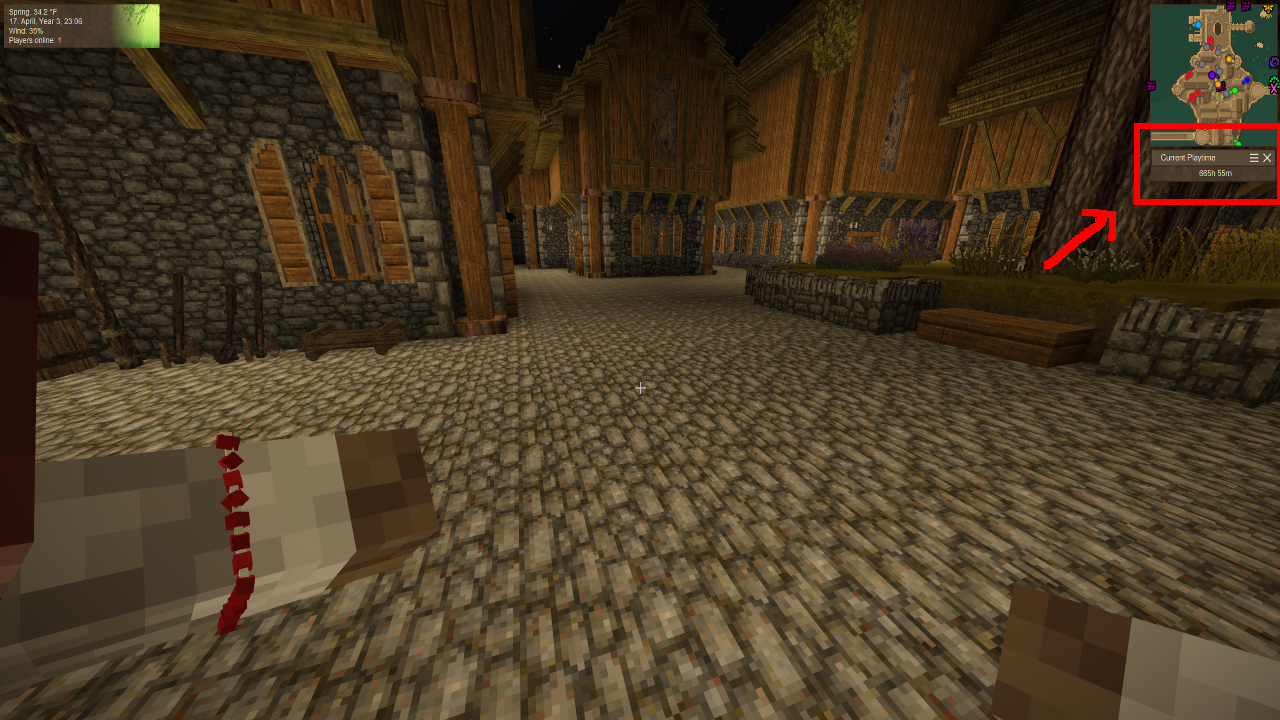
- Displays time on screen via HUD in upper right next to mini-map
Hotkey:
- default key - num8 (8 key on the numberpad)
- can be changed in the controls menu
Commands:
.playtime - type this command in chat and it will display your time!
.playtime "<playername> <hr> <min>" This command allows you to set your time (for if you have been keeping track before you added this mod like I have)
- example: ".playtime natedoeslife 1 20" This sets your playtime to 1hr 20mins
- WARNING: If you do "/playtime <playername>" and don't put in the hours or minutes it will act like you put in 0 0 and reset your playtime.
Migration Instructions (4.0.0 version):
Migration Method 1 (manual)
- Before updating to 1.21
-
- Record all your world times somewhere (notepad, pen paper, where ever)
-
- Update to 1.21 and update mod to 4.0.0
- Go in each world and run the command .playtime <Username> <hrs> <mins>
Migration Method 2 (bulk/less manual)
- Update to 1.21
- Update Mod to 4.0.0
-
- Load into your world
- Your time will show 0hr 0min, this is fine
- Go into your Vintage Story installation path
- Copy the folder named "playtime"
- Go to your "VintagestoryData" folder
- Probably located in your Appdata Folder
- Open File Explorer and type %Appdata% in the path bar
- Look for the folder named "NDL-TimeTracker"
- Past your "playtime" folder in there
- Replace the one in there if there is one
- Probably located in your Appdata Folder
-
- Your time should now be restored
- Reach out if this fails
Planned Workings:
- none at the moment
Feedback/Suggestions/Support:
I livestream on Twitch or Youtube (ad-free) monday-thursday (6pm est - 10pm est) Typically I play vintage story but on occasion might dive into a random game. I welcome suggestion and feedback on the mod in chat there or you can leave a comment below.
- You can also join my personal discord channel via - https://discord.gg/6qQZYPU
- Please use the channel #ndl-timetracker for any comments/chat regarding this mod! (going to be at the bottom of the channel list, in the VS-MODS Category)
Other Mods By Author:



| Mod Version | Mod Identifier | For Game version | Downloads | Released | Changelog | Download | 1-click mod install* |
|---|---|---|---|---|---|---|---|
| 4.0.1 | ndltimetracker | 137 | Oct 31st at 5:07 AM | ndltimetracker_4.0.1.zip | 1-click install | ||
|
New Features:
Updates:
Bug Fixes: | |||||||
| 4.0.0 | ndltimetracker | 370 | Aug 26th at 4:03 PM | ndltimetracker_4.0.0.zip | 1-click install | ||
|
New Features:
Updates:
Bug Fixes: | |||||||
| 3.2.0 | ndltimetracker | 506 | Feb 28th at 5:43 PM | ndltimetracker_3.2.0.zip | 1-click install | ||
|
New Features:
| |||||||
| 3.1.2 | ndltimetracker | 223 | Feb 4th at 10:26 PM | ndltimetracker_3.1.2.zip | 1-click install | ||
|
New Features:
| |||||||
| 3.0.2 | ndltimetracker | 77 | Feb 3rd at 4:39 PM | ndltimetracker_3.0.2.zip | 1-click install | ||
|
New Features:
| |||||||
| 3.0.1 | ndltimetracker | 59 | Feb 3rd at 4:14 AM | ndltimetracker_3.0.1.zip | 1-click install | ||
|
New Features:
| |||||||
| 3.0.0 | ndltimetracker | 67 | Feb 2nd at 11:46 PM | ndltimetracker_3.0.0.zip | 1-click install | ||
|
New Features:
| |||||||
| 2.0.0 | ndltimetracker | 101 | Jan 30th at 10:26 PM | ndltimetracker_2.0.0.zip | 1-click install | ||
|
New Features:
| |||||||
| 1.1.0 | ndltimetracker | 131 | Jan 28th at 7:12 PM | ndltimetracker_1.1.0.zip | 1-click install | ||
|
v1.1.0 update
| |||||||
| 1.0.0 | ndltimetracker | 143 | Jan 27th at 8:27 AM | ndltimetracker_1.0.0.zip | 1-click install | ||
|
v1.0.0 | |||||||
eerino Hmmmmm I dont know of another mod that does this and sadly I don't know that all that would really fit within the idea of this mod.
I can take it onto my board of ideas and such but I've been on a bit of a break from core modding at the moment (unless something needs fixing obviously) and not really looking to start/build new projects that are out of scope of my current ones.
Sorry for that.
I would recommend maybe asking in the VS discord in the #mods-general chat. Someone might be able to help or make a mod that does that.
Hey again Nate, I don't expect you to add this feature but I'm searching for a mod that allowes me to track real time in game and can be started/paused/resumed/recorded. For example if chiseling was your job and you needed to record your hours only chiseling. (timer wouldnt start stop based on activity but maybe could include a reminder in chat every so often asking if you want to continue tracking time)
Do you know if anything like this exists or is it possible to use your mod and add commands that would let me start/pause and see current amount of time?
Thanks :p
El_Neuman Maybe, I can look into it, thats not a bad idea I'd just be weary that if they update that menu in anyway it would break my mod. My mod concept is going with the least likely way that will break in the future.
It's possible to add playtime in menu C ?
So the triple message could be you have more then one saved time session for that world.
One possible way to fix that is to write down your time (for any worlds you want the time for)
- go to your base installation folder for vintage story
- you should see a "playtime" folder in there
- clear all the entires and then when you go into the world do the .playtime
(.playtime NateDoesLife 5 25) and just set your playtime that way.
- This might also fix your crash as it looks like your crashing when its trying to save your playtimedata.
For a followup question, does this crash everyone on the server at the same time or just yourself?
If its easier you can message me on discord, my tag is NateDoesLife with a crown emoji in front of it. You should be able to search it in the VS discord and I should come up easily.
DanceOfBlood
Here's a new one
Crash: https://pastebin.com/37tL7vkv
Client Main: https://pastebin.com/SspGCeCQ
Another one
Crash: https://pastebin.com/vE2rQcYu
Client Main: https://pastebin.com/NTuCBGDS
Here's the the triple message I meant:
For that error, there were only two of us in the server and weirdly enough it crashed both of us.
I'll let you know if I managed to get it happen again
Awesome! Thank you for the error, I will take a look at that method that gets flagged and see if I can find out whats causing it. Just out of curiousity did someone leave the server at the time of the crash?
Also if it happens again, could you send me a pastebin of your client-main log as well? Sorry it just helps me pinpoint exactly whats causing the crash instead of trying to guess.
DanceOfBlood
Somehow I got a crash again, I was just waiting for my tools to cool off.
https://pastebin.com/C3Ch1Zfk
I'll get back to you on it when I play with my friends to recreate the situation.
Just tried to replicate now but the triple welcome message didn't happen.
Wish I had the crash log saved for it.
Hmmm interesting, I will see what I can do to adjust that from happening.
Any chance you can send me a copy of the log file from when you join the server along with the crash your getting.
Can use Pastebin.com - #1 paste tool since 2002! to send them.
DanceOfBlood
Hey! Great mod.
I found myself getting three "welcome your current playtime is x" when joining my server.
I'm guessing this is because the server had gone through three different versions.
I remember reverting back to 1.1.0 after testing out one of the 3.0 versions (cant remember which)
and now I went to 3.1.2, it works but perhaps because of multiple versions that was used this came up.
Just saying it in case you could find some sort of fix to this. Also, I currently get some crashes in 3.1.2.
Could be the problem of multiple time saving
Looks like it fixed it and I was able to use the .playtime command as well.
Ok, I just put up a new release with what I hope is a fix for that.
I believe it was happening when new players data was trying to be saved for the first time.
If it happens to keep happening or another error happens you can always shoot me a message on discord (NateDoesLife with a crown emoji in the front of it, if you search NateDoesLife in the VS discord you should find me easily). Then I can work with you a bit easier then uploading fresh releases each time. If you would like.
PandaPants200
Well my screen didn't go black but...
Running on 64 bit Windows 10.0.26100.0 with 16282 MB RAM
Game Version: v1.20.3 (Stable)
2/2/2025 9:39:22 PM: Critical error occurred in the following mod: ndltimetracker@3.0.0
Loaded Mods: aculinaryartillery@1.2.3, chiseltools@1.14.11, nailsmold@1.0.2, TA_plainsandvalleys@1.0.9, sustainableforestry@1.1.0, game@1.20.3, weaponpackalphaunoff@1.6.0, apegrapes@1.2.3, egocaribautomapmarkers@4.0.1, betterfirepit@1.1.5, carryon@1.8.0-pre.1, commonlib@2.6.1, expandedfoods@1.7.3, fromgoldencombs@1.8.6, ndltimetracker@3.0.0, prospecttogether@2.0.0, stonebakeoven@1.1.5, trailmodcupdate@1.2.1, creative@1.20.3, survival@1.20.3, stonequarry@3.4.3
System.Collections.Generic.KeyNotFoundException: The given key 'PandaPants200' was not present in the dictionary.
at System.Collections.Generic.Dictionary`2.get_Item(TKey key)
at ndltimetracker.ndltimetrackerModSystem.<>c__DisplayClass12_0.<SavePlaytimeData>b__0() in P:\NDL Mods VS\NDL-TimeTracker\ndltimetracker\ndltimetracker\ndltimetrackerModSystem.cs:line 149
at Vintagestory.Client.NoObf.ClientMain.ExecuteMainThreadTasks(Single deltaTime) in VintagestoryLib\Client\ClientMain.cs:line 786
at Vintagestory.Client.GuiScreenConnectingToServer.RenderToDefaultFramebuffer(Single dt) in VintagestoryLib\Client\MainMenu\Screens\GuiScreenConnectingToServer.cs:line 254
at Vintagestory.Client.ScreenManager.Render(Single dt) in VintagestoryLib\Client\ScreenManager.cs:line 695
at Vintagestory.Client.ScreenManager.OnNewFrame(Single dt) in VintagestoryLib\Client\ScreenManager.cs:line 670
at Vintagestory.Client.NoObf.ClientPlatformWindows.window_RenderFrame(FrameEventArgs e) in VintagestoryLib\Client\ClientPlatform\GameWindow.cs:line 88
at OpenTK.Windowing.Desktop.GameWindow.Run()
at Vintagestory.Client.ClientProgram.Start(ClientProgramArgs args, String[] rawArgs) in VintagestoryLib\Client\ClientProgram.cs:line 334
at Vintagestory.Client.ClientProgram.<>c__DisplayClass10_0.<.ctor>b__1() in VintagestoryLib\Client\ClientProgram.cs:line 130
at Vintagestory.ClientNative.CrashReporter.Start(ThreadStart start) in VintagestoryLib\Client\ClientPlatform\ClientNative\CrashReporter.cs:line 93
NateDoesLife
Everything should be good to go in v3.0.0
- I converted it to a 100% client side mod so you shouldn't need it loaded on the server anymore.
- Let me know if for some reason the black screen issue comes back up and I will investigate further, could be the HUD creation method I am using.
PandaPants200
I was using v2 but it didn't crash or show up in the logs. I will try with v1.1 later. NateDoesLife
Any log errors, crashes or anything. What version are yall using.
Also if you could try using v1.1.0 and let me know if that happens as well that would be great. I added a HUD to v2.0.0 and I think that might be the cause of that.
PandaPants200
I just tried to us this on a LAN server and when another player joined the right half of our screens would go black.
I did not see any performance decreases so far while testing this.
MRGOOSE
does this affect performance?