
Mods / Infinitum Pickup HUD


Author: unicorn_ares
Side: Both
Created: May 5th at 9:00 PM
Last modified: Oct 14th at 6:52 PM
Downloads: 10659
Follow Unfollow 226
Recommended download (for Vintage Story 1.21.5):
infinitumpickupmod_1.2.6.zip
1-click install
🧺 Infinitum Pickup HUD
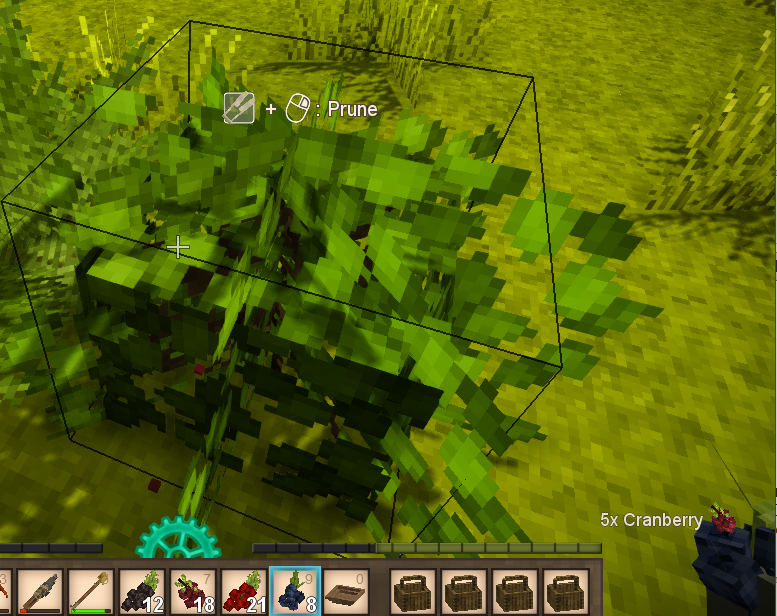
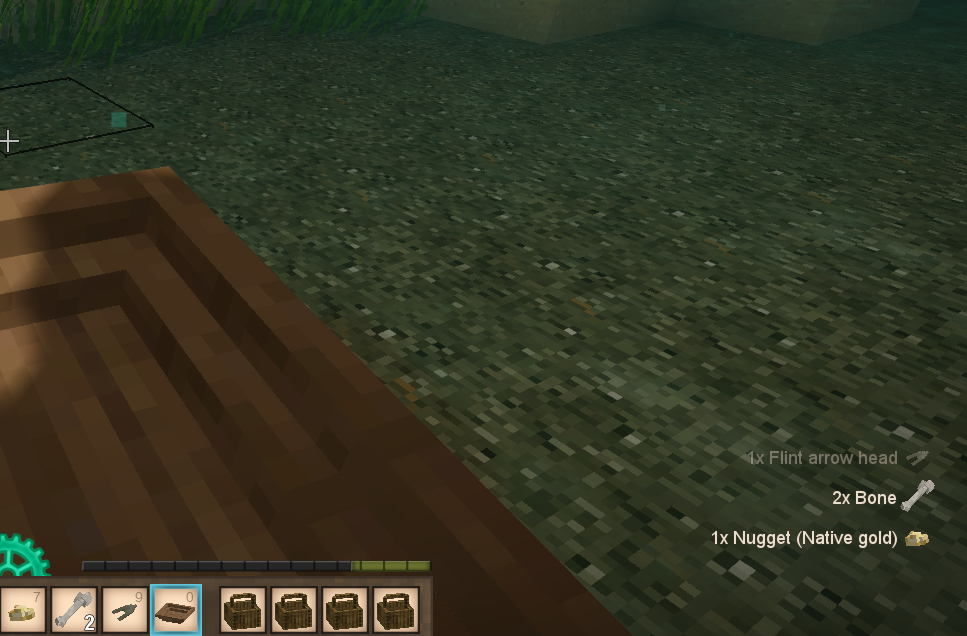
A small and handy client&server-side mod that adds a pickup HUD showing which items you just picked up.
It works not only for items collected from the ground, but also for items gained by panning, grabbing by hand, or similar actions.
No more wondering "What the heck did I just pick up?" – now you’ll know for sure.
✅ Works on both server and client.
❗ Required on both sides to function!
🎮 Discord
✨ Features
- Lightweight, minimal HUD on item pickup
- Works for all sources of item acquisition (not just dropped ones)
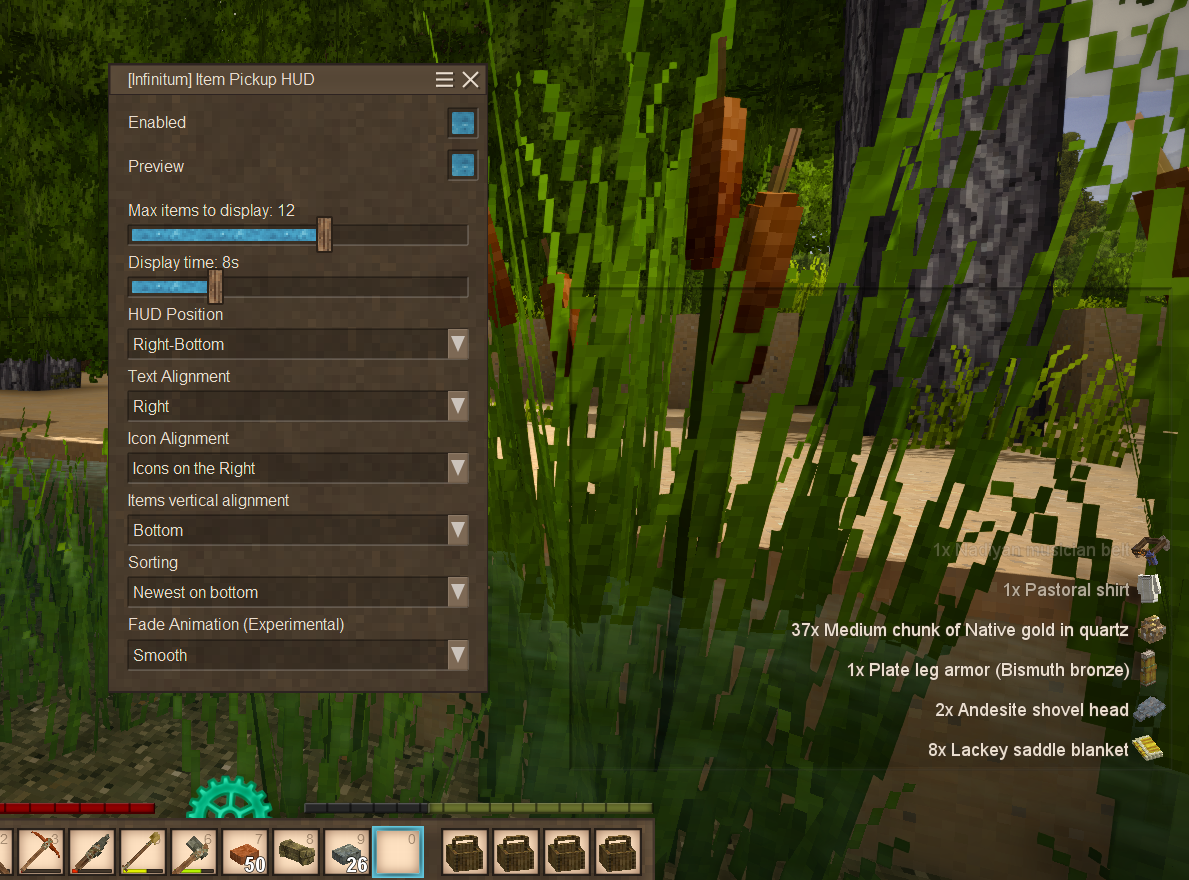
- Fully in-game configurable (press
Pto open the settings menu!)- Toggle display on/off
- Set max number of visible rows
- Configure how long each item stays visible
- Configure the HUD position with real-time preview
- Choose sort order: newest items on top or bottom
- Change text alignment: select which edge to align text to
- Customize icon positioning: choose where to display the icon relative to the text
- Adjust vertical alignment: modify how items are stacked inside the HUD
- (Optional) Fade-out animation — currently experimental, only affects text (not icons), and may impact performance, so it's disabled by default
- You can customize the mod's config hotkey by going to (Settings > Controls > User Interface > [Infinitum] Item Pickup HUD) after joining a world or server.
- Supported languages: English, Ukrainian
⚠️ Compatibility
- Requires the mod on both client and server
- Works in both singleplayer and multiplayer
❤️ Just a note...
This is my first-ever C# project, and also the first mod I've made for any game.
So don’t expect ultra-polished perfection or 100% stability – but I really hope it's helpful and fun to use! 😊
Feedback is always appreciated 💙
🔧 What’s next?
I'm planning to continue development and improvements! Some things on my to-do list:
- Investigate ways to make this a client-only mod
- Improve overall code quality — currently relies on Harmony patches and protobuf hacks
- Add settings to adjust font and icon size (partially works via UI scale already)
- Polish the fade animation, and apply it to icons
- Possibly more cool ideas as I go...
Stay tuned — this is just the beginning! 🙌
| Mod Version | For Game version | Downloads | Released | Changelog | Download | 1-click mod install* |
|---|---|---|---|---|---|---|
| 1.2.6 | 1810 | Oct 14th at 6:52 PM | infinitumpickupmod_1.2.6.zip | 1-click install | ||
📦 Changelogv1.2.6 - (Both sides) Fix
| ||||||
| 1.2.5 | 574 | Oct 5th at 2:39 PM | infinitumpickupmod_1.2.5.zip | 1-click install | ||
📦 Changelogv1.2.5 - (Both sides) Fix
| ||||||
| 1.2.4 | 44 | Sep 10th at 2:06 PM | infinitumpickupmod_1.2.4.zip | 1-click install | ||
📦 Changelogv1.2.4 - (Both sides) Fix
| ||||||
| 1.2.3 | 982 | Aug 28th at 8:24 PM | infinitumpickupmod_1.2.3.zip | 1-click install | ||
📦 Changelogv1.2.3 - (Both sides) Fix
| ||||||
| 1.2.2 | 2994 | May 29th at 9:04 PM | infinitumpickupmod_1.2.2.zip | 1-click install | ||
📦 Changelogv1.2.2 - (Both sides) Fix
| ||||||
| 1.2.1 | 1046 | May 18th at 11:13 AM | infinitumpickupmod_1.2.1.zip | 1-click install | ||
📦 Changelogv1.2.1 - (Client side) Fix
| ||||||
| 1.2.0 | 1058 | May 9th at 1:53 AM | infinitumpickupmod_1.2.0.zip | 1-click install | ||
📦 Changelogv1.2.0 – (Client side) Added new icon position and fixed an issue with VTML rendering
| ||||||
| 1.1.1 | 212 | May 8th at 9:20 AM | infinitumpickupmod_1.1.1.zip | 1-click install | ||
📦 Changelogv1.1.1 – (Server side) Hotfix
| ||||||
| 1.1.0 | 297 | May 7th at 12:59 AM | infinitumpickupmod_1.1.0.zip | 1-click install | ||
📦 Changelogv1.1.0 – (Client side) Customizable HUD Positioning
| ||||||
| 1.0.1 | 234 | May 6th at 11:28 AM | infinitumpickupmod_1.0.1.zip | 1-click install | ||
📦 Changelogv1.0.1 – (Client side) Hotfix
| ||||||
| 1.0.0 | 197 | May 5th at 9:05 PM | infinitumpickupmod_1.0.0.zip | 1-click install | ||
📦 Changelogv1.0.0 - Initial Release
What's next?
| ||||||
Epic, thank you! <3
SnaiI Hi, thanks for reporting the issue.
That’s really strange and I have no idea what happened to the file.
I rolled back my VS version and rebuilt this release to re-upload the file, so it should be available now.
1.2.4 link is broken :(
ANG249 updated for game v.1.21.2
After updating to 1.21.2, from 1.21.1.
This error pops up
[Error] [infinitumpickupmod] Please restart the game. The mod's .dll was already loaded and cannot be reloaded. Most likely cause is switching mod versions after already playing one world. Other rare causes include two mods with .dlls with the same name
how about adding an overlay setting.. so the text is easier to read
unicorn_ares Thank you for the update even though you stepped away from the game and are busy with other things. It's highly appreciated.
I’ve updated the mod for game version 1.21.1.
At this point, I don’t see a strong reason to make it open-source.
Honestly, I’m still a bit surprised anyone is using this mod at all, since there’s an alternative that runs entirely on the client side and open-source: Item Pickup Notifier by OldManYells
That said, since people do use it, I’ll continue keeping it alive.
F0rkmaster, DigitalHare
would love to see an update. if you can't keep updating this super practical mod, would you consider making it open-source?
With 1.21.1 being officially released, getting the same problem as SternFr. Asking to restart every time with it on.
I’ve stopped playing this game for now and have some other things to focus on, so the mod won’t be getting further development at the moment.
However, I’ll try to release updates to keep it compatible with new game versions (though I can’t promise anything for unstable builds).
I do hope to return later with new major updates or even new mods.
SternFr updated for game v.1.21.0 (possibly 1.21.0-rc.*)
Request to restart the game each time you create a game in 1.21rc.2
that fixed it unicorn_ares! Thank you for the quick fix.
At the moment, I'm not quite sure if I should continue maintaining the mod, due to some personal reasons.
Thank you all for your support and encouragement. It truly means a lot!
Greylocke, F0x06 Thank you both for the feedback, and sorry for the long delay.
I've rebuilt the mod for version 1.20.11 - it seems to be working now.
I am seeing the same error as F0x06. I tried both the 1.2.1 and 1.2.0 mod versions, and had the same result.
The mod is not notifying when picking up items, but it did with the prior VS stable release.
FYI, this from the recent release notes may be a factor: "[For coders: we did not change the API, but if your mod's code references ServerMain.Clients with VintagestoryLib.dll as a dependency, you will likely need to recompile against the 1.20.11 version of VintagestoryLib.dll. Harmony patches which make code changes deep within VintagestoryLib might also need attention: most of the entity physics, animations and general entity ticking code in the engine has been changed.]"
Hi ! Just updated my server to `1.20.11` and now i have these errors
```
28.5.2025 19:55:54 [Server Error] [infinitumpickupmod] An exception was thrown when trying to load assembly:
28.5.2025 19:55:54 [Server Error] [infinitumpickupmod] Exception: Assembly with same name is already loaded
at System.Runtime.Loader.AssemblyLoadContext.<LoadFromPath>g____PInvoke|5_0(IntPtr ptrNativeAssemblyBinder, UInt16* ilPath, UInt16* niPath, ObjectHandleOnStack retAssembly)
at System.Runtime.Loader.AssemblyLoadContext.LoadFromAssemblyPath(String assemblyPath)
at System.Reflection.Assembly.LoadFrom(String assemblyFile)
at Vintagestory.Common.ModAssemblyLoader.LoadFrom(String path) in VintagestoryLib\Common\API\ModAssemblyLoader.cs:line 34
at Vintagestory.Common.ModContainer.<>c__DisplayClass36_0.<LoadAssembly>b__0(String path) in VintagestoryLib\Common\API\ModContainer.cs:line 455
at System.Linq.Enumerable.SelectListIterator`2.MoveNext()
at System.Linq.Enumerable.WhereEnumerableIterator`1.ToList()
at Vintagestory.Common.ModContainer.LoadAssembly(ModCompilationContext compilationContext, ModAssemblyLoader loader) in VintagestoryLib\Common\API\ModContainer.cs:line 454
```
unicorn_ares Thanks!! Issue solved! We did have the hud in the bottom right just by default, just fyi in case that means anything.
unicorn_ares try overriding the 'DrawOrder' property for the dialog. World map uses 0.07 and default value for dialogs are 0.1. Making it below 0.07 may help with the interaction issues.
RDawn Thanks for the report! This issue is related to GUI overlapping. I partially fixed it back in version 1.0.1 by making the HUD no longer block interaction with other GUI elements - however, the world map issue still remained.
In my experience, placing the HUD in the bottom-right corner helps a lot.
I’ve just released an update (v1.2.1) where the HUD now fully hides when there's nothing to display (as if it’s turned off), which should help with that.
Please make sure all players are using the latest version of the mod (v1.2.1).
Since the native HUD system doesn’t let me avoid some of these issues entirely, I’m planning to implement custom rendering in the future. That should completely resolve these problems and, hopefully, also improve the fade-out animation.
So not sure what the issue is, but when using this mod to host a game anyone who joins (not the host) cannot interact with their esc menu or the world map. The most they can do is open them.
I was running 1.20.7 but updated to 1.20.10 (most recent version), both stable, and it does it regardless.
No idea how to add images, but the mods i'm running are:
better prospecting 1.7.0
better ruins 0.4.12
carryon 1.20.0-pre_v1.8.0-pre.1
chiseltools1.14.11
commonlib_vs1.20.2-rc-1_net7_v2.6.1
crock_mod
hudclockpatch
infinitumpickupmod_1.2.0
playercorpse_vs1.20.1-rc.1_net7_v1.11.0
stepupadvanced_v1.0.4
vsimgui_1.1.8
waypointtogethercontiued_2.2.0_1.20.0
xinvtweaks_v1.6.9
x_lib_v08.16
xskills_v0.8.19
Added file names so you could see mod versions. Aware of the possibility of the mod not working with certain versions of other mods but don't have the time to be troubleshooting with another person right now so wondering if there's any insight.
unicorn_ares Oh hey that was my bad I didnt notice the update, sorry. Ive updated and it works as expected. thank you!! Keep up the good work :D
unicorn_ares Yes definitely agree on the potential server side issues, happy to have helped a little bit with this specific issue :)
TheCat Thank you for your interest in my mod. I finally had a chance to play with it myself and found a few issues and improvements that I’ll try to implement soon. Yes, I’m aware that a similar issue was present up to version v1.1.0, but I fixed it in v1.1.1, so it shouldn’t happen anymore. There are only 2-3 lines of code in that area, so it’s hard for me to understand what the issue could be this time. The only thing that comes to mind is that maybe the mod wasn’t updated on the server side after v1.1.1.
I’ve added my mod to the #mods channel on the official Discord server, so now you can freely discuss it there, share screenshots, and talk about your thoughts or any issues related to the mod.
Here is a discord link: Infinitum Pickup HUD
Hello mod developer your mod is really neat thought I would add some info on the below crash type as it also happened to me:
I experienced crashing like Cliper a few days ago on the 1.0.0 version (where I just disabled the mod), just tried updating the file to the latest version and did not have the crash any more but the crash described by Cliper is very similar to the one I am familiar with, I am on VS version 1.20.10 Mods I have:
Tested Each
Infinitum Pickup HUD 1.0.0 (Instant Crash on Pulveriser Right Click)
Infinitum Pickup HUD 1.2.0 (No Crashing)
Primitive Survival 3.7.7 seems to be mentioned in the crash log for me
System.NullReferenceException: Object reference not set to an instance of an object.
at Vintagestory.Common.PlayerInventoryManager.TryGiveItemstack_Patch2(PlayerInventoryManager this, ItemStack itemstack, Boolean slotNotifyEffect)
at Vintagestory.GameContent.Mechanics.BEPulverizer.OnInteract(IPlayer byPlayer, BlockSelection blockSel) in VSSurvivalMod\Systems\MechanicalPower\BlockEntity\BEPulverizer.cs:line 220
at Vintagestory.GameContent.Mechanics.BlockPulverizer.OnBlockInteractStart(IWorldAccessor world, IPlayer byPlayer, BlockSelection blockSel) in VSSurvivalMod\Systems\MechanicalPower\Block\BlockPulverizer.cs:line 28
at Vintagestory.Client.NoObf.SystemMouseInWorldInteractions.TryBeginUseBlock(Block selectedBlock, BlockSelection blockSelection) in VintagestoryLib\Client\Systems\Player\MouseInWorldInteractions.cs:line 875
at Vintagestory.Client.NoObf.SystemMouseInWorldInteractions.HandleMouseInteractionsBlockSelected(Single dt) in VintagestoryLib\Client\Systems\Player\MouseInWorldInteractions.cs:line 617
at Vintagestory.Client.NoObf.SystemMouseInWorldInteractions.OnFinalizeFrame(Single dt) in VintagestoryLib\Client\Systems\Player\MouseInWorldInteractions.cs:line 85
at Vintagestory.Client.NoObf.ClientEventManager.TriggerRenderStage(EnumRenderStage stage, Single dt) in VintagestoryLib\Client\Util\ClientEventManager.cs:line 188
at Vintagestory.Client.NoObf.ClientMain.RenderToDefaultFramebuffer(Single dt) in VintagestoryLib\Client\ClientMain.cs:line 992
at Vintagestory.Client.GuiScreenRunningGame.RenderToDefaultFramebuffer(Single dt) in VintagestoryLib\Client\MainMenu\Screens\GuiScreenRunningGame.cs:line 242
at Vintagestory.Client.ScreenManager.Render(Single dt) in VintagestoryLib\Client\ScreenManager.cs:line 695
at Vintagestory.Client.ScreenManager.OnNewFrame(Single dt) in VintagestoryLib\Client\ScreenManager.cs:line 670
at Vintagestory.Client.NoObf.ClientPlatformWindows.window_RenderFrame(FrameEventArgs e) in VintagestoryLib\Client\ClientPlatform\GameWindow.cs:line 88
at OpenTK.Windowing.Desktop.GameWindow.Run()
at Vintagestory.Client.ClientProgram.Start(ClientProgramArgs args, String[] rawArgs) in VintagestoryLib\Client\ClientProgram.cs:line 334
at Vintagestory.Client.ClientProgram.<>c__DisplayClass10_0.<.ctor>b__1() in VintagestoryLib\Client\ClientProgram.cs:line 130
at Vintagestory.ClientNative.CrashReporter.Start(ThreadStart start) in VintagestoryLib\Client\ClientPlatform\ClientNative\CrashReporter.cs:line 93
Cliper Thanks a lot for reporting this issue! Would you mind tagging me in the official Vintage Story Discord so I can follow up with you directly for more details? I’ve tried reproducing the crash using the mods you mentioned, but so far I haven’t been able to trigger it on my end. It’d be great to ask a few questions if possible. Thanks again for taking the time to report it!
Discord: in #mods-general tag @unicorn_ares
Hi, I’m experiencing a crash with infinitumpickupmod v1.2.0 on Vintage Story v1.20.10 (Stable) when interacting with a Pulverizer frame. A System.NullReferenceException occurs in PlayerInventoryManager.TryGiveItemstack_Patch2, tied to the Harmony patch space.infinitum.itempickuphud. This crashes the client and disconnects players on my server, during BEPulverizer.TryTake (line 322). I’m running 42 mods, including geologyadditions@1.4.1, commonlib@2.6.1, and millwright@1.2.0, which might contribute (e.g., modded ores or multiblock mechanics). Disabling infinitumpickupmod is my next step, but I wanted to report this for v1.2.0. Full client/server logs available if needed. Thanks for your work on this mod!
Dekkan Yes, absolutely! You can change the hotkey after joining the server by going to:
Settings > Controls > User Interface > [Infinitum] Item Pickup HUD
That way you can avoid conflicts with Rifteye or any other mods.
crumps Thank you so much for the kind words! I'm really glad to hear the mod helps make your gameplay more seamless and immersive - that means a lot! 😊
Any chance to change the default hot key? P is already used by Rifteye - server Admin mod. I'd love to offer the use of this to our server but Rifteye takes precedence for Admin purposes.
Thank you for the fix again, really enjoying the mod a lot!!! This along with HUD I don't even have to open my inventory or character sheet nearly as often and can just get lost
crumps Thanks again for reporting the bug! In this update (v1.2.0), the issue has been fully fixed, and VTML in item names is now displayed correctly. It took a bit longer than I expected, though. 😅
Bonus: I added two new icon alignment options.
-------------------
It’s already 5 AM here, so I’m heading to bed. 😴
crumps Thanks a lot, that really helped narrow it down!
I’m already working on a fix and should have it released soon.
Found a good example
Seems to be the wildcraft: fruits and nuts series and this one has elderflowers in it. Hopefully that can help to narrow down any inconsistencies!
unicorn_ares oh yeah totally understandable! I did the same for a long long time, but if i do make a recommendation the biomes, floral zones, wildcraft and wild grass all play really well to make dynamic biomes. I did the same for a while but now I can't bo back with how diverse the worlds plant life is
Forgot to get on cuz I was messing with my server last night but I'll post a screenshot soon!
Shion I actually think the tags make the display more informative, so I decided to keep them in for now.
But I get that some people might prefer a cleaner look, so I might add a setting in the future to let you turn them off.
I’ve added it to my todo list!
crumps Thanks a lot, I really appreciate the kind words. I'm really glad to hear you liked my mod!
I'll definitely take a look at what's going on with the cooking items from Wildcraft and Floral Zones. That "reference location" thing usually shows up when there's no proper name for the item or if I'm pulling the wrong field for the display.
To be honest, I’m still playing through the game for the first time myself and I’ve barely reached the Copper Age, so I probably haven’t seen a lot of the content yet. Lately I haven’t had much time to actually play either.
I also tried to avoid using mods that add new items, just so I could get a proper first impression of the game without things feeling too different. But I’ll see what I can do to make it work better with modded content anyway.
Feel free to send those screenshots when you can!
Sorry I didn’t get a chance to work on improvements and fixes yesterday - I was having issues with power and internet. I live in Ukraine, so I might occasionally go quiet for a bit :)
Scorives Thanks a lot for reporting the bug!
It’s already been fixed in the latest version (v1.1.1), so you should be good to go now 😊
unicorn_ares ever considered a collab with OldManYells ? They say that their code is basically up for grabs and this mod db recently got an update to allow multiple contributors to a mod
The mod doesn't strip tags from the item names.
I'm NGL I tried both yours and the other and yours encompasses more. I do have problems with picking up cooking related items that utilize mods. Basically wildcraft and floral zones items make the hud say a reference location text and not the actual name. Once im home later I can post some screenshots to show and see if it's something that could be fixed. Could possibly just default to it saying generic crock pot and not attempt to grab the descriptor?
Scorives Hi, thanks for the heads up!
I’ll take a look at what’s causing the issue and try to get it fixed. Appreciate you reporting it!
Hi, great mod unfortanatly had to uninstall as when it is installed and i try to fill a bowl with food from a crock in my inventory it causes game to crash. wanted to give you a heads up on the error.
Duuuude. This is exactly what i was looking for. What a coincidence 🤣 Amazing mod !!
The circumstances of the two pickup HUD mods coming around at the same time cracks me up, since I just noticed it recently with two different iterations of an autorun mod. One of those "if I had a nickel" situations, honestly. I'm happy mod authors decide to put anything out in the first place, choice is never a bad thing!
icehorse, Vari_Ares
Haha, yeah, the timing really was uncanny!
I actually only recently started playing the game, and one of the first things that really bugged me was not knowing what I had just picked up - especially during panning. I kept opening my inventory every few seconds or just sitting there with it open the whole time, which wasn't exactly a fun experience. Eventually it annoyed me so much that I went looking for a mod to fix it… and when I couldn't find one, I thought - hey, writing a mod like this should be pretty straightforward!
So I started working on it - and you can imagine my surprise when, right in the middle of active development, someone else suddenly started releasing early versions of exactly the kind of mod I was making. The game’s been around for almost 9 years, and somehow both of us decide to tackle the same problem at the same time? I genuinely had a moment of “is this a prank?” and for a moment I seriously considered just dropping the project altogether.
But it felt like a waste to stop halfway through - especially since that other mod didn’t quite fit my needs. It didn’t have item icons, and I wasn’t sure how quickly it would develop. So I decided to keep going and build the version that matched my own vision. And well… here we are 😄
Right now, I’m honestly not sure if I’ll keep developing the mod further. It already does everything I personally needed it to do, and meanwhile, OldManYells managed to make it fully client-side - something I still haven’t managed to pull off properly. Plus, I don’t have a ton of free time, so I might just leave it as-is for now. We'll see!
This whole story just goes to show how much a mod like this was truly needed by the community.
icehorse Yeah I don't understand why 2 people are making the exact same mod at the same time that suspicious...
unicorn_ares I swear, you and OldManYells are competing on making the best item pick up notifier mod, and you two keep publishing updates at similar times. Almost like you two are the same person... You made an update allowing the hud to be moved, and oldmanyells made it so that the mod is finally client side, im really surprised and impressed with the progress.
Vigilance I just released a fix that should resolve the issue with overlapping Xandu’s Inventory Tweaks buttons. Let me know if it works for you! Thanks for the feedback!
StachoPL Unfortunately, I haven’t yet figured out how to make this mod work fully on the client side only.
I’ve spent a lot of time on this, but so far I haven’t been able to find a way to implement it properly without using
_sapi.Although there were some partial successes, I couldn’t manage to show the amount of picked-up items.
If someone is okay with a fully client-side version but without showing item counts, I can definitely make that happen :)
Right now, my implementation is based on code taken from the official
VSSurvivalMod, usingprotobuf-netand a few Harmony patches.You can go ahead and check how to implement client side only HealthBarMod/modinfo.json at master · Sztacho/HealthBarMod.
If you not use _sapi then you can make it working only on the client. If you need something from the _sapi then this mode must be installed on both side.
Thats is the server side:
if you not have thats but have only
then in modinfo change from both to client.
But if you have both methods then its required on the both.
Vigilance I think I understand what might be causing the issue, and I should be able to release a fix soon.
Also, I'm planning to make the HUD fully draggable in the near future, so you'll be able to place it anywhere on the screen and resize it as you like.
I like this more than the other option, but the issue I'm running in to is that I can't interact with xandu's inventory tweaks buttons that overlap your HUD's location by default. If I drag the window elsewhere, I can click on the buttons correctly again. Any ideas?
When I first started development, there were no alternatives to my mod.
That's why I decided to create it myself - but just a few days before release, that alternative showed up (though in a very early state).
Still, I decided to keep working on my own version. And funnily enough, about an hour after I released mine, that mod got updated and now there are fewer differences :)
As far as I can tell, we were both inspired by the same Minecraft mod - so it’s not too surprising!
It's up to you to decide which one suits you better :)
icehorse I haven’t used that mod myself, so I can’t say exactly what it’s like.
As far as I understand, the mentioned mod only reacts to items picked up from the ground, while mine also detects panning, grabbing by hand, and other types of item interactions.
There are also some differences in visuals and available settings.
However, my mod currently doesn’t support changing the HUD position, unlike the mentioned one.
icehorse oh, hi again
difference between ur mod and https://news.kalataka.ru/show/mod/23330 ?