
Mods / Discord Rich Presence
Tags:
#QoL
Author: MUDDXYII
Side: Client
Created: Nov 15th 2024 at 10:32 PM
Last modified: Sep 14th at 6:21 PM
Downloads: 6853
Follow Unfollow 159
Author: MUDDXYII
Side: Client
Created: Nov 15th 2024 at 10:32 PM
Last modified: Sep 14th at 6:21 PM
Downloads: 6853
Follow Unfollow 159
Latest release (for Vintage Story 1.21.0 and 1.21.1, potentially outdated):
VS-DiscordRPC-v1.1.1.zip
1-click install
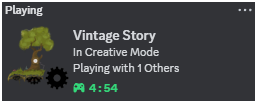
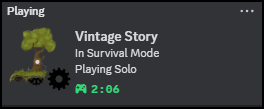
The mod that shows your Vintage Story activity in your Discord status with style! (aka the Discord Aesthetic Mod)
Features
- Game Mode Display: Shows if you're in Survival, Creative, Spectator, or Guest mode.
- Player Activity: Indicates whether you're playing solo or with others.
- Session Timer: Tracks and shows how long you've been playing.
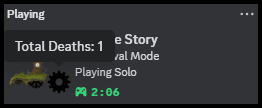
- Player Stats: Hover over the gear icon to see your total deaths.
- Client Sided: Works on servers! (credit to Predictive)
How To Use:
- Install the Mod via the 1-click install button
- Make sure Discord is open
- Load into any world
- That's it! Check your Discord status 🐧
Requirements:
- Discord: (Why else would you install this mod?)
- Vintage Story 1.21.0+: (Older versions are not supported.)
- Platform Compatibility: Tested on Windows 11 (Using MacOS or Linux? Let me know if it works!)
Support & Feedback
I know it's a simplistic mod, but if you found a bug or have a suggestion, feel free to:
- Open an issue on GitHub
- Comment below
License & Contributing
This mod is open source and available under the MIT License.
| Mod Version | Mod Identifier | For Game version | Downloads | Released | Changelog | Download | 1-click mod install* |
|---|---|---|---|---|---|---|---|
| 1.1.1 | discordrichpresence | 1328 | Sep 14th at 6:21 PM | VS-DiscordRPC-v1.1.1.zip | 1-click install | ||
Version 1.1.1- Added client side tag to support multiplayer - Thanks to Predictive | |||||||
| 1.1.0 | discordrichpresence | 962 | Aug 28th at 6:52 PM | VS-DiscordRPC-v1.1.0.zip | 1-click install | ||
Version 1.1.0- Breaking: Now requires Vintage Story 1.21.0+ and .NET 8.0 | |||||||
| 1.0.2 | discordrichpresence | 1232 | Jul 18th at 6:58 PM | VS-DiscordRPC-v1.0.2.zip | 1-click install | ||
| |||||||
| 1.0.1 | vs-discordrpc | 1900 | Mar 9th at 7:51 PM | VS-DiscordRPC-v1.0.1.zip | 1-click install | ||
| |||||||
| 1.0.0 | vs-discordrpc | 1329 | Nov 16th 2024 at 1:11 AM | Empty | VS-DiscordRPC-v1.0.0.zip | 1-click install | |
I really enjoy the fact that this mod makes this possible to advertise that I am playing the best game ever. Thank you so much for allow us to help promote such an awesome game!
Curious, possible to add the name of the server the player is playing on? "Playing Vintage Story on ThisServer" ?
Can confirm this works on Linux (Arch, KDE)
Has anyone have success with it working with mac?
Any chance of displaying the world or server name instead of the gamemode?
Predictive Thanks! I've merged your PR and just published the new version on here.
MUDDXYII Just created a PR on Github to fix the mod loading on multiplayer.
Haven't managed to get it working in multiplayer, with and without VSLauncher. Single player only?
Still says im playing even though the game is not running
Yeah, doesn't work for me on TOPS
Seems to simply not work on servers? mod is installed but discord status shows an unknown icon with no added info
Doesn't seem to work when using VS Launcher.
CachyOS manual install seems to make the mod work, I assume the same would apply to the Steam Deck.
Hey, doesn't seem to work here with last update
(Win 11 , 1.20.12+)
works on linux for me! (no flatpack)
works absolutely fine on windows 11 for me !
Can't get it to work in windows 11 1.20.10
Tried on Steam Deck and doesn't appear to be working
I'm having trouble getting it working on Windows 11, it doesn't do anything from what I can see.
This mod is not working on linux
propaneko good catch😅 - just uploaded the fixed zip file
You wrongly packed the mod, the dll's and modinfo should be in the root of the zip :P MUDDXYII
Working in 1.20.1
Discord ''one of the biggest modern spywares in our time'' :D
Not working for me on Windows 10 Pro.