
Mods / CloneTool for SICA (Shematics)

Author: Sirayne
Side: Client
Created: Apr 19th at 3:15 AM
Last modified: Apr 29th at 5:58 PM
Downloads: 243
Follow Unfollow 10
Latest release (for Vintage Story 1.20.9, outdated):
TexturePack and CloneTool 1.0.4.zip
Version: 1.0.6 (29.04.2025)
Works without any mods. (Except for command blocks, giving tools from QPCT) 
I Highlighted important categories in a larger font.
Context:
A very niche and, you could say, highly individual tool.
SICA - Sirayne`s Infinite Clone/ copy Area on the BetterRuins mod builder`s creative server. This is the area where I create my structures for the mod. 
CloneTool - is a platform that has ready-made command blocks to speed up work with in-game WorldEdit.
CloneTool, has a lot of features, the more personalized for me. 
How to start using:
Move this file to the directory where the game saves the schematics C:\Users\username\AppData\Roaming\VintagestoryData\WorldEdit
After that, start the game world and in creative mode, enable World Edit Tools with the standard “~” button.
Select Import Tool closer to the bottom end of the panel
And in the window that appears, click on the Files: window, select setup_SICA&CT_shematic_1.0.0.json.
With MagicWand in hand - LMB select a place to put it, click "Press:" at the bottom right of the window.
General CT features:

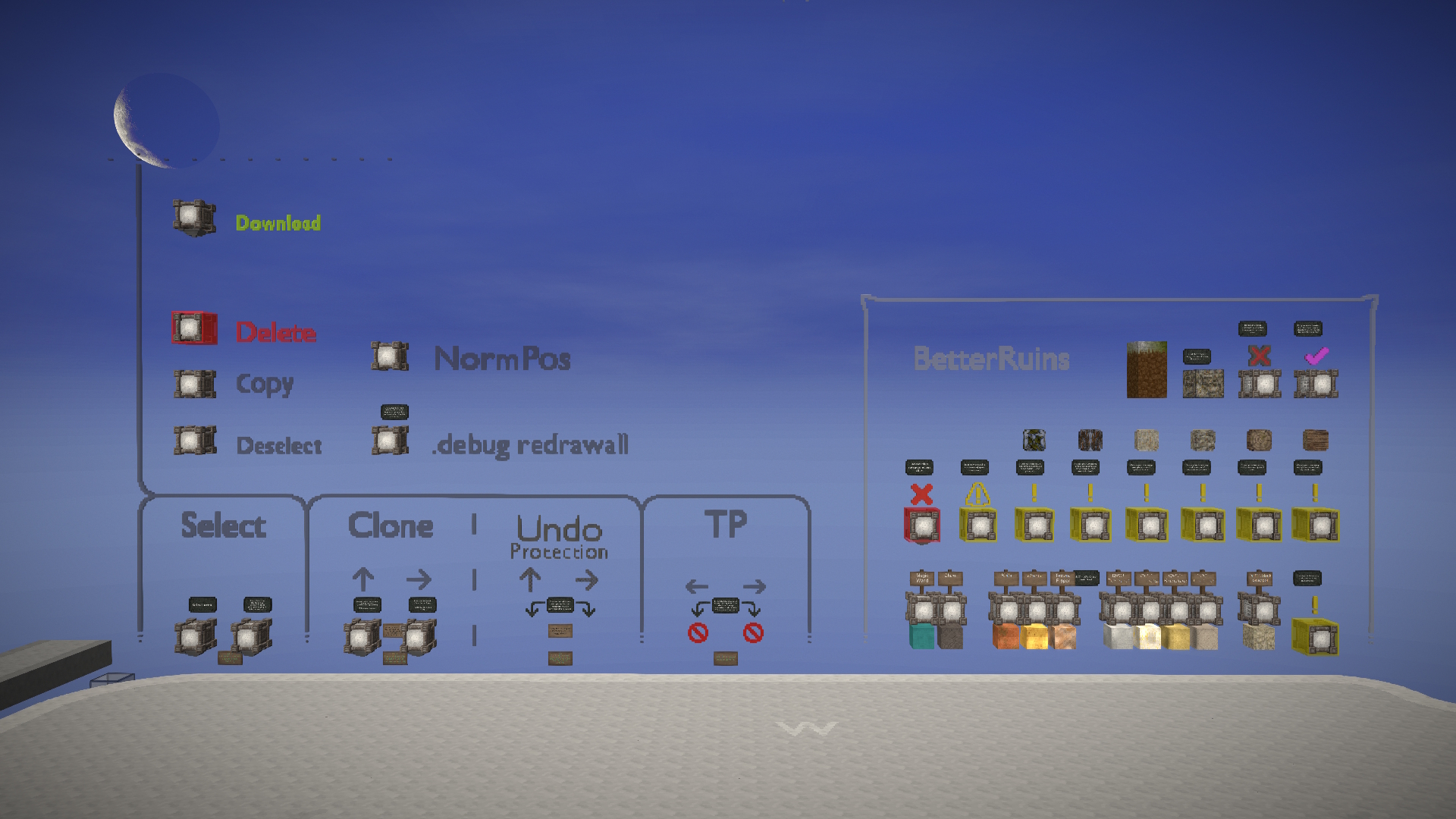
- Area selection: (2 modes)
1. Select the entire platform, all command blocks (50х50х50)
2. Smart Selection - Selects only the contents inside the platform (48х48х48 - Floor, с. blocks and other things will not be selected).

- Cloning: (2 modes) ⭐
1. Cloning a platform to the west that would extend a number of from empty platforms
2. Clone north to leave a copy of your work behind (Used for multiple saves of your work) 
- Teleportation between platforms (Only for north-south row of platforms)
Allows you to instantly move to a neighboring platforms (Clone the area to the north to make the teleportation blocks appear) 
- Some common WE operations: (I find it easier to use them without opening the WE interface)
Clear Section.
Copy Area.
Delete section contents. (All sides of the c. block are protected against accidental presses except for the west and east side of the block)
- Download the zone.
Clicking on the command block will save the platform with your content in a shematic (.json) file
The saved area will be named saved-area.json and will be stored at C:\Users\username\AppData\Roaming\VintagestoryData\WorldEdit 
- UndoProtection in the Clone category ⭐
Passive function that is included in both command blocks of the Clone category
Creates 2 unnecessary operations so that if undo is accidentally pressed, they will be removed first instead of cloning the platform.
A red block appears below the arrows just like above the clone blocks, indicating that the next undo will remove the platform (If you try to return the platform after removing it by pressing redo, the platform will return in a glitchy state - this is a game bug) 
- Individual to me, the BetterRuins category.
Contains command blocks that give you common tools in your inventory (Including Chisel, MagicWand and a few tools from the QPChiselTools mod)
Also contains, a block teleporting to the place where all my structures are collected (Only for BR builder server)
And little else... =)

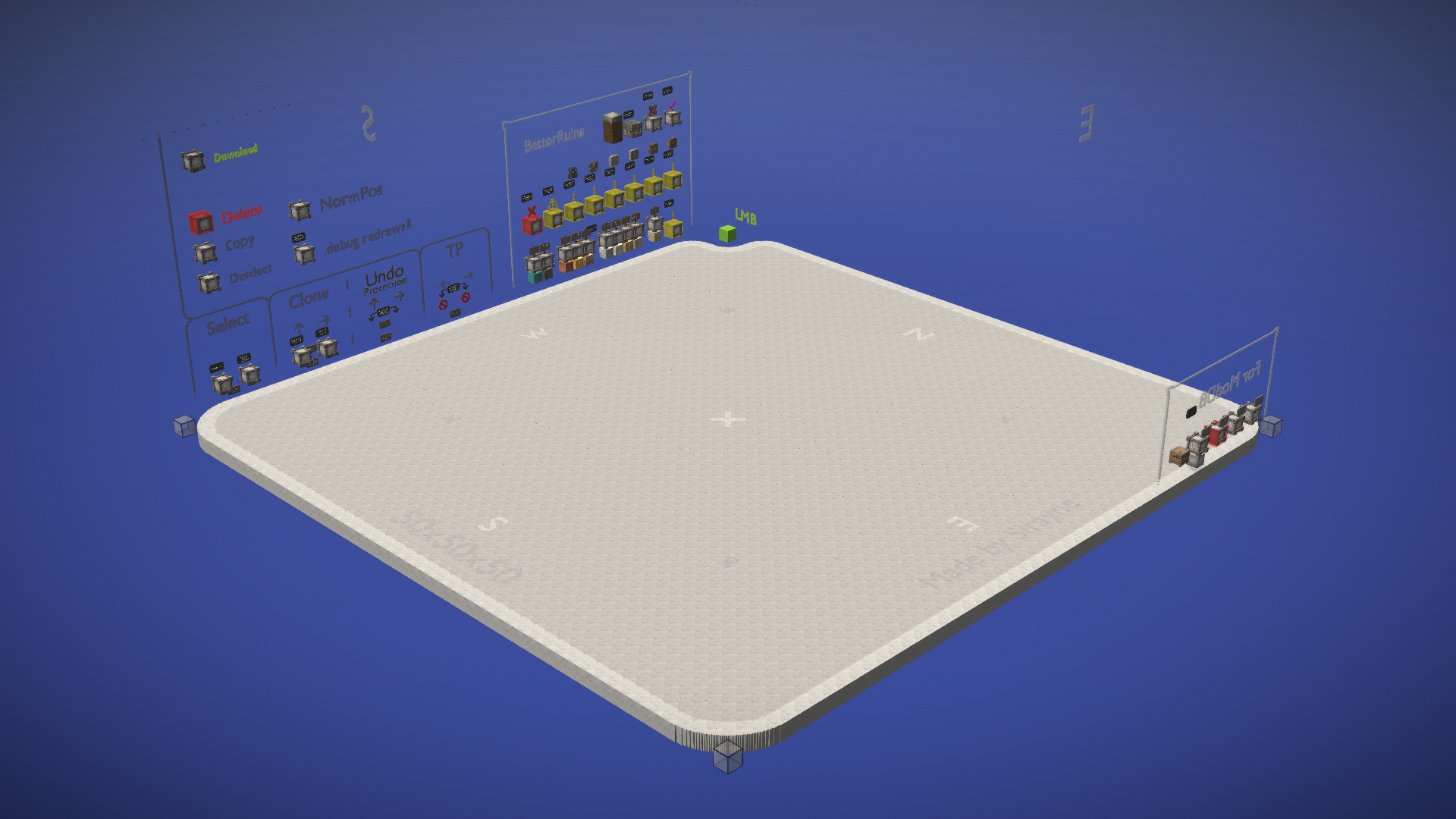
Text description of the look of the platform:
There is also a crosshair right in the center of the platform, and 4 less visible crosses halfway to the corner line from the center.
The platform has the creator's name on it, mine 😀, and rounded corners (glass in each if you want to manually select an area with magicwand)
And the key two corners, the near one is green (LMB) and the far one is red (RMB) clicking on them with magicwand will select the whole platform (50x50x50)

Outside the platform tool:
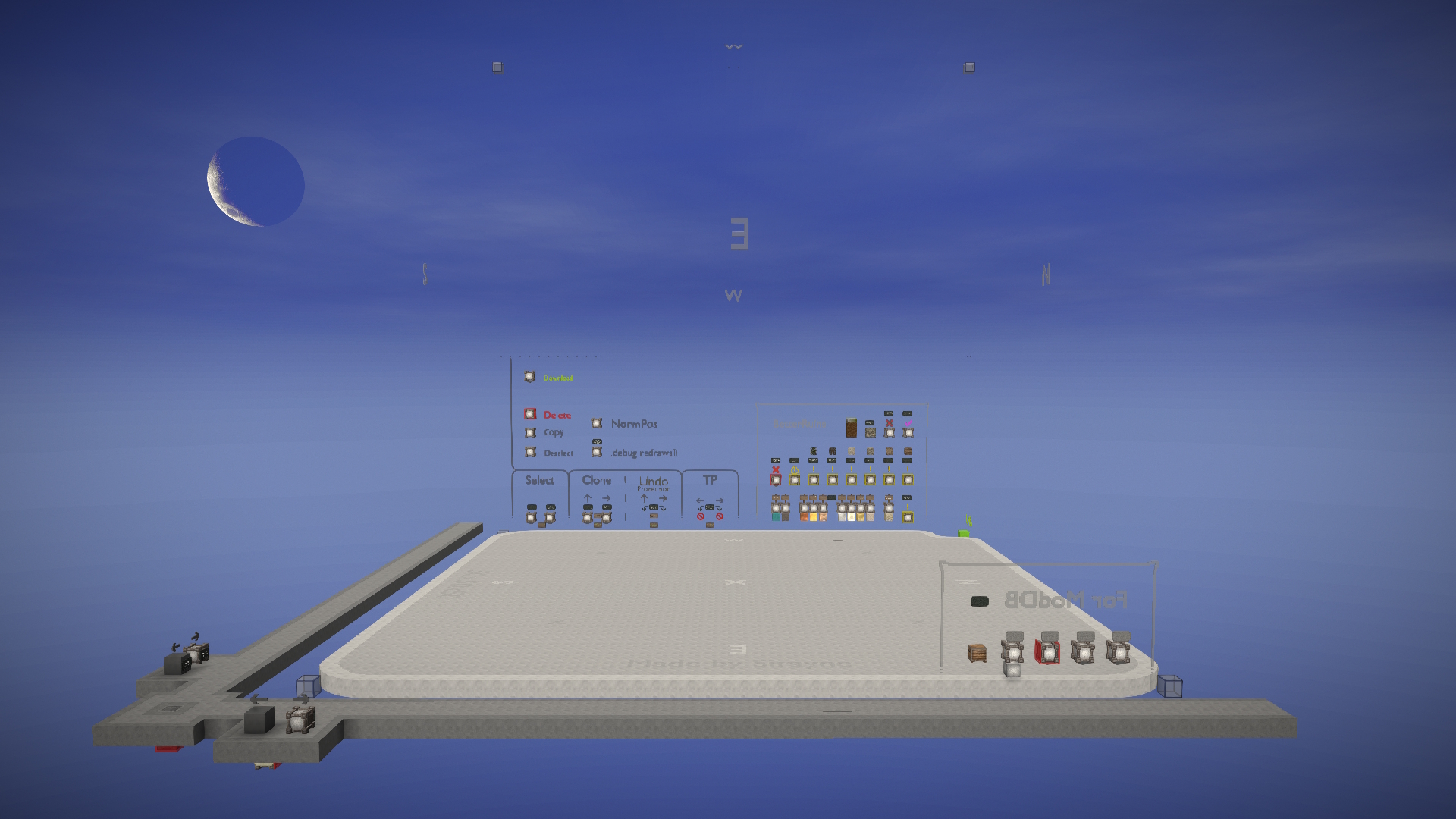
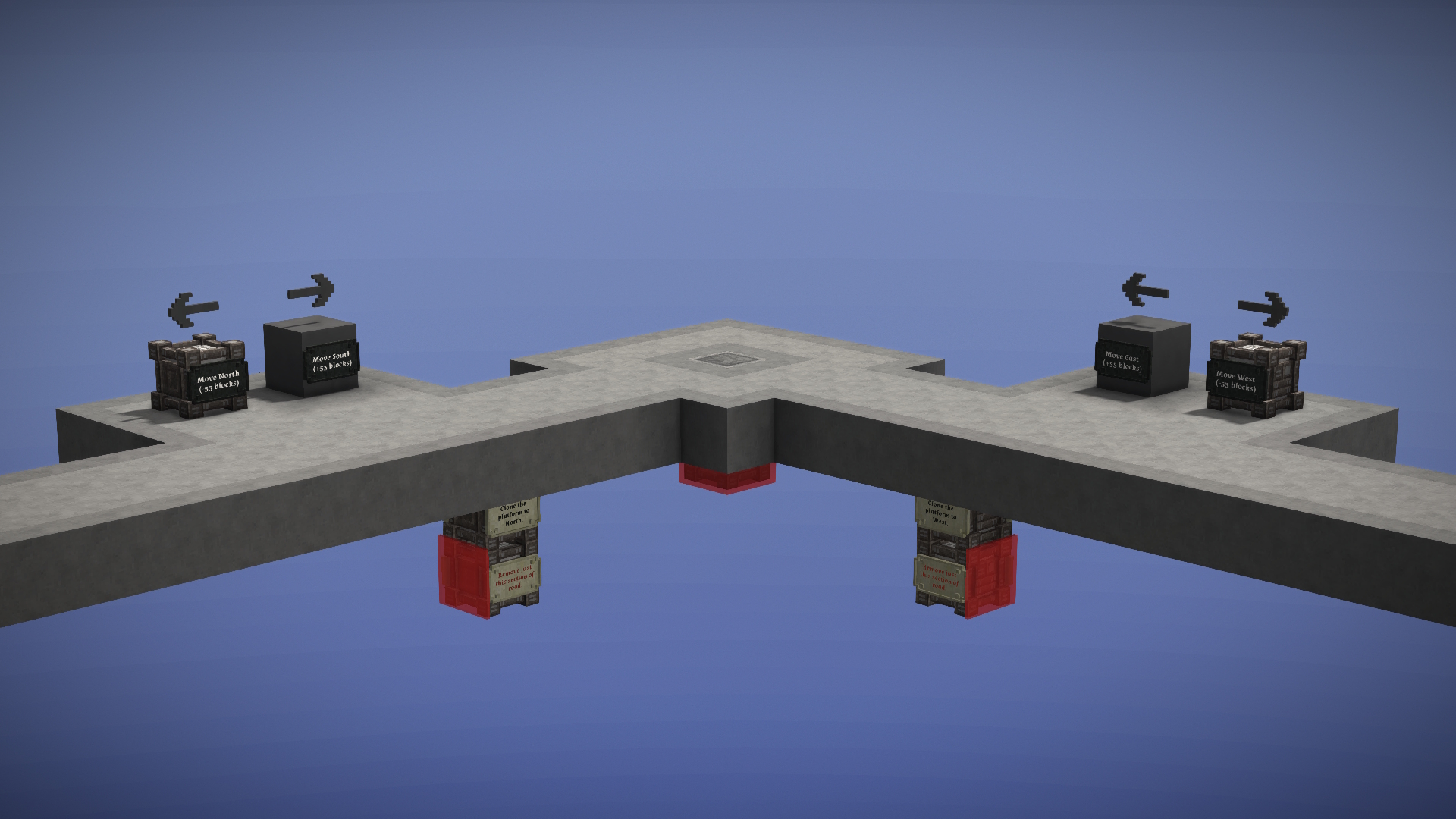
In the shematic file provided by me, there is a road that is located in the southeastern part from the platform, it also has some special tools: (To extend SICA \o/ )
- Teleportation to all sides of the world:
While on the North-South, or West-East roads you will encounter the matching c. blocks that take you to equally relevant directions - the principle is simple and I have already described it here
- Cloning the road under the road:
Command blocks that extend the road in the relevant directions, similarly simple cloning principle (Below these blocks is a deletion block of the same section)
- Removing both directions of the road function, including the center section with the creative teleporter: (Located under the creative teleporter, and if necessary literally break the glass :D)
Will delete sections if no new ones are created further. 
Special Texture pack that slightly changes the materials of the blocks used in SICA&CT
- Unsaturated color of the command block and creative teleporter
- Slight crystal effect for 4 kinds of creative blocks (colors: 70, 74, 75, 76)
- Slightly modified wooden sign material.


Known issues:
- Visual bug when copying the platform. 
Chunks are not updated properly automatically, so the platform disappears in some places
Immediate fix:
Manually update chunks with the .debug redrawall command or a slower reconnect to the world.
- UndoProtection mentioned above; incorrect return of the platform via redo if it was deleted with undo. 
All unstable blocks not returning: chiseled blocks disappear, contents of command blocks, signs as text disappear. 
Solution: I created UndoProtection to which you have to pay a bit more attention when pressing redo & undo.
The real solution, push the problem to the public with a proper bugreport.
Planning to add with some chance:
- Blocks with operations /we microblock (I realized that some of the arguments of this command are really useful, and need at least the addition of my BR category) [/we microblock removeunused] added in 1.0.1
- Ability to return blocks after they are removed when performing a west or north cloning (I have an idea how to do this, but need to experiment a bit)
- Teleportation to the next platform when it is cloned (Unfortunately either there is no way or I don't know how to move entities relative to player coordinates) (It's possible to move relative to the command block, and I'll add that later) Done, thanks @Brick again =) [1.0.1]
- A silent video of building a small structure for BR
- More information that you can drag&drop .json file into the game window
- Don't forget the vanilla macro code function
- That's not all: I have a personal draft with future minor changes todo. However, I have realized everything so far in 1.0.1, the rest of the list is right here.
- Theoretical idea: at the first start of the world with the mod, the shematics of this tool is thrown into the WorldEdit folder (+ can make a command that will do this) - The key problem is that I don't know how to code mods yet. (I'm waiting for the developers to make a separate shematic platform for us).
- Appearance of the entire platform by sending 1 command? (At least theoretically this would be possible if /setblock to chiseled blocks worked correctly)
- Do you need a notification to chat when main operations are performed? (Based on the /announce command)
- Do you need an audio notification when performing main operations? (Based on an entity appearing, then deleting it, it will make a death sound)
These changes are unlikely, but suggestions and errors are warmly welcomed in the comments!
Updates:
• 1.0.6 Adding a tool to delete all tool categories (29.04.25)


- New tool added!
It removes all categories and tools within the platform, clears all cardinal direction markers, and removes my nickname from the platform.
I’d call it “Showcase Mode” — it’s for when you no longer need tools and just want to view your creation.
(Two corners remain, allowing minimal manual interaction with the platform.)
- Updated the sign text beneath the road near the road extension command block — to clarify the wording: the platform is the CloneTool, the road consists of outer sections you can walk on.
- In the "BetterRuins" category, grass and dirt blocks have been converted into command blocks that issue them.
- The command blocks in this category were slightly reorganized.
- The "BetterRuins" label had its texture and font slightly adjusted.
- A pattern was added above the text to fill some empty space.
- A separate command block for the /we fill operation was added.
- Descriptions were added for NormPos and Fill tools.
- An icon was added above the inventory clear block in the "BetterRuins" category.
- Another icon was added above the inventory clear + meta-block issuer.
- Fixed: the green starting block (creativeblock-40) now appears one block lower as originally intended.
(This was the small bug I had mentioned in the comments.)
- Fixed: a minor coordinate issue prevented two corner markers from being cleared during the tool's first run.
(The block that removes them is located beneath the creative teleport.)
- Removed the selectable collider block beneath the center of the cloning tool platform.
- Slightly changed the tint of the blue glass
- I also put just the CloneTool platform shematic in the folder with the texture packs, that is without the SICA road sections
I'm starting to slow down on updates — I feel like I’ve mostly achieved what I set out to do.
I might release a few more minor updates, and then that’ll be it — at least, that’s how I feel for now.
Still, I can’t stop thinking about making a version 2.0.0 — with a dividing wall to the west and some improvements, free of the limitations I faced during the 1.0.0 development.
Of course, I’m still unsure whether to go through with 2.0.0, but I just can’t leave these thoughts unspoken.
• 1.0.5 Almost the latest tool polish, it's hard to think of more features (28.04.25)
- I hesitated for a long time whether this was necessary, but now the key command blocks in the cloning category have descriptions before each operation. (In case you want to explore the functionality.)
For example:
// Place the block at the starting origin point
/setblock game:meta-selectablecollider ~0 ~-2 ~-40
- The selectable-collider blocks added in version 1.0.3, located under each command block that cannot be moved, have been slightly resized to avoid casting a small shadow when the AO+Smoothlight graphics setting is enabled.
- The "For ModDB" category has been significantly revised, removing unnecessary functions and keeping only the important ones.
- The Clone command blocks now include a command to place an invisible meta-block at the starting origin point under creativeblock-40, so you can manually place a platform by using the magicwand.
(This is the only block that does not fall within any selection or removal zones by command blocks — you’ll need to manually remove it if you want to leave nothing after using the platform.)
- The corner near the starting point is now more rounded, near the green creativeblock-40.
- The screenshots on the mod page have been updated to more current ones.
- Fixed: Gradual diagonal movement using teleportation command blocks on the road.
- Fixed: The instant deletion block from the "BetterRuins" category didn’t remove protection against accidental presses (while issuing the meta-block set).
- Added: Initially, there will be no teleportation command blocks to the east and south on the road; they will appear when pressing the road extension block beneath the road. (This is similar to how teleportation blocks appear in the "TP" category after the first cloning operation.)
- Restored the cardinal direction labels on the ceiling of the platform's action zone, which were accidentally removed.
- After trying to find a suitable texture for glass-plain, I changed it again.
- I figured out why the 1-click_mod_install button wasn't working and fixed it, as well as sorted out the versions. (The download counter for such versions has been reset.)
• 1.0.4 Hotfix improving the cloning command block to the north. (26.04.25)
- Forgot to mention that 2 more command blocks were added in 1.0.3 to clear inventory and give 2 sets of wooden stuff in the ‘BetterRuins’ category.
- Fixed gradual teleportation down and sideways when using the new teleportation blocks (Changed in 1.0.3).
- The north cloning block has been changed so that it does not immediately remove the east cloning block.
- The sign showing the version in the game, removed, so that every time I release a version did not change it too. (Especially it was not removed when you removed the road with a block under the teleporter).
• 1.0.3 New category “For ModDB” and more! (26.04.25)

- Renamed the outlines (outer parts separating categories visually) of the glass command block categories (When you tried to use the middle mouse button to grab such an outline in the hotbar, the game would crash with a link to some font and text problems, assuming the problem was in the name of the chiseled block, I decided to rename them all).
- Removed the “/we Off” command block due to it not working as originally designed
It didn't turn off WE Scroll Tool Mode when pressed, and it still had to be done manually (Even “/executeas s[] /we off” didn't fix this).
- Several times removing and returning the block in which you could copy the command to update the client chunks - I decided to return it with chiseled separate text and the same block in which you can still copy the command =)
- Added a “For ModDB” category of handy update this tool for me.
It is in a non-standard place, opposite to the normal categories.
Created to save shematics roads and platforms together faster, and not have to manually select an area and not have to work with commands.
Includes selection, download, instant deletion of the area with the platform and road, and a few more handy tools for me (In the game all described on the tablets if you are interested).
Contains a command block that removes that category if you don't need it.
- Any copying of the area to the west and north, removes the “For ModDB” category!
- In the command block of copying the contents of the area, added the command /we clear (It should indicate that the operation is completed by disappearing the area. As in most blocks of the same type).
- Teleportation blocks between platforms now teleport relative to the player's position, not the command block.
(You will end up in the same place on the platform you teleported from, but on a different platform)
- Changed the texture of the frequently used in the platform, selectable collider, in the texture pack - now nice and modern!
- Changed textures of all meta-blocks in the texture pack \o/
- Changed the texture of glass, now its stroke is less noticeable.
- Now under each command block that cannot be moved (It executes commands relative to its position) there is a chiseled block of the selected collider.
- Added NormPos (/we normalize) to the common commands category for WE (Currently above the .debug redrawall) for easy handling of area selection
BetterRuins:
- Moved the chest of materials used in the platform to the “For ModDB” category
- Removed the chest of frequently used materials in structures from the “BetterRuins” category (It was replaced by the command blocks for clearing inventory and issuing item sets).
- Removed unused materials in chiseled blocks. (In the warning icons for clearing inventory and not only)
- Changed the signs warning you to clear your inventory to smaller ones. In the “BetterRuins” category
- In the command block clearing inventory and issuing some of my used Decorative Layer Blocks, added more DLBs of 4 kinds of dry gravel, and a knife that allows you to remove layers of decorations.
- Also added another DLB issuing block in 4 kinds of torn notes, and the rest of the rust with a knife.
- Reduced the checkmark icon above the teleporter that takes you to my area of completed structures, the teleporter itself has been moved to a different location, and a block issuing a set of meta blocks and clearing inventory has been added instead.
- Changed the contents of all inventory clearing tables and issuing set-ups from blocks.
- Added /we clear command to the command block that removes unused materials inside chiseled blocks.
- Added a sign saying that QPCT is QP's Chisel Tools mod from ModDB.
- Removed the command block that gives Paint Scrapper from QPCT.
- Taken into account all the latest bugs when publishing the mod, and this is the stable version.
• 1.0.2 now really does have all the features from 1.0.1 (25.04.25)
I posted the wrong version for some reason and only now noticed that no changes are working.
- The worldgen folder in the texture pack folder has been deleted (it contained past versions of the tool. Now use the files tab to use the old versions).
• 1.0.1 Improvement of Clone category command blocks, and minor things (22.04.25)
- Now the platform corners are rounded just enough to fit a full block behind them (instead of a chiseled block, which disappears in some rare cases).
With a full block, you can use the magicwand to select areas not only in the correct corners as I originally intended, but also in all others. (Still, for proper function, use normpos in the select tool.)
- Full blocks were also added to the top corners of the platform to make manual selection easier.
- The contents of the cloning command blocks have been changed — now both move you to the next platform in their respective direction, but you stay in the same spot as before. (Big thanks to @Brick for the comment!)
- The clone block to the West no longer copies platform content (it continues the row of empty platforms).
- Added a block that disables Tool Drawing (any active WorldEdit tool).
This should help if you’re trying to use the chisel mode but accidentally activate the WE Scroll Tool Mode instead. (This seems like a bug worth reporting.) (Though this can be used in other ways too.)
- Red pigment on the category signs for "UndoP. & Clone" was changed due to poor visibility on vanilla signs
- The “UndoProtection” label now uses creativeblock-70 (and the arrows have been slightly changed).
- Under certain command blocks, a chiseled block was added with a description that the command block above should not be moved (since area-based commands depend on the position of the command block).
(Just in case you ever want to rearrange things.)
My category BetterRuins:
- Added a command block to remove unused chiseled material data (the separate creativeblock-43 deletion block was removed).
- Added a command block to clear your inventory (I made a special warning icon for it).
- And added 3 command blocks that clear the inventory and give you item sets. (Thanks again @Brick for the idea!)
- Removed unnecessary chiseled blocks from the BetterRuins chest that were meant for the TP category but accidentally remained in the final version.
- The X icon above the instant-deletion block for BR was reduced in size, and a sign was added to explain the block’s purpose.
• The release 1.0.0 (14.04.25 - 19.04.25)
Before the release, I tweaked the tool on my own, which resulted in about 70 saves in 5 days.
P.S:
The whole text is translated.
The icon was made by me in blender.
| Mod Version | Downloads | Released | Changelog | Download |
|---|---|---|---|---|
| 1.0.6 | 30 | Apr 29th at 5:58 PM | TexturePack and CloneTool 1.0.6.zip | |
|
- New tool added! - Updated the sign text beneath the road near the road extension command block — to clarify the wording: the platform is the CloneTool, the road consists of outer sections you can walk on. - In the "BetterRuins" category, grass and dirt blocks have been converted into command blocks that issue them. - The command blocks in this category were slightly reorganized. - The "BetterRuins" label had its texture and font slightly adjusted. - A separate command block for the /we fill operation was added. - An icon was added above the inventory clear block in the "BetterRuins" category. - Fixed: the green starting block (creativeblock-40) now appears one block lower as originally intended. - Fixed: a minor coordinate issue prevented two corner markers from being cleared during the tool's first run. - Removed the selectable collider block beneath the center of the cloning tool platform.
| ||||
| 1.0.5 | 23 | Apr 28th at 1:28 PM | TexturePack and CloneTool 1.0.5.zip | |
|
- I hesitated for a long time whether this was necessary, but now the key command blocks in the cloning category have descriptions before each operation. (In case you want to explore the functionality.) - The selectable-collider blocks added in version 1.0.3, located under each command block that cannot be moved, have been slightly resized to avoid casting a small shadow when the AO+Smoothlight graphics setting is enabled. - The "For ModDB" category has been significantly revised, removing unnecessary functions and keeping only the important ones. - The Clone command blocks now include a command to place an invisible meta-block at the starting origin point under creativeblock-40, so you can manually place a platform by using the magicwand. - The corner near the starting point is now more rounded, near the green creativeblock-40. - The screenshots on the mod page have been updated to more current ones. - Fixed: Gradual diagonal movement using teleportation command blocks on the road. - Fixed: The instant deletion block from the "BetterRuins" category didn’t remove protection against accidental presses (while issuing the meta-block set). - Added: Initially, there will be no teleportation command blocks to the east and south on the road; they will appear when pressing the road extension block beneath the road. (This is similar to how teleportation blocks appear in the "TP" category after the first cloning operation.) - Restored the cardinal direction labels on the ceiling of the platform's action zone, which were accidentally removed. - After trying to find a suitable texture for glass-plain, I changed it again. - I figured out why the 1-click_mod_install button wasn't working and fixed it, as well as sorted out the versions. (The download counter for such versions has been reset.)
| ||||
| 1.0.4 | 72 | Apr 26th at 5:26 PM | TexturePack and CloneTool 1.0.4.zip | |
|
- Forgot to mention that 2 more command blocks were added in 1.0.3 to clear inventory and give 2 sets of wooden stuff | ||||
| 1.0.3 | 23 | Apr 26th at 4:45 PM | TexturePack and CloneTool 1.0.3.zip | |
|
- Renamed the outlines (outer parts separating categories visually) of the glass command block categories (When you tried to use the middle mouse button to grab such an outline in the hotbar, the game would crash with a link to some font and text problems, assuming the problem was in the name of the chiseled block, I decided to rename them all). - Removed the “/we Off” command block due to it not working as originally designed - Several times removing and returning the block in which you could copy the command to update the client chunks - I decided to return it with chiseled separate text and the same block in which you can still copy the command =) - Added a “For ModDB” category of handy update this tool for me. - Any copying of the area to the west and north, removes the “For ModDB” category! - In the command block of copying the contents of the area, added the command /we clear (It should indicate that the operation is completed by disappearing the area. As in most blocks of the same type). - Teleportation blocks between platforms now teleport relative to the player's position, not the command block. - Added NormPos (/we normalize) to the common commands category for WE (Currently above the .debug redrawall) for easy handling of area selection
BetterRuins: - Removed unused materials in chiseled blocks. (In the warning icons for clearing inventory and not only)
- Changed the signs warning you to clear your inventory to smaller ones. In the “BetterRuins” category - Added /we clear command to the command block that removes unused materials inside chiseled blocks. - Added a sign saying that QPCT is QP's Chisel Tools mod from ModDB. - Removed the command block that gives Paint Scrapper from QPCT.
- Taken into account all the latest bugs when publishing the mod, and this is the stable version. | ||||
| 1.0.2 | 18 | Apr 25th at 3:44 PM | TexturePack and CloneTool 1.0.2.zip | |
|
Now I noticed that the changes from 1.0.1 didn't apply to this release, so I'm duplicating it with the already applied changes | ||||
| 1.0.1 | 22 | Apr 22nd at 12:36 PM | TexturePack and CloneTool 1.0.1.zip | |
|
Changelog: - Now the platform corners are rounded just enough to fit a full block behind them (instead of a chiseled block, which disappears in some rare cases). - The contents of the cloning command blocks have been changed — now both move you to the next platform in their respective direction, but you stay in the same spot as before. (Big thanks to @Brick for the comment!) - Added a block that disables Tool Drawing (any active WorldEdit tool). - Red dyes on the category signs for UndoP. & Clone were changed due to poor visibility on vanilla signs (this issue doesn’t occur in my texture pack). - The “UndoProtection” label now uses creativeblock-70 (and the arrows have been slightly changed). - Under certain command blocks, a chiseled block was added with a description that the command block above should not be moved (since area-based commands depend on the position of the command block). My category BetterRuins: - Added a command block to clear your inventory (I made a special warning icon for it). - Removed unnecessary chiseled blocks from the BetterRuins chest that were meant for the TP category but accidentally remained in the final version. - The X icon above the instant-deletion block for BR was reduced in size, and a sign was added to explain the block’s purpose. | ||||
| 1.0.0 | 30 | Apr 19th at 5:43 AM | Empty | Texture improvements and the CloneTool itself 1.0.0.zip |
ne_pagoda
I see what you mean. Yes, unfortunately, it may seem like the name of my tool fits for this, but it doesn’t.
I’d also be interested in getting files, but by using a client-side command similar to /we expc, which already exists in the game, but without any admin rights.
Right now, a mod like that has just come out, I recommend checking it out: https://news.kalataka.ru/show/mod/29880 I haven’t used it myself yet, but it sounds potentially like what we need.
I would like the mod to be client-side and use commands or a "stick" like Lightmatic in Minecraft, so that there would be the ability to copy buildings from creative to vision as a scheme or blueprint for its implementation, for example on a server, without admin rights
What my second zone for building structures looks like now. SICA (Sirayne`s Infinite Clone Area).

An example of correct work with the tool.
Found a very small bug in added with the new feature in 1.0.5 and will already solve it in 1.0.6 (Especially 1.0.5 is not displayed in 1-click mod install).
Also in 1.0.6 there will be a feature to remove all tools and categories if you don't need them and just want to look at an older version of your work
🙂
Spent 9 hours upgrading it 🤪

Brick
Oh yes! Thank you for your words and recommendations
I will definitely try the /executeas command
We have a CreativeHotbar mod on our server that I could work with, but I don't have space in the macro editor (there are only 20 commands in there)
So I will also try your option (I still like it because of the inventory clearing, because I hardly pay attention to how my hotbar gets clogged and I often lose items)
Also I haven't had to work with entity checking, so I only have a minimal understanding of everything, but thanks for the suggestion anyway
Maybe sooner or later I'll have to and I'll remember you : )
Btw about this one:
Teleportation to the next platform when it is cloned (Unfortunately either there is no way or I don't know how to move entities relative to player coordinates) (It's possible to move relative to the command block, and I'll add that later)
I think it will work if you use ExecuteAs (I dont remember the exact command, need to check in handbook) using player as a caller and then using relative ~x ~y ~z coordinates.
That's a cool idea to optimize your workflow!
I'm not gonna download it cause I'm too used to type in the chat, but I will definitely steal the feature of using command blocks to create pallete selection :>
You can add commands to clear inventory and then give you 10 items to fill in the whole hotbar at once which is definitely awesome.
Edit. You can even make a custom area for all the different paletes with fast TP to the pallete selection area and back by spawning entities. For example. Check for existing locust (in general or in the area -> if exists tp player to specific location and remove the entity. If you check in specific area you can use same spawn entity to go back and forth, simply reuse command block structure but checking different areas and tp to different places. So basically you spawn a creature - it is detected - commands are activated to move player and remove entity.
\о/