
Mods / Buzzwords
Author: SpearAndFang
Side: Both
Created: May 31st 2022 at 3:03 AM
Last modified: Oct 19th at 12:28 AM
Downloads: 63568
Follow Unfollow 1165
Recommended download (for Vintage Story 1.20.0 - 1.20.12 and 1.21.0-rc.1 - 1.21.5):
buzzwords_1.8.0.zip
1-click install
"It's the second best bee mod"
- theess12 on Reddit
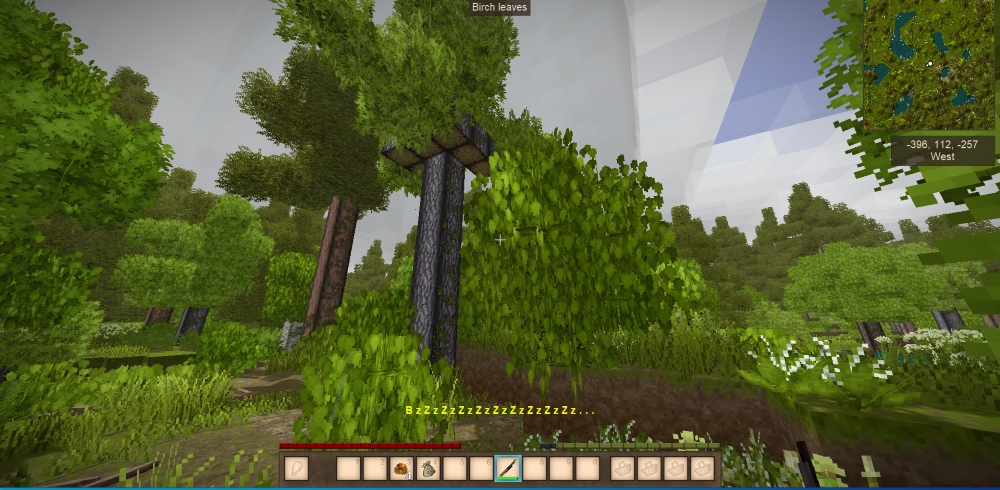
Buzzwords is an accessibility mod that does one simple thing. If you're 12 or so blocks away from a wild beehive of some sort, you'll get a 'BzZzZzZ...' text alert to notify you that bees are nearby. Get even closer, and you'll get even more z's. It's intended for players (like me) that can't hear ambient buzzing sounds for whatever reason. Maybe you've got that incredible VS soundtrack cranked up, maybe your significant other is shrieking like a howler monkey.
Mod Configuration
OPTIONAL: Now configurable in-game with a GUI! This new feature requires Config Lib and ImGui as dependencies. In-game: simply press [ESC] and click the new Mods Settings button to configure (or press [P]).
If you want to customize this mod the old fashioned way, see %appdata%/VintagestoryData/ModConfig/buzzwords.json.
BuzzRadius - the distance you need to be from a hive before the "beedar" kicks in - default = 12 blocks. thanks Briccars
BuzzFontSize - the size of the bzzz message. Thanks Tigeria
BuzzFontColor - the color of the bzzz message (an html color name or hex code i.e. html color names). Thanks Tigeria
Thanks to Maltiez for the mod configuration gui!
| Mod Version | Mod Identifier | For Game version | Downloads | Released | Changelog | Download | 1-click mod install* |
|---|---|---|---|---|---|---|---|
| 1.8.0 | buzzwords | 21229 | Jul 1st at 5:52 AM | buzzwords_1.8.0.zip | 1-click install | ||
|
Buzzwords 1.8.0 - Last Release before move to 1.21 (hopefully) Update: Shored up mod configuration loader | |||||||
| 1.7.0 | buzzwords | 26394 | Apr 17th 2024 at 6:26 AM | buzzwords_1.7.0.zip | 1-click install | ||
|
OPTIONAL: Now configurable in-game with a GUI! This new feature requires Config Lib and ImGui as dependencies. In-game: simply press [ESC] and click the new Mods Settings button to configure (or press [P]). Thanks Maltiez! | |||||||
| 1.6.0 | buzzwords | 5377 | Oct 29th 2023 at 9:41 PM | buzzwords_1.6.0.zip | 1-click install | ||
|
Same as before, just cleaned up (now) obsolete code, rebuilt with the latest Visual Studio, used new mod template, and tested with the pre-release. | |||||||
| 1.5.0 | buzzwords | 3177 | Sep 23rd 2023 at 9:14 PM | BuzzWords1.5.0.zip | 1-click install | ||
|
Larger bolder font and color for the "bzzzz" text by default. Both are also configurable in the modconfig file. - thanks Tigeria! Delete your ..\VintagestoryData\ModConfig\buzzwords.json to have it recreated with the new options | |||||||
| 1.4.0 | buzzwords | 1978 | Aug 27th 2023 at 4:12 PM | BuzzWords1.4.0.zip | 1-click install | ||
|
Added a modconfig file so you can customize the buzz radius. thanks Briccars! | |||||||
| 1.3.0 | buzzwords | 2316 | Jun 3rd 2023 at 5:14 PM | BuzzWords1.3.0.zip | 1-click install | ||
|
Major rewrite to hopefully address all outstanding issues. | |||||||
| 1.2.0 | buzzwords | 1462 | Oct 23rd 2022 at 3:13 PM | BuzzWords1.2.0.zip | 1-click install | ||
|
Shored up the null checking to prevent the issue encountered by Dij. Thanks Dij. | |||||||
| 1.1.0 | buzzwords | 871 | Jul 19th 2022 at 3:47 AM | BuzzWords1.1.0.zip | 1-click install | ||
|
v1.17.0-pre.5 and newer release - code refactor. | |||||||
| 1.0.0 | buzzwords | 764 | May 31st 2022 at 3:04 AM | BuzzWords1.0.0.zip | 1-click install | ||
|
Initial Release | |||||||
ok, that why ...
i go only with sound for blocks and finaly find one, but the words dosent show, so was my problem, still amayzing mod my friend.
thanks
Jotix
Yes the mod needs to be on client and server
Hello SpearAndFang, thanks to reply,
I do that actualy, i start a normal creative and i ca see the buzz words, but i made 10k+ blocks to south on server and still dont find nothing :\
Question, sould i made something on server ?
iam not the admin but can talk with him...
Thanks for all your work
Jotix
Maybe there are no bees in your area? I've had this happen to me before.
You can test the mod easily. Start a new "Creative Building" world, grab a "Wild Beehive in Tree" from the inventory and place it. You should immediately see the yellow "BzZzZz" text appear.
If that works then the mod will work for all beehives.
Hi everyone, first thanks for your work my friend, i start play vintage like 2 monght and after 1 year past on game i still cant find bees,
i place the mod but "dosent work" i dont have words on display, and i walk allot on map and iam not on winter heheh
something i made wrong ? any help ?
thanks
LadyKianna
While I'm sympathetic to your issue, I'm not modding much these days beyond bug fixes and pull requests. So I'm not sure if I will ever get this done. Sorry
@ Everybody Else
Thank you so much for the kind words!
Perfect, works exactly as intended. The default range is actually less than the audio cues (if you've got them cranked up), so it doesn't feel like cheating
I deeply love this mod
I love this mod, but it's not entirely clientside only, as it doesn't work on my friend's server. I'm assuming he'd have to have it as part of the server pack to get it to properly work?
Edit
Problem with putting it on the server however is not everyone wants or needs text on the screen for the bees. Can please we get an addition to the config to turn them on/off in that case?
I am genuinly glad that this mod exists.
THANK YOU SO MUCH FOR THIS! This is just what I needed!!!
Thank you for this. I too have family members that shreik like a howler monkey.
A very beeloved mod
I love and adore you
Thankyou! SpearAndFang
Remiska
yes
is this mod compatible in 1.21.1 version?
Wixard
Server
Hello, is this mod client side or it has to be installed on a server to work? Thank you!
SpearAndFang
Well I spent more time than I really had today reading the ConfigLib sources and I think this is a bug on their end (although I'm not sure exactly how it works the way it does). It seems like they send the server config path to the client and then ass-u-me they are the same when trying to read/write the client config. This means the conditions for this issue are probably rare -- using a separate server, with a mod that has server side config, and having changed the server's data path from the default. I might pick this up again and try to discuss it with the ConfigLib folks if I get some time.
Meanwhile, I think this will make it so clients on my server cannot edit their Buzzwords settings, but that is OK because the defaults are reasonable. I'll just ignore the errors for the moment.
Edit: Looking at the order of operations in the logs, I'm not sure users can override the server settings anyway? So it's probably doubly a non-issue, just log spam.
GniftyGnome
I am not sure what I can do here. The error appears to be coming from configlib itself, and is file system related - perhaps related to case sensitivity idk. It may be linux related, but I only have windows for testing, so I probably cannot recreate this.
I have added configlib support to all of my mods and have never had an error report remotely like this one, which makes me think that something isn't right on your end. Maybe delete the buzzwords.json modconfig file so it can be recreated. Maybe delete your cache. All of this on both server and client.
When playing on a server where the path to the server config files is different from the client, the client repeatedly logs the following error:
1.9.2025 00:34:49 [Client Error] [Config lib] (buzzwords) Error on parsing config: System.ArgumentException: The directory name '/home/vintagestory/data/ModConfig' does not exist. (Parameter 'path') at System.IO.FileSystemWatcher.CheckPathValidity(String path) at System.IO.FileSystemWatcher..ctor(String path) at ConfigLib.Config.CreateFileWatcher() in D:\Projects\VintageStory\configlib\configlib\source\Config\Config.cs:line 769 at ConfigLib.Config..ctor(ICoreAPI api, String domain, String modName, JsonObject json, String file, Dictionary`2 serverSideSettings) in D:\Projects\VintageStory\configlib\configlib\source\Config\Config.cs:line 122.
The logged path is the correct path for the server's config. As far as I can tell, the mod works fine; it just fills the logs with red errors. The other mods I have which use ConfigLib do not do this.
LMK if you'd prefer a GH issue. P.S. I really like this mod.
really appreciate this mod. I play with music in the background and in my 66 hours on this world I haven't found a single hive.
I am SOOOOOO looking forward to this! I am 66, retired, playing with poor vision and hearing, and honey/beeswax is so critical to winter!
NovelSora
The fact that you are unable to locate things that you download tells me all I need to know.
You can't find the mod, so it doesn't exist on your PC and couldn't have caused the crash.
Your critique: 0/10
Downloaded mod, crashed the entire program. Cannot get rid of the mod (unable to locate it). 0/10
Ijkdenem
There is no capped liimit, but I think if you go above 50 then you may need to decrease the font size in order to read it properly.
whatis max you can set be detection in settings? like 20?
Wow this is such a wonderful mod, thank you SO much for making it!!
Norah_fif
I ran the file through virus total and it did indeed say that. When I uploaded the entire zip file.
So I tested each file inside with VirusTotal and they all came back clean.
I believe that just one result often is a false positive, and in this case it is a false positive. The dll can easily be decompiled if anyone is concerned, and the source code is also available at the github link. It is a fairly simple mod.
For what it's worth, I also scanned the file with Malwarebytes and Windows Defender and it came back clean.
Quite positive that there is nothing malicious in this mod.
I will report it to the people responsible for this website as well to see if I need to take any further action.
Thank you so much for making this! As a certified bee enjoyer™ with audio processing issues, I wasn't liking my chances of finding any bees to adopt.
As someone with inner ear scarring, this is amazing thank you so much!
As someone with tinitus, you're much appreciated
This is working in 1.20 for me.
JustDavid
fwiw, I am using this mod with rc8 just fine, and the dependencies are 100% optional - you can in fact edit the configuration manually if you need to (see above).
I would like to thank the devs for this mod and it's accessibility. I am hearing impaired and I would never ear the bees without. That being said I can't wait for the dependencies to update to 1.20 rc8.
It worked after deleting the config and logging back into the game. )
SpearAndFang
AlebenTod
configlib_1.3.13 and vsimgui_1.1.5?
Because it's working for me.
You could use the previous version of this mod (1.6), which doesn't use those mods at all. And edit your config file the old fashioned way if necessary.
when you try to open the config in Config Lib, the game crashes. Config Lib and ImGui latest versions for 1.9.8 mod version v1.7.0
Thanks Spear - my tinnitus makes it really hard to hear the bees in this game, so this is completely necessary for me almost as an accessability option.
Keep up the excellent work.
This is the best Mod all time for Deaf!
Jzzpr
My best guess is to ensure that you are using the latest version of ConfigLib and ImGui.
Or stick with version 1.6 of this mod - it is the same as 1.7 other than that config stuff.
I'm having an issue when using the latest version of the mod 1.7 to the latest version of the game 1.19.7 (Stable) with Config Lib and ImGui when pressing "P" it instantly crashes the game. I used the previous version of the mod 1.6 and it works perfectly fine.
Volonorke
❤️
Спасибо за мод! спустя 2 часа беганья по лесу я решил поставить мод и каково было мое удевление когда оказалось что я стоял в 5 метрах от улья и тупо его не слышал и не видел !
Alcyonaria
That's pretty vague. Any supporting info would help (like the server-main.txt log). Feel free to post it on the VS Discord or PM it to me over there. Thanks!
position error on newest version, causes crash
fiqusonnick
Thanks!
IMPORTANT: Make sure you're downloading the right version. Somehow the new one caused my character to go into guest mode (no idea how). Otherwise amazing mod, should've been in vanilla.
I tested it and it works, THANKS!
Bunuffin
I have not tested it in multiplayer, but I rewrote it basically from scratch on Jun 3rd using an entirely different approach, it is running on 46 servers at the moment, and nobody has reported an issue.
My guess is that v1.5.0 will work on multiplayer for you.
V1.18.15 Is this still not working in multiplayer?
oops! that. that probably explains things. thank you!!!
MentallyWill
You are probably not using the mod version that corresponds with your game version.
mod version 1.6.0 is for the VS 1.19.0 pre-releases ONLY
mod version 1.5.0 is for the VS 1.18 stable releases
Hey !! so i was having some pretty bad fatal server errors that made my game unplayable and I found it came to this;
6.11.2023 19:45:11 [Fatal] System.MissingMethodException: Method not found: 'Void Vintagestory.API.MathTools.BlockPos..ctor(Int32, Int32, Int32, Int32)'.
at BuzzWords.ModSystem.BEBBuzzBeehive.Buzz(Single dt)
at Vintagestory.Common.EventManager.TriggerGameTick(Int64 ellapsedMilliseconds, IWorldAccessor world) in C:\Users\Tyron\Documents\vintagestory\game\VintagestoryLib\Common\EventManager.cs:line 59
at Vintagestory.Server.CoreServerEventManager.TriggerGameTick(Int64 ellapsedMilliseconds, IWorldAccessor world) in C:\Users\Tyron\Documents\vintagestory\game\VintagestoryLib\Server\ServerEventManager.cs:line 124
at Vintagestory.Server.ServerMain.Process() in C:\Users\Tyron\Documents\vintagestory\game\VintagestoryLib\Server\ServerMain.cs:line 881
Tigeria
New version up. Bigger brighter font by default, and it's also configurable via mod config. Thanks!
See the new screenshot above for a sample of the new default settings.
@Tigeria,
No it just leverages the built in font+color. I will take a shot at making it something different (or configurable).
Is there a way to change the font size or color? I tried digging around, but no luck.
@Zinloz,
Thanks again. Glad to hear that there was some resolution. Hopefully just a one off.
SpearAndFang The working beehive and not working beehive both have the same ID (8140/game:wildbeehive-large). I think what's going on is the beehive block was placed, but it doesn't seem to be a working entity (although I have no idea why it produces sound if not, unless that's tied to the block and not blockentity...). Anyway, I say this because I've placed a ton of flowers and an empty skep at the non-registering beehive and the skep doesn't fill - so, it's not actually functioning as a beehive.
First time I've seen this happen so I'd just disregard this as an anomaly/game issue.
@Zinloz,
Interesting. Thanks for the followup and screenshot. Perhaps there is a hive variant that I missed entirely. I'll dig a little deeper and see what I can find.
https://ibb.co/ZLNST6S
Picture showing me right under a hive and it not working. Mod is definitely enabled.
But I'm also under a different hive now and it is working, so I don't know.
Edit: I just checked the hive that isn't working for me again, after verifying that the mod is working for a different hive. In the same game, did not restart or reload the world. Two different hives, one is detected by the mod and displays the "Bzzzz" and one isn't detected and doesn't show the "Bzzz".
I'll try downgrading the mod later and see if the broken hive starts working.
Edit 2: Same beehive does not register using 1.3.0, either.
@Zinloz
I'm going to need someone to corroborate your story, because I'm not having any issues.
I just tested again (medium hives, large hives, hives in trees) with various versions of the game (1.18.7, 1.18.8, 1.18.9-rc.1) and the latest version of the mod of course (freshly download from the modDB) and it seems to be working perfectly. I'm on Windows 10 btw.
I also tried deleting my modconfig file and my cache folder contents, but it's always working.
Are you sure that the mod is enabled in your mod manager? if you have multiple versions of the mod in your mods folder that might cause a problem? idk what else to say.
I think the 1.4.0 update broke this completely. I'm using the default config, standing right under a hive I found by sound for 5~ minutes, and still have not seen the "Bzzzzz" come up. Worked fine for me before this version.
Must have mod for me, since I have trouble hearing low frequency sounds. Thanks for an update!
Briccars
I've done it. New version up. And thanks for the kind words.
Great mod, would be cool if we could adjust the radius for maximum beedar
🤘 I knew 🤘
megadeaf concert started 15 minutes ago and nobody knew
Thanks for the update! Can't wait to give it a try!
I've successfully heard wild bees all of Once in hundreds of hours in this game, so this is a blessing.
New version up for 1.18.x. A complete rewrite that is now compatible with From Golden Combs, and may even work on multiplayer servers.
@hron84 nope sorry
@SpearAndFang but it does work on singleplayer in 1.18.x?
AngryOscar As far as I know it only works in single player
Until update is ready, Would it still work over LAN if mod is installed on both computers?
Ah no worries, thanks for the update!
@Jaarl yes it has issues in multiplayer which is why I did not update this mod for VS 1.18.x. It is need of a rewrite - I just need to find the time. I've added a warning about this to the description page.
Thanks for the mod, SpearAndFang! However, it doesn't seem to work in multiplayer, even with the mod installed server- and client-side. Singleplayer works fine. Any ideas?
I shored up the logic some more and did some additional testing. Hopefully the problem that Dij encountered will no longer be a problem.
Dij thanks for the kind words and for reporting the issue. I've added your report to my to-do list and will hopefully have it sorted out soon.
This mod is one of my favorites, it's basically essential for me. Just wanted to let you know i got a crash on my server while i was hosting while using open to lan-> open to internet
Running on 64 bit Windows with 16 GB RAM
Game Version: v1.17.0-rc.5 (Unstable)
Loaded Mods: buzzwords@1.0.0, game@1.17.0-rc.5, prospectorinfo@3.2.0, stepup@1.2.0, creative@1.17.0-rc.5, redirectlogs@1.0.0, survival@1.17.0-rc.5
8/20/2022 1:04:38 PM: Critical error occurred
System.NullReferenceException: Object reference not set to an instance of an object.
at Vintagestory.Client.NoObf.ClientMain.NearestPlayer(Double x, Double y, Double z) in C:\Users\Tyron\Documents\vintagestory\game\VintagestoryLib\Client\ClientMain.cs:line 3510
at BuzzWords.ModSystem.BEBuzzBeehive.Buzz(Single dt)
at Vintagestory.Common.EventManager.TriggerGameTick(Int64 ellapsedMilliseconds, IWorldAccessor world) in C:\Users\Tyron\Documents\vintagestory\game\VintagestoryLib\Common\EventManager.cs:line 105
at Vintagestory.Client.NoObf.ClientMain.MainRenderLoop(Single dt) in C:\Users\Tyron\Documents\vintagestory\game\VintagestoryLib\Client\ClientMain.cs:line 1196
at Vintagestory.Client.NoObf.ClientMain.MainGameLoop(Single deltaTime) in C:\Users\Tyron\Documents\vintagestory\game\VintagestoryLib\Client\ClientMain.cs:line 1103
at Vintagestory.Client.GuiScreenRunningGame.RenderToPrimary(Single dt) in C:\Users\Tyron\Documents\vintagestory\game\VintagestoryLib\Client\MainMenu\Screens\GuiScreenRunningGame.cs:line 123
at Vintagestory.Client.ScreenManager.Render(Single dt) in C:\Users\Tyron\Documents\vintagestory\game\VintagestoryLib\Client\ScreenManager.cs:line 664
at Vintagestory.Client.ScreenManager.OnNewFrame(Single dt) in C:\Users\Tyron\Documents\vintagestory\game\VintagestoryLib\Client\ScreenManager.cs:line 608
at Vintagestory.Client.NoObf.ClientPlatformWindows.window_RenderFrame(Object sender, FrameEventArgs e) in C:\Users\Tyron\Documents\vintagestory\game\VintagestoryLib\Client\ClientPlatform\GameWindow.cs:line 125
at System.EventHandler`1.Invoke(Object sender, TEventArgs e)
at OpenTK.GameWindow.RaiseRenderFrame(Double elapsed, Double& timestamp) in C:\Users\Nexrem\Desktop\transfer\opentk\src\OpenTK\GameWindow.cs:line 476
at OpenTK.GameWindow.DispatchRenderFrame() in C:\Users\Nexrem\Desktop\transfer\opentk\src\OpenTK\GameWindow.cs:line 452
at OpenTK.GameWindow.Run(Double updates_per_second, Double frames_per_second) in C:\Users\Nexrem\Desktop\transfer\opentk\src\OpenTK\GameWindow.cs:line 375
at Vintagestory.Client.ClientProgram.Start(ClientProgramArgs args, String[] rawArgs)
at Vintagestory.ClientNative.CrashReporter.Start(ThreadStart start) in C:\Users\Tyron\Documents\vintagestory\game\VintagestoryLib\Client\ClientPlatform\ClientNative\CrashReporter.cs:line 87
-------------------------------
Event Log entries containing Vintagestory.exe, the latest 3
==================================
{ TimeGenerated = 8/20/2022 10:06:38 AM, Site = , Source = Windows Error Reporting, Message = Fault bucket 1240875597343726730, type 5
Event Name: RADAR_PRE_LEAK_64
Response: Not available
Cab Id: 0
Problem signature:
P1: Vintagestory.exe
P2: 1.17.0.0
P3: 10.0.17763.2.0.0
P4:
P5:
P6:
P7:
P8:
P9:
P10:
Attached files:
\\?\C:\Users\_\AppData\Local\Temp\RDR45C6.tmp\empty.txt
\\?\C:\ProgramData\Microsoft\Windows\WER\Temp\WER47BB.tmp.WERInternalMetadata.xml
\\?\C:\ProgramData\Microsoft\Windows\WER\Temp\WER4849.tmp.xml
\\?\C:\ProgramData\Microsoft\Windows\WER\Temp\WER4C00.tmp.csv
\\?\C:\ProgramData\Microsoft\Windows\WER\Temp\WER4C30.tmp.txt
These files may be available here:
Analysis symbol:
Rechecking for solution: 0
Report Id: 528c2ee5-88e3-4cab-900a-481c2ba2cd65
Report Status: 268435456
Hashed bucket: e00456b170eaf63d713879c8061f9c8a
Cab Guid: 0 }
--------------
{ TimeGenerated = 7/19/2022 8:08:35 PM, Site = , Source = Windows Error Reporting, Message = Fault bucket 1908605392412936775, type 5
Event Name: RADAR_PRE_LEAK_64
Response: Not available
Cab Id: 0
Problem signature:
P1: Vintagestory.exe
P2: 1.16.5.0
P3: 10.0.17763.2.0.0
P4:
P5:
P6:
P7:
P8:
P9:
P10:
Attached files:
\\?\C:\Users\_\AppData\Local\Temp\RDRF751.tmp\empty.txt
\\?\C:\ProgramData\Microsoft\Windows\WER\Temp\WERF917.tmp.WERInternalMetadata.xml
\\?\C:\ProgramData\Microsoft\Windows\WER\Temp\WERFD4E.tmp.xml
\\?\C:\ProgramData\Microsoft\Windows\WER\Temp\WER183.tmp.csv
\\?\C:\ProgramData\Microsoft\Windows\WER\Temp\WER1C2.tmp.txt
These files may be available here:
Analysis symbol:
Rechecking for solution: 0
Report Id: 756e0b7a-b121-4806-8014-ed3d909510a3
Report Status: 268435456
Hashed bucket: d79118caf64741b0aa7cba7dff2b0a47
Cab Guid: 0 }
--------------
{ TimeGenerated = 6/19/2022 10:15:01 AM, Site = , Source = Windows Error Reporting, Message = Fault bucket 1908605392412936775, type 5
Event Name: RADAR_PRE_LEAK_64
Response: Not available
Cab Id: 0
Problem signature:
P1: Vintagestory.exe
P2: 1.16.5.0
P3: 10.0.17763.2.0.0
P4:
P5:
P6:
P7:
P8:
P9:
P10:
Attached files:
\\?\C:\Users\_\AppData\Local\Temp\RDRC273.tmp\empty.txt
\\?\C:\ProgramData\Microsoft\Windows\WER\Temp\WERC2A3.tmp.WERInternalMetadata.xml
\\?\C:\ProgramData\Microsoft\Windows\WER\Temp\WERC2C3.tmp.xml
\\?\C:\ProgramData\Microsoft\Windows\WER\Temp\WERC457.tmp.csv
\\?\C:\ProgramData\Microsoft\Windows\WER\Temp\WERC477.tmp.txt
These files may be available here:
Analysis symbol:
Rechecking for solution: 0
Report Id: 338fef98-3df4-4d9b-86d0-960db6c1df55
Report Status: 268435456
Hashed bucket: d79118caf64741b0aa7cba7dff2b0a47
Cab Guid: 0 }
My pleasure - My story is slightly different - I play VS in a shared space, so I have to keep the audio relatively low. Got tired of never finding bees.
SF, thank you for this <3 I'm hard of hearing and I hardly ever find them because of this. Helps so much <3
FYI: I tested this mod with v1.17.0-pre.4 - still working. Use v1.1.0 for v1.17.0-pre.5
I tested this mod with v1.17.0-pre.1 and it seemed to work aok.