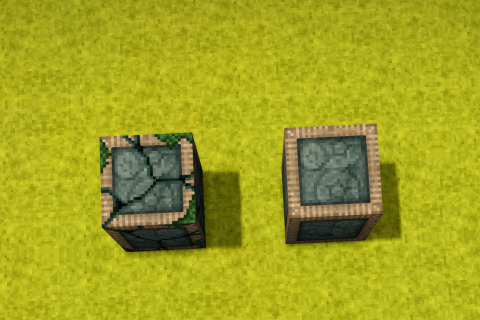
Mods / Weak Teleporter

Tags: #Other #QoL #Utility
Author: GreenSage
Side: Both
Created: Jun 21st at 7:36 PM
Last modified: Aug 7th at 6:24 AM
Downloads: 2366
Follow Unfollow 20

Latest release (for Vintage Story 1.20.12, outdated):
WeakTeleporter.zip  1-click install


This is a mod I made for a server. It's useful for multiplayer (or a map scenario/dungeon run, perhaps) where there are many towns so far apart that players can teleport to a certain town without making the other means of transportation (e.g., by boats, elk, or foot) obsolete.

  • The weak teleporter will only allow players to be teleported (unlike the vanilla teleporter, which allows all entities). Like the vanilla teleporter, you can select the destination in creative mode + right-click the block. So, 1-way or 2-way teleporting is highly configurable.
  • It also checks the player's inventory for banned items similar to the portal in the game Valheim (configurable in AppData\Roaming\VintagestoryData\ModConfig). So players still have to rely on long-distance travel options such as boats, elks to open trade routes between distant towns.
  • By default, the "weak teleporter" and the "tuning fork" are not craftable. However, you can change "isCraftable" to true in the ModConfig to enable crafting them.
  • The "Tuning Fork" is an item that can be used in Survival Mode to configure the "Weak Teleporter" and SHIFT + RIGHTCLICK any placed "Weak Teleporter" to drop it as an item on the ground.
  • To protect your "Weak Teleporter" in multiplayer from being reconfigured, make sure that you claim the area!!!
 

Other Mods Compatibility:
* Carry On Mod: Players that have a carried-on block (chest, reed chest, .etc) with them will not be able to be teleported with the Weak Teleporter 


This mod features an extensive way to ban items in the ModConfig. Check the guide below.

Guide On Configuration

There are 3 main ways you can ban an item

1. Ban a specific item

You can write an item code in string format, such as "flaxtwine" like this:

  "BannedItemCodes": [
    "flaxtwine"
  ],

You can search for item codes in this wiki: https://wiki.vintagestory.at/Special:MyLanguage/Item_codes
Or you can turn on Developer Mode and see the item codes in-game: Settings -> Interfaces -> Developer Mode

2. Ban a group of items using wildcard

Notice that in the vanilla version, item codes (like above) are written with an organized prefix (or suffix). For example :

  • fish-raw
  • fish-cooked
  • fish-cured

Therefore, you can use wildcards to ban anything starting with fish:

    "BannedItemWildcards": [
      "fish-*",
    ],

ending with fish:

    "BannedItemWildcards": [
      "*fish",
    ],

or has a "fish" string somewhere in the middle of the item codes:

    "BannedItemWildcards": [
      "*fish*",
    ],

The last example above, "*fish*", should normally be avoided, because you are banning everything that has the word "fish" but might not be related, e.g., "fish-trap", "clothing-fisherman", "fishscale".

3. Lastly, you can ban a certain class of the items

I imagine that not ALL modders follow the convention of item code naming as in vanilla, so if you have a bunch of mods installed and are not sure about the item codes of those installed mods, you have a last powerful option, which is banning the class of items. All items in Vintage Story are inherited from a certain class of code. For example, a poultice has its code written like this:

 public class ItemPoultice : Item, ICanHealCreature 

Let's say a modder makes a mod that increases the healing effect of poultice or adds many other different types of poultice, chances are they will use "ItemPoultice" class or "ICanHealCreature" class. Therefore, you can ban all poultices using:

 "BannedClassTypes": [
      "Vintagestory.GameContent.ItemPoultice"
    ],

Or if you want to go a step further, ban all healing items:

 "BannedClassTypes": [
      "Vintagestory.GameContent.ICanHealCreature"
    ],
Or you require players to be completely naked to teleport:
 "BannedClassTypes": [
      "Vintagestory.GameContent.Item"
    ],

The prefix "I" in "ICanHealCreature" stands for "Interface", btw, some have this prefix, some do not. Here is where you find out the "code" classes of items: https://github.com/anegostudios. You just need to anticipate which item class the modder uses, or check their code, if it's available on GitHub.

Further explanation on banning using class Let's work with an example of a "poultice". Upon landing on the Github page of Vintage Story (at https://github.com/anegostudios), use the top right search bar in GitHub, and type in "poultice". You should see only 1 result. In case of multiple results, select the one with the tag "class" in front of it. Then you should see a code file like this:

using System;
using System.Text;
using Vintagestory.API.Client;
using Vintagestory.API.Common;
using Vintagestory.API.Common.Entities;
using Vintagestory.API.Config;
using Vintagestory.API.Datastructures;
using Vintagestory.API.Util;

#nullable disable

namespace Vintagestory.GameContent
{
    public class ItemPoultice : Item, ICanHealCreature
    {
        public override void OnHeldInteractStart(ItemSlot slot, EntityAgent byEntity, BlockSelection blockSel, EntitySelection entitySel, bool firstEvent, ref EnumHandHandling handling)
        {
...
What you should look for is the namespace line, in this case, "namespace Vintagestory.GameContent", remember this "Vintagestory.GameContent", you need to specify the namespace in the config as well. Next, you should see the class signature "public class ItemPoultice : Item, ICanHealCreature". This simply means the ItemPoultice is derived from the class "Item", and "ICanHealCreature". If a mod adds multiple new types of poultice, they likely inherit this "ItemPoultice" class. Also, they might have renamed it to something like "ItemPoulticeAdvanced". So the chain of inheritance would look like this: "ItemPoulticeAdvanced → ItemPoultice → ICanHealCreature". The problem is you might not know what the modder named their class (if their code is not on Github), or you might want to ban all kinds of Poultice, so instead of writing:
 "BannedClassTypes": [
      "Vintagestory.GameContent.ItemPoulticeAdvanced"
    ],
You can simply write:
 "BannedClassTypes": [
      "Vintagestory.GameContent.ItemPoultice"
    ],

Note that by banning "Vintagestory.GameContent.ItemPoultice", you ban the "ItemPoultice" itself and any items that are the offspring of this class (child, grandchild, great-grandchild, etc.). So if you now install another mod extension that has a class called ItemPoulticeAdvanced2, which is a child of ItemPoulticeAdvanced, this would also be banned (without you changing the config). The inheritance tree looks like this: "ItemPoulticeAdvanced2ItemPoulticeAdvancedItemPoultice → ICanHealCreature".

Now let's get back to the namespace issue, you need to make sure that you use the correct namespace, sometimes, it could be "Vintagestory.API.Common." instead of "Vintagestory.GameContent." so you need to go to the Github page of VintageStory to confirm that.

Mod Version Mod IdentifierFor Game version Downloads Released Changelog Download 1-click mod install*
1.1.2 weakteleporter 1043 Aug 7th at 6:24 AM WeakTeleporter.zip 1-click install

* Notification to player now includes the item name

1.1.1 weakteleporter
1.20.0 - 1.20.3 1.20.5 - 1.20.7 1.20.8 - 1.20.10 1.20.11 - 1.20.12
143 Jul 20th at 9:06 AM WeakTeleporter.zip 1-click install

* Add Carry On Compatibility

1.1.0 weakteleporter
1.20.1 - 1.20.3 1.20.5 - 1.20.7 1.20.8 - 1.20.10 1.20.11 - 1.20.12
83 Jul 11th at 9:55 PM WeakTeleporter.zip 1-click install

Add recipe for the "weak teleporter" itself and the "tuning fork"

1.0.4 weakteleporter
1.20.0 - 1.20.3 1.20.5 - 1.20.7 1.20.8 - 1.20.10 1.20.11 - 1.20.12
768 Jun 26th at 4:48 PM WeakTeleporter.zip 1-click install

* Writing wrong configs should now fail silently (with a warning in the console)

1.0.3 weakteleporter
1.20.0 - 1.20.3 1.20.5 - 1.20.7 1.20.8 - 1.20.10 1.20.11 - 1.20.12
103 Jun 25th at 5:35 PM WeakTeleporter.zip 1-click install
  • Fixed ModConfig file not generated on servers
1.0.2 weakteleporter
1.20.0 - 1.20.3 1.20.5 - 1.20.7 1.20.8 - 1.20.10 1.20.11 - 1.20.12
165 Jun 22nd at 12:28 PM WeakTeleporter.zip 1-click install
  • Fix wildcard banning in mod config
  • Fix class-based banning in mod config
1.0.1 weakteleporter
1.20.0 - 1.20.3 1.20.5 - 1.20.7 1.20.8 - 1.20.10 1.20.11 - 1.20.12
34 Jun 21st at 9:17 PM WeakTeleporter.zip 1-click install
  • Fix the Config File not reading properly
1.0.0 weakteleporter
1.20.0 - 1.20.3 1.20.5 - 1.20.7 1.20.8 - 1.20.10 1.20.11 - 1.20.12
27 Jun 21st at 7:39 PM WeakTeleporter.zip 1-click install

First release


13 Comments (oldest first | newest first)

💬 Willownezz, Nov 9th at 5:17 PM

Would it be possible to make the distance you can teleport configurable?

💬 DilanRona, Aug 8th at 11:53 AM

If I am going to need a tuning fork, then it is not going to help me much then for my project tbh.

💬 GreenSage , Jul 23rd at 6:22 PM

@DilanRona Yes, you can use the Tuning Fork, but remember to turn it on in mod config.

💬 DilanRona, Jul 23rd at 6:41 AM

    Like the vanilla teleporter, you can select the destination in creative mode + right-click the block.

Is it possible to have the same functionality like that, but in survival? Specifically in cases where you are stepping on the block, and you need to select a destination. Then have the weak teleporter take you to the destination. I am busy with a large build (voyager) that uses turboshafts. And I need to replicate them in some way.

💬 Rhapsody, Jul 12th at 3:28 AM

GreenSage Thanks for your hard work, I'll give it a look!

💬 GreenSage , Jul 11th at 10:01 PM

Ramaya Done! Have fun, if you run into any bugs feel free to let me know.

💬 Ramaya, Jul 11th at 2:36 PM

GreenSage Thanks a lot for the awesome mod! Could you please add the recipe to the config in the next update? That would be super helpful 🙏

💬 GreenSage , Jul 3rd at 6:49 AM

@Rhapsody: Yeah, TP is quite gameplay-breaking (only my personal opinion), so this was meant to be creative only.
Having said that, I can add a recipe for you since it's not complicated to do so. But it'll be off by default, you'll need to check out the config to turn it on in the next mod update.

💬 Rhapsody, Jul 2nd at 8:31 AM

Hi Sage, first, I love the texture on the teleporter, it's a cool look.

I installed it and had a look (I've wanted to craft creative teleporters so bad I'm slowly getting into modding), but I'm misunderstaning something. Is there a way to craft it? It looks like a creative only block.

💬 GreenSage , Jun 25th at 3:18 PM

WickedSchnitzel Oops, I forgot to set that for servers, thanks for letting me know!

💬 WickedSchnitzel, Jun 25th at 1:28 PM

It does not seem to generate a mod config json on servers.

💬 GreenSage , Jun 22nd at 4:54 PM

Guimoute: Thank you! 😀

💬 Guimoute, Jun 22nd at 1:26 PM

Lovely art!

 (edit comment delete)
Основной веб-сайт | Почтовый сервер | FTP сервер | Административная панель | API интерфейс | Content Delivery Network | Статические файлы | Ресурсы сайта | Изображения | Файловое хранилище | Блог | Интернет-магазин | Техническая поддержка | Справочная система | Документация | Форум | Новости | Загрузки | Демонстрация | Тестовая среда | Приложение | Медиа контент | Разработка | Промежуточная среда | Бета версия | Безопасная зона | Вход в систему | Панель управления | Портал | Система управления контентом