
Mods / Vanity
Author: Darkbrook
Side: Both
Created: Aug 16th 2023 at 9:46 PM
Last modified: Nov 6th at 2:12 PM
Downloads: 86065
Follow Unfollow 809
Recommended download (for Vintage Story 1.21.0 - 1.21.5):
Vanity-2.4.6.zip
1-click install
Make your gear invisible to show off your style!—or just run around naked, I guess?
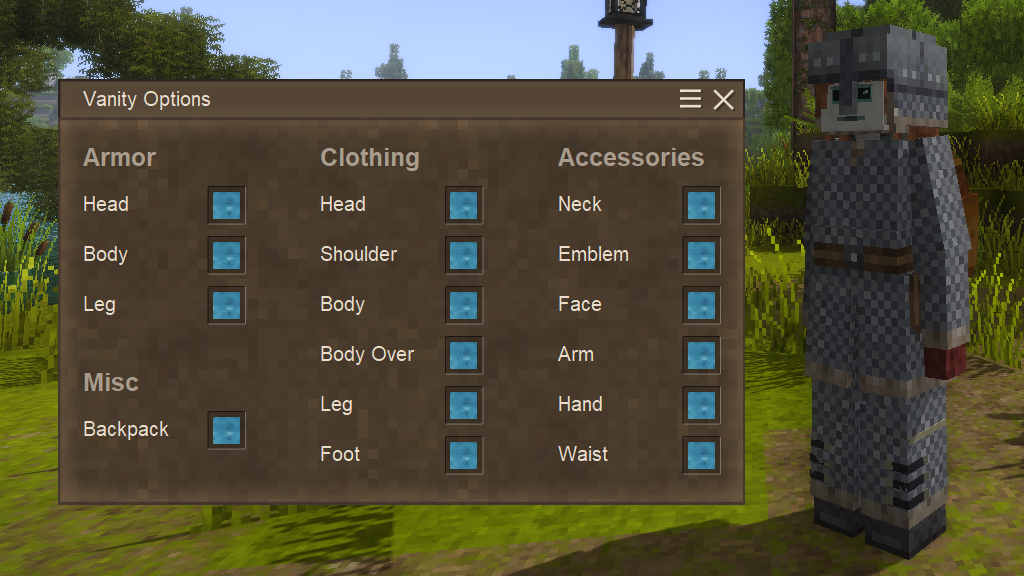
Press [V] to open the vanity options menu to individually hide your armor, clothing, accessories, and backpack. Vanity is required on the server for these visibility settings to update between players.
Wearable hiding can be restricted by modifying the “ModConfig/Vanity-Server.json” config. By default, all values are set to ‘true’, allowing all wearables to be hidden.
If you're a mod developer or come across a mod that adds extra gear inventory slots (e.g., Combat Overhaul), you can assign these slots to a vanity option type.
Default Implementations:
assets/vanity/config/vanityslots.json
{
"ArmorHead": [12],
"ArmorBody": [13],
"ArmorLegs": [14],
"Head": [0],
"Shoulder": [1],
"UpperBody": [2],
"UpperBodyOver": [11],
"LowerBody": [3],
"Foot": [4],
"Neck": [6],
"Emblem": [7],
"Face": [8],
"Arm": [10],
"Hand": [5],
"Waist": [9]
}
assets/combatoverhaul/config/vanityslots.json
{
    "ArmorHead": [15, 16, 17, 23, 24, 25, 31, 32, 33],
    "ArmorBody": [18, 19, 20, 26, 27, 28, 34, 35, 36],
    "ArmorLegs": [21, 22, 29, 30, 37, 38]
}
| Mod Version | Mod Identifier | For Game version | Downloads | Released | Changelog | Download | 1-click mod install* |
|---|---|---|---|---|---|---|---|
| 2.4.6 | vanity | 5679 | Nov 6th at 2:12 PM | Vanity-2.4.6.zip | 1-click install | ||
| |||||||
| 2.4.5 | vanity | 2668 | Nov 5th at 1:12 PM | Vanity-2.4.5.zip | 1-click install | ||
| |||||||
| 2.4.4 | vanity | 15416 | Sep 12th at 10:43 AM | Vanity-2.4.4.zip | 1-click install | ||
| |||||||
| 2.4.3 | vanity | 4993 | Aug 22nd at 1:30 PM | Vanity-2.4.3.zip | 1-click install | ||
| |||||||
| 2.4.2 | vanity | 21601 | Mar 9th at 4:14 AM | Vanity-2.4.2.zip | 1-click install | ||
| |||||||
| 2.4.1 | vanity | 4513 | Mar 1st at 5:18 AM | Vanity-2.4.1.zip | 1-click install | ||
| |||||||
| 2.4.0 | vanity | 998 | Feb 26th at 1:37 PM | Vanity-2.4.0.zip | 1-click install | ||
| |||||||
| 2.3.1 | vanity | 11678 | Jan 8th at 8:02 AM | Vanity-2.3.1.zip | 1-click install | ||
| |||||||
| 2.3.0 | vanity | 313 | Jan 5th at 2:32 PM | Vanity-2.3.0.zip | 1-click install | ||
| |||||||
| 2.2.1 | vanity | 2224 | Sep 29th 2024 at 10:53 AM | Vanity-2.2.1.zip | 1-click install | ||
| |||||||
| 2.2.0 | vanity | 7534 | Jul 1st 2024 at 4:01 PM | Vanity-2.2.0.zip | 1-click install | ||
| |||||||
| 2.1.2 | vanity | 6657 | Mar 18th 2024 at 5:33 PM | Vanity-2.1.2.zip | 1-click install | ||
| |||||||
| 2.1.1 | vanity | 415 | Mar 14th 2024 at 1:07 AM | Vanity-2.1.1.zip | 1-click install | ||
| |||||||
| 2.1.0 | vanity | 279 | Mar 10th 2024 at 11:59 PM | Vanity-2.1.0.zip | 1-click install | ||
| |||||||
| 2.0.0 | vanity | 252 | Mar 9th 2024 at 10:12 PM | Vanity-2.0.0.zip | 1-click install | ||
| |||||||
| 1.0.0 | vanity | 845 | Aug 16th 2023 at 10:42 PM | Empty | vanity_1.0.0.zip | 1-click install | |
Is there a compatibility patch for Combat Overhault?
I had the strangest bug. With this mod, after visiting the village and getting a haircut, nothing would toggle visibility anymore... but only for me. Others saw the armor/bags I was wearing but had disabled, but I still saw other players wearing only what they had enabled. Nothing I did with the check boxes changed things.
A restart of the server and everyone rejoining solved the issue, but how strange is that!
Seems like this mod is incompatible with "BackpackPackPlus Continued". I toggle the backpack off and it just loses it's texture and becomes white. Are there any Backpack mods that work with this mod?
The newest update seems to have made any apparel that use non-vanilla slots invisible, like the sheaths and headlamps from maltiez's mods.
what would it take to make this mod integrated with the layered armour from combat overhaul?
Encountered several crashes and decided to look into it. Found out vanity spams the log with mapping errors and then crashes.With spam i mean literally spam.. 164 entries per second....
[Warning] No vanity mapping found for slot index '55'. Gear visibility for this slot remains unchanged.
index goes from 15 to 55... CarryOn and Quivers & Sheaths are the only mods we use that adds slots.
I keep crashing, I am using CO
Blessed mod, glad to see it's still working!
Would a Combat Overhaul compability patch that enables hiding individual armor layers be possible?
FWIW, I was having that issue with only ConfigLib installed and never really using any mod settings to mess with it. Arisilde MRGOOSE. Don't have OverhalLib installed.
I actually came to this mod to see if toggling off and on clothing would remove the scrambled textures, as otherwise only relogging seems to work for me.
This issue looks a lot like what I was seeing (I do have a sailboat, but been iced in all winter so haven't messed with it in a while) https://github.com/anegostudios/VintageStory-Issues/issues/6857
Having same issue as Arisilde
FYI, Vanity seems to be misbehaving with the newest version of OverhaulLib for some reason. Seems to be causing all textures on other players in MP to get scrambled. Rolling back ConfigLib or removing Vanity both resolved the issue.
Is Vanity able to cooperate with Carry On, to hide the carried items?
Combat Overhaul with OverhaulLib causes disappearing hair when a helmet is worn but hidden. Maltiez had suggestions on what the exact conflict is, but it's apparently in Vanity. Thought you should be told here in addition to the discord, in case you don't check there often! 👍
I have no such mod installed. I only have the vanilla gear slots unless Carry On, or Primitive Survival add one? Those are the only ones i can think of in my mod list that even could add slots.
Akari_Enderwolf "No vanity mapping found" usually relates to having a mod installed that adds gear slots unrecognized by vanity.
After testing I've found the cause of the issue I'm having is not the vanity mod, however I am curious why that one error shows up from it when interacting with my boat or with traders.
I'm getting a weird rendering error when I put my lantern on my boat
This shows up in my client log whenever i put my lantern on my boat, the rendering error sometimes doesn't show the lantern but does show floating glass, or it will show the lantern but with discolored glass. This is the only log that shows up across Client and Server when I place my lantern on my boat.
[Warning] No vanity mapping found for slot index '15'. Gear visibility for this slot remains unchanged.
It goes through slots 15-31 in the log.
I've also noticed rendering errors on some traders, and when I first pick up some armor or other clothing items from loot.
Going to test if these rendering issues happen with Vanity turned off in the mod settings, so I can make sure.
So far testing is inconclusive, but I'm gonna keep playing without vanity for a bit to see if the rendering errors show up again at all.
Tehgarin This is a bug in the base game that was fixed in prior version and appeared again in 1.21
anyone else having the hat showing when you have shoulders on and its a hooded. Item. I have a rain poncho on shoulders and hat checked also and hat goes on over poncho.? Before it just didnt show since poncho was already on head.? Is this normal.?
Help..
Just want to say THANK YOU for keeping this updated. SO nice to easily remove things you dont want shown like Backpack while chilling in city ....
Wish they would add this to main game.
There are more slots in overhaul lib now, btw
Tested what Willownezz reported and cannot reproduce the issue in 1.21
The mask is hidden and my beard is fine, so it's probably some mod conflict on their end.
Haven't found any issues, thank you for the quick update!
Willownezz Are you using any other mods, such as Player Model lib?
I found a little bug when I use the newest version on 1.21, if I remove, for example, the mask from showing on my character, it will also remove the beard from my face lol
_Ale1ster Are you using any mods that add extra equipment slots?
love this mod. any plans to update for 1.21?
I got 2 crashes in a row, and saw this at the end of my client-main.log: "28.7.2025 23:17:09 [Warning] No vanity mapping found for slot index '39'. Gear visibility for this slot remains unchanged." this entry was repeated for slot index 39-44
I'm just curious if anything obvious occurs to anyone as to what causes this. Thanks in advance.
Hi hi, just coming to say it isnt compatible with the female seraphim models using the Player Model Lib ;w; Gonna go cry now, just wanted to PSA ;w;
;w;
Love this mod and it hurt me to take it off LOL I have been doing everything in my power to keep it but Femininity breaks Beasts of Men and then Beasts of Men breaks Vanity LOL -Throws hands up in defeat-
Hey everyone, I've been busy with other projects lately, but don't worry, I still intend to support Vanity's development.
Kara Rhyagelle I tested versions 1.20.9 to 1.20.12 with a fresh install, and they all worked on singleplayer. The issue you're experiencing is most likely either cache-related or due to a mod conflict, unless there's something wrong that's multiplayer specific. I'll keep you posted if I find anything out from further testing.
Willownezz That crash seems to be caused by the Scroll in Character Creation mod. Vanity shows up in the log because it also hooks into GuiDialogCreateCharacter, but isn't related to the crash.
Montcalm MRGOOSE More configurable Combat Overhaul support is planned, but it's going to require a fair bit of recoding, so I'm not sure when it will be released.
Rhyagelle Expect a compatibility update in the near future.
can we have more buttons for armor visbility when using combat overhaul? for all slots such as legs, arms, neck, torso etc
Please, if you do not mind, might we get an update to the latest stable? I really love this mod, and so do my friends. y-y
Please update to 1.21.0-pre.1. Crashes in the new version.
https://mclo.gs/KaxFVZ7
I am having a crash with this mod and Scroll in Character Creation
Game Version: v1.20.11 (Stable)
5/30/2025 2:19:46 PM: Critical error occurred in the following mod: vanity@2.4.2
Loaded Mods: aculinaryartillery@1.2.5, antlershorns@1.0.1, chiseltools@1.14.18, ClaimsRadar@1.1.0, cwmodular@1.0.9, goblinears@2.1.1, millwright@1.2.1, moreicons_cs@1.1.0, NavarlioClasses@1.1.1, navarliocustoms@1.9.2, nightwatcher@2.2.0, primitivesurvival@3.7.7, sortablestorage@2.3.1, temporiumdamascus@1.0.1, game@1.20.11, AbsoluteProspecting@1.500.02, accessibilitytweaks@3.8.4, alchemy@1.6.50, animalcages@3.2.2, apegrapes@1.2.6, yipyipyap@4.4.0, canmarket@0.4.20, carryon@1.8.0, commonlib@2.6.1, expandedfoods@1.7.4, fairplayguardian@1.1.9, fromgoldencombs@1.8.12, minimalcompass@1.1.3, mobsradar@2.1.6, petai@3.4.3, rifteye@0.4.1, stonebakeoven@1.1.6, tabletopgames@2.10.4, vanity@2.4.2, vinconomy@0.4.0, creative@1.20.11, survival@1.20.11, xlib@0.8.16, playercorpse@1.11.1, stonequarry@3.4.3, wolftaming@3.0.6, xskills@0.8.19
Involved Harmony IDs: vanity
System.Collections.Generic.KeyNotFoundException: The given key 'Head' was not present in the dictionary.
at Vanity.System.VanitySystemClient.ShouldRenderGear(Entity entity, Int32 slotIndex) in Vanity\System\VanitySystemClient.cs:line 42
at Vintagestory.GameContent.EntityBehaviorExtraSkinnable.OnTesselation_Patch0(EntityBehaviorExtraSkinnable this, Shape& entityShape, String shapePathForLogging, Boolean& shapeIsCloned, String[]& willDeleteElements)
at Vintagestory.API.Common.Entities.Entity.OnTesselation(Shape& entityShape, String shapePathForLogging, Boolean& shapeIsCloned)
at Vintagestory.API.Common.EntityPlayer.OnTesselation(Shape& entityShape, String shapePathForLogging) in VintagestoryApi\Common\Entity\EntityPlayer.cs:line 425
at Vintagestory.GameContent.EntityShapeRenderer.TesselateShape(Action`1 onMeshDataReady, String[] overrideSelectiveElements) in VSEssentials\EntityRenderer\EntityShapeRenderer.cs:line 229
at Vintagestory.GameContent.EntityShapeRenderer.TesselateShape() in VSEssentials\EntityRenderer\EntityShapeRenderer.cs:line 193
at Vintagestory.GameContent.EntityPlayerShapeRenderer.TesselateShape() in VSEssentials\EntityRenderer\EntityPlayerShapeRenderer.cs:line 53
at Vintagestory.GameContent.EntityShapeRenderer.BeforeRender(Single dt) in VSEssentials\EntityRenderer\EntityShapeRenderer.cs:line 393
at Vintagestory.Client.NoObf.SystemRenderEntities.OnBeforeRender(Single dt) in VintagestoryLib\Client\Systems\Render\RenderEntities.cs:line 82
at Vintagestory.Client.NoObf.ClientEventManager.TriggerRenderStage(EnumRenderStage stage, Single dt) in VintagestoryLib\Client\Util\ClientEventManager.cs:line 188
at Vintagestory.Client.NoObf.ClientMain.MainRenderLoop(Single dt) in VintagestoryLib\Client\ClientMain.cs:line 825
at Vintagestory.Client.GuiScreenRunningGame.RenderToPrimary(Single dt) in VintagestoryLib\Client\MainMenu\Screens\GuiScreenRunningGame.cs:line 161
at Vintagestory.Client.ScreenManager.Render(Single dt) in VintagestoryLib\Client\ScreenManager.cs:line 695
at Vintagestory.Client.ScreenManager.OnNewFrame(Single dt) in VintagestoryLib\Client\ScreenManager.cs:line 670
at Vintagestory.Client.NoObf.ClientPlatformWindows.window_RenderFrame(FrameEventArgs e) in VintagestoryLib\Client\ClientPlatform\GameWindow.cs:line 88
at OpenTK.Windowing.Desktop.GameWindow.Run()
at Vintagestory.Client.ClientProgram.Start(ClientProgramArgs args, String[] rawArgs) in VintagestoryLib\Client\ClientProgram.cs:line 334
at Vintagestory.Client.ClientProgram.<>c__DisplayClass10_0.<.ctor>b__1() in VintagestoryLib\Client\ClientProgram.cs:line 130
at Vintagestory.ClientNative.CrashReporter.Start(ThreadStart start) in VintagestoryLib\Client\ClientPlatform\ClientNative\CrashReporter.cs:line 93
Same crash is also happening on 1.20.10 for another player.
Darkbrook I traslated mod to Spanish Spain (es-es)
i wonder what it would take to add in support for CO's armour layers
Does anyone know if this conflicts with Combat Overhaul: Armory? It adds multiple head/torso/leg layers of armour.
Edit: it does not, but all layers of each body part are toggled simultaneously.
ManaWei KiraKira As far I can tell, the latest version of Vanity works properly on 1.20.8 in both singleplayer and multiplayer.
seem to work just fine atleast on client side for 1.20.7?
Any progress on the mod being fixed..? :(
I miss this mod <3 hope you find a solution soon <3
Viceroy Seems like 1.20 may have broke the way mods are loaded: Vanity is supposed to disable if it's not on the server. I'll put in a bug report and look into patching it on my end in the meantime.
Removed the mod from the server and players crash up on joining the server. Crash log says it's due to Vanity. Had to reinstall. Could you please fix? Thanks.
Foxtrot88 It exists in the controls tab as "Open Vanity Options"
A configurable button for vanity options would be fine, as V can conflict with some other mods
Small thing, would an abilityto size up the belts be something that would be possible? I like the belts in the game but I hate how they aren't visible under most armors
ThatLamer Thanks for the heads up, issue is fixed in Vanity 2.4.1
Since updating to 1.20.4 and downloading the latest vanity build, it appears to only work client side in MP. Running CO as well.
SpookiBoo There is an existing configurable hotkey under the controls tab named: Open Vanity Options
Would you consider making the hotkey configurable?
cool thanks for update
CamperCombo Yep!
Has the Combat Overhaul patch been implemented?
It took me half a month to figure out why this doesn't work with combat overhaul and WHAT are those weird armor slots xDDDD
AzuliBluespots Currently, armor can't be hidden while using 'Combat Overhaul: Armory'. I've identified how to make the mod compatible with Vanity, and am working on an update.
I'm trying to make this work, but it seems I can't hide armor at all, at least not the tailored gambeson.
I changed around a few mods to see if it was something on my list interfering, and besides DanaCraluminium taking the V key as an autowalk bind, changing yours to shift+V wasn't an issue.
Still, the armor won't be hidden no matter if it's with a body modification mod, with a combat/equipment modification mod, or without either. I CAN hide the clothing, as you can see from the screenshot.
No, i did not do anything to prevent it from being hidden. Not on purpose.
WickedSchnitzel Odd, no logged issues with vanity when I join CoB. Although, vanity is unable to hide the 'I Love CoB' shirt, unsure if this is by design on your end.
Please check out the following post on the official issue tracker on github: https://github.com/anegostudios/VintageStory-Issues/issues/4243#issuecomment-2564557323 Darkbrook
wojwojowski ShanaLarisar Given the demand I'll look into it once I have the time.
I'm also hoping for a compatability update for Combat Overhaul! Currently due to their new system of segmented armour parts not using the vanilla armour system, you cant hide your armour with it enabled. Additionally there seems to be an issue with the quiver from combat overhaul that goes in the belt slot not giving you the inventory space it should while Vanity is enabled. Love the mod!
hi. are you planing to make it work with combat overhaul armor parts?
Epic mod, thx for ur hard work!
pearllite YinTheGhost Thanks for the feedback! Both of these features will be in the next update. Most of the programming is already complete, so the update will most likely be released sometime this July.
I love this mod!!! Is there any way to get it to work like it does with the clothes underneath the armor as well? I play with the kemono mod, and would love to see my pony skin I made ^_^ !!!!
Would it be possible to add a server config that allows the server to say which parts the player are allowed to hide?
You need to set "RequiredOnClient" to true, else it won't auto-download while connecting to servers. Darkbrook
Wandour Client & Server
in order for it to function for all players in multi
we must also have it on client AND server?
or server is enough?
Ebic
Darkbrook
Thank you! I thought it was intentional and decided to test it and it worked
Either way, Awesome mod! was waiting for something like this!
I looked into the game code Vanity relies on and, to my surprise, found it unchanged from version 1.19.0 to 1.19.4. Therefore, Vanity 2.1.1 is functionally the same as, and network-compatible with, Vanity 2.1.0. The only difference is it can now be used on 1.19 versions prior to 1.19.4
adres4t It works fine for 1.19.3, but for some reason author decided to put a line to stop you from using it on that version.
In order to get it working on 1.19.3, download most recent version, open the zip and open modinfo.json. Change the dependencies line like this:
"dependencies": {
"game": ""
}
Image: https://imgur.com/a/9QyeIkY
And you are good to go. Go in game and press "V" key to open the menu.
Marogareh Not sure what the problem could be. There's a chance it could be conflicting with another mod if you have any installed? Just to clarify, articles of your hunter outfit won't be hidden by the mod; only wearables in the three armor slots to the far left. If the issue persists, you can message me on Discord for real-time troubleshooting.
Put this on our server, we all love it. your downloads would be higher, had it not been for 1.19.4 downloading issue, for modded servers >.<
And now we can hide the backpacks? This mod is incredible for multiplayer!
@Darkbrook This is what i tried but when i enable/disable the Equipment in the modmenu nothing changes
Would be nice to have it working in 1.19.3 if possible. Thank you.
I ADORE this mod! If I could have one thing, it would just be to have it mute the armor cachunk noises when you move. Idk why, but they pert near give me a headache sometimes. ;___;
Marogareh Make sure you uncheck the armor pieces you would like to hide in the Vanity Config (by default 'V' to access).
hiya! the mod itself works but it doesn't seem to hide my "armour". i wear the starter hunter outfit
Thank you for this!
now do backpack toggles 😍 ~~jk~~
What an enjoyable mod! It's quite good in multiplayer, where armor sets lack all sense of personality and take something away unless you take off the armor when there's no immediate danger. This mod solves that quite nicely.
THAAAANK YOU
can u make it so it effect every armor piece??
NICE!
god
YES please make it happen
That's a lovely little mod. Following this for 1.18.9.
IS THAT A HELMET?