
Mods / PlayerList
Author: BillyGalbreath
Side: Client
Created: Jul 28th 2023 at 9:05 AM
Last modified: Nov 17th at 2:19 AM
Downloads: 126904
Follow Unfollow 543
Recommended download (for Vintage Story 1.21.0 - 1.21.5):
PlayerList-2.3.4.zip
1-click install
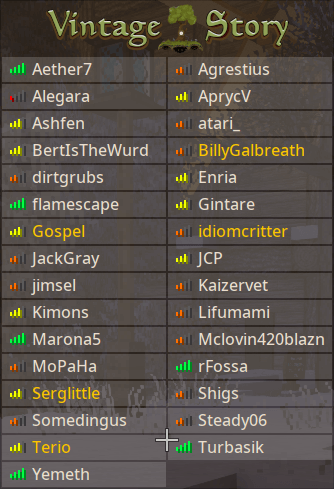
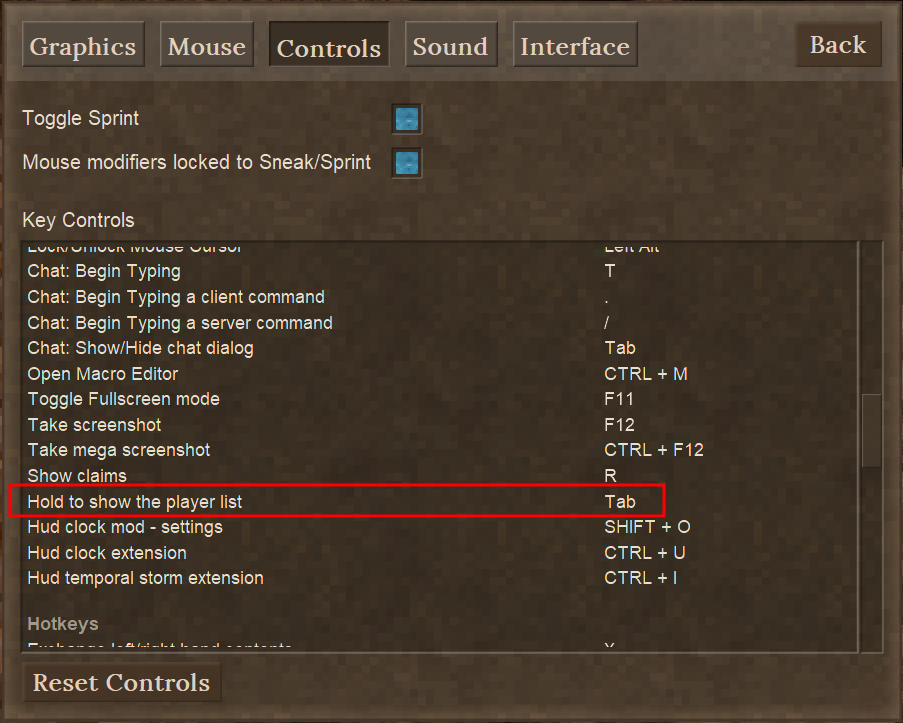
Shows a player list when you hold down tab (similar to Minecraft).
-------------------------------------------------------------------------------------------------------------
You can configure the ping thresholds using the config file at "VintagestoryData/ModConfig/playerlist.json"
You can set these for your own client, or your entire server. Server values have a higher priority.
-------------------------------------------------------------------------------------------------------------
Servers can add their own header and footer text and even a logo image to the list. Just open the playerlist.json file and add the strings you want. VTML is supported.
These variables are also supported:
- ServerName - Displays the server name that's specified in serverconfig.json
- MaxPlayers - The maximum number of players allowed
- CurPlayers - The current amount of connected players
- Month - The in-game month
- Day - The in-game day
- Year - The in-game year
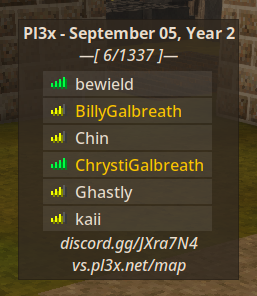
An example for most of these variables can be seen on my Pl3x server.

Here is the config for that:
{
  "thresholds": [ 100, 250, 500 ],
  "logo": "",
  "header": "<strong>Pl3x - {Month} {Day}, Year {Year}</strong>\n<i>\u2014\u005b {CurPlayers}/{MaxPlayers} \u005d\u2014</i>",
  "footer": "<i>discord.gg/JXra7N4\nvs.pl3x.net/map</i>"
}
-------------------------------------------------------------------------------------------------------------
The logo image can be configured, as well.
Default logo image:

{
  "thresholds": [ 100, 250, 500 ],
  "logo": "playerlist:textures/vs_logo.png"
}
Sample custom logo:

{
  "thresholds": [ 100, 250, 500 ],
  "logo": "https://i.imgur.com/RoAU85m.png"
}
-------------------------------------------------------------------------------------------------------------
Remember, I build these mods for myself and my family. Not you. I owe you nothing. I just like sharing what I've built with others for free. You will receive minimal to no support when using any of my mods.
-------------------------------------------------------------------------------------------------------------
| Mod Version | Mod Identifier | For Game version | Downloads | Released | Changelog | Download | 1-click mod install* |
|---|---|---|---|---|---|---|---|
| 2.3.4 | playerlist | 4629 | Nov 17th at 2:19 AM | PlayerList-2.3.4.zip | 1-click install | ||
| 2.3.3 | playerlist | 3925 | Nov 12th at 1:13 AM | PlayerList-2.3.3.zip | 1-click install | ||
| 2.3.2 | playerlist | 407 | Nov 11th at 7:56 PM | PlayerList-2.3.2.zip | 1-click install | ||
|
[e817d86] add configurable name truncation, default 20 characters | |||||||
| 2.3.1 | playerlist | 95 | Nov 11th at 4:23 PM | PlayerList-2.3.1.zip | 1-click install | ||
|
[38778fc] fix scaling issue | |||||||
| 2.3.0 | playerlist | 104 | Nov 11th at 2:16 PM | PlayerList-2.3.0.zip | 1-click install | ||
|
[0d279cb] add logo image support | |||||||
| 2.2.0 | playerlist | 325 | Nov 10th at 10:18 PM | PlayerList-2.2.0.zip | 1-click install | ||
| 2.1.5 | playerlist | 77771 | Dec 21st 2024 at 4:35 PM | PlayerList-2.1.5.zip | 1-click install | ||
| 2.1.4 | playerlist | 8946 | Aug 1st 2024 at 6:10 PM | PlayerList-2.1.4.zip | 1-click install | ||
|
[92950ad] another try at fixing the null reference | |||||||
| 2.1.3 | playerlist | 203 | Aug 1st 2024 at 5:43 PM | PlayerList-2.1.3.zip | 1-click install | ||
|
[5bb1b1d] fix possible null reference | |||||||
| 2.1.2 | playerlist | 4528 | Jun 16th 2024 at 9:09 AM | PlayerList-2.1.2.zip | 1-click install | ||
|
[af1ffd5] rewrite ui from ground up | |||||||
| 2.1.1 | playerlist | 456 | Jun 15th 2024 at 5:27 AM | PlayerList-2.1.1.zip | 1-click install | ||
| 2.1.0 | playerlist | 173 | Jun 15th 2024 at 2:25 AM | PlayerList-2.1.0.zip | 1-click install | ||
|
[f85fa94] set up run configurations | |||||||
| 2.0.4 | playerlist | 761 | Jun 12th 2024 at 10:31 PM | PlayerList-2.0.4.zip | 1-click install | ||
| 2.0.3 | playerlist | 190 | Jun 12th 2024 at 8:41 PM | PlayerList-2.0.3.zip | 1-click install | ||
|
[2ca5e0a] fix client overriding server thresholds after reload | |||||||
| 2.0.2 | playerlist | 304 | Jun 12th 2024 at 8:11 PM | PlayerList-2.0.2.zip | 1-click install | ||
|
[eed4de6] fix protobuf issue on servers | |||||||
| 2.0.1 | playerlist | 172 | Jun 12th 2024 at 7:57 PM | PlayerList-2.0.1.zip | 1-click install | ||
| 2.0.0 | playerlist | 212 | Jun 12th 2024 at 7:26 PM | PlayerList-2.0.0.zip | 1-click install | ||
| 1.8.1 | playerlist | 4285 | Apr 29th 2024 at 5:15 AM | PlayerList-1.8.1.zip | 1-click install | ||
|
Note: This version drops support for all versions below 1.19.4 due to a game bug in multiplayer that created an endless download loop. If you use one of these versions you can stick to v1.8.0 of this mod. Nothing else of importance has been updated. | |||||||
| 1.8.0 | playerlist | 5159 | Feb 7th 2024 at 4:43 PM | PlayerList-1.8.0.zip | 1-click install | ||
|
[eb85715] make ping thresholds configurable (client and server sides) | |||||||
| 1.7.4 | playerlist | 806 | Feb 4th 2024 at 7:43 PM | PlayerList-1.7.4.zip | 1-click install | ||
|
[a3a7ef3] fix color cloning issue | |||||||
| 1.7.3 | playerlist | 759 | Jan 30th 2024 at 2:47 PM | PlayerList-1.7.3.zip | 1-click install | ||
|
[89e1253] fix possible edge case concurrent issues | |||||||
| 1.7.2 | playerlist | 475 | Jan 28th 2024 at 1:26 AM | PlayerList-1.7.2.zip | 1-click install | ||
| 1.7.1 | playerlist | 261 | Jan 24th 2024 at 9:28 PM | PlayerList-1.7.1.zip | 1-click install | ||
|
DO NOT DOWNLOAD - THIS VERSION IS BROKEN! [6b3565a] let's try this side combination | |||||||
| 1.7.0 | playerlist | 195 | Jan 24th 2024 at 9:10 PM | PlayerList-1.7.0.zip | 1-click install | ||
| 1.6.0 | playerlist | 7390 | Sep 14th 2023 at 4:08 PM | PlayerList-1.6.0.zip | 1-click install | ||
| 1.5.2 | playerlist | 690 | Sep 7th 2023 at 12:37 AM | PlayerList-1.5.2.zip | 1-click install | ||
|
[3078bc9] add lang file for translations | |||||||
| 1.5.1 | playerlist | 1005 | Aug 10th 2023 at 6:03 AM | PlayerList-1.5.1.zip | 1-click install | ||
|
fix player list not showing up at all | |||||||
| 1.5.0 | playerlist | 244 | Aug 10th 2023 at 3:22 AM | PlayerList-1.5.0.zip | 1-click install | ||
|
fix players remaining on tab list after disconnecting | |||||||
| 1.4.0 | playerlist | 362 | Aug 6th 2023 at 12:04 PM | PlayerList-1.4.0.zip | 1-click install | ||
|
Fixed issue where client side only installs did not correctly handle keyboard/mouse inputs | |||||||
| 1.3.0 | playerlist | 354 | Aug 3rd 2023 at 1:42 PM | PlayerList-1.3.0.zip | 1-click install | ||
|
no longer require server side for ping | |||||||
| 1.2.0 | playerlist | 385 | Jul 29th 2023 at 11:23 PM | PlayerList-1.2.0.zip | 1-click install | ||
|
add support for colored entitlements (thanks for the suggestion DanaCraluminum) | |||||||
| 1.1.1 | playerlist | 279 | Jul 29th 2023 at 3:00 AM | PlayerList-1.1.1.zip | 1-click install | ||
|
remove left over debug spam | |||||||
| 1.1.0 | playerlist | 257 | Jul 29th 2023 at 2:54 AM | PlayerList-1.1.0.zip | 1-click install | ||
|
add ping icons | |||||||
| 1.0.2 | playerlist | 269 | Jul 28th 2023 at 9:47 AM | PlayerList-1.0.2.zip | 1-click install | ||
|
apparently also has to be marked as required on server.. | |||||||
| 1.0.1 | playerlist | 266 | Jul 28th 2023 at 9:38 AM | PlayerList-1.0.1.zip | 1-click install | ||
|
Changed side to "Universal" so servers will send the mod to clients. | |||||||
| 1.0.0 | playerlist | 262 | Jul 28th 2023 at 9:09 AM | PlayerList-1.0.0.zip | 1-click install | ||
|
Initial release. | |||||||
why does the image not work? I added a custom one to imgur and it dont work
Great mod. Love it!
Would a current time variable also a possibility?
Fantastic mod, keep up the good work!
Thanks for update!
v2.3.4 now uses a local copy of the vs logo as the default image.
BillyGalbreath The missing image isn't super helpful as Imgur decided to simply transparently send a fallback image requests made from the UK. There isn't a clean way around this but at very least I assume you'd rather it not be "broken" by default.
Here is what it looks like on a busy server at 1080p with a GUI scale of 7 (any higher and it goes off the screen):
(I decided to go to the extra effort of uploading this to imgur because I found the irony amusing - hope you enjoy)
This doesn't actually impact me that much because I don't play on a 1080p screen but I figured this probably isn't the out of the box experience you had in mind. I've also made a post in the server in question suggesting that they may wish to change their config settings away from the current default.
Please make it possible to download images from the archive. Sites remove images over time
You can use any image you want hosted from anywhere you want Aphaeleon
I went ahead and added a "missing image" icon if the logo fails to load in v2.3.3
the latest update breaks the mod for UK players because it uses imgur, we just have a giant error now
Thanks a lot for the update! I will give it a go.
The nicknames come thanks to The Basics mod I think, which allows you to adjust it for roleplay purposes.
Oh wow, those are some long names. I thought the game had a limit on name length. Now I know there isn't lol
Ok, so I tested with these names:
And with the new configurable max name length option with the default of 20 characters we get this

This can be configured by client and/or server in v2.3.2, but the server's setting always takes precedence SiiMeR
Here is an example of the long nicknames people sometimes use.
I can add a limit. That's a good idea. Can you give me an example name to test with? SiiMeR
Hey, I love your mod. It is a staple for any multiplayer server. I wanted to ask if there was a way to set max username length to be shown? If someone puts all their noble titles into a username, it makes the playerlist not fit on the screen, leading to bad experience.
Thanks, Pizza. It should be fixed in v2.3.1
Changing GUI scale messes up the window, including the logo image.
disputedname This is a client side mod, but it can optionally be installed on the server, yes. When it is installed on the server it forces all connecting clients to download it.
Didn't this used to be serverside?
Works fine on 1.21.1
BillyGalbreath
Oh, then the problem is something else, a different mod or something
Thanks for the answer and the mod
2.1.5 works fine for me on 1.21.0 (which is why i marked it as so) Tehgarin RotYoger
Here's screenshot of the mod running on The Official Public Server on version 1.21.0 (ignore the ugly font, i dont know why the game has ugly fonts on linux)
will there be an update to 1.21.0.. ??
does not work in 1.21.0v
1.20.10?
Camoman
Have you even bothered looking at the provided images? It's literally there.
How do I change the keybind?
BillyGalbreath
Some version after 0.7.4 did not work for me, maybe some crossmod error. But the latest works. Is it possible to setup a bigger gui in config?
It's working fine for me and everyone else, DejFidOFF
2.0.4 Not working. mod cuts end of the names. Still using 0.7.4 because this one only work properly at my server.
This is by design. If you have it installed on the Server then all connecting Clients will be required to download it, too, KxttyKxt
Hey! This mod's selected "Side" is Client, but my friend had to download it to join my world. Just wanted to let you know.
Love the mod, super handy for a server.
I do see the options in the config for a threshold which is nice. If you are ever looking to do an update, ever consider having a configuration option to switch out the good/avg/bad connection image with the clients actual ping number? Perhaps color coded along with the same stats for the thresholds.
Either way, thanks for this simple and yet awesome mod!
Ricodemus It's not a "target", but a "minimum version" - if I bump it to 1.19.0 then the warning goes away in 1.19.x versions of the game, but then 1.18.x clients wont be able to use it anymore. ;)
Your modinfo.json is still targeting "game": "1.18.8"
Thank you for the report BarenAD.
I have released a possible fix (if it was caused by this mod, at least) ^_^
BillyGalbreath
hi! I found compatibility issues with the following mods: PlayerList with Status Hud Continued. See youtube video for full demonstration:
In short: in the presence of both mods and when a player is excluded, a crash occurs. But if you open the inventory, there is no problem. This is especially critical when using a the mod FairPlayGuardian because players are excluded for mods, but they crumble and cannot understand the problem.
I do not know what the problem is, so I informed both authors about it :)
Logs
BillyGalbreath Apologies for the poor wording. We are in agreement about the takeaway. I simply felt the need to point out that the experience on Linux is slightly more complicated as well. I opted for an unofficial packaging of 7zip for Linux, as my usual archival program, XArchiver, was not working. If it does in fact work with Ark or File Roller, I will use those in future. Either way, I'm no longer running into issues as long as I edit directly from the archive as opposed to extracting and recompressing.
You could have used any archive program of your own preference. I just assume people use windows (it's a safe assumption) so I recommend the best for that platform, which is 7zip. As for linux, the standard Ark or File Roller, etc would suffice.
The takeaway you should have got was to open the archive and edit the file in place, not extract it. ;)
Apologies for the delay, some IRL things got in the way of me replying. As far as I can tell, the mod works using the method below. However, it was more trouble than initially expected because as far as I can tell, as the 7Zip devs don't package the app for Linux in any official capacity. However, once I was able to sort that, the method you mentioned worked.
DisorderlyF
You don't extract and recompress the zip. Use a tool like 7zip to open the zip and you can edit the file inside there.
If you extract and recompress you have a much higher potential to mess stuff up (like your pastebin shows it's missing the textures for the ping icons).
Following the instructions to make the mod work without it also installed on the server, then recompressing the extracted contents into a .zip file crashes the game.
The crash log mentions an issue in line 45 of PlayerListHud.cs (also links to what I assume is the project path on your computer)
full crash log here: pastebin.com/H92Funhf
NOTE: initially the .zip file didn't work, log claimed there was no modinfo.json file. This issue was resolved by renaming the .zip file to match the name before it was extracted.
EDIT: I've also confirmed that downgrading to version 1.5.2 does not resolve the issue
Arimil
Please read the description fully. I explain how to get it to work with no server side requirement.
I think this should be listed as a server mod, since from my testing this does not function unless installed on the server.
BillyGalbreath
I recommend adding player icons, player ping (e.g. 30 ms) to this mod and making the table background transparent (Tab)
Can you add the image of players.
Also roles as well?
BillyGalbreath
pl.json
{
"keybind-description": "Przytrzymaj, aby wyświetlić listę graczy"
}
BillyGalbreath
Works wonders! (Meant to send this a while ago)
Thank you for the fix!
Elocrypt
so sorry about that. I had not properly tested it on client side only installs. I fixed the issue in 1.4.0 by properly overriding all the keyboard/mouse input methods for the HUD so I could properly ignore them and not grab them.
Thank you for the report, I would have never known otherwise ^_^
BillyGalbreath
I installed this mod, edited the modinfo.json to be client sided and tested on a server. The mod worked, I pressed TAB and the playerlist came up and worked just fine. Although, I had an issue where I was unable to interact with anything (Opening closing doors, swinging a weapon, picking things up, opening chests, etc,), all I was able to do was move my character around, use chat, look around, move things in my inventory and throw things out of my inventory with Q.
Changing the keybind did not solve the issue. The mod is not on the server itself, only my client.
After disabling the mod I was able to interact with things again.
BillyGalbreath
change this
to this
DanaCraluminum I highly doubt it, unless the game has the vhtml for that in the IPlayer.PlayerName field automagically.
Does it show colors? E.g. if player name is Yelow (Supporter) or Green (VS Team)
simple and highly needed, great mod!