
Mods / Valrossens Waypoint Legend/Filter
Authors: valrossenOliver, gdorn
Side: Client
Created: Apr 5th at 9:44 PM
Last modified: Nov 11th at 7:19 PM
Downloads: 2322
Follow Unfollow 173
Recommended download (for Vintage Story 1.21.5):
valrossensmapfilters_1.1.1.zip
1-click install
Credits
Author
Developers
Support and debugging
Info
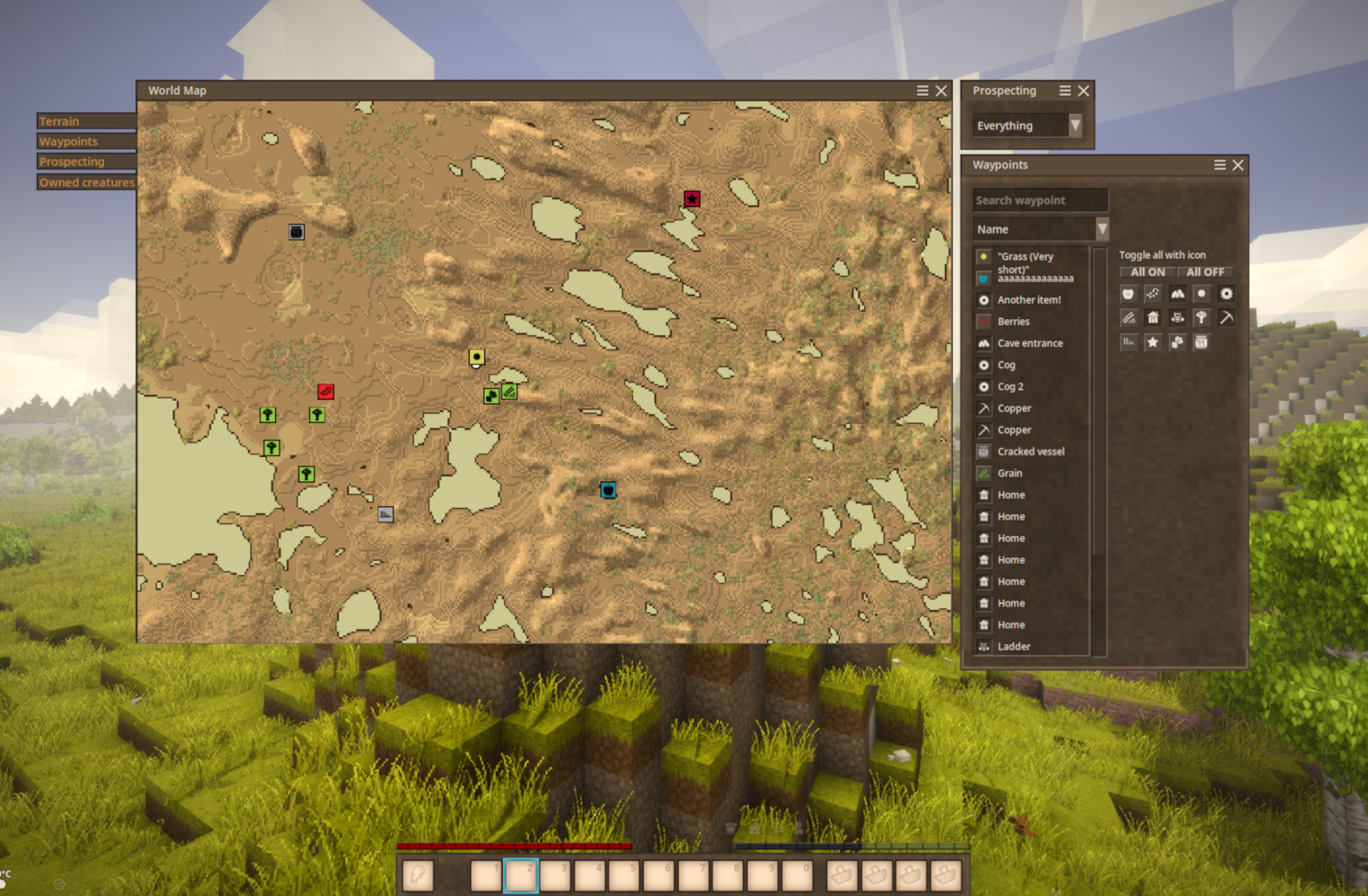
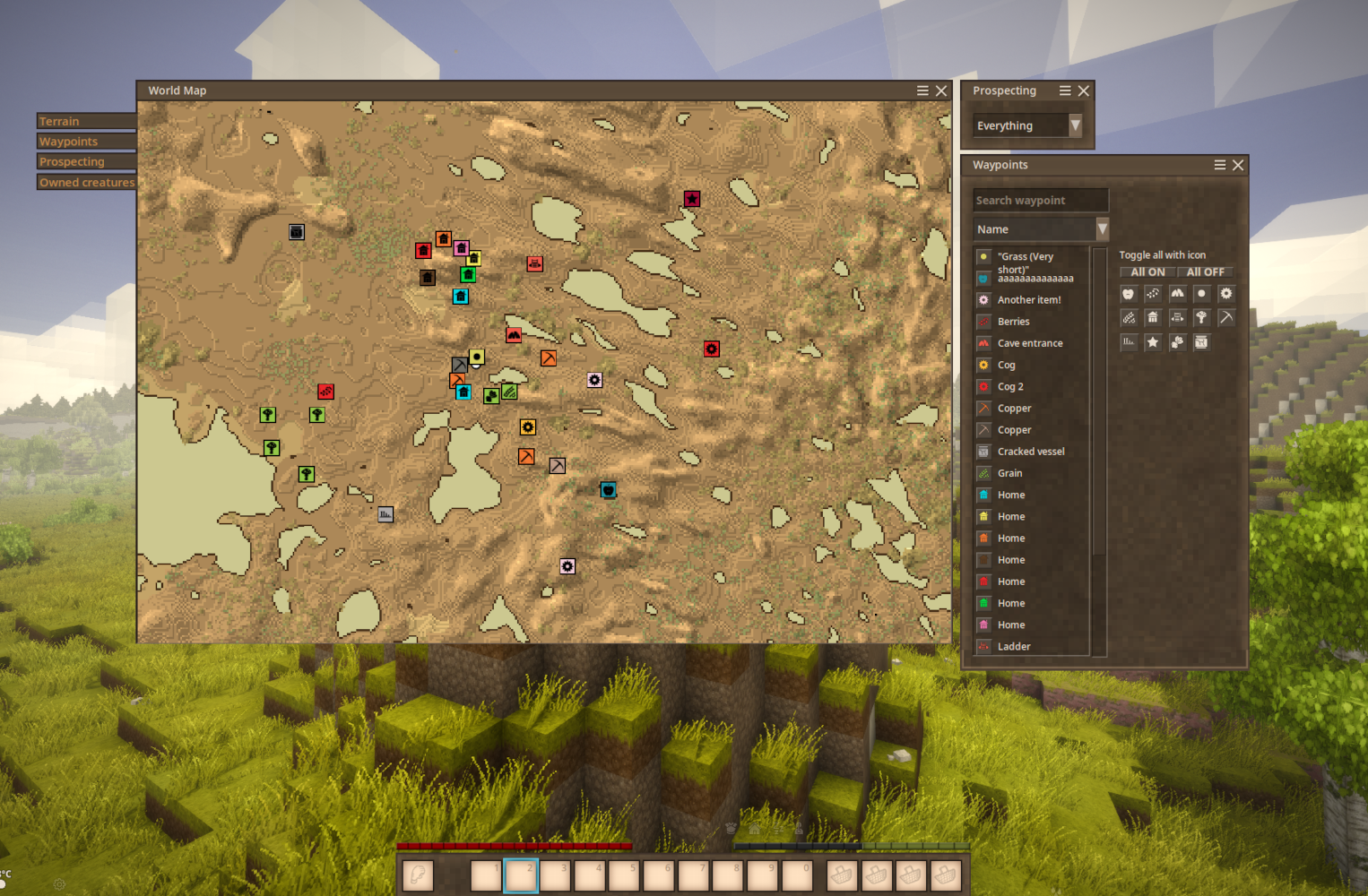
Displays a legend next to the opened world map which allows to sort, filter, search, and enable/disable groups of waypoints.
For requests of new features and contribution to the mod, please refere to the Git:
| Mod Version | Mod Identifier | For Game version | Downloads | Released | Changelog | Download | 1-click mod install* | ||||
|---|---|---|---|---|---|---|---|---|---|---|---|
| 1.1.1 | valrossensmapfilters | 295 | Nov 11th at 7:19 PM | valrossensmapfilters_1.1.1.zip | 1-click install | ||||||
| |||||||||||
| 1.1.0 | valrossensmapfilters | 202 | Oct 25th at 3:27 PM | valrossensmapfilters_1.1.0.zip | 1-click install | ||||||
|
Finally updated! dotnet8 compatible, and with even easier code to edit for others. | |||||||||||
| 1.0.11 | valrossensmapfilters | 597 | Jun 14th at 10:23 PM | valrossensmapfilters_1.0.11.zip | 1-click install | ||||||
|
Updated rendering logic to hopefully not interfere with other ui elements | |||||||||||
| 1.0.10 | valrossensmapfilters | 51 | Apr 27th at 12:50 PM | valrossensmapfilters_1.0.10.zip | 1-click install | ||||||
|
Updated the renderer logic for map icon drawing. This should in theory improve the general performance when many items are disabled | |||||||||||
| 1.0.9 | valrossensmapfilters | 81 | Apr 25th at 2:23 PM | valrossensmapfilters_1.0.9.zip | 1-click install | ||||||
|
Added logging features for easier debugging. | |||||||||||
| 1.0.8 | valrossensmapfilters | 292 | Apr 13th at 12:24 AM | valrossensmapfilters_1.0.8.zip | 1-click install | ||||||
|
Fixed crash on not having any waypoints Added fix for GC 3 (probably?) Mod should at least semi-accurately update the list live when editing/adding/removing waypoints | |||||||||||
| 1.0.7 | valrossensmapfilters | 45 | Apr 12th at 7:24 PM | valrossensmapfilters_1.0.7.zip | 1-click install | ||||||
|
Fixed scrollbar taking precedence over the map window | |||||||||||
| 1.0.6 | valrossensmapfilters | 44 | Apr 12th at 4:13 PM | valrossensmapfilters_1.0.6.zip | 1-click install | ||||||
|
Added Compatibility with xlib
Fixed some additional performance issues Fixed first rendering being very resource intensive
Known issues: An OpenGL error is triggered on GPUs running OpenGL 3 instead of OpenGL 4 | |||||||||||
| 1.0.5 | valrossensmapfilters | 61 | Apr 11th at 8:38 PM | valrossensmapfilters_1.0.5.zip | 1-click install | ||||||
|
Fixed cross world cache problems Fixed Recompose being triggered before compose when opening window
Added scrolling for waypoint groups Added sort by enabled waypoint Added buttons for enable/disable all waypoints
Some slighty updated look and feel | |||||||||||
| 1.0.4 | valrossensmapfilters | 113 | Apr 8th at 10:58 PM | valrossensmapfilters_1.0.4.zip | 1-click install | ||||||
|
Remastered the GUI generation to improve performance and load time. Should no longer force focus onto the text input where you search waypoint groups. More compact version of the icon list instead of growing all the way to to 1440 pixels down | |||||||||||
| 1.0.3 | valrossensmapfilters | 86 | Apr 7th at 6:03 PM | valrossensmapfilters_1.0.3.zip | 1-click install | ||||||
|
New stuff:
Fixes:
| |||||||||||
| 1.0.2 | valrossensmapfilters | 73 | Apr 6th at 7:21 PM | valrossensmapfilters_1.0.2.zip | 1-click install | ||||||
|
Fix for changing filters recentering the map | |||||||||||
| 1.0.1 | valrossensmapfilters | 26 | Apr 6th at 6:56 PM | valrossensmapfilters_1.0.1.zip | 1-click install | ||||||
|
Fixed sorting and improved performance when enabling/disabling a bunch of items at once via the "toggle all with icon" button | |||||||||||
| 1.0.0 | valrossensmapfilters | 32 | Apr 6th at 6:11 PM | Empty | valrossensmapfilters_1.0.0.zip | 1-click install | |||||
Yo hello !
To jump into the most recent convo, I can understand that for toggling purpose itself, grouping makes sense for sure and I would like to retain that functionality if at all possible, however, the mod could also be a powerful tool to search and filter for individual marks, let me present a case I have experienced myself :
I have a dozen or so "Red Clay" markers on the map, none of which are pinned and all of which get easily lost in all the other markers as even color coding will eventually result in a gulash. Should I have the need to mine one or more of them it presents me with a bit of problem to solve.
The current build :
- To find my desired "Red Clay" markers amongst the gulash, I would have to toggle OFF all the other groups and then manually pan around the map for the "Red Clay" markers I want to edit and pin just so I can go and mine them out.
Individual markers :
- I could simply cycle between the individual "Red Clay" markers directly in the mod window and be done there and then in fraction of the time, let alone that I could now individually delete obsolete icons in fraction of the time, etc.
So the usecase is definitely there and I hope it isn't hard to implement alongside the current groups (again as grouping for the purpose of toggling On/Off is still desired)
Also, I'm sorry but I won't be creating yet another account just to vote on a single ticket.
In any case, thank you for this mod, it's a blessing as is !
Same (marker + colour + name) means it becomes part of a group and the group is always toggled together. Heaving specific ones inside of a group is still considered but the most used case is to toggle all of them if they share name and colour.
I put up a feature request page for this here that you can vote on: Enable/disable individual waypoints instead of entire group
I noticed that if a marker has the same color and name it does not show in the list
Right, you can just pull request the changes at the REPO if you want to gdorn. I'll gladly add you to the authors list on the mod page! :)
I've put together a compatible build for 1.21. Link in profile.
valrossenOliver I am happy to take that down when you fix yours, you can use my (terrible) code or not (merge request on gitlab), entirely up to you.
Just wanted to report that this is unfortunately not compatible with v1.21 out-of-the-box. Seems some GUI methods changed:
System.MissingMethodException: Method not found: 'Vintagestory.API.Client.GuiComposer Vintagestory.API.Client.GuiComposerHelpers.AddDialogTitleBar(Vintagestory.API.Client.GuiComposer, System.String, System.Action, Vintagestory.API.Client.CairoFont, Vintagestory.API.Client.ElementBounds)'.
at ValrossensMapFilters.MapFilterDialog.ComposeDialog(Boolean avoidFocus)
at ValrossensMapFilters.MapFilterDialog.OnShouldOpen() in /home/hamlet/Development/VintageStory/valrossensmapfilters/valrossensmapfilters/Source/MapFilterDialog.cs:line 56
[...]
A very useful mod. Heaving a ton of markers (using auto map markers mod and campaign cartographer) and it saves so much time looking through the map since you can filter out the ones you don't need currently. QoL at it's finest
valrossenOliver Working for me, thank you!
compatible with cartographer mod for shared waypoints?
I hope the latest updated will fix the blocking of other UI elements. Please do try it. Billiam Faeldray
Weird. Well I'll take a look sometime this weekend or early next week. Have some time finally to work on my own projects again! :)
eerino there's not conflict what I know off.
valrossenOliver This will cause the client to crash to desktop while playing on vs 1.20.10
A bit busy at this moment, not sure why the invisible overlap thing started happening so will take a look at that when I have time.
is this compatibile with Auto Map Markers? I love that mod but it could really use a filter feature like this!
The invisible overlap issue also caused me to be unable to use the 'open to lan' button, and that dialog can't be moved out of the way, so I was forced to disable this mod unfortunately.
valrossenOliver I've updated to v1.0.10 and I still have the invisible overlap sometimes. Here's the client-debug.log.
I also took some screenshots to better demonstrate the issue I'm having.
Hope these help, thanks for looking into it!
valrossenOliver yes, the framerate instantly goes down when the icons get hidden and the slowdown persists even when the map isnt shown or otherwise. i might try disabling the minimap to test it. Ill test the new version soon and will report back
I did some experimenting, try 1.0.10 and see if it helps with performance when icons are disabled.
Definitely on the todo-list KnewOne. Wanted to do that myself the other day.
I looked at the log Maxilos33 and doesn't look like the window that I added is causing the lag. It only takes 300ms-500ms (about a third of a second to half a second) when you open the map. Not super-fast, prob improvements that could be done there, but doesn't look like its the culprit for fps drop.
Does it ONLY slow down when the icons are off and you play the game without the map open?
Could this mod get a "click to move the map to" feature to the list of waypoints ? Adding a button, or onselect to the list somehow, and just centermap to the position ?
nice, I will try the new update, I do have some random crash from time to time when the mod is installed still
here is the client-debug.log. I just created a new world, ran the rivers debug and then hid and showed all icons a few times. performance impact was still notable. sadly was too big for pastebin so I just hosted it on drive lmao https://drive.google.com/file/d/1cdvXZXaiZd7bGZqmvwdHUJe92khxKmnh/view?usp=sharing
Yo yo yo. So I got a new update pending to get pushed in a few minutes. Nothing new in mechanics department but a bit of logging stuff so that I can more easy debug your performance problems. Please submit client-debug.log when you have problems with the performance of the mod so that I can go through that and investigate much faster.
I'd request you do the same so that I can start looking into your stuff too Faeldray
I'm experiencing a bit of a strange bug with this one. It seems if I focus on this window (by searching or toggling any waypoints) and then close the map, the window remains as an invisible "ghost" that overlaps other windows and prevents interaction. I noticed it because I have my inventory window in the lower right corner and I can't interact with some of the inventory slots that would be under where the window had been.
Love the mod otherwise though, it's very handy for sorting through the hundreds of markers I make with Auto Map Marker.
valrossenOliver it stayed at 60 even when closing the map, just checked it out with the tick overlay and heres the results:
Before hiding waypoints
After hiding waypoints
it doesent matter if the map is open or not.
Does it stay at 60 even after the map is closed? Could you look at the tick overlay CTRL+10 before and after?
The mod behaves rather weirdly when hiding a large number of markers. I ran the debug command from the rivers mod to test some stuff and have hidden all markers (its around.. 300? 400? of the same marker) and when hiding the markers my fps gets locked to 60, when I unhide them it returns to 144. very weird behaviour, the settings in the video menu are untouched and changing them does nothing, only unhiding all markers returns me to my 144 fps.
Thank you for the quick response, its a REALLY useful mod with the amount of waypointing I do.
EDIT: no issues so far, xlib incompatibility before was definately the culprit
Ok, should work on latest version with xlib. :)
It's weird that it only happens to some people... got the logs and I'm suspicous of the xlibs mod. Will keep investigating. There's very likely something you call have in common that is causing it...
Edit. Yep. Xlib. Xlib somehow breaks my mod. No clue why tho. But now I know what it is.
The same problem, after opening the map and if the mod window opens, the fps drops to a couple of frames
yeah, game runs normal, until I open the map then FPS goes to 5, I sent you the video and logs on discord!
Had an issue post update that is causing a major fps issues when opening the game to LAN. Possibly an combatibility issue with waypointtogether
newest update fixed my framerate halving permanently after opening the map once, now it doesn't even lag when opening the map thank you! It seems it was temporary its back unfortunately, but its not as consistent when it starts as before
Will be another update later today. I hope that the inventory thing will be solved with this since it looked like it trigged a mini-lagspike each time. Probably more noticable on some computers.
New sort options also coming. Will see if I can get the scrollbar working or not before the update.
I have encountered that the icons disappear when jumping between worlds, not sure what is causuing it. Not on the same world however.
Please provide crash logs in here or as an issue in the source page since I have no clue what could be the cause.
The mods IS client side 100%. Could definitely be something with a mod collision.
valrossenOliver
OK, for some reason, after doing a few test runs with just your mod (and shortly after the rest of my mods) I found that the lag is gone. However, I do experience a few crashes. (one occurred upon pressing 'M' and the other occurred upon clicking just outside of the GUI for the waypoint search tab, the former occurred with just your mod enabled)
Also, at some point, I noticed that all of the buttons that allow you to enable/disable certain icons and whatnot disappeared despite me having a few markers on the map. Even with a new one being placed (and a few restarts) it didn't fix itself.
Once again, thank you for your work with the mod.
This mod is labeled client. So I assumed it was only needed on the client, but even with this mod installed, nothing happens when I open my map. Does this mod need to be installed on the server as well. I'm playing on a server. I have--- alt map icon renderer, prospect together, not enough map icon, world map master mods installed. They all have some effect on the map, so may be the problem.
Sounds like the amount of waypoints is just making the poor engine screech. I didn't hyper optimize it but I could take a look at the files maybe later or tommorow and see if I could reduce the lag.
I added you on discord, so the last update had worked and most of the lag was gone, but then I teleported far from my base and the second I got to the new place the lag came back, so I logged off and uninstalled again and the lag was gone!
not really sure why maybe too many waypoints ? I do have 400+ markers on my map!
Finally I can write, thank you for the fix!
DecaByte definitely on the todo list, both things. Found myself doing the same thing the other day.
HoosierDaddy glad if it helps. But if you make a "new" window stay with the Wiki recommended solution. I have hijacked the map drawer to attach my window to it which is definitely not the recommended solution if you're just adding a new GUI window with isolated features :)
PlagueTheIdiot, hmm, I don't have this problem. You sure its this mod and not another? Just to make sure, disable all other mods and try again and see if it persists.
I am, I use the same username on discord valrossenOliver
The other day, I was thinking about something like this for VS. I'm glad to see that my prayers have been answered!
Edit: OK, after a few seconds of trying this I notice that every time I pull up my inventory I freeze for a second and it gets choppy for a brief moment. This is a relatively new mod so I'm sure it'll be ironed out in time, just letting you know.
Awesome sauce! I was trying to figure out how to do this, and couldn't see how to do it with the way that waypoints worked in 1.19. I'm looking forward to seeing how you accomplished it. Kudos!!!!
valrossenOliver Could you add an 'Toggle all Icons' button option & add to dropdown an 'Enabled' option? I like to disable all my icons, then enable one with a toggle, then with the dropdown I can set to 'Enabled' to show on top of the list the icon I have enabled.
The way I'm doing it now is, I have the dropdown set to 'Disabled' then clicking the icon on the toggle to toggle it off so they show at the top of list. I would like the opposite of this.
I don't like looking at all the icons when I'm searching for one type.
This would help me out greatly in sorting to find the one I want.
Looking forward to the developing of this mod as it's sorely needed.
Thanks!
Latest release should hopefully solve your performance problem Willownezz
I remade the UI generator so that it should grab mouse focus any more so it is now possible to close the map with m directly after adding a new waypoint.
Still no good solution for updating the UI immediately after adding/removing a waypoint.. :/
Hmm, I thought I solved that in 1.0.3. Are you running the latest version? I don't get that problem for myself anymore.
Edit: Ah! adding a waypoint and THEN trying to close it makes you search instead of closing. I'll try to make sure the UI doesn't keep grabbing the focus.
same issue, opening the map immediately sets me into the search box, so i have to press escape instead of M to close the map, and can't add any more waypoints
attempting to open any drop-downs on or closing the window for the waypoint filter puts me back into the search box instantly as well
btw I have this issue where when I make a waypoint I can't give it a name, because the keys only type in the search box. Am I missing something? is there a toggle button to stop searching? o_o
Happy to hear! Made it for my own use for the same reason! :P Toonzar
Are you in the discord? We can take a look at it Willownezz
Not sure why, but installing this mod and using in an existing world causes my game FPS to go to almost 0
I cannot express just how much I love you for this, literally just a few days ago I looked for something like this but found none, and now here you are. Thank you😞❤️
I have not tried out Campaign Cartography so cannot speak for that.
Groups of Name - Colour - Icon
All Orange pickaxes with the name "Copper", for example NateDoesLife
One could make it more advanced so that "Big Copper" and "Miniscule copper" and "copper ore" would be the same but I have not added any synonyms as it feels a bit of a timedrain honestly.
How does your mod handling the grouping versus saying how Campaign Cartography does?
I know CC made it so the waypoints are turned on/off via maplayers directly on the map and you make the groups in the CC menu and then assign them to that group in the waypoint itself.
Is your just based on similar markers?
Not at this time MitchOReilly. That is the sort button, like sort by name/icon/disabled. I was definitely considering adding a search field, hopefully a posibility of right clicking an icon to zoom to it on the map too but that would probably be a bit more difficult.
My first goal is to make the list scrollable so that you can use this mod when there's a bunch of different waypoints since it goes outside the screen. Search will probably come after that. A disable/enable all is also something that would be nice to have.
Hi valrossenOliver , does this allow for searching for/filtering waypoints by name? I see what appears to be a name searchbox?
Very likely. Please tell me if it doesn't.
Is this compatable with Auto Map Markers mod?