
Mods / Toggle Mouse Control


Author: Primer81
Side: Client
Created: Apr 5th at 1:43 AM
Last modified: Apr 29th at 1:41 AM
Downloads: 1553
Follow Unfollow 60
Latest release (for Vintage Story 1.20.7, outdated):
togglemousecontrol_1.3.0.zip
1-click install
Mouse control is now toggleable and configurable. Stop GUIs from controlling the mouse.
For those who wish immersive mouse mode was actually immersive. 😜
Works with and without immersive mouse mode!
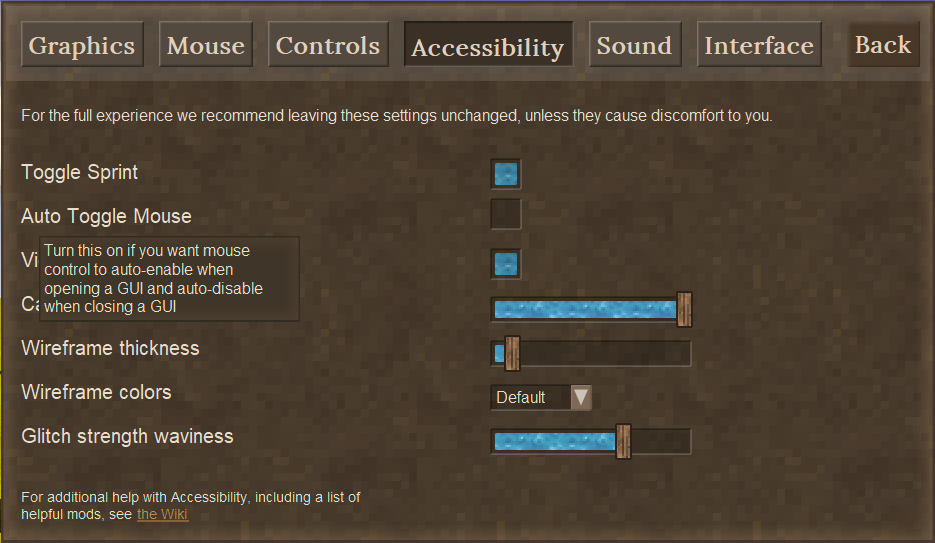
Adds a new setting named "Auto Toggle Mouse" to the accessibility menu. Allows you to control whether the mouse should auto-enable when opening a GUI and auto-disable when closing a GUI. It can also be configured from the "ToggleMouseControl/Config.json" file.
In addition, in the case where the "Auto Toggle Mouse" setting is ON, but you have certain GUIs that you either
- don't want to auto-toggle... in which case you would set "AutoToggleMouse" equal to false ❌... or
- you do want to toggle even when immersive mouse mode is ON... in which case you would set "TreatAsImmersive" equal to true ✅...
then you can open up the "ToggleMouseControl/Config.json" file and make changes for that specific GUI based on its "debug name". Changes to this file will reflect in-game as soon as you save the file; no need to reload the world. 😉
Bugs
Active Bugs:
- None! (that I know of 😉)
Patched1 Bugs:
- All patches have been converted to fixes! 🩹
- B05: Given immersive mouse mode is ON and mouse control is toggled OFF, when the player dies and the gui death dialog appears, the mouse remains locked and the player cannot toggle mouse control.
- Patched in v1.0.7 🩹
- Re-introduced in v1.1.0 🪲
- Patched in v1.1.1 🩹
Fixed2 Bugs:
- B15: Given immersive mouse mode is ON, when the survival inventory is opened/closed, then the Vanilla behavior is to NOT auto-toggle the mouse control.
- Introduced in v1.2.0 🪲 (also in Vanilla 😉)
- Fixed in v1.2.2 🛠️
- B14: Given the %APPDATA%VintagestoryData\ModConfig\ToggleMouseControl\Config.json file has not been generated yet, when loading a world, then the mod crashes by returning a null Config instead of the default Config.
- Introduced in v1.2.0 🪲
- Fixed in v1.2.1 🛠️
- B13: Given toggle sprint is ON and the player is sprinting, when the player releases the sprint key, then they do not continue sprinting.
- Introduced in v1.1.5 🪲
- Fixed in v1.1.6 🛠️
- B12: Given immersive mouse mode is OFF and a GUI dialog is open, when a new GUI dialog is open, mouse control does NOT auto-enable.
- Fixed in v1.1.4 🛠️
- B07: Given mouse control is toggled OFF and any GUI with a scrollbar is open under the player's crosshairs, then the player cannot scroll across the hotbar.
- Note: This occurs regardless of whether immersive mouse mode is ON or OFF.
- Dev Note: Should try approaching this by moving the crosshair GUI's z-depth to be underneath other GUIs.
- The crosshairs are not GuiDialogs 🫤
- Fixed in v1.1.4 🛠️
- B11: Given immersive mouse mode is OFF and a certain type of GUI (such as the firepit) is open, then mouse control does not auto-enable as expected.
- Note: By "certain type of GUI" I mean GUIs which are expected to disable the mouse grab given immersive mouse mode is OFF and do not set the PrefersUngrabbedMouse property to true.
- Dev Note: For some reason, the firepit GUI (and presumably some other GUIs) do not set the PrefersUngrabbedMouse property to true even though they ungrab the mouse in Vanilla. It seems to manage to work in Vanilla in the ClientMain class by checking for when the DialogsOpen property is non-zero.
- Fixed in v1.1.2 🛠️
- B10: Given immersive mouse mode is OFF and a certain type of GUI (such as the player inventory) is open, then mouse control is no longer toggleable at all.
- Note: By "certain type of GUI" I mean GUIs which are expected to disable the mouse grab and do set the PrefersUngrabbedMouse property to true.
- Introduced in v1.1.0 🪲
- Fixed in v1.1.2 🛠️
- B09: Given mouse control is toggled ON, when using rafts, the user cannot interact with the raft as expected.
- Fixed in v1.1.0 🛠️
- B08: Given mouse control is toggled ON, when knapping, the user cannot interact with the knappable object.
- Fixed in v1.1.0 🛠️
- B06: The immersive mouse mode check box is always displayed "checked" when the Interface settings menu is first opened.
- Note: The setting can still be changed - just know it will be set depending on if it appears "checked" after clicking it.
- Patched in v1.0.9 🩹
- Fixed in v1.1.0 🛠️
- B03: Given immersive mouse mode is OFF and a GUI (such as the player inventory) is open, then mouse control is no longer toggleable; the hot key must be held down.
- Patched in v1.0.8 🩹
- Fixed in v1.1.0 🛠️
- B04: Given immersive mouse mode is ON and the handbook GUI is opened in pause mode, then mouse control is not granted as expected.
- Patched in v1.0.6 🩹
- Fixed in v1.1.0 🛠️
- B02: Given immersive mouse mode is OFF, then GUI scroll bars can no longer be controlled with the mouse wheel 🤔.
- Patched in v1.0.5 🩹
- Fixed in v1.0.8 🛠️
- B01: Given mouse control is toggled OFF and a GUI with a scroll bar is open, then the handbook still grabs the mouse wheel events.
- Fixed in v1.0.2 🛠️
1 By patched, I mean the bug has been solved with a naive solution that should be replaced with a more robust solution later on. 🩹
2 By fixed, I mean the bug has been solved with a robust solution. 🛠️
Improvements
Improvements Made:
- F05: Given the auto toggle mouse setting is ON, then it should be possible to configure which GUI's will auto-toggle mouse control. Given an "immersive" dialog is configured to auto-toggle, then this configuration shall override the immersive mouse mode's behavior which prevents the auto-toggle.
- Added in v1.3.0 🎉
- F14: Improve compatibility with other mods that focus their own elements upon opening their custom GuiDialog.
- Added in v1.2.3 🎉
- F10: Decouple the auto-toggling behavior of a certain type of GUI (such as the player inventory) from the immersive mouse mode setting into its own setting.
- Note: By "certain type of GUI" I mean GUIs which are expected to disable the mouse grab and do set the PrefersUngrabbedMouse property to true.
- Added in v1.2.0 🎉
- F11: Add the ability to sneak while mouse control is granted.
- Added in v1.1.5 🎉
- F01: Add the ability to sprint while mouse control is granted.
- Added in v1.1.5 🎉
- F02: Add the ability to jump while mouse control is granted.
- Added in v1.1.5 🎉
- F09: Decouple disabling mouse control from the ESC key while retaining the the ability to close GUIs with the ESC key. This will more closely match the Vanilla behavior.
- Added in v1.1.0 🎉
- F08: Minimize the number of harmony patches required for the mod to function correctly. This will improve compatibility with other mods.
- Added in v1.1.0 🎉
- F07: Ensure the mouse pointer can still interact with the world when mouse control is toggled ON.
- Added in v1.0.9 🎉
Deprecated Improvements:
- F03: Disable mouse control when ESC is pressed rather than open the ESC menu.
- Added in v1.0.3 🎉
- Replaced with F09 in v1.1.0 🏗️
Future Improvements:
- F12: Make it possible to configure whether sneak, sprint, or jump player controls are accessible when mouse control is ON.
- F04: Tie the handbook pause button to a hot key (will likely spin this into its own mod).
-
F06: Minimize the size of the mod.
- F13: Translate settings/tooltips for other languages supported by Vintage Story
Compatibility Test and Review Backlog
Test/Reviews Completed:
- T00: Review and test compatibility with Vintage Story v1.20.7
Test/Reviews to do:
- T01: Review and test compatibility with Vintage Story v1.20.8
- T02: Review and test compatibility with Vintage Story v1.20.9
- Review: TODO
- Test: Seems to work as expected after playtesting for a bit.
| Mod Version | Mod Identifier | For Game version | Downloads | Released | Changelog | Download | 1-click mod install* |
|---|---|---|---|---|---|---|---|
| 1.3.0 | togglemousecontrol | 546 | Apr 29th at 1:41 AM | togglemousecontrol_1.3.0.zip | 1-click install | ||
|
Implement individual GUI based configurations for auto-toggle and whether to treat a GUI as 'immersive' or not with a Config.json that can be updated during gameplay without needing to reload the world. Each GUI is identified by its debug name and is automatically added to the config upon opening. In this way, it is possible to configure modded GUIs as well. Commit ID: 380f6caa66f19eb15d9bf325ecb71bbe710878d4 | |||||||
| 1.2.3 | togglemousecontrol | 62 | Apr 27th at 5:01 PM | togglemousecontrol_1.2.3.zip | 1-click install | ||
|
Ensure GuiComposers are initialized to be unfocused to prevent disrupting gameplay. Intended to improve compatibility with other mods that implement their own GuiDialogs. Commit ID: bec0600c2c866ea87788277e093b80fd19b30409 | |||||||
| 1.2.2 | togglemousecontrol | 25 | Apr 27th at 3:29 PM | togglemousecontrol_1.2.2.zip | 1-click install | ||
|
Ensure survival inventory prefers ungrabbed mouse to match the creative inventory behavior Commit ID: 57cbff38dff74e68d0a9730684ecdcb656303847 | |||||||
| 1.2.1 | togglemousecontrol | 37 | Apr 27th at 3:20 AM | togglemousecontrol_1.2.1.zip | 1-click install | ||
|
Return the default constructed config type in case the config file is missing or it's the first time it's being generated. Commit ID: 3e69472693a865838b6f546dd5d1cc4816742703 | |||||||
| 1.2.0 | togglemousecontrol | 32 | Apr 26th at 5:10 PM | togglemousecontrol_1.2.0.zip | 1-click install | ||
|
Update the Accessibility menu to include a new setting for auto-toggling mouse control upon GUI open/close with respect to the Vanilla behavior of the immersive mouse mode setting. Commit ID: 5956f510c3f380085f2825a8098d158590a566ab | |||||||
| 1.1.6 | togglemousecontrol | 71 | Apr 24th at 12:05 PM | togglemousecontrol_1.1.6.zip | 1-click install | ||
|
Fix toggle sprint not working as expected. Commit ID: 0604c756e75f30259f443687aaeec789d8a22bad | |||||||
| 1.1.5 | togglemousecontrol | 32 | Apr 24th at 2:11 AM | togglemousecontrol_1.1.5.zip | 1-click install | ||
|
Enable sprint, jump and sneak during mouse lock. Commit ID: 14c77dcfbee214e99f0ce88faa7190e62dccd1f4 | |||||||
| 1.1.4 | togglemousecontrol | 71 | Apr 21st at 11:57 PM | togglemousecontrol_1.1.4.zip | 1-click install | ||
|
Bug fixes:
Commit ID: 1786406 | |||||||
| 1.1.3 | togglemousecontrol | 74 | Apr 18th at 1:40 AM | togglemousecontrol_1.1.3.zip | 1-click install | ||
|
Cleanup dead code and comments from prior implementations. Commit ID: 5ce5a66e5dc33b242ce178a3529aba977de511e5 | |||||||
| 1.1.2 | togglemousecontrol | 83 | Apr 14th at 3:19 AM | togglemousecontrol_1.1.2.zip | 1-click install | ||
|
Fix B10 and B11 to address mouse toggling issues which occur when immersive mouse mode is OFF. Commit ID: 71e3edb10d3df5baea6fa879277d6ec3f32fc3c7 | |||||||
| 1.1.1 | togglemousecontrol | 27 | Apr 14th at 1:52 AM | togglemousecontrol_1.1.1.zip | 1-click install | ||
|
Patch bug where mouse gets locked on death screen when immersive mouse mode is OFF. Commit ID: 6b30af53f6da098860ce42b55415fde725d77f5d | |||||||
| 1.1.0 | togglemousecontrol | 67 | Apr 12th at 2:33 PM | togglemousecontrol_1.1.0.zip | 1-click install | ||
|
Implement a new approach to toggling the mouse via patching the ClientMain.UpdateFreeMouse function.
| |||||||
| 1.0.9 | togglemousecontrol | 57 | Apr 11th at 1:21 AM | togglemousecontrol_1.0.9.zip | 1-click install | ||
|
Implement F07 by ensuring the mouse pointer can still interact with the world when mouse control is toggled ON. Fix B06 by returning the mod's immersive mouse mode setting only when the game is paused. Commit ID: d6fb06048d61dd440ec3f1159f15e5c907bd842e | |||||||
| 1.0.8 | togglemousecontrol | 65 | Apr 9th at 4:40 AM | togglemousecontrol_1.0.8.zip | 1-click install | ||
|
Fix B03 by taking full control over the immersive mouse mode setting to grant full control over mouse control whether it's on or off. Commit ID: 799513fb0c0da3db806665de7b44bc3a3f747f78 | |||||||
| 1.0.7 | togglemousecontrol | 34 | Apr 9th at 12:29 AM | togglemousecontrol_1.0.7.zip | 1-click install | ||
|
Fix B05 such that the mouse does not stay locked while on the death screen. Commit ID: b9ced3a51046b307e32e92e3d94e77c9cc7ab164 | |||||||
| 1.0.6 | togglemousecontrol | 50 | Apr 8th at 5:21 AM | togglemousecontrol_1.0.6.zip | 1-click install | ||
|
Fix B04 such that the mouse control toggle respects the pause mode setting on the handbook. Commit ID: 22dfbe5c9964820c49cde3280f0fa7e9abf3a4cb | |||||||
| 1.0.5 | togglemousecontrol | 25 | Apr 8th at 4:10 AM | togglemousecontrol_1.0.5.zip | 1-click install | ||
|
Patch the inability to scroll GUIs while immersive mouse mode is OFF with a simple quick fix while B03 is investigated. Commit ID: 4d4d5fbaf7938b52e5edfdc9dbb3061aad50fb86 | |||||||
| 1.0.4 | togglemousecontrol | 43 | Apr 7th at 4:09 AM | togglemousecontrol_1.0.4.zip | 1-click install | ||
|
Specify the mod is client side in `modinfo.json` to inform servers. Commit ID: 3f4a59af3e7a8652c0c41a35993f004aca31713a | |||||||
| 1.0.3 | togglemousecontrol | 45 | Apr 6th at 1:47 PM | togglemousecontrol_1.0.3.zip | 1-click install | ||
|
Disable mouse control when ESC is pressed rather than open the ESC menu. Commit ID: 84653da3754a820373d34a528ce00eadfb0b1f2d | |||||||
| 1.0.2 | togglemousecontrol | 56 | Apr 5th at 6:15 PM | togglemousecontrol_1.0.2.zip | 1-click install | ||
|
Stop any GUI with a scroll bar from taking control of the mouse wheel while mouse control is toggled off. Commit ID: 8dd20ce6c2ed06787e8095a35b776c96e5b49052 | |||||||
| 1.0.1 | togglemousecontrol | 27 | Apr 5th at 4:41 PM | togglemousecontrol_1.0.1.zip | 1-click install | ||
|
Fix issue where the mouse control toggle would break after unloading and loading another world. Commit ID: 8316ebc0d69a16ccf24930a0e680af34a665ffc7 | |||||||
| 1.0.0 | togglemousecontrol | 24 | Apr 5th at 1:50 AM | togglemousecontrol_1.0.0.zip | 1-click install | ||
|
First official release! Commit ID: a864c08d3e8c8c29991854e262bc34d19c340612 | |||||||
I just really really really hate having to click into the search field every time I hope the handbook.... ugh
This works in 1.21.5, but sadly it disables the automatic typing into the search field for the Handbook
If that were to be fixed, this mod would be AMAZING 11/10
With that issue, it's 9/10
Still, it lets me keep the map open with the hardcore cartography mod so now I can continue mapping my journeys without holding down ALT for 5 hours :)
thanks for creating this mod <3
u are savior)
There's one little issue left.
When closing some window that would disable the mouse pointer at the same time as moving it, the distance between current mouse pointer position and the screen center will be considered by the game as camera movement, making an instant turn to some side. Like mouse switches to camera mode before setting the pointer to the center of the screen. It doesn't happen when using the normal bind for lock/unlock the pointer, so I assume this comes from the mod.
Any way to remove this effect?
Seems to be working just fine with 1.21.1 so far.
Seems to work in 1.21
This - and all of your mods, I suspect, from a quick check - is causing issues when loaded with others due to the inclusion of the System .dlls in the mod files. If more than one mod has these, only the first one encountered will load; the rest will throw an exception stating that the assembly is already loaded and fail to load.
The other mod I had that did this was SlowTox, and I'll report the same thing on their page.
LillyLeaf
"When you open the handbook with this mod, you now need to click into the text box in order to start typing."
I thought it has always been this way. With or without mods.
It's a super annoying QOL thing I wish was improved. However if it is a mod causing it and normally you can type immediatly, please someone tell me so I can fix it!
The one thing I've been wanting in order to finally start using immersive mouse mode!
Sadly, this mod removes functionality from the handbook. When you open the handbook with this mod, you now need to click into the text box in order to start typing.
Really hoping this gets fixed, or if it's intentional, become a toggleable option. Assuming that happens, it'll become a must have whenever I play!
Shion I'm glad it's working out for you! I'm always worried something is gonna go wrong one way or another so your confirmation is appreciated! 😊
"Discovery" of new "windows" works great. Setting TreatAsImmersive to false for GuiDialogToolMode and GuiDialogBlockEntityRecipeSelector does all I need for now.
Thank you, once again!
Shion I'm glad you like the changes! And you're feedback has been super helpful - thank you! 😊
Holy ****! The auto-unlock on inventory and handbook (which seem to work nicely together now) is the greatest QoL improvement ever!
The "patch", which I suppose removes the focus from input fields in GUIs like of Block Overlay mod, is awesome too!
Thank you! 😂
F05 will literally finalize it for me, but I assume when related to other mods, their devs would have to add or set a prover value for the PrefersUngrabbedMouse property in their GUIs, which might be a challenge before this mod becomes more popular (and it definitely should!).
Immersive mode is too good to disable, since it allows to work with multiple inventories without additional moves (like unfixing the windows).
And mouse locking/unlocking doesn't work good with it disabled: closing inventory/handbook locks the mouse with no regard to other open GUIs, which in turn forces additional ALT tap.
Ragolution
Hey all - I just released v1.2.3 which should be a very minor change that'll help improve compatibility with other mods you might install... specifically, with mods that define their own GuiDialog with a text input that ends up stealing your in-game controls upon opening... for example, the Block Overlay's mod (v4.3.1 specifically).
Let me know how it works out for you! 😊
Shion Regarding my expectations for compatibility with other mods with their own GUIs... I would expect Toggle Mouse Control to work as intended with other mods so long as they don't do anything funky with the mouse control that directly conflicts with what Toggle Mouse Control does. They do have a decision to make for each GuiDialog that they add though... and the decision must be made the same regardless of whether they want to be compatible with Toggle Mouse Control or not.
For example, if the mod author adds a normal GUI like the inventory or player handbook, then they should set the "PrefersUngrabbedMouse" property to true on that GuiDialog. If they are adding an immersive GUI like the firepit or knapping GuiDialogs, they they should set the "PrefersUngrabbedMouse" property to false. Setting it to false will allow the immersive mouse mode setting to override the auto-toggle behavior just like it does in Vanilla, but only when immersive mouse mode is ON. If immersive mouse mode is OFF, then it should be expected for the mouse to auto-toggle on those GUIs as well even in Vanilla.
In other words, mod author's shouldn't have to do anything special to their GuiDialogs to be compatible with Toggle Mouse Control... if it works in Vanilla, then there should be no reason it won't work with Toggle Mouse Control.
Shion Regarding knapping and clayforming not auto-toggling the mouse... if you want those to auto toggle the mouse control, I would recommend disabling the immersive mouse mode setting as that setting will override the auto-toggle.
That is, keep the "Auto Toggle Mouse" setting under the Accessibility menu ON and keep "Immersive Mouse Mode" under the Interface menu OFF.
Let me know how that works out for you in v1.2.2! 😊
Shion Also, I now see what you mean about the inventory not auto-enabling mouse control... I did not realize the game treats the survival and the creative inventories differently until now. 😭
As for an explanation - given immersive mouse mode is ON, when the survival inventory is opened/closed, then the Vanilla behavior is to NOT auto-enable/auto-disable the mouse control. It's treated similarly to the firepit dialog in that way...
Despite it being a Vanilla behavior though... I feel this mod should override it because the survival inventory is not a special "immersive" dialog like the firepit is. It's just a basic GuiDialog... no idea why they would give it that behavior in survival specifically. Either way, I'll treat it like a bug that also happens to be present in Vanilla. 😉
EDIT: Fixed in v1.2.2! 🎉
Shion Yeah I tested that Block Overlay's mod out standalone... it seems to be doing some funky stuff with the mouse when that overlay is open... it seems they force the mouse to be locked when the GUI is open unfortunately... I'd tell you how it does it, but the mod is closed source it seems. 😥
For now, only recourse seems to be to message the author of that mod to see what they did with the mouse grabbing... in the meantime, I'll try decompiling their mod to see what's up. 😉
EDIT:
After decompiling, I can see that their GuiBlockSelector class overrides the PrefersUngrabbedMouse property to be false... which doesn't play well in Vanilla when immersive mouse mode is ON... especially given how it's not an "immersive" dialog like the firepit or knapping dialog... I recommended that the mod author change this in the comments on the Block Overlay's mod page.
The other issue I found in that mod regarding the Alt key not working seems to do with the input text box stealing focus and consuming the Alt key press upon the GuiDialog opening... this is similar to what the handbook does in Vanilla which I've already fixed in this mod. And in v1.2.3, I've now fixed it for (hopefully) all other GuiDialogs that might have this issue! Including modded ones. 😉
Ironically, it was harder to fix the Vanilla handbook as it seems to skimp on following the game's own coding conventions regarding GuiComposers... the modding community seems to follow those conventions though at least so it's an easy fix! 😊
It works, but I'm not sure what to expect, since this is the first step towards F05. The option is there and you can toggle it.
But inventory, clayforming, and knapping selection windows are not triggering mouse release or lock.
The handbook and map does, but with no regard to the pointer's initial state.
I hope it is possible to keep the pointer unlocked on window close if it was unlocked prior to opening that window.
And I wonder if this would also toggle the mouse with other mods.
Like the Block Overlay's settings (that one needs few additional moves to unlock the pointer, which is a tiny bit annoying).
Will some sort of cooperation be needed from devs of other mods with windows?
Also, so glad emojis in the comments are back 🍾😎🎉
Shion I was able to reproduce it on v1.20.9 and v1.20.7 so it's independent of the game version it seems. And that's without any mods installed other than this one so it seems straightforward - seems I missed an edge case related to the config file. I'll have a fix out shortly in v1.2.1! 🛠️
EDIT: And it's now released! Let me know how it works out Shion! 😊
Game version is 1.20.9.
27.4.2025 01:02:51 [Notification] External Origins in load order:
modorigin@D:\Games\Vintage Story\VS\assets\creative\
modorigin@D:\Games\Vintage Story\VS\assets\survival\
mod@Autorotor1.1.2.zip
mod@BarkBeetle_1.0.3.zip
mod@BetterTradersv0.0.10.zip
mod@biggerpocketsv1.0.0.zip
mod@bradyladders-v1.1.0_v1.20.7.zip
mod@BrickMold_1.2.0.zip
mod@Buried Hostilityv1.0.3.zip
mod@canoemod.zip
mod@chickenfeed_1.1.8.zip
mod@clayprocessing_1_to_4_1.0.3.zip
mod@DoubleBackpackCapacityV0.0.1.zip
mod@Duncan's Grass.zip
mod@hangingoillamps_1.0.3.zip
mod@harvestice v1.0.0.zip
mod@HealthierTreesv1.0.0.zip
mod@HostileOverhaulv1.0.0.zip
mod@Immersive Corpse Drop 1.0.3 (Vintagestory 1.20).zip
mod@ImmersiveOreCrush_2.2.1.zip
mod@IncreasedStorageCapacityV0.0.4.zip
mod@jonasworkshop_1.1.1.zip
mod@JuicyOres-v1.0.0.zip
mod@KnifeCrossguards_v1.0.zip
mod@leathertosturdy.zip
mod@ManualToolCrafting_1.3.5.zip
mod@MidoMiscMod_1.0.2.zip
mod@millwright_1.2.0.zip
mod@MoreCrystals v1-3.zip
mod@morenails_v1.2.0.zip
mod@NoBearJetpacks_1.0.2.zip
mod@overhaullib_0.2.8.zip
mod@pigfeed_1.0.8.zip
mod@reedlesspacks-1.1.0.zip
mod@SaltFromSeawater_1.0.1.zip
mod@shears_speed_scales.zip
mod@temporal_gears_stack v1.zip
mod@VanillaPlusV1.3.5.zip
mod@vsimgui_1.1.8.zip
mod@zoombuttonreborn_2.0.0.zip
mod@altoffhandpenalty_1.2.1.zip
mod@AlwaysGetCropSeeds_v1.0.0.zip
mod@Auto Map Markers 4.0.2 (Vintagestory 1.20).zip
mod@BetterRuinsv0.4.11.zip
mod@betterstorageinteractions_1.2.3.zip
mod@blacksmithenhancements_1.1.4.zip
mod@BlastFurnace.zip
mod@blockoverlay-4.3.1.zip
mod@carbonuranite-0.0.2.zip
mod@CarryOn-1.20_v1.8.0-rc.4.zip
mod@celestevoices.zip
mod@clothshelf_1.0.1.zip
mod@combatoverhaul_0.3.9.zip
mod@Composter-v1.2.1.zip
mod@DanaCanCook-v0.2.6.zip
mod@DanaTweaks-v3.4.1.zip
mod@electricalprogressivecore_0.9.8.zip
mod@ExtraInfo-v1.9.9.zip
mod@farseer_1.3.0.zip
mod@floatingfish.zip
mod@foodshelves_1.6.2.zip
mod@hungeroverhaul_1.1.1.zip
mod@hydrateordiedrate_2.1.0.zip
mod@immersivewoodchopping_0.7.5.zip
mod@immersivewoodsawing_0.2.7.zip
mod@ImprovedHandbookRecipes_1.1.3.zip
mod@kevinsfurniture_1.6.6.zip
mod@Knapster_v2.14.4.zip
mod@minimalcompass_1.1.3.zip
mod@MobsRadar-v2.1.7.zip
mod@nohands-0.1.1.zip
mod@oneroof_1.9.3.zip
mod@PassThruChutes_V1.0.2.zip
mod@petai_v3.4.1.zip
mod@pewter_1.2.3.zip
mod@reedbuff.zip
mod@RepairMe1.1.0.zip
mod@rivers_4.1.0.zip
mod@scarecrow_v1.6.5.zip
mod@smithingplus_1.6.0-rc.2.zip
mod@stablesurface_0.0.2.zip
mod@statushudcont_3.2.6.zip
mod@stirlingmotor_1.0.1.zip
mod@survivalcats_1.0.1.zip
mod@th3dungeon_0.4.2.zip
mod@th3restock_1.1.2.zip
mod@titaniumtools_1.0.8.zip
mod@togglemousecontrol_1.2.0.zip
mod@toolsanimations_1.0.2.zip
mod@translocatorrelocator_1.0.1.zip
mod@unbindhotkeys_1.0.1.zip
mod@Vanity-2.4.2.zip
mod@Verticality_0.3.1.zip
mod@wildfarmingrevival_1.3.6.zip
mod@wildgrass_1.3.0.zip
mod@cats_v3.2.0_petai_v3.0. .zip
mod@chickenpet_1.1.1.zip
mod@electricalprogressivebasics_0.9.6.zip
mod@pagoldsilver_1.0.2.zip
mod@PlayerCorpse_VS1.20.7_net7_v1.11.1.zip
mod@Th3DungonTopEntrance_0.4.1.zip
mod@electricalprogressiveqol_0.9.6.zip
mod@electricalprogressiveequipment_0.9.8.zip
themepack@Nat'sHumanSkinColors-V1.0.1.zip
themepack@RLMoonSunv0.1.3.zip
themepack@SeraphFaceRework_v1.0.0.zip
Shion Hey thanks for the traceback! I'll take and look at those lines and see what might be happening... 🛠️ in the meantime, could you share whether or not you have any other mods installed and what version of vintage story you're running? Thanks!
Something went wrong:
27.4.2025 01:03:35 [Error] [togglemousecontrol] An exception was thrown when trying to start the mod:
27.4.2025 01:03:35 [Error] [togglemousecontrol] Exception: Object reference not set to an instance of an object.
at ToggleMouseControl.ToggleMouseControlModSystem.Dump(Object data) in C:\sw\all\vintage-story-mods\main\_src\src\ToggleMouseControl\ToggleMouseControl\src\ToggleMouseControlModSystem.cs:line 110
at ToggleMouseControl.ToggleMouseControlModSystem.StartClientSide(ICoreClientAPI api) in C:\sw\all\vintage-story-mods\main\_src\src\ToggleMouseControl\ToggleMouseControl\src\ToggleMouseControlModSystem.cs:line 48
at Vintagestory.Common.ModLoader.TryRunModPhase(Mod mod, ModSystem system, ICoreAPI api, ModRunPhase phase) in VintagestoryLib\Common\API\ModLoader.cs:line 661
27.4.2025 01:03:35 [Error] Failed to start system ToggleMouseControl.ToggleMouseControlModSystem
Hi all - F10 is now officially implemented in v1.2.0! This adds a new setting to the Accessibility menu for controlling whether or not the mouse control should auto-toggle when opening or closing a GUI with respect to the Vanilla behavior of the immersive mouse mode setting. So for those of you who like how immersive mouse mode works in Vanilla but would also like mouse control to auto-toggle for most GUIs then this is the change for you! O(∩_∩)O
This is a pretty big change under the hood so as usual, please let me know if you run into any bugs or compatibility issues! Remember you can always fallback to v1.1.6 if you have a game breaking issue!
And with that, happy toggling! =D
Yes, emojis in the comments are also broken for me (T_T)
Also want to join the chorus and say I, too, can't wait for F05! Good luck!
ManaWei "Aren't future Improvements F05 and F10 pretty much the same ?"
They are different in the sense that... F10 would be much easier to implement and likely the first step towards achieving F05 I would say. I agree they are very similar though!
Shion "Here I was about to suggest some very convinient stuff, and you seem to already have it all in your planned improvements list (F05). Good job!"
Thank you! =D
lonelyfermata "Would it be possible to make the "sneak while in menu" feature toggleable? It feels like I'm doing squats when I'm moving multiple stacks between inventories."
Yes that should be possible... maybe it would be a good idea to make each control individually configurable... sneak, sprint, and jump included. Added F12 to cover this... Thank you for the suggestion! =)
Would it be possible to make the "sneak while in menu" feature toggleable? It feels like I'm doing squats when I'm moving multiple stacks between inventories.
A few suggestions for when immersive mouse mode is enabled:
Not sure if this is possible, but it would improve QoL of controlling the game by a lot (dunno why the game dev didn't think about this in the first place).
Here I was about to suggest some very convinient stuff, and you seem to already have it all in your planned improvements list (F05). Good job!
Aren't future Improvements F05 and F10 pretty much the same ?
lonelyfermata Thank you for finding that bug! I just released v1.1.6 which fixes that issue ~ I also use toggle sprint so I understand it being a necessity! O(∩_∩)O
The "toggle sprint" option in accessibility no longer works. I love the mod otherwise, but I need toggle sprint to work in order to play.
Just released v1.1.5 which finally gives the player the ability to sprint, jump and sneak while the mouse control is ON! B-)
As usual, let me know if you find any issues with this version! O(∩_∩)O
Is it just me or are emojis in the comments broken? 🤔ðŸ’
EDIT: These truly are the end times ;-;
Tracking this issue here: https://github.com/anegostudios/vsmoddb/issues/64
Thank you, got to try out the new version last night and didn't notice any issues 🎉
B07 and B12 are now fixed in v1.1.4!
With the fix of B07, you may now move your GUIs around willy-nilly under your crosshairs without worry while the mouse is locked 😄
And with the fix of B12, given that you have immersive mouse mode OFF, each new GUI that is opened should now auto-enable mouse control to match the Vanilla behavior 🍰
Try it out and let me know what you think! 🤔💭
And do let me know of any bugs or incompatibilities! 🪲💥
B10 is now fixed in v1.1.2! Mouse toggling is once again fully functional regardless of if immersive mouse mode is ON or OFF. 😎
I also managed to discover (and fix) B11 where certain GUIs (such as the firepit) are configured differently in the code (just... why?!😭) and needed a little extra help to get working properly. 🛠️
terci "Ah, it seems like the mouse can't unlock during the death screen again."
I'm surprised this bug survived the refactor... it must mean that the game handles the mouse in a super-extra-special way when dead. 🤔 I'll have to look into that...
For now though, I just applied a simple patch that forces the mouse to unlock when the player is dead. 🩹
terci "the mouse cursor doesn't auto-lock when opening the main inventory with either Immersive Mouse Mode on or off now, though"
I'm curious what version had this behavior... auto-lock (AKA auto-disabling mouse control) should only occur when closing a GUI given immersive mouse mode is OFF and mouse control is also toggled OFF. ❓
However, I did notice that, given immersive mouse mode is OFF and a GUI is open, then mouse control can not be toggled OFF... don't have a fix for this one yet, but I did note down B10 in the description! 🪲
Ah, it seems like the mouse can't unlock during the death screen again. 💀
Nice! It always feels good to refactor a more elegant solution 🕶🧠
It seems like the mouse cursor doesn't auto-lock when opening the main inventory with either Immersive Mouse Mode on or off now, though 🐭🔀❌
That definitely wasn't the same as vanilla behavior, so I understand if this is how it's going to be going forward🙏
I got really used to that in the handful of days that I've had the mod installed, but I'm happy to retrain my muscle memory 🤾♂️
Thank you for the prompt updates and fixes, this is an incredible mod for people with RSI or carpal tunnel. Slanting my wrist around to hold the mouse lock was hurting me a little, so this mod has already saved me acutal pain. 🙇♥️
Hey all - I just released v1.1.0 in which I took a totally new approach to toggling the mouse control that is much less invasive and revises a lot of the bug fixes I have made previously. In other words, version 1.1.0 should be much more stable and work closer to how the original game works. ⚖️
Here's a quick overview of what bugs and improvements were impacted:
Please try it out and let me know if you notice any issues! 😊
new update is seemingly not working in any capacity for me, with it installed it doesnt seem to change behaviour of mouse at all. somehow different than when the older version (1.0.8) broke for me yesterday, with it no longer automatically switching modes, but mercifully keeping the mouse control as a toggle rather than a hold
Awesome, containers are perfect now! 🎉
But, and it might be just me again, but it seems like knapping got broken in exchange 🎁↔️🗿
I think it was working how I'd expect before
Edit: Also not sure if this is from the latest update, but getting into and out of rafts that were placed on the ground, then walking next to a wall, is glitching up immersive first person mode, the camera is getting stuck in my body and I don't remember that happening before
terci
Thanks for pointing out that behavior! I will have to take a look into that soon. 🛠️
Holding the mouselock button normally lets you open and close containers while in mouse mode... but it doesn't work like that while the mouse is "locked"
You can still open and close them by holding the mouselock button and clicking while in locked-mode, but then the mode gets switched again
I don't know if it's just me (remapped mouse lock to caps lock), but thought I'd mention it
Would be nice if containers worked through the mouselock mode too, but I understand if that's too tricky to implement
The mouse control toggle for when immersive mouse mode is OFF is totally working in v1.0.8! 🎉
It comes at the cost of a couple of new bugs (B06 and B07) but they're minor in comparison... and will probably be easy to fix too. 😉
BruhMoment24: "Seems like the mouse wont unlock on the deathscreen"
Oh I know exactly how to fix that one... and I've been totally forgetting to test the death screen GUI. 😅
Expect a hot fix soon! 🔥
EDIT: Fixed 🛠️
Aidan647: "Mods file size seems too big, System dlls take over 95% of code size"
Thanks for the note! I'll have to take a look into that. 🔎
Primer81
I have no idea on that! lol
I'm more of just a slightly more knowledgable than average user when it comes to this stuff.
Still, it works with the change in the modinfo.json and that's all I care about lol
Immersive mouse mode has been something I've wanted to use for SO LONG but the lack of a mouse toggle just killed it for me, so your mod is SUCH a welcome addition
Seems like the mouse wont unlock on the deathscreen... had to alt+f4 and disable the mod to respawn. been looking for this feature since i started using immersive mouse tho so plss keep up the good work <3 :P
Mods file size seems too big, System dlls take over 95% of code size
Vivaria
I just noticed that the "ModSystem" class has a virtual "bool ShouldLoad(EnumAppSide forSide)" function that we're probably supposed to override 😅. Maybe that's why it's hit or miss with the contents of the "modinfo.json" file?
ManaWei: "Why manually? The game seems to auto toggle at times by itself."
Yeah my goal is to preserve the "auto-toggle", or rather, the "auto-enable" functionality when immersive mouse mode is OFF. That's actually how it works right now if you prefer that behavior. Just gotta keep in mind the bugs noted in the description... especially B03. 🫠
But I'm hoping to get those fixed as soon as possible! 💯
EDIT: And now only B03 remains! Also, I added your suggestion to make the GUI auto-enable behavior configurable per-GUI as future improvement F05. 😊
P.S. the reason the auto-enable functionality is preserved when immersive mouse mode is OFF rather than ON is that it's just easier to implement that way. What happens when it is turned ON/OFF seems to be special ~ ✨
Primer81 It's super weird when a mod needs that and when it doesn't! Some of my client side mods don't have it and work fine on a server, and some of them have needed me to add it in order to work. I don't know what the actual deciding factor is, but thank you so much for updating your mods to add it in! I've seen at least one other person comment asking how to enable this mod, so I'm suspecting they may have run into the same issue, so the official addition should hopefully help at least a few others out, too. :)
After using this mod for a little while, something hit me..
Why manually? The game seems to auto toggle at times by itself.
So why can't it be an auto toggle at opening inventory, character page, handbook, and such.. ?
maybe with a config for different pages/windows, like a default auto toggle behaviour,
and then blacklist containers you don't want to toggle control for..
Might be a lot more complicated but it would be a huge QOL for me at the very least..
@Vivaria: "I got around this by manually adding the "side": "client", entry to the modinfo.json"
Wow, thanks for pointing that out! I had no idea it needed to be specified there. 😅
I'll have to go and update my mods!
It seems like it doesn't work by default when connecting to a server that does not also have it. I got around this by manually adding the "side": "client", entry to the modinfo.json, but I figured I would leave a comment pointing this out. :)
@Thap: "Could you make an independent pause button or pause hotkey?"
Hey Thap - could you be more specific? Independent in what way? I could, for example, tie the handbook pause button to a hot key... which sounds pretty cool actually if that's what you're suggesting! I'll add that to "Future improvements" either way. I'd likely make that it's own mod even. 😊
Could you make an independent pause button or pause hotkey?
@ChaseIIN: "Is there a specific button i have to push in order to toggle?"
This mod hijacks the built-in hot key named "Lock/Unlock Mouse Cursor" to make it behave like a toggle (ironically, this hot key's code name already IS "togglemousecontrol" 🤔). It's similar to how my other mod named "Toggle Sneak" works. I added a screenshot to help illustrate.
@Drehverschluss: "It would be cool that the first ESC hit just disables the Mouse Control if thats possible."
I like your suggestion - that sounds closer to how the game works normally. Should be a quick fix! 😉
EDIT: Added in v1.0.3! 😊
@ManaWei: "Opening the handbook in pause mode does not free up the mouse pointer, would be nice if that was a toggle.."
Oh yeah that seems like a bug! I expected it to automatically free the pointer whenever the game is paused (like with the esc menu), but this seems to be an exception. I'll look into that ASAP - thanks for letting me know! 😊
@ManaWei: "if you could make an option to auto toggle the mouse when you open your inventory.."
I'll look into this - I was hoping that disabling immersive mouse mode in settings would cover this use case, but seems like the toggle functionality doesn't behave very well when that happens. GUI scrollbars seems to break as well 😢. This one might be a bit tricky, but I'll test some things.
Is there a specific button i have to push in order to toggle?
thank you for this! i've never preferred modding the game over pure vanilla, so this is THE one mod that will finally technically break that rule! i've been waiting for this ever since immersive mouse mode was added to the game. ^^
Opening the handbook in pause mode does not free up the mouse pointer, would be nice if that was a toggle..
Another little detail, would be awesome if you could make an option to auto toggle the mouse when you open your inventory..
just two small true/false options in a config file <3
Hello there.
Very nice mod. Now i can acctually play with immersive mouse mode.
Just one thing i noticed. I really got used to close the inventorys just with ESC but now when Mouse Control is toggled and you press ESC it put´s you right into the Menu where the game stops. It would be cool that the first ESC hit just disables the Mouse Control if thats possible.
This is incredibly helpful, thank you!!
Next thing I'll look into is making it possible to sprint and jump while mouse control is active. Hopefully it's not too difficult. 😅
I noticed that the scrollbar on the handbook still grabs the mouse wheel events when the mouse is locked to control the player. Looking into addressing this soon.
Edit: Fixed in v1.0.2! 😊