
Mods / Rotting Storage
Author: jayu
Side: Server
Created: Sep 7th at 5:52 PM
Last modified: Sep 27th at 10:36 PM
Downloads: 517
Follow Unfollow 56
Latest release (for Vintage Story 1.21.0 - 1.21.2-rc.2, potentially outdated):
rottingstorage_1.0.2.zip
1-click install


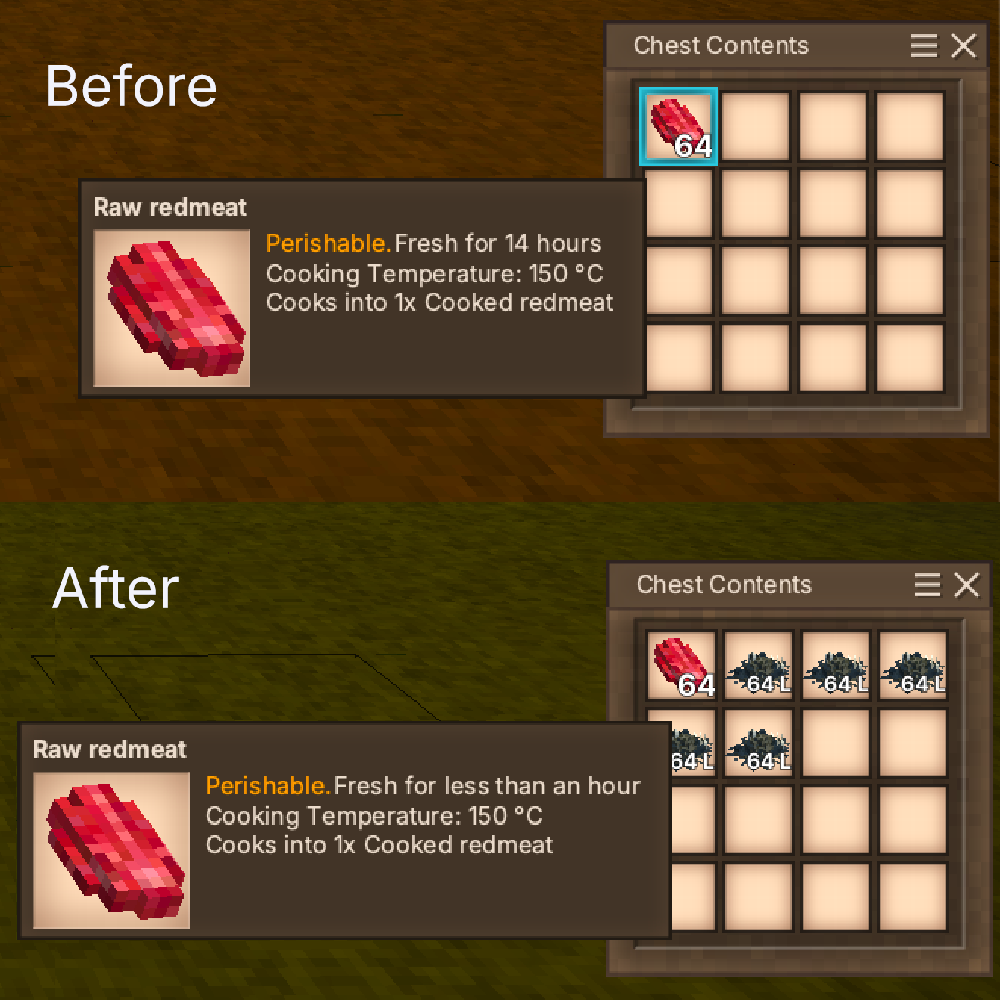
The intention of this mod is to make storage management a little more challenging, by making rot left in a container affect perish rates.
Rot and any spoiling items will accelerate the perish rate of items stored in the same container.
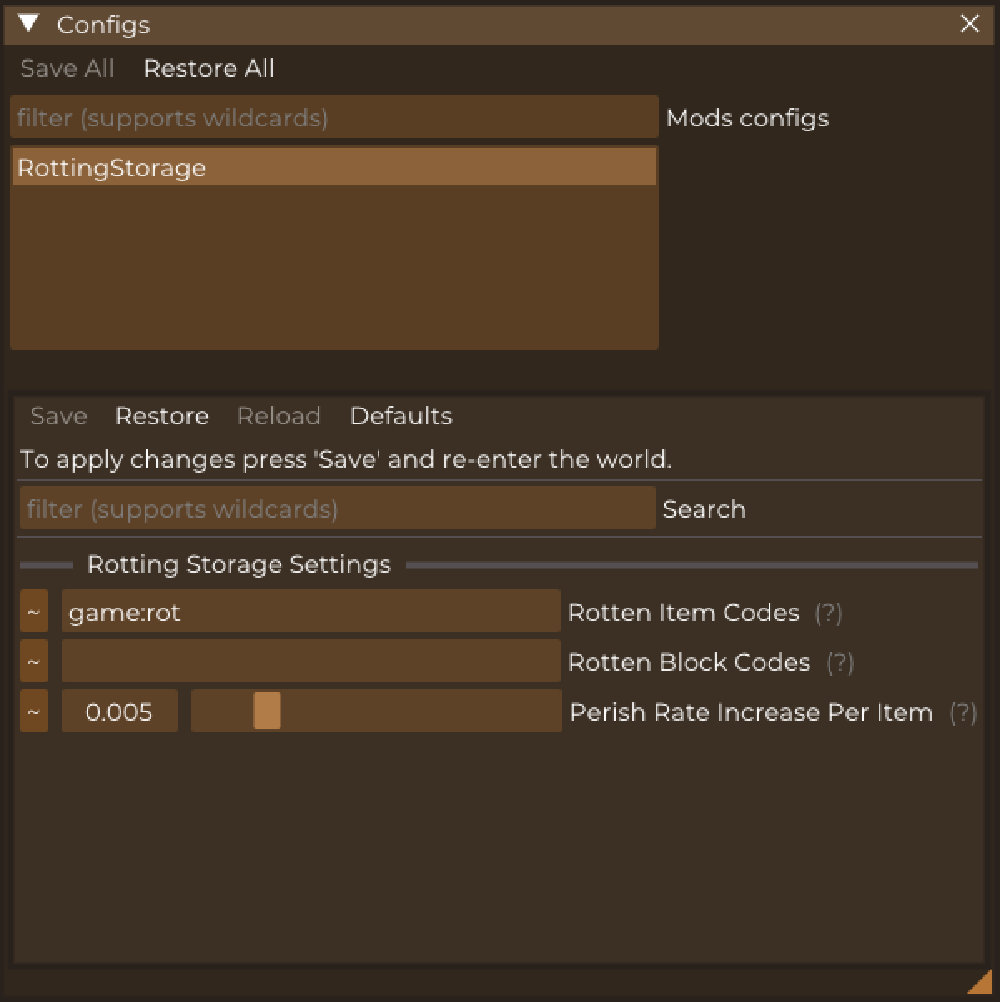
Spoilage rate is applied exponentially, but with a low base (default 1 + 0.005 per item). The increase per item can be defined in the config file in ModConfig/RottingStorage.json or via ConfigLib.
The mod is only required on the server, but will throw some warnings if not present on the client. This is because the game expects BlockEntityBehaviors to be registered on both.
Suggested mods

| Mod Version | Mod Identifier | For Game version | Downloads | Released | Changelog | Download | 1-click mod install* |
|---|---|---|---|---|---|---|---|
| 1.0.2 | rottingstorage | 248 | Sep 27th at 10:36 PM | rottingstorage_1.0.2.zip | 1-click install | ||
| |||||||
| 1.0.1 | rottingstorage | 164 | Sep 12th at 1:45 PM | rottingstorage_1.0.1.zip | 1-click install | ||
| |||||||
| 1.0.0 | rottingstorage | 105 | Sep 7th at 6:12 PM | rottingstorage_1.0.0.zip | 1-click install | ||
|
Initial release | |||||||
The_Revisionist jayu Can confirm the effect doesn't apply until world restart. For a server, I'm not sure if this means the mod is in a working state unless you restart the server often. Is this intended / something that can be fixed? Not sure what I'm messing up on our end.
Gearbound I don't see why it should tbh
Now this brings upon what "one bad apple" used to come from, lol
Would this mod conflict with, cold storage?
Ensorcelled It would be worthwhile if you specify which mod had the contradiction so that others may avoid the issue, as well as leaving open the possibility of a patch or workaround.
jayu I found what was going on. I put in just your mod, nothing else and all was fine.
So I started adding mods, since NONE said they handled perish timers. HOWEVER, I found out that people pack things in as a "surprise" without telling anyone. Doh!
I had another mod conflicting on perish timer code, it actually stopped it on the shrooms because of spelling, removed it and yours works perfectly now with my other mods!
Thank you for your time, the mod, and patience.
I was thinking about how a mod like this would make so much sense. Glad to see it made. :D
jayu Thanks for the fix!
Another thing I noticed:
Currently if I put down a storage container (tested with storage vessel) and put food and rot in it, it doesn't add the rotting effect until I restart the world. Is this expected behaviour?
jayu I was running v 1.21.1 server/client with v 1.0.1 of the mod, yes.
Ensorcelled are you using the latest version of this mod?
Threw it on server, seemed to be fine, until a player tried to move a stack of mushrooms to storage container, via shift click, client except crash, tested after back in the game with dragging, same result.
Server log has a lot of these:
I'm so excite for this mod. LOl
The_Revisionist I guess I am doing two wrong things at once, not checking if the itemstack is null in Smithing Plus (it shouldn't be, but with other mods around...) and giving in a null itemstack in IsReasonablyFresh (which for some reason doesn't guard against that, so I'll have to fix my LINQ query for rotten items in this mod.
Edit: nvm that's weird I do have a null check
Edit2: the slot was null not the stack. Fixed.
I found a weird bug.
If I put some redmeat in a storage vessel, then quit the world/game, then load it again, and right click the storage vessel to open it, the game crashes.
I can also replicate the crash by placing an empty storage vessel, quitting the world, loading it again, and trying to put it in the storage vessel.
The strange thing is, it only happens if I have both Rotting Storage and Smithing Plus installed. I don't know if it matters but I tested it in creative mode.
Running on 64 bit Windows 10.0.22631.0 with 32546 MB RAMGame Version: v1.21.1 (Stable)11/09/2025 18:16:32: Critical error occurred in the following mods: smithingplus@1.7.4, rottingstorage@1.0.0Loaded Mods: catchledge@0.5.6, chiseltoolslite@1.15.1, clickuptorches@1.1.1, firestarters@1.4.5, hangingoillamps@1.0.5, manualdough@1.1.6, prospecttogether@2.1.0, spyglass@0.5.2, stoneharvesting@1.1.1, temporalsymphony@2.2.1, game@1.21.1, vsimgui@1.1.12, egocaribautomapmarkers@4.0.3, betterfirepit@1.1.6, blacksmithenhancements@1.1.5, carryon@1.10.7, configlib@1.10.2, farseer@1.3.2, foodshelves@2.3.0, immersivetpscamera@1.0.7, lc@1.1.0, labeledtrunk@1.0.5, minimalcompass@1.1.4, nbcartographer@2.2.1, claywheel@1.1.3, purposefulstorage@1.4.1, rottingstorage@1.0.0, smithingplus@1.7.4, statushudcont@3.3.1, stickydirt@0.1.1, creative@1.21.1, survival@1.21.1, xinvtweaks@1.8.1Involved Harmony IDs: smithingplusSystem.NullReferenceException: Object reference not set to an instance of an object. at SmithingPlus.CastingTweaks.CastToolPenaltyPatch.Postfix_GetMaxDurability(Int32& __result, ItemStack itemstack) in /Users/jacopouggeri/workspace/VintageModding/SmithingPlus/SmithingPlus/CastingTweaks/CastToolPenaltyPatch.cs:line 59 at Vintagestory.API.Common.CollectibleObject.GetMaxDurability_Patch2(CollectibleObject this, ItemStack itemstack) at Vintagestory.API.Common.CollectibleObject.IsReasonablyFresh(IWorldAccessor world, ItemStack itemstack) in VintagestoryApi\Common\Collectible\Collectible.cs:line 2817 at RottingStorage.Behavior.BlockEntityBehaviorRottingStorage.IsRotting(IWorldAccessor world, ItemStack itemStack, ItemSlot slot) in /Users/jacopouggeri/workspace/VintageModding/RottingStorage/RottingStorage/Behavior/BlockEntityBehaviorRottingStorage.cs:line 82 at RottingStorage.Behavior.BlockEntityBehaviorRottingStorage.Inventory_OnAcquireTransitionSpeed(EnumTransitionType transType, ItemStack stack, Single baseMul) in /Users/jacopouggeri/workspace/VintageModding/RottingStorage/RottingStorage/Behavior/BlockEntityBehaviorRottingStorage.cs:line 48 at Vintagestory.API.Common.InventoryGeneric.GetTransitionSpeedMul(EnumTransitionType transType, ItemStack stack) in VintagestoryApi\Common\Inventory\InventoryGeneric.cs:line 182 at Vintagestory.API.Common.CollectibleObject.GetTransitionRateMul(IWorldAccessor world, ItemSlot inSlot, EnumTransitionType transType) in VintagestoryApi\Common\Collectible\Collectible.cs:line 2518 at Vintagestory.API.Common.CollectibleObject.UpdateAndGetTransitionStatesNative(IWorldAccessor world, ItemSlot inslot) in VintagestoryApi\Common\Collectible\Collectible.cs:line 2553 at Vintagestory.API.Common.CollectibleObject.UpdateAndGetTransitionState(IWorldAccessor world, ItemSlot inslot, EnumTransitionType type) in VintagestoryApi\Common\Collectible\Collectible.cs:line 2482 at Vintagestory.Client.NoObf.InventoryItemRenderer.GetItemStackRenderInfo(ClientMain game, ItemSlot inSlot, EnumItemRenderTarget target, Single dt) in VintagestoryLib\Client\Render\InventoryItemRenderer.cs:line 317 at Vintagestory.Client.NoObf.InventoryItemRenderer.RenderItemstackToGui(ItemSlot inSlot, Double posX, Double posY, Double posZ, Single size, Int32 color, Single dt, Boolean shading, Boolean origRotate, Boolean showStackSize) in VintagestoryLib\Client\Render\InventoryItemRenderer.cs:line 197 at Vintagestory.API.Client.GuiElementItemSlotGridBase.RenderInteractiveElements(Single deltaTime) in VintagestoryApi\Client\UI\Elements\Impl\Interactive\Inventory\GuiElementItemSlotGridBase.cs:line 428 at Vintagestory.API.Client.GuiComposer.Render(Single deltaTime) in VintagestoryApi\Client\UI\GuiComposer.cs:line 737 at Vintagestory.API.Client.GuiDialog.OnRenderGUI(Single deltaTime) in VintagestoryApi\Client\UI\Dialog\GuiDialog.cs:line 396 at Vintagestory.API.Client.GuiDialogBlockEntity.OnRenderGUI(Single deltaTime) in VintagestoryApi\Client\UI\Dialog\GuiDialogBlockEntity.cs:line 113 at Vintagestory.Client.NoObf.GuiManager.OnRenderFrameGUI(Single deltaTime) in VintagestoryLib\Client\Systems\Gui\GuiManager.cs:line 309 at Vintagestory.Client.NoObf.ClientMain.RenderToDefaultFramebuffer(Single dt) in VintagestoryLib\Client\ClientMain.cs:line 1017 at Vintagestory.Client.GuiScreenRunningGame.RenderToDefaultFramebuffer(Single dt) in VintagestoryLib\Client\MainMenu\Screens\GuiScreenRunningGame.cs:line 250 at Vintagestory.Client.ScreenManager.Render(Single dt) in VintagestoryLib\Client\ScreenManager.cs:line 760 at Vintagestory.Client.ScreenManager.OnNewFrame(Single dt) in VintagestoryLib\Client\ScreenManager.cs:line 663 at Vintagestory.Client.NoObf.ClientPlatformWindows.window_RenderFrame(FrameEventArgs e) in VintagestoryLib\Client\ClientPlatform\GameWindow.cs:line 113 at OpenTK.Windowing.Desktop.GameWindow.Run() at Vintagestory.Client.ClientProgram.Start(ClientProgramArgs args, String[] rawArgs) in VintagestoryLib\Client\ClientProgram.cs:line 338 at Vintagestory.Client.ClientProgram.<>c__DisplayClass10_0.<.ctor>b__1() in VintagestoryLib\Client\ClientProgram.cs:line 133 at Vintagestory.ClientNative.CrashReporter.Start(ThreadStart start) in VintagestoryLib\Client\ClientPlatform\ClientNative\CrashReporter.cs:line 95
Event Log entries for Vintagestory.exe, the latest 3=================================={ TimeGenerated = 11/09/2025 18:14:15, Site = , Source = Application Error, Message = Faulting application name: Vintagestory.exe, version: 1.21.1.0, time stamp: 0x67fe0000Faulting module name: openal32.dll, version: 1.23.0.0, time stamp: 0x63dd31adException code: 0x40000015Fault offset: 0x00000000000df046Faulting process id: 0x0xaf54Faulting application start time: 0x0x1dc233ebafbca26Faulting application path: D:\Games\Vintagestory\Vintagestory.exeFaulting module path: D:\Games\Vintagestory\Lib\openal32.dllReport Id: b99b2514-2740-4b94-806c-04cb09f9e48dFaulting package full name: Faulting package-relative application ID: }--------------{ TimeGenerated = 11/09/2025 18:06:57, Site = , Source = Application Error, Message = Faulting application name: Vintagestory.exe, version: 1.21.1.0, time stamp: 0x67fe0000Faulting module name: openal32.dll, version: 1.23.0.0, time stamp: 0x63dd31adException code: 0x40000015Fault offset: 0x00000000000df046Faulting process id: 0x0x928cFaulting application start time: 0x0x1dc233e54e27afbFaulting application path: D:\Games\Vintagestory\Vintagestory.exeFaulting module path: D:\Games\Vintagestory\Lib\openal32.dllReport Id: d729083a-e3f4-43f7-93ac-355d8a7c7efdFaulting package full name: Faulting package-relative application ID: }--------------{ TimeGenerated = 11/09/2025 18:05:38, Site = , Source = Application Error, Message = Faulting application name: VintageStory.exe, version: 1.21.1.0, time stamp: 0x67fe0000Faulting module name: openal32.dll, version: 1.23.0.0, time stamp: 0x63dd31adException code: 0x40000015Fault offset: 0x00000000000df046Faulting process id: 0x0xc254Faulting application start time: 0x0x1dc23377488ddfaFaulting application path: D:\Games\Vintagestory\VintageStory.exeFaulting module path: D:\Games\Vintagestory\Lib\openal32.dllReport Id: aeffc8f6-2cda-44db-abb2-b7971bee19ccFaulting package full name: Faulting package-relative application ID: }