
Mods / Map Waypoint Colours
Author: egocarib
Side: Client
Created: Aug 27th 2024 at 12:27 AM
Last modified: Aug 1st at 2:01 AM
Downloads: 1329
Follow Unfollow 54
Latest release (for Vintage Story 1.19.0 - 1.19.8 and 1.20.0 - 1.20.12, outdated):
waypointcolours (1.19).zip
1-click install
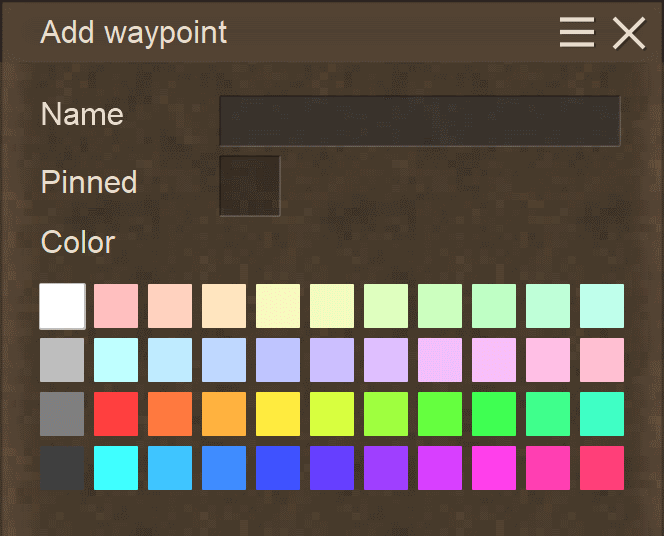
This is a continuation of Rangelost's mod, Waypoint Colours. Nothing about the mod has been changed. It has simply been recompiled to work on the latest versions of Vintage Story.
In short, this mod:
- Adds a new default palette of map icon colors for creating waypoints.
- Allows you to customize the color palette with a waypointcolours.json config file, if desired.
This is a simple mod with the objective of further increasing waypoint icon visibility on the world map.
Upon running the mod, a waypointcolours.json config file will be created in the game's ModConfig directory if it doesn't already exist. The hex colour codes within can be modified, added to or removed to customize available colours in the waypoint menu.
In the ZIP archive, a defaultcolours.json file is included, but not used. It is only there to provide the game's default list of colours for convenience.
As a side-effect, using custom colours may disable some of the game's hard-coded waypoint names (e.g. "Copper").
Note: This mod will not automatically modify the colour of existing waypoints.
| Mod Version | Mod Identifier | For Game version | Downloads | Released | Changelog | Download | 1-click mod install* |
|---|---|---|---|---|---|---|---|
| 1.1.2 | mapwaypointcolors | 1324 | Aug 27th 2024 at 2:23 AM | waypointcolours (1.19).zip | 1-click install | ||
|
An updated version of Waypoint Colours by Rangelost, recompiled to work on the latest Vintage Story versions. Confirmed to be compatible with 1.19.* and 1.20.* | |||||||
working on 1.21.1? :)
And this is my color palette:
"colours": [
"ffffff", "bcbcbc", "5b5b5b", "000000",
"ffa19a","ff1100", "a90c00", "600700",
"ffbf85","ff7900", "b85700", "723600",
"fffb8d","fff500", "c1ba00", "817c00",
"d5ff8b","a4ff00", "72b100", "497200",
"afff8f","4aff00", "35b600", "1f6b00",
"a6ffe3","00ffae", "00b47b", "00724d",
"a3fcff","00f6ff", "00bfc6", "008085",
"9ee2ff","00b2fe", "0088c1", "005b81",
"9ab9ff","004eff", "003cc4", "002883",
"c99dff","7200ff", "5700c3", "3c0086",
"ca9eff","d800ff", "9f00bc", "610073",
"ffb1ec","ff00c2", "c00092", "7b005e",
"c47e79", "b48860", "b0ad62", "8ea95e", "77ac62", "6ca191", "659ea0", "6790a1", "60739d", "66779e", "8269a1", "916887"
]
}
I tried to make sure each color had its own shades and brightnesses, but also to keep them from being too numerous to fit within the UI. (Especially if you have mods for additional icons installed.)
Total 64 colors.
❤️🧡💛Works on 1.21-rc.7💚💙💜
Here's my 88 color one:
{
"colours": [
"FF0000", "D81E3F", "A41228", "701017", "800000", "B22222", "8B0000", "FF5E78", "FF92A5", "FFC0CB", "FF4500",
"FFA07A", "BF360C", "802000", "402000", "FF8C00", "FFA500", "BF7000", "804000", "FFB23F", "FFFF00", "FFD700",
"E1FF5A", "C5E61E", "A5D900", "7FBE00", "5A9600", "417000", "32CD32", "00FF00", "008000", "004D00", "228B22",
"00FF7F", "00FA9A", "00C080", "008B45", "40E0D0", "00FFFF", "00BFFF", "0080BF", "005080", "003040", "001820",
"87CEEB", "5F9EA0", "4682B4", "4169E1", "1E90FF", "0000FF", "0000BF", "000080", "191970", "9370DB", "8A2BE2",
"6A5ACD", "4B0082", "2E1A47", "8B008B", "6A0D6A", "C71585", "DA70D6", "EE82EE", "FF77FF", "FF3FEB", "FF1493",
"D83FFF", "DB7093", "E6E6FA", "FFFFFF", "F5F5F5", "E0E0E0", "BFBFBF", "808080", "404040", "1A1A1A", "000000"
]
}
I've developed this alternative JSON file for my personal which is organized in a color chart, uses all 11 spaces on each line (44 colors total), with colors that show well on the new beige maps and the oldmap, and the file has breaks every 11 colors to make it easier to edit.
Some of you may find it useful.
{
"colours": [
"FF3F3F",
"FF6F6F",
"FF3FBF",
"FFBFBF",
"FF8811",
"D4AF37",
"FFDB3F",
"9ACD32",
"119911",
"005500",
"446644",
"D83FFF",
"993399",
"661166",
"DFBFFF",
"8B4513",
"AB6533",
"A67B5B",
"FFF8BF",
"D8FF1F",
"3F8C6C",
"7F9F7F",
"0000CD",
"5555DD",
"89CFF0",
"00FFFF",
"3FC5CC",
"BFFFC5",
"BFBFBF",
"F5F5DC",
"7F7F9F",
"9F7F7F",
"7D7D7D",
"FFFFFF",
"CFCFCF",
"6F6F6F",
"2F2F2F",
"111122",
"D83FFF",
"FF1111",
"FF793F",
"FFEB3F",
"11FF11",
"1111DD"
]
}
Yes, I tested and confirmed the existing file still works fine in 1.20 release (despite having 1.19 in the title).
Works in 1.20.0-rc.5 in case anyone is curious.