
Mods / Fix English Font (Windows only)
Author: Spoonail
Side: Client
Created: Feb 16th at 7:02 AM
Last modified: Oct 17th at 2:23 PM
Downloads: 420
Follow Unfollow 26
Recommended download (for Vintage Story 1.19.8, 1.20.3, 1.20.4, 1.20.12, 1.21.0-rc.4 - 1.21.0-rc.5, 1.21.1 and 1.21.5):
fixenfontmod_0.1.0.zip
1-click install
Overview
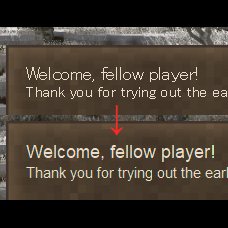
VS uses the system default font when language is set to English, but the font might not be ideal for displaying English text.
This mod fix that by forcing VS to use 'Arial', which is the font used when VS runs on Windows with the en-US system locale.
After installing this mod, you need to enter a world for the changes to take effect.
(Like all VS mods, this mod cannot affect anything before it's loaded during world loading)
This mod runs on client side, so it's available in MP without server installation.
(Some servers might not allow client side mods.)
Uninstall
This mod modifies defaultFontName entry in clientsettings.json, so simply uninstall this mod will not revert the font change.
To revert it, do one of the following:
- Run .fix-en-font revert command in the game before uninstalling
- Open VintageStoryData/clientsettings.json, find defaultFontName entry, and set "sans-serif"
Other Solutions
This mod is intended as a simple, one-stop solution for the issue described in the Overview section.
If you want more custamization or prefer a different font, use FontSettings by MystiVaid or directly specify a font name in this entry of clientsettings.json:
"defaultFontName": "sans-serif", // Replace sans-serif with your favorite font name
Help/Contact
If you encounter any problems or have feature requests, please do one of the following:
- Create an issue on the GitHub (click Issue Tracker tab on this page)
- Post in the forum thread for this mod on the Vintage Story Discord server (click Homepage tab on this page)
- The thread is one for my another mod, but post there anyway (This mod is very tiny, so I decided to share the thread)
These methods align with how I handle reports for other mods (even for other games), making it easier for me to track and respond.
Note: Comments on this page are rarely checked.
| Mod Version | Mod Identifier | For Game version | Downloads | Released | Changelog | Download | 1-click mod install* |
|---|---|---|---|---|---|---|---|
| 0.1.0 | fixenfontmod | 420 | Feb 16th at 7:03 AM | fixenfontmod_0.1.0.zip | 1-click install | ||
|
First release | |||||||
For Linux users, you can fix the font simply by opening the client by running the provided run.sh script in the installation directory instead of running the binary directly. The script's entire purpose is to setup some font configuration stuff ;)
Weloome, fellow player!