
Mods / Alarm Timer
Author: Spoonail
Side: Client
Created: Jan 8th at 11:37 AM
Last modified: Oct 17th at 2:21 PM
Downloads: 535
Follow Unfollow 30
Recommended download (for Vintage Story 1.19.8, 1.20.1, 1.20.3, 1.20.4, 1.20.12, 1.21.0-rc.4 - 1.21.0-rc.5, 1.21.1 and 1.21.5):
alarmtimermod_0.1.2.zip
1-click install
Overview
This mod adds a simple alarm timer command .tm, which notifies you with an alarm sound and custom message after the specified duration.
No more charred pies or crucibles getting cold!
Also, this mod runs on client side, so it's available in MP without server installation :)
(Some servers might not allow client side mods.)
Usage
Basic
Enter a world, and type:
.tm start 3 Hello, World!
After 3 seconds, an alarm will ring and you'll see the message in the chat window:
![[Alarm] Hello, World!](https://i.imgur.com/Z1y6g9H.png)
Adjust alarm volume if needed:
.tm volume 0.5
Most commands have very short aliases.
For example,
.tm start 3 Hello, World!
is the same as:
.tm s 3 Hello, World!
To check all commands and aliases, type .chb to open the command handbook and see the page for .tm.
Presets
You can save and reuse timer settings with presets.
To create a preset:
.tm preset add pie 50 Check your oven!
(With aliases: .tm p a pie 50 Check your oven!)
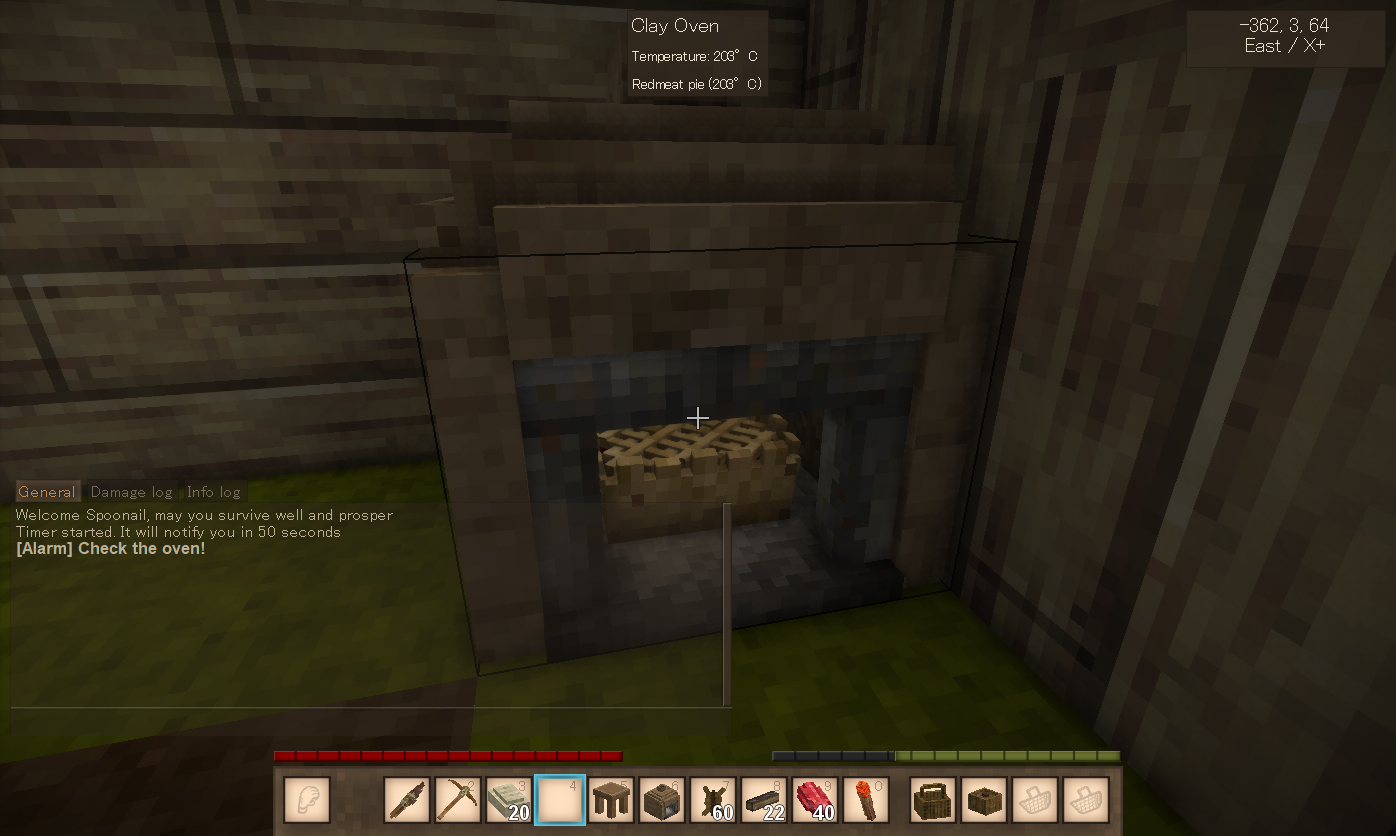
This means "Add a preset named 'pie', which has duration of 50 seconds and message 'Check your oven!'".
To start a timer with the preset values:
.tm start-preset pie
(With aliases: .tm sp pie)
After 50 seconds, you'lll see:

To list all presets:
.tm preset list
(With aliases: .tm p l)

If you feel 60 seconds are appropriate for perfect pies instead of 50, change the duration of the preset by:
.tm preset update-duration pie 60
(With aliases: .tm p ud pie 60)
To delete the preset:
.tm preset delete pie
(With aliases: .tm p d pie)
Other Features
To cancel the most recently started timer:
.tm undo
Configuration
Path: VintagestoryData/ModConfig/alarmtimermod.json
rootCommandName
Root command name (default: "tm").
With this, you can avoid .tm conflicting with other mod's command, or set it to t to save typing (for 'm').
masterVolume
Alarm volume.
Also can be set through .tm volume <value>
Help/Contact
If you encounter any problems or have feature requests, please do one of the following:
- Create an issue on the GitHub (click Issue Tracker tab on this page)
- Post in the forum thread for this mod on the Vintage Story Discord server (click Homepage tab on this page)
These methods align with how I handle reports for other mods (even for other games), making it easier for me to track and respond.
Note: Comments on this page are rarely checked.
Notes
- Timers will be cleared when you leave the world (while presets remain saved)
- That's because this mod is designed to be short-duration timer up to a few minutes, though technically there's no explicit duration limit
- You might like Alarm Clock by DruidNight for longer timer
| Mod Version | For Game version | Downloads | Released | Changelog | Download | 1-click mod install* |
|---|---|---|---|---|---|---|
| 0.1.2 | 535 | Jan 8th at 12:01 PM | alarmtimermod_0.1.2.zip | 1-click install | ||
|
First release | ||||||
Commands are good and all, but a game like this totally needs an object for this task and ways to interact with it.
I wonder if anyone though about making a placeable sandclock item into the game. Or maybe something mechanical and lore-friendly with sound signal (a clock with a bell?).
Currently only seconds are supported as the time unit.
I've tested this mod on 1.20.12 and it worked fine.
Please try testing it again with .tm start 3 Hello, World!, which is the simplest case.
If it still doesn't work, please post the log (VintageStoryData/Logs/client-main.log) to the thread for this mod on VS Discord Server or the issue tracker.
GhostPLKR
hello,
how to set time to minutes or hours? (changing to seconds doesn't work, doesn't trigger alarm)
didn't think I'd need smthn like this but actually seems really cool lol
I was just talking about how I need time/alarm mod. Thanks!